

Page 1
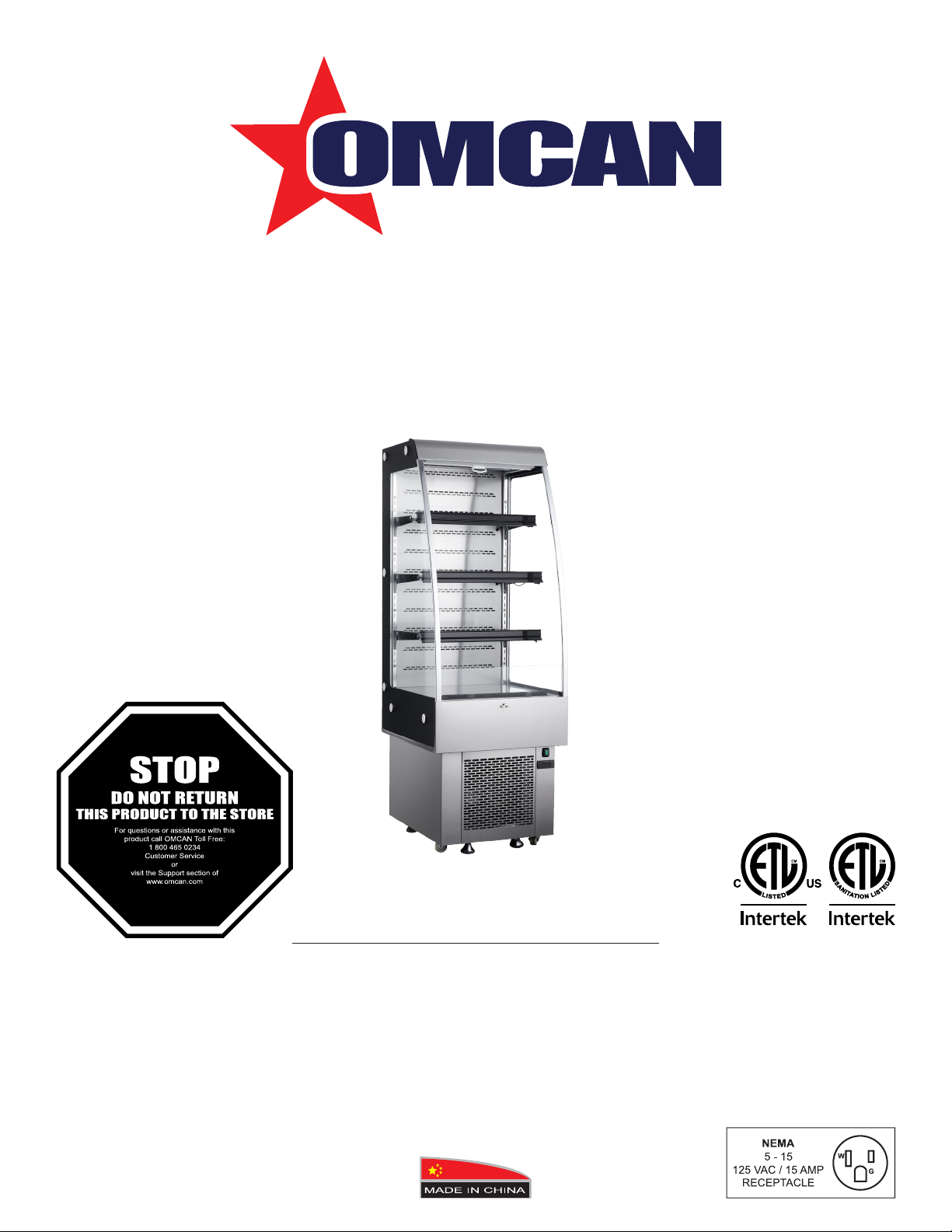
Open Refrigerated Display Case
Model RS-CN-0250
Item 25825
Instruction Manual
Revised - 08/25/2022
Toll Free: 1-800-465-0234
Fax: 905-607-0234
Email: [email protected]
www.omcan.com
Page 2

Table of Contents
Model RS-CN-0250
Section
Disclaimer
General Information
Safety and Warranty
Technical Specications
Handling and Assembly
Operation
-------------------------------------------------------------------------------------------- 3
--------------------------------------------------------------------------- 4 - 5
--------------------------------------------------------------------------- 5 - 6
----------------------------------------------------------------------------------------- 8 - 9
Page
-------------------------------------------------------------------------- 7
---------------------------------------------------------------------- 7 - 8
Maintenance
Troubleshooting
Controller Instructions
Parts Breakdown
Electrical Schematics
Warranty Registration
----------------------------------------------------------------------------------------- 9
------------------------------------------------------------------------------- 9 - 10
---------------------------------------------------------------------------- 15 - 17
--------------------------------------------------------------------- 11 - 14
---------------------------------------------------------------------------- 18
---------------------------------------------------------------------------- 19
2
Page 3

Disclaimer
OMCAN IS NOT RESPONSIBLE FOR
DIMINISHED COOLING OR ANY DAMAGES
DUE TO WATER LEAKS. WARRANTY FOR
WATER LEAKS IS VOID IF THE AMBIENT
ROOM TEMPERATURE EXCEEDS 75°F
AND 55% RELATIVE HUMIDITY, AND THE
APPLIANCE DRAIN IS NOT CONNECTED
DIRECTLY TO A FLOOR DRAIN.
3
Page 4

General Information
Omcan Manufacturing and Distributing Company Inc., Food Machinery of America, Inc. dba Omcan
and Omcan Inc. are not responsible for any harm or injury caused due to any person’s improper or
negligent use of this equipment. The product shall only be operated by someone over the age of 18, of
sound mind, and not under the inuence of any drugs or alcohol, who has been trained in the correct
operation of this machine, and is wearing authorized, proper safety clothing. Any modication to the
machine voids any warranty, and may cause harm to individuals using the machine or in the vicinity of
the machine while in operation.
CHECK PACKAGE UPON ARRIVAL
Upon receipt of an Omcan shipment please inspect for external damage. If no damage is evident on the
external packaging, open carton to ensure all ordered items are within the box, and there is no concealed
damage to the machine. If the package has suffered rough handling, bumps or damage (visible or concealed),
please note it on the bill of lading before accepting the delivery and contact Omcan within 24 hours, so we may
initiate a claim with the carrier. A detailed report on the extent of the damage caused to the machine must be
lled out within three days, from the delivery date shown in the shipping documents. Omcan has no recourse
for damaged products that were shipped collect or third party.
Before operating any equipment, always read and familiarize yourself with all operation and safety
instructions.
Omcan would like to thank you for purchasing this machine. It’s of the utmost importance to save
these instructions for future reference. Also save the original box and packaging for shipping the
equipment if servicing or returning of the machine is required.
---------------------------------------------------------------------------------------------------------------------------------------------------
Omcan Fabrication et distribution Companie Limité et Food Machinery d’Amerique, dba Omcan et
Omcan Inc. ne sont pas responsables de tout dommage ou blessure causé du fait que toute personne
ait utilisé cet équipement de façon irrégulière. Le produit ne doit être exploité que par quelqu’un de
plus de 18 ans, saine d’esprit, et pas sous l’inuence d’une drogue ou d’acohol, qui a été formé pour
utiliser cette machine correctement, et est vêtu de vêtements de sécurité approprié. Toute modication
de la machine annule toute garantie, et peut causer un préjudice à des personnes utilisant la machine
ou des personnes à proximité de la machine pendant son fonctionnement.
VÉRIFIEZ LE COLIS DÈS RÉCEPTION
Dès réception d’une expédition d’Omcan veuillez inspecter pour dommages externes. Si aucun dommage
n’est visible sur l’emballage externe, ouvrez le carton an de s’assurer que tous les éléments commandés
sont dans la boîte, et il n’y a aucun dommage dissimulé à la machine. Si le colis n’a subi aucune mauvaises
manipulations, de bosses ou de dommages (visible ou cachée), notez-le sur le bond de livraison avant
d’accepter la livraison et contactez Omcan dans les 24 heures qui suivent, pour que nous puissions engager
une réclamation auprès du transporteur. Un rapport détaillé sur l’étendue des dommages causés à la machine
doit être rempli dans un délai de trois jours, à compter de la date de livraison indiquée dans les documents
d’expédition. Omcan n’a aucun droit de recours pour les produits endommagés qui ont été expédiées ou cueilli
par un tiers transporteur.
4
Page 5

General Information
Avant d’utiliser n’importe quel équipement, toujours lire et vous familiariser avec toutes les opérations
et les consignes de sécurité.
Omcan voudrais vous remercier d’avoir choisi cette machine. Il est primordial de conserver ces
instructions pour une référence ultérieure. Également conservez la boîte originale et l’emballage pour
l’expédition de l’équipement si l’entretien ou le retour de la machine est nécessaire.
---------------------------------------------------------------------------------------------------------------------------------------------------
Omcan Empresa De Fabricacion Y Distribucion Inc. Y Maquinaria De Alimentos De America, Inc. dba
Omcan y Omcan Inc. no son responsables de ningun daño o perjuicío causado por cualquier persona
inadecuada o el uso descuidado de este equipo. El producto solo podra ser operado por una persona
mayor de 18 años, en su sano juicio y no bajo alguna inuencia de droga o alcohol, y que este ha sido
entrenado en el correcto funcionamiento de esta máquina, y ésta usando ropa apropiada y autorizada.
Cualquier modicación a la máquina anúla la garantía y puede causar daños a las personas usando la
máquina mientras esta en el funcionamiento.
REVISE EL PAQUETE A SU LLEGADA
Tras la recepcion de un envio Omcan favor inspeccionar daños externos. Si no hay daños evidentes en el
empaque exterior, Habra el carton para asegurararse que todos los articulos solicitados ésten dentro de la
caja y no encuentre daños ocultos en la máquina. Si el paquete ha sufrido un manejo de poco cuidado, golpes
o daños (visible o oculto) por favor anote en la factura antes de aceptar la entrega y contacte Omcan dentro
de las 24 horas, de modo que podamos iniciar una reclamación con la compañia. Un informe detallado sobre
los daños causados a la máquina debe ser llenado en el plazo de tres días, desde la fecha de entrega que se
muestra en los documentos de envío. Omcan no tiene ningun recurso por productos dañados que se enviaron
a recoger por terceros.
Antes de utilizar cualquier equipo, siempre lea y familiarizarse con todas las instrucciones de
funcionamiento y seguridad.
Omcan le gustaría darle las gracias por la compra de esta máquina. Es de la mayor importancia para
salvar estas instrucciones para futuras consultas. Además, guarda la caja original y el embalaje para el
envío del equipo si servicio técnico o devolución de la máquina que se requiere.
Safety and Warranty
Cautions:
• Never block the air suction outlet to keep air circulation and refrigeration capability.
• Do not overll the unit or it may hinder its operation.
• Adjust the rack height for proper food storage.
5
Page 6

Safety and Warranty
Use and Caution:
• Cool hot food before placing it in the refrigerator.
• Only trained technicians should repair damaged power cables with special tools.
• Never touch the compressor to avoid injury.
• This appliance is not intended for use by persons (including children) with reduced physical, sensory or
mental capabilities or lack of experience and knowledge, unless they have been given supervision or
instruction concerning use of the appliance by a person responsible for their safety.
• Children should be supervised to ensure that they do not play with or around the appliance.
• The operation manual is not suitable for persons (including children) with reduced physical, sensory or
mental capabilities, or lack of experience and knowledge.
SUITABLE FOR HIGH TRAFFIC AREAS WHERE NOISE LEVELS ARE NOT A CONCERN.
OMCAN IS NOT RESPONSIBLE FOR DIMINISHED COOLING OR ANY DAMAGES DUE TO WATER
LEAKS. WARRANTY FOR WATER LEAKS IS VOID IF THE AMBIENT ROOM TEMPERATURE EXCEEDS
75°F AND 55% RELATIVE HUMIDITY, AND THE APPLIANCE DRAIN IS NOT CONNECTED DIRECTLY TO
THE FLOOR DRAIN.
RESIDENTIAL USERS: Vendor assumes no liability for parts or labor coverage for component failure
or other damages resulting from installation in non-commercial or residential applications. The right
is reserved to deny shipment for residential usage; if this occurs, you will be notied as soon as
possible.
1 YEAR PARTS AND LABOUR WARRANTY
Within the warranty period, contact Omcan Inc. at 1-800-465-0234 to schedule an Omcan authorized
service technician to repair the equipment locally.
Unauthorized maintenance will void the warranty. Warranty covers electrical and part failures, not
improper use.
Please see https://omcan.com/disclaimer for complete info.
WARNING:
The packaging components (cardboard, polyethylene, and others) are classied as normal solid urban waste
and can therefore be disposed of without difculty.
In any case, for suitable recycling, we suggest disposing of the products separately (differentiated
waste) according to the current norms.
DO NOT DISCARD ANY PACKAGING MATERIALS IN THE ENVIRONMENT!
6
Page 7
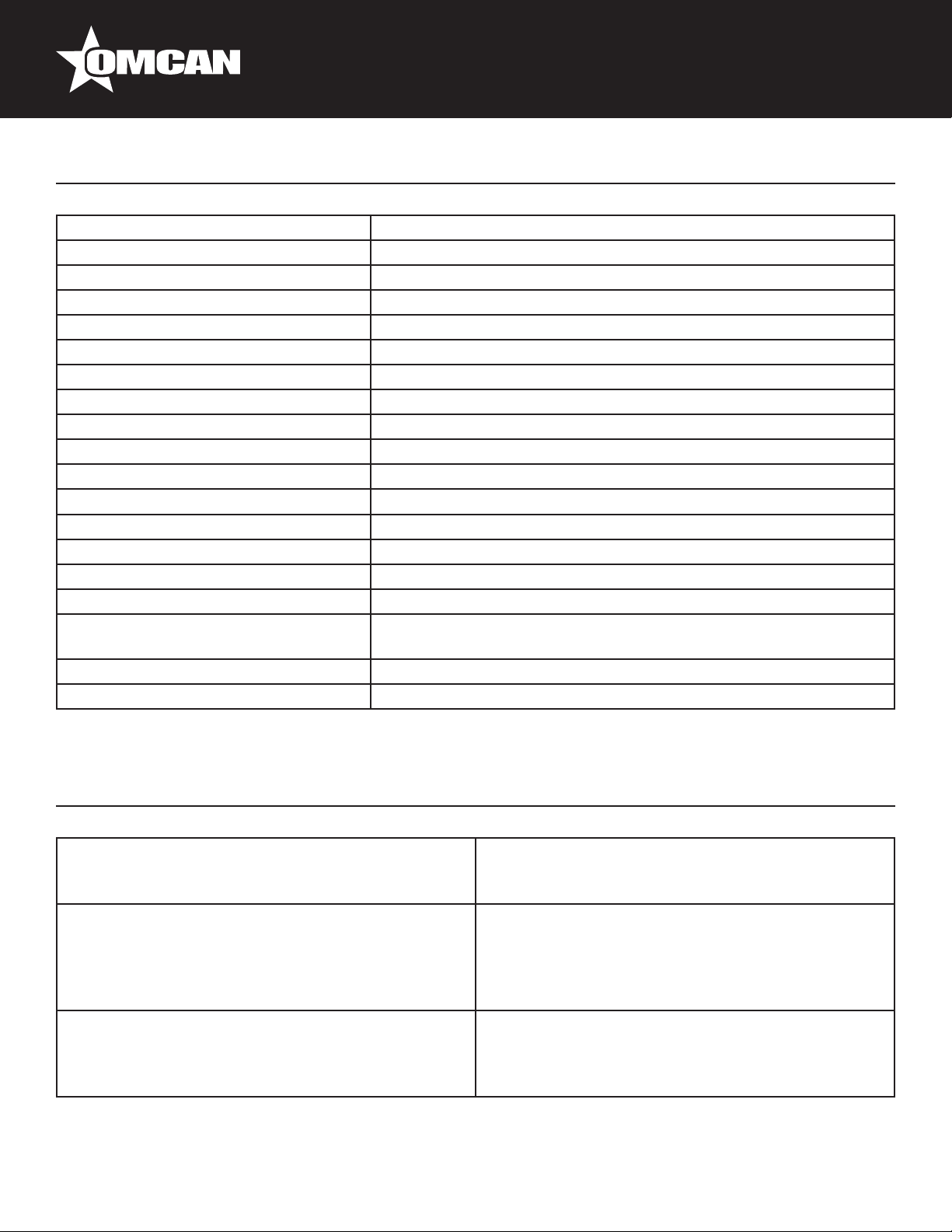
Technical Specications
Model RS-CN-0250
Power 0.138 kW
Electrical Heating Element 0.45 kW
Capacity 252 L / 8.9 cu.ft.
Electrical 110V / 60Hz / 1
Lamp Power 1.44 W x 4 (LED)
Temperature Range 2 - 10°C / 36 - 50 °F
Max Ambient Temp Rating 24°C / 75°F
Refrigerant and Injection R290 (148g)
Blowing Gas Cyclopentane
Type of Climate 6
Rated Current 14.5A
Weight 220.5 lbs. / 100 kgs.
Packaging Weight 242.5 lbs. / 110 kgs.
Dimensions 24” x 29.7” x 67.8” / 610 x 754 x 1704mm
Inner Dimensions 21.8” x 22” x 38.5” / 552 x 559 x 978mm
Shelf Dimensions
Packaging Dimensions 27.2” x 29.7” x 73.8” / 691 x 830 x 1875mm
Item Number 25825
15” x 21.8” / 381 x 552mm (2pc.)
12” x 21.8” / 305 x 552mm (1pc.)
Handling and Assembly
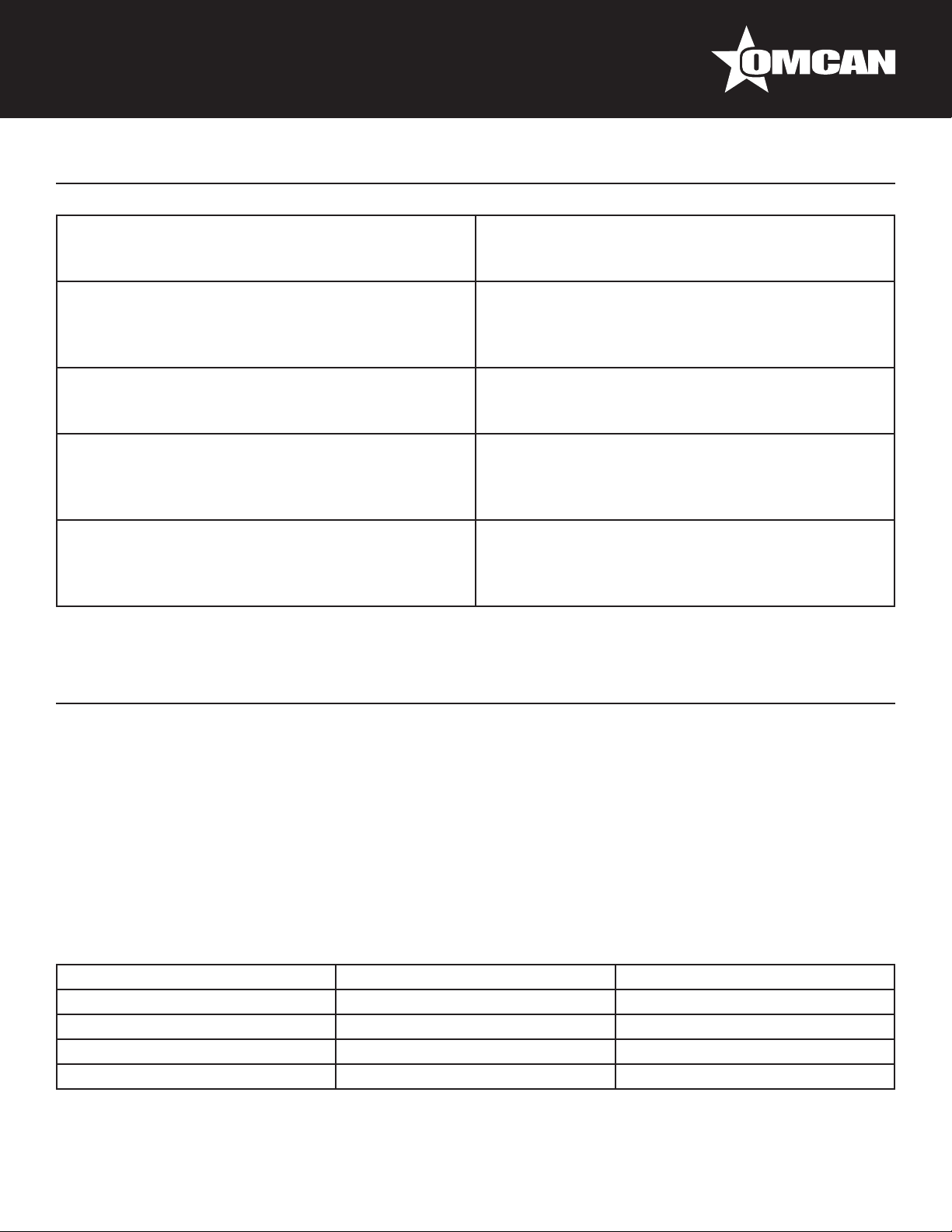
Handle with care
Unplug the wall socket rst. Never tilt it over 45
degrees when handling.
Sufcient space
The distance from both sides and back of refrigerator
to wall or other substance must be no less than 10
cm. The refrigeration capability may decrease if its
surrounding space is too small to circulate air.
Far from heat source
Never place the refrigerator direction under sunlight.
Never locate it near any heat source to prevent
reducing refrigeration capability.
Dry place
Always locate the refrigerator in a dry location.
Well ventilated
Always locate the refrigerator in an area with good
ventilation. When using for the rst time, wait for 24
hours after handling to start.
No heavy load
Never put any heavy objects on top of the
refrigerator.
7
Page 8
Handling and Assembly
Do not make holes
Never make any holes on the refrigerator. Do not
attach any objects onto the refrigerator.
Exclusive power socket
Normally, the power supply should be 100 – 110V, 60
Hz single phase AC with exclusive single phase two
pin receptacle.
Protect cables
Never break or damage the cables as this may cause
electrical shock.
Avoid ammable and explosive objects
Never put any ammable or explosive items inside
the refrigerator such as gasoline or alcohol. Never put
any dangerous product nearby the refrigerator.
After power break
After power break or unplugging the refrigerator,
always wait at least 5 minutes before starting the
refrigerator again.
Stable Location
Unpack and place the refrigerator on at and stable
ground.
Do not share the socket
Never let the refrigerator share a socket with another
appliance. The cable may become hot and this may
cause a re.
No water ushing
Never give the refrigerator surface a ush otherwise
electrical shock may occur.
No spray
Do not spray the unit with a ammable substance
such as paint. This may result in a re.
No medicine
No medicine is allowed to be kept inside the
refrigerator.
Operation
Before use:
Plug the refrigerator into 110V exclusive socket. Unit must have independent breaker. After the refrigerator is
running, test the air suction to conrm that it is sufciently cold. Then you may put food and drinks inside, once
unit reaches temperature.
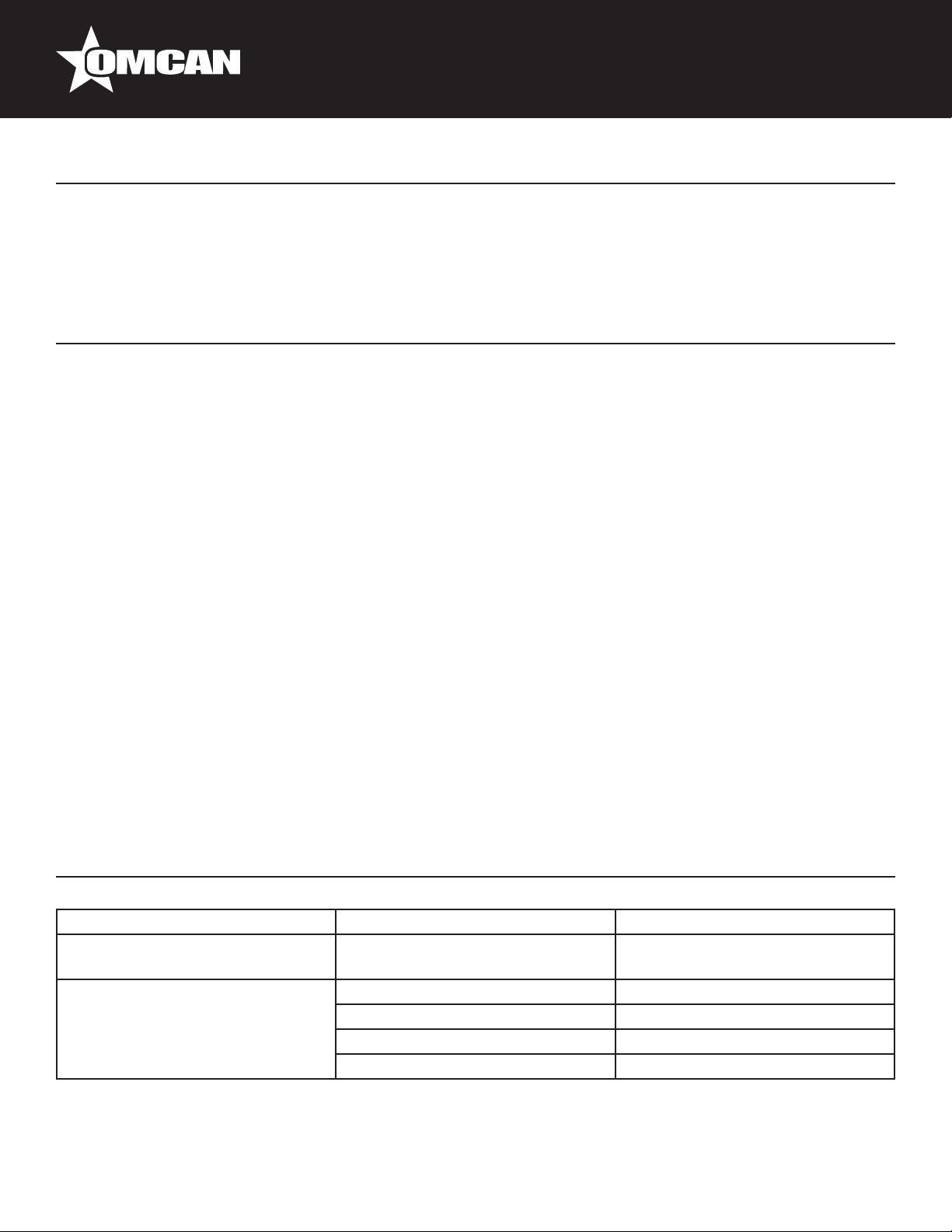
Parameter Settings
Factory initial Setting: E1=-1, E2=8, E3=6, E4=3, E5=2, E6=0, F1=25, F2=3, F3=15, F4=0, C1=0.
Please adjust E5 setting as below according to different ambient temperature range:
Ambient Temp(°C) E5 setting Other Setting
25 - 27 -01 NO change
22 - 24 0 NO change
19 - 21 1 NO change
15 - 18 2 NO change
Remark: The ambient temperature for this unit is better under 27 degree. If the ambient temperature is over 27
8
Page 9
Operation
degree,the units can work,but the efciency of unit decline and the compressor is difcult to stop. The setting
for over 27 degrees is same as the range of 25-27 degree.
Maintenance
1. Cabinet cleaning: The product should be cleaned once a week with the power supply disconnected. When
cleaning, use mild rinsing water and non-corrosive detergent. Do not wash it directly under the faucet.
2. De-dust the condenser to clean. The condenser should be cleaned every three months with power supply
disconnected. To clean the condenser, remove the dust on the bottom panel for air suction and remove the
dust on the cooling fan of the condenser with wire brush or high pressure air gun.
3. Check for any leaks as well as oil stains. This will indicate that there is repair needed, to be performed by
trained personnel.
4. Frequently observe the operation of the product. In case of abnormal noise, smell or smog, cut the power
supply immediately and call for a trained technician. Do not restart the product before the problem is xed.
5. Omcan Inc. will not be responsible for any accidents that occur because of failure to follow the regular
maintenance.
SERVICE
• To maintain good refrigeration performance, a refrigeration service person should be called periodically
(at least twice a year) to clean the discharge honeycomb and remove any accumulated dirt from the
condenser coil and condensate evaporator pan on self-contained models. POOR CIRCULATION OF AIR
THROUGH THE CONDENSER COIL WILL RESULT IN POOR REFRIGERATION PERFORMANCE.
• Dirt accumulation inside the condensate evaporator pan will reduce the pan’s capacity and affect the
efciency of the heater causing a burned out heater and an overow of defrost water onto the store oor.
Troubleshooting
Troubles Causes Solutions
Strange noise under the bottom
shelf.
No refrigeration in spite of normal
operation.
Fan blade is broken. Power off and x the blade.
Unit off. Power on.
Defrost process. Stop defrost cycle.
Refrigerant leaking. Patch the leak and rell refrigerant.
Unit failure. Call for professionals.
9
Page 10
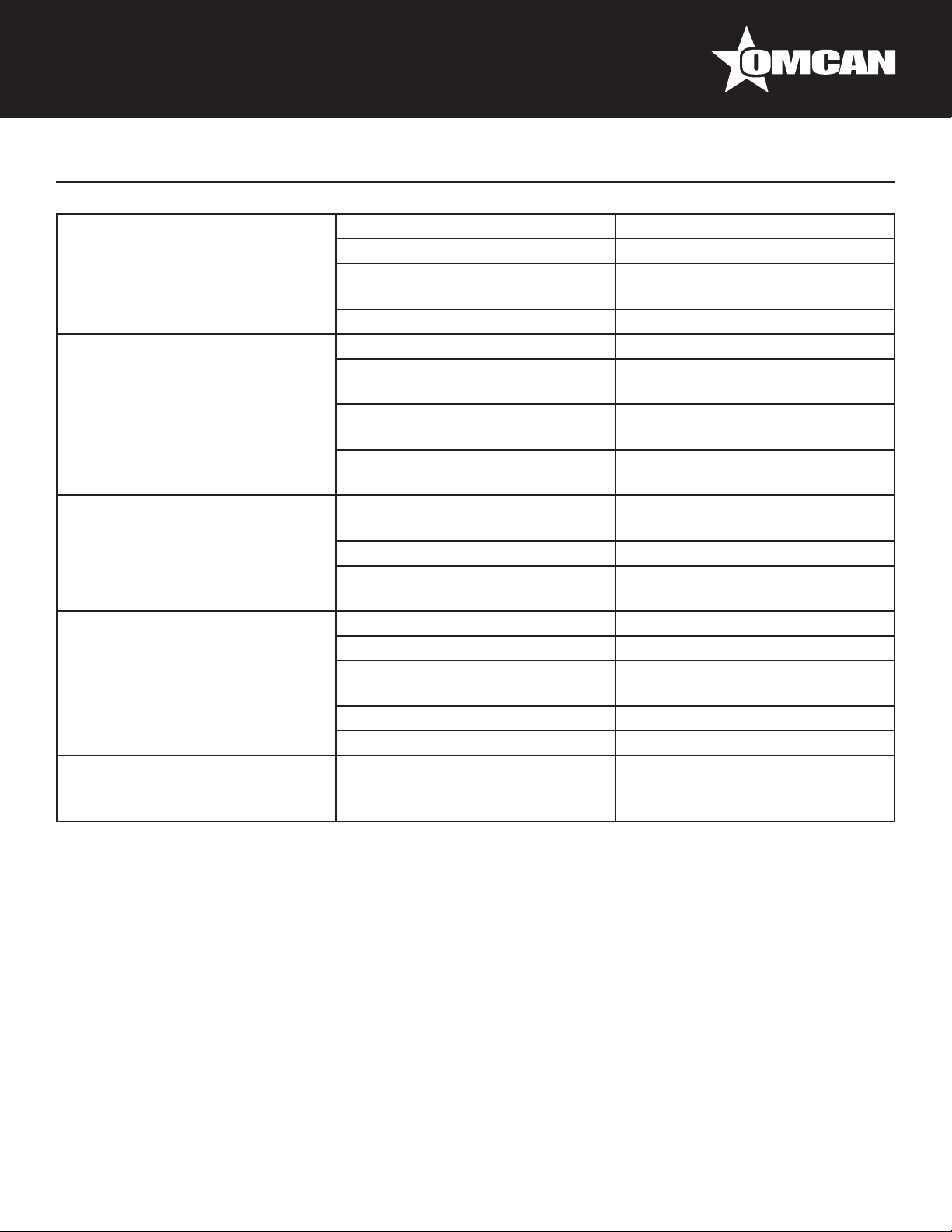
Troubleshooting
Weak air from curtain, and higher
cabinet temperature.
Normal air curtain, but higher
cabinet temperature.
Evaporator Pan overowing. Heating pipe for evaporator pan is
Normal air curtain but periodical
uctuation of cabinet temperature.
Water leaks on oor. Ambient room temperature
Evaporator blocked by frost. Increase defrost frequency.
Inside fan damaged. Replace the fan.
Too low set point of temperature
controller.
Vent blocked by storage. Remove the storage.
Insufcient refrigerant. Rell the refrigerant.
Too high set point of temperature
controllers.
The wind curtain is disturbed by
strong air ow.
Ambient temperature or humidity
beyond standards.
damaged.
Water-level controller failure. Replace the water-level controller.
Ambient temperature or humidity
beyond standards.
Condenser contaminated. Clean the condenser.
Poor venting of the unit. Improve the venting conditions.
Heat protection of compressor
failure.
Capillary is blocked by ice. Replace the drying lter.
Temperature controller failure. Replace the temperature controller.
exceeds 75°F and 55% relative
humidity.
Adjust the set point.
Adjust the set point of the
temperature controller.
Removing the disturbing factors.
Improve the conditions.
Replace the heating pipe.
Improve the conditions.
Replace the heat protection.
Connect appliance drain to oor
drain.
NOTE
The murmur of water is heard when the refrigerator is working. The coolant is circulating in the system. During
wet seasons, condensation might be found on the outside of the refrigerator. This is caused by high humidity.
Use a cloth to wipe it.
NOTE
The electric circuit diagram and parameters on the product name plate are nal ones. The design of
the machine may be improved without notice. If the supply cord is damaged, it must be replaced by the
manufacturer, its service agent or similarly qualied persons in order to avoid hazard.
10
Page 11
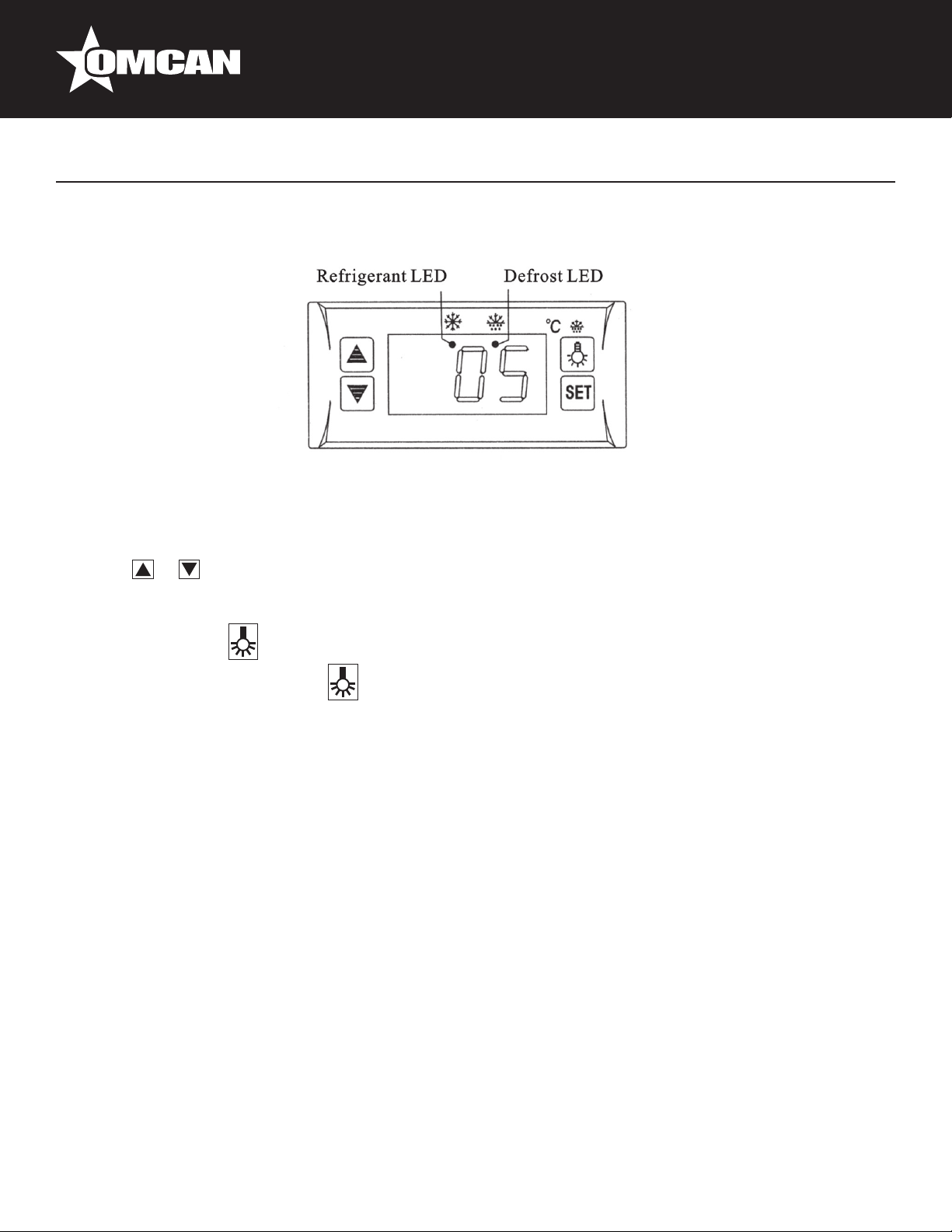
Controller Instructions
Digital Temperature Controller
Front Panel Operation
1. Set temperature.
2. Press the “SET” button, the set temperature is displayed.
3. Press or buttons to modify and store the displayed value.
4. Press the “SET” button to exit the adjustment and display the cold-room temperature.
5. If no more buttons are pressed within 10 seconds, the cold-room temperature will be displayed.
6. Illumination: Press to light. Press again to stop.
7. Manual start/stop defrost: press button and hold for 6 seconds to defrost or stop defrost.
8. Refrigerant LED: During refrigeration, the LED is on; When the cold room temperature is constant, the LED
is off; During the delay start, the LED ashes.
9. Defrost LED: during defrosting, the LED is on; When it stops defrosting, the LED is off. During the delay
display of defrost, the LED ashes.
• Unauthorized modications and/or repairs;
• Use of non original accessories or spare parts;
Exceptional events.
FEATURES OF FUNCTION
• This temperature controller very reliable and durable. The relay is exclusively for the use of the compressor
load which makes it safer. This way, the control of temperature easy to operate.
• There is integrated intelligent control.
THE MAIN FEATURES
• Temperature display (Celsius/Fahrenheit degrees).
• Temperature control.
• Illumination control.
• Manual, automatic defrost by turning off.
• Time or temperature setting to end defrost.
11
Page 12

Controller Instructions
• The cold-room sensor temperature can lock during defrost.
• Parameter sets and value storing.
• Compressor restart delay.
• Parameter locking.
• The factory default resumption.
• Offset on sensor temperature.
• Self-testing.
SPECIFICATIONS
• Power supply: approx. 12V, 50/60Hz.
• Power consumption <5W.
• Range of temperature displayed: -45° - 45°C (-40° - 120°F). Accuracy ±1°C (±2°F).
• Range of set temperature: -45° - 45°C (-40° - 120°F).
• Temperature sensor: NTC, double sensors.
• Output contact capacity for compressor: N.O. approx. 30A/250V, 50/60Hz.
• Output contact capacity for illumination: N.O. approx. 30A/250V, 50/60Hz.
• Main controller panel dimension: 78 x 35 x 76 mm.
• Mounting dimension: 71 x 29 mm.
INDICATOR
• Refrigerant: If the refrigerant LED is on, the compressor is working.
• Constant temperature: If the refrigerant LED is off, the compressor stops.
• Delay: If the refrigerant LED ashes, the compressor stops.
• Defrost: If the defrost LED is on, the compressor stops.
FRONT PANEL OPERATION
• Set temperature: Press “SET” button, the set temperature is displayed. Press the “UP” or “DOWN” buttons
to modify and store the displayed value, press the “SET” button to exit the menu and display the cold-room
temperature.
• Illumination: Press the “LIGHT” button, it lights. Press again, it stops.
• Manual start/stop defrost: Press “LIGHT” button and hold for six (6) seconds to defrost or stop defrost.
• Display the evaporator temperature: Press “UP” button and hold for six (6) seconds, the evaporator
temperature is displayed. After ten (10) seconds, the cold-room temperature is displayed.
PARAMETER SETUP
• Setting the parameter: The parameter can be adjusted only after correct PA is entered. If wrong, the
parameter can only be checked, but cannot be adjusted. However temperature controlling can still occur.
• Setting parameter: Press “SET” for six (6) seconds, start the parameter menu and the PA (menu password)
ashing. Enter the password by pressing “UP” or “DOWN”. Press “SET” again to choose the parameter.
Press “UP” or “DOWN” and the parameter can be displayed and adjusted. After the change, if no button is
pressed in thirty (30) seconds, the system will set new parameter and go back to normal operations.
12
Page 13
Controller Instructions
• Changing menu password (CPA): The CPA can be checked or changed only after correct menu password
to be entered. When it shows CPA, press “UP” or “DOWN”, the present password is displayed and can be
changed to new the new password. Press “LIGHT” to conrm and apply the new password. (Make sure to
remember the new password or you can never adjust another parameter).
• Setting factory default parameters: Press “DOWN” button for one (1) second and then press “UP” button
simultaneously for six (6) seconds, the indicator ashes. All parameters will be changed to factory defaults.
After ten (10) seconds, it returns to normal operation.
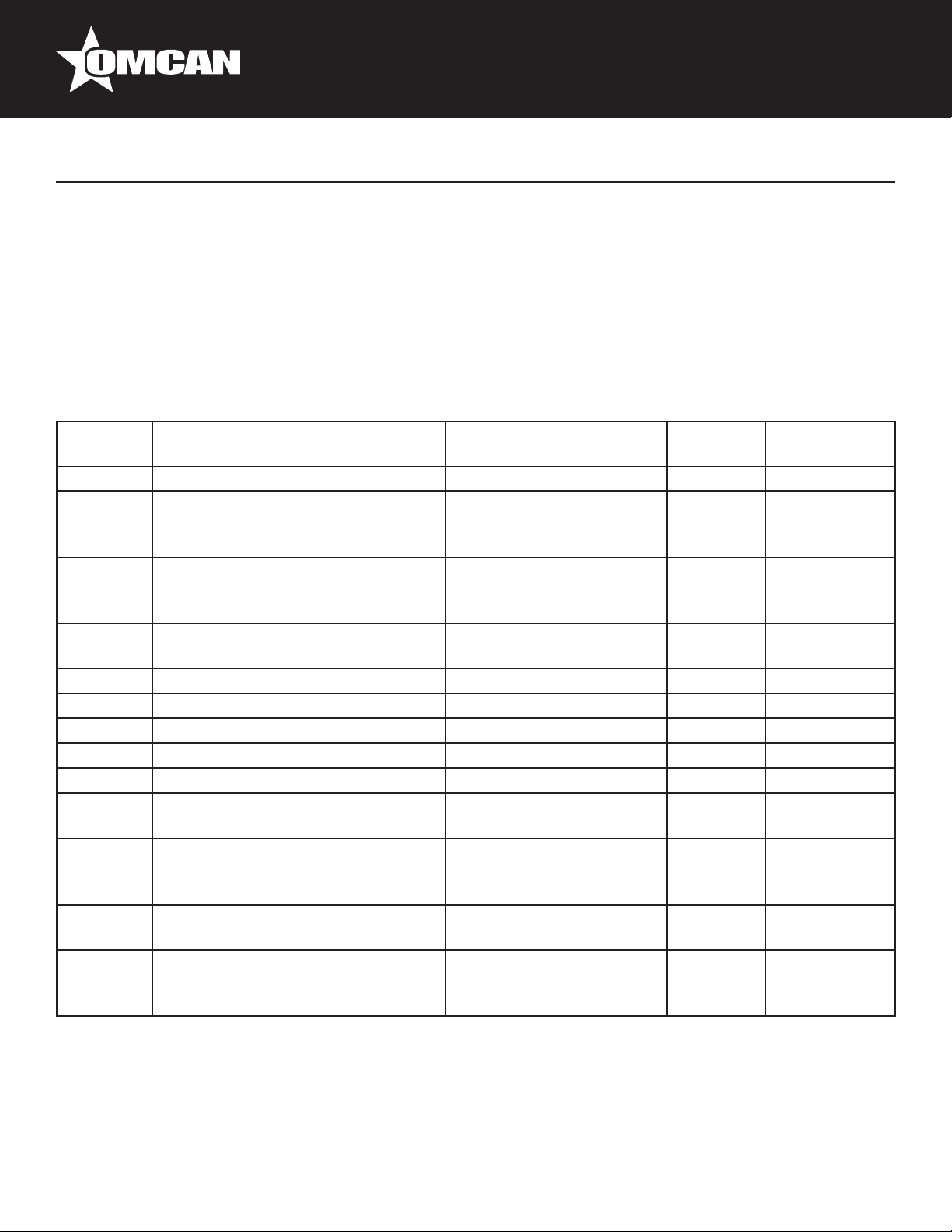
FUNCTION DETAILS
Parameter Function Set Range Default
Settings
PA Menu Password Approx. 0 – 99 00° 00°
E1 Lower Set Point Approx. -45°C Set
Temperature
Approx. -40°F
E2 Higher Set Point Set Temperature
Approx. 45°C
Approx. 120°F
E3 Temperature Hysteresis Approx. 00 – 10°C
Approx. 1 – 36°F
E4 Compressor Start Delay Approx. 00 – 10 minutes 00° 0°
E5 Offset On Room Temperature Approx. -5°C - 5°C / F 00° -1°
E6 Offset On Evaporator Temperature Approx. -5°C - 5°C / F 00° 0°
F1 Maximum Defrost Duration Approx. 1 – 60 minutes 20° 25°
F2 Defrost Interval Time Approx. 00 – 24 hours 06° 4°
F3 Defrost Termination Temperature Approx. 0 – 20°C
Approx. 32°F - 68°F
F4 Display During Defrost 00 = normal display
01 = Last value before
defrost
C1 Temperature Unit 00 = °C
01 = °F
CPA Changing Menu Password Approx. 00 – 90 (Setting
“00”, the menu password is
cancelled).
-15°C
05°F
10°C
50°F
05°C
07°C
12°C
54°F
01° 0°
00° 0°
00° 0°
Recommended
Settings
-5°
6°
4°
20°
Notes:
• The parameters can be changed only after the correct PA is entered, or else it can only be checked.
Temperature controlling can be changed without the correct PA.
• PA is set “00”, no password required for checking and/or changing.
13
Page 14

Controller Instructions
PARAMETER DETAILS
• Temperature controlling: After turning on for the delay time (E4), the compressor starts operating when
cold-room temperature is greater than the set temperature (set temperature + hysteresis), and will be off
when cold-room temperature less than the set temperature. To protect the compressor, it can be restarted,
unless the time when the compressor stops is longer than the delay time (E4).
• Defrost by turning off: After a defrost interval, it begins automatic defrost function. Eg: When evaporator
sensor temperature is less than the defrost termination temperature (F3), the defrost LED is on and the
compressor stops. When evaporator sensor is greater than the defrost termination temperature or defrost
duration (F1) the defrost stops. After two (2) minutes of draining time, the cold-room temperature is greater
than (set temperature + hysteresis) and the compressor starts. Tt goes back to refrigeration status. When
defrost interval time (F2) is set “00”, the function of automatic defrost will be cancelled. Temperature
displayed when defrost: If F4 is set “01”, it displays the temperature when defrost starts. After defrost, it will
continue to display this temperature for twenty (20) minutes and the defrost LED ashes, then come back
to normal temperature.
• Sensory work mode: If the cold-room sensor is short circuited or overheated, “HH” is displayed. If the cold-
room sensory has an open circuit or too low temperature, “LL” is displayed. The compressor automatically
has a cycle of forty-ve (45) minutes on and fteen (15) minutes off. When the evaporator sensor fails or it
is over the displayed range, the defrost termination will be just controlled by the defrost duration.
NOTES FOR INSTALLATION
• Before wiring, please read the instructions carefully and understand the function of every contact so that
you can make correct wire connection. Control loads cannot exceed the ratings.
• The temperature controller cannot be installed any area where there is water, dirt, moisture or high
temperatures. Please pay attention to EMC problem and prevent the temperature controller from any
potentially dangerous contact.
• The sensor cable leads must be kept away from the main supply in order to avoid a high frequency noise.
0.75 – 1.5 mm2 exible cord shall be used for wiring control load terminals.
• The evaporator sensor must be installed between the ns of the evaporator in the area, where there is the
thickest ice. Do not place the evaporator sensor near the electric heater.
• If the temperature controller stops functioning, please cut off the power supply and reset.
• Please don’t dismantle the controller. If you need to repair or if there any problems when using the
controller, contact an authorized service center.
14
Page 15
Model RS-CN-0250 25825
Parts Breakdown
15
Page 16
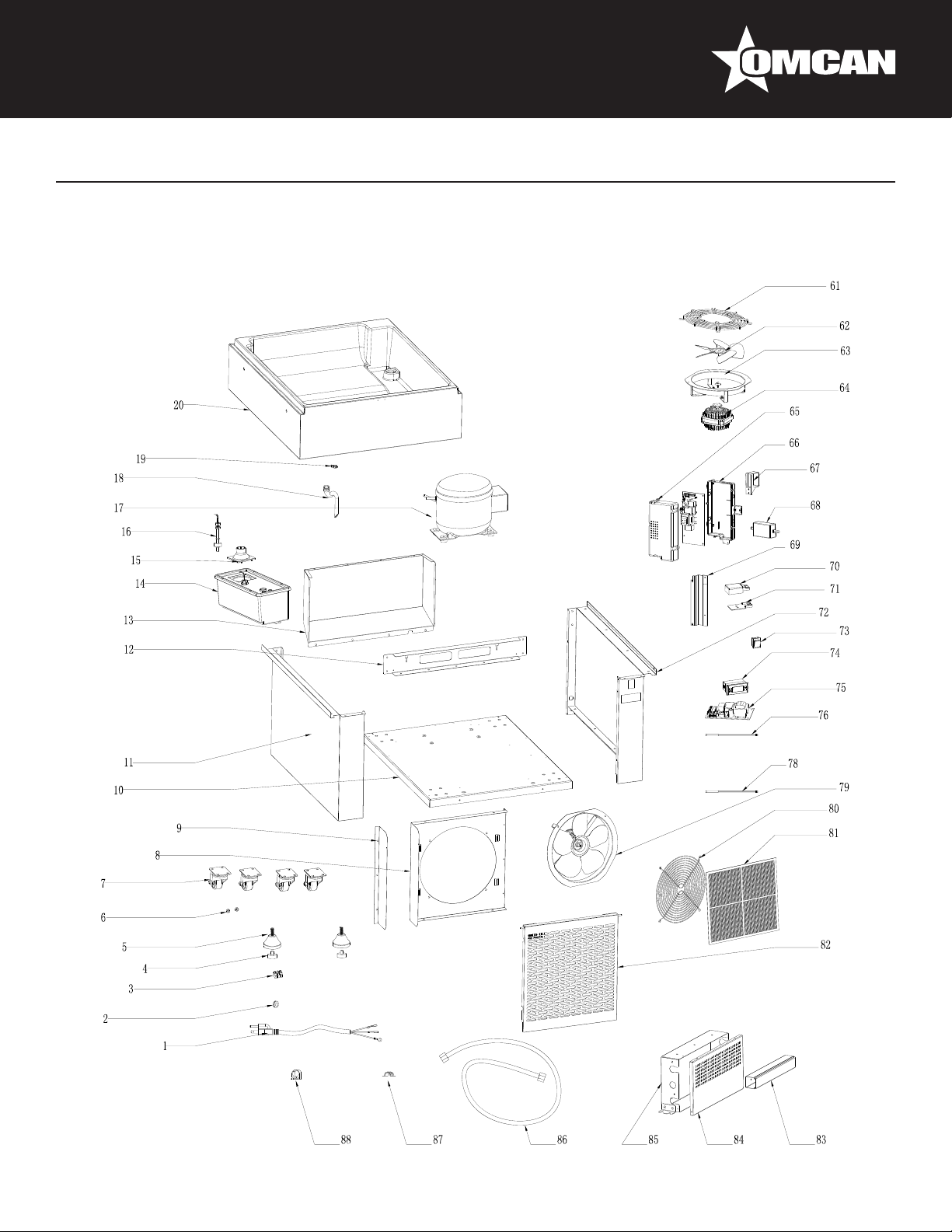
Parts Breakdown
Model RS-CN-0250 25825
16
Page 17
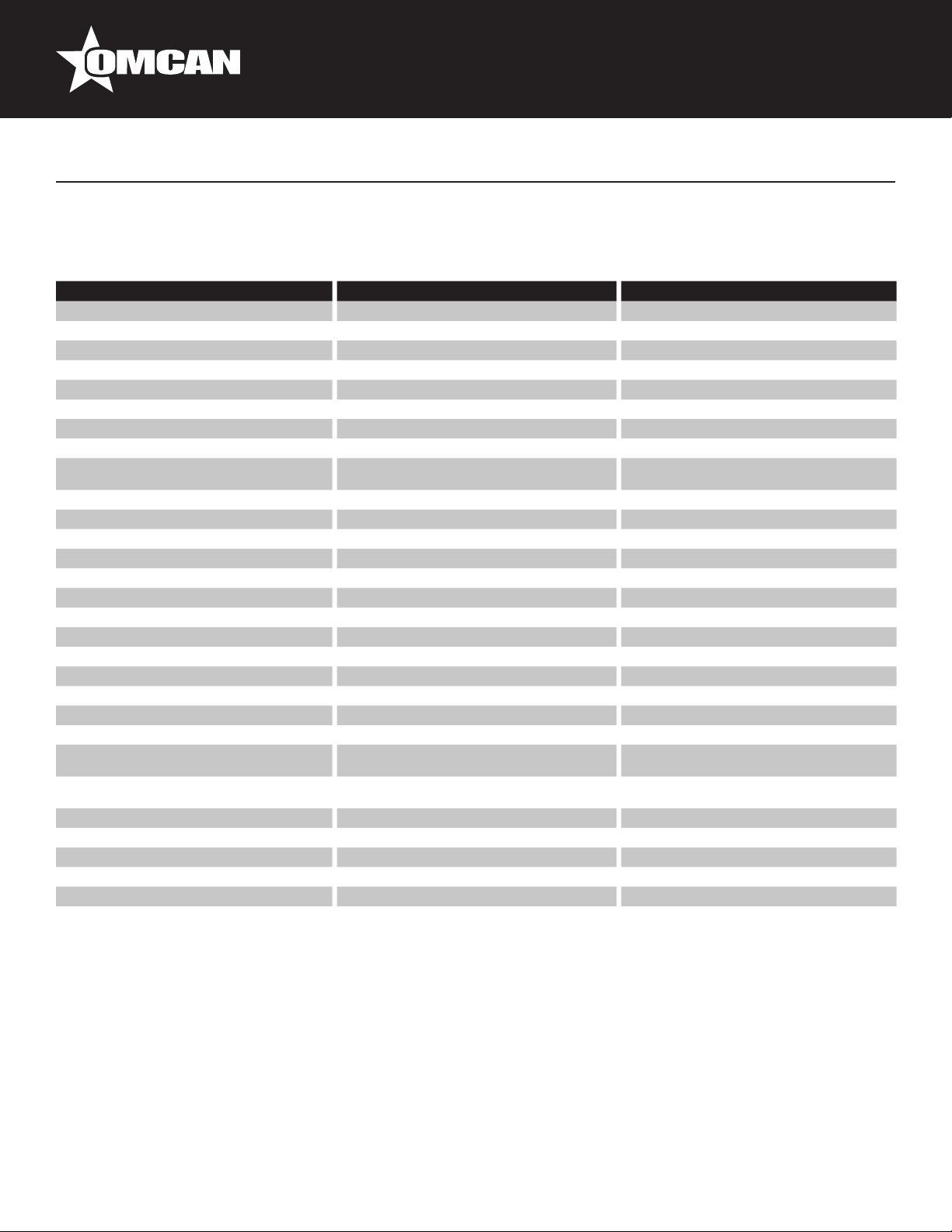
Parts Breakdown
Model RS-CN-0250 25825
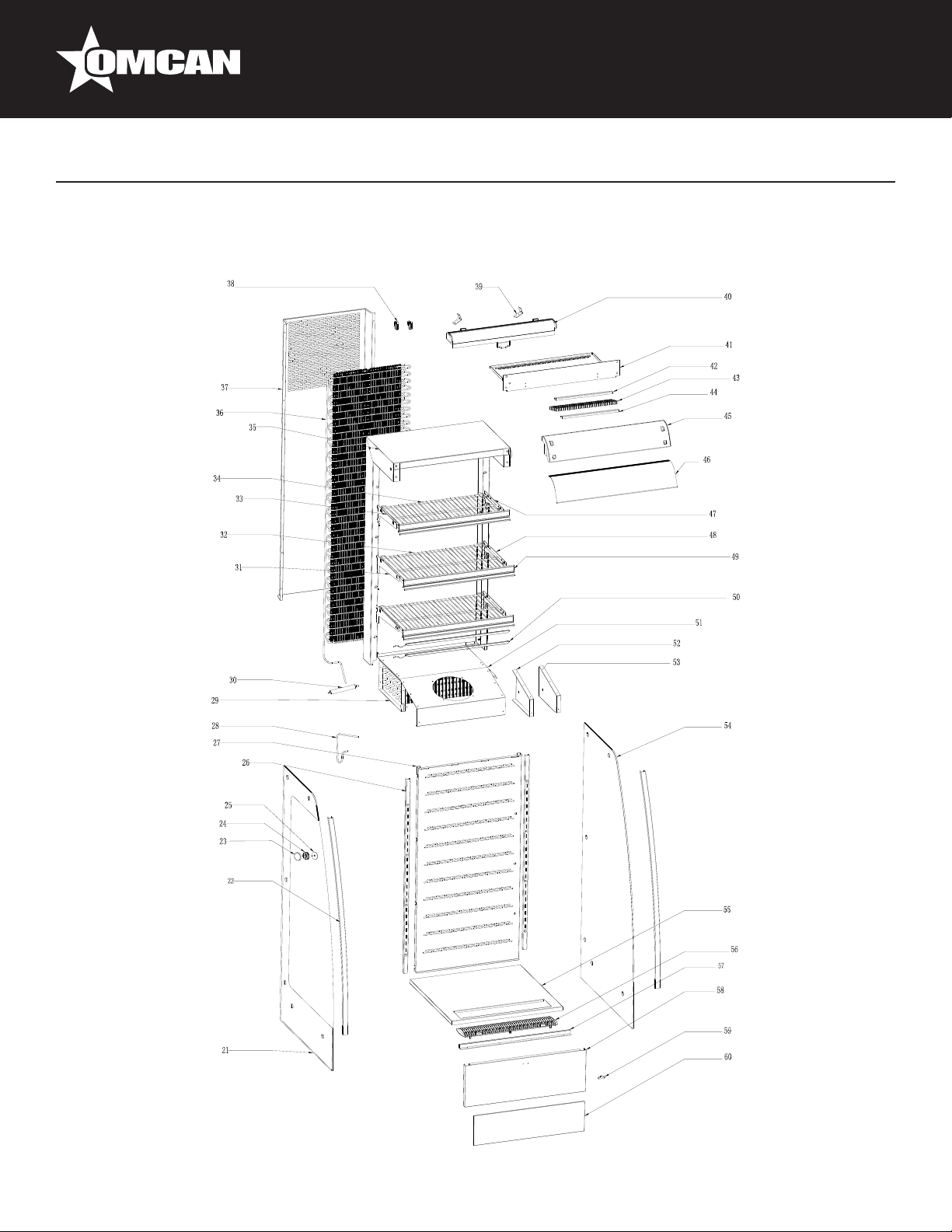
Item No. Description Position Item No. Description Position Item No. Description Position
79290 Power Cord for 25825 1 60577 Dry Filter for 25825 30 60651 Curtain Hook for 25825 59
79291 Wire Clip for 25825 2 30747 Left Shelf Bracket for 25825 31 79349 Glass Deector for 25825 60
79292 Terminal for 25825 3 79321 Bottom Shelf for 25825 32 AF543 Flat Net Cover for 25825 61
79293 Feet Pad for 25825 4 79322 Left Shelf Bracket for 25825 33 71565 Fan Blade for 25825 62
79294 Feet for 25825 5 79323 Top Shelf for 25825 34 71564 Fan Guard for 25825 63
79295 Magnet for 25825 6 79324 Foam of Back Cover for 25825 35 71522 Evaporator Fan Motor for 25825 64
60561 Rear Wheels for 25825 7 AF538 Condenser for 25825 36 60594 Cover of Circuit Board Box for 25825 65
79297 Holder for Condenser Motor for 25825 8 79326 Condenser Cover for 25825 37 61167 Circuit Board Box for 25825 66
79298
79299 Base Board for 25825 10 AF539 Night Curtain Bracket for 25825 39 67652 LED Transformer for 25825 68
79300 Left Panel of Base for 25825 11 AD502 Night Curtain for 25825 40 AF544 Bracket of Circuit Board Box for 25825 69
79301 Crossbar of Base for 25825 12 79330 Air-Out Board for 25825 41 79359 Cover of Junction Box for 25825 70
AF537 Back Cover of Base for 25825 13 79331 Back Clamp for 25825 42 61244 Junction Box for 25825 71
60587 Water Receiver for 25825 14 79332 Honeycomb Panel for 25825 43 79361 Right Panel of Base for 25825 72
79304 Pipe for Evaporated Water for 25825 15 79333 Front Clamp for 25825 44 71514 Switch for 25825 73
60589 Water Level Detector for 25825 16 AF540 Top Front Cover for 25825 45 AF545 Temperature Display for 25825 74
AD521 Compressor for 25825 17 AF541 Decorative Board for 25825 46 AF546 Main Circuit Board for 25825 75
30744 Water Pipe for 25825 18 79336 Right Shelf Bracket for 25825 47 60666 Temperature Probe for 25825 76
68368 Snap Ring for 25825 19 30750 Right Shelf Bracket for 25825 48 AD481 Overheating Probe for 25825 78
79309 Base Foam for Evaporator for 25825 20 79338 Price Tag Holder for 25825 49 79364 Condenser Fan Motor for 25825 79
79310 Left Glass for 25825 21 AF542 Shelf LED Light for 25825 50 79367 Flat Net Cover for 25825 80
79311 Front Decorative Strip for 25825 22 68310 Fixed Plate of Evaporator Motor for 25825 51 79368 Air Filter for 25825 81
79312 Nut Decoration for 25825 23 68309
79313 Nut Gasket for 25825 24 68334
79314 Decoration Nut Gasket for 25825 25 79343 Right Glass for 25825 54 67642 Cover of Terminal Box for 25825 84
79315 Pole for Shelf for 25825 26 79344 Bottom Frame of Cabinet for 25825 55 67643 Terminal Box for 25825 85
79316 Ventilated Board for 25825 27 79345 Air Intake Grill for 25825 56 60668 Drain Pipe for 25825 86
61234 Connection Pipe for 25825 28 79346 Wind Screen Strip for 25825 57 60669 Pipe Clamp for 25825 87
71562 Evaporator for 25825 29 79347 Front Decorative Board for 25825 58 60670 PPR Pipe Clamp for 25825 88
Condenser Motor Bracket Guard for
25825
9 61222 Stands for Condenser for 25825 38 79356 LED Transformer Holder for 25825 67
Right Fixed Plate of Evaporator Motor
for 25825
Right Fixed Plate of Evaporator Motor
for 25825
52 79369 Ventilated Board of Base for 25825 82
53 60590 PVC Trucking for 25825 83
17
Page 18
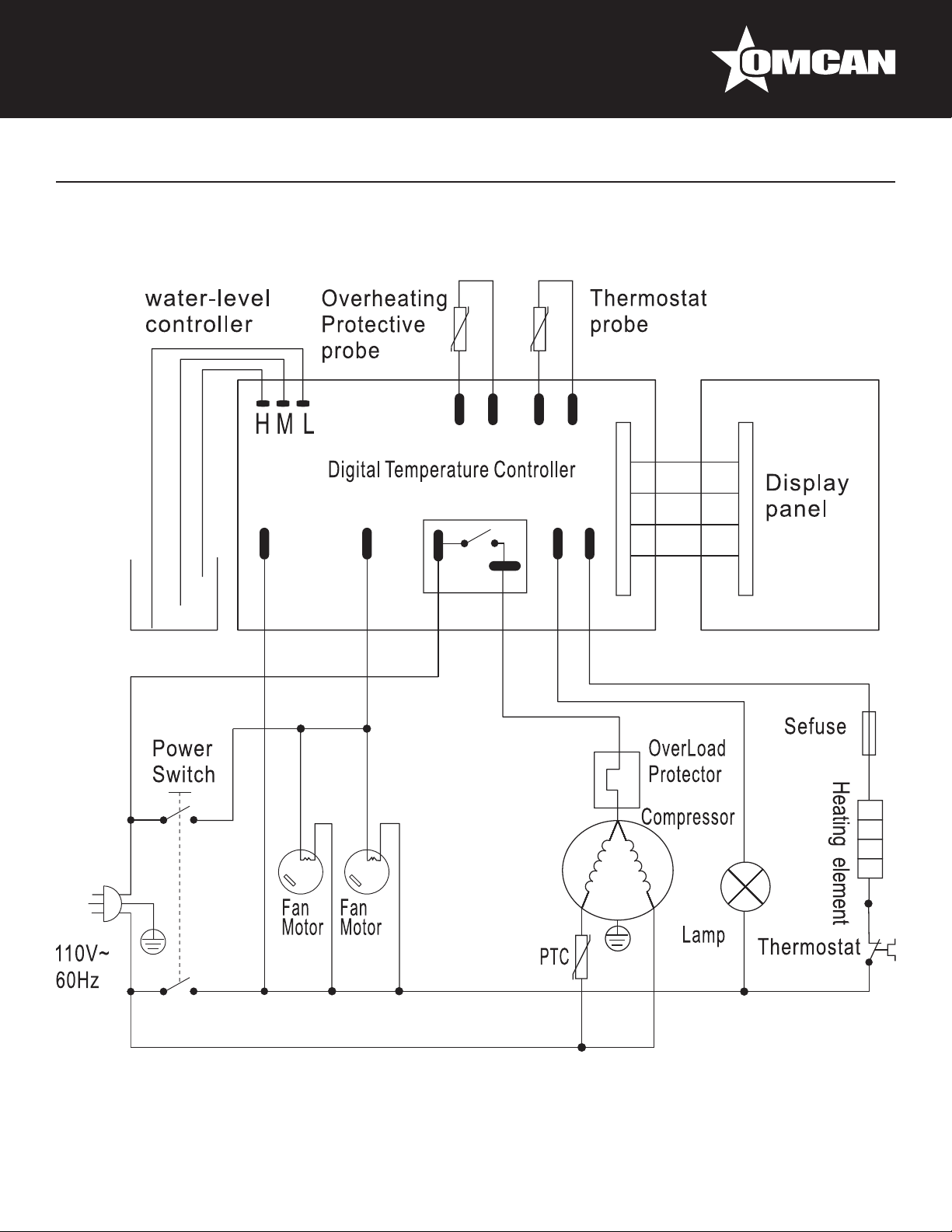
Electrical Schematics
Model RS-CN-0250 25825
18
Page 19
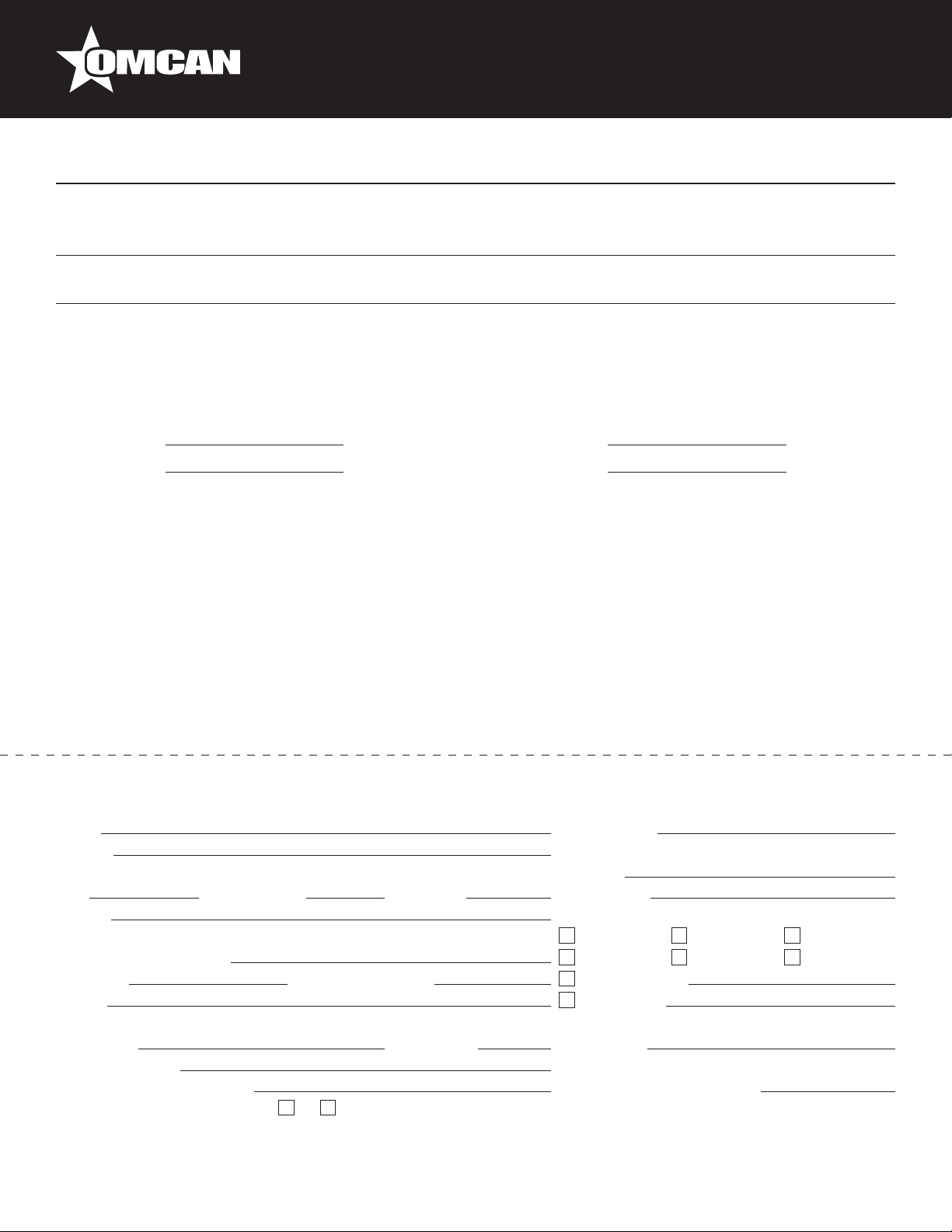
Warranty Registration
Thank you for purchasing an Omcan product. To register your warranty for this product, complete the information below, tear off the card at
the perforation and then send to the address specied below. You can also register online by visiting:
Merci d’avoir acheté un produit Omcan. Pour enregistrer votre garantie pour ce produit, complétez les informations ci-dessous, détachez la
carte au niveau de la perforation, puis l’envoyer à l’adresse spécié ci-dessous. Vous pouvez également vous inscrire en ligne en visitant:
Gracias por comprar un producto Omcan usted. Para registrar su garantía para este producto, complete la información a continuación,
cortar la tarjeta en la perforación y luego enviarlo a la dirección indicada a continuación. También puede registrarse en línea en:
https://omcan.com/warranty-registration/
For mailing in Canada
Pour postale au Canada
Por correo en Canadá
OMCAN
PRODUCT WARRANTY REGISTRATION
3115 Pepper Mill Court,
Mississauga, Ontario
Canada, L5L 4X5
PRODUCT WARRANTY REGISTRATION
4450 Witmer Industrial Estates, Unit 4,
For mailing in the US
Pour diffusion aux États-Unis
Por correo en los EE.UU.
OMCAN
Niagara Falls, New York
USA, 14305
or email to: [email protected]
Purchaser’s Information
Name: Company Name:
Address:
Telephone:
City: Province or State: Postal or Zip: Email Address:
Country: Type of Company:
Restaurant Bakery Deli
Dealer from which Purchased: Butcher Supermarket Caterer
Dealer City: Dealer Province or State: Institution (specify):
Invoice: Other (specify):
Model Name: Model Number: Serial Number:
Machine Description:
Date of Purchase (MM/DD/YYYY): Date of Installation (MM/DD/YYYY):
Would you like to extend the warranty? Yes No
Thank you for choosing Omcan | Merci d’avoir choisi Omcan | Gracias por elegir Omcan
19
Page 20

Since 1951 Omcan has grown to become a leading distributor of equipment and supplies to the North
American food service industry. Our success over these many years can be attributed to our commitment
to strengthen and develop new and existing relationships with our valued customers and manufacturers.
Today with partners in North America, Europe, Asia and South America, we continually work to improve
and grow the company. We strive to offer customers exceptional value through our qualied local sales
and service representatives who provide convenient access to over 6,500 globally sourced products.
Depuis 1951 Omcan a grandi pour devenir un des “leaders” de la distribution des équipements et
matériel pour l’industrie des services alimentaires en Amérique du Nord. Notre succès au cours de ces
nombreuses années peut être attribué à notre engagement à renforcer et à développer de nouvelles
et existantes relations avec nos clients et les fabricants de valeur. Aujourd’hui avec des partenaires en
Amérique du Nord, Europe, Asie et Amérique du Sud, nous travaillons continuellement à améliorer et
développer l’entreprise. Nous nous efforçons d’offrir à nos clients une valeur exceptionnelle grâce à
nos ventes locales qualiées et des représentants de service qui offrent un accès facile à plus de 6500
produits provenant du monde entier.
Desde 1951 Omcan ha crecido hasta convertirse en un líder en la distribución de equipos y suministros
de alimentos en América del Norte industria de servicios. Nuestro éxito en estos años se puede atribuir
a nuestro compromiso de fortalecer y desarrollar nuevas relaciones existentes con nuestros valiosos
clientes y fabricantes. Hoy con socios de América del Norte, Europa, Asia y América del Sur, que trabajan
continuamente para mejorar y crecer la empresa. Nos esforzamos por ofrecer a nuestros clientes valor
excepcional a través de nuestro local de ventas y representantes de los servicios que proporcionan un
fácil acceso a más de 6,500 productos con origen a nivel mundial.
 Loading...