

Page 1
Page 2

1
Safety Instructions
x Always read the safety instructions carefully
x Keep this User Manual for future reference
x Keep this equipment away from humidity
x Lay this equipment on a reliable flat surface before setting it up.
x Do not stand it on soft furnishings.
x If any of the following situation arises, get the equipment checked by a service
technician:
- The equipment has been exposed to moisture.
- The equipment has been dropped and damaged.
- The equipment has obvious sign of breakage.
- The equipment has not been working well or you cannot get it work according to User
Manual.
WARNING:
x To prevent the risk of electric shock, do not open the cover or the back of the receiver.
x Do not block the ventilation holes of the device. Leave appropriate gap above and
around it to allow for adequate ventilation.
x Do not place the device in an unventilated cabinet or on top of a unit which emits heat.
x To reduce the risk of fire or electric shock, do not expose this apparatus to rain or colds.
Page 3

2
Table of Contents
Introduction………………………………………………………………………………….3
Front Panel and Rear Panel Illustration………………………………………………..4
Front Panel……………………………………………………………………………….4
Rear Panel………………………………………………………………………………...4
Remote Control………………………………………………………………..5-6
Installing the Batteries……………………………………………………………7
Connecting to Equipments………………………………………………………8-10
First Time Installation……………………………………………………………11
Basic Operations……………………………………………………………….12-15
Recording Function……………………………………………………………..16
Main Menu……………………………………………………………………..17-18
Menu Tree……………………………………………………………………..18
LIVE TV………………………………………………………………………….19
PVR.…………………………………………………………………………..20-21
Recorded program……………………………………………………………..20
Record timer……………………………………………………………………20
Storage Setting…………………………………………………………………..21
File manager……………………………………………………………………..21
Recording path………………………………………………………………………21
Setting…………………………………………………………………………..22-28
Installation………………………………………………………………………22
Program edit…………………………………………………………………23-24
System setup…………………………………………………………………25-26
User preferences……………………………………………………………….27
Parental control…………………………………………………………………28
Trouble Shooting……………………………………………………………………29
Technical Specification……………………………………………………………30
Version: OPVR-1600_V1.1
Page 4

3
Introduction
This High Definition Digital Terrestrial Receiver is designed to receive terrestrial free-to-air
TV broadcast in Australia. It supports both HD and SD programs, furthermore a HDMI
output ensuring that the end-user's experience is of the highest performance. HDMI output
enables secure transfer of digital signals to the display. In addition, a fully featured
remote control is included that offers you access to every feature with only just a simple
press.
Main Features
z High Definition Twin Tuner PVR
z External PVR HDD recording via USB
z 500GB internal hard disk
z HDMI Digital Connection
z Simultaneous HD output
z Video output selection: Component (RCA, YPbPr), S-Video, Composite(RCA), HDMI
z 1080i, 720p, 576p, 576i video format support
z 4:3 / 16:9 Pictures
z 7-days Electronic Program Guide(EPG)
z Favorite Channel Editing
z Subtitle support
z Coaxial/Optical Digital Audio Output
z Parental Rating Setting
z Time-Zone and daylight-saving time options
z Time-shift Function (enable to pause live TV)
z Low power consumption
z USB 2.0 Host Interface supports
Package Contents
Before installation, please check the items of the package. The package should contain
the following items:
1. Personal Video Recorder (PVR) x 1
2. Remote control
x 1
3. AAA size battery for the remote control
x 2
4. Instruction manual
x 1
5. AV cable
x 1
6. YPbPr cable
x 1
7. RF cable
x 1
8. Warranty card
x 1
9. Quick guide
x 1
Page 5
4
Front Panel and Rear Panel Illustration
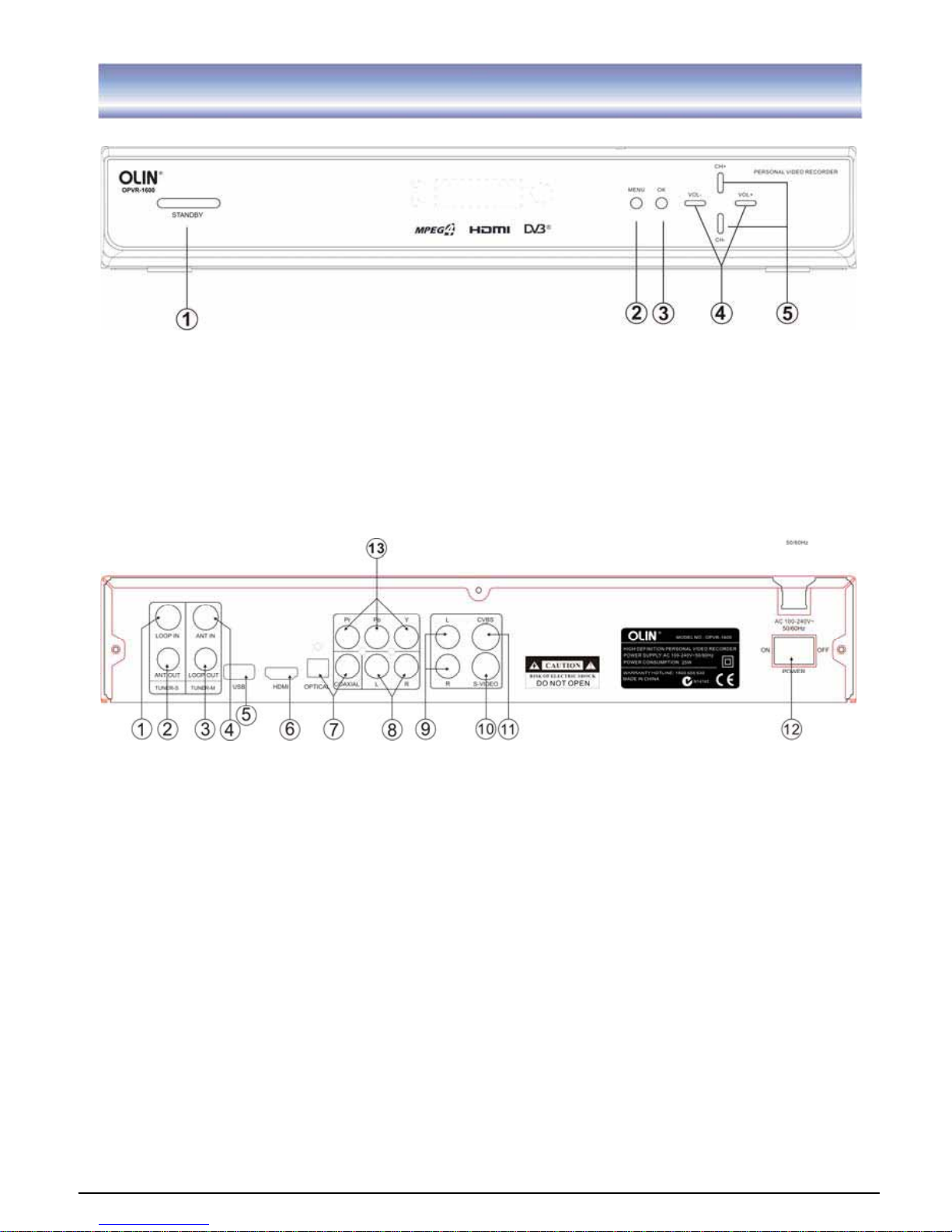
Front Panel
ķ
STANDBY: To turn the standby mode ON/OFF.
ĸ
MENU: To enter into the main menu. Press again to exit to previous menu.
Ĺ
OK: To confirm the selected menu item.
ĺ
VOL+/-: To control the level of the volume.
Ļ
CH+/-: To change the channel up/down.
Rear Panel
ķ
LOOP IN: RF signal input to connect RF loopback cable.
ĸ
ANT OUT: RF signal output to other reception equipment.
Ĺ
LOOP OUT: RF signal output to connect loop in.
ĺ
ANT IN: To connect the antenna.
Ļ
USB: The port for software upgrade. (Note: This feature is built-in only for
distributor’s customer support team in the event of restoring the system or repairing.
User is not recommended to perform the firmware upgrading by oneself. Attempt of
doing so may result in unit malfunction.)
འ
HDMI Video output used to connect to your HDMI device.
ཡ
OPTICAL/COAXIALGDigital audio output.
ར
AUDIO L/RGAudio output to connect to your TV.(Used with YpbPr)
ལ
AUDIO L/RGAudio output to connect to your TV.(Used with CVBS/S-VIDEO)
ཤ
S-VIDEO S-VIDEO output to connect to you TV.
ཥ
CVBS CVBS output to connect to your TV.
ƻ
12 POWER Switch ON/OFF.
ƻ
13 YPbPr High definition video output to connect to your TV.
Page 6
5
Remote control
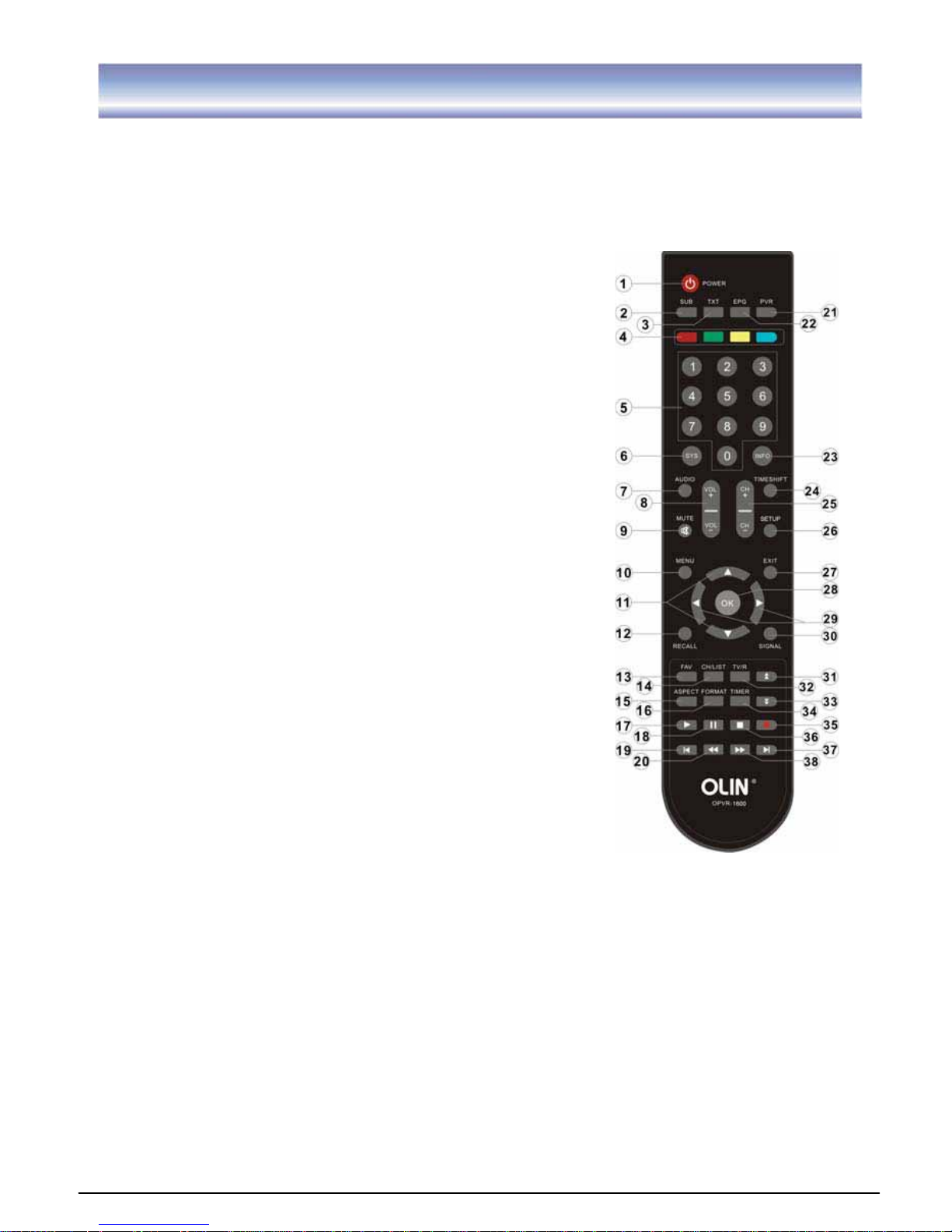
Remote key functions:
1. POWER
˖
To turn the standby mode ON/OFF.
2. SUB
˖
To switch the subtitle ON/OFF.
3. TXT: To switch the Teletext service ON/OFF. (The availability of Teletext is subject to
channel broadcasting in each region.)
4. 4 COLOR KEY
˖
To assist the operation of the PVR.
5. Numeric buttons (0-9)
˖
To control the numerical
operation and especially to change program directly.
6. SYS
˖
To view the software/hardware of the unit.
7. AUDIO: To display the Audio info of the selected
program.
8. VOL+/-: To control the level of the volume.
9. MUTE: To mute or recover the sound of the unit.
10. MENU
˖
To enter into the main menu, Press again to
exit to previous menu.
11.
: To change the program up /down or to move the
program up/down in the menu mode.
12. RECALL:
G
To return to view the previous program.
13. FAV: To access and exit the favorite programs list.
14. CH/LIST: To call out the program list.
15. ASPECT: To change aspect ratio(16:9, 4:3 letter box,
Pan Scan).
16. FORMAT
˖
To switch the different resolution (1080i,
720Pˈ576P supported).
17. PLAY: To play a record or resume time shift.
18. PAUSE
˖
To pause the current program when press
once and continue playing when press again.
19. FIRST: To go to the starting point of a program (in
time shift or PVR mode).
20. REW: To rewind playing record or time shift (support
2X, 4X, 8X, 16X, 32X).
21. PVR: To enter record program list.
22. EPG
˖
Electronic Program Guide
23. INFO: To display the current program information.
24. TIMESHIFT: To open / close the time shift.
25. CH+/-: To change the program upward/downward.
26. SETUP: System setup.
27. EXIT: To cancel operation or exit the menu directly.
28. OK
aG
To confirm the selected menu item / to open the program list.
29. ൖ൘: To control the level of the volume/to move left/right in menu mode.
30. SIGNAL: To show the quality / level of signal.
31. PAGE UP: To enter into the next / previous page.
Page 7

6
Remote control
32. TV/R: To switch the program between TV and Radio.
33. PAGE DOWN: To enter into the next / previous page.
34. TIEMR: To add a new timer.
35. REC
ୖ
To start an instant record on current channel.
36. STOP: To stop the existing program (recording, time shift).
37. END: To go to the end of the program.
38. FF: To forward playing record or time shift (support 2X, 4X, 8X, 16X, 32X).
Page 8
7
Installing the Batteries
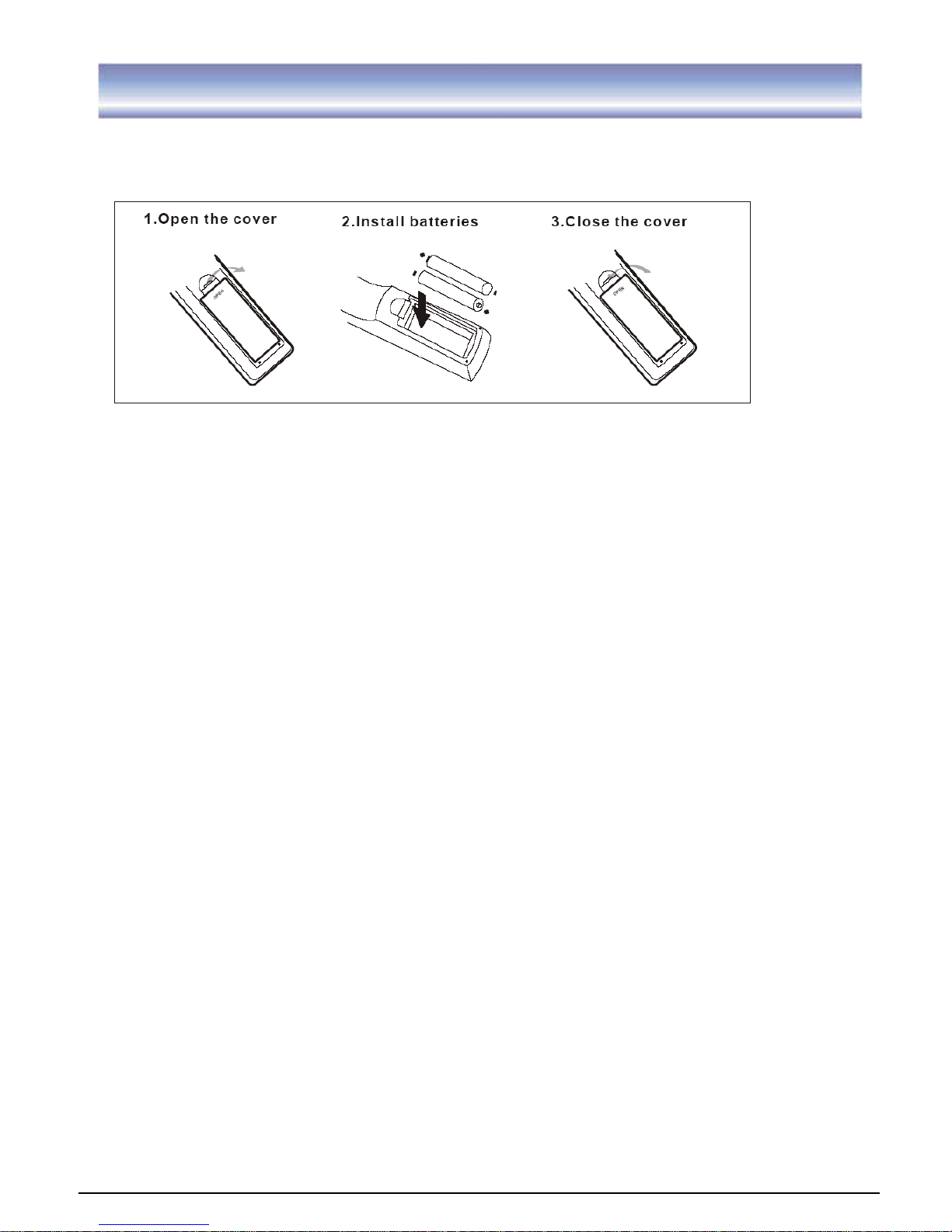
Remove the battery cover from the remote control and put two AAA size batteries inside
the compartment. The diagram inside the battery compartment shows the correct way to
install the batteries.
Caution:
1. Keep batteries out of children’s reach.
2. Don’t attempt to recharge, short-circuit, disassemble heat or throw the batteries into the
fire.
3. Always replace both batteries at the same time. Never mix new and old batteries or
batteries of a different type.
4. If the remote controller is not in use for an extended period, please remove the batteries
to prevent possible leakage and corrosion.
5. Do not drop, apply shock or step on the remote control.
6. Do not spill water on the remote control.
Note: If the unit does not work when using the remote control from a close range, it is
required to replace the batteries.
Using the Remote Control
1. To use the remote control, point it towards the front of this unit.
2. The remote control has a range of up to 7 meters from the PVR at an angle of up to 30
degrees.
3. The remote control will not work if its path is blocked.
Note: Sunlight or very bright light will decrease the sensitivity of the remote control.
Page 9
8
Connecting to Equipments
How to get good reception
G
ˍG In general you are not required to change the existing antenna. However if your antenna
is not in good condition you should consider replacing them to ensure uninterrupted
digital television viewing.
ˍ Viewers in areas of poor analog reception may need special advice about antenna
requirements for digital reception in their area.
ˍ It’s recommended that viewers use quad shielded cable from the antenna to the
television.
Connections to a TV
There are several ways of connecting this unit to the TV and Hi-Fi System. For high
definition viewing your TV must support 576p, 720p and 1080i resolution. Also the
connection between this unit and TV must be YPbPr component, or HDMI. Other
connection will provide standard definition viewing.
Warning
Please switch OFF the mains power before plugging or unplugging connection cables,
otherwise, it may damage this unit!
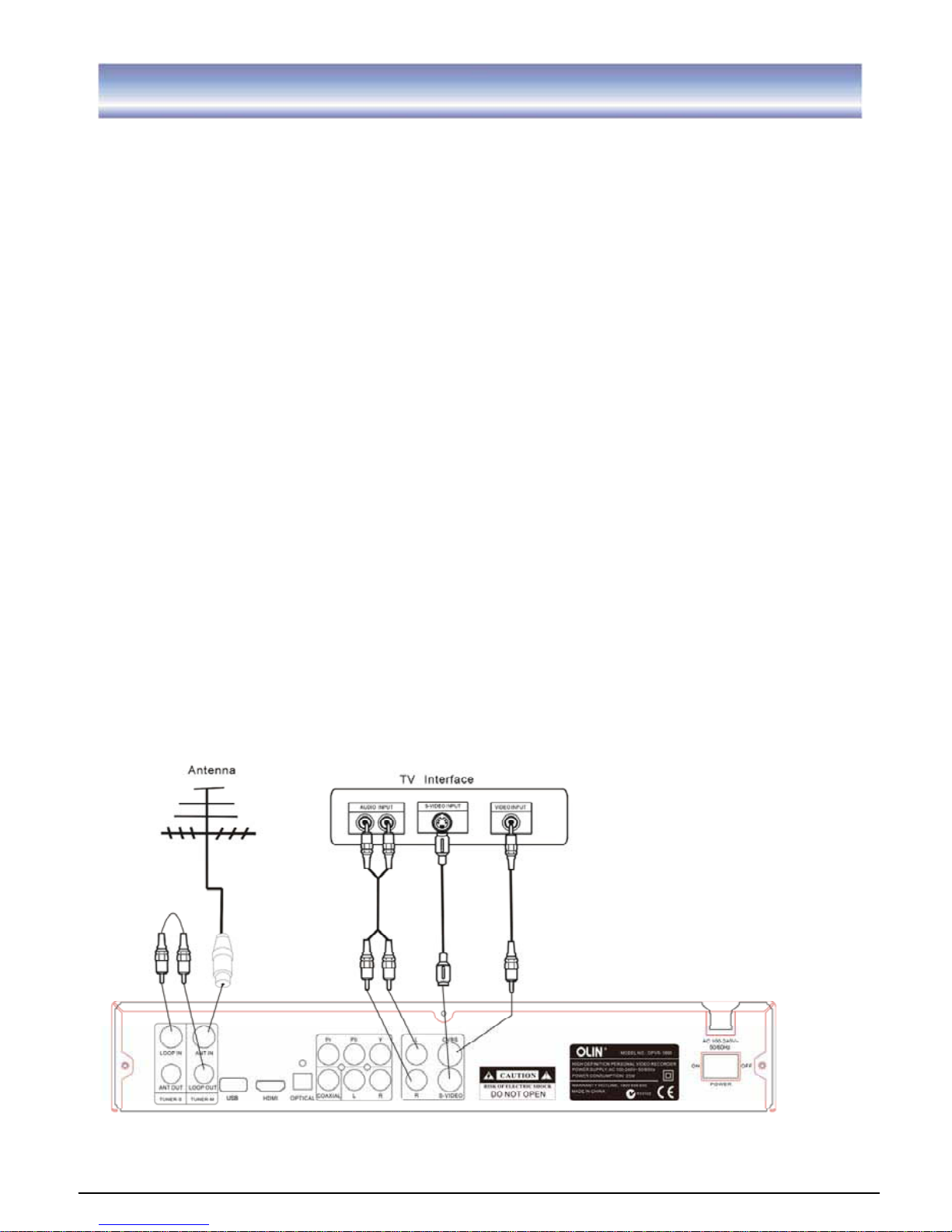
Connect the unit via Audio/CVBS/S-VIDEO
(for standard definition viewing)
1. Connect the antenna with ANT IN of the unit.
2. Connect the RF loop cable via LOOP IN and LOOP OUT.
3. Connect the unit via CVBS/ S-Video/Audio L/R.
Page 10
9
Connecting to Equipments
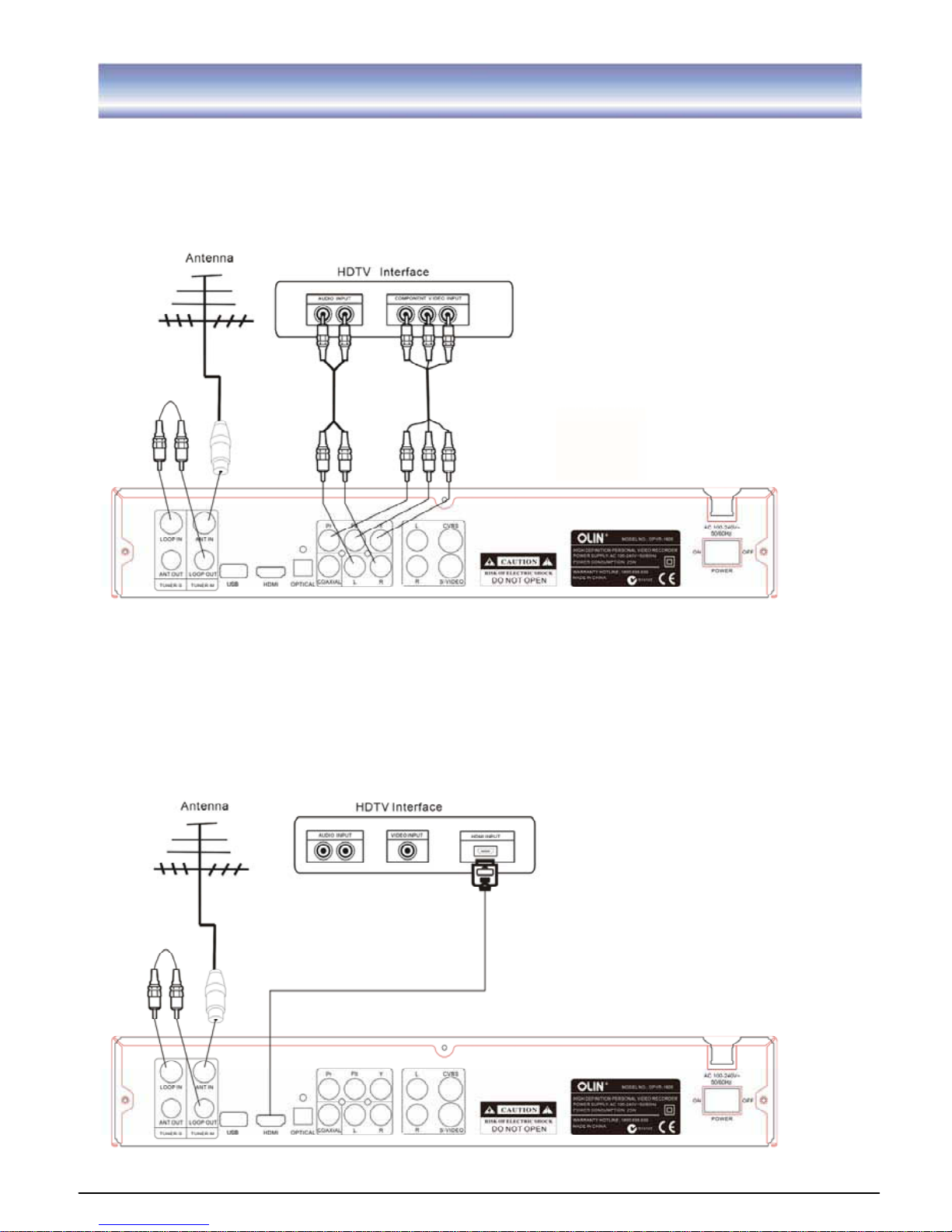
Connect the unit via YPbPr output and Audio output
(for high definition viewing)
1. Connect the antenna with ANT IN of the unit.
2. Connect the RF loop cable via LOOP IN and LOOP OUT.
3. Connect the unit to TV via YPbPr cable as the following figure.
Connect the unit via HDMI output (for high definition viewing)
1. Connect the antenna with ANT IN of the unit.
2. Connect the RF loop cable via LOOP IN and LOOP OUT.
3. Connect the unit to TV via HDMI Cable as the following figure.
Page 11
10
Connecting to Equipments
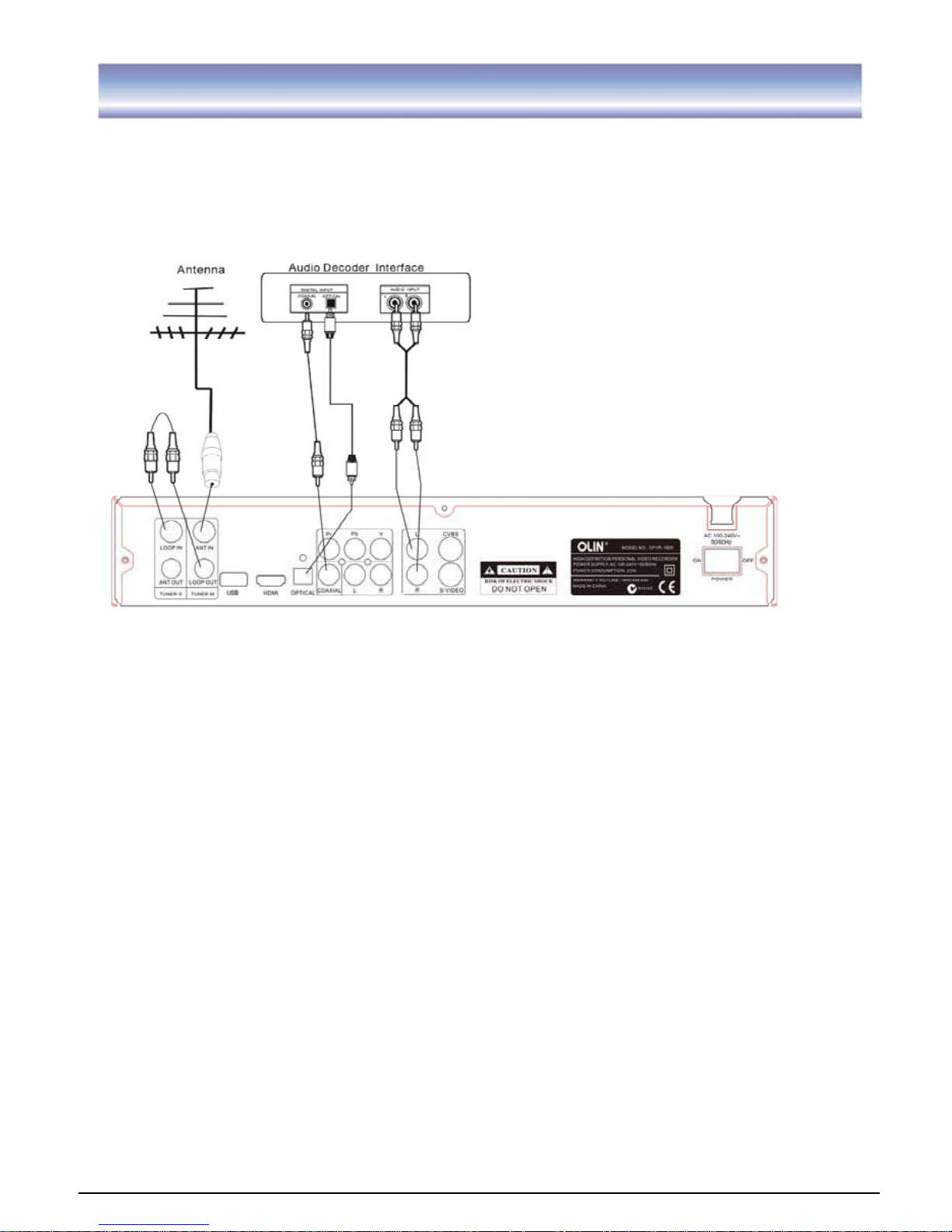
Audio connections via Optical/Coaxial/Mixed Audio L/R Output
1. Connect the antenna with ANT IN of the unit.
2. Connect the RF loop cable via LOOP IN and LOOP OUT.
3. Connect the unit to TV via AV cable as the following figure.
Page 12
11
First Time Installation
Note: Be sure to turn on the main power at the rear of the unit before using it.
After all the connections have been made properly, switch on your TV. Make sure the unit
is connected to the power supply and press Power on the remote control to switch on the
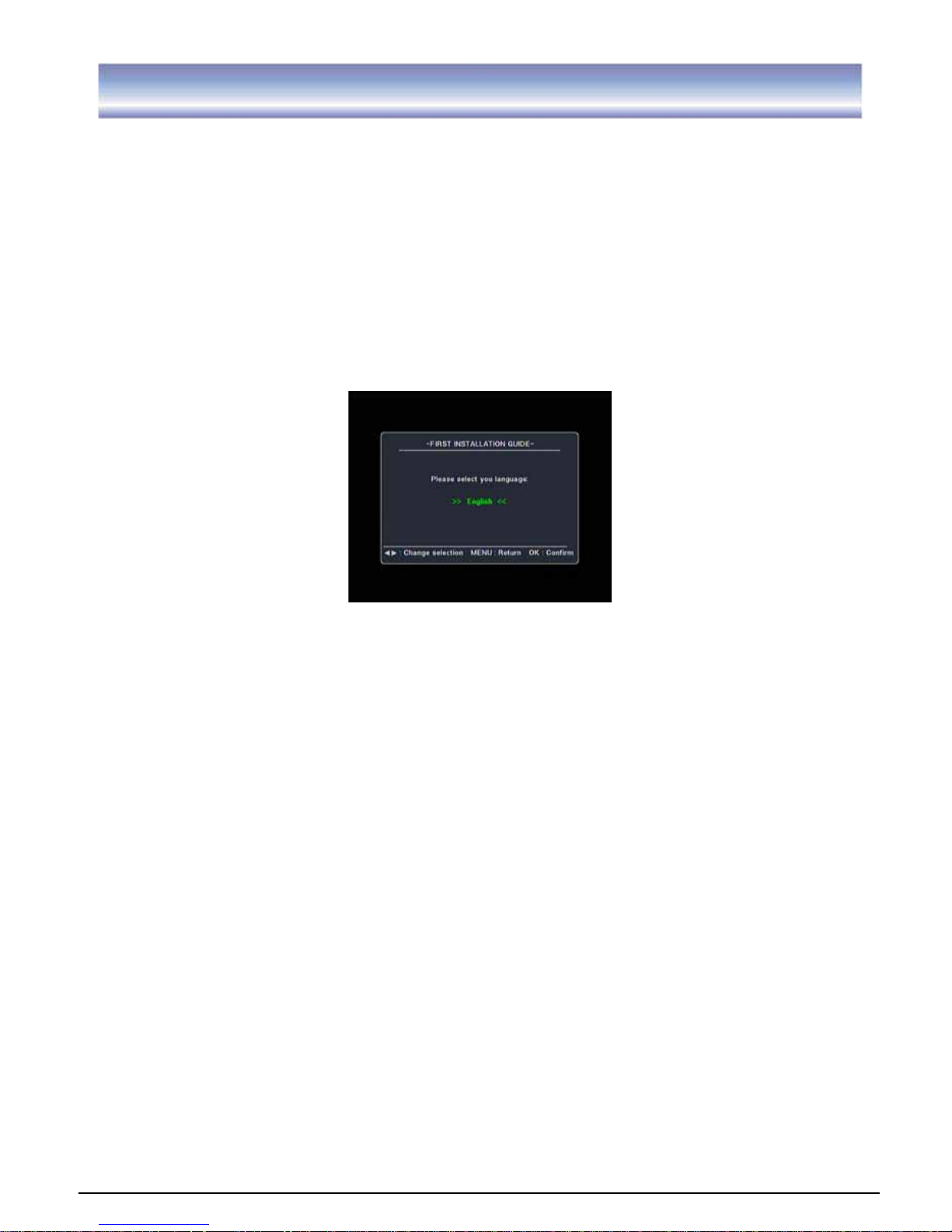
unit. If you are using the unit for the first time or restored to factory default, a First Time
Installation menu will be displayed to guide you through the initial setup to set the time
zone, the daylight saving, the TV screen type and scan channels. Please use the remote
controller to finish the setup.
When the scanning is finished, all found active channels will be stored automatically. The
last found channel will be viewed. (In case you want to stop the scanning, press the EXIT
key to exit. The already found channels will be stored).
Now you are ready to watch digital terrestrial TV channels and listen to radio broadcasts.
To skip the First Time Installation screen, you can press MENU/EXIT key to bring up the
main menu (please refer to page 17 for operation guidance)
Page 13
12
Basic Operations
Switch Program
1. Press the NUMERIC keys (0~9) on the remote control to select the channel number you want.
2. Press the key on the remote control or CH+/- on the front panel of the unit to change the
available channels upward/downward.
3. Press the RECALL key to view the previous selected channel.
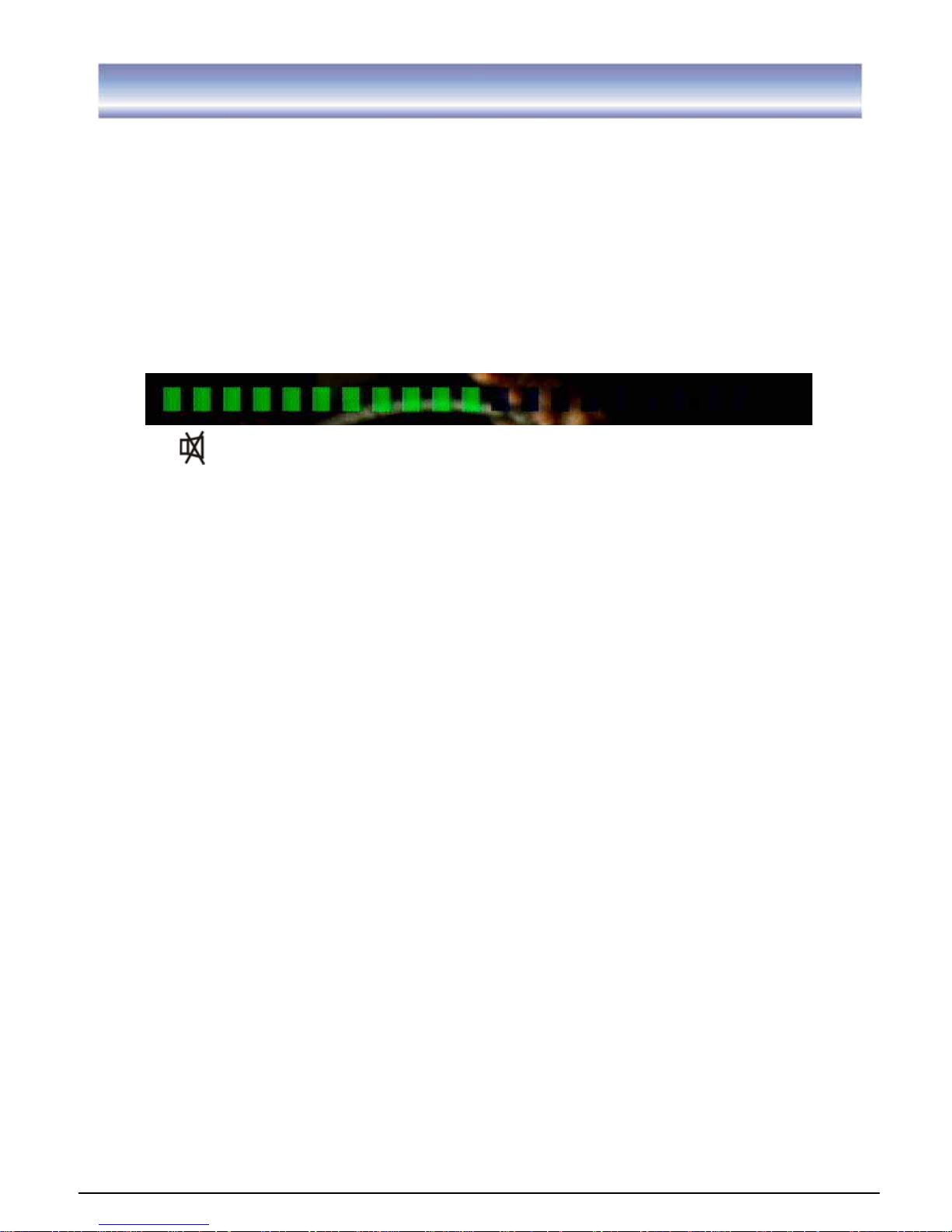
Volume control
1. Press the ൖ൘ key on the remote control, front panel or VOL+/- to adjust the volume.
The following volume bar will appear on screen.
Mute
1. Press the MUTE key to temporarily stop the sound.
2. To cancel mute, press the MUTE key again or pressൖ൘key.
Note: MUTE key is also valid in menu /EPG / Program list etc.
Change an audio language and audio mode
Press the AUDIO key on the remote control to select the audio control menu, press the
ൖ൘,, OK keys to select an audio language you want. Press EXIT key to exit the
menu.
Note: the Languages depend on the program providers.
Change screen aspect
Press ASPECT key to switch screen aspect mode (16:9 full screen, 16:9 letter box, 4:3 full
screen, 4:3 letter box, Pan Scan).
Change video resolution
Press FORMAT key to set the video resolution mode (1080i, 720Pˈ576P).
Note: this unit is default set to 1080i.
Change TV/Radio mode
Press TV/RADIO key to change the program mode between TV and Radio.
Note: The voice will appear after 5 seconds in the Radio mode.
View program info
1. Press INFO key to view the brief introduction of current program.
2. Press INFO/ EXIT to exit view.
Page 14

13
Basic Operations
Subtitle
Press SUB key to switch subtitle on/off.
Note: the availability of subtitle depends on the program providers.
Teletext service
1. Press TXT key to open a teletext page (if the teletext is transmitted)
2. Press EXIT key again or press EXIT key to close the teletext.
Note: The availability of Teletext is subject to channel broadcasting in each region.
SYS
1. Press SYS key to view the software/hardware of the unit.
2. Press EXIT or SYS key to exit.
FAV
1. Press FAV key to view the favorite channel.
2. Press key to select you want, press OK / FAV key to play full-screen.
CH.LIST
1. Press CH.LIST key to view TV List / Radio List.
2. Press key to select, press OK key to confirm and play full-screen.
Timer
Press TIMER key to view record timer menu.
PVR
Press PVR key to enter record program list.
REC
Press REC key to start an instant record on current channel.
PLAY
Press PLAY key to start to play a record or resume time shift.
PAUSE
Press PAUSE key to pause to play or start time shift function.
STOP
Press STOP key to stop running current program (recording, time shift).
FIRST
Press FIRST key to go to the starting point of a program (in time shift or PVR mode).
Page 15

14
Basic Operations
REW
Press REW key to rewind playing record or time shift (Support 2X, 4X, 8X, 16X, 32X).
FF
Press FF key to forward playing record or time shift (Support 2X, 4X, 8X, 16X, 32X).
END
Press END key to go to the end of the program.
Note: Pressing FIRST
or REW key is non-effective at this point.
TIMESHIFT
Press TIMESHIFT to open /close the time shift.
SETUP
Press SETUP to set the system directly.
SIGNAL
Press SIGNAL to show the quality / level of the signal.
Page 16
15
Basic Operations
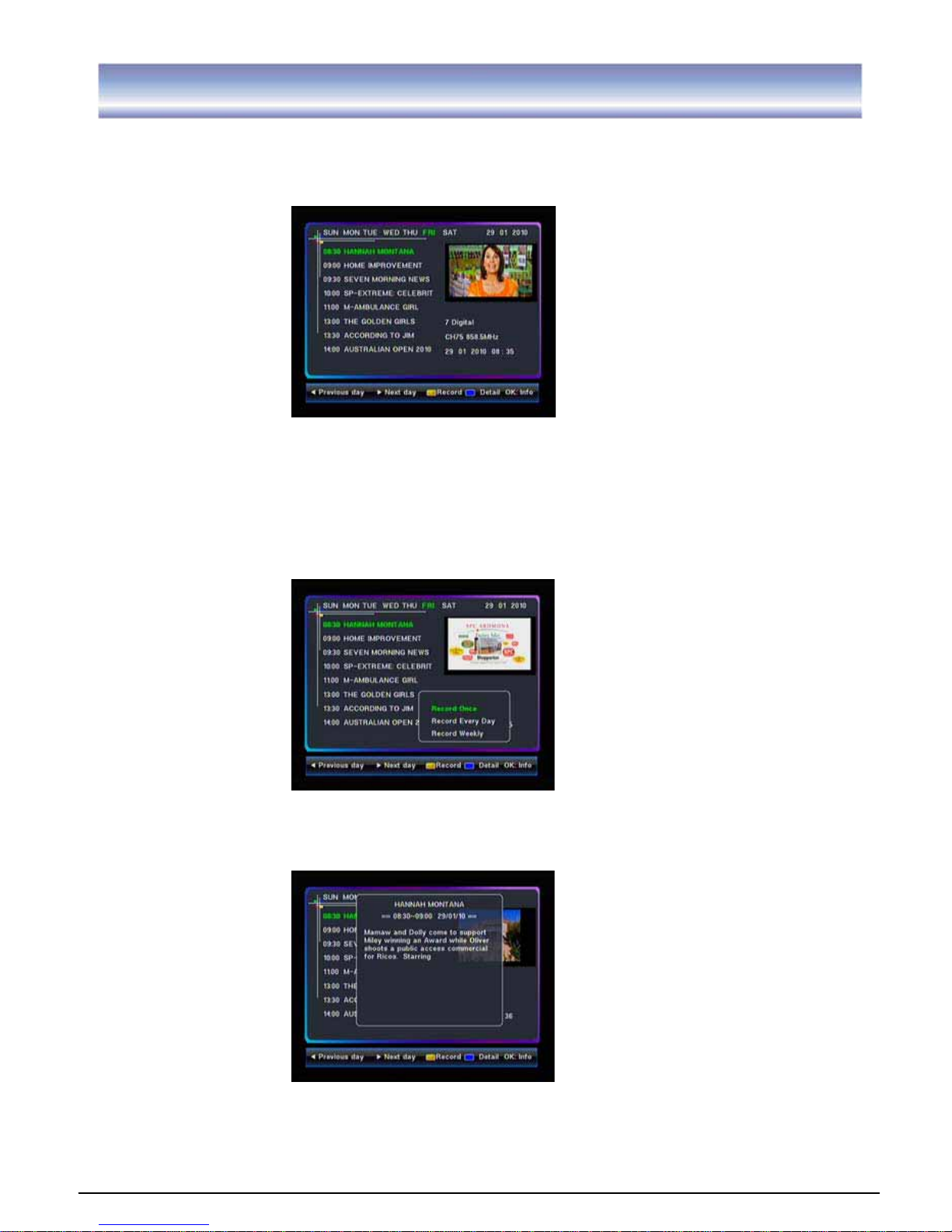
EPG (Electronic Program Guide)
1. Press EPG key to view the EPG information that is provided by the content providers.
2. Press
key to view the event information such as event name and event time.
3. Press൘key to view the event information of the next day, pressൖ to view the event
information of the previous day.
4. Press YELLOW key to set pre-record, press
key to select the options: Record
Once, Record Everyday, Record Weekly.Press OK key to confirm and an icon will
appear. Press yellow key again, the icon will disappear.
5. Press BLUE key to view the detail of the current event, press OK key to view the brief
information of the current event.
6. Press EPG key again or press EXIT key to exit the menu.
Page 17
16
Recording Function
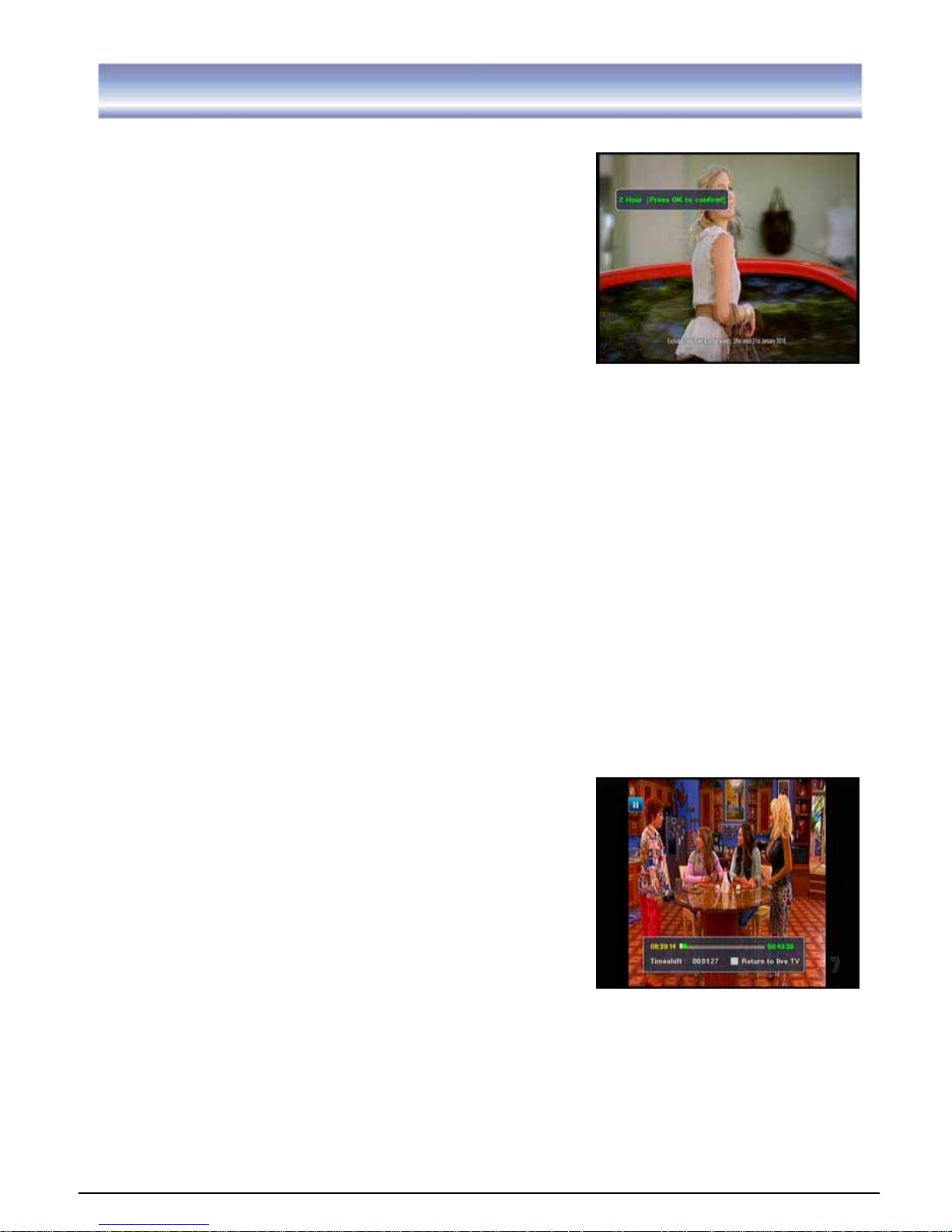
Instant Recording
1. Press REC key to pop up a box, press
ൖ൘keys to
select the options˖30M, 1H, 2H, infinite. Press OK key
to confirm and start recording in Live TV mode. A
Hard disk symbol with recorded time indicator will be
shown on the top-left of the screen. The symbol will
disappear after 15 seconds while the recording is still
in prograss. Press INFO key to show it again.
2. Press STOP key to stop recording, recorded clips can
be viewed from the PVR menu.
Note:
1. During recording, you can change to watch other channels at your decision, recording
will continue in the background.
2. Press the POWER key on the RCU, the unit will switch to standby mode. If the
recording timer list is not empty, the unit will wake up 4 minutes before the scheduled
recording time unless there is less than 5 minutes left before the scheduled recording
time when you press the POWER key, in this case, the unit will switch to active standby
mode and start recording at exactly the scheduled recording time.
3. It does not support subtitles during recording programs.
4.To avoid any unnecessary damage to hard disc, do not cut the power during the
recording, time shift, format or any operation on disc.
5. If the loop through cable is not attached to the unit properly, the unit won’t record.
Time Shift
1. Press PAUSE to play or start time shift function in Live TV Mode, time shift function up
to half hour.
2. Press PAUSE key again to pause the screen while playing in time shift mode.
3. Press FF key to circulate between 2X, 4X, 8X, 16X,
32X fast forward & play mode.
4. Press REW key to circulate between 2X, 4X, 8X,
16X, 32X fast rewind & play mode.
5. Press PREV key to reach the start of the program.
6. Press NEXT key to reach the end of the program.
7. Press STOP key to stop time shift and return to live
TV mode.
Note:
1. Only VOL, MUTE and REC keys are functional in Time Shift mode. If you press other
keys, there will appear a board “Time shift is on, please press STOP key first!”
2. Pressing PLAY key is invalid during the first 5 seconds in Time Shift mode.
Page 18

17
Main Menu
This section guides you to walk through of all options on the Menu screen.
G
Navigation in the Main Menu
G
1. Press MENU key to bring up the main menu or return previous.
2. Press key to move upward/down to the sub menu.
3. Press OK/൘key to enter into the sub menu you select, pressൖ key to return main
menu.G
4. Press EXITGkey to exit the main menu.
Note: While in sub-menu, press MENU to return to upper level, press EXIT key to go back
to TV program.
G
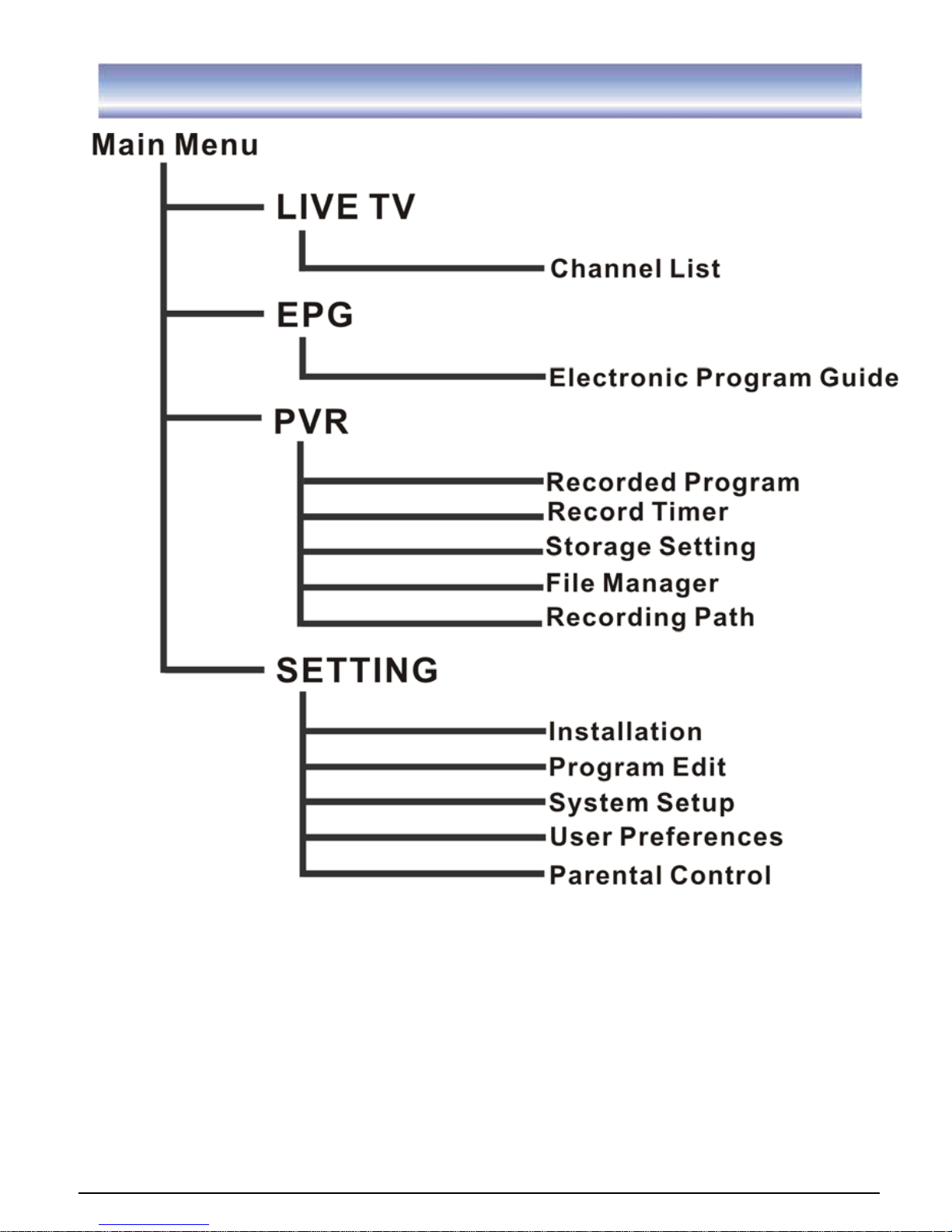
The main menu has 4 sections; please refer to the menu tree in the next page.
Live TV
EPG
PVR
SETTING
G
G
G
G
G
G
G
G
G
G
G
G
G
G
G
Page 19
18
Main Menu
G
G
G
G
G
G
G
G
Page 20
19
LIVE TV
G
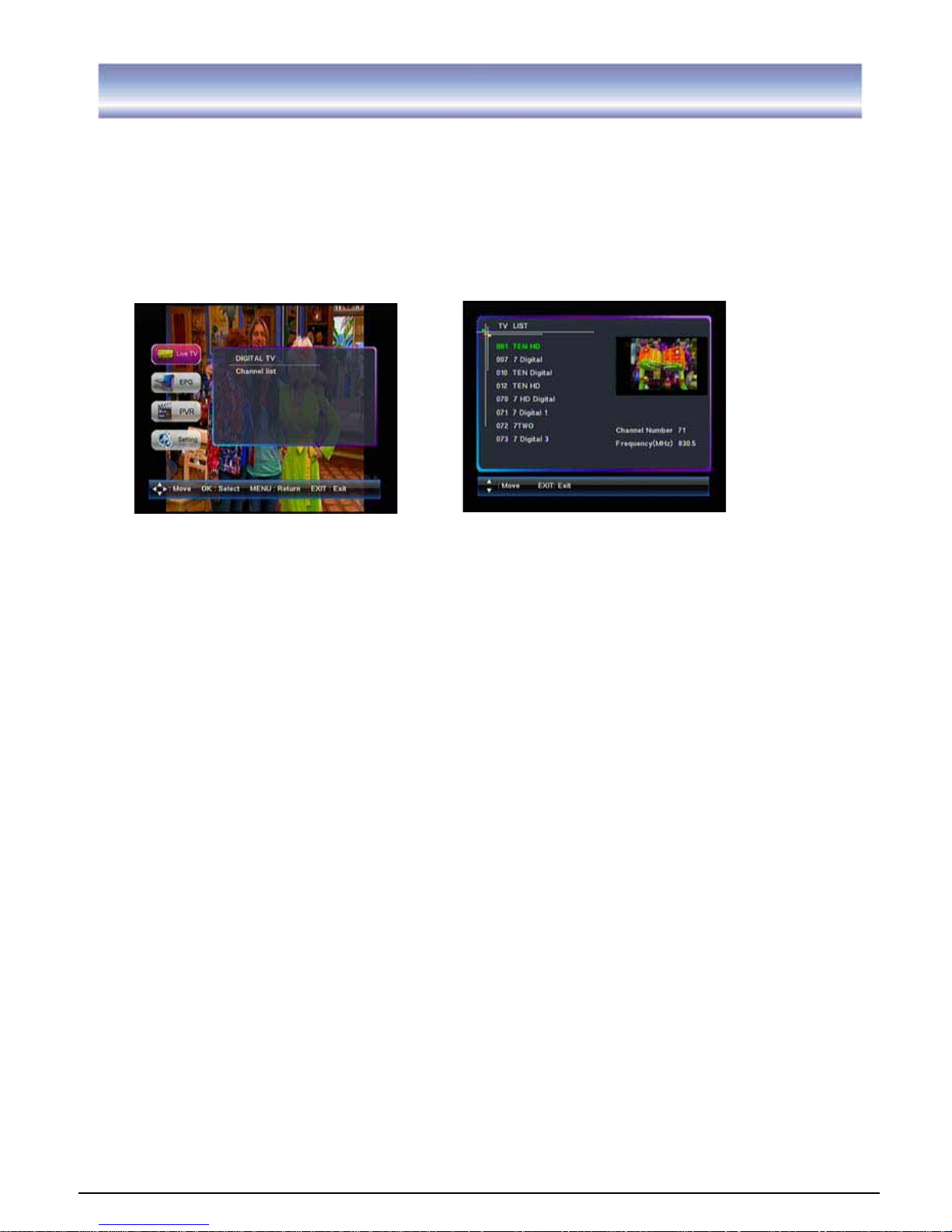
Live TV
1. Go to Main menu > Live TV.G
2. Press OK key to view TV program list.
3. Press key to select the program you want and press OK key to confirm.
4. Press EXIT key to exit all menu or press MENU key to return to the previous menu.
GGGGGGGGGGGG
G
G
G
G
G
G
G
G
G
G
G
G
G
G
G
G
G
G
G
G
G
G
G
Page 21
20
PVR
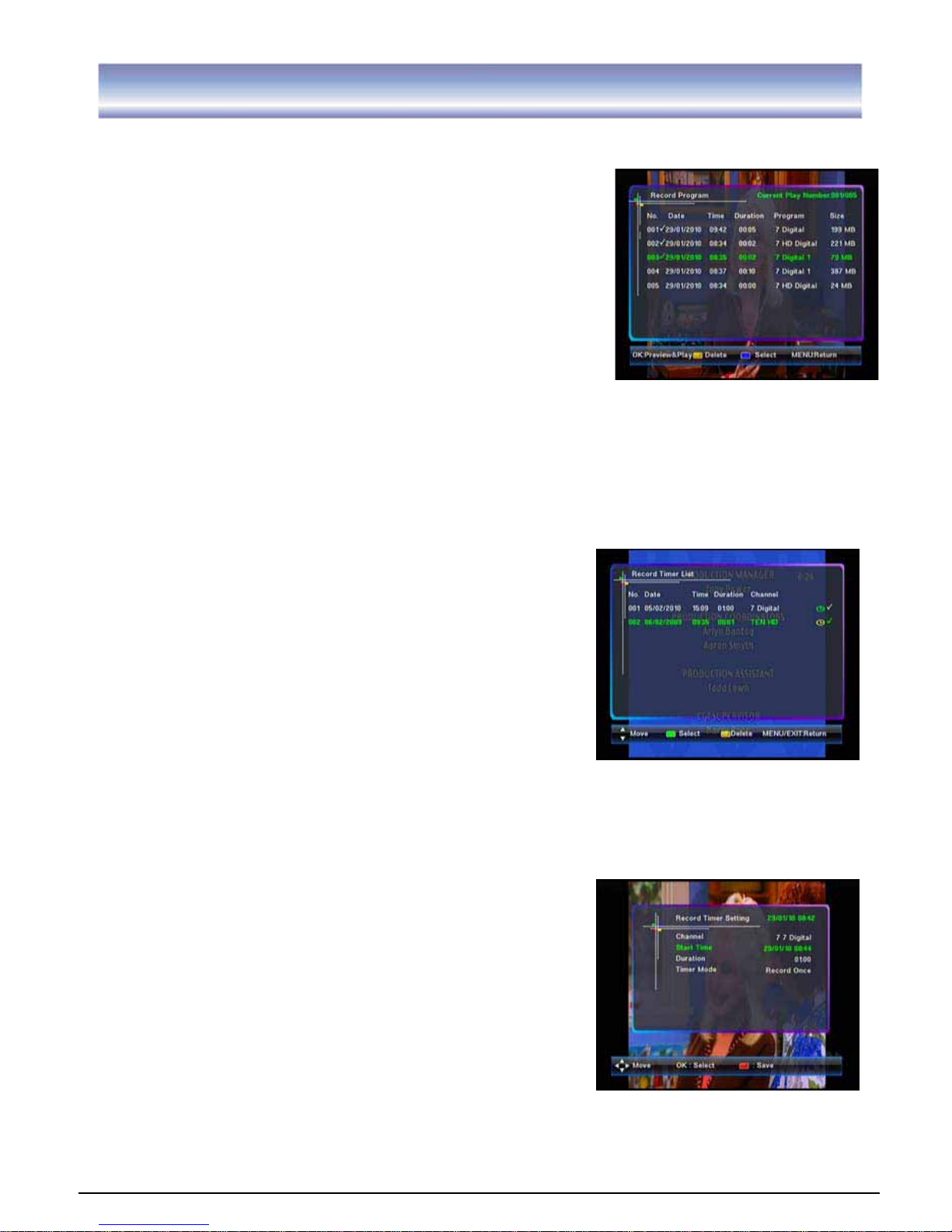
Recorded Program
1. Go to Main menu > PVR > Recorded Program.
2. Press OK key to view PVR List.
3. Press key to select the program, press OK key to
pre-view, and press OK key again to full-screen view.
4. Press BLUE key to mark this program, a check icon”Ĝ”
will appear. Press BLUE key again to cancel the
operation, the icon will disappear, and press yellow key
to delete the selected program.
5. Press EXIT key to exit all menu or press MENU to return
to the previous menu.
Note:
1. Please select storage location, either HDD or USB, in the Recording Path before
recording.
2. It will not play PVR programs automatically after enter the PVR list.
3. It does not support subtitles in the PVR play mode.
4. Numeric keys, CH +/-, FORMAT, EPG, TXT, Radio/TV, FAV, SYS, Audio and Standby
are invalid in PVR mode.
Record Timer
Record Timer List
1. Go to Main menu > PVR > Record Timer>Record
Timer List.
2. Presskey to select the program.
3. Press GREEN key to mark this program, a check
iconāĜ” will appear. Press GREEN key again to cancel the operation, the icon will
disappear. Press yellow key to delete.
4. Press EXIT key to exit all menu or press MENU key to return to the previous menu.
Add Record Timer
1. Go to Main menu > PVR > Record Timer>Add Record
Timer.
2. Press to select the options: Channel, Timer
mode, press OK key to enter submenu of selected
option and Press key to select the item, and
press OK key to confirm.
3. Press key to select the options: Start Time,
Duration, press OK key to enter the edit mode and
pressൖ൘key to select day, month, year and hour,
minute, and press or input numeric number to select the time.
4. Press RED key to save the information.
Page 22
21
PVR
Storage Setting
Storage Information
1. Go to Main menu > PVR >Storage Setting >Storage information.
2. Press OK key to display detail.
3. Press EXIT key to exit all menu or press MENU key to return to the previous menu.
Storage Format
1. Go to Main menu > PVR >Storage Setting > Storage Format.
2. A password input window will show on the screen, input the correct pin code and press
OK key to confirm format.
Note: Existing platform can’t support NTFS format.
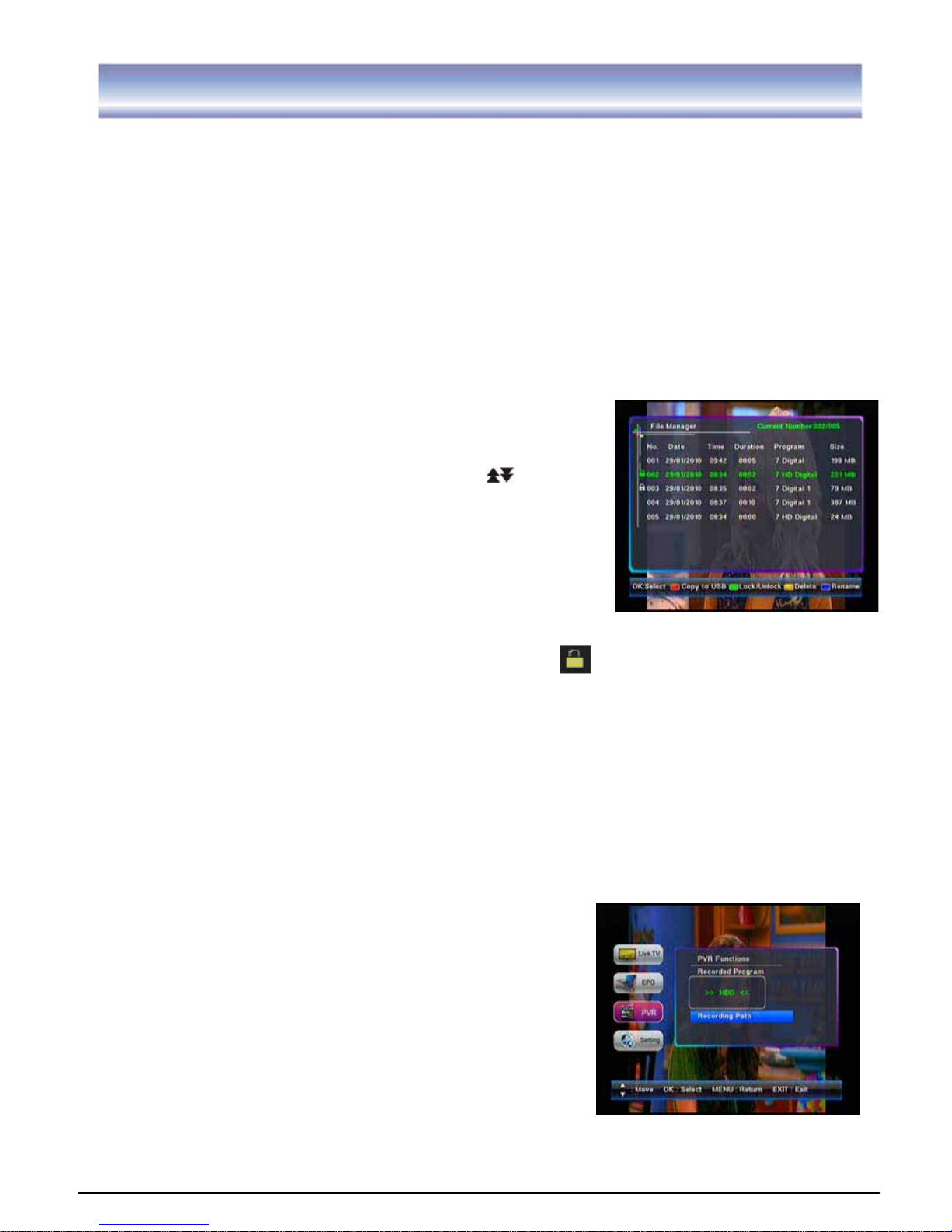
File Manager
1. Go to Main menu > PVR > File Manager.
2. Press key to select the file and press key to
page up/down.
3. Press OK key to mark this program, a check icon”Ĝ” will
appear. Press OK key again to cancel the operation, the
icon will disappear.
4. Press RED key to copy the file from HDD to USB or from
USB to HDD.
5. Press GREEN key to lock this program, a lock icon will appear. Press GREEN key
again to unlock the program, you will need a password to unlock. The lock icon will
disappear.
6. Press BLUE key to show the keypad, pressൖ൘key to select the letters and press
OK key to confirm. Press YELLOW key to save and quit, press GREEN key to delete
the letters.
7. Press YELLOW key to delete the program.
8. Press EXIT key to exit all menu or press MENU key to return to the previous menu.
Note: Multiple files can be copied simultaneously. If you want to stop copy in half-way,
it can only be stopped by pressing EXIT key after a file copy is completed. It can’t be
interrupted during copy.
Recording Path
1. Go to Main menu > PVR > Recording Path.
2. Press OK key to show a list box, press ൖ൘key to
select the options: HDD, USB, and press OK key to
confirm.
3. Press EXIT key to exit all menu or press MENU key to
return to the previous menu.
Note: As the recording path changed, the current file path is changed as well.
Page 23
22
Setting
Installation
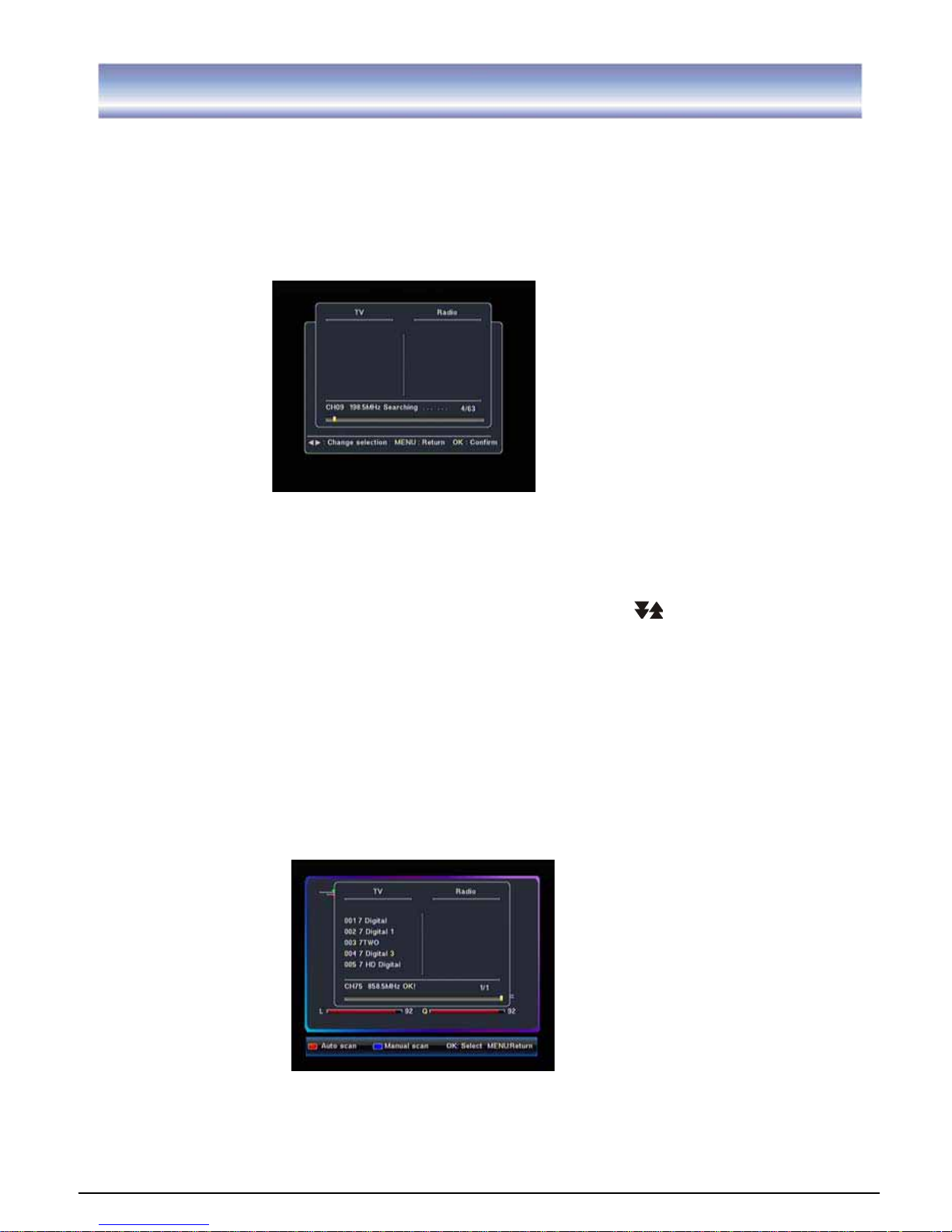
Auto Scan
1. Go to Main menu >Setting >Installation.G
2. Press RED key to auto scan all the channels.
3. Press EXIT key to stop during the auto scan.
GGGGGGGGGGGGGG
G
G
G
G
G
Manual Scan
1. Go to Main menu > Setting >Installation.
2. Press to select the channels you want to scan. Press key to page up/down.
3. Press OK key to select the channel, press again to cancel your selection. If the channel
is selected, an icon “Ĝ” will appear.
4. Repeat step2, 3 until all channels you want to search are selected.
5. Press BLUE key to start scanning the selected channels.
6. Press EXIT key to stop during the scan.
Page 24
23
Setting
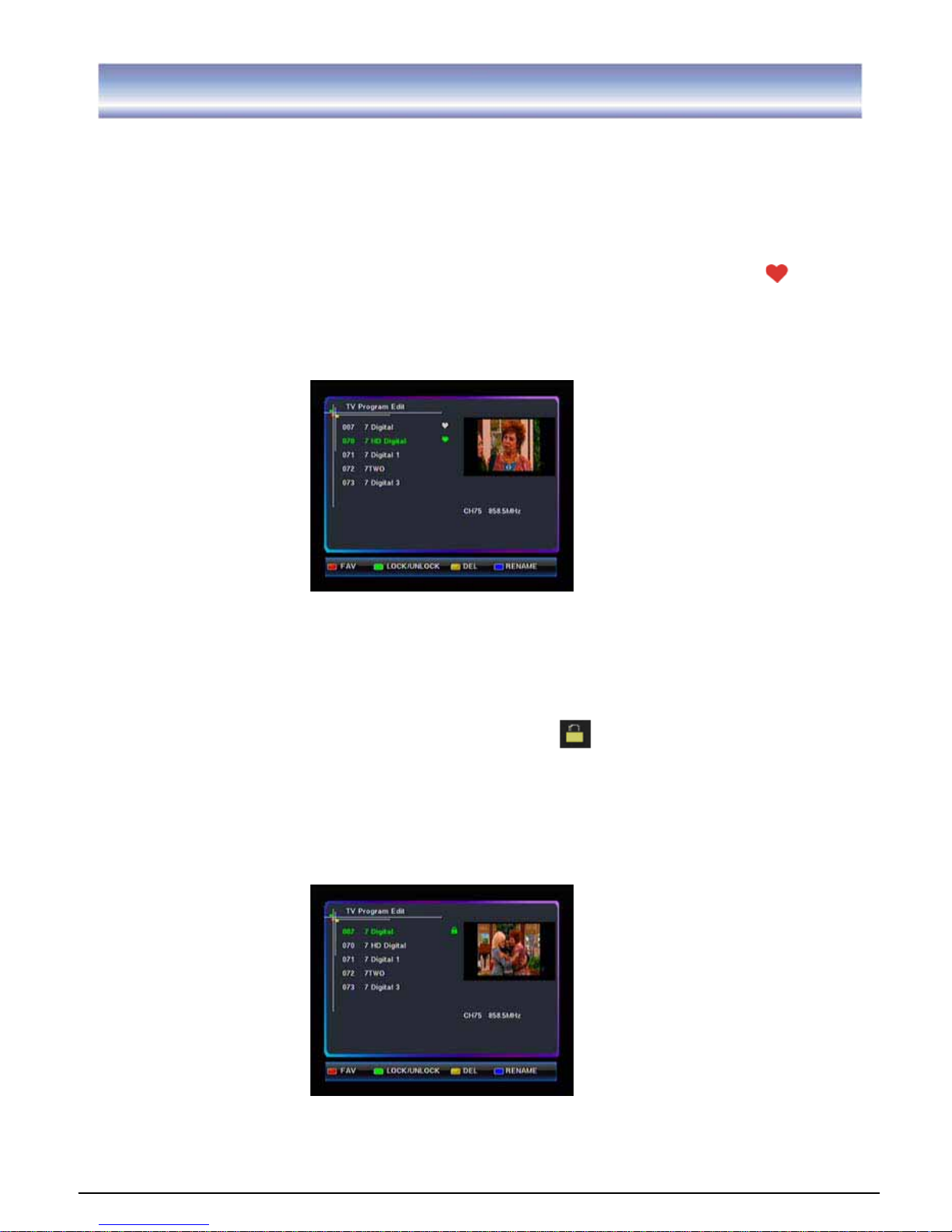
Program Edit
Edit Favorite
1. Go to Main menu > Setting>Program edit.
2. Press key to select the program.
3. Press RED key to add the program to the favorite list you selected, a FAV icon
will
appear.
4. Press RED key again to cancel this operation, the FAV icon will disappear.
5. Press EXIT key to exit all menu or press MENU key to return to the previous menu.
Lock/Unlock Program
1. Go to Main menu > Setting>Program edit.
2. Press
key to select a program.
3. Press GREEN key to lock this program. A lock icon will appear.
4. Press GREEN key again to unlock this program. The lock icon will disappear.
5. Press EXIT key to exit all menu or press MENU key to return to the previous menu.
Page 25
24
Setting
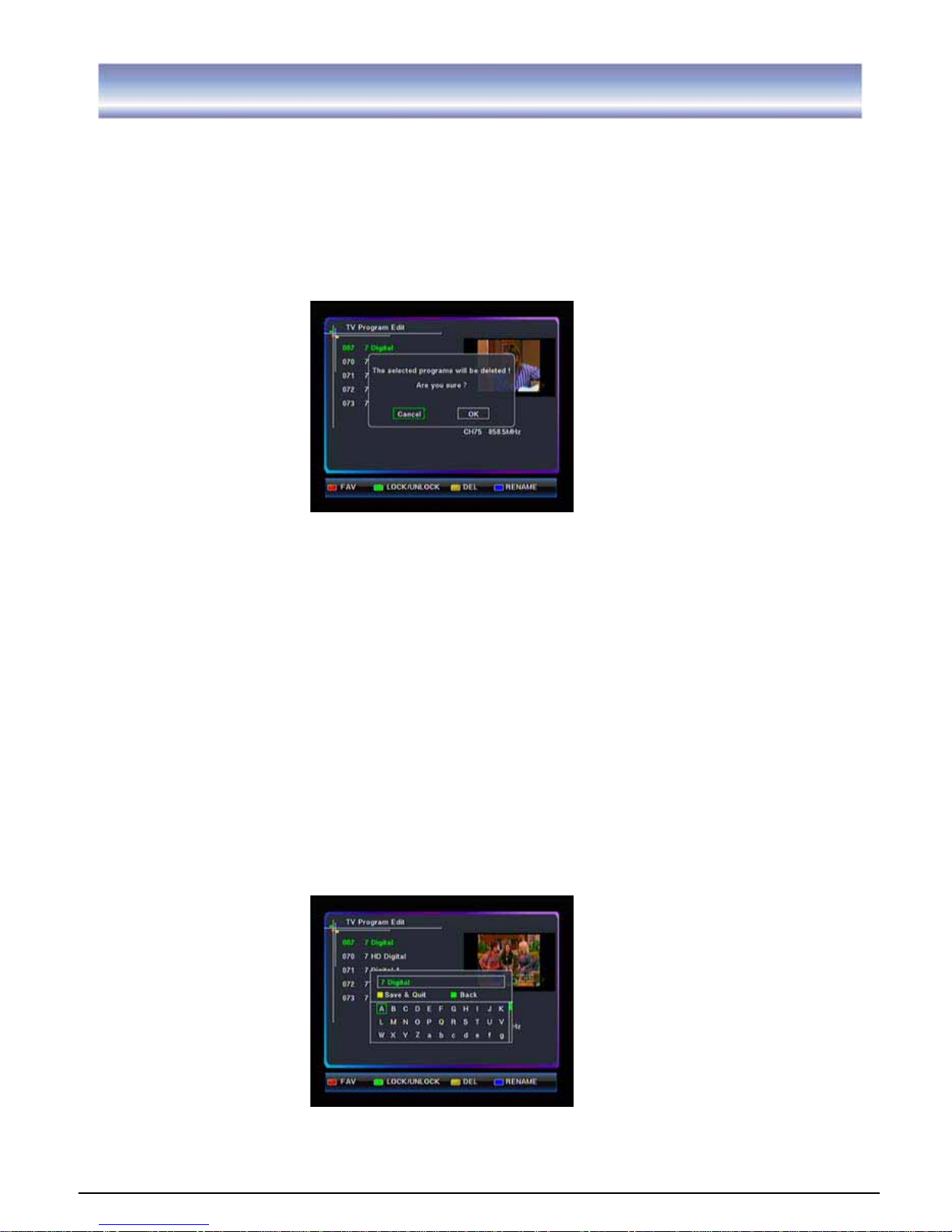
Delete Program
1. Go to Main menu > Setting >Program edit.
2. Press key to select the program.
3. Press YELLOW key to delete the program and a window will pop up asking you to
confirm. Highlight OK and press OK key to confirm delete.
4. Press EXIT key to exit all menu or press MENU key to return to the previous menu.
Rename
1. Go to Main menu >Setting> Program edit.
2. Press to select a program you want to rename.
3. Press BLUE key to enter the Name Edit Menu. A keyboard will show on the screen.
4. Press ൖ൘ to select the letters and press OK key to confirm. Press YELLOW key
to save and quit, press GREEN key to delete letters.
5. Press EXIT key to exit all menu or press MENU key to return to the previous menu.
Note: You can only enter maximum 16 letters.
Page 26
25
Setting GGGGGGG
System Setup
A/V Output Setting
1. Go to Main menu >Setting> System setup > A/V output setting.
2. Press key to select the options: Video Resolution, Aspect Radio, and Audio
SPDIF. And press OK key to enter submenu of selected option.
3. PressG G key to select the item, and press OK key to confirm.
4
. Press EXIT key to exit all menu or press MENU key to return to the previous menu.
Resolution supported: 1080i, 720P, 576P. Screen aspect supported: 16:9 Full, 16:9
Letter box, 4:3 Full, 4:3 Letter box and Panscan.
Audio SPDIF: Auto, PCM, Compress, OFF.
Local Time Setting
1. Go to Main menu > Setting > System setup > Local Time Setting.
2. Press key to select the options: Time zone, Daylight saving, and press OK key to
enter submenu of selected option.
3. Press key to select the item, and press OK key to confirm.
4. Press EXIT key to exit all menu or press MENU key to return to the previous menu.
Timer Setup
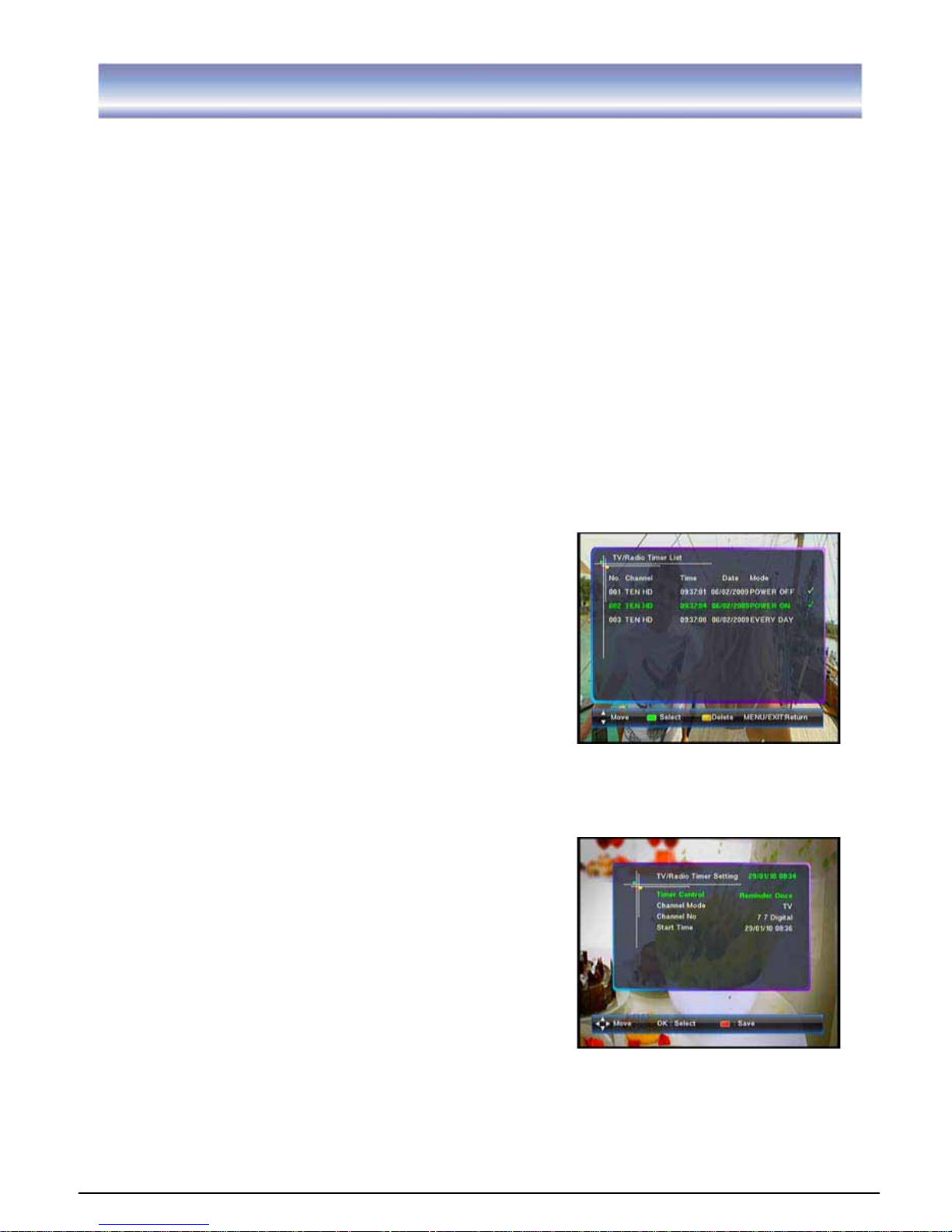
TV Timer List
1. Go to Main menu > Setting > System setup
>Timer Setup> TV / Radio Timer List.
2. Presskey to select the program.
3. Press GREEN key to mark this program, a check
icon“Ĝ” will appear. Press GREEN key again to
cancel the operation, the icon will disappear. Press
YELLOW key to delete.
4. Press EXIT key to exit all menu or press MENU key to return to the previous menu.
Add TV Timer
1. Go to Main menu > Setting > System setup >Timer
Setup>Add TV / Radio Timer.
2. Press to select the options: Timer Control,
Channel Mode, Channel No.. Press OK key to enter
submenu of selected option and press key to
select the item that you want to set, and press OK
key to confirm.
3. Press key to select the option: Start Time,
press OK key and pressൖ൘key to select day,
month, year and hour, minute, and press or input numeric number to select the
time you want.
4. Press RED key to save the information.
5. Press EXIT key to exit all menu or press MENU key to return to the previous menu.
Page 27
26
Setting
System Information
1. Go to Main menu > Setting > System Setup > System Information.
2. Press OK key to view the software/hardware Information of this unit.
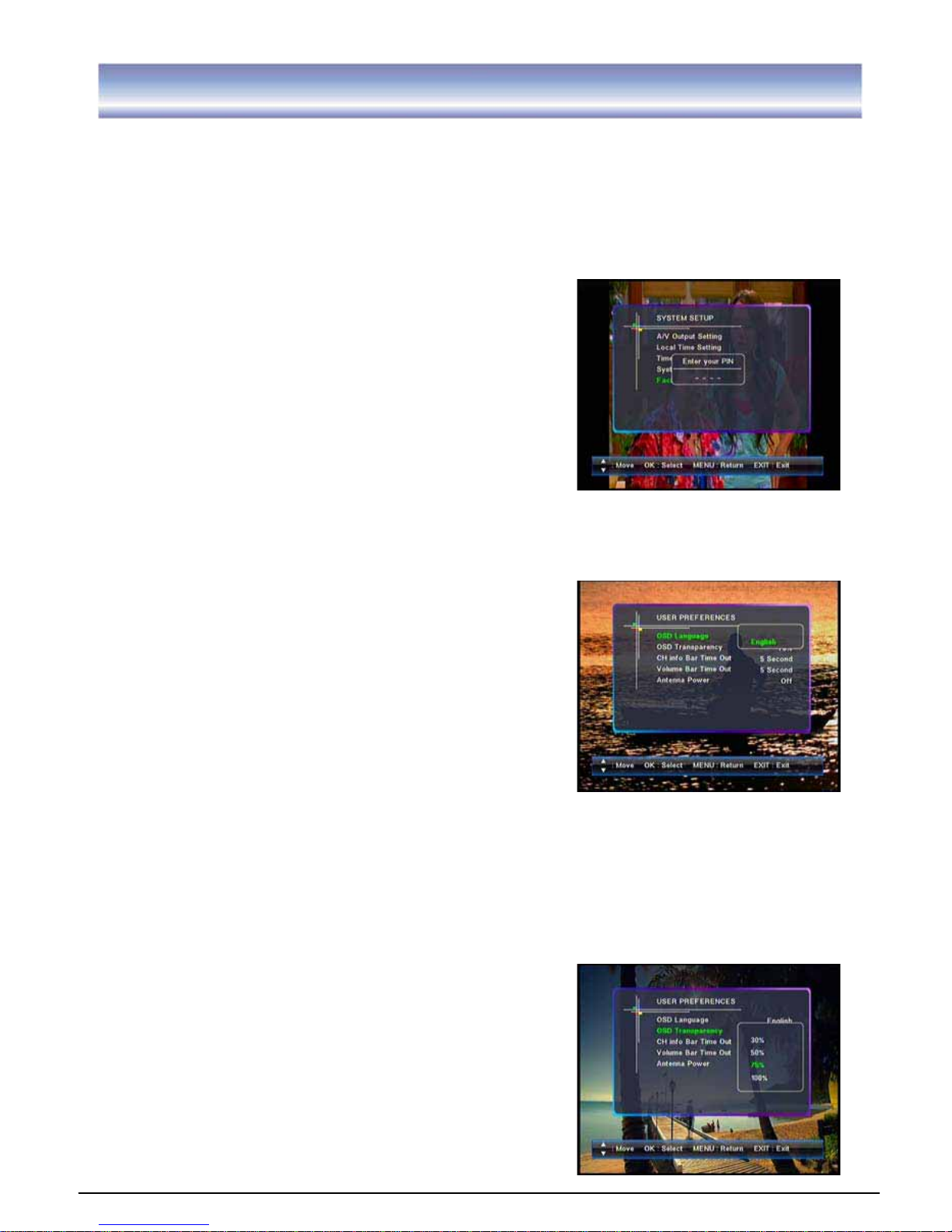
Factory Default
1. Go to Main menu > Setting >System Setup >
Factory Default.
2. Press OK key and input the correct the PIN code
and press OK key again to confirm your selection,
the factory default data will be loaded.
Note: Factory default PIN is “0000”.
User preferences GGGGGGGGGGGGGGGGGGGGGG
OSD Language
Go to Main menu > Setting > User preferences >OSD
language.
Only English is supported for this unit.
OSD Transparency
1. Go to Main menu > Setting > User Preferences >OSD Transparency.
2. Press key to select the OSD Transparency option, and press OK key to enter
submenu.
3. Press key to select the transparency
value (4 transparency modes
are available: 30%, 50%, 75%, 100%), and press OK
key to confirm.
4. Press EXIT key to exit all menu or press MENU key
to return to the previous menu.
G
G
Page 28
27
Setting
G
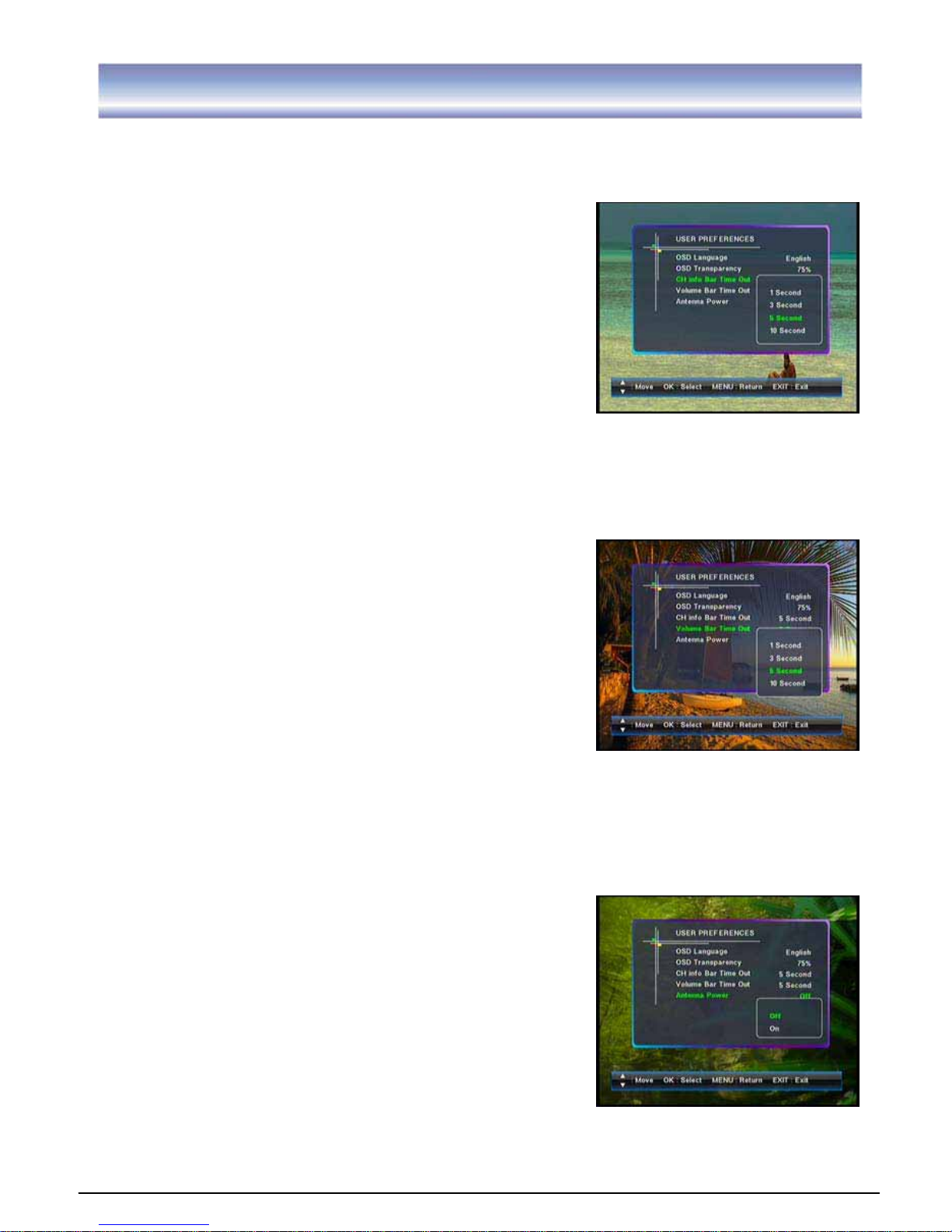
CH Info Bar Time Out
1. Go to Main menu > Setting > User preferences >CH Info Bar Time Out.
2. Press key to select the CH Info Bar Time Out option,
and press OK key to enter submenu.
3. Press key to select the timeout (4 timeout modes are
available: 1 second, 3 second, 5 second, 10 second),
and press OK key to confirm.
4. Press EXIT key to exit all menu or press MENU
key to return to the previous menu.
Volume Bar Time Out
1. Go to Main menu > Setting > User preferences >Volume Bar Time Out.
2. Press key to select the Volume Bar Time Out
option, and press OK key to enter submenu.
3. Press key to select the timeout (
4 timeout modes are available: 1 second,
3 second, 5.second, 10 second), and press OK key
to confirm.
4. Press EXIT key to exit all menu or press MENU key to
return to the previous menu.
Antenna Power
1. Go to Main menu > Setting > User preferences >Antenna Power.
2. Press key to select the Antenna Power option, and
press OK key to enter submenu.
3. PressƷ key to select the options: off,on. And press OK key
to confirm.
4. Press EXIT key to exit all menu or press MENU key to return
to the previous menu.
Note: If the unit is power off, then there is a cue appeared on the
screen “Antenna power error, it will be off.”
Page 29
28
SettingGGGGGGGGGGGGGGGGG
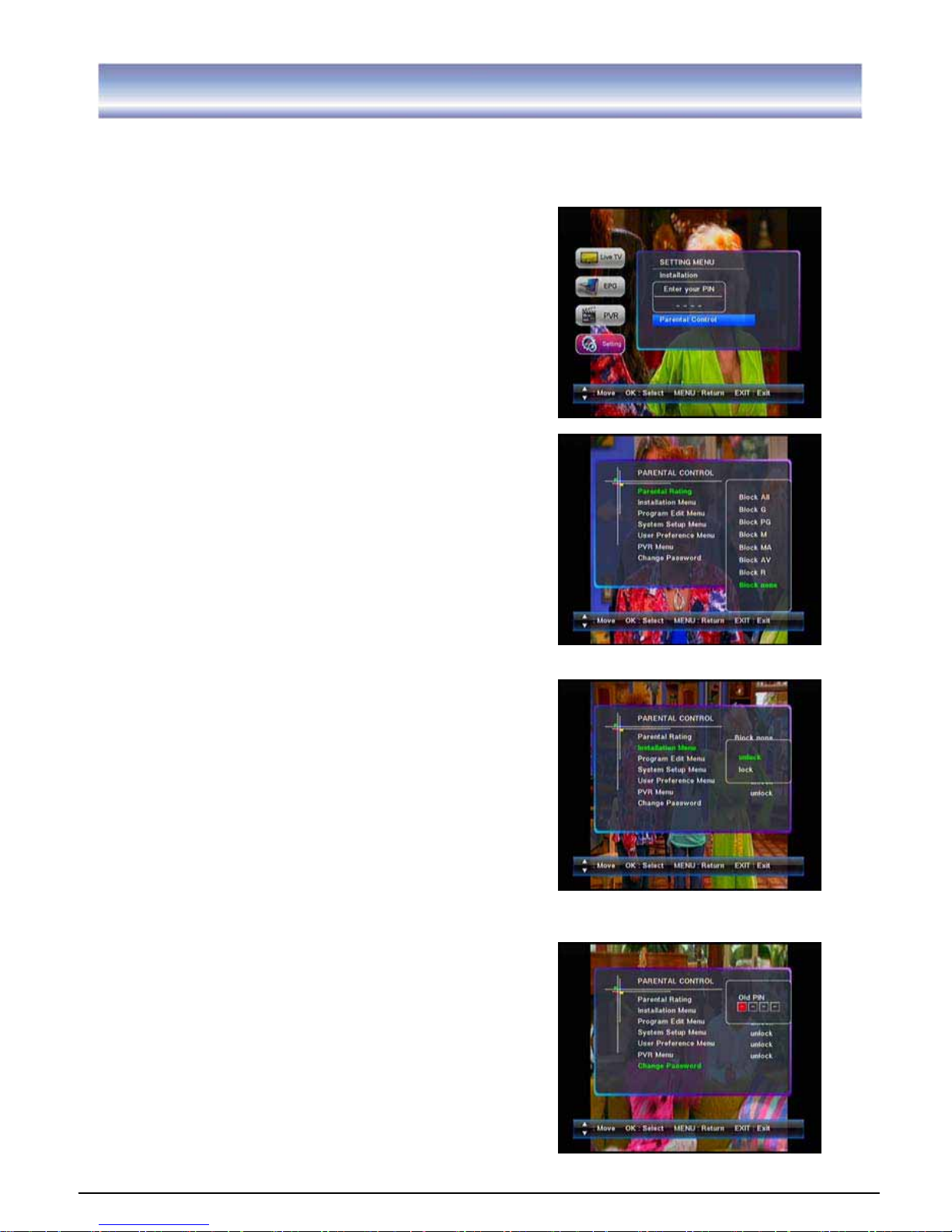
Parental Control
1. Go to Main menu > Setting >Parental control.
2. Press Ʒ key to select the Parental Control option, and press OK key and input the correct the
PIN code to enter the submenu.
1. Parental Rating
To set the rating level
There are up to 8 levels are available.
ALL: All programs are blocked
G: General
PG: Parental guidance
M: Mature audience, 15+ year old
MA: Mature adult audience 15+ year old
AV: Adult audience, strong violence, 15+ year old
R: Restricted, 18+ year old
None: No programs are blocked
2.
Installation Menu
To lock/ unlock the Installation Menu
3. Program Edit Menu
To lock/ unlock the Channel Edit Menu
4. System Setup Menu
To lock/ unlock the Setup Menu
5. User preferences Menu
To lock/ unlock the User preferences Menu
G
6. PVR Menu
To lock/ unlock the PVR Menu
7. Change Password
To modify the user’s password
Note: Factory default password is “0000”.
If you forgot your password, please input the
override code 7710 to unlock.
Page 30
29
Trouble Shooting
If you experience problems with this unit or its installation, in the first instance please read
carefully the relevant sections of this User Manual and this Troubleshooting section.
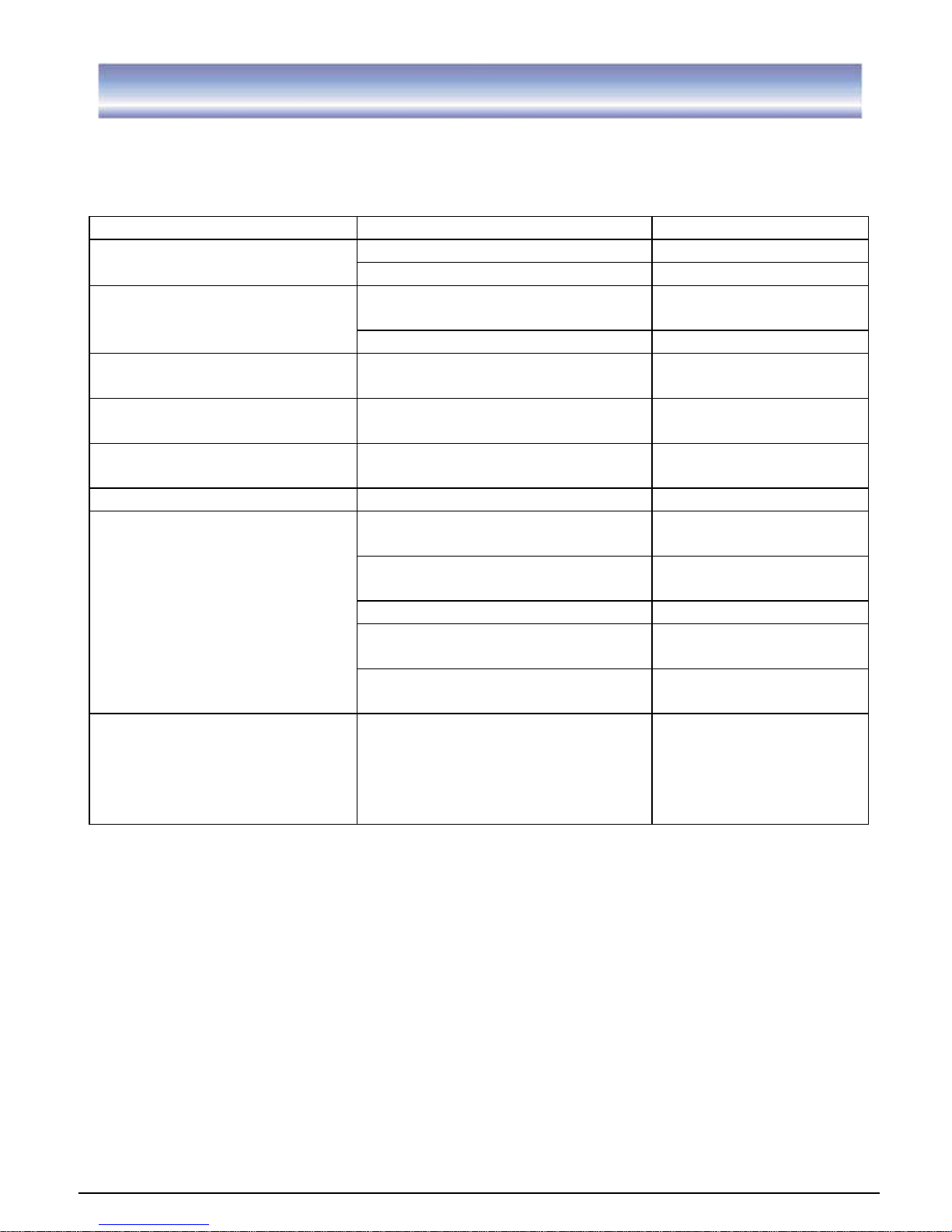
Problem Possible cause What to do
Main lead unplugged Check mains lead Display on front panel not lit
Main fuse blown Check fuse
Aerial is disconnected
Aerial is damaged/misaligned
Check aerial lead
Check aerial
No signal found
Out of digital signal area Check with dealer
No picture or sound
Program not broadcasting now
Retune to another
channel
Mosaic blocks in picture or
picture freezes
Aerial may not be compatible Check aerial
Scrambled channel message Channel is scrambled Select an alternative
channel
Forgotten channel lock code Use the override code
Receiver off Plug in and turn on the
unit
Handset not aimed correctly Aim handset at front
panel
Front panel obstructed Check for obstructions
Remote control batteries are
inserted incorrectly
Check batteries
direction
No response to remote
control
Handset batteries exhausted Replace remote
control batteries
After moving the unit to
another room, find can’t
receive the digital reception
The aerial feed may come
through a distribution system
which may reduce the digital
signal now received by the
unit
Try a direct feed from
the antenna
G
Warning:
If this doesn’t work, contact a qualified repair technician, never
attempt to repair the unit yourself.
Page 31
30
Technical Specification
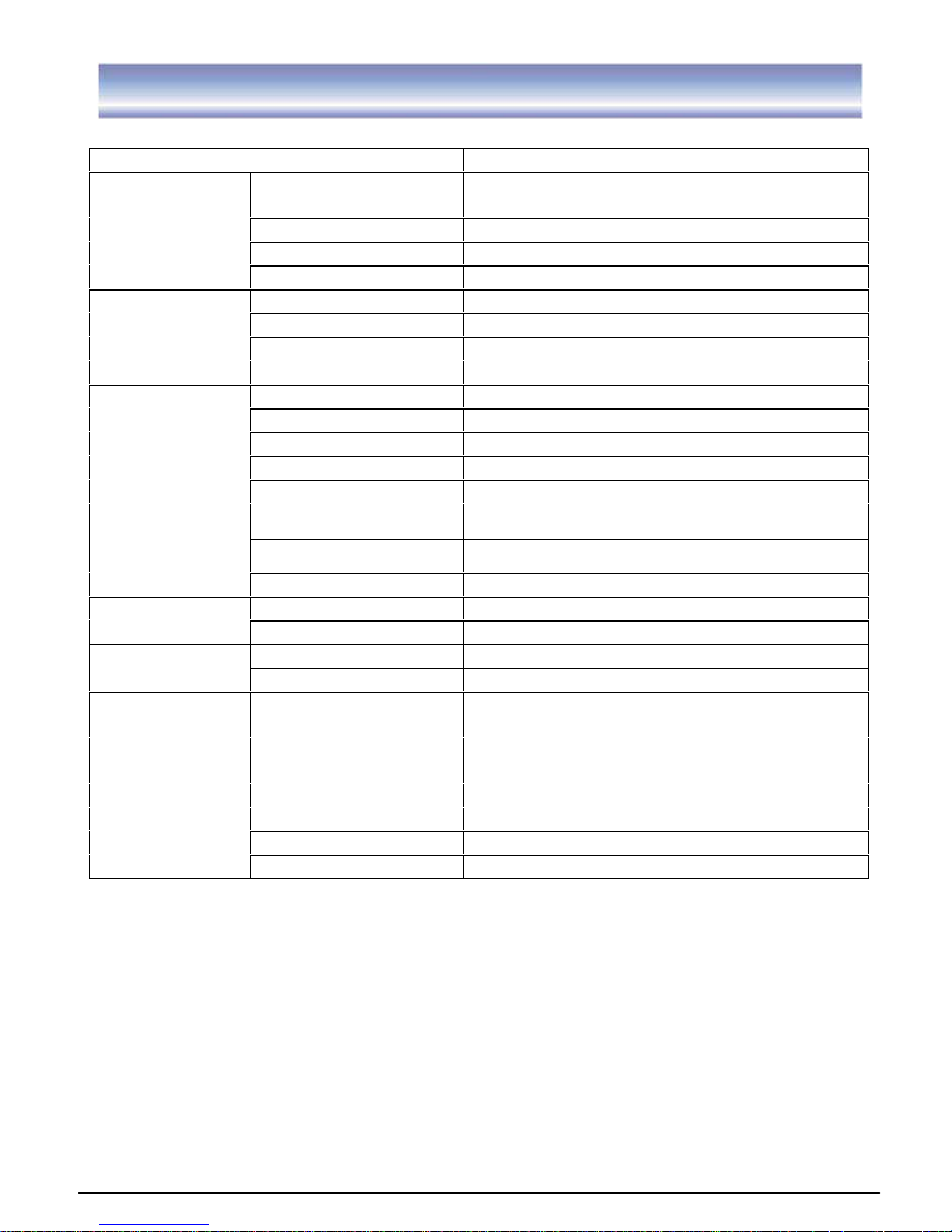
Item Specification
Frequency Range
VHF: 174MHz to 230MHz
UHF: 470MHz to 862MHz
Input Impedance 75Ohms unbalanced
Signal Input Level -78~-25dbm
TunerX2
Bandwidth 6/7/8M
Demodulator COFDM FFT Mode 2K,8K
OFDM Modulation 2K, 8K FFT, SFN and MFN
Packed Carries 2K/8K
Demodulation
Guard Interval 1/4, 1/8, 1/16, 1/32
RF IN IEC 169-2 female connector
RF Loop Through IEC 165-2 male connector
Y, Pb/Cb, Pr/Cr RCA for component video output
L/R RCA, Analog audio output
Coaxial RCA, for SPDIF digital audio output
HDMI
USB
USB 2.0 Host Interface supports
Connectors
Input 100-240V~50/60Hz
Consumption 25W max.
Power supply
Decoder Module PAL
Resolution 1920X1080i,1280X720p,720X576P,720X576i
Display
Aspect Ratio 4:3(Letterbox, full), 16:9(Letterbox, full),
Audio MPEG1, MPEG2 Layer 1&2, Dolby Digital
AC3, AAC/HE-AAC
Video/S-Video
MPEG1, MPEG2 MP@ML & MP@HL, H.264
MP@L4 & [email protected]
Decoding
Compliance ETSI EN 300 744 DVB-T Compliance
Sound Mode Right, Left, Stereo
Size 360*260*60mm
Others
Weight (Net) 2.5kg
Copyright
This manual contains information protected by copyright law.
No part of this document may be used or reproduced in any form or by any means,
or stored in a database/retrieval system without prior written permission from us.
The information of this manual is based on the current version of the product.
We reserve the right to alter the content without prior notice.
All brand names in this manual are the property of their respective owners.
Page 32

 Loading...