

Page 1
User Manual Olin Wireless Charger for Nintendo DS----Lite
Important Message
- Please read this user manual carefully before using the charging pad and receiver sleeve.
- Keep the charging pad and receiver sleeve away from water.
- Do not place or store the charging pad and receiver sleeve near water or any other liquid. Do not
immerse the charging pad or the receiver sleeve in water or any other liquid.
- After cleaning, make sure the charging pad is completely dry before you connect it to an electrical
socket.
Instructions
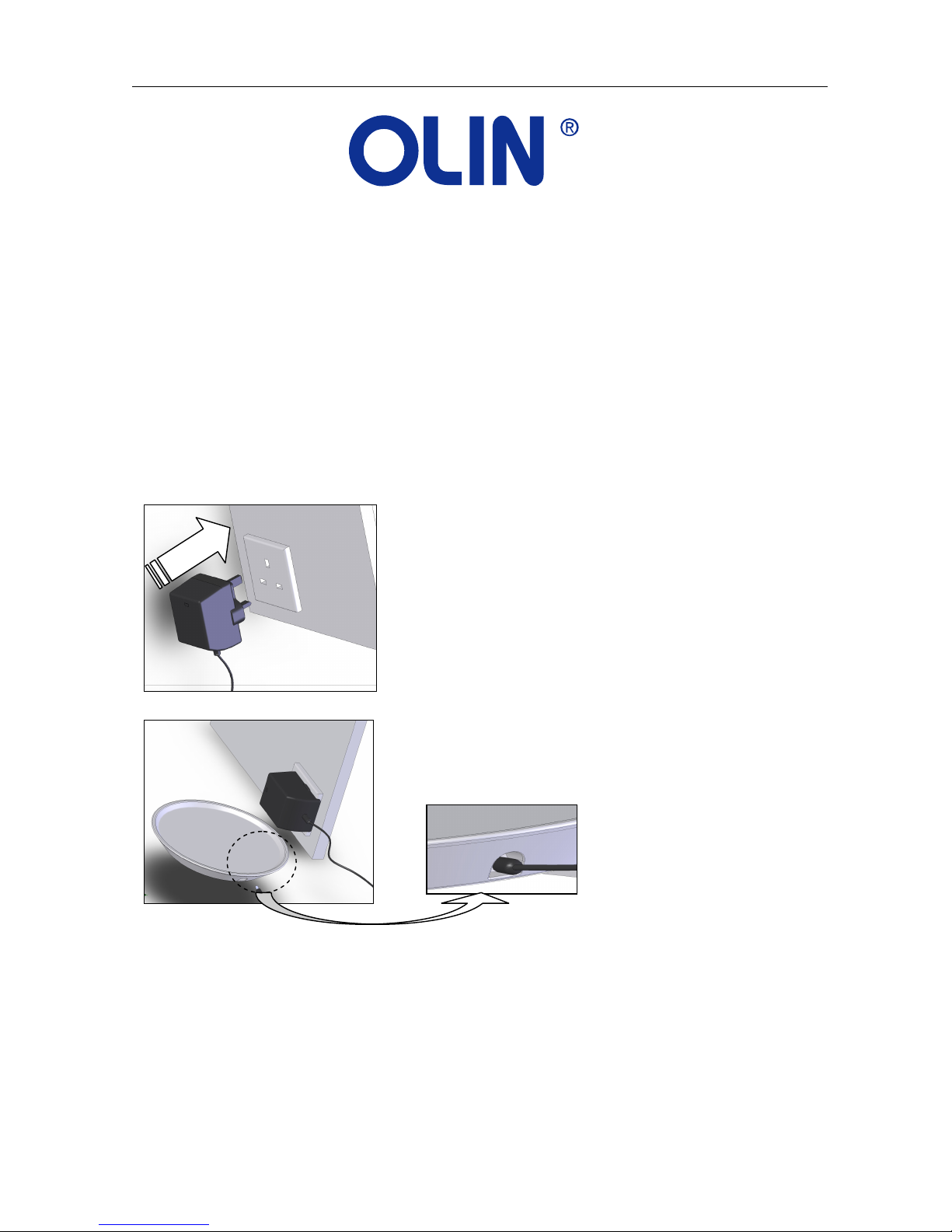
1. Connect the AC adaptor to the main
electrical socket.
2. Insert the cable into the designated slot of
the charging pad.
OWC-NDS User Manual 1 of 4
Page 2
User Manual Olin Wireless Charger for Nintendo DS----Lite
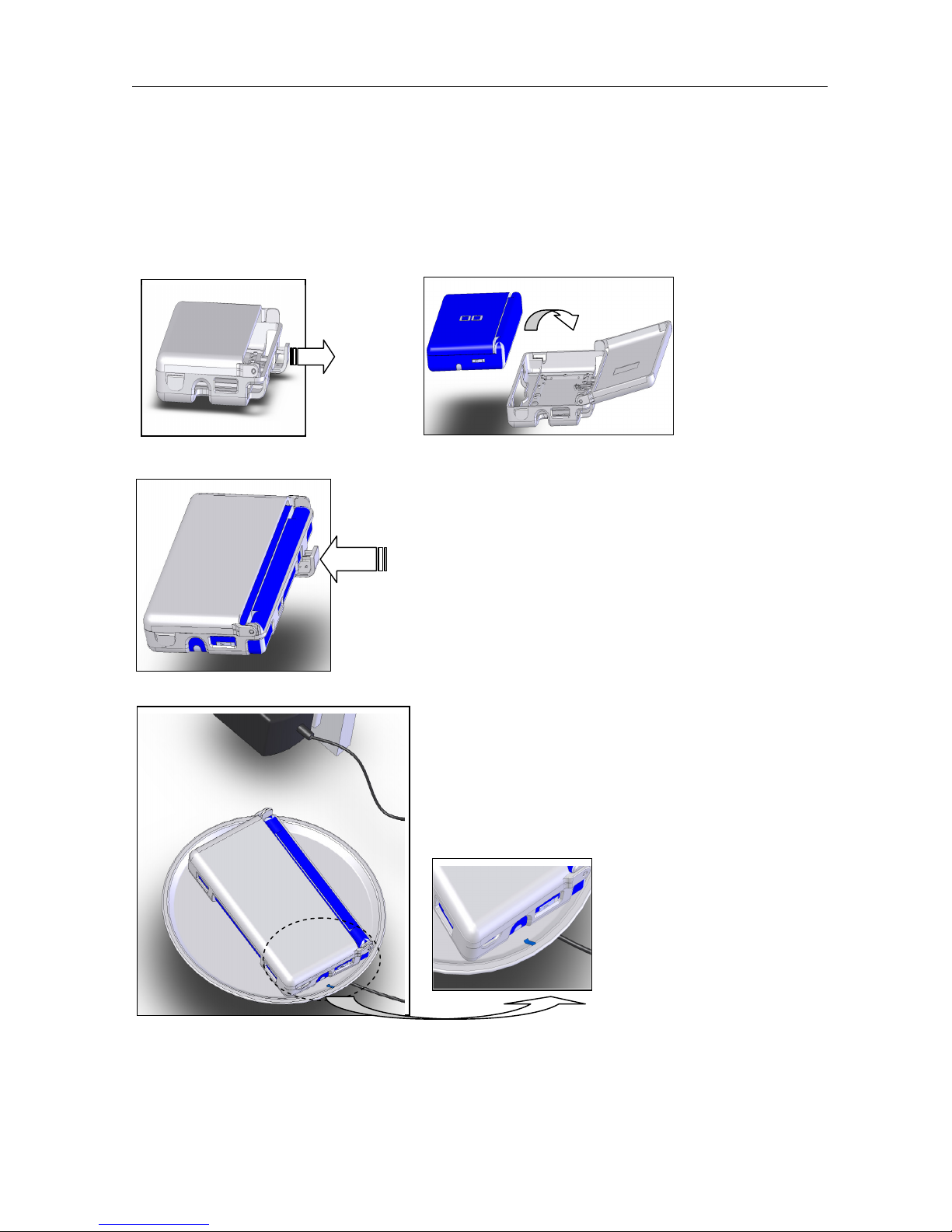
3. Pull out the connector latch on the back of
the receiver sleeve and place the NDS
device into the sleeve. You may close the
top-cover of the sleeve.
4. Push in the connector latch of the receiver
sleeve.
5. Place the NDS device (in the receiver sleeve)
onto the charging pad to start charging. The
blue light will illuminate during the charging
process. The light will go off upon
completion of the charging (standard wired
charging time).
6. You can continue to use your NDS device while charging; however, re-charging during game play will
take longer.
OWC-NDS User Manual 2 of 4
Page 3

User Manual Olin Wireless Charger for Nintendo DS----Lite
Please note:
When the NDS device is fully charged, the blue light will turn off.
When the charging pad is placed on a vibrating surface (e.g. a high power speaker), the blue light will
flash every 3 seconds and the NDS device will not start charging immediately when placed on the
charging pad. It will start to charge within 2 minutes.
When an un-official AC adaptor is used or an incorrect DC voltage is input to the charging pad, the blue
light will blink rapidly. Charging will not start in this case. Always use the official adaptor.
Warning
- Check if the voltage indicated on the AC adaptor corresponds to the local voltage before you
connect the adaptor to an electrical socket.
- Never use the AC adaptor, charging pad or receiver sleeve if any of them is damaged in any way.
- Only use the official AC adaptor (supplied together with the receiver sleeve and the charging pad).
When an un-official AC adaptor is used or an incorrect DC voltage is input to the charging pad, the
blue light will blink rapidly. No charging will occur in this case.
- Do not stick any metallic labels or any objects to the bottom of the receiver sleeve or onto the
charging pad. It will disrupt the charging process.
- Do not use the charging pad outdoors or near heated surfaces.
- If you have a pacemaker or other implanted device, consult your doctor or the manufacturer of the
implanted device before using the charging pad.
Product Specification
• AC adaptor : Input AC 100-240V ~ 50/60Hz, Output DC 16V / 0.8A
• Charging pad : Rated input DC 16V / 0.8A
• Receiver Sleeve : Rated output DC 5.2V / 450mA
• Operation temperature from 5 to 35 degrees C
• Dimension:
Pad: 169mm x 169mm x 21mm
Sleeve: 141.5mm x 80mm x 29mm
Frequently asked questions
This section lists the most frequently asked questions about the charging pad and receiver sleeve. If you
cannot find the answer to your question, contact your retailer.
Q1) Why does the receiver sleeve not charge my NDS device even when the charging pad light is on?
A1) Make sure the power connector door of the receiver sleeve is well connected. The receiver sleeve will
not charge the NDS device if the power connector door is not fully connected (ref User Manual, picture 4).
Q2) Why does the charging pad light not switch on when I place my NDS device on the charging pad?
A2) Make sure the AC adaptor is properly connected to an electrical socket and that the cable is properly
connected to the charging pad (ref User Manual, picture 1 and 2). Make sure the NDS device in its receiver
sleeve is placed flat on the charging pad.
OWC-NDS User Manual 3 of 4
Page 4

User Manual Olin Wireless Charger for Nintendo DS----Lite
Q3) When is my NDS device fully charged?
A3) Once the NDS device is fully charged, the blue light of the charging pad will turn off automatically,
indicating the charging process has been completed.
Q4) What happens if I put my credit cards, keys, or other metal objects on the charging pad?
A4) No adverse effects will occur if keys, coins, credit cards or other light metal objects are placed on the
charging pad. Heavy objects placed on the charging pad may damage the device.
Q5) Is this device water-proof?
A5) Liquids may damage the internal electronic components of the charging pad. Refrain from placing the
device in water or other liquids.
Customer Service
Should you encounter technical problems while using the products, please contact your local authorized
dealer, or Westwell friendly customer service team.
Call our toll free (Australian wide) customer helpline, 1800 656 630; or visit our website
www.westwell.com.au/olin
Copyright
This manual contains information protected by copyright law.
No part of this document may be used or reproduced in any form or by any means, or stored in a
database/retrieval system without prior written permission from us.
The information of this manual is based on the current version of the product.
We reserve the right to alter the content without prior notice.
All brand names in this manual are the property of their respective owners.
Trade Mark Disclaimer
© Westwell Australia PTY LTD 2009
Westwell & its stylized logo are registered in Australian IP office.
OLIN is a registered trade mark of Westwell Australia PTY LTD.
All rights reserved.
Nintendo and NDS are trademarks or registered trademarks of Nintendo. This product is not sponsored,
endorsed or approved by Nintendo.
All promotional materials are offered for reference only.
Actual product may vary.
OWC-NDS User Manual 4 of 4
 Loading...