

Page 1
Instrucciones de Uso / Operating instructions
Antes de utilizar este producto, por favo
r, lea
detenidamente este manual y consé
rvelo para
futuras referencias.
Before operating this unit, please read this manual
thoroughly and retain it for future reference.
Registro de propietario /Owner’s Record
El modelo y número de producto se encuentran en el menú
configuración. Anótelos en el espacio a continuación. Utilice
este número cuando necesite asistencia con el producto.
The model and serial numbers are located in the settings
menu. Record the serial number in the space provided below.
Refer to this numbers whenever you call for assistance
regarding this product.
Model No. __OKO/F1W10_________
Serial No. __________________________
Page 2

WARNING
Do not expose the unit to rain or moisture.
Do not expose the batteries to excessive heat sources, such as sunlight
(for extended periods of time) or fire.
CAUTION
Any changes or modifications that aren’t contemplated in this manual can
void your authority to operate this equipment.
If you have any questions regarding this product, contact us at:
www.okosmartframe.com
Note
This product has been tested and complies with the EMC Directive for
using connection cables and electronic devices.
The manufacturer provides reasonable protection against harmful
interference in a residential installation. This equipment generates and
uses radio frequency energy and, if not installed in accordance to the
instructions, may interfere with radio communications. However, there is
no guarantee that interference will not occur in a particular installation. If
this equipment does interfere with radio or television reception, which
can be determined by turning the equipment off and on, the user is
encouraged to try to correct the interference by one or more of the
following measures:
-Reorient or relocate the device increasing separation between the
equipment and the receiver.
-Connect the equipment to a different outlet.
-Consult the dealer or an experienced radio/TV technician for help.
Notice for users
Software © 2016 TAOC S.L.
Documentation © 2016 TAOC S.L.
All rights reserved. This manual or the software described herein, wholly
or partially, may not be reproduced, translated or reduced to any machine
readable form without prior written approval from TAOC.
IN NO EVENT SHALL TAOC S.L. BE LIABLE FOR ANY INCIDENTAL,
CONSEQUENTIAL OR SPECIAL DAMAGES, WHETHER BASED ON TORT,
CONTACT, OR OTHERWISE, ARISING OUT OF OR IN CONNECTION WITH
THIS MANUAL, THE SOFTWARE OR OTHER INFORMATION CONTAINED
HEREIN OR THE USE THEREOF.
TAOC S.L. reserves the right to make any modification to this manual or
the information contained herein at any time without notice. The
software described herein may also be governed by the terms of a
separate user license agreement.
Any design data such as sample pictures provided in this software cannot
be modified or duplicated except for the purpose of personal use. Any
unauthorized duplication of this software is prohibited under copyright
law. Please note that unauthorized duplication or modification of
Page 3

portraits or copyrighted work could infringe the rights reserved by rights
holders.
Notice that OKO™ is capable of updating its software even without the
user’s interaction, which may substantially change its features and
functions. You can keep up to date with the new capabilities and
functions of your OKO™ at:
www.okosmartframe.com
On the illustrations and screen shots used in this manual
The illustrations and screenshots used in this manual are of the
OKO/F1W10 unless noted otherwise. Please note that this product
provides online software updates that can substantially change the
features of your OKO™.
About OKO™App
To enjoy the best experience with your OKO™ we suggest you download
the mobile application OKO™App. Available on your usual App provider.
Although OKO can work by itself, not all features will be available without
linking it to the mobile application. This manual will cover the main
aspects of OKO™App. Notice that as with OKO™, OKO™App is capable of
updating its software even without the user’s interaction, which may
substantially change its features and functions. You can keep up to date
with the new capabilities and functions of your OKO™ and OKO™App at:
www.okosmartframe.com
Page 4

Table of Contents
Introduction and thanks
Care and maintenance
Main features
Product contents
Usage
Powering
Touch gestures
First Run and Wizard
Main Screen
Menu
Library
Channels
OKO™ Settings
System Update
System Update
Additional information
Precautions
AC adapter
Moisture condensation
Transport
Page 5
Introduction and thanks
TAOC S.L. wants to thank you for the purchase of your new OKO™
We hope you enjoy our product.
This device belongs to a new generation of gadgets on decoration and
entertainment based. It lets you receive and display multimedia content
sent from our App such as images, audios, videos and event alerts, it can
also display content from of our channels and receive future updates.
With an intuitive user interface, in few seconds you'll have your OKO™ set
up and ready to be enjoyed.
Please read this manual thoroughly and keep it for future reference.
Notice that OKO™ is capable of updating its software, which may
substantially change its features and functions. You can keep up to date
with the new capabilities and functions of your OKO™ at:
www.okosmartframe.com
Care and maintenance
Do not expose your OKO™ to dust, direct sunlight or high temperatures.
Do not use corrosive products or abrasive cleaners.
Keep the device clean and dust-free with a soft, dry cloth.
Recharge the battery when the low battery icon is displayed on screen.
If you hang the device, make sure it’s well anchored.
Do not disassemble the device. Any repairs must be done exclusively by
qualified TAOC S.L. personnel.
Any misuse including, but not limited to the above, may void the
warranty.
Main features
OKO™ SmartFrame 30,5 x 21,5 x 2 cm
AC Adapter: “Prim- AC: 110-240 V; 50/60 Hz; 0,2 A // Sec- DC 5 V -2.0 A”
Screen: Capacitive, 10 points, 10 inches touch screen
Connectivity: WiFi (802.11b/g/n).
Page 6

Product contents
01 – Frame
02 – USB port
03 – Power button
04 – Passepartout
05 – Rear cover
06 – Table support
07 – Wall supports
08 – Reset
09 – Speaker
User’s manual
Micro USB cable 2.0
AC Adapter-Charger
Cleaning blanket
1
2
3
4 5 6 7 8
9
Page 7
Usage
Powering
Plug your OKO™ to power by using the charger included.
Your OKO™ has an integrated rechargeable lithium-ion battery.
Initially the battery should be factory charged, but it is advisable to
perform a full charge before the first use. Recharge the battery by
connecting the device to the electrical outlet using the charger included
with the product. Charging time spans between 3-5 hours, depending on
whether the device is turned off or running. OKO can be always
connected to AC, but it includes an internal battery so you can move
around your OKO™. To turn on your OKO™, press the power switch
located on the side of the device for a few seconds. To turn off the device
hold down the power switch until the shutdown menu appears on the
screen, then choose the "Shut Down" option. A short press of the power
switch will lock/unlock the device by turning off or on the screen and
activating energy saving mode.
Notice that OKO™ is capable of updating its software, which may
substantially change its features and functions. You can keep up to date
with the new capabilities and functions of your OKO™ at:
www.okosmartframe.com
Touch Gestures
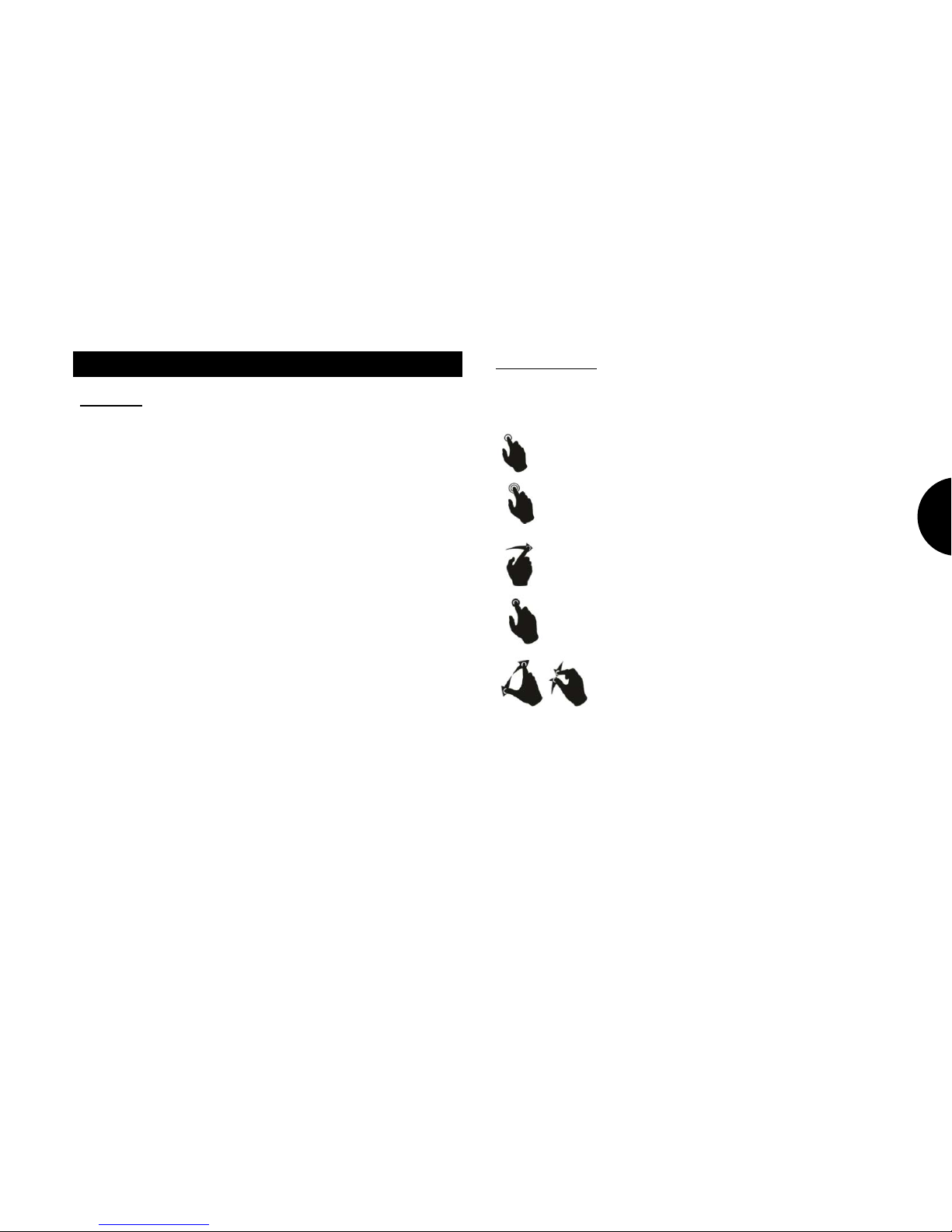
The screen on your OKO™ has multi-touch capabilities, this are the touch
gestures that can be used to interact with your OKO™:
Single Tap: A quick tap on the screen.
Double Tap: Two quick taps on the screen.
Swipe: Drag your finger on any direction maintaining contact
with the screen.
Long Press: Press the screen with a single finger for 2 seconds.
Pinch: This will zoom in or out the content when
available.
Page 8
First run and Wizard
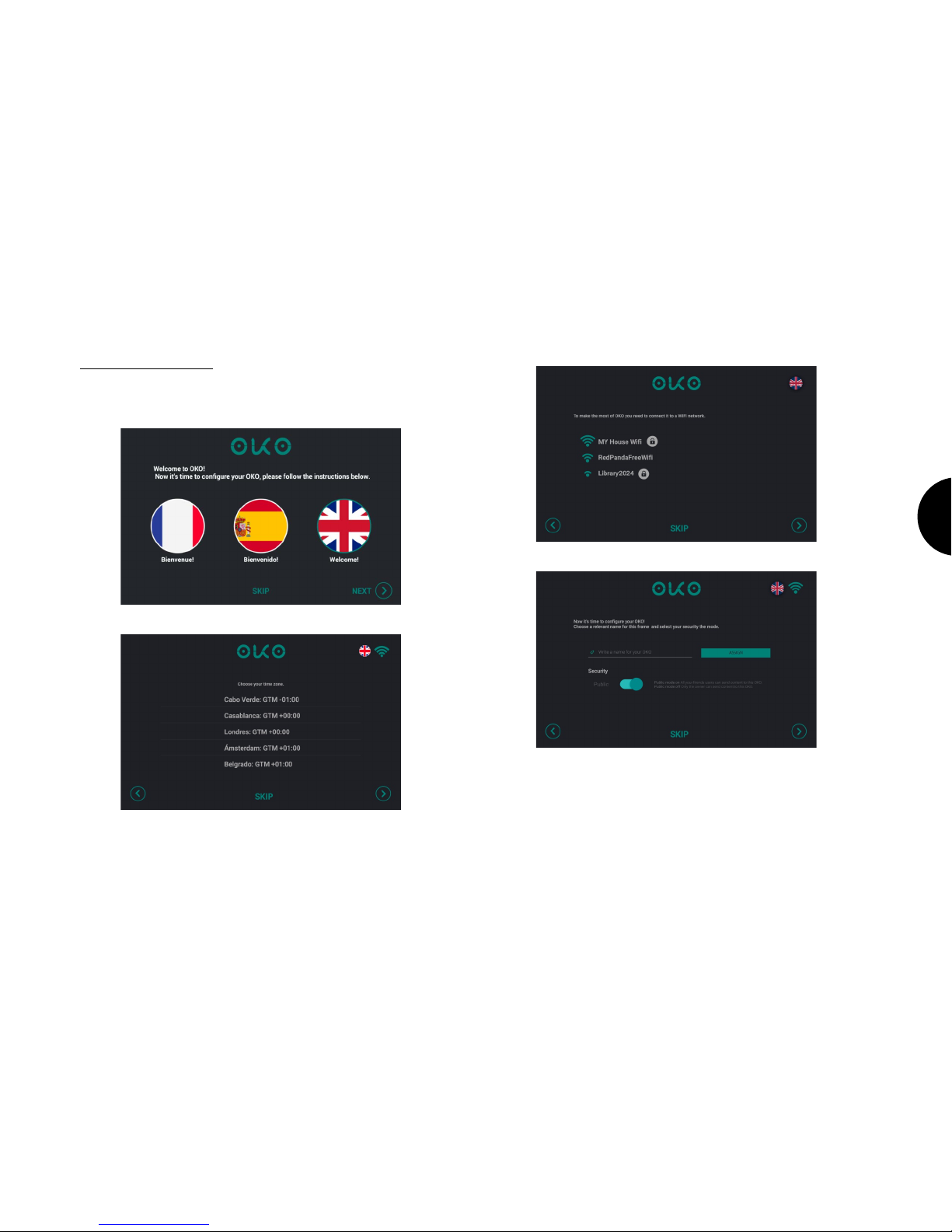
Setting up your OKO™ is very simple. Just follow the instructions:
1. Select the display language.
2. Select your time zone.
3. Connect OKO to a WIFI network.
4. Name your OKO and choose the privacy options.
Page 9
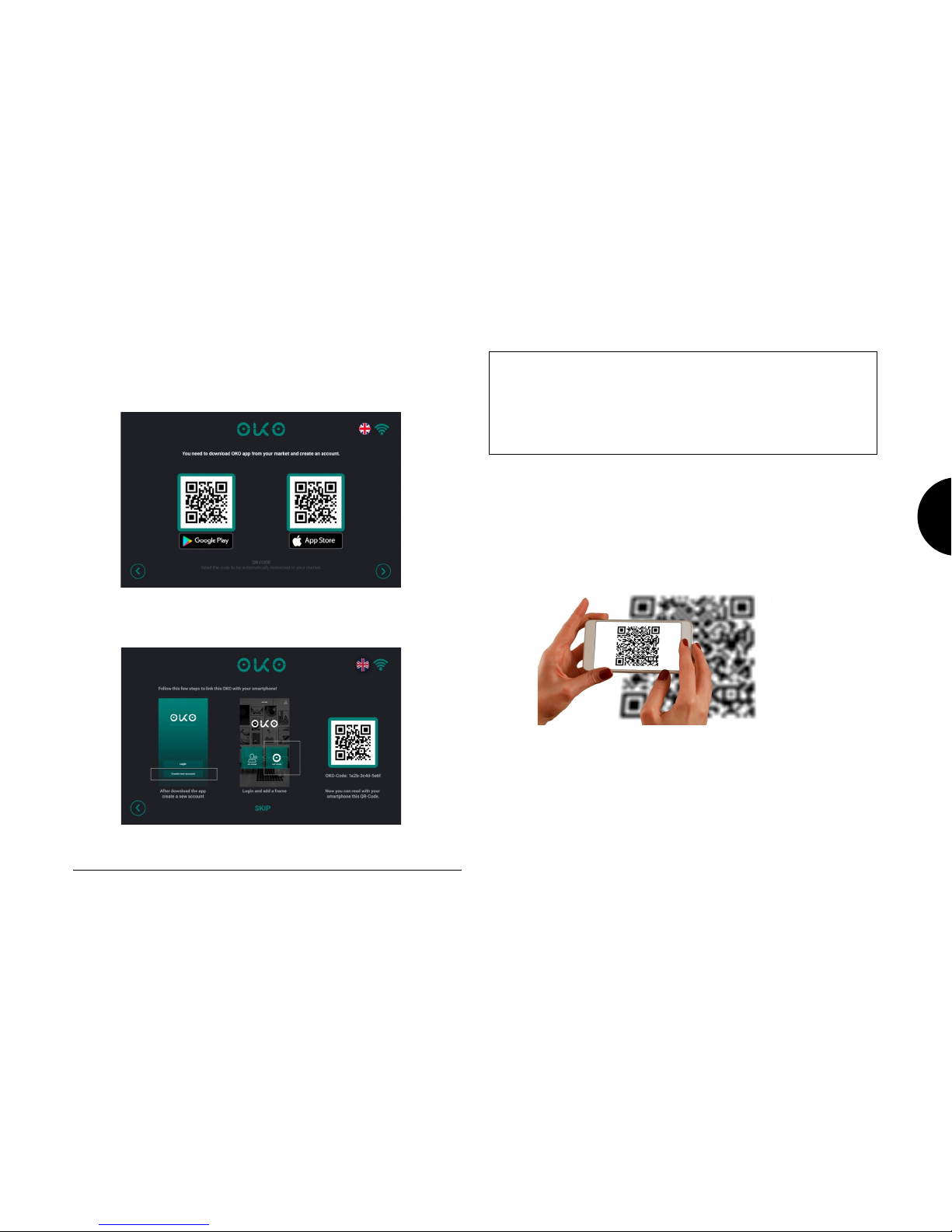
5. Download OKO™ App, available for both Apple (iOS) and Android
devices. This can be done by scanning the QR code displayed on the
screen that will direct you to the App Market on your phone or by
manually searching for OKO™ App.
6. Linking your OKO™ Smartframe to your OKO™ App. You can SKIP
this step, but we strongly recommend linking the device to the app, since
otherwise most of OKO's features won't be available.
6.1. Open OKO™ App on your phone and follow the instructions to
register a new account. If you already have an account, proceed to login.
Problems signing in to your account in your smartphone.
If you can't sign in because you have forgotten your password, click on the
“forgotten password” item on the login screen in your OKO™ App. From
there, fill your username and follow the instructions on the screen.
Remember that your username is your email address.
6.2. OKO™ App will now let you choose between adding OKO™ to your
account or adding a friend. We’ll start by linking your newly acquired
OKO™ to your account.
6.3. Linking your OKO™ is very easy, just scan the QR code that you
can see in the OKO’s screen with OKO™ App or insert the OKO-Code
manually.
Page 10

Your OKO™ is now ready to run and you can send content from your app.
To know more about uses of the OKO app, please visit:
www.okosmartframe.com
where you will find up to date information.
Page 11
Main screen
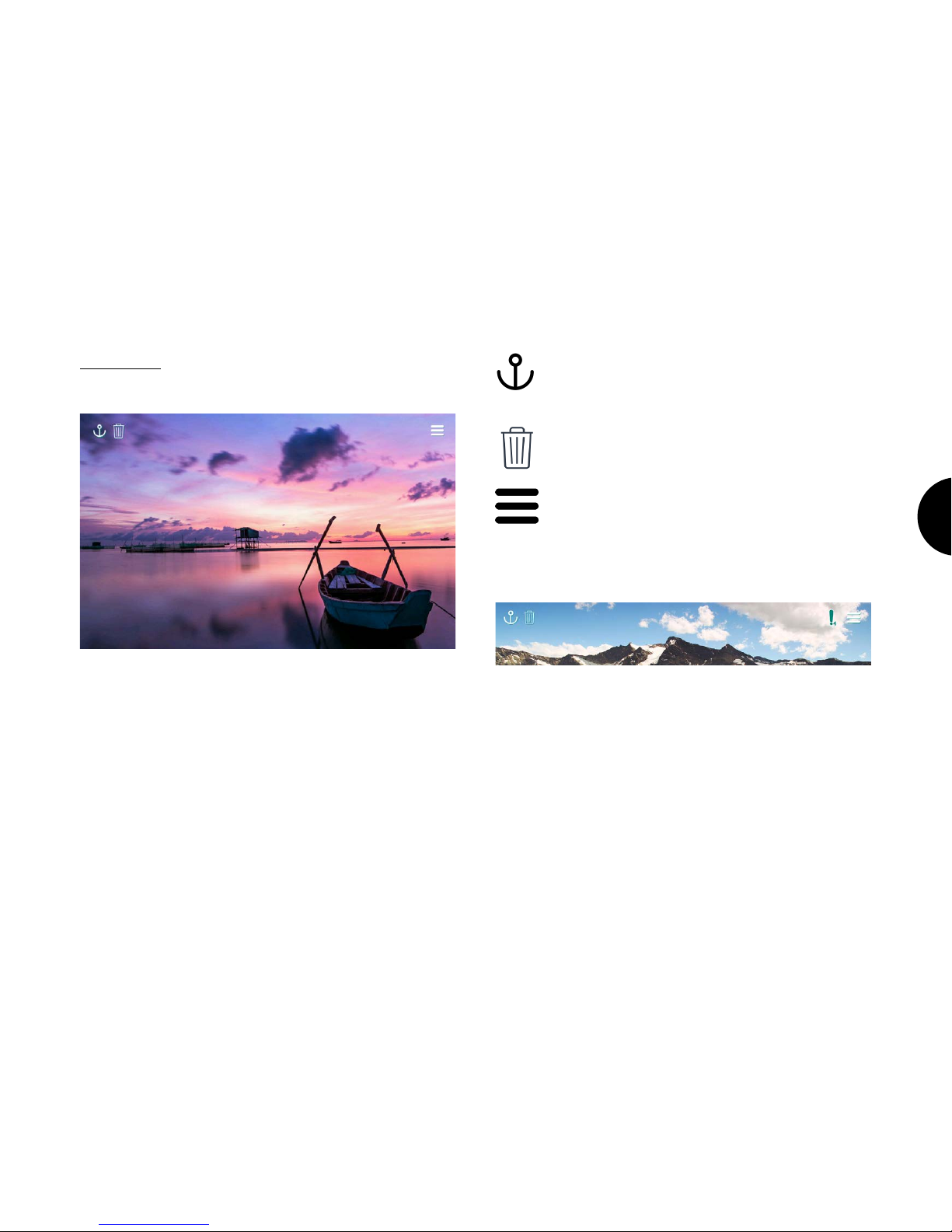
The main screen displays your content.
The buttons on the top of the screen allow you to control the content. If
these buttons are not displayed, you can bring them up by tapping once
the screen.
ANCHOR: Fixes the content on the screen, this will
prevent the auto play to go to the next content.
BIN: Deletes the current shown content.
MENU: Opens the menu.
When new content is received, an exclamation mark (!) with a number
will appear on the left of the menu icon, displaying the amount of new
content received.
Page 12
Menu
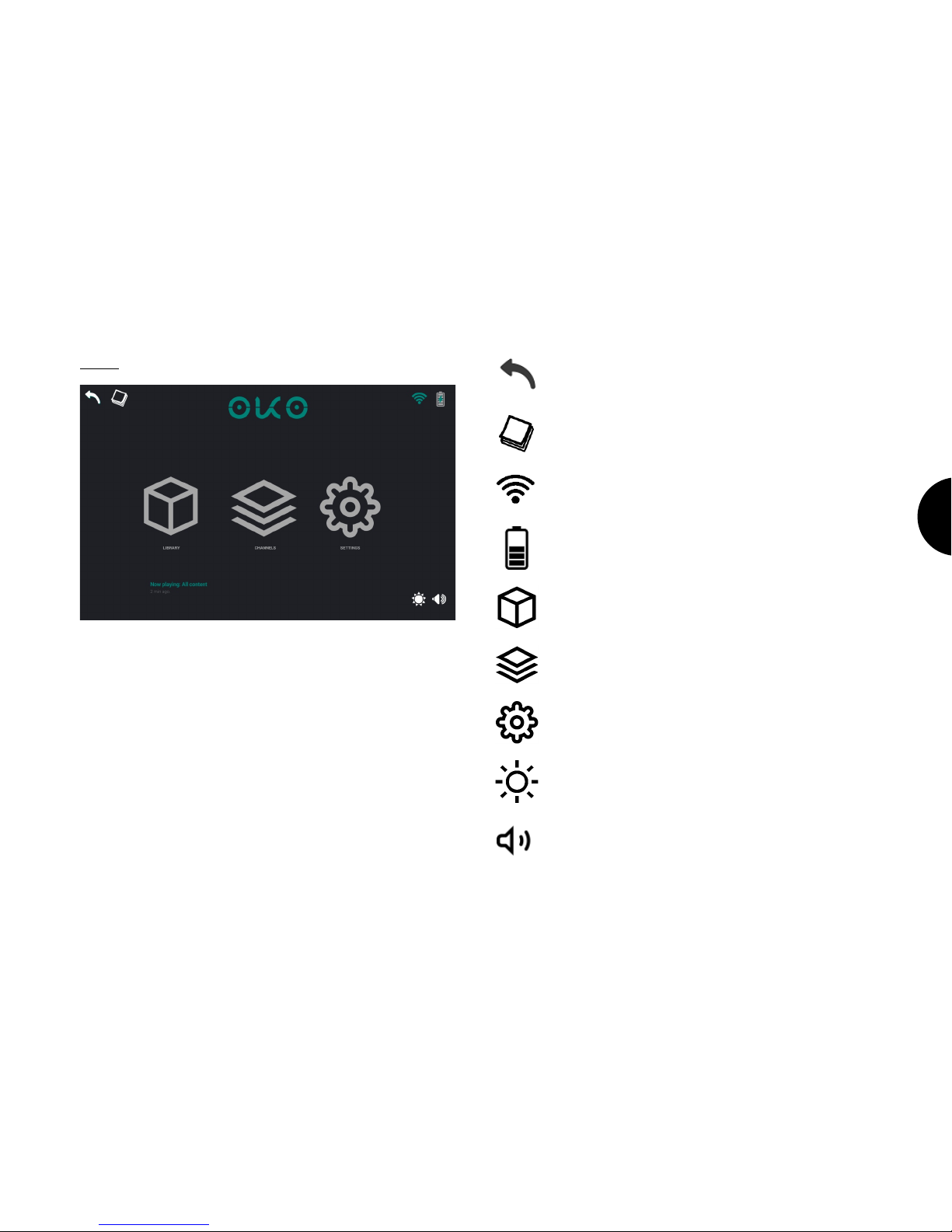
BACK: Go back to main view.
NOTES: Review your notes.
WIFI: Connectivity options.
BATTERY LEVEL: Shows the remaining battery life.
LIBRARY: Manage your content.
CHANNELS: Browse a set of predefined contents.
SETTINGS: Configure your OKO™
BRIGHTNESS: Adjust brightness level.
VOLUME: Adjust sound volume.
Page 13
Library
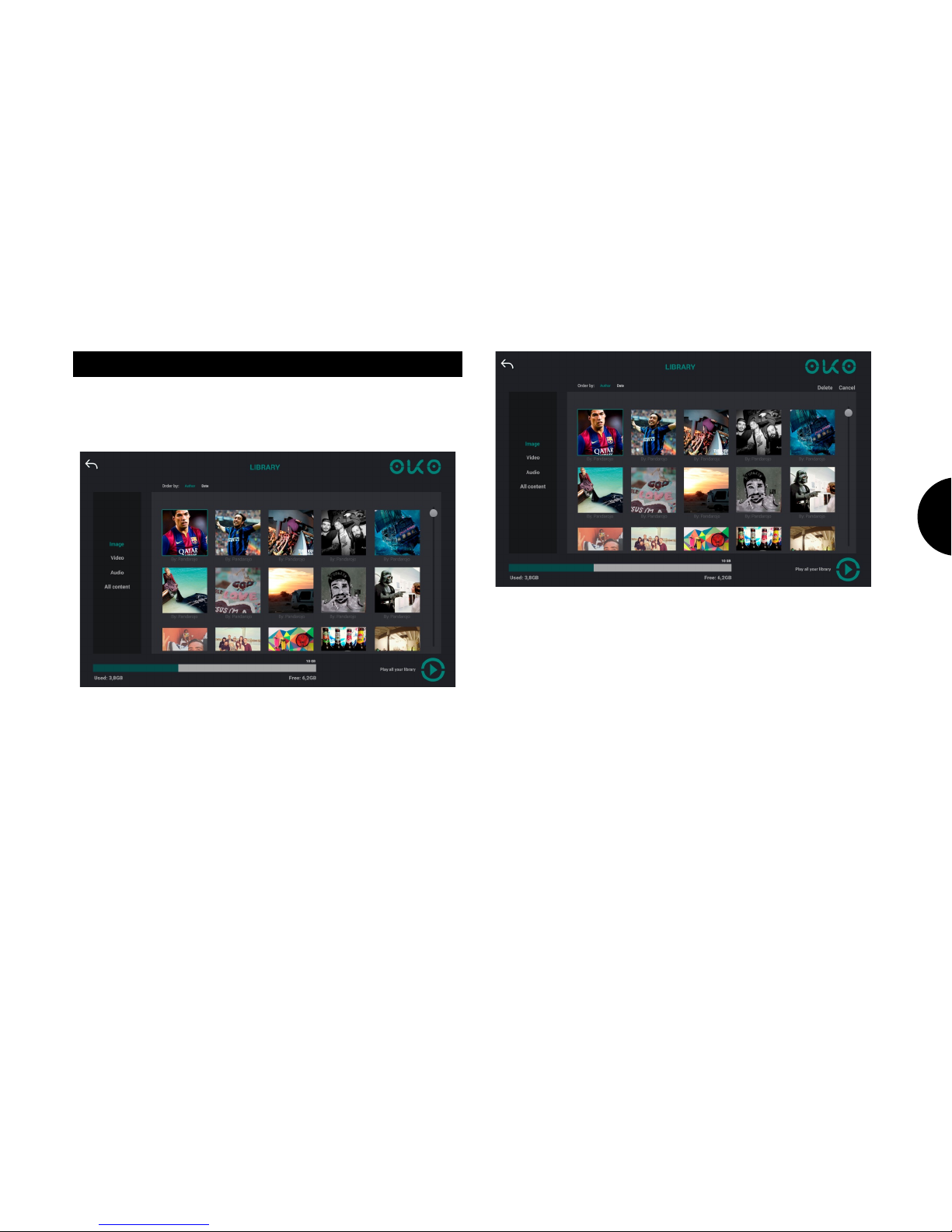
Whenever your OKO™ receives content from your OKO™ App, or from a
friend, it will be added to your playlist queue. At any time, you can review
your playlist on the library menu.
In the library menu, you can manage your playlist. When finished, click
play to show the content.
Long pressing a picture will show the delete option on the top right corner
of the screen. Tap it to delete the picture.
Page 14
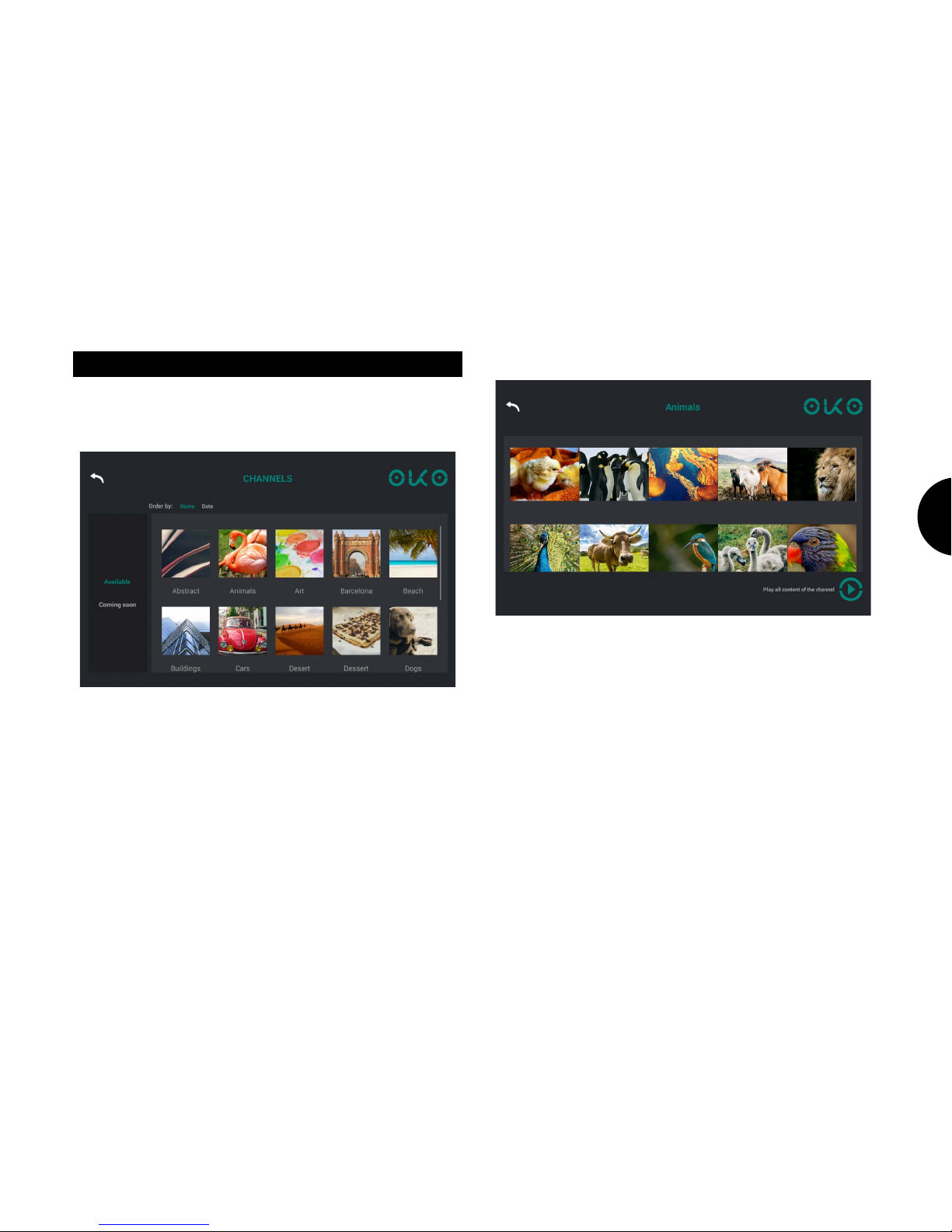
Channels
OKO™ provides a set of predefined content that you can play straight
away. Just select your preferred theme in the channel menu and click
play!
Page 15
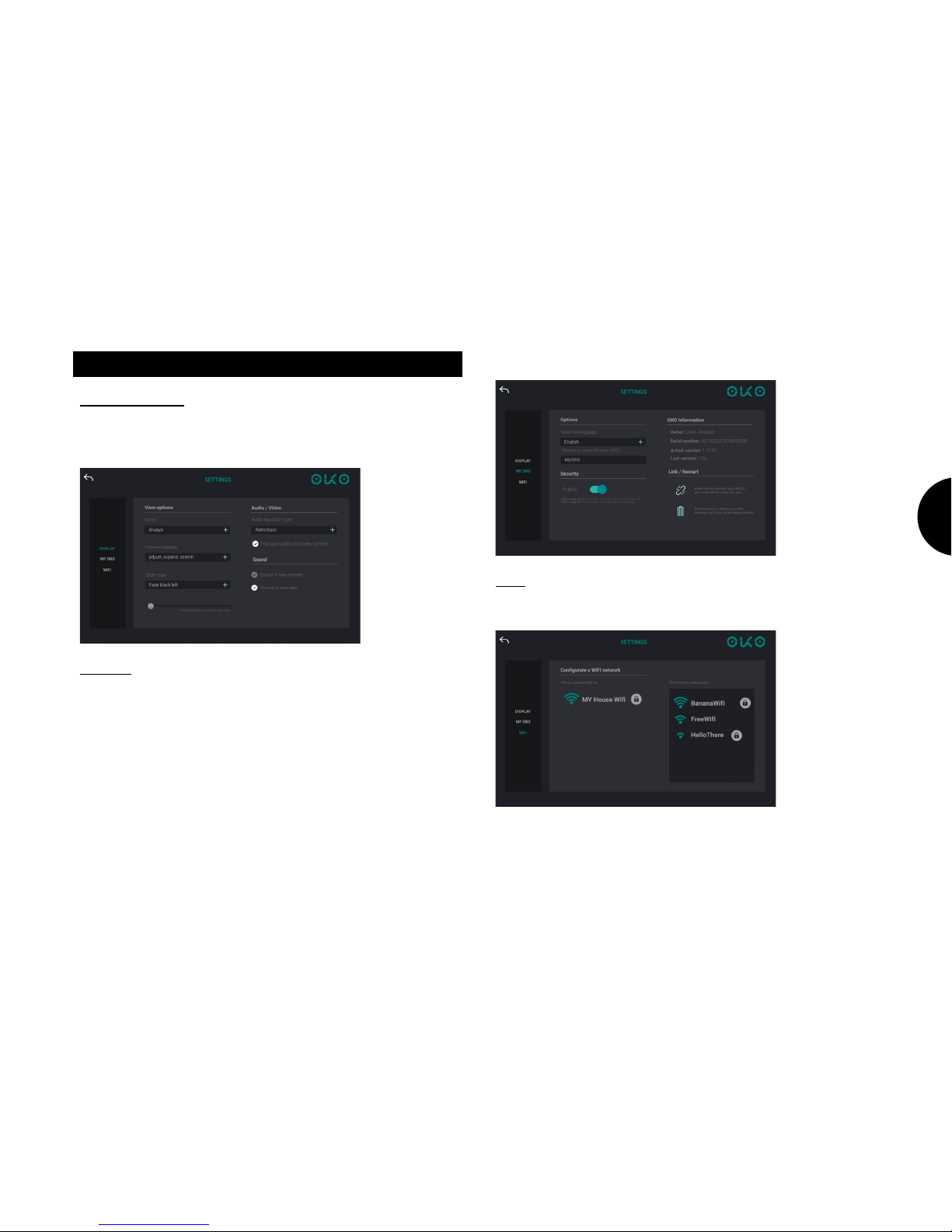
Settings
Display Settings
This menu allows managing the behaviour of your OKO™ when displaying
content. Such as comments visibility, time between contents, etc.
My Oko
Configure and link your OKO™ to your OKO™ App.
Here you will find OKO’s serial number.
When unlinking your OKO™, you will delete the link between your
Smartphone and your OKO™, but you will preserve all the content stored
in the cloud, being able to recover it once you link your OKO™ to a
smartphone again.
Delete all content will set OKO™ to its initial configuration, and you will
lose all content stored in the cloud.
WiFi
Configure your wireless connectivity.
Page 16

Updates
OKO™ integrates a version control system which will install high priority
updates regardless of user interaction. An update may substantially
change its features and functions. You can keep up to date with the new
capabilities and functions of your OKO™ at:
www.okosmartframe.com
On this regard, this manual should not be considered final, but a
reference manual of your OKO™ functionalities.
Additional information
Precautions
• Be careful not to set or drop any heavy objects on the power
cord, or to damage the power cord in any way. Never operate this
OKO™ with a damaged power cord.
• Should any solid object or liquid fall into the cabinet, unplug
OKO™ and have it checked by qualified personnel before
operating it any further.
• To disconnect the power cord, pull it out by the plug. Never pull
the power cord itself.
• When OKO™ is not going to be used for an extended period of
time, disconnect the power cord from the wall outlet.
• Do not handle OKO™ roughly.
• To reduce the risk of electrical shock, always unplug OKO™ from
the electrical outlet before cleaning and servicing.
• Avoid placing OKO™ in a location subject to:
o vibration
o humidity
o excessive dust
o direct sunlight
o extremely high or low temperatures
• Do not use electrical equipment near the photo frame. OKO™ will
not work properly in electromagnetic fields.
• Do not place heavy objects on the OKO™.
AC adapter
• Even if your OKO™ is turned off, AC power (regular current) is still
supplied to it while it is connected to the wall outlet via the AC
adaptor.
• Be sure to use the AC adaptor supplied with OKO™. Do not use
other AC adaptors, as this may cause a malfunction.
• Do not use the supplied AC adaptor for other devices.
• Do not use an electrical transformer (travel converter), as this
may cause overheating or a malfunction.
• In case the cord of the AC adaptor is damaged, do not use it any
longer, as this may be dangerous.
Page 17
Moisture condensation
• If the photo frame is brought directly from a cold location to a
warm location or placed in an extremely warm or humid room,
moisture may condense inside the unit. In such cases OKO™ will
probably not work properly and may even develop a fault if you
persist in using it. If moisture occurs, unplug the AC adaptor of the
photo frame and do not use the photo frame for at least one
hour.
Transport
• When you transport OKO™, remove the memory card, external
devices, AC adaptor, and connected cables from OKO™ and put
the photo frame and its peripherals in the original box with the
protective packaging. If you no longer have the original box and
packing parts, use similar packing material so that OKO™ will not
be damaged while being transported.
• Clean OKO™ with a soft dry cloth, or a soft cloth lightly moistened
with a mild detergent solution. Do not use any type of solvent,
such as alcohol or benzene, which may damage the screen.
Environmental protection
Waste electrical products should not be disposed of with household
waste. Please recycle where facilities exist. Check with your Local
Authority or retailer for recycling advice.
Page 18
Declaration of Conformity
Manufacturer name: TAOC S.L.
Address: TECNOLOGIAS AVANZADAS PARA EL OCIO, S.L. C/Gran
Capitán, s/n - Edificio C1, BARCELONA, 08034, SPAIN
NIF B65748303
We declare, under our own exclusive responsibility, that the product:
OKO SMARTFRAME OKO/F1W10
Manufacturing country: China
Is in compliance with the essential norms and standards of the Directive 1999/5/EC of the
European Parlament and of the Council of March 09th 1999.
Page 19

Federal Communications Commission (FCC) Statement
This device complies with part 15 of the FCC Rules. Operation is subject to the following
two conditions: (1) This device may not cause harmful interference, and (2) this device
must accept any interference received, including interference that may cause undesired
operation.
Note: This equipment has been tested and found to comply with the limits for a Class B
digital device, pursuant to part 15 of the FCC Rules. These limits are designed to provide
reasonable protection against harmful interference in a residential installation. This
equipment generates, uses and can radiate radio frequency energy and, if not installed
and used in accordance with the instructions, may cause harmful interference to radio
communications. However, there is no guarantee that interference will not occur in a
particular installation. If this equipment does cause harmful interference to radio or
television reception, which can be determined by turning the equipment off and on, the
user is encouraged to try to correct the interference by one or more of the following
measures:
• Reorient or relocate the receiving antenna.
• Increase the separation between the equipment and receiver.
• Connect the equipment into an outlet on a circuit different from that to which
the receiver is connected.
• Consult the dealer or an experienced radio/TV technician for help.
Warning: Changes or modifications made to this device not expressly approved by TAOC
S.L. may void the FCC authorization to operate this device.
Note: The manufacturer is not responsible for any radio or tv interference caused by
unauthorized modifications to this equipment. Such modifications could void the user’s
authority to operate the equipment.
RF exposure statement: The transmitter must not be allocated or operated in conjunction
with any other antenna or transmitter. This equipment complies with the FCC RF radiation
exposure limits set forth for an uncontrolled environment. This equipment should be
installed and operated with a minimum distance of 20cm between the radiator and any
part of your body.
SAR Statement
This Tablet meets the government's requirements for exposure to radio waves. The
guidelines are based on standards that were developed by independent scientific
organizations through periodic and thorough evaluation of scientific studies. The
standards include a substantial safety margin designed to assure the safety of all persons
regardless of age or health. FCC RF Exposure Information and Statement
The SAR limit of USA (FCC) is 1.6 W/kg averaged over one gram of tissue. Device types:
KPAU02 (FCC ID: 2AHS8-KPAU02) has also been tested against this SAR limit. SAR
information on this and other pad can be viewed on-line at
http://www.fcc.gov/oet/ea/fccid/. Please use the device FCC ID number for search. This
device was tested for typical operations with handset Tablet 0mm from the body. The use
of belt clips, holsters and similar accessories should not contain metallic components in its
assembly. The use of accessories that do not satisfy these requirements may not comply
with FCC RF exposure requirements, and should be avoided
Page 20
USER DATA
Name:
Address:
City: CP:
Province:
Model:
Serial Nº:
Purchase date:
Billing Nº:
Stamp:
SELLER DATA
Name:
Address:
City: CP:
Province:
IMPORTANT
Should you need assistance, before addressing to you seller, please
contact us on our website or our Customer Service.
EUROPEAN WARRANTY CARD
THIS WARRANTY CARD IS PERSONAL AND INSTRANSFERIBLE AND ONLY
VALID FOR THE ORIGINAL BUYER. FILL THE REQUESTED DATA AND KEEP IT
SAFE WITH YOUR BUYING BILL.
TAOC S.L. AGREES TO FULFILL THE COVERAGE CONDITIONS OF THIS
WARRANTY.
www.okosmartframe.com
TAOC.S.L.
TECNOLOGIAS AVANZADAS PARA EL OCIO, S.L. C/Gran Capitán, s/n - Edificio C1, BARCELONA,
BARCELONA, 08034, España
Page 21

EUROPEAN WARRANTY
This Guarantee shall be valid in all Member States of the European Union, without prejudice to any
limitations that may be legally app licable in the country in which it is intended to be exercised.
To claim the rights and coverages that assist you as a European consumer under this Guarantee, the
user will have the means to communicate with our Customer Service numbers, via ou r website, or in
writing, by contacting our Customer Service.
VALIDITY OF THE WARRANTY
This warranty only covers official products imported or marketed by TAOC S.L. To benefit from it you
must:
Complete the warranty card, model and serial number.
It is imperative to attach, along with this Guarantee Card, duly stamped by the establishment, the
original of the ticket or invoice of purchase tha t identifies the model.
The benefits of the guarantee will only be valid if the Technical Services authorized by TAOC S.L. are
used.
The product must be used in accordance with the instructions in th e manual.
The period of validity of this guarantee will be o f 2 years.
COVERAGE
The holder of this guarantee will enjoy the rights and coverages that are applicable in the Member
States of the European Union under the current leg islation without prejudice to the rights, guarantees
and limitations that, if applicable, are legally applicable in the country in which it is intended to
exercise.
In order to claim the rights and coverage contained in this document, the user can communicate with
our Customer Service number, in writing, addressed to TAOC S.L. and via ordinary jurisdiction. During
the duration of the repair, no damages will be paid for the time the product is out of service. TAOC
S.L. will not be liable for damages that a product may cause to external elements. The exchange units
and spare parts may be new or refurbished.
PROTECTION OF PERSONAL DATA
In accordance with Organic Law 15/1999, we inform you that the personal data requested, all of them
obligatory for the provision of the Wa rranty Service, may be incorporated into a file / s duly registered
in the RGPD, which TAOC S.L. is responsible for, with the purpose of providing the service, as well as
to keep you informed of similar products or services. The holder may exercise his rights of access,
rectification, cancellation and opposition by directing a signed document, addressed to the attention
of TAOC S.L., accompanied by a photocopy of his ID to the address TECNOLOGÍAS AVANZADAS PARA
EL OCIO, S.L. C / Gran Capitán, s / n - Building C1, BARCELONA, 08034, Spain or to the e-mail address:
[email protected]
WARRANTY EXCLUSIONS
• Failure to comply with any of the above requirem ents.
• When the product has not been used exclusively as directed in the manual.
• Any component or accessory inside or outside the appliance, which is not specified and included in
this warranty certificate.
• Commissioning and operating demonstrations to the user.
• If the fault is caused by fire, flood, meteorological agents, hitting, crushing or usage of inadequate
voltage or energy.
• Damage due to the bad treatment, including transport damages that must be claimed in the
presence of the personnel of the transport company. For this reason it is advisable to inspect the
packages before signing the corresponding delivery notes.
• Damage caused by physical breakage, such as casings, plastics, paints, enamels, crystals, trim and
the like.
• Products that are damaged due to misuse, failing to comply with the operating instructions that are
included with each product.
• Improper use of accessories in the product.
• Devices that have not been identified with the factory serial number or have been altered or erased
or do not match the one stated in the warranty.
• By previous intervention, manipulation and / or repair carried out by an unauthorized Technical
Service.
 Loading...