

Page 1
Issue Department:Bedding Division Date:
2017-8-15
System Instruction
Instruction of RF3017
Instruction of
button 1
button 4
button 7
RF3017
Author:
Edition:
Page 1 of 5
button3
button 6
button 8
button 11
1.1
button 9
button 13
button 12
button 1
button 10
button 14
5
button 1
button 1
6
7
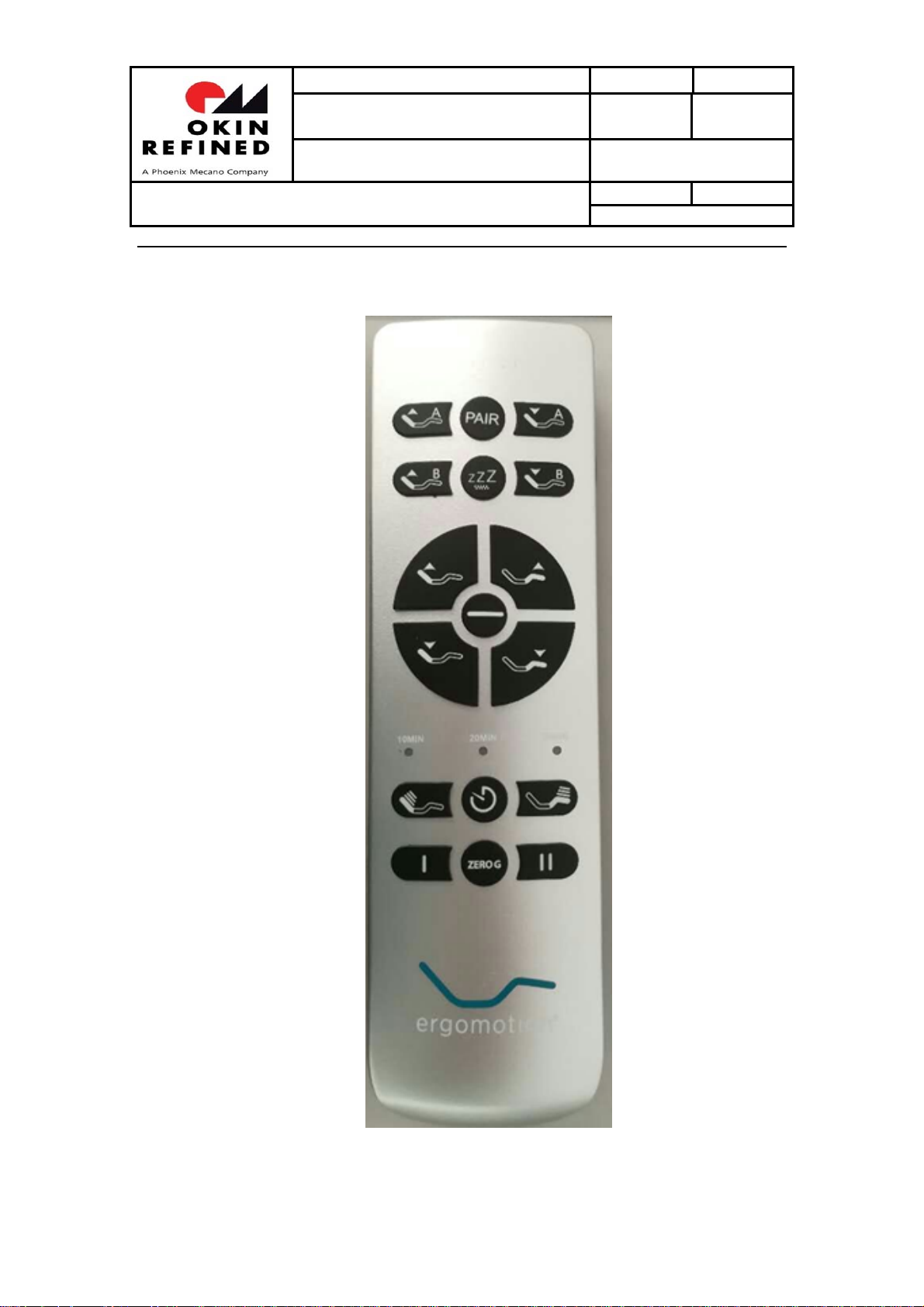
Figure1buttonofremote
1/6
Page 2
Issue Department:Bedding Division Date:
2017-8-15
System Instruction
Instruction of RF3017
Author:
Edition:
Page 2 of 5
Item
1.1 ZG button(button 1 in figure 1)
Click the ZG button, the actuator moves to ZG position, stop when click any button during the
movement;
Press and hold the ZG button for 5s, timer LED of remote flashes, the control box records
current position as ZG position;
When in the process of moving to memory positions, the head and foot actuators move first,
then the tilt and lumbar actuators move;
1.1
1.2 AntiSnore button(button 3 in figure 1)
Click
AntiSnore
during movement;
Press and hold
current position as
When in the process of moving to memory positions, the head and foot actuators move first,
then the tilt and lumbar actuators move;
button, actuators move to
AntiSnore
AntiSnore
button for 5s, timer LED of remote flashes, the control box records
position;
AntiSnore
position, stop when click any button
1.3 TV/PC button(button 4 in figure 1)
Click
TV/PC
movement;
Press and hold
current position as
When in the process of moving to memory positions, the head and foot actuators move first,
then the tilt and lumbar actuators move;
button, actuators move to
TV/PC
button for 5s, timer LED of remote flashes, the control box records
TV/PC
position;
TV/PC
position, stop when click any button during
1.4 LOUNGE button(button 6 in figure 1)
Click
LOUNGE
during movement;
Press and hold
button, actuators move to
LOUNGE
button for 5s, timer LED of remote flashes, the control box records
LOUNGE
2/6
position, stop when click any button
Page 3
Issue Department:Bedding Division Date:
2017-8-15
System Instruction
Instruction of RF3017
current position as
When in the process of moving to memory positions, the head and foot actuators move first,
then the tilt and lumbar actuators move;
LOUNGE
position;
Author:
Edition:
Page 3 of 5
1.1
1.5 Reset all memory positions to default settings(button 1 and 11 in figure 1)
Pressa and hold ZG+FLAT buttons
remote flashes, the control box reset all memory positions to default settings;
(button 1 and 16 in figure 2)for
5s, timer LED of
1.6 Head up(button 7 in figure 1)
Press and hold
released
;
HEAD UP button of remote, head actuator moves out, stop when
1.7 Head down(button 9 in figure 1)
Press and hold HEAD DOWN button of remote, head actuator moves in, stop when released;
1.8 Foot up(button 8 in figure 1)
Pressa and hold FOOT UP button of remote, foot actuator moves out, stop when released;
1.9 foot down(button 10 in figure 1)
Press and hold FOOT DOWN button of remote, foot actuator moves in , stop when released;
When moving to flat position, lumbar actuator and tilt actuator move first, after 500ms, head and
foot actuators start moving;
1.10 Flat(button 11 in figure 1)
Click FLAT button, the bed goes flat, stop when click any button during the process of going
flat;
3/6
Page 4
Issue Department:Bedding Division Date:
2017-8-15
System Instruction
Instruction of RF3017
Author:
Edition:
Page 4 of 5
1.1
1.11 Massage head(button 12 in figure 1)
Click MASSAGE HEAD button, head massage motor switches massage intensity, massage
intensityswitches among 0-1-2-3;
1.12 Massage timer(button 13 in figure 1)
If the massage motors do not work, the button is invalid, if the massage motors work, click the
button to switch the massage time, when massage time switch to 0, turn off the massage;
1.13 Massage ON/OFF(button 15 in figure 1)
Click
Massage ON/OFF
motors,if massage motors are off, then it turns on the massage motors;
button, if the massage motors are on, then it turns off massage
1.14 Under bed light(button 16 in figure 1)
Click the under bed light button, the under bed light switch its on/off state; After the under bed
light opens, if do not manually close, it will automatically turn off after 5 minutes;
1.15 Massage Type(button 17 in figure 1)
Click massage type button, to switch the massage mode og massage motors, massage mode
switches among type0type1type2type3type0; this button can only switch the massage
mode, it can not open massage motors;
4/6
Page 5
Issue Department:Bedding Division Date:
2017-8-15
System Instruction
Instruction of JLDK.35.01.01
Author:
Edition:
Page 5 of 5
1.1
FCC Warning:
Any Changes or modifications not expressly approved by the party responsible for compliance
could void the user’s authority to operate the equipment.
This device complies with part 15 of the FCC Rules. Operation is subject to the following two
conditions: (1) This device may not cause harmful interference, and (2) this device must accept
any interference received, including interference that may cause undesired operation.
ISED RSS Warning:
This device complies with Innovation,Science and Economic Development Canada licenceexempt
RSS standard(s). Operation is subject to the following two conditions: (1) this device may not
cause interference, and (2) this device must accept any interference, including interference that
may cause undesired operation of the device.
Le présent appareil est conforme aux CNR d'ISED applicables aux appareils radioexempts de
licence.
L'exploitation est autorisée aux deux conditions suivantes:
(1) l'appareil ne doit pas produire de brouillage, et
(2) l'utilisateur de l'appareil doit accepter tout brouillage radioélectrique subi, même si le
brouillage est susceptible d'en compromettre le fonctionnement.
5/6
Page 6
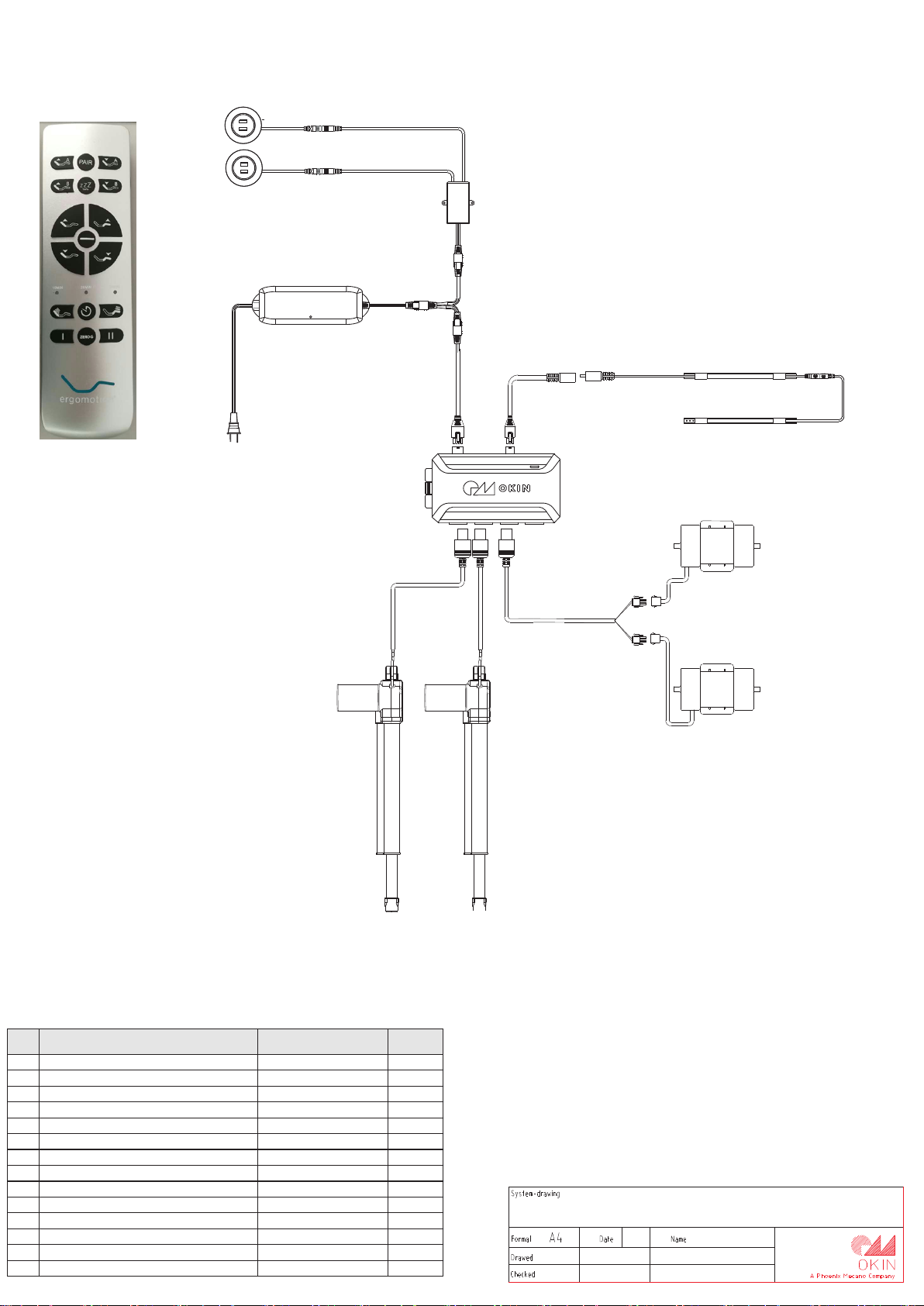
JL DP. 14.0 27. 000
NO.
1
B.15227
1
2
B.15226
1
3
JLDQ.9.001.130C 2
4
R5.410.01.009 1
5
CB.13.22.01
1
6
JLDP.10.023.000
1
7
R5.217.01.016 1
8
R5.504.01.250 1
9
R5.216.01.015C 1
10
R5.413.01.005 1
11
R5.113.00.011 1
12
JLDP.05.032.000 1
13
JLDP.14.027.000 2
14
1
JL DP. 10.0 23. 000
JL DP. 05.0 32. 000
R5 .21 6.01 .01 5C
RF3017
R5 .50 4.01 .25 0
R5 .21 7.01 .01 6
R5 .41 3.01 .00 5
CB .13 .22. 01
R5 .41 0.01 .00 9
R5 .11 3.00 .01 1
JL DQ. 9.00 1.1 30C
Product name
Head Motor
Foot Motor
Massage Motor
Massage Motor Cable
Control Box
Power Supply
Power Cord
ANSI power cord
Y cable
Patch cord of LED strip
LED strip/ LED
USB Socket/USB
Double USB Chager
19Keys remote
B.1 5227
Product code
number
RF3017
B. 152 26
20 17.0 7.31
John
6/6
 Loading...