

Page 1

Remote
Thermostat
+ / ON - / OFF
TARGET
CURRENT
ON OFF
Plug in socket
EU type
Plug in socket
UK type
Plug in socket
USA type
WIRELESS
THERMOSTAT
WIRELESS
THERMOSTAT
WIRELESS
THERMOSTAT
WIRELESS
THERMOSTAT
FEATURES
Plug and play type,no need installaon
LCD with green backlight
Display Current temperature
Display Target temperature
Automac learn code/Manually learn code
Always ON/OFF funcon(Remote control)
°C/ °F switchable
High/Low temperature warning
Easy seng with memory funcon
Low baery warning
Room thermostat
RF 433Mhz RF technology
Mul-channels,one remote can control
Portable design,hold in hand/
Stand on table/wall mounted
Heang Mode or Cooling Mode switchable
mul plugs
3. HEAT MODE( ) / COOL MODE( )
This wireless thermostat is designed with HEAT mode
and COOL mode, two mode is switchable as below steps:
Reload the batteries for remote thermostat,the heating
symbol( ) will be flashing,you can press +/ON or -/OFF
button ,switch to cooling symbol( ),after choose your
wanted mode, wait for 8~10seconds, heating symbol or
cooling symbol will stop flashing.
When you reload batteries for remote thermostat next
time,the mode symbol is memorized as your last choice,
if you don’t want to change mode, just wait for 8~10 s.
The Wireless Thermostat is intended for automatic control of
electrical heating appliances or cooling appliances and consists
of 2 components: a Remote Control Unit with intergrated temperature sensor and a Plug in Socket Unit.
It will automatically turn on/off heating devices or cooling devices
as your preset target temperature,to maintain a stable room temperature in order toprovide comfort and save energy.
1. INTENDED USE AND PRINCIPLE OF OPERATION
select Heat ( ) or cool mode( )
select Heat ( ) or cool mode( )
or display Cool symbol;
+ / ON - / OFF
TARGET
CURRENT
ON OFF
WIRELESS
THERMOSTAT
4. DESCRIPTION
Transmitter,Remote thermostat control:
Receiver, Plug in socket:
CURRENT temp. range: 0.0 °C~70 °C or 32.0 °F~158.0 °F
TARGET temp. range: 0
°C
~70 °C or 32 °F~158 °F
CURRENT Temperature resolution: ±1
°C / °F
Batteries: 2PCS*1.5V AAA battery
Low temperature: ≤0.0
°C
, CURRENT Shows LL
High temperature: ≥70.0
°C
,CURRENT Shows HH
Wall mounted holder & Table stand
Transmission Frequency: 433.92MHz
Maximum Range: 20 meters in open area
Maximum Rating:
EU type: 230V/16A/50Hz, 3680W Max.
UK type: 250V/13A/50Hz,3250W Max.
USA type: 110V/15A/60Hz, 1800W Max.
2. SPECIFICATION
MADE IN CHINA
EU
symbol flash
User Manual
Product Name:WIRELESS THERMOSTAT
Brand: OKAYLIGHT
Model:OPS100+OTS100,TS-808
Manufacture: Okaylight Electronic Co.,LTD
Page 2
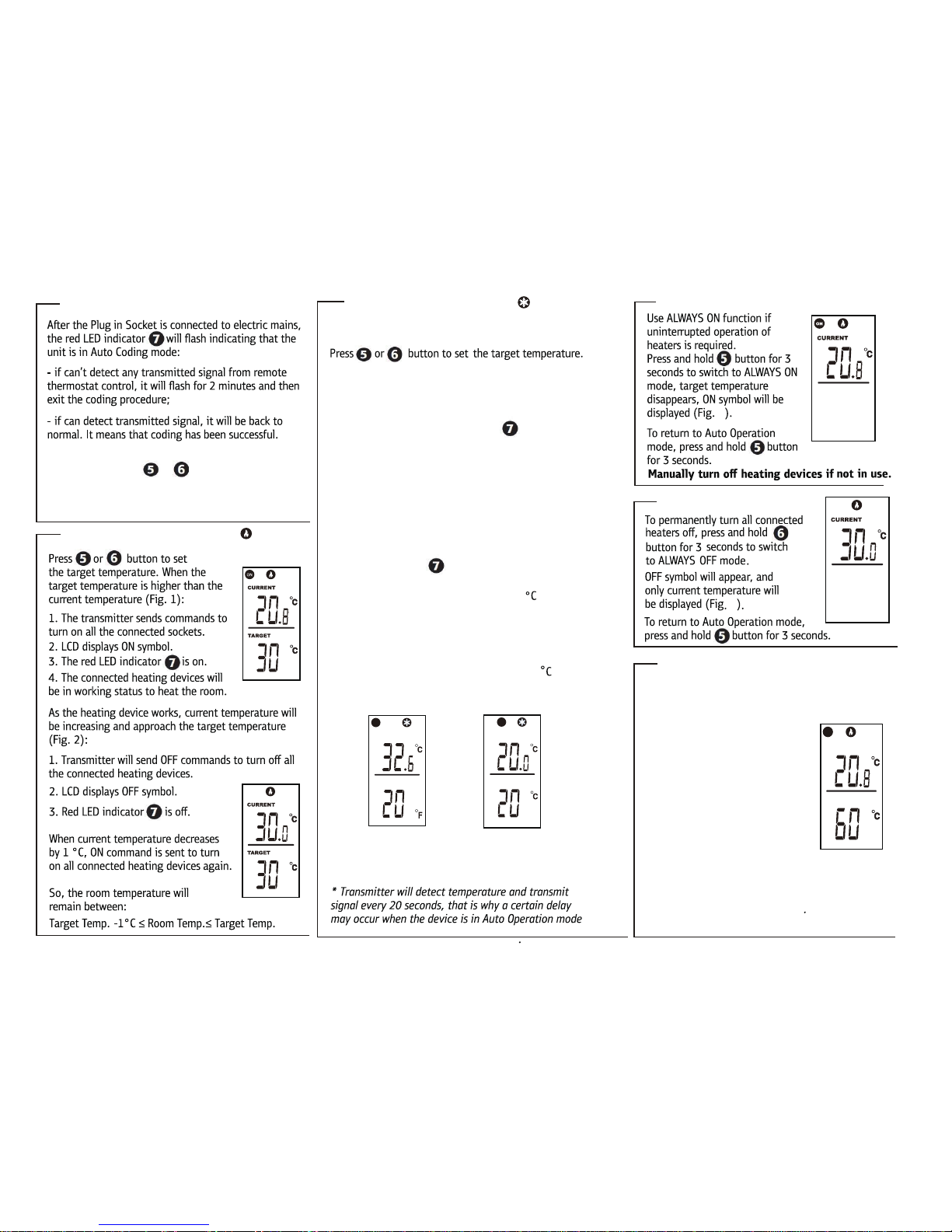
5. AUTO CODING
5
8. ALWAYS ON MODE
Fig.5
This wireless thermostat can be used as remote control
socket. You can manually turn ON or turn OFF connected
home appliances remotely by this item,such as your home
lighting,TV,FANS,Radios,etc.
In auto operation mode, set
TARGET temperature is
far higher than CURRENT
temperature, so that transmitter
always show ON symbol, see Fig.7.
- OFF: Then hold and press -/OFF
button for 3 seconds to turn
off home appliances remotely.
- ON: Hold and press +/ON button for 3 seconds
to turn on home appliances remotely again.
10. REMOTE CONTROL FUNCTION
ON
Fig.7
6. AUTO OPERATION IN HEAT MODE( )
Fig.1
Fig.2
9. ALWAYS OFF MODE
Fig.6
6
7. AUTO OPERATION IN COOL MODE( )
If you want to control cooling devices, please switch to cool mode.
In cool mode, the operation is oppsite to heat mode.
When target temp. is lower than current temp.(Fig.3)
1. Thermostat control send commands to turn on all
connected sockets.
2. LCD display ON,red LED indicator is ON.
3. The connected cooling devices will cool the room
As the cooling device works,current temperature will be
decreasing and approach the same as target temprature.(Fig.4)
1. Thermostat control send commands to turn off all the
connected cooling devices.
2. LCD display OFF symbol
3. Red LED indicator is OFF.
When current temperature increases by 1 , ON
commands is sent to turn on all connected cooling
devices again.
So the room temperature will remain between:
Target Temp.≤ Room Temp.≤Target Temp.+1
TARGET
CURRENT
ON
TARGET
CURRENT
OFF
Fig.3
Fig.4
Manually coding
You can press once or button,then wait for
3 seconds, thermostat control will send pairding code,
and Green LED flash once.
During AUTO OPERATION in Heat or Cool mode:
Page 3

FCC Caution.
This device complies with part 15 of the FCC Rules. Operation is subject to the following two
conditions:
(1) This device may not cause harmful interference, and
(2) this device must accept any interference received, including interference that may cause
undesired operation.
Any Changes or modifications not expressly approved by the party responsible for compliance
could void the user's authority to operate the equipment.
Note: This equipment has been tested and found to comply with the limits for a Class B digital
device, pursuant to part 15 of the FCC Rules. These limits are designed to provide reasonable
protection against harmful interference in a residential installation. This equipment generates
uses and can radiate radio frequency energy and, if not installed and used in accordance with the
instructions, may cause harmful interference to radio communications. However, there is no
guarantee that interference will not occur in a particular installation. If this equipment does
cause harmful interference to radio or television reception, which can be determined by turning
the equipment off and on, the user is encouraged to try to correct the interference by one or
more of the following measures:
-Reorient or relocate the receiving antenna.
-Increase the separation between the equipment and receiver.
-Connect the equipment into an outlet on a circuit different from that to which the receiver is
connected.
-Consult the dealer or an experienced radio/TV technician for help.
 Loading...