

Page 1
Quick Start Guide Ranger
Count Plus
PREPARATION FOR USE
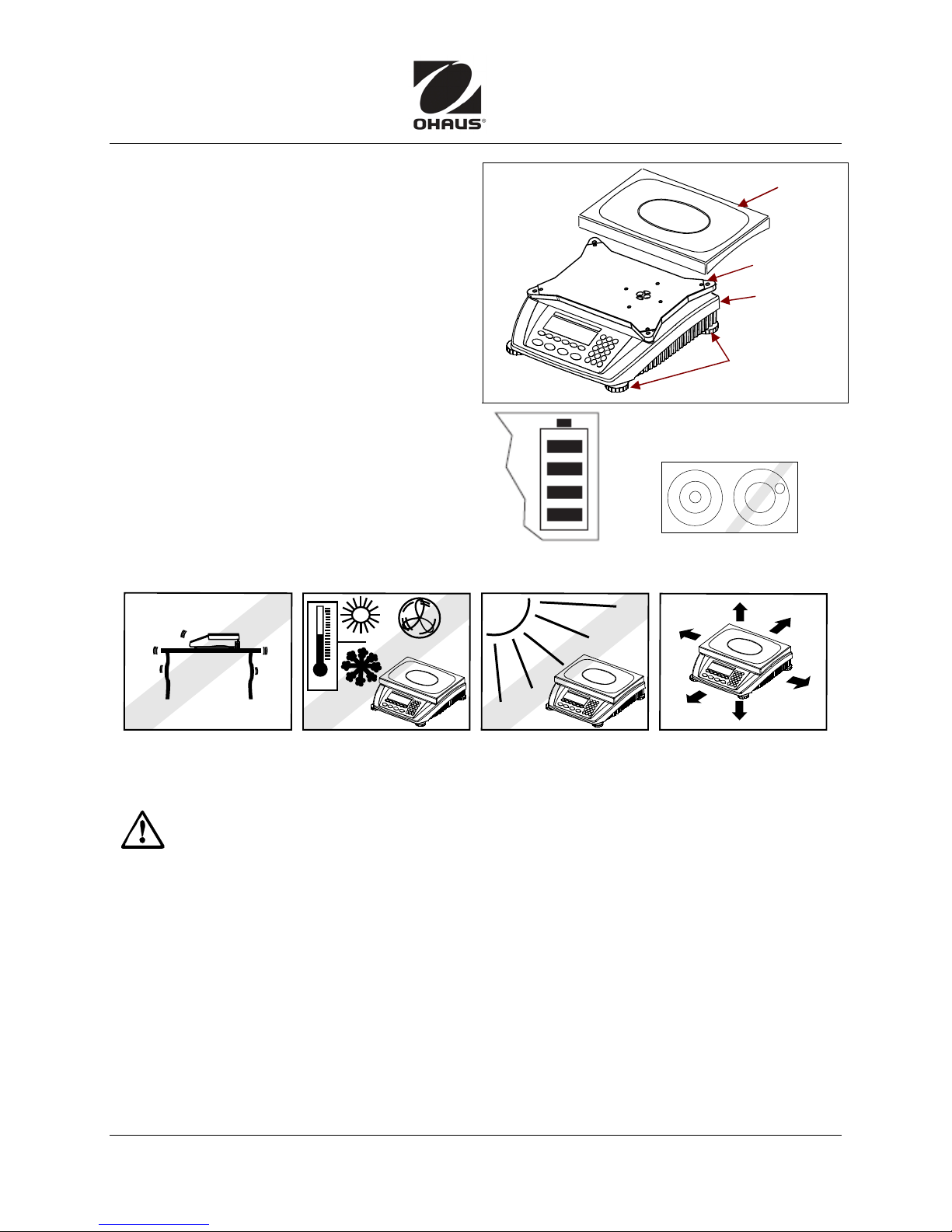
Place the weighing pan on the scale. (Be
careful not to break the black plastic retaining
springs on the edges of the pan support.)
Power
Check that local line voltage matches voltage
printed on the scale’s power adapter. If not,
do not connect the scale to the power supply.
Contact an Ohaus dealer.
Built-in battery (if present) has 30-hour life with
background light off and no peripheral devices
connected. (Each bar in battery symbol
indicates 25% capacity. When the symbol
flashes, charge battery 4 hours.) Battery takes
over if mains power is absent. When mains
power is on, device switches to it automatically.
SELECTING THE LOCATION:
Place on a firm, steady surface with sufficient space.
Weighing
Pan
Pan
support
Level Bubble
at rear
Leveling Feet
Level the scale: Adjust feet
so bubble is centered.
Avoid excessive air current, vibrations, heat sources, or rapid temperature changes.
SAFETY PRECAUTIONS
For safe and dependable operation of this product, observe the following safety
precautions:
• Verify that the input voltage printed on the power adapter and the plug type matches
the local power supply.
• Be sure the power cord does not pose an obstacle or tripping hazard.
• Disconnect the product from power supply when cleaning.
• Do not operate this product in hazardous or unstable environments.
• Do not drop loads on the pan.
• Use only approved accessories and peripherals.
• Operate the product only under ambient conditions specified in the Instruction Manual.
• Service should be performed by authorized personnel only.
Ohaus Corporation www.ohaus.com i Ranger Count Plus Quick Start Guide
Page 2
Ranger
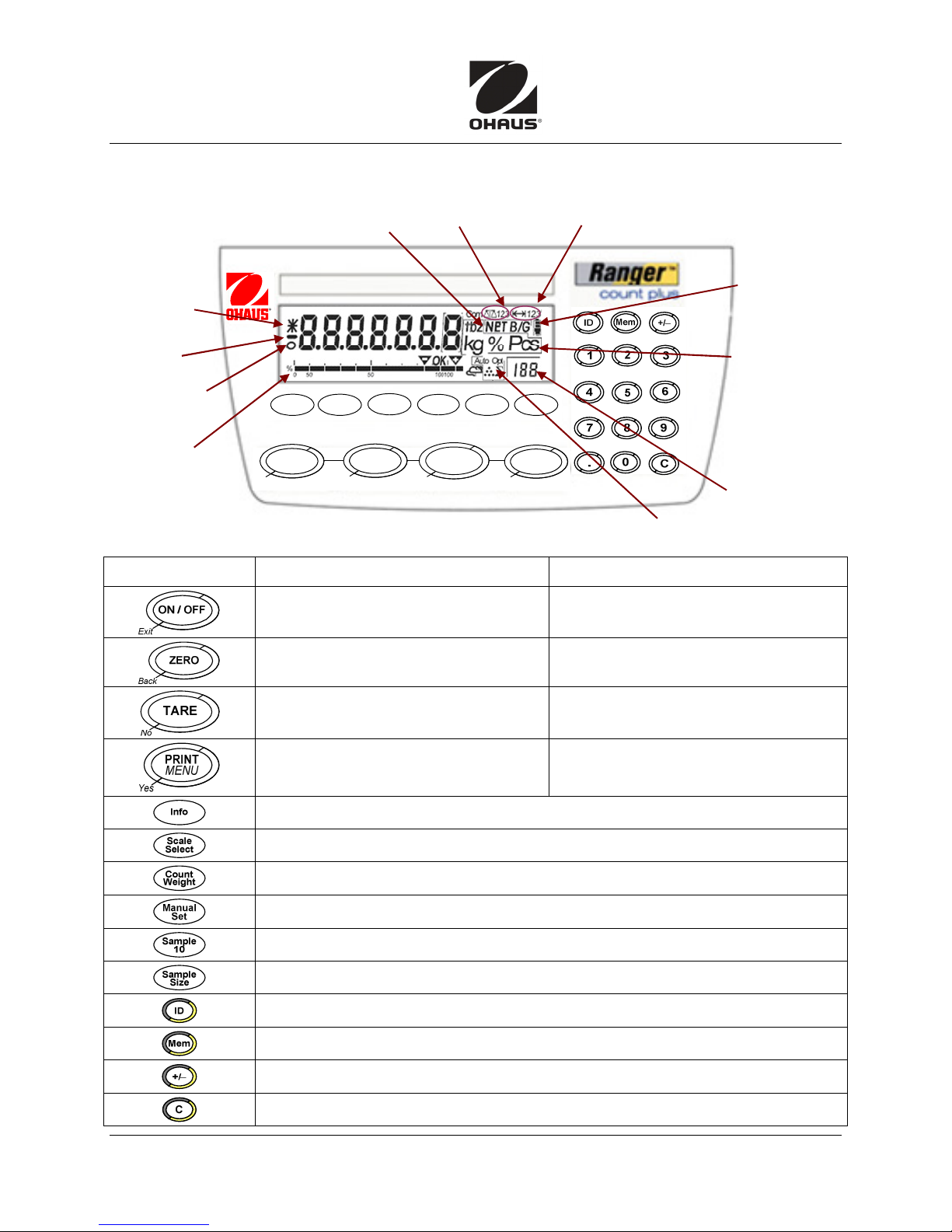
Indicators
CONTROLS
Changed weight
value indicator
(eg, minimum
weight not
reached)
Negative
indicator
Stability monitor
(goes out when
weight is stable.)
Graphic display of
weighing capacity:
shows % used
and % available
Count Plus Quick Start Guide
Exit
Net/Brutto/Gross
Scal e
Info
Sele ct
ON / OFF
Back
ZERO
Count
Weight
Active Scale
Manual
Set
TARE
No
Sample 10Sample
Yes
Weighing Range display
Size
PRINT
MENU
Symbols for optimizing
Average Piece Weight
Battery charge
level (only on
scales with
battery
Weighing units:
g – Grams
kg – Kilograms
oz – Ounces
lb – Pounds
t – Taels
% – Percent
Pcs – Pieces
Selected reference
quantity
Button Function in operating mode Function in menu
Switch device on/off, abort
To the last menu item:
Set scale to zero Scroll back
Tare scale Scroll forward
Ranger
Transfer key
Long press: Call up menu
Count Plus Quick Start Guide ii Ohaus Corporation www.ohaus.com
Call up info (eg, gross weight, average piece weight, higher resolution...)
Switch from one scale to another
Switch between Weigh mode and Count mode
Weighing in reference or defining average piece weight numerically
Determine average piece weight from 10 pieces
Specify number of pieces to use to determine average piece weight
Enter identification
Memory
Add/subtract sign
Clear key
Activate menu item
Accept selected setting
End
Page 3
Quick Start Guide Ranger
OPERATION
Count Plus
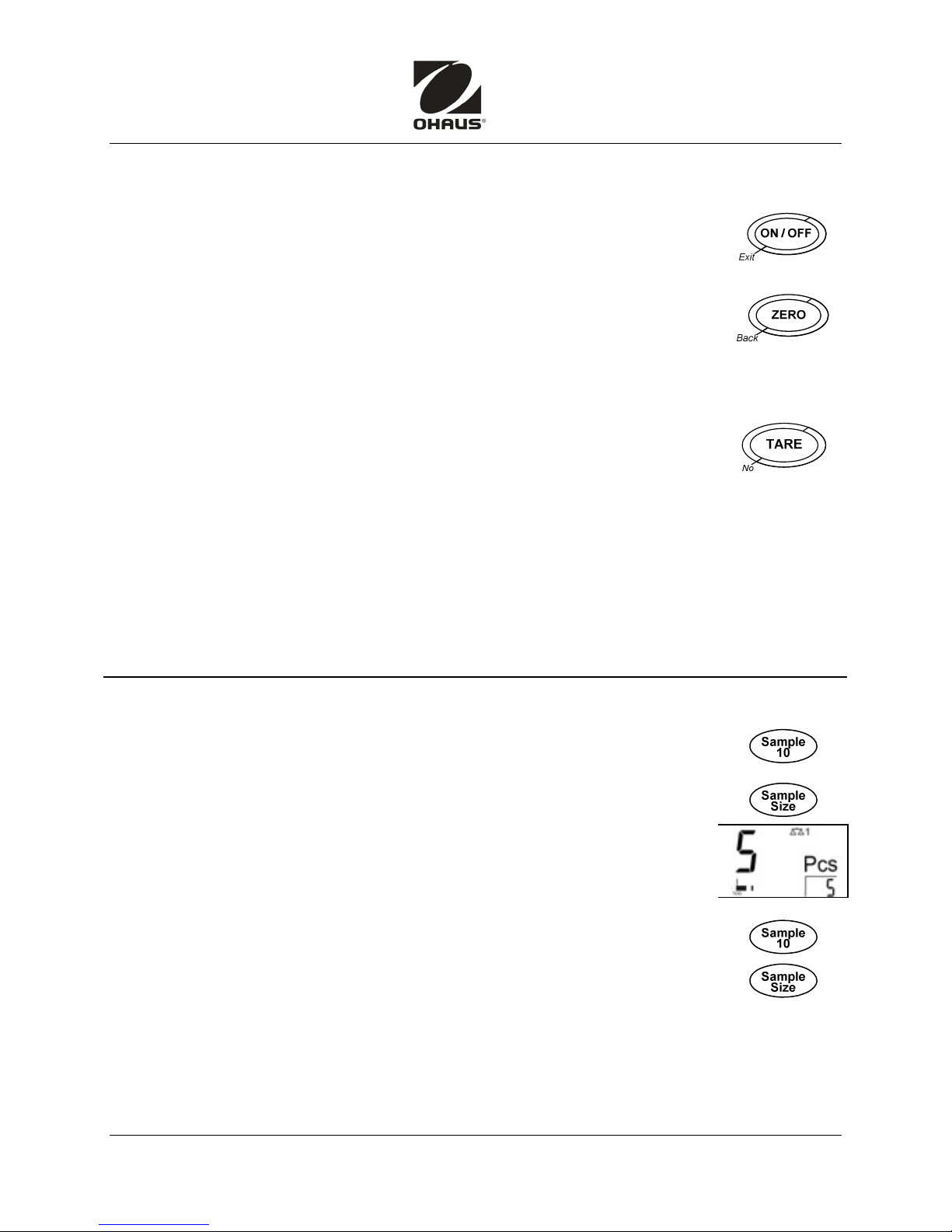
POWER On/Off:
test. When the weight display appears, scale is ready to weigh.
To turn scale off, press ON/OFF.
Zeroing corrects the influence of slight changes on the weighing pan.
Manual: Unload scale and press ZERO. The zero display appears.
Automatic: As standard, the zero point of the scale is automatically corrected
when scale is unloaded. (Automatic zero point correction is a menu setting.)
Weigh:
The display indicates gross weight in the selected measuring unit.
Tare:
The Net weight and NET indicator are displayed.
To clear Tare value, remove container and press TARE. (Or press Clear.)
Auto-Tare: (Activate A-tArE in the menu.) When the T symbol flashes, place container on
scale. Its weight is automatically tared. Zero and NET appear, and display shows weight of
contents when placed in container. Tare weight is cleared automatically when scale is unloaded.
Chain Tare: (activate CHAIn.tr in menu) Tare several times: Place first container on scale,
press TARE. Weigh sample, record result. Place second container, press TARE again.
Total weight on scale is saved as new tare weight; zero display appears. Repeat as needed.
Numerical tare weight entry: Enter known tare weight on keypad and press TARE.
Place filled container on scale. The net weight appears in the display.
Place item to be weighed on the pan.
Place an empty container on the pan and press TARE.
To turn scale on, Press ON/OFF. Scale conducts a display
OFF
appears briefly and display goes off.
COUNTING
Determining Average Piece Weight
Place an empty container on the scale and press TARE.
Place 10 reference parts on the scale and press Sample 10, or…
Check the number displayed above Sample Size;
place that number of pieces on scale, and press Sample Size.
Scale determines average piece weight and shows the number of pieces.
(Add more parts to container until required number of pieces is reached.)
To see weight on pan, press Count/Weight.
Counting Parts Out of a Container
Place a full container on the scale and press TARE.
Remove 10 reference parts and press Sample 10, or…
Check number above Sample Size, remove that number, press Sample Size.
Scale determines average piece weight and shows number of pieces removed.
Counting with known Average Piece Weight: Enter a known average piece weight on the
numerical keypad and press Manual Set. Scale is ready to count.
Using the Memory Key: There are 100 memory locations for frequently used tare values,
average piece weights, target weights and target quantities.
Ohaus Corporation www.ohaus.com iii Ranger Count Plus Quick Start Guide
(For more details, see Instruction Manual.)
(See Instruction Manual.)
Page 4
Ranger
Count Plus Quick Start Guide
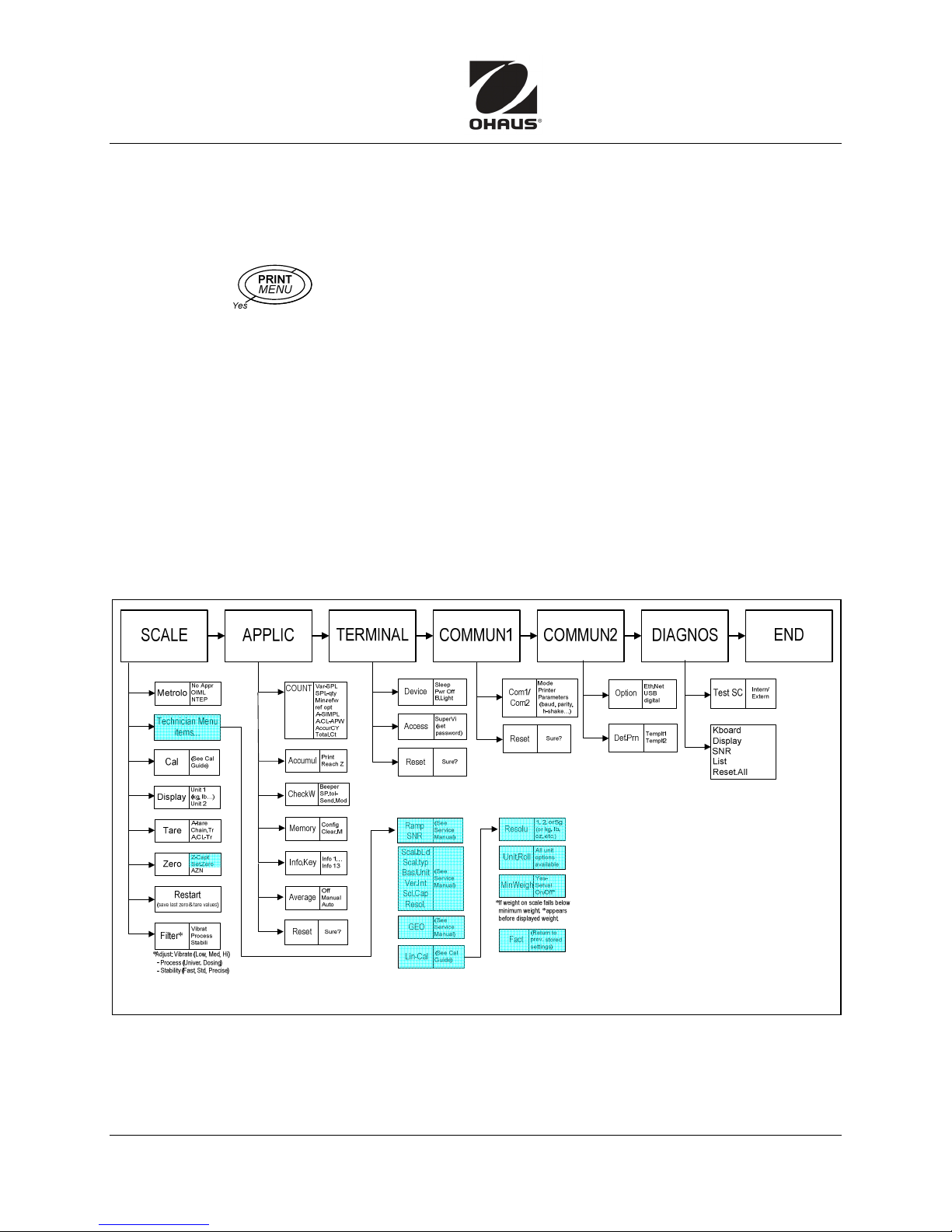
MENU NAVIGATION
The menu has two levels: Operator and Technician. The Technician level can be protected by a
password. When scale is delivered, both levels are accessible without a password.
Operator menu:
Press and hold
press Yes, then No.
See Menu Structure below for other settings.
− To scroll forward, Press No. To scroll back, Press Back.
− To activate menu item/accept selection: Press Yes.
− To exit Menu, Press Exit.
Press Yes to save settings or No to discard changes, and return to weighing mode.
Technician menu:
Press and hold MENU until
If a password is not entered after a few seconds, the scale returns to weighing mode.
Emergency password for Technician access to the menu: Back-Yes-Back-Yes.
COdE
COdE
appears: a password prompt. To work at Operator level,
COdECOdE
CCCCaL
aL
appears: standard calibration.
aLaL
(For details, see Instruction Manual.)
End
appears. Press Yes.
COdE
COdE
appears. Enter the password and press Yes.
COdECOdE
(See Calibration Guide.)
Save
appears.
MENU STRUCTURE
*80253102*
Ranger
Count Plus Quick Start Guide iv Ohaus Corporation www.ohaus.com
P/N 80253102
 Loading...