

Page 1
Quick Start Guide CS Series Scales
Spacer
PREPARATION FOR USE
Check Power
For AC power, be sure local line voltage
matches voltage printed on the scale’s power
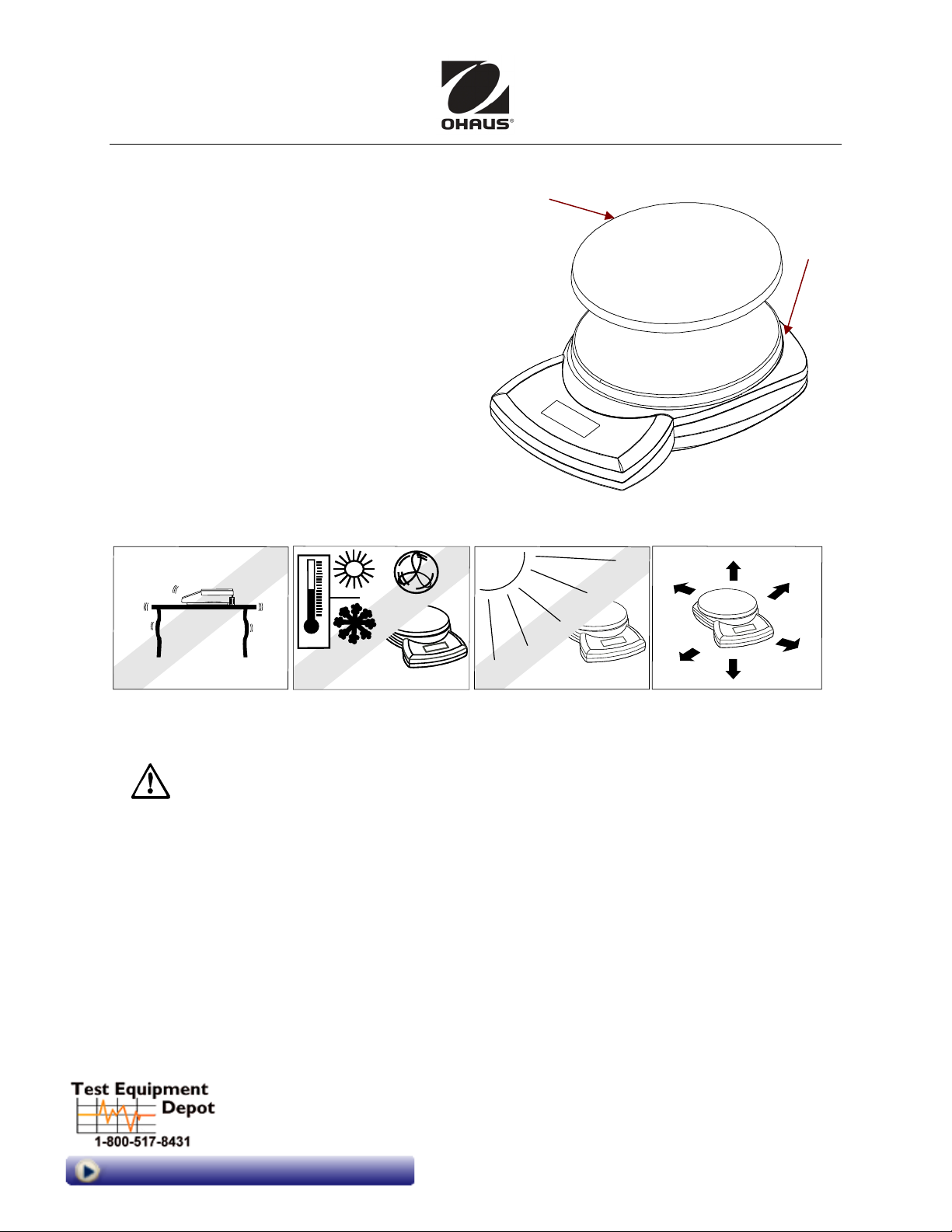
Stainless
steel pan
rests atop
weighing
platform.
Remove red
transport
adapter. If not, do not use AC power.
To use battery power, remove battery cover
and insert three LR6 (AA) batteries.
Remove Spacer, Install Pan
Remove the red transport spacer: slide it back
and off. Place the stainless steel pan (if
provided) on the weighing platform. (The scale
can be operated without the pan, if desired.)
Allow at least 30-60 seconds warm-up time,
for scale to stabilize before operation.
SELECTING THE LOCATION: Place on a firm, steady surface with sufficient space.
Avoid excessive air current, vibrations, heat sources, or rapid temperature changes.
SAFETY PRECAUTIONS
For dependable operation of this product, observe the following precautions:
• Verify that the input voltage printed on the power Adapter and the plug type
matches the local power supply (if using AC power).
• Make sure that the power cord does not pose an obstacle or tripping hazard.
• Disconnect the product from the power supply when cleaning.
• Do not operate this product in hazardous or unstable environments.
• Do not drop loads on the pan.
• Use only approved accessories and peripherals, as available.
• Operate the product only under ambient conditions specified in the Instruction
Manual.
• Service should be performed by authorized personnel only.
99 Washington Street
Melrose, MA 02176
Phone 781-665-1400
Toll Free 1-800-517-8431
Visit us at www.TestEquipmentDepot.com
i CS Series Scales Quick Start Guide
Page 2
CS Series Scales Quick Start Guide
DISPLAY
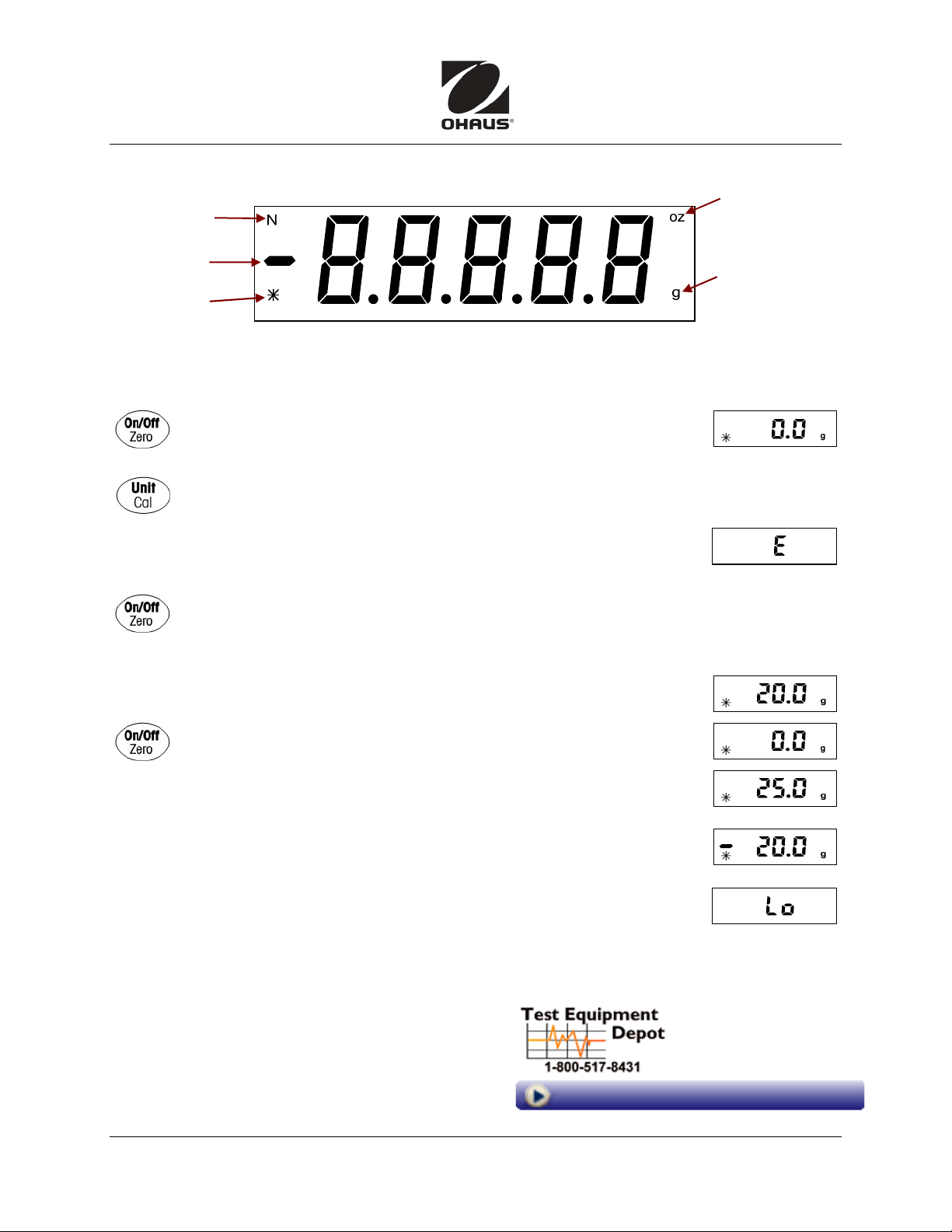
Symbol for
Newtons
Negative sign
Stability
indicator
OPERATION
Place the scale on a horizontal flat surface.
Power Up test: All display segments appear briefly on power up.
Once 0 appears, the scale is ready for use.
The on left indicates the a stable reading.
Press UNIT/CAL to switch weighing units: ounces, Newtons, grams
Overload: If the applied load exceeds the capacity of the scale,
E appears. Remove the load immediately.
The scale will return to normal operation.
TARE: Values can be added progressively to a sample:
Press ON/ZERO OFF, the scale display returns to zero.
Add more weight, press ON/ZERO OFF to zero the scale again.
Add weight up to the capacity of the scale.
Symbol for
Ounces
Symbol for
Grams
Place a container on the platform (eg, 20 grams).
Press ON/ZERO OFF. The display shows 0.00.
Add material to the container (eg, 25 grams).
Display shows weight of material – not the container.
When container and material are removed, display will show
weight of container as negative value. To return to normal
operation, press ON/ZERO OFF again.
Low Battery: The display shows Lo when the batteries are weak
and need to be replaced.
*80253050* P/N 80253050
99 Washington Street
Melrose, MA 02176
Phone 781-665-1400
Toll Free 1-800-517-8431
Visit us at www.TestEquipmentDepot.com
CS Series Scales Quick Start Guide ii
 Loading...