

Page 1
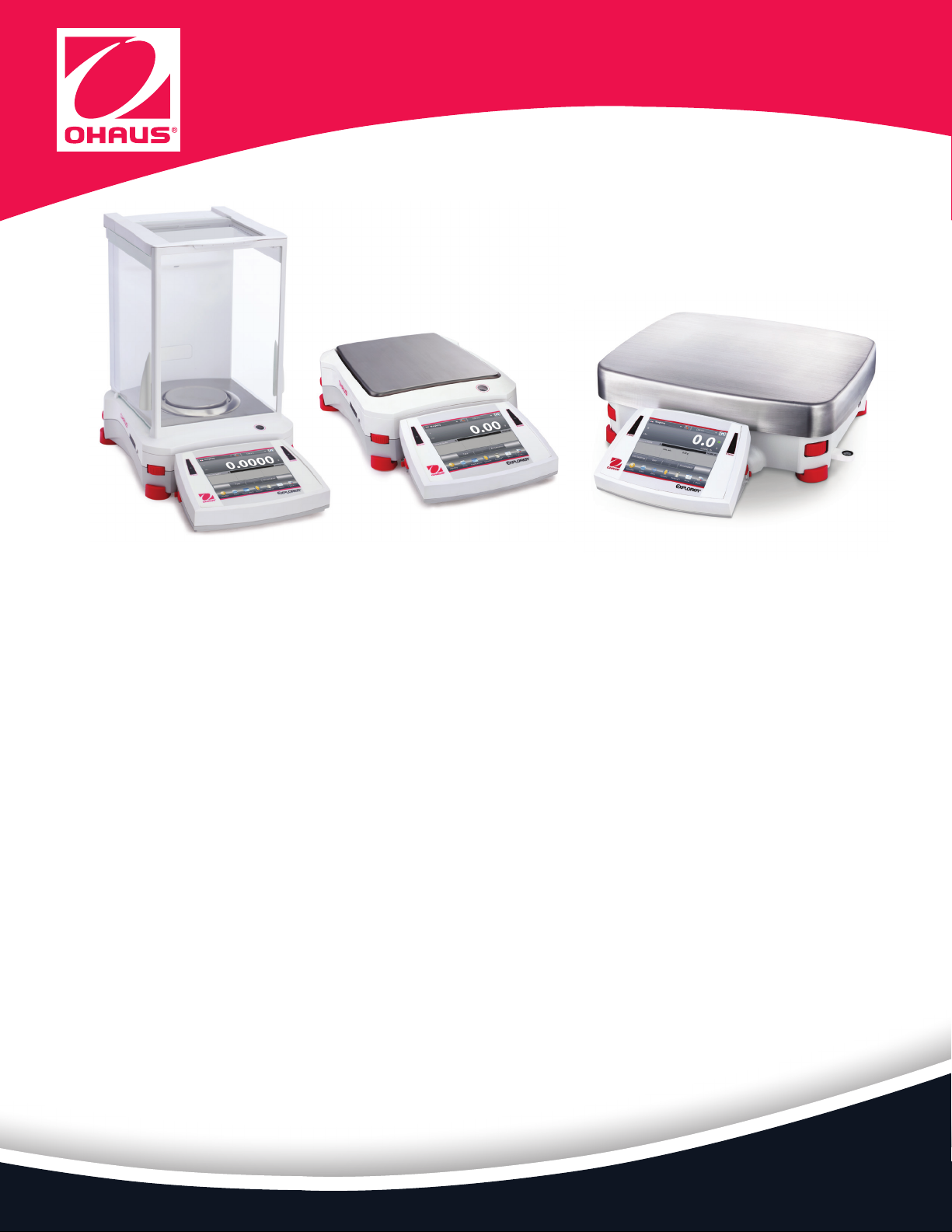
Explorer®
Analytical, Precision, and High Capacity Balances
Intelligent. Intuitive. Ingeniously Practical.
The OHAUS Explorer® Series has risen to the next level of ingenuity—expanding on its modern features
and design to offer unmatched functionality in a line of high-performance balances unlike any other
on the market.
Standard Features Include:
• Intelligent PERFORMANCE—All Explorers have newly optimized linearity and repeatability
specifications and enhanced vibration filtering for better balance stability. All models also come
standard with AutoCal™ automatic internal calibration. 3×3 filtering setup ensures fast and stable
weighing results. The Explorer EX…/E models additionally offer traditional external calibration.
These combined enhancements improve accuracy, efficiency, and throughput.
• Intuitive OPERATION—A large color touch-screen display, icon-driven application software
that features 14 unique application modes, and a 3 level adjustable angle display make
Explorer the easiest to use, most advanced balance in its class today.
• Ingenious DESIGN—The base and display separate for maximum flexibility in any work area.
Draftshield models isolate the weighing chamber to enhance stability and speed results while
offering maximum accessibility to the weighing chamber through top-mounted side doors
or through the versatile top door that flips or slides open. Hands-free entry is available with
optional automated side doors.
• Practical Features—Explorer has up to four user-programmable touchless sensors to minimize
cross contamination and wear and tear normally associated with repeated touching of the
balance. The OHAUS Explorer EX...N series of balances meet or exceed the Class I
or II accuracy requirements in accordance with NIST Handbook 44 and
Canada’s Weights and Measures Regulations.
Page 2
Explorer® Analytical, Precision, High Capacity
Intelligent PERFORMANCE
With stabilization times up to 50% faster and superior shock
protection, Explorer delivers fast, accurate, and reliable results.
• Fast stabilization time
—Improves operational efficiency
—Increases throughput
—Improves productivity
• Optimized linearity and repeatability specifications
—Provides accurate and repeatable results
• Optimized vibration filtering
—Provides balance stability in unstable environments
• Superior Shock, Spill and Splash Resistance
— 2-D Protection guards balance against disruptions in service due
to shock or sudden movements. IP54 base enclosure protects
the weighing base from damage by debris, humidity and
accidental spills and splashes.*
*High Capacity Models Only
Intuitive SOFTWARE
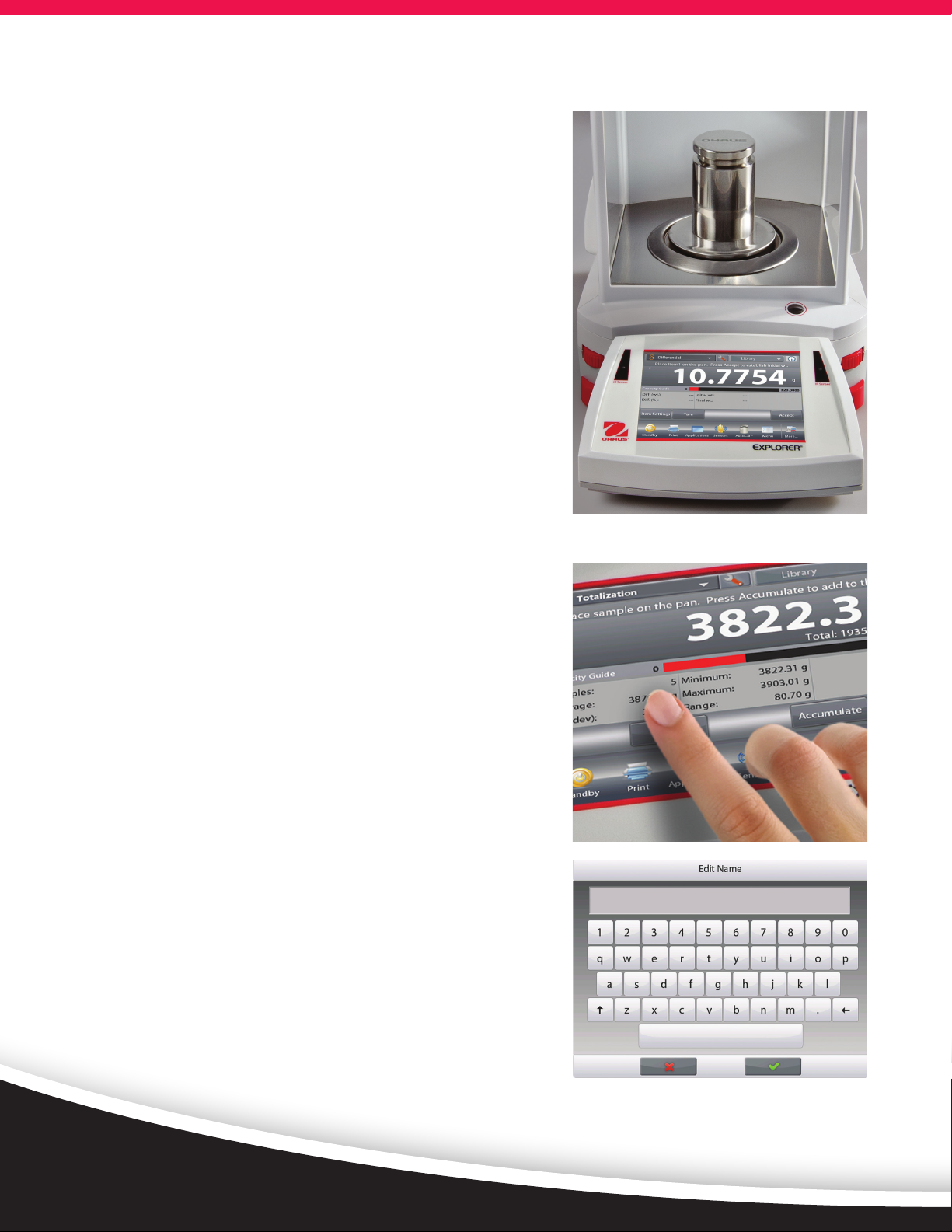
SmarText™ 2.0 is OHAUS’ easy-to-use graphical software featuring
14 applications, virtual QWERTY and numeric keypads, and belowminimum weight indication.
• Color VGA display with icons for simple menu navigation
—High resolution, 5.7” (145mm) diagonal color 640 × 480 pixel
display reproduces highly readable operating software
— Resistive touch screen display quickly responds to operator’s
touch or stylus
• 14 built-in applications with customization capabilities to meet
the varying needs in laboratory and industrial settings
• Minimum Weight capability with visual warning feature
• Virtual QWERTY keyboard and numeric keypad to quickly input
GLP and GMP data and other application data
• User Manager with administrator capability
• Library function to store and recall customized applications
• Alternate RS232 command feature adapts the balance to
existing data acquisition software
• External input for zero, tare or print operations via the external
foot switch accessory
• Audible and visual feedback for touch screen input commands
as well as the indication of the check weighing status
Page 3
Ingenious DRAFTSHIELD
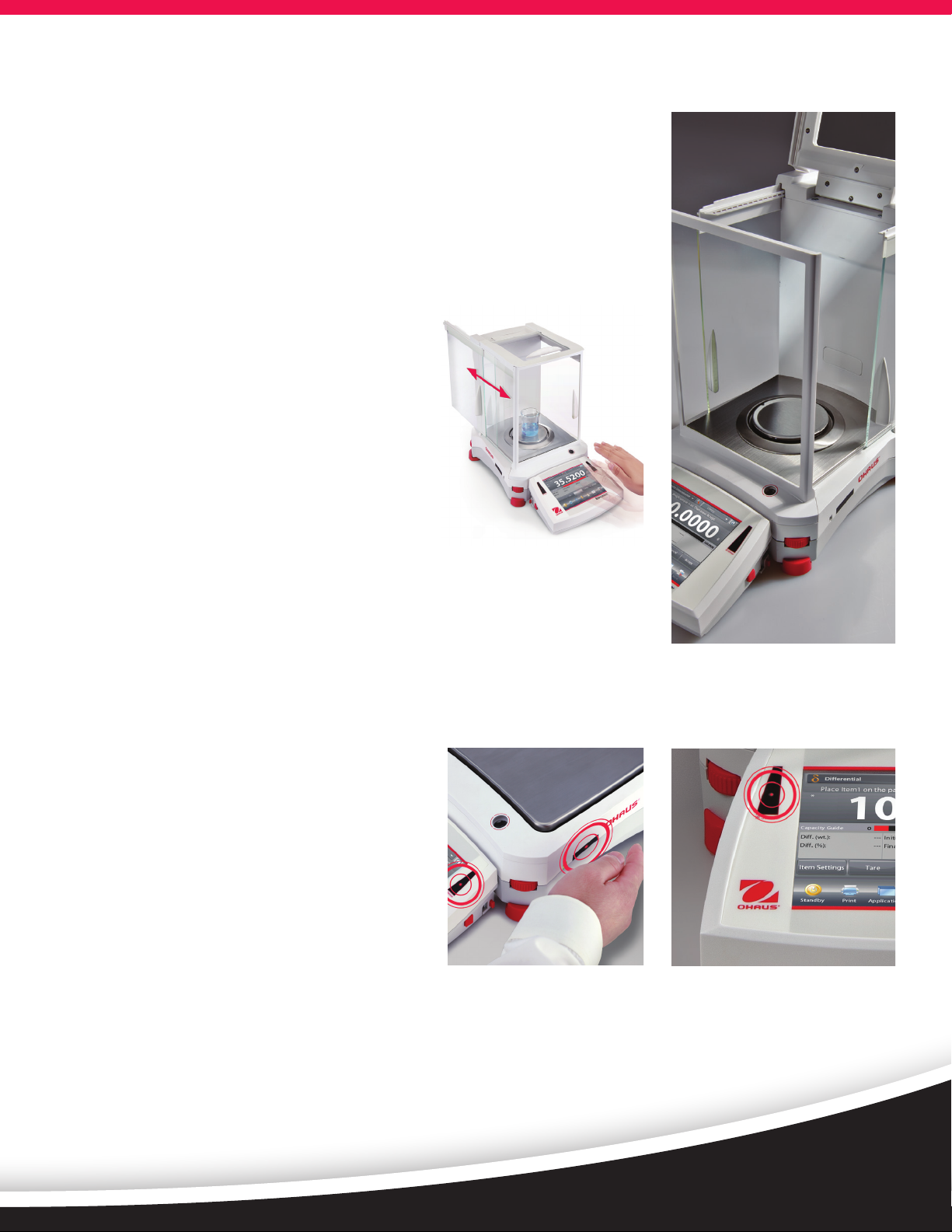
Explorer’s draftshield provides ample access and visibility to the weighing
chamber through the versatile top door and side sliding doors. Select
models feature motorized side doors that open and close automatically
with use of the touchless sensors on the base and display.
• The automatic draftshield door models have a new function for automatically opening draftshield doors without touching the balance.
It helps to eliminate sample residue transfer and contaminations.
• Side doors seamlessly glide on top-mounted
bearings
• The versatile top door offers two entry
options; access the weighing chamber by
flipping the top door or sliding the glass
panel open.
• The expansive side entry 6.3” × 9.4”
(160 mm × 240 mm) allows you to
freely place and remove large weigh boats or
other large vessels in the weighing chamber
• Antistatic coated glass helps dissipate static
charges in the weighing chamber which could adversely affect the
weighing results
• Easy to install and remove glass panels and a stainless steel bottom
make Explorer extremely easy to clean
• A draftshield chamber light is available when the balance is used in
low lighting environments
Practical TOUCHLESS SENSORS
Explorer features up to four touchless sensors for
hands-free operation of zero, print, calibration,
tare, automated draftshield doors and other
selectable functions
• Hands-free operation
—Improves weighing efficiency
—Eliminates sample residue transfer
—Minimizes contamination
• Two sensors on the base* and two on the
display can be set up individually to allow for
remote operations
• The sensors can be set up to provide automated operation of the
draftshield side doors and can be programmed to automatically open
the opposite side door in order to support efficient and logical sample
placement with your free hand.
* Analytical and precision models only.
Automatic Draftshield door operation only offered on Analytical models
Page 4
Explorer® Analytical, Precision, High Capacity
Intelligent CALIBRATION
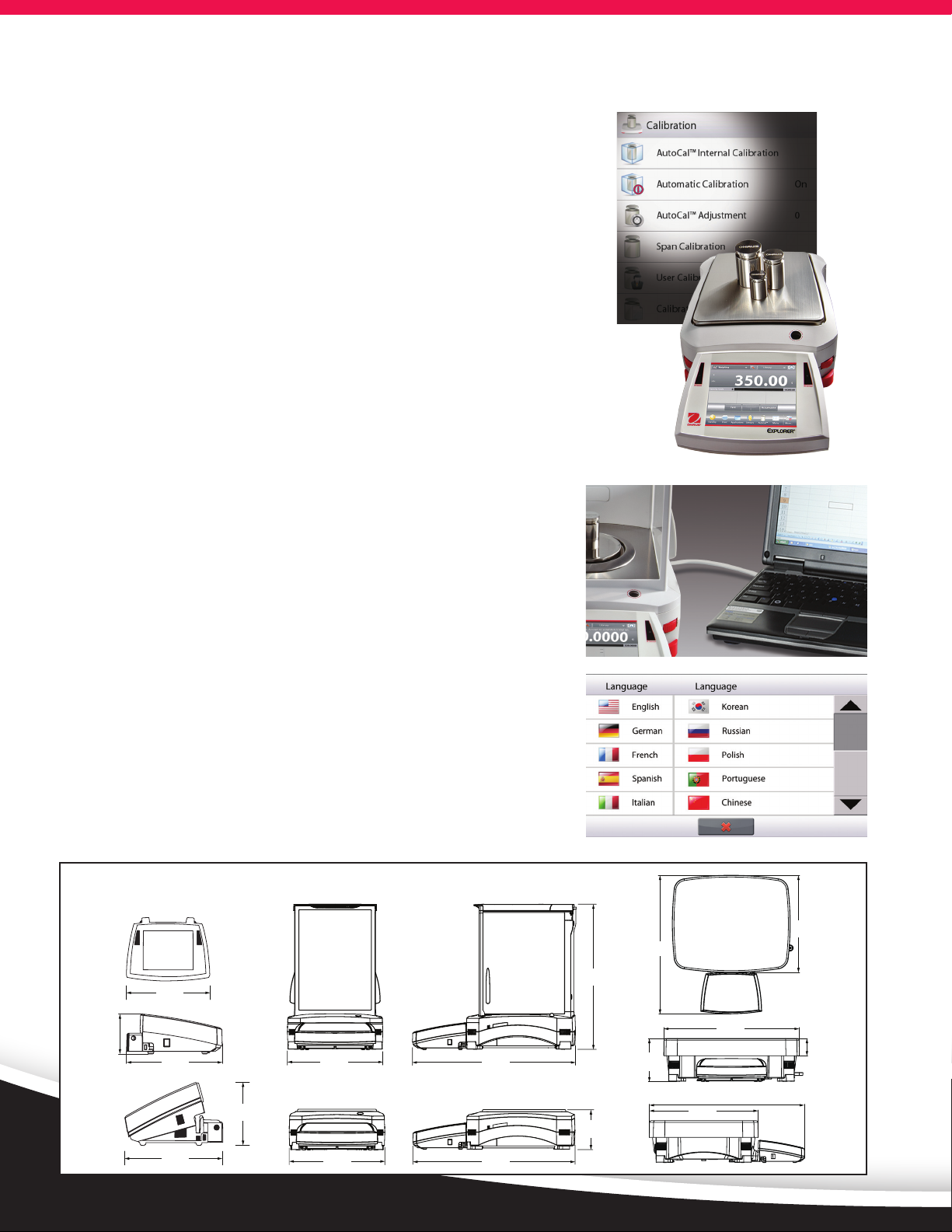
AutoCal™ ensures performance and assists with routine maintenance
by automatically calibrating the balance daily.
• Self-calibrates the system when it senses a temperature change
sufficient enough to affect weighing accuracy, or every 11 hours
• Performs routine calibration and reduces the need for external
masses
• External Calibration Models Available —
Select models feature traditional external calibration in which
external weights (user’s choice of calibration weight values) are
required to calibrate the balance to ensure accuracy
Intuitive USER SETUP
Explorer is the industry’s most easy-to-use balance, featuring leveling
assistance and instructional messaging for quick out-of-the-box
setup and use.
• Easy to view illuminated level indicator placed at the front of
the balance
• Adjustable thumbwheels are easy to turn to level the balance
• Level assist screen helps users quickly identify which
thumbwheels need to be adjusted to level the balance
• Data Transfer Function helps to output data directly into
Microsoft Excel
• Instructional messaging during application use guides users
through the weighing process
• User information menu allows users quickly view and learn more
about the available balances features
• Up to 13 operating languages make Explorer’s Intuitive User
Setup truly universal
Dimensions
7.68 in
195 mm
13.78 in
350 mm
12.25 in
17.44 in
443 mm
311 mm
2.53 in
64 mm
6.06 in
154 mm
6.06 in
154 mm
3.54 in
90 mm
9.06 in
230 mm
9.06 in
230 mm
14.85 in
377 mm
15.5 in
393 mm
15.47 in
393 mm
3.86 in
98 mm
4.72 in
120 mm
12.24 in
311 mm
17.44 in
443 mm
1.89 in
48 mm
Page 5
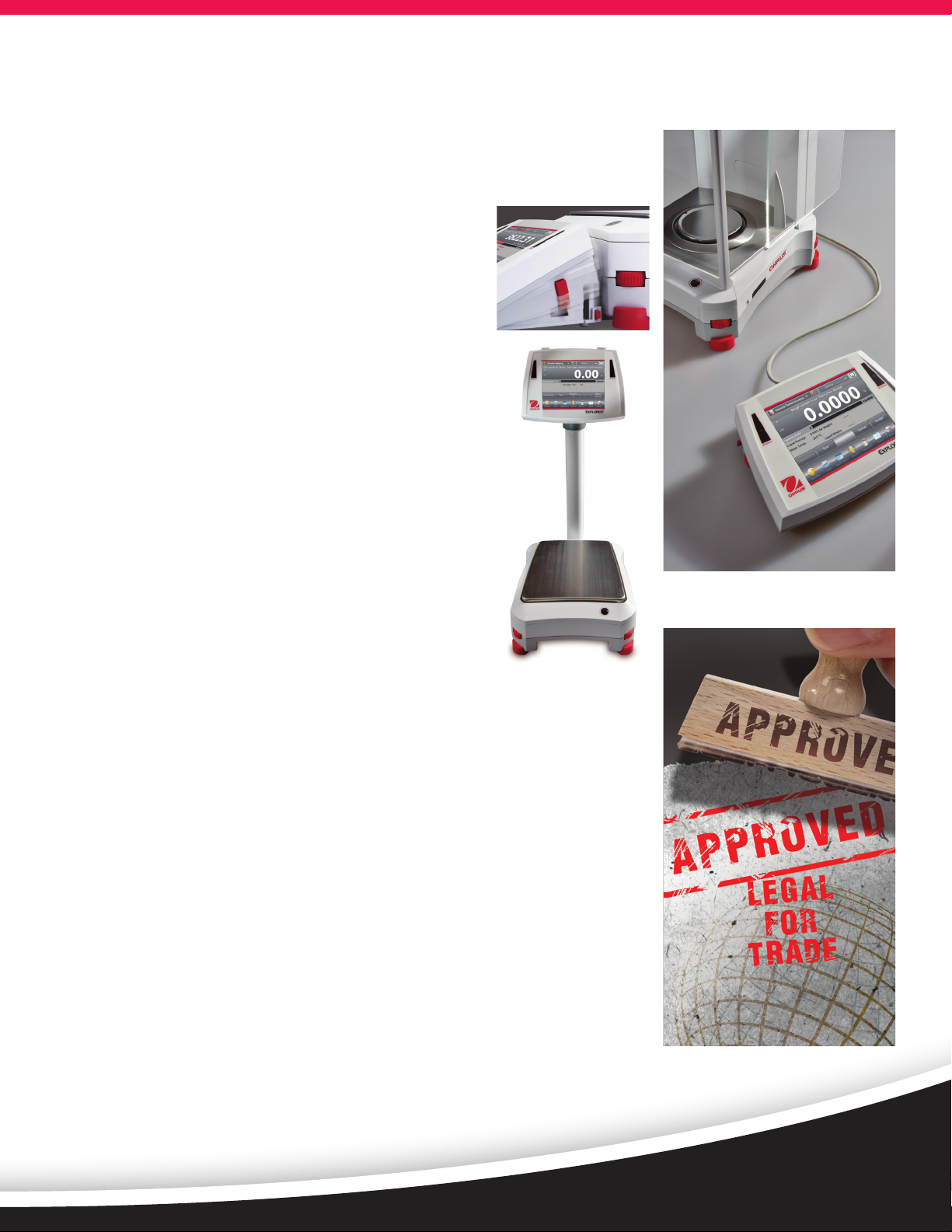
Ingenious MODULAR DESIGN
Explorer’s modular design features a color touch display that can be separated
from the weighing base
• Display features:
—3 position, angular adjustment to optimize viewing
—Easy access communication ports include standard
USB and RS232 and an optional third port for either
RS232 or Ethernet
—Left and right side cable exit feature for customized
installation capability
—Tower and wall mount ready for modular installation*
—In-use cover for protection against rugged use
—Extension cable accessory extends remote use up to
27 feet (9 meters)
• Base features
—Quadrastance™ design with four adjustable
thumbwheels provides superior stability
—Robust die-cast metal bottom housing
—Accessory tower mount ready for modular installation
—Cable storage system underneath base keeps
excess cables manageable
• Adjustable rolling feet accessory allows for simple and
quick movement and relocation of the balance**
*Tower mount sold separately
**High capacity models only
Practical APPROVALS
Explorer EX…N series of balances meet or exceed the Class I or II accuracy
requirements in accordance with NIST Handbook 44 and Canada’s Weights
and Measures Regulations. Certificate of Conformance Number 12-012 was
issued under the National Type Evaluation Program (NTEP) of the National
Conference on Weights and Measures. Notice of Approval AM-5847 was
issued by Measurement Canada, an Agency of Industry Canada.
Other Standard Features & Equipment:
Menu lock switch, security bracket, integral weigh below hook for below
balance weighing applications, removable stainless steel weighing pan,
stability indicator, overload and underload indicators, auto standby.
Page 6
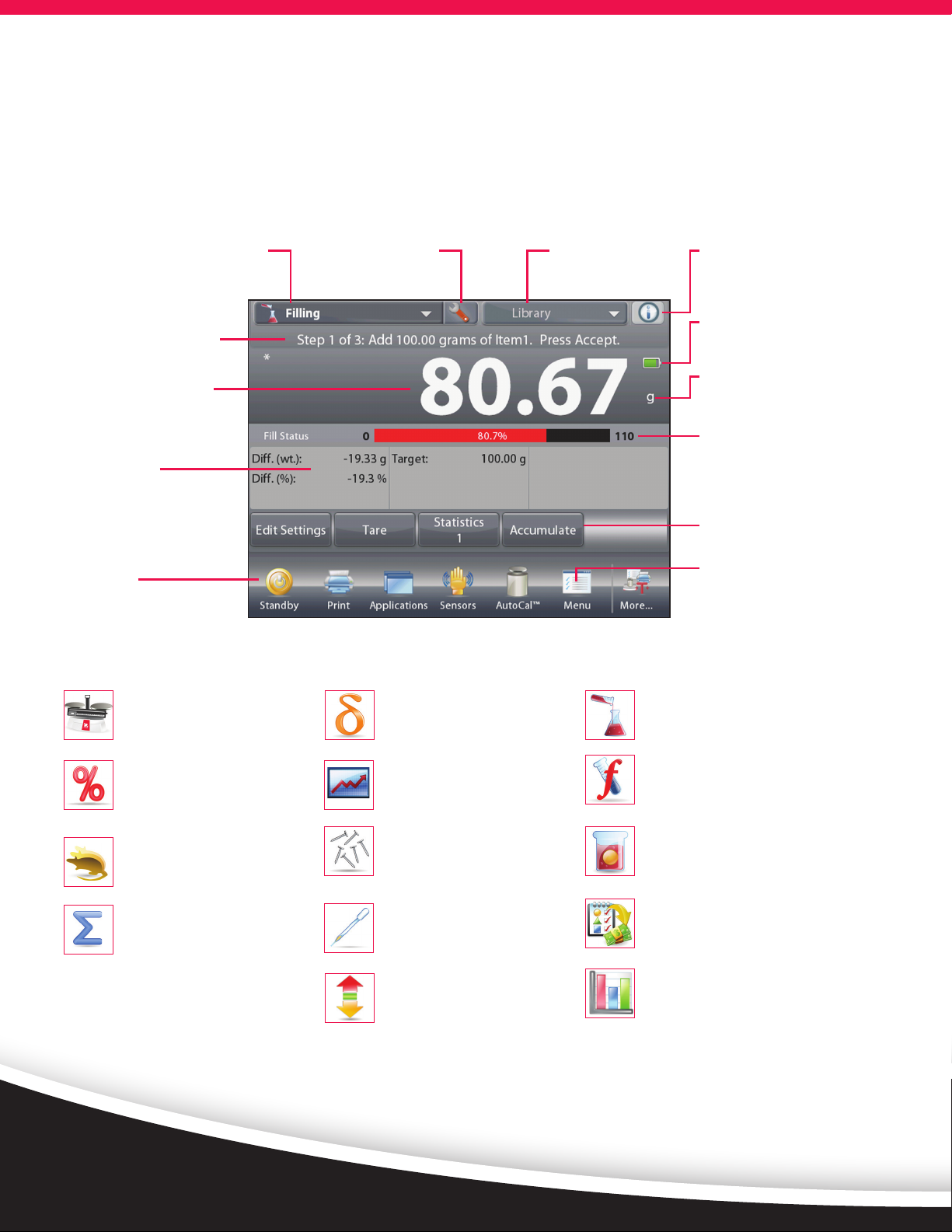
Explorer® Application Software
The OHAUS Explorer’s advanced applications simplify
even the most complex laboratory measurements.
Whether it’s determining the difference between
initial and residual weights or calculating the density
of solids and liquids,
Displays your current application.
One-touch drop down menu shows
additional application choices
Easy-to-follow text prompts
tell you what to do next
Large weigh results can
be viewed at any angle
Results area shows
pertinent application
information (varies by
application)
Seven quick keys make
balance operation a
breeze!
Touch to change your
application settings
Explorer eliminates the need for time consuming
manual calculations and data logging. The high
resolution display and innovative user interface
make balance setup and application use effortless.
Quickly store and recall
your library data of
regularly used items
Need help? Just tap the
Info button for built-in
assistance
Battery life indicator
when powered by
optional battery pack
(for High Capacity
models only)
Press the weighing unit
to change the unit of
measure (activate in
Weighing Units menu)
Fill and capacity bar
indicators assure you
are always in range
(indicators vary by
application)
Soft keys are application
specific
Press Menu to choose
applications, change
user settings, balance
setup and much more!
Standard Apps
Weighing
Determine weight of items in the
selected unit of measure. Minimum
Weight feature is also available.
Percent Weighing
Measure the weight of a sample
displayed as a percentage of a
pre-established Reference Weight.
Dynamic Weighing
Weigh an unstable load. Balance
takes an average of weights over
a time period.
Totalization
Measure cumulative weight of
multiple items. Cumulative total
may exceed balance capacity.
Differential Weighing
Store sample weights and calculate
the difference between initial
weights and final weights.
Peak Hold
Capture and store highest weight
in a series. Both stable and unstable
weights are captured.
Parts Counting
Count samples of uniform weight.
Choose Standard Counting, Check
Counting, or Fill Counting.
Pipette Adjustment
Check pipette values by weight
analysis, with built-in water density
table. (Non High Capacity Models)
Check Weighing
Compare the weight of a sample
against target limits. Choose from
Standard, Nominal-weight, or
Nominal-Percent.
Filling
Fill a container to a target weight.
Progress bar displays filling status.
Formulation
For compounding and recipe making.
The number of components can be
from two to 99.
Density Determination
Determine density of solids more
dense than water, solids less dense
than water, liquids, or porous material.
Ingredient Costing
Determine cost of formula or recipe
based on known cost/quantity of
components or ingredients.
SQC
Monitor and/or control processes
to eliminate under and over filling.
Page 7
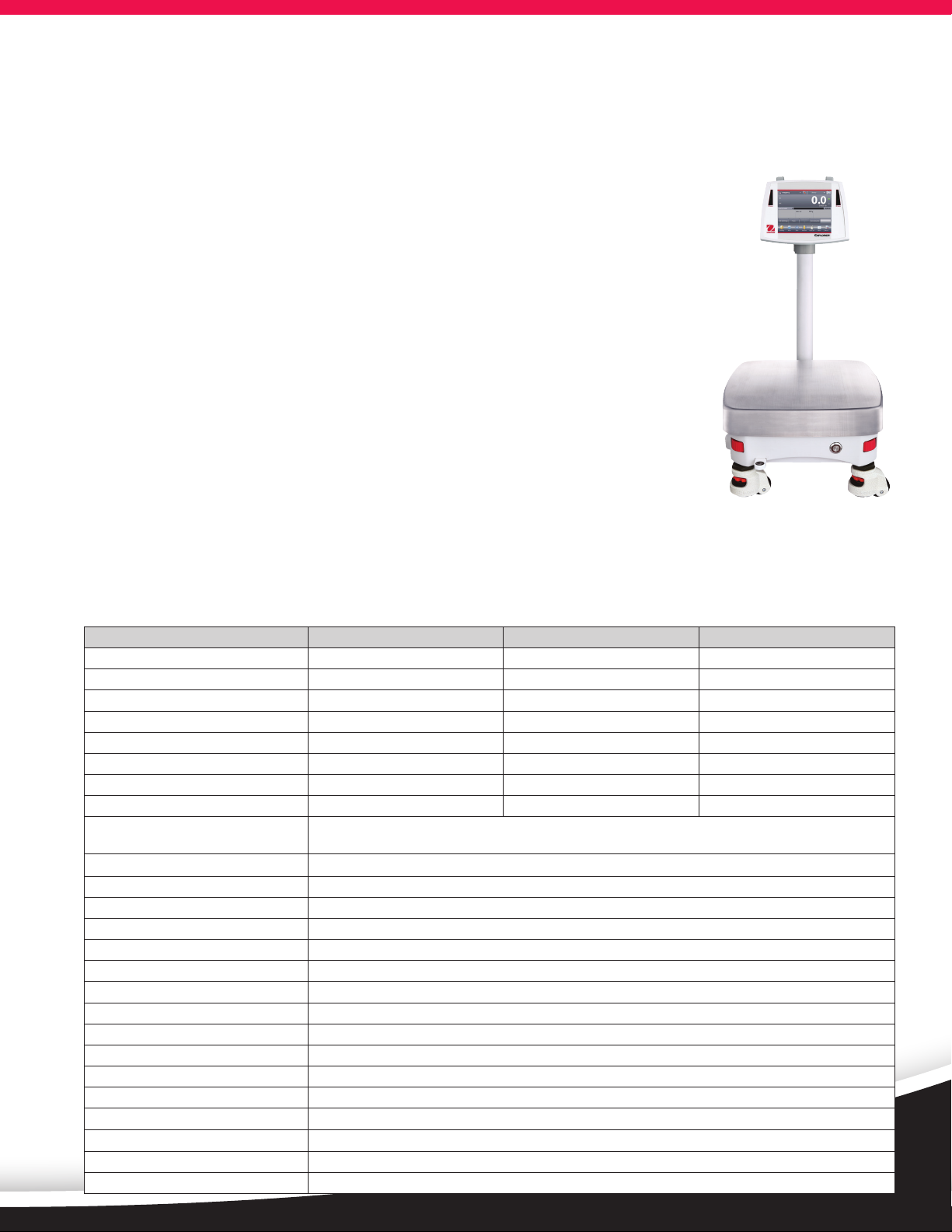
Explorer® High Capacity
The Explorer series includes three high-capacity precision models with capacities up to 35 kg. Explorer highcapacity balances offer the same intuitive features, such as AutoCal™ and a 1 second stabilization time, with
additional functions and attributes to support higher capacity weighing applications.
Modular Design
• 5.7” (145mm) diagonal color VGA touch screen optimizes viewing and menu navigation
• Two touchless sensors on display offer hands-free operation
• The display can be separated from the base up to 5 feet (1.5 meters) in order to fit
operational needs in almost any workspace. A 27 foot (9 meter) cable is also available
when additional flexibility is needed.
Superior protection in rugged or unstable environments
• With a die-cast metal base and a 14.8” × 12.2” (377 × 311mm) stainless steel pan, the
Explorer High Capacity is built to withstand rugged, every day use.
• 2-D Protection prevents shock and damage associated with movement and forces
applied to the balance
• IP54 base enclosure protects the weighing base from damage by debris, humidity
and accidental spills and splashes. (High Capacity models only)
High Capacity Accessories for Added Efficiency
• Adjustable rolling feet option provides assistance to easily moving the balance
Shown with optional tower
mount and rolling feet
• Rechargeable battery option provides 10 hours of operation away from a power source
• Weigh-below hook included and can be used for density determination
Model EX12001 EX24001 EX35001
Capacity (g) 12000 24000 35000
Readability (g) 0.1 0.1 0.1
Repeatability std (g) ±0.1 ±0.1 ±0.1
Linearity (g) ±0.2 ±0.2 ±0.2
Stabilization Time ≤1 ≤1 ≤1
Sensitivity Draft (PPM/°C) 3 3 3
Typical Min-Weight (USP, K=3, U=0.1%) 210g 210g 210g
Typical Min-Weight (GLP K=2, U=0.1%) 140g 140g 140g
Weighing Applications Weighing, Percent Weighing, Parts Counting, Check Weighing, Dynamic/Animal Weighing, Filling,Totalization,
Formulation, Differential Weighing, Density Determination, Peak Hold, Ingredient Costing, SQC
Weighing Units
Pan Size 14.84 × 12.24 in / 377 × 311 mm
Calibration AutoCal™ internal calibration
Tare Range To capacity by subtraction
Power Requirement Power Input 100-240 VAC, 0.5-0.25A, 47-63 Hz, Power Output: 24 VDC, 0.63 A, 15W
Display Type Full-color VGA graphic display, 4-wire resistive touch screen
Display Size 5.7 in / 145 mm (diagonal)
Display Housing (W × H × D) 7.68 × 3.54 × 6.06 in / 195 × 90 × 154 mm
Base Housing (W × H × D) 14.84 × 4.72 × 17.44 in / 377 × 120 × 443 mm
Communication Standard RS232, USB, Optional Ethernet or 2
Operating Temperature Range 50°F to 86°F / 10°C to 30°C
Operating Humidity Range 80% max up to 86°F/30°C, decreasing linearly to 50% at 104°F/40°C, non-condensing
Storage Conditions 14°F/-10°C to 140°F/60°C at 10% to 90% relative humidity, non-condensing
Net Weight
Shipping Weight 25.8 lbs / 12.5 kg
Shipping Dimensions 26.18 × 20.67 × 13.00 in / 665 × 525 × 330 mm
g, kg, ct, gn, lb, oz , ozt, N, dwt, hkt, sgt, twt, mom, tical, msg, tola, Custom Unit 1, Custom Unit 2, Custom Unit 3
nd
RS232
22 lbs / 10 kg
Page 8
Explorer® Analytical and Precision Balances
Model EX124 EX224 EX324 EX223 EX423 EX623 EX1103 EX2202 EX4202 EX6202 EX10202 EX6201 EX10201
Automatic Door EX124/AD EX224/AD EX324/AD — — — — — — — — — —
External Calibration — — — EX223/E EX423/E — — EX2202/E EX4202/E EX6202/E — EX6201/E —
Certified Models EX124N/AD EX224N
Capacity (g) 120 220 320 220 420 620 1100 2200 4200 6200 10200 6200 10200
Readability d (g) 0.0001 0.001 0.01 0.1
Verification Interval* e (g) 0.001 — 0.01 — 0.01 — 0.1 — 0.1 — 0.1
Class* I — II — I — II — I — I
Repeatability std (g) ±0.0001 ±0.001 ±0.01 ±0.1
Linearity (g) ±0.0002 ±0.002 ±0.02 ±0.2
Stabilization Time (sec) ≤2 ≤3 ≤1.5 ≤1
Sensitivity Drift (ppm/°C) 1.5 3 5 3
Typical Min-Weight
(USP, K=3, U=0.1%)
Typical Min-Weight
(GLP K=2, U=0.1%)
Weighing Units Gram, Milligram, Kilogram, Carat, Ounce, Ounce Troy, Pound, Pennyweight, Grain, Newton, Momme, Mesghal, Hong Kong Tael, Singapore Tael, Taiwan Tael, Tical, Tola, Baht,
Weighing Units,
Certified Models mg, g, oz, lb, ct, ozt, grain, dwt —
Weighing Applications Weighing, Percent Weighing, Parts Counting, Check Weighing, Dynamic/Animal Weighing, Filling, Totalization, Formulation,
Pan Size Ø 3.54 in / 90 mm Ø 5.12 in / 130 mm 7.48 × 7.87 in / 190 × 200 mm
Calibration All models feature external calibration. Models feature AutoCal™ internal calibration, except for EX.../E models
Tare Range To capacity by subtraction
Power Requirements AC Adapter Input: 100-240 VAC, 0.6A, 50-60 Hz
Display Type Full-color VGA graphic display, 4-wire resistive touch screen
Display Size 5.7 in / 145 mm (diagonal)
Display Housing (W×H×D) 7.68 × 3.54 × 6.06 in / 195 × 90 × 154 mm
Base Housing (W×H×D) 9.06 × 13.78 × 15.47 in / 230 × 350 × 393 mm 9.06 × 3.86 × 15.47 in / 230 × 98 × 393 mm
Communication RS232, USB and optional ethernet or 2
Temperature Range 50°F to 86°F / 10°C to 30°C
Humidity Range 80% max up to 86°F/30°C decreasing linearly to 50% at 104°F/40°C, non-condensing
Storage Conditions 140°F/60°C at 10% to 90% relative humidity, non-condensing
Net Weight 15 lbs / 6.9 kg 10 lbs / 4.3 kg 11 lbs / 5 kg
Shipping Weight 21 lbs / 9.6 kg 15 lbs / 6.8 kg 16 lbs / 7.4 kg
Shipping Dimensions 21.65 × 15.16 × 21.69 in / 55 × 38.5 × 55.1 cm 21.65 × 15.16 × 11.45 in / 55 × 38.5 × 29.1 cm
EX224N/AD
0.24g 0.24g 0.24g 2.1g 2.1g 2.1g 2.1g 21g 21g 21g 21g 210g 210g
0.16g 0.16g 0.16g 1.4g 1.4g 1.4g 1.4g 14g 14g 14g 14g 140g 140g
EX324N
EX324N/AD
— EX423N — EX1103N — EX4202N — EX10202N — EX10201N
Custom Unit 1, Custom Unit 2, Custom Unit 3
mg, g, oz, lb,
ct, ozt, grain,
dwt
Differential Weighing, Density Determination, Peak Hold, Ingredient Costing, Pipette Adjustment, SQC
—
mg, g, oz, lb,
ct, ozt, grain,
dwt
—
nd
RS232
g, kg, oz, lb,
ct, ozt, grain,
dwt
—
g, kg, oz, lb,
ct, ozt, grain,
dwt
—
g, kg, oz, lb,
ct, ozt, grain,
dwt
Compliance
Metrology: NIST Handbook 44 (NTEP CC 12-012), Measurement Canada Weights and Measures Regulations
(AM-5847) (Class I, nmax 320000; Class II, nmax 42000; certified models only)
Product Safety: IEC/EN 61010-1:2010; CAN/CSA-C22.2 No. 61010-1-12; UL Std. No. 61010-1 (3rd Edition)
Electromagnetic Compatibility: IEC 61326-1; EN 61326-1:2006 (Class B); C-Tick; FCC Part 15 (Class A);
ICES-003 (Class A)
Environment: RoHS; WEEE
Accessories
Tower Mount for Display (non High Capacity models)
. . . . . . . . . . . . . . . . . . . . . . . . . . . . . . . . . . . . . . . . . . . . . . . . . . . 83021102
Tower Mount for Display** ..................30078082
Display Extension Cable (27 Feet/9 Meter) ... 30078078
Display Extension Cable (9 Feet/3 Meter) ....83021083
Density Determination Kit ................... 80253384
Draftshield Kit (0.01g, 0.1g, non High Capacity models)
. . . . . . . . . . . . . . . . . . . . . . . . . . . . . . . . . . . . . . . . . . . . . . . . . . . 83021084
Security Device (Cable & Lock) ................ 80850000
Security Device (Laptop Lock) ................. 80850043
Interface Cable, USB (Type A to B) ............ 83021085
Second RS232 Kit .............................. 83021081
Ethernet Kit .................................... 83021082
*Certified models only **High Capacity models only
Foot Switch Kit ................................83021086
RS232 Cable & Adapter (to 80251992 Printer) 80252581
RS232 Cable, PC 25 Pin ....................... 80500524
RS232 Cable, PC 9 Pin ......................... 80500525
Impact Printer SF40A ......................... 30064203
RS232 Cable SF40A Impact Printer .......... 12122603
Compact Thermal Printer .................... 80251992
Paper for Dot Matrix Printer (2 Rolls) ........ 12120799
Ink Ribbon for Dot Matrix Printer ........... 12120798
Rolling Feet Kit** .............................. 30041470
External Rechargeable Battery Pack** ..... 30041295
Auxiliary Display PAD7 ....................... 80251396
WinWedge Software .......................... 80850080
OHAUS CORPORATION
* 7 Campus Drive
Suite 310
Parsippany, NJ 07054 USA
Tel: 800.672.7722
973.377.9000
Fax: 973.944.7177
www.ohaus.com
With offices throughout
Europe, Asia, and
Latin America
*ISO 9001:2008
Registered Quality
Management System
80774580_E © Copyright OHAUS Corporation
 Loading...