

Page 1

User's guide
Mode d’emploi
Guida per l'utente
Gebrauchsanleitung
Page 2
The lightning flash with arrowhead, within an equilateral
triangle, is intended to alert the user to the presence of
uninsulated “dangerous voltage” within the product’s
enclosure that may be of sufficient magnitude to
constitute a risk of electric shock to persons.
Caution: To prevent the risk of electric shock, do not
remove cover (or back). No user- serviceable parts
inside. Refer servicing to qualified service personnel.
The exclamation point within an equilateral triangle is
intended to alert the user to the presence of important
operating and maintenance (servicing) instructions in
the literature accompanying the appliance.
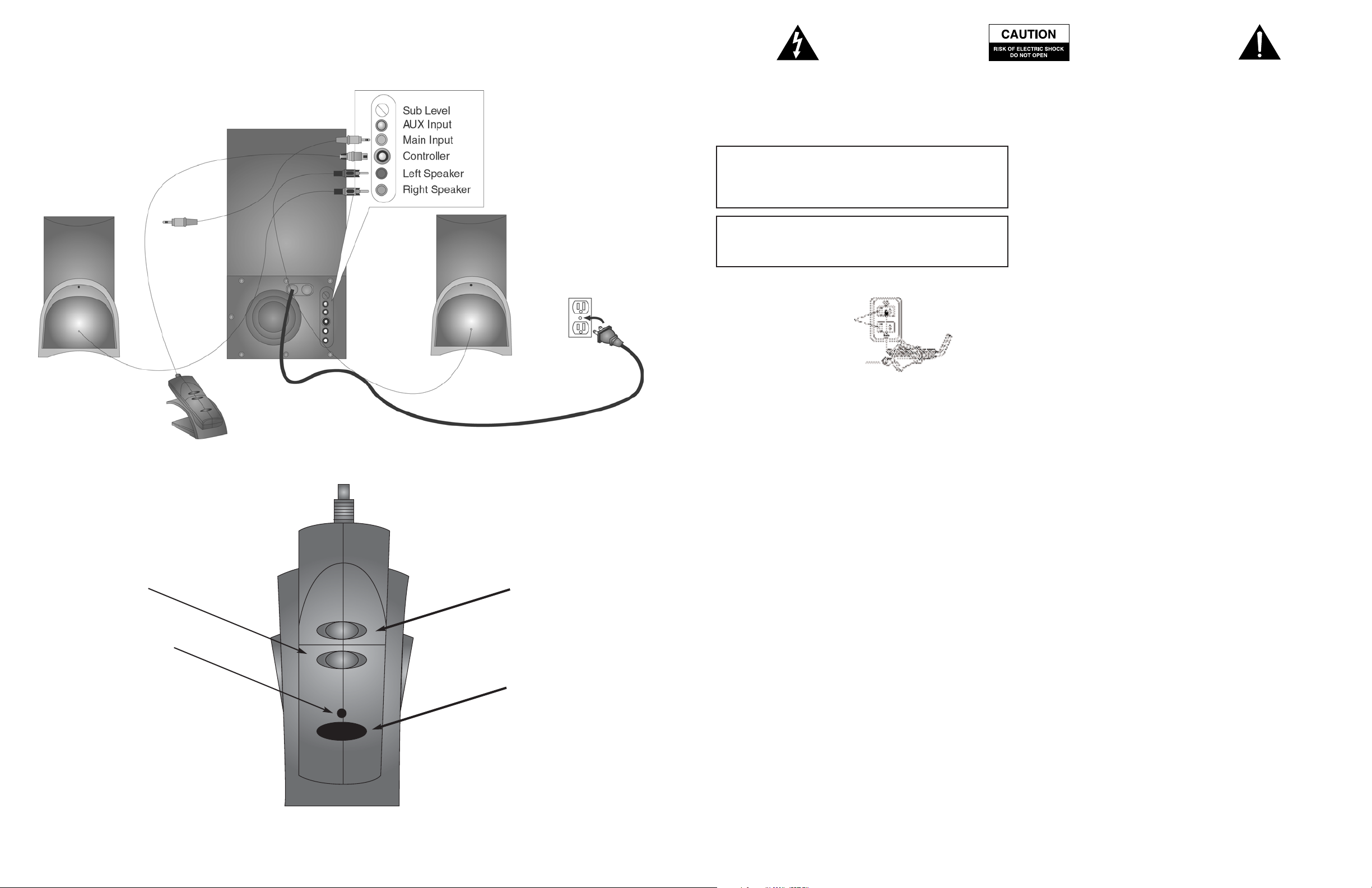
Volume Down
Power On
Indicator
1
Volume Up
Power On/Off
SAFETY INSTRUCTIONS
CAUTION
To prevent electric shock do not use this (polarized) plug with an
extension cord, receptacle or other outlet unless the blades can
be fully inserted to prevent blade exposure.
WARNING
TO REDUCE THE RISK OF FIRE OR ELECTRIC SHOCK, DO NOT
EXPOSE THIS APPLIANCE TO RAIN OR MOISTURE.
Connecting the Power Cord (AC Wall Socket)
Long slot is neutral
(ground) side.
Insert the wide blade into
the ground side slot.
Read Instructions — All the safety and operating instructions should be
read before the appliance is operated.
Retain Instructions — The operating instructions should be retained for
future reference.
Heed Warning — All warnings on the appliance and in the operating
instructions should be adhered to.
Follow Instructions — All operating and use instructions should be
followed.
Water and Moisture — The appliance should not be used near water –
for example, near a bathtub, washbowl, kitchen sink, laundry tub, in a wet
basement, or near a swimming pool, etc.
Outdoor Use — Warning: To reduce the risk of fire or electric shock, do
not expose this appliance to rain or moisture.
Location — The appliance should be installed in a stable location.
Ventilation — The appliance should be situated so that its location or
position does not interfere with its proper ventilation. For example, the
appliance should not be situated on a bed, sofa, rug, or similar surface
that may block the ventilation openings; or placed in a built-in installation,
such as a closed bookcase or cabinet that may impede the flow of air
through the ventilation openings.
Heat — The appliance should be situated away from heat sources such as
radiators, heat registers, stoves, or other appliances (including amplifiers)
that produce heat.
Power Sources — The appliance should be connected to a power supply
only of the type described in the operating instructions or as marked on
the appliance.
Power-Cord Protection — Power-supply cords should be routed so that
they are not likely to be walked on or pinched by items placed upon or
against them. Pay particular attention to cords at plugs, convenience
receptacles, and the point where they exit from the appliance.
Grounding or Polarization — The precautions that should be taken so
that the grounding or polarization means of an appliance is not defeated.
Cleaning — The appliance should be cleaned only with a polishing cloth
or a soft dry cloth. Never clean with furniture wax, benzene, insecticides
or other volatile liquids since they may corrode the cabinet.
Non-Use Periods — The power cord of the appliance should be
unplugged from the outlet when left unused for a long period of time.
Lightning Storms - Unplug the appliance during lightning storms.
Object and Liquid Entry — Care should be taken so that objects do
not fall and liquids are not spilled into the enclosure through openings.
Accessories - Only use attachments/accessories specified by the mfg.
Damage Requiring Service — The appliance should be serviced by
qualified service personnel when:
• The power-supply cord or the plug has been damaged.
• Objects have fallen, or liquid has been spilled into the appliance.
• The appliance has been exposed to rain.
• The appliance does not appear to operate normally or exhibits
a marked change in performance.
• The appliance has been dropped or the enclosure damaged.
Servicing — The user should not attempt to service the appliance.
Servicing should be referred to qualified service personnel or returned
to the dealer or call the Altec Lansing service line for assistance.
The FCC Wants You to Know
This equipment has been tested and found to comply with the limits for a
Class B digital device, pursuant to Part 15 of the FCC rules. These limits
are designed to provide reasonable protection against harmful
interference in a residential installation. This equipment generates, uses
and can radiate radio frequency energy and, if not installed and used in
accordance with the instructions, may cause harmful interference to radio
communications. However, there is no guarantee that interference will not
occur in a particular installation. If this equipment does cause harmful
interference to radio or television reception, which can be determined by
turning the equipment off and on, the user is encouraged to try to correct
the interference by one or more of the following measures:
a) Reorient or relocate the receiving antenna.
b) Increase the separation between the equipment and receiver.
c) Connect the equipment to an outlet on a circuit different from that to
which the receiver is connected.
d) Consult the dealer or an experienced radio/TV technician for help.
FCC Warning
Modifications not expressly approved by the manufacturer could void the
user authority to operate the equipment under FCC Rules.
One Year Limited Warranty
Altec Lansing Technologies, Inc. warrants to the end user that all of its speaker
systems are free from defects in material and workmanship in the course of normal
and reasonable use for a term of one year from the date of purchase.
This warranty is the exclusive and only warranty in effect relative to Altec Lansing
speaker systems and any other warranties, either expressed or implied, are invalid.
Neither Altec Lansing Technologies, Inc. nor any authorized Altec Lansing
Technologies, Inc. reseller is responsible for any incidental damages incurred in the
use of the speakers. (This limitation of incidental or consequential damage is not
applicable where prohibited.)
Altec Lansing Technologies, Inc. obligation under this warranty does not apply to any
defect, malfunction or failure as a result of misuse, abuse, improper installation, use
with faulty or improper equipment or the use of the computer speaker systems with
any equipment for which they were not intended.
The terms of this warranty apply only to speaker systems when such speakers are
returned to the respective authorized Altec Lansing Technologies, Inc. reseller where
they were purchased.
Under the terms of this warranty the original consumer purchases has certain legal
rights and may have other rights which vary worldwide.
Altec Lansing Technologies, Inc. is a leader in the design, manufacture, marketing
and support of high quality multimedia personal computer and home entertainment
sound systems. As manufacturers of multiple award-winning systems for both design
and sound quality, our products are at the forefront of emerging technologies.
2
Page 3

INTRODUCTION
Welcome to the extraordinary world of Altec Lansing high fidelity sound.
The 621 is an amplified multimedia speaker system delivering 100 watts
of power especially designed for a variety of personal audio devices such
as MP3 players, DVD players, CD players, cassette players, personal
computer systems and various other video/audio sources.
FEATURE HIGHLIGHTS
• 200 Watts total system power.
• Front-firing, wooden subwoofer features a 6.5" (165 mm) driver for
extended low frequency response.
• Separate Subwoofer volume control for fine-tuning system balance and
overall system low volume/high volume performance.
• 2 Satellite speakers each designed with a 1" (24 mm) tweeter and 3" (75
mm) full range driver delivering crisp, clear high and smooth mid-bass.
• Separate wired Digital Controller including power on/off and volume
control, allows optimum speaker placement without worrying about
control access.
• 2 audio inputs to allow mixing of audio signals from from two audio sources.
• Dual angle Satellite stands for optimum audio positioning.
• AAC1 Y-Adapter included for easy connection to gaming consoles.
The satellite speakers are magnetically shielded to prevent color distortion
on video displays. However, the subwoofer is not magnetically shielded and
should not be placed in close proximity to a computer monitor, television or
computer hard drive.
IMPORTANT
If you experience any difficulties with your speaker system, check the
Troubleshooting section of this Guide. The answers to most setup and
performance questions can be found there. If you cannot find the
information you need, please call our customer service team for assistance
before returning the speakers to your retailer under their return policy.
We're available 7 days a week for your convenience:
Monday to Friday: 8:00 a.m. to 12:00 midnight
Saturday & Sunday: 9:00 a.m. to 5:00 p.m.
1-800-ALTEC-88 (1-800-258-3288)
CONNECTIONS:
COLOR CODING: Notice that the input jacks on the subwoofer are color
coded to prevent errors. The plugs that are inserted into these jacks have
matching colors. As an example, the left front speaker satellite has a brown
connecting plug. The plug is inserted into the left front jack with the brown
color strip marking. All other connections are made in the same way.
Do not insert the power plug into an AC outlet until all connections are made.
To insure first-time operation as expected, please follow the setup
sequence below carefully in the order indicated:
1. Connect the orange plug from the 621 Right Satellite to the jack
marked RIGHT at the rear of the Subwoofer.
2. Connect the brown plug from the 621 Left Satellite to the jack marked
LEFT at the rear of the Subwoofer.
3. Connect the gray DIN plug from the System Controller unit into the DIN
jack on the Subwoofer. Note that the DIN plug has an arrow. The arrow
should be faced to the right for correct insertion into the DIN jack on
the subwoofer. Please insert this plug securely.
4. Turn off the audio source device (console gaming system, portable
music system, etc.). Shut computer systems down using the
manufacturer’s recommended procedures.
5. Locate the 6.5 ft (5 m) cable with lime green 3.5 mm (RCA) stereo plugs
on each end. Connect one lime green audio plug to the MAIN INPUT
3
at the rear of the Subwoofer and the other to the 3.5mm output jack
on your audio source.
NOTE: Console gaming systems have dual RCA outputs. Systems in
this group are the Sony® PlayStation®, Sega® Dreamcast™, and
Nintendo (64) gaming systems.
a. Locate the AAC1 Y-adapter cable included with your 621 speaker
system. It has a lime green, a red and a white 3.5 mm (RCA) jack on
the ends of the "Y" cable.
b. Locate the 6.5 ft (5 m) cable with lime green 3.5 mm (RCA) stereo
plugs on each end.
c. Connect the lime green plugs to the input labeled MAIN on the
back of the Subwoofer. Connect the lime green plug on the other
end of this cable to the lime green jack on one end of the AAC1 Yadapter cable.
d. Locate the red and white 3.5 mm RCA plugs from your powered-off
console gaming system gaming system. Connect them to the
matching red and white jacks of the AAC1 Y-adapter cable.
6. Optional: Connect a second audio source to the AUX (Auxiliary) INPUT
at the rear of the Subwoofer. See How To Enhance Presentations With
Dialogue and Other Uses For The Aux (Auxiliary) Input below.
7. Connect the power cord (at back of Subwoofer) to an AC Wall socket.
8. The unit is now ready to operate. Turn on the audio source device.
NOTE: Always turn on your audio source device before turning on
your Altec Lansing 621 Speaker System. If you turn on the speaker
system before turning on the audio source, you will hear a loud POP
sound when the audio device is turned on.
USE OF CONTROLS
POWER ON/OFF
The Power On/Off button is located on the System Controller unit. Press
the POWER button to turn on the speaker system. Push it again to turn
the unit off. A green LED power indicator on the base of the controller
will glow to show power is on.
VOLUME CONTROL
A Volume Up button and a Volume Down button are located on the
System Controller unit. Repeated pressing of the buttons changes the
volume setting by increments.
SUBWOOFER VOLUME CONTROL (BASS LEVEL)
With the Subwoofer in the desired location, the volume control is used to mix
the level of the Subwoofer with the Satellite speakers. Mixing is usually done
by playing a wide variety of music and speech and adjusting the control until
a natural sound is obtained. See PLACEMENT OF SPEAKERS below.
MAIN INPUT AND THE AUX (AUXILIARY) INPUT
Both inputs are equal. The Aux Input is also located at the rear of the
Subwoofer. One input can be used for the computer output and the other as
described in How To Enhance Presentations With Dialogue below. Make
connections as described in step 6 (CONNECTIONS) above. Do not insert
the AC power plug into the wall outlet before all connections are made.
PLACEMENT OF SPEAKERS
All stereo information is heard from the satellite speakers. The Subwoofer
contains no stereo information and sound is non-directional. As a result,
the Subwoofer does not necessarily have to be placed in any particular
relationship to the Satellites. Placing the Subwoofer on the floor close to
the wall or corner of a room provides maximum bass efficiency.
WARNING: The Subwoofer is not magnetically shielded. The Subwoofer
should NOT be placed near video display devices such as a TV or
computer monitor. The subwoofer should NOT be placed near computer
hard drives. Position the subwoofer at least 2’ (.6 m) away from computer
hard drives, or any other media that uses magnetic encoding.
The Satellite speakers are magnetically shielded and can be placed close
to a video display (TV, computer monitor) without distorting the video
image. Best stereo effect is obtained by placing the speakers as far apart
as their wiring allows.
HOW TO ENHANCE PRESENTATIONS WITH DIALOGUE
The 621 output jack (step 5, CONNECTIONS) is connected to a computer
sound card. A CD player or other audio source can be plugged into the
unused input (AUX INPUT). Mixing of the computer audio output with another
audio source can be accomplished by using the Volume Control or On/Off
switch on the second audio source. A typical example may be as follows:
A lecturer may want to interject dialogue into a multimedia presentation.
If the lecturer has a wireless FM microphone system the output of the
microphone receiver can be connected to the unused input on the 621.
When the lecturer wishes to make a comment, he either turns on the
microphone switch to speak or he can raise or lower the microphone
volume control to mix his voice with the computer audio program. Any
SPECIFICATIONS
TOTAL AUDIO POWER: 200 watts (100 Watts RMS)
Frequency Response: 35 Hz - 20 kHz
Inputs: 2 (Main and Auxiliary)
Signal to Noise Ratio @ 1 kHz input: >65 dB
Crossover Frequency: 100 Hz
System THD (distortion): < 0.1 % THD @ -10 dB full
scale input voltage
Input Impedance: 10k ohms
SATELLITE AMPLIFIED SPEAKERS
Drivers (per satellite): 1" tweeter (24 mm); 3" mid-range (75 mm)
TROUBLESHOOTING TIPS
Find more troubleshooting tips in the FAQs located in the Customer
Support area of our web site: www.alteclansing.com.
Q. When connected to my computer sound card, should I use the
Windows volume control to adjust the volume of my speakers?
A. No. Adjust the Windows controls to about center as a starting point
and then use the speaker controller to adjust volume control. If the
volume is turned too high on the sound card, it can distort the sound.
Q. One and sometimes both of my speakers do not work.
A. Check the input cable from speaker to the audio source and make sure
that it is connected to the line-out jack, which is the un-amplified source.
Make sure all the cables are plugged in correctly and have a good
connection. Still not working? Then try unplugging the cable from the back
of the computer, and insert the stereo plug into the headphone jack of an
alternate source (e.g., Walkman, Discman or FM radio) and play music. If the
speakers work, you may need to adjust your volume and balance controls in
your audio source, or Windows, if connected to your computer's sound card.
Q. My speakers give off a crackling sound (or static, or other noise).
What could be wrong?
A. Check all cables and make sure that they are connected to line-out or
audio-out jack on your sound card or other audio source, and NOT speakerout. If your audio source is your computer, check the volume control in
Windows: make sure that it is not set more than halfway. Setting this level
too high can cause sound distortion. If this does not stop the noise, unplug
the cable from the audio source and use an alternate source (e.g., Walkman,
Discman or FM radio) by plugging the stereo cable into the headphone jack.
If the noise goes away, you may have a problem with your audio source.
Q. What can cause radio feedback?
A. If you are living near a radio tower you could have interference caused
by radio frequency. Try moving your speakers to see if the interference
goes away; if not, you may be able to purchase a stereo cable from your
local retailer that has a higher percentage of shielding.
other audio device can operate in the same manner.
NOTE: Microphone location in relation tho the speakers is important. Position
the microphone so that the speakers are located between the microphone
and the audience, or so that the microphone is behind the speakers. If the
microphone is placed in front of the speakers, feedback will result.
OTHER USES FOR THE AUX (AUXILIARY) INPUT
You may elect to hook up your Stereo system or Stereo TV to the Auxiliary
input so that your speakers may be used for these devices when your
primary audio device is not in use. You can also connect your modem
audio-out to the second input.
SUBWOOFER
Speaker Drivers: 6.5" (165 mm)
POWER REQUIREMENTS
USA/Canada/and applicable 120v 60Hz AC
Latin American countries:
Europe/United Kingdom; 230v 50Hz AC
applicable Asian countries;
Argentina, Chile and Uruguay:
ETL / cETL / CE / NOM / IRAM Approved
Q. Can I hook my speakers to my TV or Stereo?
A. Yes, as long as your TV or Stereo has an unamplified source which is
line-out (check your TV or Stereo owners manual). These speakers may be
used with any audio device that has a stereo headphone jack. You may
also need a cable that has RCA jacks on one end and a 1/8 inch stereo
connector at the other end (these may be purchased at most local
electronics stores).
Q. I have very little bass coming from my Subwoofer. How do I increase
the bass output?
A. Adjust the BASS control through your audio sound source (computer
sound card control, CD player control, etc.). Check to make sure that all of
your cables are hooked up correctly and are making a good connection.
Q. I have a low hum coming from my Subwoofer. Is this normal?
A. Yes. The AC in your house is at 60 cycles per second, which is within
the audio frequency of your subwoofer. Some low hum is natural and can
be detected when your speaker system is powered on without source
audio playing, or when volume is set at an extremely low level.
Q. I have a loud hum coming from my Subwoofer. What should I do?
A. Move the power cord from the power surge protector (if applicable)
and plug directly into an AC wall outlet. Move your cables and check to
see that they are making a good connection. If you disconnect your
stereo cable from the audio source and the loud hum goes away, then
you may need to adjust the volume control in your audio source as you
may be overdriving the volume settings on your speaker system. If you
are using your 621 speakers with your computer system, just click on the
speaker icon located next to the digital clock to the lower right of your
Windows 9X or 2000 screen and adjust the volume.
Q. When I put my Subwoofer on my desk my monitor distorts. Why?
A. The Subwoofer is not magnetically shielded, and this can cause
distortion if it is less than 3 feet from your monitor.
Q. The DIN connector from the controller has multiple pins on one end,
4
Page 4

and when trying to attach this cable I noticed that some of the pins are
bent, so I am not able to insert the cable into Subwoofer. What should I do?
A. Try to gently straighten the pins with tweezers or very small pliers. If
this does not work, then contact the Altec Lansing Consumer Support
Department for further instructions.
TROUBLESHOOTING TIPS
SYMPTOM POSSIBLE PROBLEM SOLUTION
All LEDs
are unlit
No sound from
any speakers
No sound from
Subwoofer
Controller does
not work
Sound is
distorted
FOR CUSTOMER SERVICE:
Call the Altec Lansing Customer Support Team at 1-800-258-3288
Support Hours: Monday to Friday: 8:00 a.m. to 12 midnight
Saturday & Sunday: 9:00 a.m. to 5:00 p.m.
Power is not turned on
AC cord is not connected to wall outlet
Surge suppressor (if used) is not powered on
System Controller is not connected to the Subwoofer
Wall outlet not functioning
Power is not turned on
Volume setting is too low
Audio cable is not connected to audio source
Audio cable connected to wrong output on audio source
Problem with audio source device
Subwoofer volume is too low
Sound source has very little low frequency content
Fuse is blown
DIN connector not inserted in Subwoofer jack
Volume level set too high.
Windows volume control is set too high
Sound source is distorted
Press Power On button on the System Controller.
Verify the AC line cord from the back of the Subwoofer is plugged
into the wall outlet.
If the AC line cord is plugged into a surge suppressor, make sure
the surge suppressor is switched on.
Connect System Controller to Subwoofer.
Plug another device into the wall outlet (same jack) to insure it is
functioning.
Verify the AC line cord from the back of the Subwoofer is plugged
into the wall outlet.
Verify the Power On switch has been pressed (LED is illuminated).
Turn the rotary knob to the right to raise the system Master Volume.
Check volume level on computer sound card or alternate audio
source device and set at mid level.
Connect audio cable from audio source, check plug connections on
both subwoofer and source. Make sure these signal cables are
inserted firmly into the correct jacks.
Make sure that the lime green 3.5 mm stereo jack is connected to
the line-out jack of the audio source; make sure it is fully inserted.
Test the speakers on another audio device. Remove the audio
cable from the audio source device and connect it to the line-out on
another audio device or the headphone jack of another audio
source device.
If your model has a Subwoofer Volume control, try adjusting it to
increase the Subwoofer volume. If your model offers a Bass
Selector function on the System Controller, adjust Select Bass
function and raise volume level.
If listening to .WAV files over a computer sound card connection,
try listening to a CD on your computer CD or DVD player. .WAV
files often have little low frequency content. Try a music signal with
more bass.
Power off the Altec Lansing speaker system. Unplug the Subwoofer from
the AC outlet. Check to see if the fuse in the Subwoofer is blown. To do
this, unscrew the black cap at the rear of the Subwoofer and visually check
to see if the filament is in place. If it is not in place, then the fuse is blown.
You'll need to replace it with a T2A (2 amp @ 250 Volt) "SLO BLO" fuse.
You can purchase this fuse at most local electronics stores.
Verify the gray DIN connector is firmly inserted into the DIN jack on
the Subwoofer. Refer to the "Connections" section of your User's
Guide for the correct position of the arrow on the DIN plug. It is
important to insure the pins are aligned from plug to jack.
Decrease the speaker system's master volume level.
Adjust the Windows volume and balance controls to the center as a
starting point, then use the speaker controller to adjust the volume.
.WAV files are often of poor quality. So distortion and noise are
easily noticed with high-powered speakers. Try a different sound
source like a music CD.
Email: [email protected]
For up to date information, please check our website at
www.alteclansing.com
United States – Eastern Standard Time
5
INTRODUCTION
Bienvenue au monde extraordinaire du son haute fidélité d'Altec Lansing.
Le 621 est un système d'enceintes amplifiées pour ordinateur multimédia,
procurant une puissance de 100 Watts. Il est conçu pour être utilisé avec
toute une série de systèmes audio personnels, comme des lecteurs MP3,
des lecteurs de DVD, des lecteurs de CD, des passe-cassettes, des
ordinateurs personnels et d'autres sources vidéo / audio.
POINTS FORTS
• Une puissance totale du système de 200 Watts
• 2 entrées audio permettant le mixage de signaux audio provenant de
deux sources audio
• 2 haut-parleurs satellites comportant chacun un tweeter de 24 mm, et un
driver graves-médium de 75 mm, d'une puissance combinée de 50 Watts
• Un caisson de basses équipé d'un driver de 165 mm délivrant une
réponse basse fréquence étendue, et une puissance audio de 50 Watts
Des supports de satellites bi-angulaires pour un positionnement audio optimum
•
• Un contrôle du volume du caisson de basses séparé pour régler très f
inement la balance du système et la performance à bas et haut niveaux
sonores de l'ensemble
• Un contrôleur du système câblé séparément pour permettre de placer
de façon optimale les haut-parleurs sans se soucier de l'accès au contrôle
• Un adaptateur AAC1 Y pour se connecter sans peine à des consoles de
jeux est fourni avec le système
Les haut-parleurs satellites sont équipés d'un blindage anti-magnétique
pour empêcher tout risque d'altération des couleurs des images vidéo.
Cependant, le caisson de basses ne possède pas de blindage antimagnétique et, pour cette raison, ne doit pas être placé à proximité d'un
moniteur d'ordinateur, d'une télévision ou d'un disque dur d'ordinateur.
IMPORTANT
Si vous rencontrez des problèmes de fonctionnement avec votre système
d'enceintes, veuillez vous reporter au chapitre Dépannage du présent Mode
d'emploi. Vous y trouverez les réponses à la plupart des questions que vous
pourriez vous poser sur le montage et les performances de vos enceintes.
Dans le cas contraire, et avant de les retourner à votre détaillant selon les
dispositions de leur garantie, veuillez prendre contact par téléphone avec
notre Service clientèle. Nous sommes à votre disposition 7 jours sur 7 :
Du lundi au vendredi, de 8 heures à minuit
Le samedi et le dimanche, de 9 heures à 17 heures
Notre numéro de téléphone : 1–800-ALTEC–88 (1-800-258-3288)
RACCORDEMENTS:
CODAGE PAR COULEURS : Veuillez noter que les prises d'entrée sur le
caisson de basses sont codées par couleurs, pour éviter des erreurs de
raccordement. Les fiches à insérer doivent être de la même couleur que les
prises correspondantes. Par exemple, le satellite de gauche possède à
l'avant une fiche de couleur marron qu'il convient d'insérer dans la prise
marquée d'une bande marron; et de même pour les autres raccordements.
Ne brancher la prise d'alimentation électrique sur le secteur qu'après
avoir effectué tous les raccordements.
Il est recommandé de suivre soigneusement la séquence suivante pour le
montage du système, afin qu'il fonctionne correctement du premier coup:
1. Insérer la fiche orange du satellite de droite du 621 dans la prise
marquée DROITE située à l’arrière du caisson de basses.
2. Insérer la fiche marron du satellite de gauche du 621 dans la prise
marquée GAUCHE située à l’arrière du caisson de basses.
3. Insérer la fiche grise DIN du contrôleur de système dans la prise DIN du
caisson de basses. Noter que cette fiche DIN est marquée d’une flèche.
Celle-ci doit être dirigée vers la droite pour que la fiche s’adapte
correctement à la prise DIN du caisson de basses. L’insérer soigneusement.
4. Fermer le dispositif source audio (console de jeux, appareil musical
portable, etc ... ). Dans le cas d’un ordinateur, le fermer en suivant la
procédure recommandée par son fabricant.
5. Prendre le câble de 5 mètres équipé d’une fiche stéréo de couleur
citron vert, de 3,5 mm, (RCA) à chacune de ses extrémités. Insérer l’une
de ces fiches de couleur citron vert dans la MAIN INPUT (ENTRÉE
PRINCIPALE) située à l’arrière du caisson de basses et l’autre dans la
prise sortie 3,5 mm de la source audio.
NOTE: Certaines consoles de jeux possèdent des sorties RCA doubles.
On trouve parmi elles la Sony® PlayStation®, Sega® Dreamcast™ et les
systèmes de jeux Nintendo (64).
a. Prendre le câble adaptateur en Y AAC1 fourni avec le système
d’enceintes 621. On trouvera une prise couleur citron vert, une prise
rouge et une prise blanche 3,5 mm (RCA) aux extrémités du câble en Y.
b. Prendre le câble de 5 mètres équipé de fiches stéréo de couleur
citron vert, de 3,5 mm, (RCA), à chacune de ses extrémités.
c. Insérer les fiches couleur citron vert dans la MAIN INPUT (ENTRÉE
PRINCIPALE) située à l’arrière du caisson de basses. Connecter la
fiche de couleur citron vert, située à l’autre extrémité de ce câble, à
la prise couleur citron vert située à l’une des extrémités du câble
adaptateur en Y AAC1.
d. Prendre les fiches rouge et blanche 3,5 mm RCA de votre console
de jeux, après avoir débranché cette dernière. Les connecter aux
prises de même couleur du câble adaptateur en Y AAC1.
6. Optionnel : Raccorder une seconde source audio à l’AUX INPUT
(ENTRÉE AUXILIAIRE) à l’arrière du caisson de basses. Voir ci-après le
chapitre : "Comment améliorer vos présentations grâce à des dialogues
et utiliser à d’autres fins l’AUX INPUT (ENTRÉE AUXILIAIRE)."
7. Brancher le cordon d'alimentation électrique (situé sur l'arrière du
caisson de basses) dans une prise secteur.
Le système est maintenant prêt à fonctionner. Allumer le dispositif source audio.
8.
NOTE: Il faut toujours allumer le dispositif source audio avant d'allumer
le système d'enceintes 621 d'Altec Lansing. Si vous faites l'inverse, vous
entendrez un fort bruit, un "POP", quand vous allumerez la source audio.
UTILISATION DES CONTRÔLES
MARCHE / ARRÊT
Cette touche de mise sous tension est située sur le contrôleur du système.
Appuyer sur cette touche pour allumer le système de haut-parleurs. Appuyer
une seconde fois pour l'éteindre. Un témoin lumineux vert, à la base du
contrôleur, va s'allumer pour indiquer que l'appareil est sous tension.
CONTRÔLE DU VOLUME
Deux touches (Volume up et Volume down) (Volume bas et Volume fort), sont
situées sur le contrôleur du système. Appuyer à plusieurs reprises sur l'une de
ces touches pour augmenter ou diminuer le volume du son, par incréments.
CONTRÔLE DU VOLUME DU CAISSON DE BASSES
Une fois le caisson de basses placé à l'endroit souhaité, utiliser le contrôle du
niveau des basses pour obtenir un mixage satisfaisant des sons provenant de ce
caisson et des enceintes satellites. Il est généralement recommandé d'écouter
pour cela différents enregistrements musicaux et vocaux, et d'effectuer un
réglage jusqu'à l'obtention de la sonorité naturelle souhaitée. Voir ci-après le
chapitre PLACEMENT OF SPEAKERS (INSTALLATION DES ENCEINTES).
ENTRÉES PRINCIPALE ET AUXILIAIRE
Les deux entrées, la principale et l'auxiliaire, sont équivalentes. On peut donc
utiliser l'une pour la sortie ordinateur et l'autre pour ce qui est décrit, ci-après, dans
"Comment améliorer vos présentations grâce à des dialogues" (How to Enhance
Presentations with Dialogue). Faire les raccordements comme indiqué, ci-dessus,
dans l'étape 5 (RACCORDEMENTS). Ne brancher la fiche d'alimentation CA
(courant alternatif) au secteur qu'après avoir effectué tous les raccordements.
INSTALLATION DES ENCEINTES
Tous les sons stéréo proviennent exclusivement des haut-parleurs satellites. Le
caisson de basses ne contient aucune information stéréo et ne produit qu'un
son non directionnel. En conséquence, il n'a pas à être placé dans une position
6
Page 5

particulière par rapport aux satellites. Le placer sur le sol près d'un mur, dans
un coin d'une pièce, permet d'obtenir un excellent effet des graves.
ATTENTION : Le caisson de basses ne possède pas de blindage antimagnétique et NE doit donc PAS être placé près d'une installation vidéo
telle que télévision ou moniteur d'ordinateur. NE PAS le mettre non plus
près d'un disque dur d'ordinateur. Laisser une distance d'au moins
60 cm entre le caisson de basses et le disque dur d'un ordinateur ou tout
autre appareil utilisant des encodages magnétiques.
Les haut-parleurs satellites sont équipés d'un blindage anti-magnétique et
peuvent donc être situés à proximité d'une installation vidéo (télévision,
moniteur d'ordinateur) sans risque de distorsion de l'image. On obtiendra
le meilleur effet stéréo possible en les plaçant aussi loin l'un de l'autre que
la longueur du fil de raccordement le permettra.
contrôle de volume ou l'interrupteur On / Off (Marche / Arrêt) de la
seconde source audio. Voici, à titre d'illustration, un exemple classique :
Un conférencier peut désirer introduire un dialogue dans une présentation
multimédia. S'il possède un microphone FM sans fil, la sortie de ce microphone
peut être connectée à l'entrée non utilisée du 621. En conséquence, lorsque le
conférencier désire faire des remarques, il lui suffit soit de mettre l'interrupteur
du microphone sur "parler", soit d'augmenter ou de diminuer le volume du
microphone pour intervenir en mixant sa voix et le programme audio de l'ordinateur.
Cela peut être fait de la même manière avec n'importe quel autre appareil audio.
NOTE : La position du microphone par rapport aux haut-parleurs est
extrêmement importante. Le placer de telle sorte que les enceintes se
trouvent entre lui et l'auditoire, ou qu'il soit derrière les haut-parleurs. S'il se
trouve devant ces derniers, il en résultera un effet de feedback (écho répété).
Q. Quand je place mon caisson de basses sur mon bureau, j'observe une
distorsion des images sur mon moniteur. Pourquoi ?
R. Votre caisson de basses n'est pas équipé d'un blindage anti-magnétique, ce
qui peut provoquer de telles distorsions si le caisson est situé à moins de 90
centimètres (3 pieds) de votre moniteur.
DÉPANNAGE
TROUBLE PROBLÈME POSSIBLE SOLUTION
Pas de témoin
lumineux allumé
L'appareil n'est pas allumé.
Le cordon d'alimentation électrique (courant
alternatif) n'est pas branché sur le secteur.
Appuyer sur le bouton de mise sous tension situé sur le contrôleur du système.
Vérifier que le témoin lumineux situé à l’arrière du caisson de basses est bien
allumé. S’il ne l’est pas, brancher sur le secteur.
Q. Le connecteur DIN de mon contrôleur est équipé de plusieurs broches à
l'une de ses extrémités. Certaines d'entres elles sont recourbées, et je ne peux
donc pas les insérer dans le caisson de basses. Que faire ?
R. Essayez de les redresser avec une très petite pince ou avec une pince à
épiler. Si vous n'y arrivez pas, veuillez contacter le Service clients d'Altec
Lansing, qui vous donnera d'autres instructions pour résoudre ce problème.
COMMENT AMÉLIORER VOS PRÉSENTATIONS GRÂCE À DES DIALOGUES
Our améliorer vos présentations grâce à des dialogues on peut, la fiche de
sortie du 621 (voir étape 5, RACCORDEMENTS) étant connectée à la carte
son d'un ordinateur, brancher un lecteur de CD ou tout autre source audio
dans l'autre entrée non utilisée (AUX INPUT). Il est possible de mixer la
sortie audio de l'ordinateur avec une autre source audio en utilisant le
CARACTÉRISTIQUES
PUISSANCE AUDIO TOTALE DU SYSTÈME:
200 Watts; 100 RMS
Réponse en fréquences: 35 Hz - 20 kHz
Entrées: 2 (1 principale et 1 auxiliaire)
Rapport signal sur bruit, pour entrée à 1 kHz:>65 dB
Fréquence de coupure: 100 Hz
Distorsion harmonique totale du système:
<0.1% THD
à -10 dB plage
entière de voltage entrée
Impédance d’entrée: 10k ohms
HAUT-PARLEURS SATELLITES AMPLIFIÉS
Drivers de haut-parleurs (par satellite) Tweeter de 24 mm Médium - graves de 75 mm
DÉPANNAGE
Pour trouver plus de renseignements sur les moyens de dépannage, se
reporter au chapitre "Répertoire des questions les plus courantes" qui se
trouve dans l'Aide au client de notre site : www.alteclansing.com.
Q. Quand je suis connecté (e) à la carte son de mon ordinateur, faut-il que j'utilise
le contrôle de volume de Windows pour régler le volume de mes enceintes ?
R. Non. Réglez les contrôles de Windows sur une position moyenne pour
commencer, puis utilisez le contrôleur des haut-parleurs pour obtenir le volume
désiré. Un volume trop élevé sur la carte son risque de déformer le son.
Q. Il arrive que, de temps en temps, une ou même deux enceintes ne marchent pas.
R. Vérifiez le câble d'entrée du haut-parleur venant de la source audio, et assurez-
vous qu'il est connecté à la borne sortie en ligne, qui est la source non amplifiée.
Vérifiez bien que tous les câbles sont branchés correctement et que les contacts
sont bons. Toujours rien ? Essayez alors de débrancher le câble de l'arrière de
l'ordinateur, et insérez la fiche stéréo dans la prise pour écouteurs d'une autre
source audio (par exemple baladeur, lecteur portable de CD ou radio FM) et
passez de la musique. Si les haut-parleurs fonctionnent, c'est que vous devez
régler les contrôles de volume et de répartition sonore de votre source audio, ou
de Windows, si vous êtes connecté(e) à la carte son de votre ordinateur.
Q. Mes haut-parleurs font entendre des crépitements (ou des parasites, ou
tout autre bruit). Que se passe-t-il ?
R. Vérifiez tous les câbles et assurez-vous qu'ils sont bien connectés à la borne
sortie en ligne ou à la sortie audio de votre carte son ou autre source audio, et
NON à la sortie haut-parleur. Si votre source audio est votre ordinateur, vérifiez
que le contrôle Windows n'est pas réglé à plus de la moitié. En le réglant trop
haut, vous risquez de distordre le son. Si cela ne suffit pas et si les
crépitements continuent, débranchez le câble de la source audio et utilisez une
autre source (par exemple baladeur, lecteur portable de CD ou radio FM) en
branchant ce câble sur la prise pour écouteurs. Si le crépitement disparaît,
c'est que vous devez avoir un problème au niveau de votre source audio.
Q. Qu'est-ce qui peut provoquer l'effet de feedback ?
R. Si vous habitez à proximité d'une tour d'émission radio, il se peut que celle-
7
AUTRES UTILISATIONS DE L'ENTRÉE AUXILIAIRE
Pour d'autres usages de l'entrée auxiliaire, vous pouvez choisir de
brancher sur celle-ci votre installation stéréo ou votre télévision stéréo. Vos
haut-parleurs seront ainsi utilisés pour ces appareils lorsque le système
audio principal n'est pas en marche. Vous pouvez aussi connecter votre
sortie audio de modem à la seconde entrée.
CAISSON DE BASSES
Drivers du haut-parleur: 165 mm
ALIMENTATION ÉLECTRIQUE
États-Unis / Canada / et pays 120 Volts, 60 Hz CA
d'Amérique du Sud utilisant ces normes:
Europe / Royaume-Uni / 230 Volts, 50 Hz, CA
et pays d'Asie utilisant ces normes
Argentine, Chili et Uruguay
Matériel homologué ETL /cETL / CE / NOM / IRAM
ci provoque des interférences. Essayez de déplacer vos enceintes pour voir si
ces interférences disparaissent. Dans le cas contraire, vous devriez trouver dans
un magasin d'électronique un câble stéréo pourvu d'un fort blindage.
Q. Puis-je brancher mes enceintes sur ma télévision ou ma chaîne stéréo ?
R. Oui, dans la mesure où votre télévision ou votre chaîne stéréo dispose d'une sortie
ligne non amplifiée. (à vérifier sur le manuel d'instructions de ces équipements). Vos
enceintes peuvent être utilisées avec toute source audio dotée d'une prise stéréo pour
écouteurs. Il est également possible que vous ayez à vous procurer un câble disposant
d'une fiche RCA à une extrémité et d'un connecteur stéréo d'un huitième de pouce
à l'autre (vous pourrez l'acheter dans la plupart des magasins d'électronique).
Q. Je n'obtiens qu'un son très faible en provenance de mon caisson de basses.
Comment augmenter les graves ?
R. Ajustez le volume des graves (BASS) en jouant sur le contrôle de votre source
audio (carte son de votre ordinateur, lecteur de CD, etc ...). Vérifiez que tous vos
câbles sont branchés correctement et que tous vos raccordements sont bons.
Q. Mon caisson de basses produit un léger bourdonnement. Est-ce normal ?
R. Oui. Votre alimentation électrique se fait sous 60 périodes, et cette
fréquence se situe dans la plage de réponse de votre caisson de basses. Celuici produira donc naturellement un léger bourdonnement, qui sera audible
lorsque votre système d'enceintes est allumé sans que votre source audio soit
en marche ou lorsqu'elle est réglée à très bas volume.
Q. Mon caisson de basses produit un fort bourdonnement. Que faire ?
R. Si vous utilisez un parasurtenseur, débranchez de celui-ci votre câble
d'alimentation et branchez-le directement dans la prise secteur de courant
alternatif. Vérifiez aussi que tous vos câbles sont bien connectés. Si le
bourdonnement disparaît en déconnectant votre câble stéréo de votre source
audio, il vous faut alors ajuster le contrôle de volume de cette source audio : il se
peut, en effet, que vous dépassiez le niveau de volume fixé sur votre système
d'enceintes. Si vous utilisez les enceintes 621 avec votre ordinateur, il vous suffit,
pour ajuster le volume, de cliquer sur l'icône "speaker" située à la droite de
l'horloge digitale, en bas et à droite de votre écran Windows 9X ou 2000.
Le parasurtenseur (si utilisé) n'est pas branché.
Le contrôleur du système n'est pas connecté au
caisson de basses.
La prise secteur est défectueuse.
Aucun son ne
provient d'aucun
des haut-parleurs
Aucun son ne
provient du
caisson de
basses
Le contrôleur du
système ne
marche pas
Le son est
déformé
L’appareil n’est pas allumé.
Le volume est réglé trop bas.
Le câble audio n’est pas connecté à la source audio.
Le câble audio n’est pas connecté à la bonne sortie
sur la source audio.
Il y a un problème avec le dispositif source audio.
Le volume du caisson de basses est trop faible.
La source son produit très peu de son à basse
fréquence.
Le fusible a sauté.
Le connecteur DIN n’est pas inséré dans la prise du
caisson de basses.
La puissance du volume est trop haute.
La commande du volume de Windows est trop haute.
La source son est déformée.
SERVICE CLIENTÈLE:
L’équipe du service clientèle d’Altec Lansing est à votre disposition :
Du lundi au vendredi de 8 heures à minuit
Le samedi et le dimanche de 9 heures à 17 heures
(heure de la Côte Est des États-Unis)
Si le cordon d’alimentation électrique en courant alternatif est branché sur un
parasurtenseur, vérifier que ce dernier est bien allumé.
Connecter le contrôleur du système au caisson de bassses.
Brancher un autre appareil sur la prise secteur (même prise) pour s’assurer
qu’elle fonctionne bien.
Vérifier que le cordon d’alimentation électrique en courant alternatif qui part de
l’arrière du caisson de basses est bien branché sur le secteur.
Vérifier que l’interrupteur de mise sous tension est sur Marche (On) (le témoin
lumineux est allumé).
Tourner le bouton circulaire vers la droite pour augmenter le volume principal du système.
Contrôler le niveau sonore sur la carte son de l’ordinateur ou sur toute autre
source audio, et le régler sur le niveau moyen.
Connecter le câble audio de la source audio, vérifier les connections à la fois sur
le caisson de basses et sur la source son. S’assurer que ces câbles du signal sont
insérés fermement dans les bonnes prises.
S’assurer que la fiche stéréo de 3,5 mm et de couleur citron vert est connectée à la prise
de sortie ligne de la source audio et qu’elle est insérée à fond.
Essayer les haut-parleurs avec un autre système audio. Retirer le câble audio du
système source audio et le connecter à la source ligne d’un autre système audio
ou à la sortie écouteurs d’une autre source audio.
Si le caisson de basses de votre installation est équipé d’un contrôle de volume, essayer
de régler ce dernier pour augmenter le volume provenant du caisson de basses. Si le
contrôleur de votre système est équipé d’un sélecteur de graves, régler cette fonction
pour augmenter le niveau du volume.
En cas d’écoute d’un programme de fichiers. WAV à partir d’une carte son
d’ordinateur , essayer une écoute à partir d’un CD sur le lecteur de CD ou de DVD
de votre ordinateur. Les fichiers .WAV ont souvent très peu de basses fréquences.
Essayer un signal musical contenant plus de graves.
Éteindre le système de haut-parleurs Altec Lansing. Débrancher le caisson de basses
du secteur. Vérifier que le fusible du caisson de basses n'a pas sauté. Pour ce faire,
dévisser le couvercle noir situé sur l'arrière du caisson de basses et regarder si le
filament est bien en place. On peut se procurer ce type de fusible dans la plupart
des magasins d'électronique locaux.
Vérifier que le connecteur DIN gris est inséré à fond dans la prise DIN du caisson de
basses. Se reporter au chapitre "Raccordements" du mode d’emploi pour placer
correctement la flèche qui se trouve sur la fiche DIN. Il est important que les
broches soient alignées de la fiche à la prise.
Diminuer la puissance du volume principal du système de haut-parleurs.
Ajuster la commande du volume de Windows et équilibrer les commandes sur le centre
pour commencer, puis utiliser le contrôleur du haut-parleur pour régler le volume.
Les fichiers WAV sont souvent de moindre qualité ; la distorsion et le bruit sont
facilement remarqués avec des haut-parleurs de forte puissance. Essayer une source
son différente telle qu’une musique sur CD.
Son numéro de téléphone : 1-800-258-3288
Son adresse électronique : csupport @alteclansing.com
Pour la mise à jour des informations, veuillez consulter notre site sur la
Toile : www.alteclansing.com
8
Page 6

INTRODUZIONE
Benvenuti allo straordinario mondo del suono ad alta fedeltà di Altec Lansing.
Lo 621 è un sistema multimediale amplificato di altoparlanti con emissione
di 100 watt di potenza, studiato appositamente per molti diversi dispositivi
audio personali come lettori MP3, lettori di DVD, lettori di CD, video e
audio registratori, sistemi di PC e varie altre fonti video e audio.
CARATTERISTICHE SALIENTI
• Potenza totale del sistema di 200 Watt
• 2 immissioni audio per consentire di mescolare i segnali audio
provenienti da due fonti audio.
• 2 altoparlanti satelliti ognuno con un altoparlante per gli acuti da 24
mm e un driver per le frequenze medio-basse da 75 mm con una
potenza combinata di 50 Watt.
• Un subwoofer che usa un driver da 165 mm per una estesa risposta alle
basse frequenze e 50 Watt di potenza audio.
• Supporti a doppio angolo per ottenere una posizione audio ottimale.
• Comando separato del volume del subwoofer per regolare meglio
l'equilibrio del sistema e le prestazioni complessive a basso volume e
ad alto volume del sistema.
• Un'unità con cavi separati del controllore del sistema consente di
rendere ottima la collocazione degli altoparlanti senza preoccuparsi di
avere accesso ai comandi.
• Un adattatore a Y AAC1 è incluso per facilitare il collegamento alle
consolle di giochi.
Gli altoparlanti satelliti sono dotati di protezione magnetica per evitare
distorsioni dei colori sui display video. Tuttavia, il subwoofer non ha
protezione magnetica e non deve essere collocato troppo vicino a un
monitor di computer, a un televisore o a un disco fisso di computer.
IMPORTANTE
Se si hanno dei problemi con il sistema di altoparlanti, controllare la
sezione Soluzione dei problemi di questo manuale. Vi si possono trovare le
risposte alla maggior parte dei quesiti sull'installazione e sulle prestazioni.
Se non si riescono a trovare le informazioni necessarie, si prega di
contattare il nostro gruppo del servizio clienti per avere assistenza prima di
restituire gli altoparlanti al rivenditore in base alla loro prassi sulla
restituzione. Per vostra comodità, siamo disponibili sette giorni su sette:
Da lunedì a venerdì: dalle 8:00 a mezzanotte
Sabato e domenica: dalle 9:00 alle 17:00
1-800-ALTEC-88 (1-800-258-3288)
COLLEGAMENTI
CODICI A COLORI: È da notare che le prese di immissione del subwoofer
sono contrassegnate da colori per evitare errori. Le spine che vanno
inserite in queste prese hanno il colore corrispondente. Per esempio,
l'altoparlante satellite anteriore sinistro ha una spina di collegamento
marrone. La spina va inserita nella presa anteriore sinistra contrassegnata
da una striscia marrone. Tutti gli altri collegamenti vanno fatti allo stesso
modo.
Non inserire la spina di alimentazione in una presa di corrente alternata
fino a che non siano stati effettuati tutti i collegamenti.
Per assicurare che il sistema funzioni nel modo previsto la prima volta che
si prova, si prega di seguire accuratamente la sequenza di installazione
qui sotto nell'ordine indicato:
1. Collegare la spina arancione del satellite destro dello 621 alla presa
contrassegnata DESTRO nella parte posteriore del subwoofer.
2. Collegare la spina marrone del satellite sinistro dello 621 alla presa
contrassegnata SINISTRO nella parte posteriore del subwoofer.
3. Collegare la spina grigia DIN dell'unità di controllo del sistema nella
9
presa DIN del subwoofer. È da notare che spina DIN è contrassegnata
da una freccia. La freccia deve essere rivolta a destra in modo che sia
inserita correttamente nella presa DIN del subwoofer. Si prega di
inserire saldamente questa spina.
4. Spegnere la fonte audio (scheda sonora di computer, sistema di hi-fi
portatile, ecc.). Spegnere i sistemi del computer seguendo le
procedure raccomandate dal fabbricante.
5. Lo 641 fornisce due immissioni contrassegnate ANTERIORE e
POSTERIORE, situate sul subwoofer.
NOTA: I sistemi di giochi su consolle hanno due emissioni RCA. I
sistemi di questo gruppo sono Sony‚ PlayStation‚, Sega‚ Dreamcast‘ e
Nintendo (64). Assicurarsi che il sistema di giochi su consolle sia
spento prima di continuare ad eseguire i collegamenti di cui sotto.
a. Individuare il cavo adattatore a Y AAC1 accluso al sistema di
altoparlanti 641. Alle estremità ad "Y" si trovano tre prese, una
verde, una rossa e una bianca da 3,5 mm (RCA).
b. Individuare il cavo da 2 m con le spine stereo verdi da 3,5 mm
(RCA) a ciascuna estremità.
c. Collegare una delle prese verdi all'immissione contrassegnata
ANTERIORE sul retro del subwoofer. Collegare la presa verde
all'altra estremità di questo cavo con la presa verde che si trova a
una delle estremità del cavo adattatore ad Y AAC1.
d. Individuare le prese RCA rossa e bianca da 3,5 mm del sistema di
giochi su consolle ora spento. Collegarle con le corrispondenti
prese rossa e bianca del cavo adattatore a Y AAC1.
6. Collegare il cavo di alimentazione (nella parte posteriore subwoofer) a
una presa CA alla parete.
7. Collegare il cavo di alimentazione (nella parte posteriore del
subwoofer) a una presa alla parete di corrente alternata.
8. L'apparecchio è pronto a funzionare. Accendere la fonte audio.
NOTA: Accendere sempre il dispositivo di fonte audio prima di
accendere il sistema di altoparlanti Altec Lansing 621. Se si accende il
sistema di altoparlanti prima della fonte sonora, si sentirà un forte
suono simile a uno scoppio quando si accende il dispositivo.
USO DEI COMANDI
ALIMENTAZIONE ON/OFF
Il pulsante Power On/Off (accensione /spegnimento) è situato nell'unità di
controllo del sistema. Premere il pulsante di alimentazione (POWER) per
accendere il sistema di altoparlanti. Premerlo di nuovo per spegnere
l'apparecchio. Un indicatore LED verde alla base dell'unità di controllo si
illuminerà per indicare che l'apparecchio è attivato.
CONTROLLO DEL VOLUME
Un pulsante di controllo per alzare il volume e uno per abbassarlo si
trovano nell'unità di controllo del sistema. Premendo ripetutamente i
pulsanti si cambia l'impostazione del volume in incrementi progressivi.
CONTROLLO DEL LIVELLO DEL SUBWOOFER
Livello dei bassi Con il subwoofer nella posizione desiderata, si usa il
controllo del livello del subwoofer per mescolare il livello del volume del
subwoofer con quello degli altoparlanti satelliti. Per mescolare tali suoni si
prova con molti tipi diversi di musica e di parlato e si regola il comando
fino ad ottenere un suono naturale. Vedere qui sotto POSIZIONAMENTO
DEGLI ALTOPARLANTI.
IMMISSIONE PRINCIPALE E IMMISSIONE AUSILIARIA (AUX)
Queste due immissioni sono uguali. Si può utilizzare un'immissione per il
suono dal computer e l'altra nel modo descritto in Come migliorare le
presentazioni contenenti dialogo, più avanti. Effettuare i collegamenti
come descritto nella fase 5 (CONNECTIONS, Collegamenti). Non inserire
la spina di alimentazione CA alla parete prima di avere completato tutti i
collegamenti.
COLLOCAZIONE DEGLI ALTOPARLANTI
Tutte le informazioni stereo provengono dagli altoparlanti satelliti. Il
subwoofer non contiene informazioni stereo e il suono non è direzionale.
Ne risulta che il subwoofer non deve necessariamente essere collocato in
posizione particolare rispetto ai satelliti. Collocando il subwoofer sul
pavimento vicino a una parete o in un angolo della stanza si ottiene la
massima efficienza dei bassi.
ATTENZIONE: Il subwoofer non è dotato di protezione magnetica, quindi
NON deve essere collocato vicino a dispositivi di visualizzazione come un
televisore o un monitor di computer. Il subwoofer NON deve essere
collocato vicino alle unità di disco fisso di un computer o a qualsiasi
dispositivo che utilizza un metodo di codificazione magnetico.
Gli altoparlanti satelliti sono dotati di protezione magnetica e possono
essere collocati vicino a un display video (televisore, monitor di computer)
senza distorcerne le immagini. I migliori effetti stereo si ottengono
collocando gli altoparlanti alla massima distanza consentita dai loro cavi.
COME MIGLIORARE LE PRESENTAZIONI 0CON IL DIALOGO
La presa di emissione dello 621 (fase 5, Collegamenti) è collegata a una
scheda sonora di computer. Nell'immissione inutilizzata (IMMISSIONE
CARATTERISTICHE TECNICHE
POTENZA AUDIO TOTALE DEL SISTEMA
200 watt; 100 RMS
Risposta di frequenza: 45 Hz - 20 kHz
Immissioni: 2 (principale e ausiliaria)
Rapporto tra segnale e disturbo a 1 kHz di immissione >65 dB
Frequenza di transizione: 100 Hz
Distorsione (THD) del sistema: < 0.1 % THD a -10 dB alla
massima tensione d'immissione
ALTOPARLANTI SATELLITI AMPLIFICATI
Driver dei satelliti (per satellite): altoparlante per acuti da 24 mm per medio bassi da 75 m
SUGGERIMENTI PER LA SOLUZIONE DEI PROBLEMI
Per trovare ulteriori informazioni consultare i suggerimenti per la soluzione dei
problemi, nel FAQ che si trova nell'area Assistenza clienti del nostro sito Web:
www.alteclansing.com
D. Quando collego la scheda sonora del mio computer, devo usare il controllo
del volume di Windows per regolare il volume dei miei altoparlanti?
R. No. Regolare i controlli di Windows circa al centro come punto di partenza
e poi usare il comando dell'altoparlante per regolare il volume. Se il volume è
troppo alto nella scheda sonora, può distorcere il suono.
D. Qualche volta uno o entrambi i miei altoparlanti non funzionano.
R. Controllare il cavo di immissione dall'altoparlante alla fonte audio e assicurarsi
che sia collegato alla presa di emissione che è la fonte non amplificata.
Accertarsi che tutti i cavi siano inseriti correttamente e che il collegamento sia
buono. Se ancora il sistema non funziona, provare a staccare il cavo dalla parte
posteriore del computer e inserire la spina stereo nella presa per gli auricolari di
una fonte alternativa (per es., un Walkman, un lettore di dischi portatile o una
radio FM) e far suonare della musica. Se gli altoparlanti funzionano, potrà essere
necessario regolare il volume ed equilibrare i comandi della fonte audio, o di
Windows, se è collegato alla scheda sonora del vostro computer.
D. I miei altoparlanti emettono un suono scoppiettante (o statica, o altro
rumore). Quale potrebbe essere l'errore?
R. Controllare tutti i cavi e accertarsi che siano collegati alle prese di emissione di
linea o di emissione audio della scheda sonora o di altra fonte audio e NON
all'emissione dell'altoparlante. Se la fonte audio è il vostro computer, controllarne
il comando del volume in Windows: assicurarsi che non sia impostato oltre la
posizione media. Se si imposta questo livello troppo in alto si possono causare
distorsioni del suono. Se questo non fa smettere il rumore, staccare il cavo dalla
fonte audio e usare una fonte alternativa (per es., un Walkman, un lettore di dischi
portatile o una radio FM) inserendo il cavo stereo nella presa degli auricolari. Se il
rumore cessa, potrebbe esservi un problema con la fonte audio.
AUSILIARIA) si può inserire un lettore di CD o un'altra fonte audio. Si può
mescolare l'emissione audio del computer con un'altra fonte audio tramite il
controllo del volume o l'interruttore On/Off della seconda fonte audio. Il
seguente potrebbe essere un esempio tipico:
Un conferenziere può volere inserire un dialogo in una presentazione
multimediale. Se il conferenziere ha un sistema di radiomicrofoni a
modulazione di frequenza l'emissione del ricevitore del microfono può essere
collegato all'immissione non utilizzata dello 621. Quando il conferenziere
desidera fare un commento, o accende l'interruttore del microfono per
parlare o può alzare o abbassare il controllo del volume del microfono per
mescolare la sua voce al suono del programma audio del computer. Qualsiasi
altro dispositivo audio può funzionare allo stesso modo.
NOTA: La posizione del microfono in relazione agli altoparlanti è importante.
Posizionare il microfono in modo che gli altoparlanti si trovino tra il microfono
e il pubblico, o in modo che il microfono si trovi dietro agli altoparlanti. Se il
microfono viene posto davanti agli altoparlanti, si verificherà una retroazione.
ALTRI USI DELL'IMMISSIONE AUSILIARIA
Si può scegliere di collegare il sistema stereo o un televisore stereo
all'emissione ausiliaria in modo che gli altoparlanti possano essere usati
per questi dispositivi quando il dispositivo audio primario non è in uso. Si
può anche collegare l'uscita audio del modem alla seconda immissione.
SUBWOOFER
Driver degli altoparlanti: 165 mm
REQUISITI DI ALIMENTAZIONE
USA, Canada e paesi 120 v, 60 Hz CA
latino americani applicabili:
Europa, Regno Unito e; 230 v, 50 Hz CA
paesi asiatici applicabili;
Argentina, Cile e Uruguay
Omologato da ETL / cETL / CE / NOM / IRAM
D. Che cosa può causare la retroazione radio?
R. Se vivete vicino a una torre radio si possono avere interferenze causate da
radio frequenze. Cercare di spostare gli altoparlanti per vedere se
l'interferenza cessa; in caso contrario, potreste acquistare un cavo stereo dal
vostro rivenditore che sia schermato meglio.
D. Si possono collegare i miei altoparlanti al mio televisore o allo stereo?
R. Sì, purché il vostro televisore o stereo abbiano una fonte non amplificata di
linea (controllare nei manuali di istruzioni del televisore o dello stereo). Questi
altoparlanti possono essere usati con qualsiasi dispositivo audio che abbia una
presa per auricolari. Potreste anche avere bisogno di un cavo che abbia una presa
RCA a un'estremità e un connettore da 3 mm (1/8 poll) all'altra estremità (questi
possono essere acquistati nella maggior parte dei negozi locali di elettronica).
D. Dal subwoofer provengono pochissimi suoni bassi. Come posso aumentare
l'emissione dei bassi?
R. Regolare il comando dei BASSI attraverso la fonte sonora (scheda sonora di
computer, comando del lettore di CD, ecc.). Controllare che tutti cavi siano
collegati correttamente e che i collegamenti siano buoni.
D. Sento un lieve suono sordo proveniente dal subwoofer. È normale?
R. Sì. La corrente alternata della vostra abitazione è a 60 cicli al secondo, il che
rientra nella frequenza audio del subwoofer. È naturale udire un leggero suono
sordo e lo si sente quando il sistema di altoparlanti è attivato senza che vi sia una
fonte audio attiva, o quando il volume è impostato a un livello estremamente basso.
D. Sento un forte suono sordo proveniente dal subwoofer. Che cosa devo fare?
R. Spostare il cavo di alimentazione dalla protezione contro le sovracorrenti
transitorie (se applicabile) e inserirlo direttamente in una presa di CA alla parete.
Spostare i cavi e controllare che i collegamenti siano buoni. Se staccate il cavo
stereo dalla fonte audio e il rumore cessa, allora può essere necessario regolare il
comando del volume della fonte audio perché si potrebbe eccedere le
10
Page 7

impostazioni di volume del sistema di altoparlanti. Se usate gli altoparlanti dello
621 con un sistema di computer, basta cliccare sull'icona dell'altoparlante situata
vicino all'orologio digitale nell'angolo inferiore destro dello schermo Windows 9X
o 2000 e regolare il volume.
D. Quando metto il subwoofer sulla mia scrivania, il monitor subisce distorsioni. Perché?
R. Il subwoofer non è protetto magneticamente e questo può causare
distorsioni se si trova a meno di 90 cm dal monitor.
SINTOMO CAUSA PROBABILE SOLUZIONE
Tutti i LED sono
spenti
Nessun suono
dagli altoparlanti
Nessun suono
dal subwoofer
Il sistema di
controllo non
funziona
Il suono è
distorto
L'alimentazione non è attivata.
Il cavo di CA non è collegato alla presa alla parete.
Il soppressore di transienti (se usato) non è acceso.
Il controllore del sistema non è collegato al
subwoofer.
La presa alla parete non funziona.
L'alimentazione non è stata attivata.
L'impostazione del volume è troppo bassa.
Il cavo audio non è collegato alla fonte audio.
Il cavo audio e collegato all’emissione sbagliata
della fonte audio.
Problema nel dispositivo di fonte audio.
Il volume del subwoofer è troppo basso.
La fonte sonora contiene poche basse frequenze.
È bruciato un fusibile.
Il connettore DIN non è inserito nella presa del
subwoofer.
Il volume è regolato troppo alto.
Il controllo volume di Windows è regolato troppo alto.
La sorgente sonora è distorta.
PER IL SERVIZIO ASSISTENZA:
Chiamare il Gruppo Assistenza Clienti di Altec Lansing a: 1-800-258-3288
Orario di Assistenza: da lunedì a venerdì: dalle 8:00 a mezzanotte
sabato e domenica: dalle 9:00 alle 17:00.
D. Il connettore DIN proveniente dal controllore ha piedini multipli a una estremità,
e quando cerco di attaccare questo cavo, noto che alcuni dei piedini sono piegati,
quindi non riesco a inserire il cavo nel subwoofer. Che cosa devo fare?
R. Tentare di raddrizzare delicatamente i piedini usando un paio di pinzette
cosmetiche o pinze molto piccole. Se questo non funziona, contattare il
Dipartimento assistenza al consumatore di Altec Lansing per ulteriori istruzioni.
Premere il pulsante di alimentazione del controllore del sistema.
Verificare se il LED è illuminato sulla parte posteriore del subwoofer. Se non lo
fosse, collegare all'alimentazione CA.
Se il cavo di linea CA è inserito in un soppressore di transienti, accertarsi che
questo sia acceso.
Collegare il controllore del sistema al subwoofer.
Inserire un altro dispositivo alla presa alla parete (la stessa presa) per assicurarsi
che la presa funzioni.
Verificare che il cavo della linea di CA proveniente dalla parte posteriore del
subwoofer sia inserito nella presa alla parete.
Verificare se è stato premuto l'interruttore di alimentazione (il LED sarà illuminato).
Girare la manopola verso destra per alzare il volume principale del sistema.
Controllare il livello del volume sulla scheda sonora del computer o sul
dispositivo di fonte audio alternativa e impostarlo al livello medio.
Assicurarsi che questi cavi di segnale siano saldamente inseriti nelle prese
corrette.
Accertarsi che la presa verde stereo da 3,5 mm sia connessa alla presa di
emissione di linea della fonte audio; assicurarsi che sia inserita completamente.
Provare gli altoparlanti su un altro dispositivo audio. Rimuovere il cavo audio dal
dispositivo di fonte audio e collegarlo all'emissione di linea di un altro
dispositivo audio o alla presa degli auricolari di un altro dispositivo audio.
Se il vostro modello ha un controllo del volume del subwoofer, provare a
regolarlo per aumentare il volume del subwoofer. Se il vostro modello è dotato
della funzione Selettore dei bassi nel controllore del sistema, regolare la
funzione Selettore dei bassi e alzare il livello del volume.
Se state ascoltando i file .WAV tramite un collegamento con la scheda sonora di
un computer, provare ad ascoltare un CD sul lettore di CD o DVD del computer.
I file .WAV spesso hanno pochissimo contenuto a bassa frequenza. Provare un
segnale musicale con più suoni bassi.
Disattivare il sistema di altoparlanti Altec Lansing. Staccare il subwoofer dalla
presa CA alla parete. Controllare che il fusibile del subwoofer non sia bruciato.
Per farlo, svitare il tappo nero nella parte posteriore del subwoofer e guardare
se il filamento è a posto. Se non lo fosse, allora il fusibile è bruciato. Sarà
necessario sostituirlo con un fusibile T2A (2 Amp a 250 Volt) tipo "SLO BLO". Si
può acquistarlo nella maggior parte dei negozi locali di elettronica.
Verificare che il connettore grigio DIN sia inserito saldamente nella presa DIN
del subwoofer. Fare riferimento alla sezione "Connections, Collegamenti" del
Manuale di istruzioni per la corretta posizione della freccia sulla spina DIN. È
importante assicurarsi che i piedini siano allineati tra la spina e la presa.
Abbassare il volume del master della cassa acustica.
Regolare i controlli di volume e bilanciamento di Windows portandoli dapprima al
centro, dopodiché utilizzare il circuito di controllo dell’altoparlante per regolare il volume.
La qualità dei file .WAV è spesso scadente. Distorsione e rumore sono quindi
accentuati da altoparlanti ad alta potenza. Provare un’altra sorgente sonora quale un
CD musicale.
Stati Uniti – Ora Standard costa orientale
E-mail: [email protected]
Per informazioni aggiornate, si prega di controllare il sito Web a
www.alteclansing.com
11
EINFÜHRUNG
Willkommen zur erstaunlichen Welt des Altec Lansing Multimedia HighFidelity Sounds.
Das 621 ist ein Multimedia-Aktivlautsprechersystem mit 100 Watt
Leistung, das spezifisch für verschiedene Arten persönlicher Audiogeräte,
wie z.B. MP3-Player, DVD-Player, CD-Player, Kassettenspieler, PCs und
andere Video-/Audioquellen konzipiert wurde.
AUSGEWÄHLTE FEATURES
• 200 W Gesamtaudioleistung
• 2 Audioeingänge zur Mischung von Audiosignalen aus zwei Audioquellen
•
2 Satellitenboxen, jeweils mit einem 1 Zoll (24 mm) Tweeter und einem 3 Zoll
(75 mm) Mittelton-/Basslautsprecher mit einer Gesamtleistung von 50 W.
• Ein Subwoofer mit einem 6,5 Zoll (165 mm) Lautsprecher für die
erweiterte NF-Wiedergabe und 50 W Audioleistung.
Satellitenständer mit zweifacher Winkelneigung für optimale Audioplatzierung.
•
• Separater Subwoofer-Lautstärkeregler zur Feinabstimmung der SystemBalance und niedrigen/hohen Lautstärkeleistung des Gesamtsystems.
• Separat verdrahtete Systemsteuerungseinheit ermöglicht optimale
AAC1 Y-Adapter für einfachen Anschluss an Gaming-Consoles eingeschlossen.
•
Die Satellitenboxen sind magnetisch abgeschirmt, um eine Beeinträchtigung der
Farben auf den Videoanzeigen zu vermeiden. Der Subwoofer ist jedoch nicht
magnetisch abgeschirmt und darf nicht zu nahe an einem Computermonitor,
Fernsehgerät oder einer Computer-Festplatte aufgestellt werden.
WICHTIG
Falls Sie Probleme mit Ihrem Lautsprechersystem haben sollten, lesen Sie bitte
den Abschnitt „Fehlerbehebung" dieser Gebrauchsanleitung. Dort finden Sie
Antworten auf die meisten Fragen bzgl. Einrichtung und Leistung. Falls Sie die
benötigten Informationen nicht finden, rufen Sie zur Unterstützung bitte unseren
Kundendienst an, bevor Sie die Lautsprecher an Ihren Händler zurückgeben. Zur
Beantwortung Ihrer Fragen stehen wir Ihnen 7 Tage pro Woche zur Verfügung:
Montag bis Freitag: 8.00 Uhr bis 24.00 Uhr
Samstag und Sonntag: 9.00 Uhr bis 17.00 Uhr
+1-800-258-3288
VERBINDUNGEN
FARBKODIERUNG: Beachten Sie, dass die Eingangsbuchsen am
Subwoofer farbkodiert sind, um Fehler zu vermeiden. Die Stecker, die in
diese Buchsen eingesteckt werden, weisen entsprechende Farben auf.
Der linke vordere Lautsprechersatellit hat zum Beispiel einen braunen
Verbindungsstecker. Dieser Stecker wird in die linke vordere Buchse
gesteckt, die mit einem braunen Farbstreifen markiert ist. Die anderen
Verbindungen werden entsprechend hergestellt.
Der Netzstecker darf erst in eine Netzsteckdose eingesteckt werden,
wenn alle anderen Verbindungen hergestellt sind.
Um sicherzustellen, dass das System bei der ersten Betriebnahme
erwartungsgemäß funktioniert, befolgen Sie bitte genau die nachfolgende
Einrichtungssequenz in der angegebenen Reihenfolge:
1. Stecken Sie den orangefarbenen Stecker des rechten 621-Satelliten in
die mit RIGHT beschriftete Buchse auf der Subwoofer-Rückseite.
2. Stecken Sie den braunen Stecker des linken ACS621-Satelliten in die
mit LINKS beschriftete Buchse auf der Subwoofer-Rückseite.
Stecken Sie den grauen DIN-Stecker der Systemsteuerung in die DIN-Buchse
3.
am Subwoofer. Beachten Sie, dass der DIN-Stecker mit einem Pfeil versehen
ist. Dieser Pfeil soll zum korrekten Anschluss an die DIN-Buchse des
Subwoofers nach rechts weisen. Bitte stecken Sie diesen Stecker fest ein.
4. Schalten Sie das Audiogerät (Computer-Soundkarte, portables
Musiksystem, etc.) ab. Schalten Sie Computersysteme laut
Herstelleranweisungen aus.
5. Das 641 weist zwei Eingänge am Subwoofer auf, die mit „FRONT" und
„REAR" beschriftet sind.
HINWEIS: Console-Gaming-Systeme haben zwei RCA-Ausgänge. Zu
diesen Systemen zählen Sony‚ PlayStation‚, Sega‚ Dreamcast‘ und
Nintendo (64) Gaming-Systeme. Vergewissern Sie sich, dass Ihr
Console-Gaming-System ausgeschaltet ist, bevor Sie mit den
folgenden Verbindungsanweisungen fortfahren.
a. Finden Sie das AAC1 Y-Adapterkabel, das mit Ihrem ACS641
Lautsprechersystem geliefert wurde. Das „Y"-Kabel ist an seinen
Enden mit einer hellgrünen, einer roten und einer weißen 3,5 mm
(RCA) Steckbuchse versehen.
b. Finden Sie das 5 m lange Kabel mit den hellgrünen 3,5 mm (RCA)
Stereosteckern an den jeweiligen Enden.
c. Verbinden Sie einen der hellgrünen Stecker mit dem mit „FRONT"
beschrifteten Eingang auf der Subwoofer-Rückseite. Verbinden Sie
den hellgrünen Stecker am anderen Ende dieses Kabels mit der
hellgrünen Steckbuchse an einem Ende des AAC1 Y-Adapterkabels.
d. Finden Sie die roten und weißen 3,5 mm RCA-Stecker Ihres
ausgeschalteten Console-Gaming-Systems. Verbinden Sie diese mit
den passenden roten und weißen Buchsen des AAC1 Y-Adapterkabels.
6. Schließen Sie das Netzkabel (auf der Subwoofer-Rückseite) an eine
Netzsteckdose an. Die Anlage ist nun betriebsbereit. Schalten Sie das
Audiogerät ein.
7. Schließen Sie das Netzkabel (auf der Subwoofer-Rückseite) an eine
Netzsteckdose an.
8. Die Anlage ist nun betriebsbereit. Schalten Sie das Audiogerät ein.
HINWEIS: Schalten Sie das Audiogerät immer vor dem Altec Lansing
ACS621 Lautsprechersystem ein. Falls Sie das Lautsprechersystem vor
dem Audiogerät einschalten, hören Sie einen lauten KNALL, wenn das
Audiogerät eingeschalten wird.
BENUTZUNG DER BEDIENELEMENTE
EIN/AUS-SCHALTER
Der Ein/Aus-Schalter befindet sich auf der Systemsteuerungseinheit.
Drücken Sie diesen Schalter (POWER), um das Lautsprechersystem
einzuschalten. Drücken Sie ihn nochmals, um es wieder auszuschalten.
Eine grüne LED-Stromanzeige unten auf der Steuerung leuchtet auf und
weist darauf hin, dass der Strom eingeschalten ist.
LAUTSTÄRKEREGLER
Die Systemsteuerungseinheit weist zwei Lautstärkeregler auf: einen zum
Erhöhen und einen zum Erniedrigen der Lautstärke. Durch wiederholtes
Betätigen dieser Tasten wird die Lautstärke schrittweise geregelt.
SUBWOOFER-LAUTSTÄRKEREGLER (BASS)
Wenn sich der Subwoofer am gewünschten Ort befindet, wird die
Lautstärke des Subwoofers anhand des Subwoofer-Lautstärkereglers mit
der Lautstärke der Satellitenboxen abgestimmt. Die Abstimmung erfolgt
normalerweise durch Spielen verschiedener Arten von Musik- und
Sprachaufnahmen und Einstellen des Reglers, bis ein natürlicher Klang
erhalten wird. Siehe nachfolgend unter „Aufstellung der Lautsprecher".
HAUPTEINGANG UND ZUSÄTZLICHER EINGANG (AUX)
Die beiden Eingänge sind gleich. Ein Eingang kann für den Computerausgang,
der andere wie nachfolgend unter „Präsentationen mit Dialog" beschrieben
benutzt werden. Die Verbindungen wie oben in Schritt 5 (VERBINDUNGEN)
beschrieben herstellen. Der Netzstecker darf erst in eine Netzsteckdose
eingesteckt werden, wenn alle anderen Verbindungen hergestellt sind.
AUFSTELLUNG DER LAUTSPRECHER
Stereoinformationen werden von den Satellitenboxen verarbeitet. Der Subwoofer
enthält keine Stereoinformationen, und sein Klang ist ungerichtet. Beim Aufstellen
des Subwoofers muss daher keine besondere Beziehung zu den Satellitenboxen
beachtet werden. Der Subwoofer funktioniert mit der besten Bassleistung, wenn
er in Wandnähe oder in einer Zimmerecke auf dem Boden steht.
WARNUNG: Der Subwoofer ist nicht magnetisch abgeschirmt und darf
NICHT in der Nähe von Videoanzeigegeräten, wie z.B. Fernsehgeräten
oder Computermonitoren, aufgestellt werden. Der Subwoofer darf
NICHT in der Nähe von Computer-Festplatten aufgestellt werden. Stellen
12
Page 8

Sie den Subwoofer mindestens 0,6 m von Computer-Festplatten oder
anderen magnetisch kodierten Medien entfernt auf.
Die Satellitenboxen sind magnetisch abgeschirmt und können nahe an
einer Videoanzeige (Fernsehgerät, Computermonitor) aufgestellt werden,
ohne die Bildqualität zu beeinträchtigen. Der beste Stereoeffekt wird
erzielt, wenn die Lautsprecher so weit entfernt von einander aufgestellt
werden, wie dies durch ihre Lautsprecherdrähte möglich ist.
PRÄSENTATIONEN MIT DIALOG
Die Ausgangsbuchse des ACS621 (Schritt 5, VERBINDUNGEN) wird an
eine Computer-Soundkarte angeschlossen. Ein CD-Player oder ein
anderes Audiogerät kann in den unbenutzten Eingang (AUX) eingesteckt
werden. Mit Hilfe des Lautstärkereglers bzw. des Netzschalters am
zweiten Audiogerät kann der Computer-Audioausgang mit einem anderen
Audiogerät gemischt werden. Es folgt ein typisches Beispiel:
Ein Sprecher will evtl. Dialog in eine Multimedia-Präsentation integrieren.
Falls der Sprecher ein drahtloses FM-Mikrofonsystem benutzt, kann der
Ausgang des Mikrofonempfängers mit dem unbenutzten Eingang des
ACS621 verbunden werden. Wenn der Sprecher dann einen Kommentar
geben will, kann er zum Sprechen entweder den Mikrofonschalter einschalten
oder den Mikrofon-Lautstärkeregler höher oder niedriger einstellen, um seine
Stimme mit dem Computer-Audioprogramm zu mischen. Auch alle anderen
Audiogeräte können auf dieselbe Weise betrieben werden.
HINWEIS: Die Anordnung des Mikrofons in Beziehung auf die Lautsprecher
ist wichtig. Das Mikrofon muss so platziert werden, dass die Lautsprecher
sich zwischen dem Mikrofon und den Zuhörern befinden, oder so, dass das
Mikrofon hinter den Lautsprechern angeordnet ist. Wird das Mikrofon vor
den Lautsprechern angeordnet, verursacht es Feedback.
ANDERE ANWENDUNGEN DES ZUSÄTZLICHEN EINGANGS (AUX)
Sie können Ihr Stereosystem oder ein Stereo-Fernsehgerät an den zusätzlichen
Eingang anschließen, so dass Ihre Lautsprecher für diese Geräte benutzt
werden, wenn Ihr primäres Audiogerät nicht betrieben wird. Sie können auch
Ihren Modem-Audioausgang an den zweiten Eingang anschließen.
F. Wenn ich meinen Subwoofer auf meinem Schreibtisch aufstelle, wird mein
Monitor gestört. Warum?
A. Der Subwoofer ist nicht magnetisch abgeschirmt und kann stören, wenn er
weniger als 1 Meter von Ihrem Monitor aufgestellt wird.
F. Der DIN-Verbindungsstecker von der Steuerung weist an einem Ende
STOERUNGSSUCHER
STÖRUNGS MÖGLICHES PROBLEM LÖSUNG
Keine LEDs
leuchten
Strom nicht eingeschaltet.
Netzkabel nicht an Netzsteckdose angeschlossen.
Überspannungsschutz (falls benutzt) nicht eingeschaltet.
Systemsteuerung nicht an Subwoofer angeschlossen.
Ein/Aus-Schalter an der Systemsteuerung drücken.
Sicherstellen, dass das Netzkabel von der Subwoofer-Rückseite in die
Netzsteckdose eingesteckt ist.
Falls das Netzkabel in einen Überspannungsschutz eingestellt ist, sicherstellen,
dass dieser eingeschaltet ist.
Systemsteuerung an Subwoofer anschließen.
mehrere Stifte auf. Wenn ich versuche, das Kabel anzuschließen, merke ich,
dass einige Stifte verbogen sind, und ich kann es nicht an den Subwoofer
anschließen. Was soll ich tun?
A. Versuchen Sie, die Stifte äußerst vorsichtig mit einer Pinzette oder sehr
kleinen Zange gerade zu biegen. Falls dies nicht funktioniert, wenden Sie sich an
den Altec Lansing Kundendienst, der Ihnen weitere Anweisungen geben kann.
TECHNISCHE DATEN
SYSTEMGESAMTLEISTUNG: 200 W; 100 RMS
Frequenzbereich: 35 Hz -20 kHz
Eingänge: 2 (Haupt und Aux)
S/N bei 1 kHz Eingang: >65 dB
Überschneidungsfrequenz: 100 Hz
System-THD (Verzerrung): < 0.1 % THD bei -10 dB
Eingangsspannung (Vollleistung)
SATELLITEN-AKTIVLAUTSPRECHER
Lautsprecher (pro Satellit): 1 Zoll (24 mm) Tweeter
3 Zoll (75 mm) Mittelton/Bass
STOERUNGSSUCHER
Weitere Tipps zur Fehlerbehebung finden Sie unter den FAQs im Bereich
Customer Support unserer Website: www.alteclansing.com.
F. Sollte ich, wenn ich an meine Computer-Soundkarte angeschlossen bin, den
Windows-Lautstärkeregler zur Einstellung der Lautsprecherlautstärke verwenden?
A. Nein. Stellen Sie die Windows-Lautstärkeregler als Ausgangspunkt ca. in der
Mitte ein und regeln Sie die Lautstärke dann über den Lautstärkeregler Ihrer
Lautsprecher. Falls die Lautstärke auf der Soundkarte zu hoch eingestellt wird,
kann der Klang verzerrt werden.
F. Einer (und manchmal beide) meiner Lautsprecher funktionieren nicht.
A. Prüfen Sie das Eingangskabel vom Lautsprecher um Audiogerät und prüfen Sie,
dass es ordnungsgemäß an die Line-Out-Buchse, d.h. das unverstärkte Gerät,
angeschlossen ist. Vergewissern Sie sich, dass alle Kabel korrekt angeschlossen sind
und eine gute Verbindung vorliegt. Es funktioniert immer noch nicht? Versuchen Sie,
das Kabel von der Computerrückseite abzuziehen und stecken Sie den Stereostecker
in die Kopfhörerbuchse eines anderen Audiogeräts (z.B. Walkman, Discman oder
FM-Radio) und spielen Sie Musik. Falls die Lautsprecher funktionieren, müssen Sie
evtl. Ihre Lautstärke- und Balance-Regler Ihres Audiogeräts oder von Windows
(falls Sie mit Ihrer Computer-Soundkarte verbunden sind) einstellen.
F. Meine Lautsprecher „knistern" (oder ich höre Rauschen oder andere
Geräusche). Was könnte das Problem sein?
A. Überprüfen Sie alle Kabel und stellen Sie sicher, dass sie an die Line-Out- oder
Audio-Out-Buchse Ihrer Soundkarte oder eines anderen Audiogeräts, und NICHT
die Speaker-Out-Buchse, angeschlossen sind. Falls Ihr Audiogerät Ihr Computer
ist, prüfen Sie den Windows-Lautstärkeregler: Er darf nicht mehr als in der Mitte
eingestellt sein. Andernfalls kann der Klang beeinträchtigt werden. Falls die
Geräusche dadurch nicht beseitigt werden, ziehen Sie das Kabel vom Audiogerät
ab und verwenden Sie ein alternatives Audiogerät (z.B. Walkman, Discman oder
FM-Radio), indem Sie das Stereokabel in die Kopfhörerbuchse einstecken. Falls
die Geräusche verschwenden, liegt evtl. ein Problem mit Ihrem Audiogerät vor.
F. Was kann Radio-Feedback verursachen?
A. Falls Sie in der Nähe eines Funkturms leben, kann die Funkfrequenz evtl.
13
SUBWOOFER
Lautsprecher 6,5 Zoll (165 mm)
STROMVERSORGUNG
USA/Kanada und zutreff. 120 V AC 60 Hz
lateinamerik. Länder
Europa/GB 230 V AC 50 Hz
Zutreff. asiat. Länder,
Argentinien/Chile/Uruguay
ETL / cETL / CE / NOM / IRAM Zulassung
Störungen verursachen. Stellen Sie Ihre Lautsprecher um, um festzustellen, ob
die Störung verschwindet. Falls nicht, können Sie evtl. ein Stereokabel mit
höherer Abschirmungsleistung im örtlichen Fachhandel kaufen.
F. Kann ich meine Lautsprecher an mein Fernseh- oder Stereogerät anschließen?
A. Ja, solange Ihr Fernseh- oder Stereogerät eine unverstärkte Quelle als Line-
Out aufweist (siehe Gebrauchsanweisung des jeweiligen Fernseh- oder
Stereogeräts). Diese Lautsprecher können mit allen Audiogeräten verwendet
werden, die eine Stereo-Kopfhörerbuchse aufweisen. Sie brauchen evtl. ein Kabel
mit RCA-Buchsen an einem jEnde und einen 1/8-Zoll-Stereoverbindungsstecker
am anderen Ende (in den meisten Elektronikfachgeschäften erhältlich).
F. Ich bekomme sehr wenig Bassklang aus meinem Subwoofer. Wie kann ich
die Bassausgabe erhöhen?
A. Stellen Sie den BASS-Regler an Ihrer Audio-Soundkarte (ComputerSoundkarten-Regler, CD-Player-Regler, etc.) ein. Stellen Sie sicher, dass alle
Ihre Kabel korrekt angeschlossen sind und die Verbindungen gut sind.
F. Ich höre etwas Brummen aus meinem Subwoofer. Ist dies normal?
A. Ja. Die Wechselstromfrequenz in unserem Haus beträgt 60 Zyklen pro Sekunde,
d.h. liegt innerhalb der Audiofrequenz Ihres Subwoofers. Ein wenig Brummen ist
normal und kann gehört werden, wenn Ihr Lautsprechersystem eingeschaltet ist,
ohne dass das Audiogerät spielt oder wenn die Lautstärke sehr niedrig eingestellt ist.
F. Ich höre lautes Brummen aus meinem Subwoofer. Was soll ich tun?
A. Ziehen Sie ggf. das Stromkabel aus dem Überspannungsschutzpower und
stecken Sie es direkt in eine Netzsteckdose. Ziehen Sie Ihre Kabel ab und
verbinden Sie sie wieder, um festzustellen, ob gute Verbindungen vorliegen.
Falls Sie das Stereokabel vom Audiogerät abziehen und das laute Brummen
verschwindet, müssen Sie evtl. den Lautstärkeregler in Ihrem Audiogerät
einstellen, da Sie evtl. die Lautstärkeeinstellungen Ihres Lautsprechersystems
zu hoch eingestellt haben. Falls Sie Ihre ACS641-Lautsprecher mit Ihrem
Computersystem verwenden, klicken Sie auf das Lautsprechersymbol neben
der digitalen Uhr rechts unten im Windows 9X oder 2000 Bildschirm und
stellen Sie den Lautstärkepegel ein.
Netzsteckdose funktioniert nicht.
Kein Ton aus
Lautsprechern
Kein Ton aus
Subwoofer
Steuerung
funktioniert nicht
Klang ist verzerrt
Strom nicht eingeschaltet.
Lautstärke zu niedrig eingestellt.
Audiokabel nicht an Audiogerät angeschlossen.
Audiokabel an falschen Ausgang des Audiogeräts
angeschlossen.
Problem mit Audiogerät.
Subwoofer-Lautstärke zu niedrig eingestellt.
Tonquelle enthält wenig NF-Informationen.
Sicherung durchgebrannt.
DIN-Stecker nicht korrekt in Subwoofer-Buchse
eingesteckt.
Lautstärke zu hoch eingestellt.
Windows Lautstärkekontrolle zu hoch eingestellt.
Klangquelle ist verzerrt.
FÜR KUNDENDIENST:
Rufen Sie das Altec Lansing Kundendienstteam an unter
+1-800-258-3288
Geschäftszeiten: Montag bis Freitag: 8.00 Uhr bis 24.00 Uhr
Samstag und Sonntag: 9.00 Uhr bis 17.00 Uhr (US-Ostküstenzeit)
Ein anderes Gerät an die Wandsteckdose (gleiche Buchse) anschließen, um
sicherzustellen, dass das andere Gerät funktioniert.
Sicherstellen, dass das Netzkabel von der Subwoofer-Rückseite in die
Netzsteckdose eingesteckt ist.
Sicherstellen, dass der Netzschalter gedrückt wurde (LED ist grün).
Den Drehregler nach rechts drehen, um die Hauptlautstärke des Systems zu erhöhen.
Lautstärkepegel auf der Computer-Soundkarte oder anderem Audiogerät prüfen
und auf mittlere Einstellung einstellen.
Audiokabel von Audiogerät anschließen, Steckverbindungen an Subwoofer und
Audiogerät prüfen. Sicherstellen, dass diese Signalkabel fest in die richtigen
Buchsen eingesteckt sind.
Sicherstellen, dass der hellgrüne 3,5 mm Stereostecker an die Line-Out-Buchse des
Audiogeräts angeschlossen ist. Darauf achten, dass er vollständig eingeführt ist.
Die Lautsprecher mit einem anderen Audiogerät prüfen. Das Audiokabel vom
Audiogerät abtrennen und an die Line-Out-Buchse eines anderen Audiogeräts
oder die Kopfhörerbuchse eines anderen Audiogeräts anschließen.
Falls das Modell einen Subwoofer-Lautstärkeregler aufweist, versuchen, die SubwooferLautstärke über diesen zu erhöhen. Falls das Modell eine Bass-Auswahlfunktion in der
Systemsteuerung enthält, diese Funktion einstellen und die Lautstärke erhöhen.
Beim Abspielen von .WAV-Dateien über eine Computer-Soundkarte können Sie
versuchen, eine CD im CD- oder DVD-Player zu spielen. .WAV-Dateien enthalten
oft wenig NF-Informationen. Ein Musiksignal mit mehr Bass probieren.
Das Altec Lansing Lautsprechersystem ausschalten. Den Subwoofer von der
Netzsteckdose abtrennen. Überprüfen, um zu sehen, ob die Sicherung im
Subwoofer ausgebrannt ist. Dazu die schwarze Abdeckung auf der SubwooferRückseite abschrauben und daraufhin überprüfen, ob das Filament unversehrt ist.
Falls es fehlt, ist die Sicherung durchgebrannt. Die Sicherung muss dann mit einer
Sicherung vom Typ T2A (2 A/250 Volt) „SLO BLO" ausgetauscht werden. Diese
Sicherung ist in den meisten Elektronikfachgeschäften verfügbar.
Sicherstellen, dass der graue DIN-Stecker fest in die DIN-Buchse am Subwoofer
eingesteckt ist. Siehe Abschnitt „Verbindungen" in der Gebrauchsanleitung bzgl.
der korrekten Richtung des Pfeils auf dem DIN-Stecker. Es ist wichtig, dass alle
Stifte zwischen Stecker und Buchse korrekt miteinander ausgerichtet sind.
Drehen Sie den Hauptstärkeregler des Lautsprechers herunter.
Stellen Sie die Windows-Lautstärke ein und ziehen Sie die Kontrollen mittig als
Ausgangspunkt. Stellen Sie dann die Lautstärke mit dem Lautstärkeregler ein.
.WAV-Dateien sind oft minderwertig. Klangverzerrungen und Schattengeräusche
werden daher bei empfindlichen Lautsprechern auffällig. Probieren Sie eine neue
Klangquelle wie zum Beispiel einen CD.
E-Mail: [email protected]
Die jeweils aktuellsten Informationen finden Sie auf unserer Website unter
www.alteclansing.com
14
Page 9

TWO YEAR LIMITED WARRANTY
ALTEC LANSING TECHNOLOGIES, INC. WARRANTS TO THE END USER THAT ALL OF ITS COMPUTER SPEAKER SYSTEMS ARE FREE FROM DEFECTS IN MATERIAL
AND WORKMANSHIP IN THE COURSE OF NORMAL AND REASONABLE USE FOR A TERM OF TWO YEARS FROM THE DATE OF PURCHASE.
THIS WARRANTY IS THE EXCLUSIVE AND ONLY WARRANTY IN EFFECT RELATIVE TO ALTEC LANSING COMPUTER SPEAKER SYSTEMS AND ANY OTHER
WARRANTIES, EITHER EXPRESSED OR IMPLIED, ARE INVALID. NEITHER ALTEC LANSING TECHNOLOGIES, INC. NOR ANY AUTHORIZED ALTEC LANSING
TECHNOLOGIES, INC. RESELLER IS RESPONSIBLE FOR ANY INCIDENTAL DAMAGES INCURRED IN THE USE OF THE SPEAKERS. (THIS LIMITATION OF INCIDENTAL
OR CONSEQUENTIAL DAMAGE IS NOT APPLICABLE WHERE PROHIBITED.
ALTEC LANSING TECHNOLOGIES, INC. OBLIGATION UNDER THIS WARRANTY DOES NOT APPLY TO ANY DEFECT, MALFUNCTION OR FAILURE AS A RESULT OF
MISUSE, ABUSE, IMPROPER INSTALLATION, USE WITH FAULTY OR IMPROPER EQUIPMENT OR THE USE OF THE COMPUTER SPEAKER SYSTEMS WITH ANY
EQUIPMENT FOR WHICH THEY WERE NOT INTENDED.
THE TERMS OF THIS WARRANTY APPLY ONLY TO COMPUTER SPEAKER SYSTEMS WHEN SUCH SPEAKERS ARE RETURNED TO THE RESPECTIVE AUTHORIZED
ALTEC LANSING TECHNOLOGIES, INC. RESELLER WHERE THEY WERE PURCHASED.
UNDER THE TERMS OF THIS WARRANTY THE ORIGINAL CONSUMER PURCHASER HAS CERTAIN LEGAL RIGHTS AND MAY HAVE OTHER RIGHTS WHICH VARY
WORLDWIDE.
GARANTIE LIMITÉE DE DEUX ANS
Altec Lansing Technologies, Inc. garantit l'utilisateur final contre tout défaut de matériaux et de fabrication de toutes ses enceintes acoustiques pour ordinateur, dans le
cadre d'une utilisation normale et raisonnable, et cela pour une durée de deux ans à compter de la date d'achat.
Cette garantie est exclusive et tient lieu de seule garantie sur les systèmes d'enceintes acoustiques Altec Lansing pour ordinateur. Toute autre garantie explicite ou
implicite est invalide. Ni Altec Lansing Technologies, Inc., ni aucun revendeur d'Altec Lansing Technologies, Inc. ne pourra être tenu pour responsable de dommages
accessoires provoqués par l'utilisation des enceintes acoustiques. (Cette limitation des dommages accessoires et indirects n'est pas applicable là où la loi l'interdit).
Les obligations d'Altec Lansing Technologies, Inc. liées à cette garantie ne s'appliquent pas si les défauts, anomalies ou pannes sont associés à une utilisation abusive, à
une négligence, à une mauvaise installation, à une utilisation avec des équipements défectueux ou incompatibles, ou si les enceintes sont utilisées avec des équipements
pour lesquels elles n'étaient pas prévues.
Les conditions de la présente garantie ne s'appliquent que si les systèmes d'enceintes acoustiques Altec Lansing pour ordinateur sont retournés au revendeur Altec
Lansing Technologies, Inc. agréé chez qui ils ont été achetés.
Cette garantie donne à l'acheteur initial des droits légaux spécifiques, et n'est pas exclusive d'autres droits propres au pays dans lequel il réside.
GARANZIA LIMITATA DI DUE ANNI
La Altec Lansing Technologies, Inc. garantisce all'utente finale che tutti i suoi sistemi di altoparlanti per computer sono privi di difetti di materiali e di fabbricazione che si
manifestino durante il normale e ragionevole uso di tali prodotti per la durata di due anni a partire dalla data di acquisto.
Questa è la sola ed esclusiva garanzia in vigore relativa ai sistemi di altoparlanti per computer della Altec Lansing e qualsiasi altra garanzia, espressa o implicita, non è
valida. Né la Altec Lansing Technologies, Inc. né qualsiasi rivenditore autorizzato della stessa è responsabile di qualsiasi danno incidentale sostenuto durante l'uso degli
altoparlanti. (La presente limitazione relativa a danni incidentali o conseguenti non si applica laddove sia proibita per legge).
La responsabilità della Altec Lansing Technologies, Inc. ai sensi della presente garanzia non si applica ad alcun difetto, cattivo funzionamento o guasto risultanti da uso
improprio, abuso, installazione errata, uso con strumenti non appropriati o guasto risultante dall'uso errato, dall'abuso o da installazione non corretta, ovvero dall'uso con
apparecchiature guaste o non adatte, o dall'uso dei sistemi di altoparlanti per computer con qualsiasi apparecchio non adatto a tale scopo.
I termini della presente garanzia sono applicabili soltanto a quei sistemi di altoparlanti per computer che vengano riconsegnati ai rispettivi rivenditori autorizzati della
Altec Lansing Technologies, Inc. presso i quali sono stati acquistati.
Ai sensi della presente garanzia l'acquirente utente originale gode di certi diritti per legge e può averne altri che possono variare secondo i paesi.
ZWEIJÄHRIGE BESCHRÄNKTE GARANTIE
Altec Lansing Technologies, Inc. gewährleistet dem Endverbraucher eine vom Verkaufsdatum auf zwei Jahre befristete Garantie, dass alle ihre ComputerLautsprechersysteme bei normalem und angemessenem Gebrauch keine Material- oder Herstellungsfehler aufweisen.
Diese Garantie ist die ausschließlich und alleinig wirksame Garantie für Altec Lansing Computer-Lautsprechersysteme, und jegliche anderen ausdrücklichen oder
implizierten Gewährleistungen sind ausgeschlossen. Weder Altec Lansing Technologies, Inc. noch autorisierte Altec Lansing Technologies, Inc.-Händler sind für etwaige
beiläufig während der Anwendung der Lautsprecher entstehende Schäden verantwortlich. (Diese Beschränkung beiläufiger sowie mittelbarer Schäden ist in Ländern, in
denen solche Beschränkungen rechtswidrig sind, ungültig.)
Die Gewährleistungspflicht von Altec Lansing Technologies, Inc. erstreckt sich nicht auf Schäden, Funktionsuntüchtigkeit oder Versagen, die auf Grund von
Zweckentfremdung, Missbrauch, unsachgemäßer Installation, Gebrauch mit fehlerhafter oder ungeeigneter Ausrüstung oder der Verwendung der ComputerLautsprechersysteme mit unzulässiger Ausrüstung zurückzuführen sind.
Diese Garantiebedingungen gelten nur für Computer-Lautsprechersysteme, die an den jeweiligen autorisierten Altec Lansing Technologies, Inc.-Händler zurückgegeben
werden, von dem sie erstanden wurden.
Unter diesen Garantiebedingungen besitzt der Erstkäufer bestimmte rechtliche Ansprüche sowie andere Ansprüche, die sich von Land zu Land unterscheiden können.
©2001 Altec Lansing Technologies, Inc. • Milford, PA 18337 • 800-ALTEC-88 • www.alteclansing.com
A7486 REV02
 Loading...