

Page 1
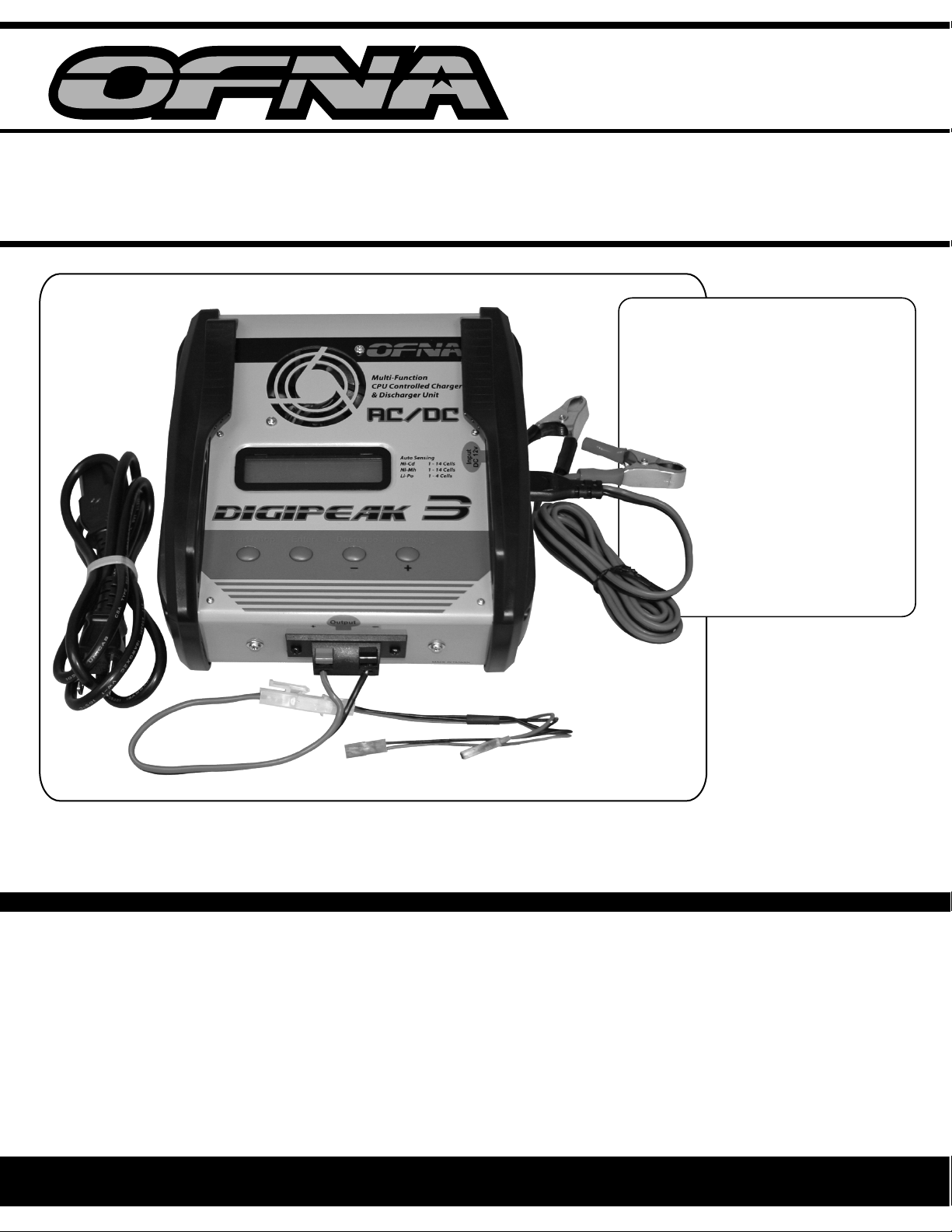
DIGIPEAK
AC/DC CHARGER
CHARGES Ni-Cd or Ni-Mh or Li-Po
1-14 Cell
5 Amp
Peak Detection
(AUTO SENSING)
NiCd 1-14 cells
-3
FEATURES:
1.Superfunction3 in 1 16 bits microchip CPU controller
2. AC, DC are both compatible
AC 110V or 230V switching power supply technologyinput DC 11V ~ 18V input usabl e
3. Two-line 16 characters dot matrix large LCD display
4. AC & DC's plug socketsare removable
5. Universal output terminal
6. Deactivate and reactivatethe beeper by using the "select" button
7. Detect inversionof the battery automaticallyand input reverse protection
8. Built-ina DC coolingfan
9. Entire aluminumcasing design - compactand portable
Ni-Mh 1-14 cells
Li-Po 1-4 cells
SPECFICATION:
Input : AC 110V OR 230V / DC 11~18V
Battery Type : Ni-Cd / Ni-MH / Li-Po
Battery Cell : Ni-Cd/Ni-MH1 - 14 Cell (1.2V - 16.8V)
Li-Po 1 - 4 Cell (3.7V - 14.8V)
ChargeRate : 0.3A ~ 5A (0.1A
Discharge Rate : 2A (Constantcurrent)
increments
)
1
Page 2
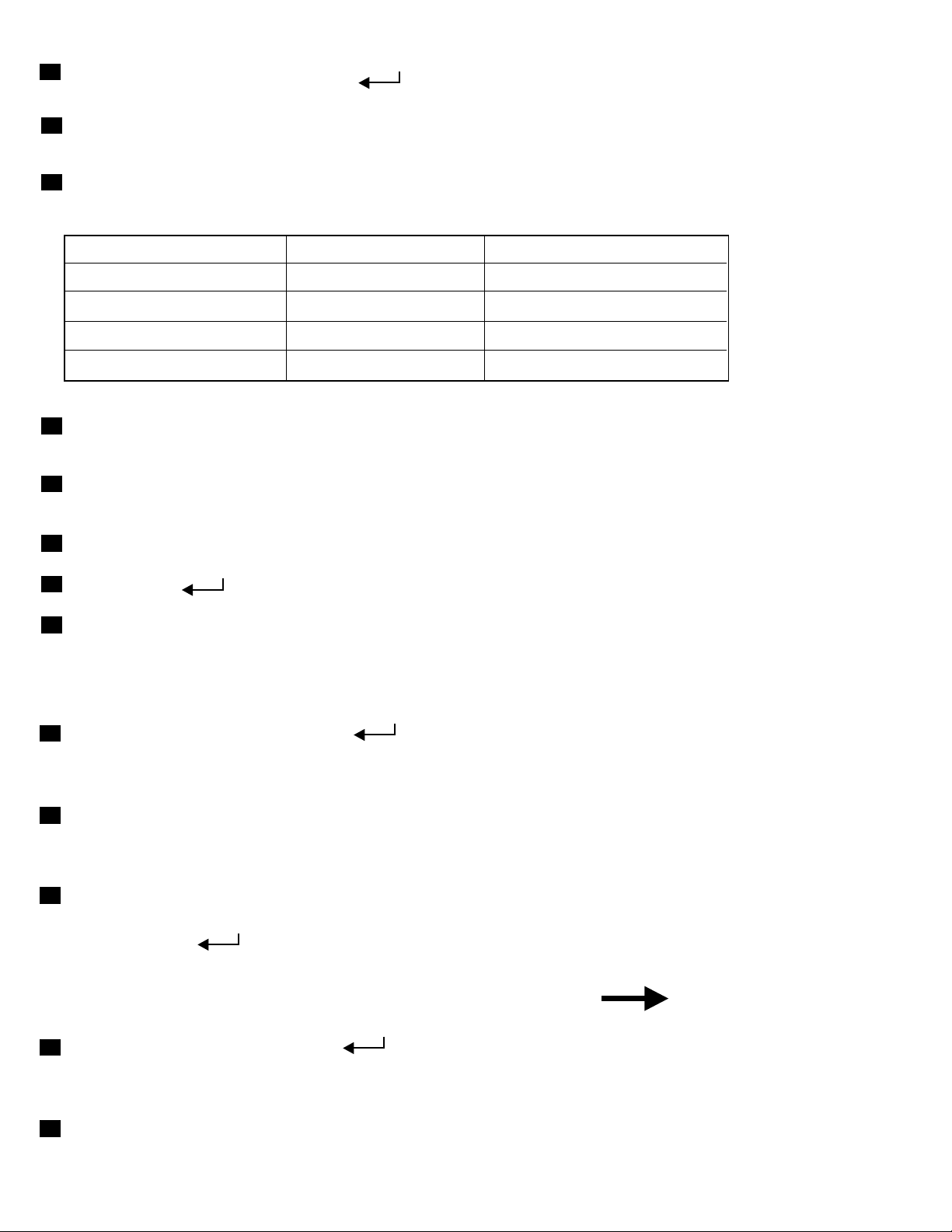
Charge
A
1.MAIN M
2.Set the c
B
The defau
to adjust th
Mode
ENU -> press the
urrent rate before ch
lt current is 2A, you can use the +(INCREASE) and -(DEC
e charge rate.
(ENTER) into charge mode.
arging. Adjustable charge rates from 300mA-5000mA.
REASE) button
C
See the ta
recommen
Battery C
D
It's norma
of chargin
E
An exhaus
with charg
F
To Re-pea
G
Press the
H
The coolin
ble below to select the charge rate for Ni-Cd & Ni-MH bat
d that you charge 1800mAh receiver packs at 1.8 amp. (
apacity Charge Rate Charge Time
mAH 0
600
1300
3300
mAH 1A 78 ~ 94 Min.
mAH 5
l situation if the curren
g.
ted
Li-Po battery pack can be fully recharged in approxim
e rate at 1C.
k the pack, simply press the S(START)
(ENTER) butto
g fan will work when
.6A 60 ~ 80 Min.
2
A 54 ~ 65 Min.
A 40 ~ 48 Min.
t value of Ni-Cd & Ni-MH turn to zero after period
button.
n to show MAX. voltage.
you press the S(START) button to start charging.
tery packs. We
1C).
ately 2-3 hours
Dischar
A
1.MAIN M
discharg
2.The disc
B
It's necess
lower than
6cells can
C
END DISC
1.To Re-D
2.Pre
ss th
Cycle C
MAIN MEN
A
twice into
to start.
B
Befo
discharge
re you
ge Mode
EN
U -> press the (ENTER) and then the +(INCREAS
e mode.
har
ge rate is 0.3A~2.0A (Adjustable).
ary
to set discharge bottom voltage of Ni-Cd & Ni-MH, sin
0.8V,
't lower than 4.8V.
HARGE
ischarge the pack sim
e (ENTER) button to return MAIN
ha
rge Mode (Discharge Charge)
U -> press the (ENTER
charge after discharge mode, and then press the S(STAR
get into this mode, you have to set the
voltage
.
ply press the S(START) button.
MENU.
) and then the +(INCREASE) button
charge / discharge rate and the
E) button into
gle cell can't
T) button
2
Page 3
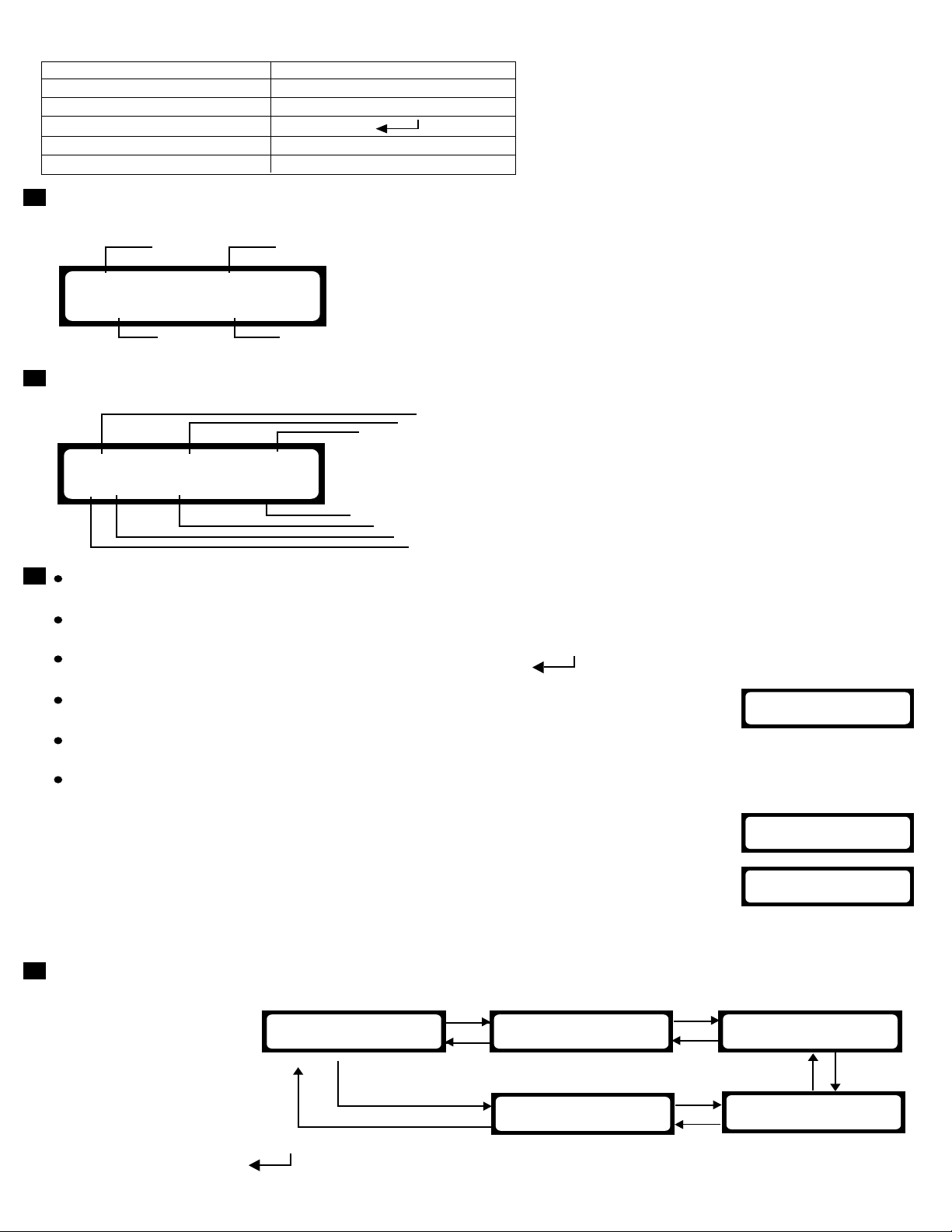
Operati
Function B
INCREAS
DECREAS
ENTER
START
FLASH
on Instruct
utton Operat
E
E
ion
ion Signal
+
-
S
'
'
A
Plug the c
charger p
NI-CD
C=2.O
B
The LCD
CHG 0
NC+ 2
C
If you ne
the STA
* When th
S(STAR
* After the
show M
* If the ba
charging
* If the ce
an ERR
* If the ce
the LCD
1.When
2.When
charge
If the b
show "
displa
harger into an AC 11
0V/230V wall outlet or a DC 12V p
ower source. The
ower is on now and the LCD displays the MAIN MENU.
1
CHARGE
A
3
displays the data below.
0 : 00 00000
.00A xx. xxV
ed
to stop charging, press the S(START) button to stop
RT button to go back
e b
attery pack is fully charged or discharged, you can p
T) button to RE-PEA
ba
ttery pack has peaked, press the (ENTER) button, the LCD will
2
1
:Battery type 2:Charge status
3
:Charge current 4:Cell count(Li-P
4
o & Pb only)
1:The charger is in the charge condition
1
2
3
2:Time (sec)
3:Ca
pacity(mAh)
(CHG:Fast Charge/D
HG:Discharge)
4:Battery type
5:Ch
7
6
5
4
6:Charge / Discharge
7:Ba
arge status setting(+:Fast Charge
-:D
ischarge*:Charge after Discharge )
rate
ttery Voltage(V)
it, and then press
to the MAIN MENU.
ress the
K or RE-DISCHARGE the pack.
AX. voltage during charging.
ttery pack is not connected to the charger before
, the LCD will show an ERROR mass
ll n
umber you selected does not match the battery pack
age.
[Error]
OPEN CIRCUIT
,the LCD will show
OR massage in Li-Po or Pb mode.
ll number you selected is not coincide
nt to the Li-Po or PB battery pack,
display will show an Error message.
the number of the ba
ttery pack>select number, the LCD
y will show "[Error] OVER VOLTAGE".
the
number of the battery pack<select number, the
r will charge battery pack at 0
attery volta
[Er
ror] LOW VOLTAGE".
ge is still over low, the LCD display will
.3A about for 2 min..
[Error]
OVER VOLTAGE
[Error]
LOW VOLTAGE
D
1.Using th
want an
pack..
2. Then, p
e + (INCREASE) / -(DECREASE) button to se
d connect the charge lead of
NI-CD CHARGE
C=2.0A
Main Menu
the charger to the connector of the battery
+
NI-MH CHARGE
C=2.0A
-
-
TONE ENABLE
+
ress the (Enter) but
ton into the mode you selected .
3
lect the battery type you
+
LI-PO CHARGE
C=2
-
.0A 7.4V
-
+
-
PB CHARGE
C=2.0A 12.0V
+
Page 4

In Ni-
Cd or Ni-MH mode
NI-CD CHARGE
C=2.0A
Charging Process
NI-CD 'CHARGE
C=2.0A
NI-CD CHARGE
C='2.0A'
Set the CHARGE current
-
NI-CD CHARGE
C='5.0A'
MIN. CHARGE current
MAX. CHARGE current is 5A
NI-CD CHARGE
C=2.0A
'
+
is 0.3A
+
-
Discharging Process
+
-
NI-CD 'DISCHARGE'
D=0.5A END=6.0V
NI-CD DISCHARGE
D='0.5A' END=6.0V
E
CH
ND=
+
A
RG
'
6.0V
E
'
-
NI-CD DISCHARGE
D='2.0A' END=6.0V
MIN. DISCHARGE current is 0.3A
MAX. DISCHARGE current is 2A
N
I-
C
D
DIS
D=
2.0A
Charge after Discha rge
Process
+
NI-CD 'DISC? CHG'
0.5A/6.0V? 2.0A
-
NI-CD DISC? CHG
'0.5A'/6.0V? 2.0A
-
NI-CD DISC? CHG
'2.0A'/6.0V? 2.0A
MIN. DISCHARGE current is 0.3A
MAX. DISCHARGE current is 2
NI-CD DISC? CHG
2.0A/'6.0V'? 2.0A
+
A
S
Pl e as e Re c on f irm
th e BAT. t y pe .
Press the S(START) button within 2
sec. to go back to the MAIN MENU.
CHG 00 : 00 00000
NC+ 2.00A xx.xxV
start charging
-
NI-CD DISCHARGE
D=2.0A END='14.0V'
th
e end of MIN. voltage is 0.6v
the end of MAX. voltage is 14v
NI-CD DISCHARGE
D=2.0A END=6.0V
+
S
Pl e as e Re c on f irm
th e BAT. T
Press the S(START) bu
sec. to go back to the MAIN MENU.
DHG 00 : 00 00000
NC- 2.00A xx.xxV
start discharging
YP E .
tton within 2
-
NI-CD DISC? CHG
2.0A/'14.0V'? 2.0A
the end of MIN. voltage is 0.
the end of MAX. voltage is 1
NI-CD DISC? CHG
2.0A/6.0V? ' 2.0A'
-
NI-CD DISC? CHG
2.0A/6.0V? ' 5.0A'
MIN. CHARGE current is 0.3A
MAX. CHARGE current is 5A
NI-CD DISC? CHG
2.0A/6
.0V? 5.0A
+
+
S
Pl e as e Re c on f irm
th e B
AT. typ e .
Press the S(START) button within 2
sec. to go back to the M
AIN MENU.
6v
4v
DHG 00 : 00 00000
NC*2.00A xx.xxV
charge after discharge
4
Page 5

LI-PO CHAR
C=2.0A 7
GE
.4V
In
Li-Po mode
Charging Process
L
I-PO 'CHARGE'
C
=2.0A 7.4V
+
-
Dis
charging Process
+
-
LI-P
O 'DISCHARGE'
D=
0.5A END=6.0V
LI-PO CHARGE
C='2.0A' 7.4V
-
L
I-PO CHARGE
C='4.0A' 7.4V
MIN. CHARGE current is 0.3A
MAX. CHARGE current is 4A
LI-PO CHARGE
C=2.0A '3.7V'
-
LI-PO CHARGE
C=2.0A '7.4V'
-
LI-PO CHARGE
C=2.0A '11.1V'
-
LI-PO CHARGE
C=2.0A '14.8V'
+
1 CELL
+
2 CELL
+
3 CELL
+
4 CELL
LI-P
O DISCHARGE
D=
'0.5A' END=6.0V
-
LI-P
O DISCHARGE
D='2.0A' END=6.0V
MIN. DISCHARGE current is 0.3A
MAX. D
ISCHARGE current is 2A
LI-PO DISCHARGE
D=
2.0A END='3.0V'
-
LI-P
O DISCHARGE
D=
2.0A END='6.0V'
-
LI-PO DISCHARGE
D=2.0A END='9.0V'
-
LI-PO DISCHARGE
D=2.0A END='12.0V'
+
+
+
+
LI-PO CHA
C=2.0A 14.8V
RGE
S
Please Reconfirm
the BAT. TYPE.
Press the S(START) button within 2
sec. to go back to the MAIN MENU.
CHG 00 : 00 00000
LI+ 2.
00A xx.xxV
start charging
5
LI-PO DISCHARGE
D=
2.0A END=12.0V
S
Please Reconfirm
the BAT. TYPE.
Press the S(START) bu
sec. to go back to the MAIN MENU.
DHG 00 : 00 000
LI- 2.00A xx.xxV
start dischar
tton within 2
ging
00
Page 6

Beep
Setup
TONE EN
Error M
LCD Displa
[Error]
REVERSE
[Error]
OUTPUT S
[Error]
OPEN CIRC
ABLE
TONE 'ENABLE'
-
+
TONE ENABLE
TONE ON TONE OFF
essage
y Proble
The output terminal is
PO
LARITY connected inversely to the
polarity of the battery p
Short circuit protection
HORT the ou
The b
UI
T connected to the charger 2.Battery
before
m Factor
ack.
for
tput terminal.
attery pack is not 1.Battery pack fail.
charging. charger.
TONE 'DISABLE'
TO
NE DISABLE
pack disconnect
[Error]
OVER VOL
[Error]
LOW VOLTA
INPUT POW
VOLTA
If the error ca
GE E
When the number of th
TAG
E battery pack >select number, doesn't match the battery
the LCD display will sh
GE
ER
RROR
nnot be fixed,
"[Erro
When
battery pack <select number, doesn't m
the LCD display will sh
"[Error] LOW VOLTAGE".
Input voltage too low. 1.DC input voltage
r] OVER VOLTAGE".
the number of the The cell number you selec
call th
e OFNA costumer support at 949-586-2910.
e The cell number you select
ow pack.
atch the battery
ow pack.
than 10.5V.
2. Power is overloading in
AC mod
e of the charger.
t
is lower
6
Page 7

Safety
Precautions :
1.Please ch
only use i
2.Do not al
responsib
3.Use only
such as "
4.During us
flammable
5.This charg
moisture.
electric sh
charger.
6.There is f
objects t
7.The posit
be conne
negative t
damage t
eck the voltage in y
t when the voltages are the same.
low children to charge battery packs unless supervis
le adult.
rechargeable batterie
Heavy duty", "Alkal
e, please keep in a w
s chemicals.
er will be damaged
Do not use this charger in the rain or when your hand i
ock or accident. Thi
an built inside this charger. To avoid ac
o e
nter into fan.
ive
(red lead) and negative (black lead) terminals of
cted to the charger te
erm
inals, wrong connection will damage the battery an
o th
e charger.
our house if it's consistent to this charger, you can
s. This charger cannot charge prim
ine battery" or "Mercury battery".
ell ventilated area and never put beside
if immersed in water or subjected to high level
s is very dangerous to both the operator and the
cidents do not allow any foreign
rminals correctly. Do not reverse the positive and
ed by a
ary batteries
s wet to avoid of
the battery should
d will cause
8.Before yo
Double ch
nothing g
*Never se
batteries
9.To avoid o
charge it
10.The best
Value of 1
11.Never dis
service lif
lower than
12.If your cha
great cus
way
.
u start to charge, ple
eck if the battery count and type matc
oes
t Li-po batteries at Ni-Cd or Ni-MH mode, otherwise
to catch fire!
f d
amaging the TX (Transmitter), please keep current u
directly.
current for charge/discharge i
C = Cell capacity, e.g. if the battery capacity is
charge Ni-Cd and Ni-MH batt
e of the batt
4.8 volts)
rger has any error, s
tomer service. Do not attempt to disassemble o
OFNA
TECH. SUPP
7 VANDERB
IRVINE, CA 9
TEL. 949-586
ase ensure you select correct charger settings.
h your charger setting. Make sure
wrong!
will cause the
nder 1A if you
s 1C (1 time of battery capacity).
2000mAH, 1C is 2000mA)
eries below 0.8 volt per cell to protect
eries. (For example, a 6-cell pack should not be discharged
end it back to OFNA with original box, we provide
r modify the charger in any
ORT
ILT
2618
-2910
7
 Loading...