

Page 1

O’DIVE - SIMPLIFIED USER’S MANUAL
Updated on 22.08.2019
Warning
O’Dive (ONE or TEK) is a connected acoustic sensor that allows the measure of the
decompression adequacy to the diver’s practice.
The features of the service imply practicing diving in a club or individually. O'Dive is not a
medical device and does not provide medical advice.
Any advice or other items available in our service are intended solely for general information
purposes. They are not intended to serve as a reference or to substitute professional
medical advice based on the personal situation of the user.
Azoth Systems disclaims any responsibility for actions taken by the user because of advice
and information provided by the service. In particular, if the user has not consulted a
medical doctor and does not have a medical certificate authorizing him to practice diving.
Direction of use
For a given set of dive parameters (depth, duration and decompression stops), it is
recognized by the scientific community that a decompression procedure generating no or a
few microbubbles is renowned safe.
The O'Dive solution assists the diver to help him optimize its practice, limiting his bubble
level, and therefore increasing his diving safety level.
The sensor measures the microbubble rate in the diver venous system following a dive.
Combined to the diving parameters, these measurements allow, first of all, the evaluation of
the quality of the decompression procedure used.
If the procedure is not optimal, the O'Dive app put at the diver's disposal a simulator
allowing him to visualize the effects of several actions to improve the quality of his
procedure while making progress in his practice.
By using regularly O’Dive technology, the diver will improve his self-understanding. He will
therefore be more likely to wisely adjust his decompression procedures and diving practice.
O’DIVE Perimeter and usage restriction
O’Dive ONE
O’Dive ONE allows for analyses of open-circuit dives with Air or Nitrox as bottom gas, with or
without use of oxygen enriched mixtures for decompression stops.
Multi-level dives can be handled, as long as the maximum depth is below 60m. The algorithm
will consider an equivalent square profile, based on the parameters input by the diver in the
Page 2

app: maximum depth, total duration and actual decompression duration provided by the dive
computer. The additional stops eventually performed by the diver are taken into
consideration to evaluate their benefit on the exposure severity.
Repetitive and multiple dives - i.e. with a surface interval below 12 hours – can be analysed
(for example: cruise with several dive per day). The residual gas load is considered as long as
the diver is using the same computer for all his dives.
Sawtooth profiles and inadequate ascending speed cannot be detected with the manual
input mode offered by O’Dive One. Therefore, the results provided to the diver do not
consider these additional risk factors.
O’Dive TEK
O’Dive TEK allows for analyses of open-circuit and closed-circuit with Air or Trimix as bottom gas, with
or without use of oxygen enriched mixtures for decompression stops.
In any case, the nature of gases breathed at the bottom (diluent for CCR and bottom mix for
OCR) or during the stops (PpO2 for CCR and gas switch for OCR) as well as the computer GF
settings (GFLow/GFHigh) must be input in the app.
Incorrectly input fields can lead to results that don’t reflect the actual quality of the
decompression.
Two parameters input modes are available:
• Manual input: it is only to be used for square profiles or equated to square – i.e.
profiles whose bottom depth change amplitude is low compared to the maximum
depth reached (+/-5m), for example a wreck dive; the diver has to input all the fields
required to characterized the exposure severity, among which the descending speed,
the ascending speed to the first stop and the stops duration.
• Import mode: it allows a finer analysis of the actual profile based on the data stored
on the dive computer ; the multi-level dives are handled as long as the maximum
depth is below 120m; the additional stops eventually performed by the diver are taken
into consideration to evaluate their benefit on the exposure severity.
Repetitive dives - i.e. with a surface interval below 12 hours – cannot be analysed.
Sawtooth profiles cannot be detected. Therefore, the results provided to the diver do not
consider this additional risk factor.
Inadequate ascending speed are however taken into consideration in the results provided to
the diver, whether they are manually input or deducted from the analysis of the computer
data.
Page 3
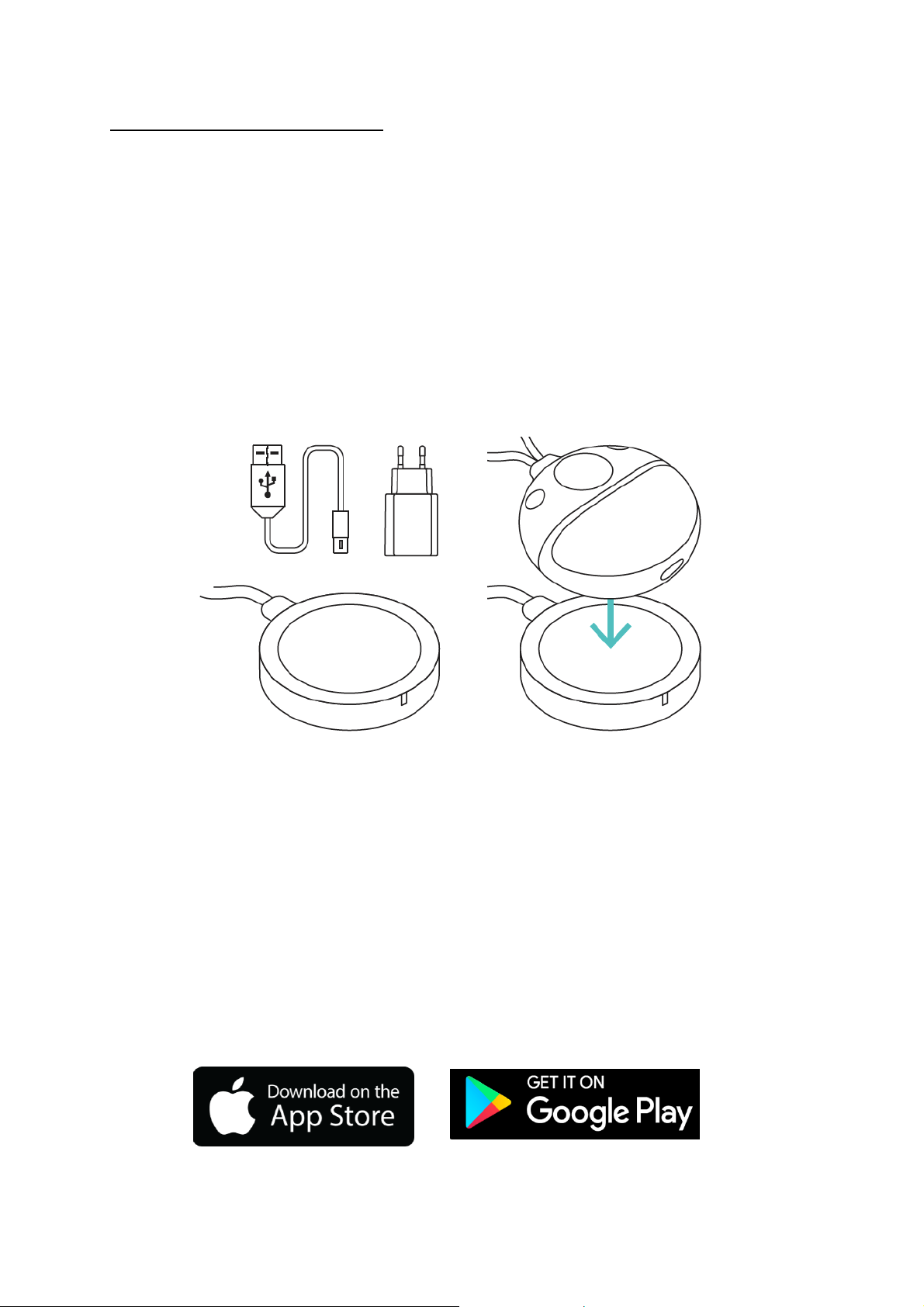
Step-by-step guide for using O’Dive
Step 1 – Charging the sensor
Before each use of the sensor, it is important to charge it in order to have the necessary
autonomy to the realization of your measurements.
IMPORTANT: It is strongly advised to make sure that the sensor is properly charging before
leaving it on its charging base, in order to avoid discharging and deterioration of the battery.
• Connect the induction charger to the provided 220V-60Hz adapter or to a USB port.
• Position the sensor on the charger, face with markings in contact with the induction
charger. When the sensor is in the right position, the charger’s indicator diode goes to
steady green and the sensor LED will flash rapidly in white, indicating that the sensor is
charging. If the battery is full enough, the LED will flash two times, then will stop.
• If the charger’s indicator diode doesn’t go to green and the sensor’s LED does not flash,
adjust the sensor position on the charger.
If the charger’s indicator diode flashes in light blue and the sensor starts (vibration + blue
flashing), remove the sensor from the charging base and turn it off, then put it back and
adjust its position after the charger’s indicator diode has come back to steady dark blue.
• At the end of the charge (maximum duration of 6 hours), the LED will stop. Your sensor is
then ready to be used.
Step 2 – Downloading the O’Dive app
The sensor is operating with the O’Dive ONE & O’Dive TEK apps, available on the Apple Store
and on Google Play.
Once the app is installed, you can use your sensor.
Page 4

Step 3 – Taking in hand the sensor
Starting the sensor
To start the sensor, press for 1 second the button located on its top. The sensor vibrates and
the LED will flash rapidly in blue (1 flash per second for 90 seconds) signaling the possibility
of pairing a phone.
A red flashing LED indicates a low battery level. In this case, the sensor has to be charged as
soon as possible. (see step 1).
Turning the O’Dive sensor off
There are 3 ways you can turn off your sensor:
Press the on/off button for 5 seconds (the flashing LED stops and
the sensor vibrates).
Disable the WIFI connection on your smartphone.
Place the sensor on the induction charging station (see step 1).
Page 5

Technical Characteristics
Weight
Less than 0,5kg
Sensor dimensions (L x W x H)
78,8 x 73,5 x 34,6 mm
Doppler frequency
2MHz
Endurance
3H continuous wave
Battery
LiPo (Lithium Polymère) rechargeable
Battery power
7,4V – 600mAh
Recharge
Induction – 2A
Wireless connection
Wi-Fi
Operation temperature range
0°C – 40°C
Storage temperature range
-35°C – 65°C
Humidity
35% - 85% RH
Conformity
CE
The sensor can be cleaned with a damp cloth after use
Step 4 – Registration / Connection
- Before using the sensor, you need to create an account on the app.
- Open the app and click on the button Register. If someone is already logged in, click
on the name on the top right corner of the home page to join the section ‘My account’
and click on the button Register.
- Follow the steps.
- If you want to import your dives’ profiles from Subsurface , fill in your Subsurface
email address and password.
- In case you always use the same sensor, fill the field ‘Sensor number’ (you can scan the
QR code on the tag, type the number with the keyboard, or select the sensor Wi-Fi on Android only).
- Do not forget to accept the Terms of Use (TOU).
If you already have an account, go to Log in and fill in your email address and password.
Step 5 – Making measurements
Measurements must be undertaken after diving, when the rate of gas microbubbles in the
blood is potentially the highest.
Two series of measurements will be carried out:
• 2 measurements of approximately 20 seconds, 30 minutes following the dive (one
under the left clavicle and one under the right clavicle).
• 2 other measurements 60 minutes after the dive (one under the left clavicle and one
under the right clavicle).
Page 6

IMPORTANT: It is strongly advised to watch the tutorial on the app to fully understand
how to position the sensor. An incorrect sensor positioning under the clavicle will result in
bad measurements and, therefore, an impossibility to analyze the signals. Please practice
positioning of the sensor in front of a mirror before making measurements after your
dives.
Before any measurement, make sure that your name is displayed on the top right corner of
the screen. If it is not the case, click on the other name to join the section ‘My account’ and
log in or register (see step 3).
- Select New measurement: the app creates a new dive and requests you to start your
sensor.
- Check that the proposed sensor number is matching your device. If not, click on
Change sensor, fill the sensor number (see step 4) and validate. Start the measurement
again by clicking New measurement then Use current dive.
- When the sensor number is correct, start your sensor (see step 3), then click Connect
on the app. The sensor will now pair with your smartphone via Wi-Fi. Important: data
sharing via Wi-Fi needs to be deactivated.
- When the pairing is done, the LED starts flashing in green, the Start button becomes
accessible, and the battery pictogram on the top right corner of the screen gets
activated.
- Follow the steps to perform the two series of measurements. For the second series –
taking place 30 minutes after the first one – you need to click on New measurement,
then on Use current dive, so that all the measurements are linked to the same dive.
- When the measurement is not satisfactory, the app will ask you to restart it. Make sure
that the sensor is properly positioned and that you follow all the instructions (no
speaking, relaxed arm, forced respiration).
- After a series of two measurements (left and right), the sensor automatically shuts
down.
Page 7

Step 6 – Validating and synchronizing measurements
Once the measurements are done, you must input your dive parameters and synchronise your
data with Azoth Systems’ server to get your results.
Note: synchronisation of the data requires a connexion to a Wi-Fi or a 4G network.
Input your dive parameters
- If you use O’Dive ONE, go to My results. Select your dive under the ‘Pending’ tab, input
your dive parameters and validate.
- If you use O’Dive TEK, go to My results. Select your dive under the ‘Pending’ tab. You
can then either import the dive profile or do a manual input.
For importing the profile, click on Import data then Import from a dive computer
(works only under iOS with Shearwater) or Import from Subsurface cloud and select
the corresponding dive. Then, fill in the fields left in blank and validate.
For a manual input, input your dive parameters and validate.
Synchronise your data on the server
- Once your parameters are input, go to the section My results and click on Synchronise
on the top right corner of the screen. The dive and the related measurements are sent
to our server to be analysed and are now listed under the ‘Dives’ tab.
- In case there are still some dives under the ‘Pending’ tab with the pictogram ⓘ, you
must input the dive parameters and synchronise one more time.
Step 7 – Evaluating your procedures
A few dozen minutes after the dive, you will receive an email notification indicating that
your dive has been analyzed. This recommendation is presented as a graph evaluating the
level of adequacy of your decompression procedure to your diving practice.
- Go to the section My results and click on Synchronise. You will be able to see on the
graph if your decompression procedure is optimal, perfectible or to be changed.
- A simulation tool is available to help you see the potential benefits of several factors
on the quality of your decompression procedure. To use this tool, select the dive that
you want to simulate and change one or several of the proposed factors to improve
your procedure quality.
Page 8

Support-Contact
We are looking forward to hearing from you regarding the quality, functionalities or use of
this product.
We are committed to reply to you without delay.
To get the full instruction manual, please send us a request at:
contact@azoth-systems.com
Legal Notice
This product and its battery pack cannot
be discarded in the domestic waste. They
require separate collection. Ensure that
you dispose of your O’Dive electronic
product and batteries in a sensible and
considerate manner, at a collective
recycling point.
This valorization of your electrical waste
contributes to protect the environment
and your health.
 Loading...