

Page 1

Oclean Smart Electronic
Toothbrush
Page 2
User manual
Thank you for using the Oclean One Smart Sonic Electric Toothbrush Electric
Toothbrush.
Important safety information
• Due to high-speed vibration, during the rst use of a toothbrush, you may feel
stinging. This feeling will gradually disappear during regular use of the brush.
• If the toothbrush is not used for a long time, the battery will discharge due to
the presence of power consumption during standby. This can be solved by
charging, the charging indicator on the brush will not light up immediately. Wait
6 - 10 minutes until the toothbrush returns to its normal state.
• The toothbrush may become hot during charging. If the toothbrush is heated to
very high temperatures, immediately stop charging and / or turn off the brush
and take it to an authorized Oclean diagnostic service center.
• For a toothbrush only Oclean special heads may be used.
• The toothbrush is intended only for oral cavity cleansing. Do not use it for other
purposes.
• A toothbrush is a personal item. This product is not intended for use in dental
clinics and should not be used by many patients.
• The toothbrush should not be exposed to direct sun rays for a long time. It
should be stored in a cool and dry place.
Persons with an increased sensitivity of the oral cavity
The following categories of people need to use this product with caution.
1. Persons undergoing periodontal surgeries or who are undergoing treatment at
the moment.
2. People with oral cavity problems, poorly kept articial teeth, or bleeding gums.
3. Persons with increased oral sensitivity before using this product need to
consult a dentist.
Toothbrush is not suitable for people with limited mental and physical abilities. Not
suitable for infants and children under 12 years of age. Children are only allowed to
use this product under adult supervision.
Regularly clean the power connector to avoid dust and dirt, which may reduce
charging efciency.
Page 3
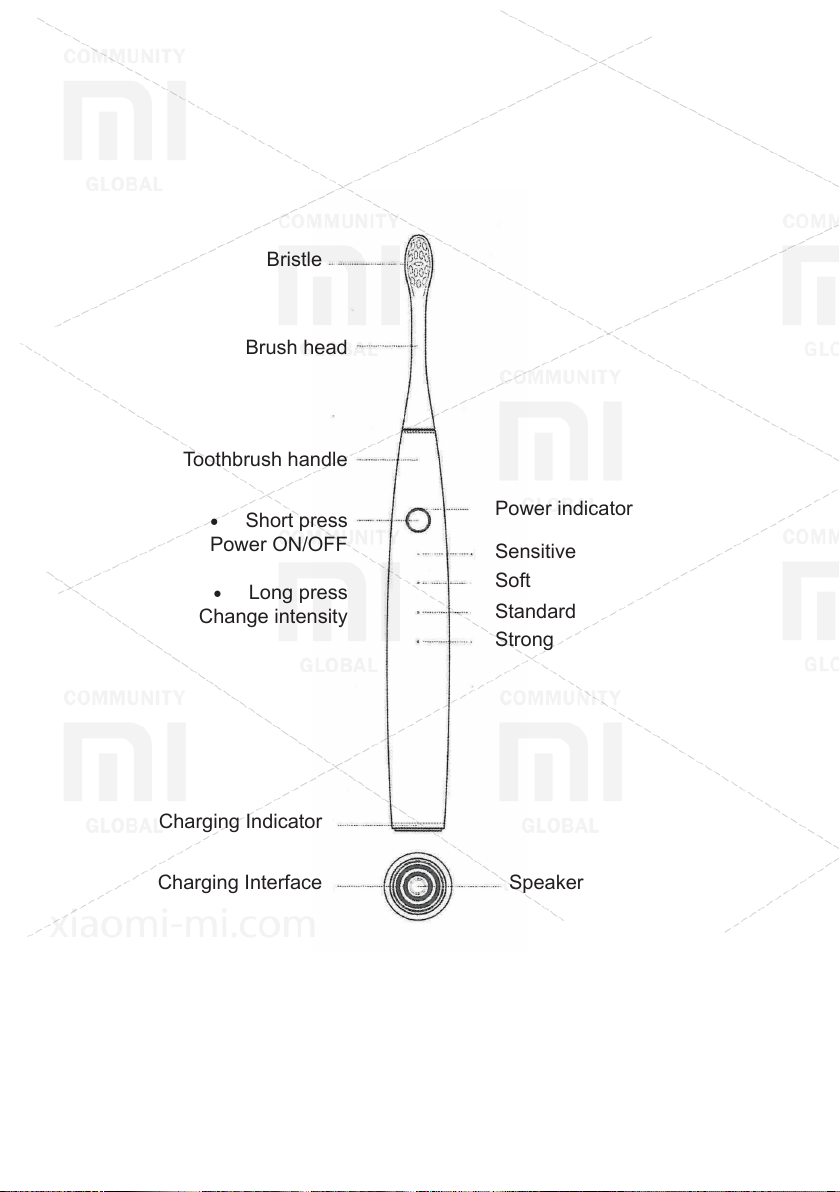
Bristle
Brush head
Toothbrush handle
• Short press
Power ON/OFF
• Long press
Change intensity
Charging Indicator
Charging Interface
Power indicator
Sensitive
Soft
Standard
Strong
Speaker
Page 4
Explanation
Awakening mode (by default)
• Make a short press on the power button to turn on the toothbrush, and a sound
greetings will be played. The brush automatically goes into sleep after 15
seconds without using it.
• Short pressing after toothbrush activation activates the specied cleaning mode.
• According to the cleaning plan, the toothbrush automatically stops after the
specied time. If you need to stop cleaning before reaching the specied time,
make a short press on the power button to stop the cleaning.
• Press and hold the power button for 2 seconds to change the intensity of the
cleaning.
Cleaning mode without wakeup (activated via mobile application)
• The wipe-free cleaning mode can be activated via the mobile application. A short
press on the power button will skip the wakeup mode and immediately start the
cleaning process.
• Press and hold the power button for 2 seconds to change the intensity of the
cleaning.
Anti-spray mode (activated via mobile application)
• Activate the anti-spatter function through the Oclean mobile application, it
effectively prevents spray of liquids when the toothbrush is not used in direct
contact with the teeth.
Page 5
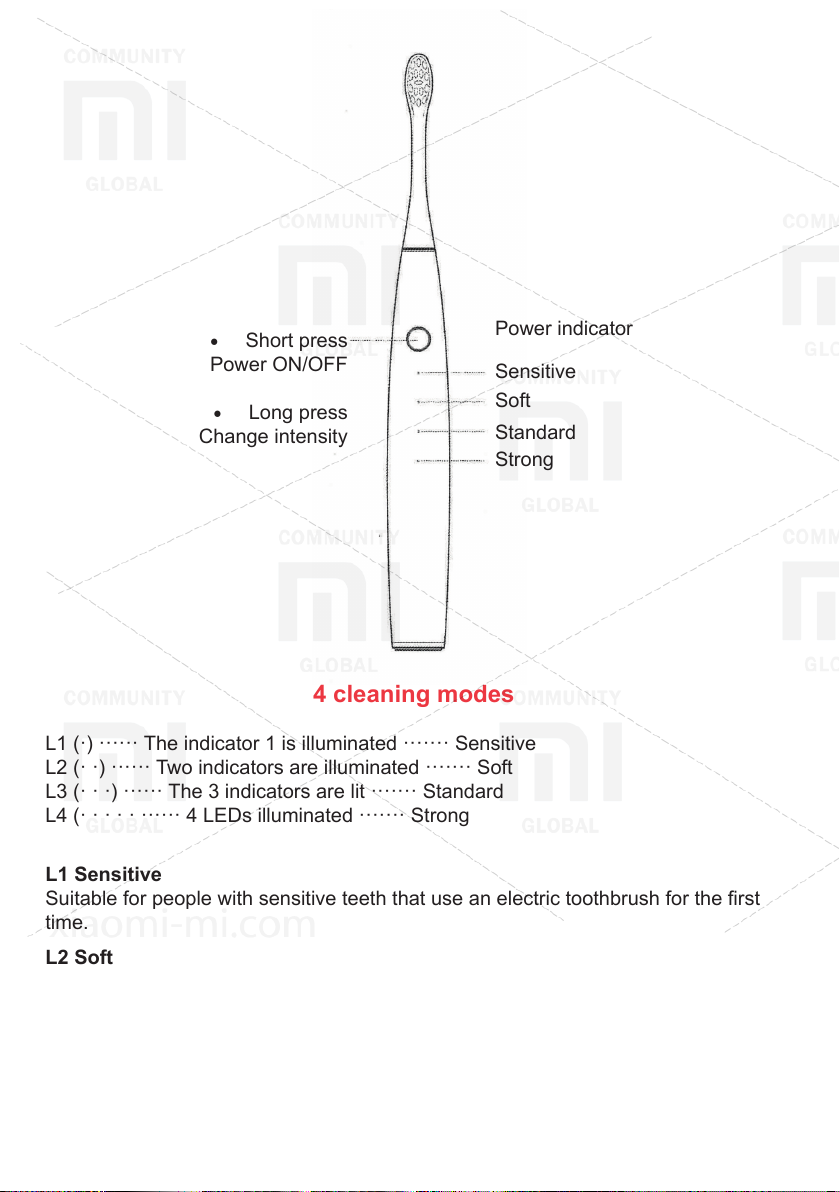
• Short press
Power ON/OFF
• Long press
Change intensity
Power indicator
Sensitive
Soft
Standard
Strong
4 cleaning modes
L1 (·) ······ The indicator 1 is illuminated ······· Sensitive
L2 (· ·) ······ Two indicators are illuminated ······· Soft
L3 (· · ·) ······ The 3 indicators are lit ······· Standard
L4 (· · · · · ······ 4 LEDs illuminated ······· Strong
L1 Sensitive
Suitable for people with sensitive teeth that use an electric toothbrush for the rst
time.
L2 Soft
Suitable for people using an electric toothbrush for the rst time.
L3 Standard
Suitable for people who have used an electric toothbrush before.
L4 Strong
Suitable for persons with increased teeth cleaning requirements.
Page 6
Clever toothbrush solution
Oculan One is an innovative product in this industry, thanks to the experience of
numerous experiments and advice given by dentists. Our new brand of smart and
ultrasound toothbrushes meets the needs of each individual individual. Download
and log in to our account in our mobile app for more information.
Recommended toothbrushing method
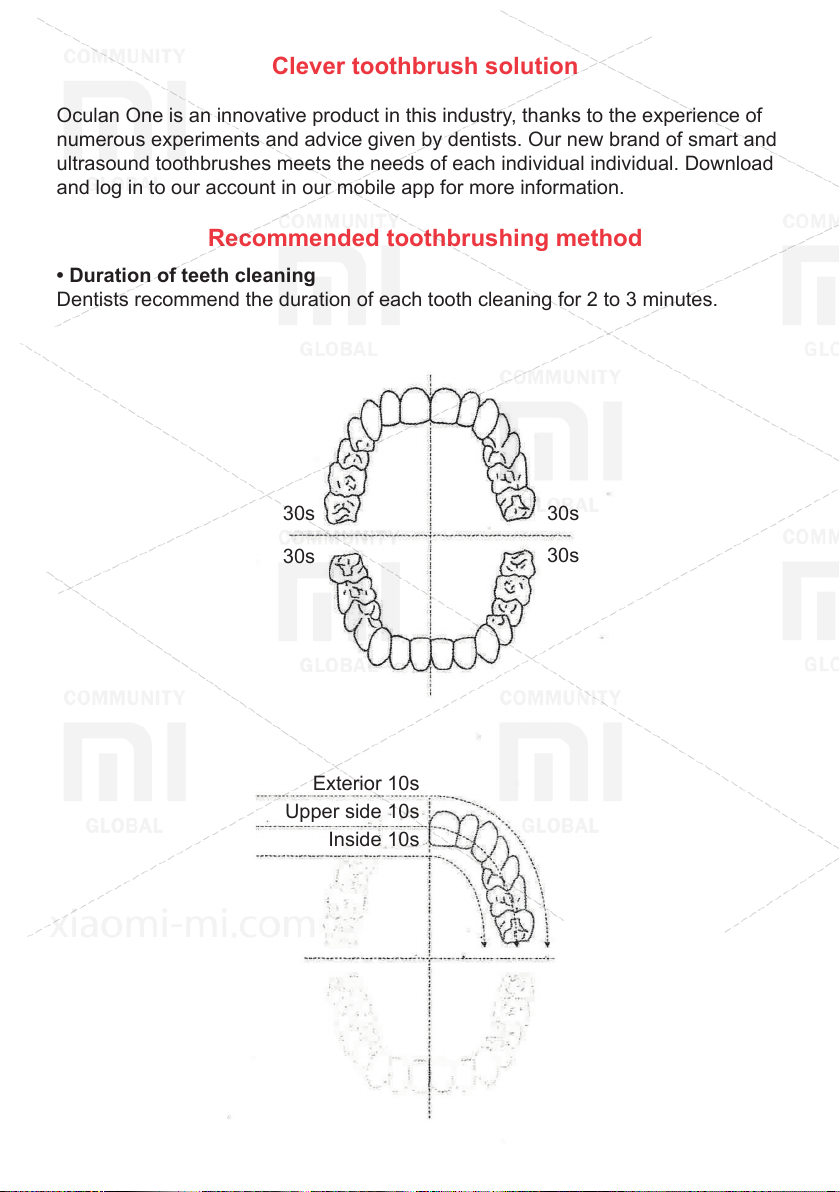
• Duration of teeth cleaning
Dentists recommend the duration of each tooth cleaning for 2 to 3 minutes.
30s 30s
30s
Exterior 10s
Upper side 10s
Inside 10s
30s
Page 7
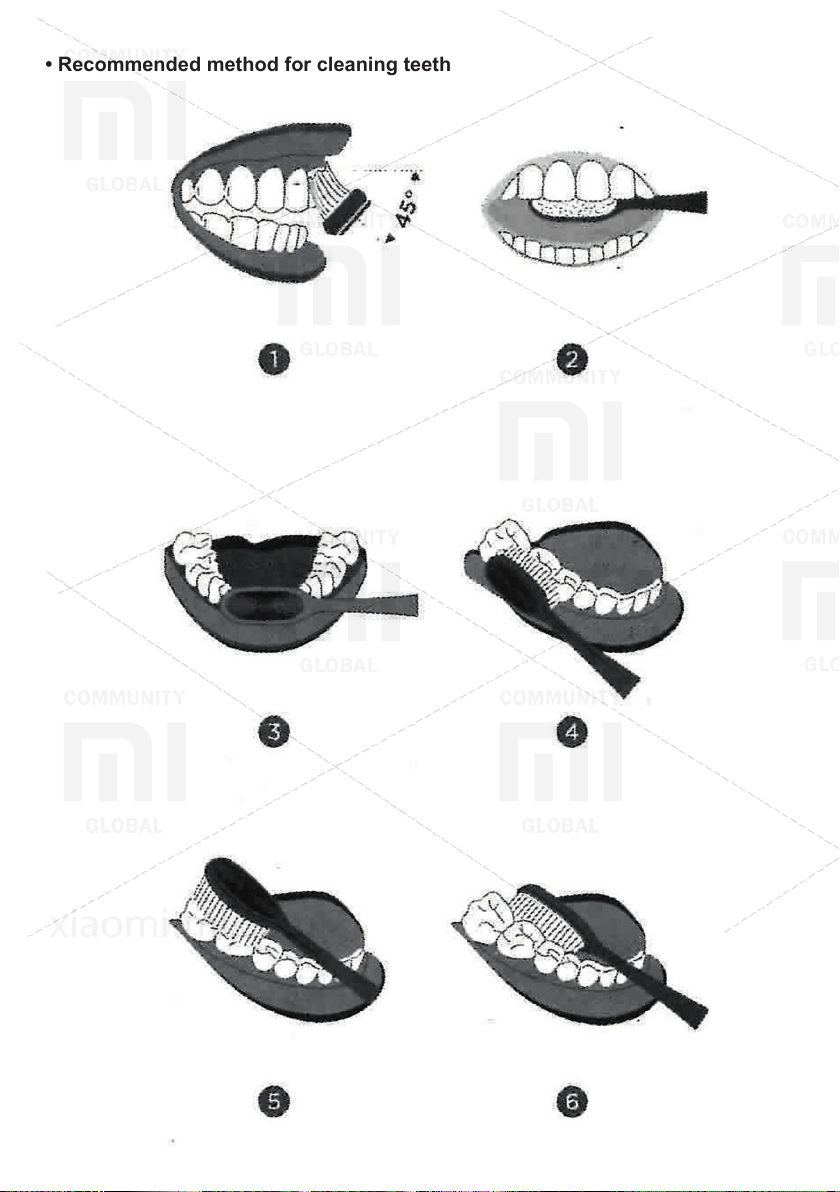
• Recommended method for cleaning teeth
Page 8
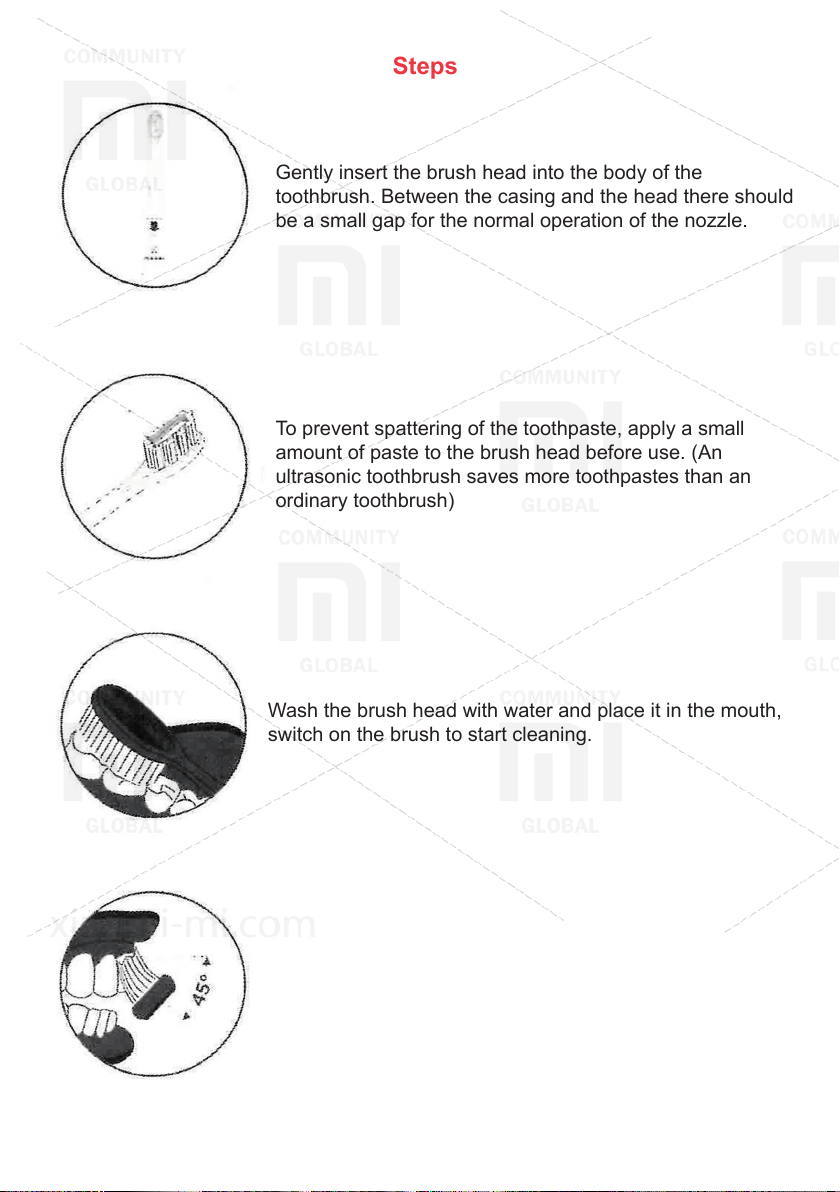
Steps
Gently insert the brush head into the body of the
toothbrush. Between the casing and the head there should
be a small gap for the normal operation of the nozzle.
To prevent spattering of the toothpaste, apply a small
amount of paste to the brush head before use. (An
ultrasonic toothbrush saves more toothpastes than an
ordinary toothbrush)
Wash the brush head with water and place it in the mouth,
switch on the brush to start cleaning.
Slowly move the bristle at an angle of 45 ° along the gum
line for proper tooth brushing.
Page 9
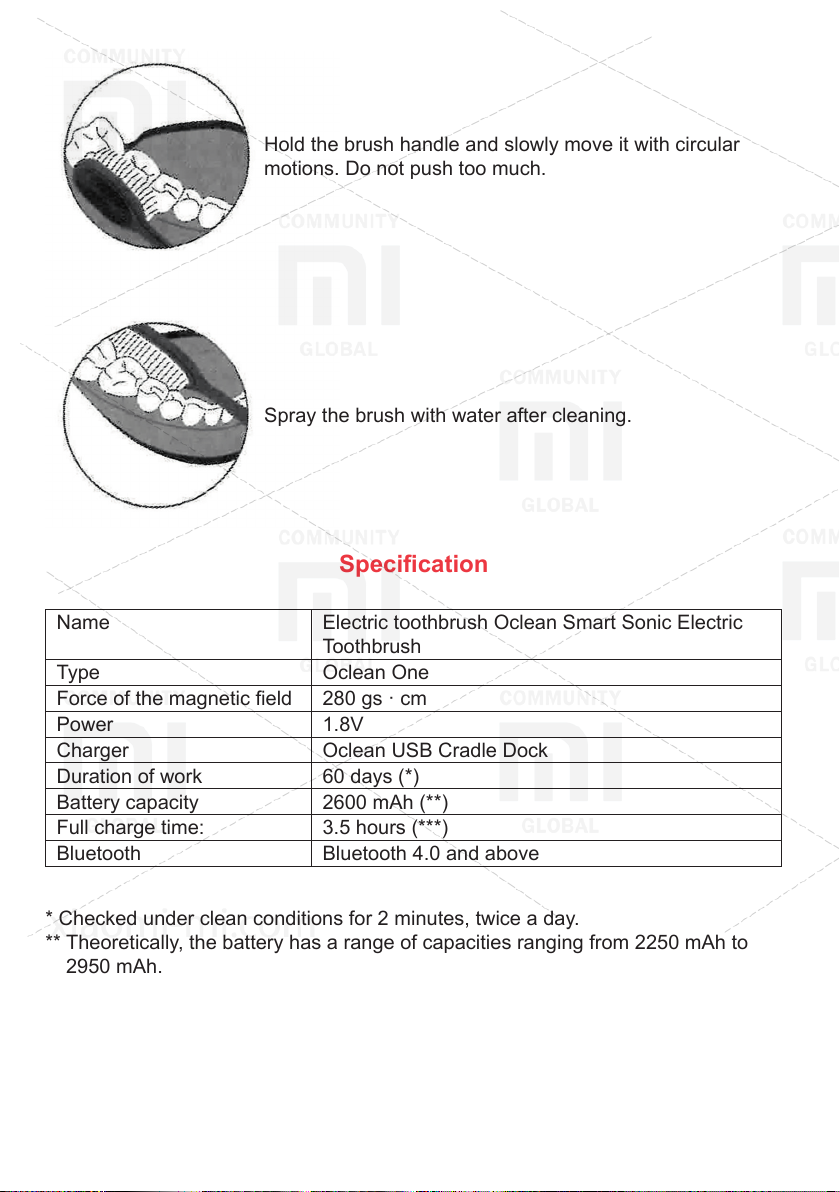
Hold the brush handle and slowly move it with circular
motions. Do not push too much.
Spray the brush with water after cleaning.
Specication
Name Electric toothbrush Oclean Smart Sonic Electric
Toothbrush
Type Oclean One
Force of the magnetic eld 280 gs · cm
Power 1.8V
Charger Oclean USB Cradle Dock
Duration of work 60 days (*)
Battery capacity 2600 mAh (**)
Full charge time: 3.5 hours (***)
Bluetooth Bluetooth 4.0 and above
* Checked under clean conditions for 2 minutes, twice a day.
** Theoretically, the battery has a range of capacities ranging from 2250 mAh to
2950 mAh.
*** It is recommended to use a USB charger with parameters of 5V / 1A or 5V / 2A.
Page 10
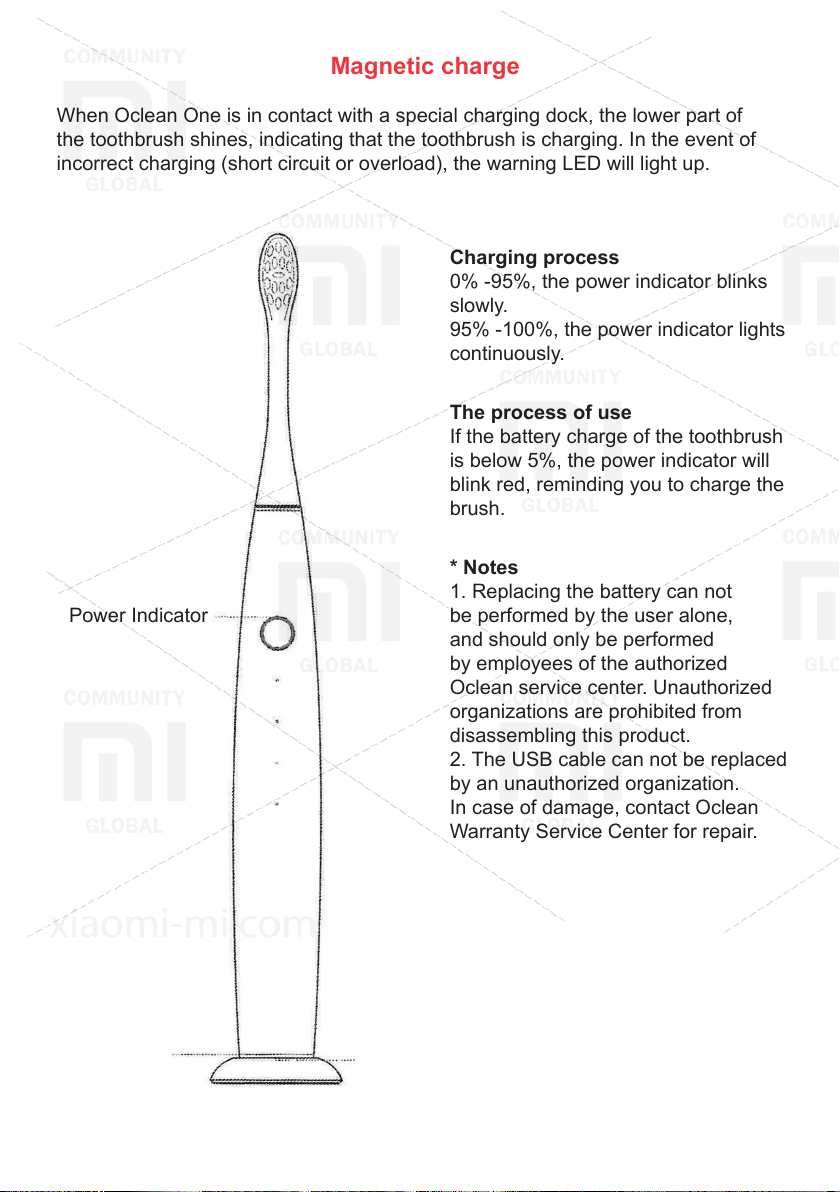
Magnetic charge
When Oclean One is in contact with a special charging dock, the lower part of
the toothbrush shines, indicating that the toothbrush is charging. In the event of
incorrect charging (short circuit or overload), the warning LED will light up.
Charging process
0% -95%, the power indicator blinks
slowly.
95% -100%, the power indicator lights
continuously.
The process of use
If the battery charge of the toothbrush
is below 5%, the power indicator will
blink red, reminding you to charge the
brush.
* Notes
1. Replacing the battery can not
Power Indicator
be performed by the user alone,
and should only be performed
by employees of the authorized
Oclean service center. Unauthorized
organizations are prohibited from
disassembling this product.
2. The USB cable can not be replaced
by an unauthorized organization.
In case of damage, contact Oclean
Warranty Service Center for repair.
Charging
Indicator Warning LED
Page 11
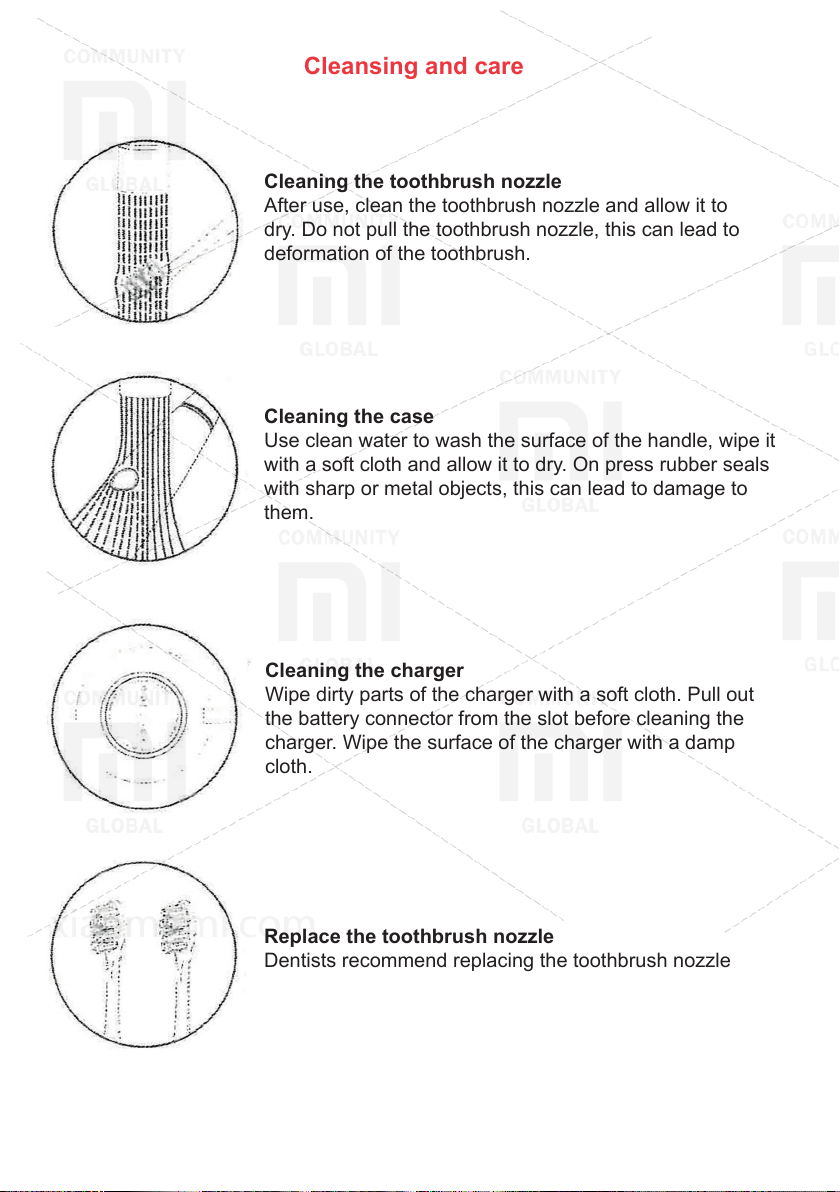
Cleansing and care
Cleaning the toothbrush nozzle
After use, clean the toothbrush nozzle and allow it to
dry. Do not pull the toothbrush nozzle, this can lead to
deformation of the toothbrush.
Cleaning the case
Use clean water to wash the surface of the handle, wipe it
with a soft cloth and allow it to dry. On press rubber seals
with sharp or metal objects, this can lead to damage to
them.
Cleaning the charger
Wipe dirty parts of the charger with a soft cloth. Pull out
the battery connector from the slot before cleaning the
charger. Wipe the surface of the charger with a damp
cloth.
Replace the toothbrush nozzle
Dentists recommend replacing the toothbrush nozzle
every 2-3 months to maintain an optimal level of cleaning.
Page 12
Typical problems and solutions
Below is a list of typical problems that users may encounter when using the brush.
These problems can be easily resolved by users using these methods. Follow
these steps to resolve before contacting a professional warranty service center.
1. The force of vibration has become weak
Possible problems
• The brush is too much pressed to the teeth.
• The gap between the brush head and the body is too large or too small.
Solution
• Place the head of the toothbrush on the teeth without touching.
• Remove the toothbrush nozzle, reinsert it in place, leaving a sufcient gap
between the nozzle and the body.
2. The toothbrush runs a short period of time
Possible problems
• The docking station does not come in contact with the charging ring on the case,
which may have led to an incorrect charging, which will also be indicated by the
LED indicator.
• Insufcient battery power.
Solution
• Clear the docking station.
Charge the device for a longer time.
• The battery life has expired.
If the indicator light on the bottom of the toothbrush is red, contact an authorized
Oclean center to replace the charger.
Page 13
3. The toothbrush does not work
Possible problems
• The toothbrush is located on the docking station not in a vertical position.
Solution
• Charge the toothbrush.
• Replace the battery with an authorized Oclean customer support center.
4. The sound became quieter
Possible problems
• There is water in the loudspeaker, which led to a decrease in volume.
Solution
• Place the toothbrush in an upright position so that the water ows naturally.
• Shake a little brush to remove water.
* For more detailed consultations, please contact us at [email protected]
Page 14
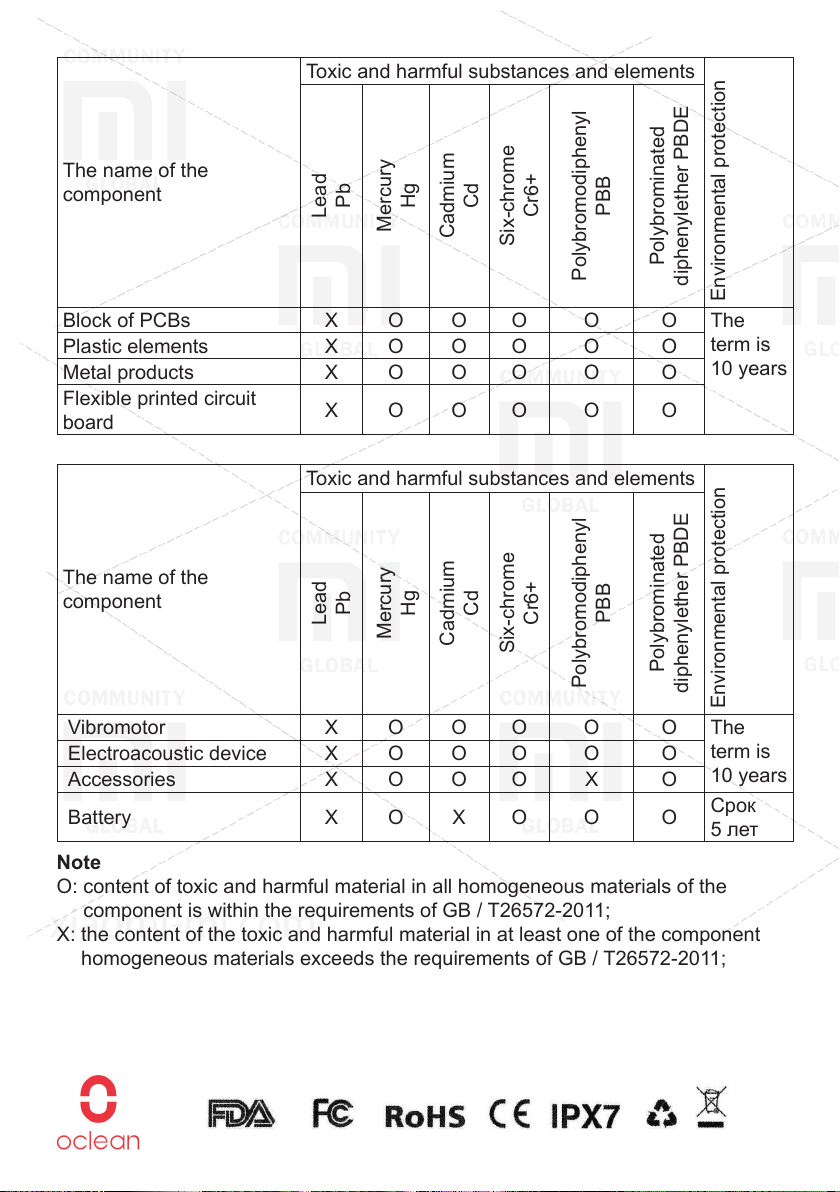
Toxic and harmful substances and elements
The name of the
component
Block of PCBs Х O O O O O The
Plastic elements Х O O O O O
Metal products Х O O O O O
Flexible printed circuit
board
The name of the
component
Vibromotor Х O O O O O The
Electroacoustic device Х O O O O O
Accessories Х O O O Х O
Battery Х O Х O O O
Note
O: content of toxic and harmful material in all homogeneous materials of the
component is within the requirements of GB / T26572-2011;
X: the content of the toxic and harmful material in at least one of the component
homogeneous materials exceeds the requirements of GB / T26572-2011;
In addition to several materials whose substitutes can not be found due to
the level of technical development, the main materials of this product are
environmentally friendly. You can use this product without worrying about violations
of environmental protection rules.
Pb
Lead
Х O O O O O
Toxic and harmful substances and elements
Pb
Lead
Hg
Mercury
Hg
Mercury
Cd
Cadmium
Cadmium
Six-chrome
Cd
Six-chrome
Cr6+
Cr6+
PBB
Polybromodiphenyl
PBB
Polybromodiphenyl
Polybrominated
Polybrominated
diphenylether PBDE
Environmental protection
term is
10 years
diphenylether PBDE
Environmental protection
term is
10 years
Срок
5 лет
Page 15
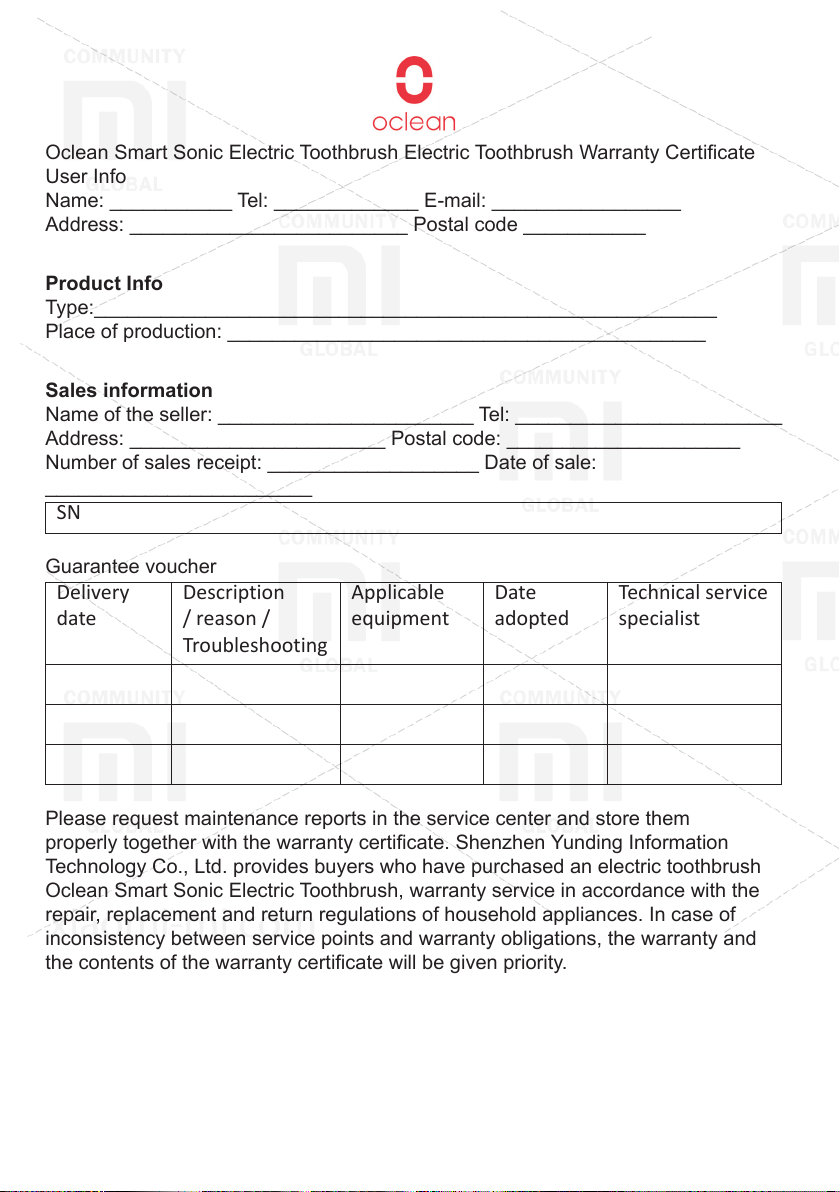
Oclean Smart Sonic Electric Toothbrush Electric Toothbrush Warranty Certicate
User Info
Name: ___________ Tel: _____________ E-mail: _________________
Address: _________________________ Postal code ___________
Product Info
Type:________________________________________________________
Place of production: ___________________________________________
Sales information
Name of the seller: _______________________ Tel: ________________________
Address: _______________________ Postal code: _____________________
Number of sales receipt: ___________________ Date of sale:
________________________
SN
Guarantee voucher
Delivery
date
Description
/ reason /
Applicable
equipment
Date
adopted
Technical service
specialist
Troubleshooting
Please request maintenance reports in the service center and store them
properly together with the warranty certicate. Shenzhen Yunding Information
Technology Co., Ltd. provides buyers who have purchased an electric toothbrush
Oclean Smart Sonic Electric Toothbrush, warranty service in accordance with the
repair, replacement and return regulations of household appliances. In case of
inconsistency between service points and warranty obligations, the warranty and
the contents of the warranty certicate will be given priority.
Shenzhen Yunding Information Technology Co., Ltd.
Floor 28, Tower C, Dachong Commercial Center, No. 9676 Road, Shenzhen, China
Zip code: 518057
If there is a problem with the product purchased, please contact
Email: [email protected]
www.oclean.com
Page 16
Oclean’s page on Facebook
www.facebook.com/ocleanofcial
Subscribe to Oclean’s Ofcial Facebook page
Download the mobile app
www.oclean.com/download
Scan the QR code to download the mobile app
xiaomi-mi.com
 Loading...