

Page 1
USER MANUAL
MANUALE UTENTE
Manuale Istruzioni:Layout 1 21/09/2011 17.16 Page 1
Page 2

2U S E R M A N U A L
THANK YOU FOR PURCHASING OCARINA
Specifications
Your Ocarina has the following specifications and special
features:
• Fully functional MP3 player with integrated speaker
• 2 GB memory (32 hours at 128 kbit/s data rate).
• Hidden volume control (controlled by the parents)
• Programmable Auto O time
• Over 40 hours on a single AA battery (included)
• Durable exterior of soft, food-grade rubber
• USB port
• Headphone jack
• Safety tested: meets CE, RoHS and ASTM F963 Toy Safety
• No toxic paints and lead-free
• Dimensions: 16,5x7,0x2,75 cm
• Graphic Display (96x40 pixels)
• Multiple Playlists (max 99)
Computer System
Requirements
• Pentium III 500MHz or higher recommended
• Macintosh iMac G3 or higher
• Windows® 2000 SP4, XP, Vista or 7
• Mac OS X Version 10.1.5 or higher
• USB port
• CD-ROM (for transferring music from a CD)
• Internet connection (for purchasing music online)
Manuale Istruzioni:Layout 1 21/09/2011 17.16 Page 2
Page 3
3
Imported by
Sindbad s.r.l.
Email: [email protected]
Website: www.ocarinamp3.com
Via San Giovanni 32/A
50124 Firenze
Italy
European Compliance
This product conforms to the following:
EMC Directive 89/336/EEC as amended by 92/31/EEC and 93/68/EEC.
Mains operated products for the European market comply with Low Voltage Directive
2006/95/EC.
Communication / RF wireless products for the European market comply with R&TTE
Directive 1999/5/EC.
CAUTION:
To comply with the Europe CE requirement, this device must be installed with
CE certified computer equipment which meet with Class B limits.
All cables used to connect this device must be shielded, grounded and no longer than
3m in length. Operation with non-certified computers or incorrect cables may result in
interference to other devices or undesired eects to the product.
MODIFICATION:
Any changes or modifications not expressly approved by SINDBAD S.r.l.
or one of its aliated companies could void the user’s warranty and guarantee rights.
FCC Information
This device complies with part 15 of the FCC Rules. Operation is subject to the following
two conditions: (1) This device may not cause harmful interference, and (2) this device
must accept any interference received, including interference that may cause undesired
operation.
This equipment has been tested and found to comply with the limits for a Class B digital
device, pursuant to Part 15 of the FCC Rules. These limits are designed to provide
reasonable protection against harmful interference in a residential installation. This
equipment generates, uses and can radiate radio frequency energy and, if not installed
and used in accordance with the instructions, may cause harmful interference to radio
communications. However, there is no guarantee that interference will not occur in a
particular installation. If this equipment does cause harmful interference to radio or
television reception, which can be determined by turning the equipment o and on, the
user is encouraged to try to correct the interference by one or more of the following
measures:
- R eorient or relocate the receiving antenna.
- Increase the separation between the equipment and receiver.
- Connect the equipment into an outlet on a circuit dierent from that to which the
receiver is connected.
- Consult the dealer or an experienced radio/TV technician for help.
This Class B digital apparatus complies with Canadian ICES-003.
U S E R M A N U A L
It is highly recommended that you register your name and contact information on our
website. Should we need to contact you for important information regarding your Ocarina.
Go to www.ocarinamp3.com for more information and details on our privacy policy.
Manuale Istruzioni:Layout 1 21/09/2011 17.16 Page 3
Page 4

4
SAFETY INFORMATION
Hearing Safety
The Ocarina speaker volume levels are safe during normal
operation. Prolonged exposure to the speaker at very close
proximity could lead to hearing damage now or later in your
child’s life.
• Do not allow your child to sleep holding the Ocarina.
The speaker could fall too close to the ear for a prolonged
period.
• Do not allow your child to hold the speaker directly to
their ear for a prolonged period of time.
• Do not use headphones for children under age 6. Older
children may use headphones occasionally for very short
lengths of time (less than 20 minutes).
• Do not allow your child to use headphones when the
HPhone Loud setting is ON (see Settings information on
p.6). This setting is not intended for use by children and
can harm their hearing.
General Safety
• Do not allow children under age 6 to use headphones
because they may not hear warning sounds in their
environment.
• Do not allow your child to play with the Ocarina while it is
plugged into the USB cable.
• Do not allow your child to play with the Ocarina with the
battery door open or missing.
Care for your product
• Your Ocarina is water resistant but is not waterproof.
• Do not immerse your Ocarina in liquids.
• Do not allow your child to play with the Ocarina in water
such as a bath or pool.
• Avoid direct spray of liquids.
• Clean with a mild detergent and a soft damp cloth. Never
use solvents.
• Do not open the Ocarina. There are no user serviceable
parts inside.
• Do not store the Ocarina in direct sunlight or near high
temperatures. Avoid parked cars on hot days.
About the battery
• Use a small screwdriver to open the battery compartment.
• Do not remove the small plastic retaining washers, as
loose screws can pose a choking hazard.
• Insert one ‘AA’ battery with polarity corresponding to the
diagram on the bottom of the battery compartment.
• Replace the battery door using a screwdriver. Do not
over-tighten.
• Remove batteries before storing the player for long
periods of time, as they may leak and damage the player.
Discard leaking batteries immediately, as they can cause
skin injury.
• Do not attempt to charge batteries that are not intended
to be recharged.
• Dispose of batteries according to federal, state and local
regulations.
• The Ocarina does not recharge batteries.
U S E R M A N U A L
Manuale Istruzioni:Layout 1 21/09/2011 17.16 Page 4
Page 5
5
What is special about an MP3 Player like Ocarina?
MP3 players store the music on a chip inside the player. This
means no moving parts. Music can be transferred directly
from your computer using a USB cable. For a child’s music
player, nothing is better. No small parts to break o, no CDs
to scratch and hours of music with the push of a button.
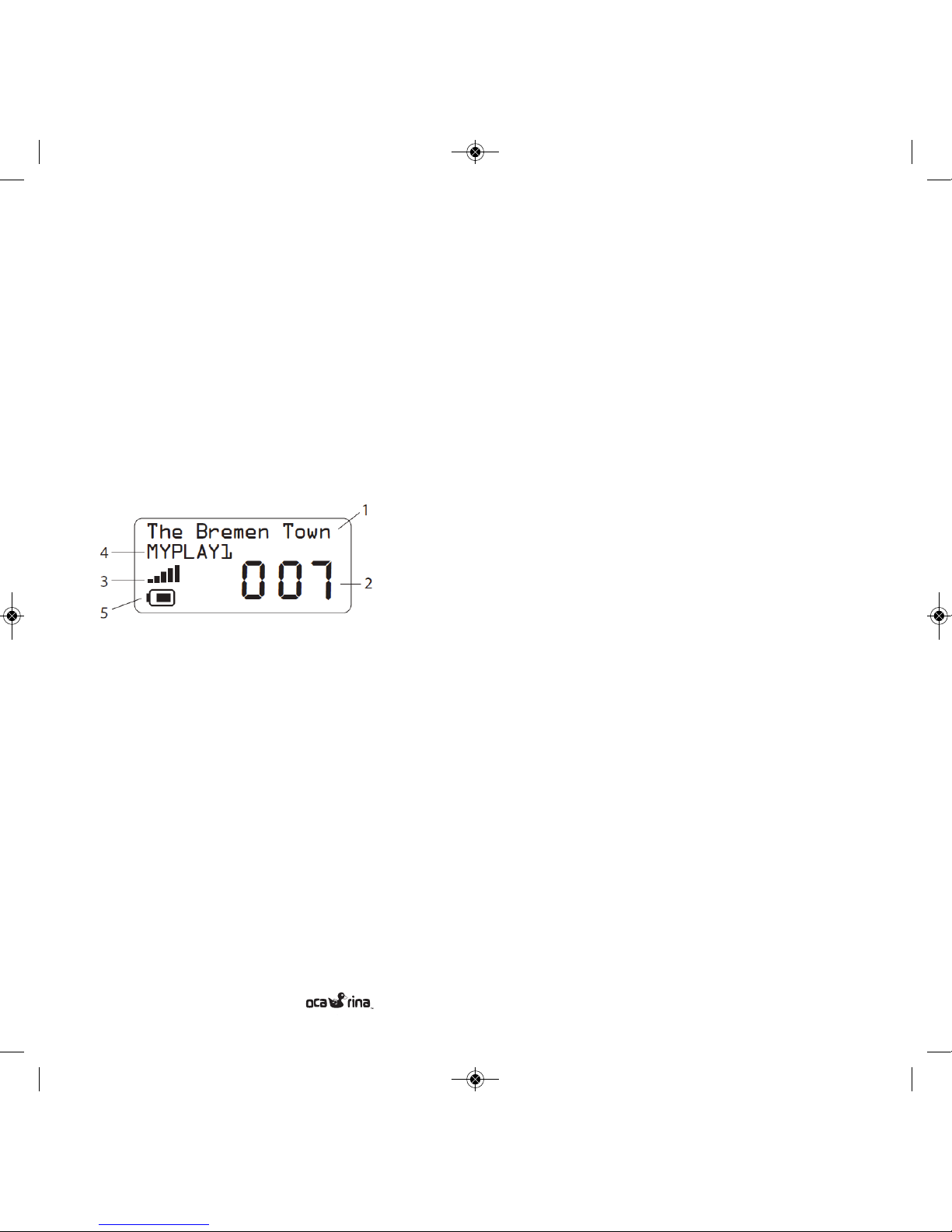
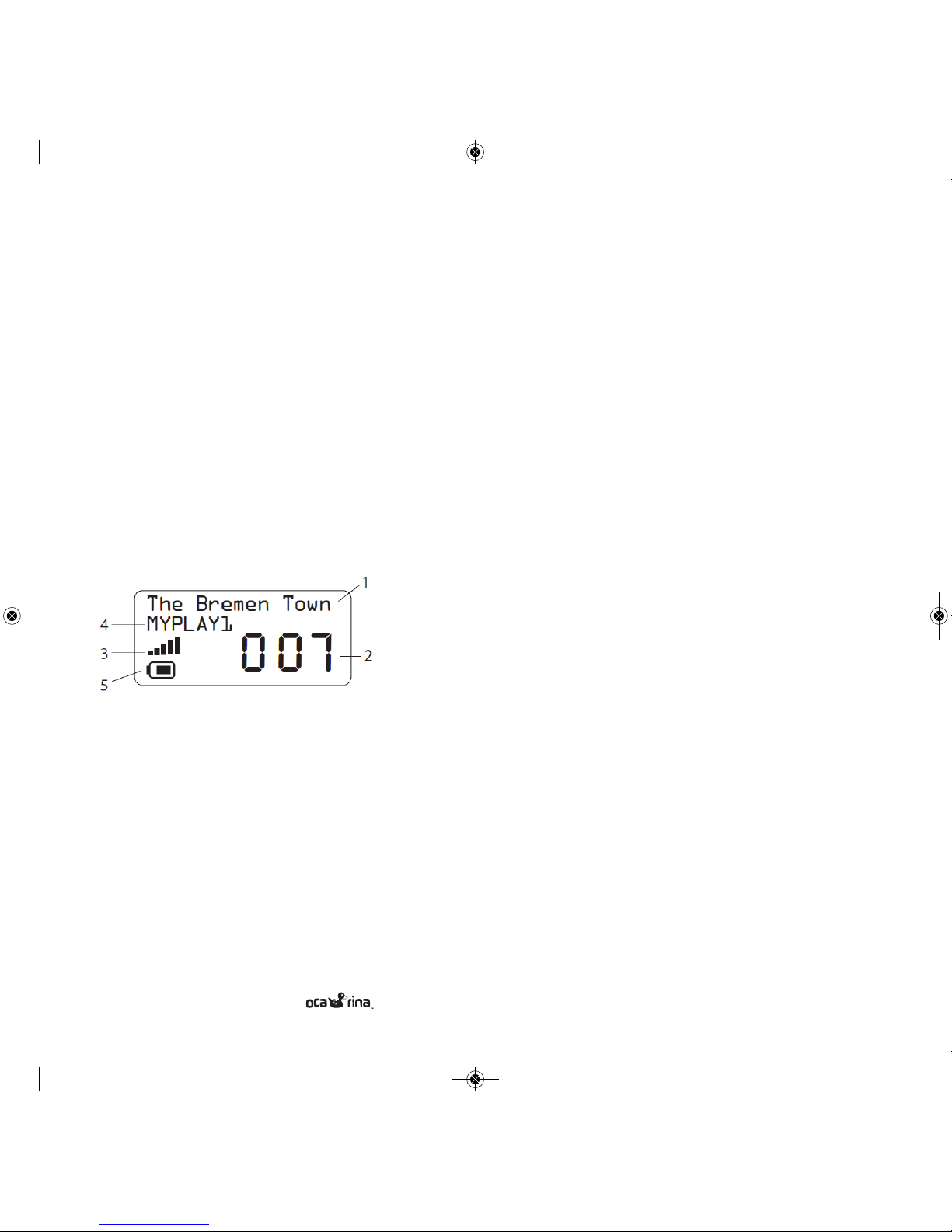
Display
1) Displays player status information
2) Song number
3) Volume level indicator
4) Current playlist name
5) Battery level indicator
GETTING STARTED
Turning ON
Press any button to turn the Ocarina On. It takes a few
seconds for the music to queue up before it plays.
Turning OFF
The Ocarina will shut itself o after one minute when no
music is playing (when the display reads “Stopped”). The player
may also shut itself o while playing music, depending on the
Auto-O and Continuous Play settings (see Auto-O and
Continuous Play section below).
Song Selection
The display shows the number of the current song. Press the
Left or Right buttons to play the previous or the next song
respectively. When the player reaches the end of the music
list, it will continue playing from the beginning.
Fast Forward / Rewind
You can fast forward and fast rewind through a song by pressing and holding the right and left buttons respectively.
Settings Menu
The settings menu has been hidden from your child to
give you control of functions such as Playlist, Volume and
auto-o times.
Entering the Settings Menu
Press and hold the Left and Right buttons simultaneously for
over 6 seconds. When the display reads “Menu”, release
the buttons.
U S E R M A N U A L
Manuale Istruzioni:Layout 1 21/09/2011 17.16 Page 5
Page 6
6
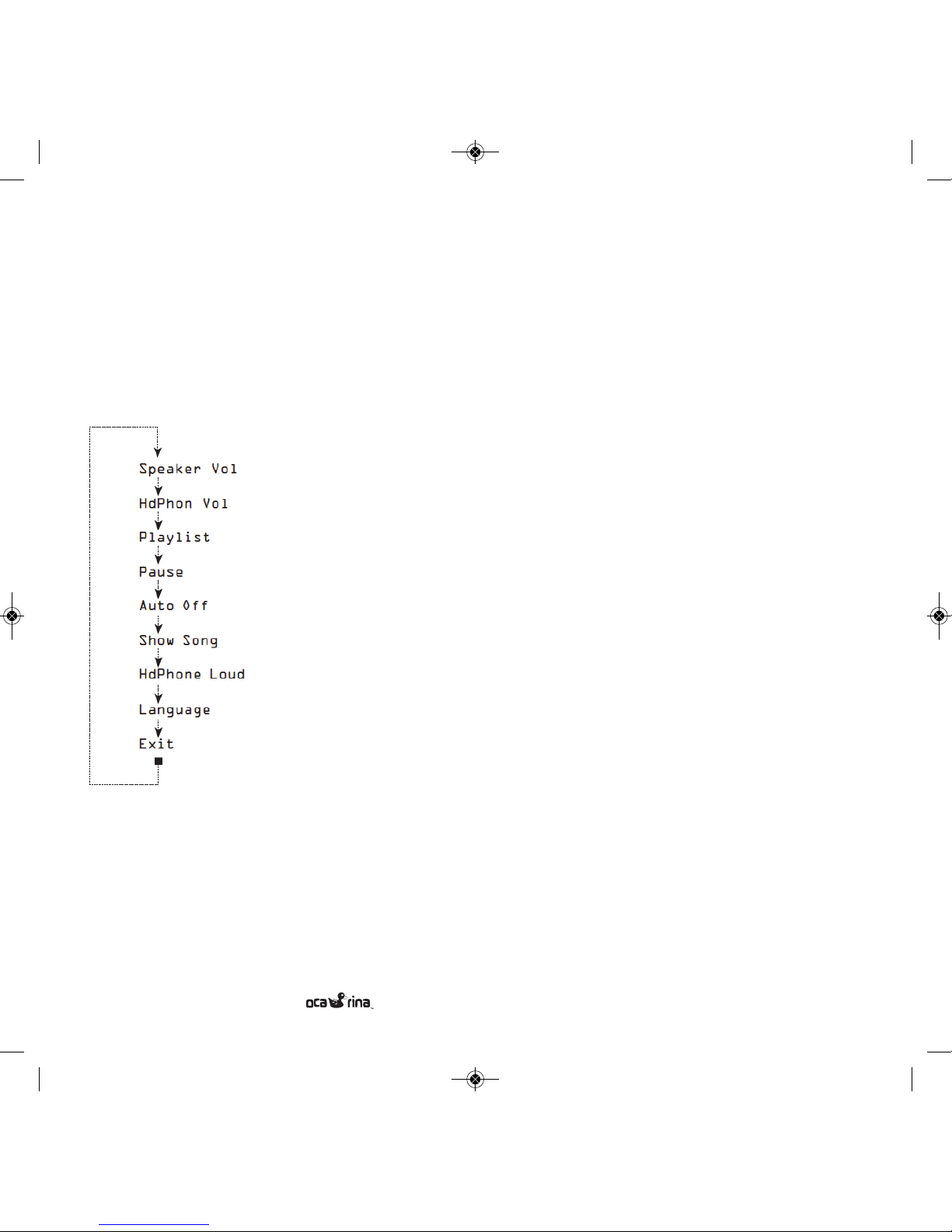
Scrolling through the Settings menu
Pressing the middle button will scroll through the Settings
menu. Pressing the left and right buttons will adjust the value
of each setting.
Each item in the menu is described as follows:
Speaker Volume
The current speaker volume
setting is displayed as a number
between 1 and 10 (loudest).
HdPhone Volume
The current headphone volume
setting is displayed as a number
between 1 and 10 (loudest).
Playlist
A playlist is simply a group of
songs. You can create up 99
playlists (see Playlist section below)
and group songs however you like.
For instance, you might put high
energy songs in a playlist called
“Fun” and lullaby songs in “Relax”.
Note: empty playlists are not displayed and cannot be selected.
Select the Aud playlist to play Audible audiobooks.
Pause
Pause ON allows the middle button to pause/resume the song.
Pause OFF allows the middle button to start and stop the song
from the beginning. Very young children may find the Ocarina
more intuitive with the pause feature o.
Auto O
The current Auto O setting is displayed (minutes). This
feature turns the player o automatically after playing for a
set time. This can be handy at bedtime or to conserve battery
power when the child leaves the player running.
When this feature is o, the Ocarina will play until the
stop/pause button is pressed.
Show Song
Shows the song name on the display.
HdPhone Loud When ON, boosts the headphone volume.
Warning: Do not use the Ocarina with headphones on children when HdPhone Loud is ON. Turn this setting ON for
playing the Ocarina through a car stereo or for when adults require loud headphones.
Language
Selects the language on the display.
Exit
Press the Left or Right buttons to exit from the Settings menu
and return to the normal mode for playing music. The other
way to exit from the Settings menu is to simply not press any
button for 10 seconds. Press the middle button to scroll back
to the top of the Settings menu.
U S E R M A N U A L
Manuale Istruzioni:Layout 1 21/09/2011 17.16 Page 6
Page 7
7
Music Management
The Ocarina appears to your computer as a USB hard drive.
This means that you can transfer music files to and from the
Ocarina using Windows Explorer or Mac Finder. You can also
drag songs from iTunes to the Ocarina.
Playlists
Each folder within the Ocarina is a playlist. The folder name is
the playlist name. Keep the folder names to 8 characters
or less for proper display on the Ocarina. Create new folders
to create new playlists. The Ocarina supports up to 99 playlists.
Empty folders do not appear in the playlist list in the settings
menu.
Transferring songs
To load songs from your computer onto the Ocarina, simply
drag and drop them from your computer into a folder. Songs
not in a folder are not played. You can also drag songs directly
from iTunes into a folder. Songs play in the order they are
placed in the folders, in other words, new songs are added to
the end of the playlist.
One convenient method to order your songs is to place them
in a temp folder on the Ocarina then drag them one at a time
to the playlist folder.
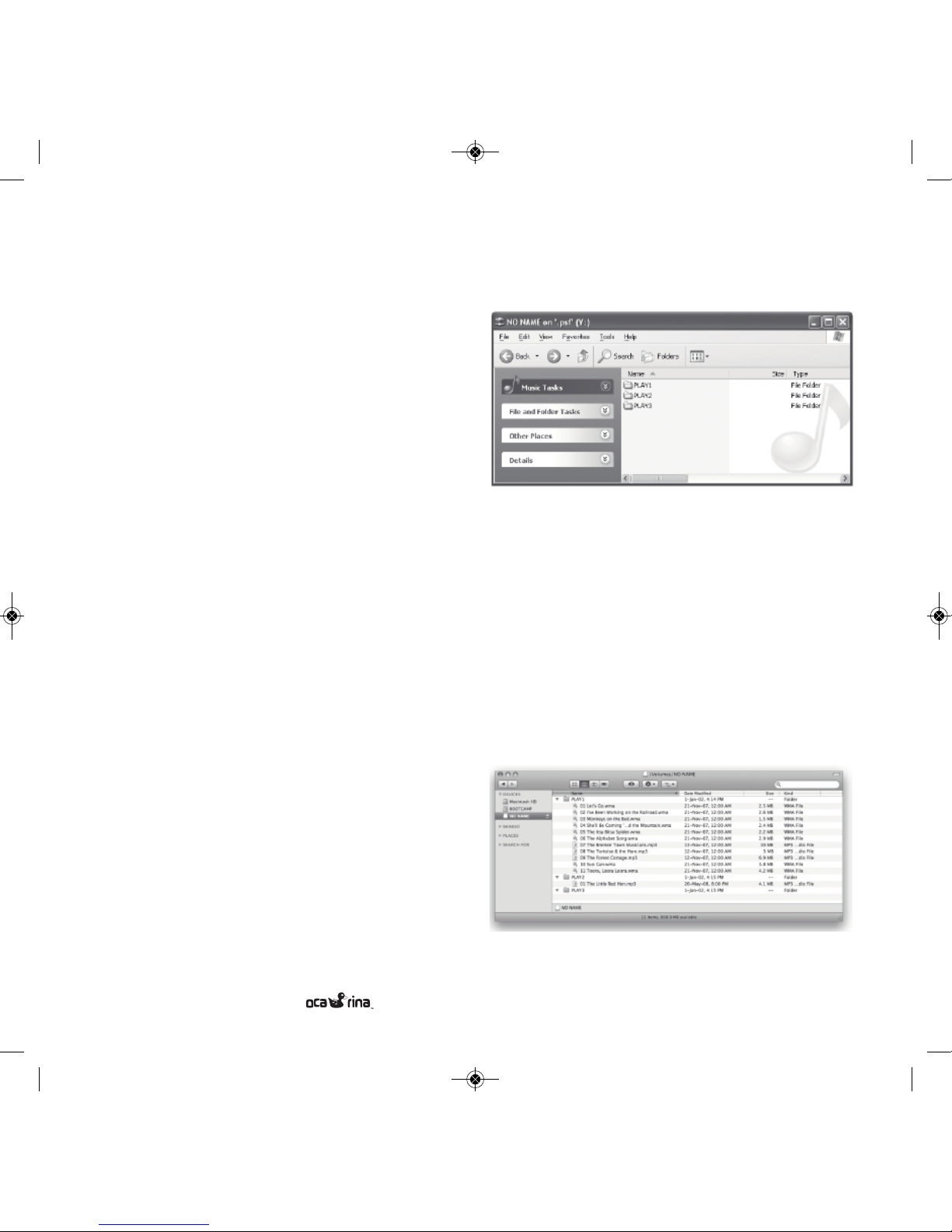
Example Using Windows Explorer
Plug your Ocarina into the USB port of your computer using
the supplied USB cable. A screen asking what you want Windows to do will appear. Select the Windows Explorer option
and select OK. The following screen will appear.
Drag and drop songs, normally located in your “My Music”
folder, to the playlist folders.
Example Using Mac Finder
Plug your Ocarina in to the USB port of your computer using
the supplied USB cable. The Ocarina appear in your “Devices”
list in the Mac Finder as shown in the screen pictured here.
Drag and drop songs from iTunes to the playlist folders.
U S E R M A N U A L
Manuale Istruzioni:Layout 1 21/09/2011 17.16 Page 7
Page 8

8
Getting Songs onto your computer
Use the media player on your computer, such as Windows
Media Player or iTunes, to copy songs from your CD
collection to your computer. Insert the CD into the drive
and your media player should open automatically, giving
you the option to copy the CD. Consult the media player’s
documentation for more information. The recommended
import settings are: MP3 encoder, 128kbps, no protection.
You can also purchase music from www.ocarinamp3.com or on
many online sources such as iTunes and Amazon.com. The
Ocarina currently plays MP3, M4A, WMA, AAC, OGG, AA,
AAX formatted songs.
Go to www.ocarinamp3.com occasionally to check for the
availability of other decoders. Do NOT use the iTunes Plus setting in iTunes.
Audio Books (Windows only)
The Ocarina plays audiobooks from audible.com. Go to
www.audible.com for more information and to download
audiobooks for your children. You must use Audible Manager
to transfer Audible content to the Ocarina.
IMPORTANT INFORMATION
THE AC ADAPTER JACK HAS BEEN MADE NON-FUNCTIONAL TO COMPLY WITH TOY SAFETY REGULATIONS
(EN62115). DO NOT USE.
EXHAUSTED BATTERIES ARE TO BE REMOVED FROM
THE PLAYER.
THE SUPPLY TERMINALS ARE NOT TO BE SHORT-CIRCUITED.
RECHARGEABLE BATTERIES ARE TO BE REMOVED FROM
THE PLAYER BEFORE BEING CHARGED.
RECHARGEABLE BATTERIES ARE ONLY TO BE CHARGED
UNDER ADULT SUPERVISION.
PACKING HAS TO BE KEPT SINCE IT CONTAINS IMPORTANT INFORMATION.
U S E R M A N U A L
Manuale Istruzioni:Layout 1 21/09/2011 17.16 Page 8
Page 9

9
Troubleshooting
Visit www.ocarinamp3.com for the latest information on trouble shooting.
Recycling/Disposal
Please consult your local regulations regarding recycling of
electronic products. The Ocarina is lead-free as it complies
with RoHS specifications.
Warranty
Consult the online troubleshooting guide before making a
warranty claim. Many issues can be resolved without the
need for factory servicing. To make a warranty claim, go to
www.ocarinamp3.com and fill out the form under “Returns”
or directly to the reseller where you purchased the Ocarina.
Include as much information about the problem as possible.
You will be provided with further instructions by email regarding how and where to send your Ocarina for servicing.
SINDBAD S.r.l. warrants to the purchaser or gift recipient that
if any manufacturing defect becomes apparent in this product
within 2 years from the original date of purchase, it will
be replaced free of charge through the local reseller. This
warranty does not include damage to the product resulting
from accidents, misuse or leaking batteries.
The provisions of this written warranty are in addition to
and not a modification of or subtraction from the statutory
warranties and other rights and remedies contained in
any applicable legislation, and to the extent that any such
provisions purport to disclaim, exclude or limit any such
statutory warranties and other rights and remedies, such
provisions shall be deemed to be amended to the extent
necessary to comply therewith.
Limitation of Warranty:
THE WARRANTY STATED ABOVE IS THE ONL Y WARRANTY APPLICABLE TO THIS PRODUCT. ALL OTHER
WARRANTIES, EXPRESS OR IMPLIED (INCLUDING ALL
IMPLIED WARRANTIES OF MERCHANTABILITY OR FITNESS FOR A PARTICULAR PURPOSE ) ARE HERE BY DISCLAIMED. NO VERBAL OR WRITTEN INFORMATION
GIVEN BY SINDBAD S.R.L., ITS AGENTS OR EMPLOYEES
SHALL CREATE A GUARANTY OR IN ANY WAY INCREASE THE SCOPE OF THIS WARANTY. REPAIR OR REPLACEMENT AS PROVIDED UNDER THIS WARRANTY IS
THE EXCLUSIVE REMEDY OF THE CONSUMER. SINDBAD
S.R.L. SHALL NOT BE LIABLE FOR INCIDENTAL OR CONSEQUENTIAL DAMAGES RESULTING FROM THE USE OF
THIS PRODUCT OR ARISING OUT OF ANY BREACH OF
ANY EXPRESS OR IMPLIED WARRANTY ON THIS PRODUCT. THIS DISCLAIMER OF WARRANTIES AND LIMITED
WARANTY ARE GOVERNED BY THE LAWS OF THE ITALIAN REPUBLIC. EXCEPT TO THE EXTENT PROHIBITED BY
APPLICABLE LAW, ANY IMPLIED WARRANTY OF MERCHANTABILITY OR FITNESS FOR A PARTICULAR PURPOSE ON THIS PRODUCT IS LIMITED TO THE
APPLICABLE WARANTY PERIOD SET FORTH ABOVE.
U S E R M A N U A L
Manuale Istruzioni:Layout 1 21/09/2011 17.16 Page 9
Page 10

10
U S E R M A N U A L
Caratteristiche e Funzioni speciali
Il tuo Ocarina ha le seguenti caratteristiche e funzioni speciali:
• Lettore MP3 con altoparlante integrato
• 2 GB di memoria (32 ore a 128 kbit/s).
• Controllo del volume nascosto (controllabile da parte dei
genitori)
• Tempo di Auto spegnimento programmabile
• Oltre 40 ore con una singola batteria AA (inclusa)
• Contenitore resistente di gomma soce, per uso
alimentare
• Porta USB
• Presa Cue
• Soddisfa certificazioni CE, RoHS e ASTM F963 sicurezza
dei giocattoli
• Senza uso di vernici tossiche e senza piombo
• Dimensioni: 16,5x7,0x2,75 centimetri
• Display grafico (96x40 pixels)
• Liste di riproduzione multiple (massimo 99)
Caratteristiche Computer
Requisiti
• Processore Pentium III 500MHz o superiore consigliato
• Macintosh iMac G3 o superiore
• Windows® 2000 SP4, XP, Vista o 7
• Mac OS X versione 10.1.5 o superiore
• Porta USB
• CD-ROM (per il trasferimento di musica da un CD)
• Connessione a Internet (per l'acquisto di musica online)
GRAZIE PER AVER ACQUISTATO OCARINA
Manuale Istruzioni:Layout 1 21/09/2011 17.16 Page 10
Page 11
11
U S E R M A N U A L
Imported by
Sindbad s.r.l.
Email: [email protected]
Website: www.ocarinamp3.com
Via San Giovanni 32/A
50124 Firenze
Italia
Conformità europea
Questo prodotto è conforme alle seguenti:
Direttiva EMC 89/336/CEE come modificata dalla 92/31/CEE e 93/68/CEE.
Prodotti gestiti dalla rete per il mercato europeo che rispettano la Direttiva Bassa Tensione
2006/95/CE.
Comunicazione/prodotti RF wireless per il mercato europeo in conformità della direttiva
R&TTE 1999/5/CE.
ATTENZIONE:
Per rispettare il requisito Europa CE, questo dispositivo deve essere
installato con apparecchiature informatiche certificate CE che rispondono ai limiti della
classe B.
Tutti i cavi utilizzati per collegare il dispositivo devono essere schermati, a terra e non più
di 3 metri di lunghezza. L'utilizzo con computer non certificati o cavi non idonei può
causare interferenze con altri dispositivi o eetti indesiderati al prodotto.
MODIFICA:
Qualsiasi cambiamento o modifica non espressamente approvati dalla SINDBAD
S.r.l. o una delle sue società aliate potrebbero invalidare la garanzia dell'utente e dei
diritti di garanzia.
Informazioni FCC
Questo dispositivo è conforme alla parte 15 delle norme FCC. Il funzionamento è soggetto
alle seguenti due condizioni: (1) Questo dispositivo non può causare interferenze dannose e
(2) questo dispositivo deve accettare qualsiasi interferenza ricevuta, incluse le interferenze che
potrebbero comprometterne il funzionamento. Questo apparecchio è stato testato ed è risultato conforme ai limiti previsti per i dispositivi digitali di Classe B, ai sensi della Parte 15 delle
norme FCC. Questi limiti sono concepiti per fornire una ragionevole protezione contro interferenze dannose in una installazione residenziale. Questo dispositivo genera, utilizza e può
emettere energia a radiofrequenza e, se non installato e utilizzato in conformità alle istruzioni,
può causare interferenze dannose alle comunicazioni radio. Tuttavia, non vi è alcuna garanzia
che non si verifichino interferenze in una par ticolare installazione. Se questo apparecchio causa
interferenze dannose alla ricezione radio o televisiva, che può essere verificata
accendendo e spegnendo il dispositivo, l'utente è incoraggiato a provare a correggere
l'interferenza adottando uno o più delle seguenti misure:
- Riorientare o riposizionare l'antenna di ricezione.
- Aumentare la distanza tra l'apparecchio e il ricevitore.
- Collegare l'apparecchio a una presa su un circuito diverso da quello a cui è collegato
il ricevitore.
- Consultare il rivenditore o un tecnico radio / TV per aiuto.
Questo apparecchio digitale di Classe B è conforme alla normativa canadese ICES-003.
Si consiglia di registrarsi sul sito www.ocarinamp3.com per ricevere aggiornamenti e informazioni riguardanti la vostra Ocarina.
Sul sito www.ocarinamp3.com ulteriori informazioni e dettagli sulla nostra politica sulla privacy.
Manuale Istruzioni:Layout 1 21/09/2011 17.16 Page 11
Page 12

12U S E R M A N U A L
Sicurezza Livelli Audio
I livelli di volume dell'altoparlante di Ocarina sono sicuri durante il normale funzionamento.
L'utilizzo prolungato a distanza molto ravvicinata dallo speaker
potrebbe causare danni all'udito.
• Non permettere ai bambini di dormire con Ocarina:
potrebbe andare troppo vicino all'orecchio.
• Non permettere ai bambini di tenere il diusore direttamente al proprio orecchio per un periodo prolungato di
tempo.
• Non utilizzare le cue per bambini sotto i 6 anni. I bambini
più grandi possono usare le cue occasionalmente
per un tempo limitato (meno di 20 minuti).
• Non permettere ai bambini di utilizzare le cue quando
l'impostazione “AmplificaCue” è ON (vedere le informazioni delle impostazioni). Questa impostazione non
è destinato all'uso da parte di bambini e può danneggiare
il loro udito.
Informazioni generali sulla sicurezza
• Non permettere a bambini sotto i 6 anni di utilizzare delle
cue, perché potrebbero non avvertire suoni che segnalano
eventuali pericoli.
• Non permettere ai bambini di giocare con Ocarina mentre è
collegato il cavo USB.
• Non permettere ai bambini di giocare con Ocarina con lo
sportello batteria aperto o mancante.
Cura del prodotto e water resistant
• Ocarina non può essere immerso nell'acqua. Dunque non
immergere il tuo Ocarina nei liquidi.
• Non permettere ai bambini di giocare con Ocarina in acqua
come in bagno o in piscina.
• Evitare comunque di utilizzare Ocarina vicino a liquidi.
• Pulire con un detergente delicato e un panno morbido e
umido. Non usare mai solventi.
• Non aprire Ocarina. Non ci sono parti riparabili dall'utente.
• Non lasciare Ocarina alla luce diretta del sole o in prossimità
di temperature elevate. Evitare di lasciarlo in auto
parcheggiata sotto il sole nelle giornate calde.
A proposito della batteria
• Utilizzare un piccolo cacciavite per aprire il vano batteria.
Non rimuovere le piccole rondelle plastiche di fissaggio
delle viti, queste possono costituire un rischio di
soocamento.
• Inserire una batteria stilo 'AA' con la polarità corrispondente
allo schema sul fondo del vano batteria. Rimontare lo
sportello della batteria con un cacciavite. Non stringere
eccessivamente.
• Prima di riporre Ocarina per lunghi periodi di tempo rimuovere la batteria: questa potrebbe versare liquido acido
danneggiandola irreparabilmente e provocare danni alla
pelle e agli occhi.
• Non tentare di ricaricare batterie che non sono destinate
ad essere ricaricate.
• Smaltire le batterie rispettando le normative federali,
statali e locali.
• Ocarina non ha un circuito di ricarica delle batterie. Dunque
se usate batterie ricaricabili dovrete utilizzare l'opportuno
caricatore.
Manuale Istruzioni:Layout 1 21/09/2011 17.16 Page 12
Page 13
13U S E R M A N U A L
Qual'è la particolarità di un lettore MP3
come Ocarina?
I Lettori MP3 memorizzano la musica su un chip all'interno
del dispositivo. Ciò significa che non c'è nessuna parte in
movimento. La musica può essere trasferita direttamente dal
computer utilizzando un cavo USB. Per un lettore musicale
di un bambino, non c'è nulla di meglio: nessuna parte
in movimento che può provocare danni, nessun CD da
graare e ore di musica con la semplice pressione di un
tasto.
Display
Il display consente di visualizzare varie informazioni:
1) Stato Ocarina / Nome Brano
2) Numero del Brano
3) Indicatore di Volume - 5 barre è il più alto
4) Nome della Lista dei Brani
5) Indicatore livello batteria
PER INIZIARE
Accensione
Premere un tasto qualsiasi per accendere Ocarina. Ci vogliono
alcuni secondi prima che la musica venga riprodotta.
Spegnimento
Ocarina si spegne automaticamente dopo un minuto di
inattività (nel display compairà la scritta “In Pausa”).
Ocarina può anche spegnersi durante la riproduzione di musica, a seconda delle impostazioni di AutoSpegnimento (vedi
sezione AutoSpegnimento nelle prossime pagine)
Selezione Brani
Il display mostra il numero del brano corrente. Premere il
tasto Sinistro o Destro per riprodurre il brano precedente o
quello successivo, rispettivamente.
Quando Ocarina raggiunge la fine della lista dei brani, inizierà
di nuovo la riproduzione dall'inizio.
Fast Forward / Rewind
Si può avanzare o riavvolgere velocemente una canzone tenendo premuto rispettivamente il pulsante destro o sinistro
Il Menu Impostazioni
Il menu delle impostazioni è stato nascosto ai bambini per
darvi il controllo di funzioni quali il volume, lo spegnimento
automatico, la lista brani, ecc.
Accesso al Menu Impostazioni
Tenere premuti i tasti sinistro e destro contemporaneamente
per più di 6 secondi. Quando il display mostra "Menu",
rilasciare i tasti.
Manuale Istruzioni:Layout 1 21/09/2011 17.16 Page 13
Page 14
14U S E R M A N U A L
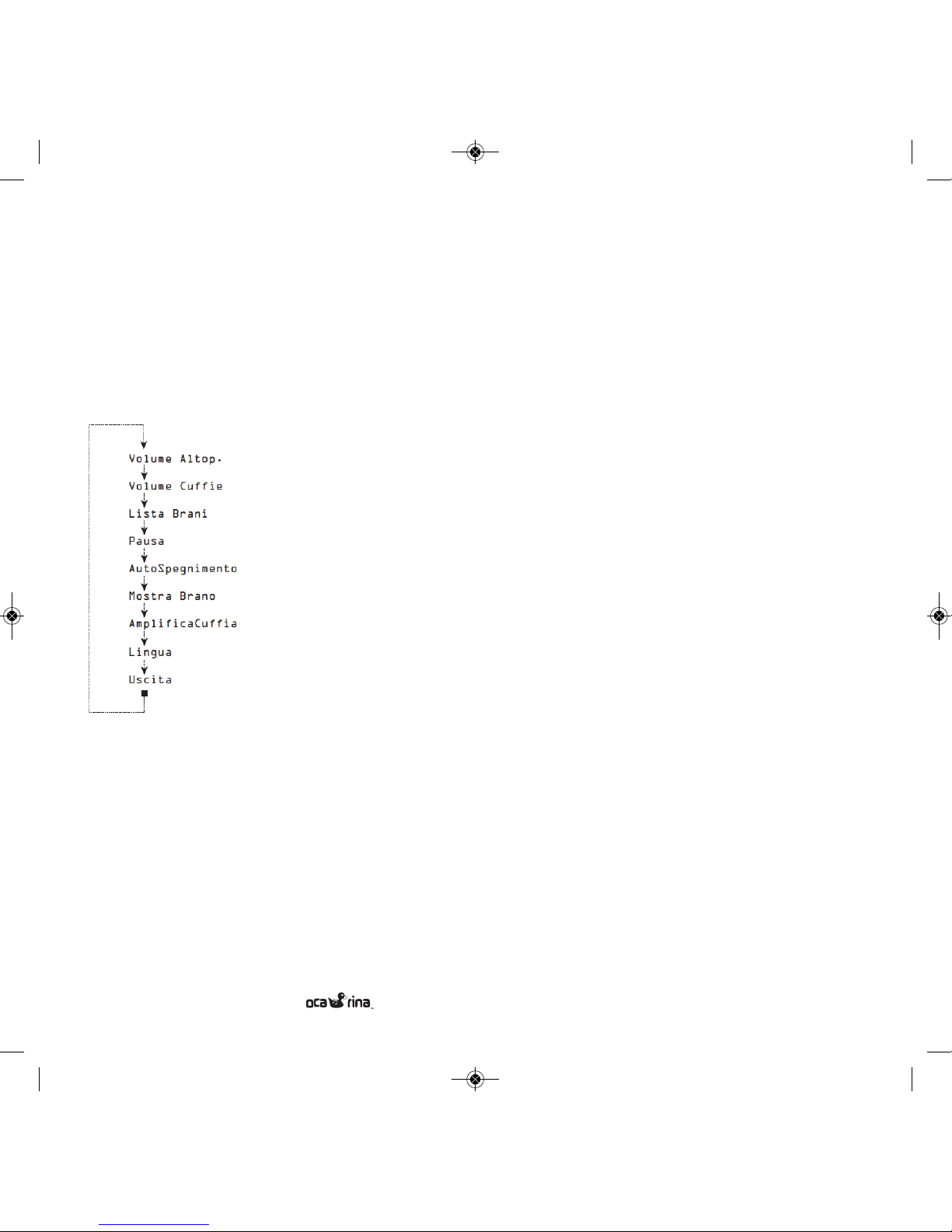
Scorrimento del Menu Impostazioni
Premendo il tasto centrale si potrà scorrere le opzioni del
menu Impostazioni. Premendo i tasti sinistro e destro si regola
il valore di ogni impostazione.
Ogni voce del menu verrà descritta di seguito:
Volume Altop.
L'attuale impostazione del volume
dell'altoparlante è visualizzato
come un numero compreso tra 1
e 10 (più forte). Cambiando il valore del volume le barre del display
cambieranno da1 a 5.
Volume Cue
L'attuale impostazione del volume
delle cue viene visualizzato come
un numero compreso tra 1 e 10
(più forte). Cambiando il valore
del volume le barre del display
cambieranno da 1 a 5.
Lista Brani
Una Lista Brani (Playlist) è semplicemente un gruppo di canzoni. È possibile creare fino a 99 liste secondo le esigenze ed il
gradimento. Per esempio, si possono mettere le canzoni più
allegre e veloci in una cartella denominata "Allegre" e le canzoni tranquille come le ninna nanne in "Relax".
Nota: liste vuote non vengono visualizzate e non possono
essere selezionate.
Selezionare la playlist Aud per riprodurre gli audiolibri Audible.
Pausa
Con la funzione Pausa ON il tasto centrale consente di mettere in pausa e riprendere il brano dal punto in cui lo abbiamo
interrotto. La funzione Pausa OFF consente al tasto centrale di
mettere in pausa il brano e riavviarlo dall'inizio. I bambini molto
piccoli possono trovare più intuitivo l’utilizzo con la funzione
Pausa On.
AutoSpegnimento
La funzione AutoSpegnimento permette di spegnere Ocarina
dopo un numero di minuti programmato. Tale funzione
visualizza il numero di minuti dopo il quale Ocarina si spegnerà.
Questa funzione può essere utile prima di coricarsi o per
risparmiare la batteria quando il bambino lascia Ocarina in
esecuzione.
Quando questa funzione è disattivata, Ocarina funzionerà
finchè non verrà premuto il tasto centrale Play/Pausa.
Mostra Brano
Mostra o meno il nome del file del brano scorrendo nel
display. Quando è ON mostra il nome del file contenuto
nella cartella riferita alla Lista Brani impostata.
AmplificaCua
Se attivato, aumenta il volume della cua.
Attenzione: non far utilizzare ai bambini Ocarina con le cue
quando AmplificaCua è ON. Attivare questa impostazione
è molto utile per la riproduzione dell’ Ocarina attraverso un
impianto stereo o con casse esterne.
Manuale Istruzioni:Layout 1 21/09/2011 17.16 Page 14
Page 15
15U S E R M A N U A L
Lingua
Questa opzione permette di modificare la Lingua nel menu
di configurazione.
Uscita
Premere il tasto Sinistro o Destro per uscire dal menu
Impostazioni e tornare alla modalità normale per la
riproduzione di musica. L'altro modo per uscire dal menu
Impostazioni è quello di non premere alcun tasto per 10
secondi. Premere il tasto centrale per scorrere alla parte
superiore del menu Impostazioni.
Trasferimento di musica
Ocarina appare al tuo computer come un disco rigido USB.
Questo significa che è possibile trasferire file musicali da e
per Ocarina usando Windows Explorer o Mac Finder.
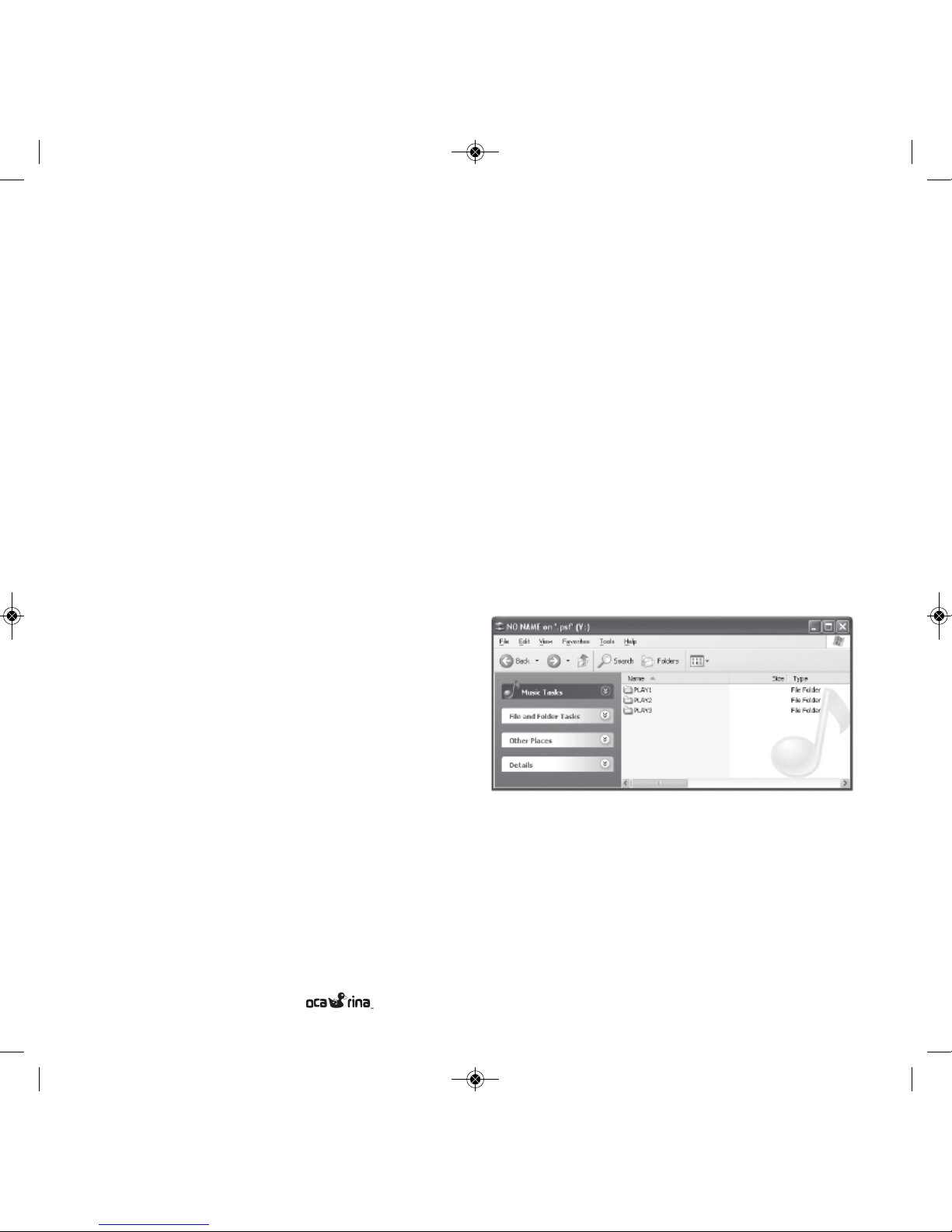
Esempio di utilizzo di Windows Explorer
Collegare Ocarina nella porta USB del tuo computer utilizzando il cavo USB in dotazione. Viene visualizzata una schermata che chiederà cosa fare. Selezionare l'opzione di Windows
Explorer e selezionare OK. La seguente schermata apparirà
sullo schermo. Trascinare i files contenenti i brani desiderati,
che si trovano normalmente nella cartella "Mia Musica", alle
cartelle/Lista brani preferite.
Manuale Istruzioni:Layout 1 21/09/2011 17.16 Page 15
Page 16
Manuale Istruzioni:Layout 1 21/09/2011 17.16 Page 16
Page 17
17U S E R M A N U A L
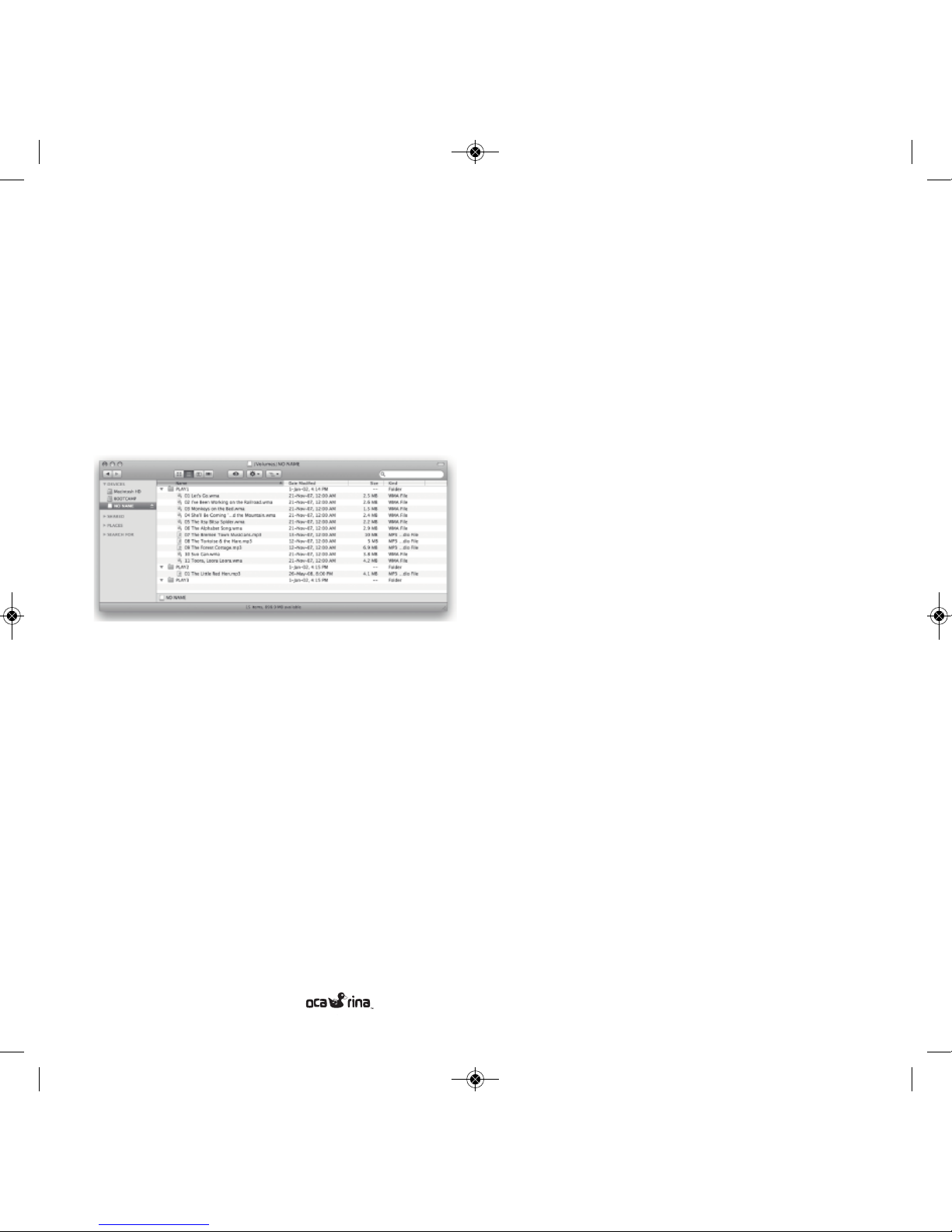
Esempio di utilizzo con Mac Finder
Collega il tuo Ocarina alla porta USB del tuo computer utilizzando il cavo USB in dotazione. Ocarina appare nella lista "Devices" nel Finder di Mac, come mostrato nella schermata qui
ragurata. Trascinare i brani musicali da iTunes nelle
cartelle/Liste brani.
Come ottenere i brani sul tuo computer
Utilizzare il media player sul vostro computer, ad esempio
Windows Media Player o iTunes, per copiare le canzoni dalla
tua collezione di CD al computer. Inserendo il CD nel lettore
del computer la procedura dovrebbe avviarsi automaticamente, dandovi la possibilità di copiare il CD. Consultare la
documentazione del lettore multimediale per ulteriori informazioni. Le impostazioni consigliate per l’importazione sono:
encoder MP3, 128kbps, nessuna protezione.
È inoltre possibile acquistare musica da www.ocarinamp3.com
o su molte fonti online come iTunes e Amazon.com. Ocarina
attualmente riproduce files in formato MP3, M4A, WMA,
AA C (audible), OGG, AA, AAX.
Vai alla pagina www.ocarinamp3.com di tanto in tanto per verificare la disponibilità di altri decoder.
Audio Libri (solo Windows)
Ocarina è compatibile con gli Audio Libri scaricabili da
www.audible.com. Vai alla www.audible.com per ulteriori
informazioni e per scaricare gli audiolibri per i vostri bambini.
Risoluzione dei problemi
Visita www.ocarinamp3.com per le ultime informazioni sulla
risoluzione dei problemi.
Riciclaggio / smaltimento
Si prega di consultare le normative locali in materia di
riciclaggio dei prodotti elettronici. Ocarina è esente da piombo
in quanto conforme alle specifiche RoHS.
INFORMAZIONI IMPORTANTI
L'INGRESSO DELL'ADATTATORE AC È STATO RESO NON FUNZIONALE
IN RISPETTO NORME DI SICUREZZA DEI GIOCATTOLI(EN62115).
N
ON UTILIZZARE.
L
E BATTERIE ESAURITE DEVONO ESSERE RIMOSSE DAL LETTORE MP3.
I
TERMINALI DI ALIMENTAZIONE NON DEVONO ESSERE IN CORTO
CIRCUITO.
L
E BATTERIE RICARICABILI DEVONO ESSERE RIMOSSE DAL LETTORE
MP3 PRIMA DI ESSERE RICARICATE.
L
E BATTERIE DEVONO ESSERE RICARICATE SOTTO LA SUPERVISIONE DI
UN ADULTO.
L
A CONFEZIONE DEVE ESSERE CONSERVATA IN QUANTO CONTIENE
INFORMAZIONI IMPORTANTI.
Manuale Istruzioni:Layout 1 21/09/2011 17.16 Page 17
Page 18

18
Garanzia
Consultare la guida alla risoluzione on-line prima di fare
una richiesta di garanzia. Molti problemi possono essere
risolti senza la necessità di riparazioni o manutenzione in
fabbrica. Per far valere la garanzia, visitare
www.ocarinamp3.com e compilare il modulo nella sezione
"Garanzia" o direttamente al rivenditore presso il quale è stato
acquistato Ocarina.
Includere quante più informazioni possibile sul problema.
Vi verranno fornite ulteriori istruzioni via e-mail su come e
dove inviare Ocarina per la manutenzione.
Sindbad S.r.l.
garantisce l'acquirente o il destinatario del
regalo che, se qualsiasi difetto di fabbricazione diventa
evidente in questo prodotto entro 2 anni dalla data originale
di acquisto, sarà sostituito gratuitamente attraverso il
rivenditore locale. Questa garanzia non comprende i danni
al prodotto derivanti da cadute, uso improprio o perdita di
liquidi nelle batterie.
Le disposizioni della presente garanzia scritta sono in aggiunta e
non una modifica o una sottrazione dalle garanzie legali della
normativa.
Limitazioni della garanzia:
LA GARANZIA DI CUI SOPRA È LA SOLA APPLICABILE AL
PRESENTE PRODOTTO. OGNI ALTRA GARANZIA
ESPLICITA O IMPLICITA (COMPRESE TUTTE LE GARANZIE
DI COMMERCIABILITÀ O IDONEITÀ PER UNO SCOPO
PARTICOLARE) SONO ESCLUSE. NESSUNA INFORMAZIONE VERBALE O SCRITTA FORNITA DA SINDBAD
SRL, I SUOI AGENTI O DIPENDENTI DEVONO CREARE
UNA GARANZIA O IN QUALSIASI MODO AUMENTARE
LA PORTATA DELLA PRESENTE.
LA RIPARAZIONE O LA SOSTITUZIONE DEL PRODOTTO
SONO L'UNICO RISARCIMENTO AL CONSUMATORE
PREVISTO DALLA PRESENTE GARANZIA .
SINDBAD S.R.L. NON È ALTRIMENTI RESPONSABILE PER
DANNI DIRETTI O INDIRETTI DERIVANTI DALL 'USO DI
QUESTO PRODOTTO NELLA REPUBBLICA ITALIANA.
FATTA ECCEZIONE PER I CASI PREVISTI DALLA LEGGE,
QUALUNQUE GARANZIA DI COMMERCIABILITÀ O
IDONEITÀ RELATIVE A QUESTO PRODOTTO È SUBORDINATA ALLA GARANZIA E ALLE LIMITAZIONI DI CUI
SOPRA.
U S E R M A N U A L
Manuale Istruzioni:Layout 1 21/09/2011 17.16 Page 18
Page 19
Manuale Istruzioni:Layout 1 21/09/2011 17.16 Page 19
Page 20
Sindbad S.r.l.
Via San Giovanni 32/A
50124 Firenze
Italy
[email protected]
www.ocarinamp3.com
Manuale Istruzioni:Layout 1 21/09/2011 17.16 Page 20
 Loading...