

Page 1
AIR NEXT USER MANUAL
Page 2
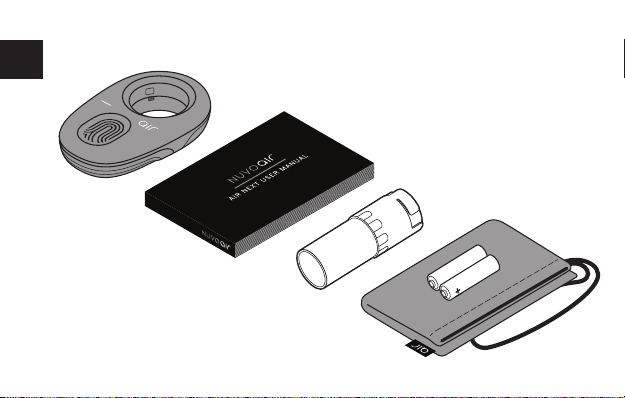
WHAT’S IN THE BOX
EN
2
Page 3
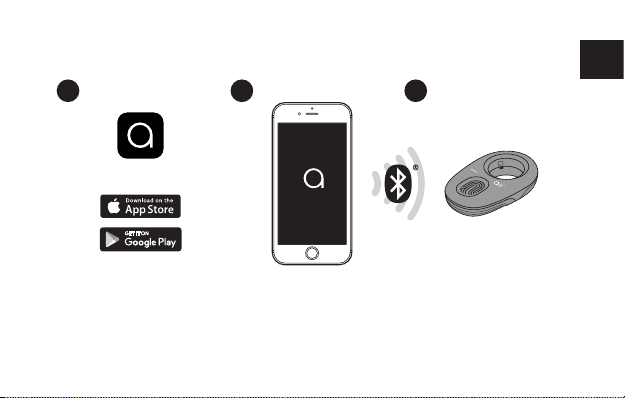
SETTING UP YOUR DEVICE
1 2 3
EN
Download the NuvoAir app
from AppStore or Google
Play Store.
Enable Bluetooth on your
mobile device. Allow the
app to access and use
Bluetooth and follow the
instructions on the screen.
3
The spirometer lights up
when it is connected to the
mobile device.
Page 4
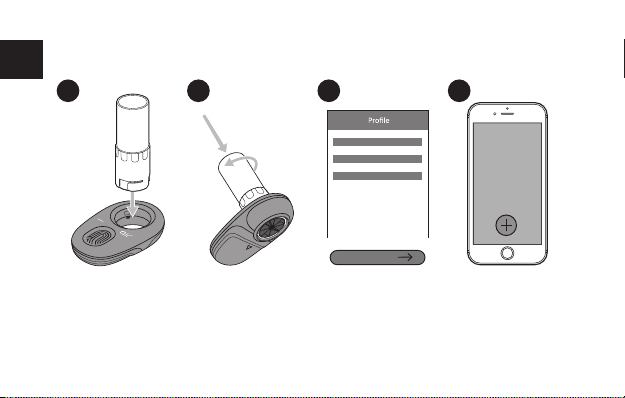
PERFORM A LUNG FUNCTION TEST
EN
1 2 3 4
Insert a new turbine
by sliding it through
the device.
Turn the turbine
clockwise until it
locks into place.
Create an account
or sign in to an
existing one and
select your prole.
4
Tap the plus button
to perform a lung
function test.
Page 5
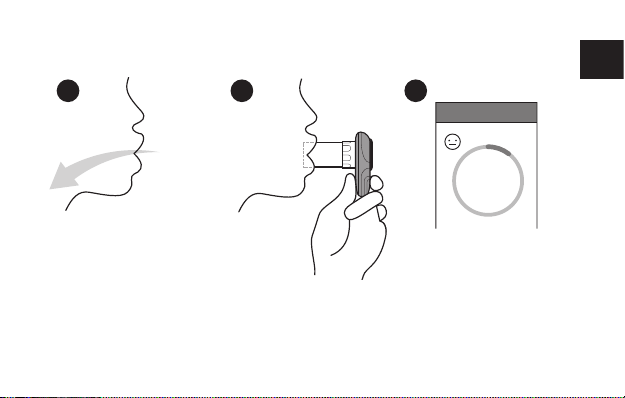
PERFORM A LUNG FUNCTION TEST
5 6 7
Take a slow deep breath as deep as you can.
Close your lips around the
opening of the turbine.
5
Blow as hard and as fast as
you can into the mouthpiece.
Test
2s
Your exhalation should
exceed 6 seconds in order
to obtain a high quality test.
EN
Page 6
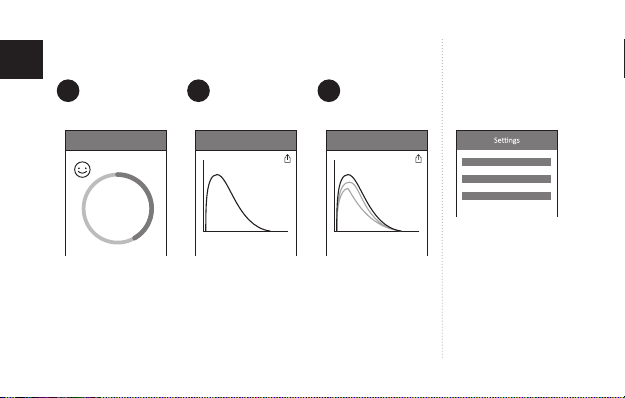
PERFORM A LUNG FUNCTION TEST BATTERY
EN
CHECK
8 9 10
Test
6s
Keep going until you
have completely
emptied your lungs.
Results
You should rest
15 to 30 seconds
before starting a
new test.
Results
Flow
Volume
You can share
the test via e-mail.
Perform a minimum
of 3 tests for high
quality results.
The app displays the
best result.
6
Battery: 100 %
Open app settings
to check battery
levels.
Page 7

INDICATIONS FOR USE
Air Next is intended to be used by:
• Healthcare professionals trained
to perform spirometry tests on
patients of age ≥ 5 years old, > 10
kg and ≥ 110 cm.
• Adults trained by healthcare
professionals (”competent adults”).
Competent adult can assist a child
who is ≥5 years old, >10kg and
≥110 cm.
Air Next is intended to perform
basic lung function and spirometry
testing.
The actual diagnosis shall be done
by a healthcare professional so
home use is only for indicative
purpose.
GENERAL INFORMATION
Air Next works with iOS and
Android devices and connects via
bluetooth. Air Next is powered by
2 x 1.5 V AAA alkaline batteries. If
the batteries are replaced or when
the device is discarded, dispose
the device as electronic waste.
Air Next is designed to work with
single-use NuvoAir disposable
turbines. When performing a spirometry test, the user
exhales into the turbine. The airow generated sets a rotor in motion. Air Next registers the speed
of the spinning rotor, converts it
and transfers the data via Bluetooth to the smartphone app.
LIMITATIONS OF USE &
CONTRAINDICATIONS
A spirometry test should only be
7
carried out when the user is at rest
(i.e. does not experience shortness
of breath) and in good health, and
thus in a suitable condition for
the test.
An analysis of the results of a
spirometry test alone is not sucient
to make a diagnosis of a clinical
condition. Test interpretation and
suggested treatment must be provided by a Healthcare professional.
A correct spirometry test depends
on the user’s capability to inhale
and exhale all air completely and
as fast as possible. If these fundamental conditions are not respected then the results obtained
during spirometry testing will not
be accurate, and therefore the test
results are “not acceptable”.
The acceptability of a test is the
responsibility of the user. Special
attention should be given when
testing the elderly, disabled and
children.
EN
Page 8

The device should never be used
when it is possible or probable
EN
that the validity of the results
may be compromised due to any
external factors.
Some conditions may pose a
relative danger to a patient or
aect the validity of spirometry
performance and results. These
include, but are not limited to the
following: unstable cardiovascular
status, unstable angina, recent
myocardial infarction (within one
month) or pulmonary embolism,
haemoptysis of unknown origin,
recent pneumothorax, thoracic,
abdominal or cerebral aneurysms,
recent thoracic, abdominal or eye
surgery, acute disorders such
as nausea or vomiting, severe
respiratory distress, physical
limitations, cognitive impairment,
dementia.
IMPORTANT SAFETY WARNINGS
Air Next should never be used with
a charging phone. Make sure the
phone is unplugged before con-
ducting a spirometry test. Don’t
use the device with a connected
AC/DC adaptor.
Once removed from its packaging,
check that there is no visible damage on the device. In the case of
damage do not use it and return it
to the seller.
Air Next has been examined by an
independent laboratory which has
certied the conformity of the device
to the European Safety Standards
EN 60601-1 and guarantees the
EMC Requirements within the limits set in the European Standard
EN 60601-1-2 and ETSI’s
EN 300328. It is a medical device
class IIa (“two a”) product. Air Next
is constantly controlled during its
production, therefore the product
conforms to the essential requirements set by the Council Directive
93/42/EEC for medical devices.
• Use only with iOS and Android
8
devices specied on our website
www.nuvoair.com.
• Use only in environments speci-
ed in this user manual.
• Do not expose to liquids.
• Air Next is not made with
natural rubber latex.
• Should you lose the battery
hatch with required and device
specic information on it, the
guarantee will no longer be valid
and NuvoAir cannot provide
further support or guarantee
the condition or functionality of
the product.
Page 9
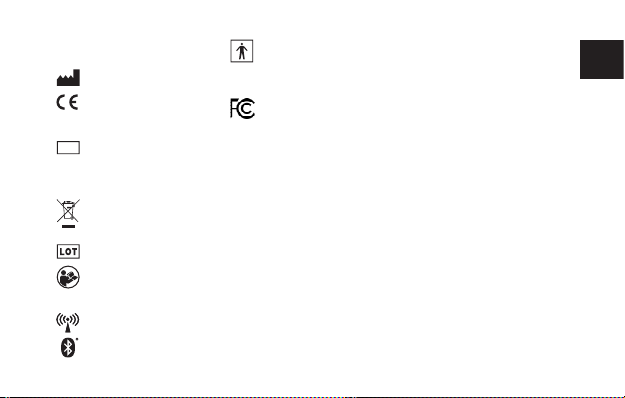
Explanation of the safety signs and
symbols marked on the device:
Manufacturer’s name and address.
CE mark: indicates that the device
is certied that it conforms to the
0598
requirements of the 93/42/EEC
medical device directive.
IP classication: indicates that the
IP32
device is protected against solid
objects over 2.5 mm entering as well
as faling drops of water, if the case is
disposed up to 15° from vertical.
Waste electrical and electronic
equipment: Dispose accordingly.
Do not dispose as unsorted
municipal waste.
Manufacturer’s LOT batch/lot code.
Follow operating instructions:
Indicates the need for the user
to consult the instructions for
important information.
The symbol is used in accordance
with IEC 60601-1-2:2014 (ED. 4)
for products including radio trans-
mitters and in accordance with
EN 300 328.
Type BF applied part: Device that
has conductive contact or medium
to long term contact with the
patient in order to fulll the
intended use.
This device complies with part 15
of the FCC Rules. Operation is
subject to the following two
conditions: (1) This device may not cause
harmful interference, and (2) this device
must accept any interference received,
including interference that may cause
undesired operation.
FCC ID Identication showing traceability
to FCC compliance.
Caution: Federal law restricts this
device to sale by or on the order of
a physician
OPERATING ENVIRONMENT
Air Next has been designed for use
in a doctor’s oce, in a hospital
setting or at home.
9
Air Next is not intended for use
in an operating theatre nor in the
presence of inammable liquids
or detergents, nor in the presence
of inammable anaesthetic gases
(oxygen or nitrogen). The device is
not designed to be used in direct
air currents (e.g. wind), sources
of heat or cold, direct sun rays or
other sources of light or energy,
dust, sand or any other chemical
substances.
NUVOAIR
DISPOSABLE TURBINE
Air Next is designed to be used
with NuvoAir disposable single use
turbines. The disposable turbine
is indicated for single use single
patient only. The integrity and
functionality is guaranteed by:
• Never holding the turbine under
a jet of water or air and never let
it come into contact with high
temperature uids.
• Not allowing dust or foreign
EN
Page 10

bodies to enter the turbine
sensor, in order to avoid incorrect
EN
functioning and possible damage.
The presence of any impurities
such as hair, sputum, threads etc.
within the body of the turbine
sensor may seriously compromise
the accuracy of the measurements.
• Avoiding environmental
contamination by cleaning waste
products, the user must adhere
to all relevant regulations.
The single use turbine cannot be
used to perform a spirometry test
on another individual (person).
You can purchase new single use
turbines at www.nuvoair.com
CAUTION: RISK OF
CROSSCONTAMINATION
Each new individual that uses
Air Next shall use a new unused
disposable NuvoAir disposable
turbine. If the turbine is not
replaced between individuals there
is a high risk of infectious cross
contamination.
AIR NEXT TESTS
PARAMETERS SUCH AS:
FEV1 (Forced Expiratory Volume
in 1 second) The volume of air (l)
exhaled in the rst second during
a forced maximal expiratory eort
after a full inspiration.
FVC (Forced Vital Capacity) The
total volume of air (l) exhaled during a forced maximal expiratory
eort after a full inspiration.
FEV1/FVC (Ratio) The calculated
result obtained by dividing FEV1
with FVC.
PEF (Peak Expiratory Flow) The
maximum ow rate (l/s) during a
forced maximal expiratory eort
after a full inspiration.
The nal results displayed in the
application are always the best
values obtained after performing
10
the desired number of tests
included in a session. The recommended number of tests per
session is 3, however the user can
perform up to 8 tests.
Displayed test are compared to a
reference table (GLI) and displayed
as percent predictive value (%pred.).
The reference used in Air Next
uses expected normal lung func-
tion values such as for FEV1,
FVC, FEV1/FVC and PEF are based
on ethnicity, gender, age and height.
Interpretation of spirometry results
should be made by a physician
or allied health care professional
with sucient training in the
performance and interpretation of
spirometry.
Note: Home use of Air Next is intended only for indicative purpose.
Interpretation of the test results
and diagnosis shall be done by a
healthcare professional.
Page 11

MAINTENANCE
Handle Air Next device carefully.
Store it in clean and moisture free
conditions. Before use, always check
that the device is free from dust,
contamination or any particles.
Air Next does not require profes-
sional maintenance. If, however,
the outside of the device needs
to be cleaned make sure to only
use a damp cloth without any
detergents.
The batteries of Air Next are
replaceable.
ACCESS TO BLUETOOTH
Enable Bluetooth on your mobile
device in order to pair with the
Air Next. You can enable Bluetooth
in your mobile device settings.
Check your device manual on how
to do this.
ELECTROMAGNETIC COMPATABILITY
11
EN
Page 12

EN
BLUETOOTH PROXIMITY
Make sure that the Air Next is
within the Bluetooth proximity of
your phone. If your phone is too
far away from the Air Next, the
connecton could be lost.
FCC RADIO FREQUENCY INTERFERENCE STATEMENT
This equipment has been tested
and found to comply with the
limits for a Class B digital device,
pursuant to part 15 of the FCC
Rules. These limits are designed
to provide reasonable protection
against harmful interference in
a residential installation. This
equipment generates uses and
can radiate radio frequency energy
and, if not installed and used in
accordance with the instructions,
may cause harmful interference to
radio communications. However,
there is no guarantee that interference will not occur in a particular
installation. If this equipment does
cause harmful interference to
radio or television reception, which
can be determined by turning the
equipment o and on, the user is
encouraged to try to correct the
interference by one or more of the
following measures:
· Reorient or relocate the receiving
antenna.
· Increase the separation between
the equipment and receiver.
· Connect the equipment into
an outlet on a circuit dierent
from that to which the receiver is
connected.
· Consult the dealer or an
experienced radio/TV technician
for help.
12
NuvoAir is not responsible for any
radio or communication interference caused by using other than
specied or recommended cables
and battery or by unauthorized
changes or modications to this
equipment. Changes or modi-
cations not expressly approved
by the manufacturer could void
the user’s authority to operate the
equipment.
This device complies with part
15 of the FCC Rules. Operation
is subject to the following two
conditions:
1. This device may not cause
harmful interference, and
2. This device must accept any
interference received, including
interference that may cause undesired operation.
Page 13

TROUBLESHOOTING
• Make sure that the NuvoAir
Disposable Turbine is correctly
inserted into Air Next.
• Make sure that the turbine is not
spinning before you do a test.
• Make sure that Air Next has
sucient battery levels.
• Make sure that Bluetooth is
enabled on your mobile device.
• Make sure the app is allowed to
use Bluetooth.
• The device can be aected by its
environment if it is too bright.
Try dimming the light or move
to a darker location.
EN
13
Page 14

TECHNICAL FEATURES
EN
Environment of use All settings
Patient Population Adults and pediatric patients over 5 years old
Technology for measure ow and volume Bidirectional turbine with infrared interruption
Energy Type Two AAA 1.5V Alkaline batteries
Physical Conguration Touchscreen on smartphone or tablet
Operating environment T: min +10°C/max +40° C RH: min 10 %/max 95 %
Conditions of storage T: min -20°C/max +60° C RH: min 10 %/max 95 % P:
Dimensions 98 x 62 x 26 mm
Weight 75g
Volume accuracy ±3% of reading or ±0.050 L, whichever is greater
Volume range 0.5-8L
ALT: max 2000 m
min 500 mBar / max ALT: ≤ 5000 m
14
Page 15
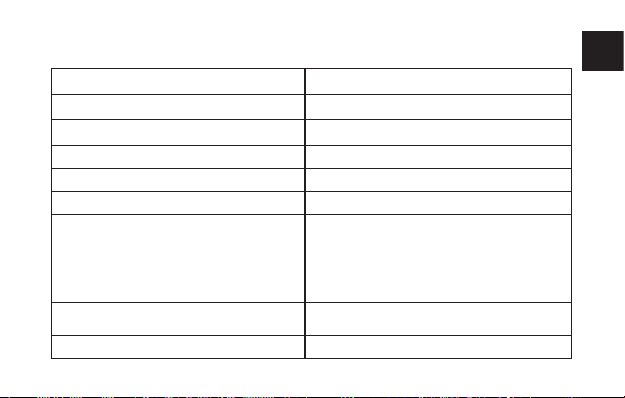
Flow range 0-14L/s
Flow accuracy ±5% or 200 mL/s
Flow resistance <0.5 cmH2O/L/s
Communication Bluetooth
Coaching Display of ow-time curves, timer and eort during test
Life expectancy 10 years
Regulations applicable: MDD 93/42 /EEC
RF emissions CISPR 11 Group 1
RF emissions CISPR 11 Class B
ISO 26782
ISO 23747
Electrical Saftey IEC 60601-1
Electro Magnetic Compability IEC 60601-1-2
EN 300 328
FCC Part 15, Subpart B, C
15
EN
Page 16

NuvoAir AB
Riddargatan 17D,
SE-11457 Stockholm,
Sweden
Version 1.0 © 2018 NuvoAir AB
NuvoAir AB guarantees that the
product is free from material and
fabrication defect, under normal
use conditions and under the
warranty period.
For more information about the
warranty, for reclamation or to
provide feedback, please visit
www.nuvoair.com
16
Page 17

Riddargatan 17D, SE-11457 Stockholm, Sweden
Version 1.0 © 2018 NuvoAir AB
NuvoAir AB
 Loading...