

Page 1
Simplese D Installation Guide
C
C
CCC
CCCCC
C
C
C
C
C
C
C
CCC
CCC
C
C
C
C
C
C
C
C
C
C
C
C
C
C
C
C
C
C
C
CCC
CCC
C
C
C
C
C
C
C
C
C
C
C
C
C
C
C
C
C
CD2
CD2
CD1
TNR1
TNR2
CD2
CD1
TNR1
TNR2
CD1
TNR1
TNR2
CD2
CD1
TNR1
TNR2
MODELNV-P2100
HIGH EFFICIENCY200 WATT
STEREOAMPLIFIER
WATTS
120V
250
60HZ
NuVoTechnologies Cincinnati Ohio. USA
CONTROL
D
VOLTAGE
TRIGGER
SPEAKER
8 OHM: 70W X 2
4 OHM: 100W X 2
CONFORM S TO
ULS TD.65 00
CERTIFI ED TO
CAN/CSA ST D.E60 065
T
E
K
USE ONLYWITH 250V FUSE
UNIT
OUTPUT POWER
ON
+12VDC
3-30 VOLTS
100mA
AC OR DC
R
T
E
E
T
K
N
I
C
M
US
C
3033118
R
E
T
N
I
Source 1
Tuner 1
2
1
L
R
SOUR CE INPU T
Source 2
Tuner 2
3
Audio
Out
AUDIO
L
INPUT
2
R
INPUT
OUTPUT
ZONE 4
4
L
R
FIXED
LINE O UT
L
R
VAR
Source 3
CD
Audio
Out
3
1
2
4
NORMAL
USE
IR OUT
Source 4
DVD
56KHz38KHz
USE FOR SAT
OR CABLE
1
2
Audio
Out
STATUS
+12VON=
MUTE
=0V
SYST EM
LINK
SPEA KER AND DATA SI GNALS
RS232
ALL PO RT CONN ECTIO N
Audio
Out
Sim plese
100~24 0V 50~6 0Hz 85W
NuVo Techno logie s Cinci nnati O hio USA
Simplese D
OdBV = 1.0RMS
LEFT
0
+6
SENSITIVITY
RIGHT
0
-12
+6
FOUR-SOURCE FOUR-ZONE
CONTROL
POWER
MODE
ON/OFF SWITCH
AUDIO AC/DC
-12
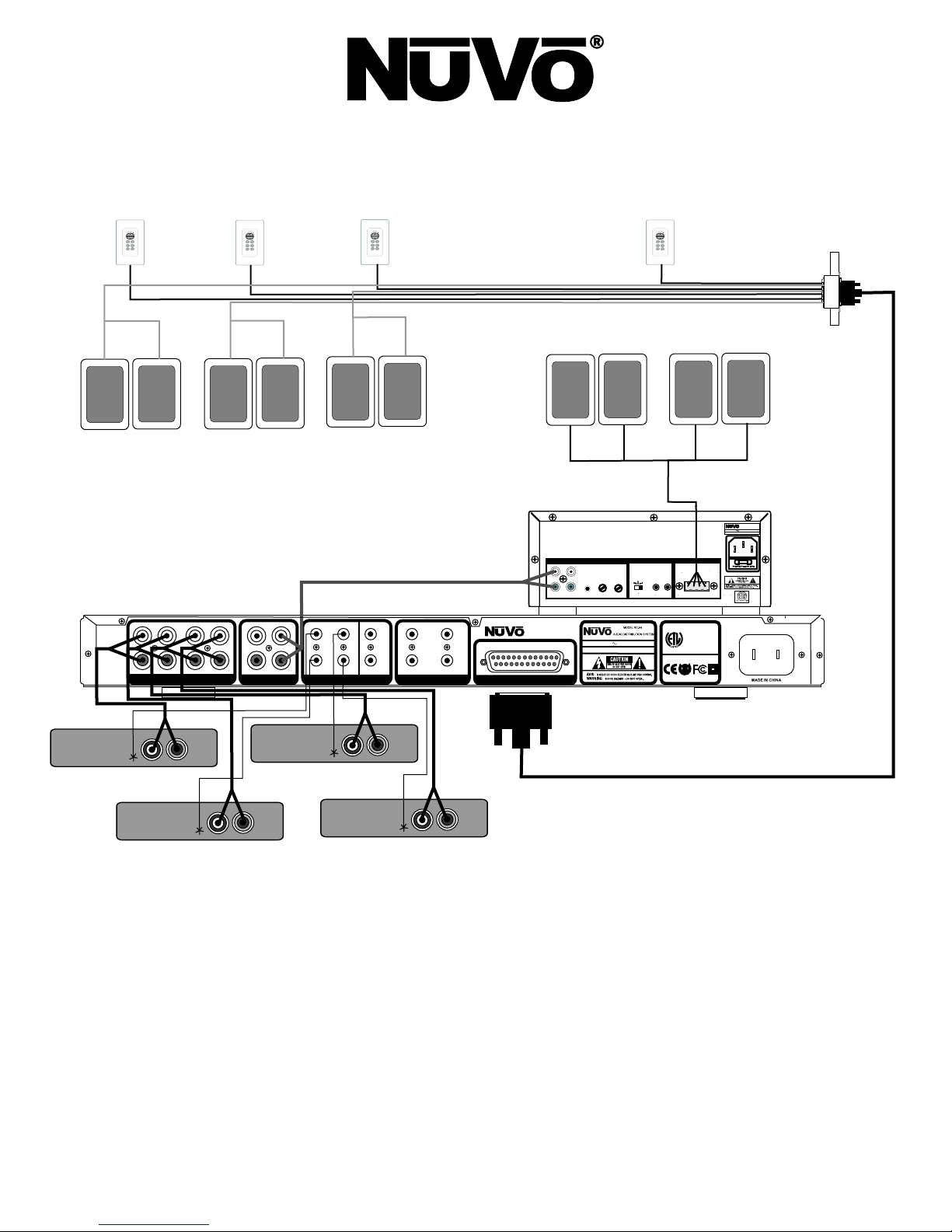
Wiring Diagram
Step 1 Prewire:
termination for the Cat-5 wire is standard 568A. Simplese uses an RJ-45 connector on each end of the Cat-5. Note that both the
speaker wire and Cat-5 are run to the Allport location at the equipment rack or cabinet.
The Simplese D System uses Cat-5 wire for keypad control and either 2 or 4 conductor 16 gauge speaker wire. The
Step 2 Allport Termination:
™
Both the speaker wire and Cat-5 cables terminate into the backside of the Allport. The order of Cat-5
plug-ins is irrelevant to the operation of the system, but it is recommended that you label the Cat-5 wires for future reference. Follow
the zone and polarity labeling for the speaker wires. The final connection from the Allport is made with the Allport Cable supplied with
the Simplese D System.
Page 2
Step 3 Connecting Audio Sources:
The Simplese D system will accept up to four independent audio sources. This is done with stereo
RCA audio cables from the audio output on each source to the appropriate source input on the back of the Simplese amplifier.
Step 4 IR Outputs:
The Simplese D System ships with four IR emitters for transferring IR data from the keypad receivers (located
under the volume button) to the IR receiver on each piece of source equipment. There are two separate IR output sections. The 38K
outputs are used most all audio sources. The exception to this frequency are cable and satellite boxes. They operate at a higher IR
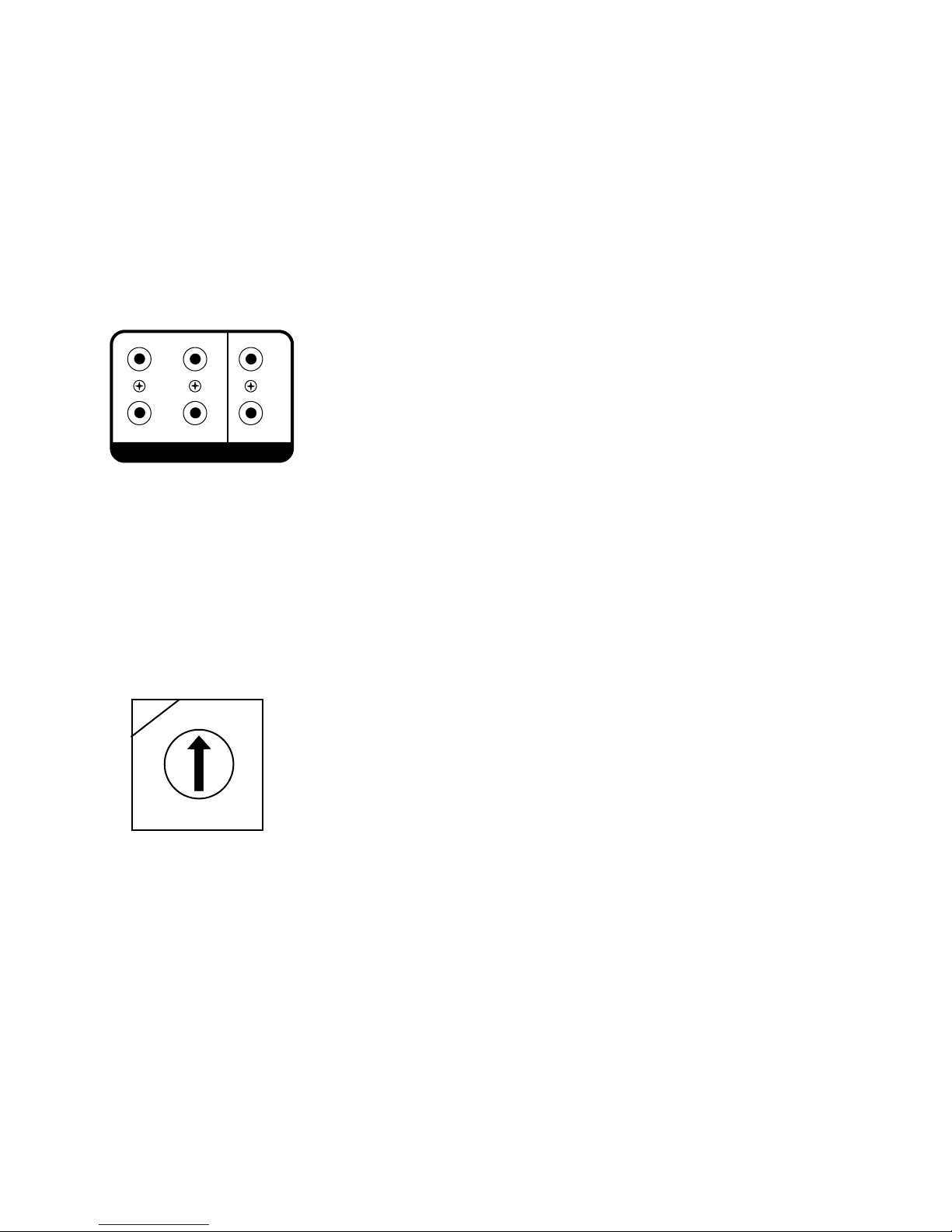
carrier frequency around 56K. A second source one and two 56K output is available for these devices, see fig. 1. It is important that
the output being used for each source matches the source input number. The outputs are individual for each source to allow
independent source control. Simply plug the emitter into the appropriate IR output on the back of the Simplese amplifier and attach
the flasher end over the IR receiver on the source equipment.
Fig. 1: 38KHz and 56KHz IR Outputs
56K Hz38K Hz
1
2
NOR MAL
USE
Step 5 Keypad Setup:
3
4
IR OUT
1
2
USE F OR SAT
OR CA BLE
Each keypad requires a specific zone setting to establish the keypad’s location. This setting is made on the
back of the keypad using an eight position rotary switch. To set the switch, place a small slot-head screwdriver in the slot in the
switch and turn it clockwise to the appropriate zone number 1-4, fig. 2. The remaining switch positions, 5-0 allow for an additional
keypad in each zone. Position 5 corresponds to zone 1, 6 to zone 2, 7 to zone 3, and 0 to zone 4.
Fig. 2: Zone setting rotary switch
0
7
6
5
Step 6 EQ Control, and Source Grouping:
1
2
3
4
The keypads can be used to set specific zone functions. These are bass and treble EQ
response, and source grouping. To change bass response, press the Mute button and Source 1 button simultaneously. Adjust the
bass level up or down by using the volume up and volume down buttons. The volume indicator LEDs will indicate the output level,
fig. 3. The default setting is flat. Adjusting treble is the same process and is accessed by pressing the Mute and Source 2 buttons.
Once the desired setting is made, press the Source button again and that returns the keypad to normal operation. Source grouping
is a featured that allows multiple zones in an open living space to always share the same source selection, but still retain individual
volume and on/off control. This is achieved by pressing Mute and Source 3. Volume Up enables the group function and Volume
Down disables the group function and causes the keypad to operate independently of all other groups, fig. 4.
Page 3
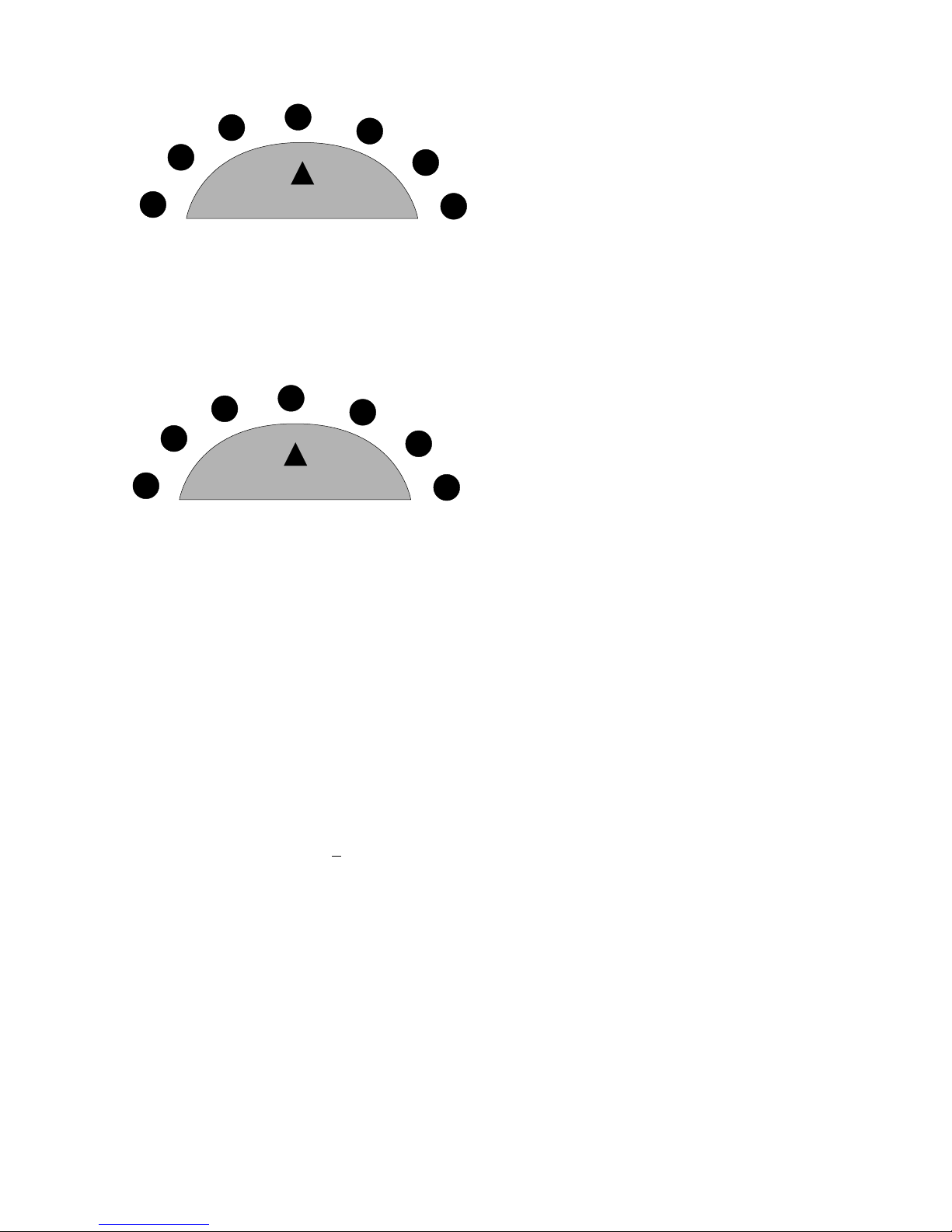
Fig. 3: Zone EQ Control
-4 dB
-6 dB
-8 dB
VOLUME
Fig. 4: Zone Group Settings
Group Disabled
VOLUME
FLAT
+4 dB
+6 dB
+8 dB
Group Enabled
Step 7 Final Setup:
Once the sources are plugged in and the keypads are set and installed you should be ready to power on any
of the zones and enjoy music from any of the sources.
Simplese D Specifications
Zones 1-6 Power Amplifier Outputs System
Continuous Average Output Power 30W (15W x 2) System On 12V @ 50mA
Two channels driven 30-20kHz @1% THD External Mute 3-12V DC
Rated Distortion (1/2 power) 0.40%
Rated Impedance 6 Ohms
Damping Factor 50+ Power Supply 90-260VAC
50/60Hz
Frequency Response (20-20kHz) " 2dB Power Consumption all channels 140W
Preamplifier Section
Variable output 0-600mV operating conditions
Fixed output 600mV Power Consumption no signal 10W
Impedance 600 Ohms
Source Inputs 1-4
input Impedance 10K Unit Size Inches 1.75 x 17 x 10.625
Input Sensitivity for rated power 300mV RMS Unit Weight Kilograms 2.95
Input Overload 3V RMS Unit Weight Pounds 6.5
+
Power Requirements
driven to full-rated power
Cower Consumption average 30W
Physical Specifications
Unit Size Millimeters 44 x 430 x 270
Emitter Outputs
Source Outputs 4 without notice.
Output Drive Current 100mA
Output Drive Voltage 12V
Compatible with single and dual emitters
NuVo reserves the right to change specifications
 Loading...