

Page 1
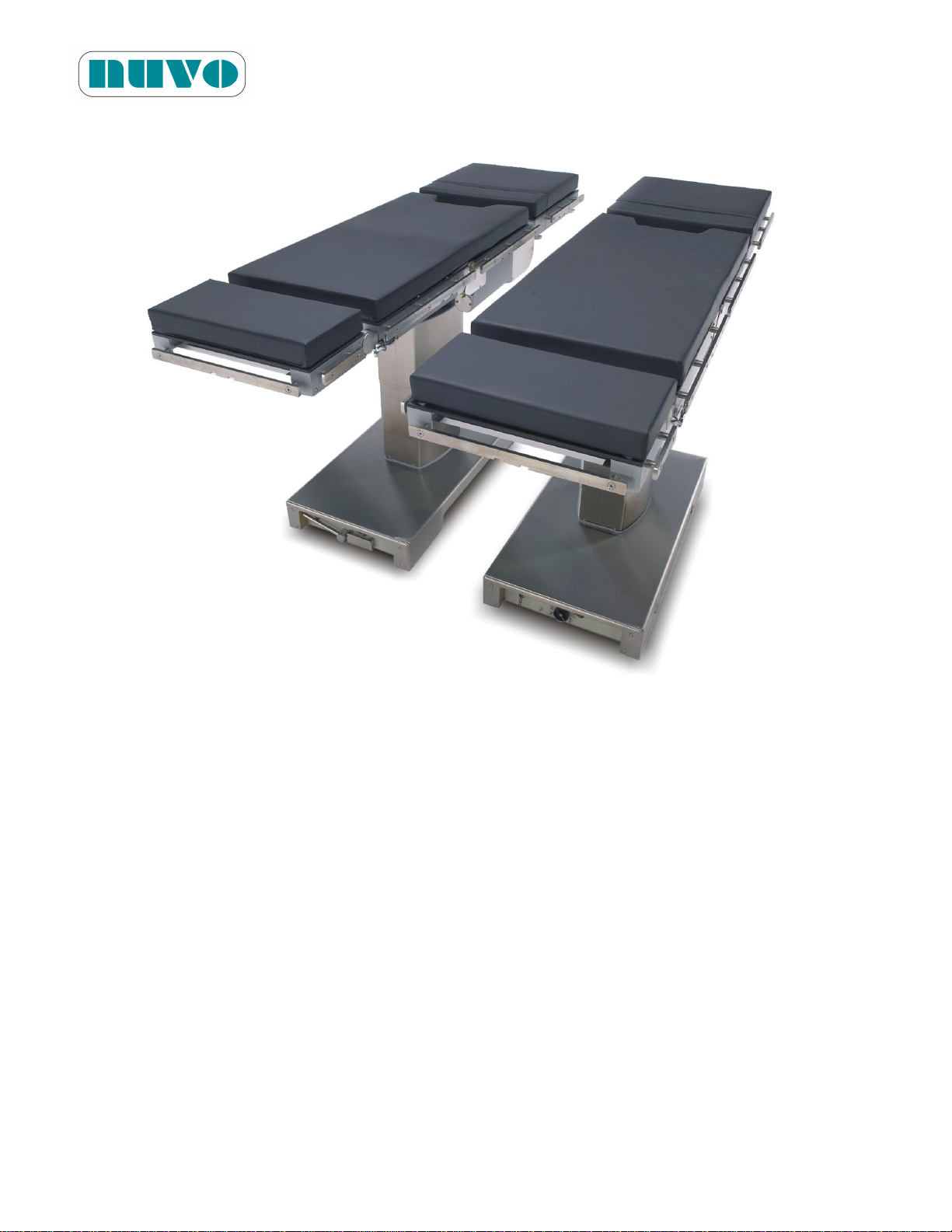
B2AV1000 Series Surgical Table
IM-B2AV1000-E01
B2AV1000 Series
SURGICAL TABLE
INSTRUCTION MANUAL
Issued Date: July 26, 2012
This manual is for NUVO’s customers and distributors only. All rights reserved.
Page 2

Page 3

B2AV1000 Series Surgical Table
REVISION
DATE OF ISSUE
REASON FOR CHANGE
00
July 01, 2009
New Release
01
October 3, 2011
Change of Electrical Circuitry
DIRECTION
CHAPTER
PAGE
REVISION
IM-B2AV1000-E
All
All
00
IM-B2AV1000-E
6, 8
6-7, 6-8, 8-1, 8-3
01
IM-B2AV1000-E01
TABLE OF CONTENTS
Section Paragraph Page
REVISION HISTORY
LIST OF AFFECTED PAGES
I
Page 4

B2AV1000 Series Surgical Table
IM-B2AV1000-E01
TABLE OF CONTENTS
Section Paragraph Page
Dear technician or user,
Before installing and using this table, please read these installing and operating
instructions thoroughly. This manual also describes the maintenance procedures.
Technicians installing and/or servicing this table should be familiar with the
warnings, cautions, and instructions contained herein.
Use these operating instructions for personnel training on features, usage and care
of B2AV1000 Series surgical tables.
II
Page 5

B2AV1000 Series Surgical Table
IM-B2AV1000-E01
TABLE OF CONTENTS
Section Paragraph Page
1 SUMMARY OF WARNINGS AND CAUTIONS………………………1-1
2 SYMBOLS, TOOLS AND MATERIALS ........................................... 2-1
3 GENERAL INFORMAION ................................................................ 3-1
3.1 Product Description .............................................................. 3-1
3.2 Product Classification and Identification ............................... 3-2
3.3 Requirements ....................................................................... 3-2
3.3.1 Operation Environment Requirements ................................. 3-2
3.3.2 Power Requirements ............................................................ 3-2
3.4 Product Transportation and Storage .................................... 3-3
3.5 Parts Identification ................................................................ 3-3
3.6 Technical Specifications ....................................................... 3-4
3.6.1 Dimensions .......................................................................... 3-4
3.6.2 Weight .................................................................................. 3-4
3.6.3 Battery Capacity ................................................................... 3-4
3.6.4 Imaging Coverage ................................................................ 3-5
3.6.5 Loading Capacity ................................................................. 3-7
3.6.6 Range of Table Movements ................................................. 3-7
3.6.7 Duty Cycle ............................................................................ 3-8
3.7 Electromagnetic Interference ............................................... 3-8
3.8 Accessories .......................................................................... 3-9
4 INSTALLATION INSTRUCTIONS .................................................... 4-1
4.1 Install AC Power Cord ........................................................ 4-1
4.2 Install Hand Pendant ............................................................ 4-2
4.3 Lock Table in Place .............................................................. 4-3
4.4 Install Head Section ............................................................. 4-4
4.5 Install Leg Extension ............................................................ 4-4
4.6 Installation Check List .......................................................... 4-5
4.6.1 Performance Check List ....................................................... 4-6
4.7 Voltage Setting Instructions .................................................. 4-7
5 OPERATING INSTRUCTIONS ......................................................... 5-1
5.1 Pinch Point Warnings ........................................................... 5-7
III
Page 6

B2AV1000 Series Surgical Table
IM-B2AV1000-E01
TABLE OF CONTENTS
Section Paragraph Page
5.2 Table Positioning ................................................................. 5-9
5.2.1 Hand Pendant Operation ..................................................... 5-9
5.2.1.1 Level Button Operation ........................................................ 5-10
5.2.1.2 Normal Orientation Operation .............................................. 5-10
5.2.1.3 Reverse Orientation Operation ............................................ 5-10
5.2.1.4 Battery Level Indicator ......................................................... 5-10
5.2.1.5 Interlock LED ....................................................................... 5-10
5.2.1.6 Service LED ......................................................................... 5-10
5.2.2 Using Override System for Table Positioning ...................... 5-13
5.2.2.1 B2AV1000S / B2AV1000SK / B2AV1000SKP ..................... 5-16
5.2.2.2 B2AV1000 / B2AV1000K ..................................................... 5-18
5.2.3 Manual Pump Instructions (B2AV1000SKP only) ................ 5-19
5.2.4 Head Section Positioning ..................................................... 5-20
5.2.5 Kidney Elevator Instructions ................................................ 5-20
5.2.6 Cassette Tunnel .................................................................. 5-20
5.2.7 Use of Equipotentiality for other Electrical Equipments ....... 5-21
5.2.8 Backup Batteries ................................................................. 5-22
5.3 Accessories ......................................................................... 5-22
5.3.1 Mattress Pads ...................................................................... 5-22
5.3.2 Side Rail Locks and Clark Sockets ...................................... 5-23
5.3.3 Arm Board ........................................................................... 5-24
5.3.4 Restraint Strap ..................................................................... 5-26
5.3.5 Cassette Top ....................................................................... 5-26
5.3.6 Foot Controller ..................................................................... 5-26
6 MAINTENANCE ............................................................................... 6-1
6.1 General ................................................................................ 6-1
6.2 Cleaning and Disinfecting Procedures ................................. 6-1
6.2.1 After Each Usage ................................................................ 6-2
6.2.2 End-of-Day Cleaning Procedures ........................................ 6-4
6.2.3 Weekly Cleaning Procedures .............................................. 6-4
6.3 Monthly Maintenance........................................................... 6-5
IV
Page 7

B2AV1000 Series Surgical Table
IM-B2AV1000-E01
TABLE OF CONTENTS
Section Paragraph Page
6.4 Quarterly Maintenance ......................................................... 6-5
6.5 Lubrication Schedule ............................................................ 6-6
6.6 Other Maintenance Schedule ............................................... 6-6
6.7 Battery Charging Procedures ............................................... 6-7
6.8 Fuse Replacement ............................................................. 6-8
6.9 System Reset ..................................................................... 6-9
7 SPARE PARTS ............................................................................... 7-1
8 CIRCUIT DIAGRAMS ....................................................................... 8-1
9 WASTE PARTS DISPOSAL ...........................……......................... 9-1
V
Page 8

B2AV1000 Series Surgical Table
IM-B2AV1000-E01
TABLE OF CONTENTS
Section Paragraph Page
This page intentionally left blank
VI
Page 9
B2AV1000 Series Surgical Table
WARNING:
PINCHING HAZARD: Extreme tabletop articulation creates pinch points. Before
operating the table, review illustrations in Figures 5-1, “PINCH POINTS.”
PINCHING AND TIPPING HAZARD: If user is not completely familiar with the controls for
patient positioning and table operation, patient could sustain injury.
TIPPING HAZARD: The maximum patient weight limit for both normal and reverse
orientation on B2AV1000 Series table with floor locks locked for standard weight loading
(please refer to 3.6.6 Loading Capacity) is 1000lb (454kg); however, the limit drops to
600lb (273kg) when the table(reverse orientation) is slide out (head end) over 6.3in (16cm).
Do not exceed the limit. Pay special attention when placing short and heavy person on
the table, for it could presents a situation of uneven weight distribution. For maximum
safe patient weight for any position other than those shown in this publication, please
contact your local NUVO representative.
TIPPING HAZARD: The nominal patient weight capacity is tested according to the
Standard IEC 60601-2-46 Additional sub clause: 21.101. The Standard’s weight
distribution calculation model is based on 190 cm stature. Patients weighing over 600
lbs (272 kilos) who are shorter than (6ft. 2.8”) 190 cm do not fit the criteria for the
Standard’s weight distribution calculation model. Read Section 3.6.5 “Load Capacity”
for important information concerning tipping hazards
PATIENT INJURY OR FALLING HAZARD: Improper positioning of patient may result in
possible patient injury and table failure. Health-care professionals who are present at the
time of surgery are responsible for the patient’s safety.
FALLING HAZARD: Make sure the floor locks are engaged before placing patient on the
IM-B2AV1000-E01
Section 1 SUMMARY OF WARNINGS AND CAUTIONS
SOMMAIRE D’AVERTISSEMENTS ET PRÉCAUTIONS
When operating or servicing the B2AV1000 Series surgical tables, users or technicians must
observe the following safety precautions. WARNINGS refer to hazards that could injure users or
patients. CAUTIONS refer to hazards that could damage the table. These precautions are
placed throughout the manual where applicable. Observe these precautions in order to lower
the risk of bodily injuries and/or damage to the table. Please note that these precautions are not
comprehensive. It is not possible for NUVO to know, evaluate and advise maintenance
departments about all of the necessary maintenance procedures or the potential dangers of each
procedure.
1-1
Page 10
B2AV1000 Series Surgical Table
WARNING:
table.
FALLING HAZARD: When a patient is on the table, do not release floor locks.
TRIPPING HAZARD: Make sure to route the power cord so that it will not create a tripping
hazard.
SHOCK HAZARD: Monitor the electrically conductive properties of floor locks. Measure
their resistance level according to the requirements of NFPA 99 before placing table in
use. Subsequent routine testing should be performed at least once every three months.
PATIENT INJURY HAZARD: A potential hazard exists when the surgical table is used
together with high-frequency surgical equipment such as cardiac defibrillators and cardiac
defibrillator-monitors. In certain conditions the antistatic properties of the mattress pads
could become insufficient to prevent burns to the patient’s skin. Care must be taken to
ensure that the insulation between the mattress pad and the patient’s skin is maintained,
including monitoring the bed sheet for excessive moisture, which could compromise this
insulation. Carefully read the manufacturers’ instructions of the aforementioned
products, as they relate to patient safety.
ELECTRIC SHOCK HAZARD: Only authorized service personnel should be allowed to
remove covers.
INSTABILITY HAZARD: Using NUVO table and accessories or accessories
manufactured and sold by other companies for other than their stated purpose may result
in possible patient or user injury, table or accessory damage.
UNANTICIPATED TABLE MOVEMENT HAZARD: Secure patient to table according to
recommended positioning practices.
EXPLOSION HAZARD: Do not use table with flammable anesthetics.
INFECTION HAZARD: When cleaning the surgical table, personnel should wear gloves, a
mask, eye protection, and other safety equipment which will protect body parts from
exposure to aerosols which could be deflected from contaminated surfaces.
PERSONAL INJURY HAZARD: When installing any surgical table accessory, check for
correct attachment and tighten securely (if applicable). Do not use worn or damaged
accessories.
PERSONAL INJURY HAZARD: Only recommended cleaners/disinfectants should be
used on NUVO surgical tables. Do not use alcohol, which does not have sufficient
cleaning/disinfecting properties, or phenolics, which when inadequately rinsed off could
IM-B2AV1000-E01
1-2
Page 11
B2AV1000 Series Surgical Table
WARNING:
burn the patient’s skin.
INTERFERENCE HAZARD: Do not place this table near other equipments that will
generate electromagnetic or other interference.
TABLE FAILURE HAZARD: This manual describes routine scheduled maintenance and
services which will help keep this equipment safe and reliable. Only experienced
personnel who are fully acquainted with this equipment should perform repairs and
adjustments. Maintenance or service performed by inexperienced, unqualified
personnel, or installation of unauthorized parts could result in personal injury, costly
damage, or cause the warranty to become void.
UNEXPECTED TABLE MOVEMENT HAZARD: If the surgical table begins to move on its
own when the override control enable toggle switch is turned on, immediately turn off the
switch, discontinue use of the table, and call a technician for service. (for
B2AV1000S/B2AV1000SK/B2AV1000SKP)
UNEXPECTED TABLE MOVEMENT HAZARD: If the surgical table begins to move on its
own when the override control toggle switch is put in either the up or down position,
immediately put the switch back in the middle position, discontinue use of the table, and
call a technician for service. (for B2AV1000/B2AV1000K)
UNEXPECTED TABLE MOVEMENT HAZARD: When using any control, please operate
one button or switch at a time to avoid unexpected table movement.
DISPOSAL HAZARD: A hazardous waste management company with appropriate licenses
and permits may be required to handle some of the materials which are contained inside
the surgical table.
AVERTISSEMENT:
RISQUE DE PINCEMENT: L'articulation excessive du dessus de table crée des points de
pincement. Consultez les illustrations des figures 5-1, « POINTS DE PINCEMENT »
avant l'utilisation la table.
RISQUE DE PINCEMENT ET DE BASCULEMENT: Si l'utiliisateur n'a pas une parfaite
connaissance des contrôles de positionnement du patient, le patient subir des blessures.
RISQUE DE BASCULEMENT: Lorsque la table de série B2AV1000 est utilisée en
orientation normale ou inverse et que les dispositifs de verrouillage au sol sont verrouillés,
IM-B2AV1000-E01
1-3
Page 12
B2AV1000 Series Surgical Table
AVERTISSEMENT:
la limite de poids maximal du patient est de 454 kg (1000 lb) (veuillez vous référer à la
section 3.6.6 « Capacité de charge »); lorsque l'opérateur fait coulisser la table en
orientation inverse du côté de la tête de plus de 16 cm (6,3 po), la limite de poids est
réduite à 273 kg (600 lb). Ne dépassez pas les limites. Portez une attention particulière
lorsque vous inst allez une personne lourde et de petite taille sur la table, pour que la
répartition du poids ne soit pas inégale. Pour connaître les limites de poids maximal sûr
du patient pour une position différente de celles présentées dans cette publication,
veuillez contacter votre représentant local NUVO.
RISQUE DE BASCULEMENT: La limite nominale de poids des patients est testée
conformément à la norme IEC 60601-2-46, sous-clause 21.101. Le modèle de calcul
standard de répartition du poids est basé sur une stature de 190 cm. Les patients de
plus de 272 kg (600 lb) de poids et de moins de 190 cm de taille (à 6 pi 2,8 po) ne
correspondent pas aux critères du modèle de calcul standard de répartition du poids.
Referrez vous à la section 3.6.5 « Capacité de charge » pour lire d'importantes
instructions relatives aux risques de basculement.
RISQUE DE BLESSURES ET DE CHUTES DU PATIENT: Le mauvais positionnement
du patient peut causer des blessures au patient et un mauvais fonctionnement de la table.
Les professionnels de la santé présents au moment de la chirurgie sont responsables de
la sécurité du patient.
RISQUE DE CHUTE: Assurez-vous que les dispositifs de verrouillage au sol sont
engagés avant de placer le patient sur la table.
RISQUE DE CHUTE: Lorsqu'un patient est sur la table, ne libérez pas le dispositif de
verrouillage au sol.
RISQUE DE TRÉBUCHEMENT: Assurez-vous d'acheminer le cordon d'alimentation
(électrique) de manière à éviter les risques de trébuchement.
RISQUE DE DÉCHARGE ÉLECTRIQUE: Surveillez les propriétés de conductivité
électrique des dispositifs de verrouillage au sol. Mesurez leur niveau de résistance
selon les exigences de la norme NFPA 99 avant de commencer à utiliser la table. Des
tests de routine doivent être effectués au moins une fois tous les trois mois.
RISQUE DE BLESSURES AU PATIENT: Un danger potentiel est présent lorsque la
table chirurgicale est utilisée avec de l'équipement chirurgical de haute fréquence tel que
des défibrillateurs cardiaques ou des moniteurs à défibrillateur cardiaque. Dans
certaines conditions, les propriétés antistatiques des couvre-matelas pourraient devenir
insuffisantes pour prévenir les brûlures à la peau du patient. Des précautions doivent
IM-B2AV1000-E01
1-4
Page 13
B2AV1000 Series Surgical Table
AVERTISSEMENT:
être prises pour s'assurer que l'isolation entre le couvre-matelas et la peau du patient est
maintenue, ce qui comprend la surveillance de l'humidité excessive dans les draps de lit,
qui pourrait compromettre cette isolation. Veuillez lire attentivement les instructions des
fabricants des produits susmentionnés, car ils ont trait à la sécurité des patients.
RISQUE DE DÉCHARGE ÉLECTRIQUE: Seul le personnel de service autorisé devrait
être autorisé à retirer les couvercles.
RISQUE D'INSTABILITÉ: L'utilisation de la table NUVO et de ses accessoires ou
d'accessoires fabriqués et vendus par d'autres compagnies pour d'autres fins que celles
indiquées peut entraîner des blessures au patient ou à l'opérateur, ainsi que des
dommages à la table ou à ses accessoires.
RISQUE DE MOUVEMENTS IMPRÉVUS DE LA TABLE: Installez le patient sur la table
de manière sécurisée selon les pratiques de positionnement recommandées.
RISQUE D'EXPLOSION: N'utilisez pas la table avec des anesthésiques inflammables.
RISQUE D'INFECTION: Lors du nettoyage de la table chirurgicale, le personnel devrait
porter des gants, un masque, des lunettes de protection et tout autre équipement de
sécurité qui permettra de protéger le corps contre toute exposition aux aérosols qui
pourraient être réfléchis par les surfaces contaminées.
RISQUE DE BLESSURES CORPORELLES: Lors de l'installation de tout accessoire à
la table chirurgicale, veuillez vérifier qu'il est adéquatement fixé et serré (selon le cas).
N’utilisez aucun accessoire usé ou endommagé.
RISQUE DE BLESSURES CORPORELLES: Seuls les nettoyants et désinfectants
recommandés devraient être utilisés sur la table chirurgicale NUVO. N'utilisez pas
d'alcool pour procéder au nettoyage de la table, car ses propriétés de nettoyage et de
désinfection sont insuffisantes et n'utilisez pas de composés phénoliques qui risquent de
brûler la peau du patient s'ils sont mal rincés.
RISQUE D'INTERFÉRENCE: N'installez pas cette table à proximité d'autres
équipements qui génèrent des interférences électromagnétiques ou d'autres types
d'interférence.
RISQUE DE MAUVAIS FONCTIONNEMENT DE LA TABLE: Ce manuel décrit la
routine d'entretien et de maintenance régulière qui aideront à garder cet équipement
sécuritaire et fiable. Seul le personnel expérimenté et connaissant parfaitement cet
équipement devrait effectuer des réparations et ajustements. Toute procédure de
maintenance ou d'entretien effectuée par du personnel inexpérimenté ou non qualifié, et
IM-B2AV1000-E01
1-5
Page 14
B2AV1000 Series Surgical Table
AVERTISSEMENT:
toute installation de pièces non autorisées pourraient causer des blessures corporelles
ou des dommages coûteux, ou annuler la garantie de l'équipement.
RISQUE DE MOUVEMENTS INATTENDUS DE LA TABLE: Si la table chirurgicale
commence à se déplacer d'elle-même alors que l'interrupteur de commande prioritaire
est activé, désactivez immédiatement l'interrupteur, cessez d'utiliser la table et appelez
un technicien qualitfié pour la réparation (des modèles
B2AV1000S/B2AV1000SK/B2AV1000SKP).
RISQUE DE MOUVEMENTS INATTENDUS DE LA TABLE: Si la table chirurgicale
commence à se déplacer toute seule elle-même alors que l'interrupteur de commande
prioritaire est en position « haute » ou « basse », placez immédiatement l'interrupteur en
position « milieu », cessez d'utiliser la table et appelez un technicien en entretien et en
réparation (pour les modèles B2AV1000/B2AV1000K).
RISQUE DE MOUVEMENTS INATTENDUS DE LA TABLE: Lorsque vous utilisez une
commande, veuillez utiliser un bouton ou un commutateur à la fois pour éviter tout
mouvement inattendu de la table.
RISQUE LIÉ À L'ÉLIMINATION DES DÉCHETS: Il peut être nécessaire de faire appel à
une entreprise spécialisée dans la gestion des déchets dangereux, possédant les licences
et permis appropriés, pour gérer certains matériaux qui sont contenus dans la table
chirurgicale.
CAUTION:
Only recommended cleaners/disinfectants should be used on NUVO tables. Do not use
alcohol, which does not have sufficient cleaning/disinfecting properties, or phenolics,
because when it is inadequately rinsed off, it could burn patient’s skin.
Route hand pendant cord and optional foot control cord clear of any pinch points where
they could be damaged.
To avoid damage to the hang hand pendant, clip from side rail of table when not in use.
Read the aerosol can label thoroughly and follow all directions and cautions.
Keep any cleaning fluid out of electric receptacles.
Only persons familiar with table operation should perform cleaning procedures which
require table articulation.
IM-B2AV1000-E01
1-6
Page 15

B2AV1000 Series Surgical Table
CAUTION:
IMPORTANT: Operate table through all articulations prior to usage when table has been
stored for longer than four weeks,
Plug power cord into a properly grounded socket only.
When using a third party arm support, keep an angle greater than 15 degrees along the
direction of table length to avoid component damage during tabletop movements.
Do not articulate table into any angle that could hurt the patient.
Do not place this surgical table near other equipment that will generate electromagnetic
interference or other types of interference.
Before using high-frequency surgical equipments, cardiac defibrillators or cardiac
defibrillator-monitors, please refer to their instruction manual.
Use only NUVO’s mattress pads in order to avoid risk of electrostatic shock.
When the power cord is damaged in any way, replace it immediately or else use the
table’s internal electrical power source until it can be replaced.
The antistatic pathway is: Mattress Pad→Tabletop→Column→Base→Floor Lock
Pads→Floor. Therefore, the anti-static properties of the table depend upon the use of
the recommended NUVO mattress pads.
If the surgical drape hangs over the articulation points or the articulation covers (stainless
steel plates covering the joints), movement could cause damage to the table. Tuck the
drapes between the mattress pad and tabletop in order to prevent this.
Static electricity could damage the IC. Avoid any bodily contact with the electronic
systems. Use probes if necessary. Personnel must use a grounding device when
probing circuits or connectors, or else immediate electrical failure could result.
There is only one way to insert the connector of the hand pendant into its receptacle on
the table. The connector must be inserted straight into the receptacle without twisting it,
or else pins inside the receptacle will be bent and rendered unusable.
Since collision with the table joint covers may damage them, keep stretchers or other
heavy objects away from the covers.
Read the entire instructional manual before operating the table.
MISE EN GARDE:
Seuls les nettoyants et désinfectants recommandés doivent être utilisés sur les tables
NUVO. N'utilisez pas d'alcool pour procéder au nettoyage de la table, car ses propriétés
IM-B2AV1000-E01
1-7
Page 16

B2AV1000 Series Surgical Table
MISE EN GARDE:
de nettoyage et de désinfection sont insuffisantes et n'utilisez pas de composés
phénoliques qui risquent de brûler la peau du patient s'ils sont mal rincés.
Acheminez le cordon du boîtier de commande manuelle suspendu et le cordon de la
pédale de commande optionnelle de manière à éviter tout point de pincement susceptible
de les endommager.
Pour éviter d'endommager le boîtier de commande manuelle suspendu, attachez-le au rail
latéral de la table lorsqu'il n'est pas utilisé.
Veuillez lire attentivement l'étiquette du flacon aérosol et suivez toutes les instructions et
les avertissements.
Gardez tout liquide de nettoyage hors de contact des réceptacles électriques.
Seules les personnes maîtrisant le fonctionnement de la table doivent effectuer les
procédures de nettoyage qui requièrent l'articulation de la table.
IMPORTANT: Lorsque la table a été stockée pendant plus de quatre semaines, activez
toutes les articulations de la table avant son utilisation.
Ne branchez le cordon d'alimentation que dans une prise de courant bien fixé au sol.
Lorsque vous utilisez un support de bras fourni par un autre fabricant, gardez un angle
supérieur à 15 degrés dans le sens de la longueur de la table pour éviter d'endommager
les composants pendant que vous articulez le dessus de table.
Éviter d'articuler la table à un angle susceptible de blesser le patient.
N'installez pas cette table chirurgicale à proximité d'autres équipements qui génèrent des
interférences électromagnétiques ou d'autres types d'interférence.
Avant d'utiliser de l'équipement chirurgical de haute fréquence, tel que des défibrillateurs
cardiaques ou des moniteurs à défibrillateur cardiaque, veuillez vous référer à leurs
manuels d'utilisation.
Utilisez uniquement un couvre-matelas NUVO afin d'éviter les risques de décharges
électrostatiques.
Si le cordon d'alimentation est endommagé, remplacez-le immédiatement ou utilisez la
source d'alimentation électrique interne de la table jusqu'à ce qu'il puisse être remplacé.
Le chemin antistatique est le suivant: Couvre-matelas→dessus de Table→ Colonne→
Base→ Patins de verrouillage au sol→Plancher. Par conséquent, les propriétés
antistatiques de la table dépendent de l'utilisation des couvre-matelas recommandés par
NUVO.
Si le champ opératoire s'accroche dans les points d'articulation ou sur les couvercles
IM-B2AV1000-E01
1-8
Page 17

B2AV1000 Series Surgical Table
MISE EN GARDE:
d'articulation (les plaques en acier inoxydable couvrant les articulations), tout mouvement
risquerait de causer des dommages à la table. Bordez les draps entre le couvre-matelas
et la table afin d'empêcher cela.
L'électricité statique peut endommager les circuits intégrés. Évitez tout contact corporel
avec les systèmes électroniques. Utiliser des sondes au besoin. Le personnel doit
utiliser un dispositif de mise à la terre pour sonder les circuits ou les connecteurs, sinon
une panne électrique pourrait en résulter.
Le connecteur du boîtier de commande manuelle ne peut s'insérer dans le réceptacle de la
table que dans un seul sens. Insérez le connecteur tout droit dans le réceptacle, sans le
tordre, sinon les broches internes du réceptacle risquent de se plier et d'être inutilisables.
Puisqu'un choc sur les couvre-joints de la table risque de les endommager, gardez les
brancards et autres objets lourds à l'écart des couvre-joints.
Veuillez lire entièrement le manuel d'instruction avant d'utiliser la table.
IM-B2AV1000-E01
1-9
Page 18

This page intentionally left blank
B2AV1000 Series Surgical Table
IM-B2AV1000-E01
1-10
Page 19
B2AV1000 Series Surgical Table
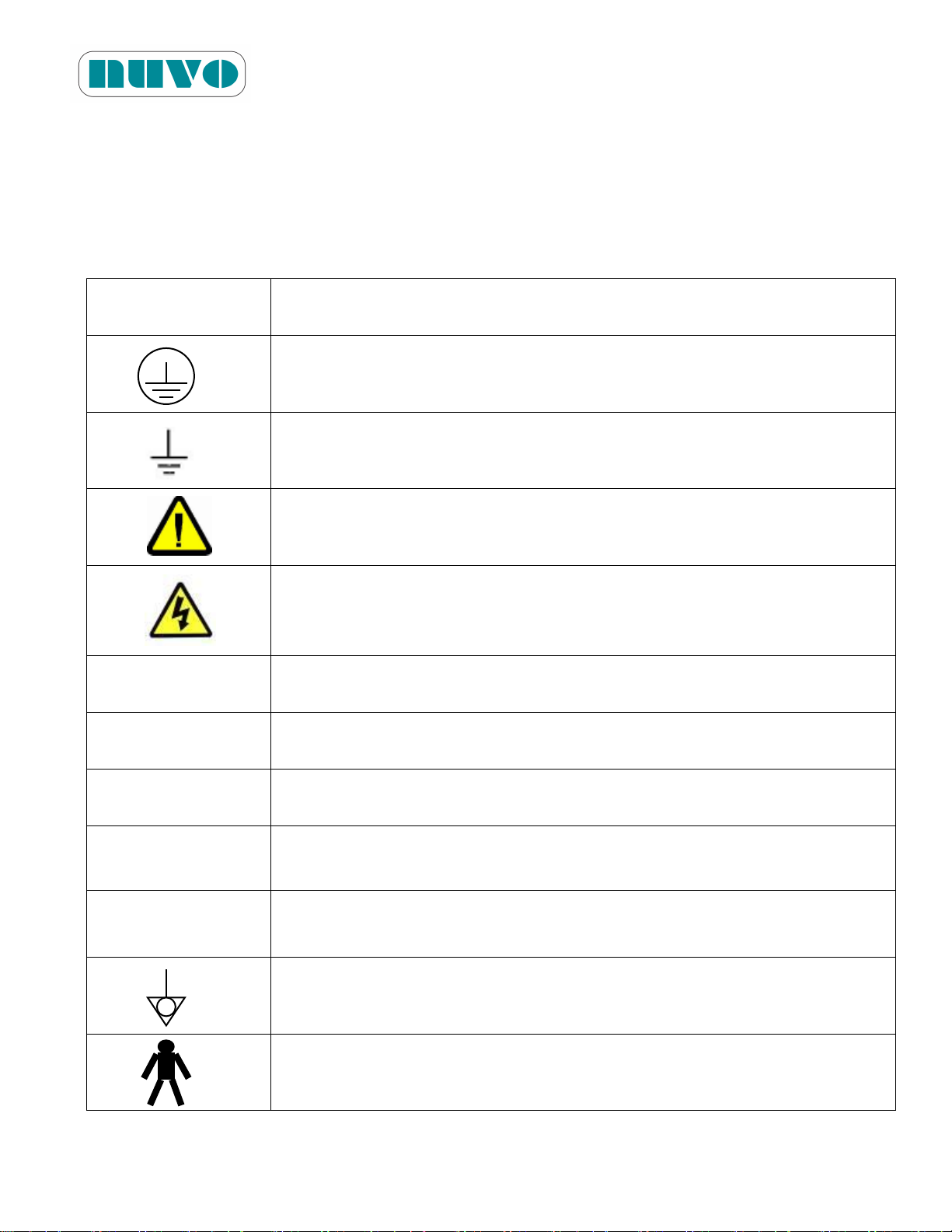
Symbols (Symboles)
Definition
(Définition)
Protective Earth
(Terre Protectrice)
Functional Earth
(Terre Fonctionnelle)
Attention, consult manual for further instructions
(Attention, consultez le manuel pour des instructions supplémentaires)
High Voltage Part
(Partie sous haute tension)
A
Amperage Rating of the Unit
(L'intensité nominale de l'unité)
V
Voltage Rating of the Unit
(Tension nominale de l'unité)
~
Alternating Current
(Courant alternatif)
W
Power Rating of the Unit
(Puissance nominale de l'unité)
Hz
Frequency of the Unit
(Fréquence de l'unité)
Equipotentiality
(Équipotentialité)
Type B Equipment
(Équipement de type B)
IM-B2AV1000-E01
Section 2 SYMBOLS, TOOLS AND MATERIALS
SYMBOLES, OUTILS ET MATÉRIELS
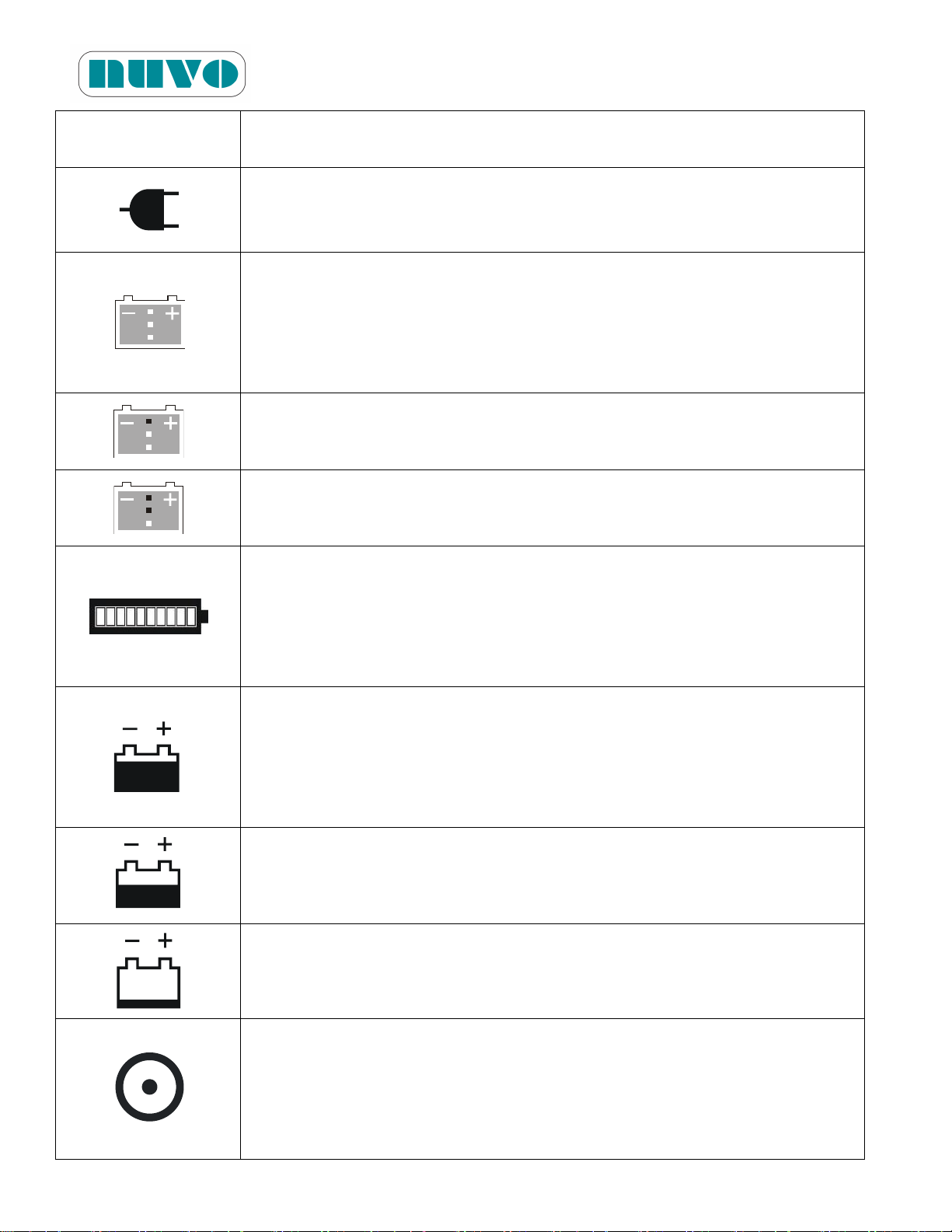
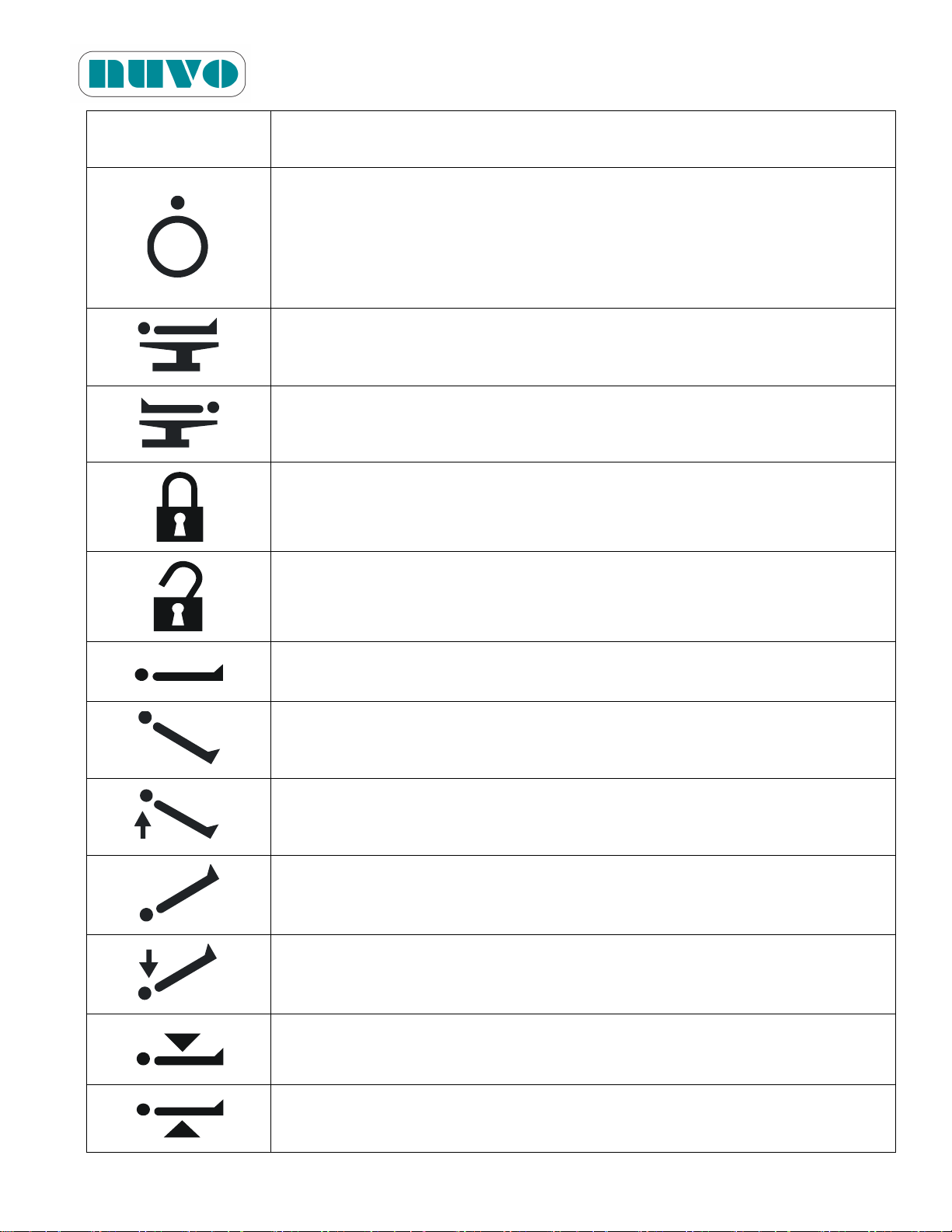
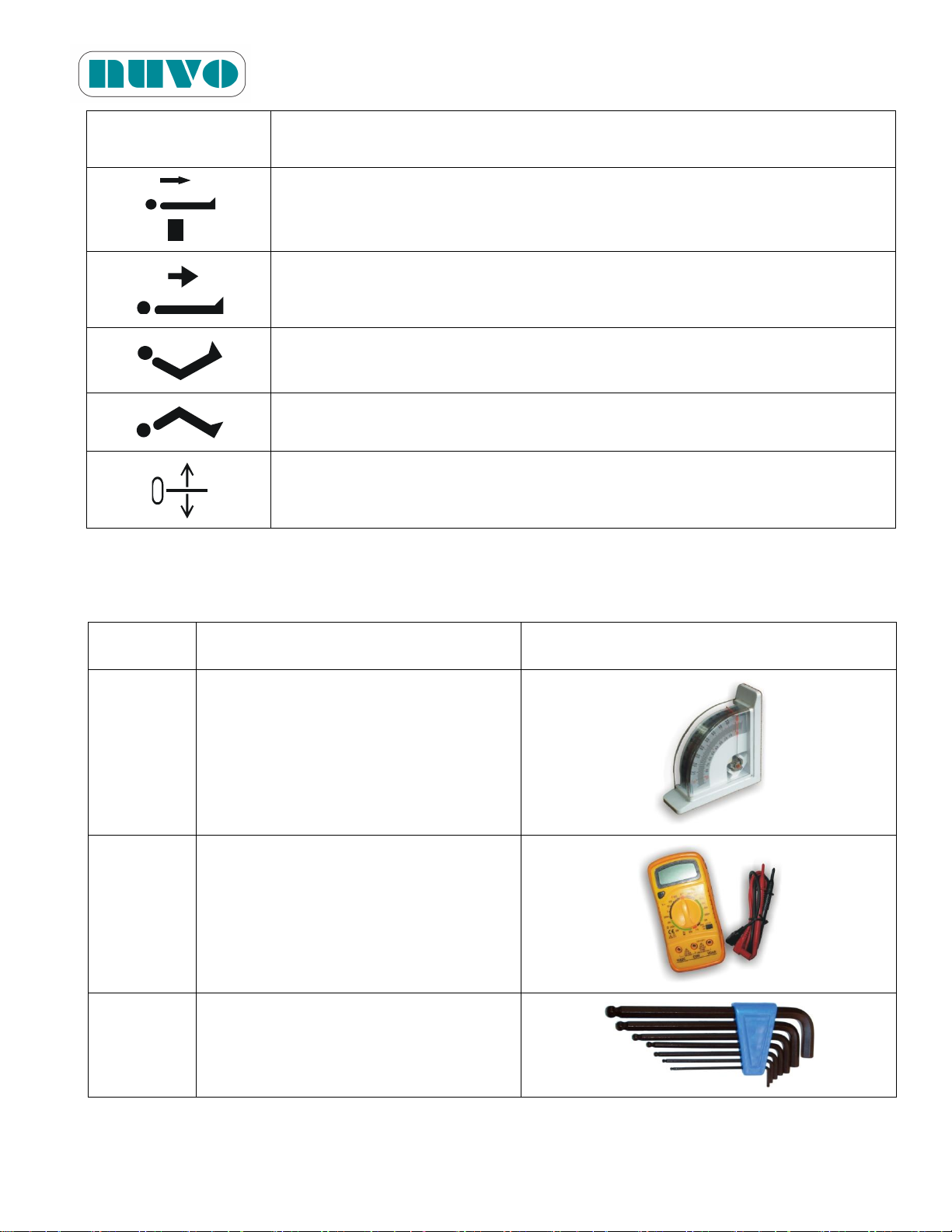
Table 2-1: Following symbols may be seen on your table or controls.
Tableau 2-1: Vous pouvez voir les symboles suivants sur la table ou sur les systèmes de
commande.
2-1
Page 20
B2AV1000 Series Surgical Table
Symbols (Symboles)
Definition
(Définition)
Powered by AC when LED is on, by DC when off
(Alimenté par le courant CA lorsque le voyant DEL est allumé, et par la
batterie interne lorsqu'il est éteint)
Full Battery
(Batterie chargée)
When all three LEDs are flashing, batteries should be replaced.
(Lorsque les trois voyants clignotent, les batteries doivent être
remplacées.)
Mid Battery
(Chargée à moitié)
Low Battery
(Batterie déchargée)
Battery Level Indicator. It becomes a service code display when Service
LED is lit on the hand pendant.
(Indicateur de niveau de batterie. Cet indicateur affiche le code de service
lorsque le voyant de service est allumé sur le boîtier de commande
manuelle.)
Full Battery
(Batterie chargée)
When all three LEDs are flashing, batteries should be replaced.
(Lorsque les trois voyants clignotent, les batteries doivent être
remplacées.)
Mid Battery
(Chargée à moitié)
Low Battery
(Batterie déchargée)
On the hand pendant, this button activates the hand pendant.
On the override panel, this button activates the override system.
(Sur le boîtier de commande manuelle, ce bouton active le boîtier de
commande. Sur le panneau de priorité, ce bouton active le système de
commande de priorité.)
IM-B2AV1000-E01
2-2
Page 21
B2AV1000 Series Surgical Table
Symbols (Symboles)
Definition
(Définition)
On Hand Pendant, it turns the Hand Pendant into Sleep Mode.
On Override panel, it disables the override system.
(Sur le boîtier de commande manuelle, ce bouton active le boîtier de
commande manuelle. Sur le panneau de priorité, ce bouton désactive le
système de commande de priorité.)
Normal Patient Orientation
(Orientation normale du patient)
Reverse Patient Orientation
(Orientation inverse du patient)
Floor Lock: Lock
(Dispositif de verrouillage au sol : verrouiller)
Floor Lock: Unlock
(Dispositif de verrouillage au sol : déverrouiller)
Level
(Plat)
Reverse Trendelenburg
(Position de Trendelenburg inverse)
Reverse Trendelenburg
(Position de Trendelenburg inverse)
Trendelenburg
(Position de Trendelenburg)
Trendelenburg
(Position de Trendelenburg)
Height Down
(Baisser la table)
Height Up
(Elever la table)
IM-B2AV1000-E01
2-3
Page 22

B2AV1000 Series Surgical Table
Symbols (Symboles)
Definition
(Définition)
Tilt Left
(Incliner à gauche)
Tilt Right
(Incliner à droite)
Back Down
(Baisser le dossier)
Back Down
(Baisser le dossier)
Back Up
(Elever le dossier)
Back Up
(Elever le dossier)
Leg Down
(Baisser les jambes)
Leg Down
(Baisser les jambes)
Leg Up
(Elever les jambes)
Leg Up
(Elever les jambes)
Slide Toward Head
(Glisser vers la tête)
Slide Toward Head
(Glisser vers la tête)
IM-B2AV1000-E01
2-4
Page 23
B2AV1000 Series Surgical Table
Symbols (Symboles)
Definition
(Définition)
Slide Toward Leg
(Glisser vers les jambes)
Slide toward Leg
(Glisser vers les jambes)
Reflex
(Flexion inverse)
Flex
(Flexion)
Zero Line Shift
(Décalage de la ligne zéro)
Item
Name and Information
Picture
T001
Level Meter
T003
Multi Meter
T004
Hex Key Wrench Set, L Shape (Metric
Standard)
IM-B2AV1000-E01
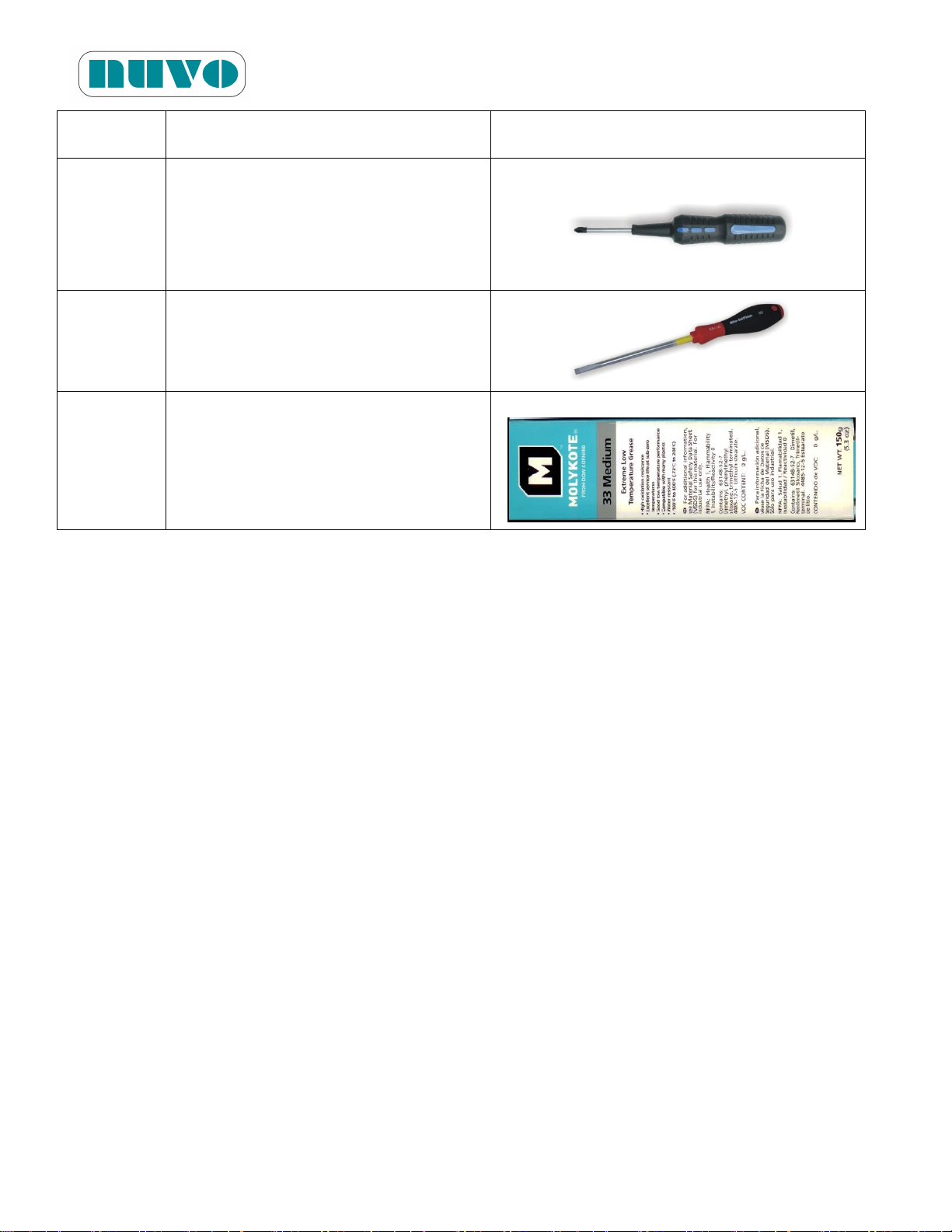
Table 2-2: Tools and Materials
Following tools and materials may be needed during installation and/or maintenance.
2-5
Page 24
B2AV1000 Series Surgical Table
Item
Name and Information
Picture
T005
Phillips (Crosshead) Screw Driver(+)
T006
Slotted Screw Driver (─)
T018
Grease:
MOLYKOTE 33 Medium
IM-B2AV1000-E01
2-6
Page 25

Section 3 GENERAL INFORMATION
Function
Model
Tabletop
Sliding
Kidney
Elevator
Foot
Pump
Override Control
DIP Switch (ASM0021)
No. 3
No. 4
B2AV1000-1 (-2)
NA
NA
NA
Manual rotary knob
+ Toggle switches
Off
On
B2AV1000K-1 (-2)
NA
○
NA
Manual rotary knob
+ Toggle switches
B2AV1000S-1 (-2)
○
NA
NA
Toggle switches
Off
Off
B2AV1000SK-1 (-2)
○
○
NA
Toggle switches
B2AV1000SKP-1 (-2)
○
○
○
Toggle switches
3.1 Product Description
The B2AV1000 Series models are shown in the following table:
Table 3-1: Model-Function Comparison
B2AV1000 Series Surgical Table
IM-B2AV1000-E01
Note: The model number suffixes of -1 and -2 denote 110VAC and 220VAC ratings
respectively. Model number without the suffix hereafter represents both ratings.
The main PCB (ASM0021) has a DIP switch (S1), which needs to be set correctly to
differentiate models. Only trained personnel should change these settings.
If jumper 3-4 of 2x3 jumper header (JP4) is open, then the table is equipped with
DC24V/14Ah lead acid batteries. If it is closed, then it is equipped with DC24V/17.4 Ah
lithium iron phosphate batteries.
Remarque:
Les suffixes -1 et -2 du numéro de modèle indiquent respectivement une alimentation de
110VCA et de 220VCA. Tout numéro de modèle indiqué sans suffixe représente les
deux types d'alimentation.
La carte de sacs imprimés principale (ASM0021) comprend un commutateur DIP (S1)
qui doit être réglépour différencier les modèles. Seul le personnel qualifié devrait
modifier ces paramètres.
Si le cavalier 3-4 du système 2x3 (JP4) est ouvert, la table est équipée de batteries au
plomb-acide de 24VCC/14Ah. Si ce cavalier est fermé, la table est équipée de batteries
au lithium phosphate de fer de 24VCC/17,4Ah.
3-1
Page 26
B2AV1000 Series Surgical Table
IM-B2AV1000-E01
Every model of B2AV1000 Series along with appropriate accessories provides excellent patient
positioning for both traditional surgery and modern endoscopic surgery. Constructed from
aluminum alloy, stainless steel, and other high strength steel, B2AV1000 Series with its powerful
electro-hydraulic system is rigid enough to position patients up to 1000 lbs (455 kg) in normal
orientation and reverse orientation (some limitation applied, please refer to Sec. 3.6.6). Ask your
NUVO sales representative for the available accessories which are sold separately from the table.
3.2 Product Classification and Identification
B2AV1000 Series surgical table’s
electrical insulation structure is
categorized as CLASS 1 TYPE B with
IPX4 fluid ingress protection. Each
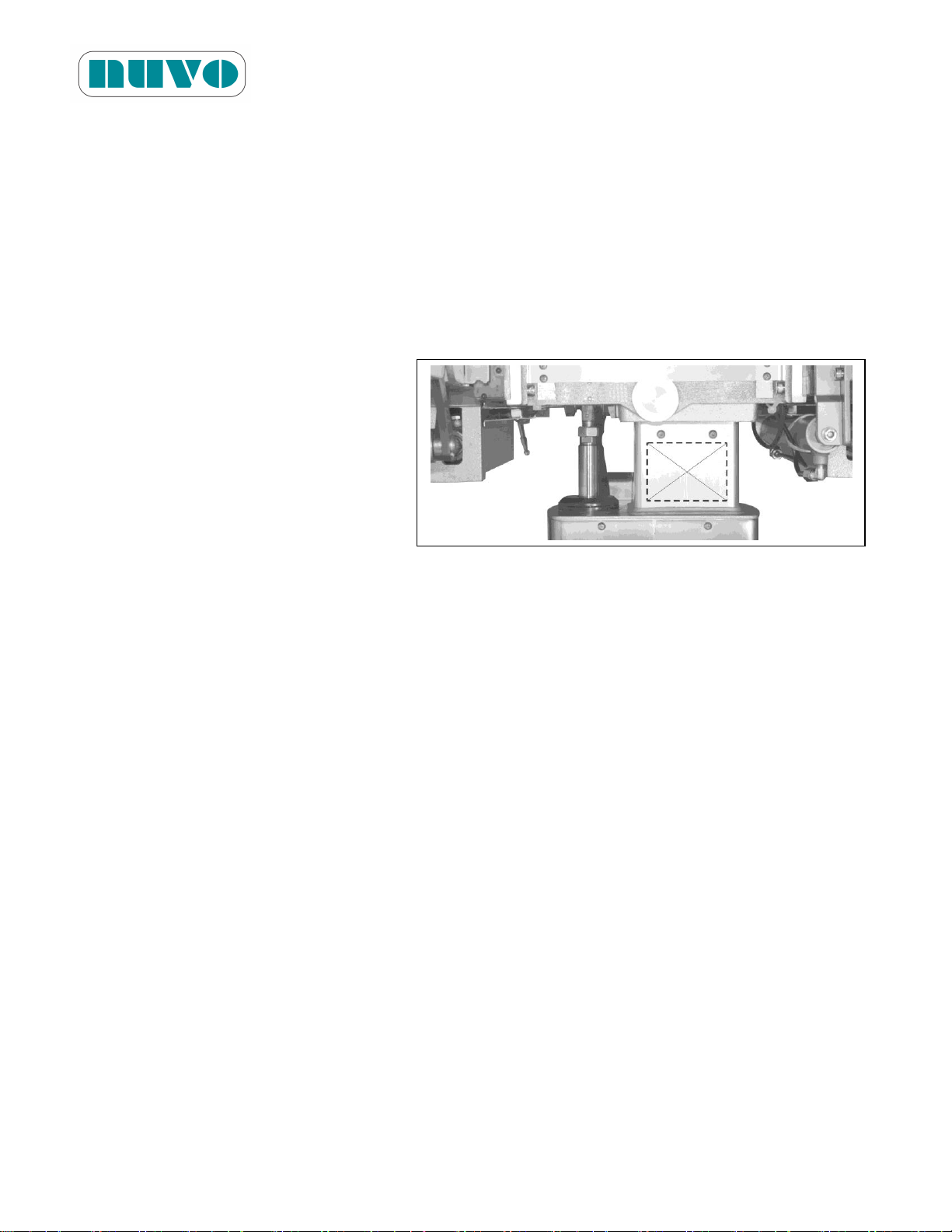
individual surgical table has a unique
serial number printed on the identification
plate, which is located on the leg side of
the column as illustrated to the right.
Figure 3-1: Identification Plate Location
3.3 Requirements
3.3.1 Operation Environment Requirements
˙ Temperature: 0°C~40°C (32°F~104°F)
˙ Relative humidity: 20~80 %RH
˙ Atmosphere Pressure: 700~1060 kPa
3.3.2 Power Requirements
˙ AC 110V / 5A, 300W, 50 / 60Hz or
˙ AC 220V / 3A, 300W, 50 / 60Hz; single phase
Note:
1. Plug the power cord into an equivalent electrical outlet marked “Hospital only” or “Hospital
Grade” for effective electrical grounding.
2. We ship our tables with standard electrical specification and configuration; any change that is
needed in the field, contact NUVO for the procedure.
Remarque:
1. Branchez le cordon d'alimentation dans une prise électrique équivalente marquée « Hôpital
uniquement » ou « Qualité hôpital » pour obtenir une mise à la terre efficace.
3-2
Page 27
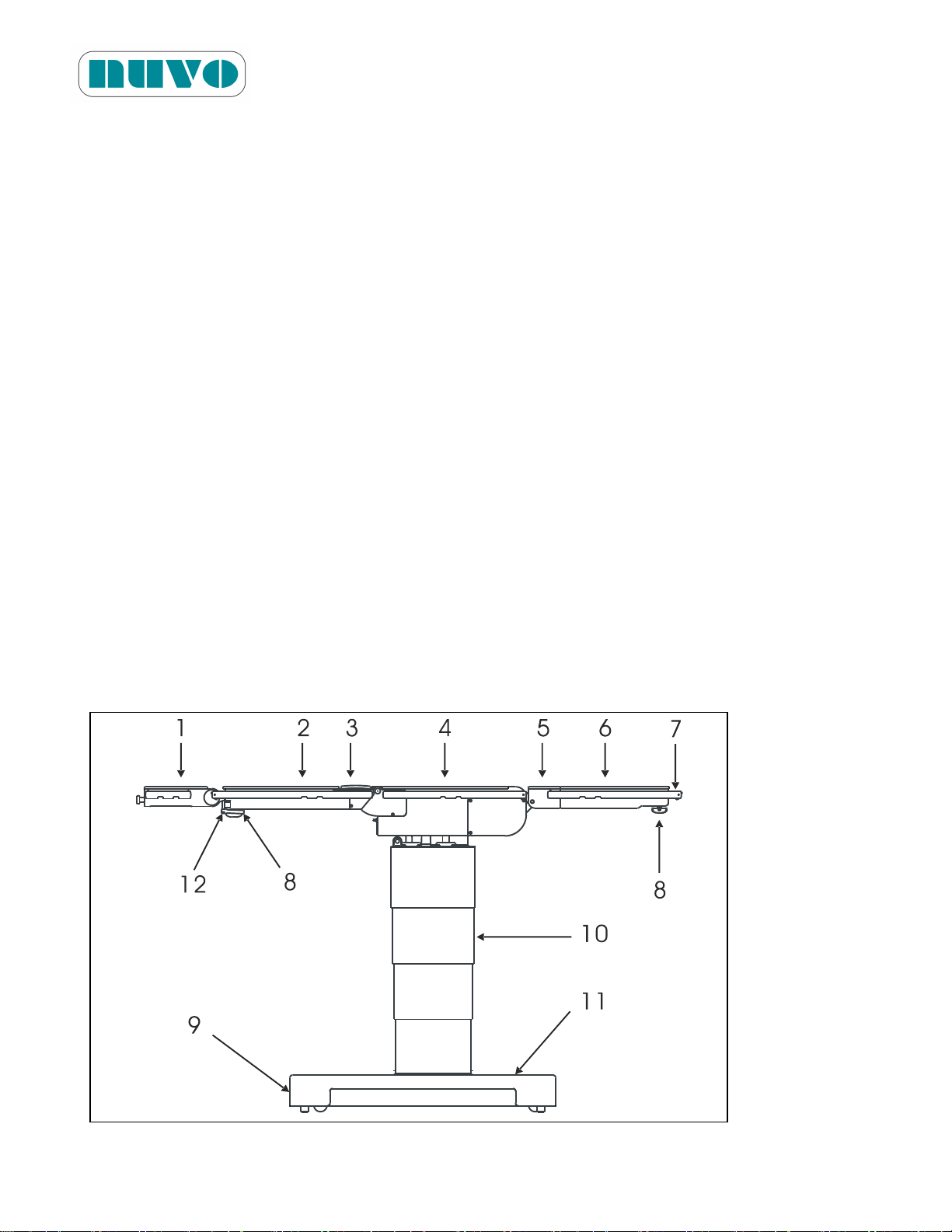
B2AV1000 Series Surgical Table
1. Detachable Head Section
2. Back Section
3. Kidney Elevator
4. Seat Section
5. Leg Section
6. Detachable Leg Extension
7. Side Rail
8. Thumbscrews
9. Base Penal with Override Control
10. Central Column
11. Table Base
12. Ratchet Wrench for kidney elevator
IM-B2AV1000-E01
2. Nous livrons nos tables avec une configuration et des spécifications électriques standards;
pour toute modification qui doit être effectuée sur le site, veuillez contacter NUVO pour
connaître la procédure.
3.4 Product Transportation and Storage
The B2AV1000 Series surgical table is heavy and its paint could be scratched by sharp or hard
objects. When the original package is not available, have an experienced person package the
table for transportation or storage in order to prevent damage. Do not expose the table to rain
even when it is well packaged. The table storage location should have a temperature between
14°F ~ 158°F (-10°C ~ 70°C) and relative humidity between 20 ~ 100 % RH
Note: For extended storage, please read Sec. 6.7 “Battery Charging Procedures.”
Remarque: Pour un stockage prolongé, veuillez lire la section 6.7 « Procédures de charge des
batteries ».
3.5 Parts Identification
Figure 3-2: Parts Identification
3-3
Page 28
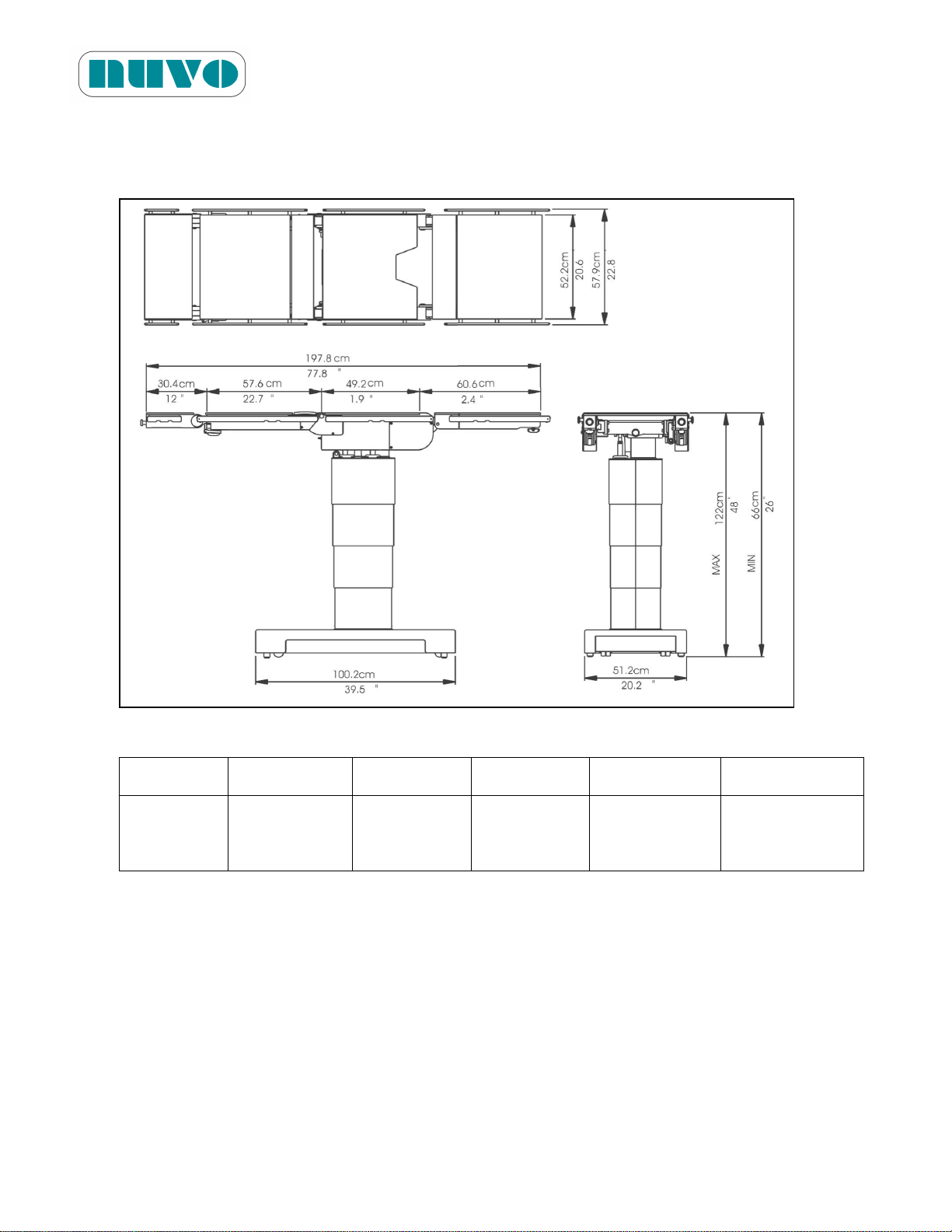
3.6 Technical Specifications
Model No.
B2AV1000
B2AV1000K
B2AV1000S
B2AV1000SK
B2AV1000SKP
Weight
lb (kg)
440
(200)
451
(205)
491
(223)
501
(228)
491
(223)
3.6.1 Dimensions
Figure 3-3: Dimensions
B2AV1000 Series Surgical Table
IM-B2AV1000-E01
3.6.2 Weight (without package, pads and accessories):
3.6.3 Battery Capacity:
Main Battery Set: 24V, 14 Ah (Battery Specification: 12V/14Ah*2, per each table)
Sub Battery Set: 24V, 2.3 Ah (Battery Specification: 12V/2.3Ah*2, for B2AV1000SKP only)
Optional C-LiFePO4 Battery Pack: 17.4 Ah (Battery Specification: 24V/17.4Ah*1, per table)
3-4
Page 29
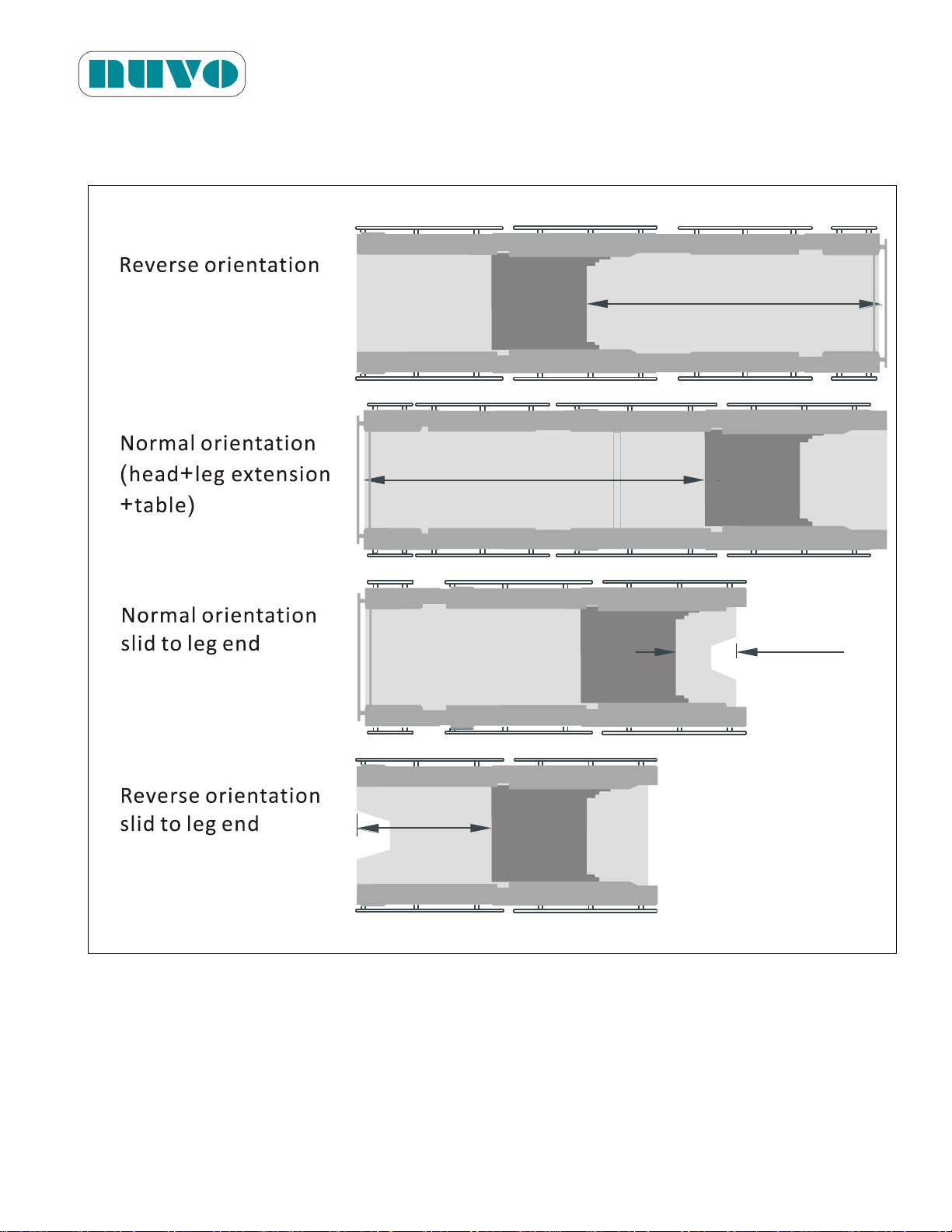
3.6.4 Imaging Coverage
UPPER BODY:
UPPER BODY:
112.3 cm
44.2 in
24.5 cm
9.6 in
LOWER BODY:
LOWER BODY:
50 cm
19.7 in
121.4 cm
47.8 in
Figure 3-4-1: Models B2AV1000/B2AV1000K
B2AV1000 Series Surgical Table
IM-B2AV1000-E01
Note: The imaging coverage is 14 inches wide.
Remarque: La couverture d'imagerie est de 35.5 cm (14 po) de large
3-5
Page 30
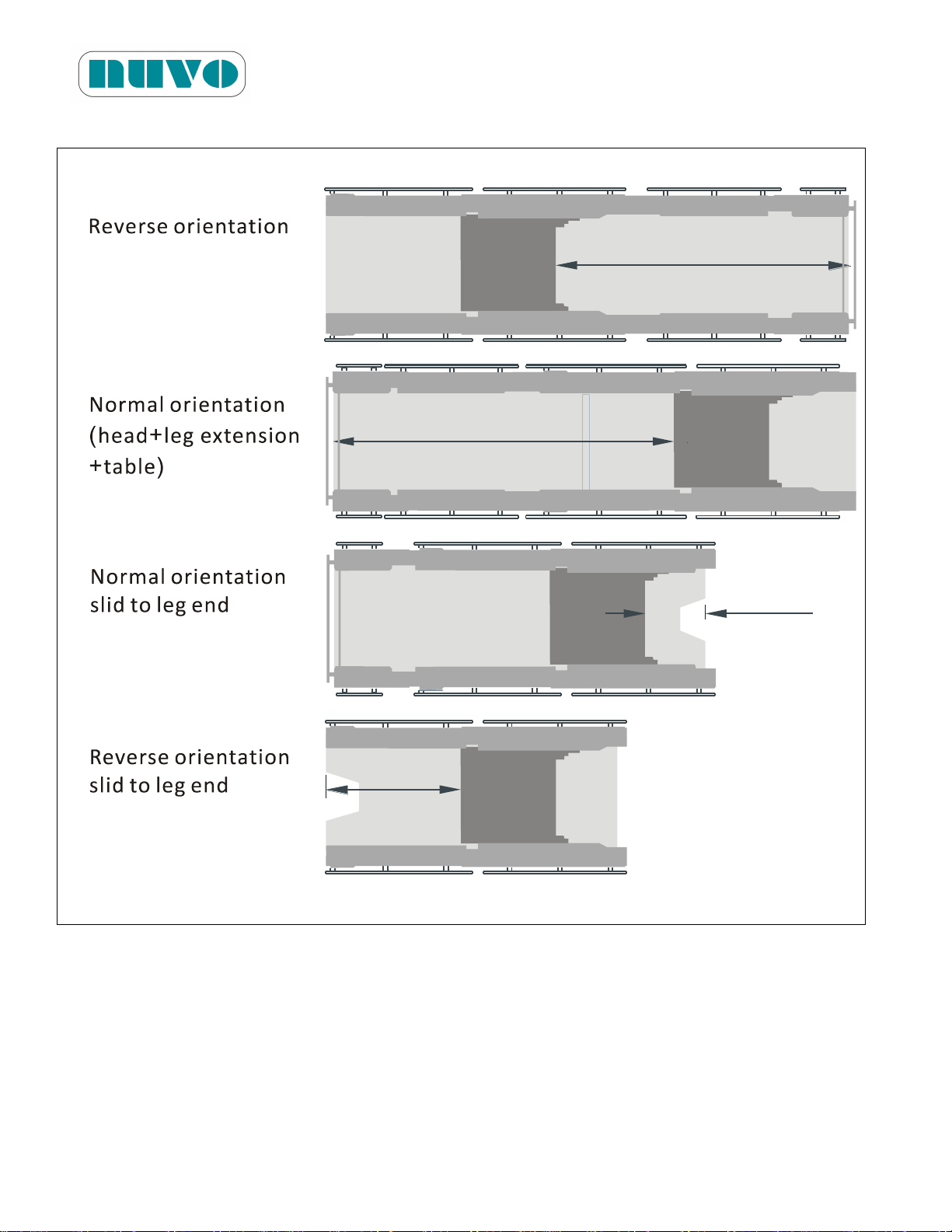
Figure 3-4-2: Models B2AV1000S/ B2AV1000SK/ B2AV1000SKP
UPPER BODY:
UPPER BODY:
112.3 cm
44.2 in
24.5 cm
9.6 in
LOWER BODY:
LOWER BODY:
50 cm
19.7 in
121.4 cm
47.8 in
B2AV1000 Series Surgical Table
IM-B2AV1000-E01
Note: The imaging coverage is 14 inches wide.
Remarque: La couverture d'imagerie est de 35.5 cm (14 po) de large.
3-6
Page 31
B2AV1000 Series Surgical Table
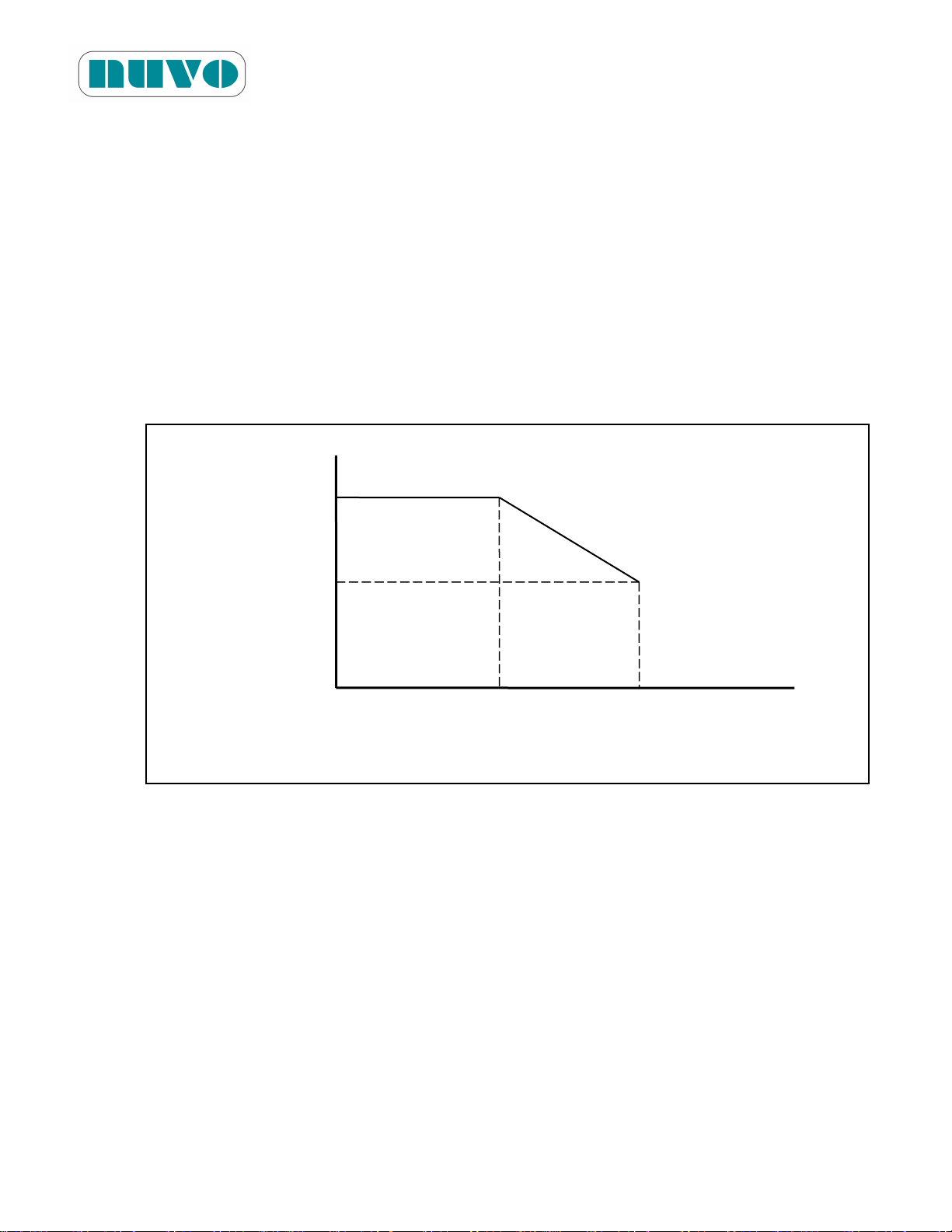
0 6.3(16) 12.2(31) Slide
Distance
in(cm)
Loading Capacity
1000(455)
600(273)
IM-B2AV1000-E01
3.6.5 Loading Capacity
The nominal patient weight capacity is tested according to the Standard IEC60601-2-46
Additional sub clause: 21.101. The Standard’s weight distribution calculation model is based on
person with 190 cm stature. The B2AV1000 Series tables could hold patient weighting up to
1000lbs (455kg) in normal orientation and reverse orientation with table sliding out
(B2AV1000S/SK/SKP models) not exceeding 6.3in (16cm). When the table (reverse orientation)
slides all the way out (head end) the capacity drops to 600lb (273kg). A graphic representation
of such drop in loading capacity with relation to slide distance is in Figure 3-5.
Figure 3-5: Loading Capacity-Slide Distance Correlation
lb(kg)
However, patients over 600lbs and shorter than 190cm do not fit the above model, which means
a person shorter than 190cm and over 600lbs could face table tipping hazard. A good practice
to minimize such hazard would be to slide out only the distance needed for a task, and not to
slide all the way out every time regardless of patient’s stature. When in doubt concerning the
maximum safe patient weight for any position, please contact your local NUVO representative.
3.6.6 Range of Table Movements
a. Height: 26in to 48in (66cm to 122cm)
b. Slide: 12.2in (31cm)
c. Lateral Tilt: 20° from horizontal.
d. Trendelenburg: 30° from horizontal.
3-7
Page 32
B2AV1000 Series Surgical Table
WARNING! AVERTISSEMENT!
INTERFERENCE HAZARD: Do not place this table near other equipment that will
generate electromagnetic or other types of interference.
RISQUE D'INTERFÉRENCE: N'installez pas cette table à proximité d'autres équipements
qui génèrent des interférences électromagnétiques ou d'autres types d'interférence.
IM-B2AV1000-E01
e. Reverse Trendelenburg: 30° form horizontal.
f. Back Section: 80°up or 50°down from horizontal.
g. Leg Section: 80°up or 105°down from horizontal.
h. Head Section: 90°up or 90°down from horizontal.
i. Kidney Bar Elevation: 0 ~4.7in (12cm) up from tabletop.
j. Flex: 25°down maximum from horizontal for both Back and Seat sections.
Note: Flex in REVERSE patient orientation: Back down 30° maximum and seat
down 30° maximum from horizontal.
Remarque: Pour effectuer une flexion alors que le patient est en orientation INVERSE:
le dossier doit être élevr à un angle maximum de -30° et le siège doit être
placé à un angle maximum de -30° de l'horizontale.
k. Reflex: 30°up maximum from horizontal for both Back and Seat sections.
Note: Reflex in REVERSE patient orientation: Back up 30°maximum with seat up
30°maximum from horizontal.
Remarque: Pour effectuer une flexion inverse alors que le patient est en orientation
INVERSE: le dossier doit être placé à un angle maximum de +30° et le
siège doit être placé à un angle maximum de +30°de l'horizontale.
3.6.7 Duty Cycle
The table is not designed for continuous use over an extended period of time. The duty cycle is
50%. It is recommended that after operating the table continuously for five minutes, it should
rest for about five minutes before being used again.
3.7 Electromagnetic Interference
3-8
Page 33

B2AV1000 Series Surgical Table
IM-B2AV1000-E01
B2AV1000 Series surgical table meets EN60601-1-2, and ENV50140 standards:
Medical Electrical Equipment: UL 60601-1 1st Edition, Rev. April 26, 2006 & CAN/CSA
C22.2 NO 601.1-M90, Rev. February 1998 & IEC 60601-1:1988 + A1:1991 + A2:1995
& IEC 60601-2-46: 1998
EMI regulation: CISPR 11 Group I Class A.
ESD regulation: Air discharge → 2~8kV, Contact discharge → 4kV
RF immunity regulation: 80~1000MHz, 10V/M, 1kHz, 80% AM
RF immunity regulation: 1G~2.5GHz , 10V / M , 1kHz , 100% AM (ENV50140)
EFT/Bursts regulation: ±2KV on AC and I/O ports
Surge regulation: ±2KV Common mode, ±1KV Differential mode
Conducted immunity regulation: 150kHz~80MHz, 10V(rms), 1kHz, 80% AM
Magnetic immunity regulation: 3A/m
Voltage Dips regulation: 30%/10mS, 60%/100mS, at 230VAC
3.8 Accessories
NUVO offers a wide range of accessories for its B2AV1000 Series surgical tables. Please
contact NUVO’s sales representative for more information about B2AV1000 Series surgical table
accessories.
3-9
Page 34

This page intentionally left blank
B2AV1000 Series Surgical Table
IM-B2AV1000-E01
3-10
Page 35
Section 4 INSTALLATION INSTRUCTIONS
WARNING! AVERTISSEMENT!
SHOCK HAZARD: Monitor the electrically conductive properties of floor locks.
Measure their resistance level according to the requirements of NFPA 99 before placing
table in use. Subsequent routine testing should be performed at least once every three
months.
RISQUE DE DÉCHARGE ÉLECTRIQUE: Surveillez les propriétés de conductivité
électrique des dispositifs de verrouillage au sol. Mesurez leur niveau de résistance
selon les exigences de la norme NFPA 99 avant de commencer à utiliser la table. Des
tests de routine doivent être effectués au moins une fois tous les trois mois.
TRIPPING HAZARD: Make sure to route the power cord so that it will not create a
tripping hazard.
RISQUE DE BASCULEMENT: Assurez-vous d'acheminer le cordon d'alimentation de
manière à ce qu'il ne crée pas de risque de trébuchement.
CAUTION! MISE EN GARDE!
Route hand Pendant cord and optional foot controller cord clear of any pinch points
where they could be damaged.
Acheminez le cordon du boîtier de commande manuelle suspendu et le cordon de la
pédale de commande optionnelle de manière à éviter tout point de pincement
susceptible de les endommager.
To avoid damage to the Hand Pendant, always hang it onto the side rail when not in use.
Pour éviter d'endommager le boîtier de commande manuelle suspendu, attachez-le au
rail latéral de la table lorsqu'il n'est pas utilisé.
When the power cord is damaged in any way, replace it immediately or else use the
table’s internal electrical power source until it can be replaced.
Si le cordon d'alimentation est endommagé, remplacez-le immédiatement ou utilisez la
source d'alimentation électrique interne de la table jusqu'à ce qu'il puisse être remplacé.
B2AV1000 Series Surgical
Table
IM-B2AV1000-E00
4-1
Page 36

B2AV1000 Series Surgical Table
CAUTION! MISE EN GARDE!
There is only one way to insert the connector of the hand pendant into its receptacle on
the table. The connector must be inserted straight into the receptacle without twisting it,
or else pins inside the receptacle will be bent and rendered unusable.
Le connecteur du boîtier de commande manuelle ne peut s'insérer dans le réceptacle de
la table que dans un seul sens. Insérez le connecteur tout droit dans le réceptacle,
sans le tordre, sinon les broches internes du réceptacle risquent de se plier et d'être
inutilisables.
To avoid damage to the Hand Pendant, always hang it onto the table’s side rails when
not in use.
Pour éviter d'endommager le boîtier de commande manuelle suspendu, attachez-le au
rail latéral de la table lorsqu'il n'est pas utilisé.
Route Hand Pendant cord and optional foot controller cord clear of any pinch points
where they could be damaged.
Acheminez le cordon du boîtier de commande manuelle suspendu et le cordon de la
pédale de commande optionnelle de manière à éviter tout point de pincement
susceptible de les endommager.
IM-B2AV1000-E01
4.1 Install AC Power Cord
1. Move table to a desired location.
2. Plug power cord into socket (#4 of Figure 5-4-1 or Figure 5-4-2), and secure it with Wire
Collect Tie (#3 of Figure 5-4-1 or Figure 5-4-2).
3. Route the cord in ways so that it could not be tripped over, and plug the cord’s 3-pronged
hospital grade plug into an electrical outlet. AC Power Indicators (#7 of Figure 5-4-1 or
Figure 5-4-2) should be lit.
4.2 Install Hand Pendant
4-2
Page 37
B2AV1000 Series Surgical Table
WARNING! AVERTISSEMENT!
SHOCK HAZARD: Monitor the electrically conductive properties of floor locks.
Measure their resistance level according to the requirements of NFPA 99 before placing
table in use. Subsequent routine testing should be performed at least once every three
months.
RISQUE DE DÉCHARGE ÉLECTRIQUE: Surveillez les propriétés de conductivité
électrique des dispositifs de verrouillage au sol. Mesurez leur niveau de résistance
selon les exigences de la norme NFPA 99 avant de commencer à utiliser la table. Des
tests de routine doivent être effectués au moins une fois tous les trois mois.
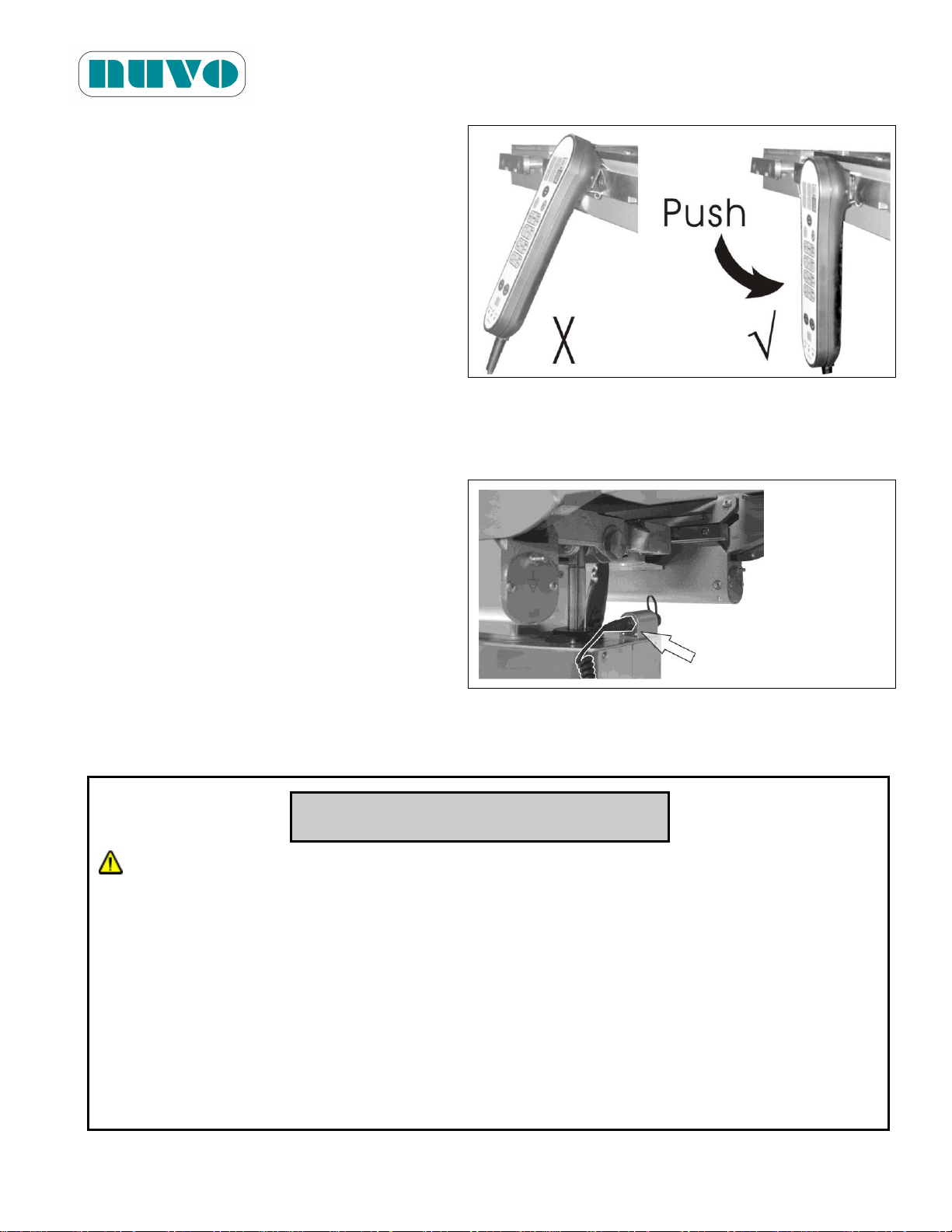
1. Push Hand Pendant to firmly clip it on
an appropriate side rail. Do not only
hang it on the side rail.
Note:
When removing the Hand Pendant
from the side rail, pull it straight out.
Do not twist from side to side, or the
metal clip could be damaged.
Remarque:
Figure 4-1:
Lorsque vous retirez le boîtier de commande manuelle du rail latéral, tirez-le vers vous. Ne
le tournez pas de gauche à droite, car cela pourrait endommager l'attache en métal.
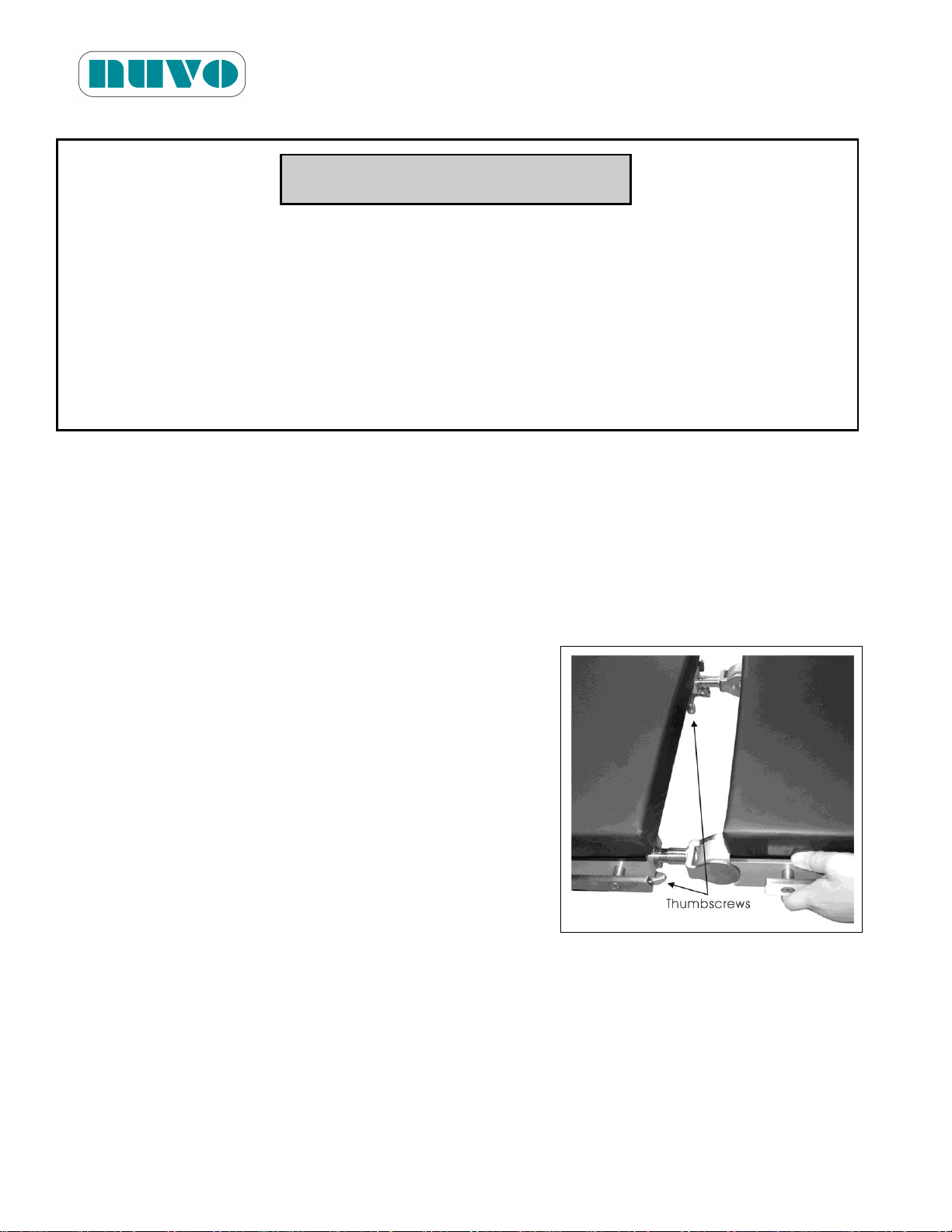
2. Locate the receptacle on column top
under the seat section.
3. Insert the connector all the way into the
receptacle, and then tighten its screw
to prevent the connection from
becoming loose.
Figure 4-2:
IM-B2AV1000-E01
4.3 Lock Table in Place
4-3
Page 38
B2AV1000 Series Surgical Table
CAUTION! MISE EN GARDE!
The antistatic pathway is: Mattress Pad →Tabletop →Column →Base →Floor Lock
Pads →Floor. Therefore, the anti-static properties of the table depend upon the use of
the recommended mattress pads.
Le chemin antistatique est le suivant: Couvre-matelas→ dessus de Table→ Colonne→
Base→ Patins de verrouillage au sol→Plancher. Par conséquent, les propriétés
antistatiques de la table dépendent de l'utilisation des couvre-matelas recommandés par
NUVO.
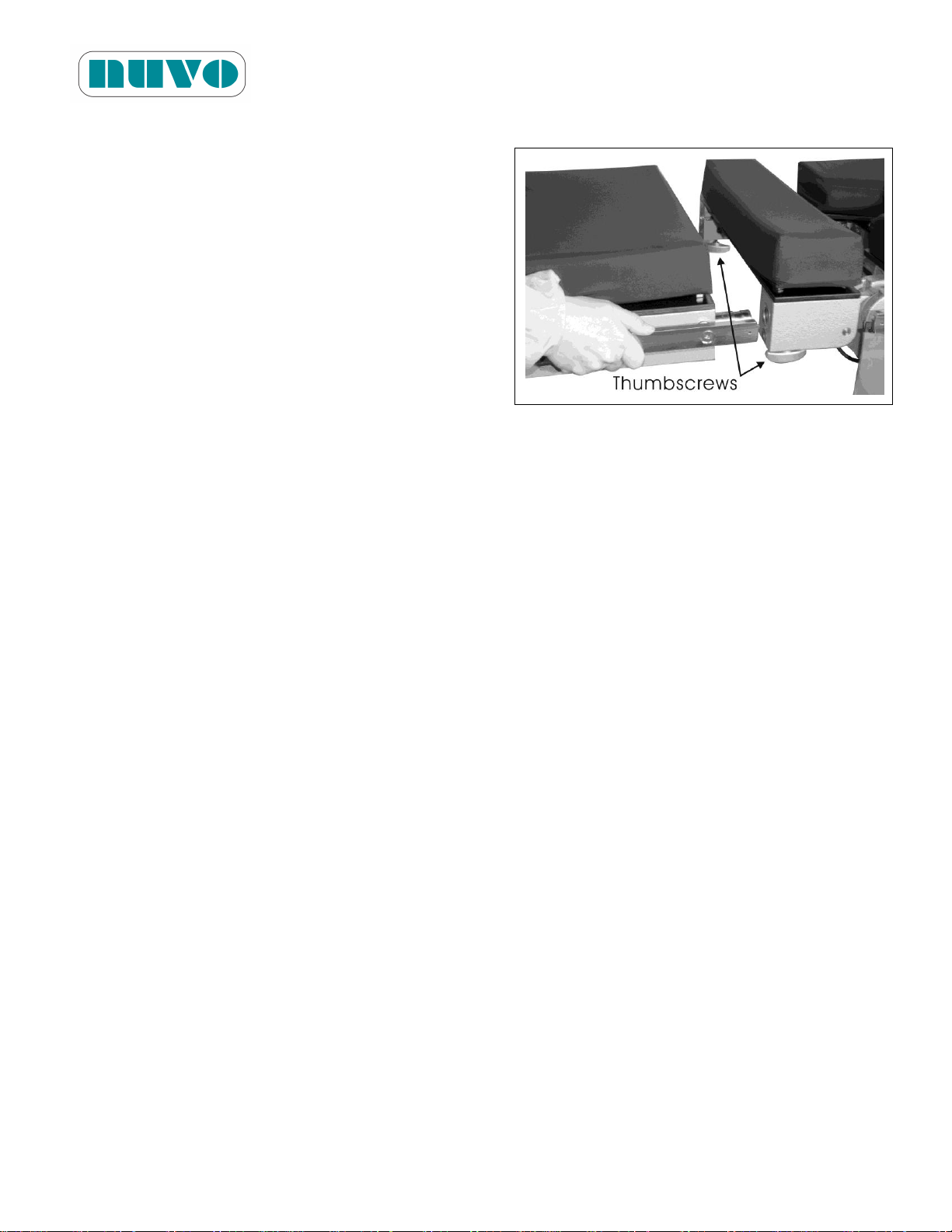
1. Loosen thumbscrews under back section before
attaching or removing Head Section.
2. Insert connection rods of the head section into the
back section.
3. Tighten the two thumbscrews to secure the head
section.
IM-B2AV1000-E01
1. Press the Lock button (#2, Figure 5-2) of Hand Pendant and wait for the green LED to light
up, the floor locks will become locked. The table will remain locked until the unlock button
(#8, Figure 5-2) is pressed.
2. Make sure the table does not wobble. If the table does not wobble it means the locks are
snug against the floor.
4.4 Install Head Section
Figure 4-3:
4-4
Page 39
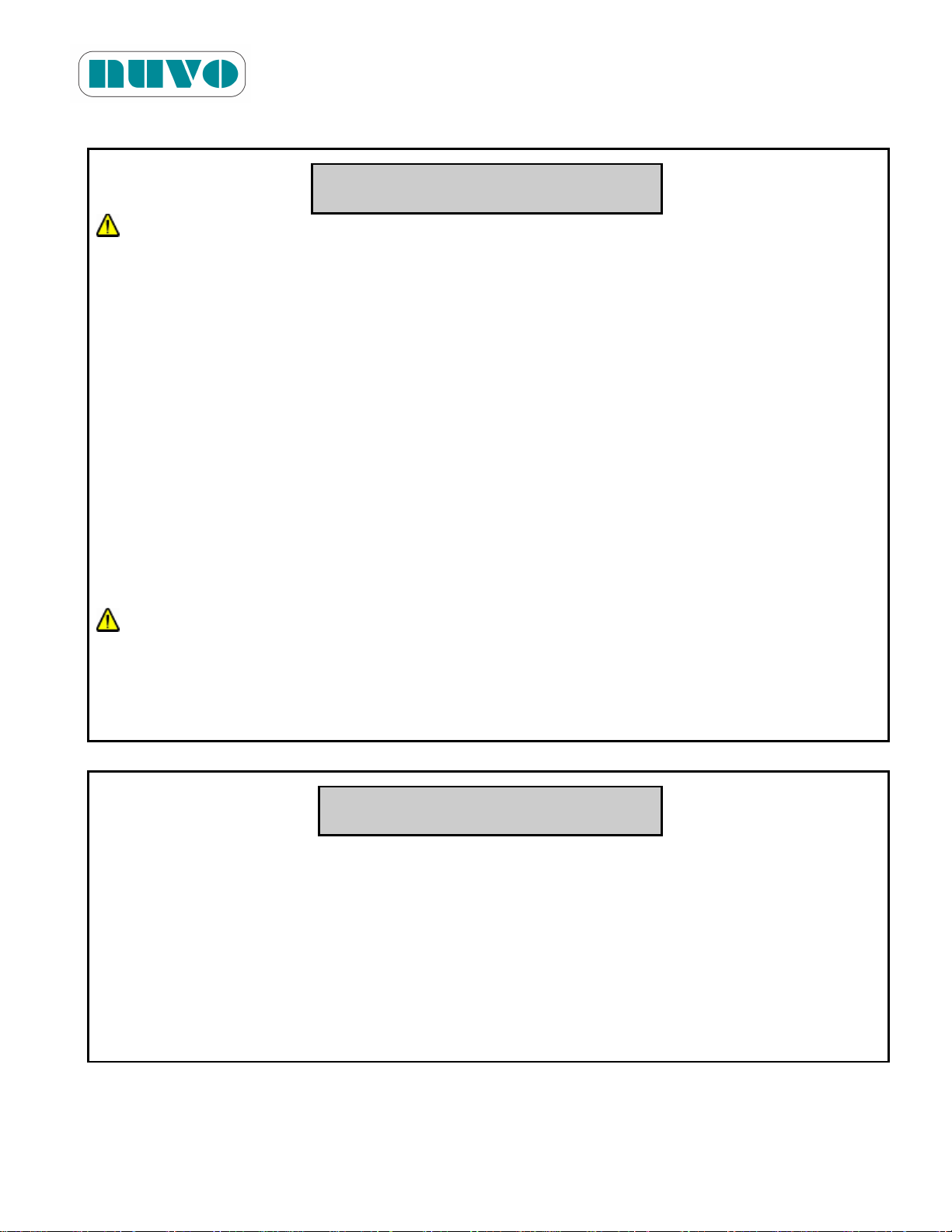
4.5 Install Leg Extension
1. Loosen thumbscrews under tabletop frame
before attaching or removing leg extension.
2. Insert connection rods of the leg extension
into leg section.
3. Tighten the two thumbscrews to secure the
leg extension.
4.6 Installation Check List
B2AV1000 Series Surgical Table
IM-B2AV1000-E01
Figure 4-4:
Check off boxes below as they are performed.
□ Install, secure power cord with wire collect tie and route power cord to prevent tripping.
□ Install Hand Pendant.
□ Lock and secure table in place.
□ Install Head Section and Leg Extension.
□ Install table pads.
□ Check all table movements (4.6.1 Performance Check List).
4-5
Page 40

B2AV1000 Series Surgical Table
Test Item
Specification
Result
Verified
Height range of table
without Mattress pads
26in ~ 48in
(66cm ~ 122cm)
Sliding
12.2in (31cm)
Kidney Elevator
4.7in (12cm)
Trendelenburg
0°~30°
Reverse Trendelenburg
0°~30°
Lateral Tilt
to right 0°~20°
to left 0°~20°
Back Section
up 0°~80°
down 0°~50
o
Leg Section
up 0°~80°
down 0°~105°
Head Section
up 0°~90°
down 0°~90°
Flex
Back down 25° max.
Seat down 25° max.
Reflex
Back up 30° max.
Seat up 30° max.
Override Switches
Height, Sliding, Trend.,
Rev. Trend., Side Tilt, Back,
Leg, Floor Locks,
Level
+/- 2°
IM-B2AV1000-E01
4.6.1 Performance Check List
After completing installation procedures (4.1 to 4.5), installation technician shall verify the
performance of table (also refer to 5.2 “Hand Pendant Operation”) according to the specifications
and record the results of verification in the chart below:
4-6
Page 41
4.7 Voltage Setting Instructions
WARNING! AVERTISSEMENT!
TABLE FAILURE HAZARD: This manual describes routine scheduled maintenance and
services which will help keep this equipment safe and reliable. Only experienced
personnel who are fully acquainted with this equipment should perform repairs and
adjustments. Maintenance or service performed by inexperienced, unqualified
personnel, or installation of unauthorized parts could result in personal injury, costly
damage, or cause the warranty to become void.
RISQUE DE MAUVAIS FONCTIONNEMENT DE LA TABLE: Ce manuel décrit la routine
d'entretien et de maintenance régulière qui aideront à garder cet équipement sécuritaire et
fiable. Seul le personnel expérimenté et connaissant parfaitement cet équipement devrait
effectuer des réparations et ajustements. Toute procédure de maintenance ou d'entretien
effectuée par du personnel inexpérimenté ou non qualifié, et toute installation de pièces
non autorisées pourraient causer des blessures corporelles ou des dommages coûteux, ou
annuler la garantie de l'équipement.
ELECTRIC SHOCK HAZARD: Only authorized service personnel should be allowed to
remove the base cover.
RISQUE DE DÉCHARGE ÉLECTRIQUE: Seul le personnel de service autorisé devrait
être autorisé à retirer les couvercles.
CAUTION! MISE EN GARDE!
Static electricity could damage the IC. Avoid any bodily contact with the electronic
systems. Use probes if necessary. Personnel must use a grounding device when
probing circuits or connectors, or else immediate electrical failure could result.
L'électricité statique peut endommager les circuits intégrés. Évitez tout contact corporel
avec les systèmes électroniques. Utiliser des sondes au besoin. Le personnel doit
utiliser un dispositif de mise à la terre pour sonder les circuits ou les connecteurs, sinon
une panne électrique pourrait en résulter.
B2AV1000 Series Surgical Table
IM-B2AV1000-E01
4-7
Page 42

B2AV1000 Series Surgical Table
Terminals Input
Voltage
Wires
90 ~ 132
180 ~ 264
Jumper 1
0v - J1
J1 - J2
Jumper 2
J2 - N
Jumper not used
IM-B2AV1000-E01
Required Tools: T003 and T006 (Refer to Table 2-1: Tools and Materials)
Procedures:
1. Remove protective sleeves from the column and lift up the base cover.
2. Unplug one of the connectors from the batteries.
3. Unplug AC power cord (#4, Figure 5-4-1 or 5-4-2).
4. Unplug the 6-terminal green power supply connector on Main Control PCB (Fig 4-5).
5. Make sure jumper(s) are in the appropriate place(s) according to Table 4-1.
6. Wire from terminal 0V to Bridge Rectifier (AC -) according to Figure 4-5.
7. Wire from terminal 20V, 22V, 24V or 26V to the Bridge Rectifier (AC +) according to Figure
4-5.
8. Plug in the AC power cord and use multi meter to check the DC voltage on the green
connector in step 4 at the terminals that a red and a grey wires that connect to the bridge
rectifier. Make sure the Multi Meter is calibrated annually.
9. Repeat steps 3, 7 and 8 if voltage does not read between 31V and 34V.
10. Make sure the AC power is plugged in before reconnect wire to the batteries and put back
the cover and column sleeves.
Table 4-1:
4-8
Page 43
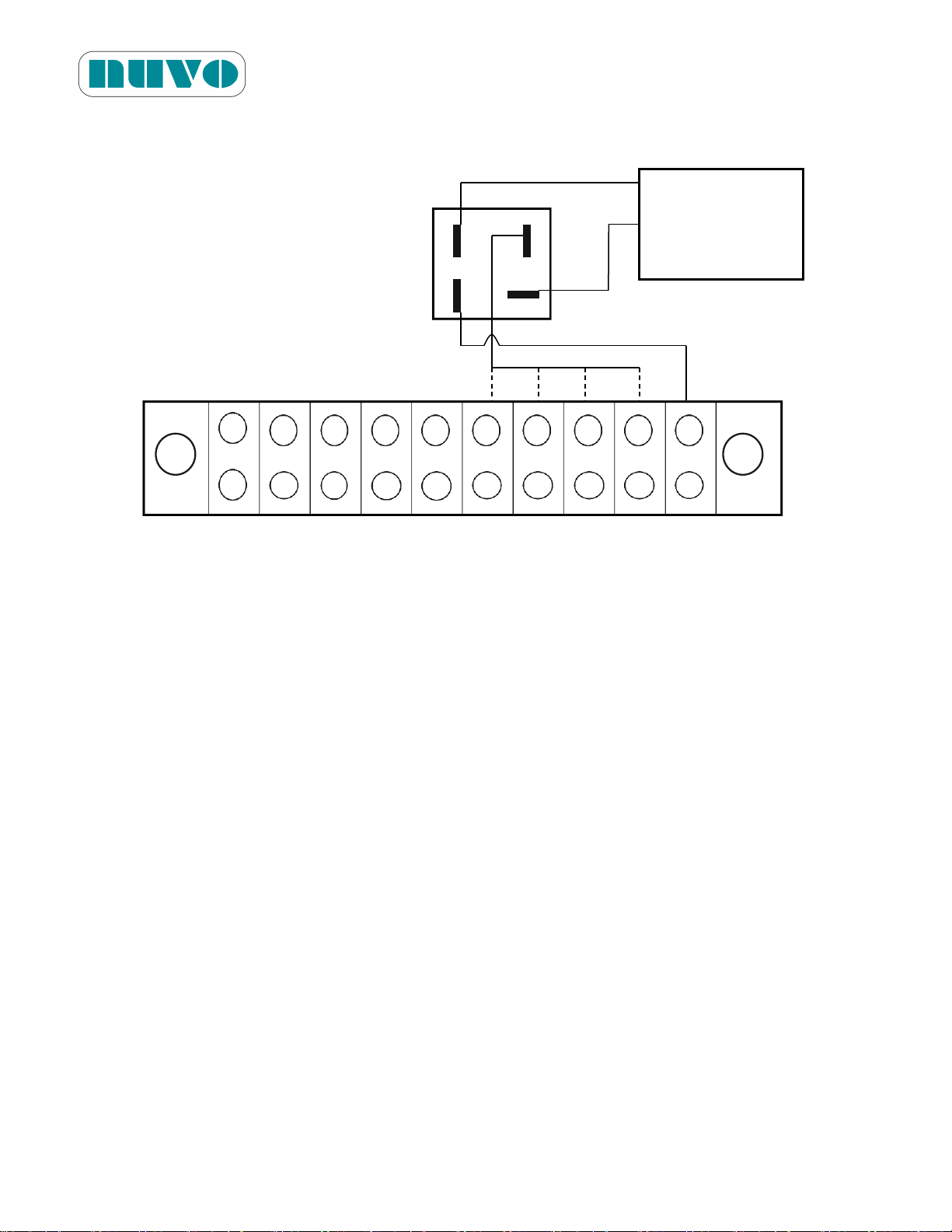
Figure 4-5: Wiring of Terminals and Bridge Rectifier
Terminals
110
110
26V
24V
22V
20V 0V
L
0V
J1
J2
N
26V
24V
22V
20V
0V
Bridge
Rectifier
AC
+
Main Control
PCB (ASM0021)
B2AV1000 Series Surgical Table
IM-B2AV1000-E01
TH
0V 0V
4-9
Page 44

This page intentionally left blank
B2AV1000 Series Surgical Table
IM-B2AV1000-E01
4-10
Page 45
B2AV1000 Series Surgical Table
WARNING!
PINCHING HAZARD: Extreme tabletop articulation creates pinch points. Before
operating the table, review illustrations in Figures 5-1, PINCH POINTS.
PINCHING AND TIPPING HAZARD: If user is not completely familiar with the controls
for patient positioning and table operation, patient could sustain injury.
TIPPING HAZARD: The maximum patient weight limit for normal orientation and
reverse orientation with sliding toward head not over 6.3in (16cm) is 1000lb (455kg).
The limit drops to 600lb (273kg) when the table (reverse orientation) is slid out to its
extreme (head end).
TIPPING HAZARD: The nominal patient weight capacity is tested according to the
Standard IEC60601-2-46 Additional sub clause: 21.101. The Standard’s weight
distribution calculation model is based on 190cm stature. Patients over 600lbs and
shorter than 190cm do not quit fit the Standard’s model of weight distribution. Read
Section 3.6.5 Loading Capacity for important information concerning tipping hazard.
PATIENT INJURY HAZARD: A potential hazard exists when the surgical table is used
together with high-frequency surgical equipment such as cardiac defibrillators and
cardiac defibrillator-monitors. In certain conditions the antistatic properties of the
mattress pads could become insufficient to prevent burns to the patient’s skin. Care
must be taken to ensure that the insulation between the pad and the patient’s skin is
maintained, including monitoring the bed sheet for excessive moisture, which could
compromise this insulation. Carefully read the manufacturers’ instructions of these
products relating to patient’s safety.
PATIENT INJURY OR FALLING HAZARD: Improper positioning of patient may result
in possible patient injury and table failure. During surgery, health-care professional
present at the time is responsible for the patient’s safety.
FALLING HAZARD: Make sure the floor locks are engaged before placing patient on
the table.
FALLING HAZARD: When a patient is on the table, do not release floor locks.
TRIPPING HAZARD: Make sure to route the power cord so that it will not create a
tripping hazard.
IM-B2AV1000-E01
Section 5 OPERATING INSTRUCTIONS
5-1
Page 46
B2AV1000 Series Surgical Table
EXPLOSION HAZARD: Do not use this table with flammable anesthetics.
INSTABILITY HAZARD: Using an NUVO surgical table and/or NUVO accessories or
accessories manufactured and sold by other companies for other than the stated purpose
could result in possible patient or user injury, and/or table, accessory, or other property
damage.
UNANTICIPATED TABLE MOVEMENT HAZARD: Secure patient to surgical table
according to recommended positioning practices.
PERSONAL INJURY HAZARD: Check for correct attachment and tighten securely (if
applicable) when installing any table accessory. Do not use worn or damaged
accessories.
INFECTION HAZARD: When cleaning the surgical table, personnel should wear gloves,
a mask, eye protection, and other safety equipment which will protect body parts from
exposure to aerosols which could be reflected from contaminated surfaces.
INTERFERENCE HAZARD: Do not place this table near other equipments that will
generate electromagnetic or other interference.
UNEXPECTED TABLE MOVEMENT HAZARD: When the table begins to move on its
own as soon as the override system is enabled, please disable it right the way and call for
a technician service. (for B2AV1000S/B2AV1000SK/B2AV1000SKP)
UNEXPECTED TABLE MOVEMENT HAZARD: When the table begins to move on its
own as soon as the override control toggle switch is switched to up or down positions,
please switch it back to the middle position and call for service. (for
B2AV1000/B2AV1000K)
UNEXPECTED TABLE MOVEMENT HAZARD: When using any control, please operate
one button or switch at a time to avoid unexpected table movement.
TABLE FAILURE HAZARD: This manual describes scheduled maintenance and service
which will help keep this equipment safe and reliable. Only experienced personnel who
are fully acquainted with this equipment should perform repairs and adjustments.
Maintenance or service performed by inexperienced, unqualified personnel, or installation
of unauthorized parts could result in personal injury, costly damage, or cause the
warranty to become void.
IM-B2AV1000-E01
5-2
Page 47
B2AV1000 Series Surgical Table
AVERTISSEMENT!
RISQUE DE PINCEMENT: L'articulation excessive du dessus de table crée des points de
pincement. Consultez les illustrations des figures 5-1, « POINTS DE PINCEMENT » avant
l'utilisation la table.
RISQUE DE PINCEMENT ET DE BASCULEMENT: Si l'utiliisateur n'a pas une parfaite
connaissance des contrôles de positionnement du patient, le patient subir des blessures.
RISQUE DE BASCULEMENT: Lorsque la table de série B2AV1000 est utilisée en
orientation normale ou inverse et que les dispositifs de verrouillage au sol sont verrouillés,
la limite de poids maximal du patient est de 454 kg (1000 lb) (veuillez vous référer à la
section 3.6.6 « Capacité de charge »); lorsque l'opérateur fait coulisser la table en
orientation inverse du côté de la tête de plus de 16 cm (6,3 po), la limite de poids est
réduite à 273 kg (600 lb). Ne dépassez pas les limites. Portez une attention particulière
lorsque vous inst allez une personne lourde et de petite taille sur la table, pour que la
répartition du poids ne soit pas inégale. Pour connaître les limites de poids maximal sûr
du patient pour une position différente de celles présentées dans cette publication, veuillez
contacter votre représentant local NUVO.
RISQUE DE BASCULEMENT: La limite nominale de poids des patients est testée
conformément à la norme IEC 60601-2-46, sous-clause 21.101. Le modèle de calcul
standard de répartition du poids est basé sur une stature de 190 cm. Les patients de
plus de 272 kg (600 lb) de poids et de moins de 190 cm de taille (à 6 pi 2,8 po) ne
correspondent pas aux critères du modèle de calcul standard de répartition du poids.
Referrez vous à la section 3.6.5 « Capacité de charge » pour lire d'importantes
instructions relatives aux risques de basculement.
RISQUE DE BLESSURES AU PATIENT: Un danger potentiel est présent lorsque la table
chirurgicale est utilisée avec de l'équipement chirurgical de haute fréquence tel que des
défibrillateurs cardiaques ou des moniteurs à défibrillateur cardiaque. Dans certaines
conditions, les propriétés antistatiques des couvre-matelas pourraient devenir
insuffisantes pour prévenir les brûlures à la peau du patient. Des précautions doivent
être prises pour s'assurer que l'isolation entre le couvre-matelas et la peau du patient est
maintenue, ce qui comprend la surveillance de l'humidité excessive dans les draps de lit,
qui pourrait compromettre cette isolation. Veuillez lire attentivement les instructions des
fabricants des produits susmentionnés, car ils ont trait à la sécurité des patients.
RISQUE DE BLESSURES ET DE CHUTES DU PATIENT: Le mauvais positionnement du
IM-B2AV1000-E01
5-3
Page 48
B2AV1000 Series Surgical Table
patient peut causer des blessures au patient et un mauvais fonctionnement de la table.
Les professionnels de la santé présents au moment de la chirurgie sont responsables de la
sécurité du patient.
RISQUE DE CHUTE: Assurez-vous que les dispositifs de verrouillage au sol sont engagés
avant de placer le patient sur la table.
RISQUE DE CHUTE: Lorsqu'un patient est sur la table, ne libérez pas le dispositif de
verrouillage au sol.
RISQUE DE TRÉBUCHEMENT: Assurez-vous d'acheminer le cordon d'alimentation
(électrique) de manière à éviter les risques de trébuchement.
RISQUE D'EXPLOSION: N'utilisez pas la table avec des anesthésiques inflammables.
RISQUE D'INSTABILITÉ: L'utilisation de la table NUVO et de ses accessoires ou
d'accessoires fabriqués et vendus par d'autres compagnies pour d'autres fins que celles
indiquées peut entraîner des blessures au patient ou à l'opérateur, ainsi que des
dommages à la table ou à ses accessoires.
RISQUE DE MOUVEMENTS IMPRÉVUS DE LA TABLE: Installez le patient sur la table
de manière sécurisée selon les pratiques de positionnement recommandées.
RISQUE DE BLESSURES CORPORELLES: Lors de l'installation de tout accessoire à la
table chirurgicale, veuillez vérifier qu'il est adéquatement fixé et serré (selon le cas).
N’utilisez aucun accessoire usé ou endommagé.
RISQUE D'INFECTION: Lors du nettoyage de la table chirurgicale, le personnel devrait
porter des gants, un masque, des lunettes de protection et tout autre équipement de
sécurité qui permettra de protéger le corps contre toute exposition aux aérosols qui
pourraient être réfléchis par les surfaces contaminées.
RISQUE D'INTERFÉRENCE: N'installez pas cette table à proximité d'autres équipements
qui génèrent des interférences électromagnétiques ou d'autres types d'interférence.
RISQUE DE MOUVEMENTS INATTENDUS DE LA TABLE: Si la table chirurgicale
commence à se déplacer d'elle-même alors que l'interrupteur de commande prioritaire est
activé, désactivez immédiatement l'interrupteur, cessez d'utiliser la table et appelez un
technicien qualitfié pour la réparation (des modèles
B2AV1000S/B2AV1000SK/B2AV1000SKP).
RISQUE DE MOUVEMENTS INATTENDUS DE LA TABLE: Si la table chirurgicale
commence à se déplacer toute seule elle-même alors que l'interrupteur de commande
prioritaire est en position « haute » ou « basse », placez immédiatement l'interrupteur en
position « milieu », cessez d'utiliser la table et appelez un technicien en entretien et en
IM-B2AV1000-E01
5-4
Page 49
B2AV1000 Series Surgical Table
réparation (pour les modèles B2AV1000/B2AV1000K).
RISQUE DE MOUVEMENTS INATTENDUS DE LA TABLE: Lorsque vous utilisez une
commande, veuillez utiliser un bouton ou un commutateur à la fois pour éviter tout
mouvement inattendu de la table.
RISQUE DE MAUVAIS FONCTIONNEMENT DE LA TABLE: Ce manuel décrit la routine
d'entretien et de maintenance régulière qui aideront à garder cet équipement sécuritaire et
fiable. Seul le personnel expérimenté et connaissant parfaitement cet équipement
devrait effectuer des réparations et ajustements. Toute procédure de maintenance ou
d'entretien effectuée par du personnel inexpérimenté ou non qualifié, et toute installation
de pièces non autorisées pourraient causer des blessures corporelles ou des dommages
coûteux, ou annuler la garantie de l'équipement.
CAUTION!
Route hand pendant cord and optional foot control cord clear of any pinch points where
they could be damaged.
To avoid damage to the hang hand pendant, clip from side rail of table when not in use.
IMPORTANT: Operate table through all articulations prior to usage when table has been
stored for longer than four weeks,
Plug power cord into a properly grounded socket only.
Check the manual and be familiar with all information before operation.
When using a third party arm support, keep an angle greater than 15 degrees along the
direction of table length to avoid component damage during tabletop movements.
Do not articulate table into any angle that could hurt the patient.
Do not place this surgical table near other equipment that will generate electromagnetic
interference or other types of interference.
Before using high-frequency surgical equipments, cardiac defibrillators or cardiac
defibrillator-monitors, please refer to their instruction manual.
Use only NUVO’s mattress pads in order to avoid risk of electrostatic shock.
When the power cord is damaged in any way, replace it immediately or else use the
table’s internal electrical power source until it can be replaced.
The antistatic pathway is: Mattress Pad→Tabletop→Column→Base→Floor Lock
Pads→Floor. Therefore, the anti-static properties of the table depend upon the use of
the recommended NUVO mattress pads.
If the surgical drape hangs over the articulation points or the articulation covers (stainless
steel plates covering the joints), movement could cause damage to the table. Tuck the
drapes between the mattress pad and tabletop in order to prevent this.
IM-B2AV1000-E01
5-5
Page 50
B2AV1000 Series Surgical Table
There is only one way to insert the connector of the hand pendant into its receptacle on
the table. The connector must be inserted straight into the receptacle without twisting it,
or else pins inside the receptacle will be bent and rendered unusable.
Since collision with the table joint covers may damage them, keep stretchers or other
heavy objects away from the covers.
Read the entire instructional manual before operating the table.
MISE EN GARDE!
Acheminez le cordon du boîtier de commande manuelle suspendu et le cordon de la
pédale de commande optionnelle de manière à éviter tout point de pincement susceptible
de les endommager.
Pour éviter d'endommager le boîtier de commande manuelle suspendu, attachez-le au rail
latéral de la table lorsqu'il n'est pas utilisé.
IMPORTANT: Lorsque la table a été stockée pendant plus de quatre semaines, activez
toutes les articulations de la table avant son utilisation.
Ne branchez le cordon d'alimentation que dans une prise de courant bien fixé au sol.
Lorsque vous utilisez un support de bras fourni par un autre fabricant, gardez un angle
supérieur à 15 degrés dans le sens de la longueur de la table pour éviter d'endommager
les composants pendant que vous articulez le dessus de table.
Éviter d'articuler la table à un angle susceptible de blesser le patient.
N'installez pas cette table chirurgicale à proximité d'autres équipements qui génèrent des
interférences électromagnétiques ou d'autres types d'interférence.
Avant d'utiliser de l'équipement chirurgical de haute fréquence, tel que des défibrillateurs
cardiaques ou des moniteurs à défibrillateur cardiaque, veuillez vous référer à leurs
manuels d'utilisation.
Utilisez uniquement un couvre-matelas NUVO afin d'éviter les risques de décharges
électrostatiques.
Si le cordon d'alimentation est endommagé, remplacez-le immédiatement ou utilisez la
source d'alimentation électrique interne de la table jusqu'à ce qu'il puisse être remplacé.
Le chemin antistatique est le suivant: Couvre-matelas→dessus de Table→ Colonne→
Base→ Patins de verrouillage au sol→Plancher. Par conséquent, les propriétés
antistatiques de la table dépendent de l'utilisation des couvre-matelas recommandés par
NUVO.
Si le champ opératoire s'accroche dans les points d'articulation ou sur les couvercles
d'articulation (les plaques en acier inoxydable couvrant les articulations), tout mouvement
risquerait de causer des dommages à la table. Bordez les draps entre le couvre-matelas
et la table afin d'empêcher cela.
Le connecteur du boîtier de commande manuelle ne peut s'insérer dans le réceptacle de la
table que dans un seul sens. Insérez le connecteur tout droit dans le réceptacle, sans le
IM-B2AV1000-E01
5-6
Page 51
B2AV1000 Series Surgical Table
tordre, sinon les broches internes du réceptacle risquent de se plier et d'être inutilisables.
Puisqu'un choc sur les couvre-joints de la table risque de les endommager, gardez les
brancards et autres objets lourds à l'écart des couvre-joints.
Veuillez lire entièrement le manuel d'instruction avant d'utiliser la table.
IM-B2AV1000-E01
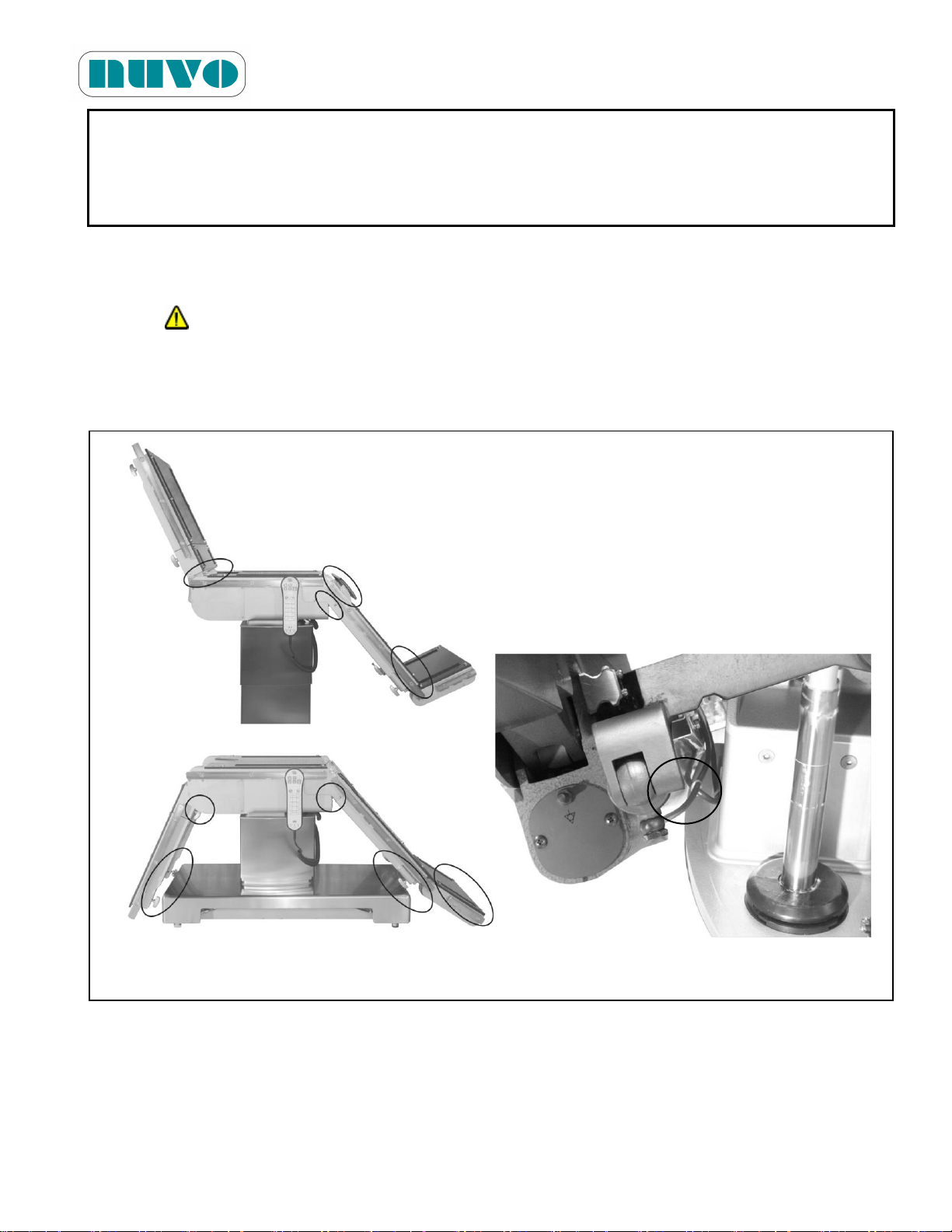
5.1 Pinch Point Warnings
Tabletop articulation could create pinch points. These points are identified in Figures 5-1 and the
stickers “ ” can be seen near each pinch point. Everyone involved in the tabletop positioning
should be aware of these pinch points before operating the table.
Figure 5-1: Pinch Points
5-7
Page 52
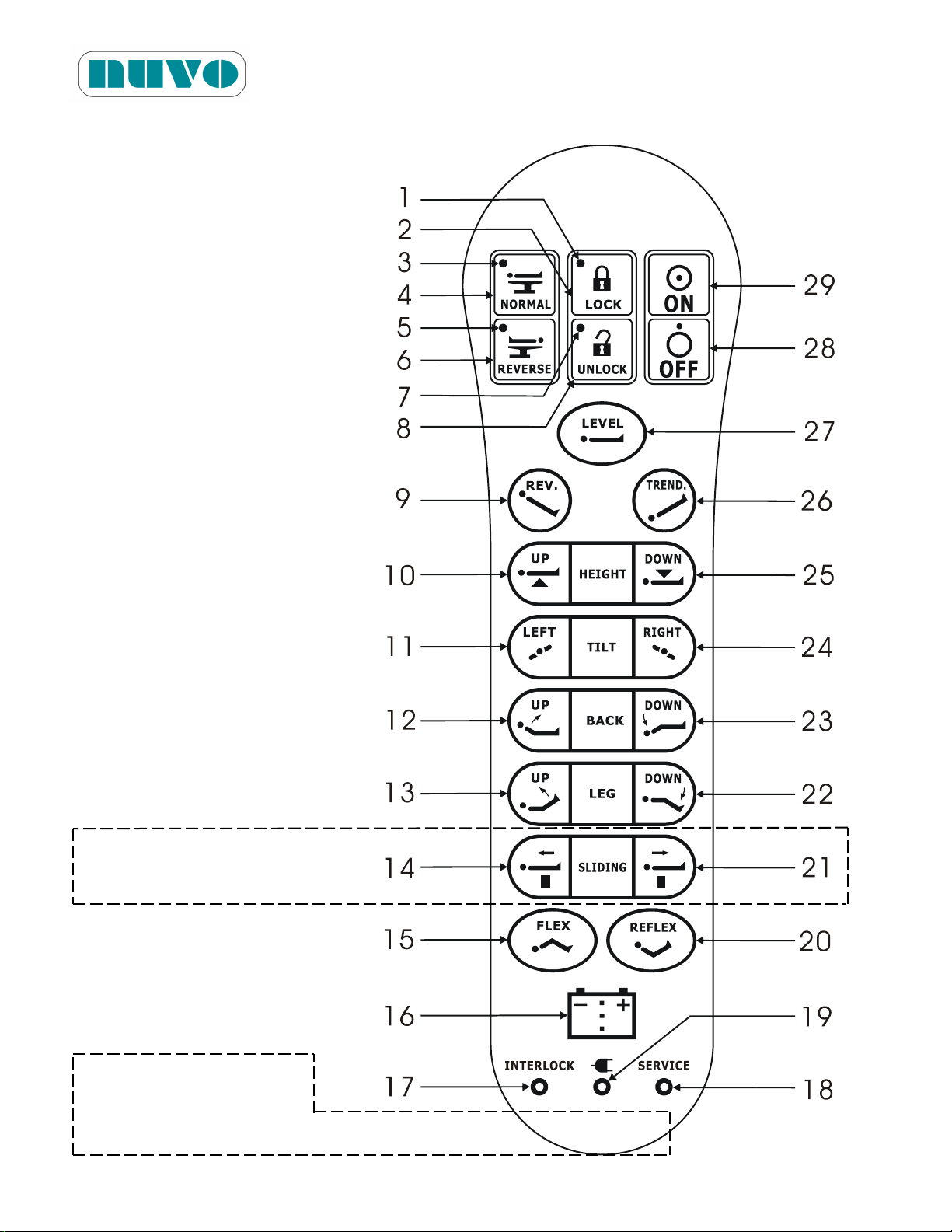
Figure 5-2: Definition of Buttons & Indicators of Hand Pendant
the part number, the last #
PN######V#
B2AV1000 Series Surgical Table
IM-B2AV1000-E01
14 and 21 are for models
with S suffix.
The first six numbers are
is version number.
5-8
Page 53

B2AV1000 Series Surgical Table
No.
Description
No.
Description
1.
Floor Lock Indicator (Green LED): Lock
16.
Battery Level Indicator
2.
Floor Lock: Lock
17.
Interlock Indicator (Yellow LED)
3.
Normal Orientation Indicator (Green LED)
18.
Service Indicator (Yellow LED)
4.
Normal Patient Orientation
19.
AC Power Indicator (Green LED)
5.
Reverse Orientation Indicator (Green LED)
20.
Reflex
6.
Reverse Patient Orientation
21.
Slide Down (Leg end)
7.
Floor Lock Indicator (Green LED): Unlock
22.
Leg Down
8.
Floor Lock: Unlock
23.
Back Down
9.
Reverse Trendelenburg
24.
Right Tilt
10.
Height Up
25.
Height Down
11.
Left Tilt
26.
Trendelenburg
12.
Back Up
27.
Tabletop Level
13.
Leg Up
28.
Sleep Mode
14.
Slide Up (Head end)
29.
Activate
15.
Flex
IM-B2AV1000-E01
Note: 14 and 21 are for models B2AV1000S, B2AV1000SK and B2AV1000SKP only.
Remarque: Les points 14 et 21 ne concernent que les modèles B2AV1000S, B2AV1000SK et
B2AV1000SKP.
5.2 Table Positioning
Make sure the Floor Locks are engaged before reading further.
Use Hand Pendant or an optional Foot Controller to create a desired table position, but Head
Section and Kidney Elevator could only be adjusted manually. In case of a Hand Pendant
malfunction, use the Override System before the problem can be solved.
5.2.1 Hand Pendant Operation
Complete Section 4 before using the Hand Pendant for first surgery.
1. Press desired button(s) to create a desired position. Press one button at a time. There
are no automatic buttons other than the LOCK and UNLOCK buttons, the table moves
only when a movement button is pressed, and it stops as soon as the button is released,
or it stops when it has reached its maximum or programmed allowable distance or angle.
2. Release the button when the desired position is reached.
3. For LOCK or UNLOCK, press the button and release it after the function has been
activated. The table will automatically LOCK or UNLOCK.
5-9
Page 54

B2AV1000 Series Surgical Table
IM-B2AV1000-E01
4. When the table begins to move on its own while using the hand pendant, press the OFF
button right away and call for service.
5.2.1.1 Level Button Operation
Press Level button (#27, Figure 5-2) until tabletop has reached level and then let go of
the button.
5.2.1.2 Normal Orientation Operation
Press Normal button (#4, Figure 5-2) and its green LED will be lit. All buttons will
automatically switch to normal orientation.
5.2.1.3 Reverse Orientation Operation
Press Reverse button (#6, Figure 5-2) and its green LED will be lit. All buttons will
automatically switch to reverse orientation.
5.2.1.4 Battery Level Indicator
Besides indicating level of battery power, it also indicates the need to change the
battery or batteries when all three LEDs within the battery symbol are flashing.
5.2.1.5 Interlock LED
As a protective feature, when the Interlock indicator (#17, Figure 5-2) is lit (buzzer
beeping at the same time), it means one of movements (table down, Trendelenburg,
Reverse Trendelenburg, tilts, leg down, back down or slide out) has been stopped for
running into something and the button of the above said movements is disabled. It
could also mean that one of the above said movements has reached its maximum
distance or angle.
5.2.1.6 Service LED
While operating Hand Pendant, if Service indicator (#18, Figure 5-2) is lit (buzzer
beeping at the same time), it could mean override system is on. Turn it off and the
Service LED should disappear. Other than that, when Service LED is on while using
the hand pendant, then a problem has occurred that renders certain component(s)
unusable. At this time, the 10-segment LED Battery Indicator (#8, Figure 5-4-1 or #8,
Figure 5-4-2) could display Service Code. For other events, which the Service LED is
lit only while a button is pressed; press the button while looking for the Service Code
display. Let go of the button to exit from the Service Code display. Inform your
finding to the NUVO Sales or Service Representatives. (Refer to Table 5-1 for
description of Service Codes.)
5-10
Page 55
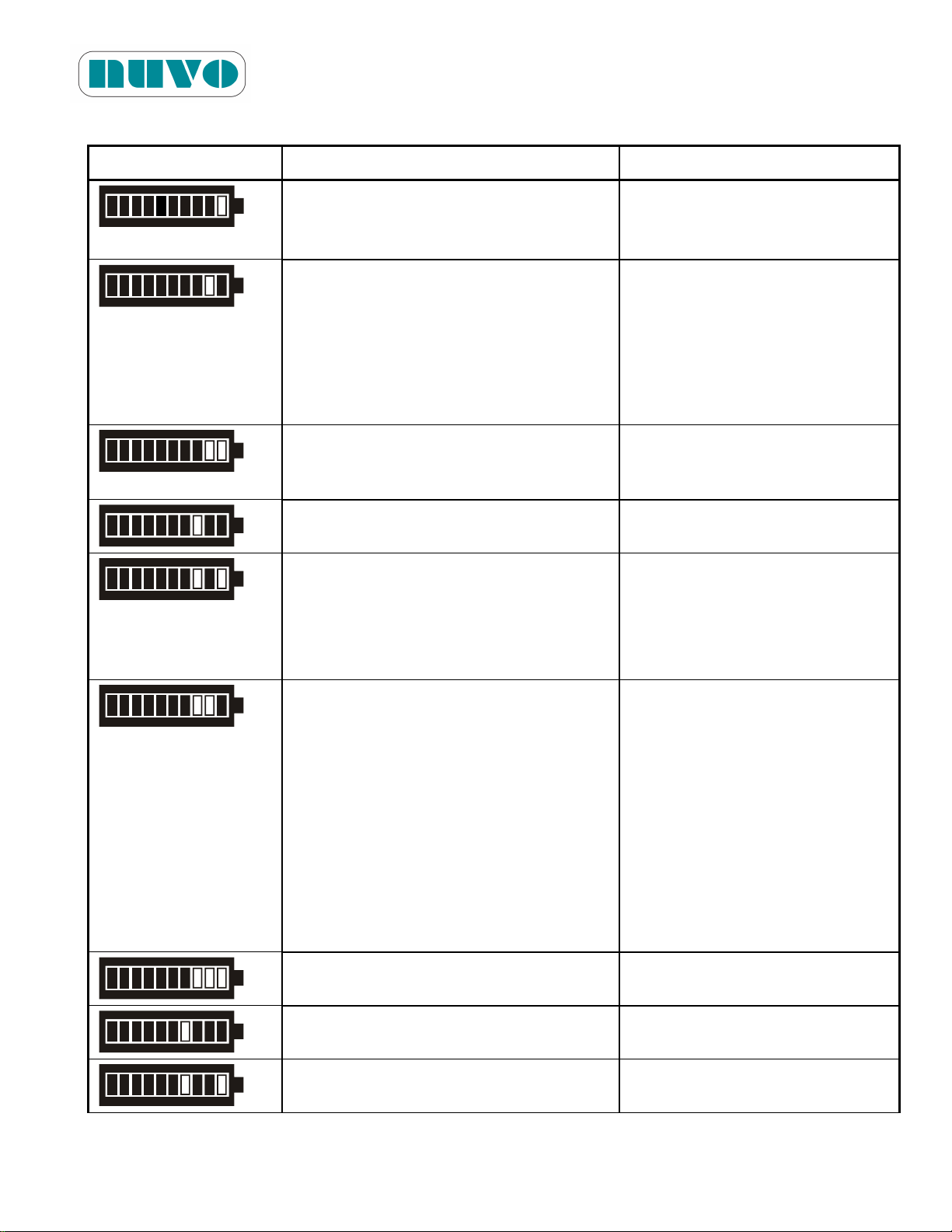
Table 5-1 Service Codes
Display/Code
Symptom
Cause
1
Pump motor is not working.
1. Overheated motor
2. Faulty driver PCB (ASM0022
or ASM0023)
2
1. LOCK functions normally but signal
from both of 2-set photo sensors
(ASM0026) were not detected.
2. UNLOCK functions normally, but
signal from at least one of the two
2-set photo sensors (ASM0026)
was not detected.
Faulty 2-set photo sensors
(ASM0026) or connection
3
LOCK functions normally, but the
signal from psUNLOCK was not
detected.
Faulty psUNLOCK or pressure
setting too high
4
LOCK functions normally, but the
signal from psLOCK was not detected
Faulty psLOCK or pressure
setting too high
5
During LOCK, signals from neither
psLOCK nor psUNLOCK were
detected.
1. Solenoid valve jam
2. Faulty (ASM0022) driver PCB
3. Faulty wiring of psLOCK,
psUNLOCK or pressure
setting too high
6
1. All angle sensors function normally,
but signal from psSYSTEM was not
detected when either
Trendelenburg, back down or leg
down moves to extreme
(B2AV1000(K))
2. All angle sensors function normally,
but signal from psSYSTEM was not
detected when either lateral tilts,
Trendelenburg, Rev. Trend, Back or
Leg down moves to extreme
(B2AV1000S(K)(P))
Faulty psSYSTEM or pressure
setting too high
7
No signal from Back angle sensor
(ASM0029)
Back ASM0029 or wiring
damaged
8
no signal from Leg angle sensor
(ASM0029)
Leg ASM0029 or wiring
damaged
9
no signal from Seat angle sensor
(ASM0028)
Seat ASM0028 or wiring
damaged
B2AV1000 Series Surgical Table
IM-B2AV1000-E01
5-11
Page 56
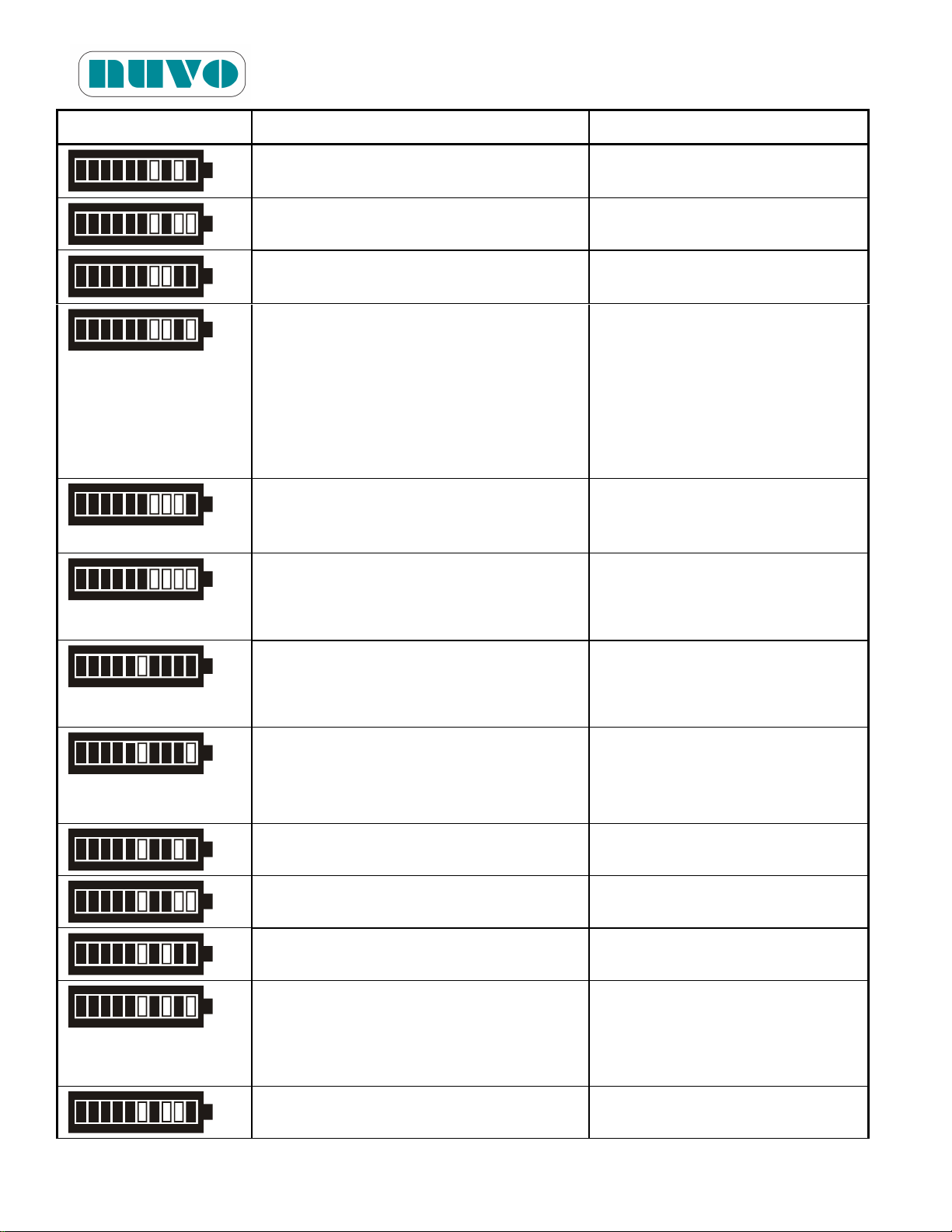
B2AV1000 Series Surgical Table
Display/Code
Symptom
Cause
10
No signal in more than one angle
sensor
Loosed or damaged ASM0028
connection (P17)
11
Not Used
12
Motor is running as soon as the hand
pendant is turned on.
Main PCB or Driver PCB is
damaged.
13
When rotary valve keeps turning but
receives no signal from U1~U4 of
ASM0027 (B2AV1000(K))
1. Short circuit within the angle
system.
2. Rotary valve motor damaged
3. ASM0023 driver PCB
damaged
4. ASM0027 or its cable
damaged
14
Rotary valve position number not
matching position code
(B2AV1000(K))
ASM0027 or its cable damaged
15
Rotary valve position code correct but
stops too early, and fails to position
after programmed compensation.
(B2AV1000(K))
Timing parameter is set too low
16
Rotary valve position code right but
stops too, and fails to position after
program compensation.
(B2AV1000(K))
Timing parameter is set too high
17
Tabletop rotates laterally or
longitudinally without their respective
button being pressed.
(B2AV1000S(K)(P))
Faulty ASM0022 driver PCB
18
Not Used
19
Not Used
20
Not Used
21
Main batteries is not being charged
(i.t.)*
1. Loose battery connector
2. Battery reached life span or
over discharged
3. Broken PCB (ASM0021)
22
Not Used
IM-B2AV1000-E01
5-12
Page 57
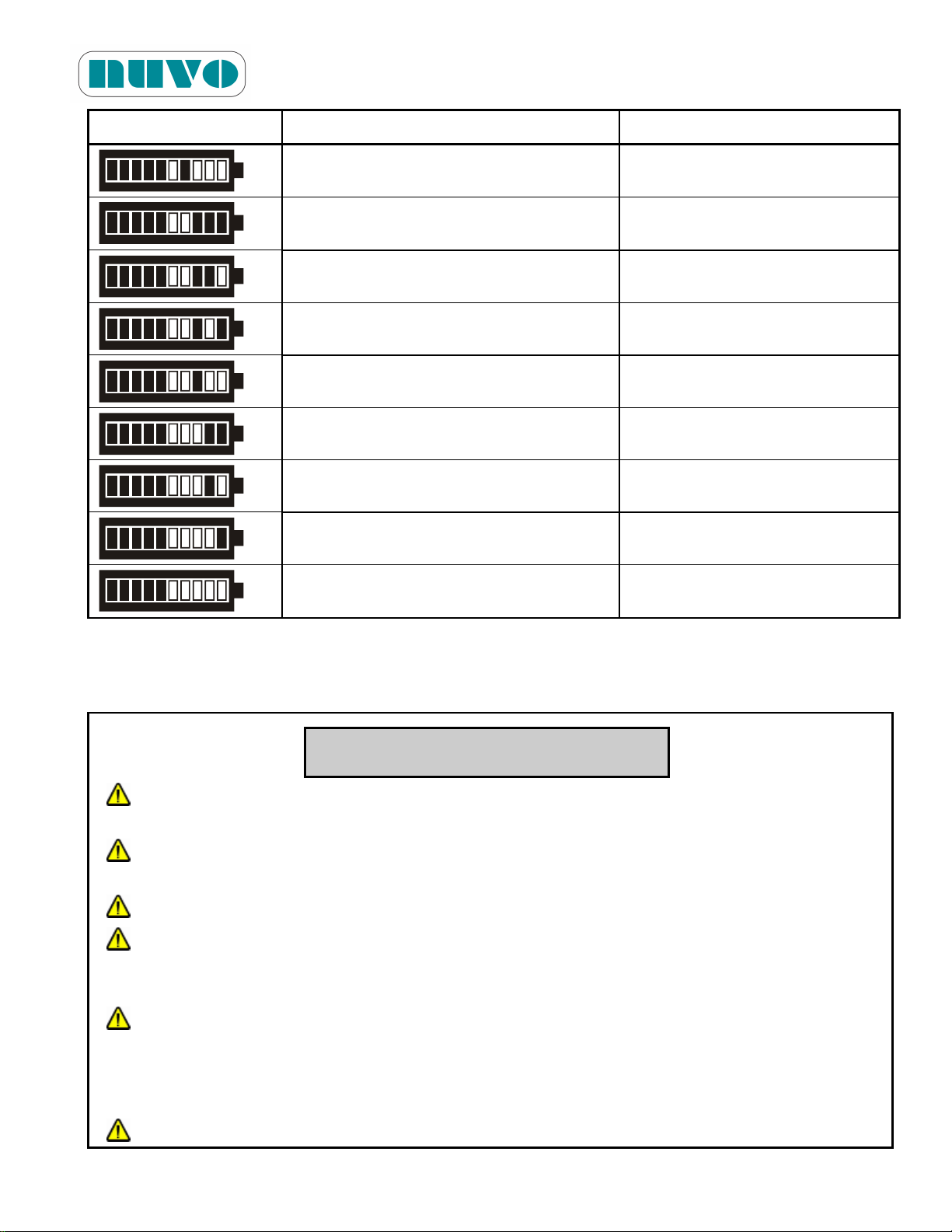
B2AV1000 Series Surgical Table
Display/Code
Symptom
Cause
23
Not Used
24
Using Slide button of hand pendant on
Non-slide table
25
Not Used
26
Not Used
27
Voltage too high (i.t.)*
Wrong Setting
28
Voltage too low (i.t.)*
Wrong Setting
29
Upon switching on, Service LED lights
and emits bi-bi-bi sound (i.t.)*
Did not disable Override
System
30
Not Used
31
Wrong DIP Switch setting
(B2AV1000(K)) (i.t.)*
WARNING!
PINCHING HAZARD: Extreme tabletop articulation creates pinch points. Before
operating the table, review illustrations in Figures 5-1, PINCH POINTS.
PINCHING AND TIPPING HAZARD: If user is not completely familiar with the controls
for patient positioning and table operation, patient could sustain injury.
EXPLOSION HAZARD: Do not use this table with flammable anesthetics.
UNEXPECTED TABLE MOVEMENT HAZARD When the table moves by itself as you
enable the override system, disable it right away and call a technician for service.
(B2AV1000S(K)(P) only)
UNEXPECTED TABLE MOVEMENT HAZARD: If the surgical table begins to move on
its own when the override control toggle switch is put in either the up or down position,
immediately put the switch back in the middle position, discontinue use of the table, and
call a technician for service. (for B2AV1000/B2AV1000K)
UNEXPECTED TABLE MOVEMENT HAZARD: When using any control, please
IM-B2AV1000-E01
*i.t.: initial tests performed in the beginning of turning on the hand pendant.
5.2.2 Using Override System for Table Positioning
5-13
Page 58
B2AV1000 Series Surgical Table
operate one button or switch at a time to avoid unexpected table movement.
AVERTISSEMENT!
RISQUE DE PINCEMENT: L'articulation excessive du dessus de table crée des points
de pincement. Consultez les illustrations des figures 5-1, « POINTS DE
PINCEMENT » avant l'utilisation la table
RISQUE DE PINCEMENT ET DE BASCULEMENT: Si l'utiliisateur n'a pas une parfaite
connaissance des contrôles de positionnement du patient, le patient subir des
blessures.
RISQUE D'EXPLOSION: N'utilisez pas la table avec des anesthésiques inflammables.
RISQUE DE MOUVEMENTS INATTENDUS DE LA TABLE: Si la table chirurgicale
commence à se déplacer d'elle-même alors que l'interrupteur de commande prioritaire
est activé, désactivez immédiatement l'interrupteur, cessez d'utiliser la table et appelez
un technicien qualitfié pour la réparation (des modèles
B2AV1000S/B2AV1000SK/B2AV1000SKP).
RISQUE DE MOUVEMENTS INATTENDUS DE LA TABLE: Si la table chirurgicale
commence à se déplacer toute seule elle-même alors que l'interrupteur de commande
prioritaire est en position « haute » ou « basse », placez immédiatement l'interrupteur
en position « milieu », cessez d'utiliser la table et appelez un technicien en entretien et
en réparation (pour les modèles B2AV1000/B2AV1000K).
RISQUE DE MOUVEMENTS INATTENDUS DE LA TABLE: Lorsque vous utilisez une
commande, veuillez utiliser un bouton ou un commutateur à la fois pour éviter tout
mouvement inattendu de la table.
CAUTION! MISE EN GARDE!
Read the entire manual before operating the table
Veuillez lire entièrement le manuel d'instruction avant d'utiliser la table.
IM-B2AV1000-E01
5-14
Page 59
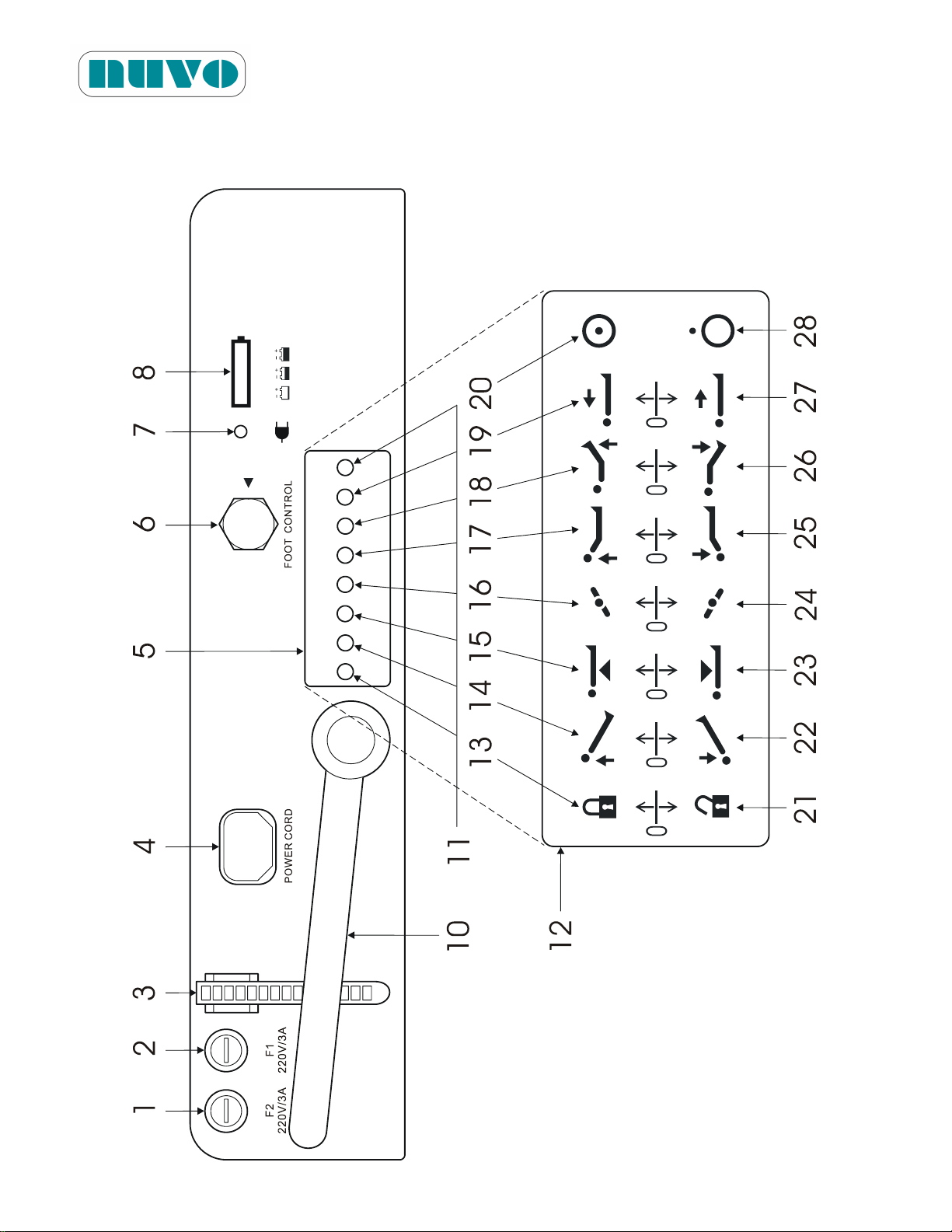
B2AV1000 Series Surgical Table
IM-B2AV1000-E01
Figure 5-4-1: Definition of switches and items on the Base Penal and Override System
(Models B2AV1000S / B2AV1000SK / B2AV1000SKP only)
5-15
Page 60
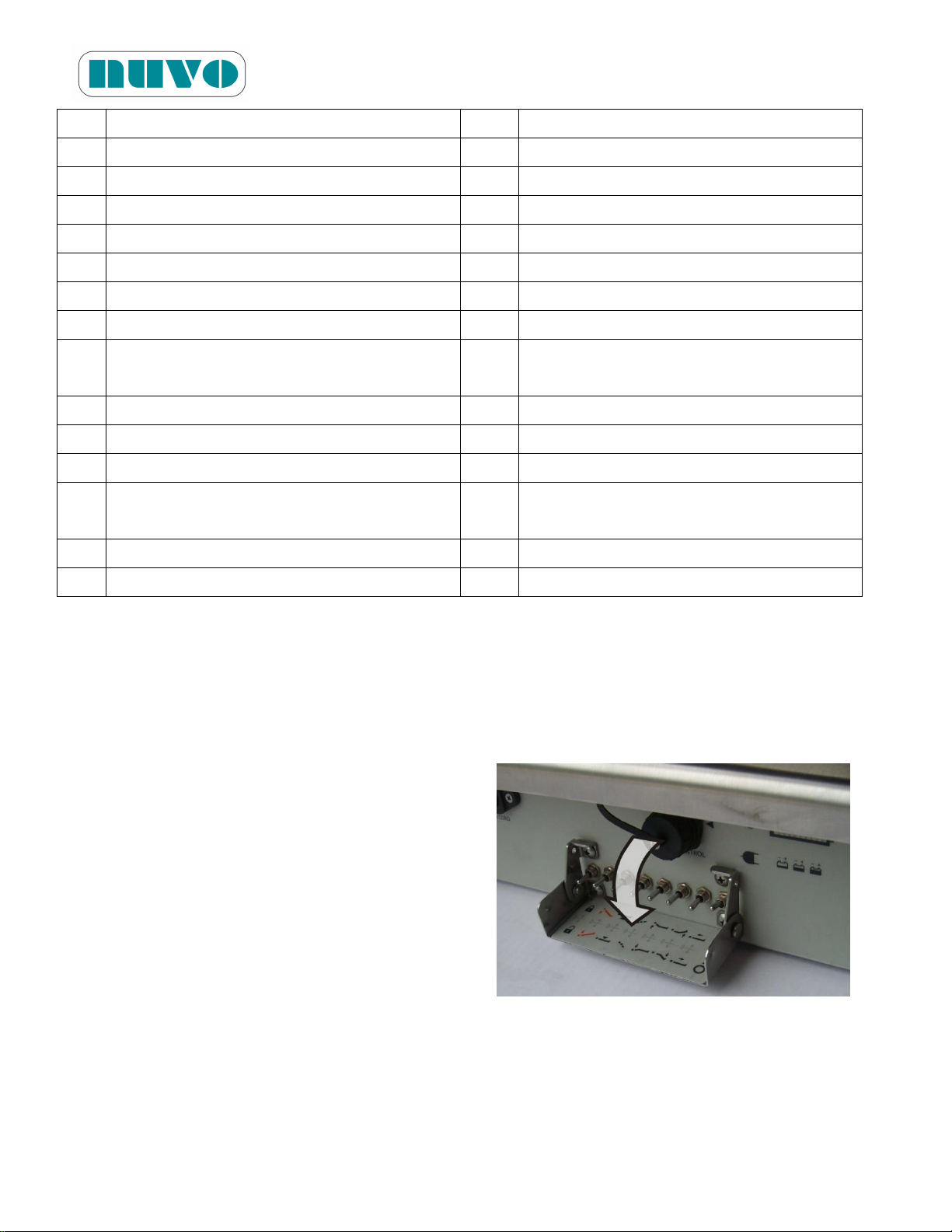
B2AV1000 Series Surgical Table
No.
Description
No.
Description
1.
F1 Fuse (live)
15.
Height Up
2.
F2 Fuse (neutral)
16.
Left Tilt
3.
Wire Collect Tie
17.
Back Up
4.
Power Cord Socket
18.
Leg Up
5.
Override System Cover
19.
Tabletop Slide Up
6.
Foot Control Socket
20.
Override System Enable
7.
AC Power Indicator (Green LED)
21.
Disengage Floor Lock
8.
Battery Power Indicator (10 bars-Full, 5
bars-Mid, 2 bars-Low)
22.
Trendelenburg
9.
(not used)
23.
Height Down
10.
Footpump Pedal (B2AV1000SKP only)
24.
Right Tilt
11.
Override System Toggle Switches
25.
Back Down
12.
Override System Label (located inside of
“5. Override System Cover”)
26.
Leg Down
13.
Floor Lock
27.
Tabletop Slide Down
14.
Reverse Trendelenburg
28.
Override System Disable
IM-B2AV1000-E01
5.2.2.1 B2AV1000S / B2AV1000SK / B2AV1000SKP
The B2AV1000S/B2AV1000SK/B2AV1000SKP tables are equipped with an Override System
(#12, Figure 5-4.1) for controlling table movements in the event of Hand Pendant malfunction.
The system consists of an on/off switch, table movement switches and a floor lock switch.
1. Flip down the override system cover.
2. Turn toggle switch (#20, Figure 5-4-1) to ON.
Note: If the table moves by itself as you
enable the override system, disable it
right away and call for service.
Remarque: Si la table se déplace d'elle-même
alors que vous activez le système de
commande de priorité, désactivez-le
immédiatement et appelez un
technicien en entretien et en
réparation.
3. Toggle switch(s) (#11, Figure 5-4-1) up or
down to actuate desired table movement.
5-16
Page 61
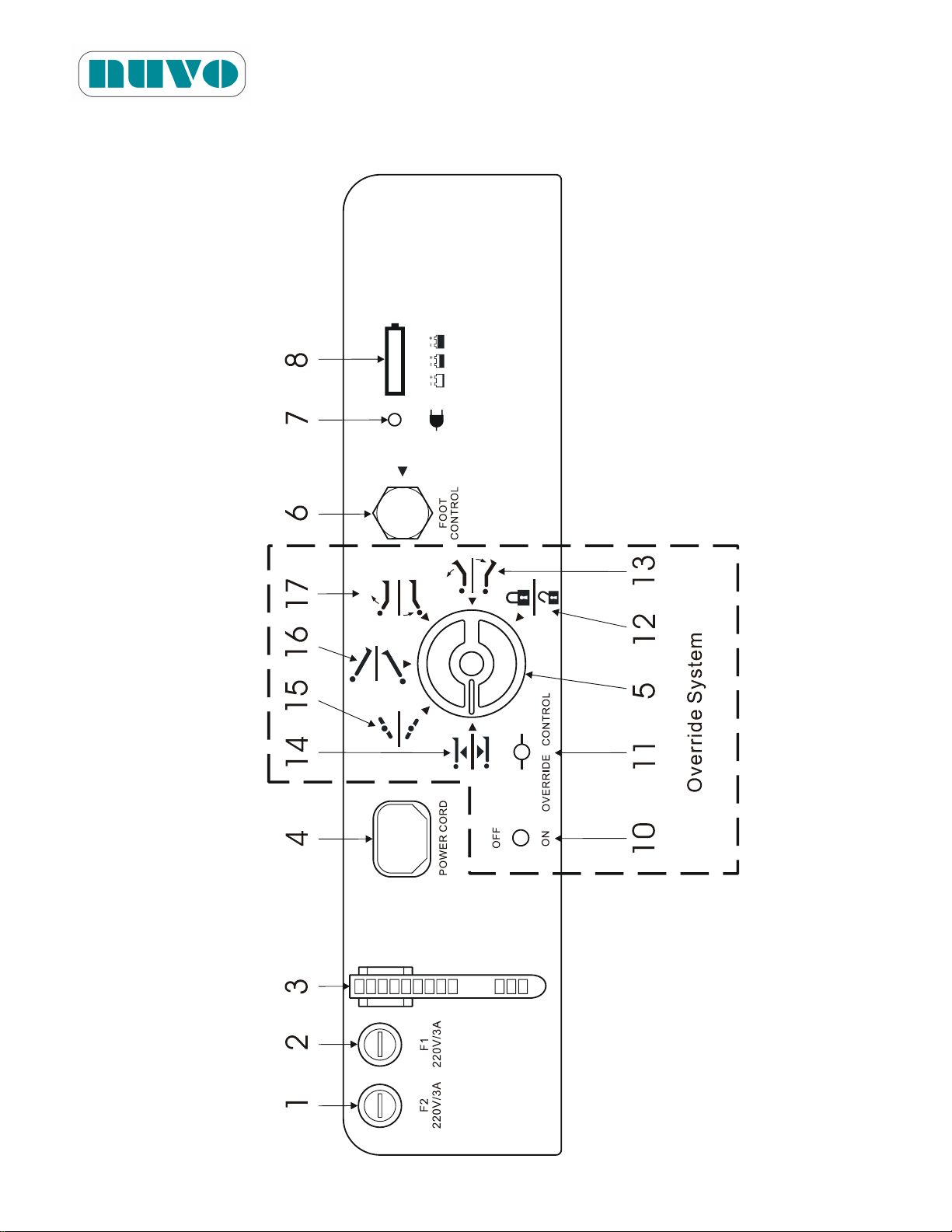
B2AV1000 Series Surgical Table
IM-B2AV1000-E01
Figure 5-4-2: Definition of switches and items on the Base Penal and Override System
(Models B2AV1000 / B2AV1000K only)
5-17
Page 62
B2AV1000 Series Surgical Table
No.
Description
Rotary Knob (#5)
Override Control (#11)
1.
Fuse (neutral)
No.
Description
Up
Down
2.
Fuse (live)
12.
Floor Lock
Lock
Unlock
3.
Wire Collect Tie
13.
Leg
Up
Down
4.
Power Cord Socket
14.
Height
Up
Down
5.
Manual Rotary Knob
15.
Tilt
Left
Right
6.
Foot Control Socket
16.
Trendelenburg
Rev. Trend.
Trend.
7.
AC Power Indicator (Green LED)
17.
Back
Up
Down
8.
Battery Level Indicator(10 bars: Full, 5
bars: Mid, 2 bars: Low)
9.
(not used)
10.
ON/OFF Switch (to actuate movement)
11.
Override Control Switch (to control
direction of movement)
IM-B2AV1000-E01
5.2.2.2 B2AV1000 / B2AV1000K
The B2AV1000/B2AV1000K tables are equipped with an Override System (Figure 5-4-2) for
controlling table movements in the event of Hand Pendant malfunction. The system consists of
an on/off switch, a manual rotary knob and an override control toggle switch.
1. Turn knob (# 5, Figure 5-4-2) to select a desired movement.
2. Toggle switch (# 11, Figure 5-4-2) up or down towards the direction of desired movement.
Note: If the table moves by itself, return the Override Control toggle switch to its neutral
position, which is in the middle, and call for service.
Remarque: Si la table se déplace d'elle-même, remettez l'interrupteur de commande
prioritaire en position neutre (au milieu), et appelez un technicien qualifié pour la
reparation.
3. Toggle switch (#10, Figure 5-4-2) to activate the movement.
4. Repeat step 1, 2 and 3 as many time as needed to create a desired table position.
Note:
Override System is only suitable for NORMAL patient orientation.
Although table positioning can be performed with the Override System, the problem
should be corrected as soon as possible. Have a qualified service technician repair
the table before further use.
5-18
Page 63
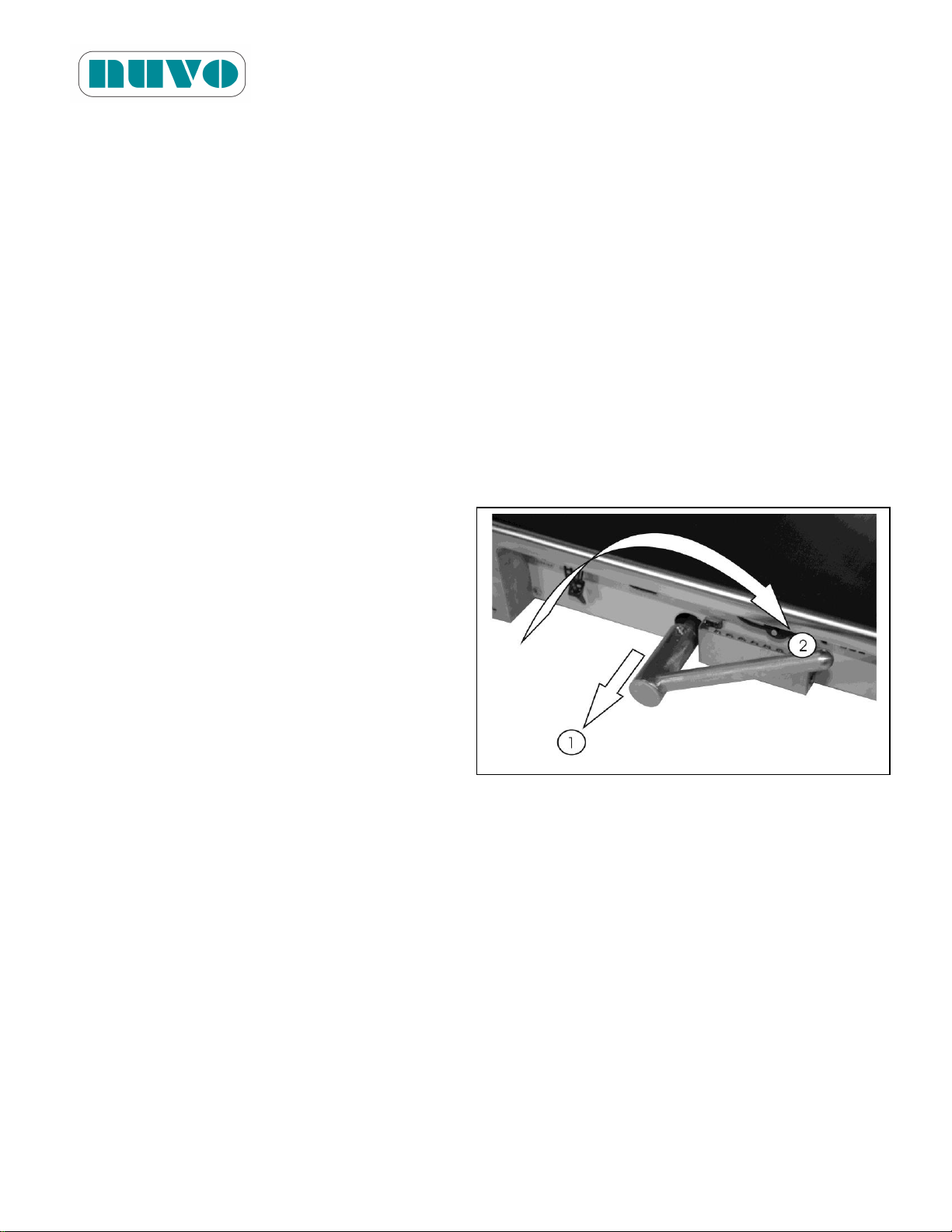
B2AV1000 Series Surgical Table
IM-B2AV1000-E01
When Override System is enabled, Hand Pendant and Foot Controller are disabled,
and the Hand Pendant’s Service LED is lit.
Remarque:
Le système de commande de priorité ne convient qu'à l'orientation NORMALE du patient.
Bien que le positionnement de la table puisse être effectué avec le système de
commande de priorité, le problème devrait être corrigé dès que possible. Demandez
à un technicien en entretien et en réparation de réparer la table avant de continuer à
l'utiliser.
Lorsque le système de commande de priorité est activé, le boîtier de commande
manuelle et la pédale de commande sont désactivés, et le voyant de service du boîtier
de commande manuelle est allumé.
5.2.3 Manual Pump Instructions (B2AV1000SKP only)
Use Manual Pump when electrical pump is not working. Articulate table using Hand Pendant in
the following steps:
1. Pull out and flip Foot Pedal into position.
2. Press a Hand Pendant button for the
desired movement.
3. Step on the Foot Pedal while pressing a
Hand Pendant button until the desired
degree or distance of movement is
reached.
4. Step off the foot pedal and release the
button to stop table movement.
F
Figure 5-5
Note: Although table positioning can be performed with Manual Pump, problem should be
corrected as soon as possible.
Remarque: Bien que le positionnement de la table puisse être effectué avec une pompe
manuelle, le problème devrait être corrigé dès que possible.
5-19
Page 64
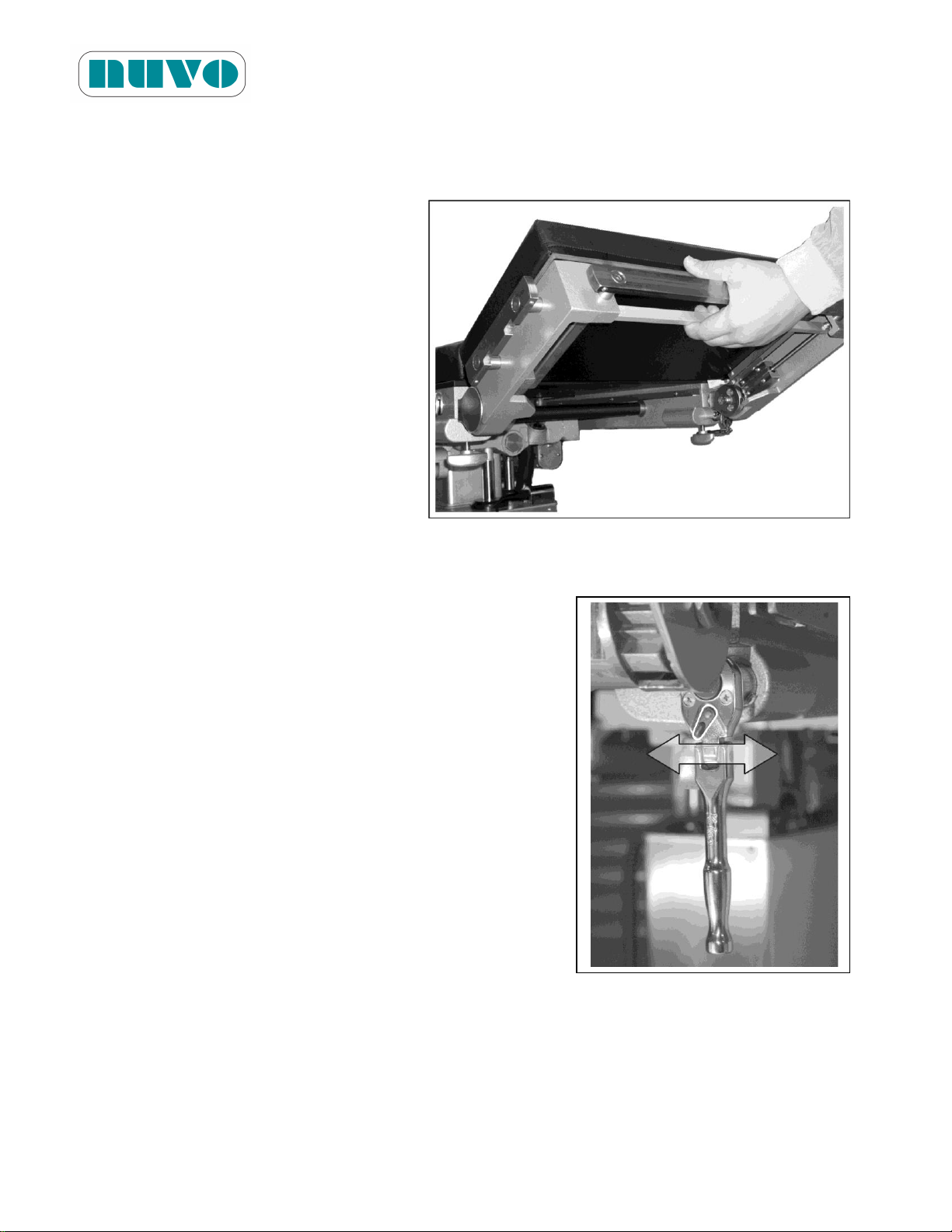
B2AV1000 Series Surgical Table
IM-B2AV1000-E01
5.2.4 Head Section Positioning
Head section is manually adjustable 90° maximum up or down from the Back section.
1. To adjust the Head section upward, lift
the Head section by hand.
2. To adjust the Head section downward,
locate the spring-loaded bar pull and
pull it to unlock the Head section to
lower it to a desired angle and release
the bar pull. Move the Head section
slightly until ratchet mechanism locks
it into position.
Figure 5-6:
5.2.5 Kidney Elevator Instructions
The kidney elevator is manually adjustable up to 4.7in
(120mm) from the tabletop.
1. Locate the ratchet wrench (#12, Figure 3-2) under the
right side of Back section, fold down and bring out the
handle.
2. Adjust the lever to the right for the upward direction, and
then use the wrench to bring up the kidney elevator.
3. Adjust the lever to the left for the downward direction,
and then use the wrench to bring down the kidney
elevator.
Figure 5-7:
5.2.6 Cassette Channels
There are Cassette Channels beneath the tabletop where the radiograph can be taken. Just slide
in the x-ray film cassette (14" wide only).
5-20
Page 65
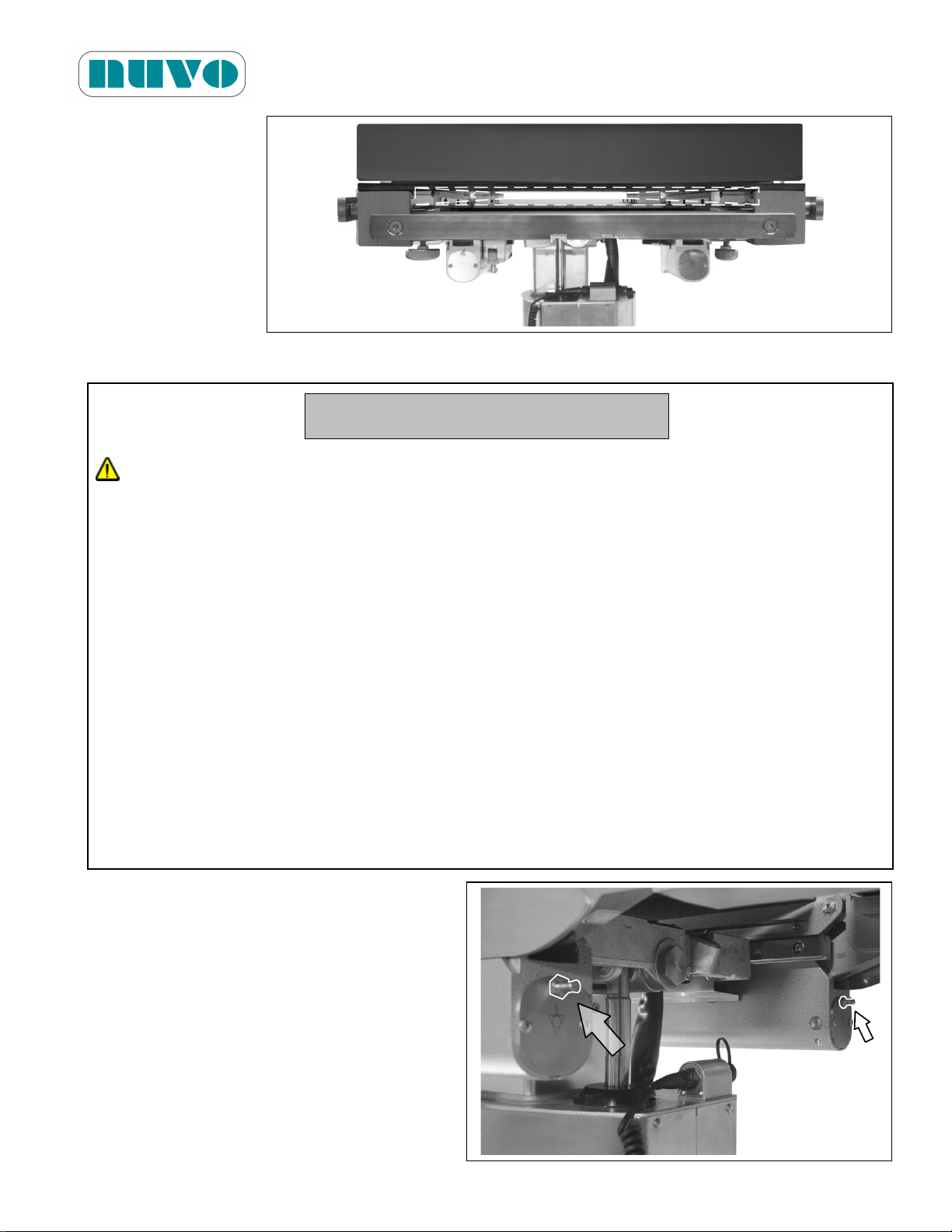
Figure 5-8:
WARNING! AVERTISSEMENT!
PATIENT INJURY HAZARD: A potential hazard exists when the surgical table is used
together with high-frequency surgical equipment such as cardiac defibrillators and cardiac
defibrillator-monitors. In certain conditions the antistatic properties of the mattress pads
could become insufficient to prevent burns to the patient’s skin. Care must be taken to
ensure that the insulation between the mattress pad and the patient’s skin is maintained,
including monitoring the bed sheet for excessive moisture, which could compromise the
insulation. Carefully read the manufacturers’ instructions of the aforementioned products,
as they relate to patient safety.
RISQUE DE BLESSURES AU PATIENT: Un danger potentiel est présent lorsque la table
chirurgicale est utilisée avec de l'équipement chirurgical de haute fréquence tel que des
défibrillateurs cardiaques ou des moniteurs à défibrillateur cardiaque. Dans certaines
conditions, les propriétés antistatiques des couvre-matelas pourraient devenir
insuffisantes pour prévenir les brûlures à la peau du patient. Des précautions doivent
être prises pour s'assurer que l'isolation entre le couvre-matelas et la peau du patient est
maintenue, ce qui comprend la surveillance de l'humidité excessive dans les draps de lit,
qui pourrait compromettre cette isolation. Veuillez lire attentivement les instructions des
fabricants des produits susmentionnés, car ils ont trait à la sécurité des patients.
5.2.7 Use of Equipotentiality for other Electrical Equipments
B2AV1000 Series Surgical Table
IM-B2AV1000-E01
Two connecting points of Equipotentiality
are available.
Figure 5-9:
5-21
Page 66
B2AV1000 Series Surgical Table
WARNING! AVERTISSEMENT!
INSTABILITY HAZARD: Using an NUVO surgical table and/or NUVO accessories or
accessories manufactured and sold by other companies for a purpose other than the
stated purpose could result in patient or user injury, and/or table, accessory, or other
property damage.
RISQUE D'INSTABILITÉ: L'utilisation de la table NUVO et de ses accessoires ou
d'accessoires fabriqués et vendus par d'autres compagnies pour d'autres fins que
celles indiquées peut entraîner des blessures au patient ou à l'opérateur, ainsi que
des dommages à la table ou à ses accessoires.
PERSONAL INJURY HAZARD: When installing any surgical table accessory, check
for correct attachment and tighten securely (if applicable). Do not use worn or
damaged accessories.
RISQUE DE BLESSURES CORPORELLES: Lors de l'installation de tout accessoire
à la table chirurgicale, veuillez vérifier qu'il est adéquatement fixé et serré (selon le
cas). N’utilisez aucun accessoire usé ou endommagé.
CAUTION! MISE EN GARDE!
The anti-static pathway is: Mattress Pad→ Tabletop→ Column→ Base→ Floor Lock
Pads→ Floor. Therefore, the anti-static properties of the table depend upon the use of
the recommended NUVO mattress pads.
IM-B2AV1000-E01
5.2.8 Backup Batteries
B2AV1000 Series surgical tables are AC or DC powered. In AC mode, the batteries are
charged automatically. In absence of AC power, the table will switch to battery power
automatically.
Note: Make sure the Battery Level Indicator (#8, Figure 5-4-1 or 5-4-2) has at least 2
segments before operating the table.
Remarque: Assurez-vous que l'indicateur de niveau de batterie (#8, Figure 5-4-1 ou 5-4-2)
allume au moins deux segments avant d'utiliser la table.
5.3 Accessories
5.3.1 Mattress Pads
5-22
Page 67
B2AV1000 Series Surgical Table
CAUTION! MISE EN GARDE!
Le chemin antistatique est le suivant: Couvre-matelas→ dessus de Table → Colonne→
Base→Patins de verrouillage au sol→Plancher. Par conséquent, les propriétés
antistatiques de la table dépendent de l'utilisation des couvre-matelas recommandés par
NUVO.
Part Number
Description
Shelf Life
B2DCP001630
v00.1
Pressure Relieving Pad, Head Section
(Coussin anti-pression, section de tête)
3 years(ans)
B2DCP001636
Pressure Relieving Pad, Body Section
(Coussin anti-pression, section du corps)
3 years(ans)
B2DCP001632
Pressure Relieving Pad, Leg Section
(Coussin anti-pression, section des jambes)
3 years(ans)
B2DCP001633
Pressure Relieving Pad, Leg Extension
(Coussin anti-pression, rallonge pour les jambes)
3 years(ans)
B2DGN0001v01
Pressure Relieving Pad Set (Head, Body, Leg and
Leg Extension)
(Jeu de coussins anti-pression (tête, corps, jambes
et rallonge pour les jambes))
3 years(ans)
B2DCP001656
Pressure Relieving Pad, Arm Support
(Coussin anti-pression, support de bras)
3 years(ans)
IM-B2AV1000-E01
The conductive mattress pads are backed with hook fastener tape strips, which can be securely
placed on the tabletop.
1. Installing the mattress pads: Leaving the hook fastener tape strip attached to the
mattress pad, remove the paper from the back of the outer tape strip. Carefully position the
mattress pad over the appropriate table section, then press firmly to ensure the adhesive
attaches securely to the tabletop.
2. To detach the mattress pad, pull up and peel it away from the tabletop.
Note: Use Mattresses supply by NUVO to ensure its anti-static properties.
Remarque: Utilisez les couvres-matelas fournis par NUVO pour garantir les propriétés
antistatiques.
5-23
Page 68
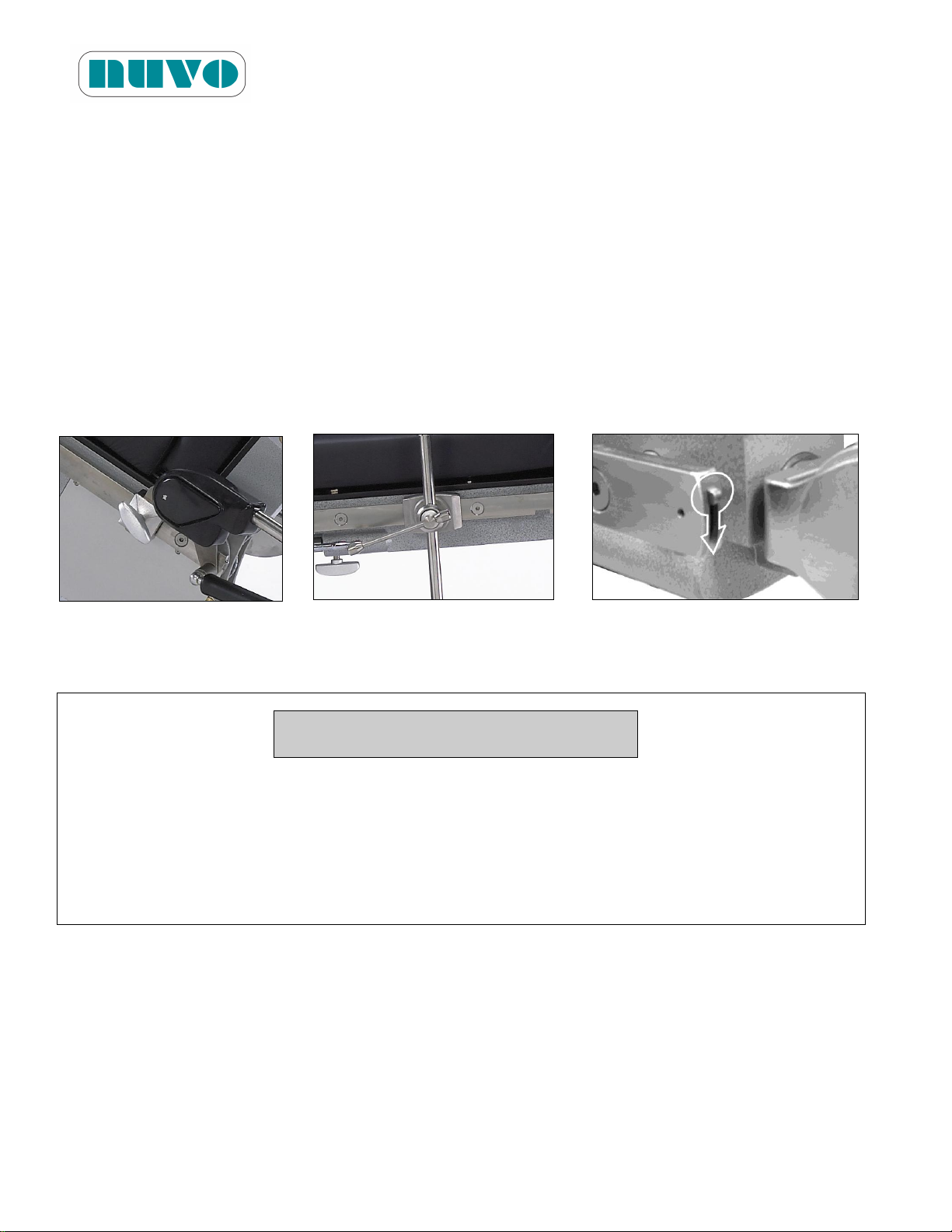
B2AV1000 Series Surgical Table
CAUTION! MISE EN GARDE!
When using a third party arm board, keep an angle greater than 15 degrees along the
direction of table length to avoid component damage during tabletop movements.
Lorsque vous utilisez un support de bras fourni par un autre fabricant, gardez un angle
supérieur à 15 degrés dans le sens de la longueur de la table pour éviter d'endommager
les composants lorsque vous articulez la table.
IM-B2AV1000-E01
5.3.2 Side Rail Locks and Clark Sockets
Many accessories are attached to the table’s side rails; these accessories need side rail locks or
Clark sockets to help secure them in place.
To install a side rail lock (figure 5-10), place it on the side rail, then insert the rectangular rod of
accessory through the corresponding rectangular hole, and lock the accessory into position with
thumbscrew. To uninstall, reverse the steps of installation.
To install a Clark socket (figure 5-11), slide it in from the end of side rails or through notches on
the side rail, and place the round rod of accessory through the Clark socket’s corresponding
round hole, and lock the accessory into position with screw. To uninstall, reverse the steps of
installation.
Figure 5-10 Figure 5-11 Figure 5-12
5.3.3 Arm Board
The Arm Board is manually adjustable 180° from head end to leg end horizontally; it can be used
when the angle of the tabletop is no more than 15 degrees above or below horizontal. The
Multi-task Arm Board is available for purchase separately, which can be used for any angle.
5-24
Page 69
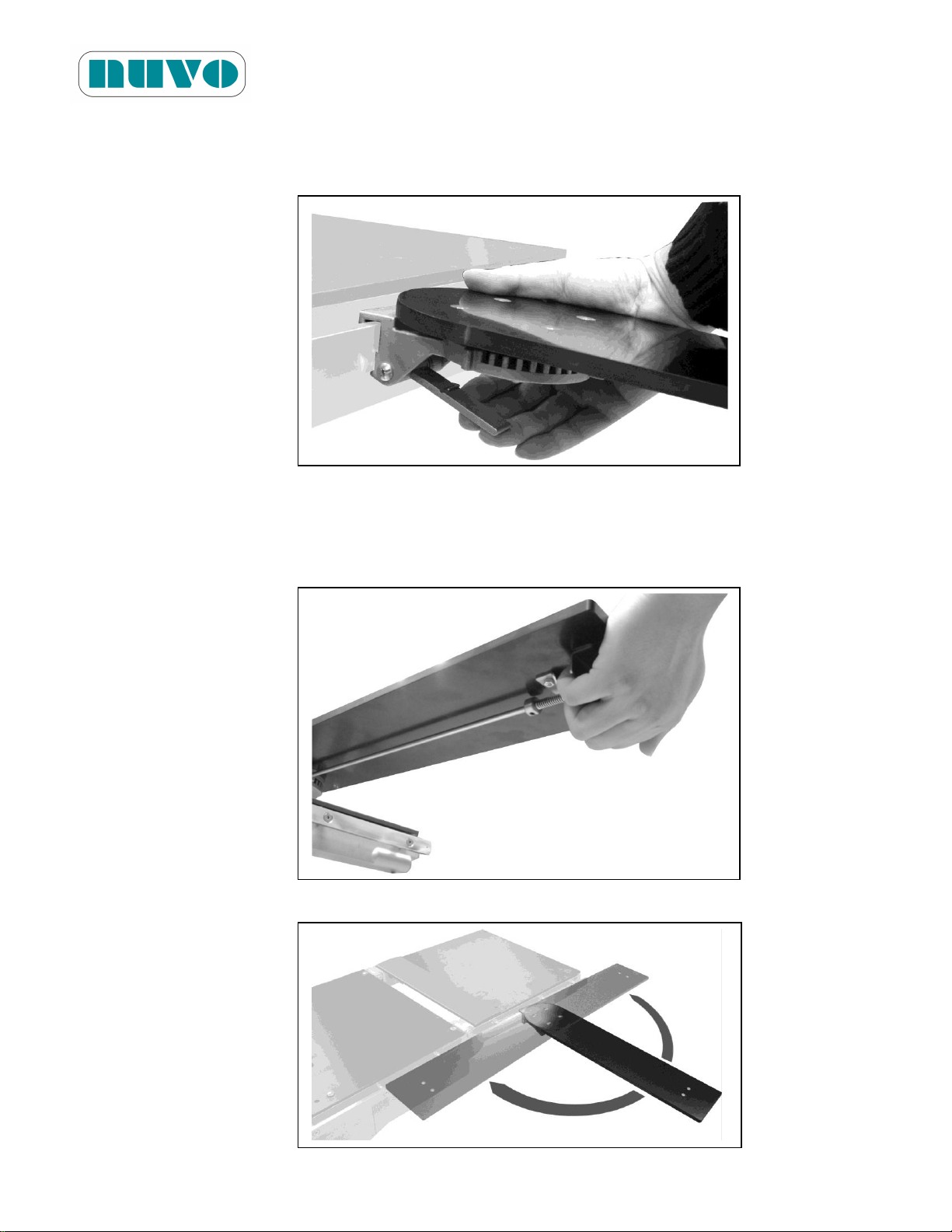
B2AV1000 Series Surgical Table
IM-B2AV1000-E01
Adjust Arm Board to desired angle:
1. Clamp Arm Board to the side rails.
Figure 5-13:
2. Locate ratchet release and pull to release (spring-loaded) the ratchet lock, and at the
same time adjust the arm support to the desired angle, and let go of ratchet release to
lock the Arm Board.
Figure 5-14:
Figure 5-15:
5-25
Page 70
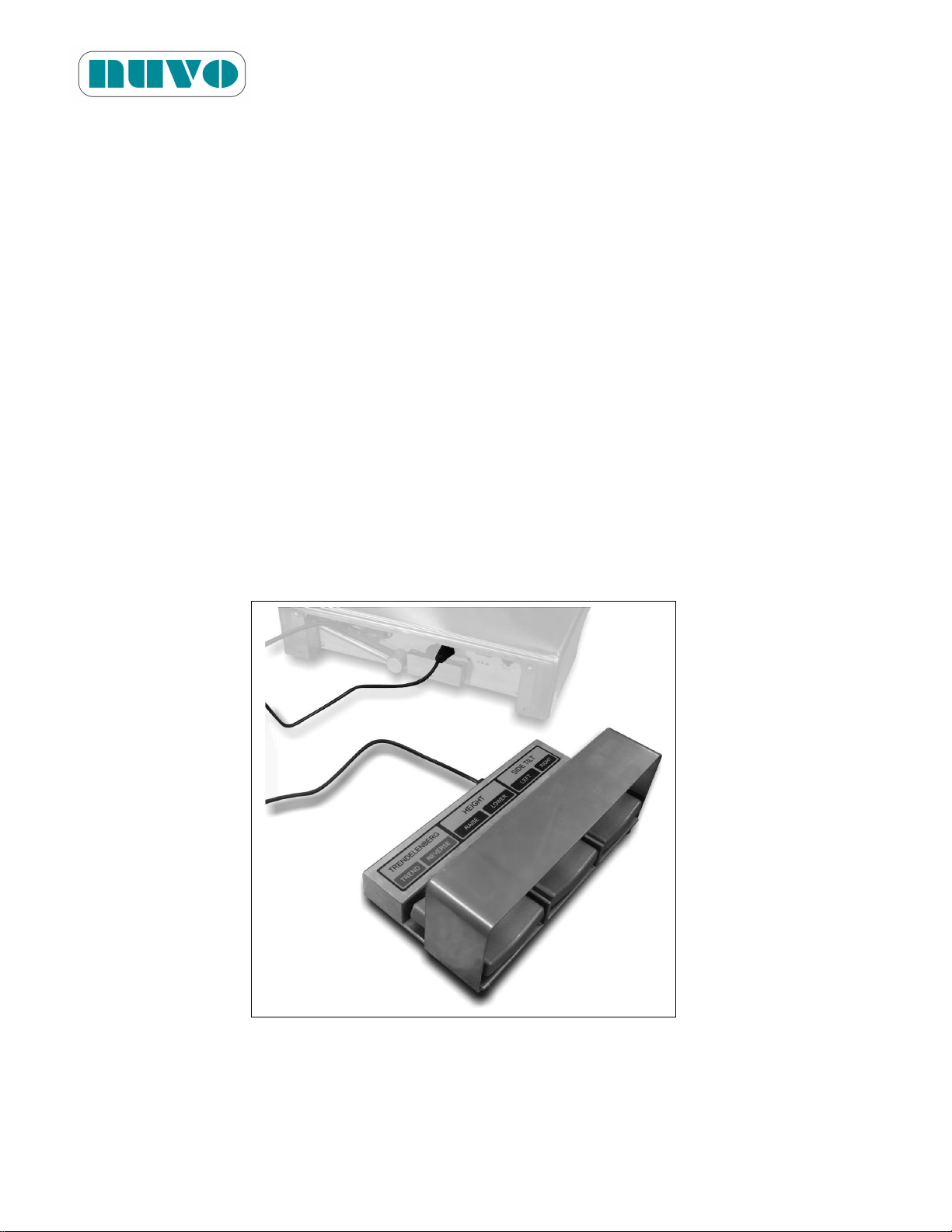
B2AV1000 Series Surgical Table
IM-B2AV1000-E01
5.3.4 Restraint Strap
Strap patient's legs with Restraint Strap to the side rails by using the attached hooks on either
end of the Restraint Strap. Adjust the length of Restraint Strap so that it is taut and holds the
patient in place.
5.3.5 Cassette Top
An optional accessory of four-section cassette top is available from NUVO for B2AV1000 Series
table. An X-ray cassette can be inserted between tabletop and the cassette top from the left for
right side of table. Align and push the pins of cassette top into holes on the tabletop so they fit
tightly, then place the patient onto the table top. During surgery, the X-ray cassette can be
inserted from left or right side easily to take photos. Adjust and push the cassette pin to ensure
snug fit.
5.3.6 Foot Controller
An optional accessory of Foot Controller is available from NUVO for B2AV1000 Series table.
Insert the controller’s connector into the Foot Control Socket on the Base Control Panel (#6,
Figure 5-4-1 or Figure 5-4-2) and then tighten the screw cap to prevent the disconnection.
Figure 5-16:
5-26
Page 71
Section 6 - MAINTENANCE
WARNING! AVERTISSEMENT!
TABLE FAILURE HAZARD: This manual describes routine scheduled maintenance
and service which will help keep this equipment safe and reliable. Only experienced
personnel who are fully acquainted with this equipment should perform repairs and
adjustments. Maintenance or service performed by inexperienced, unqualified
personnel, or installation of unauthorized parts could result in personal injury, costly
damage, or cause the warranty to become void.
RISQUE DE MAUVAIS FONCTIONNEMENT DE LA TABLE: Ce manuel décrit la
routine d'entretien et de maintenance régulière qui aideront à garder cet équipement
sécuritaire et fiable. Seul le personnel expérimenté et connaissant parfaitement cet
équipement devrait effectuer des réparations et ajustements. Toute procédure de
maintenance ou d'entretien effectuée par du personnel inexpérimenté ou non qualifié,
et toute installation de pièces non autorisées pourraient causer des blessures
corporelles ou des dommages coûteux, ou annuler la garantie de l'équipement.
WARNING! AVERTISSEMENT!
PERSONAL INJURY HAZARD: Only recommended cleaners/disinfectants should be
used on NUVO surgical tables. Do not use alcohol, which does not have sufficient
cleaning/disinfecting properties, or phenolics, which when inadequately rinsed off could
burn the patient’s skin.
RISQUE DE BLESSURES CORPORELLES: Seuls les nettoyants et désinfectants
recommandés devraient être utilisés sur la table chirurgicale NUVO. N'utilisez pas
d'alcool pour procéder au nettoyage de la table, car ses propriétés de nettoyage et de
désinfection sont insuffisantes et n'utilisez pas de composés phénoliques qui risquent
de brûler la peau du patient s'ils sont mal rincés.
6.1 General
B2AV1000 Series Surgical Table
IM-B2AV1000-E01
Maintenance procedures described in Sections 6.2 through 6.7 shall be done regularly. Only a
qualified technician should perform quarterly and semi-annual maintenance procedures.
6.2 Cleaning and Disinfection Procedures
To perform the cleaning procedures described in this section, please use the following materials:
6-1
Page 72
B2AV1000 Series Surgical Table
WARNING! AVERTISSEMENT!
INFECTION HAZARD: Wear gloves, mask and eye protection that would protect
against aerosols being reflected from contaminated surfaces when cleaning.
RISQUE D'INFECTION: Lors du nettoyage de la table chirurgicale, le personnel devrait
porter des gants, un masque, des lunettes de protection et tout autre équipement de
sécurité qui permettra de protéger le corps contre toute exposition aux aérosols qui
pourraient être réfléchis par les surfaces contaminées.
CAUTION! MISE EN GARDE!
Only persons familiar with table operation shall perform cleaning procedures which
require table articulation.
Seules les personnes maîtrisant le fonctionnement de la table doivent effectuer les
procédures de nettoyage qui requièrent l'articulation de la table.
Read the aerosol can label thoroughly and follow all directions and cautions.
Veuillez lire attentivement l'étiquette du flacon aérosol et suivez toutes les instructions et
les avertissements.
IM-B2AV1000-E01
1. Clean and dry lint-free cloths
2. A container of clean water
3. Materials for different types of cleaning
a. SOIL OR STAINS: Use neutral soapsuds with lukewarm water. Use water to rinse
and let it dry. Harsh cleansers, solvents, or detergents are not recommended.
b. HARD TO CLEAN SPOTS: For troublesome spots or stains, use standard
household/vinyl cleansers and/or a soft bristle brush on. Heavy and dried-on soil
should be pre-soaked.
c. DISINFECTION: Follow the product label and dilute disinfectants and/or germicides
accordingly. Contact NUVO for a list of recommended disinfectants.
Note: When using disinfectants, read and follow label’s recommendations.
Remarque: Lors de l'utilisation de désinfectants, lisez et suivez les recommandations de
l'étiquette.
6.2.1 After Each Usage
6-2
Page 73

B2AV1000 Series Surgical Table
CAUTION! MISE EN GARDE!
Keep any cleaning fluid out of electric receptacles.
Gardez tout liquide de nettoyage hors de contact des réceptacles électriques.
IM-B2AV1000-E01
1. Remove soil with a disposable cloth and place the used cloth in an appropriate
biohazards waste-disposal container.
2. Clean tabletop according to the following steps:
a. Level the tabletop and at a comfortable working height.
b. Remove tabletop pads by peeling them away from tabletop. Place them on other clean
surfaces.
c. Hold the can of spray six to eight inches from surface and spray cleaning fluid liberally
on top and sides of pads. Clean only one pad at a time if possible.
d. Use a clean lint-free cloth to wipe sprayed surfaces, dampened with water to remove
cleaning fluid. To minimize streaking use dampening cloth.
e. To remove any remaining residue, wipe cleaned surfaces again with a clean, damp lint-
free cloth.
f. Repeat steps c, d and e for all sides of pad and for all tabletop surfaces.
g. Place and align pad on tabletop, and then press the pad so it is securely adhere to the
tabletop.
3. Raise table to maximum elevation to clean lower surfaces.
4. Clean the column and entire base surface:
a. Hold the can of spray six to eight inches from a surface and spray.
b. Use a clean lint-free cloth to wipe sprayed surfaces, dampened with water to remove
cleaning fluid. To minimize streaking use dampening cloth.
c. To remove any remaining residue, wipe cleaned surfaces again with a clean, damp lint-
free cloth.
6-3
Page 74
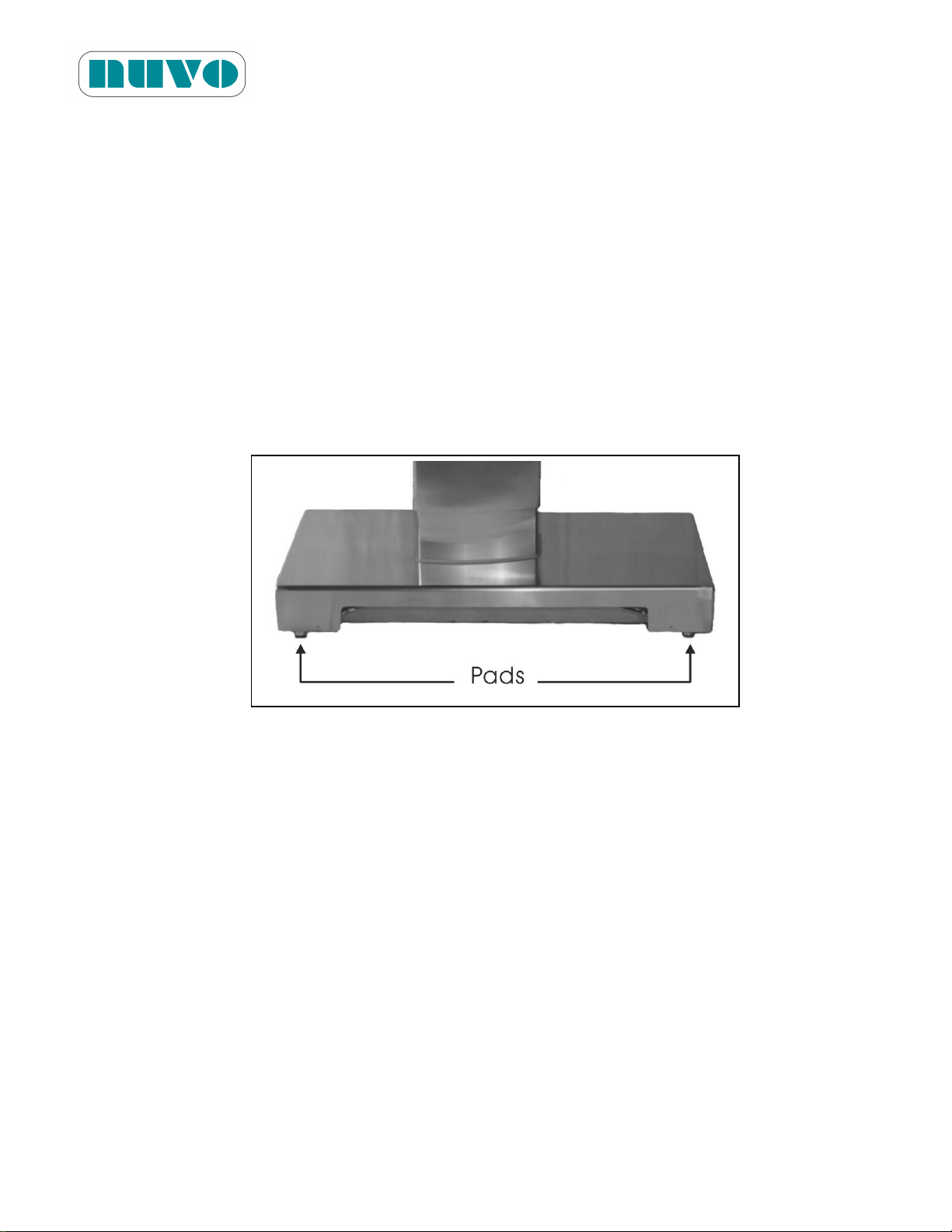
B2AV1000 Series Surgical Table
IM-B2AV1000-E01
d. Repeat steps a, b and c for all surface.
5. Turn the table’s power off with Hand Pendant when finished with cleaning procedure.
6.2.2 End-of-Day Cleaning Procedures
1. Perform cleaning procedures as described in Section 6.2.1.
2. Clean floor lock pads:
a. UNLOCK table floor locks.
b. Wipe floor lock pad with a cloth, dampened with water, to remove cleaning fluid and
debris.
Figure 6-1:
6.2.3 Weekly Cleaning Procedures
1. Perform Section 6.2.1 and 6.2.2 cleaning procedure.
2. Go through all movements of table and clean all additional surfaces exposed during
these articulations as follows:
a. Hold the can of spray six to eight inches from surface and spray.
b. Use a clean piece of lint-free cloth to wipe sprayed surfaces, dampened with water to
remove cleaning fluid. To minimize streaking use a damp cloth.
c. To remove any remaining residue, wipe cleaned surfaces again with a clean, damp lint-
free cloth.
3. Turn the table’s power off with Hand Pendant when finished with cleaning procedure.
6-4
Page 75

B2AV1000 Series Surgical Table
WARNING! AVERTISSEMENT!
SHOCK HAZARD: Monitor the electrically conductive properties of casters and floor
locks. Measure their resistance level according to the requirements of NFPA 99
before placing table in use. Subsequent routine testing should be performed at least
once every three months.
RISQUE DE DÉCHARGE ÉLECTRIQUE: Surveillez les propriétés de conductivité
électrique des dispositifs de verrouillage au sol. Mesurez leur niveau de résistance
selon les exigences de la norme NFPA 99 avant de commencer à utiliser la table.
Des tests de routine doivent être effectués au moins une fois tous les trois mois.
ELECTRIC SHOCK HAZARD: Only authorized service personnel should be allowed to
remove the covers.
RISQUE DE DÉCHARGE ÉLECTRIQUE: Seul le personnel de service autorisé devrait
être autorisé à retirer les couvercles.
IM-B2AV1000-E01
6.3 Monthly Maintenance
Perform all table functions. Observe if all movements are smooth and if there is any noise.
Have a qualified technician check the table for anything out of the ordinary. Never allow
inexperienced, unqualified technicians to attempt any repair on the table.
6.4 Quarterly Maintenance
1. Clean the floor locks according to 6.2.2 and then check for conductivity.
6-5
Page 76
6.5 Lubrication Schedule
LUBRICANT
TABLE SECTION
MINIMUM FREQUENCY
Grease,
See Table 2-2.
Articulation pins – Leg Section
2 x per year
Articulation pins – Tabletop Tilting
Articulation pins – Back Section
Articulation pins – Seat Section
Central column – Tabletop up/down
Floor locks
ITEMS
MINIMUM FREQUENCY
1. TABLETOP
1.1 Remove pads, and then look for wear and tear on the pads
and on the fastening strips of pads and tabletop.
4× per year
1.2 Examine all side-rail hardware attachments.
1.3 Check and tighten screws on side rails.
1.4 Remove and clean cassette top of each table section.
2. HYDRAULIC SYSTEM
2.1 Clean fluid filters.
1× per year
2.2 Check the cleanness of hydraulic oil. Replace it if necessary.
2.3 Check hydraulic fluid level.
2.4 Inspect floor directly beneath the table and all the hoses,
fittings and components of hydraulic system for leakage.
3. ELECTRICAL CHECKS
3.1 Check for loose circuit board connectors and cable plugs.
1× per year
3.2 Check for damage or fraying cables.
3.3 Inspect electrical cord and Hand Pendant cable.
3.4 Electrically conductive properties of floor locks
4× per year
6.6 Other Maintenance Schedule
B2AV1000 Series Surgical Table
IM-B2AV1000-E01
6-6
Page 77
B2AV1000 Series Surgical Table
ITEMS
MINIMUM FREQUENCY
4. TABLE MOVEMENTS (NORMAL AND REVERSE ORIENTATIONS)
4.1 Seat, Back and Leg Sections
1× per year
4.2 Lateral Tilt
4.3 Height and Sliding
4.4 Head Section
5. TABLE RIGIDITY
5.1 Check both ends of tabletop for any horizontal or vertical play.
1× per year
5.2 Check side tilt mechanism for any play.
5.3 Check central column for any play.
5.4 Check for wobbling of table base due to uneven floor locks.
IM-B2AV1000-E01
Note: Before the base cover is closed, please make sure tools are left outside of the table
base.
Remarque: Avant de refermer le couvercle de la base, assurez-vous de n'oublier aucun outil
dans la base de la table.
6.7 Battery Charging Procedures
Batteries will be charged automatically as long as the AC power is plugged in (#4, Figure 5-4-1 or
5-4-2). Battery Level Indicator indicates low or discharged battery conditions on the Hand
Pendant (#16, Figure5-2) as well as on the Base Panel (#8, Figure5-4-1 or 5-4-2). We
recommend that AC power be plugged in whenever possible to allow charging the batteries, since
this will prolong lead acid battery’s life. Follow the battery charging schedule below, if AC power
is not the main power supply:
1. Every 10 days when the table is in normal service; more often if usage demands.
2. Charge whenever Battery Power indicates low or l ess than two green lights are displayed on
the base panel’s Battery Power Indicator.
3. Charge whenever any of the Battery Power icons indicate low or the base panel Battery
Level Indicator displays less than two green lights.
Note:
6-7
Page 78

B2AV1000 Series Surgical Table
IM-B2AV1000-E01
1. Allow about 12 hours for full battery charge for sealed lead battery. Charging time for
LiFePO4 batteries is 5 hours.
2. Verify Battery Level Indicator indicates full.
3. All batteries are a sealed, lead-acid gel electrolyte-type, with a nominal life of 4 years.
LiFePO4 batteries can be charged 1000 times and have a life of 10 years (depending on
the usage frequency)
4. The battery is delivered by sea-shipping only.
5. Only replace the battery recommended by NUVO.
6. When power cord has been unplugged for ten (10) days, the hand pendant is then
deactivated until AC power is restored. It is to remind the user to charge the batteries.
7. If batteries are not being charged, check for the following:
Blown fuse(s), F1 and F2 (# 2 and #1, Figure 5-4-1 or 5-4-2) - replace if necessary
Defective AC power cord - replace if necessary
Remarque:
1. Pour une batterie au plomb, comptez environ 12 heures pour une charge maximale de la
batterie. Le temps de recharge des batteries LiFePO4 est de 5 heures.
2. Vérifiez que la batterie est complètement chargée en vous assurant que tous les
segments sont allumés sur l'indicateur de niveau de batterie.
3. Toutes les batteries sont de type scellé, au plomb-acide à électrolyte en gel, avec une
durée de vie nominale de 2 ans et demi; les batteries LiFePO4 fournies en option
peuvent être chargées jusqu'à 1000 fois et ont une durée de vie de 10 ans (selon la
fréquence d'utilisation)
4. Les batteries ne doivent être expédiées que par voie maritime.
5. Remplacez uniquement la batterie par un modèle recommandé par NUVO.
6. Lorsque le cordon d'alimentation a été débranché pendant plus de dix (10) jours, le
boîtier de commande manuelle est ensuite déchargé.
7. Si les batteries ne sont pas chargées lorsque la table est branchée, vérifiez les points
suivants :
Les fusibles F1 et F2 ont peut-être sauté (#2 et #1, figure 5-3) - remplacez-les au
besoin.
Cordon d'alimentation défectueux - remplacez-le dès que possible.
6.8 Fuse Replacement
1. Unplug the AC power cord (#4, Figure 5-4-1 or 5-4-2).
2. For B2AV1000SKP, pull out and turn away the manual pump pedal to better expose the
fuse socket caps.
6-8
Page 79
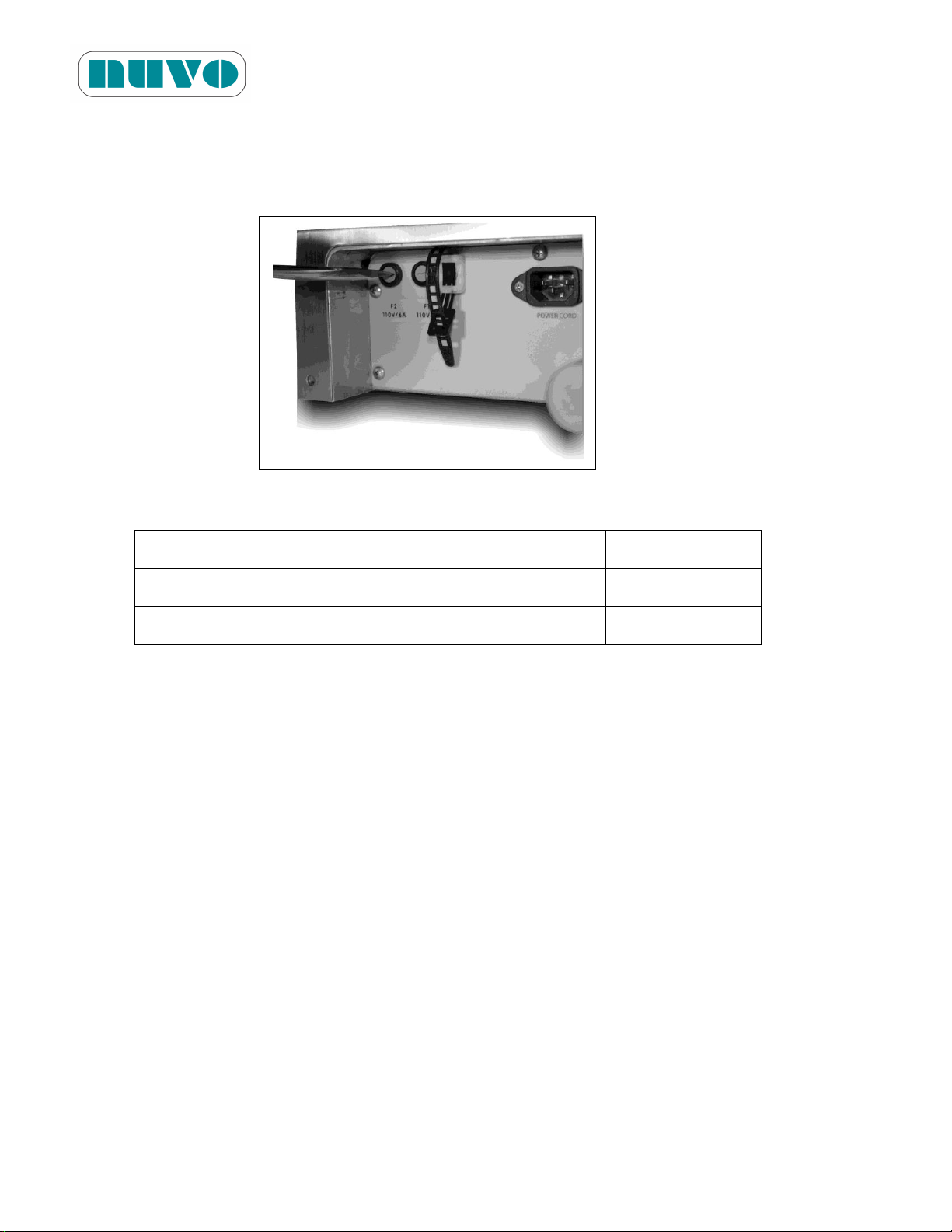
B2AV1000 Series Surgical Table
NUVO Item ID
Specifications
AC Voltage
EF0002
6*32 3A/250V (time-lag)
220V~240V
EF0003
6*32 5A/250V (time-lag)
110V~120V
IM-B2AV1000-E01
3. Remove fuse socket caps (#1 and #2, Figure 5-4-1 or 5-4-2) with a screwdriver. The cap
is not a screw; therefore, do not try to unscrew it or the cap may be damaged. Just push in
the cap and turn slightly to unlock it and use hand to pull it out.
Figure 6-2
4. Replace blown fuse(s) with new one(s) according to the specification below.
5. Push and turn slightly to lock the fuse socket caps.
6.9 System Reset
Preliminary check:
1. Unplug AC and the AC LED that is on the base panel should be off, and vice versa.
2. While the AC is plugged in, turn on hand pendant, and its panel should be lit.
3. The battery power indicator should come on after the hand pendant is turned on.
4. While the hand pendant is on, perform the following.
For B2AV1000S(K)(P):
1. Flip the override control enable toggle switch to the “on” (up) position. It is the first toggle
switch from the right.
2. Wait 5 seconds, and the hand pendant should be turned off, which means the system has
been reset.
6-9
Page 80
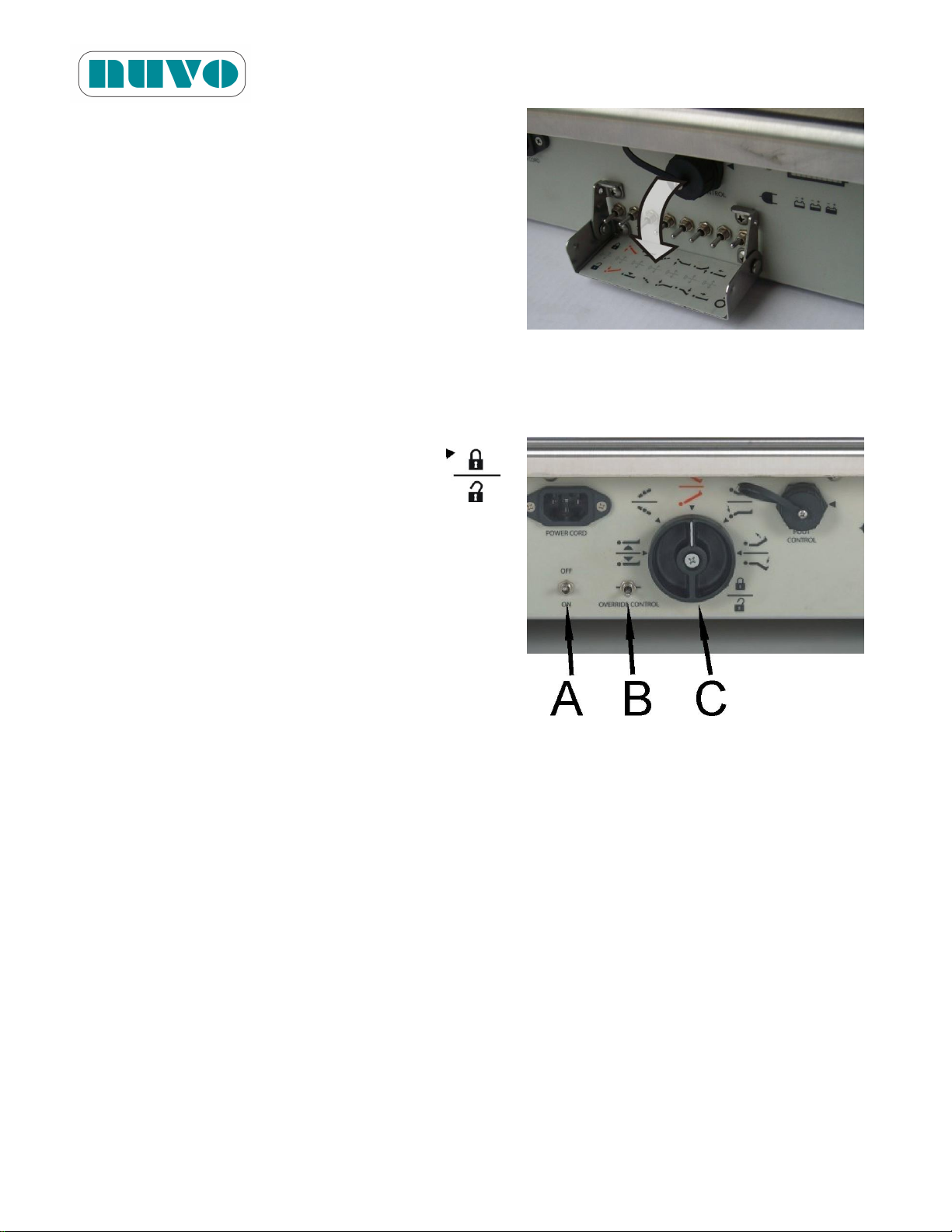
3. Flip the override control enable toggle switch to
the “off” position.
For B2AV1000(K):
1. Turn the (C) knob so the indicator is pointing to
the triangle of the Lock/Unlock symbol “ “.
B2AV1000 Series Surgical Table
IM-B2AV1000-E01
Figure 6-3
2. Flip the (B) toggle switch all the way down.
3. Press and hold the (A) toggle switch down for 5
seconds until the hand pendant is turned off,
which means the system has been reset.
While the switch is being pressed down, the
pump motor will be running, and the table will
be unlocked. Figure 6-4
4. Return the (B) toggle switch to its neutral position (in the middle).
6-10
Page 81

B2AV1000 Series Surgical Table
Item Id
Description
Q’ty
Notes
ASM0214
B2AV1000S Hand Pendant
1
For B2AV1000S(K)(P)
ASM0215
B2AV1000 Hand Pendant
1
For B2AV1000(K)
CP000151
Coil Cable, C97-CHX-FM08S835
1
CP000277
B2AV1000S Membranous Keypad
1
CP000279
B2AV1000 Membranous Keypad
1
ASM0024
Hand Pendant PCB Assembly
1
CP000282
Lower Cover of Hand Pendant
1
CP000281
Upper Cover of Hand Pendant
1
CP000285
Spring Hook
1
ASM0021v01
Main Control PCB Assembly
1
ASM0022v01
Driver PCB Assembly For Solenoids
1
ASM0023v01
Driver PCB Assembly For Rotary
1
ASM0026
Dual Photo Sensor PCB Assembly
1
ASM0025
Power Indication PCB Assembly
1
EF0003
Time-lag Fuse, 6*32, 5A/250V
2
For mains power, AC110V
EF0002
Time-lag Fuse, 6*32, 3A/250V
2
For mains power, AC220V
EF0004
Terminal Car Fuse, U/L ATC, 15A/32V
1
CP000136
300VA Insulation Transformer
1
ED0001
Bridge Rectifier, 600V/50A, CM5006
1
ES0001
Toggle Switch, LTS-001
1
SH0004
Pressure Switch, K4 ZA06 (20~200 BAR)
1
CP000150
Cable, C97-CHX-MF08S1800
1
CP000200
d20D30S43.6 Bidirectional Cylinder
1
CP000203
ST560 Bidirectional Cylinder
1
CP000204
d50D58S140 Bidirectional Cylinder
1
CP000205
d50D58S55 Bidirectional Cylinder
1
CP000206
d30D40S320 Bidirectional Cylinder
1
CP000208
d40D46S137.6 Bidirectional Cylinder
1
CP000209
d40D46S185 Bidirectional Cylinder
1
SW0003
Bonded Seal, BS-222
1
SW0027
Bonded Seal, BS-212
1
SW0018
Bonded Seal, BS-217
1
SO0001
O-ring, P14x2
1
SO0002
Dust Sealing, LBH-22D-14d-18.3S-5H
1
SZ0001
Flexible Joint Ratchet, KOKEN 2774PS
1
CP000400v00.1
Bakelite Plate, Head Section
1
IM-B2AV1000-E01
Section 7 SPARE PARTS
Parts listed in this section are needed to ensure the fastest maintenance on the B2AV1000
Series surgical table. The listed numbers of spare parts are for your safety stock if you have
between 1 to 10 tables.
When you order parts, please include the part number, description, and quantity for each
replacement part.
Send your order directly to your nearest NUVO sales representatives.
7-1
Page 82
Item Id
Description
Q’ty
Notes
CP000417
Bakelite Plate, Back Section
1
CP000811
Bakelite Plate, Seat Section (small cutout)
1
CP000560
Bakelite Plate, Leg
1
CP000540
Bakelite Plate, Leg Extension
1
CP000552
T Screw, 36mm
1
CP000553
T Screw, 24mm
1
CP000554
T Screw, 40mm
1
CP000009
Motor, DC82x2440120L000
1
IMPORTANT: DO NOT STOCK THE FOLLOWING PARTS!
Item Id
Description
Shelf Life
B2DCP001630
v00.1
Pressure Relieving Mattress Pad, Head Section
3 years
B2DCP001636
Pressure Relieving Mattress Pad, Body Section
3 years
B2DCP001622
Pressure Relieving Mattress Pad, Leg Section
3 years
B2DCP001633
Pressure Relieving Mattress Pad, Leg Extension
3 years
GN0001v01
Pressure Relieving Mattress Pad Set (Head, Body, Leg and Leg
Extension)
3 years
B2DCP001656
Pressure Relieving Mattress Pad, Arm Board
3 years
EB0001
Sealed Lead Acid Battery, WP14-12E
3 Months
EB0002
Sealed Lead Acid Battery, WP2.3-12
3 Months
CP000119
LiFePO4 Battery
3 Months
As an environmentally conscious manufacturer, we have made the mattress pad outer
covering using a biodegradable material. Since the following parts have a limited shelf
life, order them from your NUVO sales representatives as needed. Mattress pads can
be ordered from NUVO or else directly from the following contacts.
B2AV1000 Series Surgical Table
IM-B2AV1000-E01
7-2
Page 83
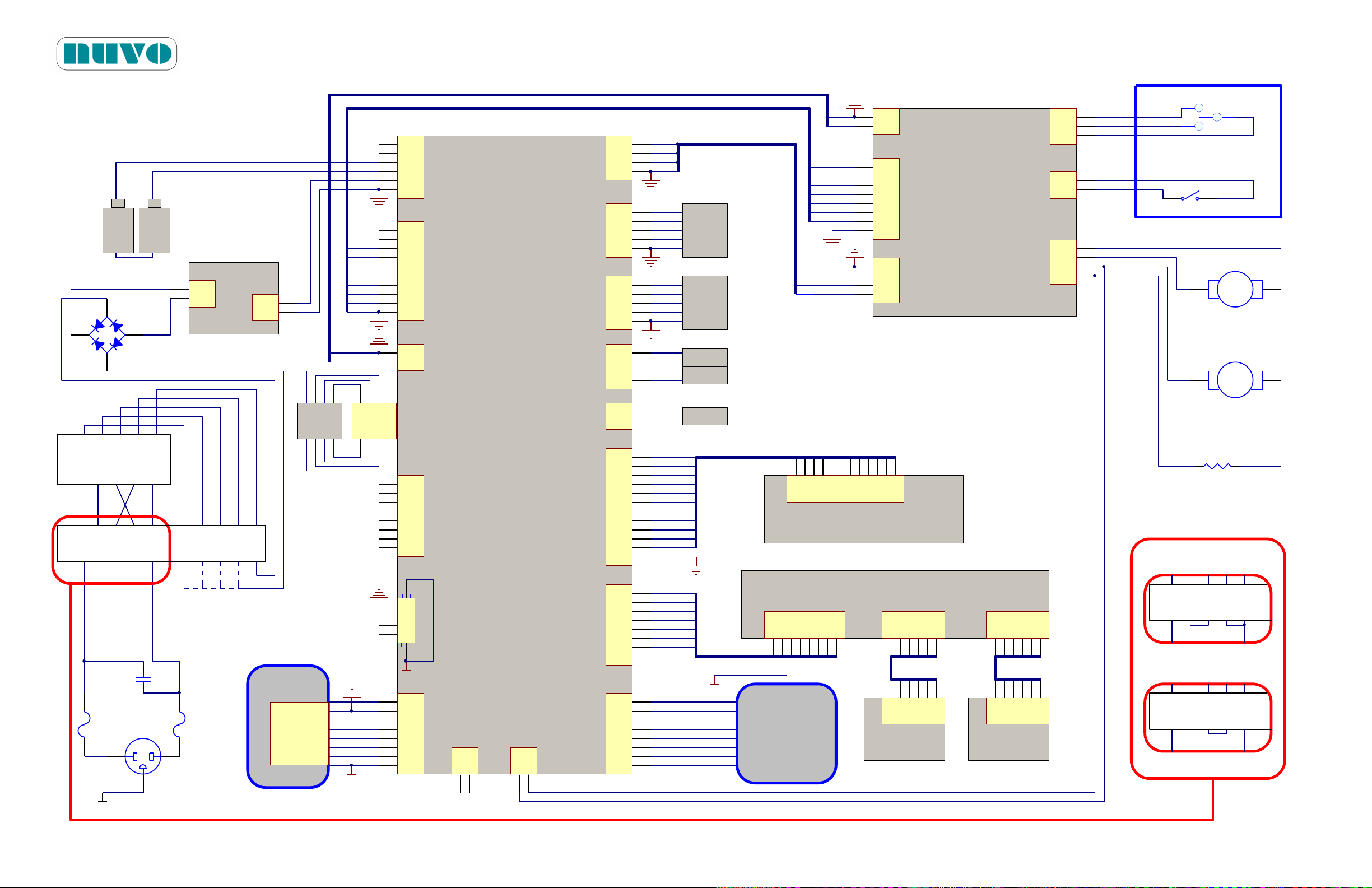
Section 8 CIRCUIT DIAGRAMS
Override Lower
Override Upper
+24V
ManEna
Hand Pendant
Override Switch
1
2
3
4
5
JP6
A2501WV2-5P
+3.3V
RAW3A
COL4
COL3
1
2
3
4
5
6
7
8
9
10
11
12
JP11
A2501WV2-12P
1
2
3
4
5
6
7
8
JP2
A2501WV2-8P
Earth
TXD1
RXD1
CTRLKP1
+5V
1
2
3
4
5
6
JP10
5EHDVC-06P
BAT+
BAT-
VIN 24V
1
2
3
4
5
6
7
8
9
10
JP1
A2501WV2-10P
1
2
3
4
5
6
7
8
JP3
A2501WV2-8P
1
2
JP8
5EHDVC-02P
+24V
+24V
1
2
3
4
8 6
CN2 USB-B
D-
D+
123456789
10
11
12
JP1
A2501WV2-12P
Power LED
Plug AC Female
ASM0021
Earth
ASM0025
ASM0023
1
2
3
4
5
6
7
8
JP17
A2501WV2-8P
ASM0028
1234567
8
JP1
A2501WV2-8P
12345
6
JP2
A2501WV2-6P
12345
6
JP3
A2501WV2-6P
12345
6
JP2
A2501WV2-6P
ASM0029
1
2
3
4
JP3
5EHDVC-04P
1
2
JP4
5EHDVC-02P
ManuEna
Motor1Dir
Motor2Dir
Motor2PWR
Motor1PWR
ManuEna
Motor2PWR
Motor1PWR
Motor2Dir
Motor1Dir
Earth
+
F2F1
AC
-
12V
+
+
12V
-
1
2
3
A2501WV2-03P
JP2
1
2
A2501WV2-02P
JP5
SW-SPST
ManEna
+24V
ManEna
Override Upper
Override Lower
110V: 5A
220V: 3A
110V: 5A
220V: 3A
1
2
3
4
5
JP7
A2501WV2-5P
+3.3V
RAW3A
COL4
COL3
1
2
3
4
JP13
A2501WV2-4P
COL2
COL1
ps LOCK
ps UNLOCK
RAW5A
RAW5A
ACLight
RED2
RED1
GREEN5
GREEN4
GREEN3
GREEN2
GREEN1
12345
6
JP2
A2501WV2-6P
ASM0029
123456
78
JP12
A2541WV2-2Ax4P
ASM0027
photo F1
(ASM0026)
photo F2
(ASM0026)
YELLOW3
YELLOW2
YELLOW1
RAW5A
COL3
ps SYSTEM
1
2
JP9
A2501WV2-2P
26V - 24V - 22V - 20V - 0V
26V 24V 22V 20V 0V
110V0V 110V 26V 22V24V 20V 0V0VTH
(Secondary)
(Primary)
Transformer
Terminal
TH - 0V - 110V- 0V- 110V
For 200~240 AC Voltage
For 100~120 AC Voltage
Jumper Jumper
110V0V 110V0VTH
Terminal
Jumper
110V0V 110V0VTH
Terminal
Jumper Configurations
X1
0.47uFK/300V
A
-
+
Rotary Valve Motor
A
-
+
Hydraulic Power Unit Motor
RB350100-30K51R
DC82X2432120L000
0V J2 NJ1L
0V J2 NJ1L
0V J2 NJ1L
1
2
3
4
5
6
7
8
JP1
A2501WV2-8P
1
2
3
4
5
6
7
8
JP5
A2501WV2-8P RAW2A
foot3N(TREND)
foot2N(REV. TREND)
foot1N(HEIGHT UP)
foot3P(HEIGHT DOWN)
foot2P(TILT_LEFT)
foot1P(TILT RIGHT)
RAW1A
Foot Controller
Earth
1
2
JP14
A2501WV2-2P
Main1REL
Main1REL
ASM0024
Cement Resistor
0.11R/10W
1
2
3
4
JP19
A2501WV2-4P
Motor
Main1REL
1
2
3
4
JP6
A2501WV2-4P
Motor
Main1REL
1
2
JP4
1
2
JP2
A2501WV2-02P
1
2
JP1
A2501WV2-02P
DC24V
DC24V
ASM0020
B2AV1000 Series Surgical Table
IM-B2AV1000-E01
Figure 8-1: B2AV1000 and B2AV1000K
8-1
Page 84

B2AV1000 Series Surgical Table
IM-B2AV1000-E01
This page intentionally left blank
8-2
Page 85
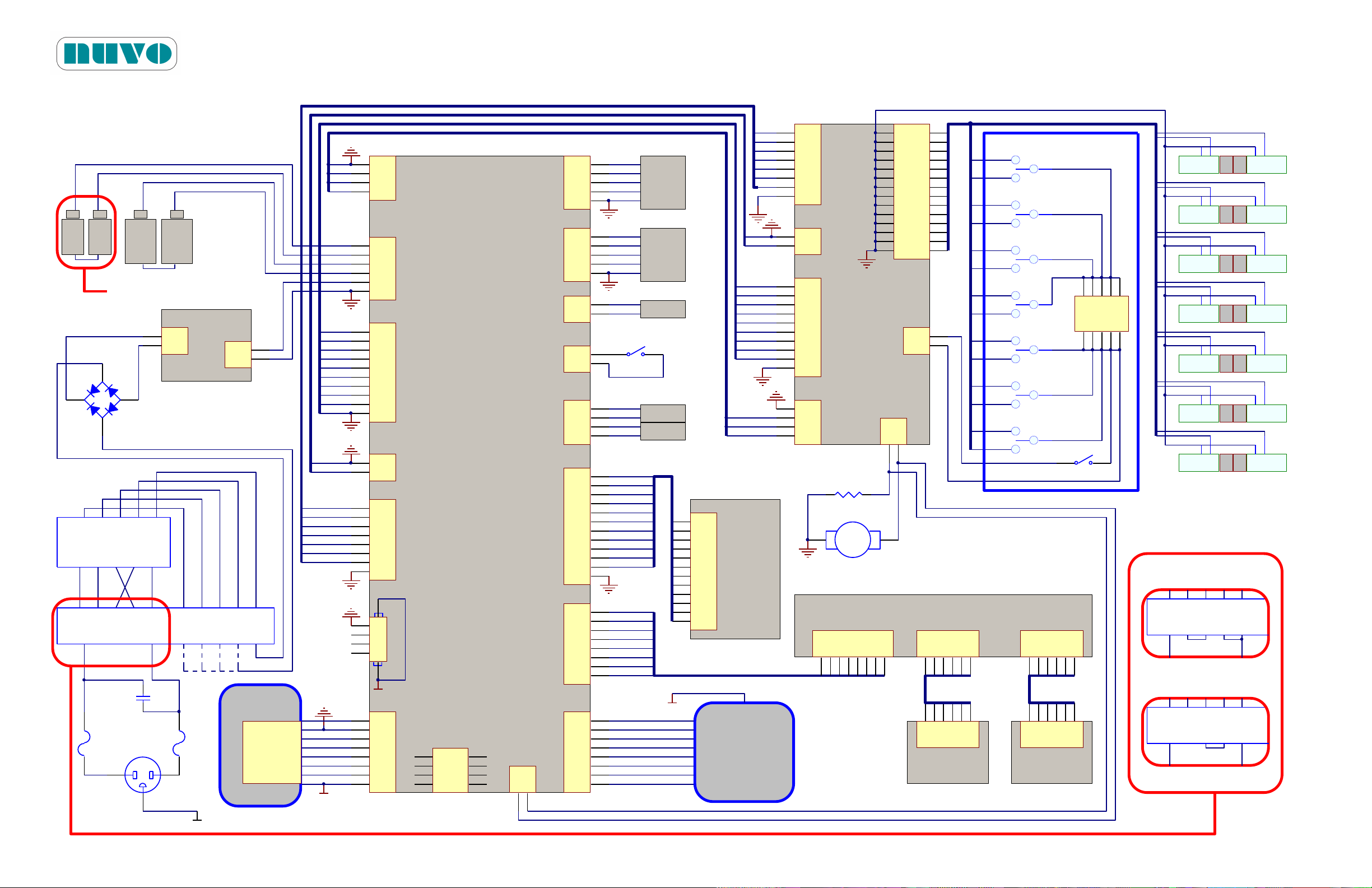
S1
S2
S3
S4
S5
S6
S7
S8
S9
S10
S11
S12
S13
S14
+24V
A
+
Hydraulic Power Unit Motor
Override Switch
BAT+2
BAT-2
BAT+
BAT-
VIN 24V
Motor2
G7N
G7P
G6N
G6P
G5N
G5P
1
2
3
4
5
6
7
8
9
10
JP5
A2501WV2-10P
ManEna
G4N
G4P
G3N
G3P
G2N
G2P
G1N
G1P
1
2
3
4
5
6
7
8
JP6
A2501WV2-8P
Motor2
G7N
G7P
G6N
G6P
G5N
G5P
+24V
ManEna
+24V
1 2
3 4
5 6
7 8
9 10
11 12
13 14
15 16
17 18
19 20
21 22
23 24
25 26
27 28
JP3
5EEHDRC-28P
1
2
JP2
5EHDVC-02P
1
2
JP4
A2501WV2-02P
1
2
JP1
5EHDRC-02P
ASM0022
+
_
12V 12V
+
12345678910
PM2.5-05P
S1 S2
SW-SPST
1
2
3
4
5
JP6
A2501WV2-5P
+3.3V
RAW3A
COL4
COL3
ASM0026 (photo F1)
1
2
3
4
5
6
7
8
9
10
11
12
JP11
A2501WV2-12P
1
2
3
4
5
6
7
8
JP2
A2501WV2-8P
Earth
TXD1
RXD1
CTRLKP1
+5V
1
2
3
4
5
6
7
8
JP5
A2501WV2-8P RAW2A
foot3N(TREND)
foot2N(REV. TREND)
foot1N(HEIGHT UP)
foot3P(HEIGHT DOWN)
foot2P(TILT_LEFT)
foot1P(TILT RIGHT)
RAW1A
1
2
3
4
5
6
JP10
5EHDVC-06P
1
2
3
4
5
6
7
8
9
10
JP1
A2501WV2-10P
1
2
JP8
5EHDVC-02P
+24V
1
2
3
4
8 6
CN2 USB-B
D-
D+
RAW5A
COL3
Plug AC Female
ASM0021
Earth
12
34
56
78
JP12
A2541WV2-2Ax4P
1
2
3
4
5
6
7
8
JP17
A2501WV2-8P
ManuEna
Earth
+
F2F1
AC
12V
+
+
12V
110V: 5A
220V: 3A
110V: 5A
220V: 3A
1
2
3
4
5
JP7
A2501WV2-5P
+3.3V
RAW3A
COL2
COL1
1
2
JP9
A2501WV2-2P
1
2
3
4
JP13
A2501WV2-4P
COL2
COL1
RAW5A
RAW5A
ACLight
RED2
RED1
GREEN5
GREEN4
GREEN3
GREEN2
GREEN1
1
2
3
4
5
6
7
8
JP3
A2501WV2-8P
1
2
3
4
5
6
7
8
9
10
11
12
JP1
A2501WV2-12P
Power LED
ASM0025
Foot Controller
ASM0028
1234567
8
JP1
A2501WV2-8P
12345
6
JP2
A2501WV2-6P
12345
6
JP3
A2501WV2-6P
12345
6
JP2
A2501WV2-6P
ASM0029
12345
6
JP2
A2501WV2-6P
ASM0029
Earth
For T1000SKP only.
26V - 24V - 22V - 20V - 0V
26V 24V 22V 20V 0V
110V0V 110V 26V 22V24V 20V 0V0VTH
(Secondary)
(Primary)
Transformer
Terminal
TH - 0V - 110V- 0V- 110V
_
_
_
ASM0026 (photo F2)
S3
S5
S7
S9
S11
S4
S6
S8
S10
S12
S13 S14
DC82X2432120L000
YELLOW3
YELLOW2
YELLOW1
G4N
G4P
G3N
G3P
G2N
G2P
G1N
G1P
X1
0.47uFK/300V
ps UNLOCK
ps LOCK
0V J2 NJ1L
1
2
JP14
A2501WV2-2P
ps SYSTEM
LS
For 200~240 AC Voltage
For 100~120 AC Voltage
Jumper Jumper
110V0V 110V0VTH
Terminal
Jumper
110V0V 110V0VTH
Terminal
Jumper Configurations
0V J2 NJ1L
0V J2 NJ1L
Hand Pendant
ASM0024
Cement Resistor
0.11R/10W
1
2
3
4
JP7
A2501WV2-4P
Main2REL
Main2PWR
1
2
JP4
1
2
JP2
A2501WV2-02P
1
2
JP1
A2501WV2-02P
DC24V
DC24V
ASM0020
1
2
3
4
JP19
A2501WV2-4P
Motor
Main1REL
Figure 8-2: B2AV1000S, B2AV1000SK and B2AV1000SKP
B2AV1000 Series Surgical Table
IM-B2AV1000-E01
8-3
Page 86

B2AV1000 Series Surgical Table
IM-B2AV1000-E01
This page intentionally left blank
8-4
Page 87

B2AV1000 Series Surgical Table
WARNING! AVERTISSEMENT!
DISPOSAL HAZARD: A hazardous waste management company with appropriate
licenses and permits may be required to handle some of the materials which are
contained inside the surgical table.
RISQUE LIÉ À L'ÉLIMINATION DES DÉCHETS: Il peut être nécessaire de faire
appel à une entreprise spécialisée dans la gestion des déchets dangereux,
possédant les licences et permis appropriés, pour gérer certains matériaux qui sont
contenus dans la table chirurgicale.
IM-B2AV1000-E01
Section 9 WASTE PARTS DISPOSAL
The following materials are contained within the B2AV1000 Series surgical table: lithium iron
phosphate (LiFePO4), lead (Pb) (in weight and solder), lead acid (Pb/H2SO4), hydraulic oil (CPC
R32), electronic parts, metal parts, plastic parts (ABS), etc. When disposing of the table or its
parts, ensure the proper disposal of hazardous and other regulated waste in compliance with
local regulations
9-1
Page 88

This page intentionally left blank
B2AV1000 Series Surgical Table
IM-B2AV1000-E01
9-2
Page 89

Page 90
5368 Kuhl Road Erie PA 16510 U.S.A.
Telephone: +1 (814) 899-4220 & +1 (800) 663-1152
Fax: +1 (814) 899-1410 www.nuvosurgical.com
Specifications subject to change without notice
 Loading...