

Page 1

Operation Manual
O2 Quickstick
Oxygen Analyzer
01.11
www.nuvair.com
Page 2

O2 QuickstickTM Oxygen Analyzer
NUVAIR Page 2
O2 Quickstick Oxygen Analyzer Operation Manual
If you have any questions on this equipment please contact Technical Support at:
Nuvair
2949 West 5th St.
Oxnard, CA 93030
Hours: Monday through Friday
8:00 AM to 5:00 PM PST USA
This Operation Manual contains important safety information and should always be available to those
personnel operating this equipment. Read, understand, and retain all instructions before operating
this equipment to prevent injury or equipment damage.
Every effort was made to ensure the accuracy of the information contained within this manual; however, we
retain the right to modify its contents without notice. If you have problems or questions after reading the
manual, stop and call
Nuvair at 1-805-815-4044 for information.
Page 3

O2 QuickstickTM Oxygen Analyzer
NUVAIR Page 3
O2 Quickstick Oxygen Analyzer Operation Manual
1. Introduction
This manual will assist you in the proper set-up, operation and maintenance of the O2 Quickstick TM Oxygen
Analyzer. Be sure to read the entire manual.
Throughout this manual we will use certain words to call your attention to conditions, practices or techniques
that may directly affect your safety. Pay particular attention to information introduced by the following signal
words:
Indicates an imminently hazardous situation, which if not avoided, will result in serious personal injury
or death.
Indicates a potentially hazardous situation, which if not avoided, could result in serious personal injury
or death.
Indicates a potentially hazardous situation, which if not avoided, may result in minor or moderate
injury. It may also be used to alert against unsafe practices.
Notifies people of installation, operation or maintenance information which is important but not
hazard-related.
2. System Description
When using the Analyzer for diving applications with mixed gases other than air, you must first obtain
proper instruction from a certified diving instructor with a nationally recognized training agency
qualified in mixed gas diving. Improper use of this analyzer may result in incorrect gas analysis which
can lead to serious personal injury or death.
Although the Analyzer is a rugged instrument, careless handling or abuse may result in damage to the
Analyzer resulting in inaccurate gas analysis. Inaccurate gas analysis can lead to serious personal
injury or death.
Breathing gas must always be analyzed by two separate Analyzers, with one used for gas production
and one used for analysis after production. Never depend on a single Analyzer during both gas
production and delivery. If the Analyzer readings do not agree, both units must be recalibrated.
Inaccurate gas analysis can lead to serious personal injury or death.
Page 4
O2 QuickstickTM Oxygen Analyzer
NUVAIR Page 4
O2 Quickstick Oxygen Analyzer Operation Manual
The Nuvair O2 Quickstick Oxygen Analyzer is designed to measure oxygen levels directly from high-pressure
cylinders in the range 0.1-100.0% O2. No sampling hoses or accessories are necessary. The O2 Quickstick
is designed as a quick check device to test and verify that previous readings with another analyzer are correct.
It is a water-resistant, drop-resistant, self-contained unit designed specifically for the sport and technical diving
industry.
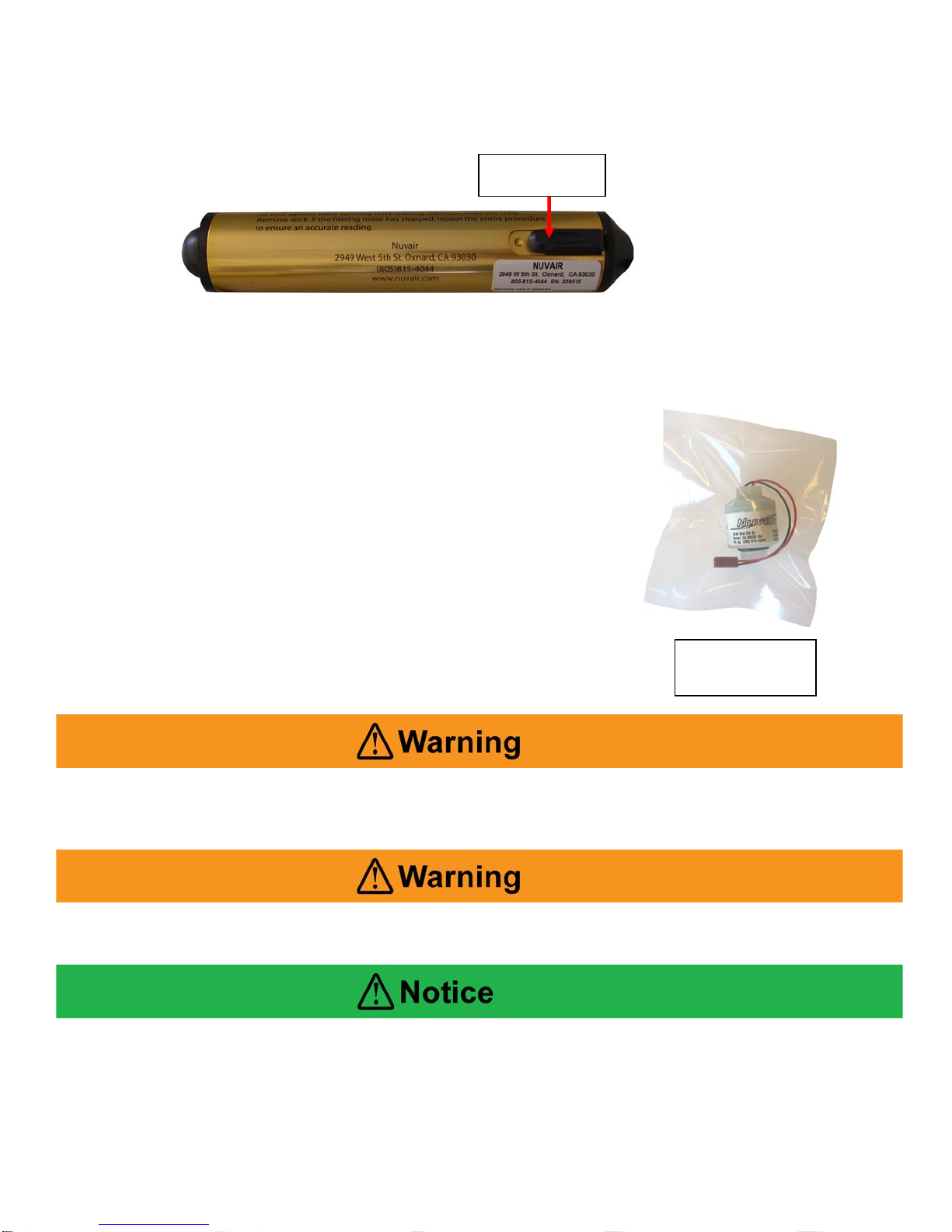
The O2 Quickstick uses a digital display with low power consumption, which includes an on-off switch. Power
is provided by a standard alkaline 9-volt Battery. The Analyzer uses an electrochemical O2 Sensor to measure
O2 content in gases. The Sensor is disposable and user-replaceable, with a life expectancy of up to 36 months
depending on usage. The Battery and Sensor are both user replaceable.
2.1. Preparation for Use
To extend Sensor life, the Analyzer is supplied with the Sensor sealed in
a bag. When first received, please verify that the bag is intact. If it is
torn, contact your supplier for assistance. Prior to initial use, install the
Sensor into the Analyzer in accordance with the Sensor Replacement
procedure. It is not necessary to remove the Sensor between Analyzer
uses.
The Battery must also be installed prior to initial use in accordance with
the Battery Replacement procedure. The Battery may be removed during
extended periods of inactivity.
3. Calibration
Oxygen Analyzers must be calibrated before each use. Improper calibration may result in the use of
incorrect breathing gas mixtures, which may cause serious injury or death to the person using the gas
mixture.
Calibration or use of the Analyzer with a low battery may result in inaccurate readings. Inaccurate gas
analysis can lead to serious personal injury or death.
If the Analyzer has been subjected to a recent change in ambient temperature, allow it to stabilize for
one hour before calibration.
Sensor Sealed in
Bag
On-Off Switch
Page 5
O2 QuickstickTM Oxygen Analyzer
NUVAIR Page 5
O2 Quickstick Oxygen Analyzer Operation Manual
When Analyzer calibration is performed at different atmospheric conditions than the gas being
measured, a calibration correction value may be required. Improper calibration may result in the use
of incorrect breathing gas mixtures, which may cause serious injury or death to the person using the
gas mixture.
Calibration should always be performed at the same temperature and humidity conditions as the gas being
measured. This is not always possible, for example, in a tropical environment where dry breathing gas from a
high-pressure Scuba cylinder will be measured after Analyzer calibration has been performed in the warm,
humid ambient air. Under these conditions a calibration correction value may be required, as detailed in the
Appendix, or dry air must be used for calibration.
Obtain proper training before attempting special calibration procedures. Improper calibration may
result in the use of incorrect breathing gas mixtures, which may cause serious injury or death to the
person using the gas mixture.
Calibration in air at sea level is suitable for many applications; however, the closer the oxygen content of the
calibration gas is to the gas being tested, the more accurate the measurement results. The following special
applications require calibration procedures beyond the scope of this manual:
• Analysis of gases containing greater than 50% oxygen requiring calibration with pure oxygen or
certified calibration gas
• Analysis of gases at altitudes above sea level requiring correction for reduced atmospheric pressure
3.1. Air calibration is essential before every use and should be performed in the environment that the
reading will be taken.
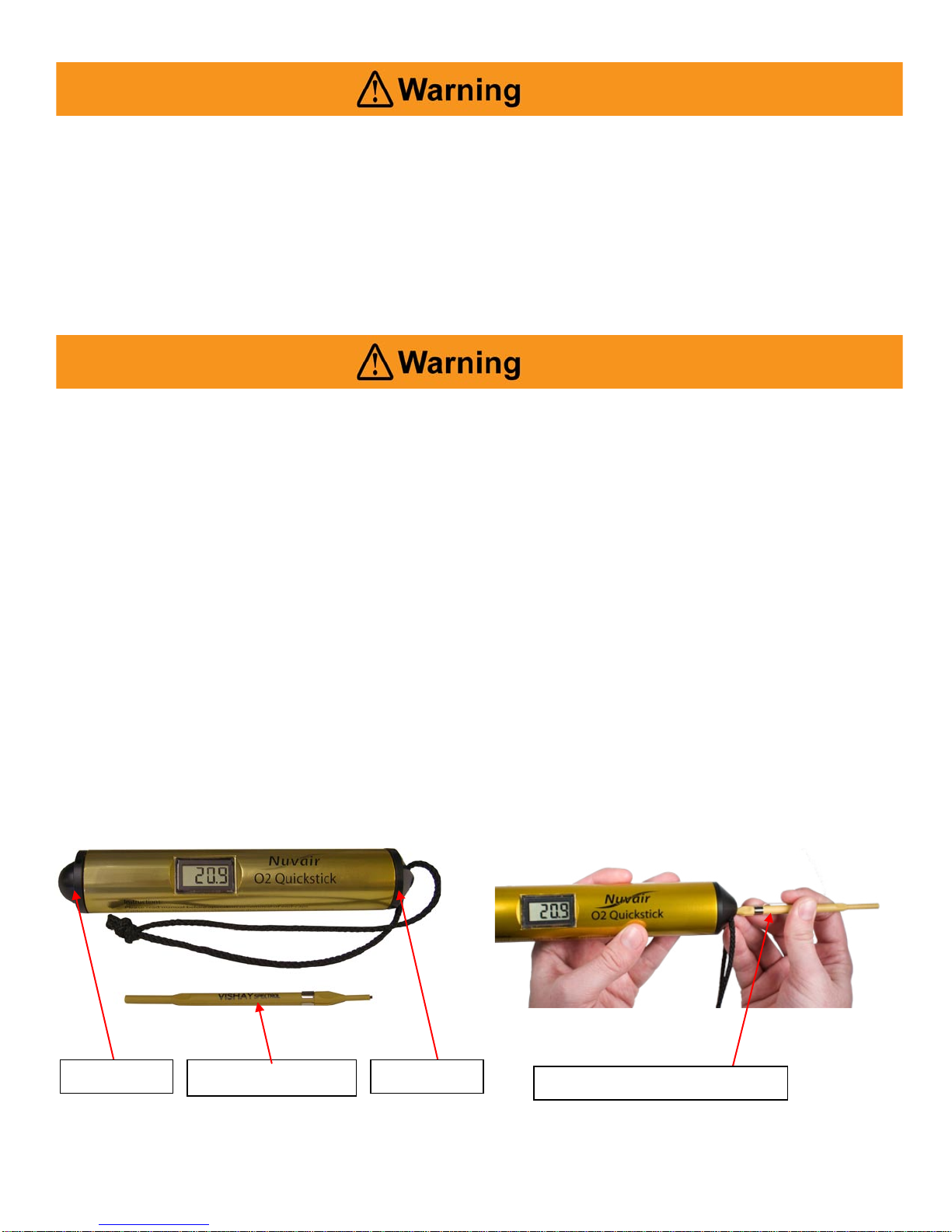
3.2. The calibration adjustment screw is the only user adjustable control on the O2 Quickstick. It is
located in the recessed hole on the battery end of the Analyzer.
3.3. The Calibrator Trim Tool provided is used to calibrate the Analyzer. It uses a very small flat
screwdriver blade to adjust the calibration screw.
3.4. Expose the analyzer to fresh air for two minutes or until the reading on the display has stabilized.
Adjust the calibration screw with the calibrator trim tool until the display reads 20.9% (see Section 4).
Battery End
Calibrator Trim Tool
Sensor End
Calibrator Trim Tool Placement
Page 6
O2 QuickstickTM Oxygen Analyzer
NUVAIR Page 6
O2 Quickstick Oxygen Analyzer Operation Manual
4. Operation
4.1. Open the cylinder valve slowly until a slight hiss can be heard.
4.2. Hold the sensor end of O2 Quickstick (the end without the lanyard) against the valve opening so that
the Nitrox mixture passes over the oxygen sensor. Be careful not to block the exhaust ports on the
side.
4.3. The reading should stabilize in 15 seconds or less and the display reading taken.
4.4. If you cannot obtain a stable reading, check that you still have a very gentle flow of gas and repeat. If
you still cannot obtain a stable reading see Troubleshooting section or use another analyzer.
4.5. Note that after a few seconds of the gas flow being stopped the reading will begin to change towards
the level in the surrounding air of 20.9% O2.
Never expose the Oxygen Sensor to pressures other than ambient or you may cause damage and/or
false readings. Damaged Sensors will not provide accurate gas analysis. Inaccurate gas analysis can
lead to serious personal injury or death when the gas mixture that was analyzed is used for breathing.
Gas, even under moderate pressures, can cause extreme bodily harm. Never allow any gas stream to
be directed at any part of your body.
5. Maintenance
5.1. During the first 12 months of the warranty period, the O2 Quickstick should be returned to the
dealer/manufacturer for repair. Your O2 Quickstick should give you three years continuous operation
with proper care before needing sensor replacement.
5.2. To clean the O2 Quickstick use a damp soft cloth.
5.3. Although designed to be water-resistant the O2 Quickstick should not be intentionally immersed in
liquid or left outside unprotected.
5.4. The O2 Quickstick is built to resist the effects of day to day shocks and drops but remember it is a
precision oxygen analyzer and should be looked after carefully to give long trouble free service.
5.5. Protect the O2 Quickstick from long periods of direct sunlight and do not subject it to high or low
temperature extremes.
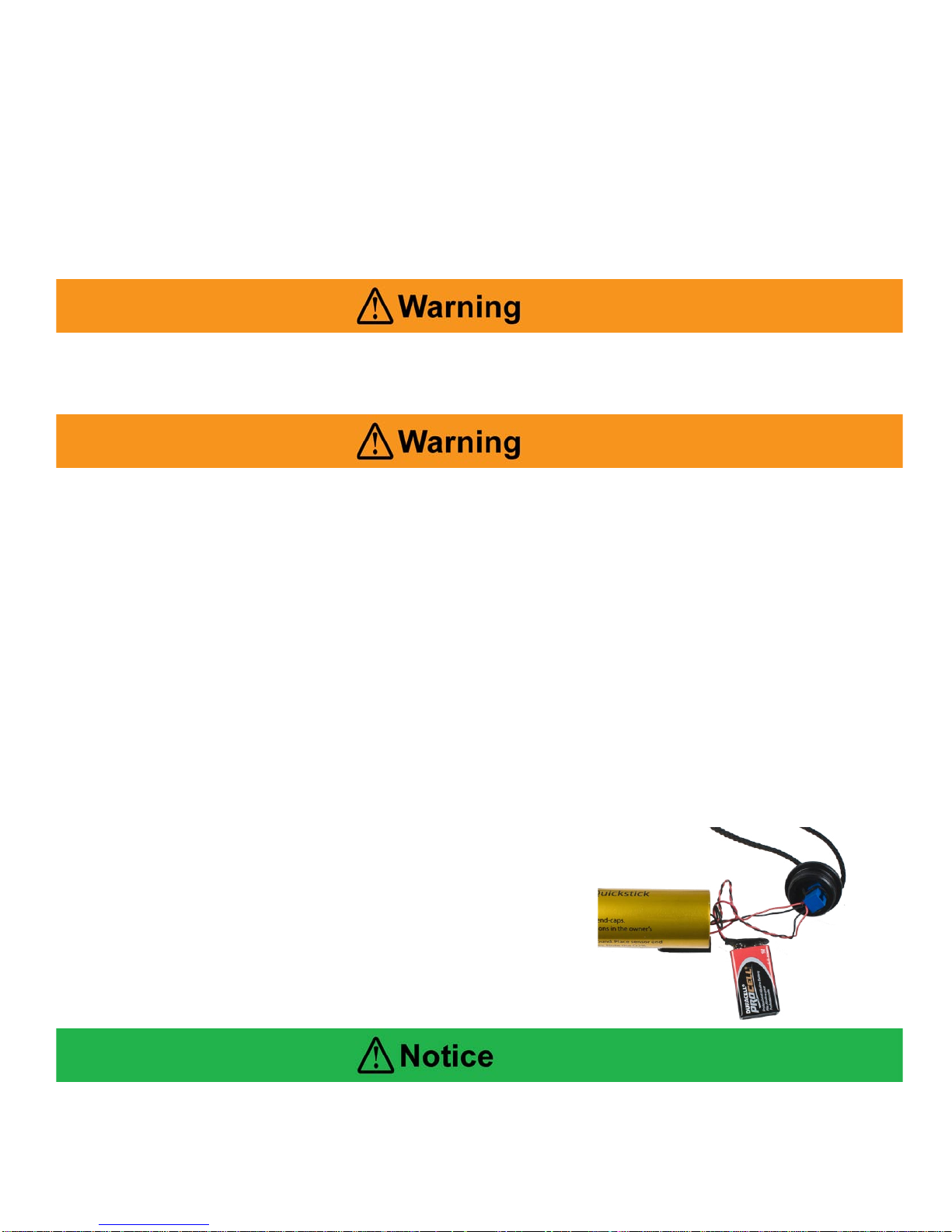
5.6. Battery Replacement – To replace the battery, gently push and remove the end cover with thumb (the
side with the lanyard). See figures 1 & 2. Gently pull the battery out from the O2 Quickstick housing.
Replace with new battery and reassemble.
Be careful not to pull to hard as you can separate
the wires from the end cap and damage the Quickstick.
Should you separate the wires from the end cap return
the Quickstick to Nuvair for repair,
DO NOT ATTEMPT THIS REPAIR ON YOUR OWN.
Be sure to dispose of spent, leaking, or damaged Batteries properly, according to local regulations.
Page 7

O2 QuickstickTM Oxygen Analyzer
NUVAIR Page 7
O2 Quickstick Oxygen Analyzer Operation Manual
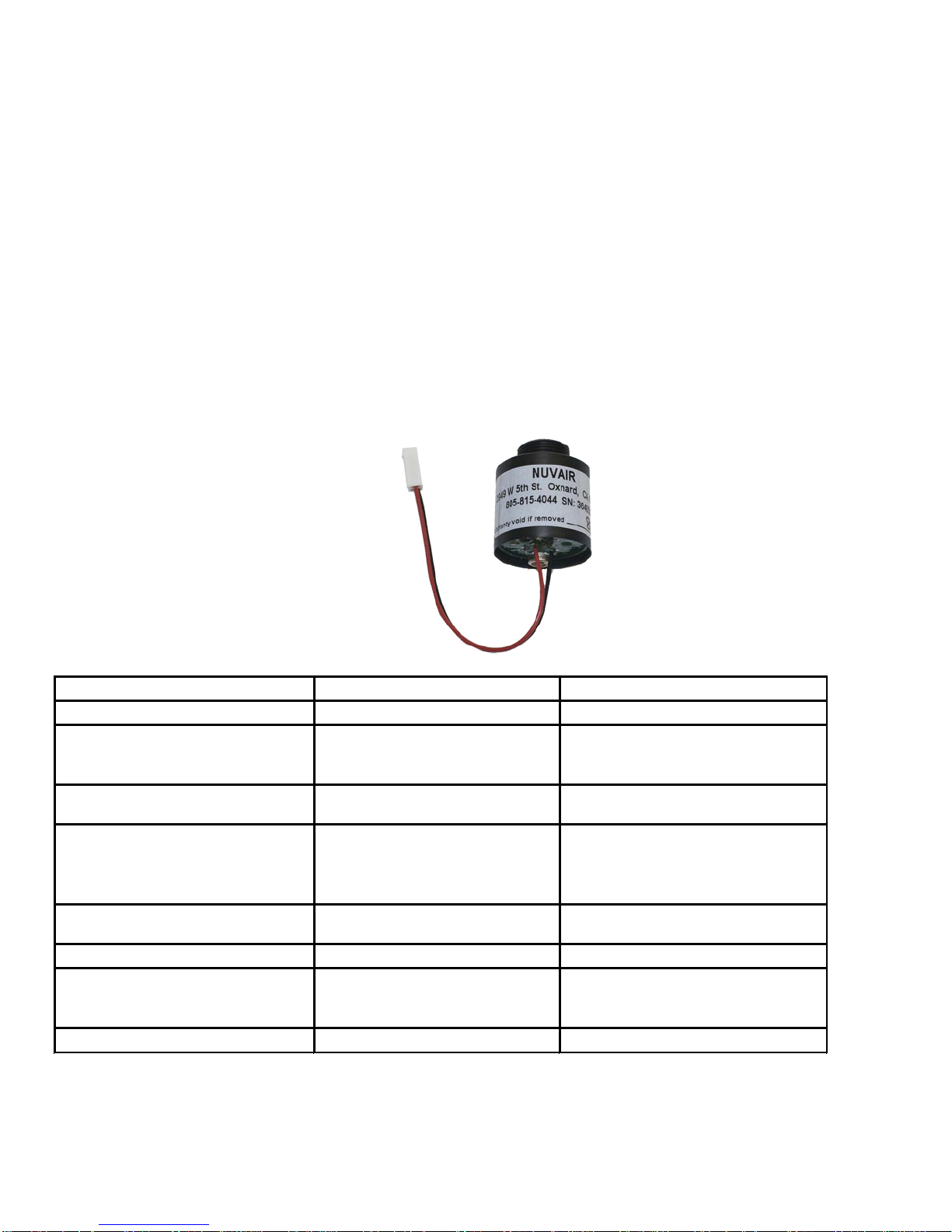
5.7. Sensor Replacement - To replace the sensor, gently push and remove the end cover with thumb (the
side without the lanyard). See Figures 1 and 2. Disconnect the 2-pin sensor plug/socket and unscrew
the complete sensor unit in a counter-clockwise direction. See Figures 4 and 5. Replace with new
sensor and reassemble unit.
Be sure to dispose of spent, leaking, or damaged Oxygen Sensors properly, according to local
regulations.
Do not swallow (ingest) either the electrolyte from the Oxygen Sensor or the Sensor itself. The
Potassium Hydroxide chemical contained in the Sensor can cause severe injury or death. If electrolyte
or the Sensor is swallowed, seek medical attention immediately.
If after handling the Oxygen Analyzer or Sensor, you find that your fingers or other parts of your body
feel “slippery” or the skin or eyes sting, immediately flush affected area with clean, fresh water for at
least 15 minutes. The stinging or slippery sensation is an indication of a leaking Sensor. The
Potassium Hydroxide chemical contained in the Sensor can cause severe injury or death. Seek
immediate medical attention if eye contact is made or skin stinging persists.
Figure
5
Figure 1
Figure 2
Figure 3
Figure
4
Page 8
O2 QuickstickTM Oxygen Analyzer
NUVAIR Page 8
O2 Quickstick Oxygen Analyzer Operation Manual
Handling Sensors
Replacement Sensors are supplied in sealed bags. Normally Sensors do not present a health hazard. Before
opening the bag, check that the electrolyte has not leaked. However, if electrolyte leakage has occurred, do
not open bag. Dispose of Sensor properly or return for replacement.
If electrolyte leakage occurs while the Sensor is in service, use rubber gloves and chemical splash goggles for
handling. Rinse contaminated surfaces thoroughly with water.
Electrolyte First Aid Procedures
• Ingestion - Drink a large volume of fresh water. Do not induce vomiting. Get immediate medical
attention.
• Eye Contact - Flush eyes with clean, fresh water for at least 15 minutes and get medical help
immediately.
• Skin Contact - Flush the affected area with clean, fresh water for at least 15 minutes and removed
contaminated clothing. If stinging persists get medical attention.
6. Spares
Order replacement Sensor Part - 9510
7. Troubleshooting
*Contact Nuvair for more information.
SYMPTOM REASON SOLUTION
Battery symbol Low Battery Change the battery
No display
Switched off
Bad connection
Switch on
Check display connection
Check battery connection
Zero reading
Sensor disconnected
Sensor expired
Check connection
Change sensor
Reading erratic
Pressure on sensor
Radio transmission
Sensor old or faulty
Condensation on sensor.
Check flow
Move unit away
Change sensor
Dry in air
Reading does not change when
calibration knob is turned
Faulty connections
Sensor failure
Check connections
Change sensor
Display segments missing Display faulty Return to dealer
Will not calibrate
Sensor faulty
Sensor not in air
High altitude
Change sensor
Check flow adapter
Use altitude calibration procedure
Reading drifts Rapid temperature change Stabilize temperature & recalibrate
*
Page 9

O2 QuickstickTM Oxygen Analyzer
NUVAIR Page 9
O2 Quickstick Oxygen Analyzer Operation Manual
Appendix
Calibration Correction Values for Temperature and Humidity
Oxygen Analyzer calibration should always be performed at the same temperature and humidity conditions as
the gas being measured. Where this is not possible, a calibration correction value may be required. A
common example is a tropical environment where dry breathing gas from a high-pressure Scuba cylinder will
be measured after Analyzer calibration has been performed in the warm, humid ambient air.
To determine if a calibration correction value is required, you must first know the temperature and relative
humidity of the air in which calibration will be performed. Using the chart below, find the atmospheric oxygen
percent value corresponding to your temperature and relative humidity. If the oxygen percent value falls in the
shaded portion of the chart, calibrate the Analyzer to the corrected chart value.
To use the correction value, follow the standard Calibration procedure except as follows:
• Make sure Oxygen Sensor is exposed to the ambient temperature and humidity corresponding to the
correction value.
• Adjust the Calibration Adjustment Screw to achieve a Display reading equal to the correction value.
• Once you have calibrated the Analyzer for temperature and humidity using the, your readings for gas
analysis should be correct with no further adjustment.
• Re-calibrate Analyzer for any changes in temperature or humidity of the ambient environment or the
gas being analyzed.
Note that the calibration correction value is never used when the temperature and humidity conditions of the
gas being measured are the same as the conditions during calibration.
OXYGEN COMPENSATION CHART FOR MOISTURE IN THE ATMOSPHERE
ATMOSPHERE OXYGEN PERCENT IN RELATION TO TEMPERATURE AND RELATIVE HUMIDITY
TEMPERATURE (
o
F) -->
32 40 50 60 70 80 90 100 110 120
TEMPERATURE (oC) -->
0 4 10 16 21 27 32 38 43 49
RELATIVE HUMIDITY (%) ATMOSPHERIC OXYGEN PERCENT (% O2)
10 20.9 20.9 20.9 20.9 20.8 20.8 20.8 20.8 20.7 20.7
20 20.9 20.9 20.8 20.8 20.8 20.8 20.7 20.6 20.5 20.4
30 20.9 20.8 20.8 20.8 20.7 20.7 20.6 20.5 20.4 20.2
40 20.8 20.8 20.8 20.7 20.7 20.6 20.5 20.4 20.2 19.9
50 20.8 20.8 20.8 20.7 20.6 20.5 20.4 20.2 20.0 19.7
60 20.8 20.8 20.7 20.7 20.6 20.5 20.3 20.1 19.8 19.5
70 20.8 20.8 20.7 20.6 20.5 20.4 20.2 19.9 19.6 19.2
80 20.8 20.8 20.7 20.6 20.5 20.3 20.1 19.8 19.5 19.0
90 20.8 20.7 20.7 20.6 20.4 20.3 20.0 19.7 19.3 18.7
100 20.8 20.7 20.6 20.5 20.4 20.2 19.9 19.5 19.1 18.5
H20 at 100% RH 0.6 0.8 1.2 1.8 2.5 3.4 4.7 6.5 8.6 11.5
I f t h e T e m p e r a t u r e a n d R e l a t i v e H u m i d i t y a x i s m e e t i n t h e s h a d e d p a r t o f t h e c h a r t , c a l i b r a t e t o t h e c h a r t O 2 l e v e l o r w i t h d r y a i r
t o m a i n t a i n 0 . 5 % O 2 a c c u r a c y i n N I T R O X .
Page 10

O2 QuickstickTM Oxygen Analyzer
NUVAIR Page 10
O2 Quickstick Oxygen Analyzer Operation Manual
Specifications
Range: 0.1-100.0% Oxygen (0-1 ATA PPO2)
Display Accuracy: +/- 0.1%
Sensor Type: Electrochemical
Expected Sensor Life, Room Air: 36 Months
Power: 9V Alkaline Battery
Response Time: Less Than 6 Seconds to 90% of Final Value
Operating Temperature: 32-104°F (0-40°C)
Storage Temperature: 32-122°F (0-50°C)
Pressure: Sensitive to Partial Pressure
Humidity: 0-99% RH (Non-Condensing)
Note: All specifications are at ambient / sea level, 25°C
Page 11

O2 QuickstickTM Oxygen Analyzer
NUVAIR Page 11
O2 Quickstick Oxygen Analyzer Operation Manual
NUVAIR O2 Quickstick TM Warranty
NUVAIR extends a limited warranty, which warrants the O2 Quickstick to be free from defects in materials and
workmanship under normal use and service for a limited period. The O2 Quickstick is warranted according to the prorated terms as set forth below. This warranty is not transferable.
NUVAIR will, at it’s discretion and according to the terms as set forth within, replace or repair any materials which fail
under normal use and service and do not exhibit any signs of improper maintenance, misuse, accident, alteration, weather
damage, tampering, or use for any other than the intended purpose. Determination of failure is the responsibility of
NUVAIR, which will work together with the customer to adequately address warranty issues. When any materials are
repaired or replaced during the warranty period, they are warranted only for the remainder of the original warranty period.
This warranty shall be void and NUVAIR shall have no responsibility to repair or replace damaged materials resulting
directly or indirectly from the use of repair or replacement parts not approved by NUVAIR.
Pro-Rated Terms:
NUVAIR warrants the O2 Quickstick to be free from defects in material and workmanship for a period of thirty-six (36)
months from date of purchase. The warranty covers parts and labor and is prorated as follows:
• 0 – 12 Months Repair or replacement free of charge
• 13 – 18 Months Warranty allowance of 75% of purchase price
• 19 – 24 Months Warranty allowance of 50% of purchase price
• 25 – 36 Months Warranty allowance of 25% of purchase price
A warranty registration card, supplied with system documentation, must be filled out and submitted to NUVAIR for the
warranty to be registered. If the warranty registration card is not received within ten (10) days of purchase, the warranty
will begin with the date of manufacture by NUVAIR.
Maintenance Items:
Any materials which are consumed, or otherwise rendered not warrantable due to processes applied to them, are
considered expendable and are not covered under the terms of this policy. This includes the 9-volt battery used in the O
2
Quickstick.
Return Policy:
Application for warranty service can be made by contacting NUVAIR during regular business hours and requesting a
Return Material Authorization number. Materials that are found to be defective must be shipped, freight pre-paid, to the
NUVAIR office in Oxnard, California. Upon inspection and determination of failure, NUVAIR shall exercise its options
under the terms of this policy. Warranty serviced materials will be returned to the customer via NUVAIR’s preferred
shipping method, at NUVAIR’s expense. Any expedited return shipping arrangements to be made at customer’s expense
must be specified in advance.
Limitation of Warranty and Liability:
Repair, replacement or refund in the manner and within the time provided shall constitute NUVAIR’S sole liability and the
Purchaser’s exclusive remedy resulting from any nonconformity or defect. NUVAIR shall not in any event be liable for any
damages, whether based on contract, warranty, negligence, strict liability or otherwise, including without limitation any
consequential, incidental or special damages, arising with respect to the equipment or its failure to operate, even if
NUVAIR has been advised of the possibility thereof. NUVAIR makes no other warranty or representation of any kind,
except that of title, and all other warranties, express or implied, including warranties of merchantability and fitness for a
particular purpose, are hereby expressly disclaimed. No salesman or other representative of NUVAIR has authority to
make any warranties.
Page 12
O2 QuickstickTM Oxygen Analyzer
Nuvair™ 2011 All Rights Reserved
Phone: 1-805-815-4044
Fax: 1-805-815-4196
2949 West 5th Street
Oxnard, CA 93030
USA
Email : [email protected]
Web : www.nuvair.com
Revision 0111
 Loading...