

Page 1

Riptide_UserManual_Final.indd 1 7/17/2014 3:07:09 PM
Riptide
User Manual
Page 2
Contents
Getting Started.................................................. 3
Waterproof & Dustproof Performance..................16
Caring for Your Riptide...................................... 17
Specifications................................................. 18
Troubleshooting............................................... 19
Customer Support. .......................................... 21
Warnings........................................................ 22
FCC Information.............................................. 25
Warranty Information ........................................27
1
Riptide_UserManual_Final.indd 2 7/17/2014 3:07:09 PM
Page 3
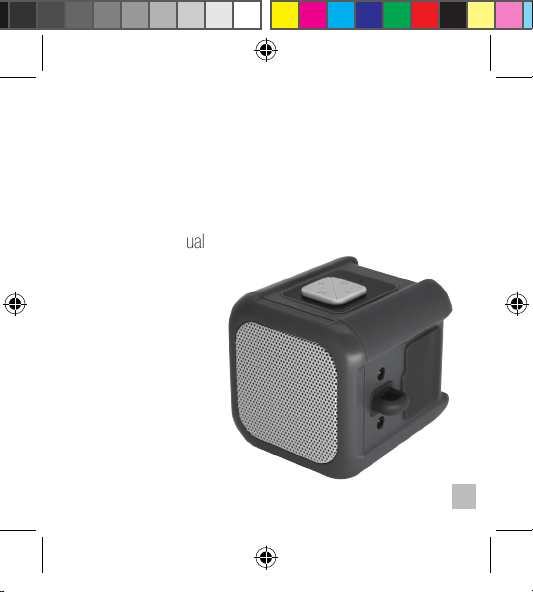
In The Box
• NUU Riptide
• Micro-USB Power Charging Cable
• 3.5mm to 3.5mm Audio Cable
• User Manual
• Carabiner
Riptide_UserManual_Final.indd 3 7/17/2014 3:07:11 PM
2
Page 4
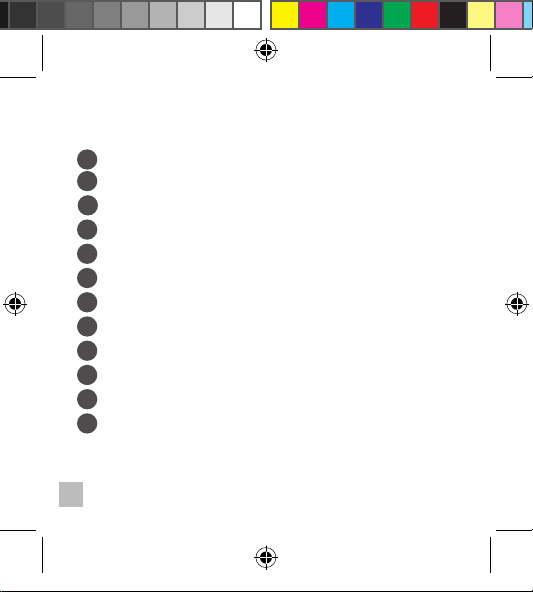
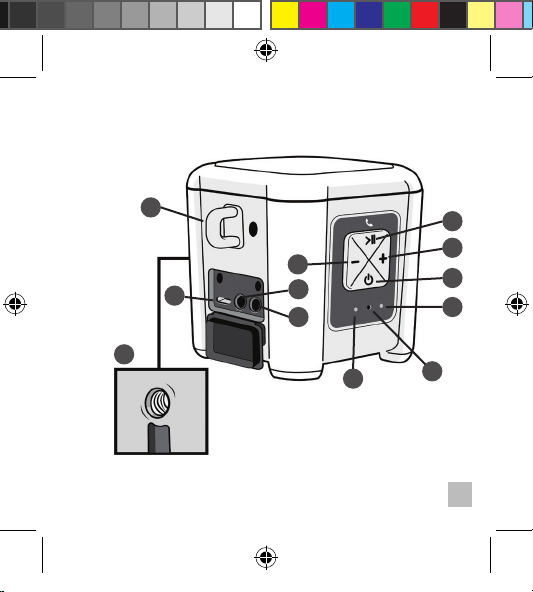
Getting Started
On/Off Switch
a
b
Bluetooth Status Light
c
Action Button
d
Volume Up
Volume Down
e
Charging Indicator
f
g
Micro-USB Charging Port
AUX-IN
h
AUX-OUT
i
Carabiner loop
j
Universal ¼-20TPI threaded hole for mounting
k
l
Built-in Microphone
3
Riptide_UserManual_Final.indd 4 7/17/2014 3:07:11 PM
Page 5
j
e
g
h
i
c
d
a
b
Riptide_UserManual_Final.indd 5 7/17/2014 3:07:12 PM
k
f
l
4
Page 6
a
5
Riptide_UserManual_Final.indd 6 7/17/2014 3:07:12 PM
On/Off Button
On: Press and hold the button for about 3 seconds to turn
the NUU Riptide on. You will hear a two-tone (low-high) sound,
indicating that the speaker is on.
Off: Press and hold the button for about 3 seconds to turn
the NUU Riptide off. You will hear a two-tone (high-low) sound,
indicating that the speaker has been turned off.
Auto-off: After 30 minutes of inactivity, the NUU Riptide will
shut off automatically. To turn the NUU Riptide on again, Press and
hold the button for about 3 seconds. The NUU Riptide will not
automatically shut off if you are playing audio through Bluetooth, or
3.5mm connection.
NOTE: The Bluetooth Status LED will light when the NUU Riptide
is on, and go dark when it is off.
Page 7
b
Riptide_UserManual_Final.indd 7 7/17/2014 3:07:12 PM
Bluetooth Status Light
The Bluetooth Status Light is a small LED located below the on/
off button that illuminates to indicate the current status of the NUU
Riptide’s Bluetooth connection.
Flashing Slowly and Intermittently: The NUU Riptide is on
and is not in pairing mode. This is also the indicator for
“auto-reconnect”, where the NUU Riptide attempts to connect with
the last paired Bluetooth device immediately after it is powered on.
NUU Riptide will automatically enter pairing mode when it cannot
find a previously paired Bluetooth device.
Flashing Quickly and Steadily: Pairing mode.
Solidly Lit: Paired and connected.
6
Page 8
c
7
Riptide_UserManual_Final.indd 8 7/17/2014 3:07:12 PM
Action Button
The Action button has the Play/Pause symbol embossed into it as
well as a Phone icon silkscreened above it. This button controls:
• Pairing with Bluetooth devices
• Playback
• Speakerphone
PAIRING WITH BLUETOOTH DEVICES
1. Switch on the NUU Riptide. The Bluetooth Status Light will
flash slowly.
2. The NUU Riptide will attempt to re-connect with the
previously paired device when it is powered on. If it cannot
find the paired device, it will enter pairing mode automatically.
You will hear a double-beep (low-low) when this happens.
Page 9
3. If the NUU Riptide did not automatically enter pairing mode,
press and hold the Action Button for about 3 seconds. You
will hear a double-beep (low-low) and the Bluetooth Status Light
will flash quickly. The NUU Riptide is now in pairing mode.
4. Enable Bluetooth on your phone or other device.* Then select
“NUU Riptide” from the list of discoverable devices.
5. If prompted for a PIN code, enter “0000” (4 zeros).
6. It will take between 10 and 15 seconds for the NUU Riptide to
pair with your device. When pairing is successful, you will hear a
high tone and the Bluetooth Status Light will remain steadily lit.
*Procedures for activating Bluetooth will vary across devices. Consult the
documentation that came with your device for further information.
Riptide_UserManual_Final.indd 9 7/17/2014 3:07:12 PM
8
Page 10
PLAYBACK
The Action button doubles as a “Play/Pause” button. While music
is playing, press and release the Action Button to pause the music.
Press and release the button again to resume playback.
SPEAKERPHONE
Make Call: To make a call, make sure your NUU Riptide must
be connected to your phone via Bluetooth. Dial as usual and speak
towards the built-in microphone located under the power button.
NOTE: The built-in microphone only works when your
phone is connected via Bluetooth.
Answer Call: To answer an incoming call, press and release the
Action button. Incoming and outgoing calls are given priority over
Bluetooth audio playback. If a call comes in while you are streaming
Bluetooth audio, the track will pause and the NUU Riptide will play the
ringtone. It will resume once the call has ended.
9
Riptide_UserManual_Final.indd 10 7/17/2014 3:07:12 PM
Page 11
Reject Call: To reject an incoming call, press and hold the Action
Button for one (1) second. You will hear a two-tone sound and the call will
go to voicemail.
NOTE: If you hold the action button too long the NUU Riptide
will enter pairing mode.
End Call: To end a call, press and release the action button.
Transfer From Speakerphone to Phone: During a phone call, press
and hold the Action button for 1-2 seconds to switch between using the
NUU Riptide and your phone to talk. You will hear a ‘beep’ indicating that the
call has been transferred to your phone or the NUU Riptide.
Riptide_UserManual_Final.indd 11 7/17/2014 3:07:13 PM
10
Page 12
d
CONTROLLING VOLUME
Press or hold the volume keys to adjust the volume. The NUU
Riptide will beep with each change in volume. When you reach
maximum volume, you will hear a high-pitched beep. When you
reach minimum volume, you will hear a low-pitched beep.
Volume may only be adjusted on the NUU Riptide while it is
connected to a Bluetooth device. When the NUU Riptide is
connected via the AUX-IN, the volume is set to maximum and must
be controlled on your phone/device.
NOTE: Music playback volume and speakerphone volume are
adjusted separately, and may only be adjusted while the NUU Riptide
is connected to a Bluetooth device.
11
Riptide_UserManual_Final.indd 12 7/17/2014 3:07:13 PM
e
&
Volume Up & Down
Page 13
f
g
Riptide_UserManual_Final.indd 13 7/17/2014 3:07:13 PM
Charging Indicator
An occasional flashing red light indicates that the battery is low and
should be recharged soon. When charging, this light is green until
the NUU Riptide is fully charged.
Micro-USB Charging Port
For best results, ensure the NUU Riptide is fully charged before
use.
CHARGING THE NUU RIPTIDE’S BATTERY
Connect the supplied Micro-USB cable into the charging port, and
plug USB side into your computer or USB AC adapter (adapter not
included).
The green charging indicator will remain illuminated while the unit
is charging. The indicator will automatically switch off when the unit
is fully charged. Allow approximately 2.5 hours for the battery to
fully charge. The NUU Riptide may be used while it is charging.
NOTE: Your computer’s USB port may not supply enough power
to charge and play at the same time.
12
Page 14
USB SPEAKER
The NUU Riptide can be used as a USB speaker when connected to
your computer’s USB port. Once connected you may control volume
with either the NUU Riptide’s buttons or your computer’s volume
controls.
If the NUU Riptide does not automatically connect, you may have
to manually select NUU Riptide as your output device. Consult your
computer’s documentation to learn how to do so.
Ensure the NUU Riptide is fully charged before using as a USB speaker.
Your computer’s USB port may not be able to supply enough power to
charge and play music at the same time.
h i
&
The NUU Riptide can connect to any device with a 3.5mm headphone
13
Riptide_UserManual_Final.indd 14 7/17/2014 3:07:13 PM
Aux-In & Aux-Out
Page 15
jack. Use the supplied 3.5 mm input cable to plug and play, no
Bluetooth required. Simply plug one end of the cable into the AUX-IN
port of the NUU Riptide and the other end into the 3.5mm headphone
jack of your phone/device.
Like any phone/device headphone jack, the AUX-OUT of the NUU
Riptide can be used as a music source that you can connect to another
NUU Riptide’s AUX-IN to double the sound output power.
NOTE: Audio content via 3.5mm stereo input will override audio
streamed via Bluetooth.
NOTE: Accessories do NOT meet waterproof and dustproof
specifications.
j
Riptide_UserManual_Final.indd 15 7/17/2014 3:07:13 PM
Carabiner Loop
A built-in loop on the I/O port side is available for attaching the
NUU Riptide to an object via a carabiner, lanyard or the like
14
Page 16
k
l
15
Riptide_UserManual_Final.indd 16 7/17/2014 3:07:13 PM
Universal ¼-20TPI threaded
hole for mounting
The NUU Riptide is compatible with any mounting system
utilizing a 1/4” 20TPI screw, enabling you to mount it on your
bike, ATV, or any other place you like.
Built-in Microphone
The NUU Riptide has a built-in microphone located under the
Power button. This noise cancelling microphone enables you
to use the NUU Riptide as a speakerphone in addition to a
speaker. For more information on using the NUU Riptide as a
speakerphone see page 9.
Page 17
Waterproof & Dustproof
Performance
The NUU Riptide is IP57 certified. This means it meets the following
requirements:
Solid particle protection level 5 – the ingress of dust is not
entirely prevented, but it does not enter in sufficient quantity to
interfere with the satisfactory operation of the equipment; complete
protection against contact.
Liquid ingress protection level 7 – the ingress of water in
harmful quantity shall not be possible when the enclosure is
immersed in water up to 3 feet for 30 minutes.
Although the NUU Riptide is designed to be dustproof, waterproof and
made to tackle any adventure, it is not indestructible. Damage caused
from misuse, abuse or failure to properly maintain the NUU Riptide is not
covered by the limited warranty. The following information should be
kept in mind at all times:
• The recommended operating water temperature range is from
0°C to 40°C (32°F to 104°F). Do NOT use the NUU Riptide
in hot springs.
Riptide_UserManual_Final.indd 17 7/17/2014 3:07:13 PM
16
Page 18
• The minimum operating temperature is -10°C (14°F).
Battery performance will be affected as the temperature
drops.
• The supplied accessories do NOT meet waterproof and
dustproof specifications.
• NUU Riptide will only meet IP57 standards when the cover to
the charging and AUX-IN port has been securely closed and
sealed.
• While the NUU Riptide is dustproof, exposure to dust and the
like may mar the surface finish. Cosmetic damage is not
covered by the warranty.
Caring for Your NUU Riptide
• If dirt or sand gets on the power charging port(s), wipe the
area clean with a soft cloth that will not leave behind any
fibers.
• Do not open or close the charging port cover with wet or
sandy hands or near water.
17
Riptide_UserManual_Final.indd 18 7/17/2014 3:07:13 PM
Page 19
• Make sure the NUU Riptide is completely dry before
opening the charging port cover.
Specifications
*Design and specifications are subject to change without notice.
• IP57 waterproof & dustproof rating
• Bluetooth Ver. 4.0. Pairs with any Bluetooth 2.0 device.
• 3.5mm AUX-IN & AUX-OUT
• 1 x 3W audio output power
• 1 x Passive bass radiator
• 1 x 50mm 4 ohm speaker driver
• up to 6 hours of playback time (80% volume)
• A2DP profile
• 10m/33ft Bluetooth Range
• Dimensions (WxHxD): 68 x 69 x 68mm (2.67 x 2.71 x
2.67 inches)
• Weight : 165g (5.8 oz.)
Riptide_UserManual_Final.indd 19 7/17/2014 3:07:13 PM
18
Page 20
Troubleshooting
Unable to pair with your Bluetooth device?
19
Riptide_UserManual_Final.indd 20 7/17/2014 3:07:13 PM
Page 21
Problems with sound?
1. For sound distortion, try lowering the volume on the NUU
Riptide and/or your phone/device.
3. Connect your phone/device to the NUU Riptide via the
3.5mm input cable rather than Bluetooth. Ensure that the
cable is fully inserted at both ends.
volume change, play/pause, pair, etc.?
1. Switch the NUU Riptide off and then on again.
2. If there is still no response after step 1, connect the unit to
the supplied power adapter and repeat step 1.
Riptide by pressing the volume up and volume down
buttons at the same time.
4. Ensure that both devices are sufficiently charged.
Riptide_UserManual_Final.indd 21 7/17/2014 3:07:13 PM
2. Move the NUU Riptide closer to your phone/device.
4. Ensure that both devices are sufficiently charged.
Not responding to commands such as
3. If there is still no response after steps 1-2, reset the NUU
20
Page 22
Unable to use as a USB speaker?
Call: 507-529-0041
Phones are answered 8 am - 4:30 pm
Central Time, Monday through Friday
Email: gonuu.com/support
On the support page complete and submit
the email form. E-mails will be answered within
one (1) business day.
Customer Support
We want to help solve whatever issues you may encounter when
using your NUU Riptide. If at any time you are not satisfied or have
questions, please call or e-mail our dedicated customer support
specialists and they will be more than happy to assist you.
21
Riptide_UserManual_Final.indd 22 7/17/2014 3:07:13 PM
Page 23
Call: 507-529-0041
Email: gonuu.com/support
Warnings
Read all instructions and warnings before using this product
to ensure your personal safety and prevent property damage.
• The cover over the charging and AUX-IN port MUST be closed
in order for the NUU Riptide to be waterproofPress firmly on the
cover to ensure it is closed and sealed.
Riptide_UserManual_Final.indd 23 7/17/2014 3:07:13 PM
On the support page complete and submit
22
Page 24
23
Riptide_UserManual_Final.indd 24 7/17/2014 3:07:13 PM
Do not expose the product to water deeper
Page 25
• Only charge the battery in accordance with the user
manual supplied.
• Do not charge the NUU Riptide in damp areas or in
extremely high or low temperatures, as this could result in
electric shock.
• Do not attempt to replace the product’s built-in battery.
Attempts to disassemble the unit or replace internal battery
will void the warranty.
• Obey all signs and displays that require an electrical device
or RF radio product to be switched off in designated areas.
• Do not place the NUU Riptide on high surfaces. During
music playback the product may move or shift, causing it
to fall.
• Do not dispose of the NUU Riptide in a fire. The battery
could explode causing injury or death.
• Dispose of the NUU Riptide with its battery in accordance
with local regulations. Do not dispose of the NUU Riptide
with regular household waste.
Riptide_UserManual_Final.indd 25 7/17/2014 3:07:13 PM
24
Page 26
FCC Information
FCC STATEMENT
This device complies with Part 15 of the FCC Rules. Operation is subject
to the following two conditions:
1. This device may not cause harmful interference, and
2. This device must accept any interference received,
including interference that may cause undesired
operation. Changes or modifications not expressly
approved by the party responsible for compliance could
void the user’s authority to operate the equipment.
NOTE: This equipment has been tested and found to comply with the
limits for a Class B digital device, pursuant to Part 15 of the FCC Rules.
These limits are designed to provide reasonable protection against
harmful interference in a residential installation. This equipment generates, uses and can radiate radio frequency energy and, if not installed
and used in accordance with the instructions, may cause harmful
interference to radio communications.
25
Riptide_UserManual_Final.indd 26 7/17/2014 3:07:13 PM
Page 27
However, there is no guarantee that interference will not occur in a
particular installation. If this equipment does cause harmful interference
to radio or television reception, which can be determined by turning
the equipment off and on, the user is encouraged to try to correct the
interference by one or more of the following measures:
• Reorient or relocate the receiving antenna.
• Increase the separation between the equipment and receiver.
• Connect the equipment into an outlet on a circuit different from
• Consult the dealer or experienced radio/TV technician for help.
FCC RF Warning Statement
The device has been evaluated to meet general RF exposure
requirement. The device can be used in portable exposure condition
without restriction.
Riptide_UserManual_Final.indd 27 7/17/2014 3:07:14 PM
that to which the receiver is connected.
26
Page 28
Warranty Information
Limited One Year Warranty
Information
NUU Limited (hereafter referred to as NUU), warrants this product to be free from defects in workmanship and materials, under normal use and conditions, for a period of one (1) year from the date of
original purchase.
If you are experiencing any problems with the operation or function of your product, please make sure
you have downloaded our full owner’s manual from our website for reference or contact the authorized
local distributor (information of the authorized distributors are listed on www.gonuu.com). Should this
fail to resolve the matter and service is still required by reason of any defect or malfunction during the
warranty period, NUU will repair or, at its discretion, replace this product without charge. This decision is
subject to verication of the defect or malfunction upon delivery of this product to a designated factory
service center. The product must include proof of purchase, including date of purchase. To obtain the
Warranty Service, Customer must contact the authorized local distributor within the applicable warranty
period to obtain warranty service authorization. Dated proof of original purchase from the authorized
reseller will be required. NUU is not responsible for Customer’s products or parts received without a
warranty service authorization. Products or parts shipped by Customer to local distributor must be sent
prepaid and packaged appropriately for safe shipment, and it is recommended that they be insured or
sent by a method that provides for tracking of the package.
THIS WARRANTY SHALL NOT BE EXTENDED, ALTERED OR VARIED EXCEPT BY A WRITTEN INSTRUMENT
27
Riptide_UserManual_Final.indd 28 7/17/2014 3:07:14 PM
Page 29
DULY SIGNED BY NUU WARRANTIES EXCLUSIVE. IF THIS PRODUCT DOES NOT OPERATE AS WARRANTED ABOVE,
CUSTOMER’S SOLE REMEDY FOR BREACH OF THAT WARRANTY SHALL BE REPLACEMENT OR REPAIR OF THE
PRODUCT OR PART OR REFUND OF THE PURCHASE PRICE PAID, AT NUU. THIS WARRANTY IS IN LIEU OF ALL
OTHER WARRANTIES (OR CONDITIONS), EXPRESSED OR IMPLIED, INCLUDING (WITHOUT LIMITATION), ANY
WARRANTIES OF MERCHANTABILITY, NON-INFRINGEMENT, OR FITNESS FOR A PARTICULAR PURPOSE. NUU
SHALL NOT BE LIABLE FOR LOSS OF PROFITS OR ANY SPECIAL, INCIDENTAL, OR CONSEQUENTIAL DAMAGES
WHICH THE PURCHASER MAY SUSTAIN. IN NO EVENT SHALL NUU’S LIABILITY EXCEED THE PURCHASE PRICE
OF THE DEFECTIVE PRODUCT. NUU NEITHER ASSUMES NOR AUTHORIZES ANY OTHER PERSON TO ASSUME
FOR IT ANY OTHER LIABILITY IN CONNECTION WITH THE SALE, INSTALLATION, MAINTENANCE OR USE OF
ITS PRODUCTS. NUU SHALL NOT BE LIABLE UNDER THIS WARRANTY IF ITS TESTING AND EXAMINATION
DISCLOSE THAT THE ALLEGED DEFECT OR MALFUNCTION IN THE PRODUCT DOES NOT EXIST OR WAS CAUSED
BY CUSTOMER’S OR ANY THIRD PERSON’S MISUSE, NEGLECT, IMPROPER INSTALLATION OR TESTING,
UNAUTHORIZED ATTEMPTS TO OPEN, REPAIR, OR MODIFY THE PRODUCT, OR ANY OTHER CAUSE BEYOND THE
RANGE OF THE INTENDED USE, OR BY ACCIDENT, FIRE, LIGHTNING, OTHER HAZARDS, OR ACTS OF GOD. THIS
WARRANTY DOES NOT COVER PHYSICAL DAMAGE TO THE SURFACE OF THE PRODUCT, INCLUDING CRACKS
OR SCRATCHES ON OUTSIDE CASING. THIS WARRANTY DOES NOT APPLY WHEN THE MALFUNCTION RESULTS
FROM THE USE OF THIS PRODUCT IN CONJUNCTION WITH ACCESSORIES, OTHER PRODUCTS, OR ANCILLARY
OR PERIPHERAL EQUIPMENT AND NUU DETERMINES THAT THERE IS NO FAULT WITH THE PRODUCT ITSELF.
THIS WARRANTY DOES NOT APPLY TO ANY MALFUNCTION OR FAILURE OF THE PRODUCT OR PART DUE TO ANY
COMMUNICATION SERVICE CUSTOMER MAY SUBSCRIBE TO OR USE WITH THE PRODUCT. WARRANTY IS VOID IF
THE WARRANTY STICKER IS REMOVED.
LIMITATION OF LIABILITY: TO THE FULL EXTENT ALLOWED BY LAW, NUU ALSO EXCLUDES FOR ITSELF AND ITS
SUPPLIERS ANY LIABILITY, WHETHER BASED IN CONTRACT OR TORT (INCLUDING NEGLIGENCE), FOR INCIDENTAL, CONSEQUENTIAL, INDIRECT, SPECIAL, OR PUNITIVE DAMAGES OF ANY KIND, OR FOR LOSS OF REVENUE
OR PROFITS, LOSS OF BUSINESS, LOSS OF INFORMATION OR DATA, OR OTHER FINANCIAL LOSS ARISING OUT
OF OR IN CONNECTION WITH THE SALE, INSTALLATION, MAINTENANCE, USE, PERFORMANCE, FAILURE, OR
INTERRUPTION OF THIS PRODUCT, EVEN IF NUU OR ITS AUTHORIZED RESELLER HAS BEEN ADVISED OF THE
Riptide_UserManual_Final.indd 29 7/17/2014 3:07:14 PM
28
Page 30
POSSIBILITY OF SUCH DAMAGES, AND LIMITS ITS LIABILITY TO REPLACEMENT, REPAIR, OR REFUND OF THE
PURCHASE PRICE PAID, AT NUU’S DISCRETION. THIS DISCLAIMER OF LIABILITY FOR DAMAGES WILL NOT BE
AFFECTED IF ANY REMEDY PROVIDED HERE-IN SHALL FAIL OF ITS ESSENTIAL PURPOSE.
Disclaimer: Some countries, states, or provinces do not allow the exclusion or limitation of implied warranties or the limitation of incidental or consequential damages for certain products supplied to consumers, or
the limitation of liability for personal injury, so the above limitations and exclusions may be limited in their
application to you. When the implied warranties are not allowed to be excluded in their entirety, they will
be limited to the duration of the applicable written warranty. This warranty gives you specic legal rights
which may vary depending on local law.
NUU Service Center
3111 19th Street NW
Rochester, MN 55901-6606 USA
29
Riptide_UserManual_Final.indd 30 7/17/2014 3:07:14 PM
Page 31
Riptide_UserManual_Final.indd 31 7/17/2014 3:07:14 PM
Page 32
Riptide_UserManual_Final.indd 32 7/17/2014 3:07:14 PM
www.facebook.com/nuubrand
www.twitter.com/go_nuu
Made in China
© 2013 NUU. ALL RIGHTS RESERVED
The Bluetooth word mark and logo are registered
trademarks and are owned by the Bluetooth SIG, Inc.
 Loading...