

Page 1
Page 2
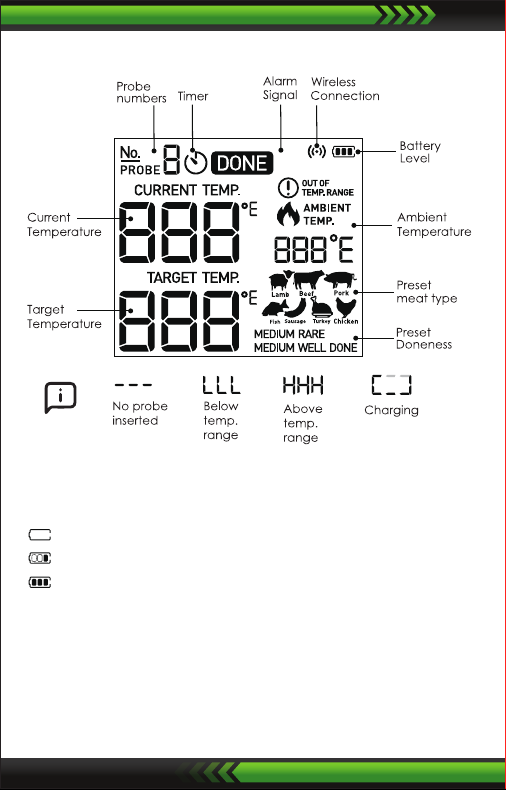
Screen Introduction
Baery Recharging
Please use Type-C cable to charge the device
Flashing: Low power (Need to charge)
Progress bar: Charging
Full icon: Fully charged
Install the Probes
The device will keep scanning the sockets when its power is switched
ON, the Probe icons on LCD will display one by one from 1 to 6 where
probes are plugged in. Then insert the probes into the food, make
sure the front tip of the probe is in the center of the food to get
accurate temperature.
www.NutriChefKitchen.com
2
Page 3
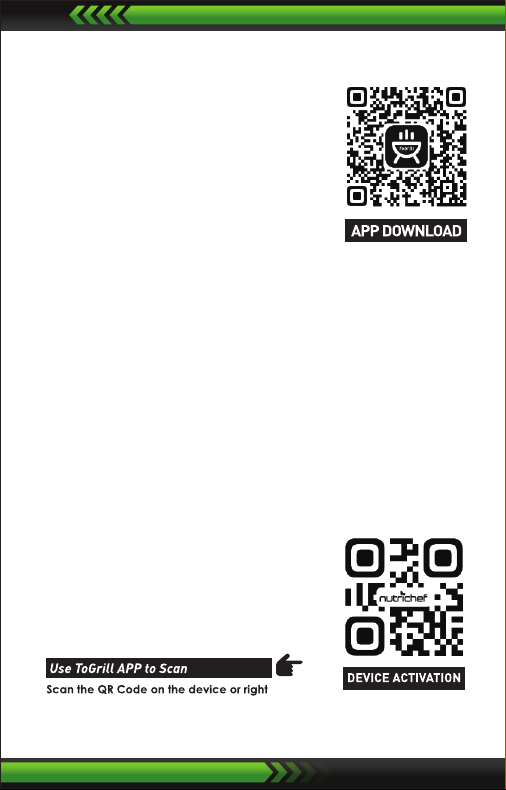
Download the APP
Search the keyword 'ToGrill' in Appstore or
Google Play, or scan the following QR code
with your phone. Download and install it for
free.
Make sure your phone meets the requirements:
iOS devices running version 11.0 or later.
Android devices running version 5.0 or later,
with BT 4.0 module or later.
Power ON/OFF
• Press and hold the button for more than 3 seconds when it is in
OFF mode, it will be powered on. The LCD display will show 'ON'.
• If you do the same when it is in ON mode, it will be powered off.
• When there is no probe inserted in the device, it will be powered
off automatically.
Activate device and pair with your phone
1. Switch ON your device and keep the BT switch of your phone on.
2. Activate device:
• Launch the 'ToGrill' app,
• Enable mobile phone permissions
• Follow the instructions in the app
to activate the device
www.NutriChefKitchen.com
3
Page 4
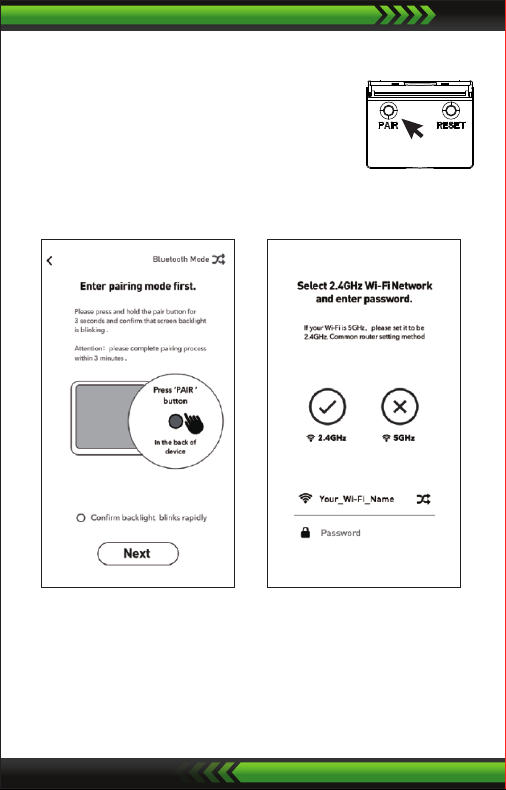
3. Pairing:
i: Sign up for an account in the app.
ii: Press and hold 'PAIR button' for 3 seconds
and conrm that screen backlight is
blinking.
(Open the stand at the back of the device)
iii: Select 2.4GHz Wi-Fi network and enter password
App Ul gure: ii
App Ul gure: iii
4. Connected successfully.
Once Paired the device with your phone, you don't need to do it
again, unless you change to other phones.
www.NutriChefKitchen.com
4
Page 5
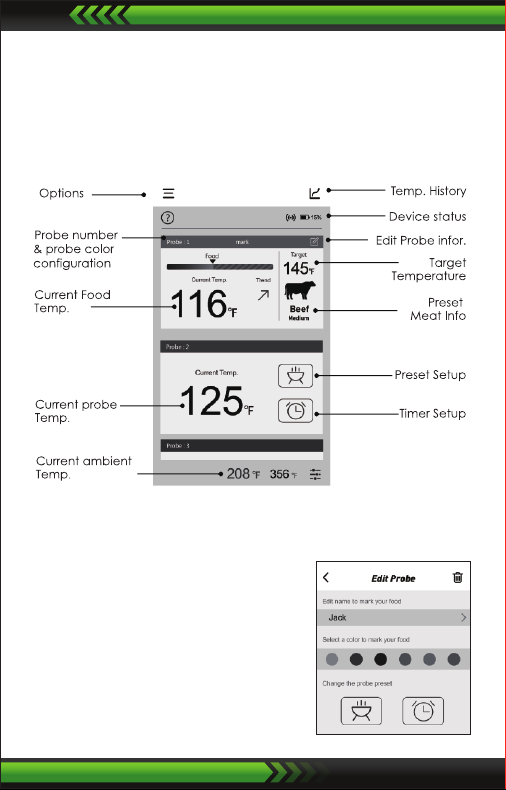
Enjoy your barbecue time
Choose food type and preference for the food where each probe is
inserted, the app and the device will display its current and tagert
temperature.
When the food is ready, the app and the device will alarm.
The user interface of the app may be changed when upgrade.
Please follow the instructlons in the app.
Probe color conguration
It's difficult for you to distinguish
different probes when you have several
probes using at the same time.
The app provides 6 colors for each
channel, which enables users set them
to be identical to the color of the probes.
The probes comes in 6 colors as well.
www.NutriChefKitchen.com
5
Page 6
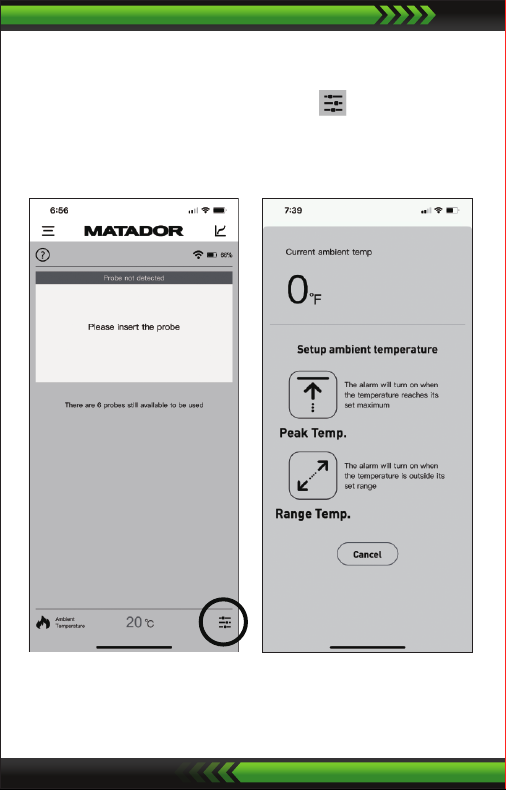
Setting the ambient temperature probe
1. After pairing, insert the pit
probe into the socket with
the re/ame logo and the
following screen will display.
2. Tap on icon located at
the bottom right of the screen
to set your monitoring
parameters of the pit probe.
3. From this screen, you can set custom alarm notications to
monitor the cooking temperature of your barbecue/pit.
www.NutriChefKitchen.com
6
Page 7
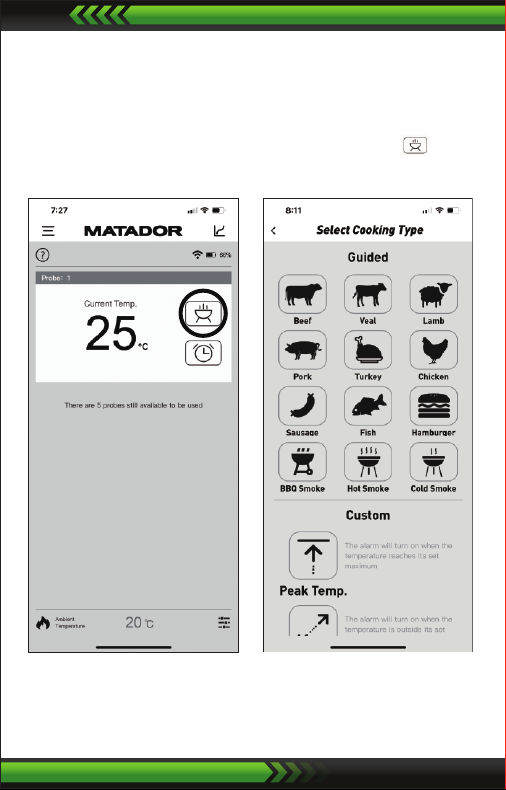
Setting your meat probes
1. Insert probes into the
Thermometer sockets and
the below screen will
display on your phone.
2. To cook using preset or
customised meat temperature
settings, tap on the icon.
3. The menu selection screen will then display.
www.NutriChefKitchen.com
7
Page 8
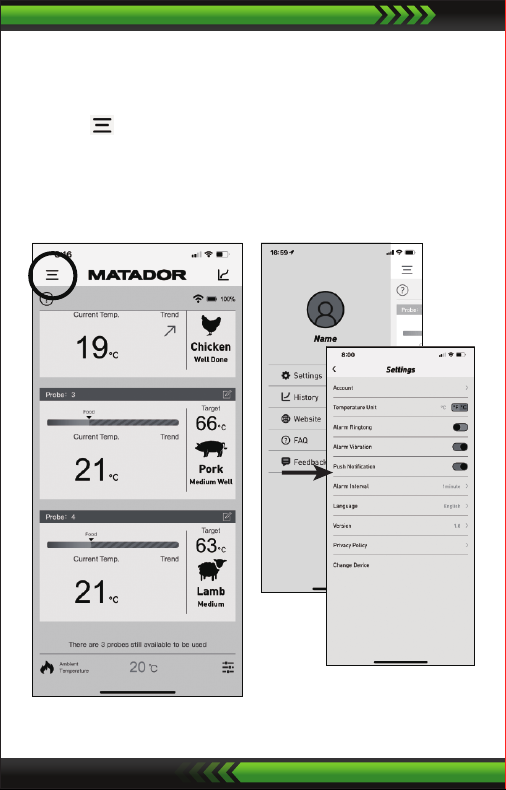
Reviewing menu options
1. From your home page, tap
on the icon in the top
left-hand corner to open the
menu side bar and the menu
screen will display.
2. Select 'Settings' option to:
• Set temperature unit F°/C°
• Set an alarm ring tone,
vibration alert or alarm
interval.
• Toggle push notications
www.NutriChefKitchen.com
8
Page 9
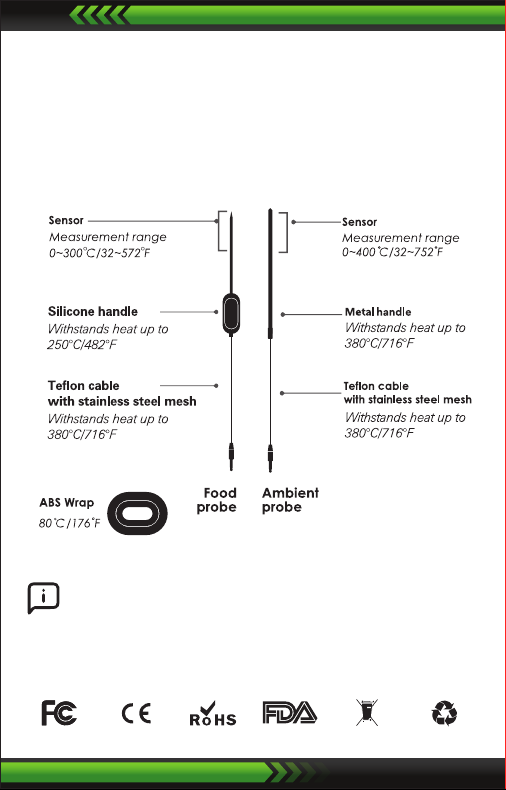
WARNING
The heat resistance varies in different components of the probe,
• DO NOT put the probes directly in re ame.
• DO NOT put the wrap into oven, or it wil melt!
• Probes are NOT dishwasher safe.
DEVICE CRASH CONDITION:
Press the reset button, the device will automatically restart.
Attention:
Temp. probes above for reference only, subject to the actual probes.
www.NutriChefKitchen.com
9
Page 10

FCC Caution
This device complies with part 15 of the FCC Rules. Operation is
subject to the following two conditions: (1) This device may not
cause harmful interference, and (2) this device must accept any
interference received, including interference that may cause
undesired operation.
15.21 Information to user
Any Changes or modications not expressly approved by the party
responsible for compliance could void the user's authority to
operate the equipment.
15.105 Information to the user
Note: This equipment has been tested and found to comply with the
limits for a Class B digital device, pursuant to part 15 of the FCC Rules.
These limits are designed to provide reasonable protection against
harmful interference in a residential installation. This equipment
generates uses and can radiate radio frequency energy and, if not
installed and used in accordance with the instructions, may cause
harmful interfer ence to radio communications. However, there is
no guarantee that interference will not occur in a particular
installation. If this equipment does cause harmful interference to
radio or television reception, which can be determined by turning
the equipment off and on, the user is encouraged to try to correct
the interference by one or more of the following measures:
• Reorient or relocate the receiving antenna.
• Increase the separation between the equipment and receiver.
• Connect the equipment into an outlet on a circuit different from
that to which the receiver is connected.
• Consult the dealer or an experienced radio/TV technician for help.
This equipment complies with FCC radiation exposure limits set
forth for an uncontrolled environment. This equipment should be
installed and operated with minimum distance 20cm beiween the
radiator & your body.
www.NutriChefKitchen.com
10
Page 11

Features:
•
Hassle-Free & Wireless Smart Thermometer
• Programmed with 9 Different Meat, 5 Doneness Settings
• Get Connected & See the Temperature on Your Smartphone
• Insert the Probes for Accurate & Reliable Temp Readouts
• Super Easy Setup with Bluetooth Pairing
• Digital LCD Display Screen
• Battery Operated Design
• Perfect for Backyard BBQ Grilling
The ‘ToGrill’ App:
•
View Your Temperature History Timeline
• Displays Real-Time Temperature
• Unique ‘Target Temperature’ Setting
• Alarm & Alert Notications
• Free to Download
• Custom Settings
• View and Export Historical Data
• Generate Poster for Social Media Sharing
• Available for iPhone & Android
What’s in the Box:
•
Smart BBQ
Thermometer
• (2) Temperature
SS Probes
• Ambient probe
• Clip
• 2000mAh
Rechargeable Li-ion
battery
Technical Specs:
•
Construction Materials: ABS Body, SS Probes
• Selectable Temperature Units: Fahrenheit / Celsius
• Max Probe Temperature: 32-572 °F
• Max Stainless Steel Cable Temperature: 716 °F
• Battery-Operated: Requires 3.7V Li-ion battery
• Smartphone Support: iPhones 4s, iOS 11.0 & later, Android 5.0
and Later
• Outdoor Wireless Range: 328+ ft
• Indoor Wireless Range: 100+ ft
• Temperature Probe Construction: Stainless Steel
• *Avoid Placing Directly Over Open Flames
• Product Dimensions (L x W x H): 3.9’’ x 3.15’’ x 0.9’’ -inches
www.NutriChefKitchen.com
11
Page 12
 Loading...