

Page 1
Product Guide
Mini RFID
Shared & Assigned Use Functionality
Versa locks with a touch RFID interface are operated by an RFID credential or by an ADA compliant User Key. Manager credentials (Manager
Key or RFID) provide management access and/or external power. Programming is accomplished via a Programming Key unique to the lock
system. An optional mobile application tool simplifi es lock system management and provides audit trail.
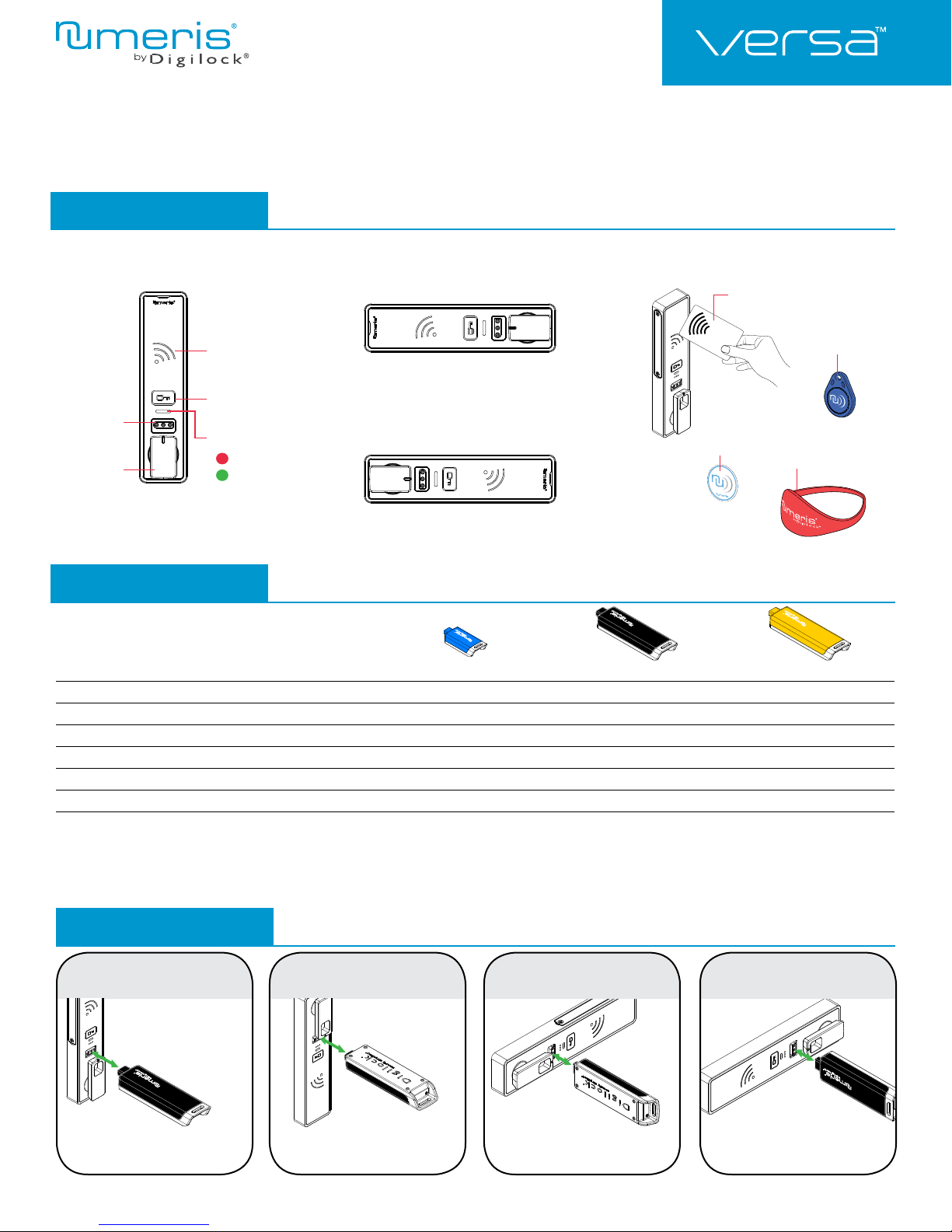
Lock Orientation
Front Unit
Reader
RFID Credentials
RFID Card
RFID
CARD
Horizontal Right
Key Button
Key Slot
Knob
Vertical
LED Usage Indicator
Shared Use
Assigned Use
Horizontal Left
RFID Adhesive
Label
Keys
User Key Manager Key
Operates the lock
Overrides user access
Allows management inspection
Provides external power
Programs Manager Keys to the lock
Assigns user credentials3 (in assigned use functionality)
Sets lock functionality
1
Up to 6 Manager Keys may be programmed to each lock. If managed with the optional Mobile App, up to 250 Manager Keys may be programmed to each lock.
2
1 Programming Key allowed per lock system.
3
Up to 20 user credentials may be assigned to each lock. If managed with the optional Mobile App, up to 250 user credentials may be assigned to each lock.
•••
••
••
••
•
1
Programming Key
RFID Keyfob
RFID Wristband
2
•
•
Key Insertion
Vertical Up Vertical Down
Numeris logo must face up
on vertical up body.
Numeris logo must face
down on vertical down body.
Horizontal Left Horizontal Right
Numeris logo must face right
on horizontal left body.
Numeris logo must face left
on horizontal right body.
1
Page 2
RFID
CARD
Manager
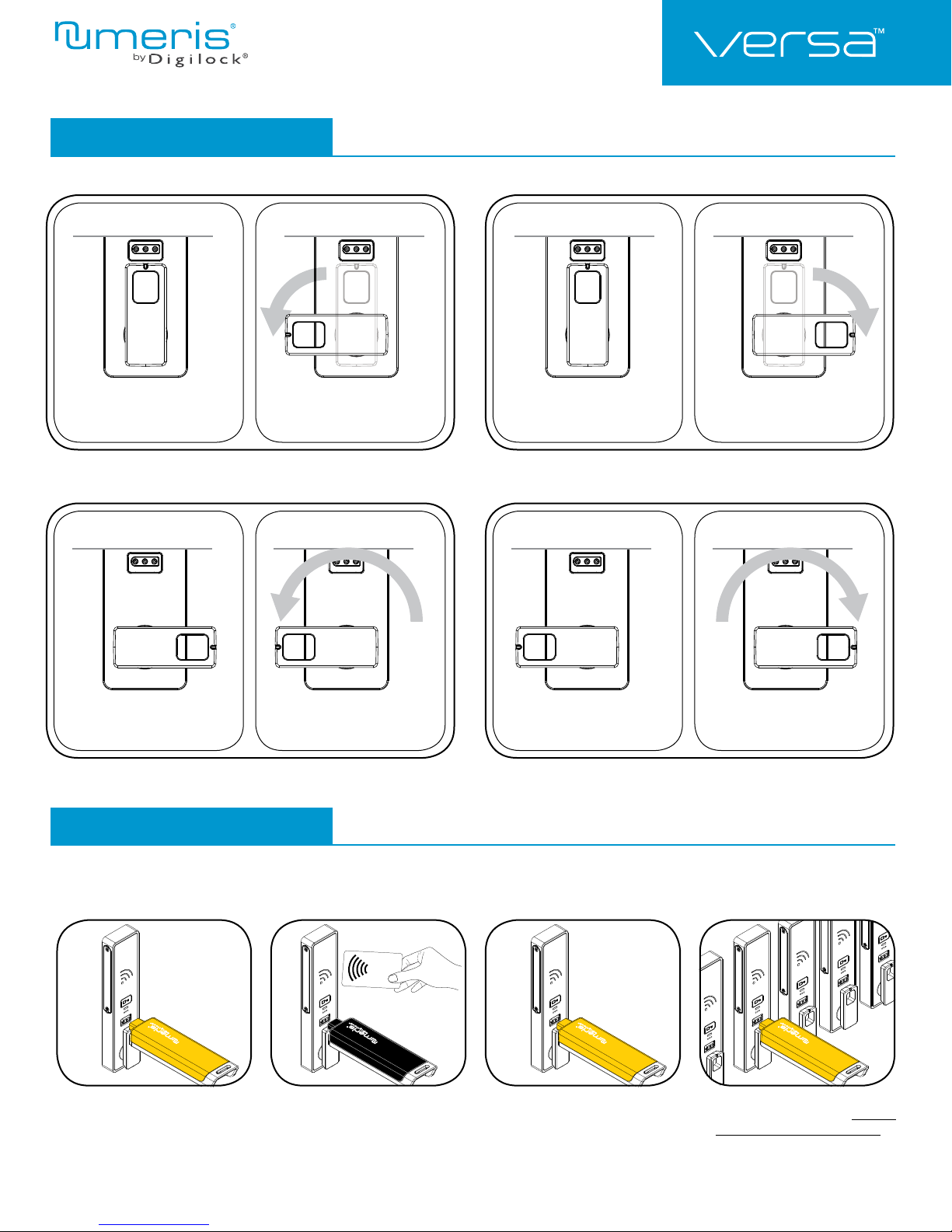
Knob Positions
90º
Product Guide
Mini RFID
Shared & Assigned Use Functionality
Locked
90º CCW to unlock
Locked
90º CW to unlock
180º
Locked
180º CCW to unlock
Locked
180º CW to unlock
Setup
Locks are shipped with factory default settings (only operates by pressing `). Each lock must be set up to operate with a Programming
Key and manager credentials (Manager Key or RFID).
1324
Insert the Programming Key.
A two-tone beep will be heard and
the LED and Reader will turn on.
2
Insert one Manager Key or present
one Manager RFID at a time.
A two-tone beep will be heard for each
manager credential programmed.
Insert the Programming Key.
A two-tone beep will be heard and
the LED and Reader will turn off.
Repeat above steps for each lock
or follow instructions to Express
Register Manager Credentials to
setup all the locks.
Page 3
Product Guide
RFID
CARD
Manager
Mini RFID
Programming Instructions
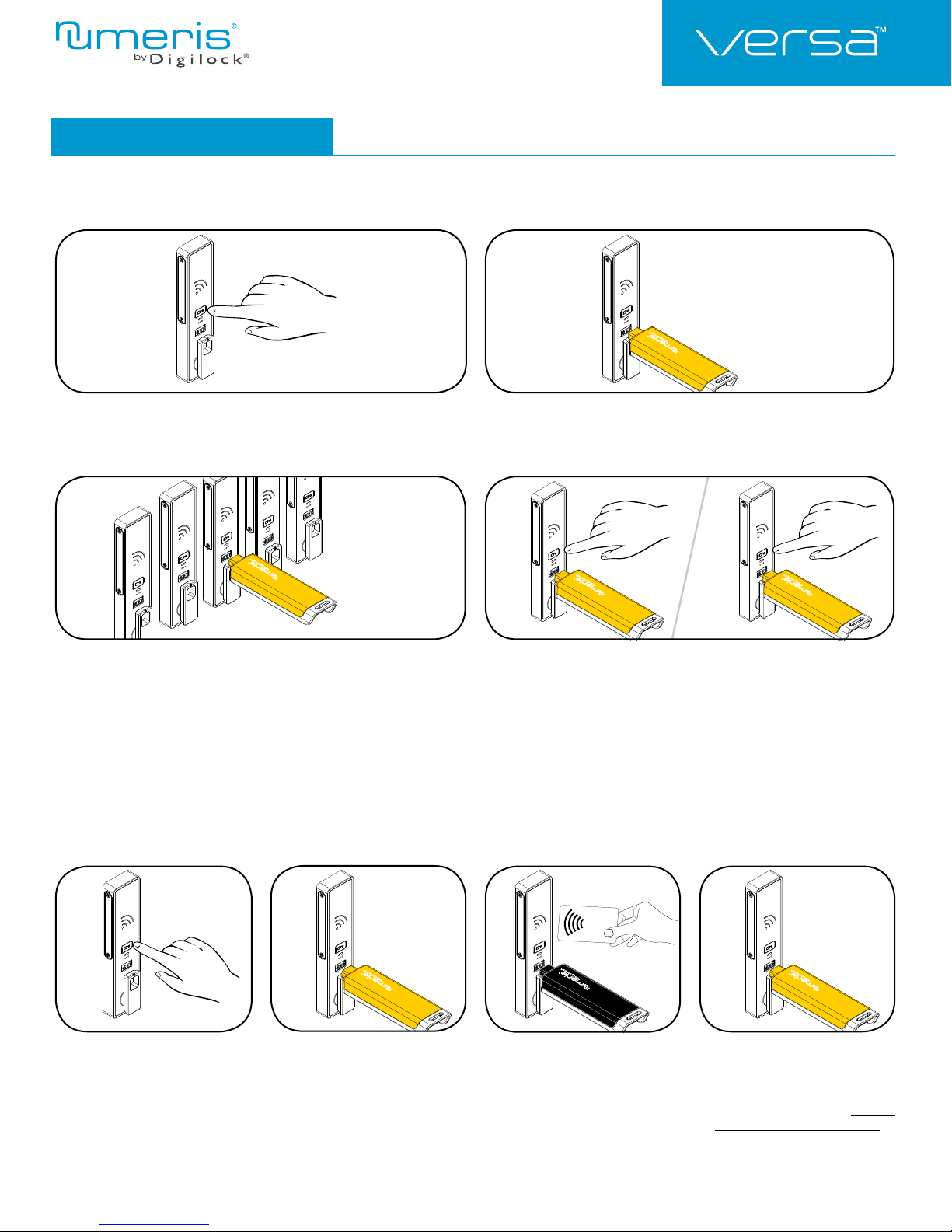
Express Register Manager Credentials
The Programming Key can quickly program multiple locks to operate with the same manager credentials.
Shared & Assigned Use Functionality
1
Go to a lock already programmed to operate with the manager credentials.
Touch and hold ` for 10 seconds (a two-tone beep will be heard after
5 seconds followed by 2 sets of two-tone beeps after 10 seconds) then
release. The LED will fl ash.
3
Insert the Programming Key to program each lock to operate with the same
manager credentials.
Two sets of two-tone beeps will be heard and the LED will fl ash once
to indicate successful programming.
2
Insert the Programming Key.
Two sets of two-tone beeps will be heard and the LED will turn off.
4a 4b
End express registration mode.*
Go to any programmed lock.
Touch ` then insert the Programming Key.
Touch ` then insert the Programming Key again to return the bolt to the
original position.
*The Programming Key will continue to function in express registration mode until it is used to operate a lock.
Add Manager Credentials
Manager credentials can be programmed to the locks at any time.
12 43
Go to a lock requiring additional
manager credentials.
Touch and hold ` for 5 seconds
(a two-tone beep will be heard after
5 seconds) then release.
The LED will fl ash and the Reader
will turn on
.
Insert the Programming Key.
A two-tone beep will be heard.
Insert each additional Manager Key
or present each Manager RFID one
at a time.
A two-tone beep will be heard for each
manager credential programmed.
Insert the Programming Key.
A two-tone beep will be heard and
the LED and Reader will turn off.
Repeat above steps for each lock
or follow instructions to Express
Register Manager Credentials to
quickly program the same manager
credentials to operate multiple locks.
3
Page 4
Product Guide
Mini RFID
Shared & Assigned Use Functionality
Programming Instructions
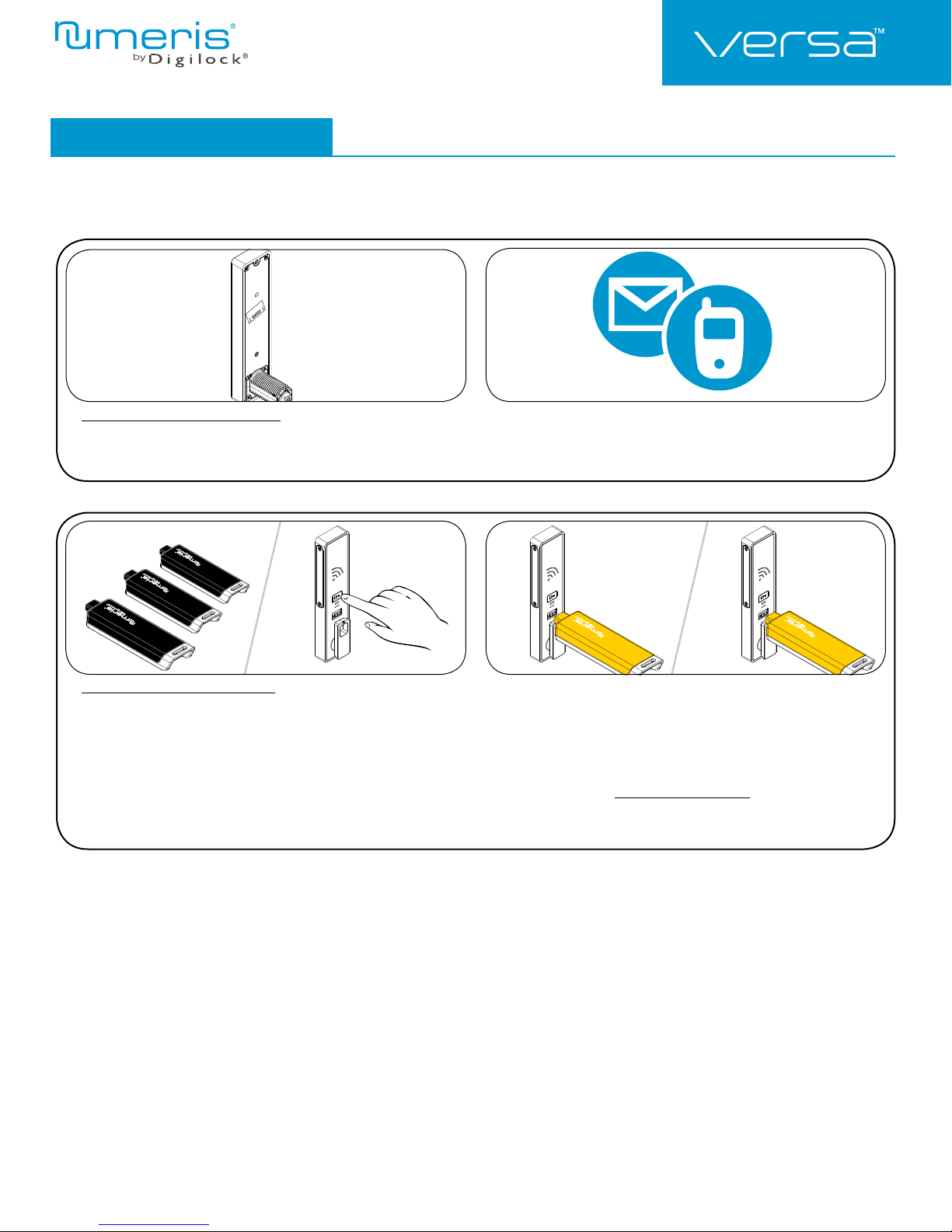
Replace Programming Key or Manager Credentials
The locks must be reprogrammed to prevent the lost/stolen Programming Key or manager credentials from operating a lock.
1
To replace the Programming Key:
Note the order or serial number (found on the lock’s rear unit). Contact Digilock Support to purchase a replacement Programming Key.
1a 1b
To replace Manager Credentials:
Collect all remaining and replacement manager credentials.
Go to any lock operated by the lost/stolen manager credentials.
Touch and hold ` for 5 seconds (a two-tone beep will be heard after 5
seconds) then release.
The LED will fl ash and the Reader will turn on.
2
2a 2b
Insert the Programming Key.
A two-tone beep will be heard.
Insert the Programming Key again.
Three sets of two-tone beeps will be heard and the LED and Reader will
turn off. All previously programmed manager credentials will be erased.
Follow instructions to Add Manager Credentials to program the remaining
and replacement manager credentials to the locks.
4
Page 5
Product Guide
RFID
CARD
Manager
RFID
CARD
RFID
CARD
Manager
Mini RFID
Shared & Assigned Use Functionality
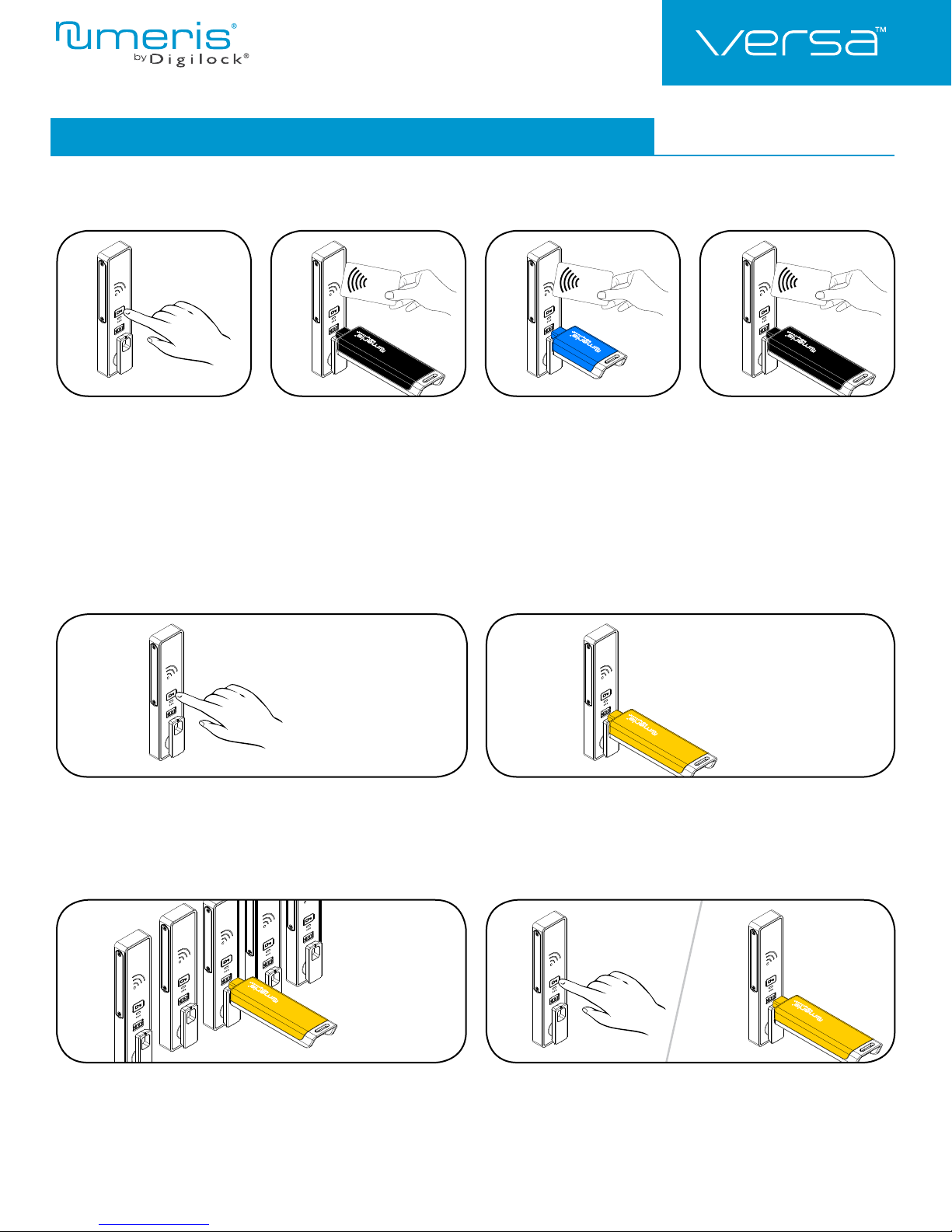
Programming Instructions - In Assigned Use Functionality
Assign User Credentials
Up to 20 user credentials (User Key or RFID) may be assigned to each lock.
1324
or
Touch and hold ` for 5 seconds
(a two-tone beep will be heard after
5 seconds) then release.
The LED will fl ash and the Reader
will turn on.
Insert a valid Manager Key or present
a valid Manager RFID.
A two-tone beep will be heard.
Express Register User and Manager Credentials
The Programming Key can quickly program multiple locks to operate with the same user and manager credentials.
1
Insert each User Key or present
each User RFID one at a time.
Two sets of two-tone beeps will
be heard for each user credential
assigned to the lock.
2
Insert a valid Manager Key or present
a valid Manager RFID.
A two-tone beep will be heard and
the LED and Reader will turn off.
or
Go to a lock already programmed to operate with the user and
manager credentials.
Touch and hold ` for 15 seconds (a two-tone beep will be heard after 5 seconds
followed by 2 sets of two-tone beeps after 10 seconds followed by 3 sets of twotone beeps after 15 seconds) then release.
The LED will fl ash.
3
Insert the Programming Key to program each lock to operate with the same user
and manager credentials.
Two sets of two-tone beeps will be heard and the LED will fl ash once to indicate
successful programming.
*The Programming Key will continue to function in express registration mode until it is used to operate a lock.
Insert the Programming Key.
Two sets of two-tone beeps will be heard and the LED will turn off.
4a 4b
End express registration.*
Go to any programmed lock
Touch ` then insert the Programming Key.
5
Page 6
Product Guide
RFID
CARD
Manager
RFID
CARD
Manager
RFID
CARD
RFID
CARD
Mini RFID
Shared & Assigned Use Functionality
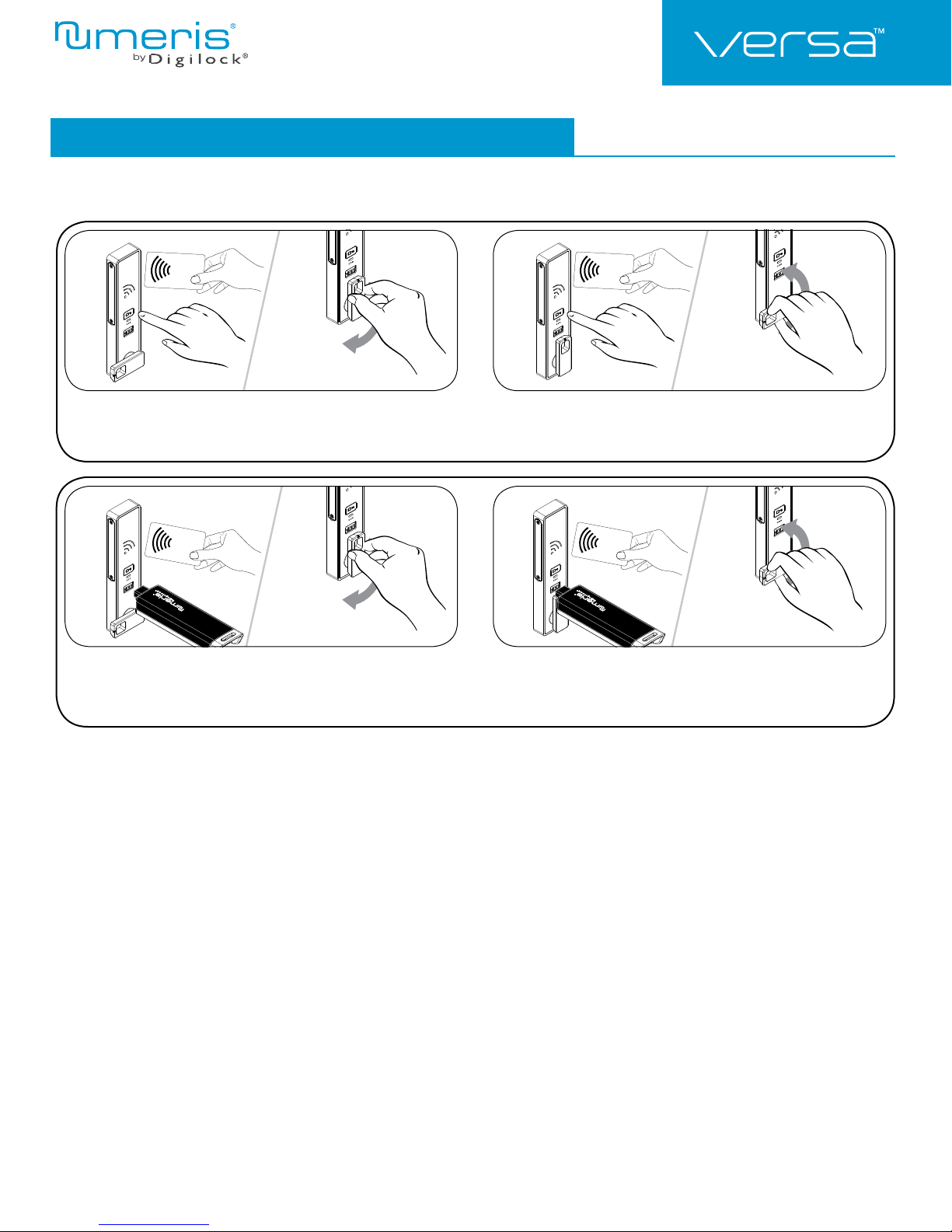
Operating Instructions - In Shared Use Functionality
In shared use functionality, the user presents an RFID credential to lock and the same RFID credential to unlock. Once unlocked, the lock is
available for a different user.
1a 1b
Operate with a User RFID
To lock: Touch `, present an RFID then turn the handle to the
locked position.
To unlock: Touch `, present the same RFID then turn the handle to the
unlocked position. Open the door.*
1a 1b
or or
Operate with a Manager Credential
To lock: Close the door. Insert a registered Manager Key or touch `,
present a valid Manager RFID then turn the handle to the
locked position.
*If a manager credential is used to relock, the previous user credential will continue to operate the lock.
To unlock: Insert a registered Manager Key or touch `, present a valid
Manager RFID then turn the handle to the unlocked position.
Open the door.*
6
Page 7
Product Guide
RFID
CARD
Manager
RFID
CARD
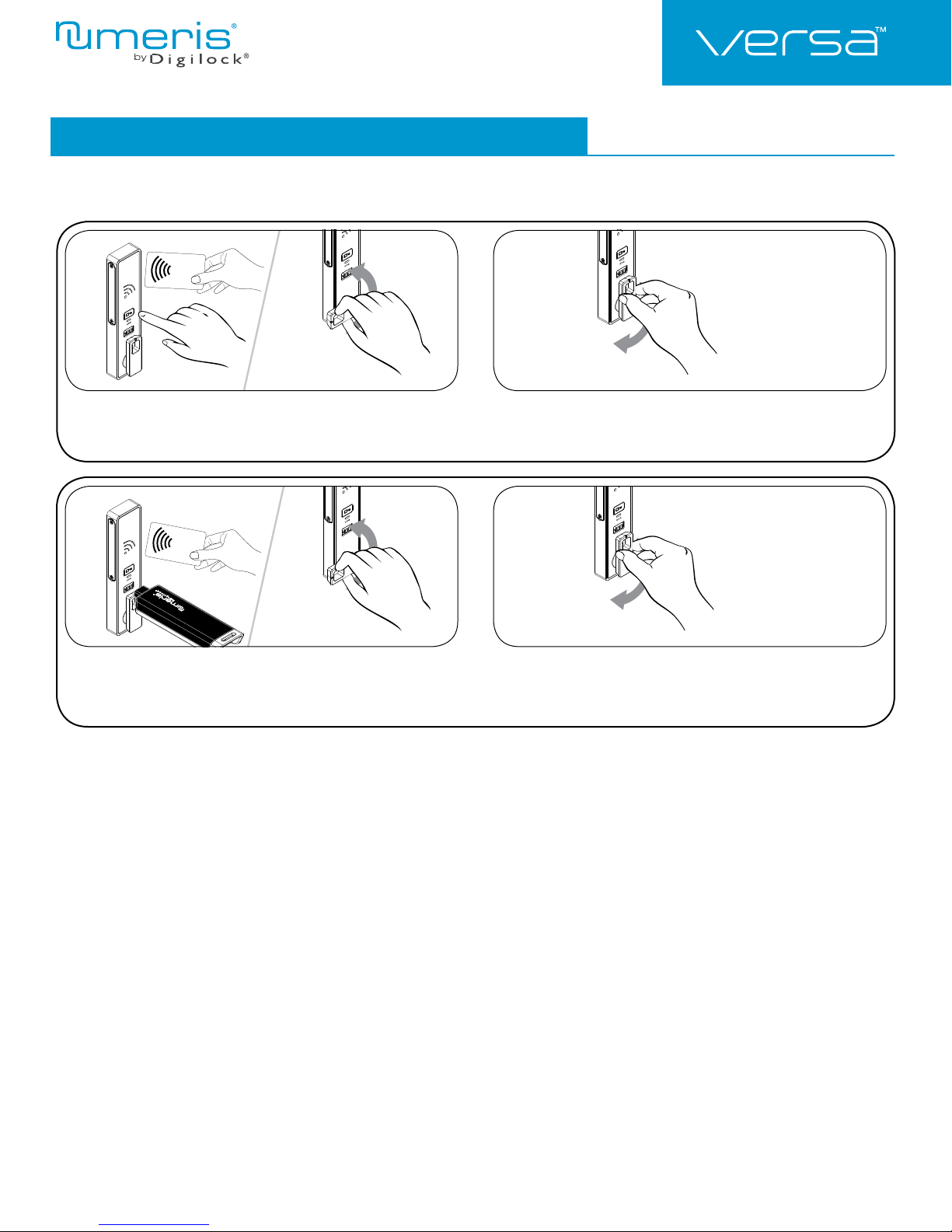
Operating Instructions - In Assigned Use Functionality
In assigned use functionality, users operate the lock with their assigned user credential.
1a 1b
Operate with a User RFID
To unlock: Touch `, present an assigned User RFID then turn the
handle to the unlocked position.
To relock: Close the door then turn the handle to the locked position.
Mini RFID
Shared & Assigned Use Functionality
1a 1b
or
Operate with a Manager Credential
To unlock: Insert a valid Manager Key or touch `, present a valid
Manager RFID then turn the handle to the unlocked position.
To relock: Close the door then turn the handle to the locked position.
092817
PG-NMVM-RF-DEN
Phone: 707 766 6000
www.digilock.com | [email protected]
7
Page 8

Product Guide
Mini RFID
Shared & Assigned Use Functionality
Regulatory Information
The user is cautioned that changes or modifications not expressly approved by CompX, Timberline could
void the user’s authority to operate the equipment.
This device complies with Part 15 of the FCC Rules. Operation is subject to the following two conditions:
(1) This device may not cause harmful interference, and (2) this device must accept any interference
received, including interference that may cause undersired operation.
This equipment has been tested and found to comply with the lim its for a Class B digital device,
pursuant to Part 15 of the FCC Rules. These limits are designed to provide reasonable protection against
harmful interference in a residen tial installation. This equipment generates, uses and can radiate radio
frequency energ y and, if not installed and used in accordance with the instructions,may cause harmful
interference to radio communications. However, there is no guarantee that interference will not occur in a
particular installation. If this equipment does cause harmful interference to radio or television reception,
which can be determined by turning the equipment off and on, the user is encouraged to try to correct the
interference by one or more of the following measures:
Reorient or relocate the receiving antenna.
Increase the separation between the equipment and receiver.
Connect the equipment into an outlet on a circuit different from that to which the receiver
is connected.
Consult the dealer or an experienced radio/TV tech nician for help.
092817
PG-NMVM-RF-DEN
Phone: 707 766 6000
www.digilock.com | [email protected]
8
 Loading...