

Page 1
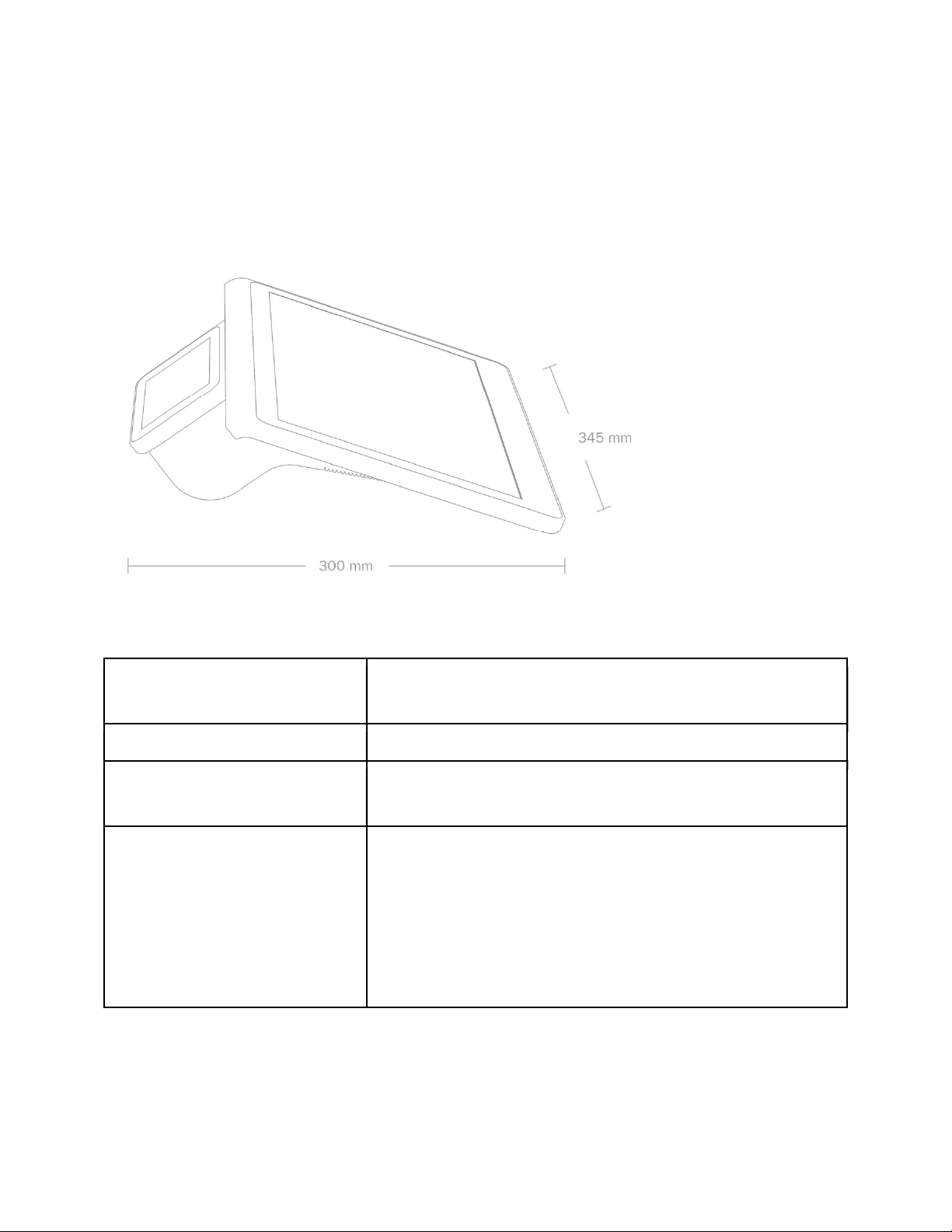
Quick Guide
Full HD Merchant Display
This document is based on the Intended Hardware Usage Document V7 from 20170405. It is
intended to provide the certification laborator with relevant informtion on Dasher for performing the
relevant tests and to quote for the certification.
Overview
Usage Scenario
OS
Processor & Memory
Displays
- countertop POS
- Wifi Access Point
- Printer
N4 OS (Linux + Android)
App Processor iMX6 Cortex A9 Quad Core
RAM: 2GB DDR3
eMMC: 16GB
14" (diagonal) LED-backlit display with IPS technology; 1920x1080 native
resolution
Touchscreen Merchant Display
Capacitive Touchscreen with multi-touch
Anti-Glare and Anti-Fingerprint
5" Customer Display
LED-backlit display with IPS technology; 1280x720 native resolution
confidential - © NumberFour AG 1 of 19
Page 2
Wireless
Default
Wi-Fi
802.11n Wi-Fi wireless networking with 2x2 MiMo technology,
IEEE 802.11 b/g/n compatible
Bluetooth
Bluetooth 2.1+EDR wireless technology
Interfaces
Printer
Barcode Scanner
Audio
Cash Drawer Port
Electrical and Operating
Requirements
In the Box
1 x USB OTG
3 x USB
1 x Ethernet (10/100/1000)
1 x HDMI
Wifi (b/g/n)
Bluetooth 2.1+EDR
Auto Paper Cutter
Out of Paper & Open Printer Detection
50 mm Paper Roll Size
CCD Camera Module with fix focus lens
Barcodes supported: EAN, QR-Code
Buzzer
RJ-11/RJ-12 connector
Line Voltage: 100-240V AC
Operating Temperature: 0 °C to +45 °C
Storage Temperature: -20 °C to +60 °C
Operating Humidity: 5% - 95% (non-condensing)
14" enforeDasher
24V Power Adapter 100-200V AC
Power Cord
5mm Printer Paper Roll
Supported Countries
Certifications
Tier 1: US, UK, DE
Tier 2: Indonesia, India, Malaysia, Turkey, ROE
Tier 3: ROW
TBD: China
CE & R&TTE
FCC
CCC
CB
RoHS
UL
confidential - © NumberFour AG 2 of 19
Page 3

Usage Guide
On/Off/Reset
Device is OFF: press push button -> device gets switched ON
Device is ON: press push button -> SW functionality: device shows dialog on the screen
to the user with the option: device goes to SLEEP, OFF, RESET
Device is in SLEEP mode: press push button -> device WAKES up and is in ON mode
Device FORCED SHUTDOWN: press push button >8sec -> device is performing a
hardware shutdown. Pressing again will start the device again
Change Paper
Open the Printer by pressing down the button at the right side of the device
Take out any remaining parts from the previous paper roll
Place the new paper roll inside with the paper towards the printer mechanism and hold
the paper while closing the printer lid.
Concurrent used functions
All functions of the device can be used at the same time
Detail Specifications
Please see below the details for the various parts as reference.
Processor and Memory
Dasher is based on the Freescale iMX6 Cortex-A9 processor. The electrical design is based on
reference designs of the different integrated circuits.
The operating system (N4OS) for Dasher is based on Linux and Android. The Linux user space
is used for UI less N4 services, network services and to deal with external connected devices
via USB or Bluetooth. The Android user space is used for N4 Applications with rich user
interfaces.
The N4 software (Apps and Services) are mostly written in C++ and Java and running on top of
the operating system (N4OS).
Key Features:
confidential - © NumberFour AG 3 of 19
Page 4

Operating System: N4OS (Linux- and Android -based OS)
Boot from eMMC
Option to use 8, 16 or 32 GB of EMMC memory with fast data transfer
Option to use 1 or 2 GB of DDR3 RAM, needs to be using the full bandwith of 64bit of
the iMX6 for max. performance
Operate 3 different screens at the same time (Merchant Screen, Customer Screen,
HDMI attached Screen)
Fast Factory setup to load Operating System (N4OS)
Numberfour software will enable remote software update via Internet
Support of RealTimeClock with independent power supply (none-rechargeable battery)
for min. 3 years to allow operation in case there is no internet connectivity after startup
Debugging and Testing for development via JTAG and Serial UART
Hardware Requirements:
Processor
freescale iMX6 Quad Core
Memory
eMMC
Pin2Pin compatibility supporting sizes from 8 - 16GB
eMMC 4.4 / 4.41 Standard with 52 MHZ, 8 BIT Transfer Mode & Dual Data
Rate
eMMC will be pre-loaded with operating system for fast factory setup
DDR3 RAM
Pin2Pin compatibility supporting sizes from 1 - 2 GB 4 x 16bit (using the
full bandwith of 64bit of the iMX6 for max. performance to access (read/write)
the RAM)
Firmware Loading (Installation N4OS and N4 Apps/Services)
Initial firmware image loading via different options via Boot ROM
configuration (SW & HW)
Fast Operating System installation via pre-installed OS on eMMC
Download image via USB (Serial Downloader)
Debug for iMX6
JTAG
Serial Debug via UART output / input
Wifi
Dasher will communicate via Wifi with the respective Access Point for communication with the
confidential - © NumberFour AG 4 of 19
Page 5

NumberFour Backend in the cloud and to get Software Updates.
Also Dasher can operate as an access point (AP) for a Corporate-Network (for business owner
and staff) and for a Guest - Network (for customers of business owner).
Dasher can also be used as a gateway for a mesh network that extends the range of an existing
Wifi Network.
Dasher supports auxiliary devices like external Printers, Barcode Scanner, Weighing Scales or
Payment Devices that can be connected via Wifi.
confidential - © NumberFour AG 5 of 19
Page 6

Hardware Requirements:
Wifi/BT Module to be used: DHXA-222 Module ( based on AR9462)
Support for 802.11b/g/n & BT 2.1+EDR
Antennas 2.4GHz : 2x
Two connectors on-
standard laptops
Antenna specifications : Impedance / VSWR 1.5
Efficiency 40%
Supports antenna sharing between Bluetooth and Wifi
Communication with Processor via PCIe
Bluetooth
Dasher uses the Wifi/BT Module DHXA-222 Module ( based on AR9462)
Dasher supports auxiliary devices like external Printers, Barcode Scanner, Weighing Scales or
Payment Devices that can be connected via Bluetooth and Dasher device provisioning via BLE.
Key Features from NumberFour selected DHXA-222 Module:
Bluetooth Host and Client
Standard Bluetooth Communication with Bluetooth clients and host: distance is determined
by shared Wifi Antenna.
confidential - © NumberFour AG 6 of 19
Page 7

Waiter Lock will be implemented using BT to check t he di s t ance be t w een w at erk ey
fob and Dasher for automatic lock-out of user.
Support for operation as Beacon
Wifi/Bluetooth coexistence
Wake-up of Processor via Bluetooth
Can operate at the same time as Wifi antenna
Hardware Requirements:
Wifi/BT Module to be used: DHXA-222 Module ( based on AR9462)
Support of antenna sharing between Bluetooth and Wifi (Wifi/Bluetooth coexistence)
Communication with Processor via USB 2.0
Camera
Built-in Camera for barcode scanning. Scanning of the most used barcodes used in CRM, Retail
and Business (QR-Code, EAN, PDF) from mobile screens and from paper. Primary use case
will be to read CRM codes from mobile screens.
The camera is located in the customer display and requires sufficient lighting for reading
barcodes. Additional lighting is not planned
Key Features:
Operates in a distance from approx.5 cm to 15cm based on NumberFour Software
Detection of multiple barcodes in captured images by Numberfour Software.
Decoding of most used barcodes (Numberfour software will decode 1D & 2D barcodes,
e.g. EAN, QR-Code, PDF)
Hardware Requirements:
Camera Module with
Sensor Chip: GalaxyCore GC2155 selected by Hisense based on Requirements-
CMOS 2MP sensor with internal image processor
support image sizes: 1600 x 1200
Image Output Format: 10-bit, Bayer RGB, RGB565, YCbCr 4:2:2
Sensitivity mini. 3300mV/Lux-sec
Connection through USB bus with additional USB chip
Optical Lens
confidential - © NumberFour AG 7 of 19
Page 8
Fix Focus calibrated by supplier with Depth of Field (DOF): approx. 5 cm
to 15 cm as tested succesfully with samples (7.5-11.2 specified in Lens
spec with high contrast and minimum distortions
FOV (diagonal): approx. 73 degree (no or very small distortion at lens
edge)
IR filter: yes
Merchant Display
As the Merchant display with the touch is the single most expensive component it is key to
NumberFour to have the flexibility to use different eDP consumer displays in the sizes from
possible.
Key Features:
IPS- - resolution and minimum of 262k color
Power-saving Features to dimm and shut off the display
Electronics allow to exchange eDP displays
Hardware Requirements:
Interface: eDP
Version min 1.1, max. 1.3
supported Resolutions & Frame rates:
1920x1080 @ mind. 60Hz
1366x768 @ mind. 60Hz
supported Color
262k
16.7M
Interface display chip for converting RGB 24bit output from Processor to eDP
Chip selected: Analogix ANX9807
Embedded DisplayPort 1.3 output support with 1.2/1.1 backward
compatibility
RGB24 Input to eDP converter chip interface lines
final LCD choice: 1st choice: LG LP140WF6-SPB6 (2nd choice: M140NWF5 R0)
-like)
Resolution: 1920 x 1080 (FHD)
Brightness/Luminance: min. 250 nits
confidential - © NumberFour AG 8 of 19
Page 9
Contrast: min. 600:1
Viewing angle: min. 80/80/80/80
Viewing direction: free view
Frame Rate: 60Hz
Color: min. 262k
Interface to Processor to shut off display
Backlight
Single Voltage (supports from 12-16 Volts without layout change)
Dimming (PWM)
ON/OFF
Capacitive Touch & Coverglass
The capacitive touch screen allows the user to operate the device with multi-touch actions.
The cover glass needs to sustain daily usage and might be hardent.
Key Features:
Capacitive Input
Multi-touch Input
Hardened cover glass to sustain reasonable force applied
OCR Bonding with Display
Anti-Glare to limit light directly reflecting in the screen and disturbing the user
Anti-Fingerprinting to enable easy cleaning of fingerprints on the display
Hardware Requirements:
Type: capacitive touch
Interface: I2C or USB
Self-calibration
Wake-up signal to Processor by touch event
Touch Panel, input method: min. 5 touch points
Physical dimensions according to drawings
Final Touch Selection: GoWorld GWTC14219A(R)
Sensor Resolution: 1920*1080
Touch: 5 Finger touch, Host can be woken by tp touch event
Touch Response: min. 100Hz (10ms)
OCR Bonding with Display
Cover Lens (CG), glass type: tempered glass
Light transmittance:
Cover Lens Surface Treatment: Anti-Glare
confidential - © NumberFour AG 9 of 19
Page 10
Brightness Sensor / Ambient Light Sensor
Dasher has a Brightness Sensor aka Ambient Light Sensor to measure the environment light
conditions and to adjust brightness of the display to save power and to provide a backlight
setting that suits the environmental ambient light. .
Key Features:
Sensor will measure the environment light conditions
Optical filter used with the Brightness Sensor chip that provides a light response similar
to that of the human eye
Hardware Requirements:
Interface to MCU: I2C
Differentiation from full darkness to direct sunlight
Customer Display
the performed merchant task.
Same as the merchant display the customer display should be exchangeable with other, similar
displays. The power supply for the logic needs to be adjustable without modifications on the
main board layout.
The currently selected display is connected via MiPi 2 lane. In the future it might be required to
use displays with MiPi 4 lanes. In this case an adapter board will be used with a converter chip
to convert the signal from MiPi 2 lanes to Mipi 4 lanes. This adapter board needs to be
connected to the main PCB of Dasher.
Key Features:
shows information independent of the merchant display
IPS- min 854x480 @ 50Hz resolution and minimum of 262k color
Power-saving Features to dimm and shut off the display
Dasher should be able to support other, similar displays electrically
Hardware Requirements:
Cover Lens
Air-bonding with Display
Cover Lens (CG), glass type: tempered glass
confidential - © NumberFour AG 10 of 19
Page 11
Light transmittance:
Cover Lens Surface Treatment: Anti-Glare
Selected Display: 1st choice GoWorld GWMTF14435 (2nd choice Techstar TS8250E)
Each of the 2 displays can be used without any HW changes incl. Plastics, PCBA)
MIPI 2 data lane (Connection via MIPI-DSI interface)
supported Resolutions & Frame rates
854x480 @ mind. 50Hz
800x480 @ mind. 50Hz
1280x720 @ mind. 50Hz
supported Color:
262k
16.7M
Color Temperature of Backlight: 7000Kelvin:
Device Selection Criteria
Brightness/Luminance: min. 350 nits
Contrast: typ.800:1
Viewing angle: typ. 80/80/80/80 degree
Backlight Dimming and ON/OFF
Support for different Backlight Voltages for alternative displays (9V - 21V)
Support for MIPI Display Converter Chip (external PCB) to convert from MIPI 2 data lanes to
MIPI 4 data lanes to connect alternate MIPI displays with MIPI 4 data lanes
Possible converter chip: Quicklogic - ArcticLink III - BX3B2F: MIPI (2 data lanes) -
MIPI(4 data lanes)
Additional wires are needed for MIPI Converter Chip (see Quicklogic - ArcticLink III -
BX3B2F)
Wires for connecting a PCB with MIPI converter chips needs to be
layouted/prepared
Printer
(e.g receipt, coupon etc.). The Processor will communicate with the printer controller MCU via
SPI or UART to send low level print data. The printer controller MCU located on a separate
printer controller board and is responsible to compute the low level printing process and control
the printer mechanism.
A protection circuit will take care to protect the thermal print head and motor.
Key Features:
Thermal Printer with printer controller MCU---ok
confidential - © NumberFour AG 11 of 19
Page 12
Protection circuits to protect thermal printhead mechanism against software failures
(Numberfour software will utilize the protection circuits)
Printhead Overheating
Paper End detection
Cover Open detection
24V power can be cut-off by dead man switch
-off by dead man switch
specific circuit will measure the thermal print head resistance to provide best print results
and discover issues at the printhead dots level
Hardware Requirements:
- CAPD347E-E (24V)
Max Print Speed: up to 200mm/s
MCU (Printer Controler)
min Cortex-M4 with FPU and with 256KB flash and 64KB RAM, at least 84MHz 0
Waitstates when executing from flash (e.g. STM32F4)
at least 2 32-Bit Timers + 6 other Timers
ADCs: at least 6 channels, 12 Bit resolution (not necessarily on the MCU)
Debugging Interface: UART output/input, JTAG (Single-Wire) via Testpoints
Firmware update via Host CPU
in-field usage: will be flashed via freescale Processor (SPI or UART)
during production: Printer Module (before soldered on Main PCB) via
UART1
Printer Protection
against Printhead Overheating
Thermistor against Overheating in print head, readable by 12Bit ADC
Paper End detection
Cover Open detection
24V power can be cut-off by dead man switch
-off by dead man switch
24V voltage measurement, readable by 12Bit ADC
Stepper-Driver: 2 stepper driver chips are used to control the paper and cutter motor (full
step, micro step) with sleep mode
Printer PCB: The printer controller circuit will be placed on a separate PCB. This PCB is
soldered on the Main PCB
External reference voltage, e.g. 2.5V, readable by 12Bit ADC
Interfaces to Processor freescale
UART and SPI min. 1.5 MHz, aligned with MCU and IMX.6
confidential - © NumberFour AG 12 of 19
Page 13

Interfaces
Dasher supports auxiliary devices like external Printers, Barcode Scanner, Weighing Scales or
Payment Devices that can be connected via USB and Ethernet.
Support of one external HDMI Monitor with a resolution up to FHD for advertising or customer
display
Dasher allows to connect a standard cash drawer with 24V.
Key Features:
3 x USB Port for external devices (all can be used simultaneously)
1 x USB OTG Port
1 x Ethernet Port to connect network (up-link) or to connect with ethernet equipment e.g.
printer
HDMI Port for video (different from customer & merchant display)
Cash Drawer Port for 24V cash drawer to open and to read open state
Hardware Requirements:
USB Port for external devices (all can be used simultaneously)
3x USB
Protocol Version 2.0
500mA per port
1x USB OTG
500mA per port
Change OTG by software
Ethernet Port
10/100/1000 Speed (1GBit)
HDMI Port
supported resolutions for individual feed (different from customer & merchant
display)
1920x1080@60
1280x720@60
Connector: Type-A
no power supply
Cash Drawer Port
support of all 24V cash drawers
GPIO to open cash drawer and GPIO for drawer open state
Configurable impulse length via software
RJ11/RJ12 Jack with Pin-Assignment (6 Pin) as Epson Standard
confidential - © NumberFour AG 13 of 19
Page 14

Push Button
Ergonomic push button for the user for ON / FORCED SHUTDOWN / OFF, SLEEP, WAKE-UP,
RESET via Software
Key Features:
Single Push Button ON / FORCED SHUTDOWN / OFF, SLEEP, WAKE-UP, RESET via
Software
Hardware Key Behavior (push button ON/OFF/RESET)
Device is OFF: press push button -> device gets switched ON
Device is ON: press push button -> SW functionality: device shows dialog on the
screen to the user with the option: device goes to SLEEP, OFF, RESET
Device is in SLEEP mode: press push button -> device WAKES up and is in ON
mode
Device FORCED SHUTDOWN: press push button >8sec -> device is performing
a hardware shutdown. Pressing again will start the device again.
Hardware Requirements:
accordingly to Key Features
Power Supply
Dasher is powered by an external desktop power adapter with single voltage support (24V DC).
This power adapter will allow to use Dasher with all features at the same time (maximum power
consumption of Dasher). Dasher has his internal power supply to create all required voltages
with enough power for all sub-components with their maximum power consumption at the same
time.
Key Features:
External Power Adapter
Input Voltage: 100-240V AC
Output Voltage: 24V DC
Internal Power Supply
create all required voltages for Dasher parts and components to allow working
with their maximum power consumption at the same time
required power support for external devices as specified in this Intended
Hardware Usage document.
Power saving in Hardware where possible to minimize power consumption
Power Saving mode: Sleep
reduce power consumption to the minimum
confidential - © NumberFour AG 14 of 19
Page 15

Wake up from sleep mode
ESD Protection
Dasher needs to be protected against electronic discharge.
Key Features:
ESD protection for all areas of the device that need to be protected according to be
compliant to local regulations.
Hardware Requirements:
Merchant Touch Display
Customer Display
Cash Drawer connector
HDMI connector
USB connector
Ethernet connector
Power connector
Printer Mechanism
Housing/Casing
Dasher consist of different plastic parts.
Key Features & Hardware Requirements:
Build to repair - The devices can be opened and closed for repair---- /close
means housing can be opened and re-assembled by a certified and authorized
technician f.e. by unscrewing screws/bolts Dasher replaceable/removable parts are f.e.
main board ,Printer Head, switch board . While other parts with tape / glue are non
removable: f.e. Merchant Display,Customer Display Cable of camera WIFI antenna
Rear cover and Iron plate. means getting a (partially)failing device in working
order again by handling through a certified and authorized technician at a service center
or at the factory.(i.e. not in the field). A service manual will be created to identify service
/ repair procedures.
Material is PC ABS
Specification:
Material Definition/Spec according to plastic supplier s spec.
Numberfour/Lenovo Gray (see picture)
confidential - © NumberFour AG 15 of 19
Page 16
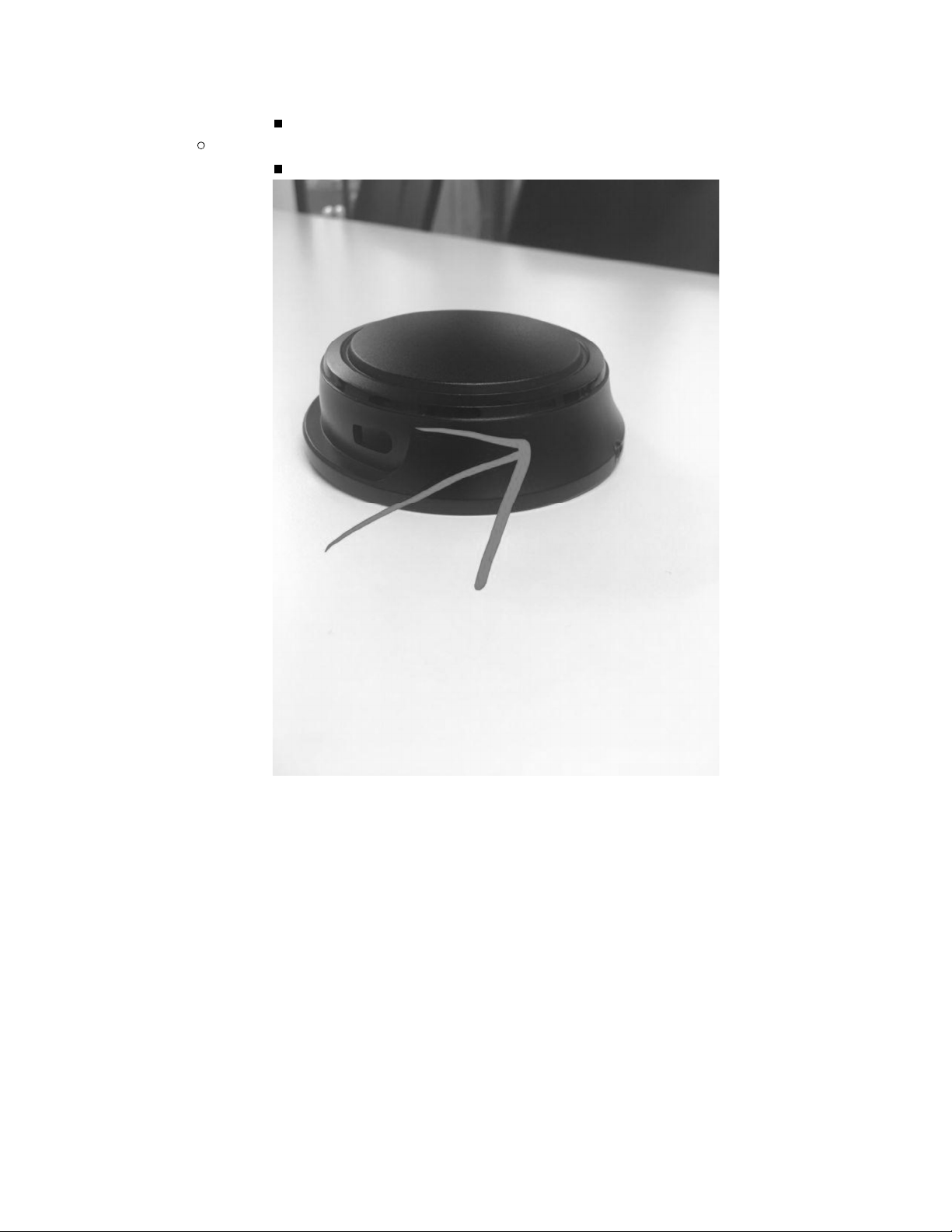
Numberfour Black (see picture)
Surface Texture:
According to selected sample--- (see picture)
confidential - © NumberFour AG 16 of 19
Page 17
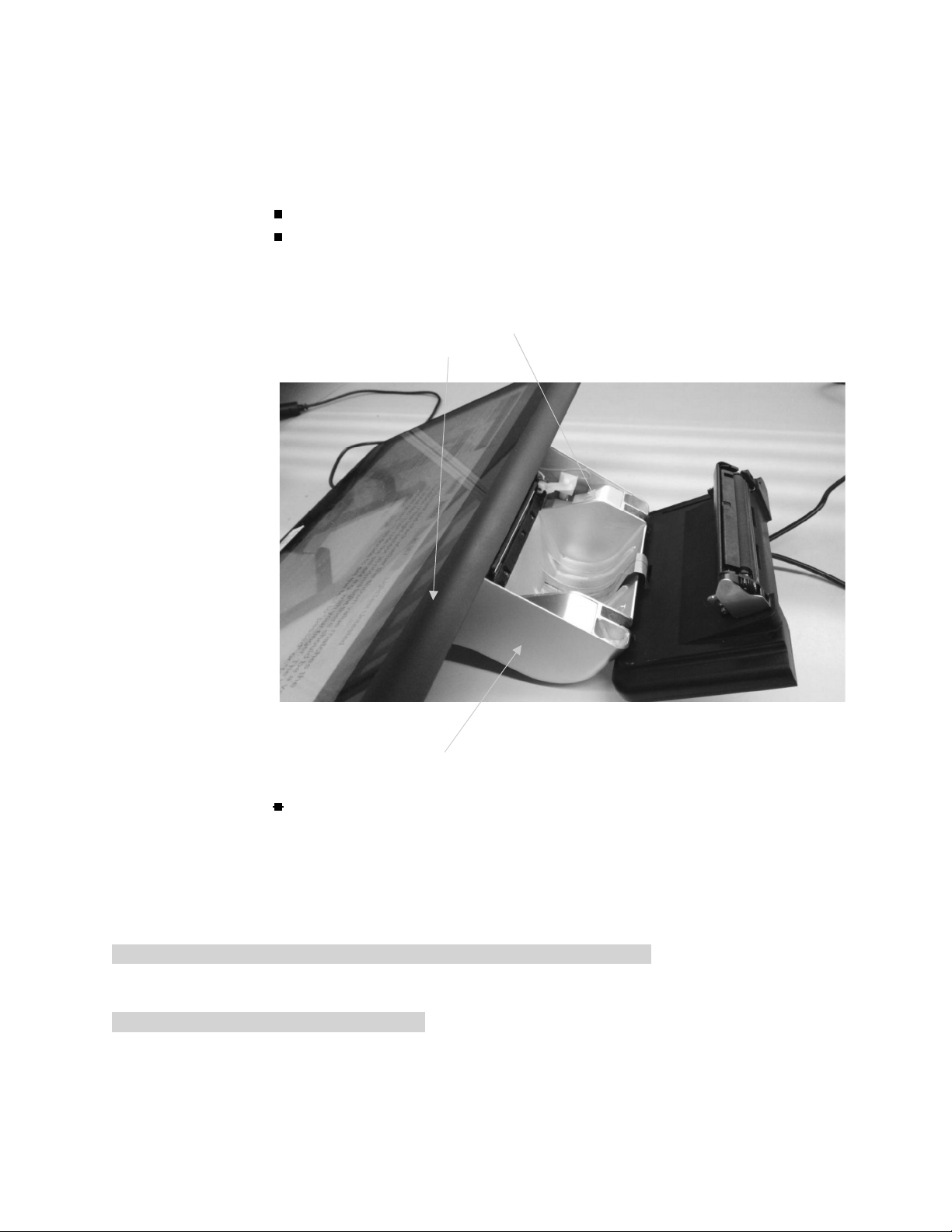
Painting / Color
Silver paint: Numberfour silver (see picture
Picture with arrow pointing to
A. Numberfour/Lenovo Gray ,
B. Numberfour Black,
C. Numberfour silver
Chem. Resist.: Human Sweat and Grease; soft cleaning by damp
cloth
Endurance & Environmental Resistance
Dasher has a designed lifetime of 3 yrs at a small merchant location (not to be confused with
factory warranty)
Key Features & Hardware Requirements:
confidential - © NumberFour AG 17 of 19
Page 18

Average lifetime before Dasher has first failure : 3 yrs OR active use 15,000 hours AND
printer with min. 50km printout
for time: the cumulative number of days at the merchant locations after delivery
of the device to the merchant / number of first failures
for active usage hours: the cumulative number of usage hours of devices /
number of first failures
for print out: the cumulative km of print out / number of first failures of printer
Operation Environmental Temp: 0C to +45C-
Storage Temp.: -20C to +60C
Operating Humidity: 5% - 95% (non-condensing)
Device can be cleaned outer surface with moist cloth
Certifications & Compliance
Dasher will be made available for sale in multiple countries/regions and the hardware needs to
fulfill all Base Certifications listed below as precondition to be compliant to required local
regulations.
Based on previous research performed by Hisense, TÜV SÜD and NumberFour Dasher needs
to fulfill the requirement of the below listed Base Certifications and pass these certifications.
These certifications are in full or partially required to be compliant in the below listed target
countries, but might require additional local approvals & paperwork:
HICS will not perform a formal patent / license check for every component or combination of
components for every region/country indicated.
For a defined list of (key) components the supplier of the component will be asked by HICS to
verify the country list against the applicable components and provide answers in writing to HICS.
HICS will build a file with the replies of the individual suppliers. HICS is not liable for false
answers provided by components suppliers.
HICS is not liable for formal usage right approval for every country/region since not all licenses /
patents / IP rights on components or the application of combinations of components,
technologies can be overseen for every region.
Key Features (List of target countries/regions):
Europe
DACH (Germany, Austria, Switzerland)
confidential - © NumberFour AG 18 of 19
Page 19

UK
France
Spain
Italy
Benelux (Netherlands, Belgium)
Scandinavia (Denmark, Sweden, Norway)
Poland
Turkey
Russia
Americas
USA
Canada
Brazil
Mexico
Argentina
Asia
China (incl. Hong Kong & Taiwan)
Japan
India
Indonesia
Philippines
Malaysia
Singapore
Other
Australia
South Africa
Hardware Requirements (Base Certifications to be performed):
CE & R&TTE
FCC
CCC
CB
RoHS
UL
confidential - © NumberFour AG 19 of 19
Page 20
FCC Statement
This device complies with part 15 of the FCC rules. Operation is subject to the following two conditions: (1) this
device may not cause harmful interference, and (2) this device must accept any interference received,
including interference that may cause undesired operation.
Changes or modifications not expressly approved by the party responsible for compliance could void the user’s
authority to operate the equipment.
NOTE: This equipment has been tested and found to comply with the limits for a Class B digital device,
pursuant to part 15 of the FCC Rules. These limits are designed to provide reasonable protection against
harmful interference in a residential installation. This equipment generates uses and can radiate radio
frequency energy and, if not installed and used in accordance with the instructions, may cause harmful
interference to radio communications. However, there is no guarantee that interference will not occur in a
particular installation. If this equipment does cause harmful interference to radio or television reception, which
can be determined by turning the equipment off and on, the user is encouraged to try to correct the
interference by one or more of the following measures:
- Reorient or relocate the receiving antenna.
- Reorient or relocate the receiving antenna.
- Reorient or relocate the receiving antenna.
-Consult the dealer or an experienced radio/TV technician for help important announcement
Important Note:
Radiation Exposure Statement
This equipment complies with FCC radiation exposure limits set forth for an uncontrolled environment. This
equipment should be installed and operated with minimum distance 20cm between the radiator and your body.
This transmitter must not be co-located or operating in conjunction with any other antenna or transmitter.
 Loading...