

Page 1

NuForce
Air DAC / TX
382 South Abbott Avenue, Milpitas, CA 95035, USA • PHONE: +1-408-890-6840 • FAX: +1-408-262-6877
nuforce.com • EMAIL: [email protected] • Skype: nuforce-sales
Page 2
f
FCC Radiation Exposure Statement:
This equipment complies with FCC radiation exposure limits set forth for an uncontrolled environment. This
equipment should be installed and operated with minimum distance 20cm between the radiator & your body.
FFCCCC CCoommpplliiaannccee SSttaatteemmeenntt
Hereby, NuForce Inc. declares that this device is in compliance with the limits for a Class B
digital device, pursuant to part 15 of the FCC Rules.
This equipment has been tested and found to comply with the limits for a Class B digital device, pursuant to part
15 of the FCC Rules. These limits are designed to provide reasonable protection against harmful interference in a
residential installation. This equipment uses and can radiate radio frequency energy. If not installed and operated
in accordance with the instructions, it may interfere with radio communications.
There is no guarantee that interference will not occur in a particular installation. If this equipment does interfere
with radio or television reception, the user may be able to correct the problem by one or more of the following
measures:
Reorient or relocate the receiving antenna.
Increase separation between equipment and receiver.
Use equipment on a circuit to which the receiver is not connected.
Consult your dealer or an experienced radio/TV technician for help.
WARNING: Only peripherals complying with the FCC class B limits may be attached to this equipment.
Changes or modifications made to this equipment, not expressly approved by us or parties authorized by us could
void the user’s authority to operate the equipment. This device complies with part 15 of the FCC Rules. Operation
is subject to the following two conditions: (1) This device may not cause harmful interference, and (2) this device
must accept any interference received, including interference that may cause undesired operation.
Notice for customers: The following information is only applicable to equipment sold in countries applying
EU Directives.
EEUU DDeeccllaarraattiioonn ooff CCoonnffoorrmmiittyy
Hereby, NuForce Inc. declares that this device is in compliance with the essential
requirements and other relevant provisions of Directive 2004/108/EC.
The manufacturer of this product is NuForce, 382 South Abbott Ave, Milpitas, CA 95035, USA.
The Authorized Representative for EMC and product safety is NuForce, 382 South Abbott Ave, Milpitas, CA
95035, USA.
For any service or warrantee matters, please refer to the addresses given in separate service or warranty
documents.
For customers in Europe
Disposal of Old Electrical & Electronic Equipment (Applicable in the European Union and
other European countries with separate collection systems)
This symbol on the product or on its packaging indicates that this product shall not be treated as
household waste. Instead, it shall be handed over to the applicable collection point for the
recycling of electrical and electronic equipment. By ensuring this product is disposed of correctly,
you will help prevent potential negative consequences for the environment and human health,
which could otherwise be caused by inappropriate waste handling of this product. The recycling o
materials will help to conserve natural resources. For more detailed information about recycling of
this product, please contact your local Civic Office, your household waste disposal service or the
shop where you purchased the product.
1
Page 3

SSAAFFEETTYY IINNSSTTRRUUCCTTIIOONNSS
There are two categories of Safety Instructions included in this manual:
Product Warnings, (i.e., what must never be done to assure avoiding those hazards that could cause bodily
injury or property damage); and
User Directions (i.e., what must always be done to assure the safe use of your device).
The Safety Instructions contained in this manual have been categorized in accordance with the seriousness of the
potential hazards through the use of Signal Words. Those Signal Words, and their intended meanings, are as
follows:
DANGER: Indicates that failing to observe the Safety Instructions could result in death or catastrophic bodily injury.
WARNING: Indicates that failing to observe the Safety Instructions could result in serious bodily injury.
CAUTION: Indicates that failing to observe the Safety Instructions could result in minor bodily injury or property
damage.
NOTE: Designates important information that relates to activities and/or conditions that might result in loss of data
and/or damage to your device.
SSaaffee UUssee aanndd OOppeerraattiioonn ooff YYoouurr DDeevviiccee
This equipment emits stray RF energy and will interfere with the reception of signals by airborne electronic
navigational devices or medical devices. Do not operate this equipment near any sensitive medical devices.
WARNING: Use only grounded AC power cords.
Always immediately disconnect the power to the equipment in the event the device emits an unusual odor or
sound or generates smoke.
WARNING: Never attempt to disassemble, repair or make any modification to your device. Disassembly,
modification or any attempt at repair could cause bodily injury or property damage, as well as damage to the
device itself.
WARNING: Your device is not a toy. Never allow children to play with your device. Misuse, rough or improper
handling of your device by children could result in serious bodily injury for any of the enumerated safety warnings
in this manual. In addition, always keep all accessories and components out of the reach of small children as
small parts might present a choking hazard. Seek immediate medical attention if choking occurs or if any small
part has been swallowed.
CAUTION: Never raise the sound volume level too high when using your device with earphones. An excessive
sound volume level could cause damage to your hearing.
WARNING: To reduce the risk of fire or electric shock, do not expose the unit to moisture or water.
Do not allow foreign objects to get into the enclosure. If the unit is exposed to moisture, or a foreign object gets
into the enclosure, immediately disconnect the power cord from the wall. Take the unit to a qualified service
person for inspection and necessary repairs.
Read all the instructions before connecting or operating the component.
Keep this manual so you can refer to these safety instructions.
Heed all warnings and safety information in these instructions and on the product itself. Follow all operating
instructions.
Do not use this unit near water.
Allow for a minimum 10 cm or 4 inches of unobstructed clearance around the unit. Do not place the unit on a bed,
sofa, rug, or similar surface capable of blocking ventilation openings. If the unit is placed in a bookcase or cabinet,
allow for proper ventilation. Keep the component away from radiators, heat registers, stoves, or any other
appliance that produces heat.
If the unit requires a power supply:
It must be connected to a power supply only of the type and voltage specified on the rear panel.
Connect the component to the power outlet only with the supplied power supply cable or an exact equivalent.
Do not modify the supplied cable.
Do not route the power cord where it will be crushed, pinched, bent, exposed to heat, or damaged in any way.
Pay particular attention to the power cord at the plug and where the cord exits the back of the unit.
The power cord should be unplugged from the wall outlet during a lightning storm or if the unit is to be left
unused for a long period of time.
Immediately stop using the component and have it inspected and/or serviced by a qualified service agency if:
2
Page 4

The power supply cord or plug has been damaged.
Objects have fallen or liquid has been spilled into the unit.
The unit has been exposed to rain.
The unit shows signs of improper operation.
The unit has been dropped or damaged in any way.
3
Page 5

IInnttrroodduuccttiioonn
NuForce Air DAC's wireless technology lets you stream music from your computer USB port, iPhone, iPad or iPod
to up to four different receivers throughout your home or office. Easily get CD-quality sound with no latency and no
interference throughout your environment—wirelessly, with Air DAC.
The NuForce Air DAC wireless DAC/receiver and associated TX transmitters are based on a new wireless
technology known as SKAA (www.skaa.com
interface across different SKAA devices. SKAA technology has several advantages resulting in CD-quality sound
and ease of setup described in more detail below.
Air DAC offers:
About the Air DAC and SKAA wireless technology
With Air DAC, you don't move to the music—the music moves with you.
The Air DAC Wireless System is a combination wireless transmitter (iTX or uTX) and radio receiver (Air DAC) that
operates in the 2.4GHz radio band. The Air DAC Receiver utilizes a premium quality Digital-to-Analog Converter
(DAC) stage and simple one-button SKAA control.
Unlike similar devices, the Air DAC and associated TX transmitters do not experience the typical loss in sound
quality or interference capability of cell phones and other wireless devices. Rather, they offer CD-quality sound,
virtually no latency, a 15-30 meter range, and a spread-spectrum technology that detects and chooses from
among available frequency spectrums in order to avoid interference.
The NuForce Air DAC Wireless Receiver and any device fitted with an appropriate matching TX transmitter can be
combined to form a wireless audio network. Each transmitter can send audio to four receivers, and each
receiver can connect to as many as four transmitters.
Just link your Apple mobile device wirelessly to multiple amplifier/speaker systems located throughout your home.
Then simply walk into any room with your portable player—the system automatically locks on to its signal—and
stream your music to the speakers in that space. Move to the next room and stream music from the same device
to that room's receiver or pair of speakers. Wherever you roam in your home or office, your music is with you.
). SKAA provides seamless operation and a consistent user
CD-quality sound, no latency, no interference with other Wi-Fi signals
Simple control and setup — no software, setup or pairing
Stream music to up to four receivers, and from up to four devices
Works with any digital audio from music, movies, and games
Works anywhere without interference — no wifi "hot spot" needed for reception
Features:
Can receive and lock with up to four independent iTX-100/uTX-100 transmitters.
Simple operation —Use the single front-panel switch to step through each of the available transmitters within
range of the receiver. The cycle returns to first transmitter after selecting the last available transmitter.
CD-quality performance
Extra-wide wireless audio range covers larger environments — iTX-100 range approximately spans 10-20m;
uTX-100 range spans approximately 15-30m depending on conditions.
uTX (for USB device) Transmitter is cross-platform (Mac/PC), so there's no need to install drivers.
The iTX similarly connects to a standard analog dock when mated with Apple iPod , iPhone and iPad.
4
Page 6

Compatibility
NuForce Air DAC is compatible with the following products using the iTX transmitter:
iTX is compatible with all iPod devices that have the 30-pin connector (i.e. except Shuffle).
iPod touch (1st, 2nd, 3rd, and 4th generation)
iPod classic
iPod nano (1st, 2nd, 3rd, 4th, 5th, and 6th generation)
iPod with color display
iPod mini
iPod with Click Wheel
iPhone 4S
iPhone 4
iPhone 3GS
iPhone 3G
iPhone
iPad 2
iPad
Apple, AirPort Express, Apple TV are trademarks of Apple Inc., registered in the U.S. and other countries.
Included Accessories
Power supply
Charge Cable (Only iTX )
Specifications
16-bit/48kHz x 2-channels
Operates @ 2.4GHz
RCA Output: 2.1Vrms
THD+N: 0.03% @ 1kHz.
Frequency Response: 20-20kHz
SNR > 91dB A-weighted
Power Requirement: 6.5V, 600mA, 100-240VAC (Worldwide AC)
Dimensions: 3.2"W x 3.4"D x 1.1"H
Weight: 1 lb. Shipping weight 5 lb.
5
Page 7

AAiirr DDAACC// TTXX UUsseerr SSeettuupp
There are numerous ways that the Air DAC / TX system can be configured. Here are a few guidelines to help you
get started. Once you become familiar with operating the system you will be able to easily configure it for other,
more advanced applications. In addition, we have included a detailed listing below of the Air DAC's SKAA
operating controls to help in setting up whatever type of system you might be considering.
QQuuiicckk SSttaarrtt GGuuiiddee
Start Here - System Connection to Apple Mobile Devices (iPod, iPhone, iPad)
The majority of users will likely be connecting the system to Apple Mobile Devices such as an iPod for multipleroom music playback. If that is your goal, then here is the place to start. Even if you are planning a more
advanced application, it might be a good idea to try setting up this simple system first in order to become familiar
with how everything works.
1) Connect the iTX transmitter to the base of the iPod. Start playing music from the iPod and set the volume to
maximum.
2) Plug the Air DAC into the AC power outlet and check to make sure it is turned on.
3) Connect the L&R RCA audio outputs of the Air DAC via quality interconnect cables to an unused input of your
home stereo system (or other amplifier/speaker combination).
4) After approximately one minute, the Air DAC will recognize and bond with the signal coming from the iTX/iPod.
Once bonded, that iTX/iPod will automatically be added to the Air DAC's Green List of favorite devices.
5) If you would rather not wait (as in step 4) for the Air DAC to automatically bond with your iPod (or it fails to do
so for some reason), then double-click the Air DAC’s front panel SKAA button. At this point, the Air DAC will
begin hunting for the radio signal coming from the iTX transmitter connected to your iPod. Once it detects the
signal, it should bond to it. When the process is completed, the LED at the front of the Air DAC should turn
AMBER.
6) At this point, you may wish to manually add the iPod to the Air DAC's Green List. To do so push and hold the
front panel button on the Air DAC for about three seconds until the AMBER LED turns GREEN. Once
completed, that iTX/iPod will be automatically recognized by the Air DAC every time it comes within the
vicinity.
7) Set the volume control of the stereo system to the minimum position and then turn on the AC power.
8) Slowly turn up the stereo system’s volume to the 9 o'clock position.
9) Listen for the sound of music playing through the speakers. If you hear music, turn the stereo system up to the
desired listening level. If you do not hear music, turn the volume of the stereo system back down and then
repeat steps 5 through 9.
System Connection to a Computer
1) Connect the uTX transmitter to an available USB port on the computer. Start playing music from the
computer's media software player and set the volume to maximum (0 dBFS). Check that the computer sound
device is configured to play from SKAA USB Audio device.
2) Repeat steps 2 through 9 above.
6
Page 8

Creating a Cluster
A cluster is a method whereby several Air DAC units can be combined in a way that allows one unit to be in
control of up to three others. In such a system, the front panel button SKAA control of the Master unit directs the
operation of all the system’s other Slave units. Once a preferred source is selected from the Green List on the
Master unit, all of the Slave units will then switch to the same source. If a new source is desired at a future point, it
must be selected via cycling through the sources stored in the Master's Green List.
Typically, such an arrangement might occur where you would have several Air DAC /Amplifier / Speaker systems
located in several rooms and configured so that you could move about your home with an iPod playing in your
pocket. This arrangement would allow you to have music follow you from room to room without the need to
change control settings on any of the other Air DAC receiver systems.
Another application might apply to a pair of mono amplifiers (i.e., one channel each) configured for stereo
playback and separated by a distance in which signal wires going to each is not a practical option. In that case,
you would assign one Air DAC unit to each amplifier and use only the appropriate Left or Right channel of each to
feed a given amplifier. In any case, the following procedures will apply:
1) Connect the appropriate iTX or uTX transmitter to the source device. Start playing music from the source and
set the volume to maximum.
2) Locate the number of Air DACs you will be using at their designated locations, making sure that AC power is
available nearby.
3) Connect the appropriate RCA audio outputs of each Air DAC via quality interconnect cables to the inputs of
each amplifier / speaker combination.
4) Power the Master unit to On while holding down the SKAA button until RED LED starts flashing.
5) Power each of the remaining Air DAC receiver units On.
6) Once the LED on the Master becomes solid (stops flashing), turn off the Master and all of the other Slave Air
DAC receiver units.
7) The cluster has been successfully made. Now turn on the Master and Slave units.
8) For each location, set the volume control of the amplifier / speaker system to the minimum position and then
turn on the AC power.
9) Slowly turn up the volume of each amplifier / speaker system to a 9 o'clock position.
10) Listen for the sound of music playing through the speakers on each system. If you hear music, then turn the
system volume up to the desired listening level. If you do not hear music, turn the volume of the system back
down, turn off all Master & Slave units, and then repeat steps 4 through 10.
Dismantling a C luster
At some point after having created a cluster you may wish to return the Air DAC receivers back to stand-alone
operation so that they can once again be used as individual units. In order to so, simply follow steps #1 through #4
above in "Creating a Cluster" while omitting step #5. In other words, follow the steps in creating a "Master" without
turning on the additional units that would become "Slaves." Once step #4 has been completed, then turn off the
unit in question as stated in step #6. When you turn it on the next time, that unit will now operate as an
independent receiver.
7
Page 9
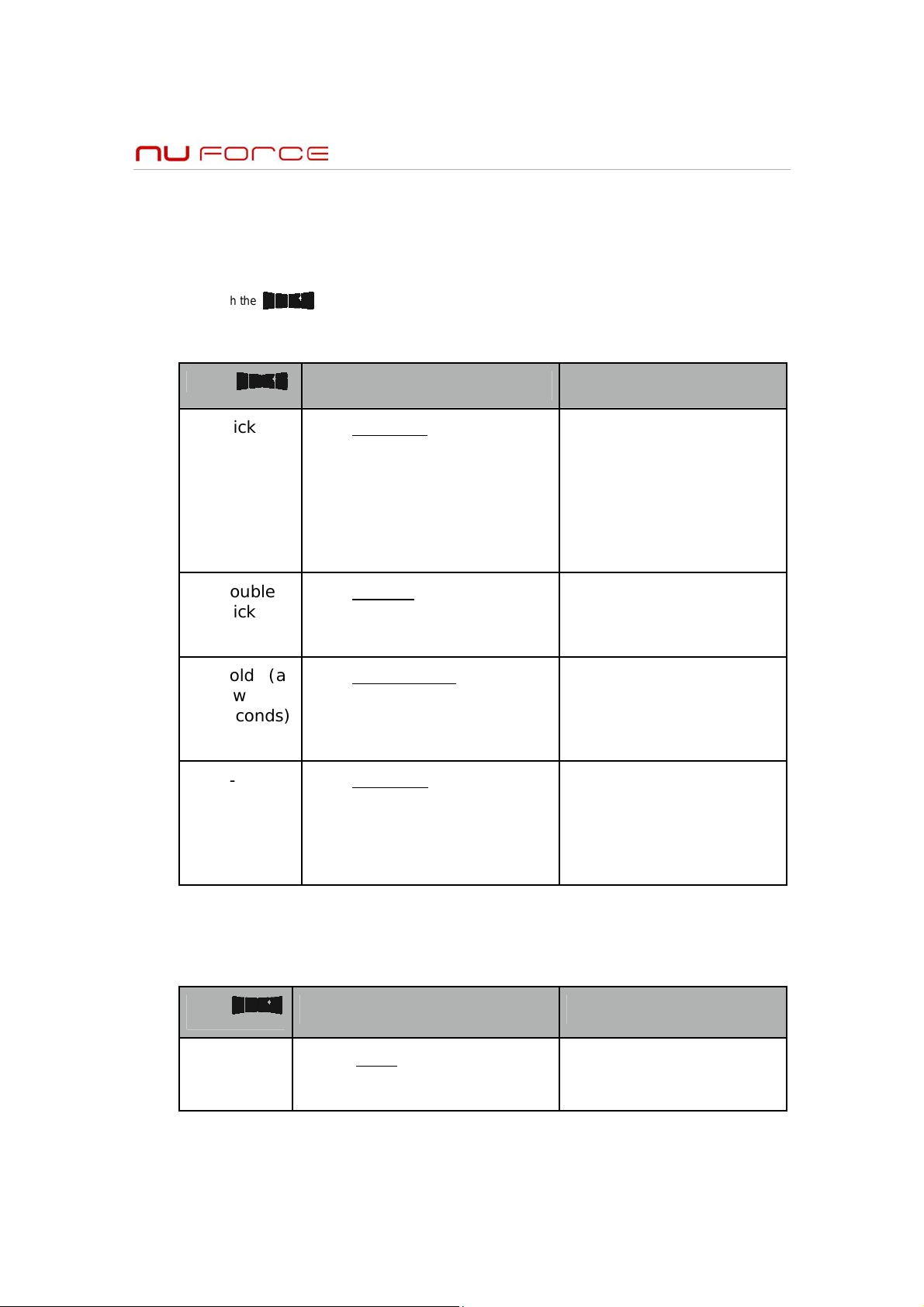
Air DAC / SKAA CONTROL GUIDE
Each Air DAC / SKAA® receiver uses a Green List to keep track of your favorite transmitters (up to ten of them).
Hunting through your Green List for your favorite transmitters is signaled by a Green LED. Your receiver can also
explore to find new transmitters. Exploring is signaled by an Amber LED. If your receiver has two or more wireless
pieces — for example, a left speaker and a right speaker — we call that a Cluster. Each Cluster uses only one
Green List. In that way, all of its pieces perform as one. You can command SKAA by using the SKAA Button (the
button with the logo).
Essentials
Command LED Meaning
Click Favorites Hunt for your
favorite transmitters.
Click again to switch
between hunting for all
transmitters on your
Green List and only the
current one
Double
Click
Explore Hunt for new
transmitters (not
favorites)
Hold (a
few
seconds)
Add / Delete
add or delete
transmitters from your
Green List
Manually
- Auto Add SKAA adds
the current Amber
transmitter to your
Green List if you listen
to it for 30 minutes
Green (dim) = Hunting
Flash # = Green List #
Green (solid) = Bonded
Amber (dim) = Hunting
Amber (solid) = Bonded
Amber to Green = Added
Red (flashing) = Deleted
Amber to Green
= Added
Triple
Mute (to cancel Mute,
Click
8
More Commands
Command LED Meaning
Amber or Green
click once)
(slow flash) = Muted
Page 10
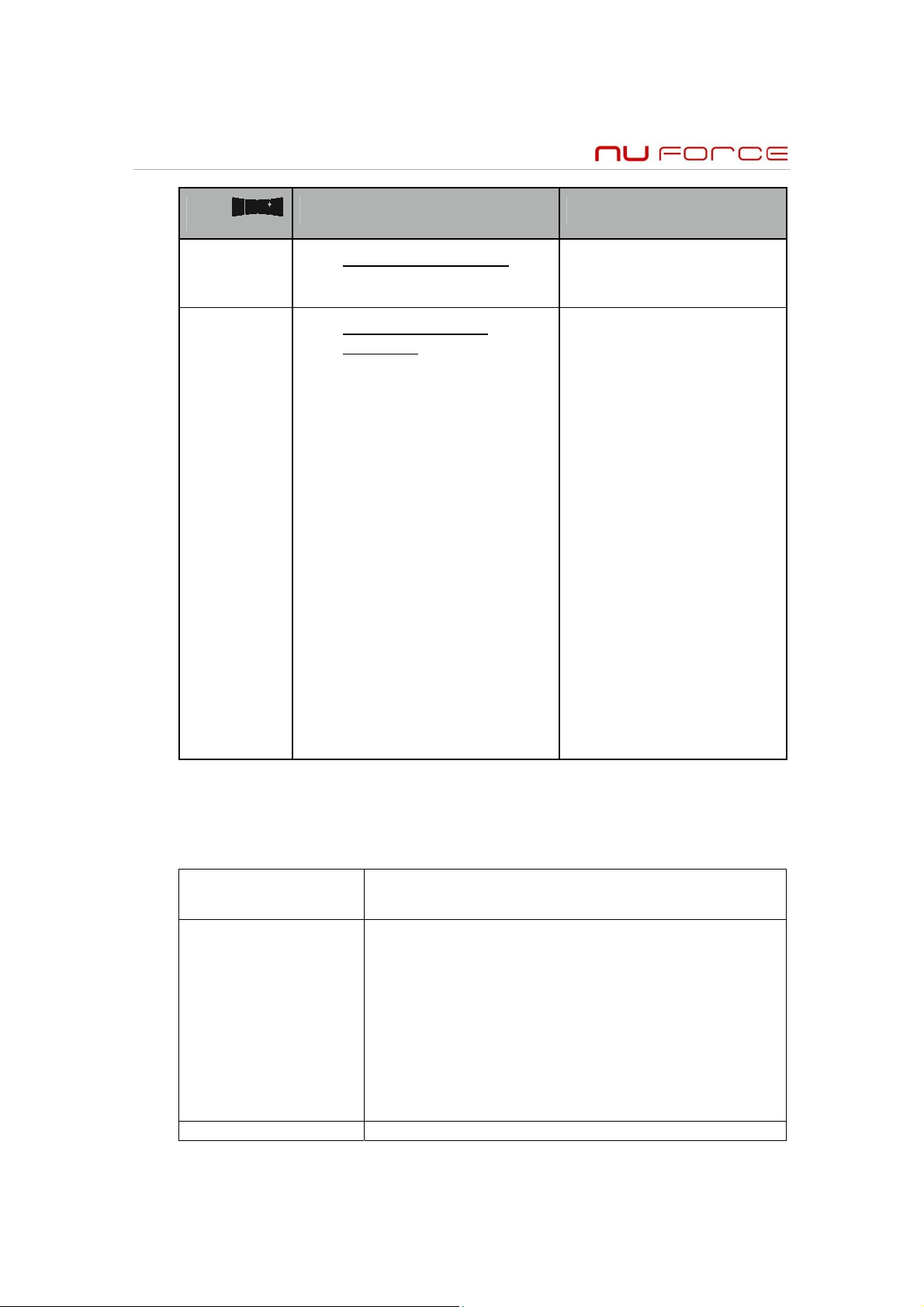
Command LED Meaning
6 Click Clear the Green List
Start over!
Hold
during
power
on
Make a Cluster of
receivers:
1. Make sure the
transmitter is Powered Off
2. Power On the Master
receiver while holding
down its SKAA Button—
hold until red LED flashes
3. With the remaining
receivers within 3 meters
of the Master receiver,
Power On the first one,
wait for its Red LED to
flash and then power on
the second one.
Red (flash) =
Green List Cleared
Red (flash) =
Master receiver has
entered ‘Cluster Up’
mode
Red (solid) =
The Cluster has been
successfully made
4. Once all of the LEDs
stop flashing (turn solid
Red), power off all of the
receivers
Questions and Answers
QQuueessttiioonn
How do I know where
I am on the Green
List?
How do I get my Let’s say you’d like your receiver to sit and wait for
When you single click the SKAA button, the receiver
hunts through the Green List much like a car stereo
hunts for radio stations when you press “seek”.
When you see the Green LED flash once, the
receiver is looking for transmitter #1 on the Green
List. When it flashes twice, it’s looking for
transmitter #2 on the Green List, and so forth. The
receiver looks for each transmitter for about 3
seconds and if not found it moves on to the next
one. This LED flashing feedback only happens for the
first 5 transmitters on the Green List.
AAnnsswweerr
9
Page 11
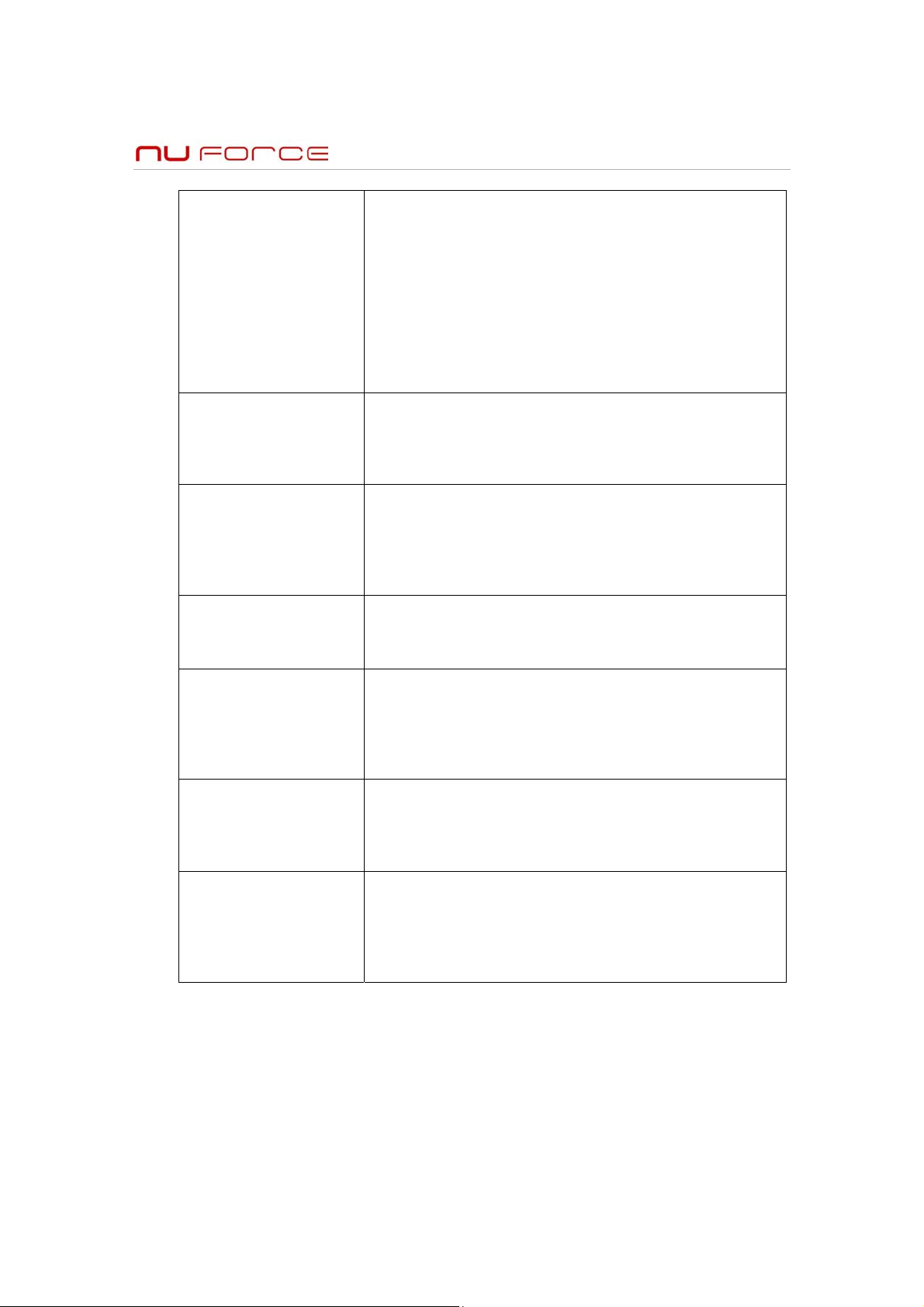
receiver to listen for a
particular
transmitter?
What is the Master
Receiver?
Can any receiver be
the Master of a
Cluster?
How do I “uncluster”
a group of receivers?
When I perform the
Clustering procedure,
how much time do I
have to do each step?
Why does only one of
my SKAA Buttons
work?
Can any group of
SKAA receivers be
made into a Cluster?
transmitter #3 on your Green List. Single click the
SKAA button and watch the LED—count how many
times it flashes. The receiver will stop and play audio
from all active transmitters as you do this. Repeat
until you see the LED flash 3 times—when you do,
single click the SKAA Button again. SKAA will stop
hunting through the Green List—it will just sit there
and look solely for transmitter #3. Single clicking
the SKAA Button toggles between hunting through
the whole Green List and sitting and waiting for one
particular transmitter.
In any Cluster, there is a single Master Receiver, and
all of the other receivers in the Cluster follow its
behavior. The Master has a working SKAA Button
and you can control the entire Cluster with that one
button.
No. A receiver must have a physical SKAA Button in
order to be made the Master of a Cluster. If a
receiver has no SKAA Button it can only operate as a
subordinate part of a Cluster— it cannot be the
Master of that Cluster and it cannot operate
independently.
Do the Make a Cluster of receivers procedure once
for each receiver, omitting step 3. This gives each of
the receivers a functioning SKAA Button, and each
then operates independently.
Each step has a 10 second time out. For example,
when you see the Master’s LED start to flash, you
have up to 10 seconds to power on the next
receiver. When that receiver’s LED starts flashing,
you have 10 more seconds to power on the next
one, etc.
If you’ve made a Cluster from several receivers, the
first one powered on in the Make a Cluster of
receivers procedure is the Master of the Cluster.
Only the Master’s SKAA Button will be functional
because a Cluster uses just one Green List.
No. The receivers must be the same product model
or be part of the same product family. If they are
not, the Make a Cluster of receivers procedure will
not work. This is because only receivers that were
designed to work together in tandem can be made
into a Cluster.
10
Page 12

FCC Statement: Federal Communication Commission Interference Statement This equipment has been tested
and found to comply with the limits for a Class B digital device, pursuant to Part 15 of the FCC Rules. These limits
are designed to provide reasonable protection against harmful interference in a residential installation. This
equipment generates, uses and can radiate radio frequency energy and, if not installed and used in accordance
with the instructions, may cause harmful interference to radio communications. However, there is no guarantee
that interference will not occur in a particular installation. If this equipment does cause harmful interference to
radio or television reception, which can be determined by turning the equipment off and on, the user is
encouraged to try to correct the interference by one of the following measures:
Reorient or relocate the receiving antenna.
Increase the separation between the equipment and receiver.
Connect the equipment into an outlet on a circuit different from that to which the receiver is connected.
Consult the dealer or an experienced radio/TV technician for help.
FCC Caution: Any changes or modifications not expressly approved by the party responsible for compliance
could void the user’s authority to operate this equipment. This device complies with Part 15 of the FCC Rules.
Operation is subject to the following two conditions: (1) This device may not cause harmful interference, and (2)
this device must accept any interference received, including interference that may cause undesired operation.
This device and its antenna(s) must not be co located or operation in conjunction with any other antenna or
transmitter.
IC Statement: This Class B digital apparatus complies with Canadian ICES 003. Operation is subject to the
following two conditions: (1) this device may not cause interference, and (2) this device must accept any
interference, including interference that may cause undesired operation of the device. Cet appareil numérique de
la classe B est conforme á la norme NMB 003 du Canada.
This device and its antenna(s) must not be co-located or operation in conjunction with any other antenna or
transmitter.
11
Page 13
TTrroouubblleesshhoooottiinngg
Factory Default Setting:
When plugging in the Air DAC for the first time, it should turn on in Hunting Mode. The SKAA LED starts out
illuminated a dim AMBER color (Hunting Mode), and as soon as any TX transmitter is detected (i.e., powered up),
it turns to solid AMBER. After approximately one minute, the Air DAC will recognize and bond with the signal
coming from the TX transmitter and the LED will turn solid GREEN. Once bonded, that TX transmitter will
automatically be added to the Air DAC's Green List of favorite devices.
In the event you are not able to get sound through your system, make sure that all interconnect cables are in good
condition and properly connected, with all power turned on, and that volume levels are appropriately set. You
should also check to make sure that your batteries are fully charged in any portable device you’re using.
Problem: Not responding to my clicks on the SKAA button.
Solution: Clicks should be fast and rapid, without pauses.
Problem: No sound but the LED is lit.
Solution: Check the Air DAC LED color. If AMBER or GREEN (which means it is getting a wireless signal), THEN
check to make sure that:
The volume is set correctly
The iTX or uTX is properly inserted
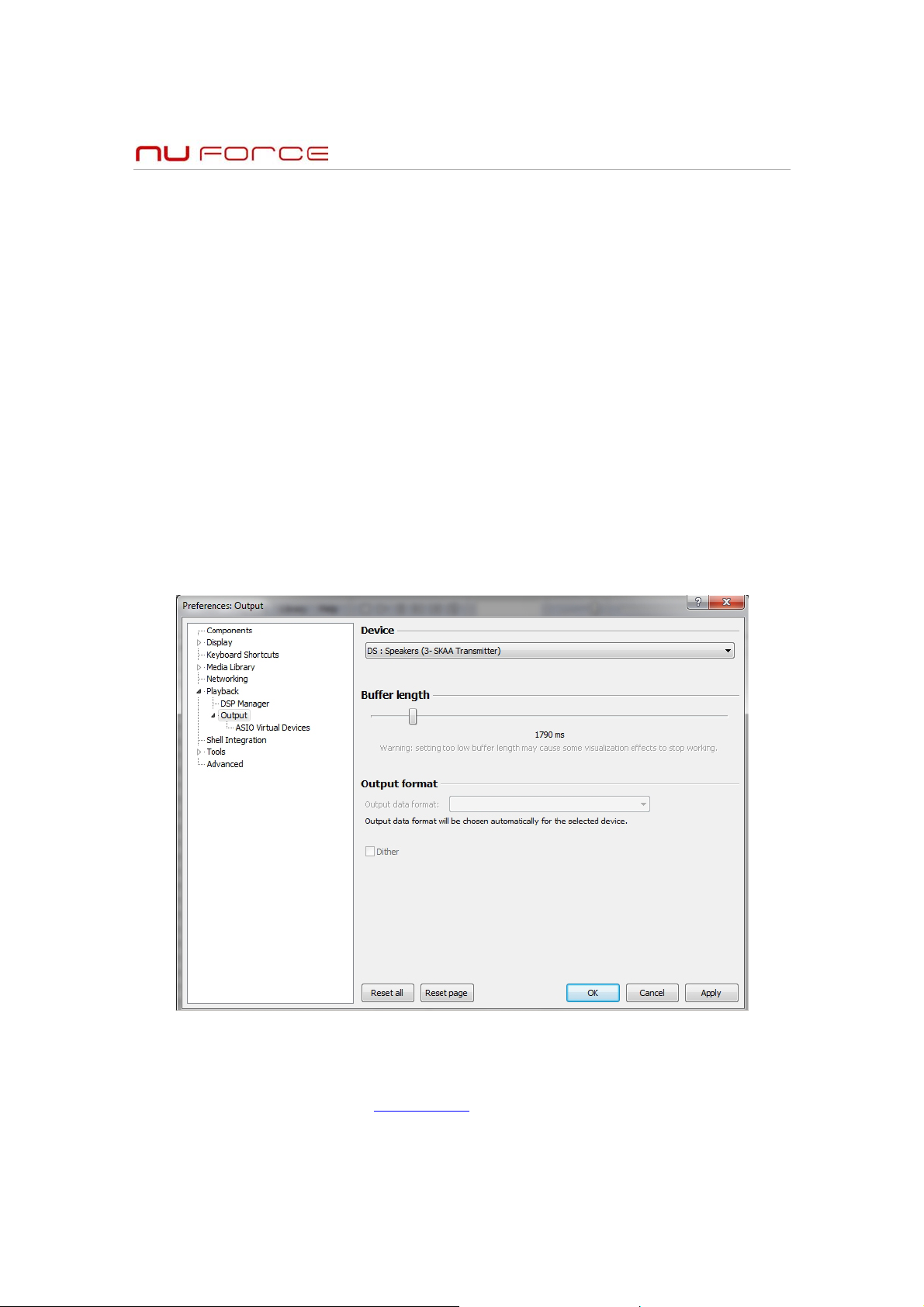
The Windows Audio Driver points to SKAA Transmitter
Please note that the uTX only supports Direct Sound mode (WASAPI, ASIO). Kernal Streaming is not
supported.
If the LED is RED, either no transmitter has been detected within range or the transmitter is not on the Green list.
Problem: No Sound and LED is not illuminated
Solution: Check to see that the power is properly connected
In the event that none of the above remedies the problem, please contact our Technical Support department at
the number provided on our website www.nuforce.com
12
. Our expert staff will be happy to assist you.
Page 14

NNuuFFoorrccee OOnnee ((11)) YYeeaarr LLiimmiitteedd WWaarrrraannttyy
NuForce’s Limited Warranty and Limitation of Liabilities
ADDITIONAL RIGHTS
FOR CONSUMERS, WHO ARE COVERED BY CONSUMER PROTECTION LAWS OR REGULATIONS IN
THEIR COUNTRY OF PURCHASE OR, IF DIFFERENT, THEIR COUNTRY OF RESIDENCE, THE BENEFITS
CONFERRED BY THIS WARRANTY ARE IN ADDITION TO ALL RIGHTS AND REMEDIES CONVEYED BY
SUCH CONSUMER PROTECTION LAWS AND REGULATIONS. THIS WARRANTY DOES NOT EXCLUDE,
LIMIT OR SUSPEND ANY RIGHTS OF CONSUMERS ARISING OUT OF NONCONFORMITY WITH A SALES
CONTRACT. SOME COUNTRIES, STATES AND PROVINCES DO NOT ALLOW THE EXCLUSION OR
LIMITATION OF INCIDENTAL OR CONSEQUENTIAL DAMAGES OR ALLOW LIMITATIONS ON HOW LONG
AN IMPLIED WARRANTY OR CONDITION MAY LAST, SO THE LIMITATIONS OR EXCLUSIONS DESCRIBED
BELOW MAY NOT APPLY TO YOU. THIS WARRANTY GIVES YOU SPECIFIC LEGAL RIGHTS, AND YOU MAY
ALSO HAVE OTHER RIGHTS THAT VARY BY COUNTRY, STATE OR PROVINCE. THIS LIMITED WARRANTY
IS GOVERNED BY AND CONSTRUED UNDER THE LAWS OF THE COUNTRY IN WHICH THE PRODUCT
PURCHASE TOOK PLACE.
LIMITED WARRANTY
For a period of ONE(1) YEAR from the date of retail purchase by the original end-user purchaser (“Warranty
Period”), NuForce warrants (i) this product against defects in materials and workmanship, and (ii) that each
Product, unmodified and under normal use and conditions, will substantially comply with NuForce’ applicable
written technical documentation for the Product. NuForce reserves the right to make substitutions and
modifications from time to time in the specifications of Products sold by NuForce, provided that such substitutions
or modifications do not materially affect overall Product performance.
If a hardware defect exists and a valid claim is received within the Warranty Period, at its option and to the extent
permitted by law, NuForce will (1) repair the hardware defect at no charge, using new or refurbished replacement
parts, (2) exchange the product with a product that is new or which has been manufactured from new or
serviceable used parts and is at least functionally equivalent to the original product, or (3) refund the purchase
price of the product. NuForce may request that you replace defective parts with user-installable new or refurbished
parts that NuForce provides in fulfillment of its warranty obligation. A replacement product/part assumes the
remaining warranty of the original product or ninety (90) days from the date of replacement or repair, whichever
provides longer coverage for you. When a product or part is exchanged, any replacement item becomes your
property and the replaced item becomes NuForce's property. When a refund is given, your product becomes
NuForce's property.
OBTAINING WARRANTY SERVICE
If you purchased the product in the U.S., deliver the product, at your expense, to any NuForce Service Center
located in the U.S. If you purchased the product outside of the U.S., deliver the product to any NuForce
Authorized Importer in the country where you purchased the product. Be aware, however, that not all countries
have NuForce Authorized Service Providers (‘NASP’) and not all Authorized Service Providers outside the country
of purchase have all parts or replacement units for the product. If the product cannot be repaired or replaced in the
country it is in, it may need to be sent to a different country or returned to the country of purchase at your expense
for repair or replacement. If you seek service in a country that is not the country of original purchase, you will
comply with all applicable import and export laws and regulations and be responsible for all custom duties, V.A.T.
and other associated taxes and charges. Where international service is available, NuForce may repair or
exchange defective products and parts with comparable products and parts that comply with local standards.
You can always deliver the product to NuForce’s U.S. main service center for obtaining warranty service, however,
you may have to pay for return shipping cost.
NuForce may send you user-installable new or refurbished replacement product or parts to enable you to service
or exchange your own product (“DIY Service”). Upon receipt of the replacement product or part, the original
product or part becomes the property of NuForce and you agree to follow instructions, including, if required,
arranging the return of original product or part to NuForce in a timely manner.
When providing DIY Service requiring the return of the original product or part, NuForce may require a credit card
authorization as security for the retail price of the replacement product or part and applicable shipping costs. If you
follow instructions, NuForce will cancel the credit card authorization, so you will not be charged for the product or
part and shipping costs. If you fail to return the replaced product or part as instructed or the replaced product or
part is not eligible for warranty service, NuForce will charge the credit card for the authorized amount.
13
Page 15

EXCLUSIONS AND LIMITATIONS
This Limited Warranty applies only to hardware products manufactured by or for NuForce that can be identified by
the "NuForce" trademark, trade name, or logo affixed to them. The Limited Warranty does not apply to any nonNuForce hardware products or any accessories, even if packaged or sold with NuForce hardware. Non-NuForce
manufacturers, suppliers, may provide their own warranties. Other accessories distributed by NuForce under the
NuForce brand name are not covered under this Limited Warranty. This warranty does not apply: (a) to damage
caused by accident, abuse, misuse, misapplication, liquid contact, fire, earthquake, non-NuForce products, or
other external causes; (b) to damage caused by service performed by anyone who is not a NASP; (c) to a product
or a part that has been modified without the written permission of NuForce; (d) to consumable parts, such as
batteries, or protective coatings designed to diminish over time unless failure has occurred due to a defect in
materials or workmanship; (e) to cosmetic damage, including but not limited to scratches, dents, and broken
plastic on ports; (f) to defects caused by normal wear and tear or otherwise due to the normal aging of the product;
or (g) if any NuForce serial number has been removed or defaced.
Important:
covered by this warranty. Only NuForce or a NASP should perform service on this hardware product.
THIS WARRANTY AND REMEDIES SET FORTH ABOVE ARE EXCLUSIVE AND IN LIEU OF ALL OTHER
WARRANTIES, REMEDIES AND CONDITIONS, WHETHER ORAL OR WRITTEN, EXPRESS OR IMPLIED.
NUFORCE SPECIFICALLY DISCLAIMS ANY AND ALL IMPLIED WARRANTIES, INCLUDING, WITHOUT
LIMITATION, WARRANTIES OF MERCHANTABILITY AND FITNESS FOR A PARTICULAR PURPOSE. IF
NUFORCE CANNOT LAWFULLY DISCLAIM IMPLIED WARRANTIES UNDER THIS LIMITED WARRANTY, ALL
SUCH WARRANTIES, INCLUDING WARRANTIES OF MERCHANTABILITY AND FITNESS FOR A
PARTICULAR PURPOSE ARE LIMITED IN DURATION TO THE DURATION OF THIS WARRANTY. No NuForce
reseller, agent, or employee is authorized to make any modification, extension, or addition to this warranty.
NUFORCE IS NOT RESPONSIBLE FOR DIRECT, SPECIAL, INCIDENTAL OR CONSEQUENTIAL DAMAGES
RESULTING FROM ANY BREACH OF WARRANTY OR CONDITION, OR UNDER ANY OTHER LEGAL
THEORY, INCLUDING BUT NOT LIMITED TO LOST PROFITS, DOWNTIME, GOODWILL, DAMAGE TO OR
REPLACEMENT OF EQUIPMENT AND PROPERTY, ANY COSTS OF RECOVERING, REPROGRAMMING, OR
REPRODUCING ANY PROGRAM OR DATA STORED IN OR USED WITH NUFORCE PRODUCTS, AND ANY
FAILURE TO MAINTAIN THE CONFIDENTIALITY OF DATA STORED ON THE PRODUCT. NUFORCE
SPECIFICALLY DOES NOT REPRESENT THAT IT WILL BE ABLE TO REPAIR ANY PRODUCT UNDER THIS
WARRANTY OR MAKE A PRODUCT EXCHANGE WITHOUT RISK TO OR LOSS OF PROGRAMS OR DATA.
Some states and provinces do not allow the exclusion or limitation of incidental or consequential damages or
exclusions or limitations on the duration of implied warranties or conditions, so the above limitations or exclusions
may not apply to you. This warranty gives you specific legal rights, and you may also have other rights that vary by
state or province.
Proof of purchase in the form of a bill of sale or receipted invoice which is evidence that the unit is within the
Warranty period must be presented to obtain warranty service.
REPLACEMENT AS PROVIDED UNDER THIS WARRANTY IS THE EXCLUSIVE REMEDY OF THE
CONSUMER.
NUFORCE SHALL NOT BE LIABLE FOR ANY INCIDENTAL OR CONSEQUENTIAL DAMAGES FOR BREACH
OF ANY EXPRESS OR IMPLIED WARRANTY ON THIS PRODUCT. EXCEPT TO THE EXTENT PROHIBITED
BY APPLICABLE LAW, ANY IMPLIED WARRANTY OF MERCHANTABILITY OR FITNESS FOR A PARTICULAR
PURPOSE ON THIS PRODUCT IS LIMITED IN DURATION TO THE DURATION OF THIS WARRANTY.
Do not open the hardware product. Opening the hardware product may cause damage that is not
“Made for iPod,” “Made for iPhone,” and “Made for iPad,” mean that an electronic accessory has been desig ned t o connect
specifically to iPod, iPhone, or iPad, respe c t ively, and has been certified by the developer to meet Apple performance standards.
Apple is not responsible for the operation of this device or its compliance with safet y and regulatory standards. Please note that
the use of this accessory with iPod, i P hone, or iPad may affect wireless performanc e. iPad, iPhone, iPod, iPod classic, iPod
nano, and iPod touch are trademarks of Apple Inc ., registered in the U.S. and other countries.
NuForce, the NuForce logo and NuForce Air DAC/TX are trademarks or registered trademarks of NuForce, Inc.
14
 Loading...