

Page 1

NuForce
AVP-18
Page 2

Page 3

FCC Notice - Declaration of Conformity Information
This equipment has been tested and found to comply with the limits for a Class B digital device,
pursuant to part 15 of the FCC Rules. These limits are designed to provide reasonable protection
against harmful interference in a residential installation. This equipment uses and can radiate
radio frequency energy and, if not installed and used in accordance with the instructions, may
cause harmful interference to radio communications.
However, there is no guarantee that interference will not occur in a particular installation. If this
equipment does cause harmful interference to radio or television reception, which can be
determined by turning the equipment off and on, the user is encouraged to try to correct the
interference by one or more of the following measures:
• Reorient or relocate the receiving antenna.
• Increase the separation between the equipment and receiver.
• Connect the equipment into an outlet on a circuit different from that to which the
receiver is connected.
• Consult the dealer or an experienced radio/TV technician for help.
WARNING: Only peripherals complying with the FCC class B limits may be attached to this
equipment.
Changes or modifications made to this equipment, not expressly approved by us or parties
authorized by us could void the user’s authority to operate the equipment. This device
complies with part 15 of the FCC Rules. Operation is subject to the following two conditions: (1)
This device may not cause harmful interference, and (2) this device must accept any
interference received, including interference that may cause undesired operation.
SAFETY INSTRUCTIONS
There are two categories of Safety Instructions included in this manual:
• Product Warnings, (i.e., what must never be done to assure avoiding those hazards that
could cause bodily injury or property damage); and
• User Directions (i.e., what must always be done to assure the safe use of your device).
The Safety Instructions contained in this manual have been categorized in accordance with the
seriousness of the potential hazards through the use of Signal Words. Those Signal Words, and
their intended meanings, are as follows:
DANGER: Indicates that a failure to observe the Safety Instructions could result in death or
catastrophic bodily injury.
WARNING: Indicates that a failure to observe the Safety Instructions could result in serious
bodily injury.
CAUTION: Indicates that a failure to observe the Safety Instructions could result in minor
bodily injury or property damage.
NOTE: Designates important information that relates to activities and/or conditions that might
result in loss of data and/or damage to your device.
Safe Use and Operation of Your Device
This equipment emits stray RF energy and will interfere with the reception of signals by
airborne electronic navigational devices or medical devices. Do not operate this equipment
near any sensitive medical devices.
WARNING: Use only grounded AC power cords.
Always immediately disconnect the power to the equipment in the event the device emits an
unusual odor or sound or generates smoke.
WARNING: Never attempt to disassemble, repair or make any modification to your device.
Disassembly, modification or any attempt at repair could cause bodily injury or property
damage, as well as damage to the device itself.
WARNING: Your device is not a toy. Never allow children to play with your device. Misuse,
rough or improper handling of your device by children could result in serious bodily injury for
any of the enumerated safety warnings in this manual. In addition, always keep all accessories
and components out of the reach of small children as small parts might present a choking
hazard. Seek immediate medical attention if choking occurs or if any small part has been
swallowed.
Page 4

CAUTION: Never raise the sound volume level too high when using your device with
earphones. An excessive sound volume level could cause damage to your hearing.
WARNING: To reduce the risk of fire or electric shock, do not expose the unit to moisture or
water.
Do not allow foreign objects to get into the enclosure. If the unit is exposed to moisture, or a
foreign object gets into the enclosure, immediately disconnect the power cord from the wall.
Take the unit to a qualified service person for inspection and necessary repairs.
Read all the instructions before connecting or operating the component.
Keep this manual so you can refer to these safety instructions.
Heed all warnings and safety information in these instructions and on the product itself. Follow
all operating instructions.
Do not use this unit near water.
You must allow a minimum 10 cm or 4 inches of unobstructed clearance around the unit. Do
not place the unit on a bed, sofa, rug, or similar surface that could block the ventilation
openings. If the unit is placed in a bookcase or cabinet, there must be ventilation of the cabinet
to allow proper cooling. Keep the component away from radiators, heat registers, stoves, or any
other appliance that produces heat.
The unit must be connected to a power supply only of the type and voltage specified on the
rear panel.
Connect the component to the power outlet only with the supplied power supply cable or an
exact equivalent. Do not modify the supplied cable.
Do not route the power cord where it will be crushed, pinched, bent, exposed to heat, or
damaged in any way. Pay particular attention to the power cord at the plug and where the cord
exits the back of the unit.
The power cord should be unplugged from the wall outlet during a lightning storm or if the unit
is to be left unused for a long period of time.
Immediately stop using the component and have it inspected and/or serviced by a qualified
service agency if:
• The power supply cord or plug has been damaged.
• Objects have fallen or liquid has been spilled into the unit.
• The unit has been exposed to rain.
• The unit shows signs of improper operation.
• The unit has been dropped or damaged in any way.
Page 5

3
Table of Content
I. Introduction
II. Accessories
III. Features
IV. Front Panel Fucntions
V. Rear Panel Functions
VI. Remote Control
VII. Speaker Connections
VIII. Connecting Input/Output Devices
Page 6

4
Introduction
High-End All-Digital Preamp-Processor with Fully Customizable Features for Serious AV
Enthusiasts
The NuForce AVP-18 all-digital HT preamp/processor offers dedicated AV enthusiasts true,
24/192 digital audio performance and superb HD video at an amazing price. With four HDMI
inputs, two optical and two coaxial S/PDIF inputs, the AVP-18 easily accommodates the most
complex system configurations. Supported digital audio formats include:
• DTS-HD Master Audio
• DTS Neo:6
• Dolby TrueHD
• Dolby Pro Logic Iix
• Dolby Pro Logic Iiz.
In order to focus on the best possible digital-to-analog conversion (DAC) performance, the AVP18 accepts only digital sources, thus permitting the DAC and following analog stages to include
the same innovative technology utilized in several of NuForce’s high-end audio DACs. In
addition, the AVP-18 offers audiophile-grade analog circuitry throughout, along with a highprecision analog volume control and superior-quality RCA output connectors, all of which
contribute to the AVP-18’s pristine clarity. For the headphone enthusiast, the unit also includes a
headphone output that provides both standard 2-channel and Dolby surround listening.
Unlike many similar processors, switching between HDMI inputs on the AVP-18 is smooth and
precise. The HDMI output and all four HDMI inputs are fully HDMI 1.4 compliant with 3-D, CEC
and SRC support. For the last word in flexibility, the AVP-18 also accepts an ARC input from
your TV. Indeed, the AVP-18 is so feature-packed we can’t list everything here. (
For further
information, please see Features section below.
)
While casual users will find initial setup a breeze, the AVP-18 still provides the demanding
audiophile all of the controls necessary to customize performance to the highest levels of
precision. To get started, connect your digital sources, plug in the calibration microphone
(included), and activate the automatic multi-channel room correction software to adjust for the
inevitable acoustic anomalies typical of most rooms. Once done and with all settings now
stored in memory, you can start enjoying the latest HD audio and video media with the
assurance that you are experiencing the kind of accurate, transparent and musical sound upon
which NuForce’s reputation rests.
While the AVP-18’s automatic calibration routine makes getting started simple and
straightforward, the serious audiophile still has the opportunity to seek perfection by way of an
advanced array of calibration options including:
• Quadruple-bass-management settings
• Eleven programmable, fully parametric equalizers per channel
• Adjustable speaker crossover points, slopes and alignment types
• Balanced and unbalanced subwoofer outputs
• Front channel bi-amplification capability.
With the AVP-18 as its cornerstone, you’ll have the ideal foundation for building the ultimate
audiophile HT system. Add one of our highly acclaimed MCH and MCA Series multi-channel
amplifiers, a full compliment of our award winning Reference Series mono-block amplifiers, or
some combination thereof and you'll find yourself immersed in a universe of true audiophile
cinema and sound.
Page 7

5
Accessories
• Power cord – 1
• AVP-18 Remote Control – 1
• AAA size batteries – 2
• Setup mic for room qualization - 1
Features
AVP-18 is the latest AV Processor supporting HDMI 1. 4.
1. Audio
A. Supports the latest HD audio decoding, including Dolby TrueHD, Dolby Digital Plus,
DTS Master, DTS Hi Res, etc.
B. SD audio decoding compatible with Dolby Digital (EX), DTS, DTS ES (D6. 1, M6. 1),
AAC 5. 1, AAC 2. 0, DTS 96/24 or 192K 7. 1 CH PCM
C. Perfect matrix decoding function such as Dolby Pro Logic, DTS Neo:6
D. Intelligent room acoustic scanning feature
E. Powerful bass management feature for individually managing front, center,
surround, and rear speakers over a cross-over filter. Increasing the performance of
single / double post positioning devices
F. Comes with an equalizer of eleven different options and setting
G. Comprehensive cross-over design
2. Video
A. HDMI 1. 4 input / output
B. 4-way HDMI input, 1-way HDMI output and HDMI high-speed switching technology
C. Supports HDMI 1080P, YUV, RGB, DVI, HD audio, and 8 CH LPCM
D. Compatible with 3D video playback
E. Compatible with HDMI CEC control
F. Compatible with HDMI ARC audio return
G. Video input compatibility:
HDMI/DVI, 480P, 576P, 720P50, 720P60, 1080i 50, 1080i 60, 1080P 50, 1080P 60, 1080P 24
Page 8
6
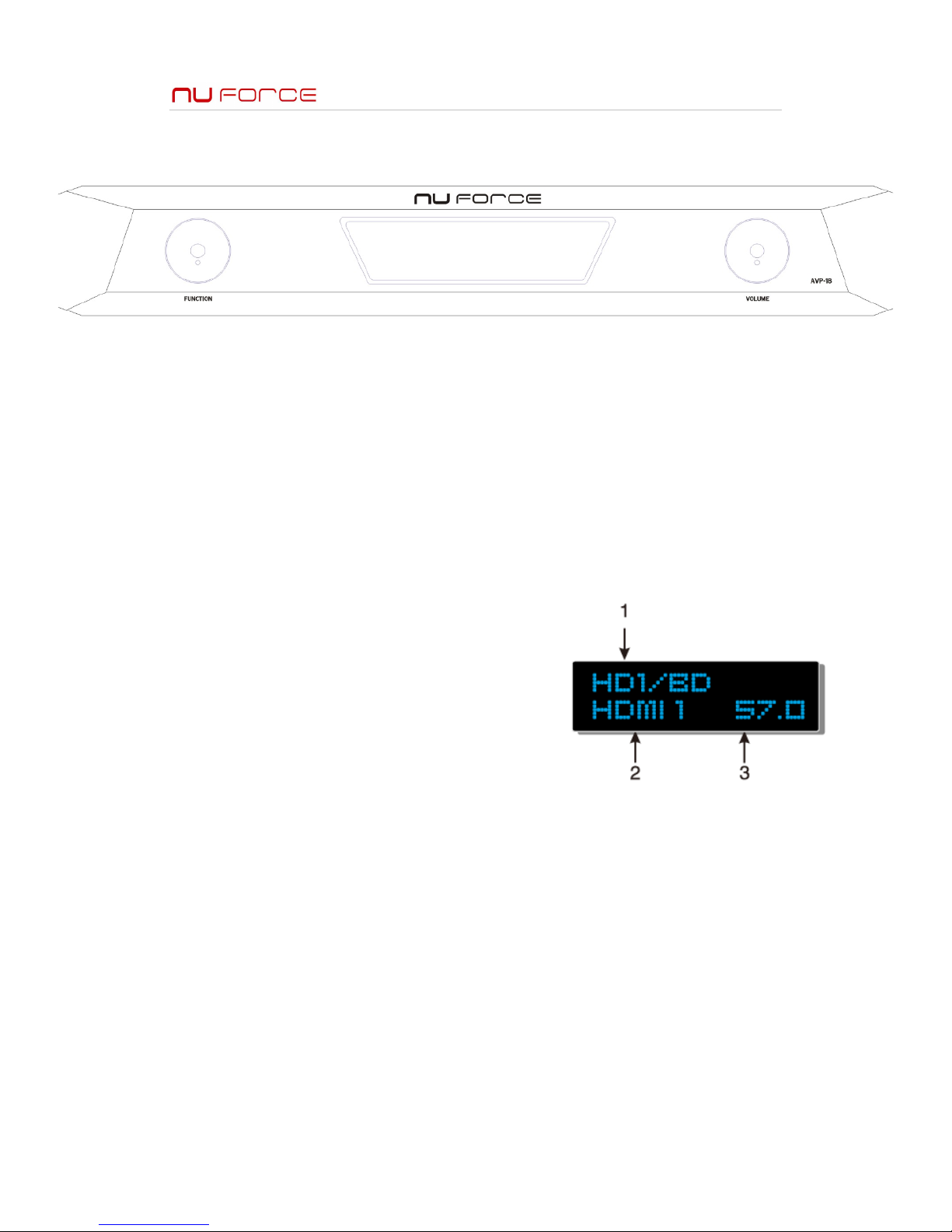
Front Panel Feature
1. Left knob –
A. Input selection by turning the knob
B. OSD Menu Selection by by turning the knob, press to confirm selection
2. Right knob -
A. Volume adjustment
B. Selecting OSD menu option
C. Power on by press and hold the right knob
On Screen Disply
1. Video Input source information
Note: Displays the selected input source, factory default
is set at HDMI 1 input
2. Audio input source information
Note: Displays the source of audio signal
3. Volume information
Note: Displays the voume (00.0 – 80.0 dB)
Page 9
7
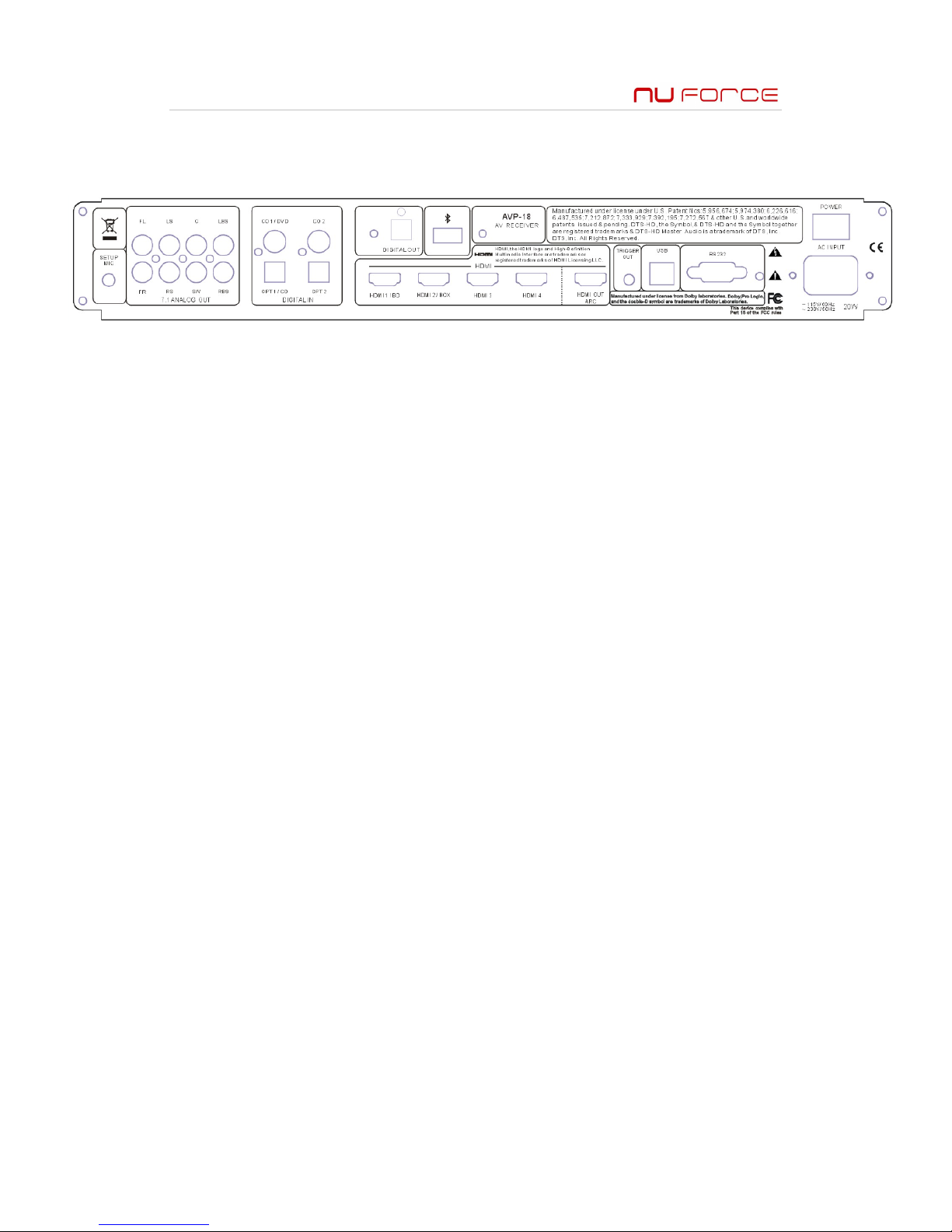
Rear Panel Connections
! Setup Mic – connecting the set up mic for intelligent acoustic room scanning
! 7. 1 Analog Output – for connecting speaker of different position
" FL – front left
" FR – front right
" LS – Left surround
" RS – Right surround
" C – Center
" SW – Subwoofer
" LBS – Left back surround
" RBS – Right back surround
! Digital In – for connecting digital source
" CO1 – coaxial input # 1
" CO2 – coaxial input # 2
" Opt1/CO – optical / coaxial input # 1
" Opt2 - optical input # 2
! HDMI – 4 sets of HDMI input and 1 set of HDMI output
" HDMI input # 1
" HDMI input # 2
" HDMI input # 3
" HDMI input # 4
" HDMI output / ARC
! Trigger Out – triggering output of 12V / 120 mA, used for connecting to another device
with triggering function
! Digital out
! USB – for connection between AVP-18 and a computer, mainly used for firmware upgrade
! RS-232 – Serial com port
! Power – rear power switch of AVP-18
Page 10
8
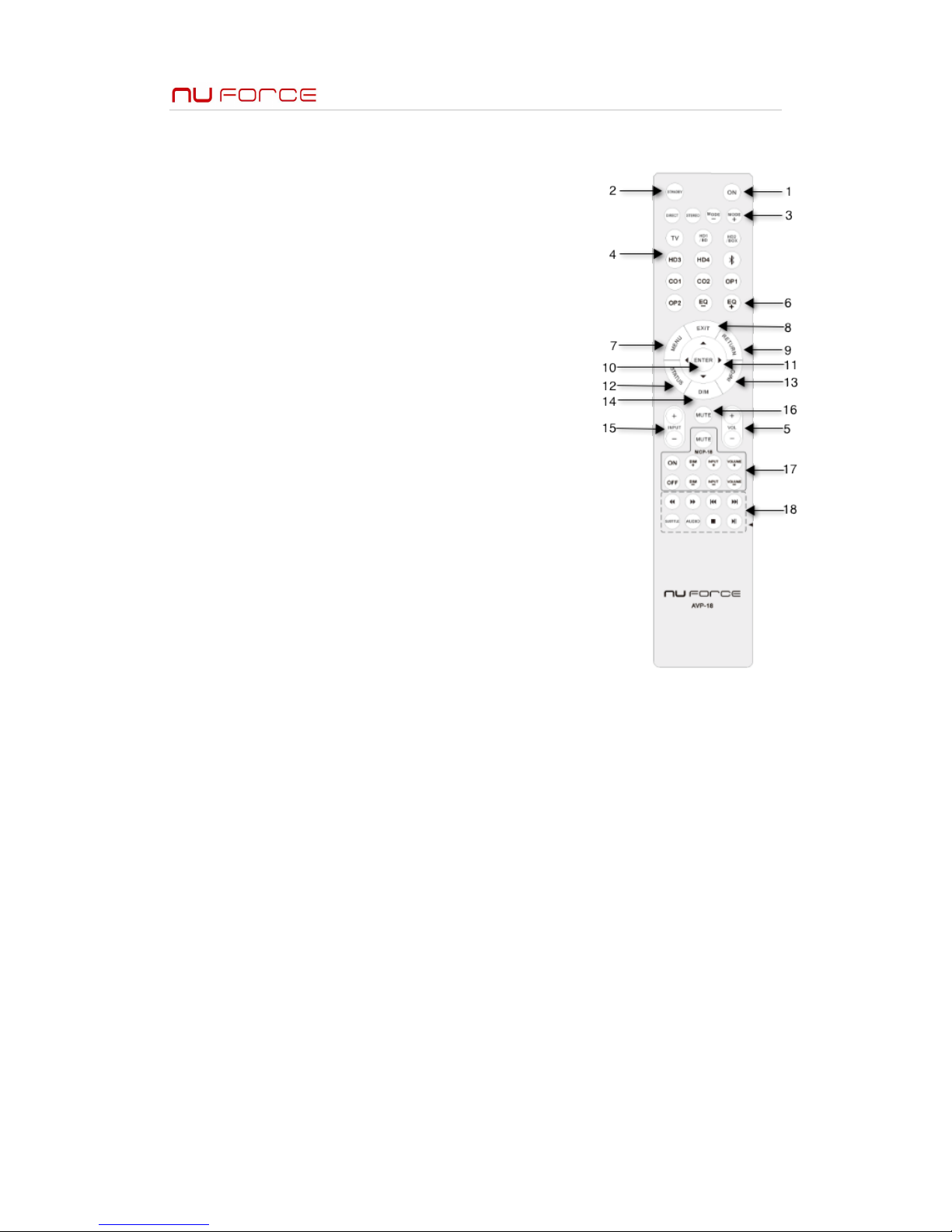
Remote Control
1. On – Power on button
2. Standby – turn the unit into standby mode
3. Listening mode select – switch between listening modes
A. Stereo – sound will be transmitting through left and right
speakers
B. Direct – Audio signal from input source will be directly
transmitted with minimum processing
C. DSP – this allows you to select different listening scene
according to your preference
D. Dolby Pro Logic IIX – extend any 2 channel signal source
to play 7. 1 channel surround sound. It provides a natual
and uninterrupted surround sound effect. It can also
optimize your experience with home gaming console. It
comes with 2 different setting one for music and the
other one for movie
E. Doly Digital – Supports media with Dolby Digital and
provides sound effects as you are in a movie theatre or a
concert hall
F. Dolby EX – Extend a 5. 1 CH source to a 6. 1 CH source by
using special Dolyby EX matrix encoding surround
sound technology.
G. Dolby Digital Plus – Specilly designed for HDTV, supports
7. 1CH up to 48 kHz sampling rate.
H. Doly TrueHD – It is designed based on an etra storage
space for new Blu-ray and HD DVD disc format. This
format can support 7. 1 CH up to 48 / 96 kHz and 5. 1 CH
up to 192 kHz sampling rate.
I. Neo 6 – this mode can extend any 2 channel signal source to play as 7.1 CH with seven
different matrix-encoding
J. DTS – DTS digital surround sound formats supports 5. 1 separating channels and use
compression techniques to provide hi-fi effects. Only support media with DTS marking
K. DTS-ES – this mode is designed for DTS-ES Discrete and DTS-ES Matrix sound tracks,
supports media with DTS-ES trademarks
L. DTS-Master – designed to utilize the extra storage space on Blue-ray and HD DVD disc,
supports 48/96 kHz with 7. 1 separated channel in digital audio and 192 kHz for 5. 1 CH
M. DIS Hi Res – a compression technology that collects the high resolution in the audio,
designed for HDTV. Supports 7. 1 CH up to 96 kHz sampling rate
4. Input selections – select input accordingly
5. Volume adjustment
6. EQ mode – select preset EQ settings
7. Menu button – opens up on-screen menu
8. Exit button – exit from on-screen menu
9. Return button – return to the previous screen on the menu
10. Enter button – confirm selection on the on-screen menu
11. Arrow keys – move cursor according to the direction on the on-screen menu
12. Status- display the curreny input source and listening mode
13. Info – display the input source format
14. Dim – adjust the brightness on the unit display
15. Input +/- - change the input source
16. Mute button
17. Remote function for MCP-18
18. DVD/BD player control
Page 11
9
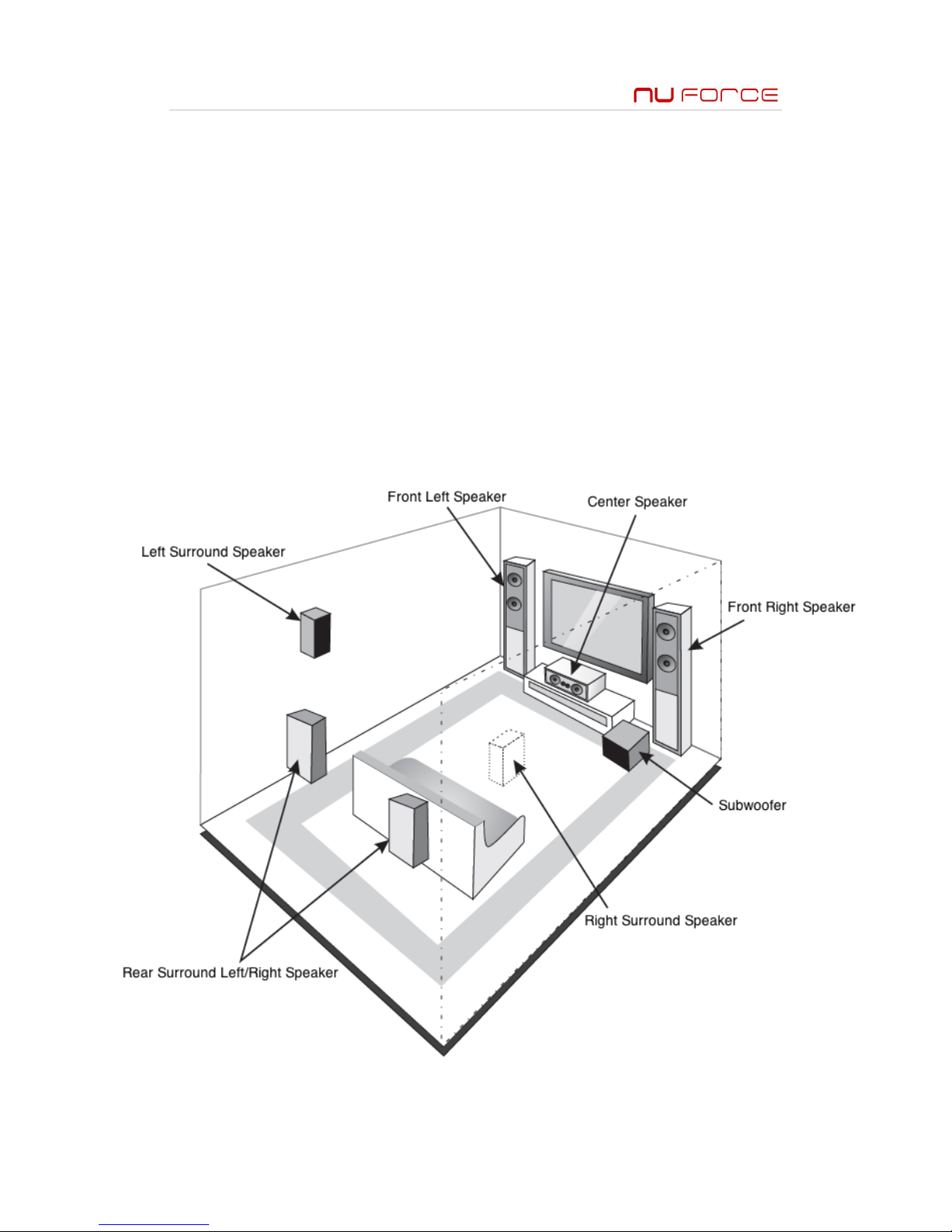
Connecting the Speakers
! Unplug all power cords before connecting the speakers
! Follow the instruction manual of the speakers
! Make sure the correct polarity is connected
! Please connect one speaker per connector
! A over-lengthed speaker cable might effect the sound quality
! Short circuiting on the cable might damaged the amplifier
! Please make sure the core of the cable is not in contact of the rear panel of the unit
! Connecting mutiple cables to one speaker might damage the amplifier
Positioning Your Speakers
Page 12

10
Connecting Input/Output Devices
Note: Please read the instructions before connecting any devices to AVP-18, once the devices
are connected, please check all connection is in tact before turning on the power
! Optical Digital Input
" The optical digital input is equipped with active protected cover which will
automatically open and close up when the optical cable is plugged in or unplugged
! Connecting your cables
" The red color input refers to right-channel and the white color input refers to the left
channel
" Please make sure the cable is fully plugged in for best connection
" To avoid interference, please place audio/video cables away from the power/speaker
cables
Setup for Room Equalization
The intelligent acoustic room scanning involves a testing mic. It can automatically test the
number of connected speakers, the optimal inflection point frequency and the distance
between speakers and the audience. Through capturing noise in the room, it will adjust
frequency and time thresholds to solve distorion problem caused by noise. The scanning
system can also automatically set the EQ. The equalizer with 11 segments can maintain the
balance withtin obtave. Before doing the acoustic scanning, please make sure all speakers are
connected.
Connecting the testing mic:
• Connect the test mic included in the package to the SETUP MIC jack on the rear panel
before scanning. Place the mic in the main listening position and parallel with the
listener’s ear when sitting down. Make sure the mic is standing up straight with the
sensor pointing up. In order to ensure the accuracy of the testing, please do not hold or
touch the mic while doing the acoustic scanning.
• Please enter the on-screen menu and go to Setup
• Select the option Auto Room EQ
• Follow the on screen instructions to complete the testing process
Page 13

11
NuForce’s Limited Warranty and Limitation of Liabilities
ADDITIONAL RIGHTS
FOR CONSUMERS, WHO ARE COVERED BY CONSUMER PROTECTION LAWS OR REGULATIONS IN THEIR COUNTRY OF
PURCHASE OR, IF DIFFERENT, THEIR COUNTRY OF RESIDENCE, THE BENEFITS CONFERRED BY THIS WARRANTY ARE
IN ADDITION TO ALL RIGHTS AND REMEDIES CONVEYED BY SUCH CONSUMER PROTECTION LAWS AND
REGULATIONS. THIS WARRANTY DOES NOT EXCLUDE, LIMIT OR SUSPEND ANY RIGHTS OF CONSUMERS ARISING OUT
OF NONCONFORMITY WITH A SALES CONTRACT. SOME COUNTRIES, STATES AND PROVINCES DO NOT ALLOW THE
EXCLUSION OR LIMITATION OF INCIDENTAL OR CONSEQUENTIAL DAMAGES OR ALLOW LIMITATIONS ON HOW LONG
AN IMPLIED WARRANTY OR CONDITION MAY LAST, SO THE LIMITATIONS OR EXCLUSIONS DESCRIBED BELOW MAY
NOT APPLY TO YOU. THIS WARRANTY GIVES YOU SPECIFIC LEGAL RIGHTS, AND YOU MAY ALSO HAVE OTHER RIGHTS
THAT VARY BY COUNTRY, STATE OR PROVINCE. THIS LIMITED WARRANTY IS GOVERNED BY AND CONSTRUED UNDER
THE LAWS OF THE COUNTRY IN WHICH THE PRODUCT PURCHASE TOOK PLACE.
LIMITED WARRANTY
For a period of TWO (2) YEARS from the date of retail purchase by the original end-user purchaser (“Warranty Period”),
NuForce warrants (i) this product against defects in materials and workmanship, and (ii) that each Product, unmodified
and under normal use and conditions, will substantially comply with NuForce’ applicable written technical
documentation for the Product. NuForce reserves the right to make substitutions and modifications from time to time
in the specifications of Products sold by NuForce, provided that such substitutions or modifications do not materially
affect overall Product performance.
If a hardware defect exists and a valid claim is received within the Warranty Period, at its option and to the extent
permitted by law, NuForce will (1) repair the hardware defect at no charge, using new or refurbished replacement parts,
(2) exchange the product with a product that is new or which has been manufactured from new or serviceable used
parts and is at least functionally equivalent to the original product, or (3) refund the purchase price of the product.
NuForce may request that you replace defective parts with user-installable new or refurbished parts that NuForce
provides in fulfillment of its warranty obligation. A replacement product/part assumes the remaining warranty of the
original product or ninety (90) days from the date of replacement or repair, whichever provides longer coverage for
you. When a product or part is exchanged, any replacement item becomes your property and the replaced item
becomes NuForce's property. When a refund is given, your product becomes NuForce's property.
OBTAINING WARRANTY SERVICE
If you purchased the product in the U.S., deliver the product, at your expense, to any NuForce Service Center located in
the U.S. If you purchased the product outside of the U.S., deliver the product to any NuForce Authorized Importer in the
country where you purchased the product. Be aware, however, that not all countries have NuForce Authorized Service
Providers (‘NASP’) and not all Authorized Service Providers outside the country of purchase have all parts or
replacement units for the product. If the product cannot be repaired or replaced in the country it is in, it may need to be
sent to a different country or returned to the country of purchase at your expense for repair or replacement. If you
seek service in a country that is not the country of original purchase, you will comply with all applicable import and
export laws and regulations and be responsible for all custom duties, V.A.T. and other associated taxes and charges.
Where international service is available, NuForce may repair or exchange defective products and parts with
comparable products and parts that comply with local standards.
You can always deliver the product to NuForce’s U.S. main service center for obtaining warranty service, however, you
may have to pay for return shipping cost.
NuForce may send you user-installable new or refurbished replacement product or parts to enable you to service or
exchange your own product (“DIY Service”). Upon receipt of the replacement product or part, the original product or
part becomes the property of NuForce and you agree to follow instructions, including, if required, arranging the return
of original product or part to NuForce in a timely manner.
When providing DIY Service requiring the return of the original product or part, NuForce may require a credit card
authorization as security for the retail price of the replacement product or part and applicable shipping costs. If you
follow instructions, NuForce will cancel the credit card authorization, so you will not be charged for the product or part
and shipping costs. If you fail to return the replaced product or part as instructed or the replaced product or part is not
eligible for warranty service, NuForce will charge the credit card for the authorized amount.
EXCLUSIONS AND LIMITATIONS
This Limited Warranty applies only to hardware products manufactured by or for NuForce that can be identified by the
"NuForce" trademark, trade name, or logo affixed to them. The Limited Warranty does not apply to any non-NuForce
hardware products or any accessories, even if packaged or sold with NuForce hardware. Non-NuForce manufacturers,
suppliers, may provide their own warranties. Other accessories distributed by NuForce under the NuForce brand name
are not covered under this Limited Warranty. This warranty does not apply: (a) to damage caused by accident, abuse,
misuse, misapplication, liquid contact, fire, earthquake, non-NuForce products, or other external causes; (b) to damage
caused by service performed by anyone who is not a NASP; (c) to a product or a part that has been modified without the
written permission of NuForce; (d) to consumable parts, such as batteries, or protective coatings designed to diminish
over time unless failure has occurred due to a defect in materials or workmanship; (e) to cosmetic damage, including
but not limited to scratches, dents, and broken plastic on ports; (f) to defects caused by normal wear and tear or
otherwise due to the normal aging of the product; or (g) if any NuForce serial number has been removed or defaced.
Important: Do not open the hardware product. Opening the hardware product may cause damage that is not covered
by this warranty. Only NuForce or a NASP should perform service on this hardware product.
THIS WARRANTY AND REMEDIES SET FORTH ABOVE ARE EXCLUSIVE AND IN LIEU OF ALL OTHER WARRANTIES,
REMEDIES AND CONDITIONS, WHETHER ORAL OR WRITTEN, EXPRESS OR IMPLIED. NUFORCE SPECIFICALLY
DISCLAIMS ANY AND ALL IMPLIED WARRANTIES, INCLUDING, WITHOUT LIMITATION, WARRANTIES OF
MERCHANTABILITY AND FITNESS FOR A PARTICULAR PURPOSE. IF NUFORCE CANNOT LAWFULLY DISCLAIM IMPLIED
WARRANTIES UNDER THIS LIMITED WARRANTY, ALL SUCH WARRANTIES, INCLUDING WARRANTIES OF
MERCHANTABILITY AND FITNESS FOR A PARTICULAR PURPOSE ARE LIMITED IN DURATION TO THE DURATION OF
Page 14

12
THIS WARRANTY. No NuForce reseller, agent, or employee is authorized to make any modification, extension, or
addition to this warranty.
NUFORCE IS NOT RESPONSIBLE FOR DIRECT, SPECIAL, INCIDENTAL OR CONSEQUENTIAL DAMAGES RESULTING FROM
ANY BREACH OF WARRANTY OR CONDITION, OR UNDER ANY OTHER LEGAL THEORY, INCLUDING BUT NOT LIMITED
TO LOST PROFITS, DOWNTIME, GOODWILL, DAMAGE TO OR REPLACEMENT OF EQUIPMENT AND PROPERTY, ANY
COSTS OF RECOVERING, REPROGRAMMING, OR REPRODUCING ANY PROGRAM OR DATA STORED IN OR USED WITH
NUFORCE PRODUCTS, AND ANY FAILURE TO MAINTAIN THE CONFIDENTIALITY OF DATA STORED ON THE PRODUCT.
NUFORCE SPECIFICALLY DOES NOT REPRESENT THAT IT WILL BE ABLE TO REPAIR ANY PRODUCT UNDER THIS
WARRANTY OR MAKE A PRODUCT EXCHANGE WITHOUT RISK TO OR LOSS OF PROGRAMS OR DATA.
Some states and provinces do not allow the exclusion or limitation of incidental or consequential damages or
exclusions or limitations on the duration of implied warranties or conditions, so the above limitations or exclusions may
not apply to you. This warranty gives you specific legal rights, and you may also have other rights that vary by state or
province.
Proof of purchase in the form of a bill of sale or receipted invoice which is evidence that the unit is within the Warranty
period must be presented to obtain warranty service.
REPLACEMENT AS PROVIDED UNDER THIS WARRANTY IS THE EXCLUSIVE REMEDY OF THE CONSUMER.
NUFORCE SHALL NOT BE LIABLE FOR ANY INCIDENTAL OR CONSEQUENTIAL DAMAGES FOR BREACH OF ANY
EXPRESS OR IMPLIED WARRANTY ON THIS PRODUCT. EXCEPT TO THE EXTENT PROHIBITED BY APPLICABLE LAW,
ANY IMPLIED WARRANTY OF MERCHANTABILITY OR FITNESS FOR A PARTICULAR PURPOSE ON THIS PRODUCT IS
LIMITED IN DURATION TO THE DURATION OF THIS WARRANTY.
 Loading...