

Page 1
aptX®
Bluetooth®
onboard!
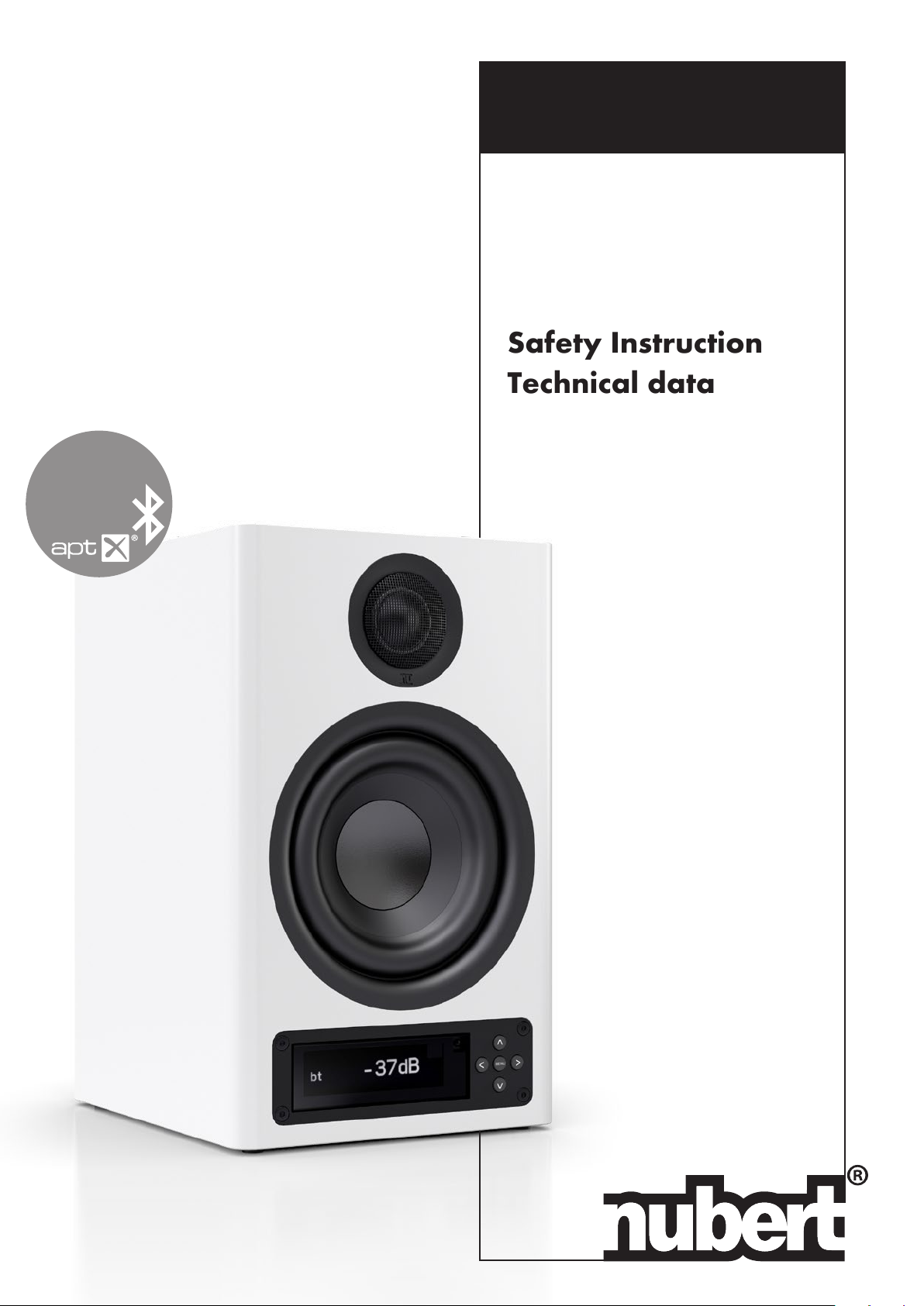
nuPro X-3000
Wireless
Active Speakers
Instruction manual
Safety Instructions
Technical data
13
Page 2
Device approval and conformity
with EC directives
Nubert electronic GmbH hereby declares that this product complies with the
2014/53/EU directives, provided that it is installed and used in accordance with
the manufacturer‘s instructions. The full text of the EU Declaration of Conformity
is available at the following Internet address:
https://www.nubert.de/konformitaetserklaerungen/716/
• Do not change the serial number on the speaker. It is part of the operating
approval.
• If the loudspeaker is repaired or modied by workshops or other third parties
not authorized by Nubert, it loses its operating license.
• Only accessories and devices may be connected which in turn comply with all
legal requirements and are approved.
• The loudspeaker may only be used for the applications specied in the „In-
tended Use“ section
Intended use
This speaker is designed exclusively for sound reproduction in dry rooms. Use
the speaker only as described in this manual. Any other use (particularly safe-
ty-relevant or medical use, installation in open environment like IP-certied prod-
ucts) is considered improper and may result in property damage or even personal
injury. Nubert electronic GmbH does not assume any liability for damages caused
by improper use.
Safety instructions
The entire operating manual, in particular the safety instructions, must be read
in full before connecting and commissioning the device. For your own safety,
be sure to follow all warnings and safety instructions in this manual and on the
speaker. The user is not permitted to carry out any work on the loudspeaker
other than the described work. Keep this document so that you have access to
it at all times. Furthermore, it must also be handed over to possible re-owners.
Key to the symbols
The triangle symbol with exclamation mark (without additional comment)
indicates important instructions for commissioning, operation and maintenance
of the device.
The term Caution! next to the triangle symbol indicates a medium risk. Failure
to observe this warning may result in property damage.
The term Danger! next to the triangle symbol indicates a high risk. Failure to
observe this warning may result in death or personal injury
This symbol indicates that you must read and observe the operating in-
structions and the safety and warning notices in order to operate the device.
This symbol (triangle with lightning) warns of dangerous voltages inside
the enclosure and of hazards due to electric shock.
This symbol indicates that the device complies with electrical protection
class 2 and therefore does not require earthing.
Devices with this symbol may only be used in a dry indoor environment.
Equipment marked with this symbol must not be disposed of with house-
hold waste. Refer to the Disposal and Battery Return section at the end of this
manual.
General information
Never operate the loudspeaker unattended!
Danger of electric shock!
To avoid the risk of electric shock, the speaker may not be opened by the
user. There are no user-serviceable parts inside the speaker.
Service work and repairs are reserved for qualied specialists authorized by
Nubert. If you need service, please contact Nubert electronic GmbH directly
([email protected])!
Danger of suffocation!
Never let children use or play with neither speaker, remote control or packaging
unattended. There is a risk that children will get caught in the packaging lm
and suffocate. Make sure that children cannot remove any small parts from the
devices! These parts, like the remote control battery, could be swallowed and
cause suffocation. In case of swallowing any parts, contact a doctor immediately!
Danger of injury or damage!
When moving the speaker, take care to avoid injury and damage!
Caution!
Since the speaker can only be completely disconnected from the mains at the
mains input on the rear of the unit or by pulling the mains plug from the socket, it
must be positioned so that you have free access to the mains input or mains plug.
If any of the following situations occurs, the loudspeaker must be switched off
immediately and disconnected from the mains. Contact Nubert electronic GmbH
([email protected]) immediately!
• The speaker has been damaged or has fallen down.
• Power cord or plug is damaged
• Objects or liquid have got into the loudspeaker
• The speaker has been exposed to excessive moisture or rain.
• The speaker does not work properly or exhibits a signicant reduction in per-
formance.
• The loudspeaker smells burnt, develops smoke or makes unusual noises.
Only use accessories recommended by Nubert!
Installation instructions
Caution!
An unstable location can damage the speaker.
• Only place the loudspeaker on a at, stable surface and make sure that it
cannot be knocked over!
• Also make sure that no unintentional pulling can occur on the cables to avoid
knocking over the speaker or damaging the connection sockets!
• Keep strong mechanical shocks away from the loudspeaker!
Caution!
Excessive heat build-up inside the unit can shorten its service life or lead to re.
• Never cover the back of the speaker! Make sure that there is a clearance of at
least 10 cm and sufcient air circulation in the back area!
• Do not operate the speaker and remote control near heat sources such as
radiators or stoves!
• Do not set the speaker and remote control to direct sunlight.
• Do not expose to direct sunlight!
• Never place burning candles or similar open re sources on the loudspeaker!
Danger of explosion!
Installation in unsuitable locations can cause explosions. Do not use the speaker
or remote control
• in environments where there is a risk of re or explosion!
• at extremely low or extremely high temperatures!
• near ammable gases or vapours!
• near strong dust!
• near ammable materials!
nuPro X-3000
· 3/2019
!
!
!
!
!
!
!
!
2
!
!
Page 3
Danger of electric shock!
The loudspeaker carries mains voltage and voltages higher than 35 V AC or DC
inside. It has no special protection against the intrusion of liquids or objects into
the system. There is therefore a risk of lethal electric shock.
• Never touch the speaker with wet hands!
• Only use the speaker in a dry place!
• Do not operate it outdoors or in damp rooms!
• The loudspeaker must be protected from liquids of all kinds, including dripping
and splashing water.
•
Do not place any containers containing liquids (e.g. ower vases) on the speak-
er or in the immediate vicinity!
• If the loudspeaker is moved from a cold environment to a warm room, conden-
sation may form inside the unit. Wait at least six hours until the loudspeaker
has reached room temperature and is dry before switching it on!
• No objects or foreign bodies may get into the device.
• Should the loudspeaker come into contact with liquids or should objects have
got inside, please unplug the mains plug immediately and contact Nubert elec-
Danger of injury or damage!
For speakers with threaded bushings on the underside:
The threaded bushings may be used for upright mounting of the loudspeaker on
suitable base plates only. The threaded bushings on the underside of the loud-
speaker enclosures are not designed for tensile loads and must therefore not be
used as holders for hooks or similar devices in order to suspend the loudspeaker
cabinet. A falling speaker may cause serious injury and damage.
Connection instructions
General connection instructions
• Disconnect the mains plug before changing any wiring on the system!
• Make sure that all connections have been made correctly and that all plugs
are rmly seated in the sockets before connecting the speaker to the mains.
• Use only the intended cables or plug connections for the connections! Failure
to do so may result in damage or malfunction.
•
If you want to disconnect connections on the loudspeaker, always pull the plug,
never the cable!
• Ensure that all plugs are rmly seated in the sockets!
• Only use cables and accessories recommended by Nubert!
Danger of electric shock!
Faulty mains supply systems or excessive mains voltage can lead to electric
shocks.
•
All power supply or antenna systems connected to the loudspeaker must com-
ply with all applicable laws and regulations and be professionally installed by
an approved installation company.
• Use only the appropriate power cord to connect the speaker. Do not modify
the power cord or its plug.
• Make sure that the mains voltage at your location matches the requirements
of the loudspeaker! The correct power supply can be found on the label on the
back of the speaker. It must not be connected to other power supplies.
• Devices of Class 1 construction must be connected to the mains power socket
outlet with a protective earth connection. Make sure that the installation of the
protective earth is carried out correctly!
• When laying the power cables, make sure that they cannot be damaged (e.g.
by heating or mechanical stress)! Pay particular attention to the areas of the
connectors and distributors!
Caution!
Overvoltage in the power supply system (e.g. due to lightning) can damage or
destroy the device and power supply unit.
• An overvoltage protection element can provide a certain degree of protection
against excessively high voltages in the power grid.
• However, the greatest possible protection against damage can only be
achieved with the complete separation from the mains supply.In case of thun-
derstorms or danger of lightning strikes, disconnect the mains cable from the
socket and any antenna plugs from your hi- system!
• If the speaker is not used for a long period of time or is unattended, the power
supply should be disconnected. Disconnect the mains plug from the socket!
Remote control and battery
This product comes with a remote control and a battery. The following must be
observed when handling remote controls and batteries:
If the batteries are discharged, the range of the remote control will de-
crease signicantly. If this happens, replace the batteries immediately. Always
use high-quality CR2025 lithium button cells as replacement batteries. Make sure
that the polarity is correct when inserting the battery into the battery compart-
ment!
Caution!
Improper handling can lead to material damage.
• Do not drop the remote control!
• Do not expose the remote control and battery to water or other liquids!
• Do not operate or store the remote control and battery in locations with high
humidity or high or low temperature!
Danger!
Leaking or exploding batteries can pose a health hazard and cause damage to
goods.
• If you do not use the device for a long time or if the batteries are depleted,
remove the batteries from the remote control to prevent discharge, leakage of
acid or explosions.
• Leaking batteries must be replaced immediately.
• If you nd a leaking battery, do not touch the leaking material and dispose of
the batteries immediately!
• Do not touch leaking batteries!
• Should your skin, eyes or mouth come into contact with the leaking material,
clean the affected area immediately with water and contact a doctor!
Danger! Do not ingest battery, chemical burn hazard!
Ingestion of batteries can cause severe internal burns and death within a short
time span.
•
Ensure that batteries do not get into your body by any means, in particular that
they cannot be swallowed!
• Keep new and used batteries away from children.
•
If the battery compartment does not close securely, stop using the product and
keep it away from children.
•
If you think that batteries might have been swallowed or placed inside any part
of the body, seek immediate medical attention!
Equipment marked with this symbol must not be disposed of with house-
hold waste. Refer to the Disposal and Battery Return section at the end of this
manual.
3/2019 · nuPro X-3000
!
!
!
!
!
!
!
!
!
3
Page 4
nuPro X-3000
· 3/2019
Unpacking and Scope of Delivery
Auspacken
When unpacking your speaker, do not use sharp or pointed objects
to avoid possible damage to the enclosure. Please keep the packaging in a safe place in case you need to transport the speaker at
a later date.
Scope of delivery
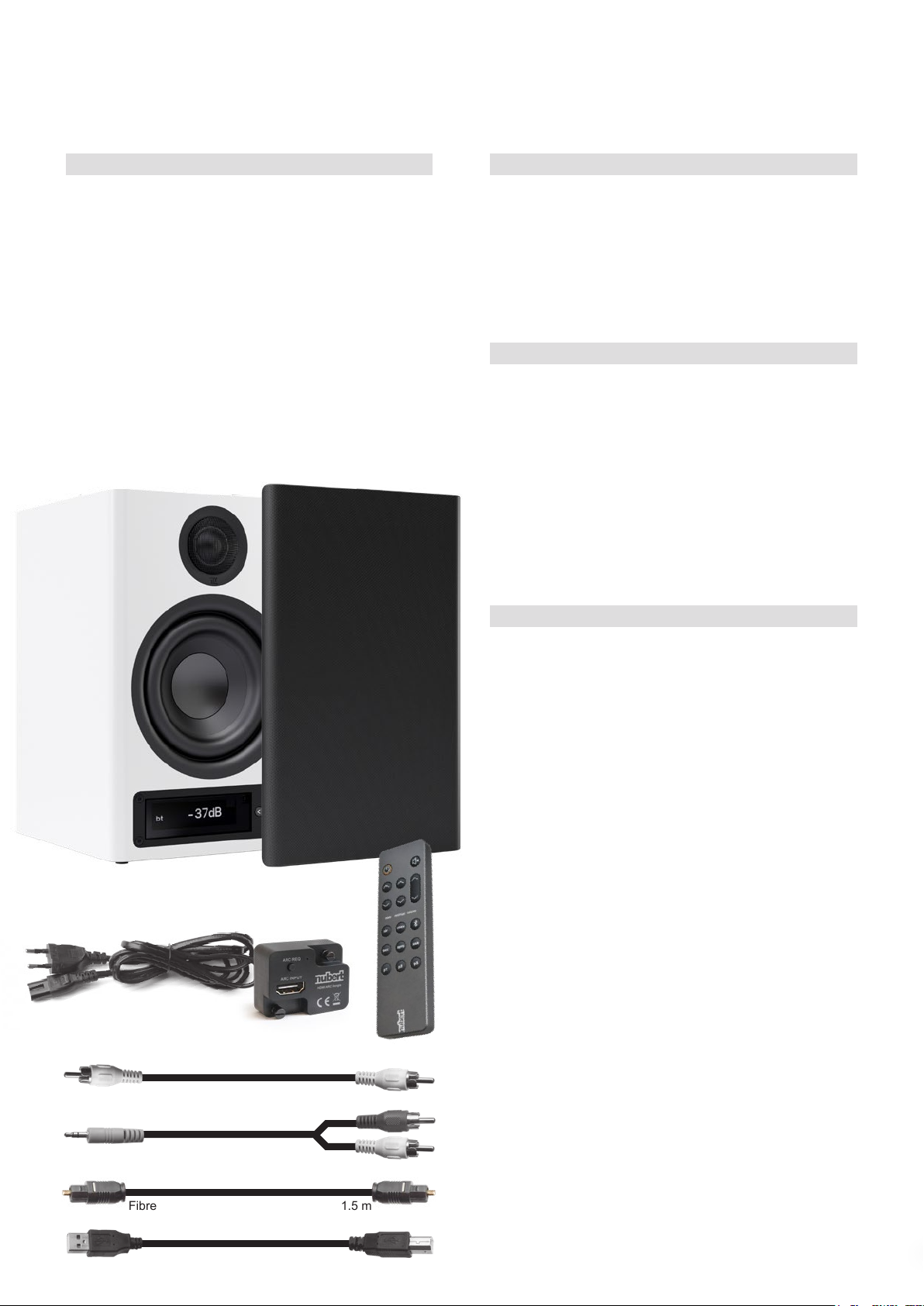
If the delivery is complete, it contains the following parts:
• 1 nuPro active loudspeaker
• 1 Cloth grille
• 1 remote control with battery
• 1 Mains cable, 2 m
• 1 HDMI ARC adapter
• 4 Signal cables:
– SPDIF coaxial cable, 3 m
– Stereo jack cinch cable (3.5 mm jack cinch), 1.5 m
– Fibre optic cable with TOS-Link plugs, 1.5 m
– USB cable (Type A/Type B), 1.5 m
Cloth grille
The cloth grille protects the loudspeaker drivers (for example from
curious children who like to press in tweeter domes) and provides a
visual contrast for those who do not like the technical appearance
of loudspeaker drivers. It is carefully placed against the front of the
speaker and held in place magnetically. Please make sure that the
surface of the bafe is not damaged.
With the cloth grill removed, the loudspeaker sounds somewhat
brighter and clearer - the choice is yours!
Low temperatures and Sound
When speakers are shipped and delivered during the cold months
of the year, it is imperative that they adapt to the temperature of
the living area. Low temperatures have a considerable inuence on
the moving parts of a loudspeaker such as diaphragm, voice coil,
bead and spider. The ability of these components to follow rapid
oscillations or to perform large excursions is thus signicantly restricted. This is not dangerous, but “frozen” speakers are far from
their acoustic peak.
Hence our tip: When your new speakers arrive on a cold winter’s
day, just give them a few hours to acclimatise. Your Nubert speakers will thank you with the superior sound quality you have come to
expect from us.
Mains cable, 1.75 m
HDMI ARC adapter
Setup
The nuPro X are high-quality, very neutral active stereo loudspeakers. They impress with an extremely homogeneous, precise, and
“direct” sound reproduction with the nest resolution in the entire
frequency spectrum. However, even “honest loudspeakers” are
exposed to the manifold inuences of room acoustics. In order to
achieve the most natural and true-to-life reproduction possible,
please observe the following general installation instructions:
• The rear-facing bass reex ports should be at least 3 centimetres
away from back- and side walls in order to avoid air ow noise.
Some distance to the back- and side walls also helps prevent an
increase in the bass- and fundamental ranges. If the bass reproduction is perceived as being too strong when the speakers are
placed close to a wall, you can raise the lower cut-off frequency of
the speakers, as described on page 8 under system hp, and/or adjust the bass volume with the bass control as a “countermeasure”.
•
When placed on a shelf, the best sound is achieved when the front
edge of the speaker is either ush with the shelf or even protrudes
slightly. This allows the loudspeaker to radiate the sound freely into
the room and helps to avoid voices sounding like coming through
a funnel.
• Within horizontal listening angles up to 30 degrees off the hori-
zontal axis, you will experience no signicant change or loss in
sound quality. Only at wider listening angles does the sound lose
its brightness slightly. It is then advisable to point the speakers
towards the listening position.
SPDIF coaxial cable, 3 m
Stereo jack cinch cable
(3.5 mm jack cinch), 1.5 m
Fibre optic cable with TOS-Link plugs, 1.5 m
USB cable (Type A/Type B), 1.5 m
44
• The most natural sound is achieved when the tweeters are approximately at ear level. But even 20 degrees above or below
the tweeter axis, the sound is still homogeneous. If your active
speakers need to be placed lower or higher, they should ideally
be angled so that the tweeters are aimed at the listening position.
Page 5
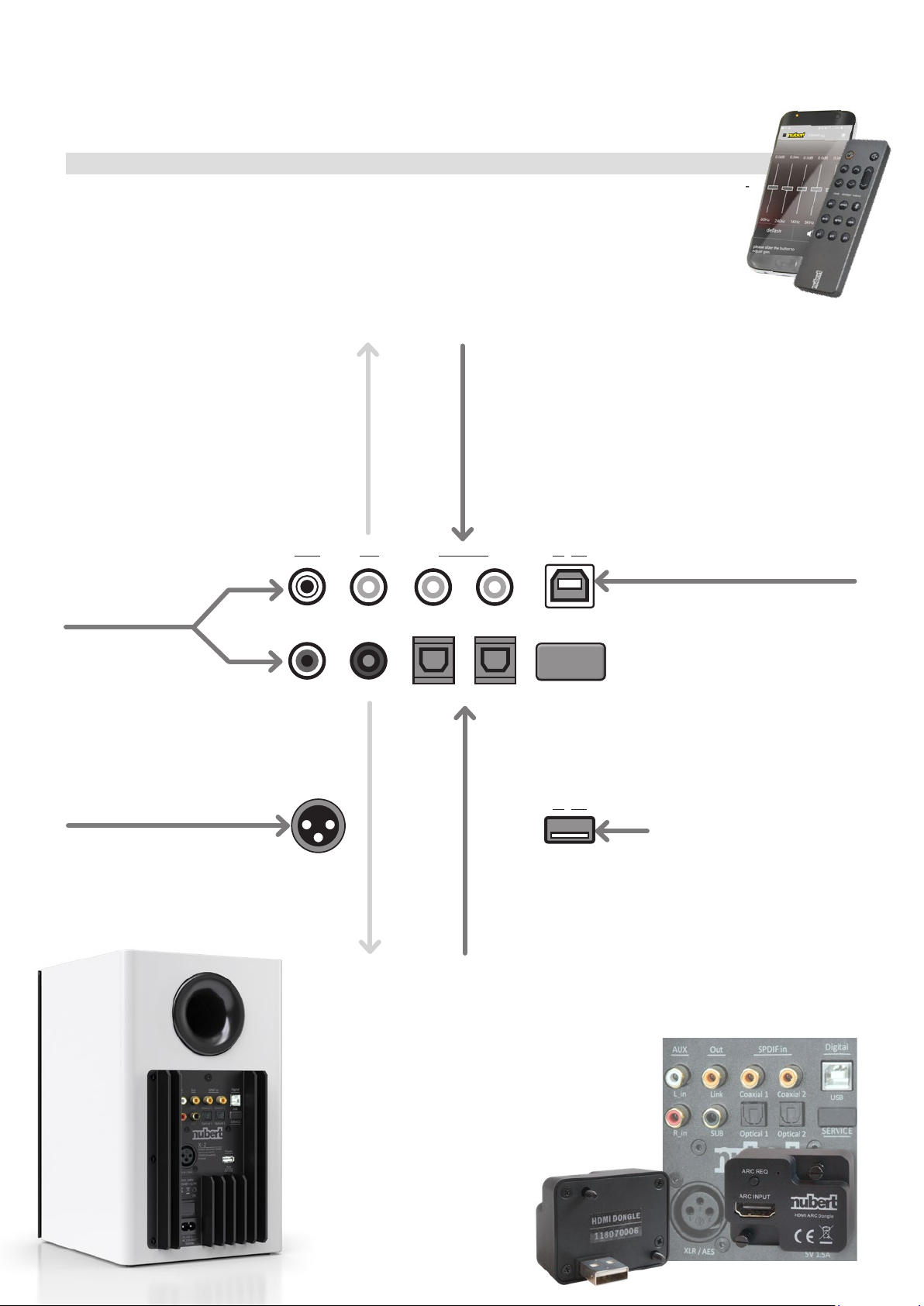
Connections and application examples
The nuPro boxes must be completely wired before switching
them on, see also our separate Quick-Start instructions.
An additional active subwoofer can also be connected on request.
3/2019 · nuPro X-3000
Using the remote control or the Nubert X-Re-
mote App, you can select which of the connected devices you want to hear from the
input sources (see page7, section “Nubert
X-Remote” App)..
n AUX input Master speaker box:
Source device with
analog line output,
for example
• CD player
• various network players
• Preamplier or AV receiver,
Smartphones, tablets and
MP3 players with 3.5 mm jack
Headphone jack
• PCs/laptops and TVs with 3.5 mm
jack headphone jack.
n Link output
on the master
loudspeaker box:
Connection of
the slave loudspeaker box
AUX
L_in
SPDIF inOut
Link
SUBR_in Optical 1
Coaxial 1 Coaxial 2
n 2x SPDIF inputs on the master speaker box:
Source devices with electrical digital output, e.g.
• CD player
• various network players
• satellite receiver
• various radio transmission systems
n SPDIF input on the slave speaker box :
Connection to the link output of the
nuPro master loudspeaker box
Optical 2
Digital
USB
SERVICE
(Nubert
Service only)
n USB input Master speaker box:
Source device with USB port such
as computer and laptop.
The nuPro loudspeaker takes over
the task of the sound card.
(See also the notes below, section
“USB Connection to Computers”
n XLR/AES input Master speaker
system:
Source device with XLR/AES
output, e.g. mixer, digital musical
instrument, microphone
XLR / AES
n SUB output
Master loudspeaker
box: Connection of
an active
subwoofer
Digital
Port SV 1.5 A
n 2x optical inputs
Master loudspeaker box:
Source devices with optical
digital output e.g.
• various network players
(e.g. Apple TV)
• Bluetooth receiver
• TV
• game console
n USB port
The port provides a 5 V/1.5 A power
supply, for the direct operation of a
wireless radio receiver or a player (e.g.
a smartphone) on the loudspeaker.
At the same time it creates another
digital audio input: The HDMI/ARC
adapter included in the scope of
delivery is connected here.
5 5
Page 6
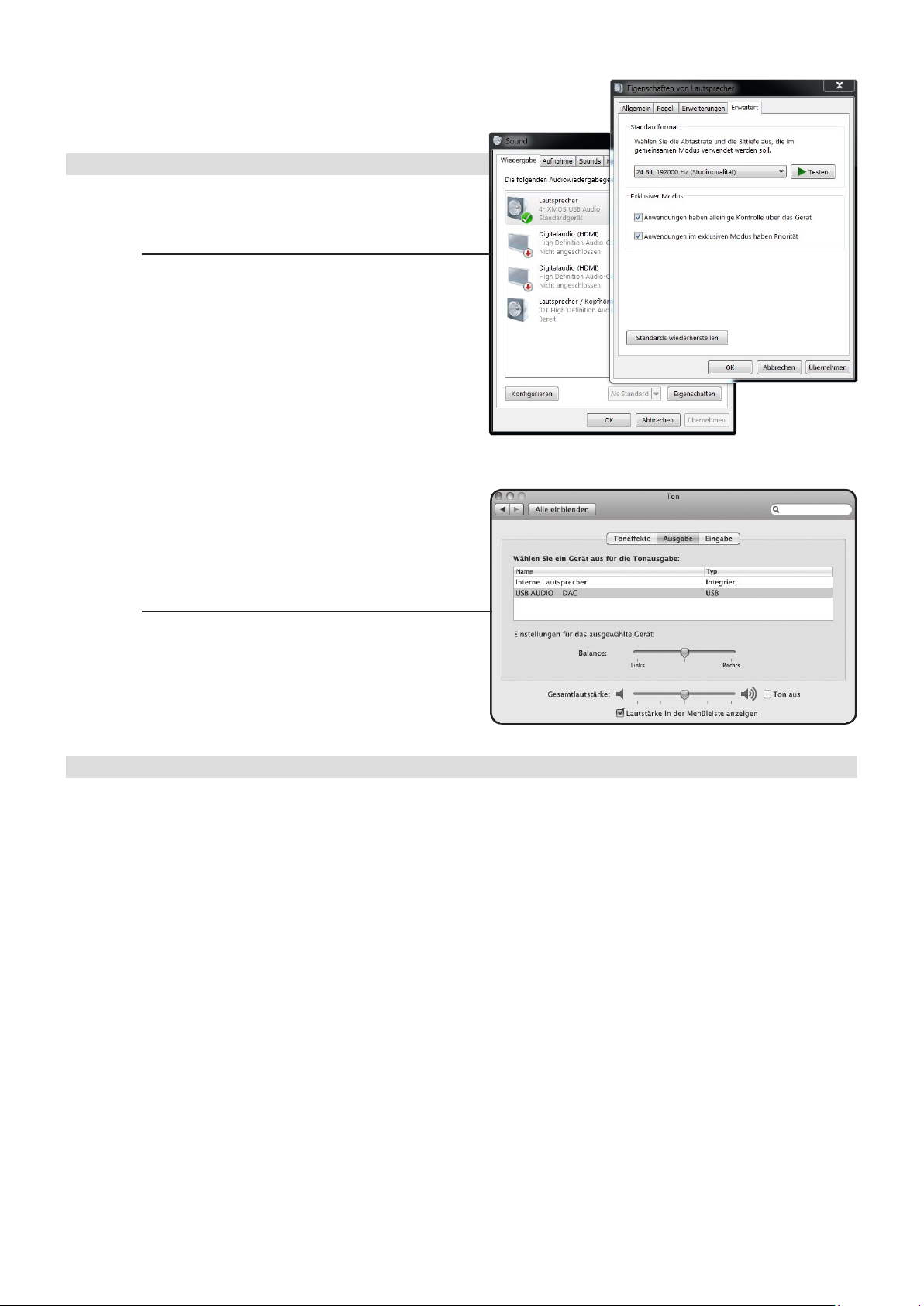
nuPro X-3000
· 3/2019
USB connection to computers
The Nubert nuPro X active loudspeakers use modern USB audio
codec converters which support the plug-and-play standard to a high
degree.
n Windows
please download the latest driver from the Nubert website to your computer: https: //www.nubert.de/downloads/61/
Choose “Software / Driver” - there: “nuControl USB Driver”.
After installing the driver, proceed as follows:
1. Connect the nuPro X speaker to your computer using a suitable
USB cable (included).
2. On the desktop, right-click the speaker icon in the status bar (at
the bottom right of the screen), then left-click the Playback Devices
entry. Alternatively, you can access the setting via the “Control Panel” and the “Sound” menu.
3. A window opens with a list of connected playback devices. The
nuPro audio driver appears here as “Speaker 4-XMOS USB-Audio”
(you can rename the default name of the device at any time in Windows).
4. Under “Advanced”, select “24 Bit 192000 Hz Studio Quality”
speaker properties for the best possible audio transmission quality.
5. Left-click on the entry of the “4-XMOS USB Audio” device again
and select it with the button below “Default”. Now click on “Apply”
and “OK” to save the setting.
n MAC OS X
1. Connect the nuPro speaker to your computer using the supplied
USB cable.
2. Call up the system settings and click on “Sound” in the Hardware
area.
3. Select “USB Audio DAC” from the list of available audio devices.
.
Construction and technology
Tilt Control
The midrange/treble adjustment of the nuPro loudspeakers shows
the characteristics of a so-called “Tilt control”. While standard treble
controls “bend” the frequency response and thus produce colourations, this control continuously affects the frequency response in
a linear fashion. This perfectly preserves the basic tonal character
of the loudspeaker and the harmony of the sound image. The Mid/
Hi tone control allows an increase or decrease of the frequency
response with a maximum of 10 dB at 20 kHz.
Analog gain
The input sensitivity for the analog inputs XLR and AUX can be
adjusted in 2 steps (0 dB / +6 dB).
Digital Signal Processing
For maximum signal purity, the signal path of a nuPro X is kept on
the digital level as far as technically possible. Thus, the input signal
is transferred to a digital signal processor (DSP) by the shortest
route, which takes over the frequency distribution and the optimiza-
tion of the frequency response. Also the passing on to the amplier
components is done digitally, so that the maximum signal to noise
ratio and precision can be guaranteed.
Time correction
Due to the digital signal processing every nuPro X loudspeaker has
a small delay of the sound signal. If the nuPro speakers are operated as a stereo pair in the PAIR conguration, any time differences
between the speakers are automatically compensated so that the
left and right signals are reproduced at exactly the same time. The
result is the best possible spatial reproduction with precise voice
positioning.
6
Sound format
The nuPro X loudspeakers process signals at the digital inputs in
“PCM” format. It may therefore be necessary to adjust the settings of
players such as TV sets or game consoles accordingly. To do this,
select “PCM” as the output format in the playback menu. Please also
refer to the manual of your player.
Switching off a nuPro X pair
If the master box switches to standby mode (due to automatic
switch-off or manually with the remote control), the other boxes op-
erated in PAIR mode follow automatically.
Auto-on function
The automatic switch-off/switch-on reacts differently depending
on the pre-selected input. If no signal is present at the analog signal inputs, an automatic switch-off takes place within 20 minutes.
Switching on is reversed as soon as a music signal is detected. At
the other inputs, the activity of the connected source device is monitored and therefore immediately switched off or on. At the inputs
Spdif, Optical, Port, AES the presence of the digital data stream is
evaluated, while at the USB input the presence of the USB supply
voltage is considered.
Note: Modern computers often have USB sockets with a voltage
applied even when the computer is switched off (e.g. for charging
a mobile phone). If you want to use the auto-on function of your
nuPro active loudspeakers in conjunction with the USB input, you
must select a USB connector that does not have continuous voltage.
Page 7
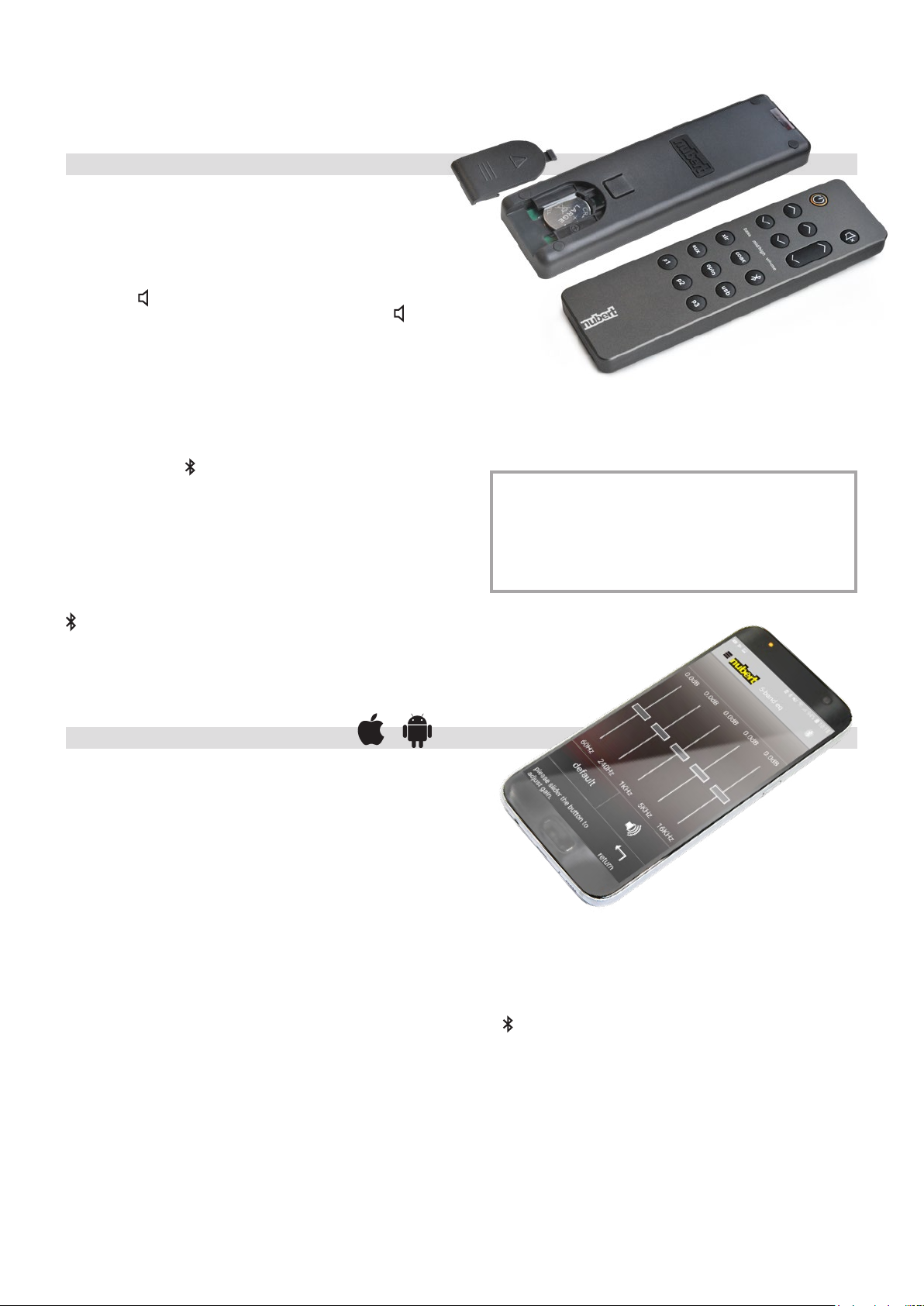
Remote control
The remote control of the nuPro allows direct access to the permanently required functions:
on button
After switching on the mains switch, the nuPro is in stand-by or
auto-on mode. Use the on key to activate or deactivate the speaker.
volume and x (mute) keys
The volume can be adjusted with the volume keys. The mute x key
allows you to mute and unmute the speakers.
bass and mid/high keys
The remote control also allows an uncomplicated adjustment of the
sound character of the nuPro speakers. The bass keys allow the
bass intensity to be raised and lowered, while the mid/high keys can
be used to adjust the mid/high range by up to +/- 10 dB . For more
information, refer to section “Scale” on page 6.
xlr, aux, coax, opto, (bluetooth) and usb buttons
The 6 buttons on the remote control below are for source selection.
By pressing a key repeatedly you can switch between 2 functions
(toggle):
key activates toggle between
xlr XLR/AES input XLR ↔ AES-Eingang
aux AUX Line input –– –
coax SPDIF input Coaxial 1 ↔ Coaxial 2
opto SPDIFinput Optical 1 ↔ Optical 2
Audio Streaming –– –
usb USB-connector USB-connector ↔
+ Digital port Digital port.
3/2019 · nuPro X-3000
p1 · p2 · p3 keys
With these buttons you can directly recall 3 presets, which you can
make and save in the setup. Alternatively, a preset can be stored by
pressing and holding the respective button (see page 8)
Remote Control Signals, nuPro X-Series
and nuPro Soundbars
The remote control signals of the nuPro X series and the nuPro
stereo boards (remote control labeled Remote AS) do not in-
uence each other. This means that combinations of these
systems can also be operated without triggering unwanted operations.
Nubert X-Remote App
As an alternative to the remote control, you can also control the
nuPro X-Series speakers with the Nubert X-Remote App, which
you can download to your mobile device free of charge via the
App Store or Play Store.
It offers the possibility to adjust all settings of the active loudspeakers comfortably from the listening position. All menu items can be
found which are also accessible via the display.
The app is intuitive and easy to use thanks to easy-to-understand
graphics.
Adjustment options:
n Volume: Volume control between -100 dB……0 dB
n Input: Source selection aux, bluetooth, xlr, aes, coax 1,
coax 2, optical 1, optical 2, usb, port
n Sound: Sound settings divided into
• mid-hi -10 dB……0 dB……+10 dB
• bass -10dB……0dB……+10dB
• balance (left)-10dB……0dB……-10dB(right)
• Loudness on/off
n 5-Band 60 Hz / 240 Hz / 1 KHz / 3.5 KHz / 16 KHz
Equalizer (control range +/-6 dB)
n Setup Pop-up:
• single Single operation mode
• pair stereo pair conguration, wired
• wls master Stereo pair conguration, wireless Master
• wls slave Stereo pair conguration, wireless Slave
n Channel Pop-up:
• left ch
• right ch
• mono
n
Bluetooth, divided into:
• pair activates the Bluetooth pairing mode
• reset deletes all already paired Bluetooth devices
n Advanced, divided into:
• system Hp raises the lower cut-off frequency;
1-Hertz steps - graphically supported.
• subwoofer sets the upper cut-off frequency for the subwoofer;
1-Hertz steps - graphically supported.
• analog gain 0 dB/+6 dB for analog inputs XLR and Aux.
• preset Memory for up to 3 individual settings.
• display Default settings for display and other
lighting properties.
• auto power ON/OFF
• default Resets all parameters to factory settings
7
Page 8
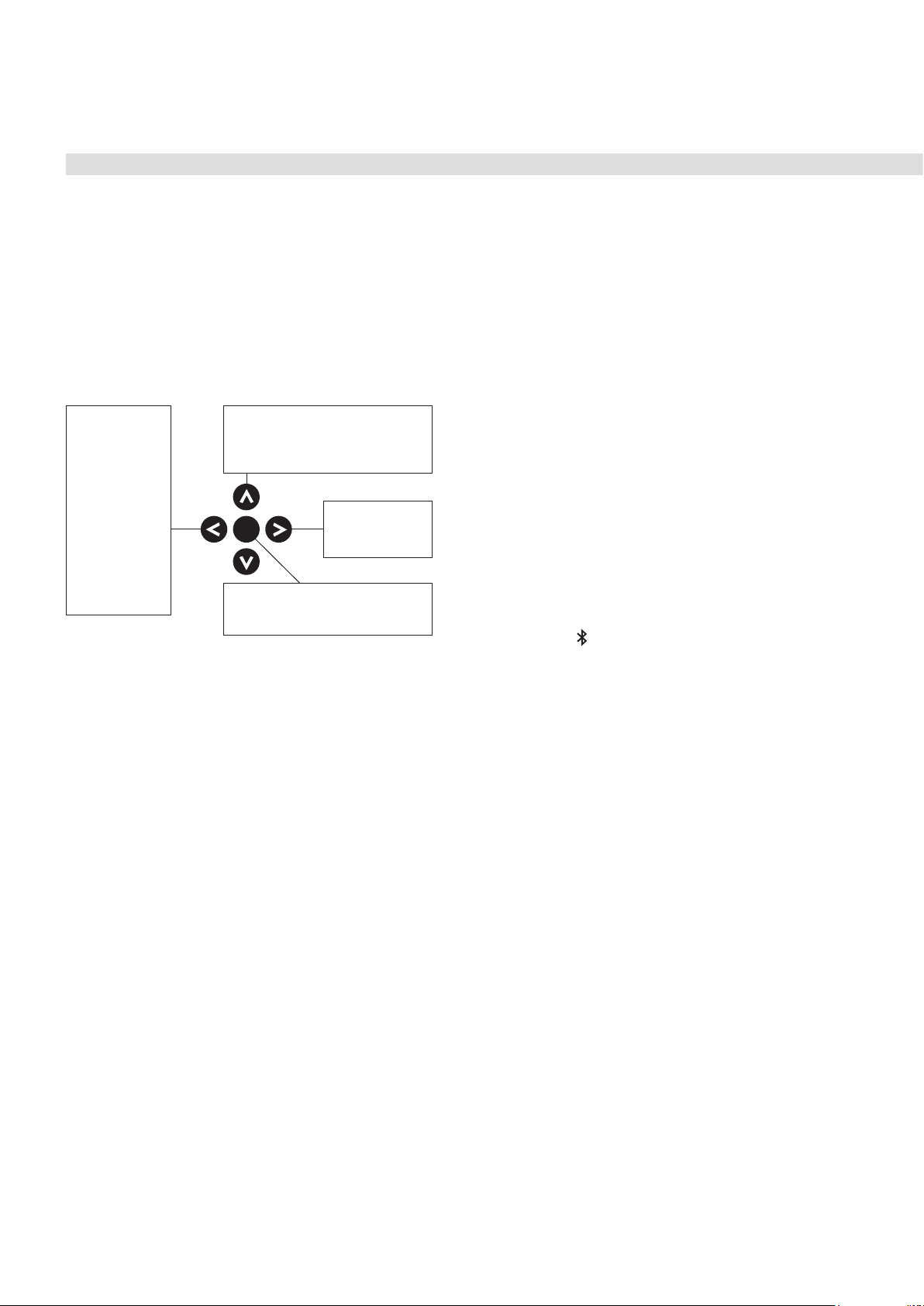
nuPro X-3000 · 3/2019
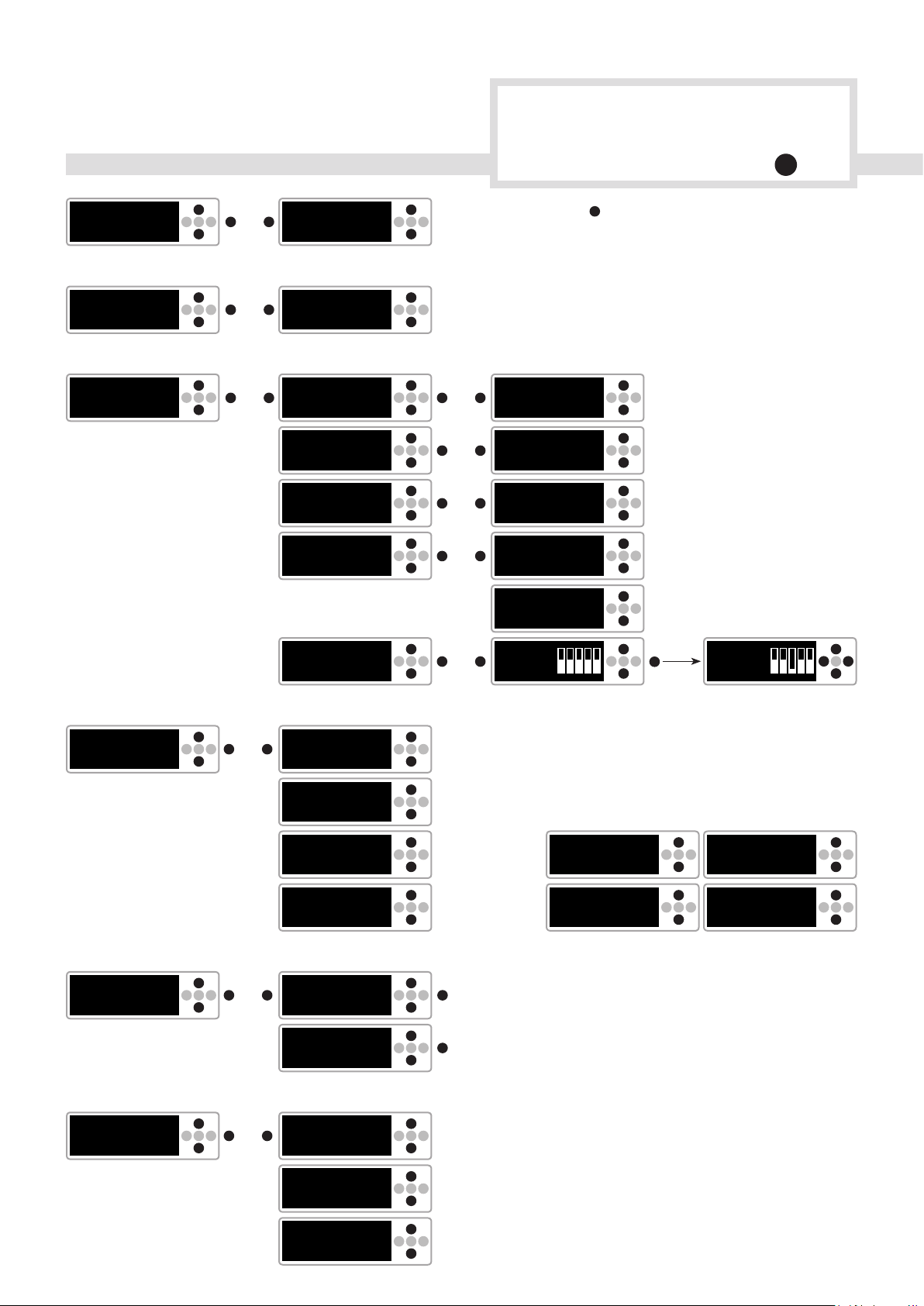
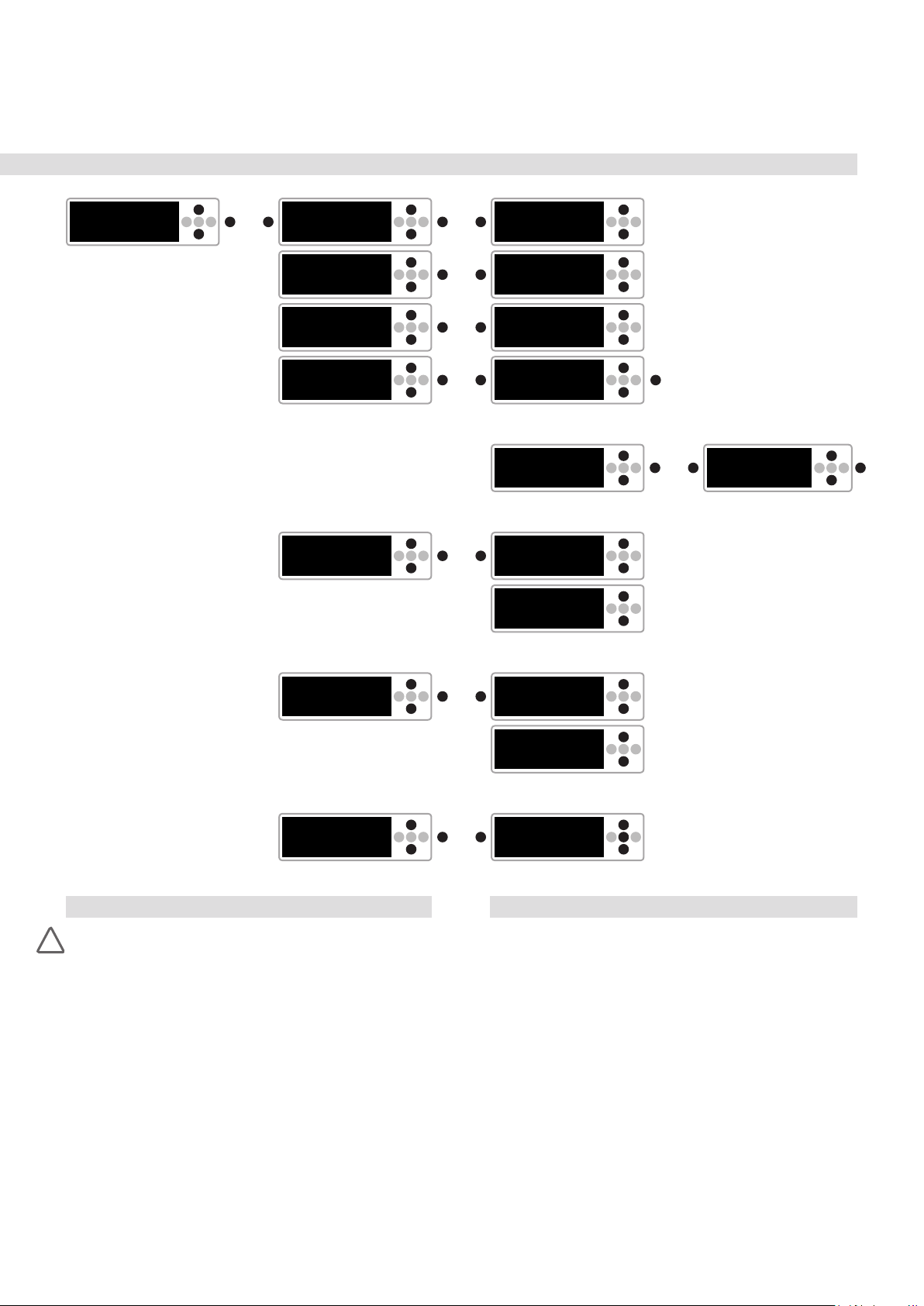
Configuration of the nuPro X loudspeakers please note the „Menu sitemap and navigation“ on page 10/11
Every nuPro X has the same range of functions and the same connections. Depending on the cabling (see the “Setup” section), the
nuPro active loudspeakers automatically congure themselves as
master or slave loudspeaker boxes after switching on: the link-out
loudspeaker box becomes master, the SPDIF-in loudspeaker box
becomes slave. All settings of the loudspeakers are now based on
this assignment. You are then ready to play.
Alternatively you can connect nuPro X loudspeakers wirelessly. After
switching on your speakers, you use the MENU control in the setup
to determine which of the speakers becomes master or slave - see
below, topic “setup”.
All settings can be made at any time on the front of the master
speaker box using the control pad and can be read on the display.
The main menu
always appears
immediately
when the display shows the
volume and you
then press the
left arrow key.
With this key you
always change to
the higher menu
level.
Note: If no settings are made, the display changes automatically
after 8 seconds to the permanent operating display of the volume
or the nuPro logo. With this change, all settings made are saved.
However, if the nuPro’s power connection is disconnected before
the automatic saving takes place, it will load the last saved settings
on restart.
By pressing the up or down
arrow key, the various menu items
can be called up or settings can be
changed.
Use the right ar-
MENU
Press the central MENU button
to conrm your selection or to switch
to a submenu.
row key to switch
to a submenu
– 5-band-equalizer
Press the MENU button to enter the Eq settings. Press the MENU
button again to exit the area. Use the left and right arrow keys to
navigate through the individual bands.
Use the up or down arrow key to raise or lower the level.
n setup
This menu item is used to select the operating mode.
If you want to freely congure your boxes individually, you can select
the menu item single here. You now have access to the complete
conguration of the speaker box.
If you operate your nuPro active loudspeakers as a stereo pair,
select pair for both speakers. This is also the factory setting. The
boxes thus congure themselves automatically as slave and master.
Both speakers can be operated from the master speaker box.
For wireless operation, select wls slave on the slave speaker box
and wls master on the master speaker box and conrm your selection. The loudspeakers now connect (display: connecting) and
conrm the connection (display: connected).
Stand-by power consumption increases to 1.3 watts in wireless
mode.
n channel
Here you can specify whether the respective nuPro X should play
the left (LEFT) or right (RIGHT) channel. If you want the loudspeaker
to reproduce a mono signal, this can also be set here. In master/
slave mode, the slave speaker box automatically follows the channel
selection.
n bluetooth
Use the up and down arrows to select between pair and reset.
Press MENU under pair to activate Bluetooth pairing. This is active
for one minute and waits for an available device.
Reset resets the devices stored in the background. This is necessary if more than 8 different devices have been paired with the nuPro
X via Bluetooth.
n volume
the up or down arrows to select the desired volume.
loudest setting: 0 dB
lowest setting: -100 dB
n input
Select the desired source device with the up arrow key or down
arrow key:
AUX in Analoge Line input
USB in USB input
Coaxial 1, 2 Digital electrical inputs
Optical 1, 2 Digital optical inputs
XLR Balanced analog input
AES Balanced digital input
Port Digital input
Bluetooth Audio Streaming input
n sound
– mid high
The up or down arrow button can be used to raise or lower the mid/
high range by up to 10 dB. See also page 6, section “Tilt control”.
– bass
The up or down arrow key can be used to increase or decrease the
bass range by up to 10 dB.
– balance
With the up or down arrow button, a volume difference of up to 10 dB
can be set between the two speakers of a stereo pair.
n advanced
– system hp (high pass and cut-off frequency)
Here the lower cut-off frequency of the nuPro active loudspeakers
can be adjusted. This can be especially useful when used with a
subwoofer.
To change the lower cut-off frequency, select the system-hp with
MENU. With the up or down arrow key the start value “10 Hz” can
be changed in 1-Hertz steps.
– subwoofer
The subwoofer output only outputs low frequency sounds. The desired crossover frequency can be set under this menu item. Use the
up or down arrow button to do this.
Note: The SUB out output always outputs a mono signal formed
from the signal of the current source device.
– analog gain
The input sensitivity for the XLR and AUX analog inputs can be
adjusted in two stages:
0 dB (up arrow button) and +6 dB (down arrow button)
– preset
3 presets are available for saving individual settings. A preset is
saved by selecting save as. Use the up or down arrow keys to select
the memory location p1, p2, p3.
Press the MENU key to conrm the memory settings for the previously selected p1, p2, p3.
– loudness
Use the up or down arrow key to select between loudness on/off.
88
Page 9
– display set
This menu item contains 2 submenus: content and light.
content volume (up arrow key) and logo (down arrow key):
This function permanently sets the default display to
volume or to the Nubert nuPro logo.
light normal · autodim · auto off:
This function sets the illuminance of the display:
normal = permanent full brightness
autodim = the display dims automatically
after 8 seconds.
off = after 8 seconds automatic
switching off of the display.
– auto power
The nuPro’s electronics have an automatic standby function that automatically switches the loudspeaker into power-saving mode when
it is not needed - and also switches it back on again automatically. If
the menu item off is selected here, this is automatically deactivated.
Note: For more information on the stand-by automatic function, see
page 6 in the Design and Engineering section.
– default
This menu item is used to restore the delivery status. Press the
MENU button to conrm the reset operation. Loading is displayed
while the settings are being made.
Note: Alternatively, the reset can be performed at any time by pressing the right arrow key for 8 seconds.
3/2019 · nuPro X-3000
Technical Data nuPro X-3000
Prinzip Fully Active HiFi/Studio/Multimedia
Loudspeaker
2-Way Bass Reex System
Drivers 1x Tweeter with 25 mm fabric dome
1x 148 mm bass-midrange driver
with polypropylene composite cone
Power of built-in ampliers 2x 150 Watt (rated power)
2x 220 Watt (music power)
Frequency response 38 – 22 000 Hz +/- 3 dB
40 – 20 000 Hz +/- 2 dB
Input sensitivity 1 V for analog gain +6 dB
2 V for analog gain +0 dB
Max. Input 4.5 V
Standby power consumption 0.7 Watt (single / pair)
1.3 Watt (wls master / wls slave)
Maximum sampling rates at
all digital connections 24 bit / 192 kHz
Radio frequency bands and radio transmitting power
2402 – 2480 MHz 15.8 dBm / 37.6 mW
5180 – 5240 MHz 9 dBm / 8 mW
5736 – 5818 MHz 9 dBm / 8 mW
Dimensions (H x W x D) 30 x 18.5 x 23 cm
(D incl. amplier)
Weight 6.6 kg
rms
Further Applications
Conjunction with a subwoofer
If your nuPro active speakers are to be used in conjunction with a
subwoofer, you can connect it to the SUB connector. This provides
a mono sum signal with a low pass lter for subwoofers. The crossover frequency can be selected in the sub out menu item. The
selection of the suitable crossover frequency of the nuPro active
loudspeakers can be made under system hp (see above “Cong-
uration > advanced > system hp”). The relative volume of the subwoofer can be adjusted at the subwoofer itself.
Connecting a nuPro pair to a preamplier
In addition to connecting a preamplier to a nuPro pair in masterslave mode, an external preamplier can also be connected direct-
ly to the individual nuPro active loudspeakers. As with conventional
active loudspeakers without master-slave functionality, the boxes
can then be congured independently of each other. Connect the
output of the left channel of your preamplier to the nuPro on the
left and the output of the right channel to the nuPro on the right.
Note: Assign the left input AUX L in the nuPro speaker box. Do not
connect the boxes to each other with the SPDIF coaxial cable.
nuPro X
left
Link SPDIF Link SPDIF Link SPDIF Link SPDIF
Use of a single nuPro
Every nuPro X has the possibility to play the left or right channel as
well as a mono sum signal. To do this, select the menu item chan-
nel. (See above “Conguration > channel”).
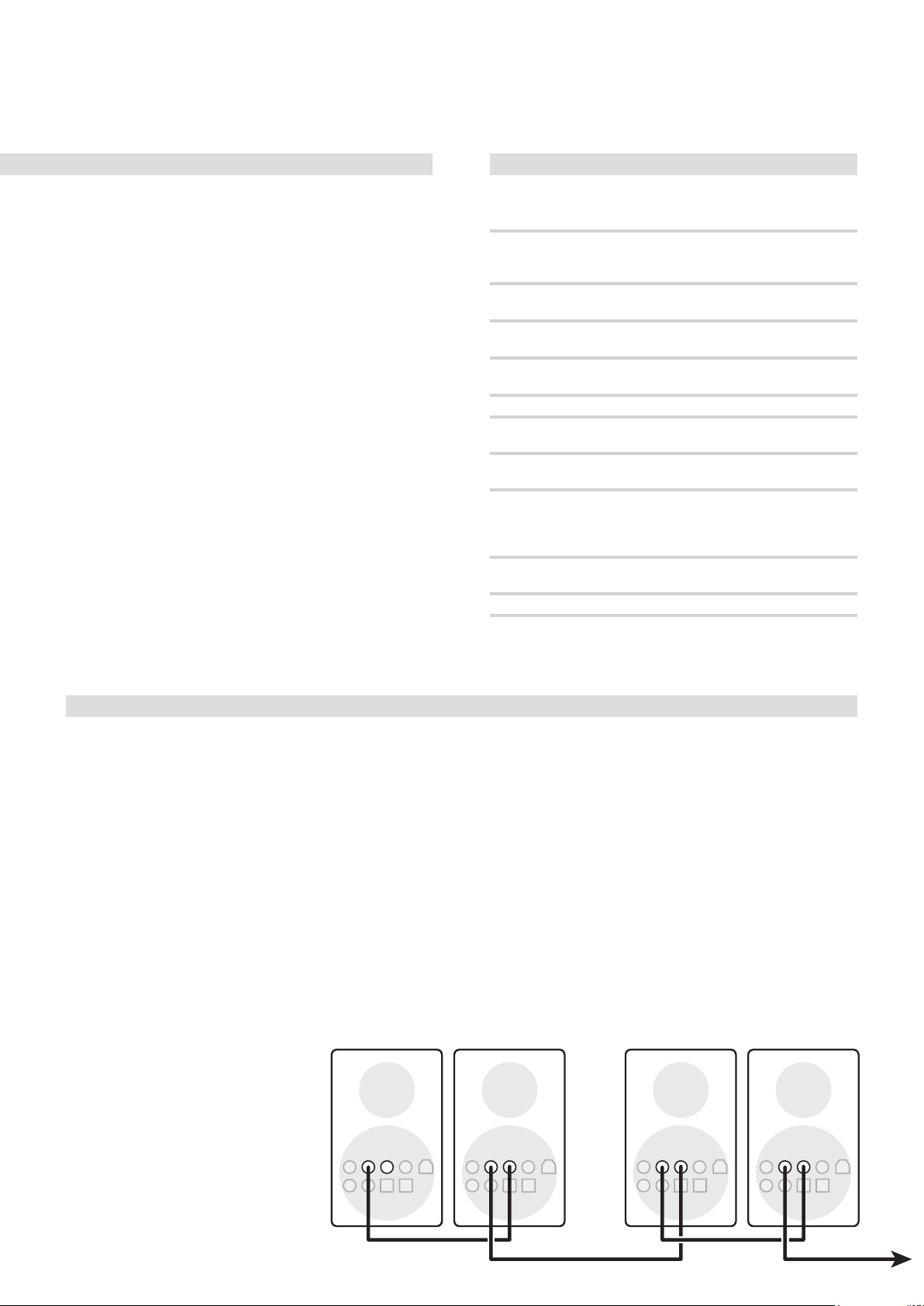
Use of more than two nuPro active loudspeakers
(see illustration below)
To supply a larger number of nuPro active loudspeakers with the
same signal, the connection from Link out to SPDIF in can be per-
formed repeatedly. In this case it is recommended to congure
each nuPro individually and therefore to select the entry single
in the menu item setup. Then you can navigate to the menu item
channel and select the channel that the respective nuPro should
play back. (For further information see section “Conguration > setup” above).
Note: In the single conguration, the speaker box at the link output
outputs the selected input signal completely in SPDIF format. It is
therefore possible to transmit the signal repeatedly.
nuPro X
right
nuPro X
left
nuPro X
right
Use of more than two nuPro active loudspeakers
9
Page 10
nuPro X-3000
· 3/2019
After switching on the nuPro X, the Nubert logo appears
on the display.
After 8 seconds, the display changes to the “volume“ menu.
nuPro X series: Menu sitemap and navigation
volume
input
sound
><
>M<
><
>M<
><
>M<
M >
or
M >
or
M >
or
coax 1 -30dB
Display when choosen
input Coaxial 1
coax 1
mid high
bass
balance
loudness
><
>M<
><
>M<
><
>M<
><
>M<
><
>M<
><
>M<
M >
or
M >
or
M >
or
M >
or
You access menu navigation by pressing the button.
>
On this sitemap, the M symbolizes the menu button.
To ease recognition, the arrow keys relevant for navigation
or changes are shown in black and remaining keys are greyed out.
><
mid hi 0.0dB
bass 0.0dB
left
0.0dB
right
loudness on
loudness off
>M<
><
>M<
><
>M<
><
>M<
><
>M<
setup
bluetooth
><
>M<
><
>M<
M >
or
M >
or
5-band eq
single
pair
wls master
wls slave
pair
reset
><
>M<
><
>M<
><
>M<
><
>M<
><
>M<
><
>M<
><
>M<
M >
or
automatic
connection
automatic
connection
M
to conrm
M
to conrm
eq
connecting
connecting
><
>M<
M
><
>M<
><
>M<
+6dB–
0––––
1khz
–6dB–
connected
connected
▲
><
>M<
><
>M<
><
>M<
channel
10
><
>M<
M >
or
left ch
right ch
mono
><
>M<
><
>M<
><
>M<
Page 11
3/2019 · nuPro X-3000
advanced
><
>M<
M >
or
system-hp
subwoofer
analog gain
preset
display set
><
>M<
><
>M<
><
>M<
><
>M<
><
>M<
M >
or
M >
or
M >
or
M >
or
M >
or
hpf 10Hz
lpf 140Hz
gain 0dB
preset 1
...
save as
content
light
><
>M<
><
>M<
><
>M<
><
M
>M<
to call up the preset
><
M >
>M<
or
><
>M<
><
>M<
save as p1
><
>M<
M
to conrm
auto power
default
Care and cleaning tips
Caution!
!
Improper handling of the speaker may result in damage.
• Always unplug the speaker before cleaning it!
• Before recommissioning, make sure that all connections are correct, that there are no short circuits and that the speaker is completely dry.
• Never use strong cleaning agents or solvents such as petrol, spirit or similar!
Enclosure
We recommend commercial window cleaner sprayed onto a cotton
cloth. This allows almost all ngerprints and dust to be easily removed. Alternatively, you can also use window active foam.
We advise against the use of microbre cloths! These can cause
mini scratches in the surface.
Diaphragms and Speaker Chassis
To remove dust from a loudspeaker chassis, a lint-free cotton cloth
is sufcient to wipe the membrane lightly with very little pressure.
The tweeters of all Nubert loudspeakers are equipped with a pro-
tective grille so that they can also be wiped off with low pressure. If
the dust cannot be completely removed, a make-up brush from the
drugstore is suitable.
><
>M<
><
>M<
M >
or
M >
or
><
auto power on
auto power off
default to
factory setting?
>M<
><
>M<
><
>M<
Service
If you have any questions or problems during the commissioning of
your Nubert system, please do not hesitate to contact our service
team:
Phone:
0800 68 23 780 (toll-free, within Germany)
0049 7171 92690-118 (international)
E-mail:
[email protected]
Please have your customer number ready!
11
Page 12

Garantiebestimmungen
Warranty terms
Your provider and contractual partner:
Nubert electronic GmbH, Goethestr. 69, 73525 Schwäbisch Gmünd,
Germany (German)
Phone: +49 7171 92690-0 · Fax: +49 7171 92690-145 · E-Mail: [email protected]
Managing Director: Günther Nubert · Register court AG Ulm, HRB 700296
Tax ID No.: DE 16758584 · WEEE Reg. No. DE 48888173
Nubert warrants the Nubert product described in this manual to the purchaser under the following terms and conditions.
The purchaser‘s statutory warranty claims, in particular for subsequent performance and, if applicable, damages in the event of defects, shall remain unrestrictedly with the
purchaser and shall be fully available to our customers.
1. The warranty period for the Nubert product and its electronic components described in this manual is 2 years from the date of delivery.
Your proof of purchase is the proof of guarantee.
2. Contents of the warranty claim
The guarantee applies to all parts and labour costs from delivery. It includes and is limited to the free repair or replacement of the defective part in the event of a material
defect in the goods (e.g. Material defect or manufacturing defect). In addition, Nubert shall bear the costs of the return shipment of the affected product from or to the curb
in the case of justified warranty claims, provided that the goods are within the countries of the European Union and the shipment was previously agreed with Nubert. Additional services are possible as a gesture of goodwill in accordance with Nubert’s free discretion. For the duration of the guarantee, it is assumed that the material defect
was already present at the time of transfer of risk. Replaced parts become the property of Nubert. Warranty services do not extend the warranty period, nor do they set a
new warranty period in motion. The warranty period for installed spare parts ends with the warranty period for the entire device. The promise or the execution of warranty
services is made without recognition of a performance obligation according to statutory warranty law.
3. The warranty claim does not apply in the case of
• repair attempts of any kind not previously agreed upon with Nubert
• improper operating environment or improper storage (e.g. Damage due to moisture)
• improper transport packaging (the original transport packaging, correctly used, provides sufficient protection)
• improper transport, if the transport was not previously agreed upon with Nubert (Nubert organizes the transport for you with Nubert selected
• Transport company. You will receive return tickets with the corresponding postage paid returns).
• improper mechanical effects on the goods (e.g. on housing, switches, connection sockets or antennas)
• improper operation, improper mounting (e.g. switches, antennas) or improper connection (e.g. operation on defective or unsuitable amplifiers or other source devices
with DC voltage or unusually high hum voltage at the source device output).
4. Disassembled components
Do not disassemble any components from our equipment and do not send in any such individual parts until you have contacted Nubert Service and agreed on this measure.
5. What to do in the event of a warranty claim
If possible, pack the defective device in its original carton with a copy of the purchase receipt and a meaningful description of the defect. Please note our shipping instructions. Please contact the Nubert team for a return or refund:
• Telephone within Germany 0800-68 23 780 (toll free) • Phone international: +49 7171 92690-118 • Fax: +49 7171 92690-145 • E-mail: [email protected]
Of course, you can also return your defective product to the Nubert Service in Schwäbisch Gmünd or Aalen:
• Nubert electronic GmbH, Goethestr. 69, D-73525 Schwäbisch Gmünd, Germany • Nubert electronic GmbH, Bahnhofstr. 111, D-73430 Aalen, Germany.
Shipping information: We recommend that you always keep the original carton, along with the protective foam inserts. Tip: Folding saves space! This is the only way to
ensure a safe return shipment in the worst-case scenario. If, in exceptional cases, you use a different packaging, it should protect professionally against the typical dangers
of shipping and have special protective cushions or equivalent protective devices. We would like to draw your attention to the fact that we accept no liability for damage
caused by improper packaging for which you are responsible!
Disposal and battery return
Environmental protection: Ingredients, e.g. chemical pollutants in old appliances, can damage the environment and health if stored improperly, in particular if they are
not shatterproof or disposed of properly by persons not authorised to do so. Especially in the case of illegal exports, there is no guarantee that the environment and human
health will be protected from damage. Old appliances can also contain recyclable raw materials, old appliances can be repaired or parts can be reused and thus considerably protect the environment. Old appliances must therefore not be disposed of with normal household waste or exported illegally. As an end user, you are legally obliged to
return or properly dispose of electrical equipment. Please note: You are responsible for the deletion of personal data on the waste equipment to be disposed of.
Batteries:
Ingredients, e.g. chemical type of batteries, can damage the environment and health if not stored and disposed of properly. At the same time, recyclable raw materials may
also be included. Batteries must therefore not be disposed of with normal household waste. As an end user, you are legally obliged to return used batteries. You can return
batteries after use to the seller or in the designated collection points (e.g. in public collection points in your municipality or in the trade) free of charge or send them back
free of charge. You can also send the batteries back to the seller free of charge by post, whereby any requirements of the dangerous goods law must be observed. The sale
at points of sale is limited to the quantities customary for end users for disposal as well as used batteries which the distributor carries or has carried in its product range.
• Battery return
The symbol with the crossed-out dustbin reminds you not to put batteries in the household waste.
Under this symbol you can also find the following symbols with the following meaning about ingredients:
Pb = battery contains more than 0.004 mass percent lead, Cd = battery contains more than 0.002 mass percent cadmium,
Hg = battery contains more than 0.0005 mass percent mercury.
• Old appliances
Electrical and electronic equipment is also marked with the crossed-out wheelie bin symbol. The symbol indicates that you,
as the owner of this appliance, may not dispose of it with your household waste (grey bin, yellow bin, organic waste bin, paper or glass).
You can send the device to the municipal collection points to be collected separately from unsorted municipal waste for reuse. Used batteries and accumulators which are
not enclosed by the waste equipment shall be separated from it at a collection point prior to delivery. You can also return old electrical appliances to us for return shipment.
We will provide you with a return label free of charge at [email protected] for this purpose.
You can also request this by calling +49 7171-92690118. Please then send the old device to the following address:
Nubert electronic GmbH, Goethestr. 69, D-73525 Schwäbisch Gmünd, Germany. Please ensure that the old appliance is properly packaged for shipment so that breakage is
avoided as far as possible and mechanical compaction or breakage can be ruled out.
The acceptance of waste equipment may be refused if there is a risk to human health and safety due to contamination
As of: 20.1.2017
Technical changes, errors and misprints excepted - You will find our General Terms and Conditions (AGB) on our website: www.nubert.de/agb.htm
For questions and individual advice, please dial our special numbers:
• Calls from Germany - Toll Free 0800-6823780
• Calls from abroad +49 7171 92690-118
Our hotline is available from
Monday to Friday from 10:00-18:00 and Saturdays from 9:00-13:00.
nuPro X-3000/E11 · © Nubert 3/2019
Nubert electronic GmbH
Goethestr. 69
73525 Schwäbisch Gmünd
Germany
E-mail: [email protected]
Hotline service:
• Calls from Germany - Toll Free 0800-6823780
• Calls from abroad +49 7171 92690-118
 Loading...