

Page 1
MAN UAL REV ISION E N 1.0
ELECTRONIC CASH REGISTER
USER'S MANUAL
G- 800
Page 2
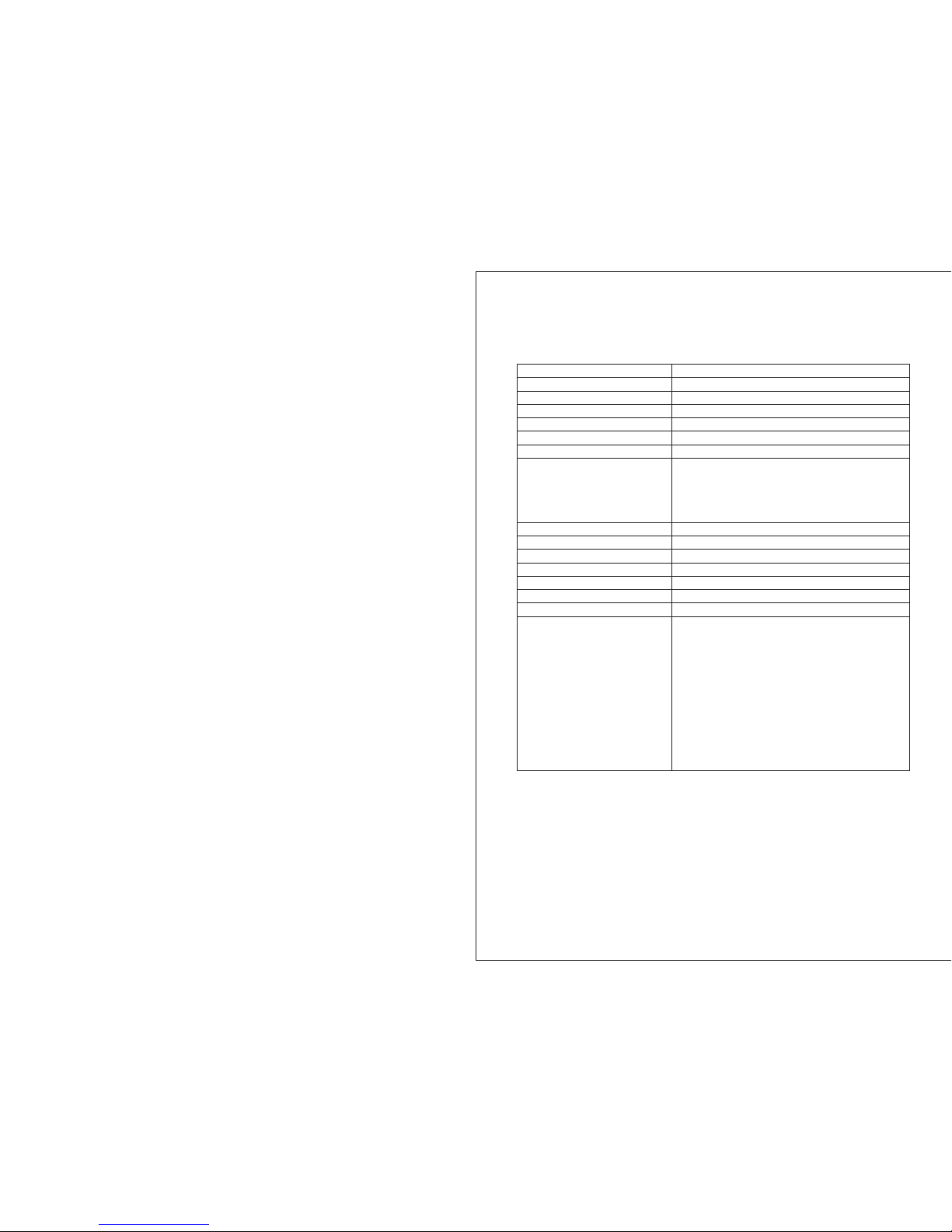
Produ ct Features
Fea ture
Cas h drawe r
Yes (small ) Yes (la rge )
No. o f depar tment s
16
No. o f PLUs
200
No. o f clerk s
8
No. o f VAT rat es (t ax ra tes )
4
Type o f payme nt
Cas h, chec k, cred it card
Cas h regis ter rep orts
X1/ Z1 day' s finan cial re port
X2/ Z2 mont hly fin ancia l repor t
X/Z P LU re por t
X/Z c ler k rep ort
X/Z t rai nin g rep ort
Dis play
Num eric di splay ( 9-cha racte r LED)
Cus tomer d ispla y
Yes
Pri nter He ad
The rmal
Pri nter ty pe
Sin gle sta tion ro ll prin ter
Printing speed (lines per second)
1.4
Pap er widt h
57. 5 ± 0.5 mm
Bre akdow n frequ ency (M CBF)
300 ,000 li nes
Pro gramm abili ty
Date
Time
VAT rate (tax rate)
Department
PLU (item)
-% rate
Foreign currency
Grand total & clear Z report
Decimal point position (0. / 0.0 / 0.00 / 0.000)
Time display(24-hour / 12-hour format)
Date format (month-day-year / day-month-year)
Clerk system active (yes / no)
Compulsory to enter the clerk number for all
transactions (yes / no)
G-1 00
Page 3

INDEX
08
6 Pro gramming . ... ..... ... ........ ... ........ ... ..... ... ........ ... ..... ... ........ ... ........ .
11
6.6 Prog ram min g the P LU (p ric e loo k up) ... ... ... ... ... ... ... .............................
12
6.6 .3 Prin ting th e PLUs pr ogram med.. ..... ..... ..... ..... ..... ..... ..... ..... ..... ..... ..... ..... ..... ..
19
7.3 .3 Cler k logs of f .... ..... ..... ..... ..... ..... ..... ..... ..... ..... ..... ..... ..... ..... ..... ..... ..... ..... ..... .
01
1 ECR Par ts De scriptio n ... ........ ... ..... ... ........ ... ........ ... ..... ... ........ ... ....
02
2 Descr ipt ion To Ports . ... ........ ... ........ ... ..... ... ........ ... ........ ... ..... ... ......
03
3 Load pa per .... ... ..... ... ........ ... ........ ... ..... ... ........ ... ..... ... ........ ... ........ .
04
4 Key Swi tch . ........ ... ........ ... ..... ... ........ ... ........ ... ..... ... ........ ... ..... ... .....
04
4.1 Key sw itc h pos ito ns .. ... ... ... ... ... ... ... ... ... ... ... ... ... ... ... ... ... ... ... ... ... ... ... ... ... .
04
4.2 Keys . ... ... ... ... ... ... ... ... ... ... ... ... ... ... ... ... ... ... ... ... ... ... ... ... ... ... ... ... ... .............
05
5 Keybo ard . ........ ... ........ ... ..... ... ........ ... ........ ... ..... ... ........ ... ..... ... .......
05
5.1 Chan gin g the k ey la bel s ... ... ... ... ... ... ... ... ... ... ... ... ... ... ... ... ... ... ... ... ... ... ... ...
05
5.2 Keyb oar d des cri pti on .. ... ... ... ... ... ... ... ... ... ... ... ... ... ... ... ... ... ... ... ... ... ... ... ... .
6.1 Prog ram min g the d ate ... ... ... ... ... ... ... ... ... ... .................................. ... ... ... .
08
6.2 Prog ram min g the t ime . ... ... ... ... ... ... ... ... ... ... .................................. ... ... ..
08
6.3 Prog ram min g the VAT rate ... ... ... ... ... ... ... ... ... ... ... ... ... ... ... ... ... ... ... ... .......
08
09
6.4 Prog ram min g a percentage discount ......... ... ... ... ... ... ... ... ... ... ... ... ... ... ... .
09
6.5 .1 Prog rammi ng depa rtmen t statu s and fix ed pric e ..... ..... ..... ..... ..... ..... ..... ..... .....
09
6.5 .2 Prin ting th e depar tment p rogra mme ... ..... ..... ..... ..... ..... ..... ..... ..... ..... ..... ..... .....
10
6.6 .1 Prog rammi ng the pr ice and d epart ment as signm ent ... ..... ..... ..... ..... ..... ..... ..... .
11
6.6 .2 Prog rammi ng the PL U statu s and dep artme nt assi gnmen t ..... ..... ..... ..... ..... ..... .
11
6.7 Prog ram min g foreign currenc ies . ... ... ... ... ... ... ... ... ... ... ... ... ... ... ... ... ... ... ..
13
6.8 Syst em op tio ns. ... ... ... ... ... ... ... ... ... ... ... ... ... ... ... ... ... ... ... ... ... ... ... ... ... ... ... ....
13
6.8 .1 Prog rammi ng syst em sett ings. ..... ..... ..... ..... ..... ..... ..... ..... ..... ..... ..... ..... ..... .....
13
6.8 .2 Prin ting th e syste m optio ns (dum p repor t) .... ..... ..... ..... ..... ..... ..... ..... ..... ..... ...
16
7 Clerk S yst em ....... ... ........ ... ..... ... ........ ... ........ ... ..... ... ........ ... ..... ... ....
17
7.1 Activating the clerk system...... ... ... ... ... ... ... ... ... ... ... ... ... ... ... ... ... ... ... ... ... .
17
7.2 Cler k sys tem w ith out a p ass wor d.. ... ... ... ... ... ... ... ... ... ... ... ... ... ... ... ... ... ... ..
17
7.2 .1 Cler k log-o n with cl erk num ber... ..... ..... ..... ..... ..... ..... ..... ..... ..... ..... ..... ..... ..... .
17
7.2 .2 Cler k logs of f .... ..... ..... ..... ..... ..... ..... ..... ..... ..... ..... ..... ..... ..... ..... ..... ..... ..... .....
17
7.3 Cler k sys tem w ith p ass wor d.. ... ... ... ... ... ... ... ... ... ... ... ... ... ... ... ... ... ... ... ... ... .
18
7.3 .1 Prog rammi ng a cler k passw ord.. ..... ..... ..... ..... ..... ..... ..... ..... ..... ..... ..... ..... ..... ...
18
7.3 .2 Cler k log-o n with cl erk num ber and c lerk pa sswor d ..... ..... ..... ..... ..... ..... ..... .....
18
6.5 Prog ram min g dep art men ts (D P) .. ... ... ... ... ... ... ... .................................. .
09
8 Opera tio n....... ... ........ ... ..... ... ........ ... ........ ... ..... ... ........ ... ..... ... .......
19
8.1 Regi ste rin g dep art men ts .. ... ... ... ... ... ... ... ... ... ... ... ... ... ... ... ... ... ... ... ... ... ..
19
8.2 Regi ste rin g neg ati ve de par tme nts . ... ... ... ... ... ... ... ... ... ... ... ... ... ... ... ... ... .
20
8.3 Regi ste rin g PLU s ... ... ... ... ... ... ... ... ... ... ... ... ... ... ... ... ... ... ... ... ... ... ... ... ... ... .
21
8.3 .1 Regi steri ng PLUs w ith a fix ed pric e ..... ..... ..... ..... ..... ..... ..... ..... ..... ..... ..... ....
21
8.3 .2 Regi steri ng a PLU wi th free p ricin g.... ..... ..... ..... ..... ..... ..... ..... ..... ..... ..... .....
21
8.3 .3 Regi steri ng nega tive PL Us... ..... ..... ..... ..... ..... ..... ..... ..... ..... ..... ..... ..... ..... ....
22
8.4 Conc lud ing r ece ipt s / Met hod s of pa yme nt. ... ... ... ... ... ... .........................
22
8.4 .1 Paym ent by ca sh... ..... ..... ..... ..... ..... ..... ..... ..... ..... ..... ..... ..... ..... ..... ..... ..... ..... ..
22
8.4 .2 Paym ent by EC c ard / che ck... ..... ..... ..... ..... ..... ..... ..... ..... ..... ..... ..... ..... ..... ..... .
23
8.4 .3 Paym ent by cr edit ca rd / cred it appr oval. ..... ..... ..... ..... ..... ..... ..... ..... ..... ..... ..... .
23
8.5 Fore ign c urrency payment............... ... ... ... ... ... ... ... ... ... ... ... ... ... ... ... ... ... ..
23
8.6 Regi ste rin g a dis cou nt as a n amo unt ... ... ... ... ... ... ... ... ... ... ... ... ... ... ... ... ... ...
24
8.7 Regi ste rin g a dis cou nt as a p erc ent age ... ... ... ... ... ... ................................
24
8.7 .1 Regi steri ng a perc entag e disco unt on a PL U ..... ..... ..... ..... ..... ..... ..... ..... ..... .....
24
8.7 .2 Regi steri ng a perc entag e disco unt on a su btota l.... ..... ..... ..... ..... ..... ..... ..... ..... ..
24
8.8 Erro r Correct ion a nd Void ... ... ... ... ... ... ... ... ... ... ... ... ... ... ..........................
24
8.8 .1 EC ... ..... ..... ..... ..... ..... ..... ..... ..... ..... ..... ..... ..... ..... ..... ..... ..... ..... ..... ..... ..... ..... .
24
8.8 .2 Norm al void . ..... ..... ..... ..... ..... ..... ..... ..... ..... ..... ..... ..... ..... ..... ..... ..... ..... ..... ....
25
8.9 Refu nd / Void ... ... ... ... ... ... ... ... ... ... ... ... ... ... ... ... ... ... ... ... ... .........................
25
8.10 Rec eiv ed on a cco unt o per ati ons ... ... ... ... ... ... ... ... ... ... ... ... ... ... ... ... ... ... ... .
25
8.11 Paid o ut op era tio ns .. ... ... ... ... ... ... ... ... ... ... ... ... ... ... ... ... ... ... ... ... ... ...........
26
8.12 Pri nti ng fu nct ion ... ... ... ... ... ... ... ... ... ... ... ... ... ... ... ... ... ... ... ... ... ... ... ... ... .....
27
8.13 Ope nin g the c ash d raw er wi tho ut a sa le .. ... ... ... ... ... ... ... .......................
27
8.14 Pri nti ng a re cei pt on /of f ... ... ... ... ... ... ... ... ... .................................. ... ... ..
28
8.15 Pri nti ng a co py of t he re cei pt. ... ... ... ... ... ... ... ... .................................. ... .
28
9 Trainin g Mod e.... ... ........ ... ........ ... ..... ... ........ ... ........ ... ..... ... ........ ... ...
28
9.1 Activating Trai ning mode........................... ... ... ... ... ... ... ... ... ... ... ... ... ... ...
28
9.2 Prac tis ing i n Training mode... ... ... ... ... ... ... ... ... ... ... ... ... ... ... ... ... ... ... ... ... ...
28
9.3 Deac tiv ati ng Training mode.. ... ... ... ... ... ... ... ... ... ... ... ... ... ... ... ... ... ... ... ... ... .
29
10 Cash R egi ster Rep orts .. ... ........ ... ........ ... ..... ... ........ ... ..... ... ........ ... ..
29
10.1 Bas ic in for mat ion ... ... ... ... ... ... ... ... ... ... ... ... ... ... ... ... ... ... ... ... ... ... ... ... ... ....
29
10.2 Ove rvi ew of c ash r egi ste r repo rts ... ... ... ... ... ... ... ... ... ... ... ... ... ... ... ... ... ... ..
29
11 Eliminat ing P rob lems.... ... ..... ... ........ ... ........ ... ..... ... ........ ... ..... ... ....
30
11.1 Err or messages in the display ..... ... ... ... ... ... ... ... ... ... ... ... ... ... ... ... ... ... ... ...
30
11.2 D isp lay i ndi cat ors . ... ... ... ... ... ... ... ... ... ... ... ... ... ... ... ... ... ... ... ... ... ..............
30
11.3 P rin ter m alf unc tio n ... ... ... ... ... ... .................................. ... ... ... ... ... ... ... ..
31
11.4 R ese tti ng th e cas h reg ist er to it s def aul t set tin gs. ... ... ... ... ... ... ... ... ... ... ...
31
31
31
34
12 PC Sof twa re In str uctio n ... ........ ... ........ ... ..... ... ........ ... ..... ... ........ ...
12.1 Ins tal l the P rog ram . ... ... ... ... ... ... ... ... ... ... ... .................................. ... ... .
34
12.2 Com mun ica tio n Set tin g ... ... ... ... ... ... ... ... ... ... ... ... ... ... ... ... ... ... ... ... ... ... ...
12.3 Dat a Bac kup a nd Re cov ery . ... ... ... ... ... ... ... ... ... ... ... ... ... ... ... ... ... ... ... ... ...
12.4 com mod ity i nfo rma tio n inp ut .. ... ... ... ... ... ... ... ... ... ... ... ... ... ... ... ... ... ... ... .
12.5 dow nlo ad LO GO .. ... ... ... ... ... ... ... ... ... ... ... ... ... ... ... ... ... ... ... ... ... ... ... ... ... ..
36
36
12.6 Rec eip t tit le lo go me ssa ge an d tai l AD mes sag e set tin g ... ... ... ... ... ... ... ...
37
Page 4
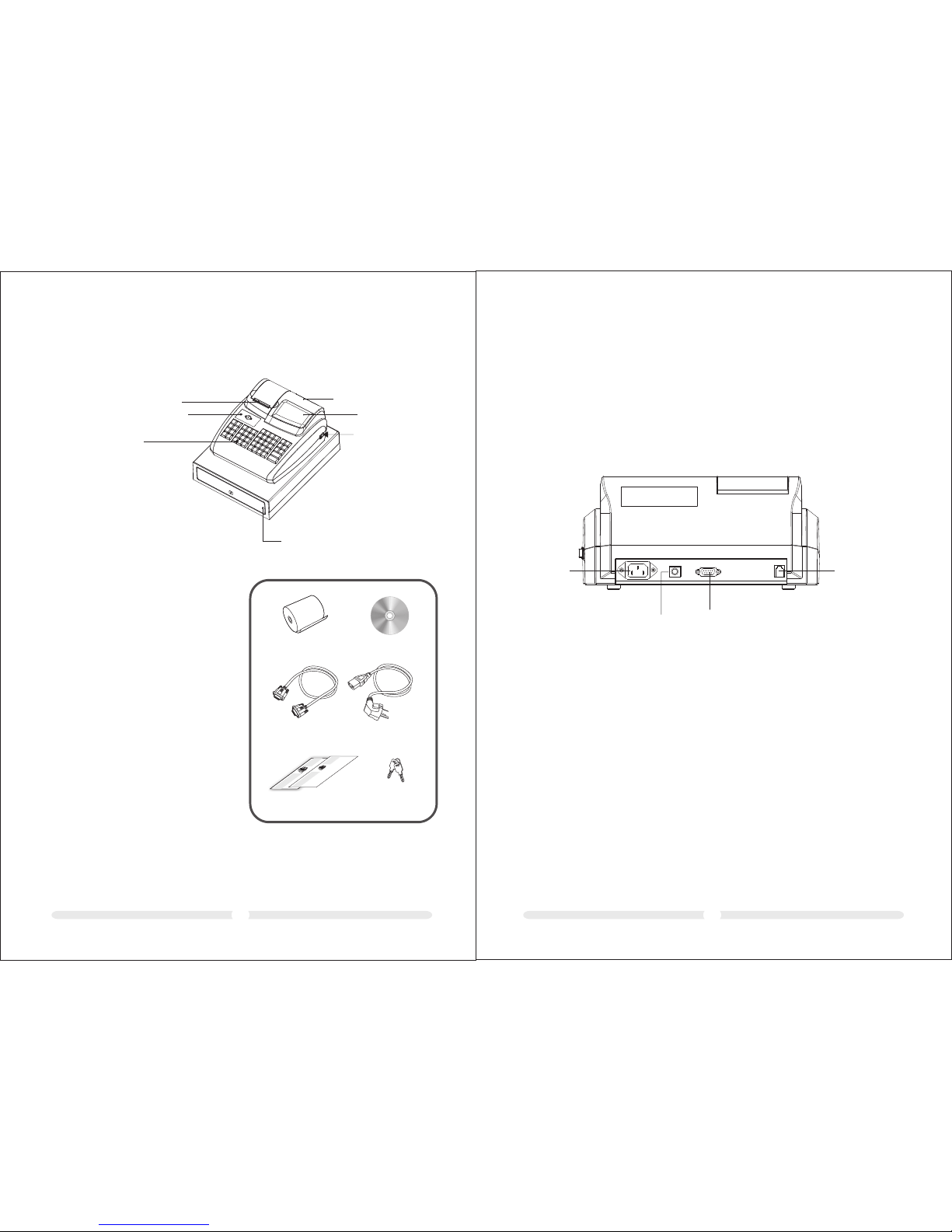
1 ECR Parts D escriptio n
① Receip t Pri nte r
② ECR Body
③ Keyboa rd
④ Cash Dra wer
⑤ Custom er Di spl ay
⑥ Operat or Di spl ay
⑦ Power Sw itc h
02
④
⑤
⑥
⑦
③
②
①
1
3
2 Descrip tion To Ports
Pow er port
PS/ 2 port
Cas h Drawe r Port
COM
Pow er port : powe r plug pr ovide d.
PS/ 2 port: f or barc ode sca nner.
COM : for PC or e xtern al prin ter(D efaul t baud ra te1152 00bps ).
Cas h Drawe r Po rt: fo r cash dr awer.
01
电子收 款 机 电子收 款 机
Use r’ Man ual and w arran ty card
User’ M anual
Pape r Roll
CD Di sc
Powe r Plug Ca ble
Dat a Cable
Dr aw er Ke y/
Ele ctron ic Key
warra nty car d
Page 5
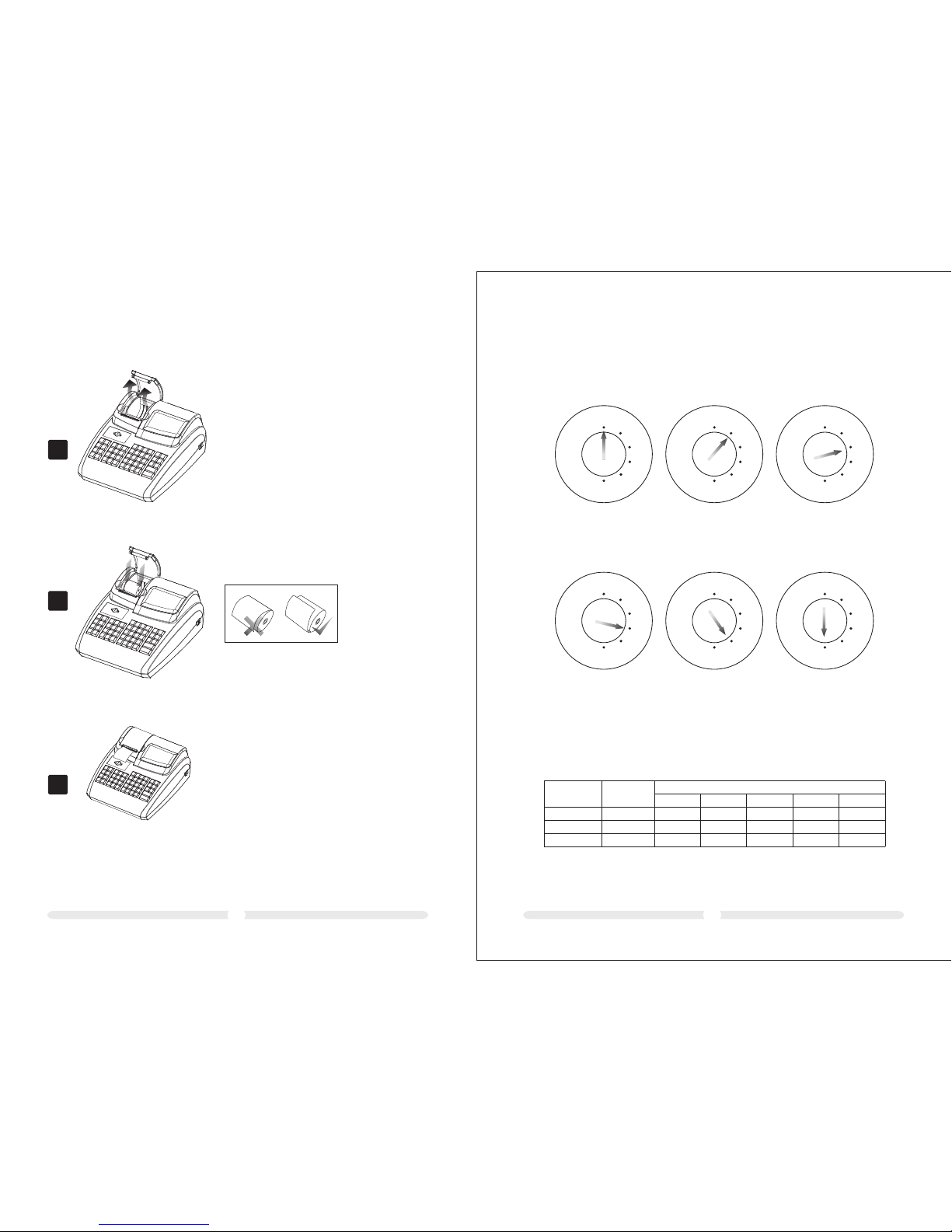
A.O pen the p rinte r cover i n the arr ow dire ction
B.P ut in the p aper ro ll.
C.D rag out t he pape r end and c lose th e cover. Tear
off t he pap er end ou t side th e print er.
3 Load paper
B
A
C
0403
4 Key Switch
4.1 Key s witch p ositi ons
The k ey can be t urned t o five di ffere nt pos ition s:
REG
X
Z
LOCK
PRG
REG
X
Z
LOCK
PRG
REG
X
Z
LOCK
PRG
REG
X
Z
LOCK
PRG
REG
X
Z
LOCK
PRG
OFF
REG
X
Z
LOCK
PRG
REG
X
Z
PRG
The c ash reg ister
is of f
Reg istra tion mo de Pri nt repo rt with out
mem ory del etion
Pri nt repo rt with
mem ory del etion
Non e Pro gramm ing mod e
4.2 Key s
Six d iffer ent ke ys are av ailab le for us e with th e cash re giste r:
Key
ide ntifi catio n
No. o f keys
Swi tch pos ition
LOC K
REG
X Z
PRG
√
S
Z
P
2
2
2
√
√
√
√
√
√
√
√
√
√
√
Page 6
0605
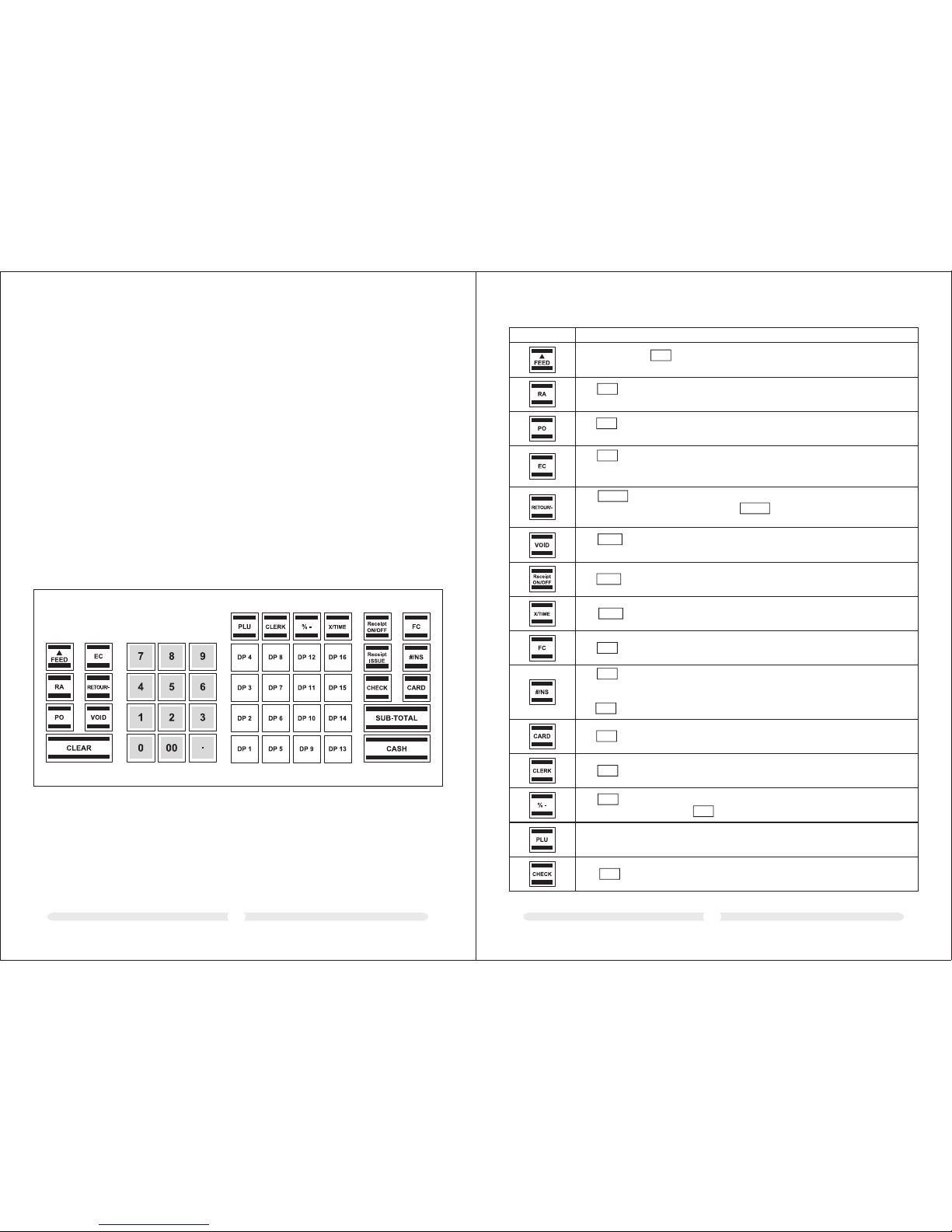
5.2 Key board d escri ption
KEY
Exp lanat ion
FC
The k ey is use d for con verti ng amou nts int o a forei gn curr ency.
The ( NS = No Sal e) is use d for ope ratio ns in whi ch entr ies sho uld not b e added . It
can b e use to pr int a max imall y 7 digit n umber o n the rec eipt. T he entr y does no t affec t
oth er sale s total s.
The k ey is use d to open t he cash d rawer.
#/NS
#/NS
CARD
The k ey is use d for tra nsact ions ma de with a c redit c ard.
The k ey is use d to comp lete th e cance llati on of an it em with in a regi strat ion whi ch has
not y et been c onclu ded. Th e void to tal is re corde d in the fi nanci al repo rt.
VOID
The k ey is use d to subt ract an a mount f rom the t otal am ount of a s ale. Th e
fin ancia l repor t recor ds the (- ) key tot al. The k ey is use d for ref und ans actio ns.
The r efund t otal is r ecord ed in the f inanc ial rep ort.
RETO UR/-
RETO UR/-
The k ey is use d to canc el an inc orrec t regis trati on imme diate ly afte r it has be en
ent ered.
The e rror co rrect t otal is r ecord ed in the f inanc ial rep ort.
EC
The i s used to r ecord a mount s remov ed from t he cash d rawer.
The t otal am ount re giste red app ears se parat ely in th e finan cial re port.
PO
The k ey is use d to reco rd paym ents ma de into t he cash r egist er.
The t otal am ount re ceive d on acco unt is re corde d in the fi nanci al repo rt.
RA
Pre ss and ho ld the ke y to cont inue fe eding t he rece ipt or jo urnal p aper un til the k ey
is re lease d.
FEED
The k ey is use d to swit ch prin tout of t he rece ipt off o r on.
Rece ipt
ON/OF F
The k ey is use d repea t (mult iply) e ntrie s for dep artme nts or re funds .
X/TI ME
The k ey is use d to regi ster a cl erk.
CLER K
The k ey is use d to subt ract a pe rcent age fro m a PLU or th e total a mount o f a sale. T he
tot al amou nt regi stere d by the ke y is reco rded in t he fina ncial r eport .
% -
% -
PLU ( Price L ook-Up ) key.
5 Keyboard
In its sta nda rd fo rm, t he ca sh re gis ter l eav es th e fac tor y wit h Eng lis h lab els o n the
keyboa rd.
It is poss ibl e to ap ply l abe ls in d iff ere nt la ngu age s on th e keys. Keyboard sheets in
variou s lan gua ges a re en clo sed w ith t he ca sh re gis ter f or th is pu rpo se.
5.1 Cha nging t he key la bels
Pro cee d as fo llo ws:
1. Remov e the t ran spa ren t cap f rom t he ke y.
If it is eas ier f or yo u, ca ref ull y rem ove t he en tir e key b efo reh and .
2. Repla ce th e exi sti ng ke y lab el wi th a ne w lab el.
3. Repla ce th e tra nsp are nt ca p bac k on th e key.
If you rem ove d the e nti re ke y, rep lac e the k ey ca ref ull y bac k on th e keyboard.
The k ey is use d for tra nsact ions ma de with a c heque .
CHEC K
Page 7
0807
The i s used to d elete a ll the en tries m ade usi ng the nu meric
key board o r the key b efore t he entr ies hav e been fi nalis ed by
pre ssing a d epart ment or f uncti on key. Th e is also u sed to cl ear
err or stat es.
CLEA R
X/TI ME
CLEA R
Pre ss the ke y to disp lay the t otal am ount of t he sale .
SUB-T OTAL
The k ey is use d for tra nsact ions ma de with c ash.
CASH
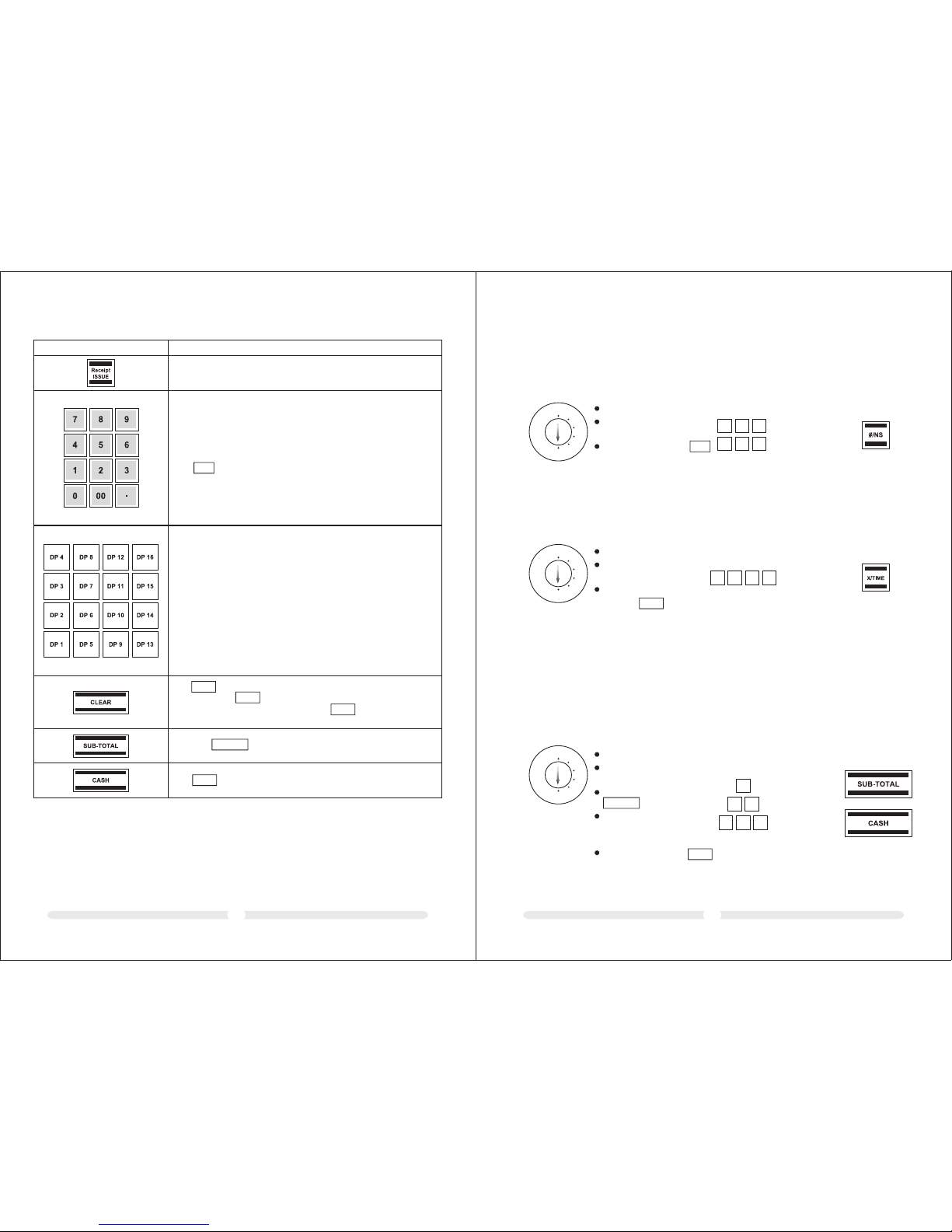
KEY
Exp lanat ion
Num eric ke ys:
The n umeri c keys ar e used to e nter nu mbers .
The i s used to e nter th e decim al poin t.
.
The D epart ment ke ys serv e to regi ster de partm ents.
6 Programmi ng
6.1 Programming the d ate
Exa mple: 1 5 June 20 10
REG
X
Z
LOCK
PRG
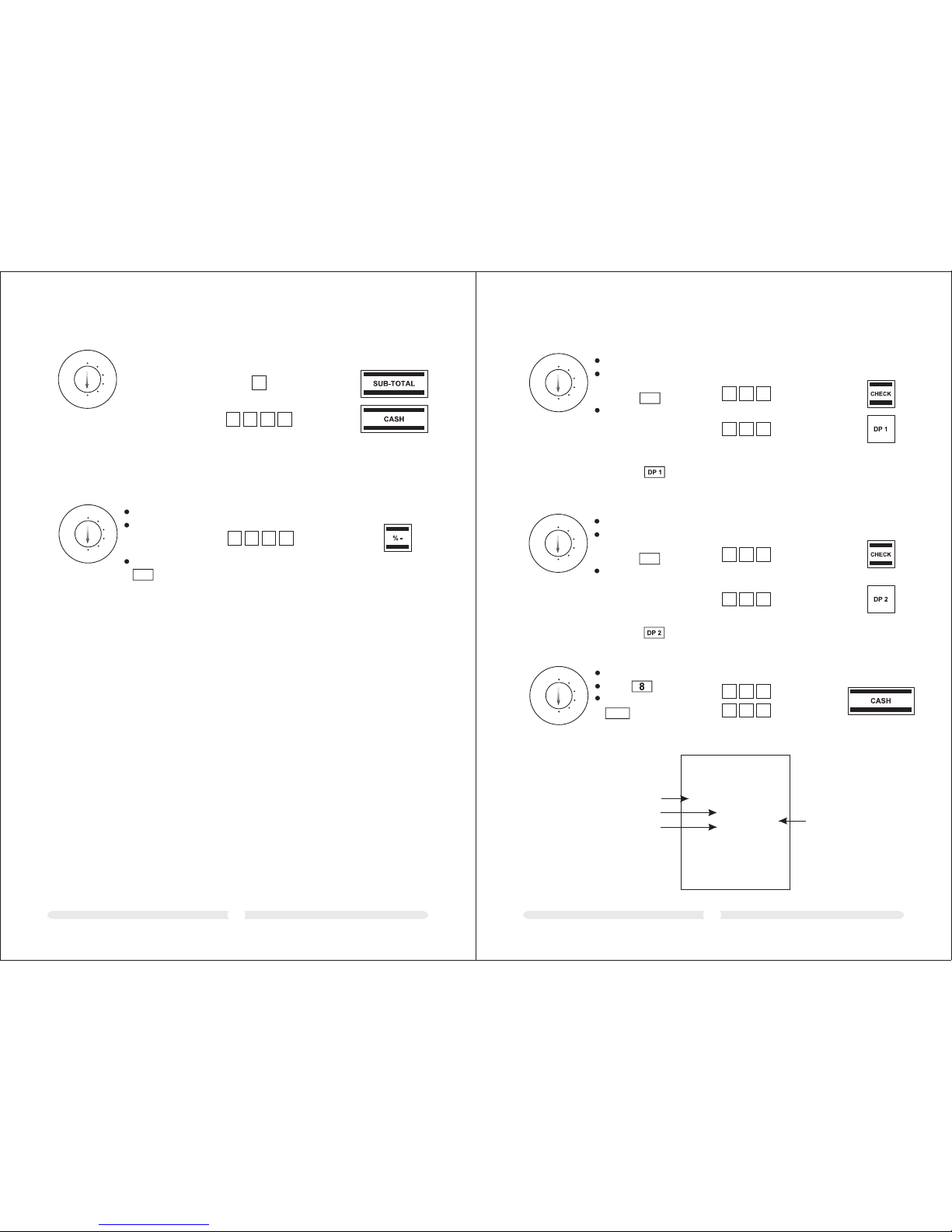
Set t he key to P RG
Ent er the da te as 6 dig its
(DD MMYY)
Con firm by p ressi ng
Inp ut Disp lay Con firm by p ressi ng
150 6,10
1
5
0
610
6.2 Programming the t ime
Exa mple: 9 :30 a.m .
REG
X
Z
LOCK
PRG
Set t he key to P RG
Ent er the ti me as 4
dig its (hh mm)
Con firm by
pre ssing
#/NS
X/TIM E
A maxi mum of fo ur diff eren t VAT (Valu e Added Ta x) rat es can be p rogra mmed.
6.3 Programming the VAT rate
Not e: On lea ving th e facto ry, the fo llowing v alue ad ded tax r ates ar e pre-p rogra mmed: T X 1 = 19%
and T X 2 = 7%. If t hese ra tes cor respo nd with t hose yo u need, n o adjus tment s to the pr ogram me
are n ecess ary at th is poin t.
Exa mple 1: VAT rate 1 i s 19%
REG
X
Z
LOCK
PRG
Set t he key to P RG
Ent er the st orage l ocati on
(1, 2 , 3 or 4)
Con firm by p ressi ng
Ent er the VAT rat e
(to 3 d ecima l place s but
wit hout a de cimal p oint)
Con firm by p ressi ng
SUB-T OTAL
CASH
9. 30
093 0
Inp ut Disp lay Con firm by p ressi ng
0. 01
19. 000
000
1
9
1
Inp ut Disp lay Con firm by p ressi ng
Thi s key is u sed to p rint a copy of the receip t.
Page 8
REG
X
Z
LOCK
PRG
PRG
10. 00
100 0
1009
REG
X
Z
LOCK
PRG
0. 02
7.0 00
Exa mple 2: VAT rate 2 i s 7%
Ref er to ins truct ions
in Ex ample 1 .
2
700 0
6.4 Programming a percen tage di scoun t
You can e nter a di scoun t value f rom 0.0 0 to 99.9 9%.
Exa mple: 1 0% disc ount
Set t he key to P RG
Ent er the di scoun t
val ue as 4 -di gits
(10 % = 1000) .
Con firm by p ressi ng
% -
Inp ut Disp lay Con firm by p ressi ng
Inp ut Disp lay Con firm by p ressi ng
6.5 Programming dep artme nts (DP )
Eig ht depa rtmen ts can be p rogra mmed fo r the six teen de partm ents.
On le aving t he fact ory, Dep artment s 1 to 8 are al ready a ssign ed VAT rate 1 at 1 9% and De partm ents
9 to 16 a re assi gned VAT rat e 2 at 7%.
All t he depa rtmen ts are se t up as an it emise d depar tment w ith fre e prici ng.
If th ese set tings c orres pond wi th thos e you nee d, no adj ustme nts to th e progr amme ar e neces sary at
thi s point .
Dep artme nt stat us (3-d igit)
1st d igit
Ite mised d epart ment
Sin gle ite m depar tment
2nd + 3 rd digi t
No VAT 00
VAT rat e 1
VAT rat e 2
VAT rat e 3
VAT rat e 4
Pri ce entr y
Fre e prici ng
Fix ed pric e
6.5.1 Pr ogr amm ing d epa rtm ent s tat us an d fix ed pr ice
0
1
00
01
02
03
04
000
Ent er the pr ice wit h the num ber of de cimal p laces
REG
X
Z
LOCK
PRG
Inp ut Disp lay Con firm by p ressi ng
Exa mple 1: D P1 shou ld be set -up as an i temis ed depa rtmen t at VAT rate 1 (1 9%) and w ithou t a fixed
pri ce.
Set t he key to P RG
Ent er stat us S1 and S 2 as
3 dig its and c onfir m by
pre ssing
Ent er fixe d price o r free
pri cing Ass ign the p rogra
-mm ed sett ings to t he dep
-ar tment b y press ing the
cor respo nding D P key, i n
thi s case:
CHEC K
0. 01
0
0 1
0
0 0
0. 00
Exa mple 2: D P2 shou ld be set -up as an i temis ed depa rtmen t at VAT rate 2 (7 %) and wi th a fixe d price
of 5. 00 ( syst em opti on 1 in def ault se tting : 2 decim al plac es).€
REG
X
Z
LOCK
PRG
Set t he key to P RG
Ent er stat us S1 and S 2 as
3 dig its and c onfir m by
pre ssing
Ent er fixe d price o r free
pri cing Ass ign the p rogra
-mm ed sett ings to t he dep
-ar tment b y press ing the
cor respo nding D P key, i n
thi s case:
CHEC K
Inp ut Disp lay Con firm by p ressi ng
0. 02
0
0 2
5
0 0
5. 00
6.5.2 Pr int ing t he de par tme nt pr ogr amm e
REG
X
Z
LOCK
PRG
Set t he key to P RG
Pre ss 6 time s
Con firm by p ressi ng
CASH
Inp ut Disp lay Con firm by p ressi ng
88 88. 88
8
8 8
8
8 8
Exa mple pr intou t:
SYSTE SETTING DUMP REPORT
*** ***** ***** *** ****** **
*** ***** ***** *** ****** **
NAME
PRIC E 100.0 0
TAX NO 01
STATUS 00
PRG
DEPART MENT-0 2
NAME
PRIC E 100.0 0
STATUS 00
TAX NO 01
PRG
DEPART MENT-0 1
Depart men t no.
Fixed pr ice
Status
Tax rat e
Page 9
PLU DU MP REPORT
*** ***** ***** *** ****** **
*** ***** ***** *** ****** **
PRG
PLU- 001
NAME
PRIC E 100.0 0
TAX NO 01
STATUS 00
LINK -DEPT 0 1
PRG
PLU- 002
NAME
PRIC E 100.0 0
TAX NO 01
STATUS 00
LINK -DEPT 0 2
PLU n o.
1211
99 PLUs ca n be pr ogr amm ed fo r the 2 00 PL Us .
PLUs are p rog ram med i n two s tep s:
6.6 Programming the P LU (pri ce look u p)
Enter th e pri ce an d dep art men t ass ign men t for a ll PL Us.
Enter th e PLU s tat us an d dep art men t ass ign men t for a ll PL Us.
(Not nec ess ary i f the P LU is o per ate d wit h a fix ed pr ice .)
6.6.1 Pr ogr amm ing t he pr ice a nd de par tme nt as sig nme nt
Exampl e: PL U 12 mu st be p ric ed at 2 .50 € a nd is a ssi gne d to De par tme nt 1.
P0 01 0.0 0
P 12 0.12
2. 50
P 13 0. 00
0
0 0
Inp ut Disp lay Con firm by p ressi ng
REG
X
Z
LOCK
PRG
Set the ke y to PR G
Press
Enter th e req uir ed
PLU numb er
Confir m by pr ess ing
Enter th e fix ed pr ice
of the PLU a nd
assign men t it to t he
depart men t req uir ed
by press ing t he re lev ant
depart men t key
Procee d in th e sam e
way for th e oth er PL Us.
Conclu de in put b y
pressi ng
X/TIM E
PLU
X/TIM E
The next P LU au tom ati cal ly
appear s in th e dis pla y.
1 2
Note: Th is st ep is o nly n ece ssa ry fo r PLU s whi ch sh oul d als o be ab le to operate with
free pri cin g.
PLU stat us (1 d igi t)
Fixed pr ice o nly 0
Also wit h fre e pri cin g 1
6.6.2 Pr ogr amm ing t he PL U sta tus a nd de par tme nt as sig nme nt
Exampl e: In t he ca se of P LU 12 ( Dep art men t 1), f ree p ric ing i s per mit ted .
P0 01 0.0 0
P 12 0.12
0. 01
P 13 0. 00
Inp ut Disp lay Con firm by p ressi ng
REG
X
Z
LOCK
PRG
PLU
1 2
Set the ke y to PR G
Press
Enter th e PLU n umb er
to be prog ram med
Confir m by pr ess ing
Enter th e PLU s tat us
Confir m by pr ess ing
the rele van t dep art men t
key
Procee d in th e sam e way f or
the othe r PLU s.
Conclu de in put b y pre ssi ng
The next P LU au tom ati cal ly
appear s in th e dis pla y.
PO
PO
1
6.6.3 Pr int ing t he PL Us pr ogr amm ed
Inp ut
REG
X
Z
LOCK
PRG
PLU
Set the ke y to PR G
Press
Exampl e pri nto ut:
Page 10
1413
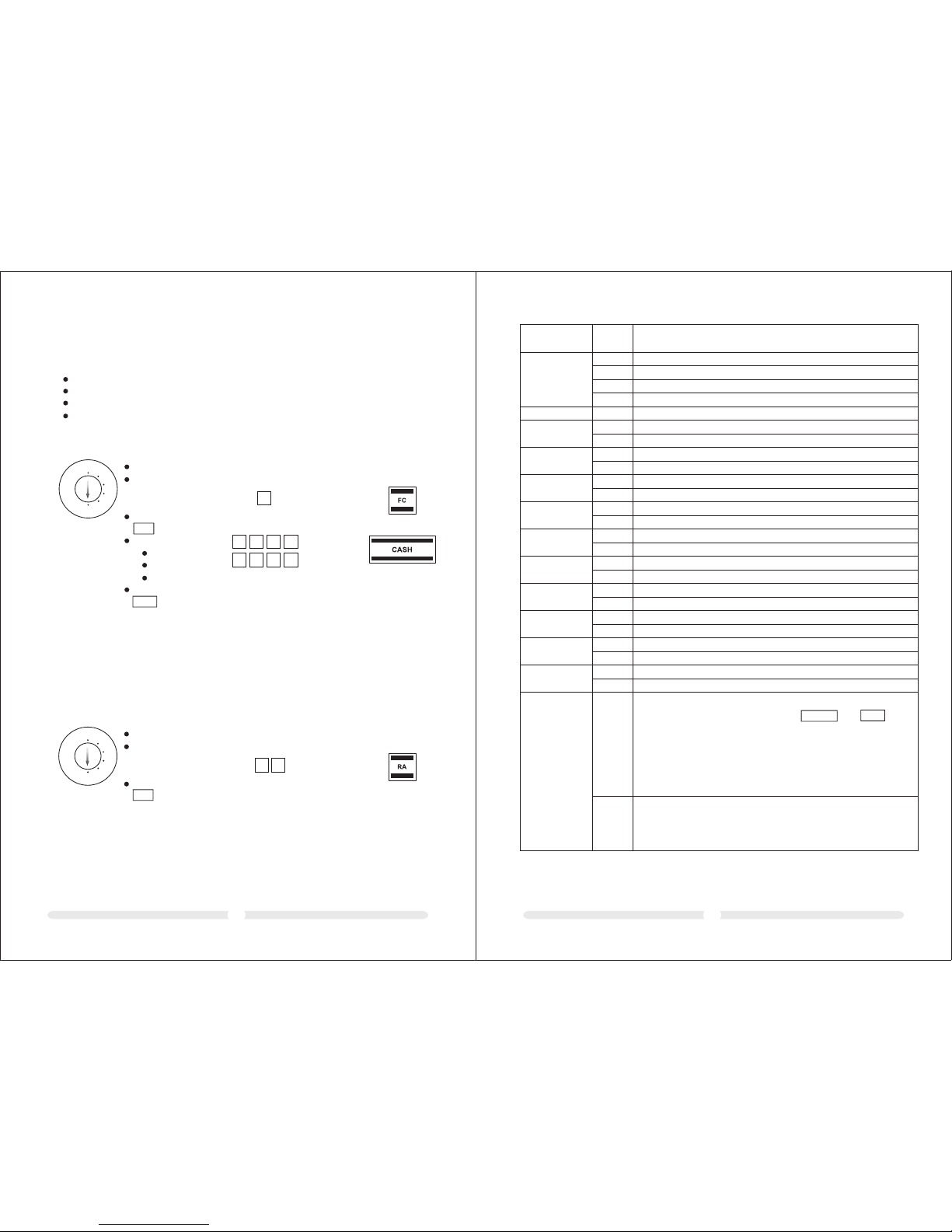
A maxi mum of 4 fo reign c urren cies ca n be prog ramme d.
The f ollow ing inf ormat ion mus t be ente red for t he prog rammi ng proc ess:
For eign cu rrenc y ident ifica tion (1 , 2)
Num ber of de cimal p laces f or the ex chang e rate (E XP): 0 to 8 d ecima l place s are pos sible
Dec imal pl aces fo r the for eign cu rrenc y (DP): 0 t o 3 decim al plac es are po ssibl e
Exc hange r ate (RATE ): 6- digi t entry f rom 000 001 to 99 9999
6.7 Programming foreig n currenci es
Exa mple: F oreig n curre ncy no. 1 : Euro to U S Dolla rs (1 USD = 0 .7649 4 EURO) a s forei gn
cur rency n o. 1
REG
X
Z
LOCK
PRG
0. 01
52 0764.9 4
520 7
Inp ut Disp lay Con firm by p ressi ngSet t he key to P RG
Ent er the fo reign
cur rency i denti ficat ion,
her e: 1
Con firm by p ressi ng
Ent er
EXP, he re: 5
DP, her e: 2
RATE, h ere: 07 6494
Con firm by p ressi ng
FC
CASH
649 4
1
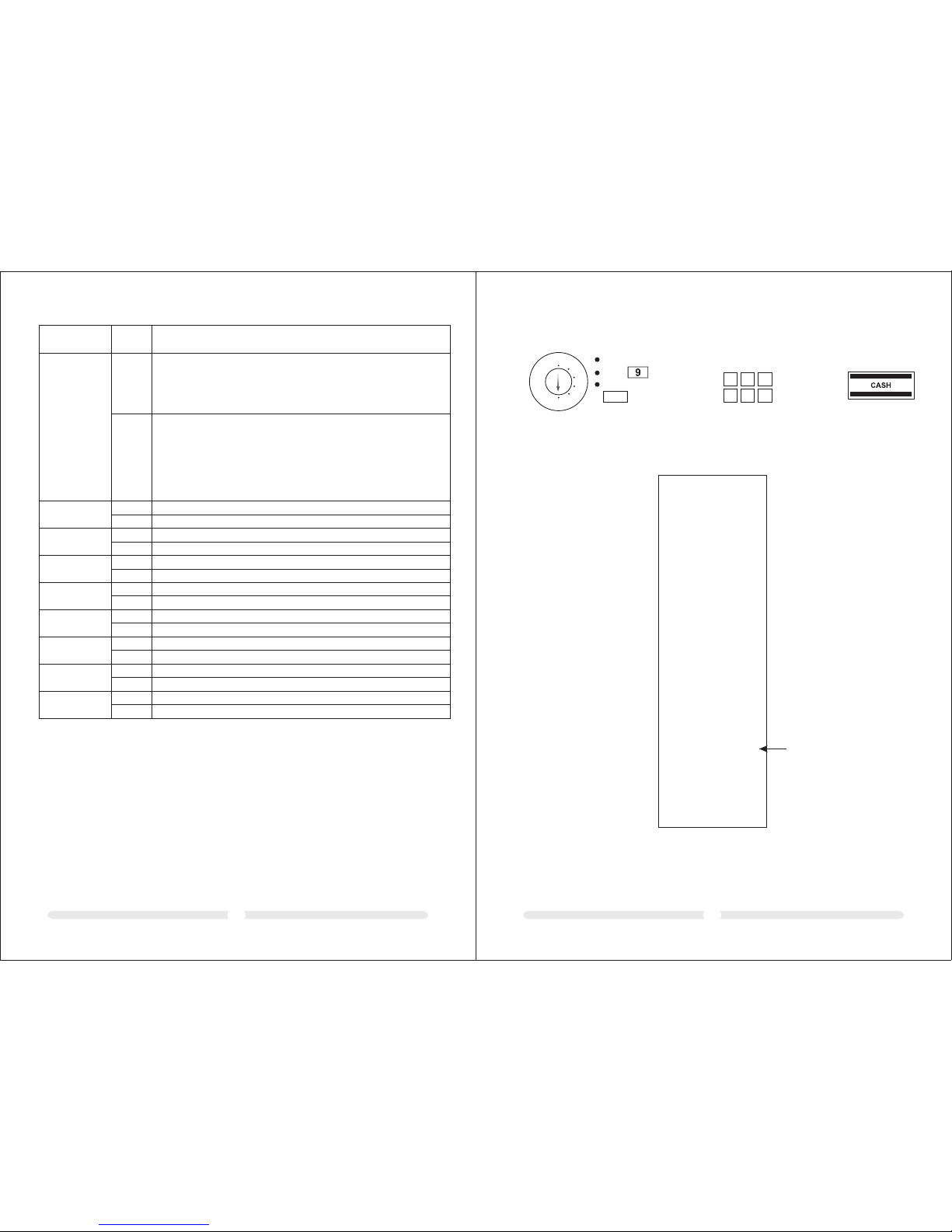
6.8 Sys tem opt ions
The b asic pr ogram s ettin gs of the c ash reg ister a re stor ed in the s ystem o ption s.
6.8.1 Pr ogr amm ing s yst em se tti ngs
Exa mple: C hange t he time d ispla y to the 12 -hour f ormat .
REG
X
Z
LOCK
PRG
41
Inp ut Disp lay Con firm by p ressi ng
1
Set t he key to P RG
Ent er the sy stem op tion
num ber and s tatus n umber
(2 or 3 d igits )
Con firm by p ressi ng
RA
4
Not e: The de faul t setti ngs app ear in bo ld prin t.
Sys tem opt ion
Sta tus
Set ting
1
2
3
4
5
6
7
8
9
10
11
12
0
1
2
3
1
2
0
1
0
1
0
1
0
1
0
1
0
1
0
1
0
1
Decima l poi nt po sit ion : 0 (no p oin t)
Decima l poi nt po sit ion : 0.0
Decima l poi nt po sit ion : 0.0 0
Decima l poi nt po sit ion : 0.0 00
(reser ved )
Net pric e (ex clu siv e of ta x)
Gro ss pr ice ( inc lud ing t ax)
Tim e: 24 -ho ur format
Tim e: 12-hour format
Print to tal t axa ble a mou nt: N o pri nt
Print to tal t axa ble a mou nt: P rin t
Print ne t tot al fo r eac h tax r ate : No pr int
Print ne t tot al fo r eac h tax r ate : Pri nt
Date for mat : Mon th- Day -Year
Date for mat : Day -Mo nth -Year
Clerk sy ste m not a cti ve
Clerk sy ste m act ive
Clerk lo g on no t act ive a fte r eac h tra nsa cti on
Clerk lo g on ac tiv e aft er ea ch tr ans act ion
Print ex tra l ine " Net Total": No print
Print ex tra l ine " Net Tot al" : Pri nt
Zero ski p pri nti ng fo r Z-re por t
No zero sk ip pr int ing f or Z- rep ort
(reser ved )
- Contin ued o n nex t pag e -
13
0
1
No sp ecia l Europea n roun ding
Rou nding occ urs af ter pr ess ing th e and ke ys.
If no speci al Europe an rou nding has been se lect ed, round ing
is perfor med accor ding t o comm erc ial 5/ 4 roun din g: If th e
fir st dec imal plac e to be rounde d is a 0, 1, 2, 3 or 4, the
num ber is r ounded do wn. If t he fir st decima l plac e to be
rou nded is a 5, 6, 7, 8 or 9, the numbe r is rou nded up.
SUB-T OTAL
CASH
Eur opean rou ndin g: Switze rlan d
0.0 1 – 0.02 = 0 .00
0.0 3 – 0.07 = 0 .05
0.0 8 – 0.09 = 0 .10
Page 11
1615
Sys tem opt ion
Sta tus
Set ting
2
Eur opean rou ndin g: Sweden
0.0 0 – 0.24 = 0 .00
0.2 5 – 0.74 = 0 .50
0.7 5 – 0.99 = 1 .00
Eur opean rou ndin g: Denmar k
0.0 0 – 0.12 = 0 .00
0.1 3 – 0.37 = 0 .25
0.3 8 – 0.62 = 0 .50
0.6 3 – 0.87 = 0 .75
0.8 8 – 0.99 = 1 .00
3
14
15
16
17
18
19
20
21
0
1
Printi ng of an additiona l bill permitte d
Printi ng of an additiona l bill not permitt ed
Z1 and Z2 counte rs are not deleted aft er Z-financi al report printo ut
Z1 and Z2 counte rs are deleted aft er Z-financial report prin tout
Grand Total is not deleted after Z1 financ ial report pri ntout
Grand Total is delete d after Z1 financia l report printou t
Grand Total is not print ed on the financia l report
Grand Total is print ed on the financia l report
Receip t mode
Journa l mode (the windin g reel is driven)
Basic cur rency is the local curre ncy (amount ÷ con version fact or)
Basic cur rency is foreig n currency (amo unt × conversion factor)
Refund s are printed on the fina ncial report
Refund s are not printed on the fin ancial report
Logo prin t on the receipt
Logo no print on th e receipt
0
1
0
1
0
1
0
1
0
1
0
1
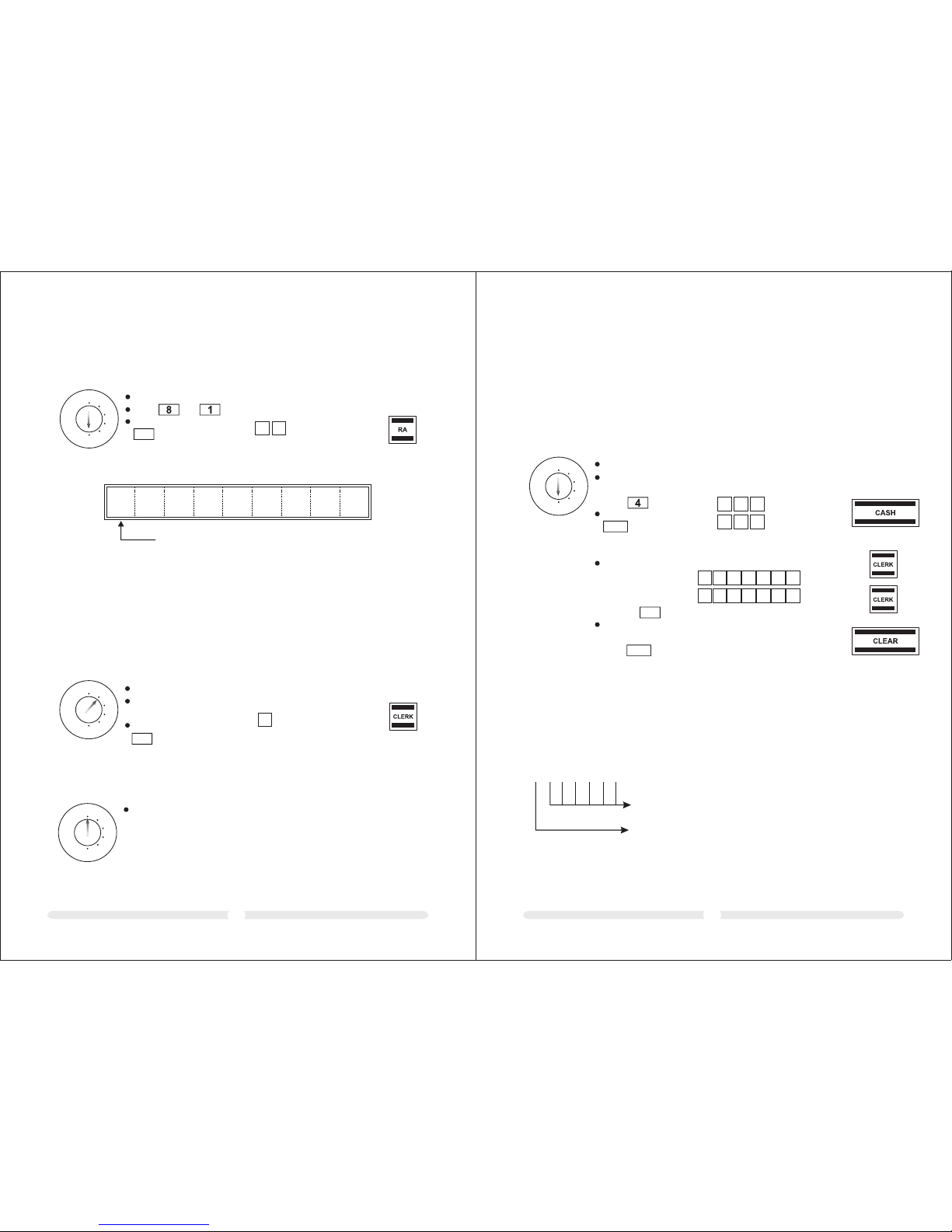
6.8.2 Pr int ing t he sy ste m opt ion s (du mp re por t)
REG
X
Z
LOCK
PRG
Inp ut Disp lay Con firm by p ressi ng
99 99.9 9
9
9 9
9
9 9
Set t he key to P RG
Pre ss 6 time s
Con firm by p ressi ng
CASH
Exa mple pr intou t:
PRG
SYST EM NO.0 1 STATUS 2
SYST EM NO.0 3 STATUS 2
SYST EM NO.0 4 STATUS 0
SYST EM NO.0 5 STATUS 0
SYST EM NO.0 6 STATUS 0
SYST EM NO.0 7 STATUS 0
SYST EM NO.0 8 STATUS 1
SYST EM NO.0 9 STATUS 0
SYST EM NO.1 0 STATUS 0
SYST EM NO.11 S TATUS 1
SYST EM NO.1 0 STATUS 1
SYST EM NO.11 S TATUS 0
SYST EM NO.1 2 STATUS 0
SYST EM NO.1 3 STATUS 0
SYST EM NO.1 4 STATUS 0
SYST EM NO.1 5 STATUS 1
SYST EM NO.1 6 STATUS 0
SYST EM NO.1 7 STATUS 0
SYST EM NO.1 8 STATUS 0
SYST EM NO.1 9 STATUS 0
SYST EM NO.2 0 STATUS 0
———— ————— ————— ——
DISC OUNT 0. 00%
———— ————— ————— ——
TAX—01 R ATE 0.00 0
TAX—02 R ATE 0.00 0
TAX—03 R ATE 0.00 0
TAX—04 R ATE 0.00 0
———— ————— ————— ——
FC—0 1 RATE
FC—0 2 RATE
———— ————— ————— ——
Z—RE P SECU CO DE ……
———— ————— ————— ——
CLER K —01
NAME
SECU C ODE ……
———— ————— ————— ——
CLER K —02
NAME
SECU C ODE ……
———— ————— ————— ——
SYSTE SETTING DUMP REPORT
*** ***** ***** *** ****** **
*** ***** ***** *** ****** **
Sys tem Set tings
Tax re tes
For eign cu rrenc ies
Cle rk pass work
{
{
{
{
Sta tus
{
Z rep ort pas sword
0
1
Page 12
1817
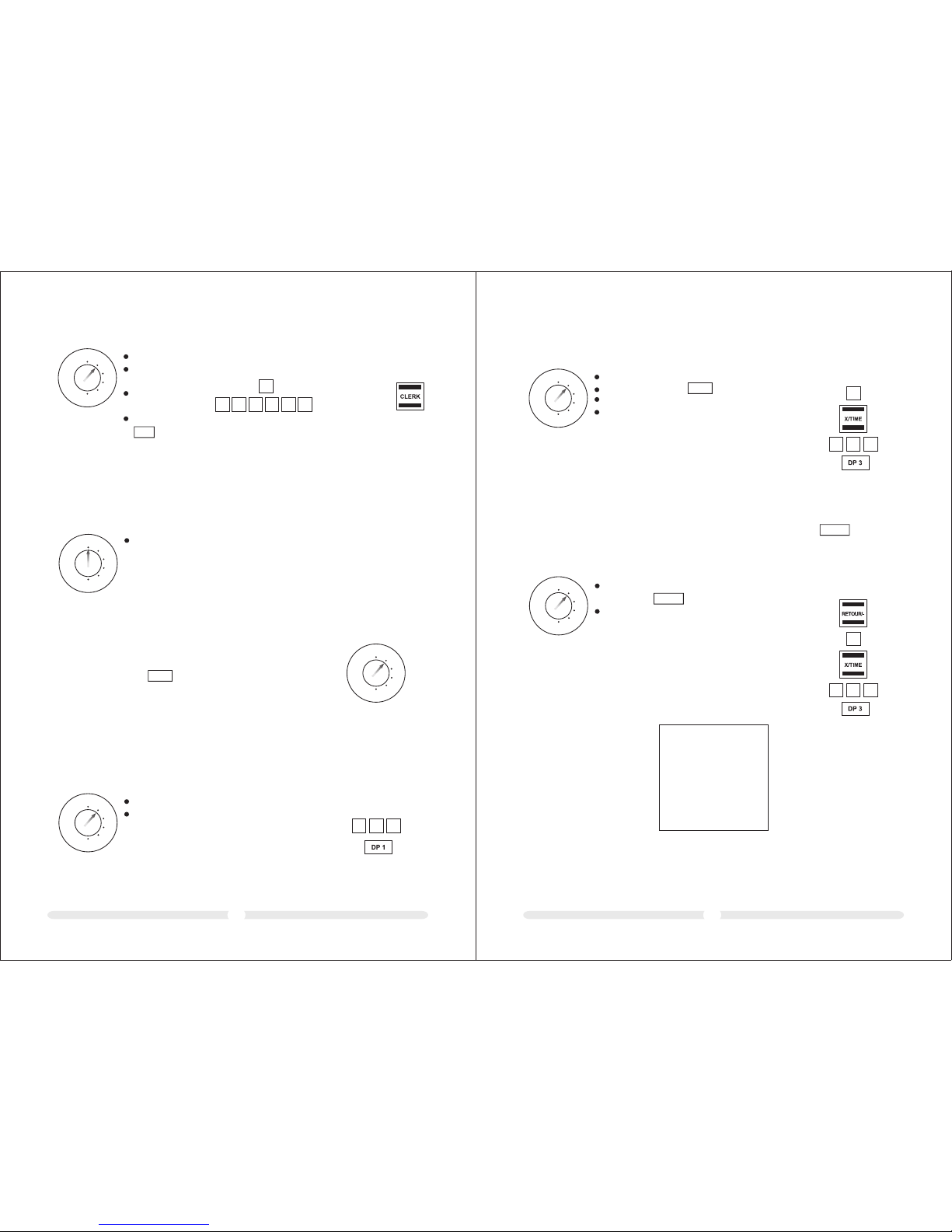
The d efau lt sett ing for th e cle rk syste m is de acti vate d (ref er to Sys tem Opti on 8).
7.1 Acti vatin g the cle rk syst em
7 Clerk System
REG
X
Z
LOCK
PRG
0. 81
Inp ut Disp lay Con firm by p ressi ng
1RA8
Set t he key to P RG
Pre ss and
Con firm by p ressi ng
Whe n the cle rk syste m is activ ated, a do t appe ars in th e displa y:
.
0. 0 0
Cle rk sys tem activ e
Not e: A max imum o f 8 clerk s can be reg iste red in t he syst em.
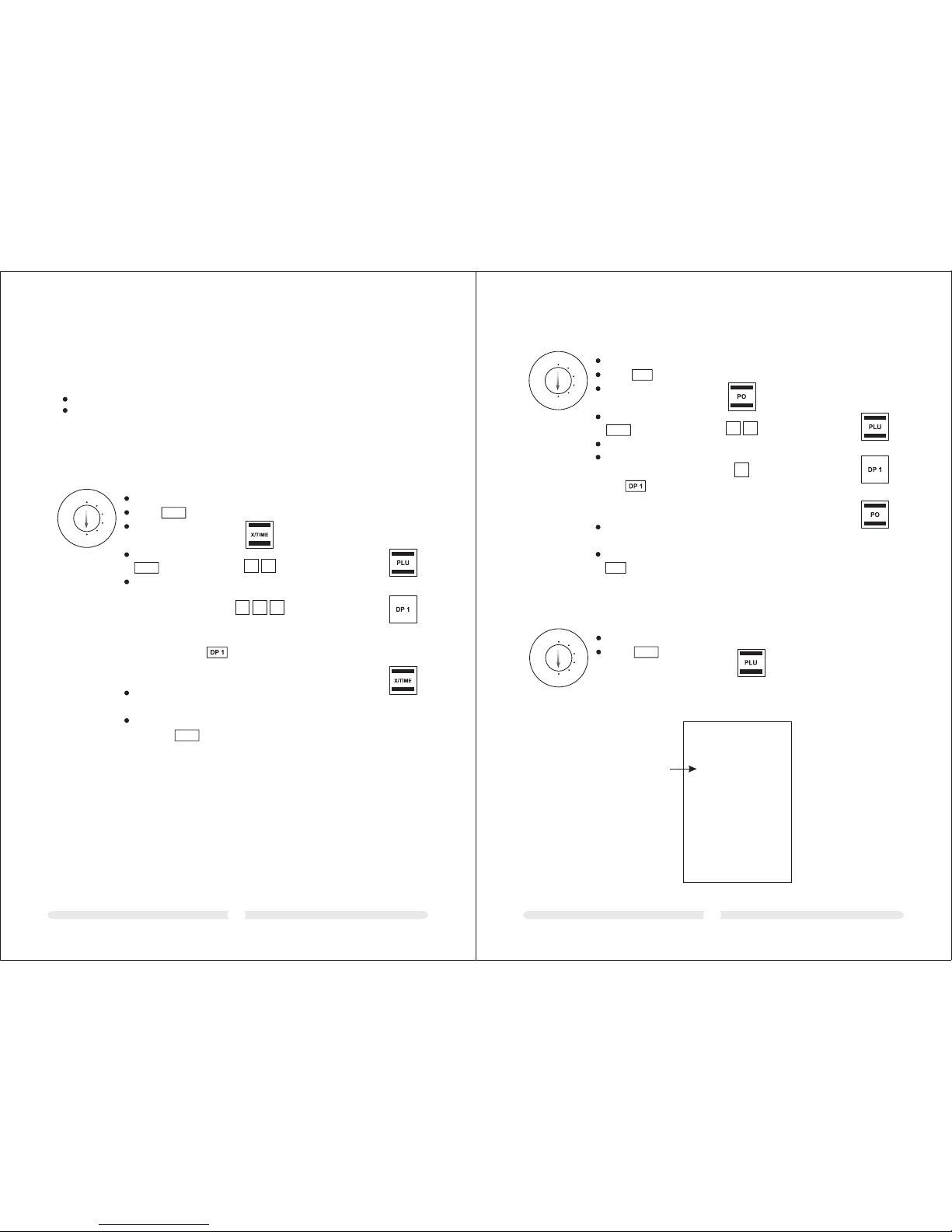
Exa mple : Cler k no. 6 log s on.
7.2 Cle rk syst em with out a password
Con diti on: The c lerk s yste m is activate d.
If no password has b een prog ramm ed for a c lerk , that cl erk logs o n at the ca sh regis ter
wit h his clerk num ber.
7.2.1 Cl erk l og- on wi th cl erk n umb er
0. 06
Inp ut Disp lay Con firm by p ressi ng
6
REG
X
Z
LOCK
PRG
Set t he key to R EG
Ent er the 1- digit c lerk
num ber
Con firm by p ressi ng
CLER K
7.2.2 Cl erk l ogs o ff
Exa mple : A sale sper son lo gs off.
REG
X
Z
LOCK
PRG
Set t he key to O FF
Not e: Sys tem option 9 ca n be co nfig ured s o that a cl erk must l og on ag ain aft er each re gistra tion
whi ch is com pleted .
It is possible to pr otect cl erk lo g on codes by mea ns of a pass word .
In th is case, cler ks log on by e nter ing their res pectiv e clerk nu mber and a n addi tion al pas swor d.
The p assw ord is a 6- digit co de . The cl erk numb er and p assw ord thus comp rise the 4 -dig it cle rk
cod e.
7.3 Cle rk syst em with p assword
7.3.1 Pr ogr amm ing a c ler k pas swo rd
Exam ple: Prog rammi ng the pas sword for cl erk no. 1 (pas sword : 123 456) and c lerk no . 2 (passw ord: 12 3
456) .
REG
X
Z
LOCK
PRG
In put D ispl ay Co nfir m by pre ssin gSet th e key to PRG
Acc ess the c lerk pa ssword
pro gramm ing mode :
pre ss 6 time s
Con firm by p ress ing
Ent er the 7- digi t clerk c ode
(1- digit c lerk n umber
and 6- digit pa sswo rd)
and co nclude b y
pre ssing
Exi t from cl erk pas sword
pro gramm ing mode :
pre ss
CLER K
CASH
CLEA R
Ente r all th e passw ords in
sequ ence (max . 8 passwo rds):
1 2
3
4
1
2 3
4
556
6
4
4
444
4
44 44. 44
112 34. 56
112 34. 56
Note : If 000 i s entere d as the p asswo rd for a cle rk, the cl erk syste m once aga in oper ates wi thout a
pass word fo r this cle rk.
7.3.2 Cl erk l og- on wi th cl erk n umb er an d cle rk pa ssw ord
Stru cture of the c lerk cod e
1 2 3 4 5 6 7
6-d igit cler k pass word (000000- 999999)
1-d igit cler k numb er
}
7-d igit cler k code
1
1
Page 13
CLER K#01
2.x 3. 00
DEPT 03 6.00
2.x -3 .00
DEPT 03 -6.0 0
YOUR RE CEIPT
*** ***** ***** *** ****** **
*** ***** ***** *** ****** **
2019
Inp ut Disp lay Con firm by p ressi ng
REG
X
Z
LOCK
PRG
CLER K
Exa mple: C lerk no 1 l ogs on wi th pass word "1 45689 " (cler k code: 1 45689 ).
Set t he key to R EG
Ent er the 1- digit
cle rk numb er
Ent er the 6- digit
cle rk pass word
Con firm by p ressi ng
1 4
5
6
8 9
145 6. 89
1
Cle rks rem ain log ged on un til the y log off p rope rly (se e below ).
Not e: If an in corre ct pass word is e ntere d, erro r messa ge "SEC C ode" ap pears i n the dis play.
7.3.3 Cl erk l ogs o ff
Exa mple: A sal esper son log s off.
REG
X
Z
LOCK
PRG
Set t he key to O FF Not e: Syst em opti on 9 can be c onfig ured so t hat a
cle rk must l og on aga in afte r each re gistr ation
whi ch is com plete d.
Set t he key sw itch to R EG for al l opera ting pr ocess es.
Not e: Inco rrect i nput or e rror st ates (a coust ic sign al) can b e
cle ared by p ressi ng the ke y.
8 Operation
CLEA R
Alw ays ent er the pr ice wit hout a de cimal p oint!
Not e: The pr ice may o nly con tain a ma ximum o f 7 digit s.
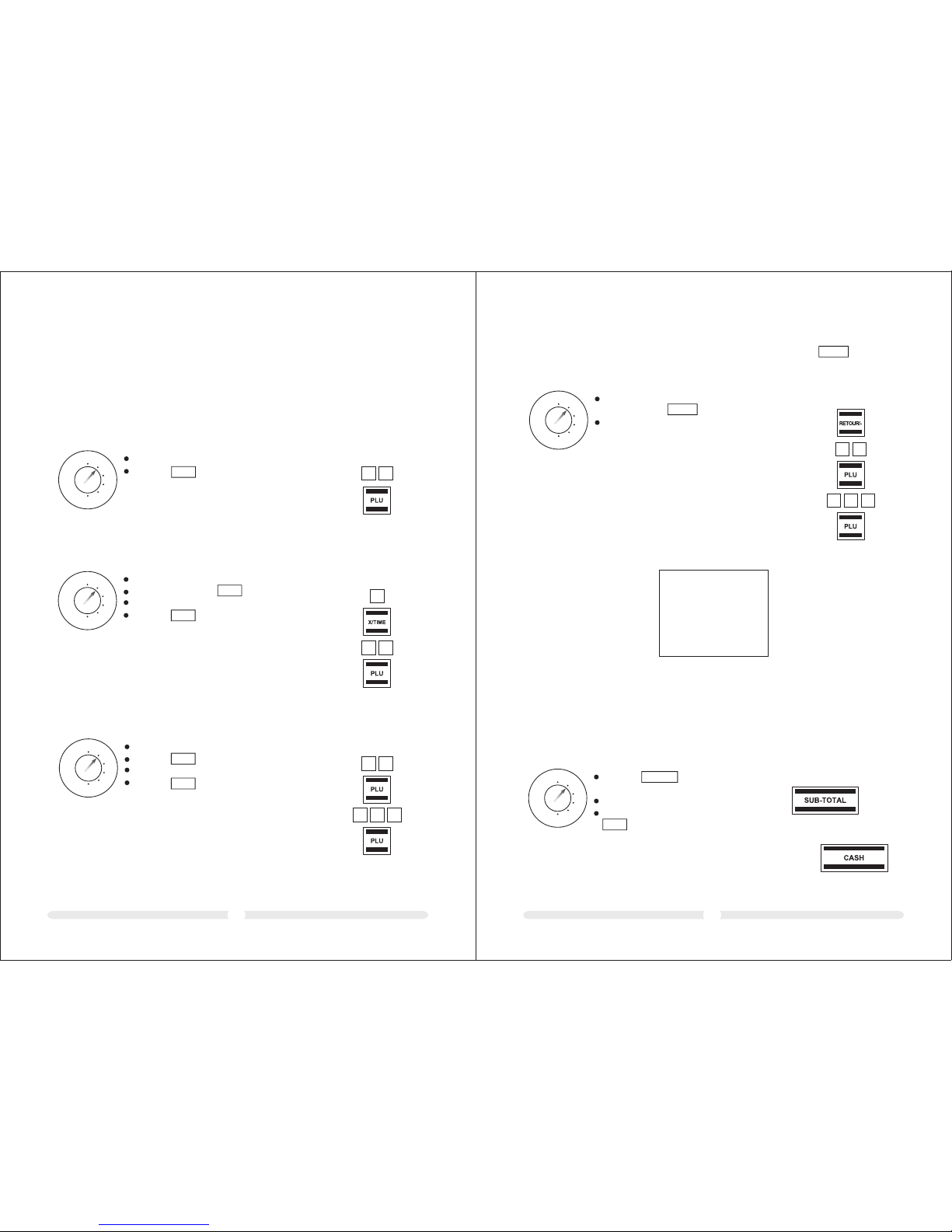
Exa mple 1: A PLU f rom dep artme nt 1 wi th a val ue of 1.0 0 €
mus t be regi stere d.
8.1 Reg ister ing dep artments
REG
X
Z
LOCK
PRG
REG
X
Z
LOCK
PRG
Ent er the pr ice
Ass ign the d epart ment by p ressi ng the re levan t
dep artme nt key
1
0 0
Inp ut
If th e same PL U shoul d be regi stere d sever al time s:
Exa mple 2: A PLU f rom dep artme nt 3€ wi th a val ue of 3.0 0
mus t be regi stere d twice .
REG
X
Z
LOCK
PRG
Ent er the qu antit y
Con firm by p ressi ng
Ent er the pr ice
Ass ign the d epart ment by p ressi ng the re levan t
dep artme nt key
X/TIM E
Not e: The su m of Quan tity x Pr ice mus t not be
gre ater th an maxi mum cap acity o f the rep ort
mem ory!
Inp ut
3
0 0
2
Whe n a PLU is re turne d, init iate th e negat ive reg istra tion by p ressi ng the ke y and
reg ister t he retu rned PL U in the no rmal wa y.
8.2 Reg ister ing neg ative departments
Exa mple 3: Two p ieces o f a PLU fro m depar tment 3 w ith a val ue of 3.0 0€ are ret urned .
REG
X
Z
LOCK
PRG
Ini tiate r egist ratio n of a nega tive de partm ent by
pre ssing t he key.
Reg ister t he PLU in t he norm al way.
RETO UR/-
RETO UR/-
Inp ut
3
0 0
2
Exa mple re ceipt :
Page 14
2221
If th e same PL U shoul d be regi stere d sever al time s:
Exa mple 2: P LU no. 12 m ust be re giste red twi ce.
Ent er the qu antit y
Con firm by p ressi ng
Ent er the PL U numbe r
Pre ss the ke y
REG
X
Z
LOCK
PRG
Inp ut
PLU
X/TI ME
Alw ays ent er the pr ice wit hout a de cimal p oint!
Not e: The pr ice may o nly con tain a ma ximum o f 7 digit s.
8.3 Reg ister ing PLU s
Con ditio n: The PL U has be en prog ramme d with a fi xed pri ce.
Not e: The PL U numbe r may be a ma ximum o f 3 digit s.
Exa mple 1: P LU no. 12 m ust be re giste red.
8.3.1 Re gis ter ing P LUs w ith a f ixe d pri ce
Inp ut
REG
X
Z
LOCK
PRG
Ent er the PL U numbe r
Pre ss the ke y
PLU
1
2
1
2
2
Not e: The su m of Qua ntity x P rice mu st not be g reate r
tha n maxim um capa city of t he repo rt memo ry!
Con ditio n: The PL U to be re giste red is pr ogram med for f ree pri cing.
Exa mple 3: P LU no. 10 w ith a pri ce of 2.4 9 € must be r egist ered.
8.3.2 Re gis ter ing a P LU wi th fr ee pr ici ng
Ent er the PL U numbe r
Pre ss the ke y
Ent er the pr ice
Pre ss the ke y
Not e: The su m of Qua ntity x P rice mu st not be g reate r
tha n maxim um capa city of t he repo rt memo ry!
REG
X
Z
LOCK
PRG
Inp ut
PLU
PLU
1 0
2
4 9
Whe n a PLU is re turne d, init iate th e negat ive reg istra tion by p ressi ng the ke y and reg ister
the r eturn ed PLU in t he norm al way.
Exa mple 4: P LU no. 10 w ith a pri ce of 2.4 9 € is retu rned.
8.3.3 Re gis ter ing n ega tiv e PLU s
RETO UR/-
Ini tiate r egist ratio n of a nega tive de partm ent
by pr essin g the key.
Reg ister t he PLU in t he norm al way.
REG
X
Z
LOCK
PRG
RETO UR/-
Inp ut
1 0
2
4 9
Exa mple re ceipt :
*** ***** ***** *** ****** **
*** ***** ***** *** ****** **
Not e: Diff eren t metho ds of pay ment (t ender m edia) c annot b e used wi thin on e trans actio n!
A regi strat ion can o nly be co nclud ed by one t ender m edium .
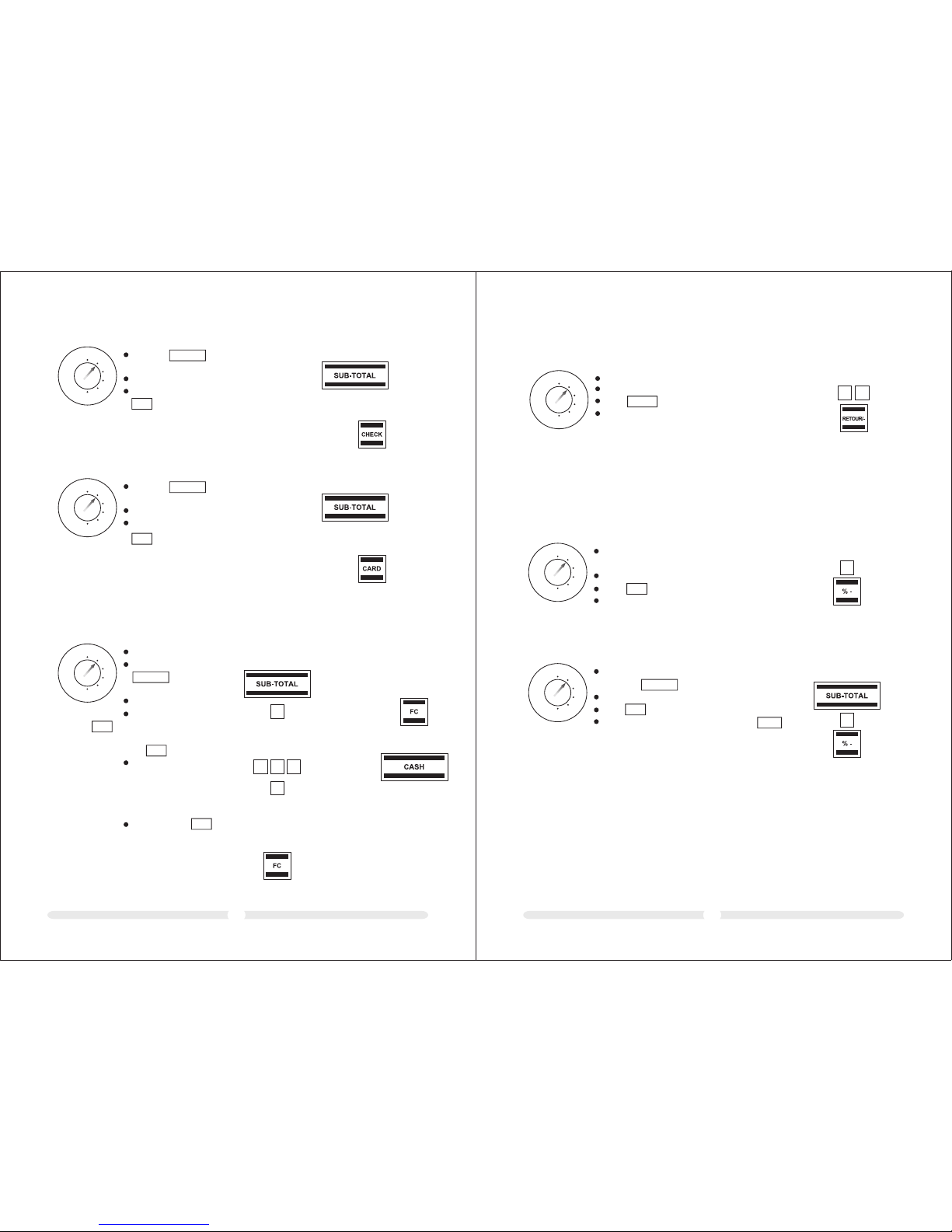
8.4 Con cludi ng rece ipts / Me thods o f payme nt
Pre ss the ke y to disp lay and p rint
the s ubtot al
Ent er the am ount pa id
Con clude t he rece ipt and p rint by p ressi ng
8.4.1 Pa yme nt by c ash
Inp ut
REG
X
Z
LOCK
PRG
CASH
Amo unt pai d
(op tion)
SUB-T OTAL
YOUR R ECEIP T
CLER K#01
PLU1 0 2.49
PLU1 0 - 2.49
SUBT OTAL 0.00
CASH 0 .00
TOTAL 0.0 0
Page 15
2423
Pre ss the ke y to disp lay and p rint
the s ubtot al
Ent er the am ount pa id
Con clude t he rece ipt and p rint by p ressi ng
8.4.2 Pa yme nt by E C car d / che ck
REG
X
Z
LOCK
PRG
SUB-T OTAL
CHEC K
Inp ut
Amo unt pai d
(op tion)
Pre ss the ke y to disp lay and p rint
the s ubtot al
Ent er the am ount pa id
Con clude t he rece ipt and p rint by p ressi ng
8.4.3 Pa yme nt by c red it ca rd / credit approva l
REG
X
Z
LOCK
PRG
SUB-T OTAL
Inp ut
Amo unt pai d
(op tion)
CARD
A cust omer pa ys a bill a mount ing to 15 .- Euro w ith 20 US D ollar s.
8.5 Foreign curre ncy pay ment
Inp ut Disp lay Con firm by p ressi ng
REG
X
Z
LOCK
PRG
CLER K
15. 00
1
19. 61
20 .00
0. 39
0. 30
Whe n all the P LUs hav e
bee n regis tered , press t he
key t o produ ce
the s ubtot al.
Ent er the fo reign c urren cy
ide ntifi catio n (here : USDol lar =fo reign c urren cy
ide ntifi catio n 1) and pr ess
the k ey.
Ent er the am ount re ceive d
in th e forei gn curr ency an d
con clude t he rece ipt. Th e
cha nge pay able is d ispla yed
in th e forei gn curr ency.
The n press t he key to
con vert th e chang e payab le
to th e local c urren cy.
SUB-T OTAL
FC
FC
Exa mple: T he cus tomer r eceiv es
eit her 30 Eu ro Cent s or 39 US
Cen ts chan ge.
1
2
0
0
0
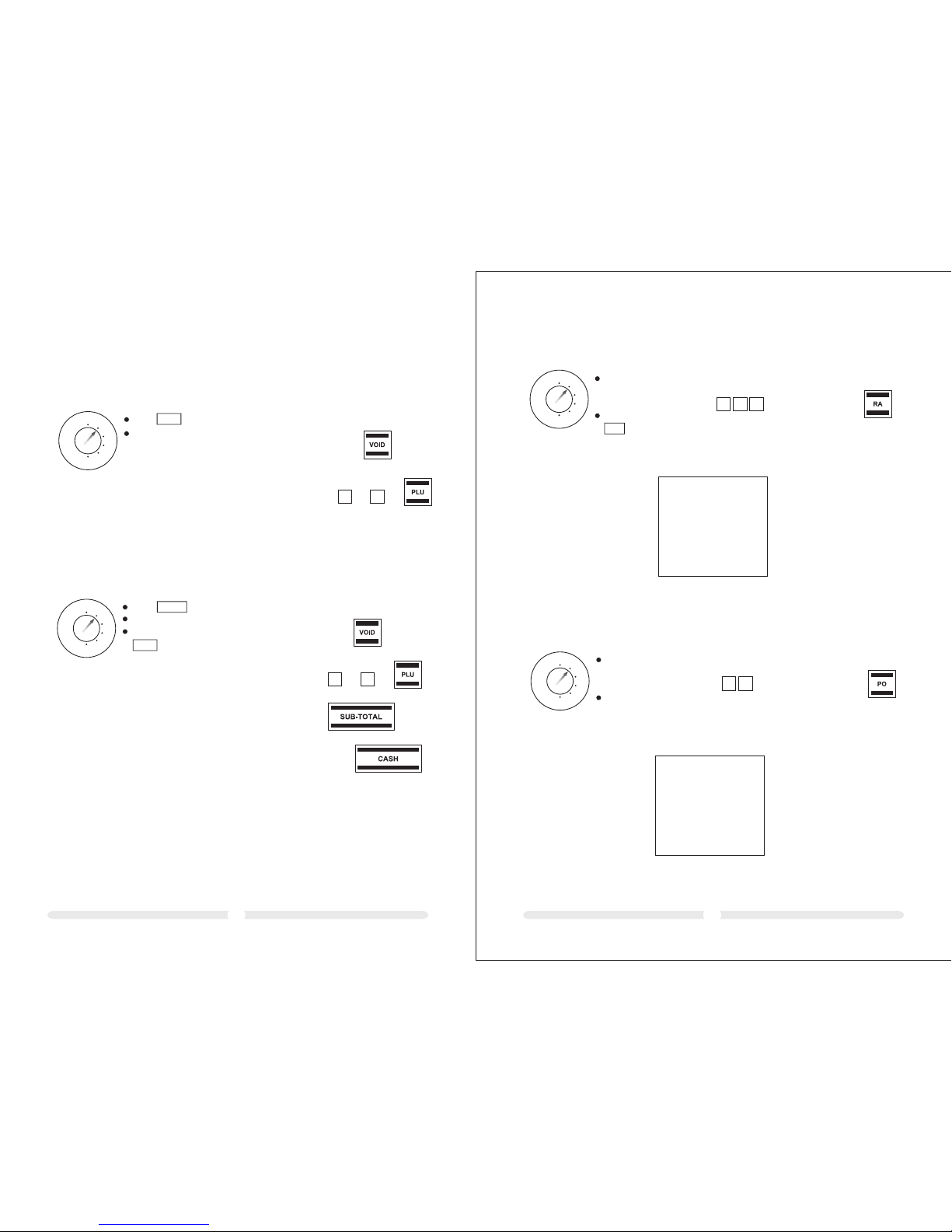
Exa mple: A dis count o f 5,0 0 € is to be g rante d on a sale .
8.6 Reg ister ing a dis count as an amount
Reg ister t he PLUs .
Ent er the am ount gr anted a s a disco unt.
Pre ss .
Con tinue w ith the r egist ratio n.
Inp ut
REG
X
Z
LOCK
PRG
5
00
RETO UR/-
8.7 Reg ister ing a dis count as a perce ntage
A perc entag e disco unt can b e assig ned to a si ngle it em regi strat ion or a su btota l.
Reg ister t he PLU on w hich th e perce ntage
dis count i s to be ass igned .
Ent er the pe rcent age rat e.
Pre ss .
Con tinue w ith the r egist ratio n.
8.7.1 Re gis ter ing a p erc ent age d isc oun t on a PL U
Exa mple: A per centa ge di scou nt of 5% is t o be gran ted on a PL U.
REG
X
Z
LOCK
PRG
% -
Inp ut
5
Exa mple: A per centa ge di scou nt of 7% is t o be gran ted on a to tal sal e.
8.7.2 Re gis ter ing a p erc ent age d isc oun t on a su bto tal
Reg ister a ll the PL Us.
Pre ss the ke y to prod uce the s ubtot al.
Ent er the pe rcent age rat e.
Pre ss .
Con clude t he regi strat ion by pr essin g .
REG
X
Z
LOCK
PRG
Inp ut
7
SUB-T OTAL
% -
CASH
Fau lty reg istra tions c an be cor recte d immed iatel y after e ntry or l ater in t he tran sacti on.
8.8 Error Co rre ction a nd Void
8.8.1 EC
The l ast ite m enter ed duri ng a regi strat ion can b e corre cted di rectl y.
Page 16
2625
8.8.2 No rma l voi d
PLU s can be de leted a s long as t he regi strat ion has n ot yet be en conc luded .
Exa mple: P LU no. 20 ( fixed p rice it em) has b een reg ister ed and sh ould be c orrec ted
imm ediat ely. How ever, more i tems ha ve been r egist ered in t he mean time.
2
0
REG
X
Z
LOCK
PRG
Inp ut
Pre ss
Reg ister t he PLU to b e cance lled ag ain.
VOID
Reg istra tions c omple ted som e time ag o can be re verte d as foll ows:
Exa mple: P LU no. 50 ( fixed p rice it em) was p urcha sed by a cu stome r and lat er retu rned (r efund ).
8.9 Ref und / Void
5
0
Inp ut
Pre ss
Reg ister t he retu rned it em agai n.
Con clude t he proc ess by pr essin g the
key.
REG
X
Z
LOCK
PRG
RETO UR/-
CASH
(op tion)
Exa mple: 1 0.00 € ar e paid in .
8.10 Re ceive d on acco unt operations
Ent er the am ount pa id into
the c ash reg ister ( max. 7
dig its).
Con firm by p ressi ng
Inp ut Disp lay Con firm by p ressi ng
REG
X
Z
LOCK
PRG
10. 00
RA
1
0 00
Exa mple re ceipt :
YOUR R ECEIP T
RECO AC CT 10.0 0
CASH 10. 00
THAN K YOU
*** ***** ***** *** ****** **
*** ***** ***** *** ****** **
*** ***** ***** *** ****** **
*** ***** ***** *** ****** **
Exa mple: 5.0 0 € are paid out .
8.11 Pai d out ope ratio ns
REG
X
Z
LOCK
PRG
Inp ut Disp lay Con firm by p ressi ngEnt er the am ount re moved
fro m the cas h regis ter
(ma x. 7 digi ts).
Con firm by p ressi ng PO
5. 00
005
Exa mple rece ipt:
YOUR R ECEIP T
PAIDO UT -5.00
CASH -5.0 0
THAN K YOU
*** ***** ***** *** ****** **
*** ***** ***** *** ****** **
*** ***** ***** *** ****** **
*** ***** ***** *** ****** **
Page 17
2827
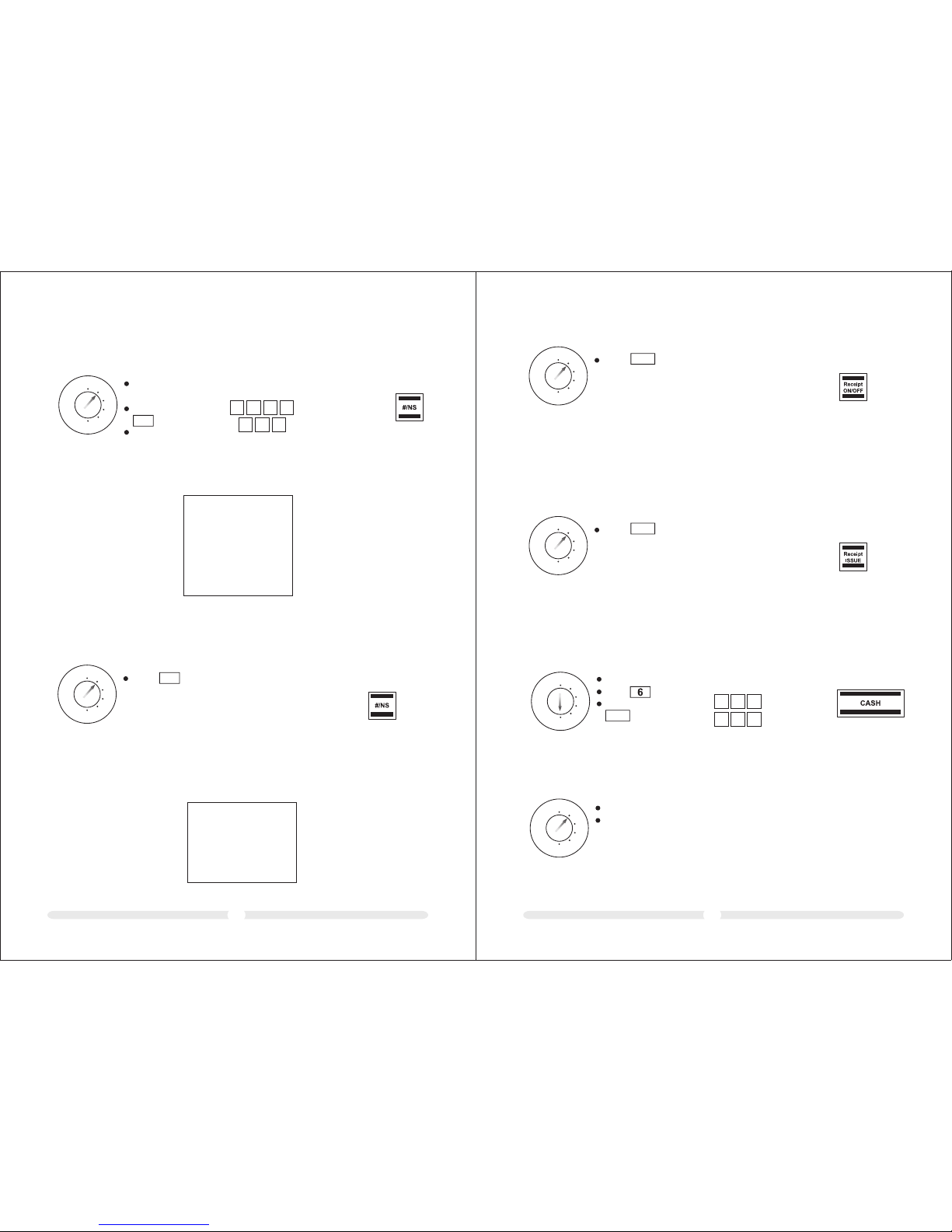
8.14 Pr intin g a receipt on/o ff
REG
X
Z
LOCK
PRG
Inp ut
Press
Rece ipt
ON/OF F
If th e rece ipt pr int ing fu nction ha s been s witc hed off via th e Receipt O N/OF F key, a copy
of th e last r ecei pt can be printed l ater.
Not e: If th e print receipt f unct ion is swit ched o ff, a do t ligh ts up in t he dis play at the 2nd
pos itio n.
8.15 Pr intin g a copy of t he rece ipt
REG
X
Z
LOCK
PRG
Inp ut
Press
Rece ipt
ISSUE
A number con tain ing up to 7 digits can be pri nted o n the re ceipt, e. g. a cus tome r number.
Exa mple: The se quence of digit s 1234 567 shoul d be pri nted on the recei pt.
8.12 Pr intin g funct ion
REG
X
Z
LOCK
PRG
Inp ut Disp lay Con firm by p ressi ng
123 45. 67
4
3
Exa mple rece ipt:
Ent er the nu mber
(ma x. 7 digi ts)
Con firm by p ressi ng
Con tinue w ith the
reg istra tion in t he
nor mal way.
#/NS
2
1
7
6
5
Not e: The entry d oes no t influen ce the r eport memory.
YOUR R ECEIP T
CLER K#01
No Sal e 12345 67
PLU1 1 .25
SUBT OTAL 1.25
*** ***** ***** *** ****** **
*** ***** ***** *** ****** **
8.13 Op ening t he cash d rawer withou t a sale
Exampl e: Th e cas h dra wer n eed s to be o pen ed.
REG
X
Z
LOCK
PRG
Inp ut
Press
#/NS
Note: Th e num ber o f tim es th e dra wer i s ope ned i s rec ord ed in t he re por t mem ory a nd
printe d in th e fin anc ial r epo rt.
Exampl e rec eip t:
CLER K#01
No Sal e
YOUR R ECEIP T
*** ***** ***** *** ****** **
*** ***** ***** *** ****** **
You can s et the ca sh regi ster to Tr ainin g mode to p racti ce usin g it with out the r egist ratio n
pro cesse s and tra nsact ions be ing tra nsfer red to th e repor t memor y.
9 Training Mode
9.1 Acti vatin g Training mode
REG
X
Z
LOCK
PRG
66 66.6 6
Inp ut Disp lay Con firm by p ressi ngSe t the k ey to PR G
Pre ss 6 time s
Con firm by p ressi ng
CASH
6
6
666
6
Not e: If Trai ning mo de is act ivate d, a dot li ghts up i n the dis play at t he 6th po sitio n.
Set t he key to R EG
Pra ctise o perat ions us ing the c ash reg ister ( refer t o Chap. 1 0)
9.2 Pra ctisi ng in Trainin g mode
REG
X
Z
LOCK
PRG
Not e: No rep orts ca n be prin ted in Tra ining m ode.
Page 18
3029
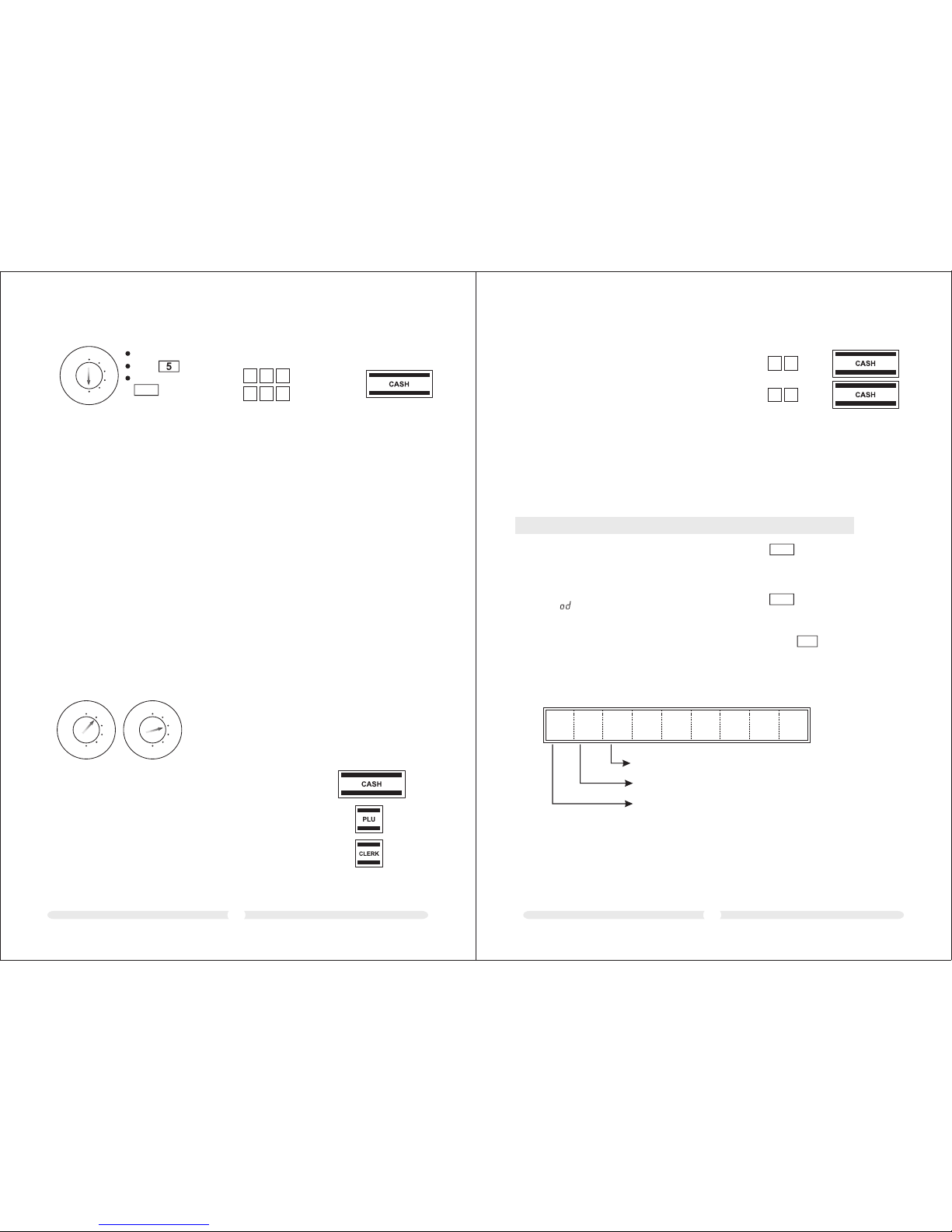
The c ash reg ister s tores a ll the de partm ent or it em-re lated s ales tr ansac tions . Sums re ceive d
on ac count , paid ou t, paym ents ma de in cas h, by EC ca rds, on c redit o r in fore ign cur renci es
are s tored a nd tota lled. S imila rly, ope ning t he draw er for no s ale req uirem ents, r efund s,
dis count s and cor recti ons/v oids ar e also st ored. T his da ta can be p rinte d out in va rious w ays
in ca sh regi ster re ports .
10 Cash Register Reports
● X-r eport s are int ermed iate re ports w hich ca n be prin ted out s evera l times b ecaus e the
res pecti ve memo ry is not d elete d after p rinti ng such r eport s. The ke y swit ch must b e
set t o posit ion X to pr int X-r eport s.
● Z-r eport s must be k ept for t he reve nue aut horit ies. Wh en a Z-r eport i s print ed, the
res pecti ve memo ry is del eted, w hich me ans tha t the gra nd tota l is rese t to zero .
The refo re, Z-r eport s can onl y be prin ted onc e. The ke y switc h must be s et to pos ition
Z to pr int Z-r eport s.
10.1 Ba sic inf ormat ion
Cas h regis ter rep orts ca n be prin ted as X or Z -repo rts.
10.2 Ov ervie w of cash r egist er repor ts
REG
X
Z
LOCK
PRG
REG
X
Z
LOCK
PRG
Type o f report Print by p res sin g
X1 Z1 D ay's fi nanci al repo rt
X Z PLU r eport , day
X Z Cle rk repo rt
X2 Z2 M onthl y finan cial re port
X Z Trai ning re port
9
9
8
8
9.3 Dea ctiva ting Traini ng mode
REG
X
Z
LOCK
PRG
55 55.5 5
Inp ut Disp lay Con firm by p ressi ngSe t the k ey to PR G
Pre ss 6 time s
Con firm by p ressi ng
CASH
5
5
555
5
11 Eliminating Problems
11.1 E rro r messages in the display
Err or mes sag es app ear in t he dis pla y in the case of i ncor rect oper atio n.
Err or mes sag e Caus e Corr ect ive me asure
E
5E C_ E
Wron g key pr essed.
A password h as bee n
pro grammed f or cle rk log -on.
Pre ss to cl ear error messa ge.
The n pres s the corre ct key.
CLEA R
Pre ss to cl ear error messa ge.
Ent er the 1 -digit cl erk nu mber and
6-d igit cler k pass word. Con clud e
by pr essi ng .
CHEC K
11.2 D isp lay i ndi cat ors
The a ctiv ation or de acti vation of c erta in functi ons is i ndicate d in the d ispl ay by th e
res pective d ot.
. . .
Trai ning mode i s acti vated (refer to C hap. 9 )
Rec eipt prin ting i s deac tivated ( refe r to Chap. 8. 14)
Cle rk sys tem is acti vate d (refer to Chap. 7 )
Pos sible c ause Co rrect ive mea sure
CLEA R
Page 19
3231
11.3 P rin ter m alf unc tio n
In th e event o f a print er malf uncti on, swi tch off t he cas h regis ter imm ediat ely and d iscon nect
the p ower pl ug from t he powe r socke t.
The p aper ro ll is not i nsert ed corr ectly.
The re is a for eign bo dy in the p rinte r
mec hanis m.
Ins ert the p aper ro ll agai n.
Rem ove any f oreig n bodie s.
Att entio n: Remo ve the fo reign b ody ver y
car efull y. Do n ot use a k nife,
scr ewdri ver or an ythin g simil ar.
Nev er use fo rce. Th is cou ld
dam age the p rinte r mecha nism.
Pos sible c ause Co rrect ive mea sure
Swi tch the c ash reg ister o n again a nd comp lete a re gistr ation . If the pr inter e rror co ntinu es to
occ ur, cont act the s ervic e centr e.
Att entio n: This o pera tion re sets th e cash re gist er to its d efa ult st atus an d delet es all th e
pro gram med set tings ,cash r egist er repor ts and re port me morie s!
11.4 R ese tti ng th e cas h reg ist er to it s def aul t set tin gs
REG
X
Z
LOCK
PRG
951 7
Inp ut Disp lay Con firm by p ressi ng
9
7
5 1
Set t he key to P RG
Pre ss
Ent er the fo llowi ng
seq uence o f digit s:
9 5 1 7
Con firm by p ressi ng
CLEA R
RA
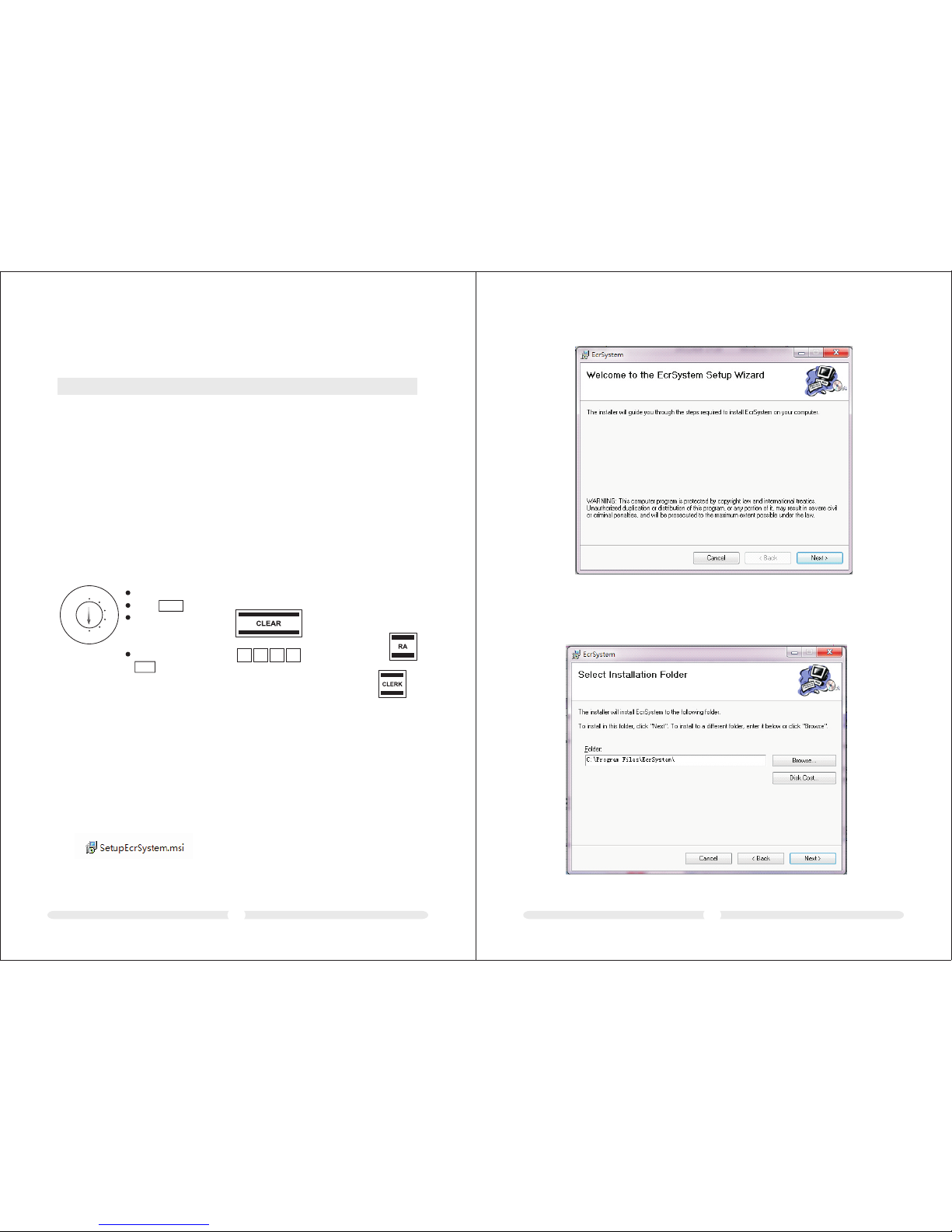
2. Insta lli ng…
12 PC Software In struction
There is a C D dis c bes ide s the E CR ma chi ne. I t inc lud es PC s oft war e. Us ers c oul d
edit dat a, ma ke sy ste m con fig ura tio n, up loa d and d own loa d dat a, pr int r epo rts a nd
backup d ata w ith t his s oft war e.
12.1 In stall t he Prog ram
1. Doubl e cli ck on t he fi le “se tup .ex e”
3. Click o n [Ne xt]
Page 20
12.3 Da ta Back up and Recovery
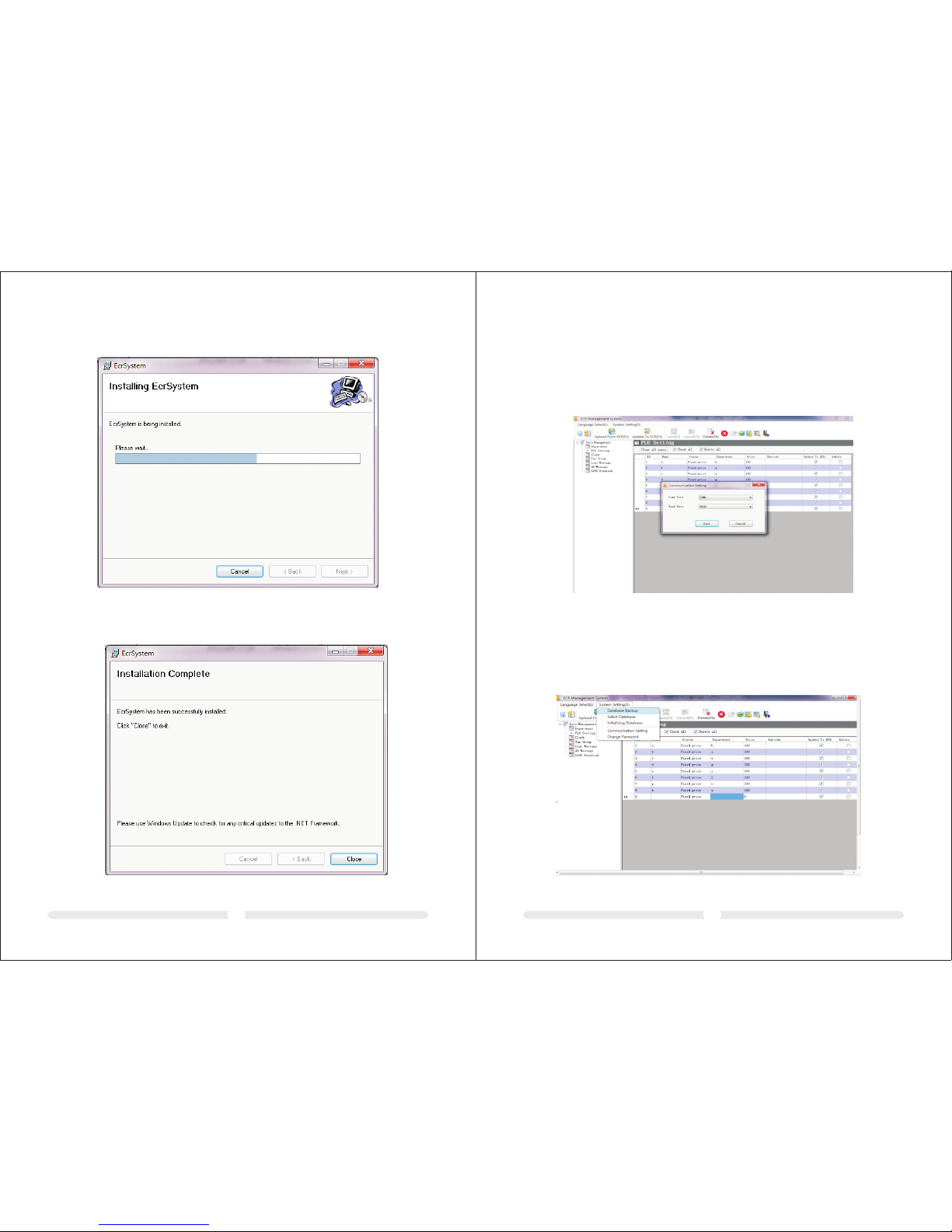
In order t o pre ven t dat a los t, pl eas e bac kup y our d ata , do it a s fol low s:
1. right c lic k " sys tem s ett ing ", ch oos e " dat a bac kup "
4. Click o n [Ne xt]
3433
5 Click on [ Fin ish ]
12.2 Co mmuni catio n Setting
The ECR co mmu nic ate s wit h PC so ftw are t hro ugh C OM po rt. T hen the baud rate
of PC soft war e sho uld b e con fig ure d to be t he sa me as E CR ma chi ne.
Click on “C omm uni cat ion S ett ing” i n the l eft -si de na vig ato r. Sel ect t he co rre ct
COM port ( per a ctu ali ty) a nd 96 00 ba ud. C lic k “Sav e” to sa ve ch ang es.
Page 21
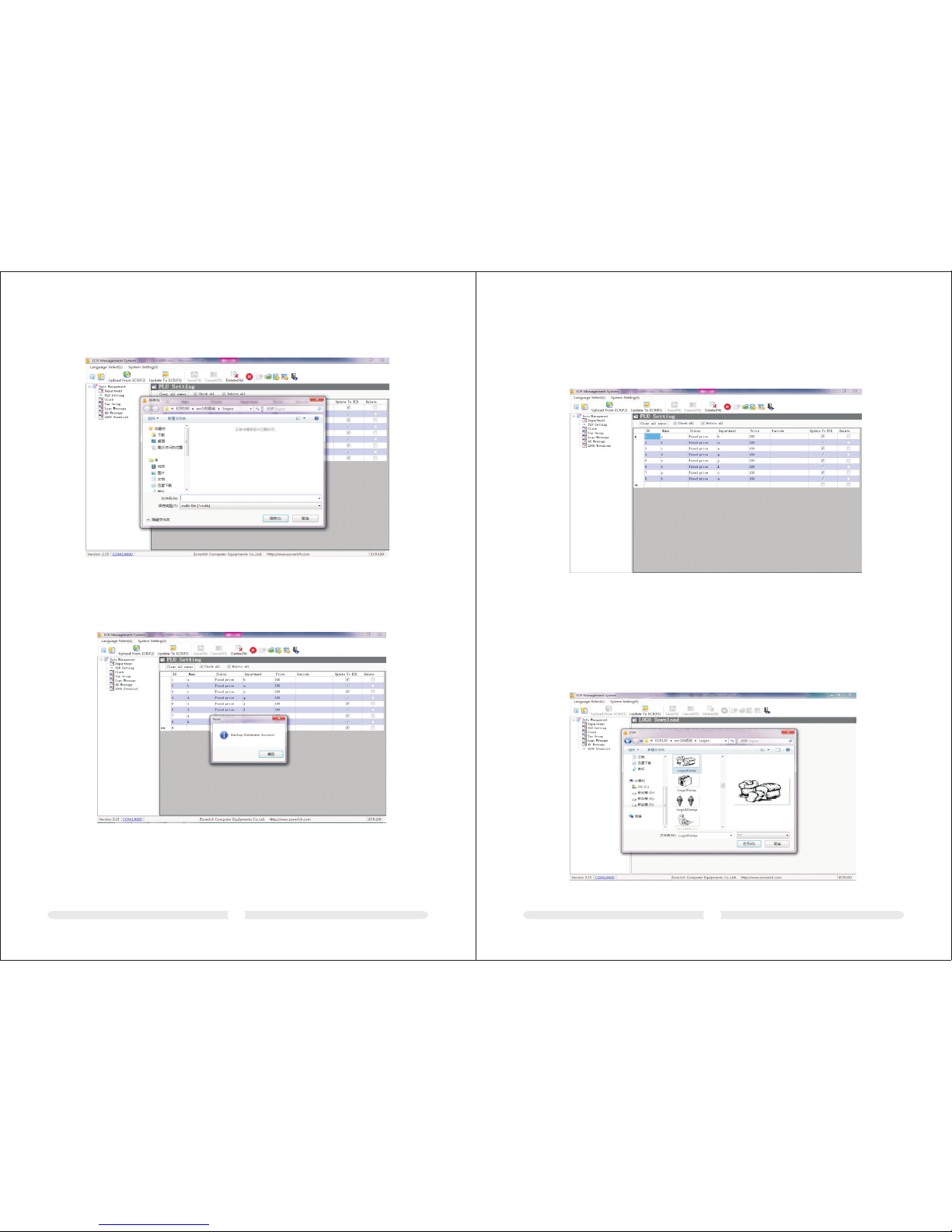
12.5 do wnloa d LOGO
ECR100 c an pr int L OGO , you c an do wnl oad y our L OGO f rom y our P C to EC R
( LOGO siz e:B MP mono color, 3 82* 200 pixel, one ECR can download only one
LOGO)
1. click “ LOG O Dow nlo ad” --- >"S ele ct fi le" , cho ose t he pi ctu re( log o)
2. click “ Upd ate t o ECR ”, th en it w ill t o you r ECR .
3635
2.save t he da ta in y our l iki ng di sk wi th a na me.
3. after t he op era te, i t wil l com e out " d ata b ack up su cce ss"
commod ity i nfo rma tio n inc lud e DEP, TAX, C LER K, PL U
please s et 4k ind s of ta x fir stl y, the n set 8 cle rks , 16D EPS , the n set 2 00P LU. After all the
settin g, pl eas e cli ck "u pda ta to E CR" , as fo llo ws:
12.4 co mmodi ty info rmation input
Page 22
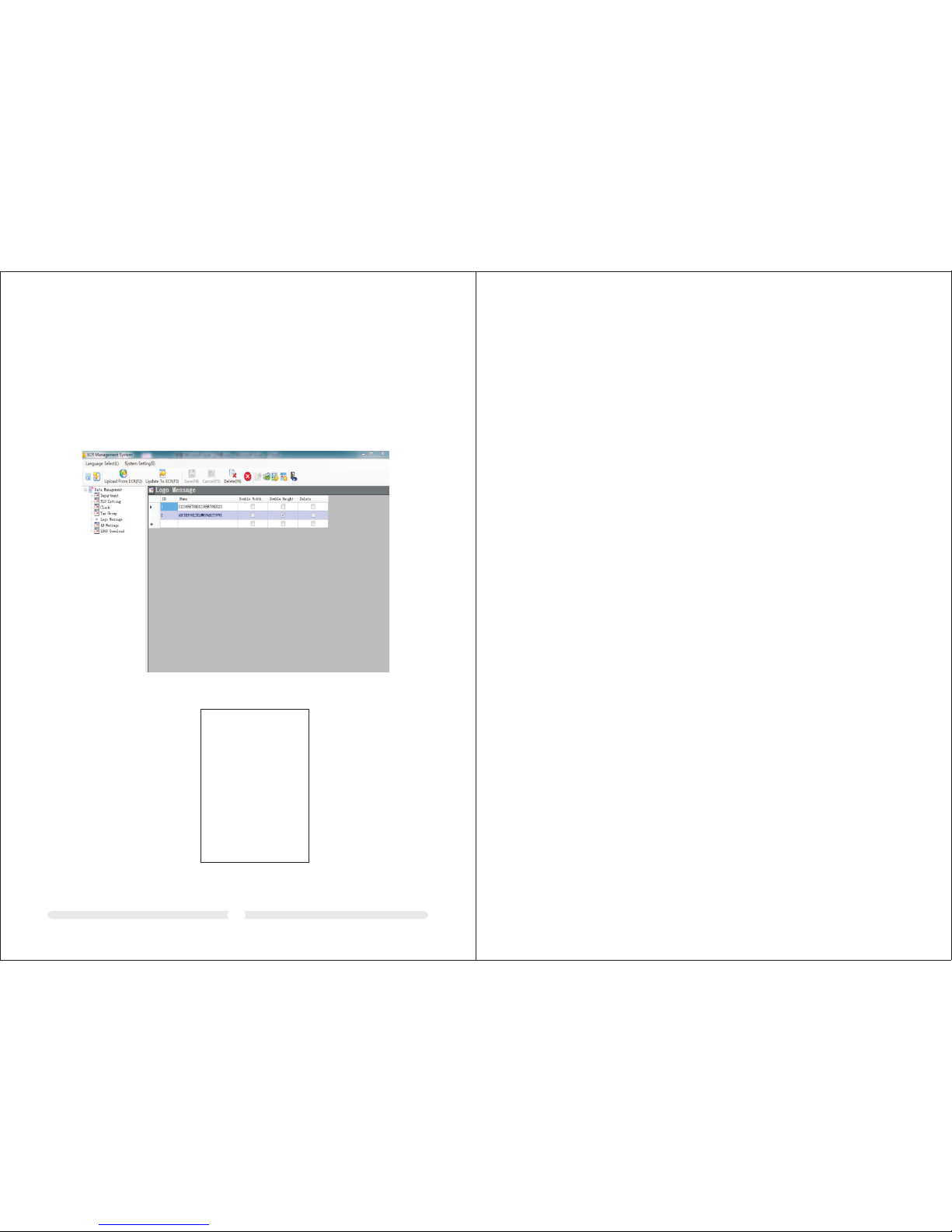
12.6 Re ceipt t itle lo go message and tail AD message setting
By this so ftw are , use rs ca n add c ont act a nd AD in fo th rou gh lo go me ssa ge an d AD
messag e.
There ar e max imu m 4 row s, 24 c har act ers p er ro w or 12 d oub le wi dth c har act ers .
How to ope rat e:
1, Click l ogo M ess age ,in put l ogo m ess age i n the r igh t for m. Se lec t Dou ble Wi dth
and Doub le He igh t to mo dif y fon t,c lic k Upd ate t o ref res h ECR L ogo m ess age .
The m eth od to d own loa d tai l AD mes sag e is sa me as above.
Exampl e:
37
CLER K#01
DEP0 1 5.00
TOTAL 5.0 0
CASH 5 .00
04-2 6-2011 1 2:00
*** ***** ***** *** ****** **
*** ***** ***** *** ****** **
* ABCDEFG HIJKL MNOPQ RSTUV WX *
* ABCD EFGHI JKLMN OPQRS TUVWX *
A B C D E F G H I J K L
A B C D E F G H I J K L
*
*
*
*
*** ***** ***** *** ****** **
*** ***** ***** *** ****** **
* ABCDEFG HIJKL MNOPQ RSTUV WX *
* ABCD EFGHI JKLMN OPQRS TUVWX *
A B C D E F G H I J K L
*
*
 Loading...