

Page 1
Little Speakers...Little Speakers...
BIG SOUND!BIG SOUND!
BIG SOUND!
3
1
Specifications
Product Size 3.96in x 2.8in x 1.02in
Bluetooth Version
Bluetooth Distance
Power Output Rating
Charging Voltage
Operating Voltage
S/N
THD
Transmit Frequency
Music Playing Time
Speaker Parameter
Battery
Bluetooth
1. Turn ON by holding the button for 2 seconds. A voice prompt will indicate Boom Box is on and blue
LED light will flash when ready for pairing.
Item # 69901
(100mm x 71mm x 26mm)
5.0
32.8ft (10m)
1W
5V
DC3.3V ~ 4.2V
>90DB
<1%
150-16KHZ
~ 120 min
1.18in (30mm)
3.7V / 300mAh
®
Pairing
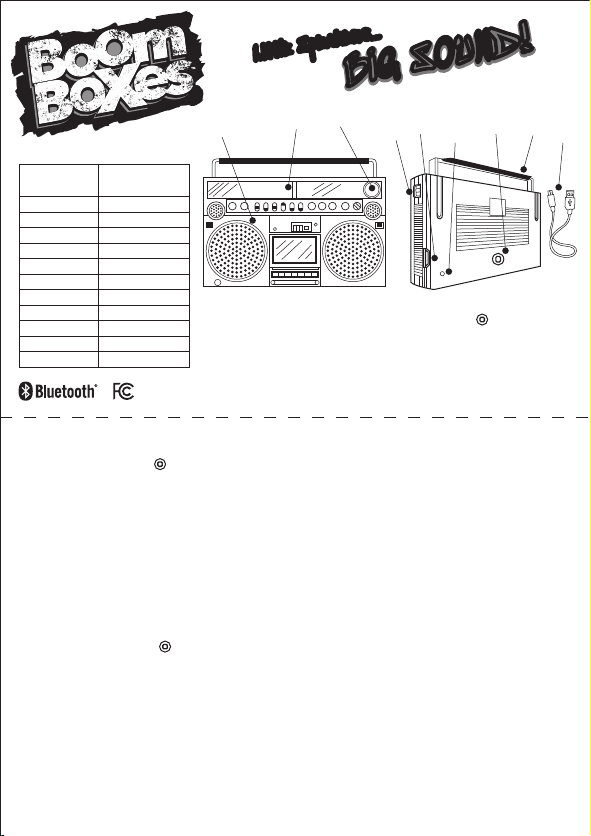
1. Speaker
2. Equalizer
3. Volume Control
4. Hook
5. Micro USB Port
2
6. Power/Pairing/Charging Indicator
7. Power/Sync Button
8. Kickstand (Handle bends backward)
9. Mini USB Charging Cable
5
4
2. Activate your phone or other device’s Bluetooth function.
3. Locate and connect to the Bluetooth speaker, named “BOOMBOX”.
4. When the two devices are connected, a voice prompt will indicate a successful connection and blue
LED light will be solid.
5. If you are unable to play music, refresh the Bluetooth connection.
6. Adjust the volume by using the volume control dial on the front of the Boom Box.
7. When the two devices are disconnected, a voice prompt will indicate disconnection and blue
LED light will flash.
8. Turn OFF by holding the button for 4 seconds. A voice prompt will indicate Boom Box is off and blue
LED light will turn off.
9. The Boom Box will turn off automatically 5 minutes after disconnected from Bluetooth.
Charging the Battery
1. When the speaker is low on battery, a voice prompt will indicate a low battery every 2 minutes until
it is plugged in to charge.
2. Insert the charging cable into the Micro USB port, then connect the USB plug into a 5V/300mAh
power source. A red LED light will turn on.
3. Once fully charged, the red LED light will turn off.
7 8
6 9
Page 2
Changes or modifications not expressly approved by the party responsible for compliance
could void the user’s authority to operate the equipment.
This equipment has been tested and found to comply with the limits for a Class B digital
device, pursuant to Part 15 of the FCC Rules. These limits are designed to provide
reasonable protection against harmful interference in a residential installation. This
equipment generates, uses and can radiate radio frequency energy and, if not installed
and used in accordance with the instructions, may cause harmful interference to radio
communications. However, there is no guarantee that interference will not occur in a
particular installation.
If this equipment does cause harmful interference to radio or television reception, which
can be determined by turning the equipment off and on, the user is encouraged to try to
correct the interference by one or more of the following measures:
- Reorient or relocate the receiving antenna.
- Increase the separation between the equipment and receiver.
- Connect the equipment into an outlet on a circuit different from that to which the
receiver is connected.
- Consult the dealer or an experienced radio/TV technician for help.
Warning: This device complies with Part 15 of the FCC Rules. Operation is subject to
the following two conditions: (1) this device may not cause harmful interference,
and (2) this device must accept any interference received, including interference that
may cause undesired operation.
We hope you enjoy your Boom BoxesTM. For any inquiries or concerns, please don’t
hesitate to contact us.
NSI International, Inc. 30 West 22nd Street, 3rd Floor, New York, NY 10010
Customer Service Department: (888) 425-9113 or [email protected]
Website: www.nsi-intonline.com
© 2019 NSI International, Inc., and NSI Products (HK) Limited.
All Rights Reserved. Made in China.
Manufactured by NSI International, Inc. New York, NY 10010
© 2003-2019 by Bluetooth SIG, Inc. The Bluetooth word mark and logos
are owned by Bluetooth SIG, Inc. Other third-party brands and names
are the property of their respective owners.
 Loading...