

Page 1
User Instructions
Intended Use
General Safety Warning
Item
Description
Qty.
20st
MAXIMUM
Safety Precautions
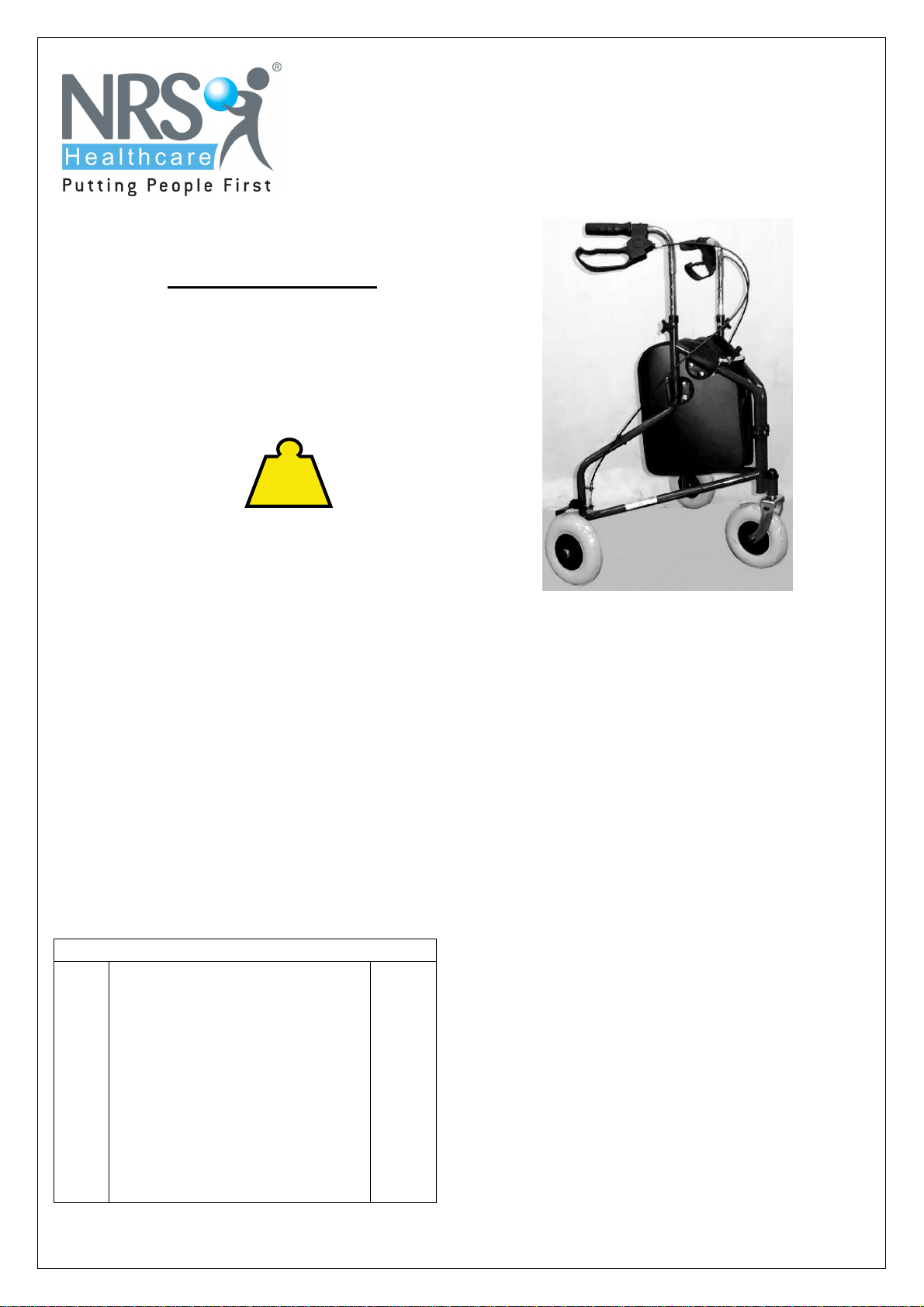
M99126 NRS 3 Wheel Rollator with Bag
Please ensure these instructions are fully read
and understood before use.
Retain these instructions in a safe place for
future reference.
USER
WEIGHT
127kg
The NRS 3 Wheel Rollator comes
complete with Bag, and is designed to
provide support and assistance to those
unable to, or who lack the confidence to,
walk without some level of support. This
rollator is intended for indoor and outdoor
use.
Unpacking
Check all parts carefully before assembling
the product.
Do not assemble if any parts are damaged.
Do not assemble if any parts from the list
below are missing.
CONTENTS LIST
1 Rollator Frame with braked
2
3
4
handles
Bag
Hand wheels with:
bolts/plastic washers
User Instructions
1
1
2
1
Page 1
· Do not exceed the maximum user
weight limit of 127Kg (20st).
· Ensure Rollator is locked open before
use.
· Check the brakes before use.
· Only use the rollator as a walking
support.
· Do not use the rollator on stairs or an
escalator.
· Exercise caution when there is a
heavy load in the bag (max. 5Kg) or
basket /tray (max. 5Kg)
· Loads should only be transported
using the bag (where fitted). Do not
hang heavy items from the handles as
this may affect the stability of the
Rollator.
· Do not use the rollator to walk
backwards.
· Caution must be taken when
negotiating curbs and other obstacles,
or when using on sloping, uneven or
slippery surfaces. Failure to do so
may result in a serious risk of a fall or
injury.
· When using the rollator in a stationary
position, the brakes must be locked.
Page 2

Safety Precautions (continued)
· Do not perform any adjustments to the
rollator while it is in use.
· Wheels must be in contact with floor at all
times.
Assembly and Height Adjustment
NOTE: Before assembly consult a suitably
qualified healthcare professional regarding the
correct height adjustment for maximum
support; and correct brake activation.
1. Open the Rollator into operating position
(see overleaf)
2. Insert the Handlebars into the framing tubes
and set to the correct height as follows;
· Stand upright behind the rollator with your
shoulders relaxed and your arms by your
side, looking straight ahead.
· In this position, the handgrips of the rollator
should be adjusted to a height level with
your wrists.
· This will position your arms at an
approximate 20º to 30º bend when using
the rollator.
· Check that the holes in the handle bars and
the frame are aligned.
· Place the supplied bolt through the aligned
holes in the handlebar and frame. The
holes in the frame are hexagonal in shape
to accommodate the head of the bolt.
· Place the washer over the bolt and then
apply the hand nut. Hand-tighten firmly, but
do not over tighten
3. Check the brakes thoroughly before use.
NOTE: The brakes are factory set, and if
assembled correctly do not need adjusting.
To check; Apply and release the parking
brake on each side 10 times (see diagram
5b) The brake should grip the wheel and
prevent any movement when applied, when
released, the gap between the brake and
the wheel should be between 1 to 3 mm. If
either of the above conditions is not correct
adjust the brakes as detailed in the
maintenance section, and re-check.
4. Fit the bag to the frame as shown in the
photograph on page 1 using the poppers to
fasten.
Using the 3 Wheel Rollator
Opening: Fold out the Rollator and push down
the cross bar fully. (See Diagram 1a)
NOTE: It is very important that the crossbar
is pushed fully down to prevent the Rollator
folding during use.
Folding: Pull up the cross bar. (See Diagram
1b) The Rollator will then close inwards for
storage. Take care to keep fingers out of frame
when folding. The bag should be empty before
folding.
Walking: This unit is to be used as a mobility
aid, creating a natural gait as the user walks
securely with their primary weight distribution
between the handlebars and with the unit in
front of the user.
Braking: The locking brakes are intended to
assist the user to control the Rollator. To apply
the brakes when in motion, pull up both of the
loop handles. (See diagram 2a).
To apply the parking brakes, push down the
handles until they lock down. A distinct click
indicates that the brake is in the correct
position. (See Diagram 2b) It is important that
both the brakes are put in the parking position
when they are to be used. Lift up the handle to
release.
If you apply the parking brakes, or pull up the
brakes to stop whilst moving, and the rear
wheels on the rollator still move, stop use
immediately. Do not use again until the brakes
have been checked and correctly adjusted.
Refer to the maintenance section.
Page 2
Page 3
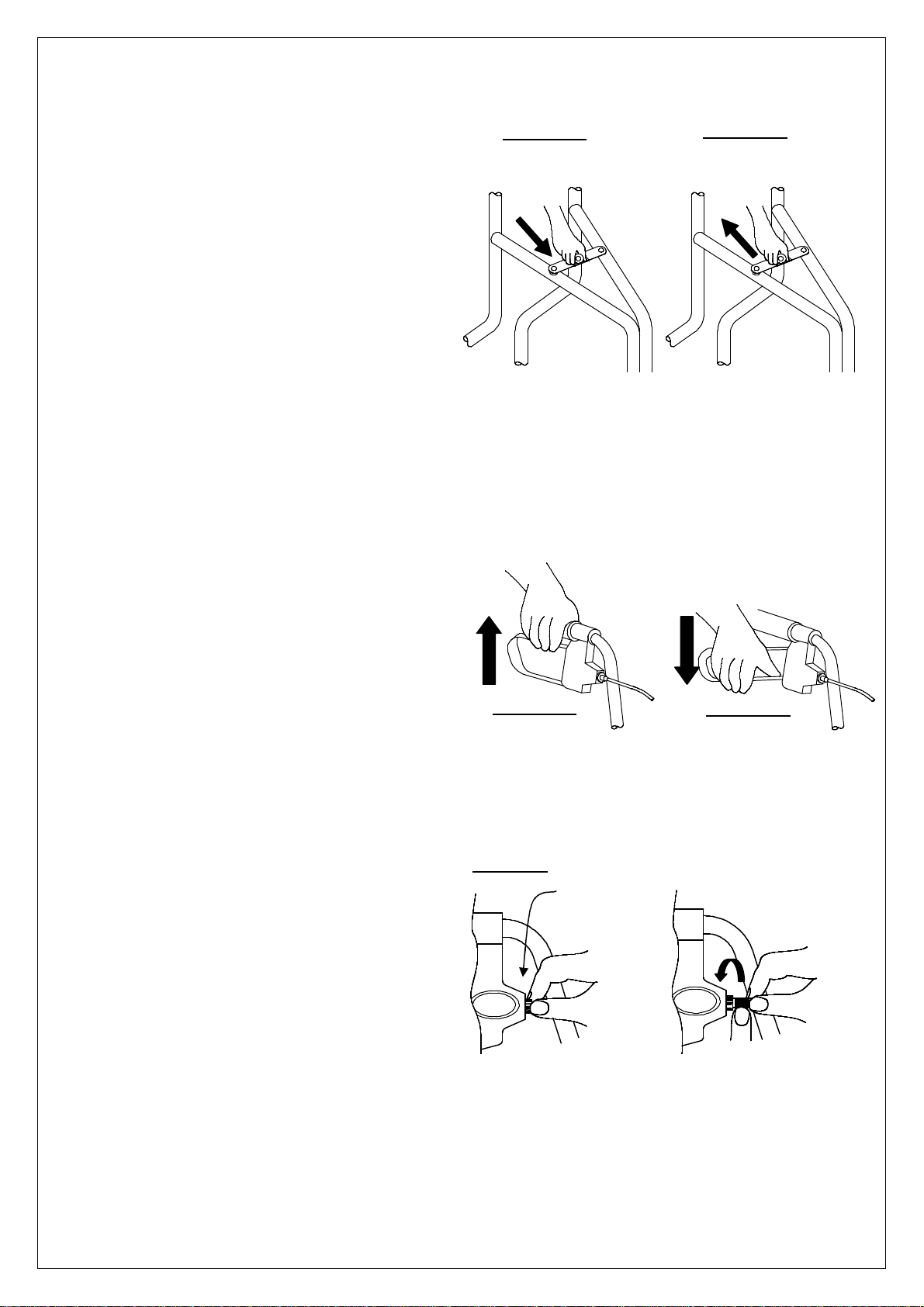
Diagram 3
Maintenance
· Regularly check for wear and tear and that
all screws and knobs are securely fastened.
· Check brakes are working satisfactorily by
both walking and squeezing the brakes and
by braking to a stop.
· Check the parking brakes by pushing the
handles into the locked position, and then
trying to push the rollator.
· If the brakes do not completely lock the
wheels the brakes need to be adjusted, as
detailed below.
· Brake Adjustment: The brake adjusters are
situated in front of the brake handles, as
shown in diagram 3. To adjust, loosen the
lock nut, turn the adjuster anticlockwise to
tighten the brake then retighten the lock nut.
· For correct adjustment the brake
mechanism should not touch the wheel, but
the gap should be no greater than 3mm.
· Caution: After making any adjustments to
the brakes, you must test them before the
rollator is used.
· If adjustment does not tighten the brakes, do
not use the rollator. Contact your dealer or
NRS Customer services, details below.
Cleaning Instructions
· Clean regularly, wipe down with a soft, non
abrasive cloth.
· Ensure there is no build up of dirt or debris
around the axle, brakes and wheels.
Diagram 1a
Push down fully to lock
the rollator in the open
position
Diagram 2a
Locknut
Diagram 1b
Pull up to fold the rollator.
Take care to keep fingers
away from frame when
folding
Diagram 2b
Turn Adjuster
Anti-clockwise
to tighten brake
Page 3
Page 4

www.nrs
-
uk.co.uk
The NRS 3 Wheel Rollator with Bag is part of a range of over 3000 daily
living aids available from NRS Healthcare.
To view the full range please visit our website www.nrs-uk.co.uk or
request a catalogue from the number below
IMPORTANT
For information on how to obtain the User Instructions in other languages
and
formats for use by people with visual, reading or cognitive impairments,
please contact: [email protected] or telephone 0845 120 4522.
Additional copies of this user instruction are available on our
website:www.nrs-uk.co.uk.
Manufactured for
NRS Healthcare
Sherwood House, Cartwright Way,
Forest Business Park, Bardon Hill,
Coalville, Leicestershire. LE67 1UB UK
Tel. Main Office: 0330 100 00 98
Tel. Customer Services: 0845 120 4522
Email: [email protected]
Email: [email protected]
UI/M99126/11/13/Iss4
Page 4
 Loading...