

Page 1

65” Interactive Touch Display
Page 2
Overview
Stunning Enclosure
The flawless enclosure
is crafted from black
aluminium and assembled
in segments so the
enclosure can remain
sexy and sleek with its
rounded corners. It also
has a polymer rear cover
to keep it super slim and
lightweight.
Connectivity
The rear of the screen
features AV inputs that
allow for more permanent
connections such as AV in
and out, Audio in and out,
RS-232, VGA, DP, SPDIF,
HDMI, YPbPr, USB.
Built-in Android PC
Featuring a powerful
integrated PC running
Android 5.0 with 2GB RAM
and 16GB ROM.
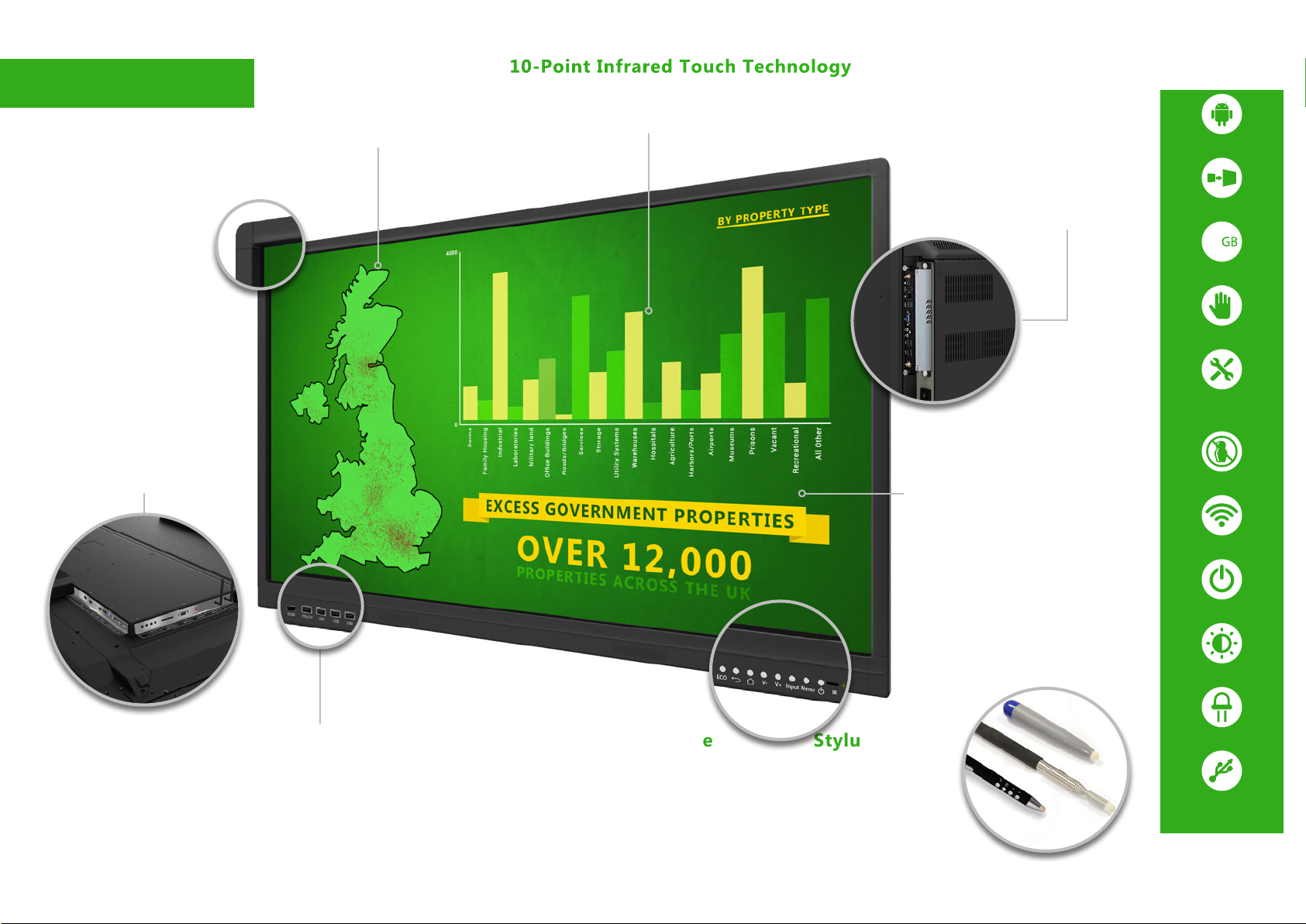
10-Point Infrared Touch Technology
Using the most durable and robust commercial touch
technology available. Use anything such as your finger,
or one of the styluses included, as your pointer.
Optional OPS PC
For a seamless solution an
OPS PC can be integrated into
the rear of the display. This
allows you the flexibility to
choose between Android and
Windows and switch effortlessly
between the two. Available with
a cost effective OPS PC or a
more powerful OPS PC.
LED Backlight
The long lasting eco-friendly
LED backlight focusses on
optimum brightness and
contrast; causing no eye
strain as you would get from
projectors. The panel and
backlight have a lifespan in
excess of 80,000 hours.
Integrated Android PC
Optional OPS PC
16
Integrated 16GB Storage
10 Touch Points
5 Year
Onsite Warranty
(UK Mainland Only)
No Shadow
5-GHz Integrated Wi-Fi
Etched Glass
Improves tactility for
smooth touch gestures.
The anti-glare nano
coating also diffuses
external light so that
images and videos are
much clearer.
Easy Access Ports
and Controls
Quickly and conveniently connect
your own laptop to the screen
using the front facing HDMI and
Touch USB ports. There are
also USB ports connected to the
internal PC for easy access.
Power/Menu
Buttons
Free MeetingPad Software
State of the art ‘MeetingPad’ Software brings
the Interactive Touch Display to life. No
additional hardware is required as you wireless
mirror and fileshare between your devices
and the screen. The wireless features are all
compatible with Android, Apple and Windows
devices and even allow you to annotate the
screen from your device.
Freeze Frame Function
While your laptop is connected
you can freeze the image on
screen so that you can continue
to work independently on your
laptop.
Stylus Set
Included
Two special ‘Smart
Pens’ are included as
well as an extendable
pointer and two extra
magnetic styluses for
free.
Low Power Consumption
Anti-glare Glass
LED Backlight
VGA, HDMI, AV, Audio, YP-
bPr, RS-232, DisplayPort,
SPDIF & USB Connectivity
Page 3

Free MeetingPad Software
Wireless Mirroring
Connect to the Touch
Screen from any
smartphone, tablet,
laptop, PC or Mac
wirelessly. Using mobile
devices you can mirror the
display in both directions,
and even take control
of the Touch Screen,
from anywhere on the
same Wi-Fi network.
Mirroring via 5GHz allows
users the best wireless
experience available
with fast mirroring and
less interference. All of
this without the need
of additional wires or
transmitters.
File Sharing
Once your device and
the Touch Screen are
wirelessly connected
you can quickly and
easily share content to
and from your device.
Use the Eshare app to
show videos, images and
audio files stored on your
smartphone, tablet, laptop
or PC. You can also
share files from the Touch
Screen to your device
using various methods
such as email or scanning
a QR code. Files can
easily flow between the
Touch Screen and your
devices.
Multiplatform
Compatibility
Android, Apple and
Windows devices
are compatible
to connect with
‘MeetingPad’
No Additional
Hardware
Required
Wirelessly
mirror and
share files straight from
your device without the
need for any additional
hardware, such as
transmitters or wires.
However there is a handy
Screen Projection Dongle
USB included that makes
mirroring from your PC
or Mac fast and simple,
without the need to install
any software.
Flexible Working Tools
Personalise your experience by
changing the background colour
of the display, as well as the
colour, thickness and opacity of
the lines with your drawing tools.
Whiteboard
Replaces the traditional
marker board in meeting
rooms and classrooms.
Annotate, draw and
create meeting magic
with the ultimate
presentation tool.
Unlimited
Connections
There is no limit
to the amount
of mobile
devices that can
simultaneously
connect
wirelessly to the
screen.
Snipping
Tool
Crop segments
of the display
to shift focus to
more important
sections of
documents,
screenshots or
webpages.
Web Browser
Surf the web with the
integrated internet browser.
Scrolling Text
The marquee text tool is fun and
innovative way to make important
messages stand out, such as setting up
welcome messages for your visitors.
Save/Home/
Whiteboard
Pen/Touch
Smart Pen Stylus
There are two interactive ‘Smart Pens’
included. These special styluses allows you
to control the display wirelessly from anywhere in the
room. You can change the pen tool colour, save annotated
documents, navigate through a PowerPoint presentation and go back to the
‘MeetingPad’ home screen.
Annotations
Make notes on
your existing
documents,
screenshots and
even webpages.
Expand and
innovate your
content with ideas
and concepts.
Previous page
Next page/
Start or stop
presentation
Page 4

Full Android Control
Experience the Android revolution with the powerful
integrated Android PC that runs everything. Preview and
switch between external sources and even annotate over
images, presentations, documents and webpages – either
running from the ‘MeetingPad’ or from external devices.
Our innovative ‘MeetingPad’ solution controls all functions
allowing you to achieve state of the art interactive whiteboard
functionality. Show videos, play music, and even run your
apps; ‘MeetingPad’ brings the power to change your meetings
forever to your fingertips.
Wireless Mirroring
Mirror what is on your Windows, Android or Apple device
without the need for messy cables with the wireless mirroring
feature this display offers. Great for presenting and sharing
content during meetings it is done using your devices native
streaming platform – Screen Mirroring for Android, Miracast for
Windows and AirPlay for Apple. Mirroring the display from your
mobile, tablet or laptop has never been easier.
Freeze-Frame
Function
If you are running the Interactive Touch Display from your laptop
you can “freeze” the content mirrored from your device, This
allows you to use unplug your laptop and use it independently
from the screen with the content still being on display.
Optional Windows
OPS PC
Experience the best of both worlds with an upgrade to add
a Windows OPS PC directly into the rear of your Interactive
Touch Display. Having the world most popular operating
system in Windows just a switch away from our ‘MeetingPad’
software offers the best in flexible working. Upgrading allows
you to save space and avoid a tangle of messy wires that
you use to get with attaching other laptops or PCs to your
Interactive Touch Display.
Page 5

Features
10 Point Touch Easy Access Ports
10
Touch
Points
Replace
Projectors
Having up to 10 touch
points allows for a wider
variety of applications than
ever before. This kind of
functionality allows you to
manipulate images, zoom
in an out as well as perform
many other touch gestures;
much like you would with a
smartphone or tablet. It also
allows for multiple users
interacting with the screen
at one time, ideal for group
interaction and learning.
Now is the time to replace
old fashioned projector
systems with an Interactive
Touch Display that has a
series of advantages over
the antiquated presentation
technology. Built to last
over 16 times longer than
a projector bulb and with
drastically improved contrast
and sharpness the images
quality does not compare.
There are also no annoying
shadows cast on the display
that you have with projectors.
and Controls
Built in‘MeetingPad’
Software
If you don’t want to use
the internal PC you can
conveniently connect a
laptop, or another external
device, to the display’s front
ports. For more permanent
connections there are a
variety of AV inputs on the
rear of the unit. The display
also has clearly labelled
buttons on the front face.
Bundled with the screen
is an easy to use meeting
software program. Designed
specifically for use with our
Interactive Touch Displays
this program combines
the annotation style of
traditional whiteboards with
the convenience modern
technology allows. You can
read, write, edit, compare
and most importantly
annotate a variety of images,
videos, PDF’s, Office
documents (Word, Excel, and
PowerPoint) simultaneously.
LED Backlight
The LED backlight used
is not only eco-friendly
but also ensures the
display has enhanced
brightness and contrast.
This technology increases
the lifespan and reduces
the power consumption by
around 30%. This form of
light technology is mercury
free; safeguarding this
screen’s eco friendliness.
Etched Anti-
Glare Glass
The etched glass diffuses
the light, increasing the
clarity of the screen and
makes text and images
much more legible even in
areas with strong light. The
display’s anti-glare nano
coating improves scratch
and impact resistance
of the screen as well as
improving tactility; essential
for group interactivity.
Page 6

Panel
Touch
Audio
AV Inputs/
Outputs
Mechanical
Environmental
Computer
Accessories
Display Size 65 inch
Resolution 1920x1080
Display Area (mm) 1428.48x803.52
Aspect Ratio 16:9
Pixel Pitch (mm) 0.744 x 0.744
Brightness (cd/m2) 500
Colour 16.7 million
Colour Depth 8 Bit
Viewing Angle 178°
Contrast Ratio 5000:1
Lifespan 80,000 Hours
Touch Technology Infrared
Touch Points 10
Glass Hardness 7H minimum
Response Time ≤5ms
Touch Point Accuracy ±1.5mm
Touch Resolution 32768x32768
Speaker Output 15W, 8Ω (x2 Front)
Front Inputs Touch USBx1, HDMI x1, USB x3
Side Inputs DisplayPort, Touch USB, HDMI x 2, VGA, Audio In, USB 3.0 x 2, AV In, YPbPr, SD Card, RS232
Outputs AV Out, Audio Out, SPDIF
Power Input AC110~240V (50Hz~60Hz)
Unit Size (WxHxD mm) 1516.5x930.46x105
VESA Holes (mm) 400x400/400x600
Net Weight (Kg) 66.25
Gross Weight (Kg) 77
Package Size 1730x1180x320
Operating Temperature 0°C to 50°C
Storage Temperature -30°C to 60°C
Operating Humidity 10% to 80%
Storage Humidity 5% to 95%
CPU ARM Quad-core Cortex-A53 1.4GHz
RAM 2GB DDR3
Architecture 64-bit
Graphic Engine Mali450MP4 (6-core) 450MHz
Hard Drive/Internal Memory (eMMC) 16GB
USB USB 3.0 x 2, USB 2.0 x3
LAN 10/100 Ethernet
Wi-Fi 802.11b/g/n/ac
OS Android 5.0.1
Included
Optional Wall Mount, Floor Stand/Trolley, Ceiling Mount
User Manual (CD), Remote Control, Power Cable, USB A Male to USB A Male Cable(x1), USB A Male to USB
B Male Cable (x1), Wi-Fi Aerial (x2), HDMI Cable, Magnetic Whiteboard Pen (x 2), Smart Pen (x2), Telescopic
Pointer (x1), USB Screen Projection Dongle (x2)
Technical Drawing:
Errors and omissions excepted
 Loading...