

Page 1
MՅୢ)
ؾتSS
NT-SPL5 Way S
User Manual
www.trendwoo.com
MADE IN CHINA
"OZRVFTUJPOTQMFBTFTFOEBOFNBJMUPTVQQPSU!USFOEXPPDPNGPSJORVJSZPSXFCTJUFWJTJU
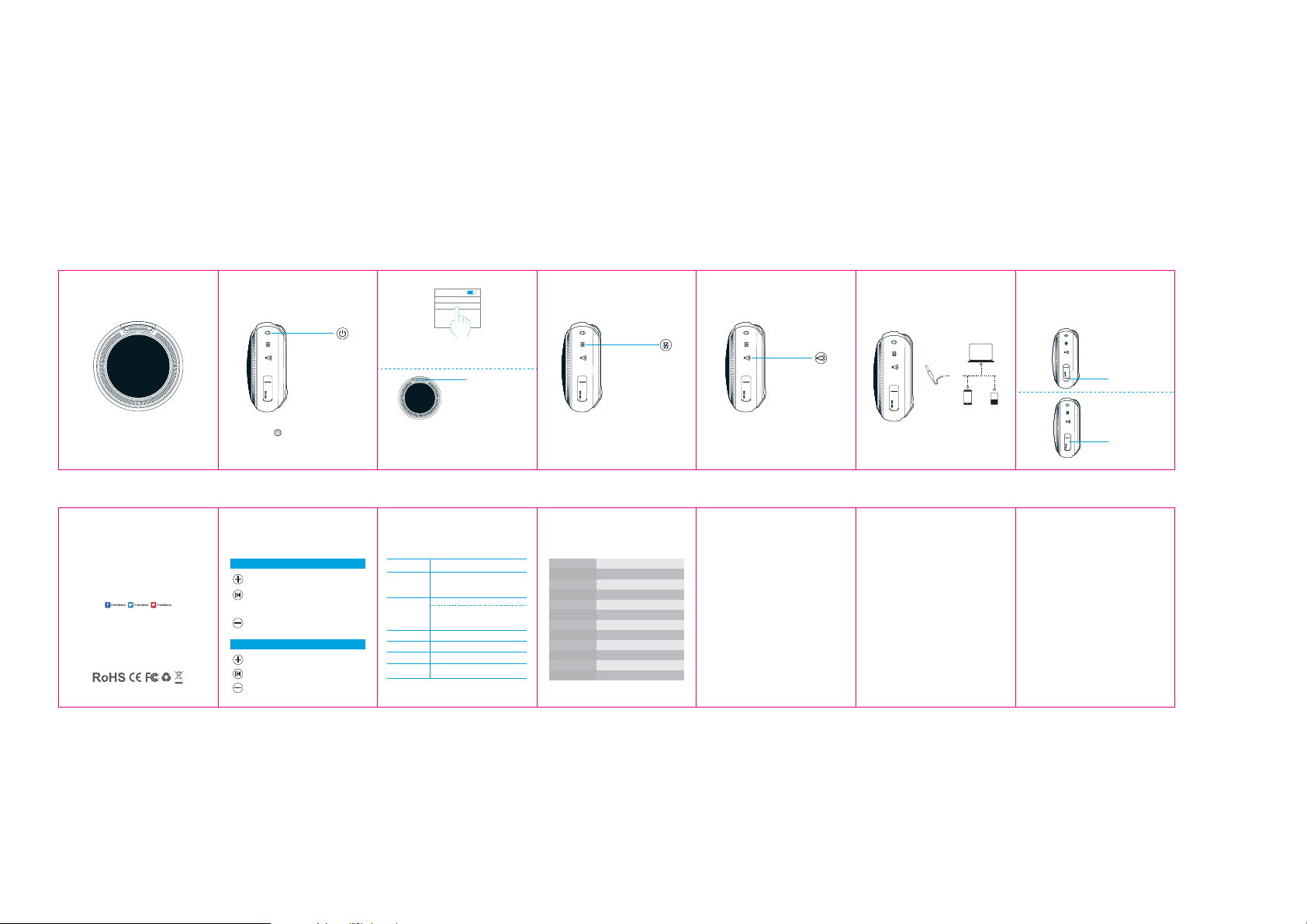
Bluetooth Pairing
On/O Button
Step 1Long press 3 seconds to power on.
The speaker enters the bluetooth searching status and
the blue indicator starts blinking.
Step 2 Choose the Device
Find the Shelly-S from the Bluetooth name list in the
phone
Step 3 Bluetooth Connected
In the phone, it shows Shelly-S is connected, and the blue
indicator light on, which means connection succeeded
and can start to play music.
Bluetooth
My Device
4IFMMZ4
Indicator light keeps on
Bluetooth Disconnection Light Mode
Bluetooth Disconnection Button
Press it to disconnect bluetooth, and Shelly-S gets back to
Bluetooth pairing mode.
Click to press the button, the green light mode will be
switched in circulation by normally on/ slow ash/ quick
ash/ light o.
Basic Operation LED Operation Product Specications Frequently Asked Questions
Bluetooth Mode
1. Short press for volume up
2. Long press for next track
1.Short press when playing music for Play/Pause
2.When a call is coming, short press to answer
3. When a call is coming, double press to refuse the call
4. During a call conversation, short press to hang o
1. Short press for volume down
2. Long press for previous track
AUX IN Mode
Short press for volume up
Short press for mute
Short press for volume down
Power On
Bluetooth Mode
AUX IN Mode
Wait for Pairing
Bluetooth Connected
Charging Status
LED DenitionStatus Description
The default mode is Bluetooth mode, and blue light
ashes and stays in searching status. If put 3.5mm
AUX IN cable, it will enter AUX IN mode, the green
light is on.
Play/Pause Blue light is normally on.
When it is over the bluetooth connection range, the
blue light ashes(back to pairing status). When the
speaker is in pairing mode for over 10 minutes, it will
power o automatically.
Green light is normally on
Blue light ashes
Blue light is normally on
Red light is on when charging. Green light is on
when it is fully charged
Product Name Shelly-S
Bluetooth Version
Bluetooth range
Driver Unit 4Ω 5W
Battery Capacity 800mAh
Audio Input 3.5mm AUX IN / Bluetooth
Working time 4-5Hrs(70% volume)
Charging time 喡3Hrs/ 0.5A charging current
Handsfree function Support
S/N
Dimension
Weight
Bluetooth 4.1
10m
≥75dBS/N
96*96*43mm
158g
Q:What kind of charger should we use for the speaker?
A:All common USB chargers can be used, while we suggest the ones
above 5V/1A.
Q:What if there is noise or discontinuous sound when
playing?
A:The speaker can be normally used within 10m under no obstruction
environment. If it is over 10m or with obstruction, there might be noise
or discontinuous sound.
Q:Why will the speaker shut down automatically when
it is working ?
A:When there is no bluetooth pairing or AUX IN within 10 minutes, the
speaker will shut down automatically to reduce power consumption.
Q: The speaker cannot connect the once-paired
cellphone.
A: First, remove the Shelly-S from the cellphone’s Bluetooth list and then
short press the Bluetooth Disconnection Button to restart paring mode.
Light Mode Button
AUX Connection Rubber Cover
How to easily close the rubber cover of the charging port?
Device
Q: What is the working sequence of the speaker?
A: The priority is AUX IN input, phone call in Bluetooth mode and then
playing music Bluetooth mode.
Q: The speaker cannot be started up in a normal
situation.
A: Please plug in the charger and try in a few minutes.
*This speaker supports mobile phones and tablet PCs etc. Here this User Manual is
illustrated based on mobile phones.
Insert the head of the
rubber cover rst
Press the middile part
of the rubber cover,
done!
Page 2

FCC Warning
This device complies with Part 15 of the FCC Rules. Operation is subject to the following two
conditions:
(1) This device may not cause harmful interference, and (2) this device must accept any
interference received, including interference that may cause undesired operation.
NOTE 1: This equipment has been tested and found to comply with the limits for a Class B digital
device, pursuant to part 15 of the FCC Rules. These limits are designed to provide reasonable
protection against harmful interference in a residential installation. This equipment generates, uses
and can radiate radio frequency energy and, if not installed and used in accordance with the
instructions, may cause harmful interference to radio communications. However, there is no
guarantee that interference will not occur in a particular installation. If this equipment does cause
harmful interference to radio or television reception, which can be determined by turning the
equipment off and on, the user is encouraged to try to correct the interference by one or more of
the following measures:
- Reorient or relocate the receiving antenna.
- Increase the separation between the equipment and receiver.
-Connect the equipment into an outlet on a circuit different from that to which the receiver is
connected.
-Consult the dealer or an experienced radio/TV technician for help.
NOTE 2: Any changes or modifications to this unit not expressly approved by the party
responsible for compliance could void the user's authority to operate the equipment.
 Loading...