

Page 1

Model 3
High Performance
96/24 D/A Converter
User Manual
Serial #: ___________________
Revisione 3 – 8/2/2000
(1 di 7)
Page 2
INSTRUCTION FOR USE:
CAUTION:
1.
Be careful handling the mains cable
Please, pay attention not to damage or stretch the mains cable. Otherwise,
risk of electric shock or damage can arise. Keep tightly the mains plug when pulling
it away from the wall socket, never pull the cable.
2.
Don’t remove the upper cover
To avoid shock hazard, please don’t remove the upper cover when the
(2 di 7)
Page 3
equipment is connected to a mains socket or to any other equipment. Refer to the
appropriate section of this manual for the digital input settings.
3.
Don’t insert any object into the equipment
Don’t insert metallic objects into the equipment and pay attention not to
throw liquids on it. Otherwise, risk of electric shock or damage can arise.
NOTE:
This equipment is not shipped with any mains or interconnect cable. This items’
quality is a main factor for the achievement of the best sonic performance; they
must be chosen taking into account the synergy with the other parts of the hi-fi
system.
NAMES AND FEATURES DESCRIPTION
1
2 3 4 5
(3 di 7)
Page 4

6
7
8
10
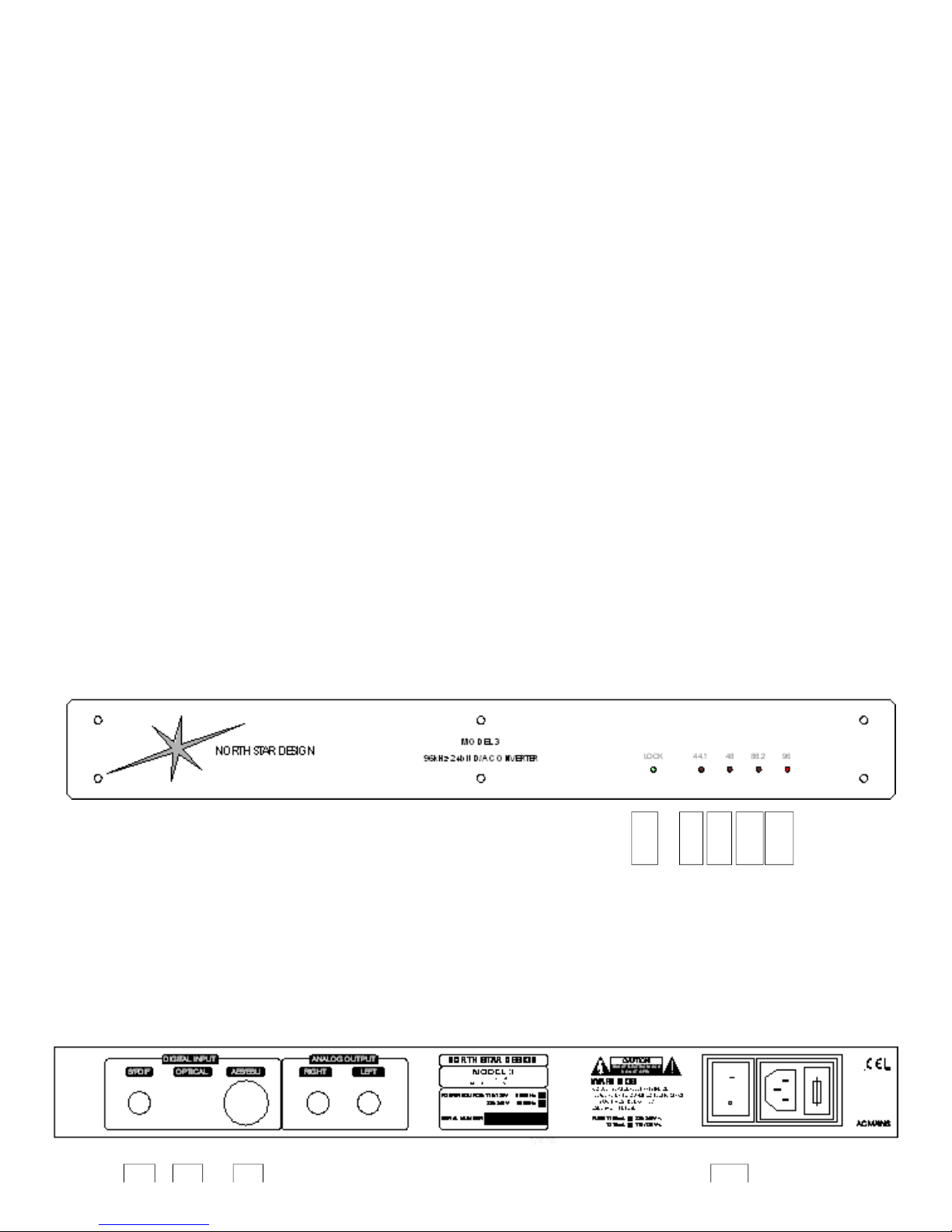
1. Lock Led
It will glow red when no signal is fed into any digital input. Feeding a digital
signal through an enabled input will turn this led to green.
2. 44.1 Led
This led glowing red while the lock led glows green means that a 44.1 KHz
sampling rate has been recognized on any enabled input, e.g. when connecting a
CD transport.
3. 48 Led
This led glowing red while the lock led glows green means that a 48 KHz
sampling rate has been recognized on any enabled input, e.g. when connecting a
DAT tape.
4. 88.2 Led
This led glowing red while the lock led glows green means that a 88.2 KHz
sampling rate has been recognized on any enabled input. This frequency is used by
many professional equipments .
5. 96 Led
This led glowing red while the lock led glows green means that a 96 KHz
sampling rate has been recognized on any enabled input, e.g. when connecting a
DVD audio (96/24) player.
6. Coaxial Input (S/PDIF)
Use this input to connect the DAC to the digital output of a source (CD
transport, DAT tape, DVD player), using a 75 Ohm digital cable provided with RCA
connectors (not shipped with the equipment).
(4 di 7)
Page 5

7. Optical Input (TOSLINK)
Use this input to connect the DAC to the digital output of a source (CD
transport, DAT tape, DVD player), using a digital fiber optic cable (not shipped with
the equipment).
8. Balanced Input (AES/EBU)
Use this input to connect the DAC to the digital output of a source (CD
transport, DAT tape, DVD player), using a 110 Ohm digital cable provided with XLR
connectors (not shipped with the equipment).
9. Analogue Output
Use this output to connect the DAC to the input of a preamplifier or
integrated amplifier using interconnect provided with RCA connectors (not shipped
with the equipment).
9.
Mains Switch
11. Mains Fuse Holder
Use same type fuses only.
12. Mains Socket
Plug in the mains cable before connecting its other end to the wall socket.
Check the equipment you own is set to the mains voltage used in your country.
Balanced input
(AES-EBU)
(5 di 7)
Page 6

S/PDIF or optical
input
SELECTING THE ENABLED DIGITAL INPUT
Setting two jumpers located on the pcb is necessary to select the appropriate digital
input. The default setting enables the coaxial and the optical inputs. It’s possible to
ask for a custom setting either directly to North Star Design or to your dealer.
To select the digital input, follow the instructions below.
1.
Disconnect any mains or interconnect cable from the DAC
2.
Unscrew the screws that keep the cover in place
3.
Locate the jumpers near the digital inputs’ connectors
4.
Follow the instructions printed on the board, setting the jumpers
5.
Close the equipment
WARNING
When the inputs are set on S/PDIF-optical it is possible to use either the coaxial
input or the optical input, but NEVER at the same time, otherwise the equipment
could work not properly.
(6 di 7)
Page 7

TECHNICAL SPECIFICATIONS
Sampling rates: 30KHz-100KHz
Word width: 16, 18, 20, 24 bit
Oversampling: 8x
Clock recovery: Double PLL
Dynamic Range: 110dB
S/N ratio: 109dB
Max. output voltage: 2Vrms
Output impedance: < 50 Ohm
Output sockets: Gold plated RCA posts
Inputs: S/PDIF (RCA coax and Toslink optical),
AES/EBU (XLR balanced)
Mains/Power Consumption: 230/115V 50/60Hz 15VA
Chassis size: 43,3 x 17 x 5 cm - 17 x 6.7 x 1.95
in
Weight (with envelope): 5,4 Kg - 11.9 lbs
(7 di 7)
 Loading...