

Page 1
Rev. 061218
3625 Cincinnati Avenue, Rocklin, CA 95765 ♦ 855-388-7422 ♦ www.northernvideo.com
Installation & Quick Setup Guide
Page 2

IP4DIR100 Series IP Dome Camera · Quick Start Guide
1
1
About this Manual
This Manual is applicable to IP4DIR100 & IP4DIR1004MM Network
Cameras.
The Manual includes instructions for using and managing the
product. Pictures, charts, images and all other information
hereinafter are for description and explanation only. The
information contained in the Manual is subject to change, without
notice, due to firmware updates or other reasons. Please find the
latest version in the company website
Please use this user manual under the guidance of professionals.
Legal Disclaimer
REGARDING TO THE PRODUCT WITH INTERNET ACCESS, THE USE OF
PRODUCT SHALL BE WHOLLY AT YOUR OWN RISKS. OUR COMPANY
SHALL NOT TAKE ANY RESPONSIBILITIES FOR ABNORMAL
OPERATION, PRIVACY LEAKAGE OR OTHER DAMAGES RESULTING
FROM CYBER ATTACK, HACKER ATTACK, VIRUS INSPECTION, OR
OTHER INTERNET SECURITY RISKS; HOWEVER, OUR COMPANY WILL
PROVIDE TIMELY TECHNICAL SUPPORT IF REQUIRED.
SURVEILLANCE LAWS VARY BY JURISDICTION. PLEASE CHECK ALL
RELEVANT LAWS IN YOUR JURISDICTION BEFORE USING THIS
PRODUCT IN ORDER TO ENSURE THAT YOUR USE CONFORMS THE
APPLICABLE LAW. OUR COMPANY SHALL NOT BE LIABLE IN THE
EVENT THAT THIS PRODUCT IS USED WITH ILLEGITIMATE PURPOSES.
IN THE EVENT OF ANY CONFLICTS BETWEEN THIS MANUAL AND THE
APPLICABLE LAW, THE LATER PREVAILS.
Page 3

IP4DIR100 Series IP Dome Camera · Quick Start Guide
2
2
Regulatory Information
FCC Information
Please take attention that changes or modification not expressly
approved by the party responsible for compliance could void the
user’s authority to operate the equipment.
FCC compliance: This equipment has been tested and found to
comply with the limits for a Class B digital device, pursuant to part
15 of the FCC Rules. These limits are designed to provide reasonable
protection against harmful interference in a residential installation.
This equipment generates, uses and can radiate radio frequency
energy and, if not installed and used in accordance with the
instructions, may cause harmful interference to radio
communications. However, there is no guarantee that interference
will not occur in a particular installation. If this equipment does
cause harmful interference to radio or television reception, which
can be determined by turning the equipment off and on, the user is
encouraged to try to correct the interference by one or more of the
following measures:
FCC Conditions
This device complies with part 15 of the FCC Rules. Operation is
subject to the following two conditions:
1. This device may not cause harmful interference.
Page 4
IP4DIR100 Series IP Dome Camera · Quick Start Guide
3
3
2. This device must accept any interference received, including
interference that may cause undesired operation.
EU Conformity Statement
This product and - if applicable - the supplied
accessories too are marked with "CE" and comply
therefore with the applicable harmonized European
standards listed under the EMC Directive 2014/30/EU, the RoHS
Directive 2011/65/EU.
2012/19/EU (WEEE directive): Products marked
with this symbol cannot be disposed of as unsorted
municipal waste in the European Union. For proper
recycling, return this product to your local supplier
upon the purchase of equivalent new equipment, or dispose of it at
designated collection points. For more information see:
www.recyclethis.info
2006/66/EC (battery directive): This product
contains a battery that cannot be disposed of as
unsorted municipal waste in the European Union.
See the product documentation for specific battery
information. The battery is marked with this symbol,
which may include lettering to indicate cadmium (Cd), lead (Pb), or
mercury (Hg). For proper recycling, return the battery to your
supplier or to a designated collection point. For more information
see: www.recyclethis.info
Industry Canada ICES-003 Compliance
This device meets the CAN ICES-3 (B)/NMB-3(B) standards
requirements.
Page 5
IP4DIR100 Series IP Dome Camera · Quick Start Guide
4
4
Safety Instruction
These instructions are intended to ensure that user can use the
product correctly to avoid danger or property loss.
The precaution measure is divided into “Warnings” and “Cautions”
Warnings: Serious injury or death may occur if any of the warnings
are neglected.
Cautions: Injury or equipment damage may occur if any of the
cautions are neglected.
Warnings
● In the use of the product, you must be in strict compliance with
the electrical safety regulations of the nation and region. Please
refer to technical specifications for detailed information.
● Input voltage should meet both the SELV (Safety Extra Low
Voltage) and the Limited Power Source with 12 VDC according
to the IEC60950-1 standard. Please refer to technical
specifications for detailed information.
Warnings Follow these
safeguards to prevent serious
injury or death.
Cautions Follow these
precautions to prevent potential
injury or material damage.
Page 6

IP4DIR100 Series IP Dome Camera · Quick Start Guide
5
5
● Do not connect several devices to one power adapter as
adapter overload may cause over-heating or a fire hazard.
● Please make sure that the plug is firmly connected to the power
socket. When the product is mounted on wall or ceiling, the
device shall be firmly fixed.
● If smoke, odor or noise rise from the device, turn off the power
at once and unplug the power cable, and then please contact
the service center.
● Proper configuration of all passwords and other security
settings is the responsibility of the installer and/or end-user.
Cautions
● Make sure the power supply voltage is correct before using the
camera.
● Do not drop the camera or subject it to physical shock.
● Do not touch sensor modules with fingers. If cleaning is
necessary, use clean cloth with a bit of ethanol and wipe it
gently. If the camera will not be used for an extended period,
please replace the lens cap to protect the sensor from dirt.
● Do not aim the camera at the sun or extra bright places.
Blooming or smearing may occur otherwise (which is not a
malfunction), and affect the endurance of sensor at the same
time.
● The sensor may be burned out by a laser beam, so when any
laser equipment is in using, make sure that the surface of
sensor will not be exposed to the laser beam.
Page 7

IP4DIR100 Series IP Dome Camera · Quick Start Guide
6
6
● Do not place the camera in extremely hot, cold (the operating
temperature shall be -30°C to +60°C), dusty or damp locations,
and do not expose it to high electromagnetic radiation.
● To avoid heat accumulation, good ventilation is required for
operating environment.
● Keep internal components of the camera away from liquid while
in use.
● While in shipping, the camera shall be packed in its original
packing, or packing of the same quality.
● If the product does not work properly, please contact tech
support at 855-388-7422 or [email protected]
your dealer or the nearest service center. Never attempt to
disassemble the camera yourself. (We shall not assume any
responsibility for problems caused by unauthorized repair or
maintenance.)
Page 8

IP4DIR100 Series IP Dome Camera · Quick Start Guide
7
7
Table of Contents
1 Appearance Description ................................................................. 8
1.1 Overview of IP4DIR100 Series Camera ............................ 8
2 Installation .................................................................................... 11
Memory Card Installation .............................................. 12 2.1
Ceiling Mounting ........................................................... 13 2.2
Mounting with Brackets ................................................ 17 2.3
2.4 Network Cable Waterproof Jacket Installation .............. 24
3 Set the Network Camera over the LAN ......................................... 27
3.1 Wiring ........................................................................... 27
3.2 Activate the Camera ...................................................... 28
3.3 Modify the IP Address ................................................... 31
4 Access via Web Browser ............................................................... 34
5 Operate via Guarding Vision App ................................................. 36
5.1 Enable Guarding Vision Service on Camera ................... 36
5.2 Guarding Vision Setup ................................................... 39
5.3 Add Camera to Guarding Vision .................................... 39
5.4 Initialize the Memory Card ............................................ 41
Page 9
IP4DIR100 Series IP Dome Camera · Quick Start Guide
8
8
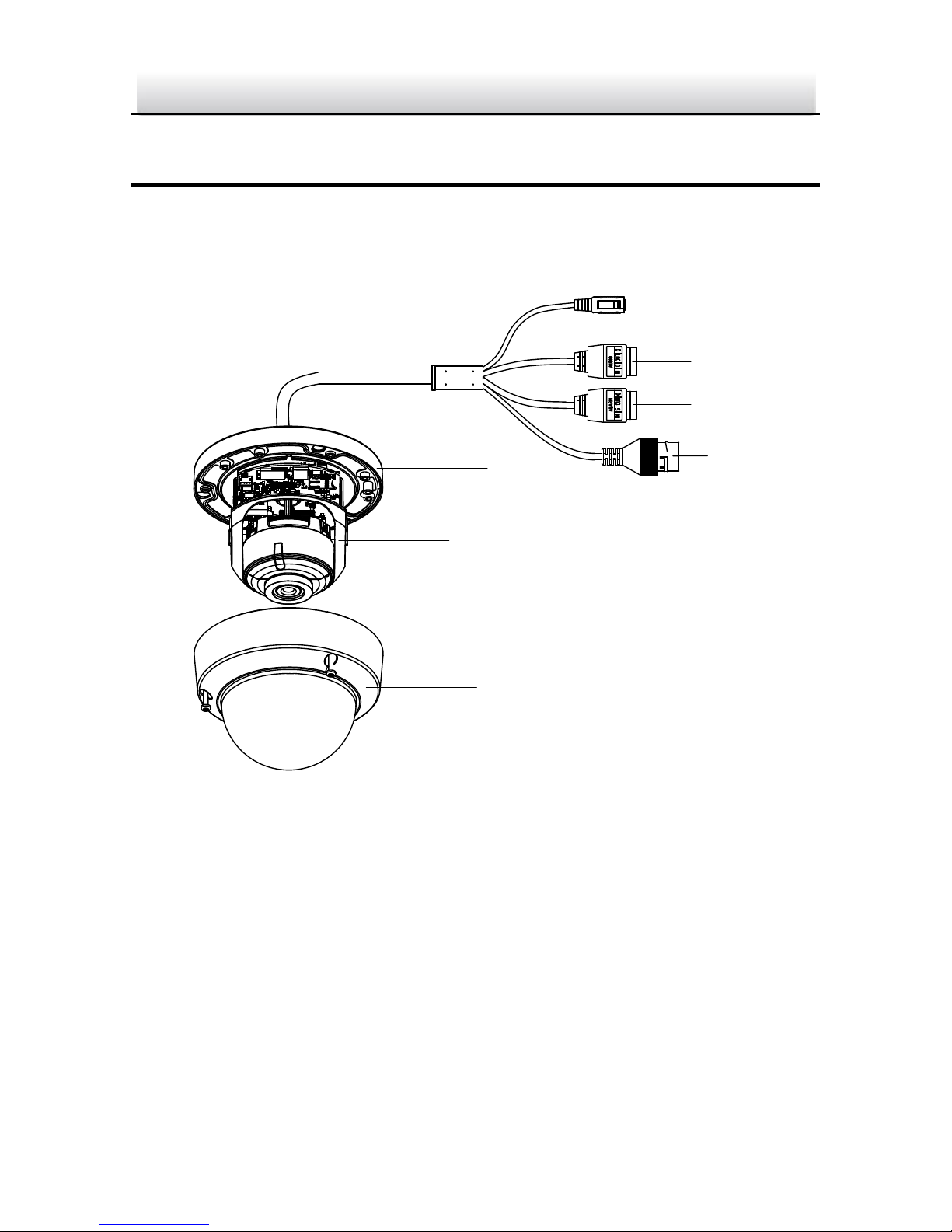
1 Appearance Description
1.1 Overview of IP4DIR100 Series Camera
5
7
6
8
1
4
3*
DC12VIN
2*
Page 10
IP4DIR100 Series IP Dome Camera · Quick Start Guide
9
9
9
10
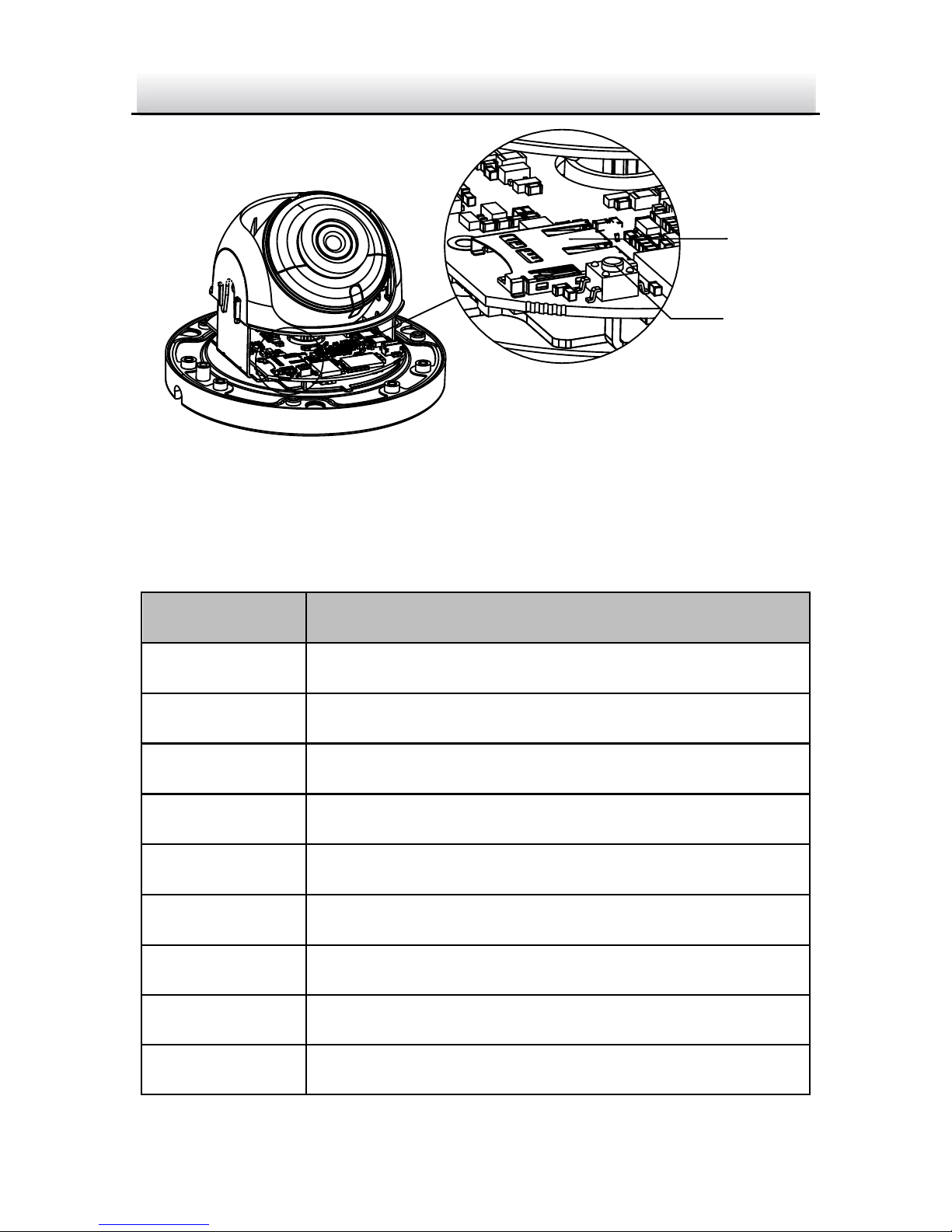
Overview of IP4DIR100 Series Camera Figure 1-1
Description of IP4DIR100 Series Camera Table 1-1
No.
Description
1
Power supply interface (12 VDC)
2
Audio input and output interface
3
Alarm input and output interface
4
RJ45 self-adaptive network interface (PoE)
5
Mounting base
6
Black liner
7
Lens
8
Bubble
9
Memory card slot
Page 11

IP4DIR100 Series IP Dome Camera · Quick Start Guide
10
10
10
Reset button
Note:
To reset the camera to default status you first need to remove
power from the camera. Then press and hold the reset button
while re-applying power, continue to hold the reset button for at
least 15 seconds after applying power to default the camera.
Page 12

IP4DIR100 Series IP Dome Camera · Quick Start Guide
11
11
2 Installation
Before you start:
● Make sure the device in the package is in good condition and all
the assembly parts are included.
● The standard power supply is 12 VDC or PoE (802.3 af), please
make sure your power supply matches with your camera.
● Make sure all the related equipment is power-off during the
installation.
● Check the specification of the products for the installation
environment.
● Make sure that the wall is strong enough to withstand four
times the weight of the camera and the bracket.
For the camera that supports IR, you are required to pay attention to
the following precautions to prevent IR reflection:
● Dust or grease on the dome cover will cause IR reflection.
Please do not remove the dome cover film until the installation
is finished. If there is dust or grease on the dome cover, clean
the dome cover with clean soft cloth and isopropyl alcohol.
● Make sure that there is no reflective surface too close to the
camera lens. The IR light from the camera may reflect back into
the lens causing reflection.
● The foam ring around the lens must be seated flush against the
inner surface of the bubble to isolate the lens from the IR LEDS.
Fasten the dome cover to camera body so that the foam ring
and the dome cover are attached seamlessly.
Page 13
IP4DIR100 Series IP Dome Camera · Quick Start Guide
12
12
Memory Card Installation 2.1
This cameras supports memory card as local storage, you can follow
the steps to mount and unmount the memory card.
Steps:
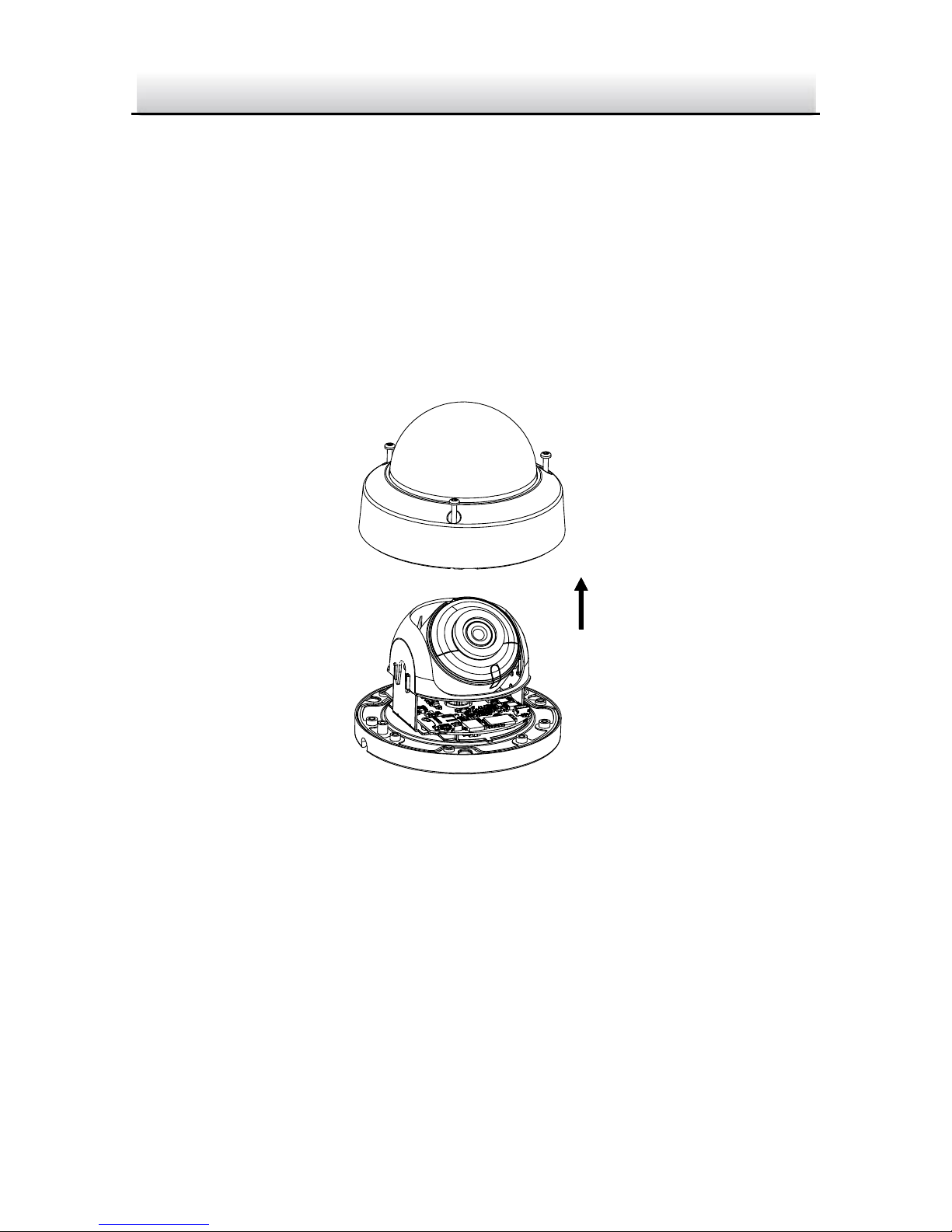
1. Loosen the screws on the bubble. Remove the bubble to expose
the memory card slot.
Remove Bubble Figure 2-1
Notes:
● Screws on bubble cannot be unscrewed completely in order to
prevent dropping or loss.
● The bubble is fastened to the camera with a safety rope.
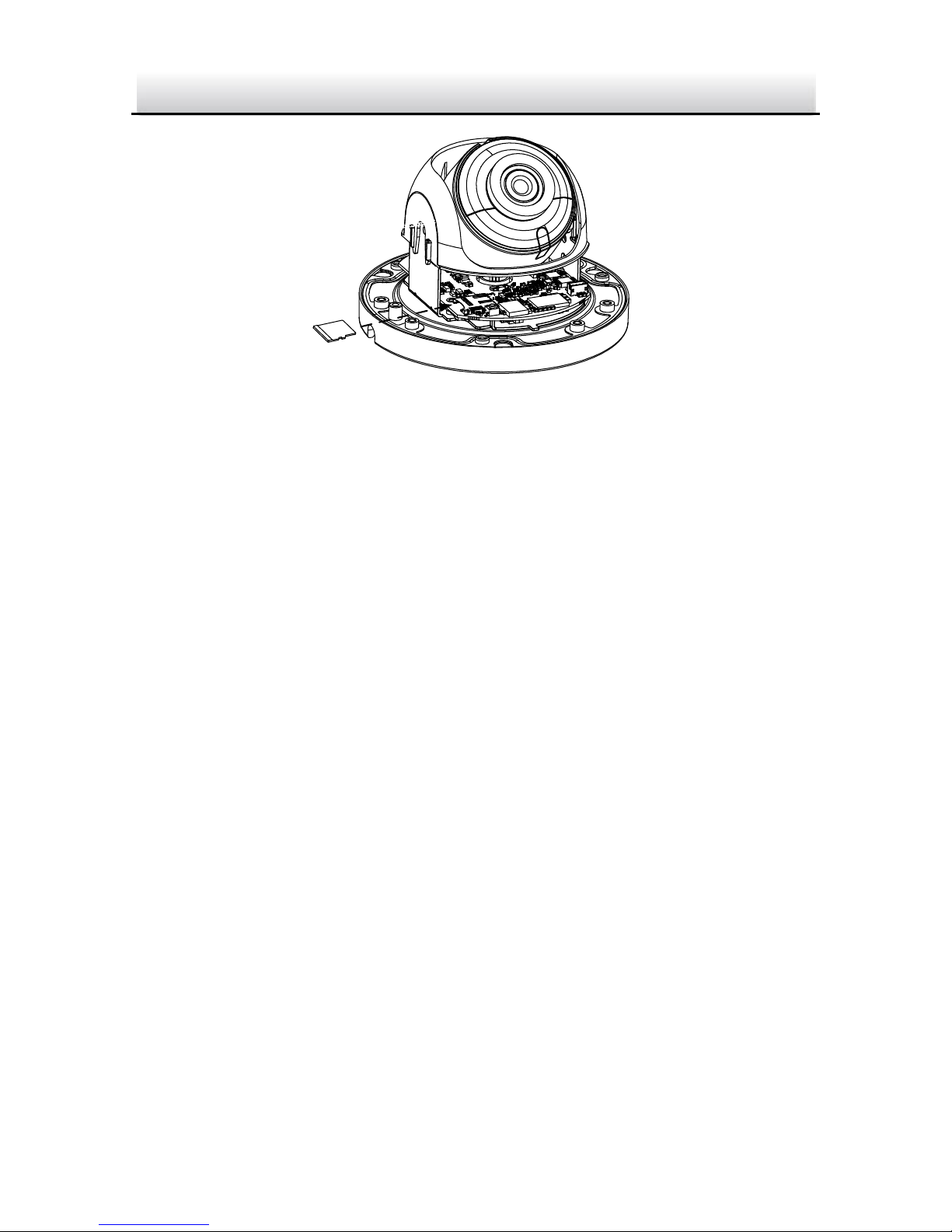
2. Find the memory card slot to insert the memory card.
Page 14
IP4DIR100 Series IP Dome Camera · Quick Start Guide
13
13
Insert Memory Card Figure 2-2
3. (Optional) To unmount the memory card, push to get it ejected.
Ceiling Mounting 2.2
Steps:
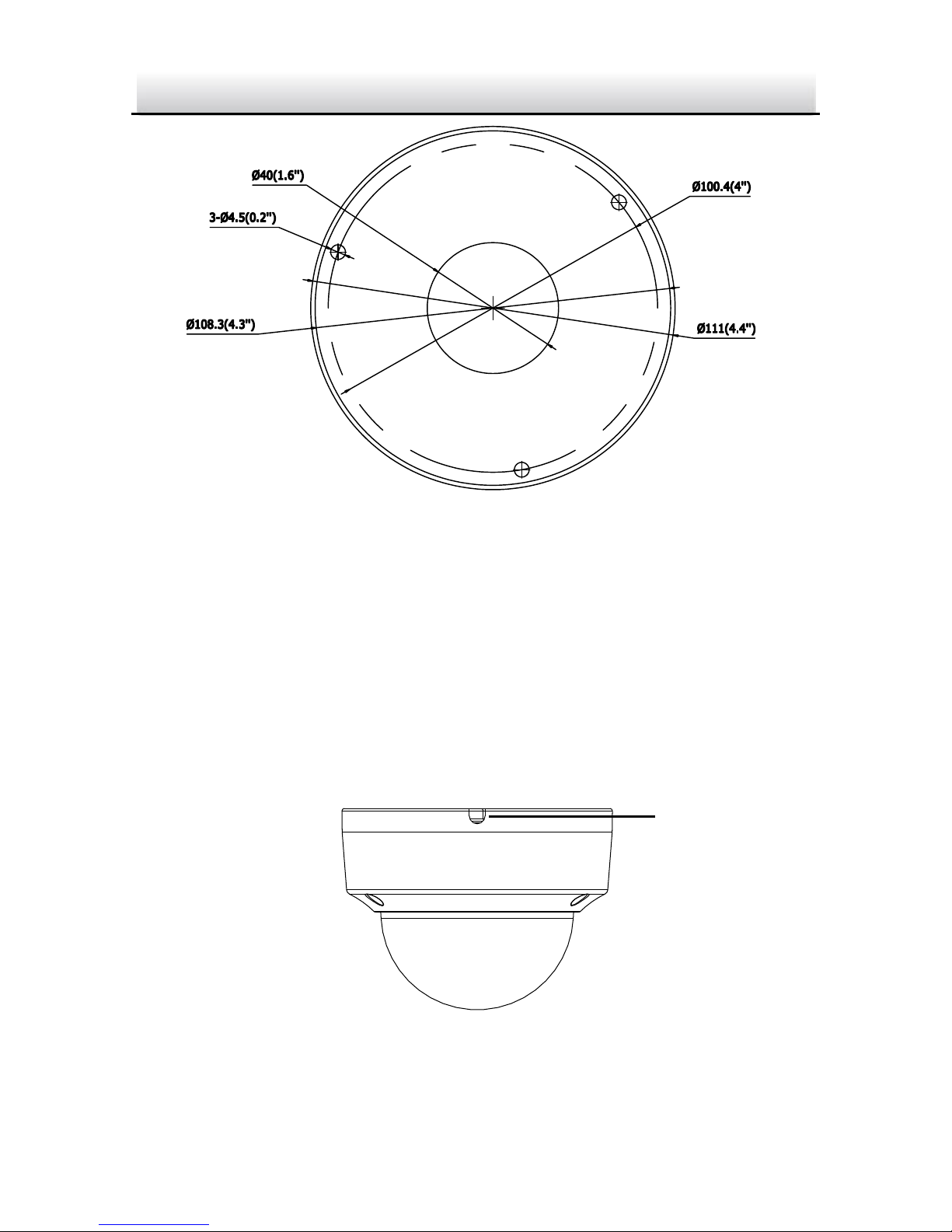
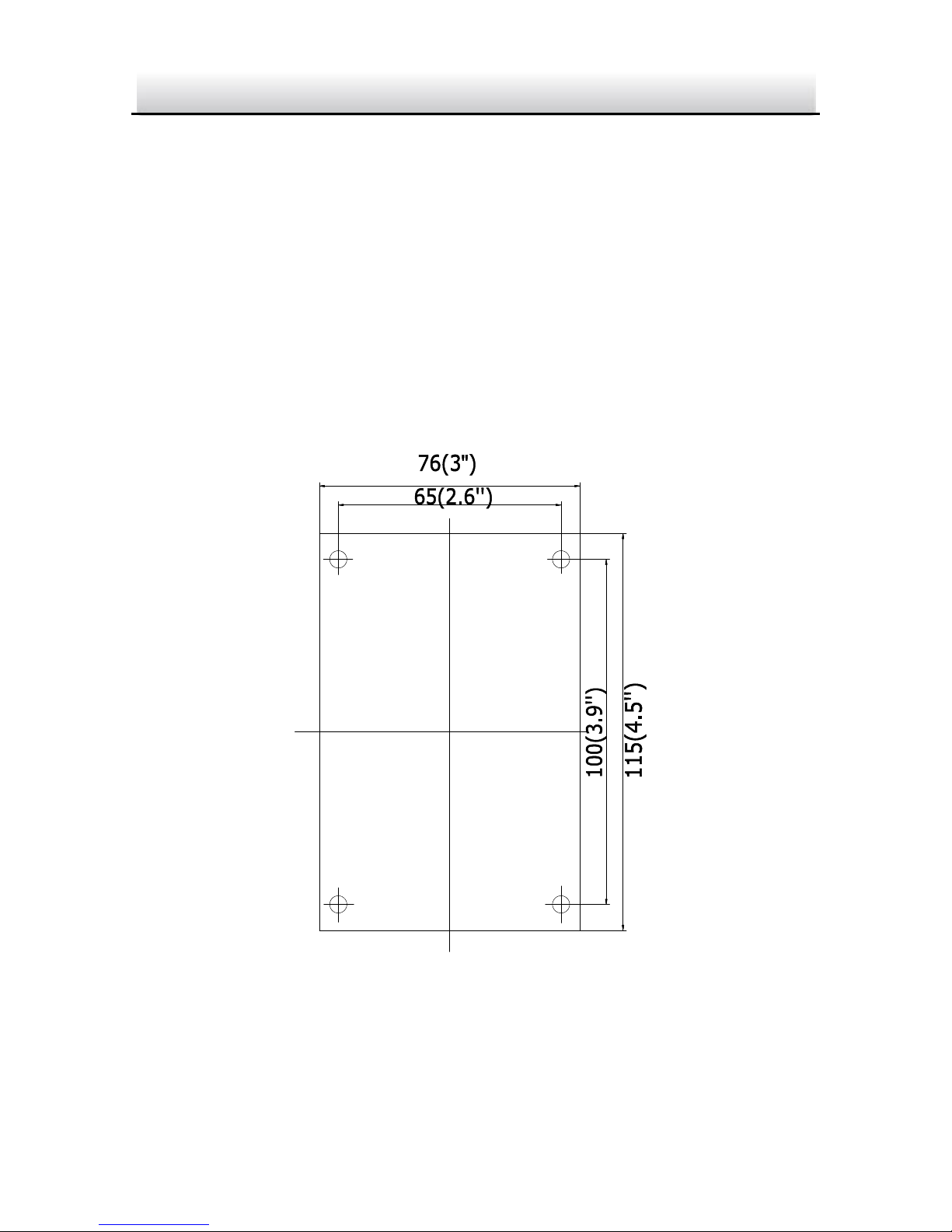
1. Paste the drill template to desired mounting place.
2. Drill the screw holes on the ceiling according to the drill
template.
Page 15
IP4DIR100 Series IP Dome Camera · Quick Start Guide
14
14
1
1
1
A
Drill Template
Hole A: for cables routed through the ceiling
Screw hole 1: for Mounting Base
Drill Template Figure 2-3
Notes:
● If you choose to route cable through the ceiling, cut a cable
hole according to Hole A on drill template.
● You can also route cable from the side outlet.
● If you install the camera in outdoor, install the waterproof
jacket to the network cable. See Section 2.4.
Side Outlet Figure 2-4
Side Outlet
Page 16
IP4DIR100 Series IP Dome Camera · Quick Start Guide
15
15
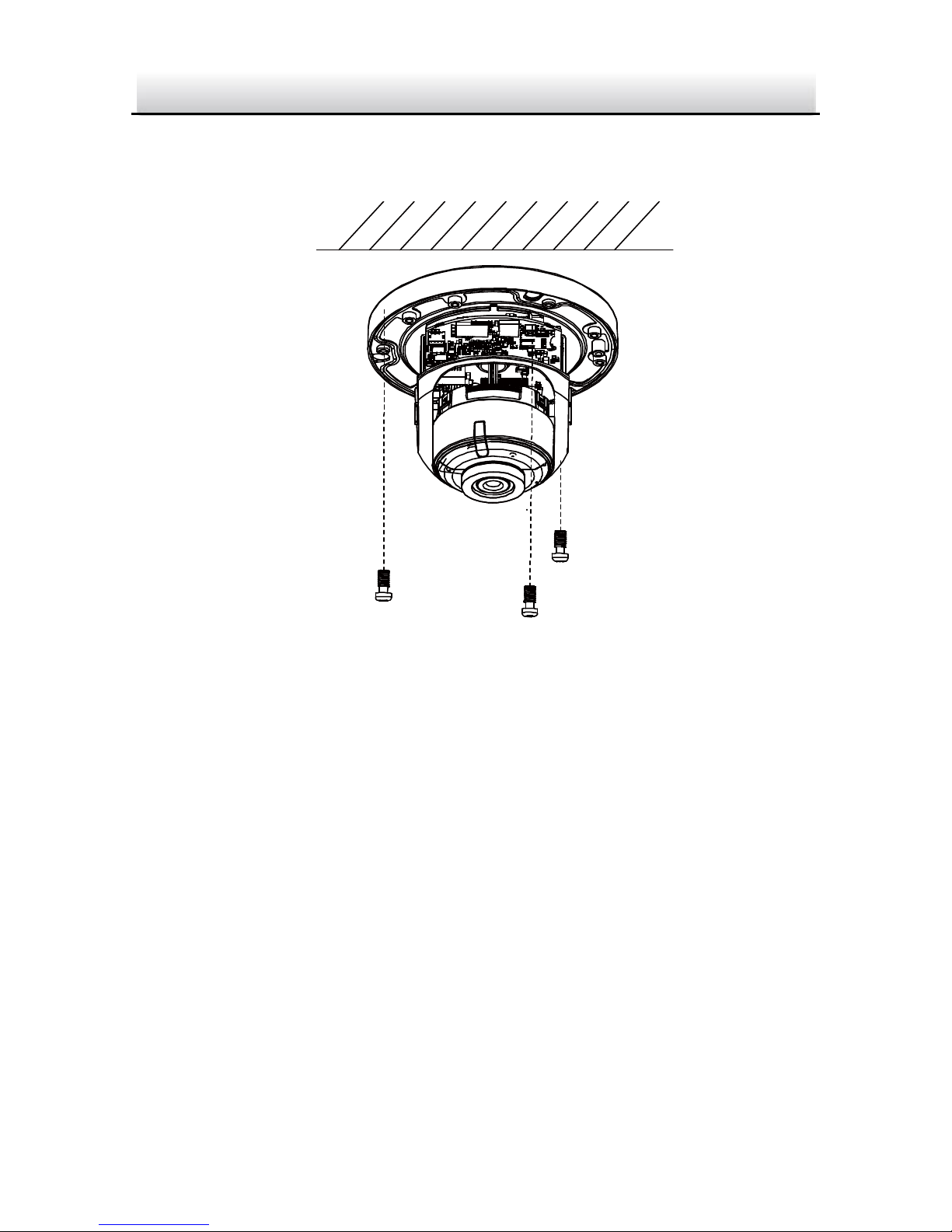
3. Route the cables and fix the mounting base on the ceiling with
three screws.
Fix the Mounting Base Figure 2-5
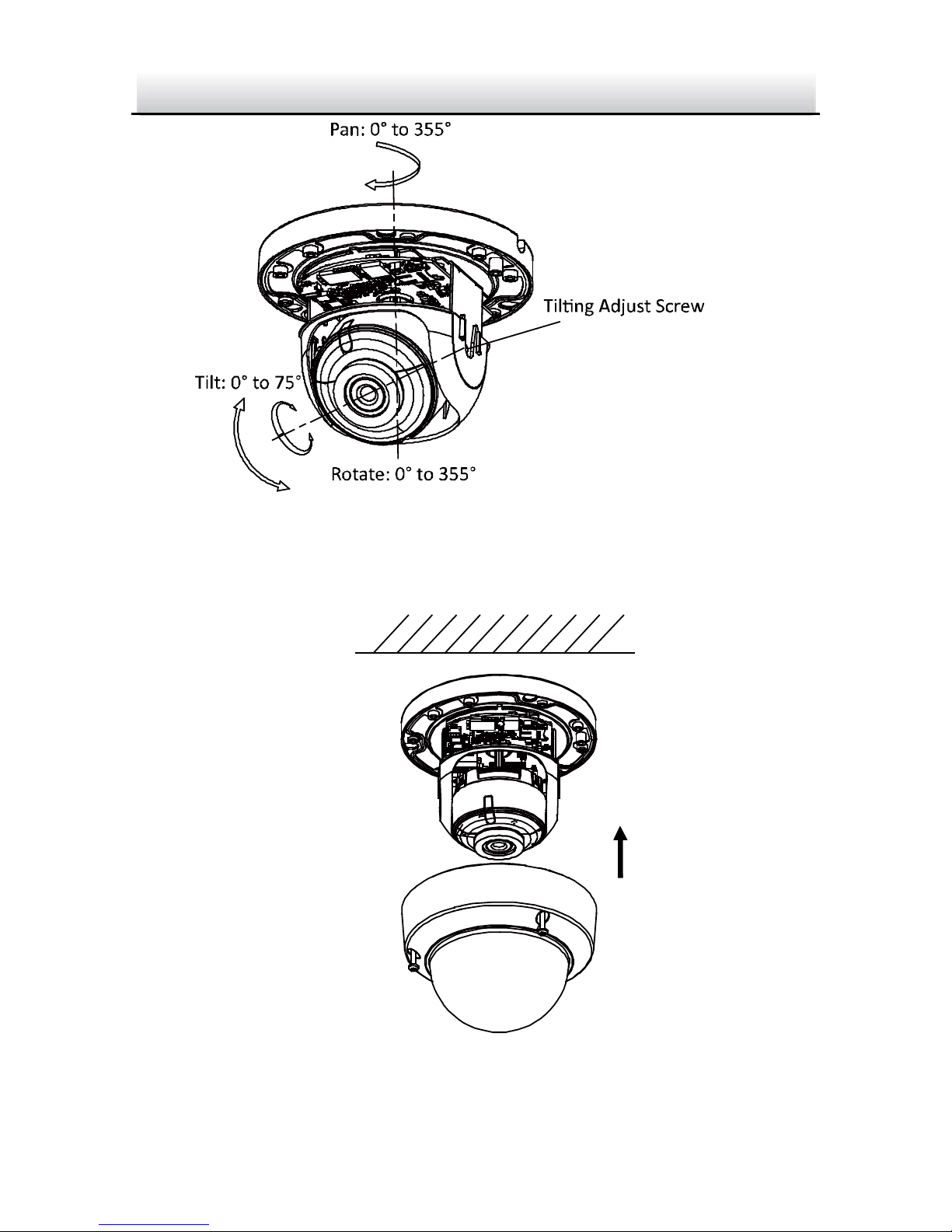
4. Adjust surveillance angle.
1). Loosen one tilting adjust adjusting screw to adjust the tilting
position. Tighten the screw after adjustment.
2). Hold the black liner to adjust the panning position.
3). Hold the lens to adjust the rotating position.
Page 17
IP4DIR100 Series IP Dome Camera · Quick Start Guide
16
16
Angle Adjustment of Camera Figure 2-6
5. Install the bubble back to the camera.
Install Bubble
Figure 2-7
Page 18
IP4DIR100 Series IP Dome Camera · Quick Start Guide
17
17
Mounting with Brackets 2.3
This camera supports various mounting accessories. Wall Mounting
is used as an example in this manual.
The wall mounting bracket is not included in the package. You need
to purchase one separately, if you adopt this mounting type.
Steps:
1. For the WM110 plastic indoor wall mount: Mark the screw holes
on desired mounting place.
Hole
Hole
Hole
Hole
Mark Screw Hole Figure 2-8
2. Drill 4 screw holes for expansion screws.
Page 19
IP4DIR100 Series IP Dome Camera · Quick Start Guide
18
18
3. Unscrew the bubble of the camera.
4. (Optional) Insert the memory card to the camera, if your camera
supports memory card installation. Refer to Section 2.1.
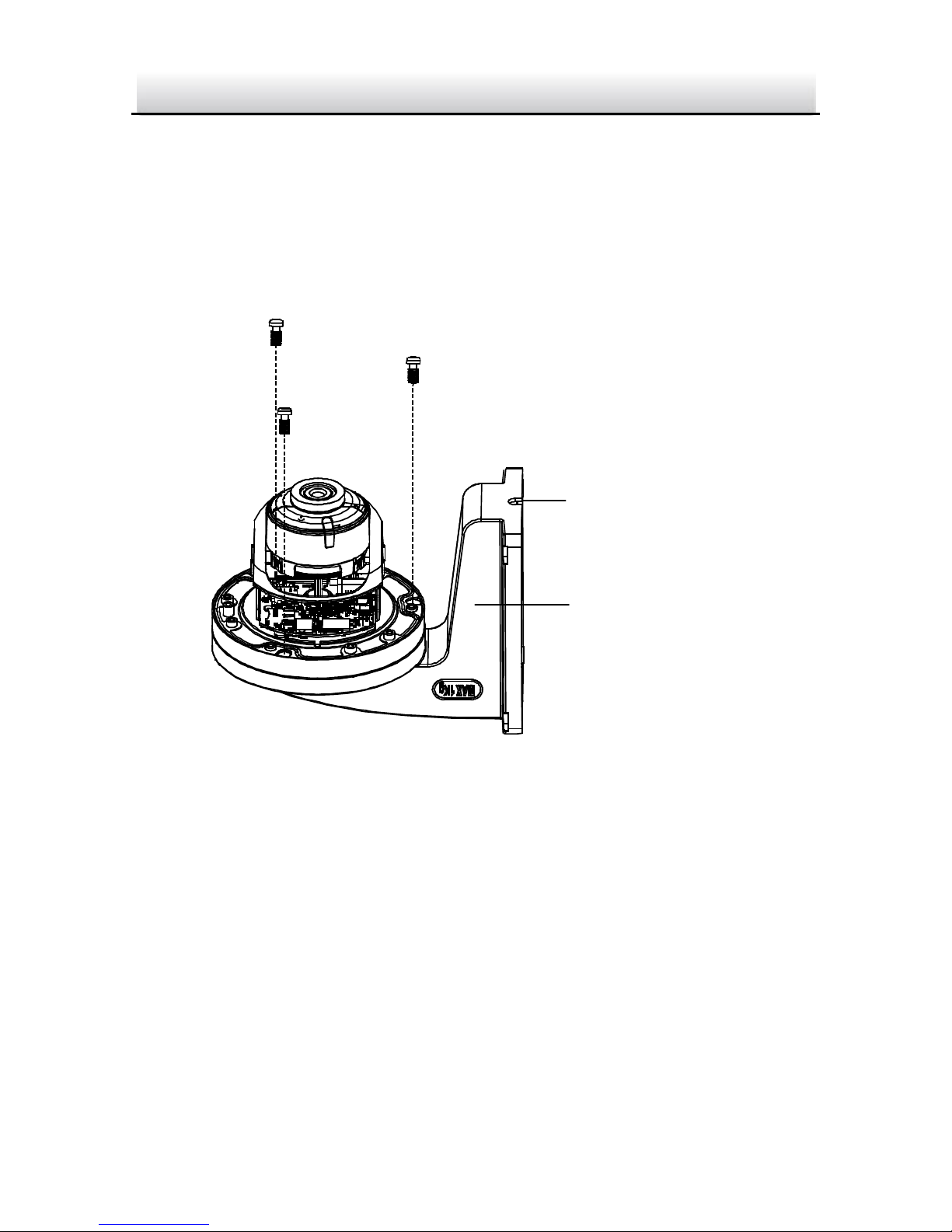
5. Route the cables and fix the camera to the cap of the wall
mounting bracket with three supplied self-tapping screws.
Wall Mounting
Bracket
Cable Hole
Fix the Camera to Indoor WM110 Wall Mounting Bracket Figure 2-9
6. Align the wall mounting bracket to the screw holes and fix it to
wall.
Note:
If you install the camera in outdoor, install the waterproof jacket
to the network cable. See Section 2.4.
Page 20
IP4DIR100 Series IP Dome Camera · Quick Start Guide
19
19
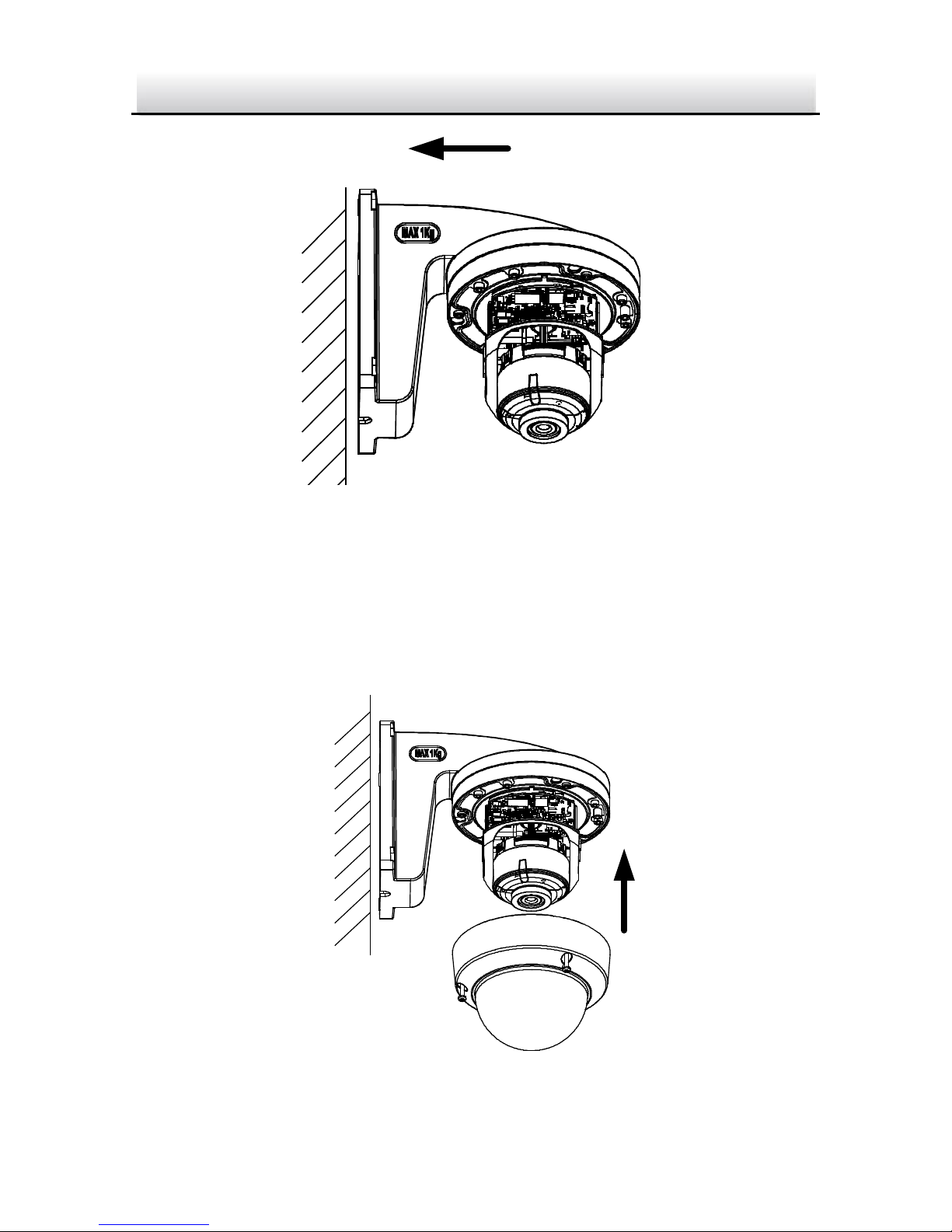
Fix the Indoor WM110 Wall Mounting Bracket to Wall Figure 2-10
7. Adjust surveillance angle of camera. Refer to Step 4 in Section
2.2.
8. Install the bubble back to the camera.
Figure 2-11 Install the Bubble
Page 21
IP4DIR100 Series IP Dome Camera · Quick Start Guide
20
20
2.3.1 Wall Mounting with Outdoor WMTS Junction Box
The WMTS outdoor wall mounting bracket with junction box is not
included in the package. You need to purchase one separately, if you
adopt this mounting type. You will also need to purchase the DPC110
Pendent cap to complete installation with the WMTS.
Steps:
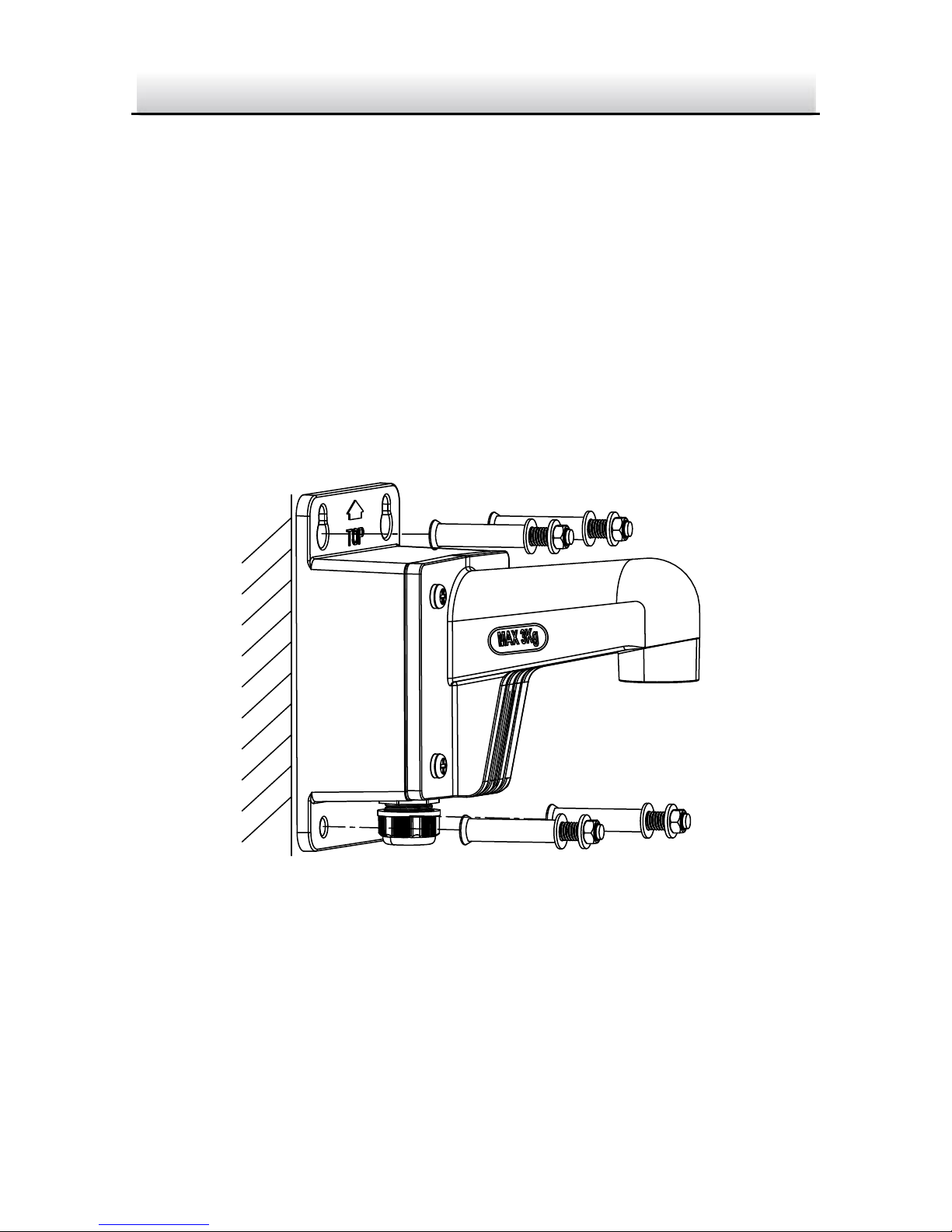
1. Mark the screw holes on desired mounting place.
2. Fix the bracket to the wall with four expansion bolts.
Fix the Outdoor WMTS Bracket Figure 2-12
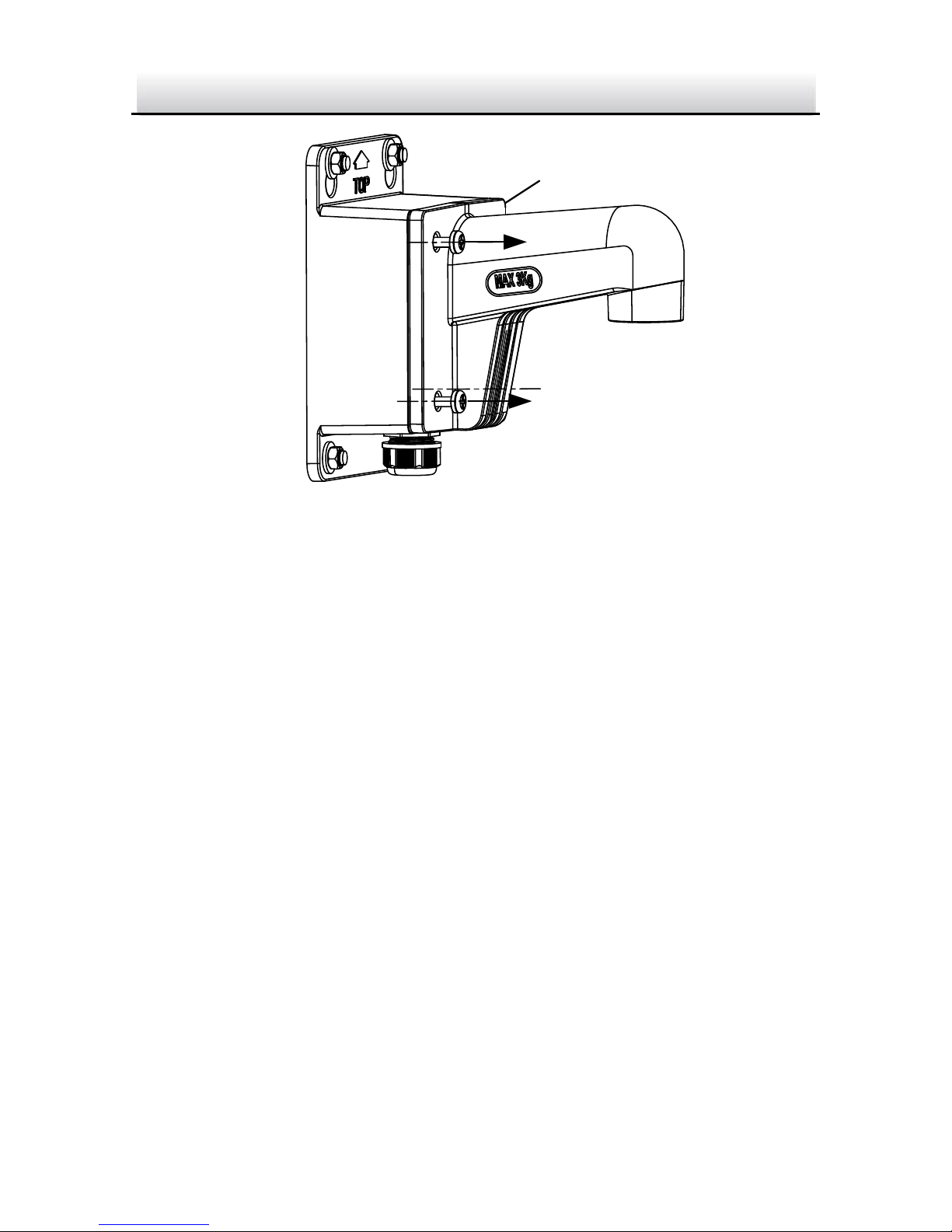
3. Unscrew the junction box cover.
Page 22
IP4DIR100 Series IP Dome Camera · Quick Start Guide
21
21
Cover
Unscrew the Cover Figure 2-13
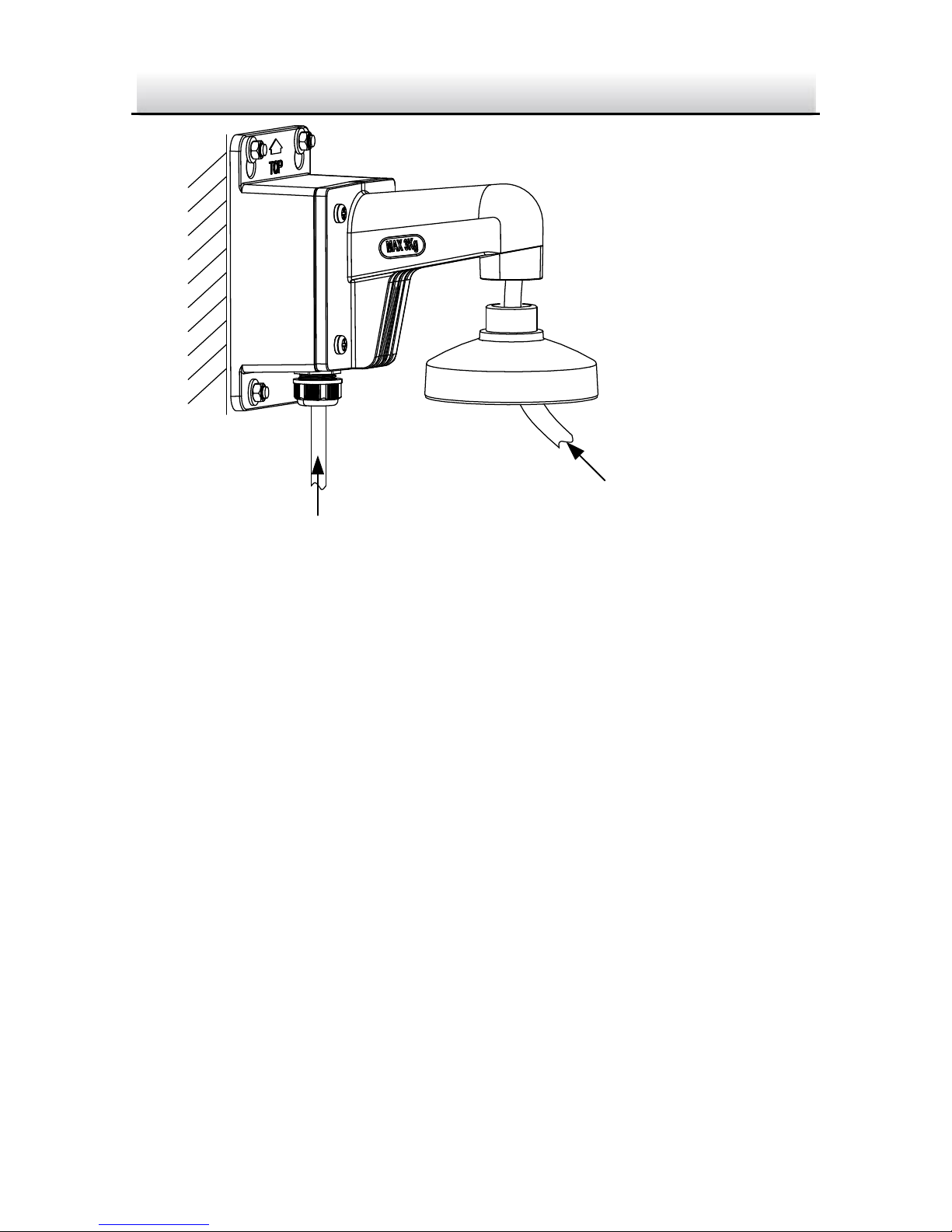
4. Route and connect the cables.
Source cables of network, power, etc., go in from the side outlet
of the junction box. Camera cables go in from the cap and the
bracket.
Note:
If you install the camera in outdoor, install the waterproof jacket
to the network cable. See Section 2.4.
5. Screw the cover back.
Page 23
IP4DIR100 Series IP Dome Camera · Quick Start Guide
22
22
Source Cable
Camera Cable
Cable Routing Figure 2-14
6. Unscrew the bubble of the camera.
7. (Optional) Insert the memory card to the camera, if your camera
supports memory card installation. Refer to Section 2.1.
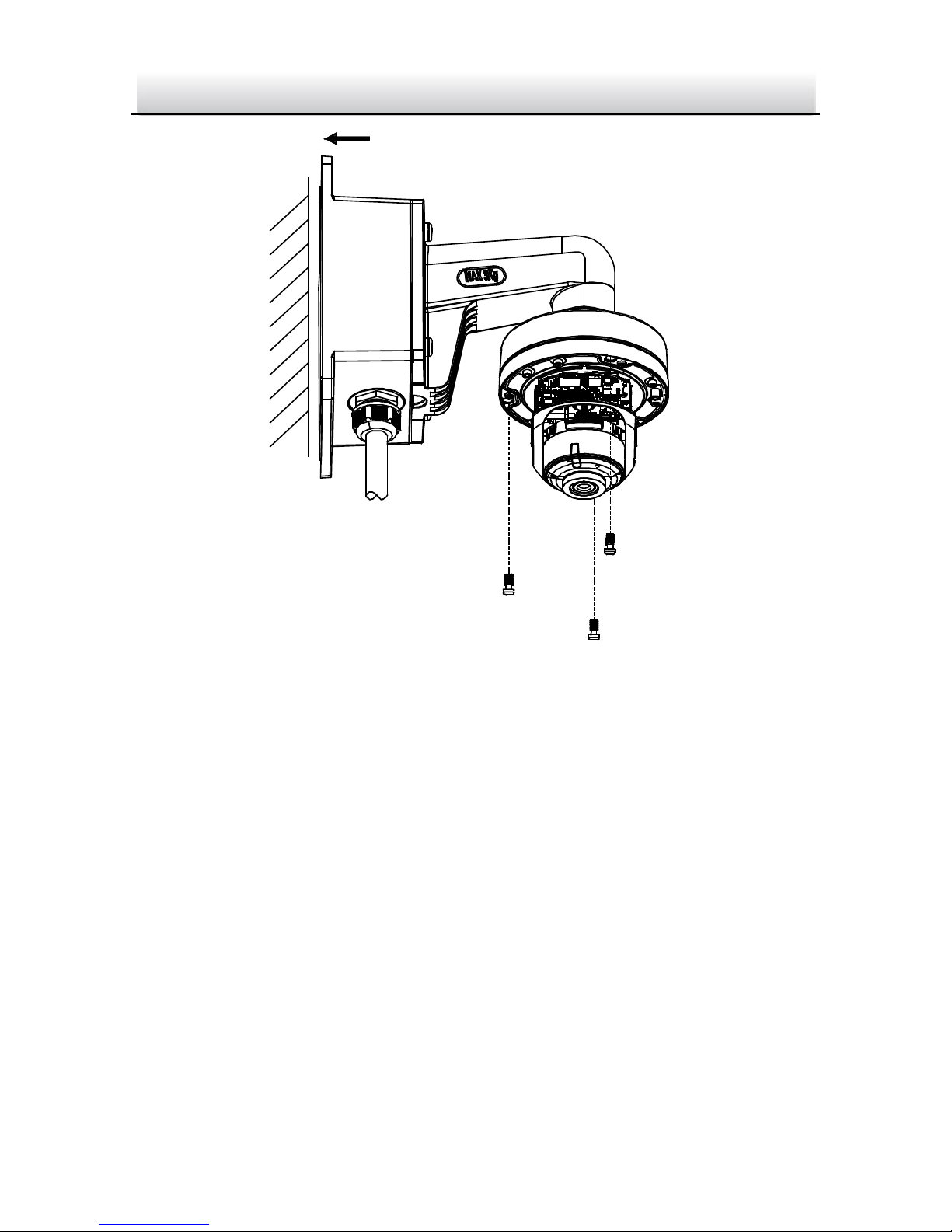
8. Fix the camera to the DSPC cap of the wall mounting bracket
with three supplied screws.
Page 24
IP4DIR100 Series IP Dome Camera · Quick Start Guide
23
23
Fix the Camera to DPC110 Cap Figure 2-15
9. Adjust surveillance angle of camera. Refer to Step 4 in Section
2.2.
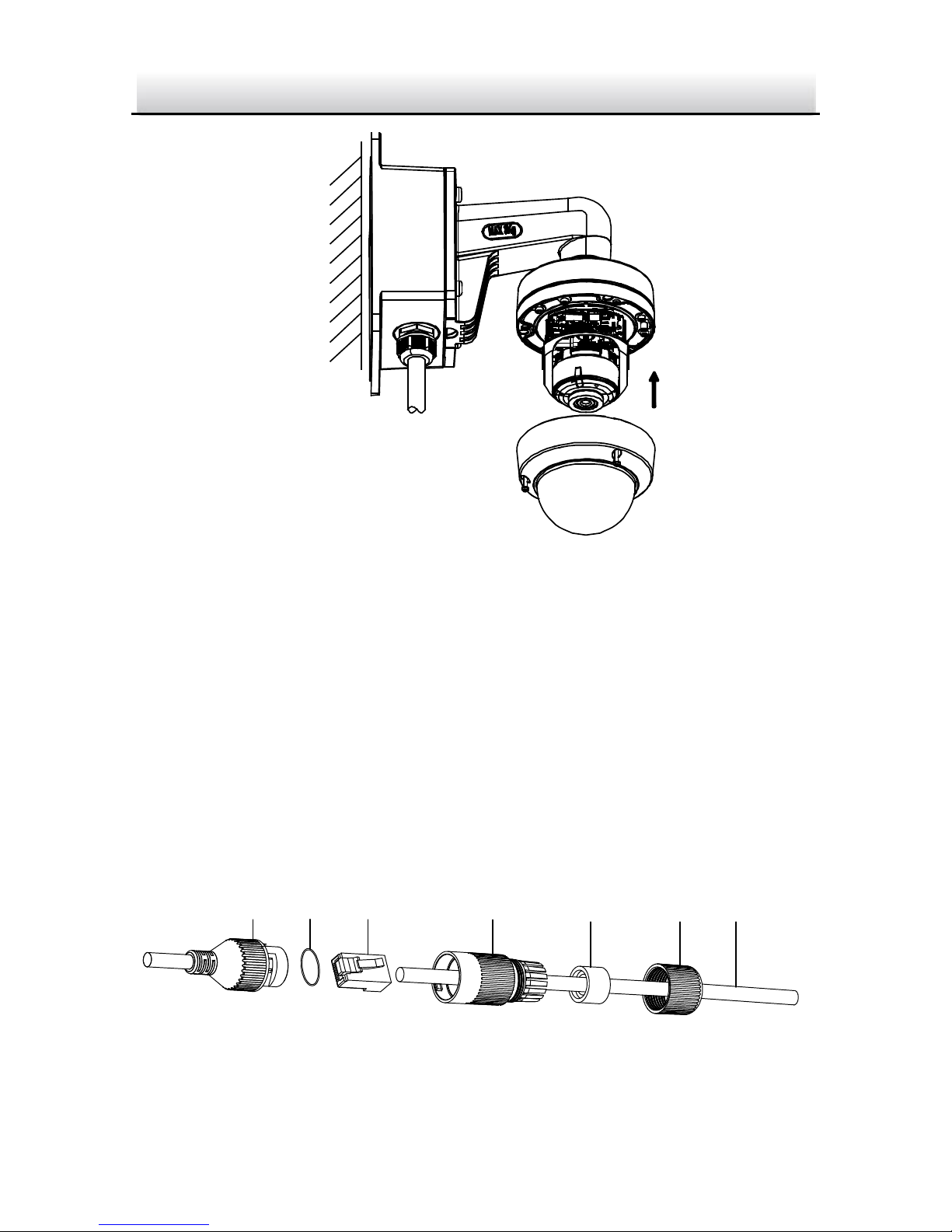
10. Install the bubble back to the camera.
Page 25
IP4DIR100 Series IP Dome Camera · Quick Start Guide
24
24
Install the Bubble Figure 2-16
2.4 Network Cable Waterproof Jacket
Installation
Purpose:
If the camera is installed outdoor, you should use the waterproof
accessory for the network cable after the camera is secured on the
installation surface.
①
②
③
④
⑤
⑥ ⑦
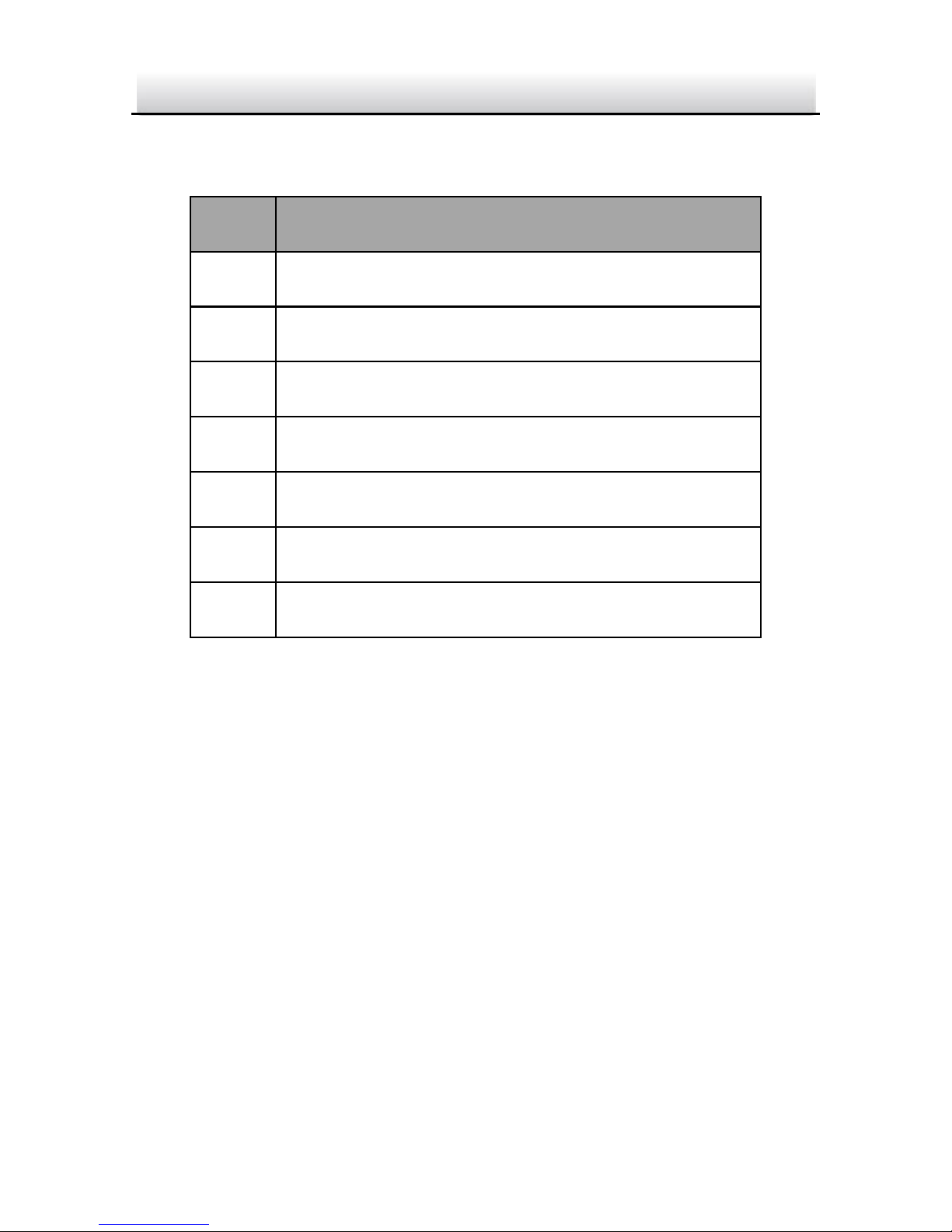
Figure 2-17 Waterproof Accessory Components
Page 26
IP4DIR100 Series IP Dome Camera · Quick Start Guide
25
25
Table 2-1 Components
No.
Components
1
Camera’s Network Interface Socket
2
O-Type Gasket
3
Network Plug
4
Waterproof Endcap
5
Waterproof Rubber Gasket
6
Lock Nut
7
Network Cable from Router/Switch
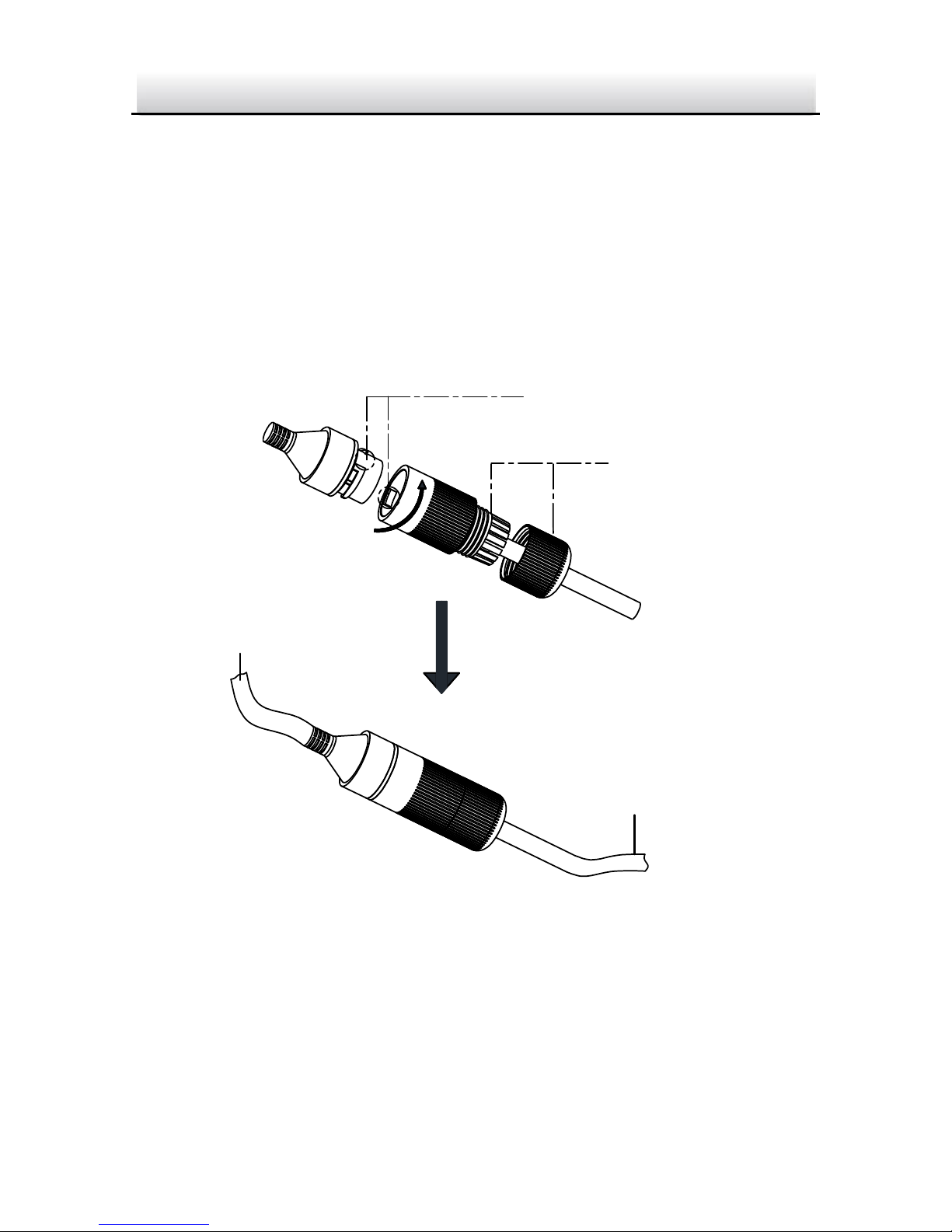
Steps:
Feed the plugless network cable ⑦ through the lock nut ⑥, 1.
waterproof rubber gasket ⑤ (rubber gasket inset ridge must
face waterproof endcap), and the waterproof endcap ④ in
order.
Crimp an RJ-45 network plug ③onto the end of the cable, 2.
taking care to insert the twisted pairs of wires in correct order.
Place the O-type gasket ② onto the end of the camera’s 3.
network interface socket ①.
Insert the network plug ③ into the camera’s network interface 4.
socket ①.
Page 27
IP4DIR100 Series IP Dome Camera · Quick Start Guide
26
26
Insert the waterproof rubber gasket ⑤ into the waterproof 5.
endcap ④, and secure lock nut ⑥ with the waterproof
endcap ④.
Align the snap on the waterproof endcap ④ with the notch on 6.
the camera’s network interface socket ①, and then secure the
waterproof endcap ④ to the camera’s network interface
socket ① to finish installation.
Camera
Switch/Router
Align the snap and notch.
i. Insert ⑤ into ④.
ii. Secure ⑥ with ④.
Waterproof Accessory Installation Figure 2-18
Page 28
IP4DIR100 Series IP Dome Camera · Quick Start Guide
27
27
3 Set the Network Camera over the
LAN
Note:
You shall acknowledge that the use of the product with Internet
access might be under network security risks. For avoidance of any
network attacks and information leakage, please strengthen your
own protection.
If the product does not work properly, contact your dealer or the
nearest service center for help.
3.1 Wiring
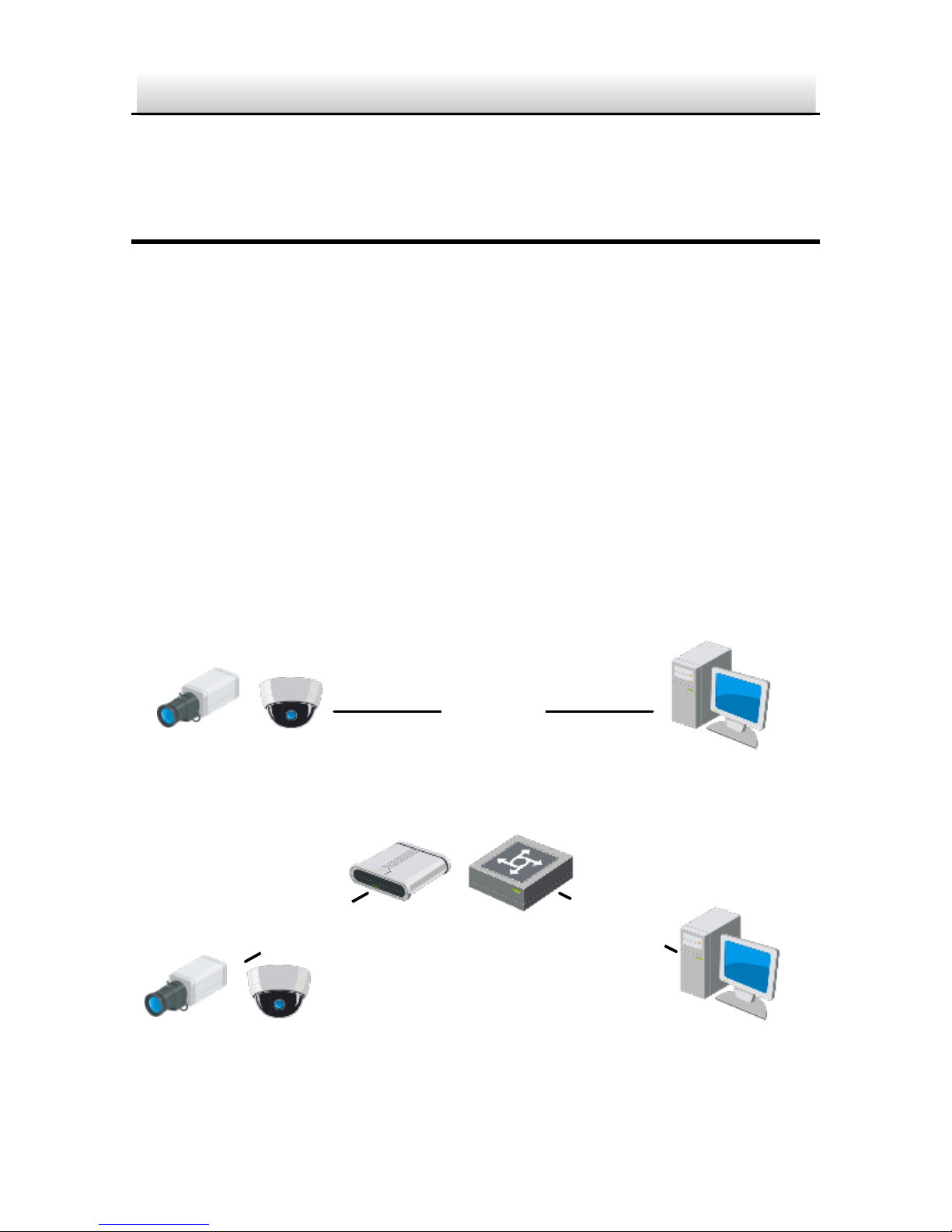
Connect the camera to network according to the following figures.
Network Cable
or
Network Camera
Computer
Figure 3-1 Connecting Directly
Network Cable
Network Cable
or
or
Network Camera Computer
Figure 3-2 Connecting via a Switch or a Router
Page 29

IP4DIR100 Series IP Dome Camera · Quick Start Guide
28
28
3.2 Activate the Camera
You are required to activate the camera first by setting a strong
password for it before you can use the camera.
Activation via Web Browser, Activation via SADP, and Activation via
Client Software are all supported. We will take activation via SADP
software and Activation via Web Browser as examples to introduce
the camera activation.
Note:
Refer to the User Manual of Network Camera for Activation via
Client Software.
3.2.1 Activation via Web Browser
Steps:
1. Power on the camera. Connect the camera to your computer or
the switch/router which your computer connects to.
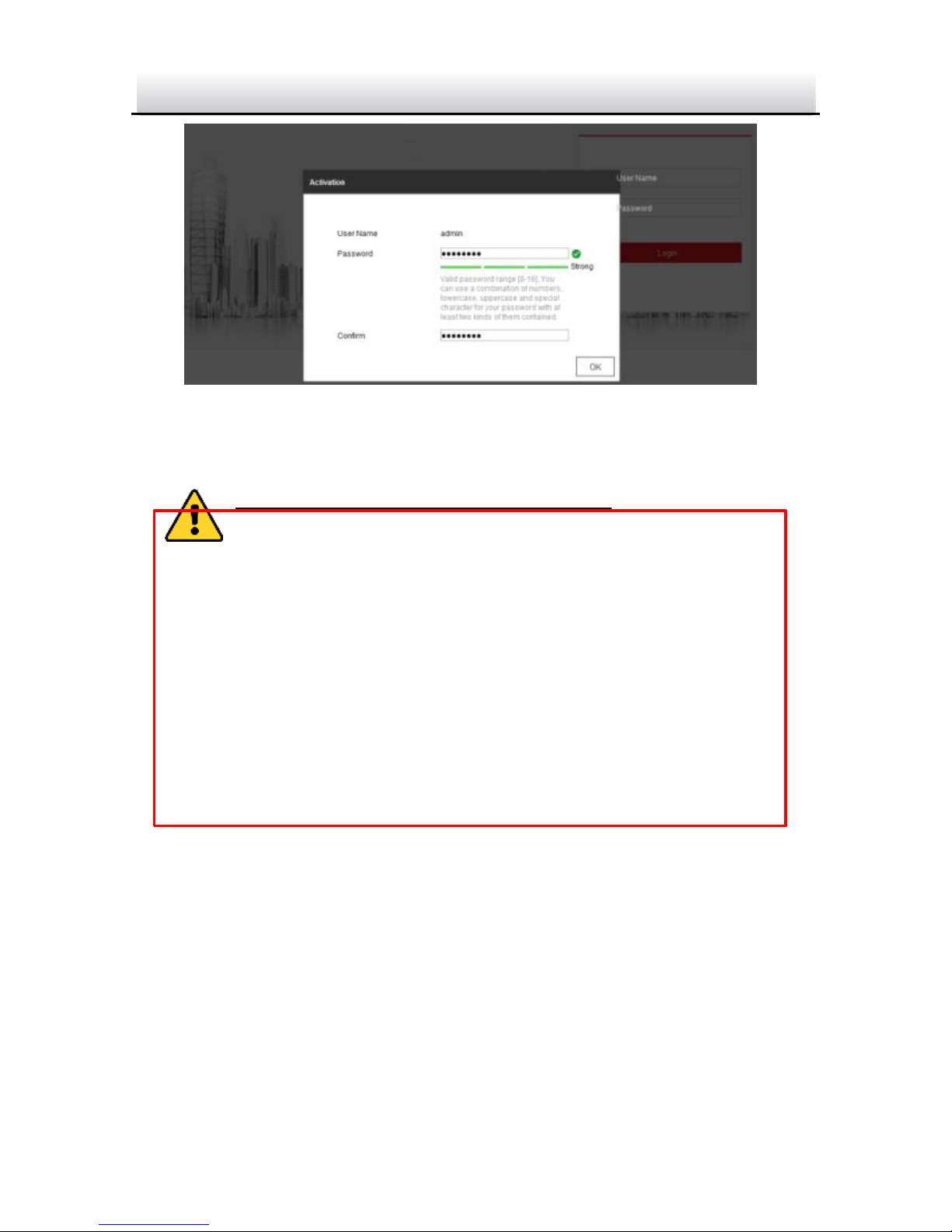
2. Input the IP address into the address bar of the web browser, and
press Enter to enter the activation interface.
Notes:
The default IP address of the camera is 192.168.1.64.
The computer and the camera should belong to the same
subnet.
For the camera enables the DHCP by default, you need to use
the SADP software to search the IP address.
Page 30
IP4DIR100 Series IP Dome Camera · Quick Start Guide
29
29
Figure 3-3 Activation Interface (Web)
3. Create a password and input the password into the password field.
STRONG PASSWORD RECOMMENDED– We highly
recommend you create a strong password of your own
choosing (using a minimum of 8 characters, including
upper case letters, lower case letters, numbers, and
special characters) in order to increase the security of
your product. And we recommend you reset your
password regularly, especially in the high security
system, resetting the password monthly or weekly can
better protect your product.
4. Confirm the password.
5. Click OK to save the password and enter the live view interface.
3.2.2 Activation via SADP Software
SADP software is used for detecting the online device, activating the
camera, and resetting the password.
Get the SADP software from the supplied disk or the official website,
and install the SADP according to the prompts. Follow the steps to
Page 31
IP4DIR100 Series IP Dome Camera · Quick Start Guide
30
30
activate the camera, please refer to the User Manual of Network
Camera for other two activation methods.
Steps:
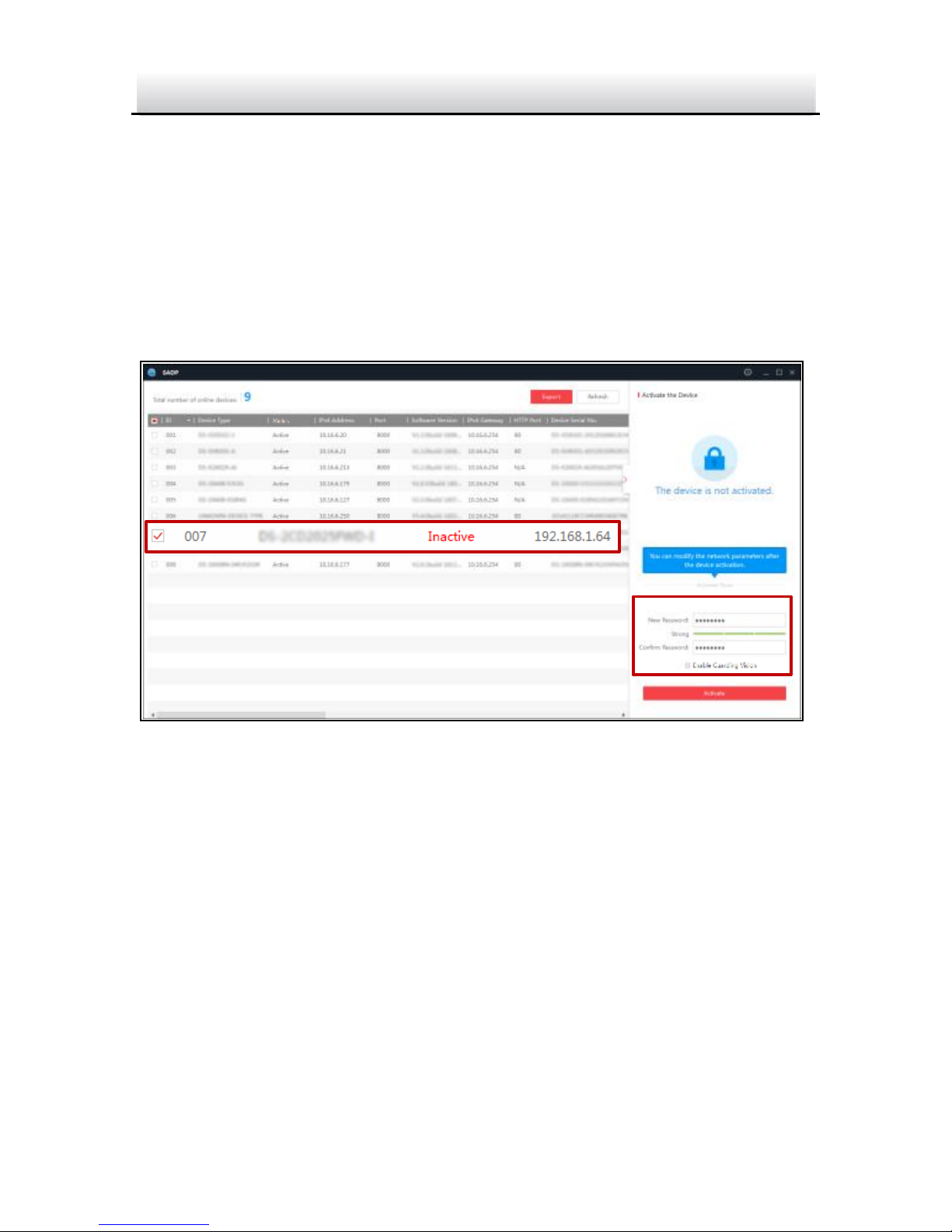
1. Run the SADP software to search the online devices.
2. Check the device status from the device list, and select the
inactive device.
Select inactive device.
Input and confirm
password.
Figure 3-4 SADP Interface
Note:
The SADP software supports activating the camera in batch. Refer
to the user manual of SADP software for details.
3. Create and input the new password in the password field, and
confirm the password.
Page 32
IP4DIR100 Series IP Dome Camera · Quick Start Guide
31
31
STRONG PASSWORD RECOMMENDED– We highly
recommend you create a strong password of your own
choosing (using a minimum of 8 characters, including
upper case letters, lower case letters, numbers, and
special characters) in order to increase the security of
your product. And we recommend you reset your
password regularly, especially in the high security
system, resetting the password monthly or weekly can
better protect your product.
Note:
You can enable the Guarding Vision service for the device during
activation. Refer to Chapter 5.1 for detailed information.
4. Click Activate to start activation.
You can check whether the activation is completed on the popup
window. If activation failed, make sure that the password meets
the requirement and try again.
3.3 Modify the IP Address
Purpose:
To view and configure the camera via LAN (Local Area Network), you
need to connect the network camera in the same subnet with your
PC.
Use the SADP software or client software to search and change the
IP address of the device. We take modifying the IP Address via SADP
software as an example to introduce the IP address modification.
For IP address modification via client software, refer to the user
manual of client software.
Page 33
IP4DIR100 Series IP Dome Camera · Quick Start Guide
32
32
Steps:
1. Run the SADP software.
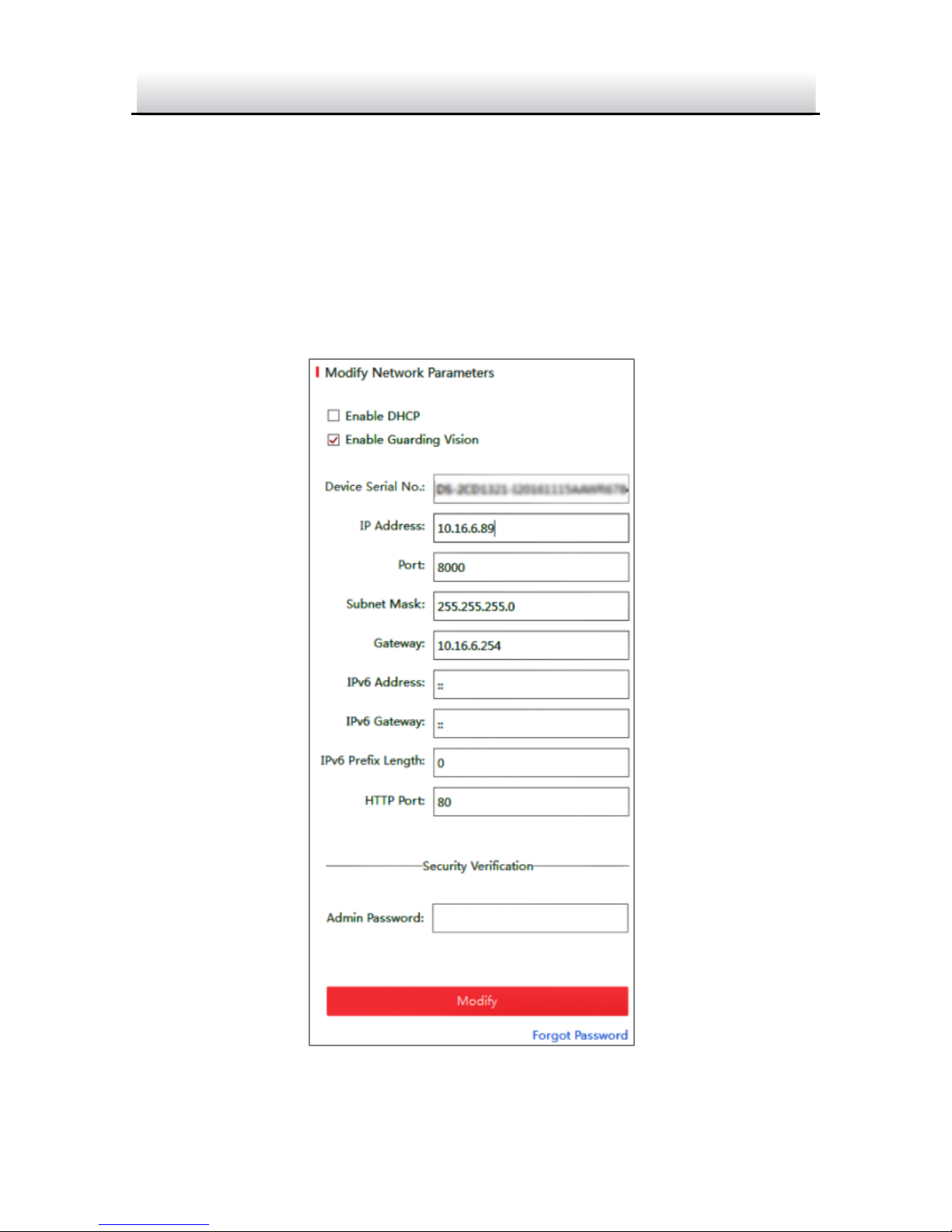
2. Select an activate device.
3. Change the device IP address to the same subnet with your
computer by either modifying the IP address manually or checking
Enable DHCP.
Figure 3-5 Modify the IP Address
Page 34

IP4DIR100 Series IP Dome Camera · Quick Start Guide
33
33
Note:
You can enable the Guarding Vision service for the device during
activation. Refer to Chapter 5.1 for detailed information.
4. Input the admin password and click Modify to activate your IP
address modification.
The batch IP address modification is supported by the SADP. Please
refer to the User Manual of SADP for details.
Page 35

IP4DIR100 Series IP Dome Camera · Quick Start Guide
34
34
4 Access via Web Browser
System Requirement:
Operating System: Microsoft Windows XP SP1 and above version
CPU: 2.0 GHz or higher
RAM: 1G or higher
Display: 1024×768 resolution or higher
Web Browser: Internet Explorer 8.0 and above version, Apple Safari
5.0.2 and above version, Mozilla Firefox 5.0 and above version and
Google Chrome 18 and above version
Steps:
1. Open the web browser.
2. In the browser address bar, input the IP address of the network
camera, and press the Enter key to enter the login interface.
Note:
The default IP address is 192.168.1.64. You are recommended
to change the IP address to the same subnet with your
computer.
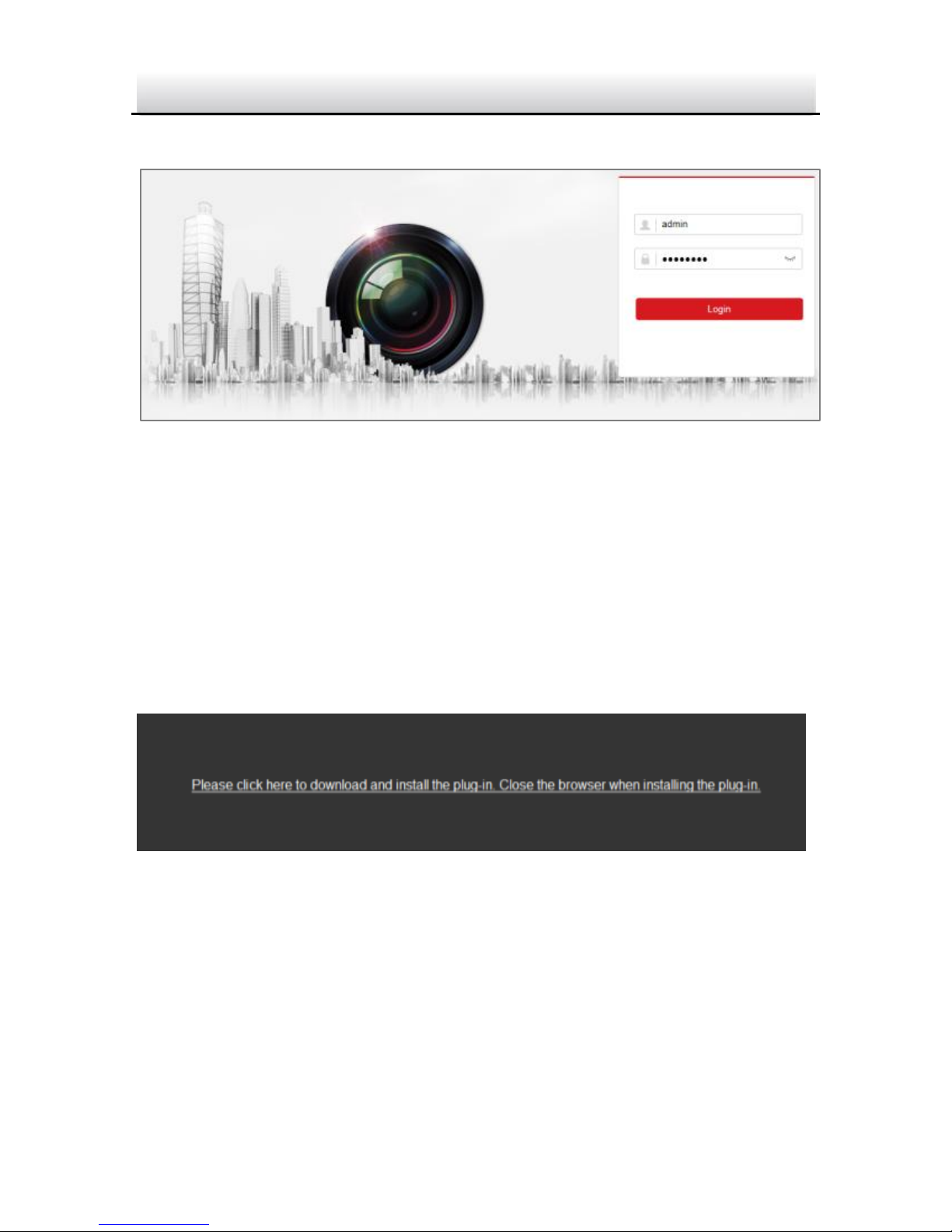
3. Input the user name and password.
The admin user should configure the device accounts and
user/operator permissions properly. Delete the unnecessary
accounts and user/operator permissions.
Note:
The device IP address gets locked if the admin user performs 7
failed password attempts (5 attempts for the user/operator).
Page 36
IP4DIR100 Series IP Dome Camera · Quick Start Guide
35
35
4. Click Login.
Figure 4-1 Login Interface
5. Install the plug-in before viewing the live video and managing the
camera. Please follow the installation prompts to install the
plug-in.
Note:
You may have to close the web browser to finish the installation of
the plug-in.
Figure 4-2 Download Plug-in
6. Reopen the web browser after the installation of the plug-in and
repeat steps 2 to 4 to login.
Note:
For detailed instructions of further configuration, please refer to
the user manual of network camera.
Page 37

IP4DIR100 Series IP Dome Camera · Quick Start Guide
36
36
5 Operate via Guarding Vision App
Purpose:
Guarding Vision is an application for mobile devices. With the App,
you can view live image of the camera, receive alarm notification
and so on.
Note:
Guarding Vision service is not supported by certain camera models.
5.1 Enable Guarding Vision Service on Camera
Purpose:
Guarding Vision service should be enabled on your camera before
using the service.
You can enable the service through SADP software or web browser.
5.1.1 Enable Guarding Vision Service via SADP Software
Steps:
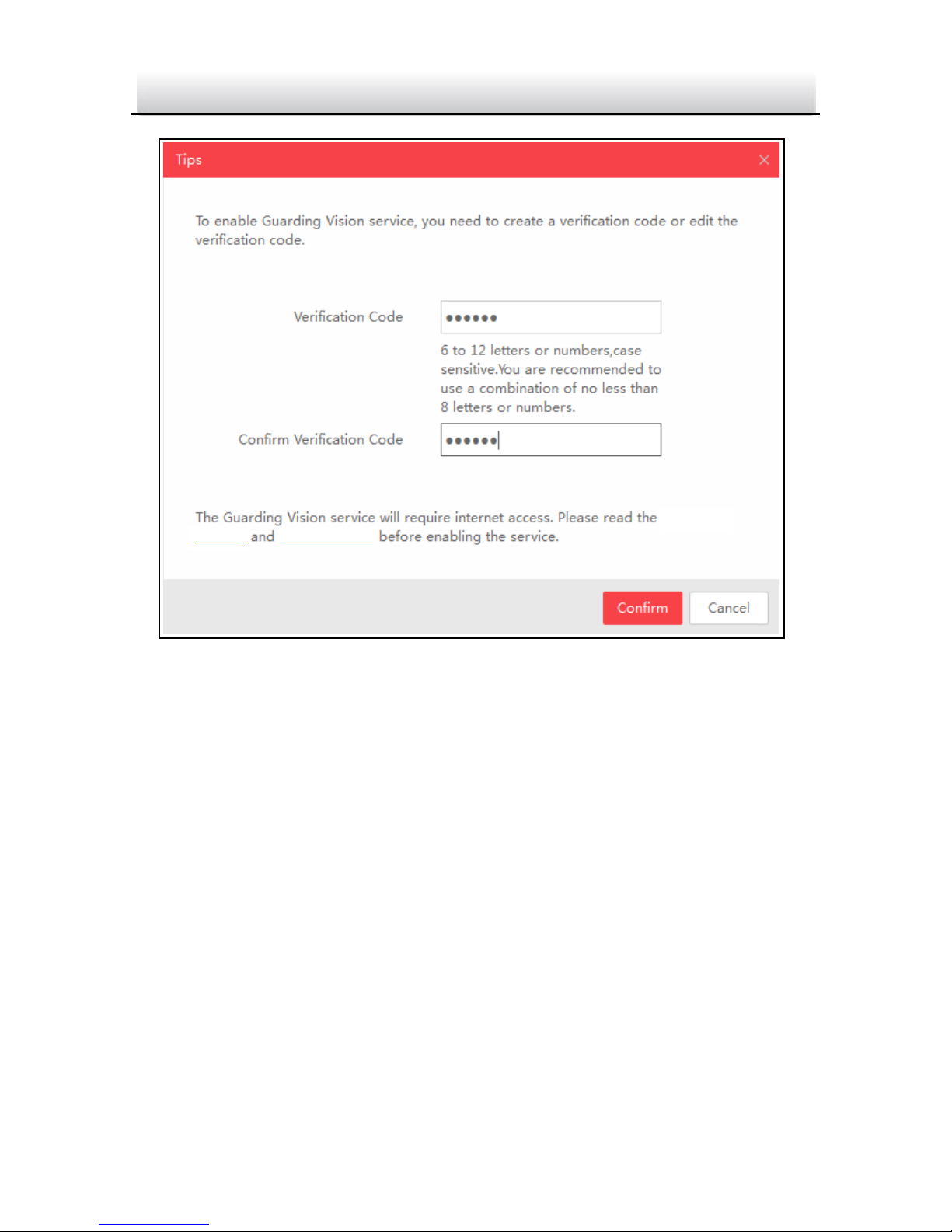
1. Check the checkbox of Enable Guarding Vision on:
1). "Activate the Device" page during camera activation, refer to
Chapter 3.2.2.
2). Or "Modify Network Parameters" page during modifying IP
address, refer to Chapter 3.3.
2. Create a verification code or change the verification code.
Page 38
IP4DIR100 Series IP Dome Camera · Quick Start Guide
37
37
Service”
“Privacy Policy”
Figure 5-1 Verification Code Setting (SADP)
Note:
The verification code is required when you add the camera to
Guarding Vision app.
3. Click and read "Terms of Service" and "Privacy Policy".
4. Confirm the settings.
5.1.2 Enable Guarding Vision Service via Web Browser
Before you start:
You need to activate the camera before enabling the service. Refer to
Chapter 3.2.
Page 39
IP4DIR100 Series IP Dome Camera · Quick Start Guide
38
38
Steps:
1. Access the camera through web browser. Refer to Chapter 4.
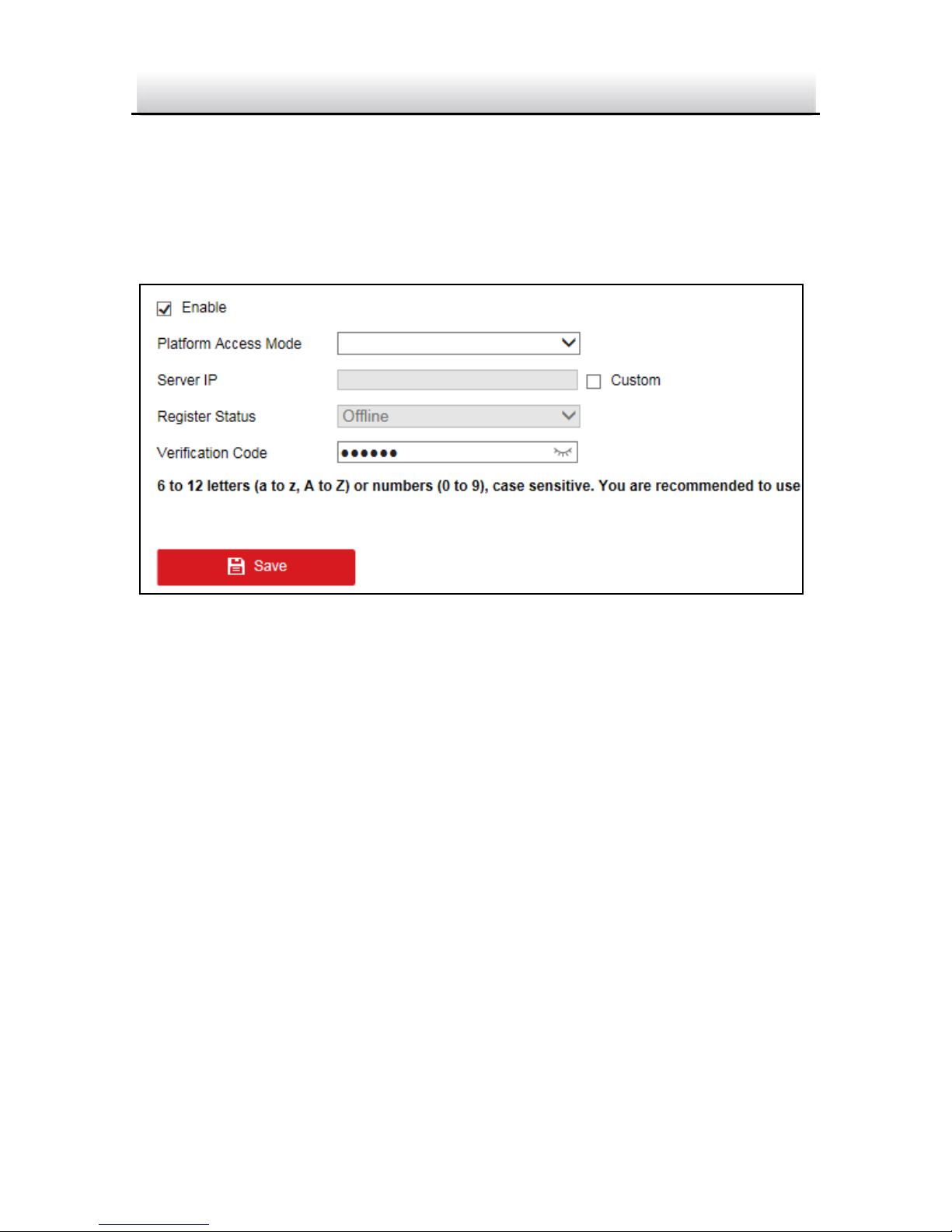
2. Enter platform access configuration interface: Configuration >
Network > Advanced Settings > Platform Access.
Guarding Vision
dev.guardingvision.com
Figure 5-2 Platform Access Configuration (Web)
3. Select Platform Access Mode as Guarding Vision.
4. Check Enable.
5. Click and read "Terms of Service" and "Privacy Policy" in pop-up
window.
6. Create a verification code or change the verification code for the
camera.
Note:
The verification code is required when you add the camera to
Guarding Vision app.
7. Save the settings.
Page 40
IP4DIR100 Series IP Dome Camera · Quick Start Guide
39
39
5.2 Guarding Vision Setup
Steps:
1. Download and install the Guarding Vision app by searching
“Guarding Vision” in App Store or Google PlayTM.
2. Launch the app and register for a Guarding Vision user account.
3. Log in Guarding Vision app after registration.
5.3 Add Camera to Guarding Vision
Before you start:
You need to enable the Guarding Vision service on camera before
adding it to your Guarding Vision account. Refer to Chapter 5.1.
Steps:
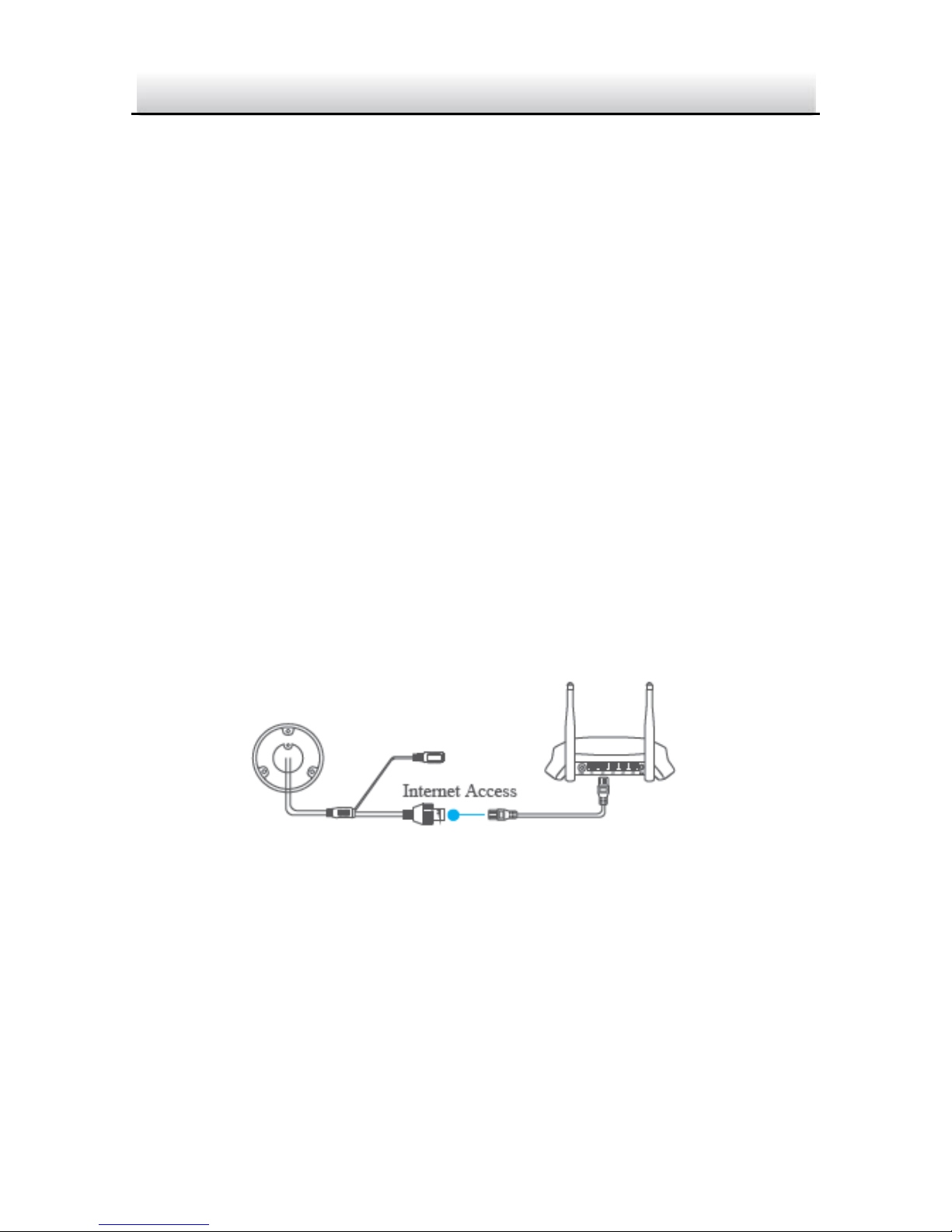
1. Use a network cable to connect the camera with a router if the
camera does not support Wi-Fi.
Figure 5-3 Connect a Router
Note:
After the camera connects to the network, please wait one minute
before any operation on the camera using Guarding Vision app.
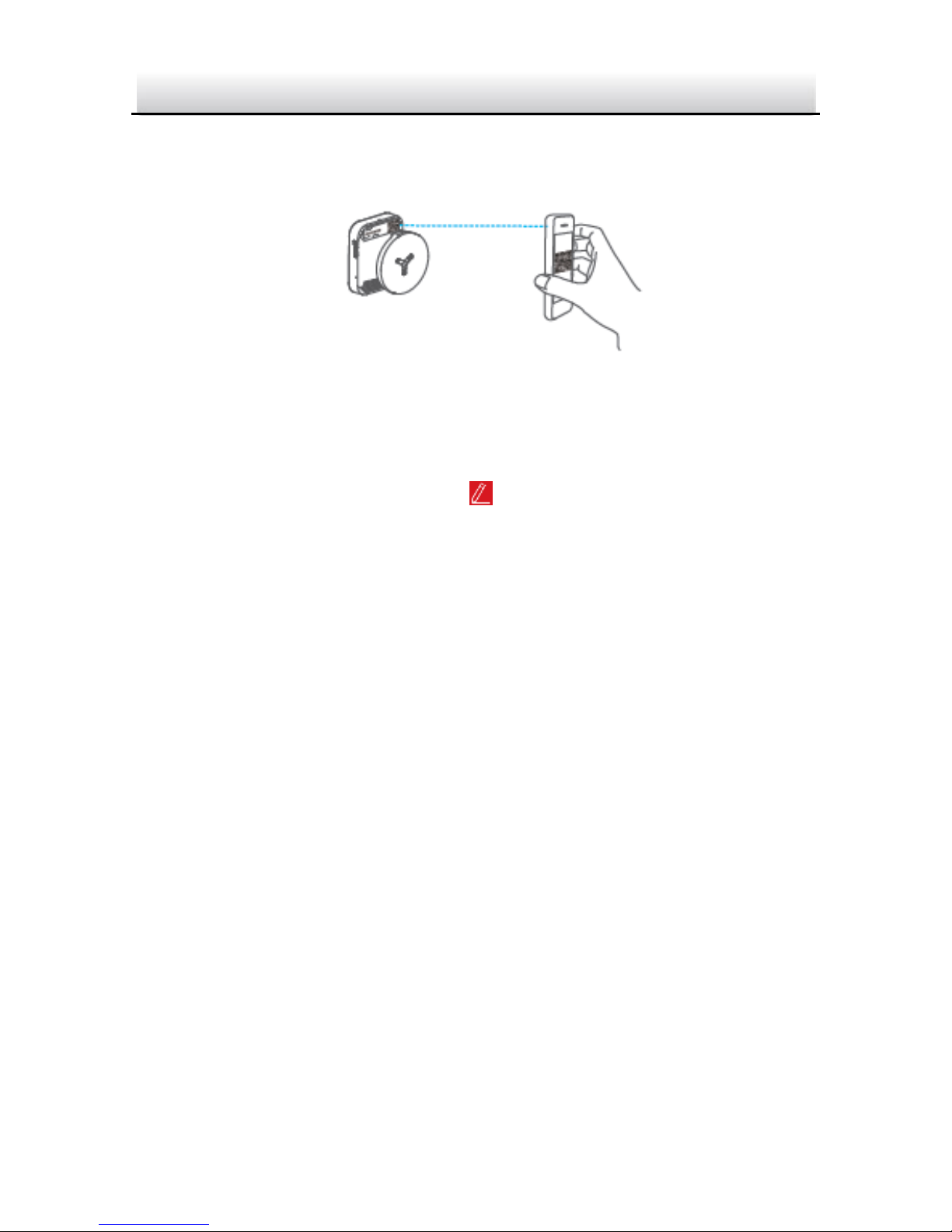
2. In the Guarding Vision app, tap “+” on the upper-right corner and
then scan the QR code of the camera to add the camera.
Page 41
IP4DIR100 Series IP Dome Camera · Quick Start Guide
40
40
You can find the QR code on the camera or on the cover of the
Quick Start Guide of the camera in the package.
Figure 5-4 Scan QR Code
Note:
If the QR code is missing or too blur to be recognized, you can also
add the camera by tapping the icon and inputting the
camera's serial number.
3. Input the verification code of your camera.
Note:
● The required verification code is the code you create or
change when you enabling Guarding Vision service on
camera.
● If you forget the verification code, you can check the current
verification code on Platform Access configuration page via
web browser.
4. Follow the prompts to set the network connection and add the
camera to your Guarding Vision account.
Note:
For detailed information, refer to the user manual of the Guarding
Vision app.
Page 42

IP4DIR100 Series IP Dome Camera · Quick Start Guide
41
41
5.4 Initialize the Memory Card
Steps:
Check the memory card status by tapping on the Storage Status in
the Device Settings interface.
If the memory card status displays as Uninitialized, tap to initialize
it. The status will then change to Normal. You can then start
recording any event triggered video in the camera such as motion
detection.
Page 43

0
UD07706N
 Loading...