

Page 1

Nortel Networks Symposium Agent
Planning and Engineering Guide
Product release: 2.3
Document release: Standard 2.0
Date: June 2001
Page 2

Page 3

Nortel Networks Symposium Agent
Planning and Engineering Guide
Product release: 2.3
Document release: Standard 2.0
Date: June 2001
Copyright © 2001 Nortel Networks, All Rights Reserved.
Information is subject to change without notice. Nortel Networks reserves the right to make
changes in design or components as progress in engineering and manufacturing may warrant.
The process of transmitting data and call messaging between the Meridian 1 and the Symposium
Agent is proprietary to Nortel Networks. Any other use of the data and the transmission process is
a violation of the user license unless specifically authorized in writing by Nortel Networks prior to
such use. Violations of the license by alternative usage of any portion of this process or the
related hardware constitutes grounds for an immediate termination of the license and Nortel
Networks reserves the right to seek all allowable remedies for such breach.
DMS, MERIDIAN 1, MERIDIAN LINK, MSL-100, NORTEL NETWORKS, and SYMPOSIUM are
trademarks of Nortel Networks. INTERNET EXPLORER, WINDOW S, and WINDOWS NT are
trademarks of Microsoft Corporation. Sybase is a trademark of Sybase Corporation.
Page 4

Standard 2.0
Publication history
November 1999
June 2001
This is the standard 1.0 release of the Nortel Networks Symposium
Agent Planning and Engineering Guide Release 2.0.
This is the standard 2.0 release of the Nortel Networks Symposium
Agent Planning and Engineering Guide Release 2.3.
iv Nortel Networks Symposium Agent
Page 5

Contents
Getting started 7
About this guide ........................................................................................................... 8
Overview ...................................................................................................................... 9
Considerations for planning and engineering .............................................................. 9
System components................................................................................................... 10
Technical support....................................................................................................... 12
System configurations 13
Introduction ................................................................................................................ 14
Standalone configuration ........................................................................................... 14
Coresident configuration ............................................................................................ 16
Symposium Agent switch connectivity ....................................................................... 17
Understanding server performance 19
Introduction ................................................................................................................ 20
Key performance factors ............................................................................................ 20
Understanding client features 23
Introduction ................................................................................................................ 24
Client software features ............................................................................................. 24
CPU usage 29
Introduction ................................................................................................................ 30
Load Testing and Data Collection.............................................................................. 31
Load Tests and Hardware/Software Configuration.................................................... 32
Results ....................................................................................................................... 32
CPU Loading Measurement Data .............................................................................. 33
CPU Loading Model ................................................................................................... 34
Summary .................................................................................................................... 36
Planning and Engineering Guide v
Page 6

Standard 2.0
vi Nortel Networks Symposium Agent
Page 7

Chapter 1
Getting started
In this chapter
About this guide 8
Overview 9
Considerations for planning and engineering 9
System components 10
Technical Support 12
Planning and Engineering Guide 7
Page 8

Getting started Standard 2.0
About this guide
Introduction
The Symposium Agent Release 2.3 Planning and Engineering Guide provides
information for selecting and planning your Symposium Agent system.
Who should use this guide
Information in this document is intended for technical planning and purchasing
personnel who are responsible for determining the requirements for installing and
operating a Symposium Agent system in their organization.
Skills you need
You need knowledge and experience of products not covered in this document.
Nortel Networks product knowledge
!
Meridian 1 Option 11-81 PBX or DMS-100 or MSL-100
!
Symposium TAPI Service Provider for M1
!
Symposium Call Center Server or Symposium Express Call Center Server
!
Symposium CompuCall TAPI Server or Symposium TAPI Driver for ICM
PC experience or knowledge
!
Microsoft Windows NT Workstation and Windows NT Server
!
Microsoft Windows 2000 Server and Microsoft Windows 2000 Professional
!
Microsoft Internet Explorer 4.0
!
Microsoft Internet Information Server
!
Microsoft Windows 95
!
Microsoft Windows 98
!
Microsoft Transaction Server
!
Sybase Adaptive Server
Other experience or knowledge
!
network management
!
client-server systems
!
Microsoft Telephony Application Programming Interface (TAPI 2.1)
For further information
!
Symposium TAPI Service Provider Release 2.2 for Meridian 1, GRB-116
!
Symposium TAPI Driver for ICM Product Service Introduction (PSI)
8 Nortel Networks Symposium Agent
Page 9

June 2001 Getting started
# 50193.16/04-99 Issue 1
!
Symposium Agent 2.3, Sales and Marketing Bulletin # 1260-G
!
Symposium Agent 2.3 General Release Bulletin
!
Reference Guide for Installing, Configuring, and Maintaining the Symposium
TAPI Service Provider for Meridian 1 Release 2, Publication ID 881938
!
Symposium Agent 2.3 Installation Guide, available as a .pdf file on the
Symposium Agent 2.3 CD-ROM
!
Symposium Agent 2.3 online Help in HTML format
The online Help includes information for administering the system after the
installation and initial setup. The Help topics, reference information, and brief
tutorials appear in a Table of Contents that you can open using your browser.
The Help topics are also indexed by keywords.
Before using the online Help, you may need to relax your browser security for
the Intranet (not Internet) zone to allow the use of the ActiveX control that
provides the Help Table of Contents. For instructions on browser security
settings, see the section called "Running the Symposium Agent administration
tool."
Neither the Symposium Agent 2.3 Installation Guide nor the online Help is
sold or distributed in paper copy.
Overview
The Symposium Agent server can be set up in two configurations. In the first
configuration, as a standalone server, the Symposium Agent Server software
resides on the server platform by itself. The second configuration combines the
Symposium Agent server software and the TAPI Service Provider (M1 TAPI SP,
CompuCall TAPI Driver or TAPI Driver for ICM) on the same server platform.
The information contained in this document explains how to plan for each
configuration.
Considerations for planning and engineering
Planning and engineering involves determining the best size, platform, and
location for your Symposium Agent system.
To start planning and engineering a Symposium Agent system, consider the
Planning and Engineering Guide 9
Page 10

Getting started Standard 2.0
following questions:
!
Will Symposium Call Center Server or Symposium Express Call Center
Server route calls to your Symposium Agent users?
!
What is the LAN connectivity for the PCs?
!
What applications will you want users to screen pop on, and which data
(Calling Number, Called Number/DNIS or Call/User Data) will be used to
trigger the screen pops?
!
Will the client PC be equipped with Windows 95,Windows 98, Windows NT
4.0 Workstation, or Windows 2000 Professional?
!
How are your network domains currently set up and how will the domain
requirements imposed by TAPI SP and Symposium Agent impact the current
network?
!
Where will the servers be located and how will they be connected?
!
Will you use your own web server to support your application(s) or will you
use Internet Information Server? Which server will Symposium Agent uses as
it’s web server? (If you use Symposium Agent’s server as your web server,
you may require a faster machine with more memory and larger disk drive.)
!
Do you want screen pops to occur before calls are answered (when the agent's
phone is ringing), when the call is answered/connected, or after the call ends?
!
What is the maximum number of calls per hour the call center will handle?
!
What is the number of concurrent users?
System components
Key components
A Symposium Agent system consists of five key components:
1) Switch components Meridian 1 Option 11C and Options 51C
2) Symposium Agent Server The Symposium Agent Server software and
3) Telephony Server (TAPI Server) reside on separate Windows NT 4.0 or
or on the same server.
through 81C or MSL-100 or DMS-100 are
supported.
Telephony Server (TAPI SP) software can
Windows 2000 servers
4) Administrative PC The Administrative PC is used to configure
10 Nortel Networks Symposium Agent
Page 11

June 2001 Getting started
the Symposium Agent system. It must be
equipped with Internet Explorer 4.0 or
higher. TAPI SP and Symposium Agent
administrative tasks can be performed from
the same PC if the TAPI SP software is
installed on the same server as Symposium
Agent. Or, administrative tasks can be
performed from a Symposium Agent 2.3
Client PC.
5)Symposium Agent Client PC The Client PC must be equipped with
Internet Explorer 4.0 or higher.
Both the Symposium Agent Server and the switch resources related to
Symposium Agent need to be provisioned.
Required third-party software
Client
!
Windows 95, Windows 98, Windows NT 4.0 (with Service Pack 5.0, or
higher), or Windows 2000 Professional
!
Microsoft Data Access Components (MDAC)
!
DCOM (from Microsoft)
!
TAPI 2.1 Remote Service Provider upgrade for Windows 95 clients
Server
!
Windows NT 4.0 (SP 5.0) or higher operating system (configured as NTFS -
NT File System)
!
Windows 2000 Server
!
Microsoft IIS 4.0 or higher web server software
!
Sybase Adaptive Server 12
!
Microsoft Transaction Server software
Other
!
DMS/MSL-100 (release NA009 or MSL-08) or Meridian 1 (X11 Release 23
or higher)
!
Symposium Call Center Server, Symposium Express Call Center Server,
CompuCall ACD, or Meridian ACD
!
TAPI 2.1 Server
!
Direct connect (Ethernet AML), Meridian Link (Release 5 or higher),
CompuCall TAPI Driver (X.25), Symposium TAPI Driver for ICM (TCP/IP)
or Symposium Call Center Meridian Link Services Module (MLSM) on
Symposium Call Center Server or Symposium Express Call Center Server.
Planning and Engineering Guide 11
Page 12

Getting started Standard 2.0
Note:
Sybase was chosen as the database in order to match other Symposium products
such as Symposium Call Center Server and Symposium WebResponse Server.
Symposium Agent Server supports Sybase Adaptive Server 12. Symposium
Agent Server can use an existing customer Sybase installation if it is version 11.5.
Versions of Sybase earlier than 11.5 are not supported.
Technical support
Introduction
If you experience technical difficulties, ensure that you have downloaded the
latest Service Updates, Performance Enhancement Packages (PEPs) and addenda
for Symposium Agent. You can download Service Updates and PEPs from
http://sulaco.europe.nortel.com:8080/mpl/index.cfm and download the latest
installation or documentation addendum from www.nortel-sccs.com.
Nortel Networks personnel use pcAnywhere as a remote support tool. If you
require remote support from Nortel Networks, it is recommend that you install
pcAnywhere.
For a customized installation/configuration of Symposium Agent, contact your
Nortel Networks representative.
12 Nortel Networks Symposium Agent
Page 13

Chapter 2
System configurations
In this chapter
Introduction 14
Standalone configuration 14
Coresident configuration 16
Symposium Agent switch connectivity 17
Planning and Engineering Guide 13
Page 14

System configurations Standard 2.0
Introduction
Symposium Agent software can be installed on a server by itself (standalone
configuration) or on a server with other software (coresident) and always requires
a TAPI Server. Nortel Networks recommends installing Symposium Agent
software and TAPI Server software on the same server. The TAPI Server software
required depends upon the type of switch and telephones Symposium Agent will
control or monitor. Symposium Agent can also operate in a Legacy ACD
environment, Symposium Call Center Server environment, or Symposium
Express environment. Refer to the section Symposium Agent switch connectivity
in this chapter for detailed information. Symposium Agent must not be installed
on a Symposium Call Center Server.
This section provides the minimum hardware and software requirements for
implementing a Symposium Agent system.
.
Standalone configuration
Listed below are the minimum hardware and software requirements for a
standalone Symposium Agent configuration.
Symposium Agent Server hardware requirements
!
Pentium II PC 400 MHz or higher
!
Minimum hard disk drive 6.0 Gbytes
!
Minimum 256 Mbytes of RAM
!
CD-ROM drive
!
Network Interface Card
!
Mouse
!
VGA or SVGA Display (800 x 600 pixels)
Symposium Agent Server software requirements
!
Windows NT 4.0 Server with Service Pack 5.0 (or higher), or Windows 2000
Server,
Note: You can verify the service pack level during the early stages of the
boot up. The service pack version appears next to the Windows NT build
number.
!
Internet Explorer 4.0 (or higher)
Note: You can verify the version in Internet Explorer by choosing Help →
About in Internet Explorer.
14 Nortel Networks Symposium Agent
Page 15

June 2001 System configurations
!
Windows NT 4.0 Option Pack 4.0 (Internet Information Server and
Transaction Server)
Note: You can determine if these components are installed by checking the
list in the Services on Windows NT (from the Start menu, choose Settings →
Control Panel → Services).
!
Microsoft Data Access Components 2.1 (or higher)
!
Remote TAPI Service Provider (available with Microsoft's TAPI 2.1)
!
Sybase Adaptive Server 12
TAPI server hardware and software requirements
In a standalone configuration, a separate server is required in addition to the
Symposium Agent Server. The additional server is required to support installation
of the TAPI SP software. Refer to the following documents to obtain guidelines
for engineering the TAPI Server.
For Meridian 1 switch Refer to the Engineering and Capacity Rules
for Windows NT using the Symposium TAPI
Service Provider for Meridian 1 Release 2
(Document number P0889315)
For DMS-100 or MSL-100 switch Refer to the ICM TAPI Driver Network
Manager's Guide
Symposium Agent Client (agent workstation) requirements
Hardware
!
Pentium II PC 200 MHz or higher
!
Minimum 32 Mbytes of RAM
!
Minimum free hard disk space 25 Mbytes
!
Network Interface Card
Software
!
Windows 95 (upgraded to Microsoft’s TAPI 2.1)
!
Windows 98 or Windows NT 4.0 with Service Pack 5.0
!
Windows 2000 Professional
!
MDAC 2.1 (or higher)
!
Microsoft Internet Explorer 4.0 (or higher)
Symposium Agent (administration workstation) requirements
The Symposium Agent system is administered through an Internet Explorer
Planning and Engineering Guide 15
Page 16

System configurations Standard 2.0
browser. The administration workstation can be a PC whose characteristics match
the client workstation requirements above, or a Symposium Agent Client
workstation.
Coresident configuration
Listed below are the minimum hardware and software requirements for a
Symposium Agent coresident configuration (with the TAPI Service Provider
software installed on the Symposium Agent Server).
Symposium Agent Server hardware requirements
!
Pentium II PC 400 MHz or higher
!
Minimum hard disk drive 8.0 Gbytes
!
Minimum 512 Mbytes of RAM
!
CD-ROM drive
!
Network Interface Cards CLAN and ELAN (if you are not using direct
connect)
!
Mouse
!
VGA or SVGA Display (800 x 600 pixels)
Symposium Agent client (agent workstation) requirements
The Symposium Agent client requirements are the same as for the standalone
configuration.
Symposium Agent (administration workstation) requirements
Symposium Agent and the TAPI Service Provider can be administered from the
same Symposium Agent Server console. The Symposium Agent Server software
requirements are the same as for the standalone configuration except that the
Symposium TAPI Service Provider or ICM TAPI Driver software must be
installed on the Symposium Agent Server and Microsoft's TAPI 2.1 software is
installed on the server when Windows NT 4.0 Server Service Pack 4 is installed.
The minimum hardware requirements increase, as noted above.
Note: Windows NT 4.0 Server Service Pack 5 and the MDAC 2.1 upgrade should
be installed on the server just prior to the installation of the TAPI Server software.
16 Nortel Networks Symposium Agent
Page 17

June 2001 System configurations
Symposium Agent switch connectivity
Symposium Agent standalone and coresident configurations both require TAPI
Server connectivity to a switch. Listed below are the possible switch connectivity
configurations and the requirements for each configuration.
Note: Symposium Agent 2.3 cannot be used to monitor or control Multiple
Appearance Directory Number (MADN) lines.
M1 switch
Symposium Agent 2.3 can connect via the TAPI Server to any Meridian 1 option
11-81 with X11 Release 23 or higher.
When TAPI Service Provider is deployed using Meridian Link 5 (Coresidency
6.03), the following is required:
!
X11 Release 23 or higher
!
Symposium TAPI Service Provider for Meridian 1, Release 2.1 or higher
When TAPI Service Provider is deployed with Symposium Call Center Server 1.1
or higher (1.5 is recommended), or Symposium Express 1.0:
!
X11 Release 23 or higher
!
Symposium TAPI Service Provider for Meridian 1, Release 2.1 or higher
When TAPI Service Provider is deployed using Symposium TAPI Service
Provider Direct Connect Option:
!
X11 Release 23 or higher
!
Symposium TAPI Service Provider for Meridian 1, Release 2.1 or higher
For more information, refer to the TAPI Service Provider document Reference
Guide for Installing, Configuring, and Maintaining the Symposium TAPI Service
Provider for Meridian 1 Release 2, Publication ID 881938.
For other switch prerequisites, consult the Sales and Marketing Bulletin #1160,
Revision 3.
Telephone requirements for M1
With the M1, Symposium Agent can be used with the following types of
telephones: M2008, M2216, M2616, M3110, M3310, M3820, M3901, M3901,
M3903, M3904, M3905 and 2500 type sets. Meridian 1 telephone sets associated
with Symposium Agent 2.3 clients must be configured as AST sets.
Planning and Engineering Guide 17
Page 18

System configurations Standard 2.0
MSL-100 switch
Symposium Agent 2.3 can be connected to any Meridian SL-100 with MSL09 or
higher equipped with Symposium CompuCall TAPI Driver or Symposium TAPI
Driver for ICM.
The ICM or CompuCall link must be data filled on the MSL-100 and the
telephone sets associated with Symposium Agent 2.3 clients must be configured
with the ECM or ACD SERVORD option.
The ICM Link requires an Ethernet Interface Unit (EIU) in the SL-100.
Telephone requirements for MSL-100
With the MSL-100, Symposium Agent can be used with the following types of
telephones: M5000 series, Pots (single line), or M2000 series sets with IVD patch
RIC88 on MSL09.
DMS-100 switch
Symposium Agent 2.3 can be connected to any DMS Centrex ACD environment
with an Intelligent Call Management (ICM) link. It requires NA010 or higher
software equipped with a Symposium TAPI Driver for ICM.
The ICM link must be datafilled on the DMS for the telephone sets associated
with Symposium Agent 2 clients. The DMS must be configured with ICM and
ACD software.
The ICM link requires an Ethernet Interface Unit (EIU) on the DMS and a router
on both the DMS and customer premise end point, if the call center is on a
different network than the DMS.
Telephone requirements for DMS-100
With the DMS-100, Symposium Agent can be used with the following types of
telephones: M5000 series, and Pots (single line).
18 Nortel Networks Symposium Agent
Page 19

Chapter 3
Understanding server performance
In this chapter
Introduction 20
Key performance factors 20
Planning and Engineering Guide 19
Page 20

Understanding client feature server performance Standard 2.0
Introduction
To optimize the performance of the Symposium Agent system you need to
consider certain operating conditions in order to determine the memory and disk
storage requirements of the Symposium Agent Server.
Optimum performance of the Symposium Agent system is governed by four key
factors:
1) Standalone server configuration vs. server coresidency with the Symposium
TAPI Service Provider
2) The number of users who will be logged in and active simultaneously
3) The number of users who will be using call logs
4) The size and location of the web applications that will be used inside the
framework of Symposium Agent
These factors are discussed on the following pages.
Key performance factors
Standalone server vs. coresidency with TAPI server
Nortel Networks recommends that the Symposium Agent Server software reside
on the same server as the Symposium TAPI Service Provider for M1 software or
the Symposium TAPI Driver for ICM software when the number of Symposium
Agent users is less than 500. Establishing coresidency in this way minimizes LAN
traffic and eases administration. When the number of users exceeds 500, it is
recommended that separate sever platforms be used. In all cases the server
platforms must be in the same domain as the agent PC that wishes to control the
phone. If the agent PC is not in the same domain then a two-way trust relationship
must exist between the domains.
The number of concurrent users
The Symposium Agent Server, when started by a single user, will launch two
instances of the Microsoft Transaction Server service. Each MTX.EXE that is
started will consume 5600 Kbytes of memory (5.6 Mbytes) initially. The amount
of actual memory needed by the MTX.EXE services can grow based on the
amount of use and information requested by the agent applications.
The amount of memory per agent login is approximately 500 Kbytes per client.
20 Nortel Networks Symposium Agent
Page 21

June 2001 System configurations
This figure includes all services accessed by the agent during the login to the
server. This number was derived from an agent logging into the server with two
Tabs assigned to them. The amount of memory needed for each agent will vary
based on the number of Tabs used by the agent. After the initial login is complete,
the size of the needed RAM will decrease based on the usage of the agents.
The amount of memory used per call = 8 Kbytes (TAPI requirement) + 4 Kbytes
(Call Log entry) + (Symposium Agent) = Total Memory. Symposium Agent 2.3
will pass the 8 Kbytes per call plus any information presented to the agent for
screen pops. This could increase the total per call memory to 512 Kbytes per call.
Notes: Additional memory will be used for call data and agent-to-agent
messaging on a per call basis.
The 4 Kbytes used for Call Log generation will be released by the system
after the information is written to the Sybase database.
The following table provides the break points for the number of agents and the
amount of RAM needed. These configurations are the same for standalone or
coresident server setups.
Server
Configuration
Pentium II 400
MHz CPU
Pentium II 400
MHz CPU
Pentium III 450
MHz CPU
Pentium III 600
MHz CPU
* For more than 500 users, it is recommended that you use separate server platforms for TAPI
Service Provider and Symposium Agent 2.3.
Amount of RAM Number of Agents
256 Mbytes 100 Active Agents
512 Mbytes 101 – 500 Active Agents
768 Mbytes 501 – 800 Active Agents*
1000 Mbytes
(1 Gbyte)
800 – 1000*
The size and location of the web applications
Symposium Agent includes Microsoft's IIS to support its basic framework and
can be used to support the web applications used by the end user. However, the
requirements of the web application such as memory and disk storage requirement
may compete with Symposium Agent requirements. For example:
!
Installation of the Symposium Agent 2.3 server software requires 30 Mbytes
of disk space.
!
Other components being installed are Sybase, Microsoft’s IIS, and Microsoft
Transaction Server.
!
Sybase requires a minimum of 250 Mbytes.
Planning and Engineering Guide 21
Page 22

Understanding client feature server performance Standard 2.0
!
The Symposium Agent database can be up to 2 Gbytes.
!
The amount of memory used by the Symposium Agent application will
depend on the number of Active Server Pages (ASP) assigned to the
individual agent. The larger the number of pages, the more memory will be
required by the server to update the agents.
The number of users who will be using Call Logs
Because each call record will consume 4 Kbytes of disk space for storage, the
number of Call Logs being stored can increase the amount of storage space
needed on the server, as shown in the following example:
16000 calls per hour + 4 Kbytes = 64000 Kbytes or 64 Mbytes
You must monitor the storage space on the server. Refer to the Nortel Networks
Symposium Agent Installation Guide (provided on the Symposium Agent 2.3 CDROM) for the procedure to purge the database.
For each Call Log that is generated, 4 Kbytes is needed by the server for storage.
This disk space can be recovered when the Call Logs are purged from the system.
CPU Utilization Vs. Call Processing Rate
Measurements have been taken in the lab using simple calls to determine the
relationship between call processing rate and CPU utilization during steady state
call processing. The results of this testing can be found in Appendix A.
22 Nortel Networks Symposium Agent
Page 23

Chapter 4
Understanding client features
In this chapter
Introduction 24
Client software features 24
Planning and Engineering Guide 23
Page 24

Understanding client features Standard 2.0
Introduction
For LAN connectivity, memory, and disk space requirements for a Symposium
Agent Release 2.3 client PC, refer to Chapter 2, System Configurations. The
minimum requirements include the amount of memory and disk space required
for Symposium Agent software only. Refer to Microsoft documentation for
memory and hard disk space requirements for each Microsoft component.
Symposium Agent software must be installed on the server and then uploaded to
the client via a setup program in the Launcher folder of the server. For
information, refer to the Symposium Agent Installation Release 2.3 Guide. The
Symposium Agent client software includes the following features:
!
automatic software update
!
user login
!
browser
!
softphone (agentTelephony)
!
tabs (agentTabs)
!
call rules runtime
!
telephony control
!
license management
!
language support
!
graphical user interface
Client software features
Listed below are descriptions of the key Symposium Agent software modules.
Automatic software update
The automatic software update program is the only Symposium Agent software
that needs to be installed initially on client machines. It downloads the latest
versions of all other Symposium Agent client software from the server. This
allows patches and upgrades to be easily delivered to customer sites without
manually reinstalling software on each client machine. The automatic software
update program has the ability to launch other programs. In the case of
Symposium Agent, the program that is launched is the user login program.
24 Nortel Networks Symposium Agent
Page 25

June 2001 System configurations
User login
The user login program validates the user ID and password against the list of
users and passwords stored in the Symposium Agent database. If validation
succeeds, the login program starts the browser and call rules runtime programs. It
then hides itself but stays alive.
Browser
The browser is a full-featured, telephony-enabled, Internet Explorer-based web
browser. It contains a soft phone and tabs that correspond to web pages.
Softphone (agentTelephony)
The softphone is an ActiveX control that resides on the browser. It allows the user
to perform telephony functions (answer, dial, hold/unhold, transfer, conference)
and ACD agent functions (login/logout, go ready/not ready, make set busy/in
service) through the computer keyboard without touching the physical telephone.
Outbound calls (simple, transfer, or conference) are performed with the aid of a
dial wizard that can make use of special dial plans or corporate directories. It is
also possible to attach text to any outbound call. If the recipient of the call is also
a Symposium Agent user, the text appears along with the incoming call.
Symposium Agent supports a maximum of two lines.
Telephone numbers are not always dialed the way they appear in corporate
directories or databases. For example, an electronic phone directory might contain
the number 6125551212. If the user’s area code is 612, that number might be
dialed as 95551212 (remove the area code and insert 9 for an outside call). Dial
plans are stored in the server database. The dial plan client software
(nndpUser.dll) is an ActiveX component. If dial plans are in effect, this
component examines all numbers to be dialed and makes available to the dial
wizard possible modifications of the digits based on dial plans.
The soft phone has the ability to dial numbers from the customer’s corporate
directory, provided that the corporate directory is compliant with the LightWeight Directory Access Protocol (LDAP). An example of an LDAP-compliant
directory is Microsoft’s Exchange server. The component responsible for
retrieving LDAP data is NNLDAP.dll.
Tabs (agentTabs)
The tabs that appear on the browser are shortcuts to web URLs. When a tab is
selected, the browser displays its associated URL. The following types of tabs
may appear:
!
Symposium Agent standard web pages (such as call logs, agent activity logs,
and statistics)
!
web pages for other Nortel Networks applications (such as Symposium
WebResponse Server)
Planning and Engineering Guide 25
Page 26

Understanding client features Standard 2.0
!
web pages for other vendors’ call center applications (such as Comverse call
recording, and Symon call center statistics)
!
customized call guides
!
others, as required by the customer
Call information can be passed to these web pages. This allows easy construction
of web-based call guides that are customized for a call center’s needs. Different
pages can appear on the tab based on call state (offering, connected, idle), and all
of the pages are passed call data (for example, IVR digits, calling line id, dialed
number).
Call rules runtime
The call rules runtime component is an ActiveX .EXE that is started by the login
program. It allows screen pops or other interactions with third-party software
through a variety of mechanisms (keystroke macros, DDE, or OLE) when
telephone calls are made or received. The call rules runtime component is also
responsible for passing telephony data to web URLs represented by the browser
tabs.
Telephony control
Telephony control is provided by a Nortel Networks ActiveX Telephone Object
(nato.exe) and an ActiveX .EXE component. This component is used by the
browser’s soft phone and by call rules runtime.
License management
License management is accomplished with the aid of Globetrotter’s FlexLM
software, which allows only a certain number of users to check out a feature at
the same time. The number of simultaneous users is defined in a license file
given to the customer by Nortel Networks when Symposium Agent is purchased.
In addition, hardware protection is employed (via a dongle on a license server).
When a Symposium Agent user logs in, a feature is checked out. When a
Symposium Agent user logs out, the feature is checked back in. While a
Symposium Agent user is logged in, the license manager heartbeat is periodically
checked.
Language support
One attribute of a user in the Symposium Agent database is preferred language.
Text strings in the user interface of both the browser and call rules runtime
programs appear in the logged-on user’s preferred language.
26 Nortel Networks Symposium Agent
Page 27

June 2001 System configurations
Graphical user interface
The browser uses a series of custom, light-weight Nortel Networks graphical user
interface controls to achieve its unique look and feel. These controls include:
!
pop-up menu
!
grid
!
toolbar/menu
!
image list
!
clipboard event viewer
Planning and Engineering Guide 27
Page 28

Understanding client features Standard 2.0
28 Nortel Networks Symposium Agent
Page 29

Appendix A
CPU usage
In this appendix
Introduction 30
Load testing and data collection 31
Load test and hardware/software configuration 32
CPU loading measurement data 33
CPU loading model 34
Summary 36
Page 30

Understanding client features Standard 2.0
Introduction
This appendix describes the performance testing that was performed on the
Symposium Agent product and provides a model that was derived from these
tests. It further describes the calculations necessary for its use.
30 Nortel Networks Symposium Agent
Page 31
June 2001 System configurations
Load testing and data collection
Symposium Agent test environment
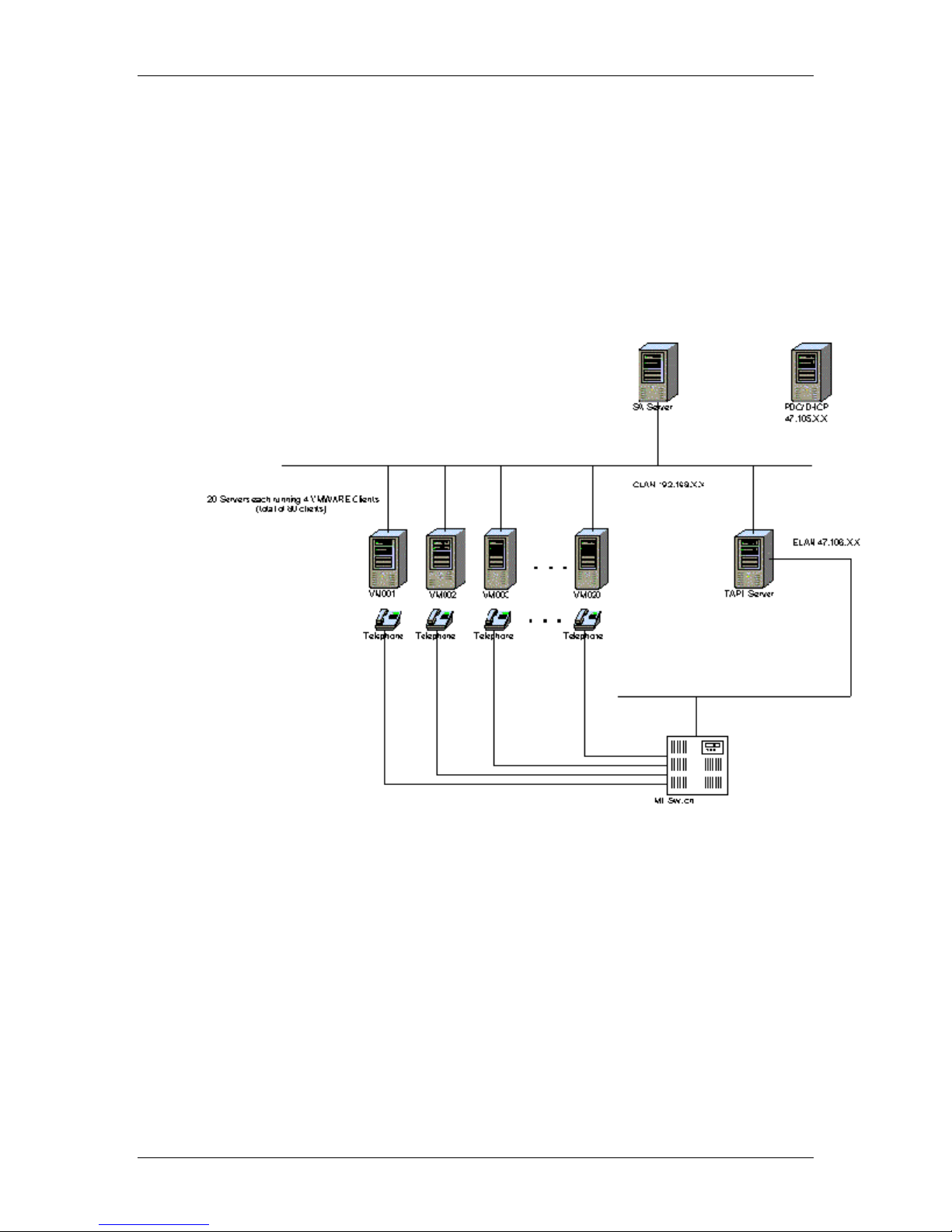
The following diagram illustrates the Symposium Agent test environment used for
the testing as well as the transaction flow.
Network diagram for Symposium Agent stress test
Figure 1: Symposium Agent Test Environment
Planning and Engineering Guide 31
Page 32

Understanding client features Standard 2.0
Load tests and hardware/software configuration
Five test cases were performed following the Symposium Agent load test plan.
Load tests up to 14,000 CPH were executed. System performance data was logged
using Performance Monitor.
Equipment Hardware Software
TAPI server - standalone
Symposium Agent server –
standalone
PDC/DHCP server
Client host servers (20)
Client – virtual (80)
Load generator
Switch
Results
Four or the five tests had log files recording performance data. Results from three
of the four remaining tests were found to be adequate for performance data
extraction on the Symposium Agent server. All 4 of the log files were used for
the TAPI server.
PII 400 MHz (256 M RAM)
PII 400 MHz (128 M RAM)
PII 400 MHz (128 M RAM)
PII 500 MHz (256 M RAM
4 Clients per host server
Ameritec Load Box
Meridian 1
Windows 2000 , Symposium
TAPI Server 2.3.0.10
Windows 2000, Sybase 12.0,
Symposium Agent 2.3.0.4
Windows NT 4.0, DHCP
Windows NT 4.0 or higher,
VMWare 2.0
Windows 95, TAPI 2.1, MDAC
2.1, IE 4.0
n/a
X11 Release 23 or higher
32 Nortel Networks Symposium Agent
Page 33
June 2001 System configurations
CPU loading measurement data
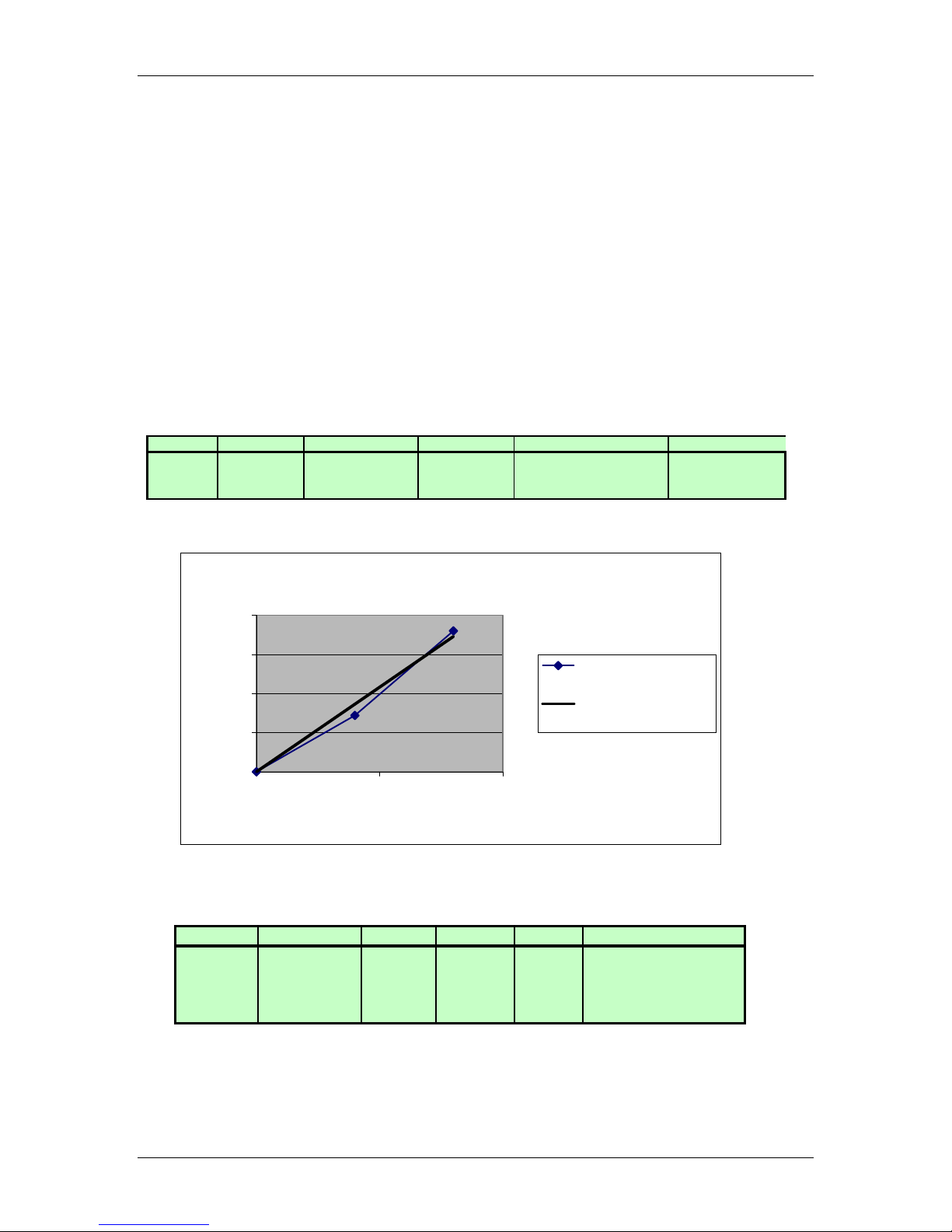
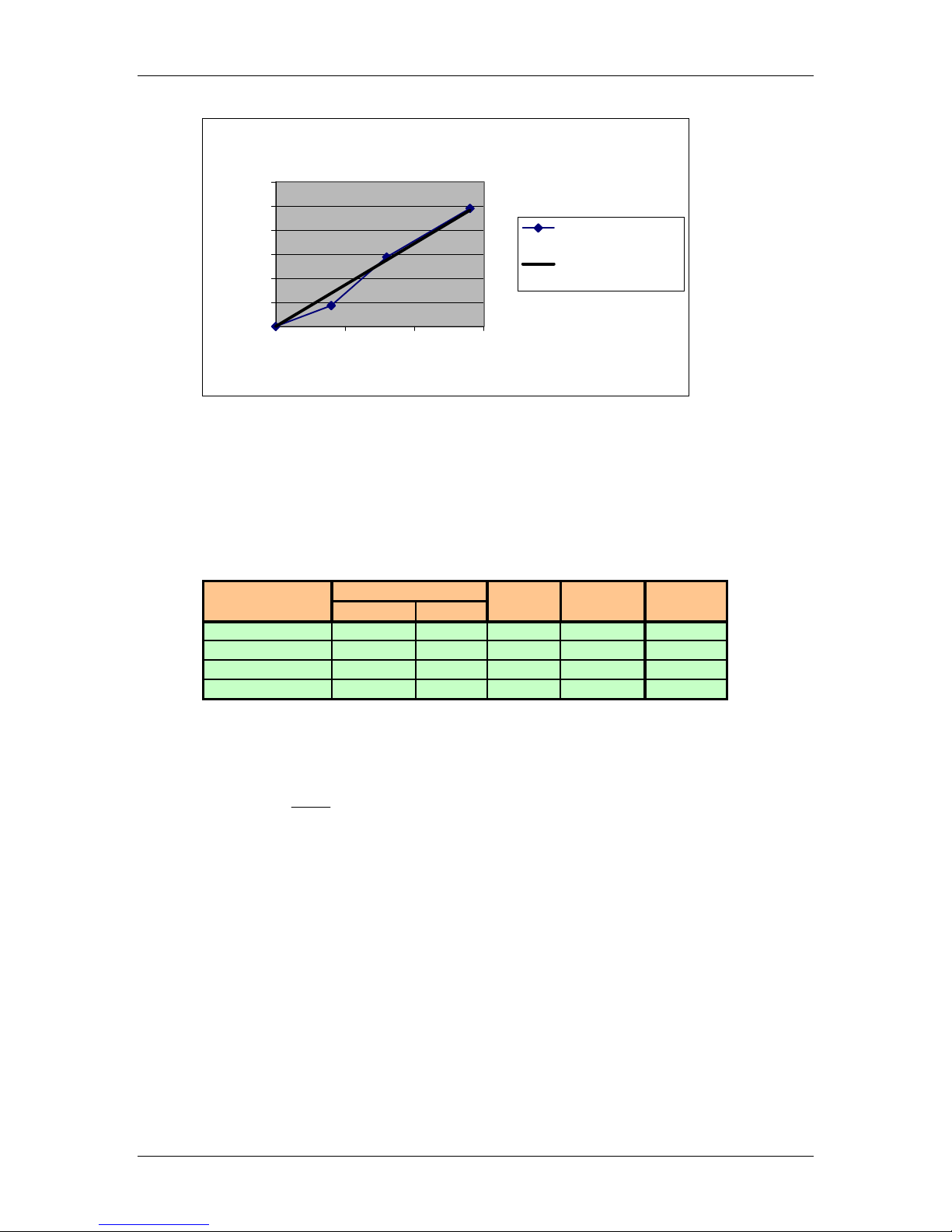
Performance Monitor logs were collected during the testing for test cases 2
through 5. (The SA Server log file for Test Case 4 contained corrupted data and
therefore was not used. The corresponding TAPI log file was not corrupted and
could be used.) This data was analyzed and a simple model of Symposium Agent
CPU load as a function of call rate was derived.
Note: These calls were simple calls and had no other processing associated with
them.
The log data for the SA server and TAPI server are summarized below in the first
and second tables respectively:
Test Case Logfile Platform CPH CPU (%) CPU-Sec (in 1 hour)
2 NoLoad PII400 0 10% 0
3 LiteLd_02116 PII400 4000 12% 72
5 MLd_0216 PII400 8000 15% 180
SA Server CPU Vrs. Call Rate
200
y = 0.0216x
2
R
150
100
CPU-Sec
50
0
0 5000 10000
Test Case Logfile Platform CPH CPU (%) CPU-Sec (in 1 hour)
2 NoLoad PII400 0 1% 0
3 LiteLd_02116 PII400 4000 2% 43.2
5 MLd_0216 PII400 8000 5% 144
4 HLd_0215 PII400 14000 8% 244.8
= 0.9842
CPU-Sec (in 1 hour)
Linear (CPU-Sec (in
1 hour))
CPH
Planning and Engineering Guide 33
Page 34
Understanding client features Standard 2.0
TAPI Server CPU vrs. Call Rate
300
250
200
150
100
50
CPU-Sec in 1 Hour
0
0 5000 10000 15000
y = 0.0172x
2
R
= 0.9801
CPH
CPU-Sec in 1 hour
Linear (CPU-Sec in
1 hour)
CPU loading model
The test results show linear scaling of CPU usage with call load. CPU calibration
values based on the above analysis are summarized in Table 1.
Internal Name Measured Scaled to
SA_NL PII400 256 % 10% 10%
TAPI_NL PII400 256 % 1% 1%
SA_CPU PII400 256 CPU-Sec 0.0216 0.0216
TAPI_CPU PII400 256 CPU-Sec 0.0172 0.0172
Measured Platform
Processor Memory Units Value PII400
Table 1
The equation for CPU estimation is given by:
λµ
CPU
+=
υ
3600
()
BaseCPUCPUscaleU
,*
where ν is the no-load CPU , λ is the call rate in CPH and µ is the CPU cost per
call in CPU-Sec. Scale() is a scaling factor that scales the utilization to any
processor desired (CPU) using the measured or base processor (Base CPU).
Scaling factors are shown in Table 2.
34 Nortel Networks Symposium Agent
Page 35

June 2001 System configurations
Processor Base Rel
P75 7.33
P100 4.89
P166 2.75
PP200 2.00
PII266 1.45
PII300 1.33
PII333 1.20
PII350 1.14
PII400 1.00
PII450 0.91
PIII450 0.75
PIII500 0.68
PIII550 0.63
PIII600 0.58
PIII600E 0.53
PIII650 0.50
PIII667 0.48
PIII700 0.46
PIII733 0.45
PIII750 0.44
PIII800 0.42
PIII866 0.39
PIII933 0.36
PIII1.0B 0.34
PIV1.3G 0.27
PIV1.5G 0.24
Dual processor scaling factors are obtained from the single
processor by multiplying the corresponding Base Relative
value by 2/3. For example, the base relative value of a PIII
733 is given in the table as 0.45. The dual base relative
value then is 0.45 * 2/3 = 0.30.
Note that these processors are scaled relative to the PII400.
Relative scalings to other processors can be calculated by
taking the ratio of the unknown to known base relative
values. For example, a base relative value for the PIII450
to a known value for the PII300 is calculated as 0.75/1.33
= 0.56
Table 2
Example
Calculate the CPU load on a PIII 500 MHz for both TAPI and Symposium Agent
Server for a call rate of 30,000 CPH:
I Symposium Agent server:
λµ
•
CPU
+=
υ
3600
()
BaseCPUCPUscaleU
,*
• The no-load CPU on a PII400 for the Symposium Agent server is
given in Table 1 as 10%
• L is 30,000 CPH and m is 0.0216 from Table 1
• Scale(PIII 933, PII 400) = 0.68 from Table 2.
0216.0*30000
• Thus 19.068.0*
U or 19%
CPU
1.0 =
+=
3600
II TAPI server:
•
Planning and Engineering Guide 35
CPU
λµ
3600
()
BaseCPUCPUscaleU
,*
+=
υ
Page 36

Understanding client features Standard 2.0
• no-load CPU on a PII400 for the TAPI server is given in Table 1 as
1%
• L is 10,000 CPH and m is 0.0172 from Table 1
• scale (PIII 933, PII 400) = 0.68 from Table 2.
0172.0*30000
CPU
01.0
+=
3600
• 10.068.0*
U or 10%
=
Summary
This report represents an analysis of the Symposium Agent performance data.
For the simple calls used in the testing, the data shows linear scaling as a function
of call processing rate. A linear model was derived for estimating the CPU load
on a given Intel processor resulting from the processing of simple calls.
36 Nortel Networks Symposium Agent
Page 37

Page 38

Symposium Agent
Planning and Engineering Guide
Nortel Networks
9701 Data Park
Minnetonka, MN. 55343
USA
Copyright © 2001 Nortel Networks, All Rights Reserved.
Product release: 2.3
Document release: Standard 2.0
Date: June 2001
 Loading...