

Page 1
Outdoor Air Conditioner
User’s Information and Installation Instructions
13+ SEER Extra High Effi ciency Split System
These units have been designed and tested f or
capacity and effi ciency in accordance with A.R.I.
Standards. Split System Air Conditioning units
are designed for use with a wide variety of f ossil
fuel furnaces, electric furnaces, air handlers, and
evaporator coil combinations.
These instructions are primarily intended to
assist qualifi ed individuals experienced in the
proper installation of heating and/or air conditioning appliances. Some local codes require
licensed installation/service personnel for this
type of equipment. Read all instructions carefully
before starting the installation.
USER’S INFORMATION
IMPORTANT
Read this owner information to become familiar
with the capabilities and use of your appliance.
Keep this with literature on other appliances
where you have easy access to it in the future.
If a problem occurs, check the instructions
and follow recommendations given. If these
suggestions don’t eliminate your problem, call
your servicing contractor.
OPERATING INSTRUCTIONS
T o Operate Your Air Conditioner for
Cooling —
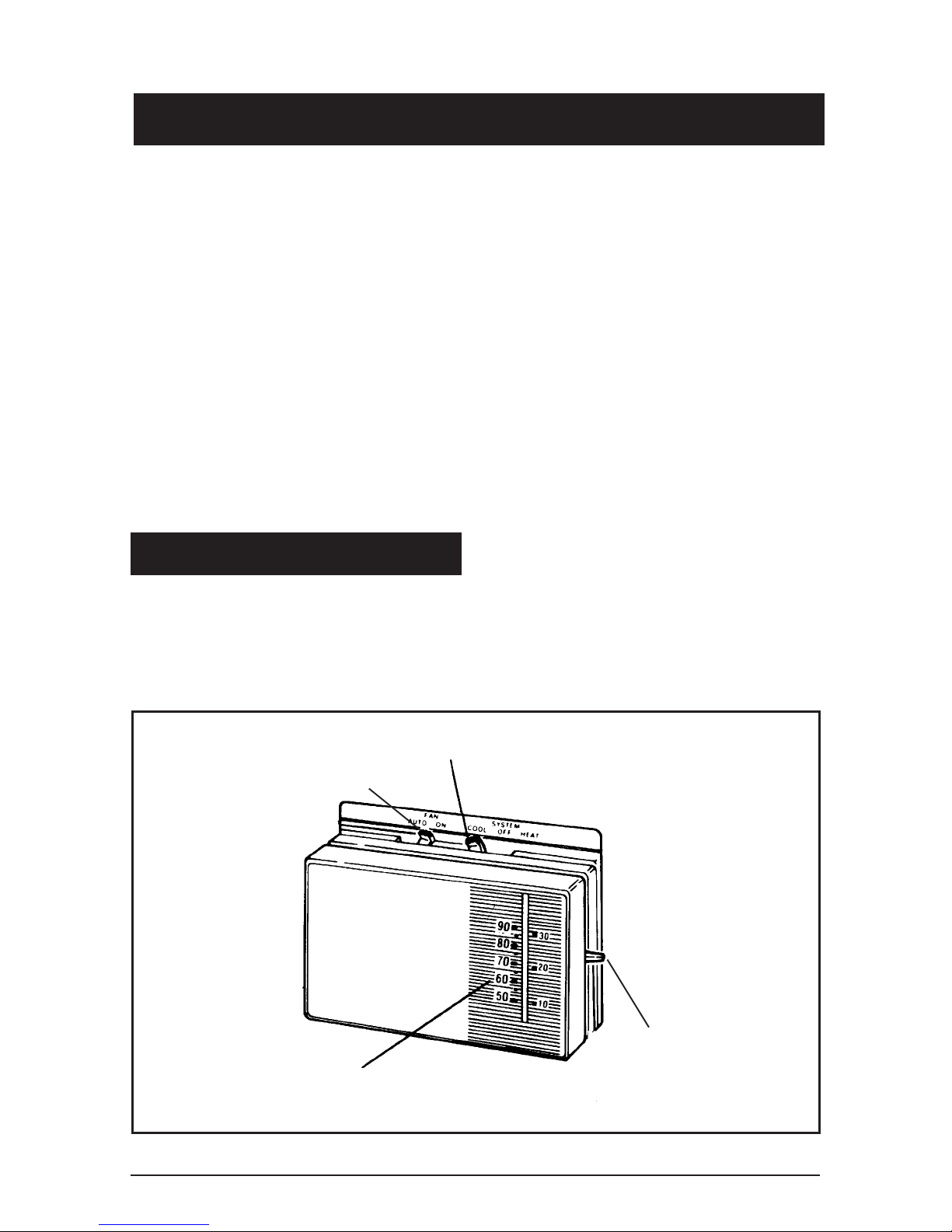
1. Set the thermostat system switch to COOL
or AUTO and the thermostat fan switch to
AUTO. (See Figure 1)
2. Set the thermostat temperature to the
desired temperature level using the
temperature selector. Please refer to the
separate thermostat user’s manual for
complete instructions regarding thermostat programming. The outdoor unit
and indoor blower will both cycle on and
off to maintain the indoor temperature at
the desired cooling level.
SYSTEM SWITCH
FAN SWITCH
TEMPERATURE SCALES
Figure 1. Typical Thermostat
TEMPERATURE
SELECTOR
Page 2
To Operate Your Furnace for
Heating —
1. Set the thermostat system switch to HEAT
or AUT O and the thermostat f an s witch to
AUTO. (See Figure 1)
1. Regularly:
a. Clean or replace the indoor air fi lter at the
start of each heating and cooling season,
and when an accumulation of dust and dirt
is visible on the air fi lter.
2. Set the thermostat temperature to the
desired temperature level using the
temperature selector. Please refer to
the separate user’s manual for complete
thermostat programming instructions. The
furnace and indoor blower will cycle on and
off to maintain the indoor temperature at
the desired heating level.
T o Shut Off Y our Air Conditioner —
Set the thermostat system switch to OFF
and the thermostat fan switch to AUTO. (See
Figure 1)
The system will not operate, regardless of the
thermostat temperature setting.
To Operate the Indoor Blower
Continuously —
Set the thermostat fan switch to ON (See
Figure 1)
b. Remove any leaves and grass clippings
from the coil in the outdoor unit, being
careful not to damage the aluminum fi ns.
c. Check for any obstruction, such as twigs,
sticks, etc.
d. Certain models have external panels
fabricated from a premium grade of
stainless steel designed to inhibit corrosion. For such units, if the unit is
located in a coastal region or other area
subjected to high concentrations of salt,
then the unit should be hosed off after
storms and monthly otherwise to maintain
its new appearance.
2. Before Each Cooling Season:
If the furnace/air handler blower motor and the
outdoor unit fan motor(s) have oil tubes at the
motor bearings, apply 10 drops of SAE No. 20
motor oil to each oil tube.
The indoor blower will start immediately, and
will run continually until the fan switch is reset
to AUTO.
The continuous indoor blower oper ation can be
obtained with the thermostat system switch set
in any position, including OFF.
The continuous indoor blower operation is
typically used to circulate the indoor air to
equalize a temperature unbalance due to a sun
load, cooking, or fi replace operation.
T o Maintain Your Air Conditioner —
CAUTION:
Be certain the electrical power to
the outdoor unit and the furnace/
air handler is disconnected before
doing the following recommended
maintenance.
CAUTION:
Do not over-oil, or oil motors not
factory-equipped with oil tubes. The
compressor is hermetically “sealed”
and does not require lubrication.
3. Before Calling a Service Technician, Be
Certain:
a. The unit thermostat is properly set—
see “To Operate Your Air Conditioner
for Cooling” and “T o Operate Y our Furnace
for Heating.”
b. The unit disconnect fuses are in good
condition, and the electrical power to the
unit is turned on.
1. GENERAL INFORMATION
Read the following instructions completely before
performing the installation.
2
Page 3
Condensing Unit Section — Each condensing unit is shipped with a refrigerant charge
adequate to operate the outdoor section with
an indoor matching coil or air handler, and 15
feet of refrigeration line.
NOTE: DO NOT USE ANY PORTION OF
THE CHARGE FOR PURGING OR LEAK
TESTING.
Matching coils and air handlers are shipped
with a small pressurized holding charge to
pressurize them to keep out contaminants. To
release the pressure, carefully read the installation instructions provided with the indoor coil
or air handler.
Liquid and Suction Lines — Refrigerant grade
copper tubing should be used when installing the
system. Refrigerant suction line tubing should
be fully insulated.
W ARNING:
Ensure all electrical power to the unit
is off prior to installing or servicing
the equipment. Failure to do so may
cause personal injury or death.
3. SITE PREPARATION
Unpacking Equipment — Remove the card-
board carton and User’s Manual from the
equipment. T ake care not to damage the tubing
connections when removing the carton.
Inspect for Damage — Inspect the equipment
for damage prior to installing the equipment at
the job site. Ensure coil fi ns are straight and, if
necessary, comb fi ns to remove fl attened and
bent fi ns.
Field Connections for Electrical Power
Supply — All wiring must comply with current
revisions of the National Electrical Code
(ANSI/NFPA 70) and with applicable local
codes having jurisdiction. The minimum size of
electrical conductors and circuit protection must
be in compliance with information listed on the
outdoor unit data label.
2. SAFETY CONSIDERATIONS
Pressures within the System — Split system
air conditioning equipment contains liquid and
gaseous refrigerant under pressure. Installation
and servicing of this equipment should be performed by qualifi ed, trained personnel thoroughly
familiar with this type of equipment. Under no
circumstances should the Homeowner attempt
to install and/or service the equipment.
Labels, Tags, Precautions — When working
with this equipment, follow all precautions in the
literature, on tags, and on labels provided with
the equipment. Read and thoroughly understand
the instructions provided with the equipment
prior to performing the installation and operational checkout of the equipment.
Preferred Location of the Outdoor Unit at the
Job Site — Conduct a survey of the job site to
determine the optimum location for mounting
the outdoor unit. Ov erhead obstructions, poorly
ventilated areas, and areas subject to accumulation of debris should be avoided. The outdoor
unit should be installed no closer than 18 inches
from the outside walls of the facility and in an
area free from overhead obstructions to ensure
unrestricted airfl ow through the outdoor unit.
Facility Prerequisites — Electrical power
must be supplied to the equipment. Electrical
power supplied must be adequate for proper
operation of the equipment. The system must
be wired and provided with circuit protection in
accordance with local building codes and the
National Electrical Code.
Minimum Circuit Ampacity — Electrical wiring
to the equipment must be compatible and in
compliance with the minimum circuit ampacity
listed on the outdoor unit data label.
Maximum Fuse/Circuit Breaker Size — Circuit
protection for the outdoor unit must be compatible with the maximum fuse/circuit breaker siz e
listed on the outdoor unit data label.
Brazing Operations — Installation of equipment
may require brazing operations. Safety codes
must be complied with. Safety equipment (e .g.;
safety glasses, work gloves, fi re extinguisher,
etc.) must be used when performing brazing
operations.
4.
INSTALLING THE OUTDOOR UNIT
Slab Mount — The site selected f or a slab mount
installation requires a stable foundation and one
3
Page 4
not subject to erosion. The slab should be level
and anchored (if necessary) prior to placing the
equipment on the slab.
Cantilever Mount — The cantilever mount
should be designed with adequate safety factor
to support the weight of the equipment, and for
loads subjected to the mount during operation.
Installed equipment should be adequately secured to the cantilever mount and levelled prior
to operation of the equipment.
Roof Mount — The method of mounting should
be designed so as not to overload roof structures
nor transmit noise to the interior of the structure.
Refrigerant and electrical line should be routed
through suitably waterproofed openings to prevent water leaking into the structure.
ference between the indoor and outdoor sections
should not exceed 20 feet.
Filter Dryer Installation — A fi lter dryer is
provided with PS series models only and must
be installed in the liquid line of the system. If the
installation replaces a system with a fi lter dryer
already present in the liquid line, the fi lter dryer
must be replaced with the one supplied with the
unit. The fi lter dr yer must be installed in strict
accordance with the manufacturer’ s installation
instructions.
For all other series models, installing a fi lter
dryer is optional. Ho wev er , it is good installation
practice to install a fi lter dryer when replacing
the evaporator and/or condenser of a system.
When installing, the fi lter dryer must be installed
in strict accordance with the manufacturer’s
installation instructions.
5. INSTALLING THE INDOOR UNIT
The indoor section should be installed before
proceeding with routing of refrigerant piping.
Consult the installation instructions of the indoor
unit (i.e.: air handler, furnace, etc.) for details
regarding installation.
6. CONNECTING REFRIGERANT
TUBING BETWEEN THE INDOOR
AND OUTDOOR UNIT
General — Once outdoor and indoor unit place-
ment has been determined, route refrigerant
tubing between the equipment in accordance with
sound installation practices. Refr igerant tubing
should be routed in a manner that minimizes the
length of tubing and the number of bends in the
tubing. Refrigerant tubing should be supported
in a manner that the tubing will not vibrate or
abrade during system operation. T ubing should
be kept clean of foreign debris during installation
and installation of a liquid line fi lter drier is recommended if cleanliness or adequacy of system
evacuation is unknown or compromised. Every
effort should be made by the installer to ensure
that the fi eld installed refrigerant containing
components of the system have been installed
in accordance with these instructions and sound
installation practices so as to insure reliable
system operation and longevity. The maximum
recommended interconnecting refrigerant line
length is 75 feet, and the vertical elevation dif-
Optional Equipment — Optional equipment
(e.g.: liquid line solenoid valv es, etc.) should be
installed in strict accordance with the manufacturer’s installation instructions.
7. MAKING ELECTRICAL
CONNECTIONS
W ARNING:
T urn off all electrical power at the main
circuit box before wiring electrical
power to the outdoor unit. Failure to
comply may cause severe personnel
injury or death.
Wiring Diagram/Schematic — A wiring dia-
gram/schematic is located on the inside cover
of the electrical box of the outdoor unit. The
installer should become familiar with the wiring
diagram/schematic before making an y electrical
connections to the outdoor unit.
Outdoor Unit Connections — The outdoor
unit requires both power and control circuit
electrical connections. Refer to the unit wir ing
diagram/schematic for identifi cation and location
of outdoor unit fi eld wiring interfaces.
Control Circuit Wiring — The outdoor unit is
designed to operate from a 24 V AC Class ll control
circuit. Control circuit wiring must comply with
4
Page 5
the current provisions of the National Electrical
Code (ANSI/NFP A 70) and with applicab le local
codes having jurisdiction.
Thermostat Connections — Thermostat connections should be made in accordance with the
instructions supplied with the thermostat, and
with the instructions supplied with the indoor
equipment.
Electrical Power Wiring — Electrical power
wiring shall comply with the current provisions
of the National Electrical Code (ANSI/NFP A 70)
and with applicable local codes having jurisdiction. Use of rain tight conduit is recommended.
Electrical conductors shall have minimum circuit
ampacity in compliance with the outdoor unit rating label. The facility shall employ electrical circuit
protection at a current rating no greater than that
indicated on the outdoor unit rating label.
temperature setpoint to its highest setting. Prior
to applying electrical power to the outdoor unit,
ensure that the unit has been properly and
securely grounded, and that power supply connections have been made at both the facility
power interface and outdoor unit.
Outdoor Unit — Ensure the outdoor coil and
top of the unit are free from obstructions and
debris, and all equipment access/control panels
are in place.
Using extreme caution, apply power to the unit
and inspect the wiring for evidence of open,
shorted, and/or improperly wired circuits.
Functional Checkout:
CAUTION:
Disconnect Switch — An electrically compatible
disconnect switch must be within line of sight of
the outdoor unit. This switch shall be capable of
electrically de-energizing the outdoor unit.
Optional Equipment — Optional equipment
requiring connection to the power or control
circuits must be wired in strict accordance with
current provisions of the National Electrical Code
(ANSI/NFP A 70), with applicable local codes having jurisdiction, and the installation instructions
provided with the equipment. Optional Equipment (e.g.: liquid line solenoid valves , hard start
kits, low suction pressure cutout switch kit, high
pressure cutout switch kit, refrigerant compressor crankcase heater, etc.) should be installed
in strict accordance with the manufacturer’s
installation instructions.
8. STARTUP AND CHECKOUT
If equipped with a compressor
crankcase heater , wait 24 hour s prior
to performing a function check out to
allow for heating of the compressor
crankcase. Failure to comply may
result in damage and could cause
premature failure of the system.
Indoor Blower — Set the thermostat function
switch to COOLING and the fan switch to ON.
Verify that the indoor blower is operating and
that airfl ow is not restricted. Set the fan switch
back to AUTO.
Positive Temperature Coeffi cient Resistor
(PTCR) — (select models) A PTCR is factory
installed and located on the control panel of the
outdoor unit. The PTCR is a soft start device for
use with reciprocating compressors. If a hard
start kit is needed on this model the soft star t
(PTCR) must be removed fi rst.
W ARNING:
Ensure electrical power to the unit is off
prior to performing the following steps.
Failure to do so may cause personal
injury or death.
Air Filters — Ensure air fi lters are clean and in
place prior to operating the equipment.
Thermostat — Set the room thermostat function
switch to OFF, fan switch to AUTO, and move
Low-Pressure Switch — A low-pressure
switch is factory-installed in select models only.
If provided, this switch is located in the suction
line internal to the outdoor unit. The switch is
designed to protect the compressor from a loss
of charge. Under normal conditions, the switch is
closed. If the suction pressure f alls below 5 psig,
then the switch will open and de-energize the
outdoor unit. The switch will close again once the
suction pressure increases above 20 psig.
5
Page 6
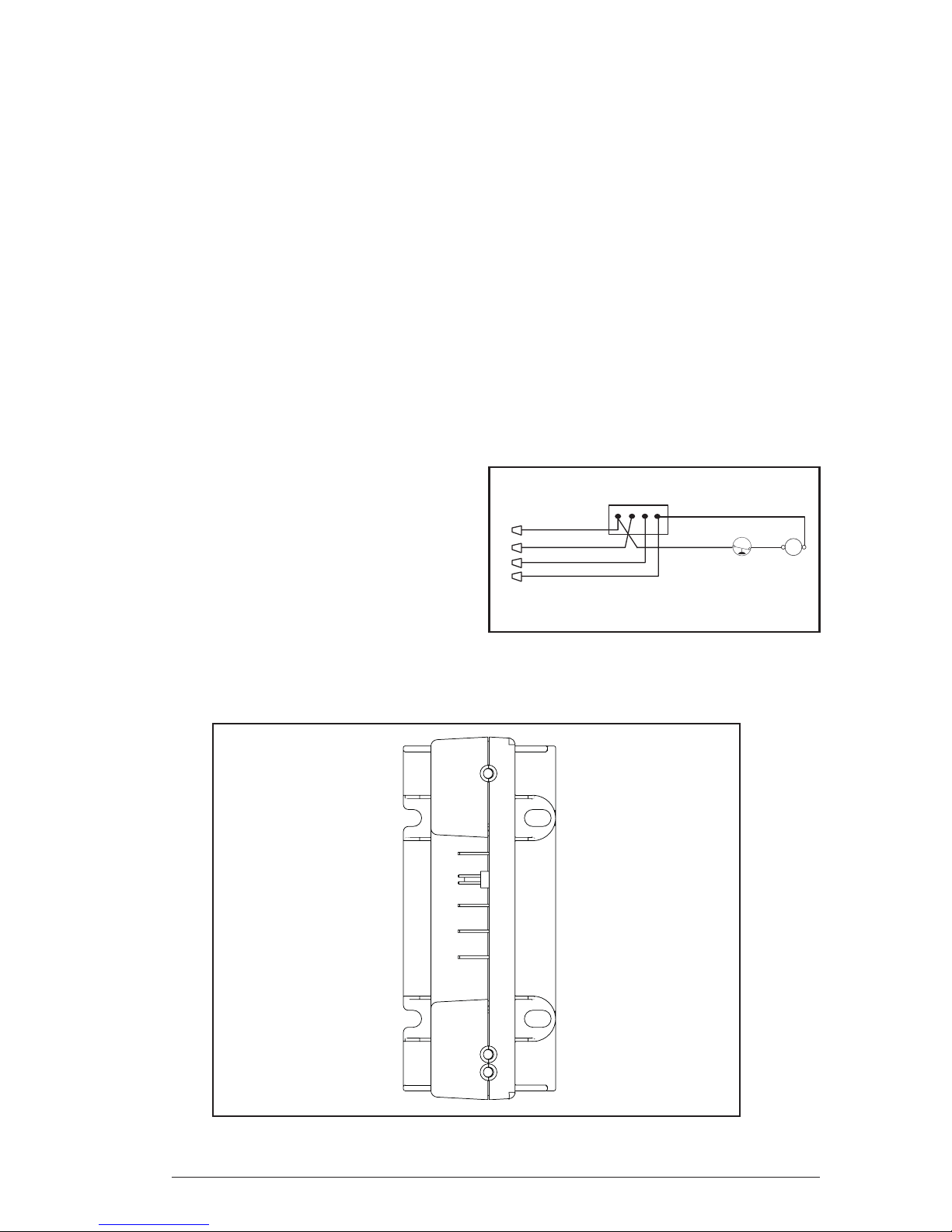
Comfort AlertTM Diagnostics (Select Models)
TM
— The Comfort Aler t
diagnostics is a breakthrough innovation for troubleshooting heat
pump and air conditioning system failures. The
module installs easily in the electrical box of
the outdoor unit near the compressor contactor. By monitoring and analyzing data from the
®
Copeland Scroll compressor
and the thermostat
demand, the module can accurately detect the
cause of electrical and system related failures
without any sensors. A fl ashing LED indicator
communicates the ALERT code and guides the
service technician more quickly and accurately
to the root cause of a problem.
NOTE: This module does not provide safety
protection! The Comfort Alert module is a
monitoring device and cannot shut down the
compressor directly.
LED Description (See Figure 2)
POWER LED (Green): indicates voltage is present at the power connection of the module.
ALERT LED (Yellow): communicates an
abnormal system condition through a unique
fl ash code. The ALER T LED will fl ash a number
of times consecutively, pause and then repeat
the process. The number of consecutive
fl ashes, defi ned as the Flash Code, correlates
to a particular abnormal condition. Detailed
descriptions of specifi c ALERT Flash Codes are
shown in Table 1 of this manual.
TRIP LED (Red): indicates there is a demand
signal from the thermostat but no current to the
compressor is detected by the module. The TRIP
LED typically indicates the compressor protector
is open or may indicate missing supply power
to the compressor.
The scroll compressor’s run (R), common (C) and
start (S) wires are routed through the holes in the
Comfort Alert
TM
module marked “R,” “C” and “S.”
The common (C) wire need not be routed through
the module for it to operate properly.
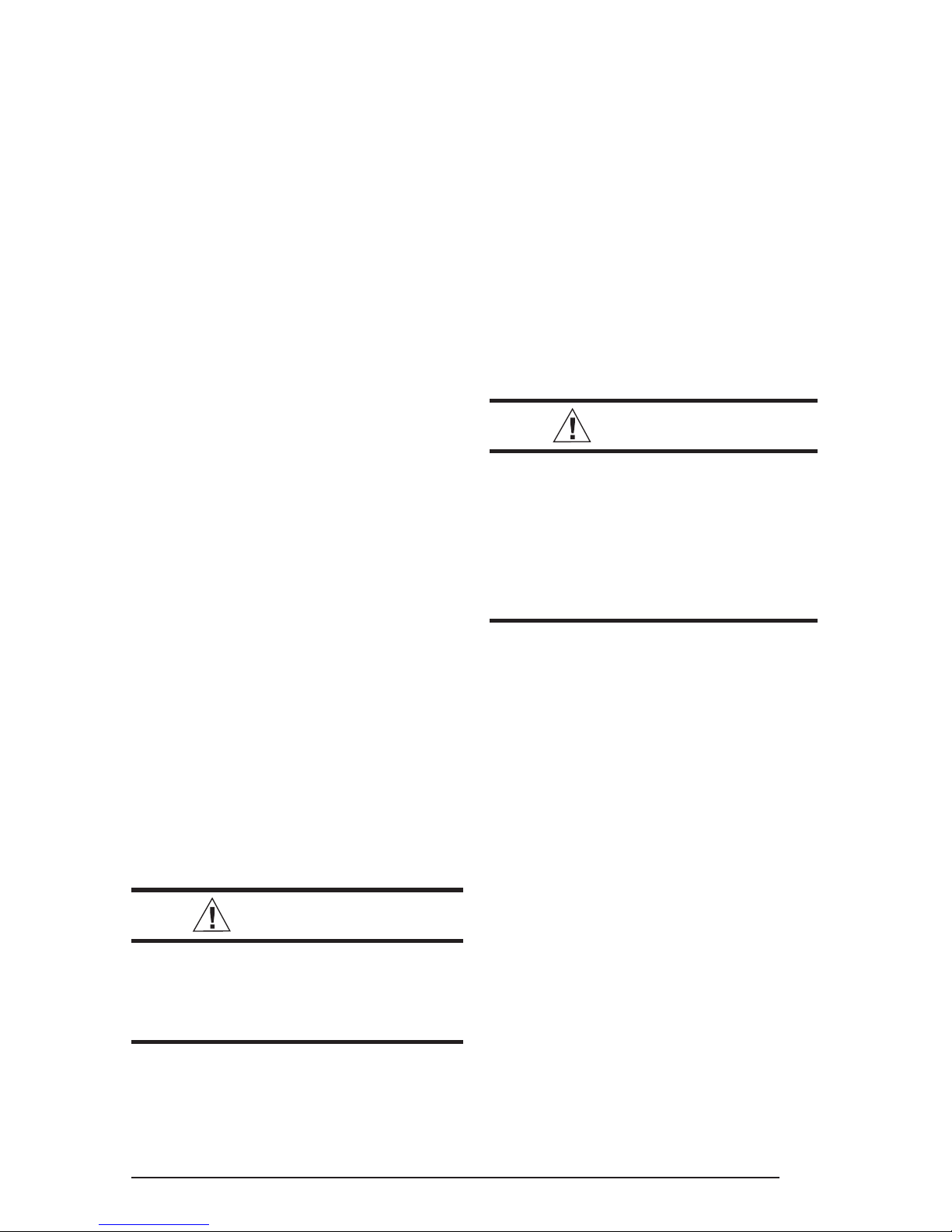
24 V AC Power Wiring — The Comfort Alert
TM
module requires a constant nominal 24 VAC
power supply. The wiring to the module’s R and
C terminals must be directly from the indoor unit
or thermostat. The module cannot be powered by
the C terminal on a defrost board or other control
board without experiencing nuisance alerts.
Comfort Alert
L
C
Y
R
C
R
L
Y
24 Volt Field
Connections
LPS
CC
Figure 3. 24VAC Comfort AlertTM
Wiring Diagram
Figure 2. Comfort Alert
6
TM
Diagnostics Module
Page 7

NOTE: Factory installed modules may have
different thermostat demand signal wiring,
follow manufacturers wiring installations
when replacing module.
system operation and compatibility . Ref er to the
installation instructions for this equipment and
perform a functional checkout in accordance
with the manufacturer’s instructions.
NOTE: After the thermostat demand signal is
connected, verify Y is phased properly with
C by measuring 24 V A C across Y and C when
demand is present.
TROUBLESHOOTING
Interpreting The Dia gnostic LEDs – When an
abnormal system condition occurs, the Comfort
TM
Alert
and/or TRIP LED . The yellow alert LED will fl ash
a number of times consecutively, pause and
then repeat the process. To identify a Flash
Code number, count the n umber of consecutive
fl ashes. Every time the module powers up, the
last ALERT Flash Code that occurred prior to
shut down is displayed for one minute.
Cooling — Gradually lower the thermostat
temperature setpoint below the actual room
temperature and observe that the outdoor unit
and indoor blower energize. Feel the air being
circulated by the indoor blower and verify that
it is cooler than ambient temperature. Listen
for any unusual noises. If present, locate and
determine the source of the noise and correct
as necessary.
Heating — If provided with heating equipment,
lower the thermostat setpoint temperature to the
lowest obtainable setting and set the thermostat
function switch to HEATING. The indoor blower
and outdoor unit should stop running. Increase
the setpoint temperature of the thermostat to
the maximum setting. Verify that the heating
equipment has been energized (i.e., fossil fuel
burner operating, etc.) and that the indoor blower
energizes after a short period of time. Feel the
air being circulated by the indoor blower and
verify that it is warmer than ambient temperature.
Listen for any unusual noises . If present, locate
and determine the source of the noise and correct as necessary.
module displays the appropriate ALERT
Adjustment of Refrigerant Charge:
CAUTION:
Split system air conditioner equipment
contains liquid and gaseous refrigerant
under pressure. Adjustment of
refrigerant charge should only be
attempted by qualified, trained
personnel thoroughly familiar with the
equipment. Under no circumstances
should the homeowner attempt to
install and/or service this equipment.
Failure to comply with this warning
could result in equipment damage,
personal injury, or death.
NOTE: The following Refrigerant Charging
Charts are applicable to matched assemblies
of our equipment and at listed airfl ows for the
indoor coil. Assemblies of indoor coils and
outdoor units not listed are not recommended
and deviations from rated airfl o ws or non-listed
equipment combinations may require modifi cations to the expansion device(s) and refrigerant
charging procedures for proper and effi cient
system operation.
Refrigerant Charging Chart — Refer to
Refrigerant Charging Charts for correct system
charging, and to Orifi ce Usage Chart for correct
restrictor sizes.
NOTE: Linesets over 15 feet in length may
require additional refrigerant charge. NORD YNE
recommends 0.6 oz. of refrigerant per foot for
any lineset over 15 feet.
NOTE: Other sources for heating (i.e.: electric
furnace, fossil fuel furnace, air handler with
electric heat options, etc.) that interface with
the unit should be functionally checked to v erify
Optional Equipment — A functional checkout
should be performed in accordance with the
checkout procedures supplied with the equipment.
7
Page 8

Status LED Status LED Description Status LED Troubleshooting Information
Green “POWER” Module has power Supply voltage is present at module terminals
Red “TRIP” Thermostat demand signal
Y is present, but the
compressor is not
running
1. Compressor protector is open
2. Outdoor unit power disconnect is open
3. Compressor circuit breaker or fuse(s) is open
4. Broken wire or connector is not making contact
5. Low pressure switch open if present in system
6. Compressor contactor has failed open
Yellow “ALERT” Long Run Time
Flash Code 1 Compressor is
running extremely
long run cycles
1. Low refrigerant charge
2. Evaporator blower is not running
3. Evaporator coil is frozen
4. Faulty metering device
5. Condenser coil is dirty
6. Liquid line restriction (filter drier blocked if present in system)
7. Thermostat is malfunctioning
8. Comfort Alert Failure
9. Comfort Alert Failure
Yellow “ALERT” System Pressure Trip
Flash Code 2 Discharge or suction
pressure out of limits or
compressor overloaded
1. High head pressure
2. Condenser coil poor air circulation (dirty, blocked, damaged)
3. Condenser fan is not running
4. Return air duct has substantial leakage
5. If low pressure switch present in system, check Flash
Code 1 information
Yellow “ALERT” Short Cycling 1. Thermostat demand signal is intermittent
Flash Code 3 Compressor is running 2. Time delay relay or control board defective
only briefly 3. If high pressure switch present go to Flash Code 2 information
4. If low pressure switch present go to Flash Code 1 information
Yellow “ALERT” Locked Rotor
Flash Code 4
1. Run capacitor has failed
2. Low line voltage (contact utility if voltage at disconnect is low)
• Check wiring connections
3. Excessive liquid refrigerant in compressor
4. Compressor bearings are seized
• Measure compressor oil level
Yellow “ALERT” Open Circuit
Flash Code 5
1. Outdoor unit power disconnect is open
2. Compressor circuit breaker or fuse(s) is open
3. Compressor contactor has failed open
• Check compressor contactor wiring and connectors
• Check for compressor contactor failure (burned, pitted or
open)
• Check wiring and connectors between supply and
compressor
• Check for low pilot voltage at compressor contactor coil
4. High pressure switch is open and requires manual reset
5. Open circuit in compressor supply wiring or connections
6. Unusually long compressor protector reset time due to
extreme ambient temperature
7. Compressor windings are damaged
• Check compressor motor winding resistance
Yellow “ALERT” Open Start Circuit 1. Run capacitor has failed
Flash Code 6 Current only in run circuit 2. Open circuit in compressor start wiring or connections
• Check wiring and connectors between supply and the
compressor “S” terminal
3. Compressor start winding is damaged
• Check compressor motor winding resistance
Yellow “ALERT” Open Run Circuit 1. Open circuit in compressor run wiring or connections
Flash Code 7 Current only in start circuit • Check wiring and connectors between supply and the
compressor “R” terminal
2. Compressor run winding is damaged
• Check compressor motor winding resistance
Yellow “ALERT” Welded Contactor 1. Compressor contactor has failed closed
Flash Code 8 Compressor always runs 2. Thermostat demand signal not connected to module
Yellow “ALERT” Low Voltage 1. Control circuit transformer is overloaded
Flash Code 9 Control circuit < 17VAC 2. Low line voltage (contact util
Check wiring connections
•
ity if voltage at disconnect is low)
•
Flash Code number corresponds to a number of LED flashes, followed by a pause and then repeated.
•
TRIP and ALERT LEDs flashing at same time means control circuit voltage is too low for operation.
Table 1. Interpreting the Diagnostic LEDS
8
Page 9

Miswired Module Indication Recommended Troubleshooting Action
Green LED is not on, Determine if both R and C module ter minals are
module does not power up connected. Verify voltage is present at module’s R and
C terminals. Review 24VAC Power Wiring (page 4) for
R and C wiring.
Green LED intermittent, Determine if R and Y terminals are wired in reverse.
module powers up only Verify module’s R and C terminals have a constant
when compressor runs source. Review 24VAC Power Wiring (page 4) for R
and C wiring.
TRIP LED is on but system Verify Y terminal is connected to 24VAC at contactor
and compressor check OK coil. Verify voltage at contactor coil falls below 0.5VAC
when off.
TRIP LED and ALERT LED Verify R and C terminals are supplied with 19-28VAC.
flashing together
ALERT Flash Code 3 Verify Y terminal is connected to 24VAC at contactor coil.
(Compressor Short Cycling) Verify voltage at contactor coil falls below 0.5VAC when
displayed incorrectly off.
ALERT Flash Code 5, 6 or 7 Check that compressor run and start wires are through
(Open Circuit, Open Start Circuit module’s current sensing holes. V erify Y terminal is
or Open Run Circuit) displayed connected to 24VAC at contactor coil. Verify voltage at
incorrectly contactor coil falls below 0.5VAC when off.
ALERT Flash Code 6 (Open Check that compressor run and start wires are routed
Start Circuit) displayed for Code 7 through the correct module sensing holes.
(Open Run Circuit) or vice versa
ALERT Flash Code 8 Determine if module’s Y terminal is connected. Ver ify Y
(Welded Contactor) terminal is connected to 24VAC at contactor coil. V er ify
displayed incorrectly 24VAC is present across Y and C when thermostat demand
signal is present. If not, R and C are reverse wired. Ver ify
voltage at contactor coil falls below 0.5VAC when off.
Table 2. Module Wiring Troubleshooting
9
Page 10

Refrigerant Metering Device
for 13 SEER Split System Air Conditioner
with ZRKA Compressor
Model
Number
1.5 ton 0.050 74
2.0 ton 0.059 98
2.5 ton 0.067 116
3.0 ton 0.075 116
3.5 ton 0.080 170
4.0 ton 0.089 147
5.0 ton 0.099 232
Restrictor Bore
Size (inches)
System Charge
R-22 (oz.)
Refrigerant Metering Device
for 13 SEER Split System Air Conditioner
with CRK7 Compressor
Model
Number
Restrictor Bore
Size (inches)
System Charge
R-22 (oz.)
2.0 ton 0.060 104
2.5 ton 0.067 131
3.0 ton 0.075 136
10
Page 11

Restrictor Refrigerant Charging Charts Legend
For Cooling Mode of Operation
*Note all pressures are listed in psig. and all temperatures in deg. °F.
- Shaded Boxes indicate fl ooded conditions
- Rated Design Values. Suction Pressure will be lower
than design value if indoor air fl ow, entering dry bulb, or
entering wet bulb temperatures are lower than design.
- Discharge temperatures greater than charted values
indicates a refrigerant undercharge.
Restrictor Refrigerant Charging Charts
with ZRKA Compressors
1-1/2
TON
Suc.
Press.
72 170 135
74
76 174 146
78
80 180 153
82 197 157
84 213 162
86 229 166
88 233 170 246 170
90 249 174 262 175
92 266 179 279 179
94 282 183 295 183
96 298 188
98
2
TON
Suc.
Press.
71 150 138
73
75 155 149
77
79 160 157
81 177 160
83 193 162
85 209 165
87 213 169 226 168
89 229 172 242 171
91 245 175 258 174
93 262 178 275 177
95 278 182
97
70 75 80 85 90 95 100 105
Dis.
Dis.
Dis.
Dis.
Press.
Temp.
Press.
172 141
177 150
70 75 80 85 90 95 100 105
Dis.
Press.
152 143
157 154
Dis.
Temp.
186 140
188 145
190 150
193 154
Dis.
Press.
166 142
169 147
171 152
173 157
Temp.
Dis.
Temp.
Dis.
Press.
202 145
204 149
207 154
210 158
Dis.
Press.
183 145
185 150
187 155
189 159
OUTDOOR TEMPERATURE (°F)
Dis.
Dis.
Temp.
Dis.
Temp.
Dis.
Press.
Temp.
219 149
221 154
223 158
226 162
OUTDOOR TEMPERATURE (°F)
Dis.
Dis.
Press.
Temp.
199 148
201 153
203 158
206 162
Dis.
Press.
235 154
237 158
239 162
242 166
Dis.
Press.
215 152
217 156
219 160
222 164
Dis.
Temp.
Dis.
Temp.
Dis.
Press.
251 158
253 162
255 167
259 171
Dis.
Press.
231 155
233 159
235 163
239 167
Dis.
Temp.
Dis.
Temp.
Dis.
Press.
268 162
270 166
272 170
275 175
Dis.
Press.
247 158
249 162
251 166
255 170
Dis.
Temp.
Dis.
Temp.
Dis.
Press.
284 167
286 171
288 174
292 179
Dis.
Press.
263 160
265 164
267 168
271 173
Dis.
Temp.
Dis.
Temp.
11
Page 12

Restrictor Refrigerant Charging Charts
with ZRKA Compressors Continued
2-1/2
TON
Suc.
Press.
70 75 80 85 90 95 100 105
Dis.
Dis.
Dis.
Dis.
Press.
Temp.
Press.
Temp.
Dis.
Press.
OUTDOOR TEMPERATURE (°F)
Dis.
Dis.
Press.
Dis.
Temp.
Temp.
Dis.
Press.
Dis.
Temp.
Dis.
Press.
Dis.
Temp.
Dis.
Press.
Dis.
Temp.
Dis.
Press.
Dis.
Temp.
71 149 131
151 136
73
75 154 142
77
157 144
79 161 147
81 176 151
83 191 155
85 206 159
87 210 163 221 163
89 225 167 237 167
91 240 171 252 170
164 135
167 140
169 145
172 148
180 139
182 144
184 148
188 152
195 143
197 147
199 152
203 155
210 146
212 151
215 155
218 159
226 150
228 154
230 159
233 163
241 154
243 158
245 162
248 166
256 158
258 161
260 165
264 170
93 255 175 267 174
95 270 179
97
3
OUTDOOR TEMPERATURE (°F)
TON707580859095100105
Suc.
Dis.
Dis.
Dis.
Dis.
Dis.
Dis.
Dis.
Dis.
Dis.
Dis.
Dis.
Dis.
Dis.
Dis.
Dis.
Press.
Press.
Temp.
Press.
Temp.
Press.
Temp.
Press.
Temp.
Press.
Temp.
Press.
Temp.
Press.
Temp.
Press.
Dis.
Temp.
67 149 137
151 142
69
71 153 147
73
156 151
75 160 154
77 175 158
79 191 163
81 207 167
83 210 171 223 171
85 226 175 238 176
87 242 180 254 180
164 142
167 147
169 152
172 155
180 146
182 151
185 156
188 159
196 150
198 155
200 160
203 163
212 155
214 159
216 164
219 168
227 159
229 163
231 168
235 172
243 164
245 168
247 172
251 176
259 168
261 172
263 175
266 180
89 257 184 270 184
91 273 189
93
3-1/2
TON
Suc.
Press.
70 75 80 85 90 95 100 105
Dis.
Dis.
Dis.
Press.
Temp.
Press.
Dis.
Temp.
72 150 143
152 148
74
76 154 153
78
158 157
80 161 160
166 145
168 150
170 155
173 159
82 177 162
84 192 164
86 208 167
88 211 170 223 169
90 227 173 239 171
92 242 175 254 173
94 258 178 270 175
96 273 180
98
12
Dis.
Press.
181 148
183 153
185 157
189 161
OUTDOOR TEMPERATURE (°F)
Dis.
Dis.
Temp.
Press.
197 150
199 155
201 159
204 163
Dis.
Temp.
Dis.
Press.
Temp.
212 152
214 157
216 161
220 165
Dis.
Dis.
Press.
228 155
230 159
232 163
235 167
Dis.
Temp.
Dis.
Press.
243 157
245 161
248 165
251 169
Dis.
Temp.
Dis.
Press.
259 159
261 163
263 166
267 171
Dis.
Temp.
Page 13

Restrictor Refrigerant Charging Charts
with ZRKA Compressors Continued
4
TON
Suc.
Press.
69 145 136
71
73 149 146
75
77 155 154
79 171 158
81 187 162
83 204 165
85 207 169 220 169
87 223 173 236 173
89 239 177 252 177
91 256 181 268 180
93 272 185
95
5
TON
Suc.
Press.
66 151 144
68
70 156 155
72
74 161 162
76 178 167
78 194 171
80 210 175
82 214 179 227 180
84 230 183 243 184
86 246 188 259 188
88 263 193 276 193
90 279 197
92
70 75 80 85 90 95 100 105
Dis.
Dis.
Dis.
Dis.
Press.
Temp.
Press.
147 141
152 152
70 75 80 85 90 95 100 105
Dis.
Press.
153 149
158 160
Dis.
Temp.
161 140
163 145
165 150
168 155
Dis.
Press.
167 149
170 154
172 159
174 164
Temp.
Dis.
Temp.
Dis.
Press.
177 144
179 149
181 154
184 158
Dis.
Press.
184 154
186 159
188 163
191 168
OUTDOOR TEMPERATURE (°F)
Dis.
Dis.
Temp.
Press.
Temp.
193 148
195 153
197 158
200 162
OUTDOOR TEMPERATURE (°F)
Dis.
Dis.
Temp.
Press.
Temp.
200 158
202 163
204 168
207 172
Dis.
Dis.
Dis.
Press.
209 152
211 157
213 161
216 165
Dis.
Press.
216 163
218 167
220 172
223 176
Dis.
Temp.
Dis.
Temp.
Dis.
Press.
Temp.
225 156
227 160
229 165
233 169
Dis.
Press.
Temp.
232 167
234 172
236 176
240 180
Dis.
Dis.
Dis.
Press.
Temp.
241 160
243 164
245 168
249 172
Dis.
Press.
248 172
250 176
252 180
256 184
Dis.
Dis.
Temp.
Dis.
Press.
257 164
259 167
261 171
265 176
Dis.
Press.
264 176
266 180
268 184
272 188
Dis.
Temp.
Dis.
Temp.
Restrictor Refrigerant Charging Charts
2
TON
Suction
Press.
73 154 149
75 156 154 168 149
77 158 159 171 154 183 149
79 163 160 173 159 185 154 198 150
81 167 162 177 161 187 159 200 154 212 150
83 181 164 192 162 202 159 214 155 227 151
85 195 165 206 162 216 159 229 155 241 151
87 209 166 220 163 231 159 243 155 256 152
89 213 169 224 167 234 163 245 159 258 156
91 227 171 238 167 249 164 260 160
93 241 171 252 168 263 164
95 255 172 266 168
97 270 173
99
70 75 80 85 90 95
Dis.
Dis.
Dis.
Press.
Temp.
Press.
Dis.
Temp.
with CRK7 Compressors
OUTDOO R T EMPERATURE (°F)
Dis.
Dis.
Dis.
Dis.
Dis.
Dis.
Press.
Temp.
Press.
Temp.
Press.
Temp.
Dis.
Press.
Dis.
Temp.
100 105
Dis.
Press.
Dis.
Temp.
Dis.
Press.
Dis.
Temp.
13
Page 14

Restrictor Refrigerant Charging Charts
with CRK7 Compressors Continued
2-1/2
TON
Suction
Press.
Dis.
Press.
Dis.
Temp.
Dis.
Press.
Dis.
Temp.
Dis.
Press.
OUTDOO R T EMPERATURE (°F)
Dis.
Dis.
Dis.
Temp.
Press.
Temp.
Dis.
Press.
90 95 100 10570 75 80 85
Temp.
Dis.
Dis.
Press.
Dis.
Temp.
Dis.
Press.
Dis.
Temp.
Dis.
Press.
73 146 142
75 148 148 160 144
77 150 153 162 149 174 145
79 155 155 164 154 176 150 188 146
81 158 157 168 156 178 154 190 150 202 147
83 172 159 182 157 192 155 204 151 216 148
85 186 161 196 159 206 156 218 153 230 150
87 200 162 210 160 220 157 232 154 244 151
89 203 166 213 164 224 161 234 158 246 155
91 217 167 227 165 238 162 248 158
93 231 169 241 166 252 163
95 245 170 255 167
97 258 172
99
3
TON
Suction
Press.
70 75 80 85 90 95 100 105
Dis.
Dis.
Dis.
Dis.
Press.
Temp.
Press.
Temp.
Dis.
Press.
OUTDOO R T EMPERATURE (°F)
Dis.
Dis.
Dis.
Temp.
Press.
Temp.
Dis.
Press.
Dis.
Temp.
Dis.
Press.
Dis.
Temp.
Dis.
Press.
Dis.
Temp.
Dis.
Press.
70 150 155
72 152 161 164 155
74 154 166 166 160 178 155
76 159 166 168 165 180 160 192 155
78 163 169 173 167 182 165 194 159 206 155
80 176 170 187 167 197 164 209 159 221 155
82 190 170 201 167 211 164 223 159 235 155
84 204 171 214 167 225 163 237 159 249 155
86 207 175 218 171 228 167 239 163 251 159
88 221 175 232 172 242 167 253 163
90 235 176 246 172 256 167
92 249 176 259 172
94 263 176
96
Dis.
Temp.
Dis.
Temp.
14
Page 15

375
350
325
TXV Refrigerant Charging Charts
with ZRKA Compressors
1.5 Ton AC TXV Charging Chart
300
275
250
225
Li qu id Pressu re (p sig)
200
Remove refrigerant when above curve
Add refrigerant when below curve
175
150
75 80 85 90 95 100 105 110 115 120 125 130 135
Li qu id Tem p eratu re (F)
2.0 Ton AC TXV Charging Chart
375
350
325
300
275
250
225
Li qu id Pressu r e (psig)
200
175
150
70 75 80 85 90 95 100 105 110 115 120 125 130 135
Remove refrigerant when above curve
Add refrigerant when below curve
Liquid Tempe rature (F)
15
Page 16

350
325
300
TXV Refrigerant Charging Charts
with ZRKA Compressors Continued
2.5 Ton AC TXV Charging Chart
275
250
225
200
Li qu id Pressu re (p si g )
Remove refrigerant when above curve
Add refrigerant when below curve
175
150
70 75 80 85 90 95 100 105 110 115 120 125 130
Liquid Tempe ra ture (F)
3.0 Ton AC TXV Charging Chart
350
325
300
275
250
225
200
Li qu id Pressu re (p si g )
175
150
70 75 80 85 90 95 100 105 110 115 120 125 130
Remove refrigerant when above curve
16
Add refrigerant when below curve
Liquid Tempe ra ture (F)
Page 17

350
325
300
TXV Refrigerant Charging Charts
with ZRKA Compressors Continued
3.5 Ton AC TXV Charging Chart
275
250
225
200
Li qu id Pressu re (p si g )
175
Remove ref r igerant when above curve
Add refrigerant when below curve
150
125
70 75 80 85 90 95 100 105 110 115 120 125 130
Liquid Tempe ra ture (F)
4.0 Ton AC TXV Charging Chart
350
325
300
275
250
225
200
Li qu id Pressu r e (psig)
175
150
70 75 80 85 90 95 100 105 110 115 120 125 130
Remove refrigerant when above curve
Add refrigerant when below curve
Liquid Tempe rature (F)
17
Page 18

350
325
300
TXV Refrigerant Charging Charts
with ZRKA Compressors Continued
5.0 Ton AC TXV Charging Chart
275
250
225
200
Li qu id Pressu re (p si g )
Remove refrigerant when above curve
Add refrigerant when below curve
175
150
70 75 80 85 90 95 100 105 110 115 120 125 130
Liquid Tempe ra ture (F)
TXV Refrigerant Charging Charts
with CRK7 Compressors
2.0 Ton AC CRK7 TXV Charging Chart
350
Remove refrigerant when above curve
325
300
275
250
225
200
Liq u i d Pressure (psi g )
175
150
70 75 80 85 90 95 100 105 110 115 120 125 130 135
18
Add refrigerant when below curve
Liquid Temperature (F)
Page 19

TXV Refrigerant Charging Charts
with CRK7 Compressors Continued
2.5 Ton AC CRK7 TXV Charging Chart
350
Remove refrigerant when above curve
325
300
275
250
225
200
Liq u i d Pressure (psi g )
175
Add refrigerant when below curve
150
75 80 85 90 95 100 105 110 115 120 125 130
Liquid Temperature (F)
3.0 Ton AC CRK7 TXV Charging Chart
350
Remove refrigerant when above curve
325
300
275
250
225
200
Liq u i d Pressure (psi g )
175
150
70 75 80 85 90 95 100 105 110 115 120 125 130
Add refrigerant when below curve
Liquid Temperature (F)
19
Page 20

¢708451#¤
708451A
INSTALLER: PLEASE LEAVE
THESE INSTALLATION INSTRUCTIONS
WITH THE HOMEOWNER.
708451A (Replaces 7084510)
Specifi cations and illustrations subject to change
without notice and without incurring obligations.
Printed in U.S.A. (01/06)
 Loading...