

Page 1
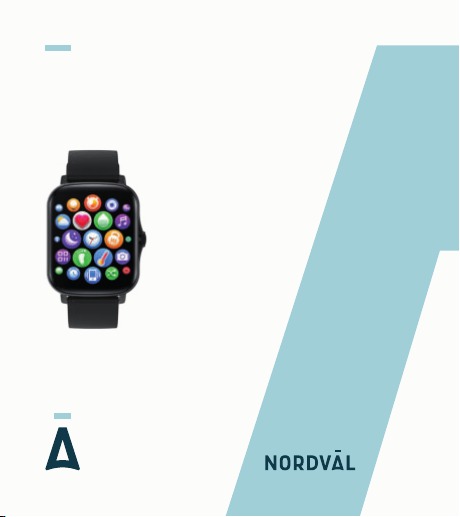
SMARTWATCH
NORDVÄL SW103
English
Page 2

Your smart technology friends.
Copyright © 2021 TJM Supplies B.V. All rights reserved.
Nordväl® is the registered trademark of TJM Zwerink Holding B.V.
Page 3

HELLO,
Thank you for purchasing the Nordväl SW103 smartwatch.
Let’s get started!
TABLE OF CONTENTS
Declaration of Conformity
What’s in the box
Get to know your smartwatch
App
Getting started with your smartwatch
Frequently asked questions
Specifications
1
2
2
4
4
4
4
5
5
5
5
10
10
12
12
Page 4
DECLARATION OF CONFORMITY
Product information
For the following
Product: Smartwatch
Type: SW103
Declaration and applicable standards
TJM Supplies B.V. hereby declares that the type of smartwatch
SW103 series conforms to:
Directive EMC 2014/53/EU, RoHS directive (2011/65/EU) and
its amendment directive 2015/863/EU on the restriction of the use
of certain hazardous substances in electronic equipment.
The full text of the EU declaration of conformity can be found at the
following internet address: www.nordval.eu/declaration-of-conformity/
2
Page 5

Importer
Company: TJM Supplies B.V.
Address: Zompstraat 8
8102 HX Raalte
The Netherlands
Email: [email protected]
Phone number: +31 85-0402973
Business license number: 72016981
VAT number: NL858946439B01
Nordväl® is the registered trademark of TJM Zwerink Holding B.V.
Specifications are subject to change without notice.
Copyright © 2021 TJM Supplies B.V.
All rights reserved.
Manufactured in China
3
Page 6
WHAT’S IN THE BOX
Please check the box for each of the following items before using
your smartwatch:
Nordväl SW103 smartwatch
USB magnetic charger
User guide
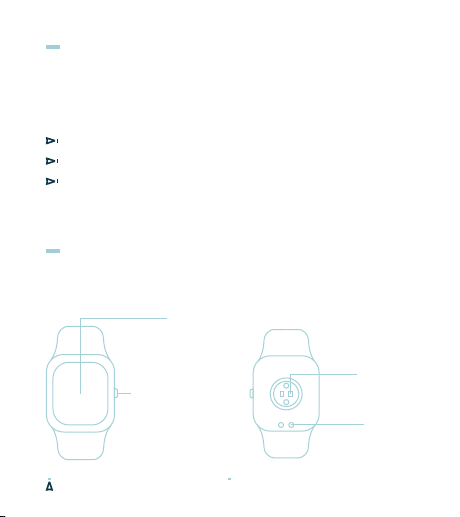
GET TO KNOW YOUR SMARTWATCH
1,69 inch
touchscreen
Heart rate
Control button
Power on, activate
screen, zoom and
scroll.
4
sensor
Charging
contact
Page 7
APP
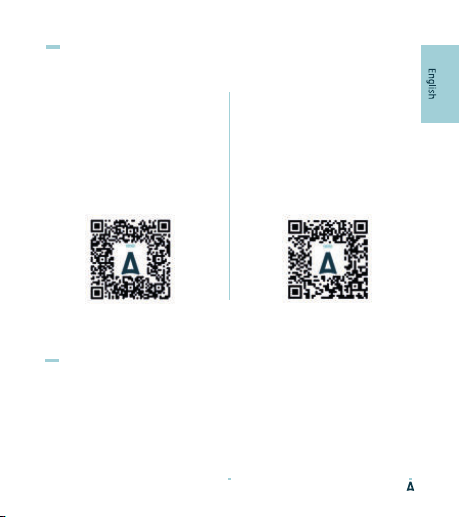
Android
Open the Google Play Store and
search “Da Fit” to download and
install the app. You can also scan
the QR code down below for a
direct download link.
iOS
Open the App Store and search
“Da Fit” to download and install
the app. You can also scan the QR
code down below for a direct
download link.
GET STARTED WITH YOUR SMARTWATCH
Power-on
Plug in the charger to charge the smartwatch prior to use, press
the control button for 3 seconds.
5
Page 8
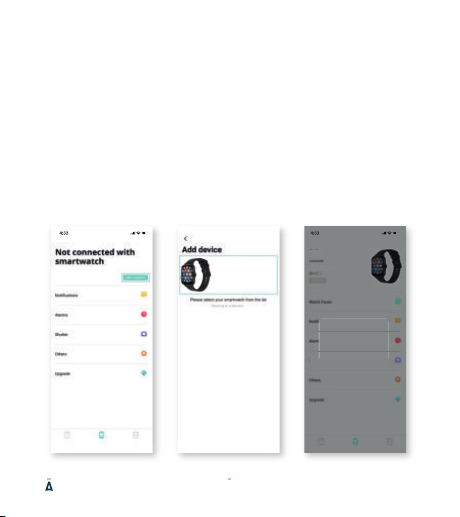
Connect the smartwatch to your phone
Open the Da Fit app on your smartphone and follow the next steps:
1. Click on "Add Device" (image 1).
When using an Android smartphone, you can connect the smartwatch
directly to your smartphone through the Bluetooth settings.
2. Click on your device named “SW103“ in the device list (image 2).
When using an iPhone, your phone will show a Bluetooth pairing request.
You can click on Bluetooth "Pairing" to confirm the Bluetooth link (image 3).
3. You are now connected and ready to use your smartwatch.
SW103B
SW103B
FA:B3:0F:21:09:31
FA:B3:0F:21:09:31
Shutter
Image 1 Image 2
6
Image 3 (iOS)
Page 9
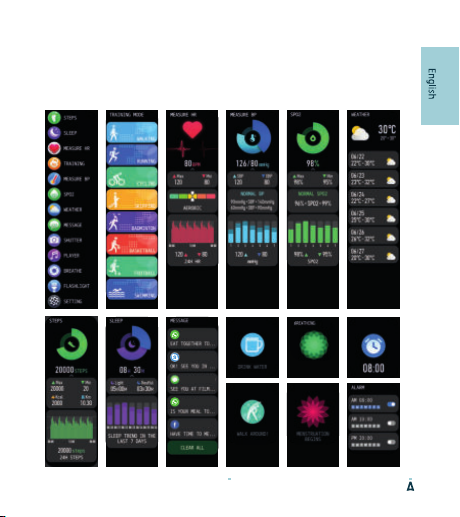
Functions
Turn on the smartwatch to open the main menu. Here you will find
the following functions:
Smartwatch interface
MOM
ELIZABETH
SOFIA JOHNSON
MOM
JOHN SIMONS
BREATHE IN
1/8
7
Page 10
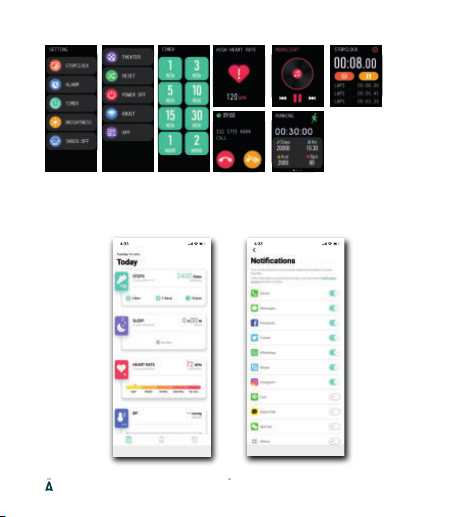
App interface
8
Page 11
9
Page 12

FREQUENTLY ASKED QUESTIONS
My smartwatch disconnects after a while.
If the “Da fit” app is restricted to stay active in the background, the
device may be disconnected from your phone and requires
reconnecting. The app can be configured to stay active in the
background by changing your phone’s settings in the “Da Fit” app.
I am not receiving push messages.
Allow the app to send push notifications in the app settings.
Is my smartwatch waterproof?
Yes. The smartwatch has an IP67 waterproof rating. This means it
can be immersed in water up to 1m deep for 30 minutes.
Is there a quick screen wake-up activation for my smartwatch?
Yes. There is a smart wake-up activation by moving your wrist.
10
Page 13

How can I remove my smartwatch in the app?
You can easily disconnect the device by clicking “remove device” in
the app.
Note for iOS users: after removing the device from the app, go to
the Bluetooth settings on your smartphone, click on “ⓘ”
to forget the smartwatch from your smartphone.
How long is my smartwatch covered under warranty?
We provide a 24 month warranty on all our products after purchase
(with some exceptions). Unfortunately, we cannot treat products
that have become defective due to incorrect use, fall damage, water
damage, etc.
Is your question not answered?
The frequently asked questions, solutions and tips are answered
above. If your question is not listed, you can visit:
www.nordval.eu/sw103-faq/
11
Page 14

SPECIFICATIONS
Product name Nordväl SW103
Size / weight 44.4x36x10.2mm / 47g
Chip processor GR5515
Flash memory RAM 64KB, ROM 64MB
Touchscreen 1,69 inch touchscreen, 240x280 pixels
Bluetooth 5.1 Bluetooth Low Energy Chip
G-Sensor Yes
Heartrate sensor Tianyi Hexin HRS3300 (Built in)
Battery capacity 190 mAh, Lithium polymer battery
Battery duration Use 5-7 days, standby for 25 days
Charging time / type 2.5 hours / magnetic charger
Waterproof rate IP67
App compatibility Android 4.4 or higher, iOS 8.0 or higher
App language EN, NL, DE, FR, ES, ITA, PT, KR, RU, AR, ZH
User interface language EN, NL, DE, FR, ES, RU, JA, AR, ZH
12
Page 15

Your smart technology friends.
Copyright © 2021 TJM Supplies B.V. All rights reserved.
Nordväl® is the registered trademark of TJM Zwerink Holding B.V.
Page 16

 Loading...