

Page 1
Service Manual
Gas Electric Refrigerators
Improper installation, adjustment, alteration, service or maintenance can cause
personal injury or property damage. Refer
to this manual. For assistance or addition-
al information, contact a qualied installer,
service agency, or the gas supplier.
Polar 7 Series (N7V, N7X, N7LX) Models
Polar 8 Series (N8V, N8X, N8LX) Models
© 2017 NORCOLD, INC. All rights reserved.
Questions? 1-800-444-7210
Part No. 639410 Rev. A 04.17.2018
Page 2
CONTENTS
SAFETY .......................................................................................4
INTRODUCTION .......................................................................... 5
About this Manual ...........................................................................................5
Certification and Code Requirements .............................................................5
About Installation .............................................................................................5
Replacement Parts ..........................................................................................5
Technical Assistance ....................................................................................... 5
Model Identification .........................................................................................6
Cooling Unit Serial Number .............................................................................6
Refrigerator Model Number .............................................................................6
SPECIFICATIONS ........................................................................ 7
Exploded Views ...............................................................................................8
GENERAL INFORMATION ........................................................ 10
Ventilation .....................................................................................................10
Overview .....................................................................................................10
Enclosure ....................................................................................................10
Baffles .........................................................................................................10
Lower Intake Vent ......................................................................................10
Exhaust Vent ...............................................................................................10
Roof Cap .....................................................................................................10
Propane Gas Connections ............................................................................ 11
Leak Test-Detergent .................................................................................... 11
Electrical Connections ...................................................................................11
120 Volts AC Electrical Connection ............................................................. 11
12 Volts DC Electrical Connection ..............................................................11
Main Control Board (Power Board) Fuses ..................................................12
Electrical Components ..................................................................................12
Interior Light ................................................................................................12
Divider Heater ............................................................................................12
12 Volt DC Fan ............................................................................................12
Low Ambient Heater (optional) ....................................................................12
Temperature Control System ...................................................................... 13
Backup Operating System ..........................................................................13
PREVENTATIVE MAINTENANCE ............................................. 13
Gas Flame Appearance ................................................................................13
Clean the Openings of the Burner Tube ........................................................14
USER INTERFACE (CONTROLS) - N7V AND N8V MODELS . 15
Power ON / OFF Button ................................................................................15
Modes of Operation .......................................................................................15
Air in the Propane Gas Supply Lines ............................................................16
Refrigerator Temperature Settings ................................................................ 16
Diagnostic Prechecks ....................................................................................16
FAULT CODES - N7V AND N8V MODELS ..............................17
Fault Code Flash Patterns - N7V and N8V Models .......................................17
TROUBLESHOOTING FLOWCHARTS - N7V AND N8V MODELS
18
Fault - Code - Solid Red Indicator Light ........................................................18
Fault Code - Flash Pattern 1 .........................................................................20
Fault Code - Flash Pattern 2 .........................................................................21
Fault Code - Flash Pattern 3 .........................................................................21
Fault Code - Flash Pattern 4 .........................................................................21
Fault Code - Flash Pattern 5 .........................................................................22
Fault Code - Flash Pattern 8 .........................................................................22
Fault Code - Flash Pattern 9 .........................................................................22
Fault Code - Flash Pattern 10 .......................................................................23
Fault Code - Thermistor Fault .......................................................................24
Blank Display ................................................................................................25
USER INTERFACE (CONTROLS) - N7X AND N8X MODELS . 26
Power ON / OFF Button ................................................................................26
Mode Button ..................................................................................................26
Temperature Set Button ................................................................................ 26
Temperature Setting Indicators ..................................................................... 26
Gas Mode Operation .....................................................................................26
AC Mode Operation ......................................................................................26
Air in the Propane Gas Supply Lines ............................................................27
Diagnostic Prechecks ....................................................................................27
FAULT CODES - N7X AND N8X MODELS ..............................27
Fault Code Flash Patterns - N7X and N8X Models .......................................27
Fault Code - Flash Patterns ..........................................................................28
TROUBLESHOOTING FLOWCHARTS - N7X AND N8X MODELS
29
Fault Code - Solid Red Indicator Light ..........................................................29
Fault Code - Flash Pattern 1 .........................................................................31
Fault Code - Flash Pattern 2 .........................................................................32
Fault Code - Flash Pattern 3 .........................................................................32
Fault Code - Flash Pattern 4 .........................................................................32
Fault Code - Flash Pattern 5 .........................................................................33
Fault Code - Flash Pattern 8 .........................................................................33
Fault Code - Flash Pattern 9 .........................................................................33
Fault Code - Flash Pattern 10 .......................................................................34
Fault Code - Thermistor Fault .......................................................................35
Blank Display ................................................................................................36
USER INTERFACE (CONTROLS) - N7LX AND N8LX MODELS 37
Power ON / OFF Button ................................................................................37
Mode Button ..................................................................................................37
Temperature Set Button ................................................................................ 37
Gas Operation ...............................................................................................37
Gas Mode ......................................................................................................38
AC Mode .......................................................................................................38
DC Mode (3-way models only) ......................................................................38
Air in the Propane Gas Supply Lines ............................................................38
Diagnostic Pre checks ...................................................................................38
FAULT CODES - N7LX AND N8LX MODELS ........................39
Polar Series N7V, N7X, N7XL / N8V, N8X, N8XL
2
www.norcold.com
Page 3
TROUBLESHOOTING FLOWCHARTS - N7LX AND N8LX
MODELS ....................................................................................40
Fault Code - “no” “FL” with audible alarm .....................................................40
Fault Code - “no” “AC” with audible alarm .....................................................42
Fault Code - “AC” “HE” with audible alarm ....................................................43
Fault Code - “dc” “HE” with audible alarm .....................................................44
Fault Code - “AC” “rE” with audible alarm .....................................................44
Fault Code - “dc” “rE” with audible alarm ......................................................44
Fault Code - “Lo” “dc” ....................................................................................45
Fault Code - “Lo” “dc” with audible alarm ......................................................45
Fault Code - “Lo” “dC” with audible alarm .....................................................45
Fault Code - “HI” “dc” with audible alarm ......................................................45
Fault Code - “no” “dt” with audible alarm .......................................................46
Fault Code - “Sr” with audible alarm .............................................................47
Fault Code - “oP” “LI” with audible alarm ......................................................47
Fault Code - “FL” “- -” with audible alarm ......................................................47
Fault Code - Flashing Temperature Setting ..................................................48
Blank Display ................................................................................................49
DIAGNOSTIC MODE - N7LX AND N8LX MODELS .................50
General Diagnostic Information .....................................................................50
Access Diagnostic Mode ...............................................................................50
Change Screens ...........................................................................................50
Exit Diagnostic Mode ....................................................................................50
Screens and Diagnostic Segments Information ............................................50
SCREEN 1: All Diagnostic Icons ON ..........................................................50
SCREEN 2: All Diagnostic Icons OFF .........................................................50
SCREEN 3: Fresh Food Fin Temperature ..................................................50
SCREEN 4: Stored Fault History ................................................................51
SCREEN 5. Stored Fault History ................................................................51
SCREEN 6. Erasing Fault History ...............................................................51
SCREEN 7. Power Board Inputs ................................................................51
SCREEN 8. Power Board Outputs ..............................................................52
SCREEN 9. Power Board DC Input Voltage Status ....................................52
SCREEN 0. Power Board AC Input Voltage Status .................................... 52
SCREEN A. .................................................................................................52
SCREEN B. .................................................................................................52
Cooling System Diagnostic Flowchart ...........................................................53
Figures
Fig. 1 - Double-wrenching gas fittings ...........................................................5
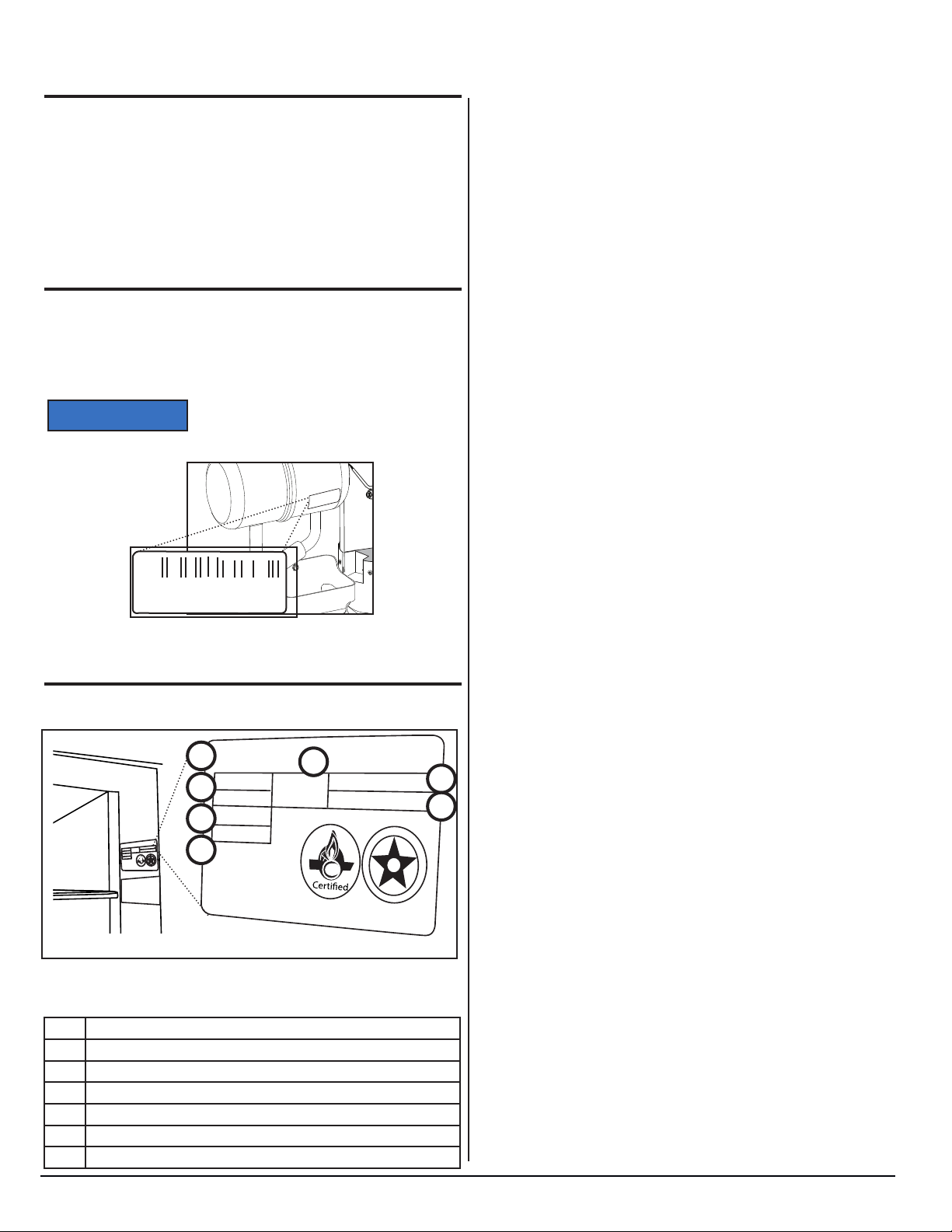
Fig. 2 - Cooling unit bar code label location. .................................................6
Fig. 3 - Refrigerator information label location .............................................6
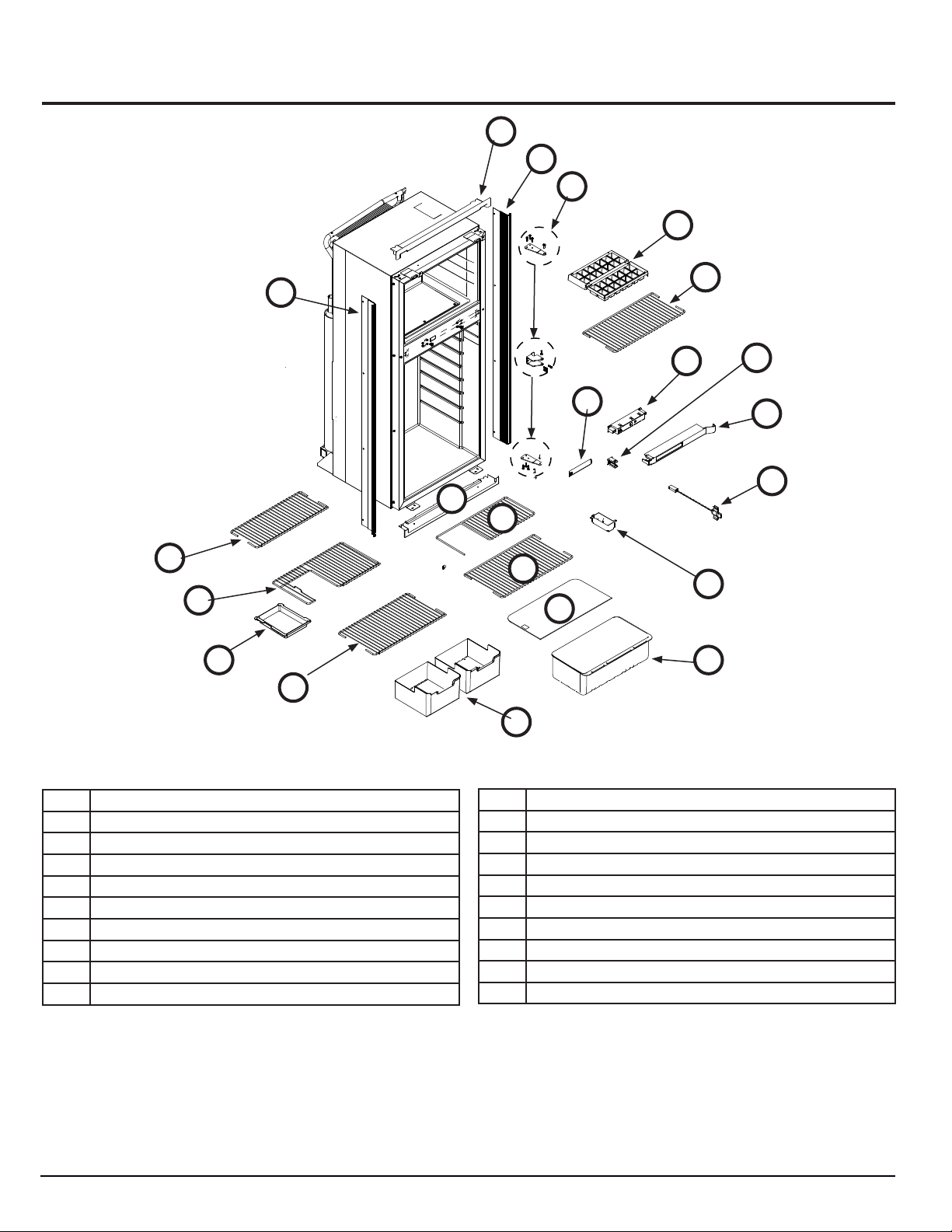
Fig. 4 - Exploded front view .........................................................................8
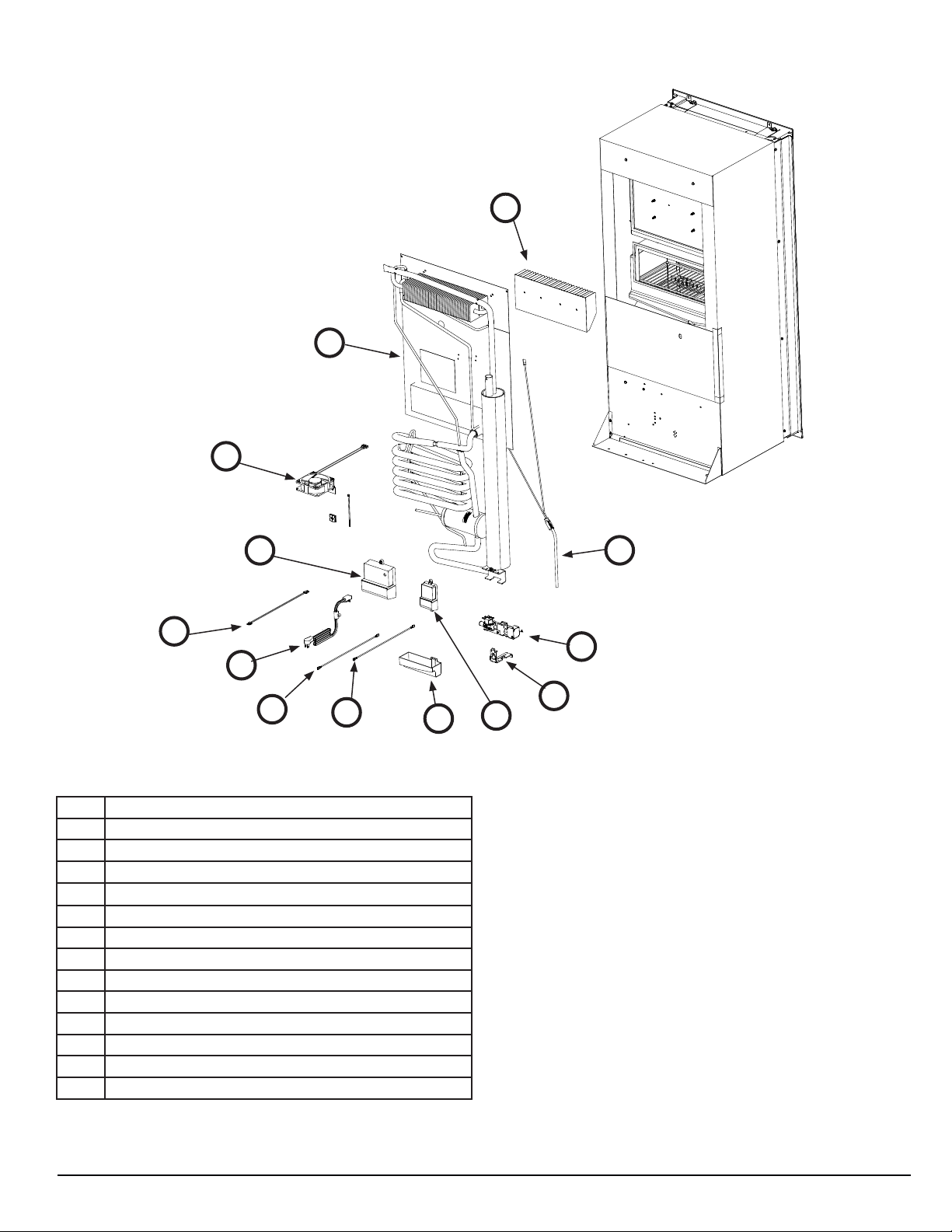
Fig. 5 - Exploded rear view ..........................................................................9
Fig. 6 - Typical roof exhaust venting .........................................................11
Fig. 7 - Fuse locations .................................................................................12
Fig. 8 - Fan wiring .......................................................................................12
Fig. 9 - Burner tube location .......................................................................14
Fig. 10 - Openings of the burner tube .........................................................14
Fig. 11 - N7V and N8V user interface (control) locations ............................15
Fig. 12 - Change mode and temperature setting ........................................15
Fig. 13 - Example fault code flash pattern ..................................................17
Fig. 14 - N7X and N8X user interface (control) locations ............................26
Fig. 15 - N7LX and N8LX user interface (control locations .........................37
Fig. 16 - Wiring diagram .............................................................................55
Fig. 17 - Wiring pictorial ..............................................................................56
Fig. 18 - Fan only wiring ..............................................................................57
Fig. 19 - Cold weather heater only wiring ...................................................57
Fig. 20 - Fan and cold weather heater wiring ..............................................58
Fig. 21 - Ice maker only wiring ....................................................................58
Fig. 22 - Ice maker and fan wiring ...............................................................59
Fig. 23 - Ice maker, fan, and cold weather heater wiring ............................59
WIRING SCHEMATIC ................................................................ 55
ICE MAKER* ...............................................................................................55
WIRING PICTORIAL ..................................................................56
AUXILIARY WIRING CIRCUITS ................................................57
Fan Only ........................................................................................................57
Cold Weather Heater Only ............................................................................57
Fan and Cold Weather Heater ......................................................................58
Ice Maker Only ..............................................................................................58
Ice Maker and Fan ........................................................................................59
Ice Maker, Fan, and Cold Weather Heater ....................................................59
ICE MAKER ...............................................................................60
REMOVE / REPLACE THE REFRIGERATOR .......................... 60
Remove the Refrigerator ...............................................................................60
Replace the Refrigerator ...............................................................................60
Conduct Leak Test ........................................................................................60
www.norcold.com
3
SERVICE MANUAL
Page 4

CAUTION
WARNING
SAFETY
It is not possible to anticipate all of the conceivable ways or conditions under which the refrigerator may be serviced or to provide
cautions as to all of the possible hazards that may result. Standard
and accepted safety precautions and equipment should be used
when working on electrical circuits and handling toxic or ammable
materials. Safety goggles and other required protection should be
used during any process that can cause material removal, such as
when removing a leaking cooling unit and cleaning components.
Read this manual carefully and understand the contents before
working on the refrigerator. Be aware of possible safety hazards
when you see the safety alert symbol on the refrigerator and in this
manual. A signal word follows the safety alert symbol and identies
the danger of the hazard. Carefully read the descriptions of these
signal words to fully know their meanings. They are for your safety.
This signal word means a hazard, which if
!
!
ATTENTION
ignored, can cause small personal injury
or much property damage.
This signal word means a hazard, which
if ignored, can cause dangerous personal
injury, death.
Norcold refrigerators are designed and
equipped for the use of propane gas only.
Do not modify, alter, or equip the refrigerator to any other fuel (natural gas, butane,
etc.).
Incorrect installation, adjustment, alteration, or maintenance of the refrigerator
can cause personal injury, property damage, or both.
Do not smoke, light res, or create sparks
when working on propane gas system.
Propane gas is highly ammable and
explosive. Do not use an open ame for
leak testing any of propane gas system
components.
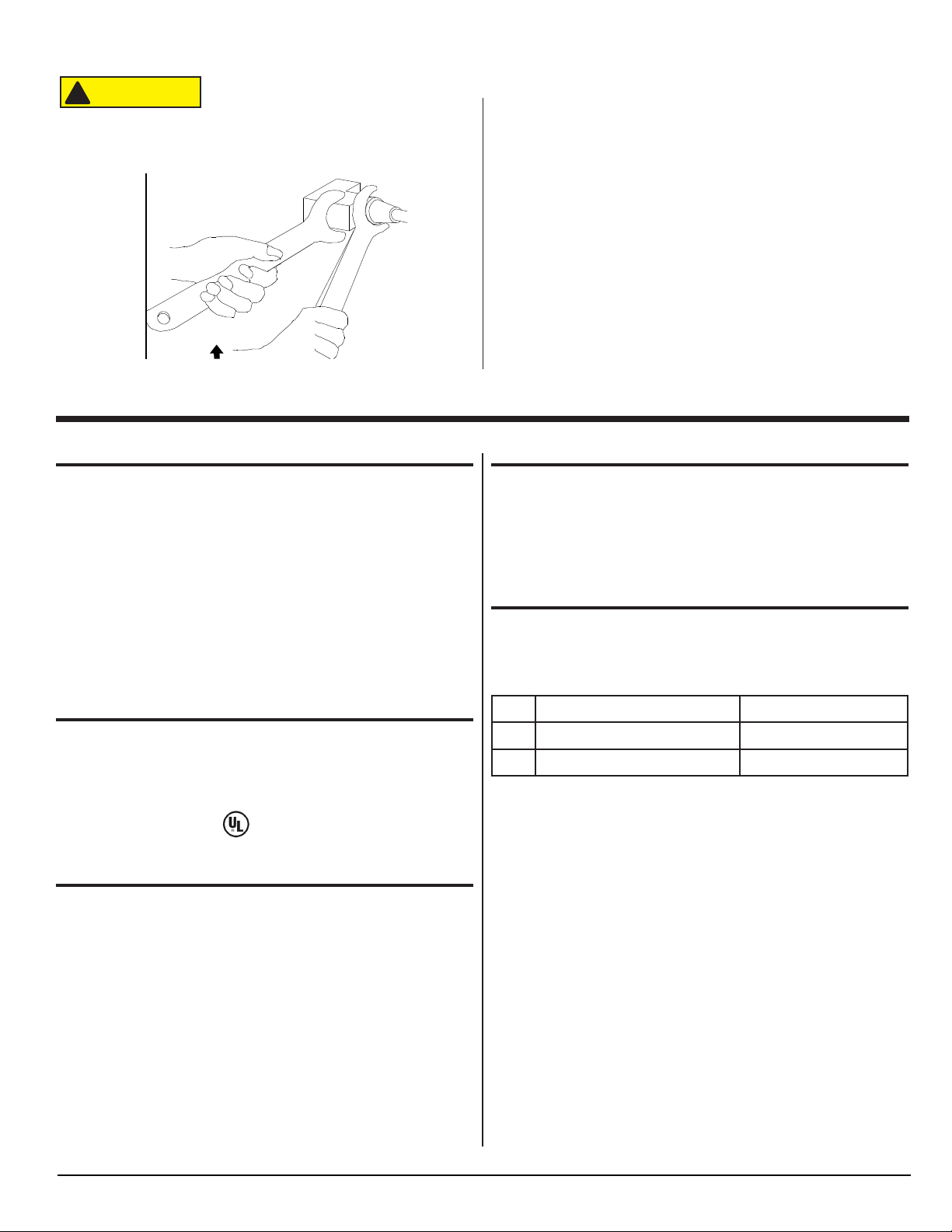
Always use two wrenches to tighten or
loosen propane gas connections. Damaged connections, piping, and components create the potential for gas leaks.
All electrical connections and repairs to
the refrigerator must comply with all ap-
plicable codes. Refer to the “Certication
and Code Requirements” section of the
Installation Manual.
Turn off AC power and DC power sources
before attempting to remove, service, or
repair any of the refrigerator’s electrical
or electronic components. Do not work on
live electrical circuits.
Do not modify, bypass, or eliminate any of
the refrigerator’s electrical components,
electronic circuits, or propane gas system
components.
Do not wet or spray liquids on or near
electrical outlets, connections or components. Most liquids, including leak detection solutions, are electrically conductive
and pose the potential for an electric
shock hazard, short electrical components, damage electronic circuits, and/or
ignite a re.
Do not use leak test solutions that contain
ammonia or chlorine. Ammonia and chlorine degrade copper and brass components.
The cooling unit is a sealed system under
pressure! Do not try to repair or recharge
the cooling unit. Do not bend, drop, weld,
drill, puncture, saw, or strike the cooling
unit.
Handle a leaking cooling unit with extreme
caution! The cooling unit contains ammonia, hydrogen, and sodium chromate.
Ammonia can cause severe skin and eye
burns. Hydrogen is highly ammable, can
ignite and burns with an intense ame.
Certain chromium compounds, such as
sodium chromate, are carcinogenic.
Do not use extension cords. Do not remove the grounding prong from the refrigerator AC power cord. Do not use a two
prong adapter to connect the refrigerator
to the AC outlet.
Do not over-fuse electrical circuits. Use
specied fuses and AWG wire sizes. The
specication section of this manual pro-
vides fuse size information. Refer to the
Installation Manual for the correct AWG
wire size specications.
Prevent child entrapment! Before disposing of the refrigerator, remove all doors
and fasten all shelves with retainers.
Make sure all hardware such as hinges
and fasteners (retaining screws, etc.), are
properly fastened.
Obey the instructions in this manual with
regard to intake and exhaust venting
specications.
Do not install the refrigerator directly on
carpet. Put the refrigerator on a metal or
wood panel that extends the full width and
depth of the refrigerator.
Polar Series N7V, N7X, N7XL / N8V, N8X, N8XL
4
www.norcold.com
Page 5
CAUTION
Safety, cont’d.
Some of the refrigerator’s metal com-
!
ponents have sharp corners and edges.
Wear hand protection, such as cut resistant gloves, and exercise extreme care
when handling the refrigerator.
Fig. 1 - Double-wrenching gas ttings
NOR000129A-1
INTRODUCTION
About this Manual
This service manual provides maintenance, diagnostic, and repair
information for NORCOLD® N7V, N7X, N7LX, N8V, N8X, and N8LX
Series gas absorption refrigerators. It is a reference tool designed
for technicians who are knowledgeable in the theory and operation
of gas/electric absorption refrigerators, liqueed petroleum (LP)
gas–propane–systems, and AC/DC electrical systems as installed
in a variety of recreational vehicles (RV).
All information, illustrations, and specications contained in this
publication are based on the latest product information available
at the time of publication. NORCOLD® reserves the right to make
changes at any time without notice.
Certication and Code Requirements
NORCOLD® gas/electric absorption refrigerators are certied
under the latest edition of ANSI Z21.19B standards for installation
in mobile homes or recreational vehicles, and with the Canadian
Standards Association CAN/CGA-1.4-M94.
Electrical components are compliant.
About Installation
Refrigerator installation must conform with the N7V, N7X,
N7LX, N8V, N8X, and N8LX Series Installation Manual for the
NORCOLD® limited warranty to be in effect. Installation must
also comply with applicable local codes and standards set by the
relevant certication agency.
Replacement Parts
Use only authorized NORCOLD® replacement parts. Generic parts
do not meet NORCOLD® specications for safety, reliability, and
performance. The use of unauthorized aftermarket or generic replacement parts voids the refrigerator’s limited warranty coverage.
Technical Assistance
If unable to resolve technical issues using the information provided
in this manual, technical support is available through NORCOLD®
Customer Service Center:
Telephone: 1-800-444-7210
(
Fax: 1-734-769-2332
3
World Wide Web: www.norcold.com.
8
The following information is required to process technical support
requests:
■ Refrigerator Model Number
■ Refrigerator Serial Number
■ Refrigerator Cooling Unit Serial Number
■ Recreational Vehicle (RV) Make/Model/Year
www.norcold.com
5
SERVICE MANUAL
Page 6
NOTICE
INTRODUCTION, cont’d.
xxxxxxxxxxxxxx
xxxxxxxxxxxxx
xxxxxxxxxxxxxxx
xxxxxxxxxxxx
xxxxxxxxxxxxxxxxxxxxxx xxxxx
xxxxxxxxxxxxxxxxxxxxx
xxxxxx
xxxxxxxxxxxxxxxxxxxxx xxxx
xxxxxxxxxxxxxxxxxxx
xxxxxxxxxxxxxxxxxxxx
xxxxx
xxxxxxxxxxxxxxxxxxxxxxx xx
xxxxxxxxxxxxxxxxxxxxxxxxx
xxxxxxxxxxxxxxxxxxxxxxx
xxxxxxxxxxxxxxxxxxxxxxx
D
E
S
I
G
N
C
E
R
T
I
F
i
E
SA
NORCOLD
x
x
x
x
xx
x
x
x
x
x
x
x
xx
x
x
x
x
x
x
x
x
x
x
x
x
Model Identication
Models which include .3 in the model number are 3-way
refrigerators that operate on AC power, propane gas, or DC power.
Models which DO NOT include .3 in the model number are 2-way
refrigerators that operate on AC power or propane gas.
Letter(s) appended to the model number identify factory installed
accessories.
Cooling Unit Serial Number
The cooling unit serial number appears on the cooling unit bar
code label. The label is afxed to the surface of the cooling unit
leveling chamber.
Be sure to have the cooling unit serial
number available if you need technical
support on this component
N000036A-1
1167359
NORCOLD
Fig. 2 - Cooling unit bar code label location.
Refrigerator Model Number
xxxxxxxxxxxxxxxxxxxxxxxxxxx
xxxxxxxxxxxxxxxxxxxxxxxxxxx
NORC OLD
A
Serial Number
B
Model Number
Group Code
C
Input Pressure
BTUH
xxxxxxxxxxxxxxxxxxxxxxxxxxx
xxxxxxxxxxxxxxxxxxxxxxxxxxx
D
xxxxxxxxxxxxxxxxxxxxxxxxx
xxxxxxxxxxxxxxxxxxx
xxxxxxxxxxxxxxxxxxxxxxxxx
xxxxxxxxxxxxxxxxxxxxxxxxx
xxxxxxxxxxxxxxxxxxxxxxxxx
xxxxxxxxxxxxxxxxxxxxxxx
xxxxxxxxxxxxxxxxxxxxxxx
Fig. 3 - Refrigerator information label location
Refrigerant
x.xx
LBS.
test pressure
E
E
xxx VOLTS - AC xx HZ
x.xx AMPS xxx Watts
xx VDC xx HZ
x.x AMPS xx xx Watts
SA
C
F
G
I
G
S
E
N
D
E
D
R
E
i
F
T
I
A Serial Number
B Model Number
C Group Code
D BTU / h
E Amount of refrigerant in cooling system
F AC Voltage / Amperage
G DC Voltage / Amperage
Polar Series N7V, N7X, N7XL / N8V, N8X, N8XL
6
www.norcold.com
Page 7
SPECIFICATIONS
N7V, N8V Models - Electronic
• Capacitive Touch - ON/OFF
• Single LED Indicator Light (Multi-Color)
• Self-Diagnostic with Fault Indicators (LED Flash Pattern)
• 2-Way Automatic Operation
• Non-Settable Factory Preset Temperature Setting (With Backup Operating System)
N7X, N8X Models - Electronic
• Capacitive Touch - ON/OFF, Mode, and Temperature Set
• Multiple LED Indicator Lights
• Self-Diagnostic with Fault Indicators (LED Flash Pattern)
• 2-Way Automatic or Manual Operation
• Five (5) Separate Temperature Settings (With Backup Operating System Mode)
• Sleep Mode
N7LX, N8LX Models - Electronic
• Capacitive Touch - ON/OFF, Mode, and Temperature Set
• Backlit LCD Display with Icon, Numerical, and Text Indicators
• Self-Diagnostic with Fault Codes
• 2-Way Automatic or Manual Operation (Standard), 3-Way Automatic or Manual Operation (Optional)
• Nine (9) Separate Temperature Settings (With Backup Operating System Mode)
• Sleep Mode
• 12 Individual Diagnostic Screens
Rough Opening Dimensions (H x W x D)
N7V, N7X, N7LX models ----------------------------------------------------------------------- 52.88 - 53.01 in. x 23.50 - 23.63 x 24.00 - 24.13 in.
N8V, N8X, N8LX models ---------------------------------------------------------------------- 59.88 - 60.01 in. x 23.50 - 23.63 x 24.00 - 24.13 in.
DC (Direct Current) Specications
Electronic Controls DC input voltage requirement --------------------------------------------------------------------------- 10.5 VDC to 16.0 VDC
DC Fuse Requirements
Main Control Board (Power Board) F1-Control Circuit ----------------------------5-Amp, 32V, MINI ® Blade, Automotive Style Fuse
Main Control Board (Power Board) F2-Auxiliary Circuit ------------------------ 7.5-Amp, 32V, MINI ® Blade, Automotive Style Fuse
DC Heater Board F1 (Optional - N7LX, N8LX models only) ---------------- 30-Amp, 32V, ATO/ATC Blade, Automotive Style Fuse
DC Resistance / Amperage Ratings
Divider Heater ------------------------------------------------------------------------------------------43 Ω to 50 Ω, 240mA to 279mA @ 12 VDC
DC Heater (3-Way models only) --------------------------------------------------------------1 each, 6.7 Ω to 7.8 Ω, 16A to 18A @ 12 VDC
Cold Weather Heater (optional) ----------------------------------------------------------------------- 6.7 Ω to 7.8 Ω, 1.5A to 1.8A @ 12 VDC
Ice Maker Water Line Heater (IM models only) ---------------------------------------------------- 6.7 Ω to 7.8 Ω, 1.5A to 1.8A @ 12 VDC
External cooling fan ------------------------------------------------------------------------------------------------------------------430mA @ 12 VDC
Interior Light --------------------------------------------------------------------------------------------------------------------------------------- 180 mA
AC (Alternating Current) Specications
Electronic Controls AC input voltage requirement -------------------------------------------------------------------------- 108VAC to 132VAC
AC Fuse Requirements
Power Board F3 ---------------------------------------------------------------------------------- 8-Amp, 250V Glass FST 5 x 20mm GMA Type
AC Current Draw
AC Heater --------------------------------------------------------1 each, 300W @120VAC, (45.7 Ω to 50.5 Ω), 2.38A to 2.63A @ 120VAC
Ice Maker Water Valve (IM models only) -------------------------------------------------------------------------------------------10W @ 120VAC
Propane gas
Operating pressure ----------------------------------------------------------------------------------------------------------------------- 10.5 - 11.5 inch w.c.
Burner rating (Heat output) ------------------------------------------------------------------------------------------------------ 1750 Btu/h @ 11 in. W.C.
Burner orice size -------------------------------------------------------------------------------------------------------------------- LP18 (not replaceable)
Gas ignition --------------------------------------------------------------------------------------------------------------------- Electronic with ame sensing
Electrode tip-to-burner gap ------------------------------------------------------------------------------------------------------------------- 1/8 to 3/16 inch
Off-level operating limits
Side-to-side-------------------------------------------------------------------------------------------------------------------------------- 3 degrees-maximum
Front-to-back ------------------------------------------------------------------------------------------------------------------------------ 6 degrees-maximum
www.norcold.com
7
SERVICE MANUAL
Page 8
SPECIFICATIONS, cont’d.
Exploded Views
R
B
A
C
G
I
J
Fig. 4 - Exploded front view
B
D
E
N
P
F
Q
S
I
H
O
K
K
L
H
M
NOR000724A
No. Description
A Hinges
B Trim Piece / Foam Tape Assembly
C Ice Cube Tray
D Freezer Wire Shelf
E User Interface Assembly (Control Assembly)
F User Interface Housing (Control Housing)
G Short Wire Shelf
H Full Wire Shelf
I Cut Out Wire Shelf
Polar Series N7V, N7X, N7XL / N8V, N8X, N8XL
J Shelf Tray
K Crisper Cover / Glass Shelf
L Crisper
M Ice Bin
N Hinge Hole Cover
O LED Assembly
P Strike Plate
Q Thermistor
R Top Trim Piece
S Bottom Trim Piece
8
www.norcold.com
Page 9
SPECIFICATIONS - Exploded Views, cont’d.
AF
U
T
AE
AC
AD
AA
AB
Fig. 5 - Exploded rear view
No. Description
T Cooling Unit
U Fins
V AC Heater
W Gas Train Assembly
X Gas Train Support Bracket / Burner Door Assembly
Y Drip Cup
Z DC Board Assembly (3-way models only)
AA Red Input Wire (3-way models only)
AB Black Input Wire (3-way models only)
AC Communication Harness (3-way models only)
AD AC Power Cord
AE Main Control Board Assembly (Power Board Assembly)
AF Fan
V
W
X
Y
Z
NOR000725A
www.norcold.com
9
SERVICE MANUAL
Page 10
WARNING
AVERTISSEMENT
ADVERTENCIA
DANGER
WARNING
GENERAL INFORMATION
To conrm that installation is adequate, check for:
■ Adequate ventilation - refer to "Ventilation Requirements" in the
refrigerator Installation Manual.
■ Both gas and electrical components installed and operating in a
safe condition.
■ Adequate seal between refrigerator mounting ange and cut-out
opening.
■ Installed on a solid oor (not on carpet) and secured.
This refrigerator is not intended to be
!
ATTENTION
operated as a free standing unit (i.e.
where the products of combustion are not
completely isolated from the living area) or
installed in such a way as to conict with
these installation instructions. Unapproved
installations could result in safety risks or
performance problems.
Ventilation
Overview
The installed unit must
!
!
!
!
ATTENTION
ATTENTION
ATTENTION
ATTENTION
Certied installation needs one lower intake vent and one upper
exhaust vent. Install the vents through the side wall of the vehicle
exactly as instructed in the Installation Manual. Any other installa-
tion method voids both the certication and the factory warranty of
the refrigerator.
The bottom of the opening for the lower intake vent, which is also
the service access door, must be even with or immediately below
the oor level. This allows any leaking propane gas to escape to
the outside and not to collect at oor level.
American Gas Association/Canadian Gas Association (AGA/CGA)
certication allows the refrigerator to have zero (0) inch minimum
clearance at the sides, rear, top, and bottom. While there are no
maximum clearances specied for certication, the following maxi-
mum clearances are necessary for correct refrigeration:
Bottom 0 inch min. 0 inch max.
Each Side 0 inch min. 1/4 inch max.
Top 0 inch min. 1/4 inch max.
Rear 0 inch min. 1 inch max.
isolated from the combustion system of the
refrigerator and it must have complete and
unrestricted ventilation of the ue exhaust
which, in gas mode, can produce carbon
monoxide. The breathing of carbon monoxide fumes can cause dizziness, nausea, or
in extreme cases, death.
be completely
Enclosure
The cabinet that encloses the refrigerator is built by the RV manufacturer. Depending on cabinet depth, height, and width certain
bafes may be present when cabinet clearances exceed installation guidelines and specications.
Bafes
Bafes prevent hot air buildup “pocketing” between the refrigerator
cabinet and the enclosure walls and/or ceiling. An enclosure may
be tted with:
■ An absorber bafe and a condenser bafe
■ Side bafes (Fig. 6, A)
■ Vertical top bafe (Fig. 6, B)
■ Vertical angled bafes
■ Box bafe
■ Or a combination of any of the above
For complete detail about any necessary bafe(s), refer to the
refrigerator Installation Manual.
Lower Intake Vent
Ventilation and combustion air ow through the lower intake vent
(Fig. 6, C), which also serves as the service access or door. The
lower intake vent needs be kept clear of obstructions that may
restrict the ow of fresh air into the enclosure.
Exhaust Vent
Warm air and combustion gases ow out of the enclosure through
the exhaust vent. The exhaust vent can be either a roof exhaust
vent (Fig. 6, D) or an upper sidewall exhaust vent.
The roof exhaust vent has a non-removable metal mesh screen
to prevent leaves, birds, rodents and/or debris from entering the
enclosure.
Roof Cap
The roof cap (Fig. 6, E) ts over exhaust vent. The sloped end
always faces the front of the RV. It is held in place by four (4) 2-1/2”
long Phillips head screws.
These clearances plus the lower and upper vents cause the natural
air draft that is necessary for good refrigeration.
Cooler air goes in through the lower intake vent, goes around the
refrigerator coils where it removes the excess heat from the refrigerator components, and goes out through the upper exhaust vent.
If this air ow is blocked or decreased, the refrigerator may not cool
correctly.
Each NORCOLD model is certied by AGA and CGA for correct
ventilation.
Polar Series N7V, N7X, N7XL / N8V, N8X, N8XL
10
www.norcold.com
Page 11
WARNING
WARNING
WARNING
GENERAL INFORMATION - Roof Cap, cont’d.
E
D
B
Front of RV
■ To avoid possible propane gas leaks, always use two wrenches
to tighten or loosen the propane gas supply line connections.
■ Leaking propane gas can ignite or explode and result in danger-
ous personal injury or death.
Do not allow the leak detecting solution
!
ATTENTION
to touch the electrical components. Many
liquids are electrically conductive and can
cause a shock hazard, electrical shorts,
and in some cases re.
Leak Test-Detergent
Using a solution of liquid detergent and water:
■ Examine the propane gas supply system for leaks: make sure
the propane gas supply line and all gas connections have no
leaks. Do not use any liquid that contains ammonia.
Electrical Connections
A
C
NOR000843A
Fig. 6 - Typical roof exhaust venting
A Side Baffles
B Vertical Top Baffles
C Lower Inake Vent
D Roof Exhaust Vent
E Roof Cap
Propane Gas Connections
The refrigerator operates on propane gas at a pressure of 10.5
inches Water Column min. to 11.5 inches Water Column max.
!
ATTENTION
■ Do not smoke, or use an open ame near the propane gas
system.
■ Do not use an open ame to examine for leaks.
■ Do not connect the refrigerator to the propane gas tank without
a pressure regulator between them.
Be very careful when working on or near
the propane gas system.
120 Volts AC Electrical Connection
The refrigerator is equipped with a three-prong plug for protection
against shock hazard and must be connected into a recognized
three-prong attachment receptacle. The cord must be routed so as
not to come in contact with the burner cover, ue pipe or any other
component that could damage the cord insulation.
Do not remove (cut) grounding plug from
!
ATTENTION
■ Verify AC power cord is in a grounded three-prong receptacle.
■ Verify receptacle is within easy reach of the lower intake vent.
■ Verify power cord does not touch the burner cover, the ue
pipe, or any hot component that could damage the insulation of
the power cord.
the refrigerator AC power cord. Removal
of this prong can result in a severe electrical shock, as well as voiding the refrigera-
tor’s electrical certication and warranty.
12 Volts DC Electrical Connection
The refrigerator controls require 12 volt DC to operate. The minimum control voltage is 10.5 volts DC. The maximum control voltage is 16.0 volts DC.
Polarity
The correct polarity of the DC leads to the main control board
(power board) connections is:
■ The 12 volt DC (positive) supply wire from the battery must be
connected to the terminal marked “12 VDC” of the main control
board (power board). On 3-way models, this connection is made
to the DC control board terminal marked “12 VDC” .
■ The 12 volt DC (ground) supply wire from the battery must be
connected to the terminal marked “GND” of the main control
board (power board). On 3-way models, this connection is made
to the DC control board terminal marked “GND”.
www.norcold.com
11
SERVICE MANUAL
Page 12
GENERAL INFORMATION - Electrical Connections, cont’d.
NOTICE
12 Volt DC Fan
Main Control Board (Power Board) Fuses
There are three (3) fuses located on the main control board (power
board). Two (2) are MINI ® Blade, Automotive Style Fuses used to
protect DC voltage circuits (F1 and F2) and one (1) is a glass body
cartridge style fuse (F3) used to protect AC voltage circuits.
Fuse F1
This is a DCV, 5-Amp, 32V, MINI ® Blade, Automotive Style Fuse.
It is used to protect the DC circuitry / componentry located on the
Main Control Board (Power Board).
Fuse F2
This is a DCV, 7.5-Amp, 32V, MINI ® Blade, Automotive Style
Fuse. It is used to protect DC “loads” connected to the auxiliary
output of the main control board (power board).
Examples of these loads are: External cooling fan, waterline heaters, etc.
Fuse F3
This is an ACV, 8-Amp, 250V, Glass Body Cartridge, FST 5x20mm,
Automotive Style Fuse. It is used to protect the AC circuitry / componentry located on the main control board (power board).
F3 F1
F2
A 12 volt DC fan (Fig. 8, A) increases ventilation of the cooling
system. The fan is located near the condenser on the rear of the
cooling system foam plug. Fan resistance through the fan motor
circuit is approximately 1.8 ohms.
The fan is unidirectional and is controlled by a thermostatic switch
(Fig. 8, B).
The thermostatic switch is located on the rst condenser n (Fig. 8,
C).
The switch turns the fan on and off. The fan comes on when the
temperature of the rst condenser n is about 130° F (54.4° C) and
turn off at about 115° F (46°C).
The DC power is supplied by an auxiliary wire harness (Fig. 8, D)
through to connector pins P1-1 (Fig. 8, E) and P1-6 (Fig. 8, F).
If the vehicle has a roof exhaust vent,
you may need to remove the refrigerator
from the enclosure to test the thermostatic switch. If the vehicle has an upper
side-wall exhaust vent, you can test the
thermostatic switch by removing the upper
sidewall vent.
Low Ambient Heater (optional)
Some models are factory equipped with a low ambient heater.
NOR000815A
Fig. 7 - Fuse locations
Electrical Components
Interior Light
The interior light is located in the top of fresh food compartment.
The light remains on at all times while the refrigerator is ON.
Divider Heater
This heater is controlled by a thermostat. The thermostat allows DC
voltage to the heater only while the refrigerator is turned ON and
only when the ambient temperature is low enough.
B
C
11 10 9
1213141516
P1
5438
1
6
7
2
F E
A
D
NOR000793A
The divider heater is permanently “foamed into” the divider between the freezer compartment and the fresh food compartment.
The divider heater warms this area to prevent condensation from
forming. Powering on the refrigerator automatically powers on the
divider heater. Power to the heater is continuously supplied by the
main control board (power board).
Polar Series N7V, N7X, N7XL / N8V, N8X, N8XL
Fig. 8 - Fan wiring
A Fan
B Thermostatic Switch
C Condenser
D Auxiliary Wire Harness
E P1-1 Auxiliary 12 VDC (ground)
F P1-6 Auxiliary 12 VDC (positive)
12
www.norcold.com
Page 13
NOTICE
WARNING
GENERAL INFORMATION - Electrical Components, cont’d.
Temperature Control System
Although the refrigerator is not frost-free, it is made to limit frost on
the cooling ns. At regular intervals, the temperature control system
automatically melts most of the frost from the cooling ns. The water from the cooling ns drains into a collection cup attached to the
back of the refrigerator. The heat of the cooling system evaporates
the water from the collection cup.
Backup Operating System
This refrigerator has a backup operating system. The backup
operating system allows the refrigerator to continue to cool if the
thermistor of the refrigerator should fail.
If a failure occurs:
■ The refrigerator automatically changes to the backup operating
system.
■ N7V and N8V models:
• In Auto AC mode, the green power ON / indicator light will
ash OFF once every 20 seconds and repeat until the
thermistor is sensed to be operating correctly.
• In Auto Propane Gas mode, the amber power ON / indicator
light will ash OFF once every 20 seconds and repeat until
the thermistor is sensed to be operating correctly.
PREVENTATIVE MAINTENANCE
An annual maintenance check is strongly recommended:
■ Leak test the gas lines.
■ Check combustion seal; repair or replace, if necessary (visual
check without removing the refrigerator).
■ Inspect or clean the openings of the burner tube.
■ Check/adjust the spark electrode gap to 1/8 - 3/16 inch.
■ Make sure the spark electrode tip is clean and the spark elec-
trode is securely attached to the gas train assembly.
■ Check/adjust AC and DC voltages and propane gas supply
pressure.
■ Make sure that area around the burner and controls is free of
debris, oily rags, etc.
■ Inspect the controls, piping and wiring to insure that they are in
good condition.
THESE MAINTENANCE PROCEDURES
MUST BE PERFORMED BY A QUALIFIED SERVICE PERSON.
NORCOLD CANNOT ACCEPT RESPONSIBILITY FOR REPAIRS, ADJUSTMENT,
OR MAINTENANCE PERFORMED BY
OTHER THAN A QUALIFIED DEALER
OR SERVICE CENTER.
■ N7X and N8X models:
• In ANY mode, the temperature setting will ash ON and
OFF for 10 seconds when the control is “awake”.
■ N7LX and N8LX models:
• In ANY mode, the temperature setting will ash ON and
OFF for 10 seconds when the control is “awake”.
■ The backup operating system can over-freeze or thaw the con-
tents of the freezer and the fresh food compartment.
■ Make sure the temperatures of the freezer and the fresh
food compartment are satisfactory.
Gas Flame Appearance
While in propane gas operation, examine the appearance of the
gas ame:
1. Change the refrigerator controls to the coldest temperature
setting.
2. Open the lower intake vent.
!
ATTENTION
3. Open the burner door and look at the gas ame:
■ The ame should be a darker blue inside and a lighter blue
outside and should be a constant and steady shape.
■ The ame should not be yellow and should not have an er-
ratic and unstable shape.
■ Make sure the ame does not touch the inside of the ue
tube.
4. Close the burner door.
5. Clean the openings of the burner tube as part of routine
maintenance. Follow the instructions in the “Clean the
Openings of the Burner Tube’ section of these instructions.
If the ame is not at peak performance, after the openings of
the burner tube are cleaned, contact Customer Service.
The burner door can be hot. Wear gloves
to avoid burns.
www.norcold.com
13
SERVICE MANUAL
Page 14
WARNING
WARNING
WARNING
PREVENTIVE MAINTENANCE, cont’d.
Clean the Openings of the Burner Tube
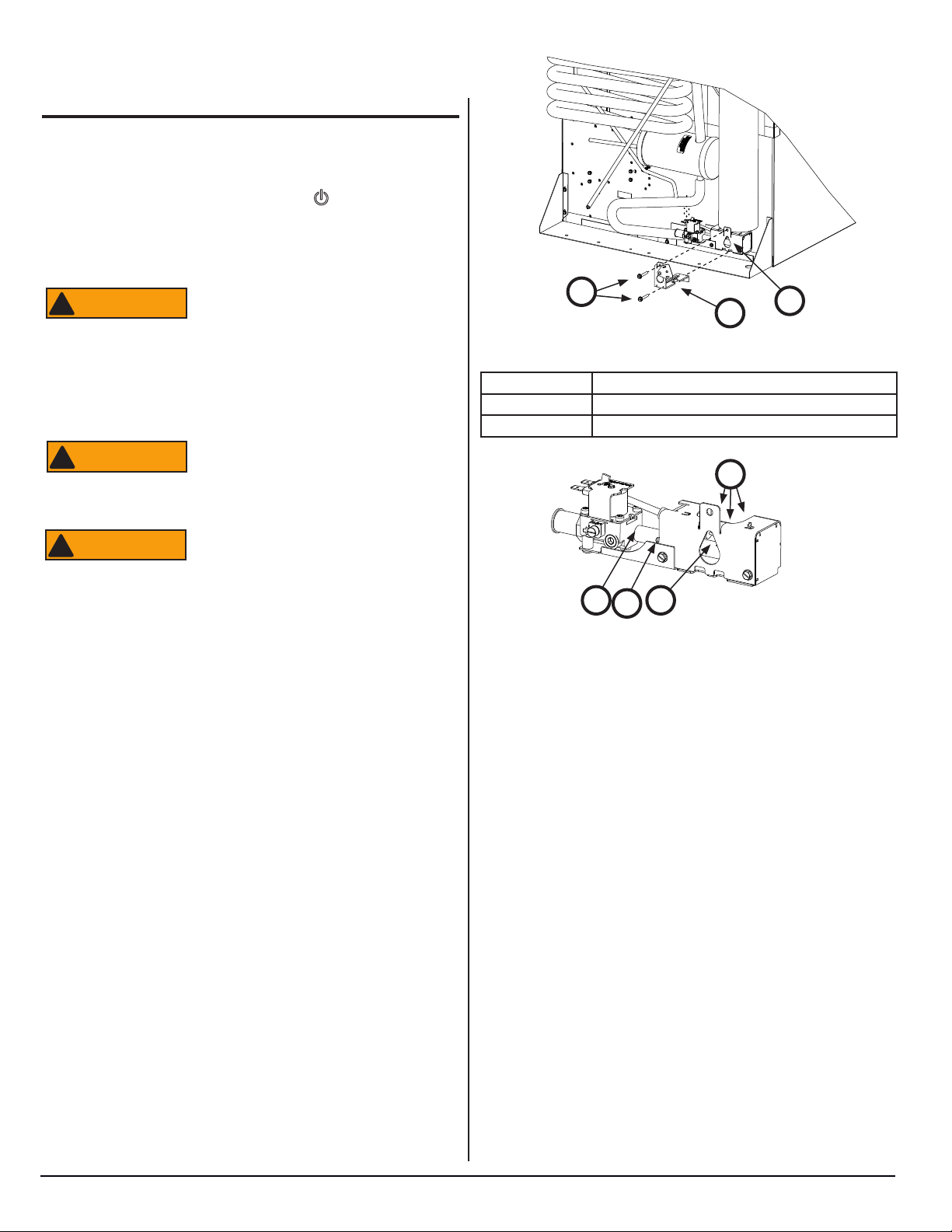
Clean the openings of the burner tube annually. To clean:
1. Close the valve at the vehicle propane gas tank(s).
2. Touch and hold the ON/OFF button ( ) for one (1) second
to turn the refrigerator off.
3. Open the lower intake vent.
4. Disconnect the two (2) white wires from the gas train assembly (Fig. 9, A).
!
ATTENTION
5. Disconnect the gas supply line from the gas train assembly.
6. Remove the two (2) screws (Fig. 9, B) that attach the gas
train support bracket/door assembly (Fig. 9, C) to the cooling unit.
!
ATTENTION
7. Remove the gas train assembly from the cooling unit.
To avoid possible propane gas leaks,
always use two (2) wrenches to loosen
and tighten the gas supply line at the gas
train assembly.
Never attempt to operate the gas train
when it is NOT installed in the cooling unit
because of the risk of electrical shock.
NOR000683A-1
B
C
Fig. 9 - Burner tube location
A Gas Train Assembly
B Screws
C Gas Train Support Bracket/Door Assembly
Air
A
When cleaning, do not try to remove
!
ATTENTION
8. Clean the openings of the burner tube with compressed air
only. Blow air into the openings of the burner tube.
9. Put the gas train assembly back onto the cooling unit.
10. Attach the gas train support bracket/door assembly to the
cooling unit.
11. Connect the gas supply line to the gas train assembly.
12. Connect the two (2) white wires to the gas valve of the gas
train assembly.
13. Open the valve at the vehicle propane gas tank(s).
14. Examine all of the gas connections for leaks. Refer to the
“Conduct Leak Test” procedure.
the burner. Removal may can cause a
propane gas leak. Leaking propane gas
can ignite or explode and result in dangerous personal injury or death. Do not try to
clean the burner with anything other than
compressed air.
NOR000683A
Air
Air
Air
Fig. 10 - Openings of the burner tube
Polar Series N7V, N7X, N7XL / N8V, N8X, N8XL
14
www.norcold.com
Page 15
WARNING
USER INTERFACE (CONTROLS) - N7V AND N8V MODELS
change temp setting.
if red
check
NORCOLD
NOR000647A
A B
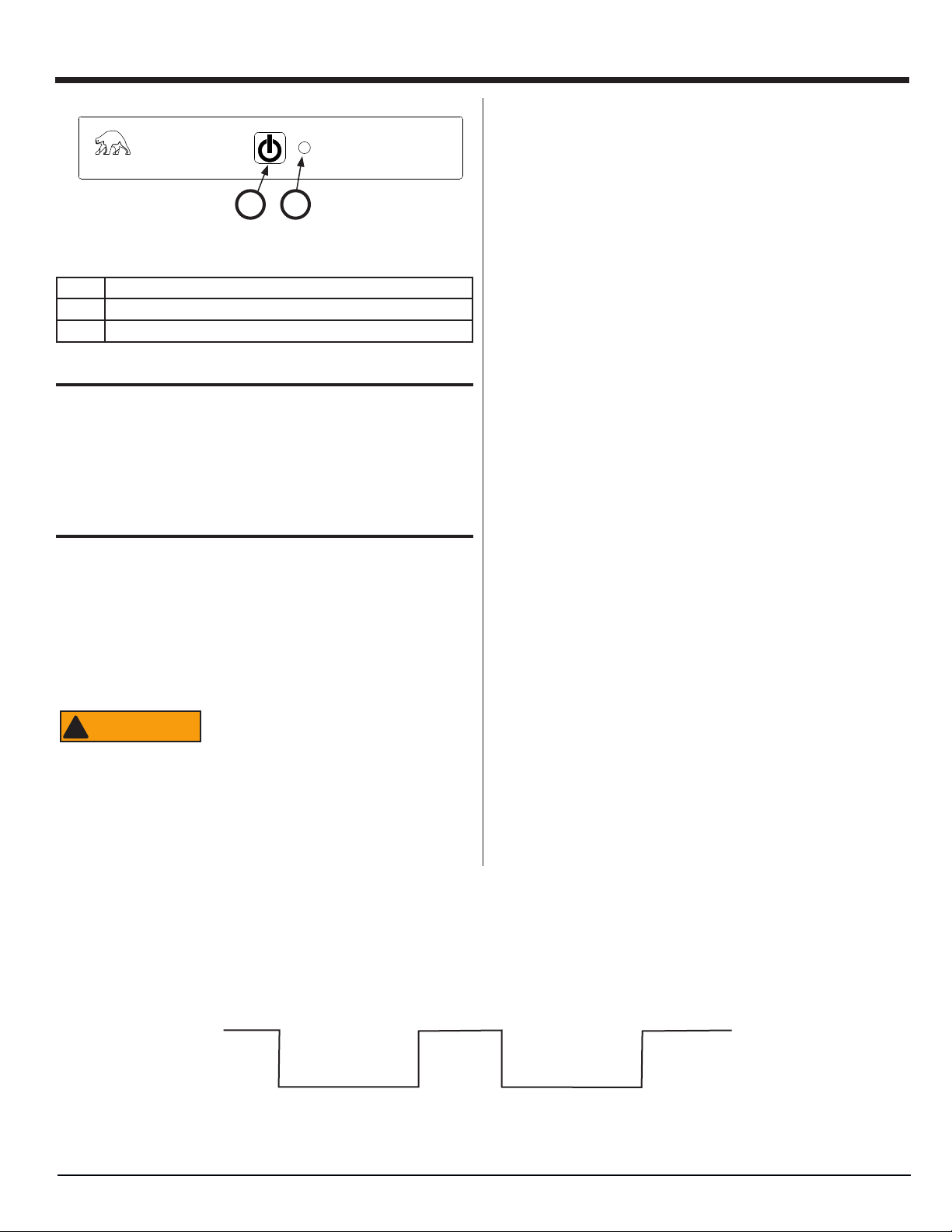
Fig. 11 - N7V and N8V user interface (control) locations
No. Description
A Power ON / OFF button
B Power ON / Indicator Light
Power ON / OFF Button
Touch the Power ON / OFF button (See Fig. 11, A) to turn on the
refrigerator.
Touch and hold the Power ON / OFF button for one (1) second to
turn off the refrigerator.
Modes of Operation
A precise heat is applied to the boiler area of the cooling unit causing a chemical reaction within the cooling unit that ultimately results
in the refrigerator cooling. The heat is applied by means of:
■ A 120 volt AC heater positioned in a heater well welded to the
surface of the boiler. AC operation requires 108 to 132 volts AC.
To replace the heater, the refrigerator must be removed from the
enclosure.
gas
These heat sources are turned on/off via a factory preset Auto
mode. The unit will attempt to operate the heat source requirements in the following order of priority:
■ 1st Priority Choice - Auto Mode
While in the Auto Mode, the AC cartridge heater is operated to
provide heat to the boiler area of the cooling unit and the power
ON / indicator light (See Fig. 11, B) is solid GREEN.
■ 2nd Priority Choice - Propane Gas Mode
While in the Propane Gas Mode, the propane gas burner is operated to provide heat to the boiler area of the cooling unit and
the power ON / indicator light is solid AMBER.
■ Touch and hold the Power ON / OFF button for between 20-23
seconds to change the mode between Auto Mode and Manual
Propane Gas Mode (See Fig. 12).
■ If the refrigerator is operating in Auto Mode, touch and hold
the ON / OFF button. The green power ON indicator light
will go out. Continue to hold the Power ON / OFF button
for between 20-23 seconds. When the power ON indicator
light comes on solid AMBER, release the Power ON / OFF
button. The refrigerator is now operating in Manual Propane
Gas Mode.
■ If the refrigerator is operating in Manual Propane Gas Mode,
touch and hold the ON / OFF button. The amber power ON
indicator light will go out. Continue to hold the Power ON /
OFF button for between 20-23 seconds. When the power
ON indicator light comes on solid GREEN, release the
Power ON / OFF button. The refrigerator is now operating in
Auto Mode.
■ If the power ON / indicator light is solid RED, there is a problem
and the refrigerator is not cooling. Refer to “Fault Codes N7V
and N8V Models” section.
Burn hazard! Allow canister and heaters
!
ATTENTION
■ A propane gas burner positioned below the boiler such that the
heat from the flame is directed across the surface of the boiler.
The controls energize the solenoid coil to open the gas valve.
Spring pressure closes the valve when the controls stop the flow
of current to the solenoid coil. The controls use an electronic
sparker to ignite the propane gas at the burner.
to cool before attempting to remove and
replace.
Touch and hold.
Green Amber Amber flashing
ON
OFF
Seconds 0 1 through 20 21 22 23 through
Fig. 12 - Change mode and temperature setting
Release here to
change mode.
Release here to
NOR000795A
30 31 32
www.norcold.com
15
SERVICE MANUAL
Page 16
NOTICE
USER INTERFACE (Controls) - N7V and N8V Models, cont’d.
A thermistor is mounted on the n assembly located inside the
fresh food compartment. The thermistor acts as a temperature sensor, reporting the temperature sensed to main control board (power
board) which turns on/off the appropriate heat source accordingly.
The user interface (controls), main control board assembly (power
board assemlby), thermistor, and other components within the
refrigerator are interconnected via a wire harness.
While the Power On indicator light is ashing, touch and release
the Power ON button to change to each of the three (3)temperature
settings, one at a time.
When the desired temperature setting is shown, touch and hold
the Power On button for ten (10) seconds to exit the temperature
setting mode. The Power ON / indicator light will stop ashing and
return to the solid GREEN or AMBER.
Air in the Propane Gas Supply Lines
For safety reasons, the refrigerator electronic controls are designed so that while
operating in Propane Gas Mode, the trial
for ignition (the maximum time that the
gas valve and the igniter can be left on
without a ame present) is limited to 30
seconds. When starting the refrigerator for
the rst time, after storage, or after replac-
ing the propane gas tanks(s), the propane
gas supply lines can have air in them.
Due to the air in the gas supply lines, the
burner may not ignite within the 30 second
time limit. If this happens, the gas valve
and igniter outputs will be turned off, the
propane gas mode will be “locked out,”
and the appropriate fault code will show in
the display.
The gas lock out condition can be reset
by powering the refrigerator OFF and
back ON, at which time a new 30 second
trial for ignition will begin. You may need
to repeat this procedure several times to
remove all of the air from the gas supply
lines.
Refrigerator Temperature Settings
Diagnostic Prechecks
Diagnosing fault codes begins by starting with the basics. In many
cases, the problem can be solved by verifying the unit is operating
in acceptable conditions:
■ The refrigerator is plugged into a known working AC outlet
with a voltage between 108VAC and 132VAC
■ Extension cords are not being used to supply AC power to
the refrigerator
■ The refrigerator is connected to a known working DC power
supply and/or battery supplying between 10.5 and 16.0
VDC
■ Propane gas is available to the refrigerator and is regulated
between 10.5 and 11.5” WC (Inches of Water Column).
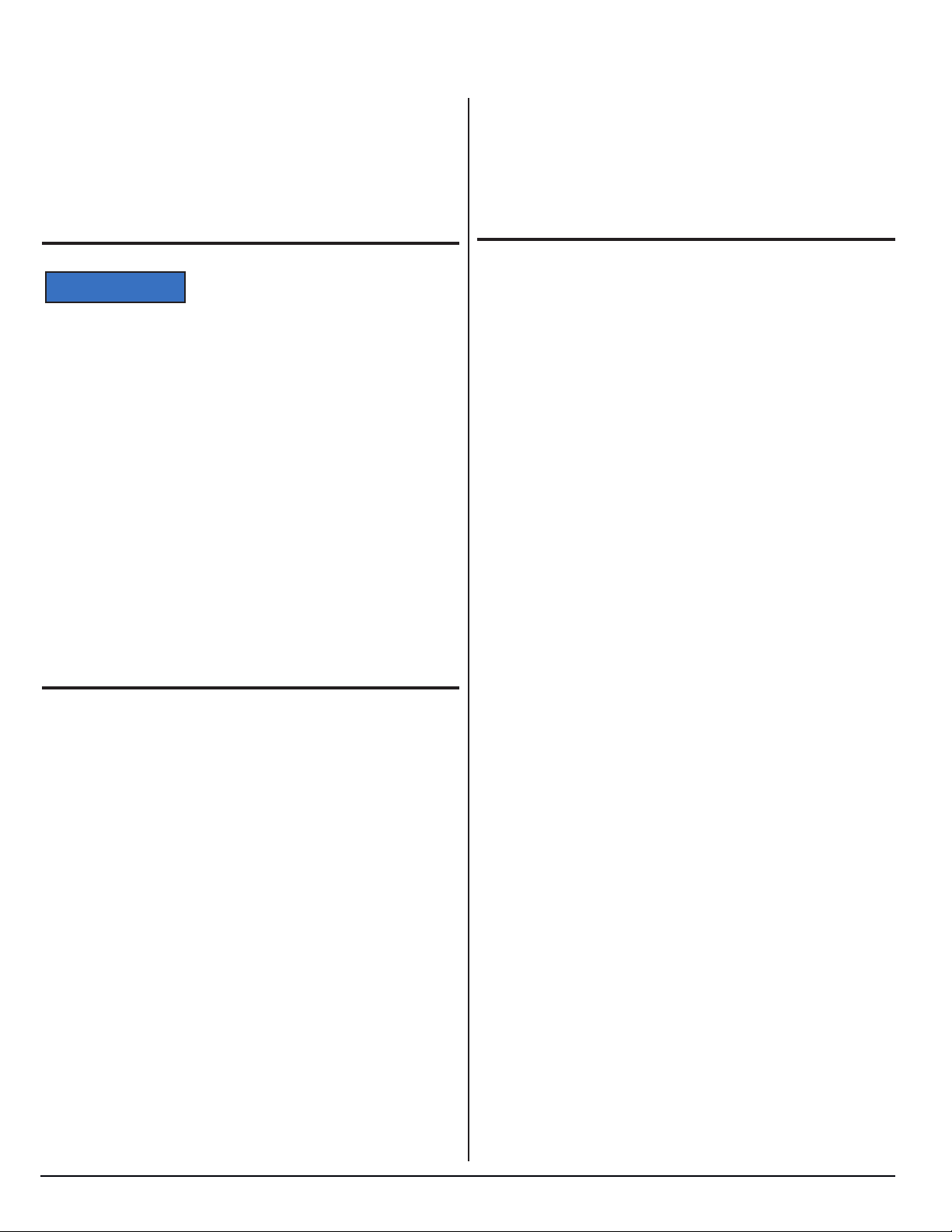
The user interface (controls) has three (3) temperature settings.
The temperature setting can be changed within the temperature set
mode of the user interface (controls). To enter the temperature set
mode (See Fig. 12):
■ Touch and hold the ON / OFF button. The power ON indica-
tor light will go out. Continue to hold the Power ON / OFF
button. The power ON indicator light will come on after 20
seconds and go off again after 23 seconds. Continue to
hold the Power ON / OFF button. The power ON indicator
light will come on again after 30 seconds. Release Power
ON / OFF button.
The color of the power ON indicator light shows the current temperature setting of the refrigerator:
■ Green shows the COLD temperature setting.
■ Amber shows the COLDER temperature setting.
■ Red shows the COLDEST temperature setting.
Touch and release the Power ON button and the Power ON / indi-
cator light will ash on and off, which indicates that the temperature
setting can be changed.
Polar Series N7V, N7X, N7XL / N8V, N8X, N8XL
16
www.norcold.com
Page 17
FAULT CODES - N7V AND N8V MODELS
NOR000123A
NOTICE
Fault Code Flash Patterns - N7V and N8V
Models
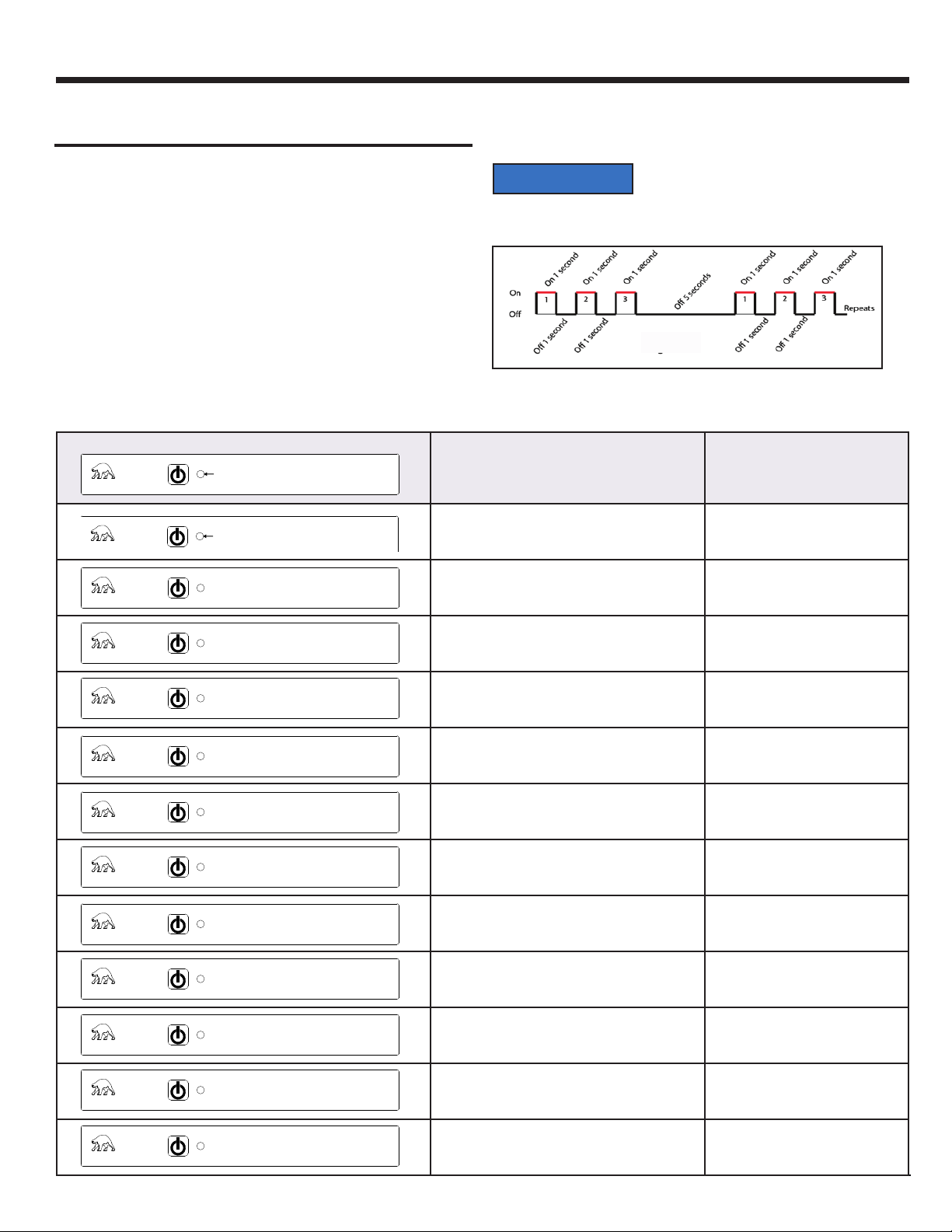
The user interface (controls) has the ability to recognize various
fault conditions and will display a unique error/fault code accordingly.
Should none of the heat source inputs be available, the power ON/
indicator light (See Fig. 12) will be solid RED.
ALL other fault codes will be displayed using ash patterns. The
term “ash pattern” means the power ON / indicator light is turned
ON and OFF to create a numeric pattern. These ash patterns di-
rectly correspond to particular fault codes. For example, fault code
3 will be indicated by ashing the power ON / indicator light RED
3-times, followed by a 5-second pause, and then repeated as long
as the fault condition is present (See Fig. 13).
Fault Code Flash Pattern Fault Code Meaning Action to Take
The refrigerator is not cooling if the power
ON / indicator light is either on solid RED
or ashes on RED.
NOROOO6123A
Fig. 13 - Example fault code ash pattern
NORCOLD
NORCOLD
NOR000647-
NORCOLD
NORCOLD
NORCOLD
NORCOLD
NORCOLD
NORCOLD
NORCOLD
Flash Pattern Appears Here
Red, on solid.
Red, flashes on one (1) time,
is off five (5) seconds, repeats.
Red, flashes on two (2) times,
is off five (5) seconds, repeats.
Red, flashes on three (3) times,
is off five (5) seconds, repeats.
Red, flashes on four (4) times,
is off five (5) seconds, repeats.
Red, flashes on five (5) times,
is off five (5) seconds, repeats.
Red, flashes on eight (8) times,
is off five (5) seconds, repeats.
Red, flashes on nine (9) times,
is off five (5) seconds, repeats.
The refrigerator tried to operate on the selected energy
source(s) with no success.
Refer to ”Fault - Code - Solid Red Indicator Light” on page 18.
AC heater fault. Refer to “Fault Code - Flash Pattern 1”
on page 20.
Internal control fault. Refer to “Fault Code - Flash Pattern 2”
on page 21.
Internal control fault. Refer to “Fault Code - Flash Pattern 3”
on page 21.
The AC heater relay stuck on. Refer to “Fault Code - Flash Pattern 4”
on page 21.
A flame is sensed at the burner when there should be
none present.
Refer to “Fault Code - Flash Pattern 5”
on page 22.
The DC input voltage to the refrigerator is too low. Refer to “Fault Code - Flash Pattern 8”
on page 22.
The DC input voltage to the refrigerator is too high. Refer to “Fault Code - Flash Pattern 9”
on page 22.
www.norcold.com
NORCOLD
NORCOLD
NORCOLD
NORCOLD
Red, flashes on ten (10) times,
is off five (5) seconds, repeats.
Green, flashes off once every
twenty seconds.
Amber, flashes off once every
twenty seconds.
Communications between the controls have been lost. Refer to “Fault Code - Flash Pattern 10”
on page 23.
The refrigerator is operating on AC electric power. The
thermistor has been sensed as inoperable, so the tem-
Refer to “Fault Code - Thermistor Fault”
on page 24
perature is being controlled via backup operating system.
The refrigerator is operating on propane gas. The thermistor has been sensed as inoperable, so the temperature
Refer to “Fault Code - Thermistor Fault”
on page 24.
is being controlled via a backup operating system.
The refrigerator is OFF. Refer to “Blank Display” on page 25.
17
SERVICE MANUAL
Page 18
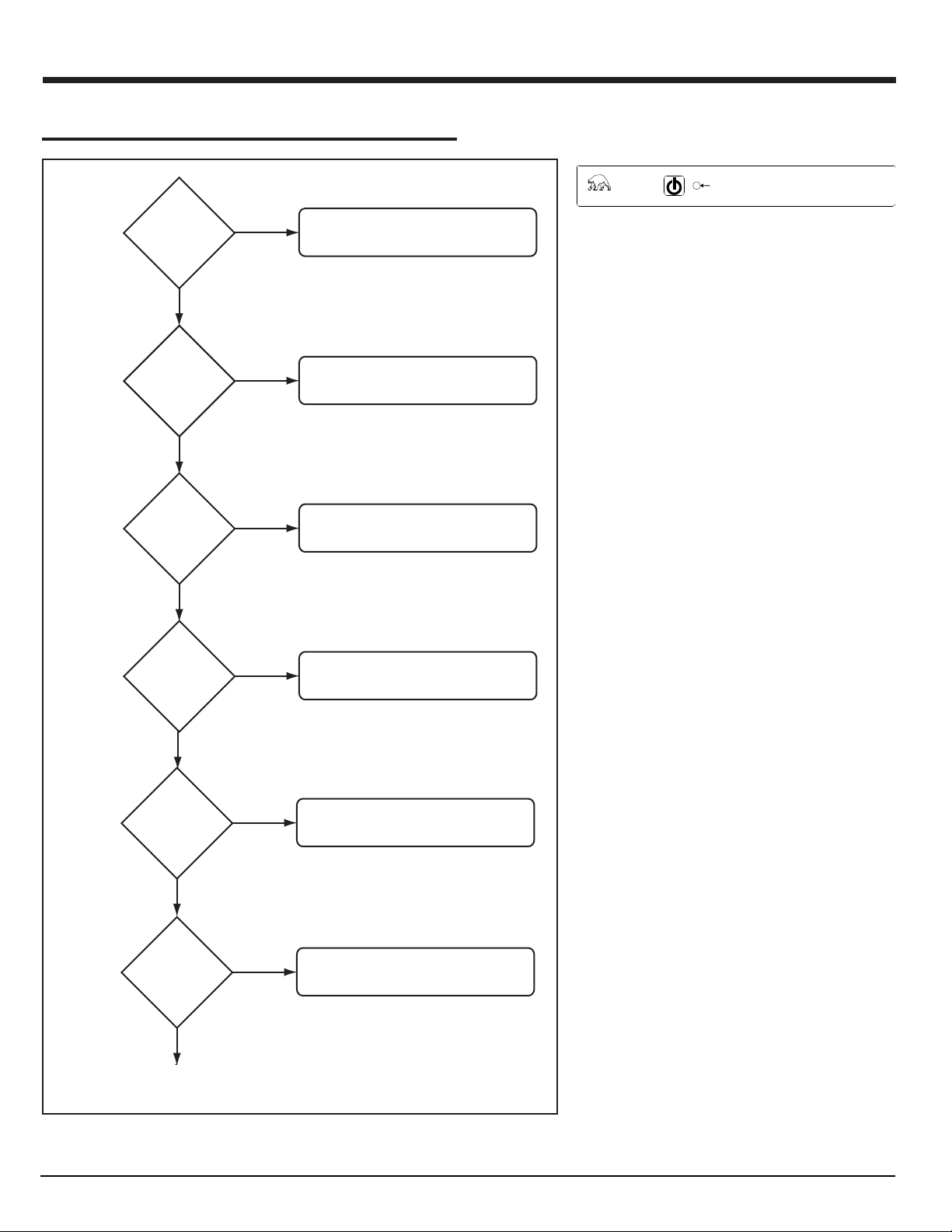
TROUBLESHOOTING FLOWCHARTS - N7V AND N8V MODELS
Fault - Code - Solid Red Indicator Light
Plugged
into working AC
outlet with min.
85 VAC?
YES
AC power
cord in good
working
condition?
YES
Is
8A fuse on
main control
board assy
(pwr board)
intact?
YES
NO
NO
NO
Correct AC outlet.
Replace AC power cord.
Replace fuse.
NORCOLD
Red, on solid.
Possible Cause:
120 VAC power is not available. Refrigerator defaulted to propane gas opera-
tion, but did not establish a ame.(Gas
Lockout).
Turn the refrigerator OFF and then back
ON to reset.
Are all
propane gas
valves open and
supply free of
air?
NO
YES
Is burner clean?
NO
YES
Is burner/
electrode gap
1/8”-3/16”?
NO
YES
Continued on following page.
Correct.
Clean burner.
Correct gap.
NOR000707A
Polar Series N7V, N7X, N7XL / N8V, N8X, N8XL
18
www.norcold.com
Page 19

YES
Replace fuse.
NO
Is
8A fuse on
main control
board assy
(pwr board)
intact?
YES
Correct.
NO
Are all
propane gas
valves open and
supply free of
air?
YES
Clean burner.
NO
Is burner clean?
Correct gap.
NO
Is burner/
electrode gap
1/8”-3/16”?
TROUBLESHOOTING FLOWCHARTS - N7V AND N8V MODELS -
Fault - Code - Solid Red Indicator Light, cont’d.
Continued from previous page.
valve connected
YES
Spark/sense
wire installed
correctly w/
continuity?
YES
Gas valve
solenoid coil
resistance
74-92 Ohms?
YES
Wires to gas
w/continuity?
YES
NO
NO
NO
Correct. Replace spark / sense
ignitor wire if needed.
Replace gas train assembly.
Correct. Replace wires if needed.
Does
main control
board (pwr board)
supply 12VDC to
gas train?
YES
Replace gas train.
NO
Replace main control board assembly
(power board assembly).
NOR000707A
www.norcold.com
19
SERVICE MANUAL
Page 20

TROUBLESHOOTING FLOWCHARTS - N7V AND N8V MODELS, cont’d.
Fault Code - Flash Pattern 1
Before starting this procedure:
■ Make sure that the AC voltage to the refrigerator is 108-132
VAC.
■ Make sure no other appliance or lighting circuit is connected to
the refrigerator AC circuit.
Check AC heater wires
for loose or damaged
connections
Heater
connections
okay?
YES
NO
NORCOLD
Repair or replace connectors. If
connectors cannot be repaired,
replace AC heater.
Red, flashes on one (1) time,
is off five (5) seconds, repeats.
The AC is off when it should be on. AC
heater “lockout”. Turn the refrigerator
OFF and then back ON to reset.
Possible Cause:
AC heater fault.
The AC heater is not plugged in.
The AC heater failed open.
Check AC heater resistance.
See figure, below.
Resistance
38-50 Ohms?
YES
NO
Replace AC heater.
Replace main control board assembly
(power board assembly).
NOR000715A
Polar Series N7V, N7X, N7XL / N8V, N8X, N8XL
20
www.norcold.com
Page 21

TROUBLESHOOTING FLOWCHARTS - N7V AND N8V MODELS, cont’d.
Fault Code - Flash Pattern 2
valve wires
plugged in?
To reset fault, power
refrigerator OFF and
then back ON.
continue?
NOR000706A
Are gas
YES
Does
problem
NO
NO
YES
Correct.
Solved.
Replace main control board assembly
(power board assembly).
NORCOLD
Red, flashes on two (2) times,
is off five (5) seconds, repeats.
Possible Cause:
The main control board assembly (power board) detected an internal fault. This
fault can be displayed in any MODE.
Fault Code - Flash Pattern 3
On the main control board
assembly (power board),
the limit circuit is open.
NOR000804A
Fault Code - Flash Pattern 4
On the main control board
assembly (power board), the
AC heater relay is stuck closed.
NOR000708A
Replace the main control board
assembly (power board).
Replace main control board assembly
(power board).
NORCOLD
NORCOLD
Red, flashes on three (3) times,
is off five (5) seconds, repeats.
Possible Cause:
On the main control board assembly
(power board), the limit circuit is open.
Red, flashes on four (4) times,
is off five (5) seconds, repeats.
Possible Cause:
On the main control board assembly
(power board), the AC heater relay is
stuck closed.
www.norcold.com
21
SERVICE MANUAL
Page 22

TROUBLESHOOTING FLOWCHARTS - N7V AND N8V MODELS, cont’d.
Fault Code - Flash Pattern 5
The gas valve is
“mechanically” stuck open.
NOR000709A
Replace gas train assembly
Fault Code - Flash Pattern 8
Correct the DC input voltage to the regerator. Make sure the input
voltage is 12.0 VDC.
NORCOLD
NORCOLD
Red, flashes on five (5) times,
is off five (5) seconds, repeats.
A ame is sensed at the burner when
there should be none present.
Possible Cause:
The gas valve is “mechanically” stuck
open. Therefore, the main control board
senses a ame is present at the burner
when there should be none
Red, flashes on eight (8) times,
is off five (5) seconds, repeats.
Possible Cause:
The DC input voltage to the refrigerator
is too low.
Fault Code - Flash Pattern 9
Correct the DC input voltage to the regerator. Make sure the input
voltage is 12.0 VDC.
Polar Series N7V, N7X, N7XL / N8V, N8X, N8XL
22
NORCOLD
Red, flashes on nine (9) times,
is off five (5) seconds, repeats.
Possible Cause:
The DC input voltage to the refrigerator
is too high.
www.norcold.com
Page 23

TROUBLESHOOTING FLOWCHARTS - N7V AND N8V MODELS, cont’d.
Fault Code - Flash Pattern 10
Check that the blue wire, within the main
wire harness, is fully plugged in; both at
P1-14 of main control board assembly
(power board) and P1-3 of user interface
(optical display).
NORCOLD
Red, flashes on ten (10) times,
is off five (5) seconds, repeats.
Possible Cause:
Fully
plugged
in?
NO
YES
With the wire harness unplugged from the
main control board assembly (power
board) and the user interface (optical
display), check continuity of the blue wire
to make sure the wire is not “open”.
Continuity?
YES
NO (OPEN)
Replace the refrigerator.
Correct connections.
Check that there is NO continuity
between the blue wire and ground.
YES
Continuity?
Communications between the user
interface (controls) and the main control
board assembly (power board) have
been lost.
Shorted to ground.
Replace the refrigerator.
NOR000796A
NO
Check that there is NO continuity
between the blue wire and any of the
other wires of the wire harness.
YES
Continuity?
NO
Reconnect the wire harness at main
control board assembly (power board)
and the user interface (optical display).
Replace the main control board assembly
(power board).
Shorted to another wire.
Replace the refrigerator.
www.norcold.com
23
SERVICE MANUAL
Page 24

TROUBLESHOOTING FLOWCHARTS - N7V AND N8V MODELS, cont’d.
Fault Code - Thermistor Fault
Is
thermistor
wire plugged
in?
NO
Plug in thermisor wire.
YES
Check thermistor wire
assembly and connctor
for broken/dirty connections.
Are
wires and
connector
good?
NOR000711A
Temperature* (°F) Resistance* (k Ω)
85 8.1 - 9.0
80 9.1 - 10.0
75 10.1 - 11.0
70 11.1 - 12.0
60 12.1 - 13.0
50 15.5 - 16.5
40 22.5 - 23.5
35 24.5 - 25.5
33 28.5 - 29.5
32 30.0 - 32.0
* Approximate values
NO
YES
Clean or repair as needed.
Check resistance at thermistor connector
with the thermistor packed in ice.
NORCOLD
NORCOLD
Green, flashes off once every
twenty seconds.
Possible Cause:
The refrigerator is operating on AC
electric power. The thermistor has been
sensed as inoperable, so temperature
is being controlled via backup operating
system.
Amber, flashes off once every
twenty seconds.
Possible Cause:
The refrigerator is operating on propane
gas. The thermistor has been sensed
as inoperable, so temperature is being
controlled via backup operating system.
Polar Series N7V, N7X, N7XL / N8V, N8X, N8XL
24
www.norcold.com
Page 25

Blank Display
Before starting this procedure verify:
■ Vehicle DC voltage to the refrigerator is 10.5 to 16.0 volts.
■ No other appliance or lighting circuit is connected to the refrig-
erator DC circuit.
■ DC input of the vehicle is wired into the main control board ac-
cording to the Refrigerator Installation Manual.
Touch Power ON button
to turn refrigerator on.
Refrigerator
turns ON?
YES
No problem.
NO
Measure DC input voltage to main
control board (power board)
at terminals 12VDC and GND.
10.5 to
16.0 VDC?
YES
NO
NORCOLD
Blank display.
Possible Cause:
The refrigerator will not turn ON.
Correct DC input
to refrigerator.
Check continuity of F1 fuse
located on main control board
(power board).
Measure voltage at main control
board (power board) between
P1-9 (white/violet) and P1-12 (green)
Measure voltage at user interface
(controls) wire harness between P1-1
(green) and P1-5 (white/violet).
YES
YES
YES
Is fuse intact
(zero ohms)?
10.5 to
16.0 VDC?
10.5 to
16.0 VDC?
NO
NO
NO
Replace fuse
(5-Amp MINI Blade
Automotive style)
Replace main
control board
(power board).
Check connection/continuity of
green wire between main control
board (power board) (P1-12) and
user interface (controls (P1-1).
Check connection/continuity of
white/violet wire between main
control board (power board) (P1-9)
and user interface (controls (P1-5).
NOR000803A
Replace user interface assembly.
www.norcold.com
25
Call Customer Service.
SERVICE MANUAL
Page 26

USER INTERFACE (CONTROLS) - N7X AND N8X MODELS
NORCOLD
NOR000648A
D E
A
MODE
HF
A B G C
Fig. 14 - N7X and N8X user interface (control) locations
No. Description
A Power ON / OFF Button
B Mode Button
C Temperature Set Button
D Power ON / Indicator Light
E Temperature Setting Indicators
F AUTO Mode Indicator
G AC Mode Indicator
H Gas Mode Indicator
Power ON / OFF Button
Touch the Power ON / OFF button (See Fig. 14, A) to turn on the
refrigerator.
Touch and hold the Power ON / OFF button for one (1) second to
turn off the refrigerator.
■ MANUAL AC mode: The refrigerator operates using only AC
electric as the power source and the AC mode indicator only
comes on.
■ MANUAL GAS mode: The refrigerator operates using only
propane gas as the power source and the propane gas mode
indicator only comes on.
Temperature Set Button
Touch and release the Temperature Set button (See Fig. 14, C) to
view the current temperature setting.
Then touch and release the Temperature Set button to change the
temperature settings, one at a time.
Or touch and hold the Temperature Set button to scroll through
temperature settings, one after the other. Release the Temperature Set button when the desired temperature setting appears.
There are ve (5) temperature settings.
Temperature Setting Indicators
There are ve (5) temperature setting indicators (See Fig. 14, E).
■ When only one (1) temperature setting indicator is on, the tem-
perature setting is the warmest.
■ When all five (5) temperature setting indicators are on, the tem-
perature setting is the coldest.
Gas Mode Operation
Mode Button
The mode button is manually operated and does not automatically
change the operating mode of the refrigerator.
Touch and hold the Mode button (See Fig. 14, B) to scroll through
the available modes of operation of the refrigerator, one after the
other. When the desired mode indicator(s) comes on, release the
Mode button.
Or touch and release the Mode button to change the available
modes of operation one at a time. There are one (1) Automatic and
two (2) Manual Modes of operation.
■ AUTO Mode: The AUTO Mode indicator (See Fig. 14, F) comes
on and the refrigerator controls automatically select the most
efficient energy source that is available.
■ If available, the refrigerator controls select AC electric as the
power choice and the AC mode indicator (See Fig. 14, G)
comes on also.
■ If AC electric is not available, the controls select gas as the
power choice and the gas mode indicator (See Fig. 14, H)
comes on also.
In AUTO GAS mode and MANUAL GAS mode, the controls energize the solenoid coil to open the gas valve. Spring pressure closes
the valve when the controls stop the ow of current to the solenoid
coil.
The propane gas burner will cycle in response to the n temperature to maintain cabinet temperature.
The controls use an electronic sparker to ignite the propane gas at
the burner.
When either AUTO or MANUAL GAS mode is selected, the refrigerator attempts to ignite the propane gas burner. If unable to ignite
the burner and to maintain a ame, the Power ON / Indicator light
changes from amber to red. Refer to “Fault Codes“ section.
AC Mode Operation
AUTO AC or MANUAL AC mode operation requires 108 to 132
volts AC. Voltage is to be supplied through a 2 pole, 3-wire, 20 Amp
grounding type receptacle.
Polar Series N7V, N7X, N7XL / N8V, N8X, N8XL
26
www.norcold.com
Page 27

WARNING
NOTICE
NOTICE
USER INTERFACE (Controls) - N7X and N8X Models, cont’d.
A 120 volt AC heater generates the heat load required for AUTO AC
and Manual AC operation. To replace the heater, the refrigerator
must be removed from the enclosure.
Burn hazard! Allow canister and heater
!
ATTENTION
The AC electric heater will cycle in response to the n temperature
to maintain the cabinet temperature.
to cool before attempting to remove and
replace.
Air in the Propane Gas Supply Lines
For safety reasons, the refrigerator electronic controls are designed so that while
operating in Propane Gas Mode, the trial
for ignition (the maximum time that the
gas valve and the igniter can be left on
without a ame present) is limited to 30
seconds. When starting the refrigerator for
the rst time, after storage, or after replac-
ing the propane gas tanks(s), the propane
gas supply lines can have air in them.
Due to the air in the gas supply lines, the
burner may not ignite within the 30 second
time limit. If this happens, the gas valve
and igniter outputs will be turned off, the
propane gas mode will be “locked out”,
and the appropriate fault code will show in
the display.
Diagnostic Prechecks
Diagnosing fault codes begins by starting with the basics. In many
cases, the problem can be solved by verifying the unit is operating
in acceptable conditions:
1. The refrigerator is plugged into a known working AC outlet
with a voltage between 108VAC and 132VAC
2. Extension cords are not being used to supply AC power to
the refrigerator
3. The refrigerator is connected to a known working DC power
supply and/or battery supplying between 10.5 and 16.0 VDC
4. Propane gas is available to the refrigerator and is regulated
between 10.5 and 11.5” WC (Inches of Water Column)
The gas lock out condition can be reset
by powering the refrigerator OFF and
back ON, at which time a new 30 second
trial for ignition will begin. You may need
to repeat this procedure several times to
remove all of the air from the gas supply
lines.
FAULT CODES - N7X AND N8X MODELS
Fault Code Flash Patterns - N7X and N8X
Models
The N7X and N8X controls have the ability to recognize various
fault conditions and will display a unique error/fault code accordingly.
Should none of the heat source inputs be available, the power ON /
indicator light (See Fig. 14, D) will be solid RED.
ALL other fault codes will be displayed using ash patterns. The
term “ash pattern” means the power ON / indicator light is turned
ON and OFF to create a numeric pattern. These ash patterns di-
rectly correspond to particular fault codes. For example, fault code
3 will be indicated by ashing the power ON / indicator light RED
3-times, followed by a 5-second pause, and then repeated as long
as the fault condition is present (See Fig. 13).
www.norcold.com
The refrigerator is not cooling if the power
ON / indicator light [185] is either on solid
RED or ashes on RED.
27
SERVICE MANUAL
Page 28

FAULT CODES - N7X AND N8X MODELS, cont’d.
Flash Pattern Appears Here
Fault Code - Flash Patterns
Fault Code Flash Pattern Fault Code Meaning Action to Take
A
NORCOLD
MODE
NOR000648-
NORCOLD
NORCOLD
NORCOLD
NORCOLD
NORCOLD
A
MODE
Red, on solid.
A
MODE
Red, flashes on one (1) time, is off
five (5) seconds, repeats.
A
MODE
Red, flashes on two (2) times, is off
five (5) seconds, repeats.
A
MODE
Red, flashes on three (3) times, is off
five (5) seconds, repeats.
A
MODE
Red, flashes on four (4) times, is off
five (5) seconds, repeats.
The refrigerator tried to operate on the selected energy source(s) with no success.
Refer to “Fault Code - Solid Red Indicator Light” on
page 29.
AC heater fault. Refer to “Fault Code - Flash Pattern 1” on page 31.
Internal control fault. Refer to “Fault Code - Flash Pattern 2” on page 32.
Internal control fault. Refer to “Fault Code - Flash Pattern 3” on page 32.
AC heater relay stuck on. Refer to “Fault Code - Flash Pattern 4” on page 32.
NORCOLD
NORCOLD
NORCOLD
NORCOLD
A
MODE
Red, flashes on five (5) times, is off
five (5) seconds, repeats.
A
MODE
Red, flashes on eight (8) times, is off
five (5) seconds, repeats.
A
MODE
Red, flashes on nine (9) times, is off
five (5) seconds, repeats.
A
MODE
Red, flashes on ten (10) times, is off
five (5) seconds, repeats.
A flame is sensed at the burner when there
should be none present.
The DC input voltage to the refrigerator is
too low.
The DC input voltage to the refrigerator is
too high.
Communications between the controls have
been lost.
Refer to “Fault Code - Flash Pattern 5” on page 33.
Refer to “Fault Code - Flash Pattern 8” on page 33.
Refer to “Fault Code - Flash Pattern 9” on page 33.
Refer to “Fault Code - Flash Pattern 10” on page 34.
Polar Series N7V, N7X, N7XL / N8V, N8X, N8XL
28
www.norcold.com
Page 29

FAULT CODES - N7X AND N8X MODELS, cont’d.
A
NORCOLD
MODE
Temperature setting snowflake(s) flash on/off at one (1)
second intervals anytime the user interface (control) is
“awake”.
A
NORCOLD
MODE
Blank display.
TROUBLESHOOTING FLOWCHARTS - N7X AND N8X MODELS
Fault Code - Solid Red Indicator Light
Plugged
into working AC
outlet with min.
85 VAC?
NO
The thermistor has been sensed as inoperable, so the temperature is being controlled
via backup operating system.
The refrigerator is OFF. Refer to “Blank Display” on page 36.
Correct AC outlet.
NORCOLD
Refer to “Fault Code - Thermistor Fault” on page 35.
A
MODE
Red, on solid.
YES
AC power
cord in good
working
condition?
YES
Is
8A fuse on
main control
board assy
(pwr board)
intact?
YES
Are all
propane gas
valves open and
supply free of
air?
YES
NO
NO
NO
Replace AC power cord.
Replace fuse.
Correct.
NOR000707A
Possible Cause:
120 VAC power is not available. Refrigerator defaulted to propane gas opera-
tion, but did not establish a ame.(Gas
Lockout).
Turn the refrigerator OFF and then back
ON to reset.
Continued on following page.
www.norcold.com
29
SERVICE MANUAL
Page 30

YES
Replace fuse.
NO
Is
8A fuse on
main control
board assy
(pwr board)
intact?
Correct.
NO
Are all
propane gas
valves open and
supply free of
air?
TROUBLESHOOTING FLOWCHARTS - N7X AND N8X MODELS, cont’d.
Continued from previous page.
Is burner clean?
YES
NO
Clean burner.
YES
Is burner/
electrode gap
1/8”-3/16”?
YES
Spark/sense
wire installed
correctly w/
continuity?
YES
Gas valve
solenoid coil
resistance
74-92 Ohms?
YES
Wires to gas
valve connected
w/continuity?
NO
NO
NO
NO
Correct gap.
Correct. Replace spark / sense
ignitor wire if needed.
Replace gas train assembly.
Correct. Replace wires if needed.
YES
Does
main control
board (pwr board)
supply 12VDC to
gas train?
NO
YES
Replace gas train.
Polar Series N7V, N7X, N7XL / N8V, N8X, N8XL
Replace main control board assembly
(power board assembly).
NOR000707A
30
www.norcold.com
Page 31

TROUBLESHOOTING FLOWCHARTS - N7X AND N8X MODELS, cont’d.
Fault Code - Flash Pattern 1
Before starting this procedure:
■ Make sure that the AC voltage to the refrigerator is 108-132
VAC.
■ Make sure no other appliance or lighting circuit is connected to
the refrigerator AC circuit.
Check AC heater wires
for loose or damaged
connections
Heater
connections
okay?
NO
YES
NORCOLD
Repair or replace connectors. If
connectors cannot be repaired,
replace AC heater.
A
MODE
Red, flashes on one (1) time, is off
five (5) seconds, repeats.
The AC is off when it should be on. AC
heater “lockout”. Turn the refrigerator
OFF and then back ON to reset.
Possible Cause:
AC heater fault.
The AC heater is not plugged in.
The AC heater failed open.
Check AC heater resistance.
See figure, below.
Resistance
38-50 Ohms?
YES
NO
Replace AC heater.
Replace main control board assembly
(power board assembly).
NOR000715A
www.norcold.com
31
SERVICE MANUAL
Page 32

TROUBLESHOOTING FLOWCHARTS - N7X AND N8X MODELS, cont’d.
Fault Code - Flash Pattern 2
Are gas
valve wires
plugged in?
NO
Correct.
NORCOLD
A
MODE
Red, flashes on two (2) times, is off
five (5) seconds, repeats.
YES
To reset fault, power
refrigerator OFF and
then back ON.
Does
problem
continue?
NOR000706A
NO
YES
Fault Code - Flash Pattern 3
On the main control board
assembly (power board),
the limit circuit is open.
NOR000804A
Solved.
Replace main control board assembly
(power board assembly).
Replace the main control board
assembly (power board).
NORCOLD
Possible Cause:
The main control board assembly (power board) detected an internal fault. This
fault can be displayed in any MODE.
A
MODE
Red, flashes on three (3) times, is off
five (5) seconds, repeats.
Fault Code - Flash Pattern 4
On the main control board
assembly (power board), the
AC heater relay is stuck closed.
NOR000708A
Polar Series N7V, N7X, N7XL / N8V, N8X, N8XL
Replace main control board assembly
(power board).
32
NORCOLD
Possible Cause:
On the main control board assembly
(power board), the limit circuit is open.
A
MODE
Red, flashes on four (4) times, is off
five (5) seconds, repeats.
Possible Cause:
On the main control board Assembly
(power board), the AC heater relay is
stuck closed.
www.norcold.com
Page 33

TROUBLESHOOTING FLOWCHARTS - N7X AND N8X MODELS, cont’d.
Fault Code - Flash Pattern 5
The gas valve is
“mechanically” stuck open.
NOR000709A
Replace gas train assembly
Fault Code - Flash Pattern 8
NORCOLD
A
MODE
Red, flashes on five (5) times, is off
five (5) seconds, repeats.
A ame is sensed at the burner when
there should be none present.
Possible Cause:
The gas valve is “mechanically” stuck
open. Therefore, the main control board
senses a ame is present at the burner
when there should be none
Correct the DC input voltage to the regerator. Make sure the input
voltage is 12.0 VDC.
Fault Code - Flash Pattern 9
Correct the DC input voltage to the regerator. Make sure the input
voltage is 12.0 VDC.
NORCOLD
NORCOLD
A
MODE
Red, flashes on eight (8) times, is off
five (5) seconds, repeats.
Possible Cause:
The DC input voltage to the refrigerator
is too low.
A
MODE
Red, flashes on nine (9) times, is off
five (5) seconds, repeats.
www.norcold.com
33
Possible Cause:
The DC input voltage to the refrigerator
is too high.
SERVICE MANUAL
Page 34

TROUBLESHOOTING FLOWCHARTS - N7X AND N8X MODELS, cont’d.
Fault Code - Flash Pattern 10
Check that the blue wire, within the main
wire harness, is fully plugged in; both at
P1-14 of main control board assembly
(power board) and P1-3 of user interface
(optical display).
Fully
plugged
in?
YES
With the wire harness unplugged from the
main control board assembly (power
board) and the user interface (optical
display), check continuity of the blue wire
to make sure the wire is not “open”.
NO
Correct connections.
NORCOLD
A
MODE
Red, flashes on ten (10) times, is off
five (5) seconds, repeats.
Possible Cause:
Communications between the user
interface (controls) and the main control
board assembly (power board) have
been lost.
Continuity?
NO (OPEN)
Replace the refrigerator.
YES
Check that there is NO continuity
between the blue wire and ground.
YES
Continuity?
NO
Check that there is NO continuity
between the blue wire and any of the
other wires of the wire harness.
YES
Continuity?
NO
Shorted to ground.
Replace the refrigerator.
Shorted to another wire.
Replace the refrigerator.
NOR000796A
Polar Series N7V, N7X, N7XL / N8V, N8X, N8XL
Reconnect the wire harness at main
control board assembly (power board)
and the user interface (optical display).
Replace the main control board assembly
(power board).
34
www.norcold.com
Page 35

TROUBLESHOOTING FLOWCHARTS - N7X AND N8X MODELS, cont’d.
Fault Code - Thermistor Fault
Is
thermistor
wire plugged
in?
YES
Check thermistor wire
assembly and connctor
for broken/dirty connections.
NO
Plug in thermisor wire.
A
NORCOLD
MODE
Temperature setting snowflake(s) flash on/off at one (1)
second intervals anytime the user interface (control) is
“awake”.
Possible Cause:
The thermistor has been sensed as
inoperable, so temperature is being controlled via backup operating system.
Are
wires and
connector
good?
NOR000711A
Temperature* (°F) Resistance* (k Ω)
85 8.1 - 9.0
80 9.1 - 10.0
75 10.1 - 11.0
70 11.1 - 12.0
60 12.1 - 13.0
50 15.5 - 16.5
40 22.5 - 23.5
35 24.5 - 25.5
33 28.5 - 29.5
32 30.0 - 32.0
* Approximate values
NO
YES
Clean or repair as needed.
Check resistance at thermistor connector
with the thermistor packed in ice.
www.norcold.com
35
SERVICE MANUAL
Page 36

TROUBLESHOOTING FLOWCHARTS - N7X AND N8X MODELS, cont’d.
Blank Display
Before starting this procedure verify:
■ DC voltage to the refrigerator is 10.5 to 16.0 volts.
■ No other appliance or lighting circuit is connected to the refrig-
erator DC circuit.
■ DC input of the vehicle is wired into the main control board ac-
cording to the Refrigerator Installation Manual.
Touch Power ON button
to turn refrigerator on.
Refrigerator
turns ON?
YES
No problem.
NO
Measure DC input voltage to main
control board (power board)
at terminals 12VDC and GND.
10.5 to
16.0 VDC?
NO
YES
Correct DC input
to refrigerator.
NORCOLD
A
MODE
Blank display.
Possible Cause:
The refrigerator is OFF.
Check continuity of F1 fuse
located on main control board
(power board).
Measure voltage at main control
board (power board) between
P1-9 (white/violet) and P1-12 (green)
Measure voltage at user interface
(controls) wire harness between P1-1
(green) and P1-5 (white/violet).
YES
YES
YES
Is fuse intact
(zero ohms)?
10.5 to
16.0 VDC?
10.5 to
16.0 VDC?
NO
NO
NO
Replace fuse
(5-Amp MINI Blade
Automotive style)
Replace main
control board
(power board).
Check connection/continuity of
green wire between main control
board (power board) (P1-12) and
user interface (controls (P1-1).
Check connection/continuity of
white/violet wire between main
control board (power board) (P1-9)
and user interface (controls (P1-5).
NOR000803A
Replace user interface assembly.
Polar Series N7V, N7X, N7XL / N8V, N8X, N8XL
Call Customer Service.
36
www.norcold.com
Page 37

USER INTERFACE (CONTROLS) - N7LX AND N8LX MODELS
F G H
set
CODE
NORCOLD
NOR000649A
MODE
A
B E D C
AUTO
Fig. 15 - N7LX and N8LX user interface (control
locations
No. Description
A Power ON / OFF Button
B Mode Button
C Temperature Set Button
D LCD Display
E AUTO Mode Indicator
F AC Mode Indicator
G GAS Mode Indicator
H DC Mode Indicator
Power ON / OFF Button
• If AC electric is not available to the refrigerator, if the AC
electric is outside the permitted operating range, or if the
AC heater does not operate, the electronic controls of the
refrigerator automatically change to the second choice of
operation.
■ The second choice of operation is propane gas. If AC
electric is not available, the controls select gas as the power
choice.
• If unable to establish and maintain a ame, a “no” FL” fault
code shows on the LCD display (See Fig. 15, D). Refer to
the “Fault Codes - N7LX and N8LX Models” section.
■ On 3-way models only, if neither AC electric nor gas is avail-
able, the controls select DC electric as the power choice the
DC mode indicator (See Fig. 15, H) comes on also.
• If the DC heater does not operate, the “dc” HE” fault code
shows on the LCD.
■ MANUAL AC mode: The refrigerator operates using only AC
electric as the power source and the AC mode indicator comes
on.
■ MANUAL GAS mode: The refrigerator operates using only gas
as the power source and the GAS mode indicator comes on.
■ MANUAL DC mode (3-way models only): The refrigerator oper-
ates using only DC electric as the power source and the DC
mode indicator comes on.
Touch and release the Power ON / OFF button (See Fig. 15, A) to
turn on the refrigerator.
Touch and hold the Power ON / OFF button for one (1) second to
turn off the refrigerator.
Mode Button
The mode button is manually operated and does not automatically
change the operating mode of the refrigerator.
Touch and hold the Mode button (See Fig. 15, B) to scroll through
the available modes of operation of the refrigerator, one after the
other. When the desired mode indicator comes on, release the
Mode button.
Or touch and release the Mode button to change the available
modes of operation one at a time. There are one (1) Automatic
and two (2) Manual Modes of operation on 2-way models and one
(1) Automatic and three (3) Manual Modes of operation on 3-way
models.
■ AUTO Mode: The AUTO Mode indicator (See Fig. 15, E) comes
on and the refrigerator controls automatically select the most
efficient energy source that is available.
■ The rst choice of operation is AC electric. If available, the
refrigerator controls select AC electric as the power choice
and the AC mode indicator comes on also (See Fig. 15, F).
Temperature Set Button
Touch and release the Temperature Set button (See Fig. 15, C) to
view the current temperature setting.
There are nine (9) temperature settings which appear as numbers
in the LCD display.
■ Number one (1) is the warmest temperature setting.
■ Number nine (9) is the coldest temperature setting.
Touch and hold the Temperature Set button to scroll through temperature settings, one after the other. Release the Temperature Set
button when the desired temperature setting appears.
Or touch and release the Temperature Set button to change the
temperature settings, one at a time.
Gas Operation
When either AUTO or MANUAL GAS mode is selected, the refrigerator attempts to ignite the propane gas burner. If unable to
ignite the burner and to maintain a ame, the fault code “no” “FL”
appears in the LCD display.
www.norcold.com
37
SERVICE MANUAL
Page 38

WARNING
WARNING
NOTICE
CONTROLS - N7LX AND N8LX MODELS, cont’d.
Air in the Propane Gas Supply Lines
Gas Mode
In AUTO GAS mode and MANUAL GAS mode, the controls energize the solenoid coil to open the gas valve. Spring pressure closes
the valve when the controls stop the ow of current to the solenoid
coil.
The propane gas burner will cycle in response to the n temperature to maintain cabinet temperature.
The controls use an electronic sparker to ignite the propane gas at
the burner.
AC Mode
AUTO AC or MANUAL AC mode operation requires 108 to 132
volts AC. Voltage is to be supplied through a 2 pole, 3-wire, 20 Amp
grounding type receptacle.
A 120 volt AC heater generates the heat load required for AUTO
AC and Manual AC operation. To replace the heater, the refrigerator must be removed from the enclosure.
Burn hazard! Allow canister and heaters
!
ATTENTION
The AC electric heater will cycle in response to the n temperature
to maintain the cabinet temperature.
to cool before attempting to remove and
replace.
For safety reasons, the refrigerator electronic controls are designed so that while
operating in Propane Gas Mode, the trial
for ignition (the maximum time that the gas
valve and the igniter can be left on without
a ame present) is limited to 30 seconds.
When starting the refrigerator for the rst
time, after storage, or after replacing the
propane gas tanks(s), the propane gas
supply lines can have air in them.
Due to the air in the gas supply lines, the
burner may not ignite within the 30 second
time limit. If this happens, the gas valve
and igniter outputs will be turned off, the
propane gas mode will be “locked out,”
and the appropriate fault code will show in
the display.
The gas lock out condition can be reset
by powering the refrigerator OFF and
back ON, at which time a new 30 second
trial for ignition will begin. You may need
to repeat this procedure several times to
remove all of the air from the gas supply
lines.
Diagnostic Pre checks
Diagnosing fault codes begins by starting with the basics. In many
cases, the problem can be solved by verifying the unit is operating
in acceptable conditions:
DC Mode (3-way models only)
AUTO DC or MANUAL DC mode operation requires 10.5 to 16.0
volts DC.
A 12 volt DC heater generates the heat load required for AUTO DC
and Manual DC operation. To replace the heater, the refrigerator
must be removed from the enclosure.
Burn hazard! Allow canister and heaters
!
ATTENTION
The DC electric heater will cycle in response to the n temperature
to maintain the cabinet temperature.
to cool before attempting to remove and
replace.
■ The refrigerator is plugged into a known working AC outlet
with a voltage between 108VAC and 132VAC
■ Extension cords are not being used to supply AC power to
the refrigerator
■ The refrigerator is connected to a known working DC
power supply and/or battery supplying between 10.5 and
16.0 VDC
■ Propane gas is available to the refrigerator and is regulated
between 10.5 and 11.5” WC (Inches of Water Column).
Polar Series N7V, N7X, N7XL / N8V, N8X, N8XL
38
www.norcold.com
Page 39

NOR000650-
CODE CODE
CODE CODECODE CODE
FAULT CODES - N7LX AND N8LX MODELS
Fault Code Fault Code Meaning Action to
Take
The burner did not ignit or re-ignite. Refer to “Fault Code - “no”
Alternately flashes “no” and “FL”
with an audible alarm.
AC voltage is not available to the refrigerator. Refer to “Fault Code - “no”
Alternately flashes “no” and “AC”
with an audible alarm.
“FL” with audible alarm” on
page 40.
“AC” with audible alarm” on
page 42.
CODE CODE
CODE CODE
CODE CODE
CODE CODE
CODE CODE
CODE CODE
CODE CODE
Alternately flashes “AC” and “HE”
with an audible alarm.
Alternately flashes “dc” and “HE”
with an audible alarm.
Alternately flashes “AC” and “rE”
with an audible alarm.
Alternately flashes “dc” and “rE”
with an audible alarm.
Alternately flashes “Lo” and “dc”.
Alternately flashes “Lo” and “dc”
with an audible alarm.
Alternately flashes “Lo” and “dC”
with an audible alarm.
AC heater fault. Refer to “Fault Code - “AC”
“HE” with audible alarm” on
page 43.
DC heater fault. Refer to “Fault Code - “dc”
“HE” with audible alarm” on
page 44.
AC heater relay stuck on. Refer to “Fault Code - “AC”
“rE” with audible alarm” on
page 44.
DC heater relay stuck on. Refer to “Fault Code - “dc”
“rE” with audible alarm” on
page 44.
DC input voltage to the refrigerator is low. Cooling is to
continue.
DC input voltage to the refrigerator is too low. Either the GAS
MODE or the DC MODE (3-way models only), or both, is
inhibited. The refrigerator is not cooling.
DC input voltage to the refrigerator is too low. All MODES
are inhibited.
Refer to “Fault Code - “Lo”
“dc”” on page 45.
Refer to “Fault Code - “Lo”
“dc” with audible alarm” on
page 45.
Refer to “Fault Code - “Lo”
“dC” with audible alarm” on
page 45.
CODE CODE
CODE CODE
set
CODE
CODE CODE
CODE CODE
Flashes “Sr” with an audible alarm.
www.norcold.com
Alternately flashes “HI” and “dc”
with an audible alarm.
Alternately flashes “no” and “dt”
with an audible alarm.
Alternately flashes “oP” and “LI”
with an audible alarm.
Alternately flashes “FL” and “--”
with an audible alarm.
DC input voltage to the refrigerator is too high. Refer to “Fault Code - “HI”
“dc” with audible alarm” on
page 45.
Communications between the controls have been lost. Refer to “Fault Code - “no”
“dt” with audible alarm” on
page 46.
This fault is within the refrigerator controls. Refer to “Fault Code - “Sr”
with audible alarm” on
page 47.
This fault is within the refrigerator controls. Refer to “Fault Code - “oP”
“LI” with audible alarm” on
page 47.
A flame is sensed at the burner when there should be none
present.
39
Refer to “Fault Code - “FL”
“- -” with audible alarm” on
page 47
SERVICE MANUAL
Page 40

FAULT CODES - N7LX AND N8LX MODELS, cont’d.
Plugged
into working AC
outlet with min.
85 VAC?
YES
Correct AC outlet.
NO
AC power
cord in good
working
condition?
YES
Replace AC power cord.
NO
YES
Replace fuse.
NO
Is
8A fuse on
main control
board assy
(pwr board)
intact?
YES
Correct.
NO
Are all
propane gas
valves open and
supply free of
air?
set
Temperature setting flashes on/off at one (1)
second intervals any time the user interface
(control) is “awake”.
The thermistor has been sensed as inoperable, so the temperature is being controlled via backup operating system.
Refer to “Fault Code Flashing Temperature Setting” on page 48.
Blank display.
The refrigeratro will not turn ON. Refer to “Blank Display” on
TROUBLESHOOTING FLOWCHARTS - N7LX AND N8LX MODELS
Fault Code - “no” “FL” with audible alarm
Before starting this procedure, make sure:
■ The valve of the RV propane gas tank)s) is open.
■ The manual shut-off valve of the gas train assembly is open.
■ The propane gas pressure to the refrigerator is 10.5 inches W.C.
Is burner clean?
electrode gap
YES
Is burner/
1/8”-3/16”?
NO
NO
Clean burner.
Correct gap.
CODE CODE
Alternately flashes “no” and “FL”
with an audible alarm.
Possible Cause:
No ame is sensed present at the
burner when there should be one.
The burner did not ignite or re-ignite.
This fault can occur in AUTO MODE or
MANUAL GAS MODE
page 49.
YES
Spark/sense
wire installed
correctly w/
continuity?
NO
YES
Gas valve
solenoid coil
resistance
74-92 Ohms?
NO
YES
Continued on following page.
Polar Series N7V, N7X, N7XL / N8V, N8X, N8XL
Correct. Replace spark / sense
ignitor wire if needed.
Replace gas train assembly.
NOR000707A
40
www.norcold.com
Page 41

YES
Replace fuse.
NO
Is
8A fuse on
main control
board assy
(pwr board)
intact?
YES
Correct.
NO
Are all
propane gas
valves open and
supply free of
air?
YES
Clean burner.
NO
Is burner clean?
YES
Correct gap.
NO
Is burner/
electrode gap
1/8”-3/16”?
YES
Correct. Replace spark / sense
ignitor wire if needed.
NO
Spark/sense
wire installed
correctly w/
continuity?
Replace gas train assembly.
NO
Gas valve
solenoid coil
resistance
74-92 Ohms?
FAULT CODES - N7LX AND N8LX MODELS -
Fault Code - “no” “FL” with audible alarm, cont’d.
Continued from previous page.
board (pwr board)
Replace gas train.
YES
Wires to gas
valve connected
w/continuity?
YES
Does
main control
supply 12VDC to
gas train?
YES
NO
NO
Correct. Replace wires if needed.
Replace main control board assembly
(power board assembly).
NOR000707A
www.norcold.com
41
SERVICE MANUAL
Page 42

TROUBLESHOOTING FLOWCHARTS - N7LX AND N8LX MODELS, cont’d.
Fault Code - “no” “AC” with audible alarm
Before starting this procedure make sure:
■ No other problems exist with the vehicle’s AC power supply.
■ No other appliances or lighting circuits are connected to the
refrigerator AC circuit.
■ No extension cords are being used to supply AC power to the
refrigerator.
Measure voltage at AC power
cord connection of the
main control board (power
board).
108 to 132
VAC?
NO
YES
Check condition of F2 fuse
on main control board
(power board).
F2 fuse okay?
NO
CODE CODECODE CODE
Alternately flashes “no” and “AC”
with an audible alarm.
Possible Cause:
There is no AC power to the refrigerator.
1. Check AC power input from RV to unit.
2. Check for faulty AC power cord.
1
Replace fuse. Use a 5 amp,
AGC type fuse.
/4" x 11/4"
Check that fuse holder clips
are making full contact with
fuse.
NOR000714A
YES
Clips okay?
YES
NO
Adjust clips to ensure fuse contacts are
firm in clips and making full contact.
Replace main control board assembly
(power board assembly).
Polar Series N7V, N7X, N7XL / N8V, N8X, N8XL
42
www.norcold.com
Page 43

TROUBLESHOOTING FLOWCHARTS - N7LX AND N8LX MODELS, cont’d.
Fault Code - “AC” “HE” with audible alarm
Before starting this procedure make sure:
■ The AC voltage to the refrigerator is 108-132 VAC.
■ No other appliance or lighting circuit is connected to the refrig-
erator AC circuit.
Reset by turning refrigerator
off and then back on.
YES
Does
problem
continue?
NO
Solved.
CODE CODE
Alternately flashes “AC” and “HE”
with an audible alarm.
The AC is off when it should be on. AC
heater “lockout.” Turn the refrigerator
OFF and then back ON to reset.
Possible Cause:
AC heater fault.
The AC heater is not plugged in.
The AC heater failed open.
Check AC heater wires
for loose or damaged
connections
Check AC heater resistance.
See figure, below.
Heater
connections
okay?
YES
Resistance
38-50 Ohms?
YES
NO
NO
Repair or replace connectors. If
connectors cannot be repaired,
replace AC heater.
Replace AC heater.
Replace main control board assembly
(power board assembly).
NOR000715A-1
www.norcold.com
43
SERVICE MANUAL
Page 44

TROUBLESHOOTING FLOWCHARTS - N7LX AND N8LX MODELS, cont’d.
Fault Code - “dc” “HE” with audible alarm
Check DC heater resistance.
See figure, below.
Resistance
0.81 to 0.91
Ohms?
NO
YES
Fault Code - “AC” “rE” with audible alarm
Replace DC heater.
Replace DC board
assembly.
NOR000717A-1
CODE CODE
Alternately flashes “dc” and “HE”
with an audible alarm.
Possible Cause:
The DC heater has failed (3-way models only).
On the main control board
assembly (power board), the
AC heater relay is stuck closed.
NOR000708A
Replace main control board assembly
(power board).
Fault Code - “dc” “rE” with audible alarm
DC heater relay stuck
closed.
NOR000721A
Replace DC board assembly.
CODE CODE
Alternately flashes “AC” and “rE”
with an audible alarm.
Possible Cause:
On the main control board assembly
(power board), the AC heater relay is
stuck closed. This fault can be displayed
in ANY MODE
CODE CODE
Alternately flashes “dc” and “rE”
with an audible alarm.
Possible Cause:
The contacts of DC heater relay (K1 on
the DC Board) are stuck closed. This
fault can be displayed in ANY MODE.
Polar Series N7V, N7X, N7XL / N8V, N8X, N8XL
44
www.norcold.com
Page 45

TROUBLESHOOTING FLOWCHARTS - N7LX AND N8LX MODELS, cont’d.
Fault Code - “Lo” “dc”
Correct the DC input voltage to the regerator. Make sure the input
voltage is 12.0 VDC.
Fault Code - “Lo” “dc” with audible alarm
Correct the DC input voltage to the regerator. Make sure the input
voltage is 12.0 VDC.
CODE CODE
Alternately flashes “Lo” and “dc”.
Possible Cause:
The DC input voltage to the refrigerator
is too low.
CODE CODE
Alternately flashes “Lo” and “dc”
with an audible alarm.
Possible Cause:
The DC input voltage to the refrigerator
is too low.
Fault Code - “Lo” “dC” with audible alarm
Correct the DC input voltage to the regerator. Make sure the input
voltage is 12.0 VDC.
Fault Code - “HI” “dc” with audible alarm
Correct the DC input voltage to the regerator. Make sure the input
voltage is 12.0 VDC.
CODE CODE
Alternately flashes “Lo” and “dC”
with an audible alarm.
Possible Cause:
DC input voltage to the refrigerator is
too low.
CODE CODE
Alternately flashes “HI” and “dc”
with an audible alarm.
Possible Cause:
The DC input voltage to the refrigerator
is too high.
www.norcold.com
45
SERVICE MANUAL
Page 46

TROUBLESHOOTING FLOWCHARTS - N7LX AND N8LX MODELS, cont’d.
Fault Code - “no” “dt” with audible alarm
Check that the blue wire, within the main
wire harness, is fully plugged in; both at
P1-14 of main control board assembly
(power board) and P1-3 of user interface
(optical display).
Fully
plugged
in?
YES
With the wire harness unplugged from the
main control board assembly (power
board) and the user interface (optical
display), check continuity of the blue wire
to make sure the wire is not “open”.
NO
Correct connections.
CODE CODE
Alternately flashes “no” and “dt”
with an audible alarm.
Possible Cause:
Communications between the user
interface (controls) and the main control
board assembly (power board)have
been lost.
Continuity?
NO (OPEN)
Replace the refrigerator.
YES
Check that there is NO continuity
between the blue wire and ground.
YES
Continuity?
NO
Check that there is NO continuity
between the blue wire and any of the
other wires of the wire harness.
YES
Continuity?
NO
Shorted to ground.
Replace the refrigerator.
Shorted to another wire.
Replace the refrigerator.
NOR000796A
Polar Series N7V, N7X, N7XL / N8V, N8X, N8XL
Reconnect the wire harness at main
control board assembly (power board)
and the user interface (optical display).
Replace the main control board assembly
(power board).
46
www.norcold.com
Page 47

TROUBLESHOOTING FLOWCHARTS - N7LX AND N8LX MODELS, cont’d.
Fault Code - “Sr” with audible alarm
Are gas
valve wires
plugged in?
YES
To reset fault, power
refrigerator OFF and
then back ON.
NO
Correct.
set
CODE
Flashes “Sr” with
an audible alarm.
Possible Cause:
The main control board assembly (power board) detected an internal fault. This
fault can be displayed in any MODE.
Does
problem
continue?
NOR000706A
NO
YES
Solved.
Replace main control board assembly
(power board assembly).
Fault Code - “oP” “LI” with audible alarm
On the main control board
assembly (power board),
the limit circuit is open.
NOR000804A
Replace the main control board
assembly (power board).
CODE CODE
Alternately flashes “oP” and “LI”
with an audible alarm.
Possible Cause:
On the main control board assembly
(power board), the limit circuit is open.
Fault Code - “FL” “- -” with audible alarm
The gas valve is
“mechanically” stuck open.
NOR000709A
www.norcold.com
Replace gas train assembly
47
CODE CODE
Alternately flashes “FL” and “--”
with an audible alarm.
A ame is sensed at the burner when
there should be none present.
Possible Cause:
The gas valve is “mechanically” stuck
open. Therefore, the main control board
(power board) senses a ame is present at the burner when there should be
none
SERVICE MANUAL
Page 48

TROUBLESHOOTING FLOWCHARTS - N7LX AND N8LX MODELS, cont’d.
NOTICE
Fault Code - Flashing Temperature Setting
A ashing temperature setting indicator means the electronic
controls have sensed the n thermistor to be inoperable. This fault
is only displayed while the optical display is “awake.” To “wake”
the display press and release either the Mode or Temperature
Set buttons. If there is a problem sensed with the thermistor the
temperature setting icon will ash ON and OFF. After 10-seconds
the control will revert back to the “sleep” mode. This fault can be
displayed in ANY MODE.
Should the thermistor be sensed inoperable the electronic controls
will ignore the thermistor and revert to a BOS mode (Backup Operating System). The BOS mode is an electronically controlled duty
cycle that allows the refrigerator to continue operating until such
time the thermistor can be repaired or replaced.
Is
thermistor
wire plugged
in?
NO
Plug in thermisor wire.
YES
Check thermistor wire
assembly and connctor
for broken/dirty connections.
This duty cycle will maintain refrigerator cooling by controlling the
length of time the heat source outputs (AC heater and propane gas
burner) are energized. The duty cycle, or length of time the cooling
cycle is regulated, can be manually controlled via the Temperature
Set button.
When a colder temperature is desired, changing the temperature
setting to the next “colder” setting will provide additional cooling by
lengthening the cooling cycle. For example, if the temperature setting is set to 5, adjusting the temperature setting to the next colder
setting of 6 will lengthen the cooling cycle. When a warmer temperature is desired, changing the temperature setting to a warmer
setting shortens the cooling cycle. For example, if the temperature
setting is set to 4, lowering the setting to 3 will shorten the cooling
cycle.
set
Temperature setting flashes
on/off at one (1) second
intervals any time the user
interface (control) is “awake”.
Possible Cause:
The thermistor has been sensed as
inoperable, so temperature is being controlled via backup operating system.
Are
wires and
connector
good?
NOR000711A
NO
YES
Clean or repair as needed.
Check resistance at thermistor connector
with the thermistor packed in ice.
An alternate method would be to use an
infrared gun to measure the n temperature. Then compare that temperature with
the temperature indicated on Diagnostic
Screen #3. The temperature difference
should be 6° F or less. If not, thermistor
is bad.
Temperature* (°F) Resistance* (k Ω)
85 8.1 - 9.0
80 9.1 - 10.0
75 10.1 - 11.0
70 11.1 - 12.0
60 12.1 - 13.0
* Approximate values
Temperature* (°F) Resistance* (k Ω)
50 15.5 - 16.5
40 22.5 - 23.5
35 24.5 - 25.5
33 28.5 - 29.5
32 30.0 - 32.0
* Approximate values
Polar Series N7V, N7X, N7XL / N8V, N8X, N8XL
48
www.norcold.com
Page 49

TROUBLESHOOTING FLOWCHARTS - N7LX AND N8LX MODELS, cont’d.
Blank Display
Before starting this procedure:
■ Make sure the vehicle DC voltage to the refrigerator is 10.5 to
16.0 volts.
■ Make sure no other appliance or lighting circuit is connected to
the refrigerator DC circuit.
■ Make sure the DC input of the vehicle is wired into the main
control board according to the Refrigerator Installation Manual.
Touch Power ON button
to turn refrigerator on.
Blank display.
Possible Cause:
The refrigerator is OFF.
Refrigerator
turns ON?
YES
NO
Measure DC input voltage to main
control board (power board)
at terminals 12VDC and GND.
Check continuity of F1 fuse
located on main control board
(power board).
Measure voltage at main control
board (power board) between
P1-9 (white/violet) and P1-12 (green)
No problem.
16.0 VDC?
YES
Is fuse intact
(zero ohms)?
YES
16.0 VDC?
10.5 to
10.5 to
NO
NO
NO
Correct DC input
to refrigerator.
Replace fuse
(5-Amp MINI Blade
Automotive style)
Replace main
control board
(power board).
Measure voltage at user interface
(controls) wire harness between P1-1
(green) and P1-5 (white/violet).
NOR000803A
Replace user interface assembly.
www.norcold.com
YES
YES
10.5 to
16.0 VDC?
NO
Check connection/continuity of
green wire between main control
board (power board) (P1-12) and
user interface (controls (P1-1).
Check connection/continuity of
white/violet wire between main
control board (power board) (P1-9)
and user interface (controls (P1-5).
Call Customer Service.
49
SERVICE MANUAL
Page 50

DIAGNOSTIC MODE - N7LX AND N8LX MODELS
CODE
General Diagnostic Information
The diagnostic mode is a tool incorporated within the controls
and can be accessed via the optical display. This tool is designed
to assist in verifying temperature, inputs, outputs, and to retrieve
recorded faults stored by the controls by displaying the various
information via the LCD. Ten (10) screens, each having a particular
function, are used to display this information. For example, screen
three (3) displays the fresh food n thermistor temperature, and
screens four (4) and ve (5) display stored fault history.
The LCD utilizes a dual 7-segment display within the LCD. The
screen number is displayed utilizing the left-side 7-segment display while inputs, outputs, and various fault related information is
displayed utilizing individual segments of the right-side 7-segment
display. These individual segments will be dened/explained under
each of the individual screen descriptions to follow.
Access Diagnostic Mode
1. Touch and hold both the MODE and the Temperature Set
buttons at the same time for ve (5) seconds.
2. Release the MODE and the Temperature Set buttons as
soon as Screen 1, Initial view appears.
3. A few seconds later, Screen 1, Second view appears.
Screens and Diagnostic Segments Information
SCREEN 1: All Diagnostic Icons ON
Screen 1 Initial view
NOR000650A-13
set
Screen 1 Second view
AUTO
■ Veries all icons are operational by turning them on.
SCREEN 2: All Diagnostic Icons OFF
Touch and release the MODE button to bring up screen 2.
Screen 2 Initial view
NOR000650A-14
Change Screens
To change screens, press and hold the MODE button until the next
screen displays.
Exit Diagnostic Mode
1. Touch and hold both the MODE and the Temperature Set
buttons at the same time for two (2) seconds.
2. Release the MODE and the Temperature Set buttons when
the mode icons and temperature setting once again display.
Turning the refrigerator OFF then back ON also exits the Diagnostic Mode.
Screen 2 Second view
■ Veries all icons are operational by turning them off.
SCREEN 3: Fresh Food Fin Temperature
Touch and release the MODE button to bring up screen 3.
Screen 3 Initial view
NOR000650A-15
Screen 3 Second view
This screen displays the actual n temperature being sensed by
the thermistor. This is not the fresh food cabinet air temperature. The example shows the n temperature to be 20°F.
■ If the thermistor is “open,” the second view will show “00”.
■ If the thermistor is “shorted,” the second view will show “99”.
Polar Series N7V, N7X, N7XL / N8V, N8X, N8XL
50
www.norcold.com
Page 51

Not used
DIAGNOSTIC MODE - N7LX and N8LX MODELS, cont’d.
SCREEN 4: Stored Fault History
Touch and release the MODE button to bring up screen 4.
Screen 4 Initial view
NOR000650A-16
Screen 4 Second view
This screen displays stored fault history using lighted LED seg-
ments. Refer to illustration below for fault history denitions of the
individual LED segments. If a fault occurred, its assigned fault
history LED segment will be on.
AC mode selected
but not available
NOROOO651A
Not used
2
4
5
7
1
3
6
Burner failed to
ignite/reignite
DC voltage low
DC voltage high
AC heater relay
stuck closed
AC heater failed
open
SCREEN 5. Stored Fault History
Touch and release the MODE button to bring up screen 5.
Screen 5 Initial view
SCREEN 6. Erasing Fault History
Touch and release the MODE button to bring up screen 6.
Screen 6 Initial view
Screen 6 Second view
NOR000650A-18
Screen 6 Third view
Screen 6 Fourth view
This screen provides a way to erase fault history from memory. To
erase the fault history:
■ Touch and hold the Temperature Set button ve (5) seconds
until “CL” shows on the screen.
■ Once “CL” is displayed, release the Temperature Set button.
■ Touch and hold Temperature Set button ve (5) seconds until
“Er” is displayed again. At this point, the fault history has been
cleared on both Screen 4 and Screen 5.
NOR000650A-17
Screen 5 Second view
This screen also displays stored fault history using lighted LED
segments. Refer to illustration below for fault history denitions of
the individual LED segments. If a fault occurred, its assigned
fault history LED segment will be on.
Thermistor failure
1
DC heater relay stuck
closed (always current)
3
DC heater relay stuck
open (no current)
6
Not used
Not used
Service required
error has occurred
NOR000651A-1
Flame present
with gas off
2
4
5
7
SCREEN 7. Power Board Inputs
Touch and release the MODE button to bring up screen 7.
Screen 7 Initial view
NOR000650A-20
Screen 7 Second view
This screen displays “live” power board inputs using lighted LED
segments. Refer to illustration below for “live” input denitions of
the individual LED segments. If a power board input is active or
“live,” its assigned input LED segment will be on.
Not used
1
Flame is sensed.
NOR000651A-2
Not used
2
3
Thermister is sensed in range
4
5
7
Not used
6
Not used
www.norcold.com
51
SERVICE MANUAL
Page 52

Not used
DIAGNOSTIC MODE - N7LX AND N8LX MODELS, cont’d.
SCREEN 8. Power Board Outputs
Touch and release the MODE button to bring up screen 8.
Screen 8 Initial view
NOR000650A-21
Screen 8 Second view
Screen 8 displays “live” power board outputs using lighted LED
segments. The following illustration provides denitions of the
“live” outputs indicated by the individual LED segments. If a power
board output is active or “live,” its assigned output LED segment will be on.
DC heater is energized
(3-way models only)
Interior light is
NOR000651A-3
energized
1
2
4
5
7
AC heater is energized
3
Divider heater is energized
Gas valve is energized
6
Spark is enabled
SCREEN 0. Power Board AC Input Voltage Status
Touch and release the MODE button to bring up screen 0.
Screen 0 Initial view
NOR000650A-23
Screen 0 Second view
This screen displays AC voltage status using lighted LED seg-
ments. Refer to illustration below for denitions of the individual
LED segments.
If AC voltage at the power board is within normal range (85 to
135 VAC), LED segment 4 will be on.
AC voltage higher than 135 volts.
1
Not used.
Not used.
NOR000651A-5
2
4
5
7
Not used.
3
ACvoltage high
6
Not used.
AC voltage lower than 85 volts.
SCREEN 9. Power Board DC Input Voltage Status
Touch and release the MODE button to bring up screen 9.
Screen 9 Initial view
NOR000650A-22
Screen 9 Second view
This screen displays DC voltage status using lighted LED seg-
ments. Refer to illustration below for denitions of the individual
LED segments.
If DC voltage at the power board is within normal range (10.5
to 16.0 VDC), LED segment 4 will be on.
DC voltage higher than 16.0 volts
1
Not used
Not used
NOR000651A-4
2
3
Not used
4
5
7
DC voltage normal
6
Not used
DC voltage lower than 8.0 volts
SCREEN A.
Touch and release the MODE button to bring up screen A.
This screen is not used.
SCREEN B.
Touch and release the MODE button to bring up screen b.
This screen is not used.
Polar Series N7V, N7X, N7XL / N8V, N8X, N8XL
52
www.norcold.com
Page 53

WARNING
DIAGNOSTIC MODE - N7LX AND N8LX MODELS, cont’d.
WARNING
Cooling System Diagnostic Flowchart
!
ATTENTION
Do not bypass or modify the refrigerator’s
controls or components to diagnose the
cooling system. Do not wire the heater(s)
direct. The heater is supplied power
through a fused circuit.
Check cooling unit.
Replace cooling unit.
Correct ventilation to meet
installation requirements.
YES
NO
Any signs of leak?
!
NO
Ventilation as
per installation
instructions?
ATTENTION
Do not operate the refrigerator if the cooling unit is leaking or a leak is suspected.
Correct heat input device to
meet specifications.
Level refrigerator as outlined
in Owner's Manual and
specifications.
NO
NO
YES
Check heat input.
Heat input device
operating within
specification?
YES
Refrigerator
operating leveled?
YES
NOR000797A
www.norcold.com
Continued on following page.
53
SERVICE MANUAL
Page 54

NO
Level refrigerator as outlined
in Owner's Manual and
specifications.
YES
Refrigerator
operating leveled?
DIAGNOSTIC MODE - N7LX AND N8LX MODELS,
Cooling System Diagnostic Flowchart, cont’d.
Continued from previous page.
Check condition of door gaskets.
Repair/replace door as
required.
Replace cooling unit.
NO
Door gaskets
sealing properly?
YES
Recheck cooling unit for leaks.
YES
Any signs of
leakage present?
NO
Test cooling unit
performance.
Visual and audible signs of leak(s):
Yellow residue on the rear of the refrigerator.
Ammonia smell.
Gurgling noise (not always present).
Cooling unit performance test:
1. Disconnect thermistor from the wire harness.
2. Set temperature setting to the coldest setting.
3. Place thermometer in freezer.
4. Allow unit to operate for 3-4 hours.
5. Measure temperature.
Replace cooling unit.
Unit is operating normally.
NOR000797A
Polar Series N7V, N7X, N7XL / N8V, N8X, N8XL
NO
YES
Cooling detected?
Refrigerator
temperatures
normal
Contact Customer Service
YES
NO
The back of the freezer plate
should be cool after 3-4 hours of
continuous operation.
Temperatures given below are based on 90°F ambient
temperature, correct ventilation, and operation at coldest
?
54
setting for a period of 8-12 hours.
Freezer -5°F to -10°F.
Fin temperature 18°F to 25°F.
www.norcold.com
Page 55

WIRING SCHEMATIC
Description
A Main Control Board (Power
Board)
B AC Power Cord
C AC Heater
D Thermostat
E Water Line Heater
F Fan
G Divider Heater
H Ignitor
J Gas Valve
K Fresh Food Thermistor
L Interior Light
M User Interface (Control)
N DC Heater Board
P DC Heater
R Cold Weather Heater
S Freezer Blower
Sw Switch
T1 Spark Transformer
F1 DC - 5A Control Fuse
F2 DC - 7.5A Auxiliary Fuse
F3 AC - 8A AC Heater Fuse
F1 * DC - 30A DC Heater Fuse
IM Ice Maker
AO Auxiliary Outputs
* Optional
- - - - - Optional
Chassis Ground
TEST
Test Tool Connection
ICE MAKER *
TF Thermal Fuse
MH Mold Heater
TS Thermostat
SW1 Shut Off Switch
MTR Motor
SW2 Hold Switch
SW3 Water Fill Switch
WV Water Valve
L Line Test Point (120 VAC)
H Mold Heater Test Point
T Thermostat Test Point
N Neutral Test Point
M Motor Test Point
V Valve Test Point
R*
P1
120VAC
120VCA
D*
D*
D*
E*
F*
AO
5438
6
7
TF
GND
ICE MAKER*
5
Grommet
1213141516
L
M
3
4
2
COMBUS
1
1a
Sw
S*
11 10 9
2
MH
MTR
M
P1
1
12VDC/12VCC
RN/KB
1
H
TS
T
SW2
NC
NO
120VAC
B
G
12VDC/12VCC
1
1
L
L
120VCA
BK/NR
CCV21/CDV21
3.3VDC/3.3VCC
2
2
2
1
2
1
C
CCV21/CDV21
CCV21/CDV21
J
GND
WH/BC
WH/BC
WH/BC
WH/BC
12VDC/12VCC
BK/NR
GN/VE
WH/BC
RD/RG
L1 L2
OL_TH_CA
IH_TH_CA
2
1
16
8
LY-EV/LY-NG
11
F3
2_OL_TH_CA
2_IH_TH_CA
P4
K4
P1
Q7
12
LB/UB
14
13
TV-CB/TV-HW
9
7
COMBUS
K2
Q1
A
10
6
K1
RN/KB
GR/DR
CB-RN/HW-KB
CB-GR/HW-DR
RN-CB/KB-HW
1
5
Q6
3
4
REG
2
F2
DNG
CDV21
F1
K3
T1
OR/OR
P*
K
NJ/LEY*
NJ/LEY*
SUBMOC
P1
1
OFF
SW1
NO
N
NC
NO
SW3
WV
NC
V
NOR000812A
GND
CCV21/CDV21
2
RTH_CD
DNG
DNG
V21
V21
DNG_RTH
K1
F1*
H
N*
www.norcold.com
Fig. 16 - Wiring diagram
55
SERVICE MANUAL
Page 56

Description
A Main Control Board (Power
Board)
B AC Power Cord
C AC Heater
D Thermostat
E Water Line Heater
F Fan
G Divider Heater
H Ignitor
J Gas Valve
K Fresh Food Thermistor
L Interior Light
M User Interface (Control)
N DC Heater Board
P DC Heater
R Cold Weather Heater
S Freezer Blower
Sw Switch
T1 Spark Transformer
F1 DC - 5A Control Fuse
F2 DC - 7.5A Auxiliary Fuse
F3 AC - 8A AC Heater Fuse
F1 * DC - 30A DC Heater Fuse
* Optional
- - - - - Optional
Chassis Ground
ICE MAKER *
IM* Ice Maker
TF* Thermal Fuse
WV* Water Valve
WIRING PICTORIAL
B
L1 L2
P4
2
1
DNG
CDV21
1
DNG
DNG
V21
V21
WV*
F3
OL_TH_CA
2_OL_TH_CA
IH_TH_CA
2_IH_TH_CA
DNG_SISSAHC
DNG_SISSAHC
P1
7
6
5
1213141516
4
11 10 9
38
2
1
NI_TIMIL
F2
TUO_TIMIL
A
T1
F1
P*
P1
2
RTH_CD
DNG_RTH
N*
F1*
+
C
4
3
P1-10
P1-13
G
6
P1-6
P1-7
D*
8
P1-1
E*
10
P1-5
P1-3
P1-4
J
13
12
P1-11
P1-2
K
L
12VDC/12VCC
H
GND
F*
D*
D*
GND
CCV21/CDV21
R*
P1-9
P1-12
P1-14
1
3
4
5
2
P1
b1
Sw*
a1
1
S*
B
M
GN-VE
A
BK-NR (ribbed)
BK-NR (smooth/bon)
Polar Series N7V, N7X, N7XL / N8V, N8X, N8XL
NOR000813A
Fig. 17 - Wiring pictorial
56
WH-BC
BN-BN
WH-BC
BK-NR
ICE MAKER*
GN-VE
IM*
TF*
www.norcold.com
Page 57

AUXILIARY WIRING CIRCUITS
Fan Only
P1
11 10 9
1213141516
5438
6
7
F
F E
Cold Weather Heater Only
B
B
C
C
1
2
P1
1213141516
5438
6
7
D C
1
2
11 10 9
E
A
A
D
D
A
NOR000793A
Fig. 18 - Fan only wiring
A Fan / Bracket Assembly
B Fan Thermostat
C Condenser
D Auxiliary Wire Harness
E P1-1 Auxiliary 12 VDC (ground)
F P1-6 Auxiliary 12 VDC (positive)
B
A
NOR000798A
Fig. 19 - Cold weather heater only wiring
A Cold Weather Heater
B Cooling Unit
C P1-1 Auxiliary 12 VDC (ground)
D P1-6 Auxiliary 12 VDC (positive)
www.norcold.com
57
SERVICE MANUAL
Page 58

AUXILIARY WIRING CIRCUITS, cont’d.
Fan and Cold Weather Heater
B
C
11 10 9
1213141516
P1
5438
1
6
7
2
H
G
D
NOR000799A
Ice Maker Only
11 10 9
1213141516
P1
5438
1
6
7
2
G
F
A
E
F
E
NOR000800A
B
5
A
D
Fig. 20 - Fan and cold weather heater wiring
A Fan / Bracket Assembly
B Fan Thermostat
C Condenser
D Auxiliary Wire Harness
E Cold Weather Heater
F Cooling Unit
G P1-1 Auxiliary 12 VDC (ground)
H P1-6 Auxiliary 12 VDC (positive)
C
Fig. 21 - Ice maker only wiring
A Water Valve
B Water Valve / IM Water Line Heater
C Water Valve / IM Water Line Heater Thermostat
D White from Power Cord
E Brown from Ice Maker
F P1-1 Auxiliary 12 VDC (ground)
G P1-6 Auxiliary 12 VDC (positive)
E
Polar Series N7V, N7X, N7XL / N8V, N8X, N8XL
58
www.norcold.com
Page 59

AUXILIARY WIRING CIRCUITS, cont’d.
Ice Maker and Fan
G
H
11 10 9
1213141516
P1
5438
1
6
7
2
K J
NOR000801A
Ice Maker, Fan, and Cold Weather Heater
G
H
11 10 9
1213141516
P1
5438
1
6
7
2
L
M
F
F
I
A
B
5
D
C
E
NOR000802A
K
A
B
5
D
E
C
J
Fig. 22 - Ice maker and fan wiring
A Water Valve
B Water Valve / IM Water Line Heater
C Water Valve / IM Water Line Heater Thermostat
D White from Power Cord
E Brown from Ice Maker
F Fan / Bracket Assembly
G Fan Thermostat
H Condenser
I Auxiliary Wire Harness
J P1-1 Auxiliary 12 VDC (ground)
K P1-6 Auxiliary 12 VDC (positive)
I
Fig. 23 - Ice maker, fan, and cold weather heater wiring
A Water Valve
B Water Valve / IM Water Line Heater
C Water Valve / IM Water Line Heater Thermostat
D White from Power Cord
E Brown from Ice Maker
F Fan / Bracket Assembly
G Fan Thermostat
H Condenser
I Cold Weather Heater
J Cooling Unit
K Auxiliary Wire Harness
L P1-1 Auxiliary 12 VDC (ground)
M P1-6 Auxiliary 12 VDC (positive)
www.norcold.com
59
SERVICE MANUAL
Page 60

CAUTION
WARNING
WARNING
WARNING
WARNING
WARNING
WARNING
WARNING
ICE MAKER
For information about ice maker operation and troubleshooting,
please refer to the separate Ice Maker Service document.
REMOVE / REPLACE THE REFRIGERATOR
!
The rear of the refrigerator has sharp
corners. To prevent cuts or abrasions
when working on the refrigerator, be
careful and wear cut resistant gloves.
Remove the Refrigerator
1. Close the valve at the propane gas tanks(s) of the vehicle.
To avoid possible propane gas leaks, al-
!
ATTENTION
2. Open the lower intake vent and remove the propane gas
supply line from the 3/8 inch male are tting of the refrigerator.
3. Unplug the AC power cord from the receptacle.
4. Remove the DC wiring from the battery or the converter of
the vehicle.
5. Put a mark on the DC wires so that you can put them back
in the correct location.
6. Remove the DC wires from the refrigerator.
7. Remove the screws which fasten the rear mounting ange
of the refrigerator to the oor.
8. Remove the plastic plugs from the lower plastic trim of the
refrigerator.
9. Remove the screws that go through the lower plastic trim,
the lower mounting bracket, and into the oor.
10. Remove the upper plastic trim by pulling it off of the upper
mounting bracket.
11. Remove the screws in the upper mounting bracket which
fasten the refrigerator to the wall.
!
ATTENTION
12. Remove the refrigerator from the opening.
ways use two (2) wrenches to loosen and
tighten the propane gas supply lines at the
refrigerator’s manual shut off valve.
Very heavy object. Do not attempt to
remove without help. Unassisted attempts
will likely cause bodily injury, property
damage, or both.
Replace the Refrigerator
Very heavy object. Do not attempt to
!
ATTENTION
1. Push the refrigerator completely into the enclosure.
!
ATTENTION
2. Put the screws through the upper mounting bracket and into
the wall.
3. Push the upper trim plastic trim onto the upper mounting
bracket.
4. Push the lower plastic trim onto the lower mounting bracket.
5. Put two screws through the lower plastic trim, the lower
mounting bracket, and into the oor.
6. Open the lower intake vent and put the screws through the
rear mounting ange of the refrigerator into the oor.
7. Connect the DC wires from the refrigerator.
8. Connect the DC wiring to the battery or the converter.
9. Push the AC power cord into the receptacle.
!
ATTENTION
10. Attach the propane gas supply line to the 3/8 inch male are
tting of the refrigerator.
install without help. Unassisted attempts
will likely cause bodily injury, property
damage, or both.
Make sure the combustion seal is not
broken, is completely around the refrig-
erator mounting anges, and is between
the mounting anges and the wall of the
enclosure. If the combustion seal is not
complete, exhaust fumes can be present in the living area of the vehicle. The
breathing of exhaust fumes can cause
dizziness, nausea, and in extreme cases,
death.
To avoid possible propane gas leaks, always use two (2) wrenches to loosen and
tighten the propane gas supply lines at the
refrigerator’s manual shut off valve.
Conduct Leak Test
1. Open the valve of the propane gas tank(s) of the vehicle.
Polar Series N7V, N7X, N7XL / N8V, N8X, N8XL
Do not allow the leak checking solution
!
ATTENTION
!
ATTENTION
2. Using a leak checking solution, examine the gas supply line
connections for leaks. No leaks are allowed.
60
to touch the electrical components. Many
liquids are electrically conductive and can
cause a shock hazard, electrical shorts,
and in some cases, re.
Do not use any leak test solution that
contains ammonia or chlorine. Ammonia
and chlorine corrode brass and copper
components.
www.norcold.com
 Loading...