

Page 1
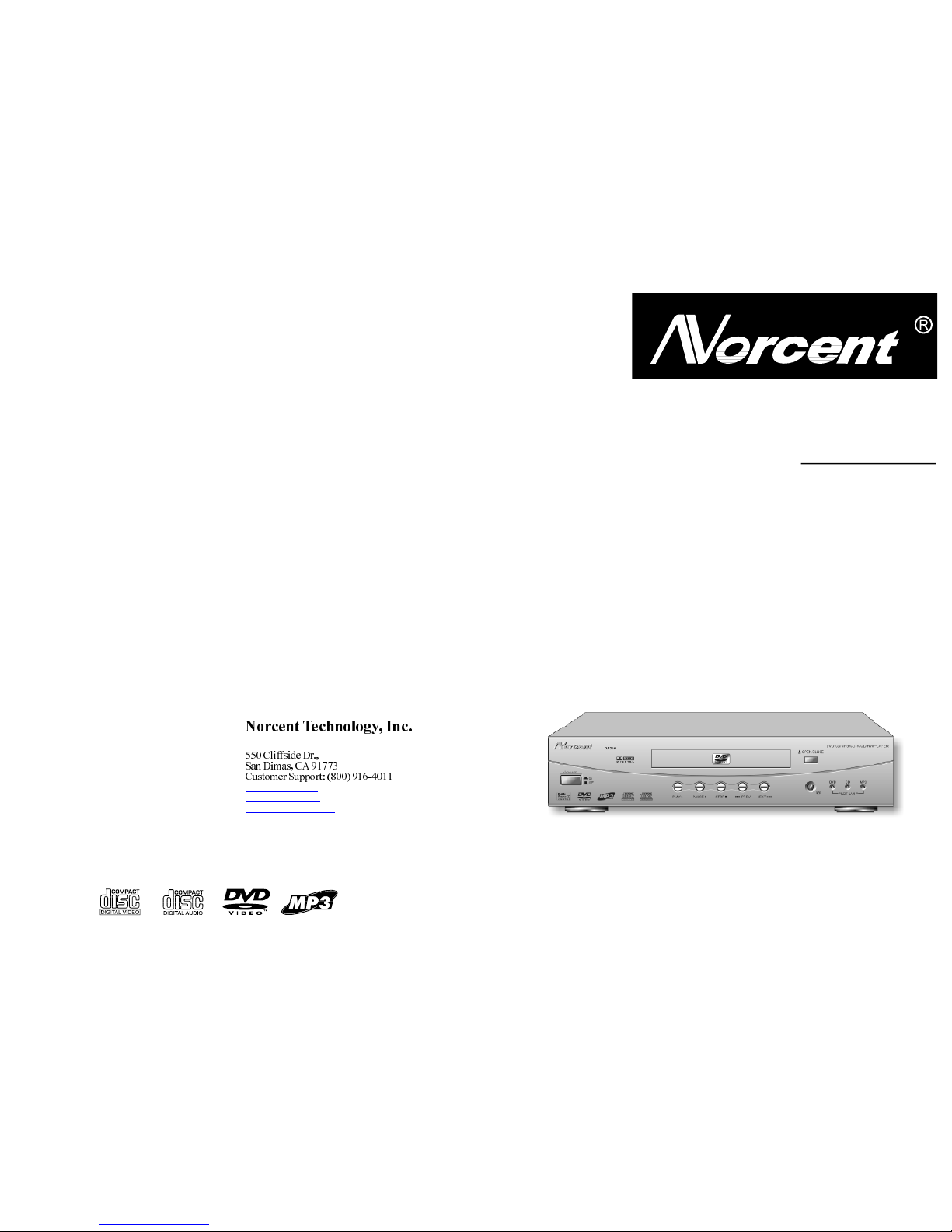
DVDPLAYERDP300
USERS
MANUAL
2002NorcentTechnology,Inc.Allrightsreserved.
PDF created with FinePrint pdfFactory trial version http://www.fineprint.com
Page 2
1
CAUTION:ThisDigitalVersatileDiscPlayeremploysalasersystem.Topreventdirectexposure
tothelaserbeam,donotopentheenclosure.Visiblelaserradiationispresentwhenenclosure
isopen.DONOTSTAREINTOBEAM.Additionally,theuseofcontrolsoradjustmentsor
performanceofproceduresotherthanthosespecifiedhereinmayresultinhazardousradiation
exposure.Toensureproperuseofthisproduct,pleasereadthisowner'smanualcarefullyand
retainforfuturereference.Shouldtheunitrequiremaintenance,contactanauthorizedservice
location,orcontactNorcentTechnology.
Content
WARNING:TOAVOIDTHEDANGEROFFIREORELECTRICSHOCK,DONOT
EXPOSETHISAPPLIANCETORAINORMOISTURE.NEVEROPENTHECABINET,
ASDANGEROUSHIGHVOLTAGESARECONTAINEDINSIDE.ONLYAQUALIFIED
SERVICETECHNICIANSHOULDATTEMPTOPENTHECABINET.
CAUTION:TOPREVENTELECTRICSHOCK,MATCHWIDEBLADEOFPLUGTO
WIDESLOT,ANDFULLYINSERTINTOELECTRICALSOCKET.
1
Thisequipmentgenerates,usesandcanradiateradiofrequencyenergyand,ifnotinstalled
andusedinaccordancewiththeinstructions,maycauseharmfulinterferencetoradio
communication.However,thisisnoguaranteethatinterferencewillnotoccurinaparticular
installation.Ifthisequipmentdoescauseharmfulinterferencetoradioortelevisionreception,
whichcanbedeterminedbyturningtheequipmentoffandon,theuserisencouragedtotryto
correcttheinterferencebyoneofthefollowingmeasures:
Reorientorrelocatethereceivingantenna
Increasetheseparation betweentheequipmentandreceiver
Connecttheequipmentintoanoutletonacircuitdifferentfromthattowhichthereceiveris
connected
Consultthedealeroranexperiencedradio/TVtechnicianforhelp
FCCCaution:AnychangesormodificationsnotexpresslyapprovedbyNorcentTechnology
couldvoidtheuser'sauthoritytooperatethisequipment.
INDUSTRYCANADAREQUIREMENT
ThisClassBdigitalapparatusmeetsallrequirementsoftheCanadianInterference-Causing
EquipmentRegulations.
PROTECTYOURSELF!
Recordthemodelandserialnumbersforthisunitwhileitiseasytoseethem.Thesenumbers
arelocatedonthebackoftheunit'scabinet.Retainthisinformationforfuturereference.
ModelNo.:DP300
SerialNo.:
CAUTION
RISKOFELECTRICSHOCKDONOTOPEN
CAUTION:TOREDUCETHERISKOFELECTRICSHOCK,DONOTREMOVECOVER(ORBACK).
THEREISNOUSERSERVICEABLEPARTINSIDE.REFERSERVICINGTOQUALIFIEDSERVICE
PERSONNEL.
Retainthisinformationforfuturereference.
TECH.
SPECIFICATIONS
Becauseitsproductsaresubjecttocontinuousimprovement,NorcentTechnologyreserves
therighttomodifyproductdesignand/orspecificationswithoutnoticeandwithoutincurring
anyobligations.
ColorSystem NTSC/PAL
Compatible Discs DVD, CD, MP3, CD-R, CD-RW
Resolution Ratio Greater Than 500 lines
Video S/N Ratio 65dB
Frequency Response fs (96KHz/24bit) 4Hz - 44KHz:+/-2dB
Audio S/N Ratio 95dB
Degree of Distortion <0.01%
D/A Converter 96KHz/24bit
Video Out
1Vp-p(75Ω)
S-Video Out
Y: 1Vp-p(75Ω); C: 0.286Vp-p(75Ω)
Audio Out 2.0V 0.2V
Digital Audio Output Coaxial
Connections CVBS Connection, S-Video, 2 Channel Output
Power Supply AC 110-240V/50/60Hz
Consumed Power 25W
PRECAUTIONS
PDF created with FinePrint pdfFactory trial version http://www.fineprint.com
Page 3

CAUTION:Isitimportantthatyoureadandfollowalloftheinstructionsinthisbookletandany
markedontheunititself.Retainthisbookletforfuturereference.
Accessories----Neverplacethisproductonanunstableplatform,stand,cart,wallmount,shelf,or
table.Theproductmayfall,causingseriouspersonalinjurytopersonsandpets,aswellasseriously
damagingtheproduct.Useonlywithastableplatform,stand,cart,wallmount,shelf,ortablethat
hasbeenrecommendedbyNorcentTechnologyorsoldwiththeproduct.Anymountingofthe
productshouldfollowthemanufacturer'sinstructions,anduseamountingaccessoryrecommended
bythemanufacturer.Thisunitwhilepositionedonsometypeofcartmustbemovedwithcare.Quick
stops,excessiveforce,andunevensurfacesmaycausetheproductandcartcombinationtooverturn.
Attachments----UseonlyattachmentsrecommendedbyNorcentTechnology,asothersmaycause
safetyand/orfirehazards.
Cleaning----Alwaysunplugthisunitfromthewallelectricaloutletbeforecleaning.Donotuseliquid
oraerosolcleaners;useadampclothforcleaning.
GroundingorPolarization-ThisproductisequippedwitheitherapolarizedACplug(aplughaving
onebladewiderthantheother)orwithathree-wiregrounding-typeplug.Theseplugsfitintothe
poweroutletonlyoneway.Thisisasafetyfeature.Ifyouareunabletoinserttheplugfullyintothe
outlet,tryreversingtheplug.Iftheplugshouldstillfailtofit,contactanelectrician.Donotdefeat
thesafetypurposeofthepolarizedpluginanywayormanner.
Lightning----Foraddedproductprotectionduringalightningstormorwhenitisleftunattendedand
unusedforlongperiodsoftime,unplugitfromthewalloutletand/ordisconnectthe antennaorcable
system.Thiswillpreventdamagetotheproductduetolightningandpower-linesurges.
ObjectandLiquid----EntryNeverpushobjectsofanykindintothisproductthroughopeningsasthey
maytouchdangerousvoltagepointsorshort-outpartsthatcouldresultinafireorelectricshock.
Neverspill
liquidofanykindonorintotheproduct.
OutdoorAntennaGrounding----Ifanoutsideantennaorcablesystemisconnectedtotheproduct,
besuretheantennaorcablesystemisgroundedsoastoprovideprotectionagainstvoltagesurges
andbuilt-upstaticcharges.Article810 oftheNationalElectricalCode,ANSI/NFPA70,provides
informationwithregardtopropergroundingofthemastandsupportingstructure,groundingofthe
lead-inwiretoanantennadischargeunit,sizeorgroundingconductors,locationofantenna-discharge
unit,connectiontogroundingelectrodes,andrequirementsforthegroundingelectrode.
Overloading----Donotoverloadwalloutlets,extensioncords,orintegralconveniencereceptacles,
asthismayresultinafireorelectricshock.
Power-CordProtection-Power-supplycordsshouldberoutedsothattheyarenotlikelyto bewalked
onorpinchedbyitemsplaceduponoragainstthem,payingparticularattentiontocordsatplugs,
conveniencereceptacles,andthepointwheretheyexitfromtheproduct.
PowerLines----Anoutsideantennasystemshouldnotbelocatedinthevicinityofoverheadpower
linesorotherelectriclightorpowercircuits,orwhereitcanfallintosuchpowerlinesorcircuits.
Wheninstallinganoutsideantennasystem,extremecareshouldbetakentokeepfromtouching
suchpowerlinesorcircuitsascontactwiththemmightbefatal.
PowerSources----Thisproductshouldbeoperatedonly fromthetypeofpowersourceindicatedon
themarkinglabel.Ifyouarenotsureofthetypeofpowersupplytoyourhome,consultyourproduct
dealerorlocalpowercompany.Forproductsintendedtooperatefrombatterypowerorother
sources,refertotheoperatinginstructions.ThisDVDplayeroperateson120VAC/60Hz.Donotturn
offunitimmediatelyafterturningon;waitatleast10seconds.
ReplacementParts----Whenreplacementpartsarerequired,besuretheservicetechnicianhasused
replacementpartsspecifiedbyNorcentTechnologyorhavethesamecharacteristicsastheoriginal
part.Unauthorizedsubstitutionsmayresultinfire,electricshock,orotherhazards.
SafetyCheck----Uponcompletionofanyserviceorrepairstothisproduct,asktheservicetechnician
toperformsafetycheckstodeterminethattheproductisinproperoperatingcondition.
Servicing----Donotattempttoservicethisproductyourselfasopeningorremovingcoversmay
exposeyoutodangerousvoltageorotherhazards.Referallservicingtoqualifiedservicepersonnel.
TVSystem----ThisunitiscompatiblewithtelevisionsetsfeaturingeithertheNTSCorPALcolor
system.
Ventilatio----nSlotsandopeningsinthecabinetareprovidedforventilationandtoensurereliable
operationandprotectionfromoverheating.Theseopeningsshouldneverbeblockedbyplacingthe
productonabed,sofa,rug,orothersimilarsurface.Thisproductshouldnotbeplacedinabuilt-in
installationsuchasabookcaseorrackunlessproperventilationisprovided.Neverplacethisproduct
nearaheatsource,suchasheatregisters,stoves,radiators,oranyotherproductthatproducesheat.
WaterandMoisture----Donotusethisproductnearsourcesofwaterandmoisture,suchas bathtub,
washbowl,kitchensink,orwashmachine;inawet,dampbasement;ornearaswimmingpoolor
similarlocations.Ifmoisturecondensationoccurs,removeanydisc,connecttheunit'spowercord
toawalloutlet,turntheuniton,andleaveitonfortwotothreehours.Bythen,theunitwillhave
warmedupandevaporatedanymoisture.
IMPORTANTSAFETY
INFORMATION
19
TROUBLE
SHOOTING
Thishandytrouble-shootingguideisprovidedtosaveyoutimeincaseyouexperienceany
inconveniencewiththisDVDplayer.Iftheproblemisnotlistedoristheprovidedsolution
doesnotcorrecttheproblempleasecallourcustomersupportdepartmentat(800)916-4011.
ProblemPossibleSolution
Nopower1.Checktoensurethatthepowerplugis
securelyinthewalloutlet.
Nosound1.ChecktheconnectionbetweentheDVD
playerandtheTVset,amplifier,orany
otherunititisconnectedto.
2.ChecktoensuretheTVandamplifierare
inthecorrectmode(video1).
Nopicture1.ChecktheconnectionbetweentheDVD
playerandtheTVsetoranyotherunitit
isconnectedto.
2.ChecktomakesureTVisturned.
Discdoesnotplay1.Checktomakesurethediscisloaded
correctlylabelsidefacingupondisctray).
2.Checkthatdisciscleanfromdirt,dust,
fingerprints,smudges.
3.Checktoensuredisciswithintheguides
onthetray.
4.Checkparentallockfunctionison.
5.Makesurediscisforuseinregion1.
Remotedoesnotwork1.Checkbatteries;possiblyreplace.
2.Checktoensurethereisn'tanyobstacles
betweentheremotesensorontheunit's
frontpanelandtheremotecontrol.
3.Besuretheremoteisaimedattheremote
sensor.
DividedpictureCheckthatdisciscleanandhasnoscratches.
2.Theunitiscontrolledbyamicrocomputer,
whichmayneedtobereset.Turnoffthe
unit'spower,waitseveralseconds,then
turnbackon.
Nocolorpicture1.ChecktoseeiftheSconnectorisdamaged
(bentpin).
MP3discsdon'tplay1.Useanothersoftwareeditiontoreburndisc,
astheeditionusedmaynotbecompatible
withtheplayer.
2.UseneweditionsofsoftwaresuchasAudio
station4,EasyCDCreator ToastTitanium,
etc.
3.MakesureMP3fileisnotencodedwith
avariablebitrate,suchasprovidedbyReal
Networks.
PDF created with FinePrint pdfFactory trial version http://www.fineprint.com
Page 4

3
Precaution.....................................................................1
SafetyInformation.........................................................2
TableofContents...........................................................3
AboutYourDVDPlayer..................................................4
BestLocation
ToObtainaClearPicture
PlayableDiscs
DigitalAudioOutput
Laser-HeadOver-CurrentProtectionSystem
DiscUse..........................................................................5
Handling
Cleaning
Storing
Controls.........................................................................6
FrontPanel
BackPanel
RemoteControl..............................................................7
Setup.............................................................................8
Accessories
InstallingBatteriesinRemoteControl
SystemConnection
SystemSetup.................................................................9
DVDMenuSetup
TVDisplay
TVType
VideoOutput
AngleMark
OSDLang.
Captions
SpeakerSetup................................................................10
DownmixMode
AudioSetup....................................................................11
AudioOut
OPMode
L+R
Dynamic
LPCMOutPreferenceSetup............................................12
AudioLanguage
Subtitle
DiscMenu
Locale
ParentalLock
Password
Defaults
SmartNavigation
PlayingaDisc................................................................13
PlayFunctions...............................................................14
FastForward/ReversePlayback
SlowMotion
Frame-by-FramePlayback
PauseDuringPlayback
StopPlayback
ResumePlaybackatLaterTime
RemovingDisc
LocatingaTitle..............................................................15
FindingaTitle
RepeatPlay
ZoomFunction
CameraAngle
LanguageSelection
SubtitlesSelection
ScreenDisplay
Volume/Mute
Mp3.................................................................................16
JPEG..............................................................................17
TroubleShooting............................................................18
Specifications.................................................................19
Warranty........................................................................20
TABLEOF
CONTENTS
Page
JPEGFILES
Jointphotographicexpertsgroup(JPEG)producesstandardsforcontinuoustoneimage
coding.Itisawidelyusedformatforcompressingandsavingimages.Ituseshighefficiencycompressiondatatocompressimagesupto15xto20x.JPEGissupportedby
mostoftheimageprocessingsoftwareinusetoday,andissuitableforstoringphoto
images.ThisNorcentDVDplayercandecodeJPEGformattedpictureCDs.
PlaybyNumberKeys
1.FollowthebasicoperatinginstructionstoinsertthepictureCDdisc.Oncethedisctray
isclosed,,themachinewillautomaticallysearchfortheinformationon thediscand
showitontheTVscreen.
2.Pressthenumberkeystoselectanimagealbum.Note:Thenumberkeysareonly
functionalwithinthecurrentimagealbum.
PlaybyMenu
1.FollowthebasicoperatinginstructionstoinsertthepictureCDdisc.Oncethedisctray
isclosed,,themachinewillautomaticallysearchfortheinformationonthediscand
displaythemainmenuontheTVscreen.
2.PressthedirectionalscrollkeystoselectimagesandpressthePLAYkey.
3.Toselectotherimages,pressSTOPkey,thenpressdirectionalscrollkeys.Onceimage
isselected,pressthePLAYkey.
OtherJPEGFunctions
1.WhileplayingaJPEGfile,functionssuchaspause,randomplay,repeatplayandothers
arestillavailable.
2.PresstheRESUMEkeywhenplayingJPEGfilestoselectvariousimagedisplaymodes.
3.PressthePREVorNEXTkeyswhenplayingJPEGfilestoselecteitherthepreviousor
nextimage.
4.ThezoomfunctionisoperablewhileshowingJPEGimages.PresstheZOOMkeytouse
thezoomfunction,pressagaintocloseit.
5.PressFASTFORWARDorFASTRETURNkeyswheninzoomfunctiontozoominorout.
6.Pressthedirectionalscrollkeyswheninzoomfunctiontorotateanimage.
PDF created with FinePrint pdfFactory trial version http://www.fineprint.com
Page 5

4
ABOUTYOUR
DVDPLAYER
ThefollowingwillhelpyougetthemostenjoymentfromyourNorcentDVDplayer.
BESTLOCATION
Theunitshouldbeplacedonafirm,flatsurface,awayfromVCRs,stereos,radios,or
largespeakers,asthemagneticfluxfromthesedevicesmaycausedistortioninthe
soundandapoorpicture.Ifplacedinacabinet,besurethereisatleast1offreespace
completelyaroundtheunitforproperventilation.
TOOBTAINACLEARPICTURE
ADVDplayerisaprecisiondevice.Iftheopticalpick-uplensanddiscdrivepartsbecome
dirtyorworndown,picturequalitywillbecomepoor.Toobtainaclearpicture,regular
inspectionandmaintenancearerecommendedevery1,000hoursofuse,dependingon
theoperatingenvironment.Contactdealerfordetails.
PLAYABLEDISCS
ThisNorcentDVDplayerwillplaythefollowingtypesofdiscs:DVD,MP3,CD,CD-R,and
CD-RWwithsuper-errorcorrectionability.ItisalsocapableofdisplayingpictureCDs
anddigitalphotoalbums.Itsupportseightlanguages,upto32subtitles,andmulti-angle
viewing.Itfeatureseasysetupandoperationwithon-screenmenus.Ithasfullfunction
CPUupgradeablecapability.
DIGITALAUDIOOUTPUT
Theunit'scoaxialoutputcapabilityenablesyoutoconnectanexternalsix-channelAV
amplifierandprocessorwithbuilt-inDolbyDigitalcodesandMPEGmodulatingcapacity
withjustonecord.ThisenablesyoutoconvenientlyenjoydifferentDVD,CD,andMP3
discs.
LASER-HEADOVER-CURRENTPROTECTIONSYSTEM
Toextendtheservicelifeofthelaserhead,theunitincludesauniquelaser-headovercurrentprotectionsystem,ensuringaconstantlasercurrent.
17
MP3isanaudiocompressiontechnologythatusesMPEG3standards,compressingatarate
of12:1.HavingCD-qualityaudio,anMP3disccanrecordover600minutesofmusic.
PlayinganMP3Disc
1.FollowthebasicoperatinginstructionstoinserttheMP3disc.Oncethedisctrayisclosed,
themachinewillautomaticallysearchfortheinformationonthediscandshowitonthe
unit'sdisplaypanel.
2.Pressthedirectionalscrollkeytoselectthesubmenutobeplayed,thenpressthedirection
scrollkeytoselectthedesiredtrack.PressthePLAYkey.Or,presstheappropriatenumber
keystoselect adesiredtrack.
3.Toselectanothersubmenu,presstheSTOPkeythenthedirectionalscrollkey.
RepeatPlay
Withrepeatplay,thesamesongorallofthesongsanMP3disccanbeplayedoverandover.
1.Choosethedesiredsongtoberepeated.
2.PresstheREPEATkey.REPEATONEwillappearontheTVscreen.
3.Ifallsongsaretoberepeated,presstheREPEATkeyasecondtime.REPEATALLwill
appearontheTVscreen.PressPLAY.
4.Toexittherepeatfunction,presstheREPEATkeyathirdtime.EXITREPEATwillappearon
theTVscreen.
Note:Themute,volumecontrol,pause,andforward/backwardsearcharestilloperableasan
MP3discplays.
MP3FUNCTION
PDF created with FinePrint pdfFactory trial version http://www.fineprint.com
Page 6

5
USEOFDISCS
Thispagecontainsvaluableinformationregardingthehandling,cleaning,andstorageofdiscs
playedinthisunit.
HANDLIN
Handling
Donottouchtheplaybacksideofthedisc.
Donotattachpaperortapetodiscs.
Donotstickorwriteanythingonthesurface.Protectagainstfingerprints.
Alwaysholdadiscbythecenterandedgeportions.
CleaningDISCS
Fingerprintsanddirtonthediscmaycausepictureand/orsounddeterioration.Wipethedisc
fromthecenteroutwardwithasoftcloth.Alwayskeepthediscclean.
Ifyoucannotwipethedirtoff,lightlyuseaslightlymoistenedsoftclothandfinishwithadry
cloth.
Donotuseanytypeofsolventsuchas:Paintthinner,benzene,commerciallyavailable
cleanersoranti-staticsprayforvinylLPs.
Storing
Donotstorediscsinplacessubjecttodirectsunlightornearheatsources.
Donotstorediscsinplacessubjecttomoistureanddust.
Storediscsverticallyinacase.Stackingorplacingobjectsondiscsoutsideoftheircasemay
causewarping.
NOTE:NorcentTechnologyisnotresponsiblefordamagethatmayoccurtoanydiscthatis
operatedinthisunitornothandled,cleaned,orstoredassuggestedabove.
CAMERAANGLE
Theabilitytochangethecameraangleallowsviewertoplaydirectorandwatchamovie
fromdifferentperspectives.
1.PresstheANGLEkeyontheremotecontrol.Witheachpress,thecameraanglechanges.
2.Thekeymaybepressedonlywhentheflashingangleiconappearsintheunit'sdisplay
panel.
Note:Cameraanglemaybechangedonlyindiscswithmulti-anglecapabilityencodedinto
them.
LANGUAGESELECTION
Theunithasthecapabilitytoshowmoviesinoneofeightlanguages.
1.PresstheLANGUAGEkey.Thelanguagemenuwillappear.Scrolltothedesiredlanguage,
thenpresstheLANGUAGEkeyagain.
Note:Thediscbeingplayedmustbemulti-languageencoded.
SUBTITLESSELECTION
Theunithasthecapabilitytodisplaysubtitlesinanyof32differentlanguages.
1.PresstheSUBTITLEkey.Thesubtitlemenuwillappear.Scrolltothedesiredlanguage,
thenpresstheSUBTITLEkeyagain.
2.Toremovethesubtitlesfromview,presstheSUBTITLEkeyuntiltheydisappear.
Note:Thediscbeingplayedmustbemulti-subtitleencoded.
SCREENDISPLAY
Whileadiscisplaying,thestatusofvariousfunctionsmaybechecked,suchasthetile,
tracknumber,andseveraltimecategories.
1.PresstheDISPLAYkeyonceandthetitleappearsalongwiththechapterandhowmuch
timehasplayedineachofthe.
2.PresstheDISPLAYkeyagainandtheremainingtimeforthatparticulartitleappears.
3.PresstheDISPLAYkeyagainandthetotalelapsedtimeforthatparticulartitleappears.
4.PresstheDISPLAYkeyagainandthetotalremainingtimeforthatparticulartitleappears.
5.PresstheDISPLAYkeyagainandthedisplayturnsoff.
VOLUME/MUTE
ThevolumeonthisNorcentDVDplayeriseasilycontrolledwiththeremotecontrolby
pressingeithertheVOL+keytoraisethevolumeortheVOL-keytolowerit.Bypressingthe
MUTEkey,noaudiowillbeheard.Toreinstatetheaudio,presstheMUTEkeyagain.
PDF created with FinePrint pdfFactory trial version http://www.fineprint.com
Page 7
6
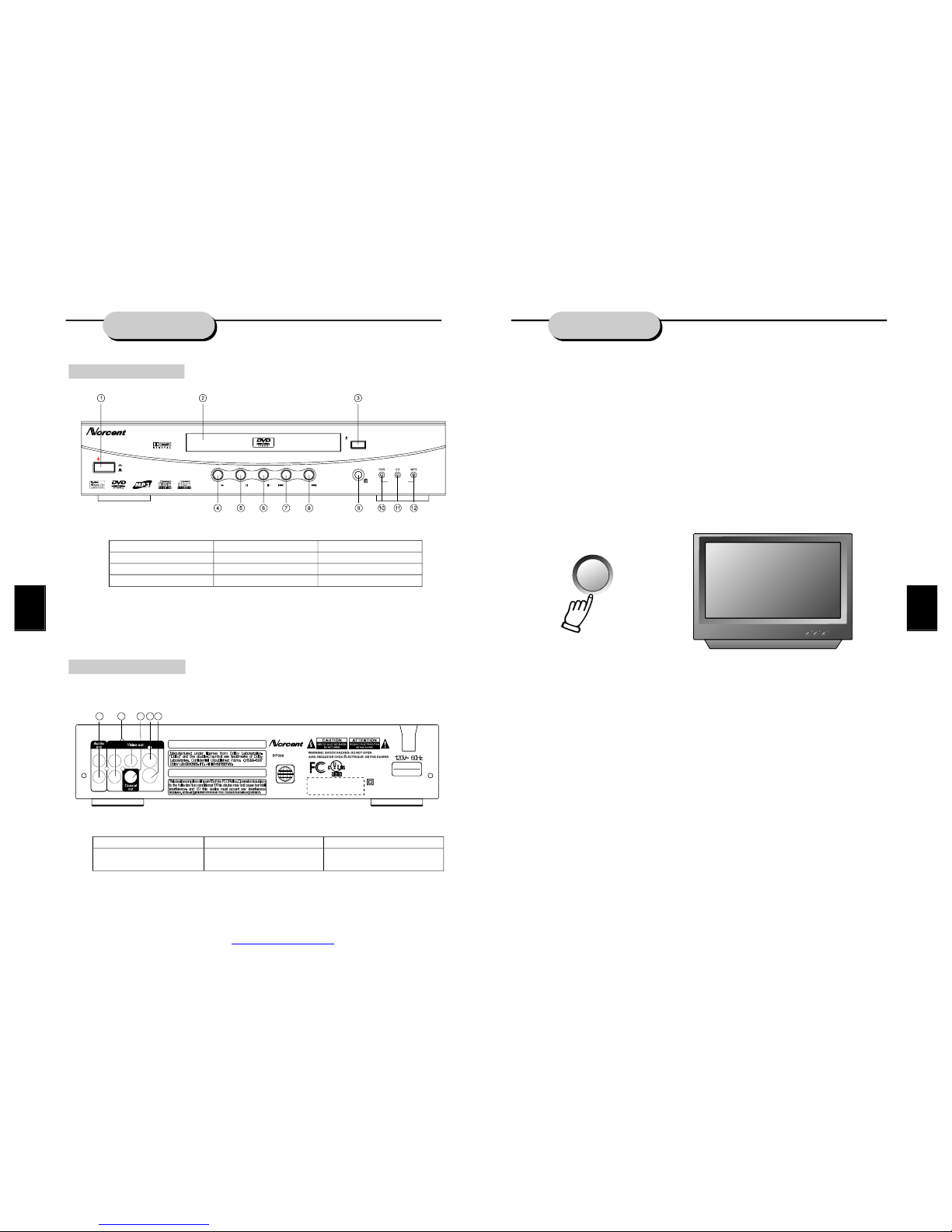
Frontpanelfunction:
Backpanelfunction:
controls
Audio/VideoApparatus
E
221338
58WJ
CLASS1LASER
PRODUCTTOIEC825
LASERKLASSE1
NACHIEC825
DOUBLEINSULATIONWHENSERVICINGUSEONLY
IDENTICALREPLACEMENTPARTS.
HongPuInternationalDevelopment(Shanghai)Co.,Ltd.
Plant25,No.30FuTeDongSanRD
WaiGaoQiaoFreeTradeZonePuDongShanghai.P.R.C.
THISPRODUCTCOMPLIESWITHFDARADIATIONPERFORMANCE
STANDARDS21CFRSUBCHAPTERJ.
C
ApparatusClaimsofU.S.PatentNos.4,631,603.4,577,216.4,819,098
and4,907,093licensedforlimitedviewingusesonly.
1
UsedbyNorth
Americaonly!
ModelNo.:
MADEINCHINA
OPEN/CLOSE
DVD/CD/MP3/CD-R/CD-RWPLAYER
POWER
ON
OFF
DP300
PLAY STOPPAUSE PREV NEXT
PILOTLAMP
RLCr
Cb Y
Video
S-Video
13
14 151617
1.POWER 5.PAUSE 9.SENSOR
2.CABIN DOOR 6. STOP 10. DVDPILOTLAMP
3.OPEN/CLOSE 7. PREV 11.CDPILOTLAMP
4.PLAY 8.NEXT 12.MP3PILOTLAMP
13. AUDIOOUTPUTJACK 15.COAXIALOUTPUTJACK 17. S-VIDEOOUTPUT JACK
14. COMPONENTVIDEO
OUTPUTJACK
16. VIDEO OUTPUTJACK
15
LOCATINGATITLE
DVDdiscsarenormallydividedintotitles,whicharethensub-dividedintochapters.Aspecific
titlecanbeeasilyfoundwiththisunit.
FINDINGATITLE
WiththisNorcentDVDplayer,specifictitlescanbefoundusingeitherthetitlemenufunction,
iftheDVDdisccontainsatitlemenu,orthroughitsuniquetitlenumber.
TitleMenuFunction
1.PresstheTITLE/RETURNkey.ThetitlemenuwillappearontheTVscreen.
2.Presstheappropriatescrollkeytoselectthedesiredtitle.Atitlemayalsobelocatedby
pressingitsassignednumberwiththenumberbuttons.
3.PresstheTITLE/RETURNkeyagain.Thiswillstartplaybackfromchapter1oftheselected
title.
Somediscsdonotrespondtothisfunction.
IfdifferentinstructionsappearontheTVscreen,followthoseinstructions.Theinstructions
givenheredescribethebasicprocedure.Proceduresmayvarydependingonthecontentof
theDVDdisc.
TitleNumber
1.Presstheappropriatenumbersinthenumbersectionoftheremotecontrol.Forexample,
fortitle15,pressthe10andthe5keys;fortitle25,pressthe10,10,5keys.
REPEATPLAY
ThisDVDplayerallowsrepeatedplaybackofspecifictitles,chapters/tracks,orsegment.It
evenallowsswitchingbetweentwoitemsthatarebeingrepeated.
1.Selecttheitemtorepeat.
2.PresstheREPEATkey.
TherepeatmodechangeseachtimetheREPEATkeyispressed(i.e.,fromtitlerepeatto
chapterrepeat,etc.)
ZOOMFUNCTION
Apicturemaybeenlargeduptofourtimesduringeitherplaybackorslowmotionthroughthe
unit'szoomfunction.PresstheZOOMkeyonceanditenlargestheimage1.5x;pressasecond
timeandtheimageenlarges2x;whileathirdpressingenlargestheimage4x.Toreturnto
normal-sizeplayback,presstheZOOMkeyafourthtime.Enlargementtakesplaceinthecenter
ofthepicture.
PBC
DISK
TOTALTITLES:12
PLAYENTRIES:21
PLAYTIME:01:16:35
AUDIOSTREAMS:08
SUBPICSTREAMS:08
MPG2.NTSC4:3/16:9LB/PS
AC3-2AC3-5.1
PDF created with FinePrint pdfFactory trial version http://www.fineprint.com
Page 8
7
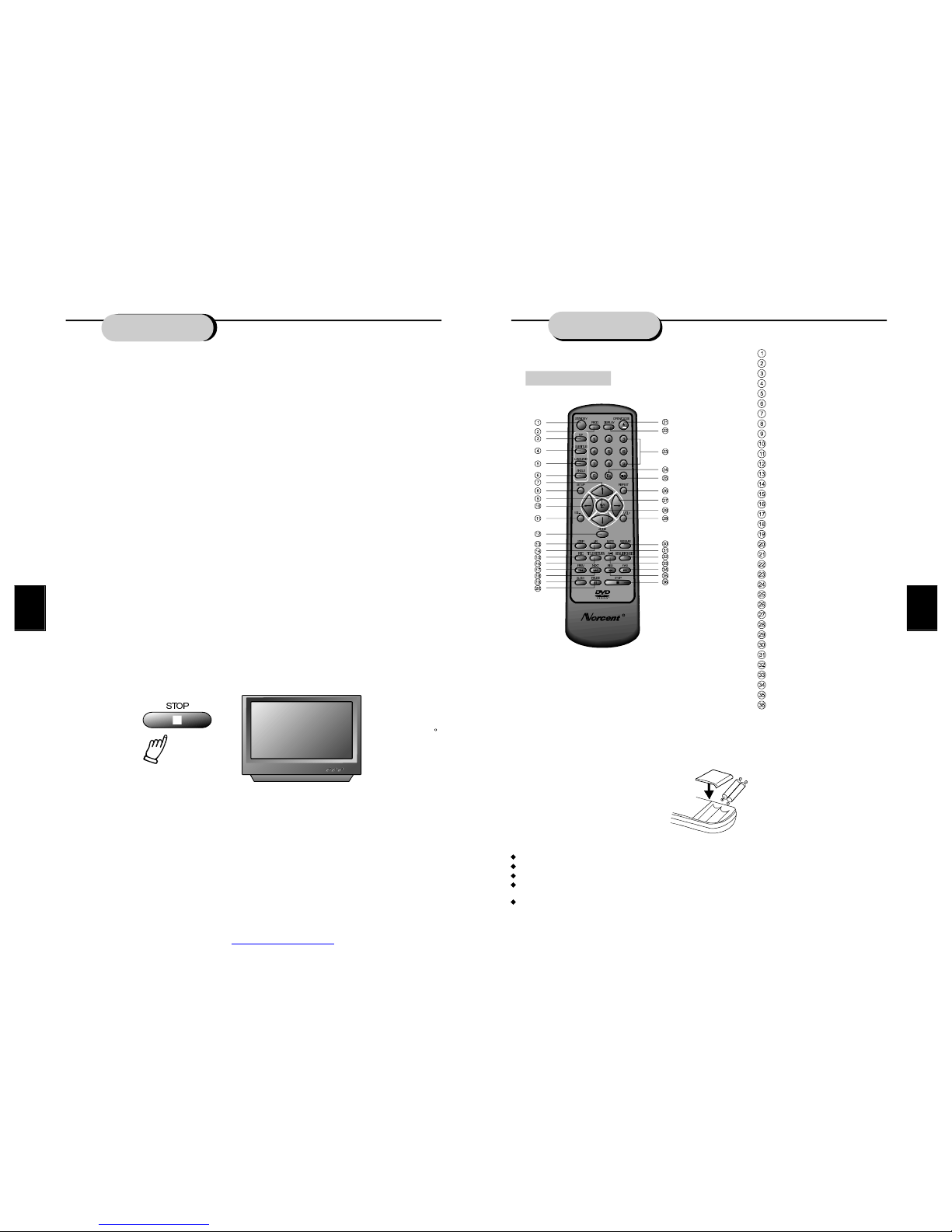
Descriptionof
UsingtheRemoteControl
Pointtheremotecontrolattheremotesensorinorderfortheplayertofunctioncorrectly.The
remotewillfunctiontoapproximately21'fromtheremotesensoratanangleofapproximately
30eachdirection.
Note:Directingtheremotesensortowardanylightsource,suchasdirectsunlight,maycause
theunittomalfunction.Donotspillwaterorputwetitemsontheremotecontrol.Never
disassembleremotecontrol.
RemoteControl
STANDBY
PROGRAM
PLAYMODE
SUBTITLE
LANGUAGE
ANGLE
L/RCHANNEL
TITLE/RETURN
SETUP
UP
LEFT
VOLUME-
PBC
PREVIOUS
NEXT
ZOOM
STEP
PLAY
REPEAT
FASTRETURN
FASTFORWARD
PAUSE
DOWN
SLOW
OPEN/CLOSE
DISPLAY
0-9NUMBERKEY
10+KEY
TIME
RESUME
MENU/BROWSE
A-BREPEAT
RIGHT
STOP
VOLUME+
MUTE
BATTERIES
INCORRECTUSEOFBATTERIESMAYCAUSETHEMTOLEAK,CORRODEOREXPLODE.
Besuretoplacethebatteriesinthecorrectdirection.
Itisdangeroustocharge/heat/openorshort-circuitthebatteries.
Donotleavedeadorexpiredbatteriesormixold/newbatteries.
Whennotusingtheremotecontrolforalongdurationoftime,removethebatteries.When
operatingrangebecomesreduced,replaceallbatterieswithnew,freshones.
Ifleakagefromthebatteryoccurs,wipethebatteryliquidfromthebatterycompartment,then
replace.
PLAY
FUNCTIONS
FASTFORWARD/REVERSEPLAYBACK
Theunitfeaturesbothfastforwardandfastreverseplayback.Eithermodewillspeedup:DVD
discplaying2x,4x,8x,or20xnormalplayspeed;MP3discplaying2x,4x,6x,8xnormal
playspeed;andotherdiscplaying1x,2x,3x,or4xnormalplayspeed.
Toactivateeitherfunction,simplypresstheFWDkeyorREVkeyontheremotecontrol.The
speedchangeseachtimethekeyispressed.Toresumenormalplayback,pressthePLAYkey.
SLOWMOTION
ThisNorcentDVDplayeralsohastheabilitytoplaydiscsinslowmotionineitherforwardor
reversedirection.Eachtimethe SLOWkeyispressed,thespeedwillslowfrom1/2,to1/4,to
1/8normalspeed.Toresumenormalplayback,pressthePLAYkey.
FRAME-BY-FRAMEPLAYBACK
Frame-by-frameadvanceallowsviewertostudyamovievirtuallyoneframeatatime.
1.PresstheSTEPkey.Theactionfreezesonscreen,whiletheaudioismuted.
2.EachtimetheSTEPkeyispressed,thepictureadvancesoneframe.
3.Tocancelframe-by-frameplayback,pressthePLAYkeyandthemoviereturnstonormal
speedwithaudio.
PAUSEDURINGPLAYBACK
Tomomentarilystopplaybackatanytime,pressthePAUSEkey.PressPAUSEagainto
resume normalplayback.
STOPPLAYBACK
Tostopplaybackanytimebeforethecompletionofamovie,presstheSTOPkey.Pressthe
PLAYkeytoplaythediscagainfromthebeginning.
RESUMEPLAYBACKATLATERTIME
Thisunitallowstheviewertostopplayback,thenlatercontinueplaybackfromthatexactdisc
location.PresstheSTOPkeytohaltplayback.Theunitthenwillmemorizethelocationwhere
playbackwasstopped.Toresumewatching,pressthePLAYkeyandtheunitwillresume
playbackfromtheexactlocationwhereplaybackwasstopped.
Warning:ThefollowingactionswillcanceltheRESUMEfunction:
UnpluggingtheDVDplayerafterplaybackisstopped.
Ejectingthedisc.
Adjusting/changingtheparentallockorselectingadifferentlanguagesetting.
Note:ThisfeatureisnotavailableinMP3andCDmodes.
REMOVINGDISC
Toremoveadiscforanyreason,presstheOPEN/CLOSEkey,waituntilthedisctrayis
completelyopen,thenremovethedisc.Oncethediscisremoved,presstheOPEN/CLOSE
buttontoclosethedisctray.
STOP
PDF created with FinePrint pdfFactory trial version http://www.fineprint.com
Page 9
SETUP
Accessories
Checktomakesurethefollowingaccessoriesareincludedintheunitcarton.
Remotecontrol
A/Vcable
User'smanual
Warrantycard
Remotecontrolbatteries
Quickinstallationguide
Ifanyitemisdamagedormissing,pleaseinformyourdealerimmediately.
InstallingBatteriesinRemoteControl
InsertthetwoAAAbatteriesintothebatterycompartmentoftheremotecontrol,makingsure
the+and-signsonthebatteriesandinsidethebatterycompartmentmatchup.
(Seepreviouspage.)
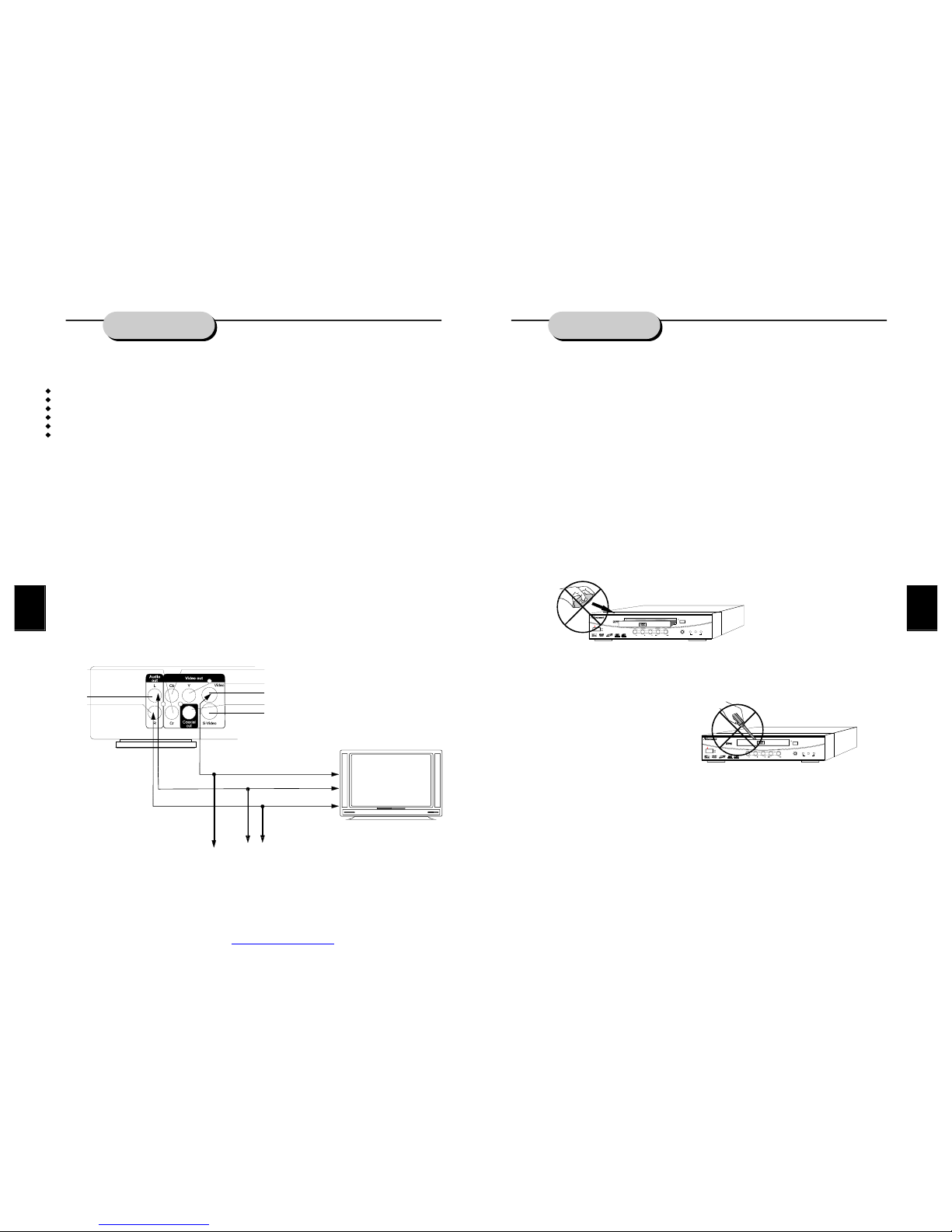
SystemConnection
Makesuretheunit'spoweristurnedoffpriortoconnectingtheunittoany othercomponent.
Audio/videocablesarecolorcodedforeasyinstallation.Besureconnectionsarefittedfirmly.
Yellow=videoterminals
White=audioterminals
Red=audioterminals
Shownbelowisaschematicforconnectingcomponents.
YELLOW
BLACK
WHITE
RED
BLUE
GREEN
RED
ORANGE
RED
WHITE
YELLOW
TVVideoinput
TVAudioinput
13
PLAYINGADISC
Oncetheunitisconnectedtoatelevisionsetandanyotheraccessoryequipment,youare
readytoenjoytheexcitementofDVDvideosoryourfavoriteCDsandMP3files.
ToplayaDVDvideodisc:
TurnontheTVandselecttheA/Vmode.IfthesetfeaturesaS-Videoconnection,besurethe
S-VideomodeisselectedfromtheTVmenu.Turnonamplifier,ifconnected.SelectAC-3or
DVDmode.
Toplayanaudiodisc:
TurnontheaudiosystemandchoosetheinputsourcethatisconnectedtotheDVDplayer.
SettheAUDIOOUTPUTtoDIGITALOUTPUTOFFfromtheSETUPMENUdisplayifyoudon't
havetheproperequipmentforDolbyDigitalorDTSsurroundsound.
1.PressthePOWERkeyonfrontpanel.DISCLOADINGappearsonscreen.
2.PresstheOPEN/CLOSEkey.Thedisctraywillopen.
3.Placethedisconthedisctray.Besureplaysideisfacedownonthetray.
4.PressOPEN/CLOSEkeytoclosetray.Thedisctraywillclose.Thedisctypewillappearin
theupper-left-handcornerofthescreen.
Onceithasreadthedisc,theunitautomaticallywillbeginplayback.WhenplayingaDVD,the
DVDortitlemenuwillappear.CDtracksareplayedinsequence.
Itispossibletodamageadiscifitisnotplacedcorrectlyontheguidesinthedisctray.This
mayalsocausetheDVDplayertomalfunction.Donotforceorplaceanythingotherthana5
inchDVDorCDontothedisctray.
(EXCLAMATIONPOINTINTRIANGLEGRAPHIC)
NevermovingtheDVDplayerduringplayback,asthismaycausedamagetothediscaswell
astheplayer.Toopenandclosethedisctray,onlyusetheOPEN/CLOSEkeyfoundonboth
theremotecontrolandortheunit'sfrontpanel.
OPEN/CLOSE
DVD/CD/MP3/CD-R/CD-RWPLAYER
POWER
ON
OFF
DP300
PLAY STOPPAUSE PREV NEXT
DVD MP3CD
PILOTLAMP
OPEN/CLOSE
DVD/CD/MP3/CD-R/CD-RWPLAYER
POWER
ON
OFF
DP300
PLAY STOPPAUSE PREV NEXT
DVD MP3CD
PILOTLAMP
PDF created with FinePrint pdfFactory trial version http://www.fineprint.com
Page 10
9
SYSTEMSETUP
DVDMenuSetup
BypressingtheSETUPkeyontheremotecontrol,themainsetupmenuappears.Youwillbe
askedtoenterthePersonalIdentificationNumber(PIN),whichis0000
1.Afteraccessingthesetupmenu,pressthescrollkeyforupordownmovementtoselecta
desireditem.Onceanitemisselected,pressthePLAYkeytoconfirmyourentryandto
movetothesub-entry.
2.Usetheleftorrightscrollkeytomovethepointerandtheupordownscrollkeytoselect
thedesiredoption.Onceanitemisselected,pressthePLAYkeytoconfirmyourselection.
Thiscompletesthesetupoftheselectedfunction.
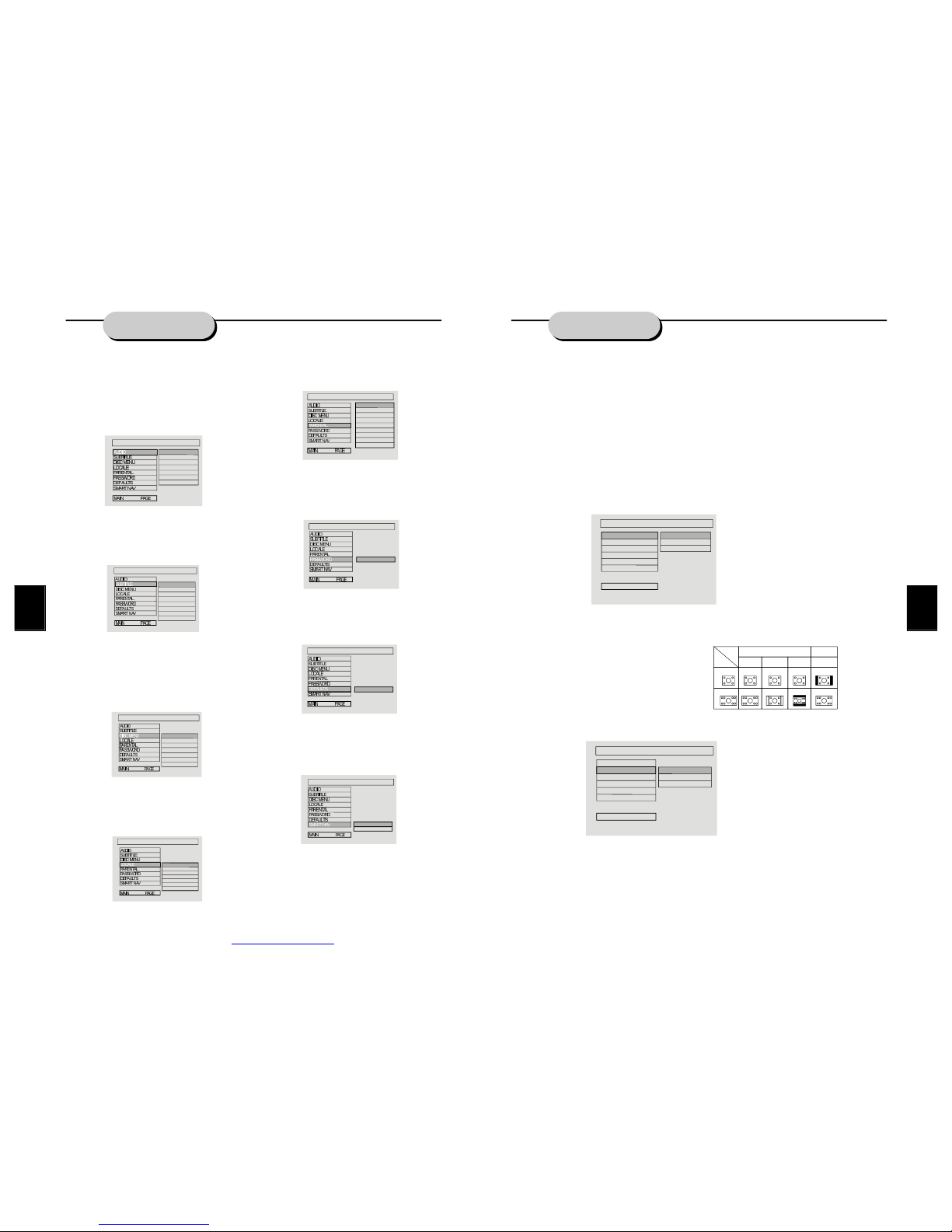
GENERALSETUP
ThisoptionisusedtosetuptheTV-screenformat,videofunctions,andDVDfunctionswith
optionsofTVdisplay,TVtype,videooutput,anglemark,OSDlang.,andcaptions.
TVDisplay
FollowtheinstructionsaboveinDVDMenuSetupincombinationwiththedesiredoptionfrom
graphicbelow.
Note:Regardlessofwhatscreenformatischosen,ifthescreendisplaysin4:3format,the
picturecanonlybeshowninthatformat.WithDVDs,thescreenformatisconvertible.Ifthe
screendisplaysonlyin4:3format,whenaDVDwith16:9displayformatisused,thepicture
willbeflattened.
TVType
FollowtheinstructionsaboveinDVDMenuSetupincombinationwiththedesiredoption
fromgraphicbelow.
ThisNorcentDVDplayersupportsoutputofvarioussystems,includingauto,NTSC,and
PAL.IftheTVsethasonlyNTSCorPALsystems,thepicturewillblinkandbecomecolorless
whenthewrongsystemisselected.Ifthisoccurs,presstheN/Pkeyontheremotecontrolto
returntothenormalscreen.Remembertoalwaysselectthecorrectsystem.
Formoreinformationonoutputformat,refertotheTVset'smanufacturer'sinstructions.
TVSYSTEM
TVDISPLAY
VIDEOOUTPUT
ANGLEMARK
OSDLANG
CAPTIONS
TVTYPE
MAINPAGE
MULTI
NTSC
PAL
GENERAL
TV
screen
Film
format
Normal
4:3
4:3
16:9
16:9
Fullview Mailbox Widescreen
TVDISPLAY
TVDISPLAY
TVTYPE
VIDEOOUTPUT
ANGLEMARK
OSDLANG
CAPTIONS
MAINPAGE
NORMAL/PS
NORMAL/LB
WIDESCREEN16:9
GENERAL
SystemSetup
WhiletheDVDplayerisinthestopmodepress
theSETUPkeytoaccesstheinitialsetupmenu,
whichincludesaudio,subtitle,discmenulocale,
parentalcontrol,password,defaults,smart
navigation,andthemainmenu.Thesepreset
valuesareessentialtoaDVDplayer.Theseitems
maybechangedasdesired.
AudioLanguage
FollowtheinstructionsinDVDMenuSetupin
combinationwiththedesiredoptionfromgraphic
below.
ThisNorcentDVDplayerasEnglish,French,
Spanish,Chinese,andJapaneseasitsbuilt-in
disc-dubbinglanguageoptions
Subtitle
FollowtheinstructionsinDVDMenuSetupin
combinationwiththedesiredoptionfromgraphic
below.
ThisNorcentDVDplayerasEnglish,French,
Spanish,Chinese,andJapaneseasitsbuilt-in
subtitlelanguages.WhenaDVDdiscisplayed,
thesubtitlefeaturemaybeselectedthroughthis
menu.Itisalsopossibletohidethefeature
throughthismenu.
DiscMenu
FollowtheinstructionsinDVDMenuSetupin
combinationwiththedesiredoptionfromgraphic
below.
ThisNorcentDVDplayerasEnglish,French,
Spanish,Chinese,Japanese,andoffasitsbuilt-in
film'smenulanguageoptions.
Locale
FollowtheinstructionsinDVDMenuSetupin
combinationwiththedesiredoptionfromgraphic
below.
Sincedifferentcountrieshavedifferentlanguage
choices,thisDVDunitoffersspecificlocale
choices.
ParentalLock
FollowtheinstructionsinDVDMenuSetupin
combinationwiththedesiredoptionfromgraphic
below.
Byselectingaspecificrating,filmsinthatgroup
andaboveareblockedfrombeingshown.
Password
FollowtheinstructionsinDVDMenuSetupin
combinationwiththedesiredoptionfromgraphic
below.
Thedefaultpasswordforthisfeatureis0000.It
maybechangedthroughthisoption.
Defaults
FollowtheinstructionsinDVDMenuSetupin
combinationwiththedesiredoptionfromgraphic
below.
Thefactorypresetdefaultsmayberesumed
throughthisoption.
SmartNavigation
FollowtheinstructionsinDVDMenuSetupin
combinationwiththedesiredoptionfromgraphic
below.
SelectNOMENUifplayinganMP3orpictureCD
withoutamenu;orselectMENUifplayingan
Mp3orpictureCDwithamenu.
ENGLISH
FRENCH
SPANISH
CHINESE
JAPANESE
GERMAN
ITALIAN
PREFERENCESSETUP
DUBBINGLANGUAGE
ENGLISH
FRENCH
SPANISH
CHINESE
JAPANESE
GERMAN
ITALIAN
OFF
SUBTITLE
PREFERENCESSETUP
DISCMENULANGUAGE
PREFERENCESSETUP
ENGLISH
FRENCH
SPANISH
CHINESE
JAPANESE
GERMAN
ITALIAN
CHINA
FRANCE
HONGKONG
JAPAN
TAIWAN
GBR
USA
REGIONCODE
PREFERENCESSETUP
1G
2
3PG
4PG13
5
6PG-R
7NC-17
8ADULT
NO-PARENTAL
FILMCLASS
PREFERENCESSETUP
CHANGE
PINEDITION
PREFERENCESSETUP
RESET
DEFAULTENTRY
PREFERENCESSETUP
NOMENU
WITHMENU
SMARTNAV
PREFERENCESSETUP
continued
PDF created with FinePrint pdfFactory trial version http://www.fineprint.com
Page 11
FollowtheinstructionsaboveinDVDMenuSetupincombinationwiththedesiredoptionfrom
graphicbelow.
SystemSetup
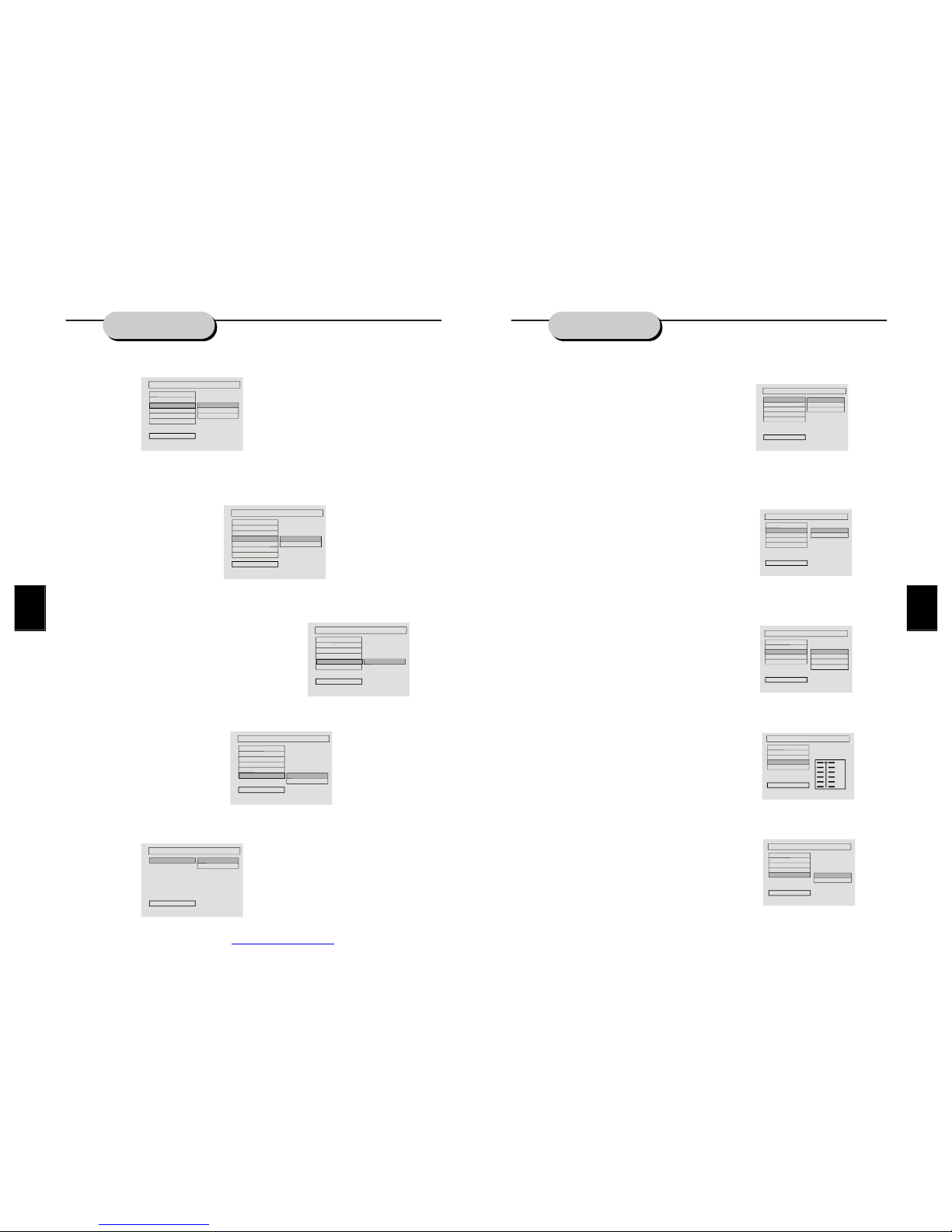
Therearethreevideooutputchoices:UsetheCVBSoutputiftheS-Videooutputjackhasbeen
selected;usetheRGBoutputiftheRGBoutputjackhasbeenselected;orusetheYUVoutput
isthecomponentoutputjackhasbeenselected.
AngleMark
FollowtheinstructionsaboveinDVDMenuSetupincombinationwiththedesiredoption
fromgraphicbelow.
WhenaDVDwithmultipleanglesisplayed,aparticularcameraanglemaybeselectedbythe
viewer.
OSDLang.
FollowtheinstructionsaboveinDVDMenuSetupincombinationwiththedesiredoption
fromgraphicbelow.
Thisisusedtosetthelanguageofthesetupmenuandscreendisplay.
Captions
FollowtheinstructionsaboveinDVDMenuSetupincombinationwiththedesiredoption
fromgraphicbelow.
SPEAKERSETUP
Thissubmenuoptionincludesdownmixmodeandmain.
DownmixMode
FollowtheinstructionsaboveinDVDMenuSetupincombinationwiththedesiredoptionfrom
graphicbelow.
ANGLEMARK
ON
OFF
GENERAL
MAINPAGE
TVDISPLAY
TVTYPE
VIDEOOUTPUT
OSDLANG
AUDIOOUTPUT
CAPTIONS
ANGLEMARK
SCREENLANGUAGE
ENGLISH
GENERAL
MAINPAGE
TVDISPLAY
TVTYPE
VIDEOOUTPUT
ANGLEMARK
CAPTIONS
OSDLANG
ON
OFF
GENERAL
CAPTIONS
MAINPAGE
TVDISPLAY
TVTYPE
VIDEOOUTPUT
ANGLEMARK
OSDLANG
CAPTIONS
LT/RT
STEREO
SPEAKERSETUP
DOWNMIX
MAINPAGE
DOWNMIX
VIDEOOUTPUT
CVBS
RGB
YUV
GENERAL
TVDISPLAY
TVTYPE
ANGLEMARK
OSDLANG
CAPTIONS
VIDEOOUTPUT
MAINPAGE
11
SystemSetup
Theaudiosettingincludesaudioout,OPmode,L+R,dynamic,andLPCMout.
AudioOut
FollowtheinstructionsaboveinDVDMenuSetupincombinationwiththedesiredoptionfrom
graphicbelow.
ThisDVDplayerprovidesthreetypesofaudiooutput:
1.AnalogNeedsconnectionofterminalsonthebackpaneltotheleftandrightspeakers.
2.SPDIF/RAWThissurroundingformisrealizedthroughopticalandcoaxialoutputofDolby
Digitalsignalsfromthebackpanel.
3.SPDIF/PCMThesameas#2.
OPMode
FollowtheinstructionsaboveinDVDMenuSetupincombinationwiththedesiredoptionfrom
graphicbelow.
BothofthelineoutputandRFadjustmentoptionsareapplicableinallconditions.Duetoit's
suitabilityandconvenienceinmostcases,lineoutputisused.Insomeconditions,forinstance
whenheadphonesareused,theRFmodemaybeused.
L+R
FollowtheinstructionsaboveinDVDMenuSetupincombinationwiththedesiredoptionfrom
graphicbelow.
Ifanamplifier/decoderisbeingusedwiththisDVDplayerandithasDolbyDigitaloutput,the
followingselectionsmaybemade:stereo,left,right,ormixedsoundaccordingly.
Dynamic
FollowtheinstructionsaboveinDVDMenuSetupincombinationwiththedesiredoptionfrom
graphicbelow.
Toavoidadisturbingtremblingsound,thedynamicfunctionlowersthevolumewithout
changingtheoriginaltone.
LPCMOut
FollowtheinstructionsaboveinDVDMenuSetupincombinationwiththedesiredoptionfrom
graphicbelow.
ANALOG
SPDIF/RAW
SPDIF/PCM
AUDIOSETUP
AUDIOOUTPUT
MAINPAGE
AUDIOOUT
OPMODE
L+R
DYNAMIC
LPCMOUT
LINEOUTPUT
RFADJUSTMENT
OPERATIONALMODESETUP
AUDIOSETUP
MAINPAGE
AUDIOOUT
L+R
DYNAMIC
LPCMOUT
OPMODE
STEREO
L-MONO
R-MONO
MIX-MONO
L+RSETUP
AUDIOSETUP
MAINPAGE
AUDIOOUT
OPMODE
DYNAMIC
LPCMOUT
L+R
DYNAMICRANGECOMPRESSION
PULL
6/8
4/8
2/8
OFF
AUDIOSETUP
MAINPAGE
AUDIOOUT
OPMODE
L+R
LPCMOUT
DYNAMIC
LPCM48K
LPCM96K
SETLPCMOUTPUTTO48KOR96K
AUDIOSETUP
MAINPAGE
AUDIOOUT
OPMODE
L+R
DYNAMIC
LPCMOUT
continued
PDF created with FinePrint pdfFactory trial version http://www.fineprint.com
Page 12
21
PDF created with FinePrint pdfFactory trial version http://www.fineprint.com
 Loading...