

Page 1
For NOERDEN SMART WATCH - MATE2 / MATE2+
User Manual
Page 2
TABLE OF CONTENTS
Box contents
Product Specifications
Your watch
Quick start with your smartphone
Discover the key functions
How to change the battery
How to change the strap
1
1
2
3
5
11
12
Upgrade your watch firmware
Reset
Declaration of conformity
13
13
13
Page 3
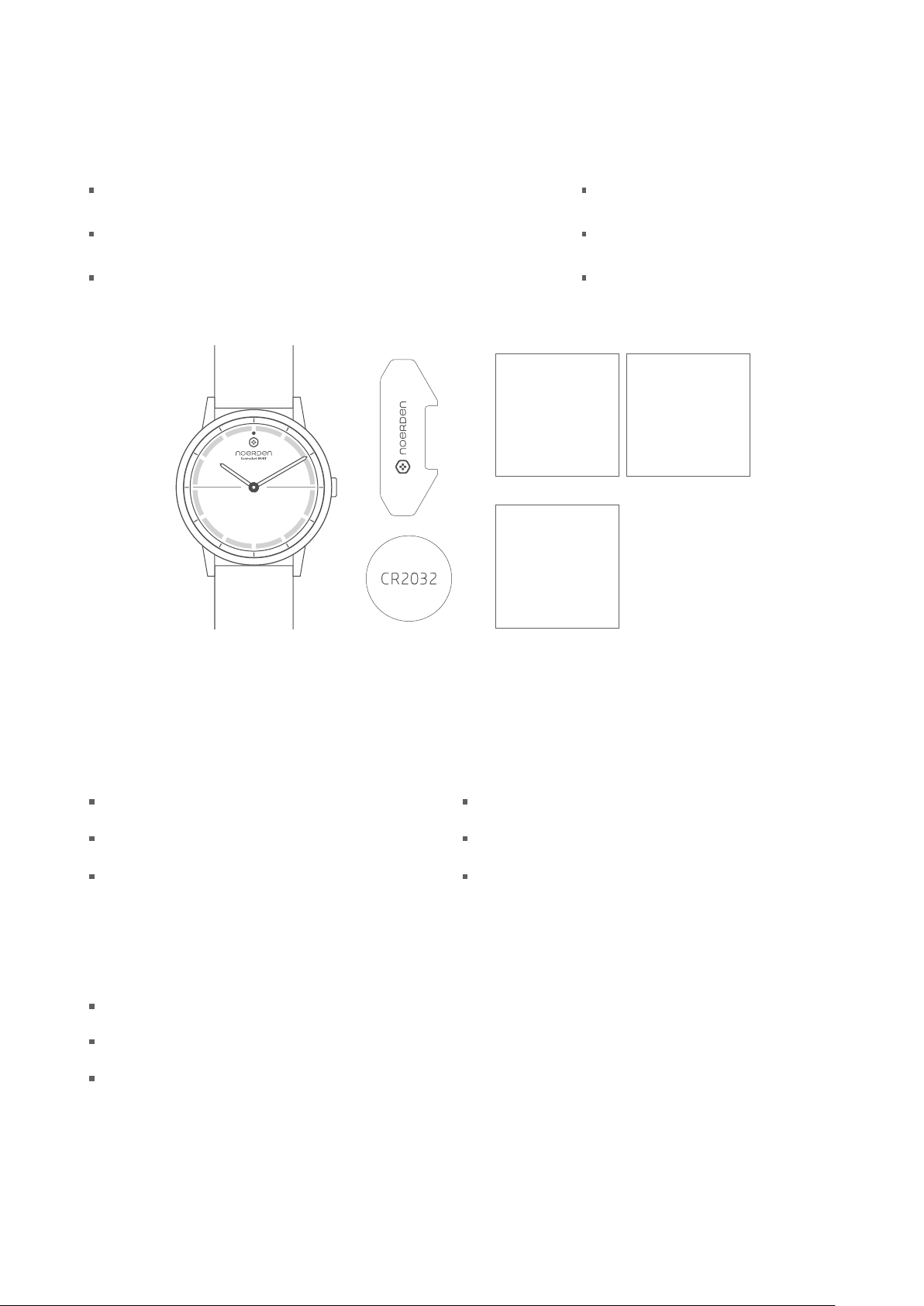
BOX CONTENTS
NOERDEN Smart Watch
Battery CR2032 (pre-installed)
Professional Watch Case Opener
QUICK START GUIDE
SAFETY STATEMENT
Quick Start Guide
Warranty Card
Safety Statement
WARRANTY CARD
PRODUCT SPECIFICATIONS
NOERDEN Smart Watch MATE2/MATE2+
5ATM Waterproof
Case Diameter: 40mm
Weight —— MATE2: 61.2g
MATE2+: 56.7g
Sensors & Technology
Quartz Oscillator
Activity G-sensor: day and night movement sensor
Indicator Light
Strap: adaptable to 150-220mm wrists
Operating temperature: 0℃- 50℃
Colors —— MATE2: black, white, black & white
and white & black
MATE2+: black and khaki
1
Page 4
Connectivity & Compatibility
Connectivity: Bluetooth 4.1
Compatible Devices: iPhone 6 and above, Android devices
Operating Systems: iOS 11.0, Android 6.0 and above
Battery
Battery Type: button battery CR2032
Normal Capacity: 240mAh
Input:
3V 0.2mA
Smart Functions & Data
World Time Synchronization
Camera Remote
Music Control
Activity Tracking
Sleep Monitoring
Personal Goal Tracking
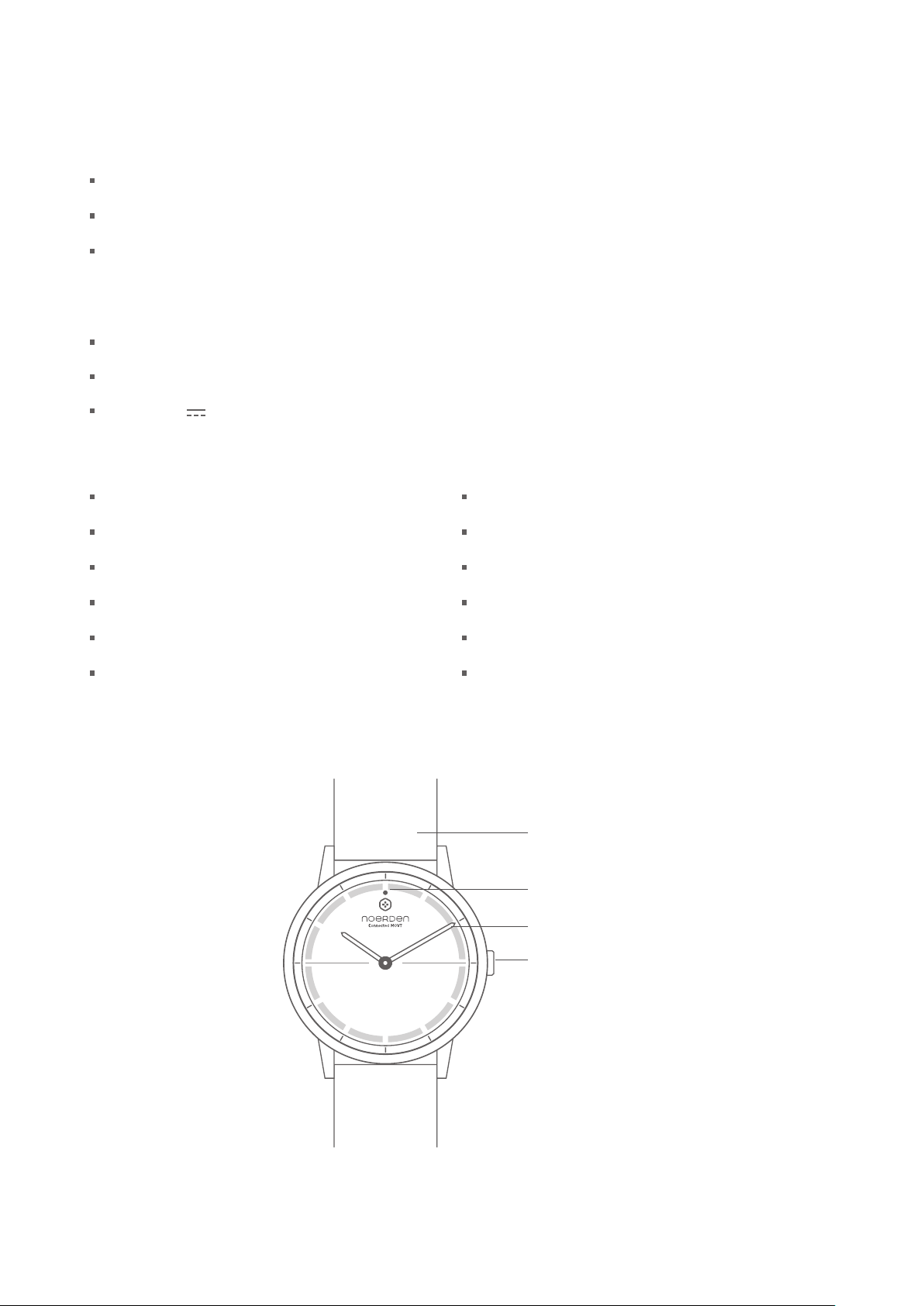
YOUR WATCH
Find My Phone
Vibration Notifications
Call Rejection
Silent Alarm
Do Not Disturb
HIIT Workout & Multi-sport Functions
Strap
Indicator light
Watch hands
Button
2
Page 5
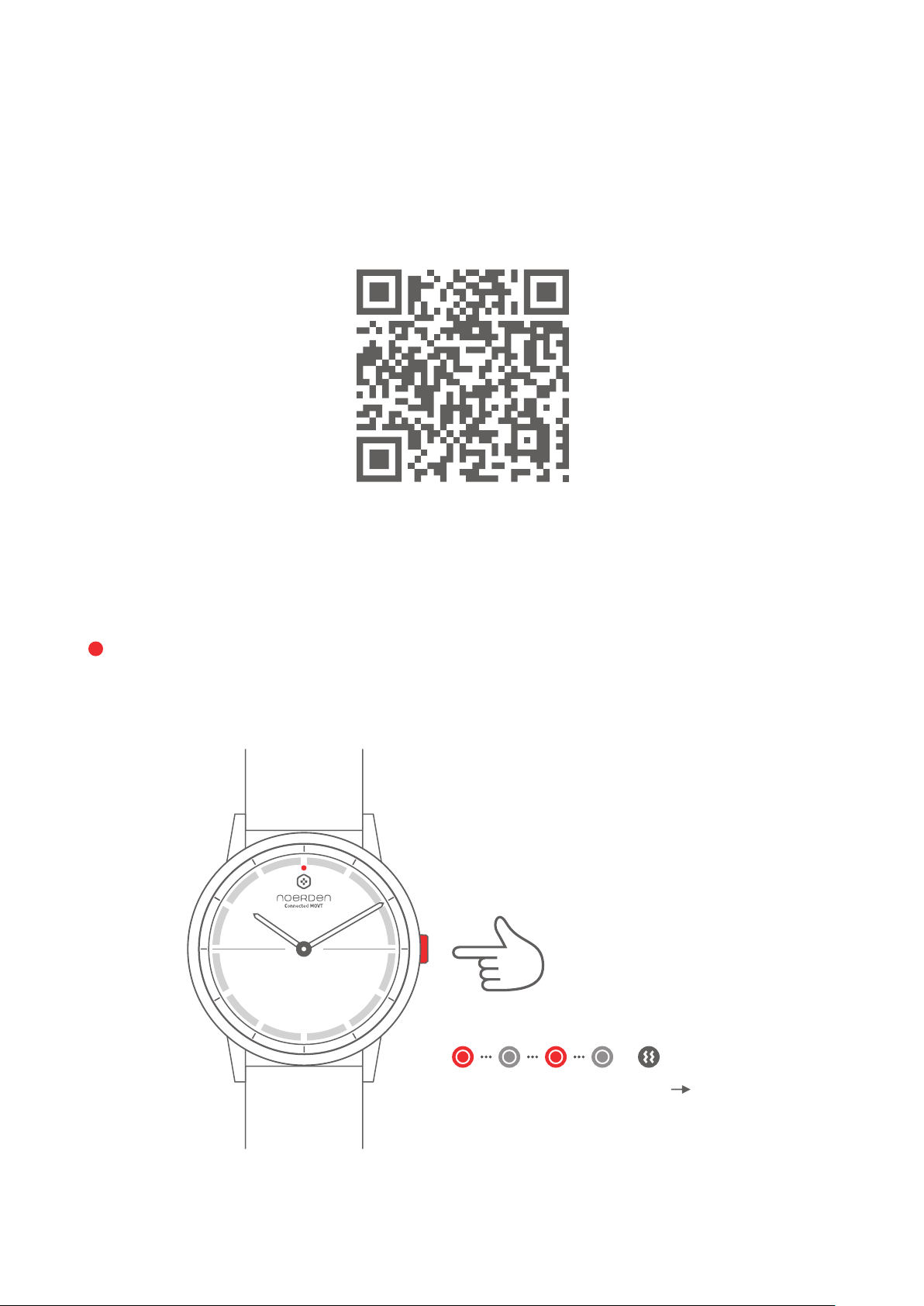
QUICK START WITH YOUR SMARTPHONE
Scan the QR code to download the NOERDEN App
or search for NOERDEN in the App Store or on Google Play.
TURN ON YOUR WATCH
Press and hold the button for 3 seconds. The indicator light will flash quickly and the watch
will vibrate. After that, your watch is automatically switched on.
Press and hold
the button
for 3 seconds
The indicator light
ON
flashes red and the
watch vibrates
3
Page 6
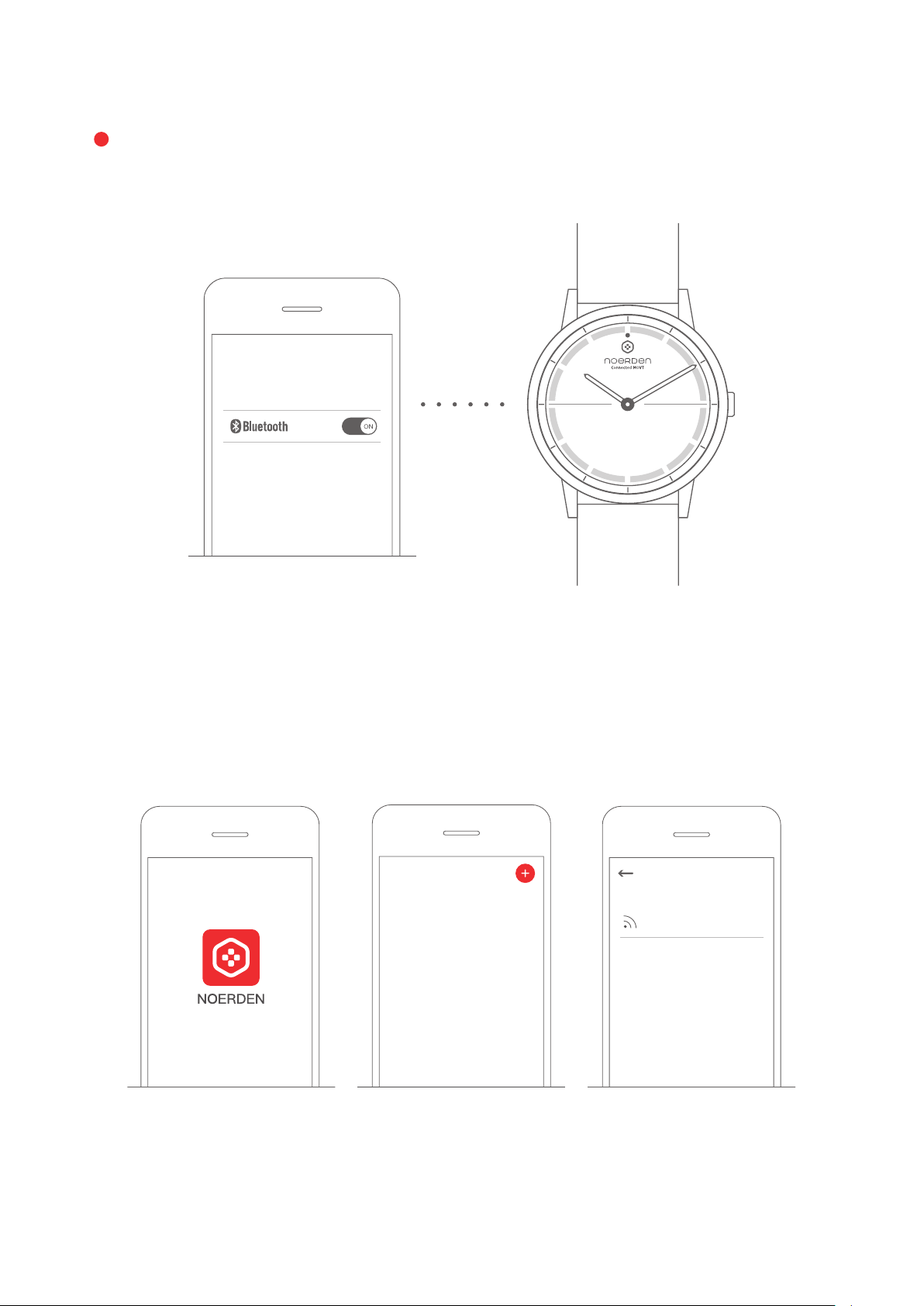
CONNECT TO THE NOERDEN APP
1. Turn on your phone's Bluetooth and hold your watch close to the phone until the device
is connected.
2. In the NOERDEN App, go to the 'Device' page and click 'Add a new device'. Follow the
instructions: find your watch 'NOERDEN-MW' and connect it.
Device Devices nearby
Noerden-MW
4
Page 7
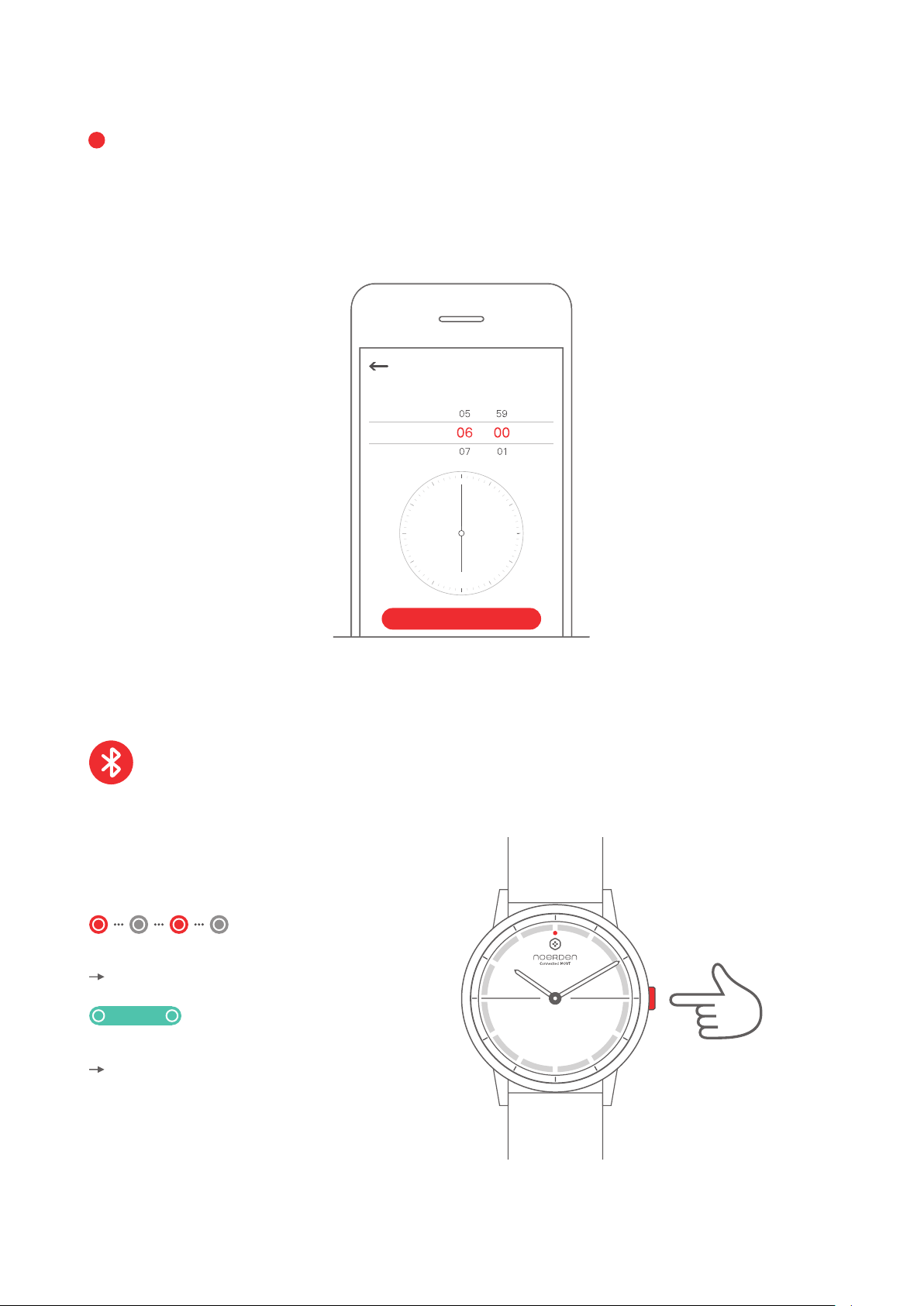
TIME CALIBRATION
When using your watch for the first time, you need to set the time of your new watch.
1. In the NOERDEN App, go to the 'Device' page and then click 'Smart Time Calibration'.
2. Enter the time displayed on your watch onto your phone's interface. The time will then
automatically calibrate.
Time calibration
Please enter the time displayed on your watch
AM
PM
OK
DISCOVER THE KEY FUNCTIONS
Bluetooth
Press the button to check the Bluetooth status of your watch.
The indicator light flashes red
Bluetooth is disconnected
Indicator light is green
Bluetooth is connected
Press once
5
Page 8
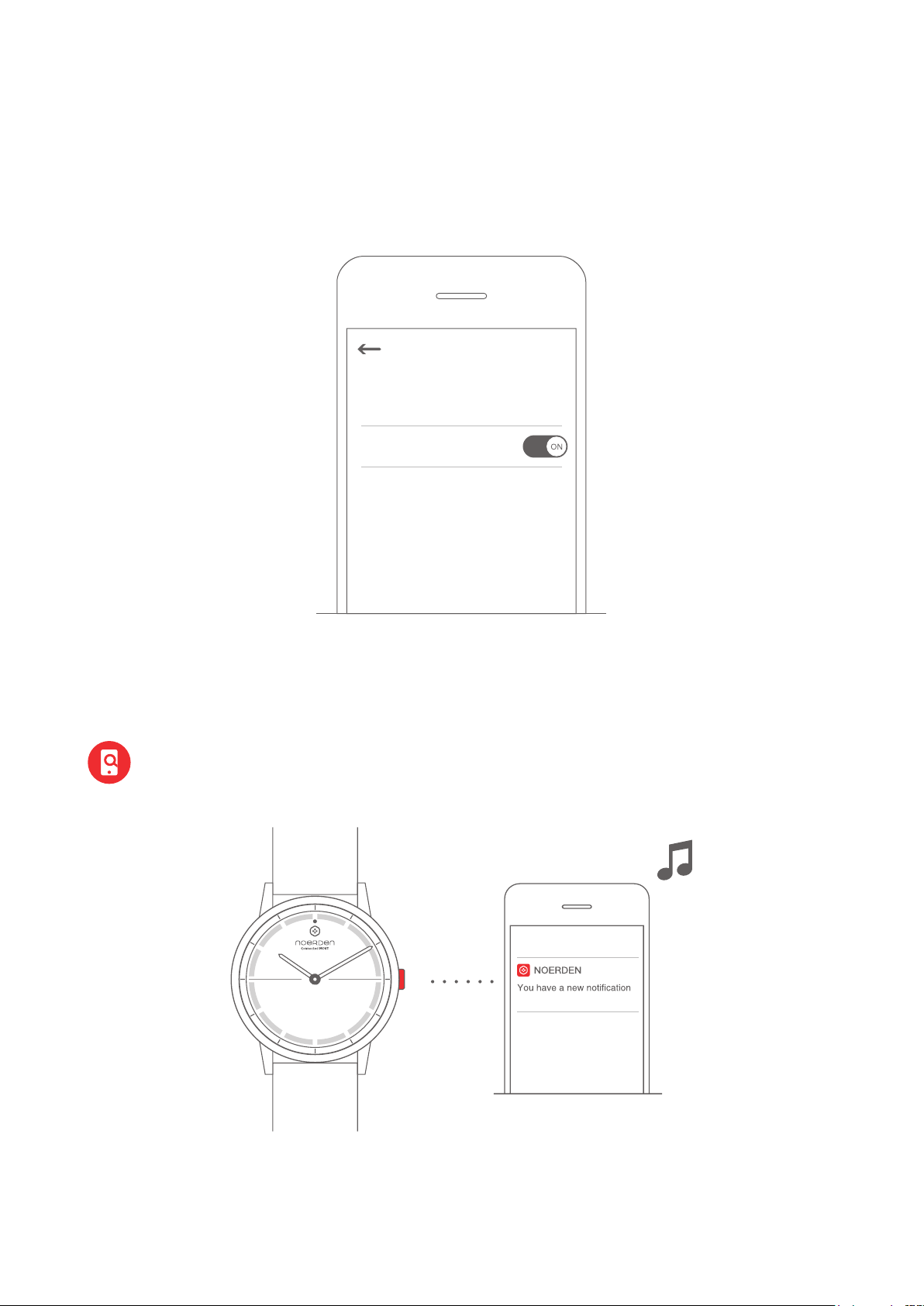
Disable Bluetooth Mode
The watch automatically starts Disable Bluetooth Mode when the bluetooth is disconnected
for more than 2 hours, meaning Bluetooth is off.
You can also manually enable the Disable Bluetooth Mode in the App.
Settings
Disable Bluetooth Mode
Note: When you press the button once to check the Bluetooth status, Bluetooth
will automatically switch on and your watch will reconnect to your phone if it was
in Disable Bluetooth Mode.
Find My Phone
Double press the button and your phone will ring.
Searching for mobile phone...
Note: Your watch must be connected to your phone via Bluetooth.
If your phone is on Silent Mode, it will only vibrate.
6
Page 9
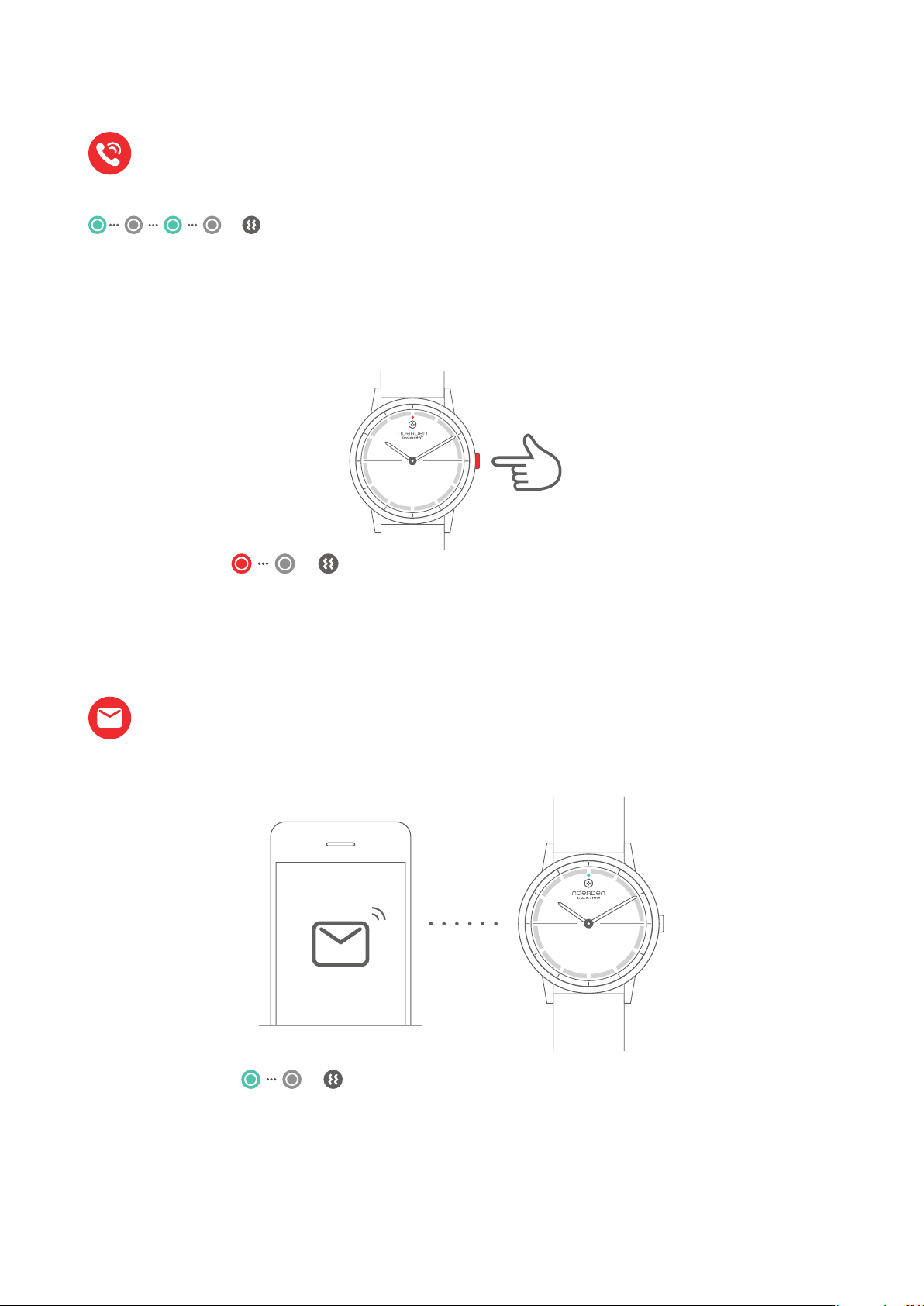
Call Alert and Rejection
Call Alert
when you receive a call, the indicator light will flash in green and your watch will vibrate
for 5 seconds
Call Rejection
To reject the call, press the button once. The indicator light will flash in red once and your
watch will vibrate once.
Press once
Your watch will vibrate and the indicator
light will flash red once.
Note: your watch must be connected to your phone via
Bluetooth. This function must be switched ON in the 'Device'
menu of the NOERDEN App and you must accept the access.
Messages and Notifications
When you receive a message or notification, the indicator light will flash in green once and
your watch will vibrate once.
Your watch vibrates and indicator
light flashes green once.
Note: your watch must be connected to your phone via Bluetooth.
This function must be switched ON in the 'Device' menu of the
NOERDEN App and you must accept the access.
7
Page 10
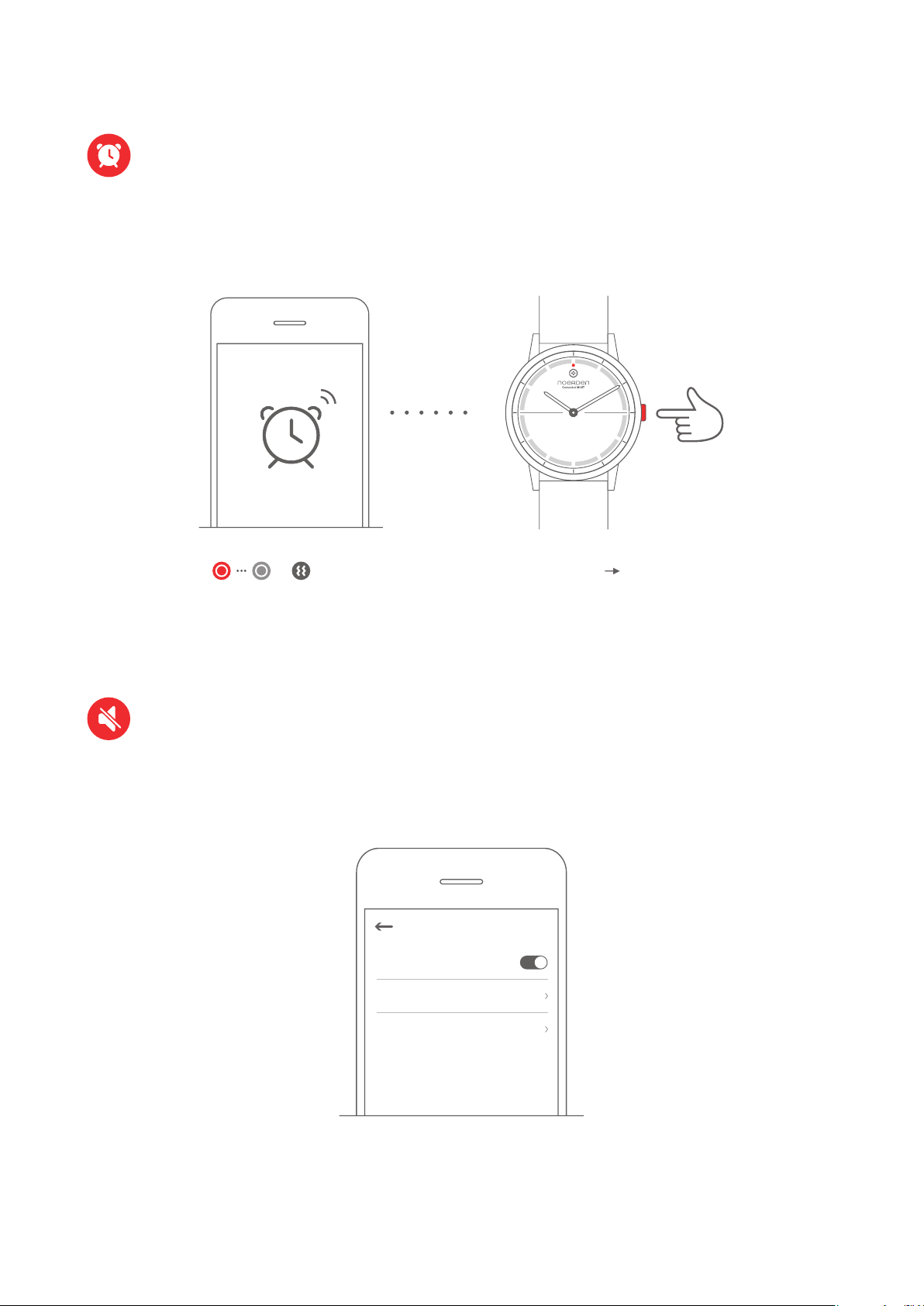
Silent Alarm
To wake-up gently, you can set a silent alarm time on the NOERDEN App.
Your watch will vibrate for 8 seconds. To turn it off, press the button once.The indicator
light will flash once in red and your watch will vibrate once.
Press once
Your watch will vibrate and the
Turn off Alarm
indicator light will flash red once.
Note: Your watch must be connected to your phone via Bluetooth. This function
must be switched ON in the 'Device' menu of the NOERDEN App.
Do Not Disturb
In 'Do Not Disturb' Mode, all calls and notifications – except alarms, will be silenced.
The default time is set from 11pm to 6am or you can change it in the 'Do Not Disturb' page
in the NOERDEN App.
Do not disturb
Do not disturb
Starting time
PM 11:00
Finishing time
AM 06:00
Note: Your watch must be connected to your phone via Bluetooth. This function
must be switched ON in the 'Device' menu of the NOERDEN App.
8
Page 11
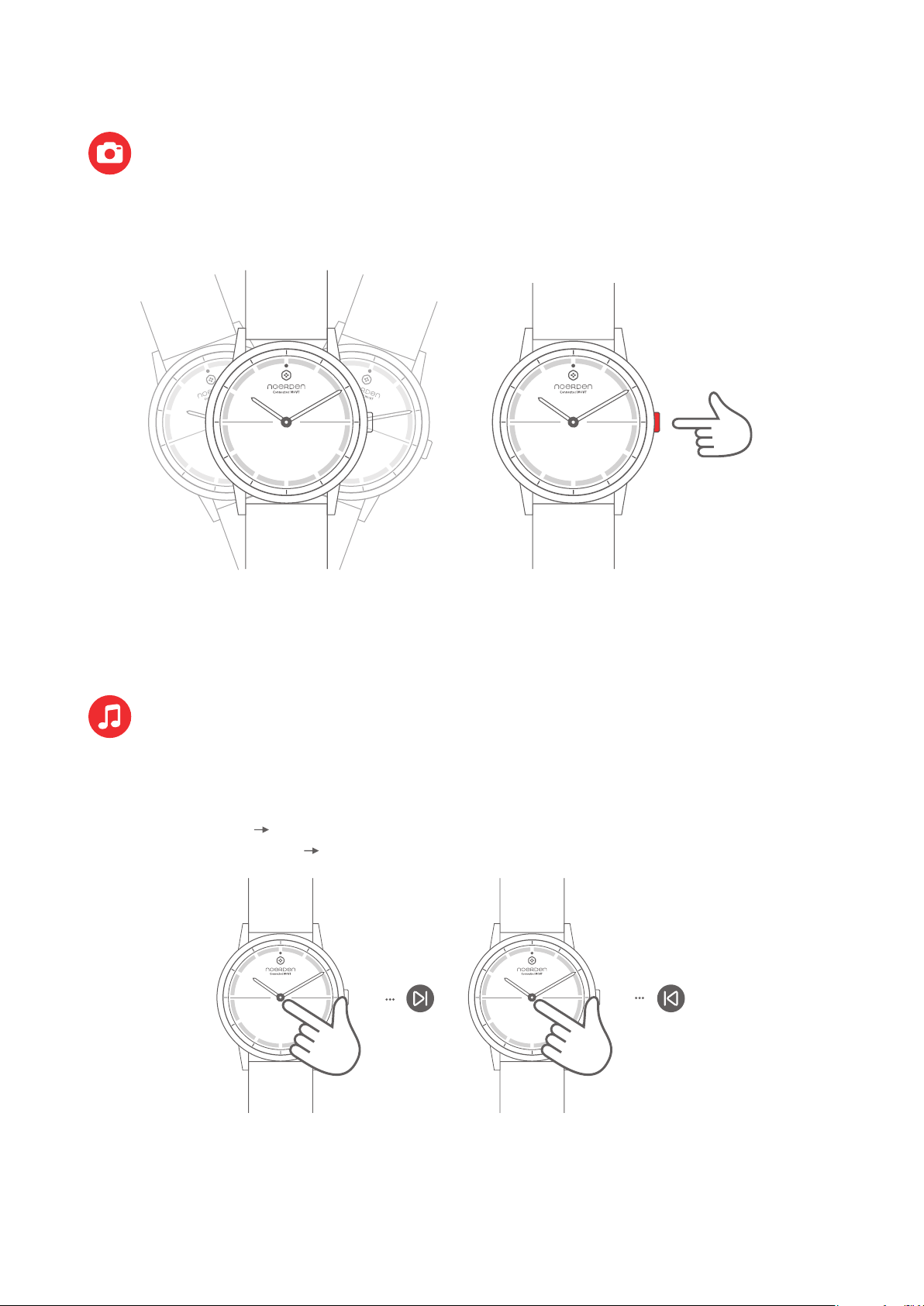
Camera Remote
In the NOERDEN App, go to the "Device" menu and then "Camera Remote". A camera
page will open. Shake your watch or press the button to take a picture.
or
Press once
Note: Your watch must be connected to your phone via Bluetooth, and
you must accept NOERDEN App to access your phone's camera.
Music Control
In the NOERDEN App, go to the 'Device' menu to switch on the Music Control function.
After that, you can tap your watch glass to control your music play.
Tap the glass twice Play the next song
Tap the glass three times Play previous song
Tap three timesTap twice
Note: Your watch must be connected to your phone via Bluetooth
and you must accept the NOERDEN App to access your music apps.
9
Page 12
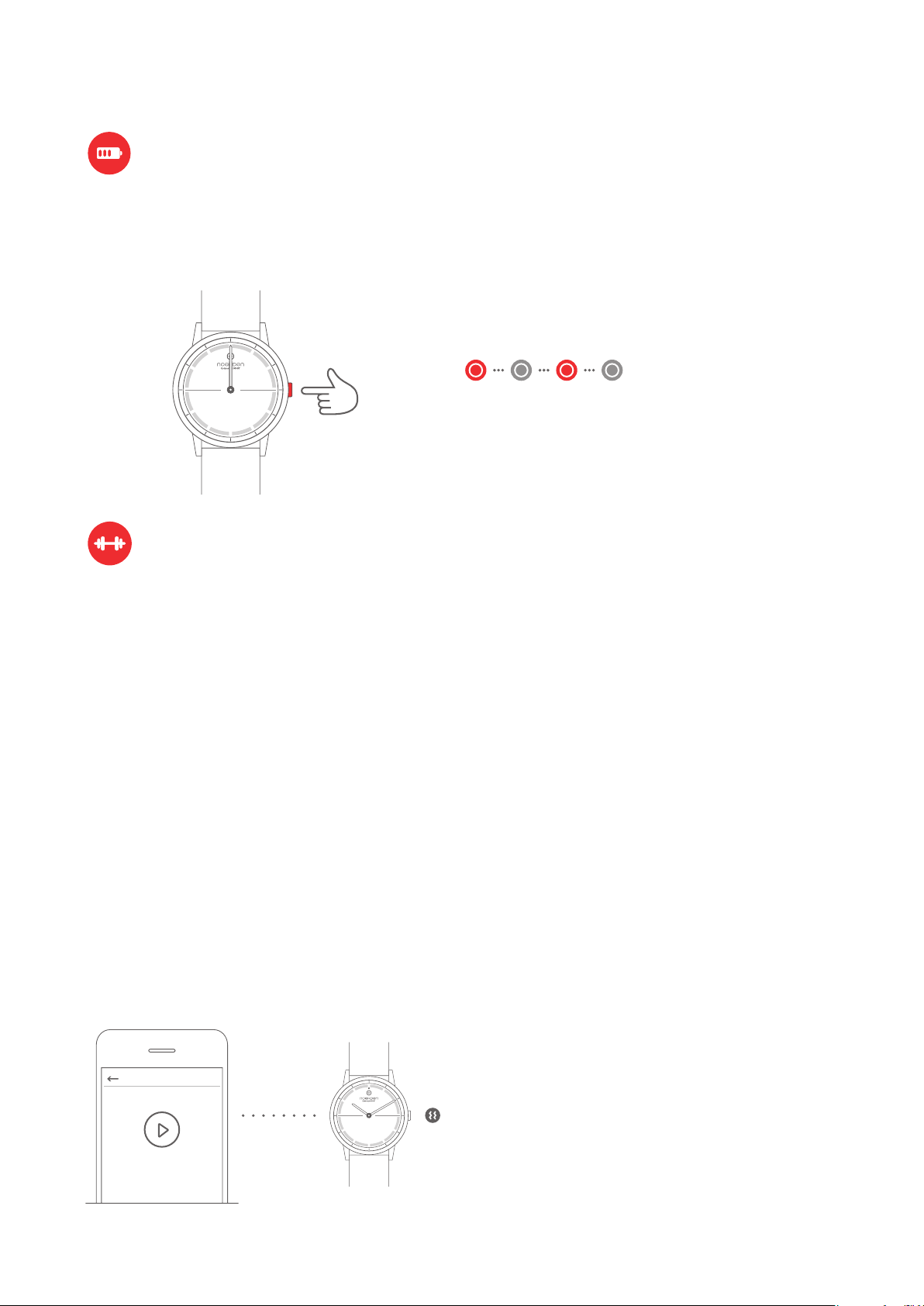
Battery
You can check the battery level of your watch in the 'Device' menu of the NOERDEN App.
When your watch's battery is low, if you press your watch button, the indicator light will flash
in red for 5 seconds and all smart functions will be turned off.
The indicator light flashes
Press once
red for 5 seconds
HIIT Workout & Multi-sport Functions
Go to the Training page in the NOERDEN App and select the activity of your choice
(running, cycling, HIIT, yoga…).
After your session is complete, you will be able to consult your activity detailed data
(distance, duration, calories…)
HIIT & Yoga
For HIIT or Yoga workouts, you can pick between different pre-set programs, exercises,
intensity levels and durations.
You can also personalize your own session by using the customize option where you can
set your preferred exercise/rest intervals/repetitions.
- Once you’re all set, click the "Start" button on the App. Your watch will vibrate 5 times and
the training session will begin.
- Your watch will vibrate 3 times when each time interval finishes, to indicate a change in
exercises or rest time.
- It will vibrate 5 times when your training session is complete.
Multi-sports
For sports such as running or cycling, simply follow the instructions in the App.
At the end of your training, you will be able to consult the route covered on a map in addition
to your detailed activity data
NOTE:
HIIT Workout & Multi-sport Functions
- Your watch must be connected via Bluetooth.
- Please make sure to keep your phone within a
10 meters distance from your watch for vibrations
to work.
- Please make sure to keep your phone with you
for activities with GPS tracking otherwise you can’t
get your route map in the end.
10
Page 13
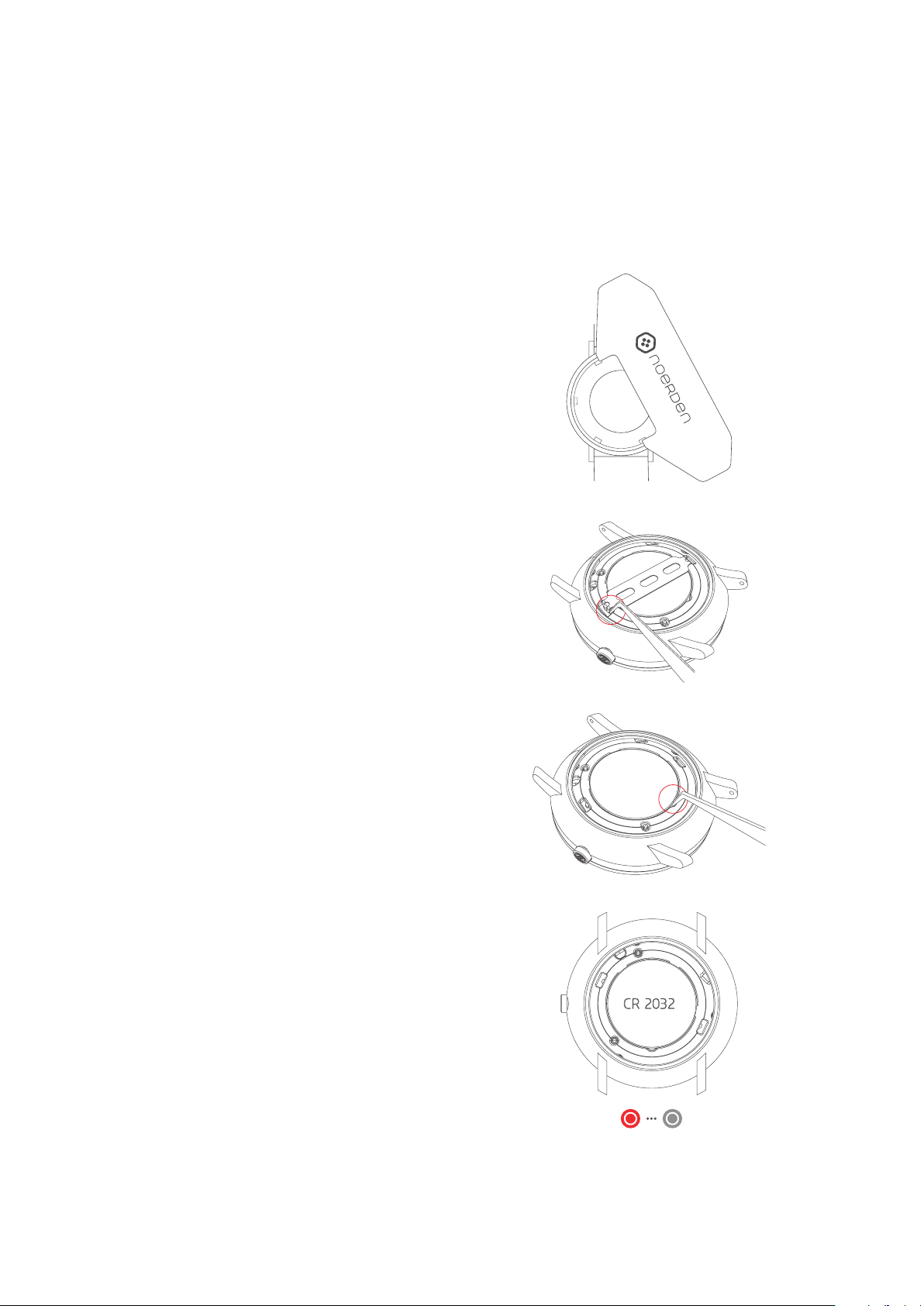
HOW TO CHANGE THE BATTERY
When the battery is low, your watch's Bluetooth is automatically turned OFF. To continue
to enjoy all smart functions, you should change the battery as soon as possible.
We recommend you to go to a local watch shop to replace the battery CR2032. If you wish
to do it yourself, you can follow the instructions below.
1. Open the watch case with the professional
case opener.
2. Take off the battery retainer.
3. Take out the old battery by using tweezers
or a flat tool thinner than 2mm, carefully lift and
remove the battery
4. Install the new battery (CR2032) in the same
way as removing it. Once it is properly installed,
the indicator light will flash red once
CR 2032
Indicator light flashes red once
11
Page 14
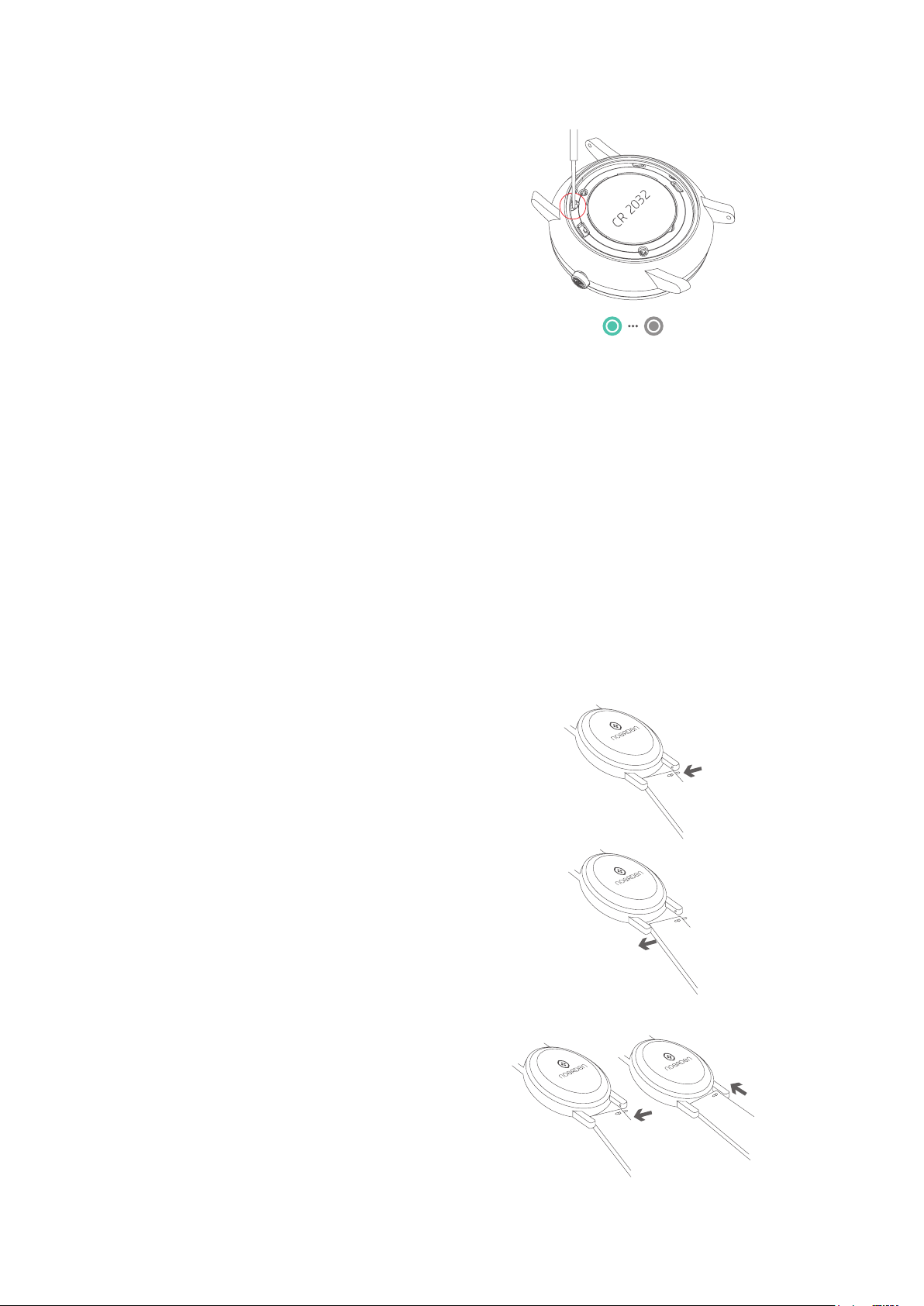
5. Use a sharp headed tool to gently press
the reset button once, the indicator light
will then flash green once.
6. Use the same method to put the battery
retainer back in.
7. Install the watch case and turn it until
it's tight. You can then use your watch
Indicator light flashes
green once
normally again!
Note:
- The warranty will be void if the battery was not changed by a professional and water damage occurs.
- If you get your battery changed by a professional, please keep the receipt as proof.
- When changing the battery yourself, make sure to close the case properly.If closed improperly,
you risk impairing the watch’s waterproof resistance.
- We suggest that you synchronize the data before changing your battery, in case of data loss.
CAUTION
RISK OF EXPLOSION IF BATTERY IS REPLACED BY AN INCORRECT TYPE.
DISPOSE OF USED BATTERIES ACCORDING TO THE INSTRUCTIONS.
HOW TO CHANGE THE STRAP
1. Move the quick release spring bar to
remove the strap.
2. Take your new strap and insert one side
of the spring bar into the lug end.
3. Push the spring bar into the other side,
your new strap is installed!
12
Page 15
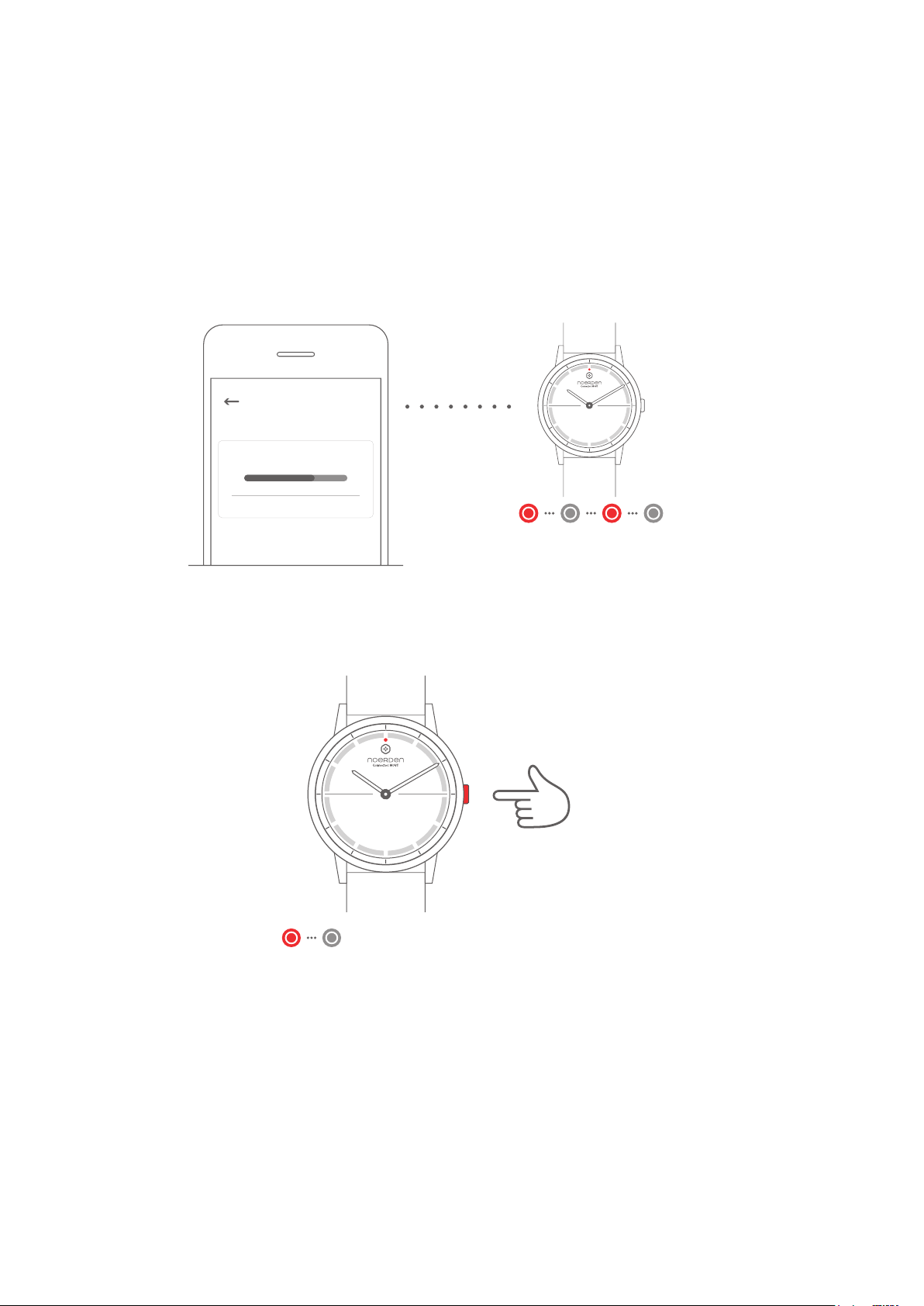
UPGRADE WATCH FIRMWARE
1. To update your firmware go to the NOERDEN App > Profile > Settings > Check for
firmware upgrade.
2. Your phone will download the new firmware version and upload it to your watch.
3. During the installation, the indicator light of your watch will continuously flash in red.
4. When the indicator light stops flashing, the firmware has been upgraded successfully.
5. Check if the time of your watch is accurate, otherwise perform the time calibration.
Settings
Firmware Upgrading...
Cancel
Indicator light flashed red until
firmware update is successful
RESET
Press and hold the button for 6 seconds. The indicator light will flash in red once and the
process will start.
Press and hold
for 6 seconds
Indicator light flashes red once
Note: If you reset your watch to factory mode, it may delete all your data.
You will have to restart your watch after the restoration.
DECLARATION OF CONFORMITY
The undersigned, Noerden (Shanghai) Information Technology Co., Ltd declares that the
electrical radio equipment types of the Noerden Smart Watches, Models MATE2/MATE2+,
comply with the 2014/53/EU directive.
The complete text is available at www.noerden.eu/support
13
Page 16
www.noerden.eu
For more information,
go to the FAQ page
in the App or on our website
 Loading...