

Page 1
PORTABLE NOAA
SMARTHOME™ 1-800-SMART-HOME 949-221-9200 http://www.smarthome.com Order #1931
ALL HAZARD ALERT
WEATHER MONITOR
Model WR-8000
Thank you for your purchase of the portable NOAA All
Hazard Alert Weather Monitor from Oregon Scientific.
Your Oregon Scientific model WR-8000 has a special alarm
tone feature that can sound an alert and give you immediate
information about a life-threatening situation. During an
emergency situation, National Weather Service forecasters
will stop routine weather radio programs and send out a
special tone that activates weather radios in the listening
area. When your Weather Monitor receives this special All
Hazards Alert tone it emits a visual and audible warning
signal. WR-8000 operates on all seven NOAA weather
broadcast bands and retrieves
local weather broadcast channel, receiving signals at
frequencies from 162.400
MHz
to
messages from
your
DATE/ ALARM Setting
IMPORTANT: When you started to set any modes, their icons (like,
Time, Date, etc.) will f/ash, and you have only 5 seconds to
this process before the unit will return to its normal operation.
return to the setting mode, simply press and hold the
MODE (5,
control again and continue your settings.
Clock
Setting
Press and hold the MODE (5) control until the word “Time” will
on the display.
Press HOUR/UP (11) control to set the hour and
DOWN (8)
set the minutes.
IMPORTANT:. PM indicator displays if the clock is set for
afternoon time. There is no indicator on the display if the clock is se
for the morning.
To select other functions, press the MODE (5) control again.
the Date
Press and hold the MODE (5) control until the word
“Date”
will
on the display.
Press HOUR/UP
(11)
control to set the desired month
(8) control to set the desired date.
Your Weather Monitor is equipped with LCD alarm
clock,
digital thermometer and automatic Freeze Warning Alert.
This water-resistant model also has an analog swing-arm
compass and a belt clip.
INITIAL SET- UP BATTERIES
Your Weather Monitor operates on three AA alkaline batteries (not
included To install the batteries slide the battery cover to the arrow
direction and remove it. Install the batteries
diagram and replace the battery cover.
NOTE: When removing old and installing fresh batteries
slide the POWER
OFF/ON
switch to the OFF position.
This model is equipped with a low battery detection circuit, which
indicates when it’s time to replace the batteries. When the “battery’
icon appears on the display lower right side of the LCD, immediately
replace the batteries. The clock will work perfectly, but there may
not be enough power to allow your Weather Radio to
properly.
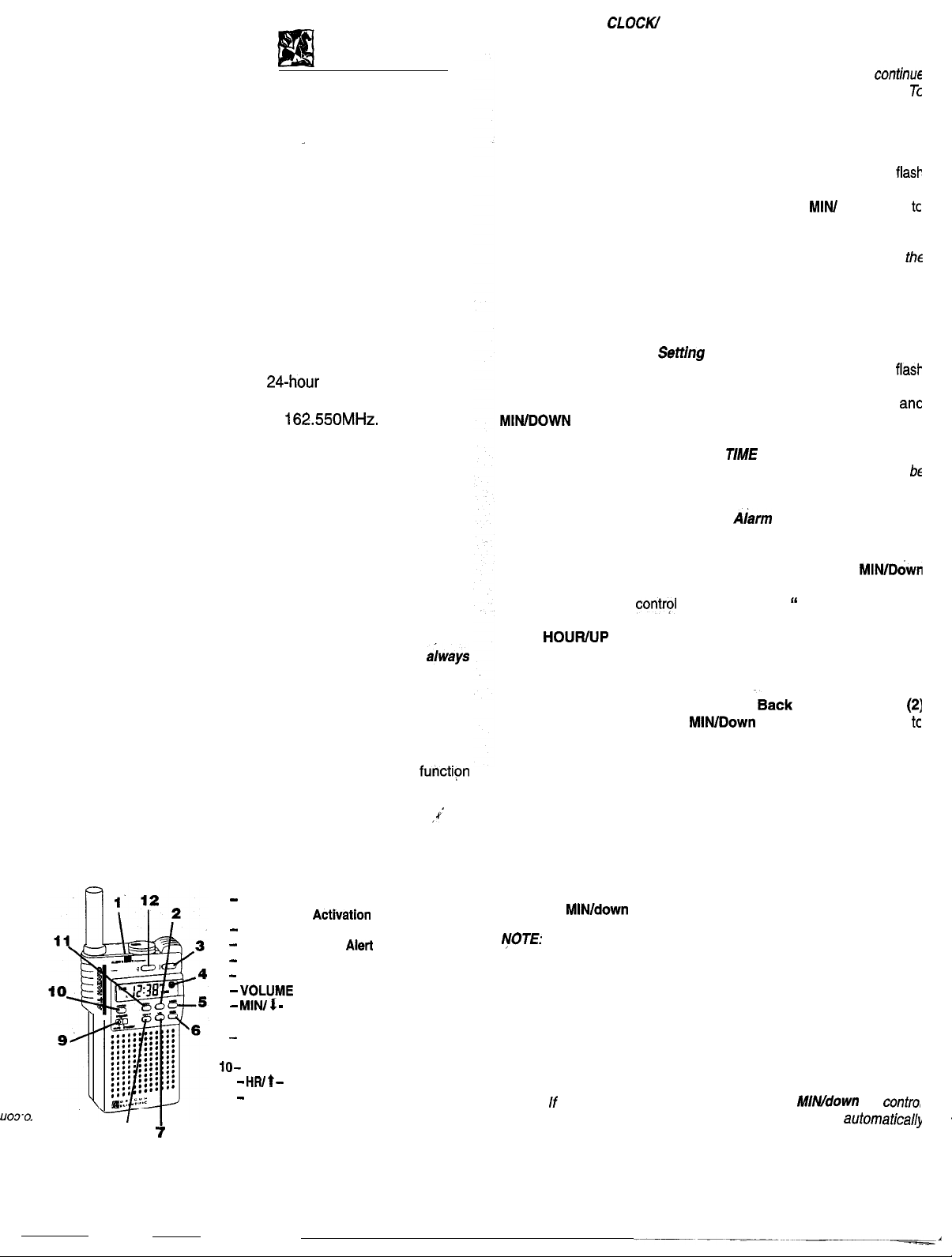
The WR8000 Weather Monitor has following controls and features:
1
LED Indicator
2 --
Back Light
3
Temperature Activation Control Button
4
Freeze Warning
5
MODE Selector Control Button
6
Radio Frequency SEEK Control Button
7
6
MlNl Minutes Adjustment
Control Button
9
MUTE/STANDBY/SPEAKER
Control Switch
ON/OFF Control Switch
11 Hours Adjustment Control Button
12
TIME/DATE Control Button
UO3’0,
a’
in accordance with the
Control Button
indicator
Control Button
NOTE: To change the display from
TIME/DATE (12)
control several times until desired mode will
to the DATE mode, press
selected.
Setting the
Press and hold the MODE (5) control until the word “Alarm” will flash
on the display.
Press HOUWUP (11) control to set the alarm hour and
(8) control to set the alarm minutes.
Press the MODE (5)
until both
“Alarm
and “ON” will flash
on the display.
Press
(11) control to enable the alarm function. The
“ON” indicator will be steady in this case.
Daily Alarm Disabling
When the daily alarm is ON or after
control is pressed, press the
Llght Activation
(8) control button once
disable the daily alarm.
NOTE:
Daily alarm can be disabled every day, but it activates agair
every 24 hours at the pre-set time.
Complete Alarm Disabling
Press and hold the MODE (5) control until the word “ALARM” wil
flash on the display.
Press and hold the MODE (5) again until both “ALARM” and “ON”
will flash on the display
Press the
(8) control to disable the alarm function
After the performing these steps the wake-up alarm will no,
sound.
Snooze Feature Activation
To activate the snooze when alarm signal is on, press the
Light Activation (2)
control and after 9 minutes of snooze, the
Back
alarm signal will sound again.
To cease the alarm, press
the Back Light Activation (2)
control
again.
NOTE:
Back Light Activation (2)
control or
(8)
were not pressed, the alarm signal will be disabled
after 9 minutes.
t
Page 2
Back Light Activation
SMARTHOME™ 1-800-SMART-HOME 949-221-9200
http://www.smarthome.com Order #1931
Press and release the
soft green back light on the display.
Back Light Activation (2)
control to get the
Displaying the Temperature
Press the
temperature in Fahrenheit
NOTE:
seconds.
Temperature Activation (3)
The built-in sensor updates the temperature every 60
control to dispiay the current
Freeze Warning Alert Activation
The Weather Monitor will alert you with the flashing
and the beep tone that sounds every 60 seconds when temperature
drops to or below 34 degrees F.
To activate the
Activation (3)
seconds until SNOW (*) icon will appear on the display.
Press the
controls and hold them within 5 seconds until
disappear.
NOTE:
to 115 degrees in Fahrenheit.
higher than the operating range, the unit will only display
Freeze
and then
HOUR/UP (11)
Alert,
Temperature Activation (3)
The Weather Monitor
temperature operating range
the outside temperature is lower or
press the
controls and hold them 5
and then
SNOW
Temperature
SNOW
icon
(8)
icon will
-15
is
NOAA SIGNALS MONITORING
There are three modes for the monitoring NOAA signals: MUTE
STANDBY and SPEAKER.
For the unit normal operation in all three modes, the OFF/ON
control switch has to be in the “ON” position.
STANDBY MODE
When an alert is broadcast, the speaker will be activated so
can hear the announcement and the red LED (1) warning ligh
will flash.
In STANDBY mode your monitor will sound
Emergenq
Alert Signal when it is broadcast. After your Weather
received an emergency alert, the warning signal on the
will go off automatically after 1 hour and indicator light wil
stop flashing after 2-3 hours, if you did not disabled
manually.
MUTE MODE
If switch is on the MUTE mode, the ALERT icon and
(1)
indicator will be flashing, but speaker wiil remain silent,
you CAN NOT HEAR the emergency alert signal.
SPEAKER MODE
red LEC
SC
RECEIVING THE NOAA WEATHER
AND ALL HAZARD ALERT
IMPORTANT: The All Hazard Weather Monitor WILL NOT
FUNCTION unless it is properly tuned to the appropriate NOAA
channel in your area. Before that, please, follow the owner’s
manual directlons to set your local time/date and radio volume.
Slide the OFF/ON
the monitor is not in use, we recommend that you keep this switch
in the
“‘OFF”
Slide the
“SPEAKER” position.
Press
in your area. The display will show a channel (A through
indicate the selected NOAA frequency.
NOTE: When seeking a NOAA channels, it is possible that ydur
Portable Oregon Scientific All Hazard Weather Monitor may pick up
one or more stations in your local area.
In this case please, choose the station (A through G) with the
strongest signal by pressing
with a weak or no signal at all, please try to relocate your monitor
closer to the area with the better NOAA signal reception.
MUTE/STANDBY/SPEAKER (9)
SEEK (8)
(10)
control switch to the “ON” position. When
position to save the battery power.
control switch into the
control button to select the strongest signal channel
SEEK (6)
button. If you are in the area
to
IMPORTANT: If you are traveling or camping with your Oregon
Scientific Portable All Hazards Weather Monitor more then 35
miles from your local area, it is important to re-seek the
channel for the best possible reception.
When your monitor is in
continuous National Weather Service broadcasts
SPEAKER
mode, you’ll heal
IN
TO ALL EMERGENCY ALERTS.
RECEPTION
Please understand that there are some conditions in which
won’t receive a NOAA Weather Radio broadcast on any of sever
weather channels (coded A through G on this monitor) used across
the
You
are not in an area served by NOAA Weather Radio.
are some areas that where there is no signal reception, although
National Weather Service transmitters cover about 92% of the
territory. Present efforts are directed to make NOAA Weather
a nationwide service.
There
The local geography (for example, a mountainous area) or
specific location (inside a heavily steel-reinforced
building) inhibits the Weather Radio signal.
clearer and/or closer location to the Weather Service transmitter.
Please, move to
To set the volume.at the desired level, press VOL (7) control button
and select one number from the eight volume levels (0 -7).
Press
WARNING:
If you have your volume set on minimum, you may not hear the
The VOLUME control knob adjusts the Alert signal.
or MIN/ DOWN (8) to adjust the volume.
emergency weather alert.
 Loading...