

Page 1
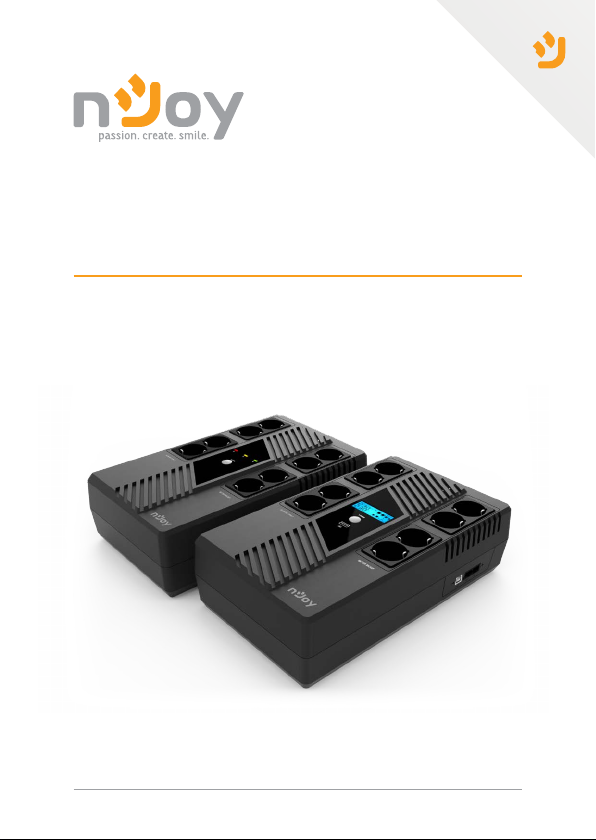
Token Series User Manual
UPCSBLS660TTOAZ01B
UPCSBLS680TTOAZ01B
Before using this product, carefully read all product documentaon and retain it for future reference.
Manual de ulizare
149.34.22.1
Page 2

Thank you for purchasing our products!
Please read this manual before using the product.
nJoy is a brand of power and backup protecon products that
create soluons for mulple levels of environment complexity,
This UPS will protect your electronic equipment from physical
damage and will provide emergency baery backup power to
prevent data loss in the event of power problems.
The following models belong to the Token Series UPS:
residenal to industrial
600 VA
800 VA
Package contents
1
UPS unit
Power cord (attached)
Token 600
Token 800
User manual
Warranty card
USB cable
NOTE!
Before installaon, please inspect the unit. Be sure that nothing inside the
package is damaged. Keep the original package in a safe place for future use.
2
Page 3
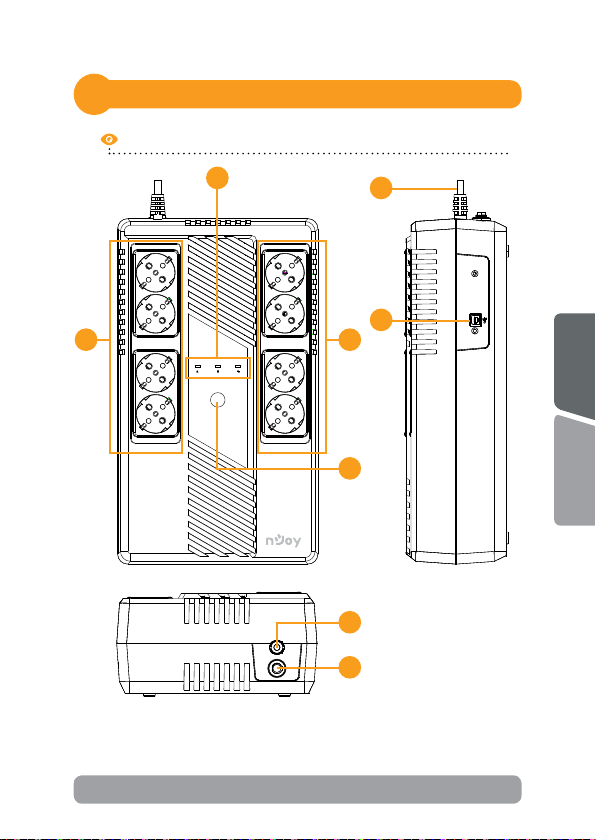
Product overview
2
Token 600
1
POWER
SURGE ONLY BATTERY BACKUP
NOTE!
Points 6 and 7 are for Token 800 model only!
8
5
34
English
2
Română
8
9
3
Page 4
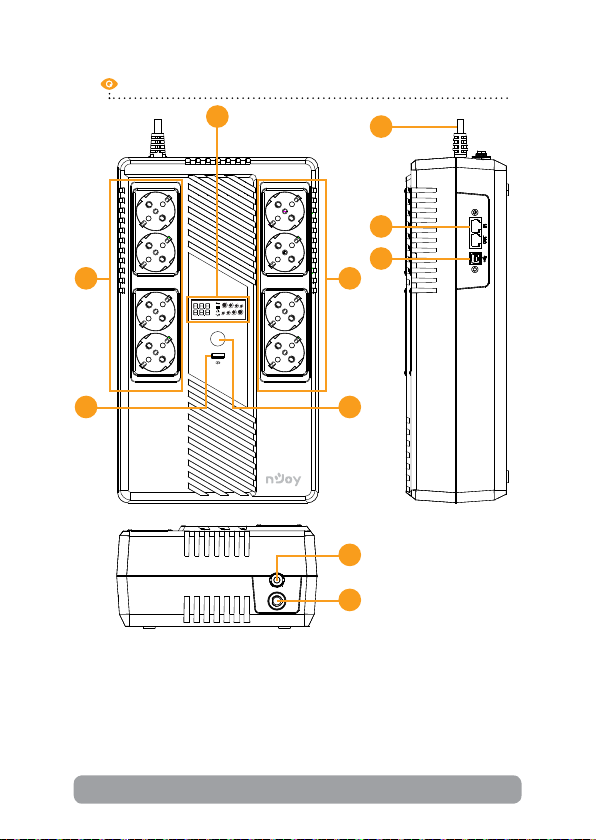
Token 800
1
8
6
5
34
BATTERY
INPUT
VAC
A
Hz
VAC
A
Hz
OUTPUT
LOAD
POWER
SURGE ONLY BATTERY BACKUP
7
2
8
9
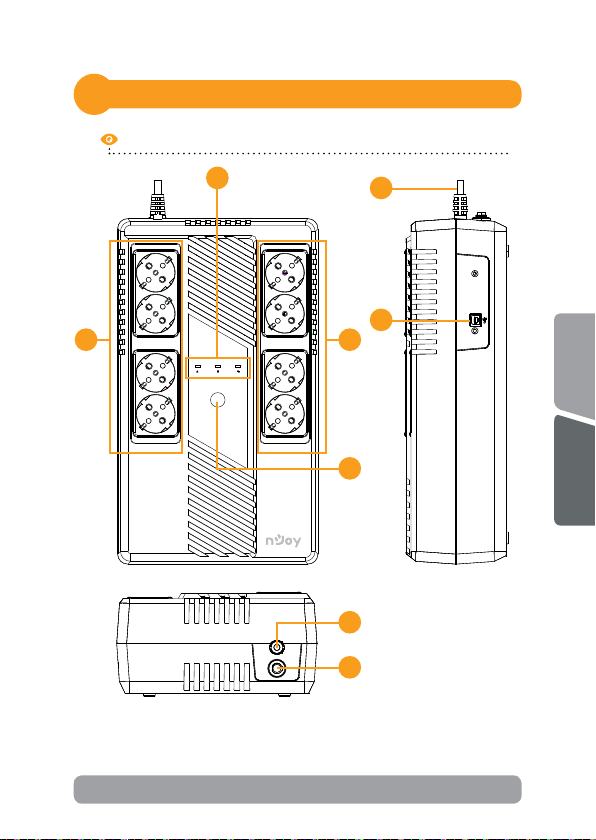
1. LED indicators (for Token 600 model) / LCD display (for Token 800
model): Indicate status informaon, sengs and events.
2. Power On/O buon: To turn on the UPS unit, press the power
switch lightly. Then, the LED or LCD will light up. To turn o the UPS
unit, press the power switch again. Then, display will shut o.
4
Page 5

3. Baery backup outlets: These outlets provide baery backup, EMI
ltering, line condioning, and surge protecon. Baery power is
automacally provided in case of power failure.
4. Surge-protected outlets: These outlets do not provide power during
power failure.
5. HID USB port: Allows the UPS to appear in Windows like a baery
icon. When the power is out, you can sll see the baery level and
adjust its sengs. Also Windows power management opons are
available. In case you need more advanced local management we
recommend you to install and use “ViewPower” soware.
6. Network, Modem or Phone surge protecon: (only for Token 800
model) This UPS protects a single line (1 in/1 out) phone, modem, or
fax machine from surges when connected through the UPS.
7. USB charger port: 5VDC, 2.1A (only for Token 800 model)
8. AC input power cord: Connect to ulity power.
9. Input circuit breaker: The circuit breaker provides opmal overload
protecon.
Important safety warnings
3
English
Please comply with all warnings and operang instrucons in this manual
strictly. Save this manual properly and carefully read the following
instrucons before installing the unit. Do not operate this unit before
reading through all safety informaon and operang instrucons
carefully:
Transportaon
• Please transport the UPS system only in the original package to
protect against shock and impact.
Preparaon
• Condensaon may occur if the UPS system is moved directly from
cold to warm environment. The UPS system must be absolutely dry
before being installed. Please allow at least two hours for the UPS
system to acclimate to the environment.
• Do not install the UPS system near water or in moist environments.
5
Română
Page 6

• Do not install the UPS system where it would be exposed to direct
sunlight or near heat sources.
• Do not block venlaon holes in the UPS housing.
Installaon
• Do not connect appliances or devices which would overload the UPS
system (e.g. laser printers) to the UPS output sockets.
• Place cables in such a way that no one can step on or trip over them.
• Do not connect domesc appliances such as hair dryers to UPS
output sockets.
• The UPS can be operated by any individuals with no previous
experience.
• Connect the UPS system only to an earthed shockproof outlet which
must be easily accessible and close to the UPS system.
• Please use only VDE-tested, CE-marked mains cable (e.g. the mains
cable of your computer) to connect the UPS system to the building
wiring outlet (shockproof outlet).
• Please use only VDE-tested, CE-marked power cables to connect the
loads to the UPS system.
• When installing the equipment, it should ensure that the sum of
the leakage current of the UPS and the connected devices does not
exceed 3.5mA.
Operaon
• Do not disconnect the mains cable on the UPS system or the building
wiring outlet (shockproof socket outlet) during operaons since this
would cancel the protecve earthing of the UPS system and of all
connected loads.
• The UPS system features its own, internal current source (baeries).
The UPS output sockets or output terminals block may be electrically
live even if the UPS system is not connected to the building wiring
outlet.
• In order to fully disconnect the UPS system, rst press the OFF/Enter
buon to disconnect the mains.
• Prevent uids or other foreign objects from entering the inside of the
UPS system.
6
Page 7

• WARNING: This is a category C2 UPS product. In a residenal
environment, this product may cause radio interference, in which
case the user may be required to take addional measures.
Maintenance, service and faults
• The UPS system operates with hazardous voltages. Repairs may be
carried out only by qualied maintenance personnel.
• Cauon - risk of electric shock. Even aer the unit is disconnected
from the mains (building wiring outlet), components inside the UPS
system are sll connected to the baery and electrically live and
dangerous.
• Before carrying out any kind of service and/or maintenance,
disconnect the baeries and verify that no current is present and no
hazardous voltage exists in the terminals of high capability capacitor
such as BUS-capacitors.
• Only persons are adequately familiar with baeries and with the
required precauonary measures may replace baeries and supervise
operaons. Unauthorized persons must be kept well away from the
baeries.
• Cauon - risk of electric shock. The baery circuit is not isolated
from the input voltage. Hazardous voltages may occur between the
baery terminals and the ground. Before touching, please verify that
no voltage is present!
• Baeries may cause electric shock and have a high short-circuit
current. Please take the precauonary measures specied in this
manual and any other measures necessary when working with
baeries: remove wristwatches, rings and other metal objects, use
only tools with insulated grips and handles.
• When changing baeries, install the same number and same type of
baeries.
• Do not aempt to dispose of baeries by burning them. This could
cause baery explosion.
• Do not open or destroy baeries. Escaping electrolyte can cause
injury to the skin and eyes. It may be toxic.
• Please replace the fuse only with the same type and amperage in
order to avoid re hazards.
• Do not dismantle the UPS system.
7
English
Română
Page 8
Installing your UPS system
4
4.1 Hardware installaon guide
1. Placement & Storage condions
Install the UPS in a protected area that is free of excessive dust and
has adequate air ow. Please place the UPS away from other units at
least 20 cm to avoid interference. Do NOT operate the UPS where the
temperature and humidity is outside the specic limits. (Please check the
specs for the limitaons.)
2. Connect to ulity and charging
Plug in the AC input cord to the wall outlet. For the best results, suggest
to charge the baery at least 6 hours before inial use. The unit charges
its baery while connecng to the ulity.
3. Connect the loads
Plug in the loads to output receptacles on the front panel of the UPS.
Simply turn on the power switch of UPS unit, then devices connected to
the UPS will be protected by UPS unit.
CAUTION
Due to its high-power consumption, we do NOT recommend
connecting LASER PRINTERS or loudspeaker equipment
such as SUBWOOFERS to this type of UPS.
Do NOT plug any SURGE STRIPS into any of the outlets.
4. Connect communicaon cable
To allow for unaended UPS shutdown/start up and status monitoring,
connect the communicaon cable one end to the USB port and the other
to the communicaon port of your PC. With the monitoring soware
installed, you can schedule UPS shutdown/start up and monitor UPS
status through PC.
8
Page 9
5. Connect Modem/Phone /Network for surge protecon
Connect a single modem/phone line into surge protected “IN” outlet
on the side panel of the UPS unit. Connect from “OUT” out let to the
computer with phone line cable.
6. Turn On/O the unit
Turn on the UPS unit by pressing the power switch. Turn o the UPS unit
by pressing again the power switch.
4.2 Soware installaon guide
Install soware: For opmal computer system protecon, install the UPS
monitoring soware from hps://www.power-soware-download.com/
viewpower.html to fully manage the UPS.
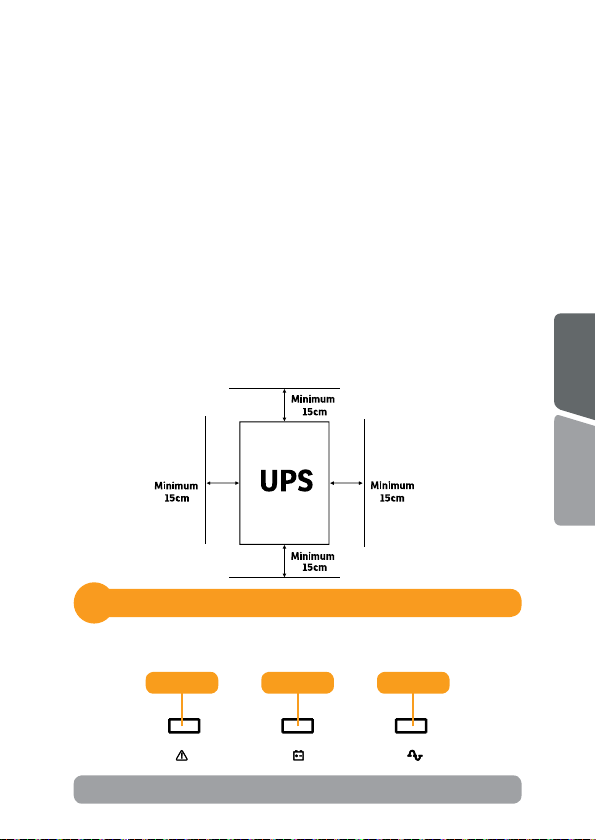
4.3 Posioning
• For opmal venlaon of the UPS, please place it 15cm distance
from any wall or object.
Indicators
5
5.1 LED indicators (for Token 600 model)
English
Română
Red Yellow Green
9
Page 10
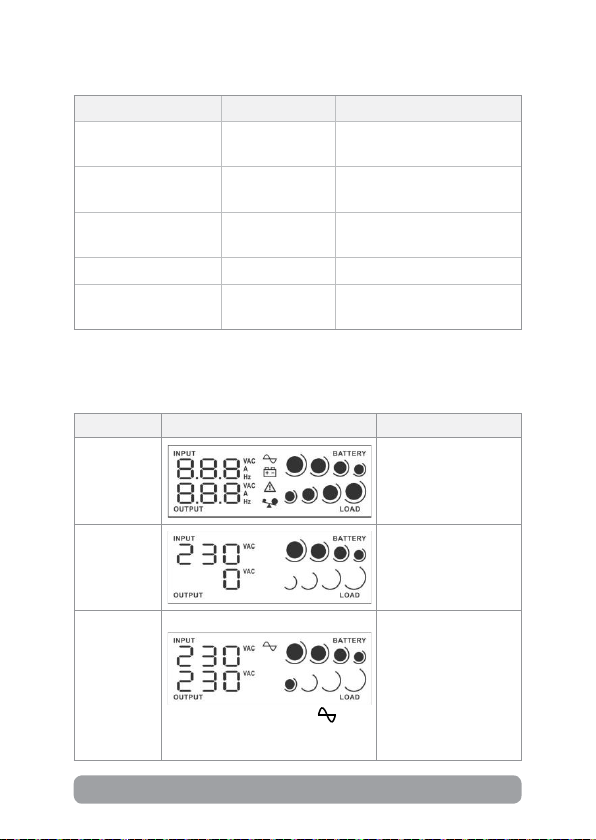
LED Alarm UPS Status
Green (LED on) O
Yellow (LED ashing)
Yellow (LED ashing)
Sounding every
10 seconds
Sounding every
second
The mains is normal and
UPS is operated normally.
Power failure occurs and
UPS is on baery mode.
Low baery
Green (LED o) O UPS is o.
Red (LED on)
Connuously
sounding
UPS fault
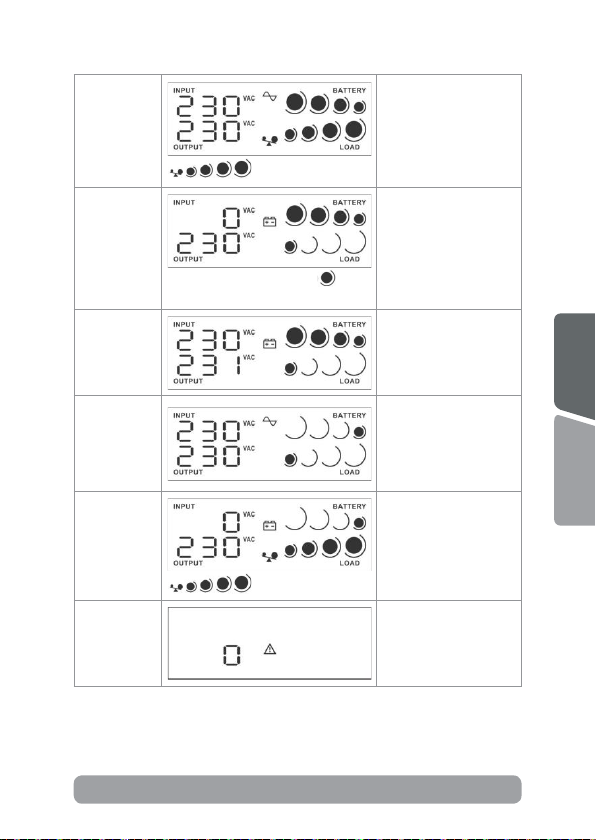
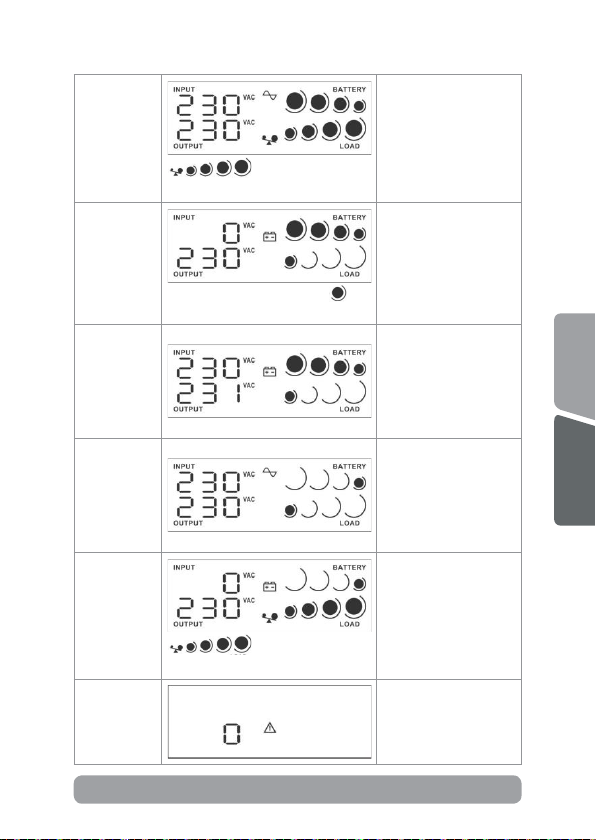
5.2 LCD display indicators (for Token 800 model)
UPS Mode LCD display Descripon
UPS Power
on
Standby
Mode
AC Mode
10
When AVR is funconing, icon
will ash every second.
When UPS is powered
on, it will enter this
mode for few seconds.
In standby mode,
no output power is
available.
When the input
voltage is within
acceptable range, UPS
will provide stable AC
power to output. The
UPS will also charge
the baeries in AC
mode.
Page 11
Overload in
AC mode
When overload occurs,
alarm will beep every
0.5 second.
Icons will ash.
Baery
Mode
Self-Test
Mode
Baery
replacement
alarm
Overload
in baery
mode
Fault mode
When baery level is low, icon
will ash every second .
Icons will ash.
Alarm will beep every
10 seconds.
This funcon is only
acvated via soware
for the model with
communicaon port.
Alarm will beep every
2 seconds. Only
available for the model
with communicaon
funcon.
When overload occurs,
alarm will beep every
0.5 second.
A fault occurs in
the UPS. Alarm will
connue beeping.
11
English
Română
Page 12

Troubleshooting6
Problem Possible cause Soluons
Charge the UPS at least 6
hours.
Replace the baery with the
same type of baery.
Press the power switch
again to turn on the UPS.
Remove some loads rst.
Before reconnecng
equipment, please verify
that the load matches the
UPS capability specied in
the specs.
Charge the UPS at least 6
hours.
Replace the baery with the
same type of baery.
Reconnect the power cord
properly.
No LCD
display on the
front panel.
Alarm
connuously
sounds when
the mains is
normal.
When power
fails, back
up me is
shorten.
The mains is
normal, but
the unit is on
baery mode.
Low baery.
Baery fault.
The UPS is not
turned on.
The UPS is overload.
The UPS is overload. Remove some crical load.
Baery voltage is
too low.
Baery defect. It
might be due to
high temperature
operaon
environment, or
improper operaon
to baery.
Power cord is loose.
NOTE!
If any abnormal situaons occur that are not listed above, please call for
service immediately.
12
Page 13

Disposal of Old Electrical & Electronic Equipment
(Applicable in the European Union and other European countries with
separate collecon systems)
This symbol on the product or on its packaging indicates that this product shall not be
treated as household waste.
Instead it shall be handed over to the applicable collecon point for the recycling of
electrical and electronic equipment.
By ensuring this product is disposed of correctly, you will help prevent potenal
negave consequences for the environment and human health, which could otherwise
be caused by inappropriate waste handling of this product.
The recycling of materials will help to conserve natural resources.
13
English
Română
Page 14

Mulțumim pentru ca ați ales produsele noastre!
Va rugam ciți cu atenție manualul de ulizare inainte de a pune
in funcțiune acest produs.
nJoy este un brand de solui UPS dedicate protecei si
rezervei de energie din diferite medii de ulizare, de la
UPS-ul va protejeaza echipamentele electronice de daune zice
si ofera o baterie de rezerva pentru a preveni pierderile de date in
cazul intreruperilor accidentale ale energiei electrice.
Din seria Token fac parte urmatoarele modele:
600 VA
800 VA
Conținutul pachetului
1
Unitatea UPS
Cablu de alimentare
rezidenal la industrial.
Token 600
Token 800
Manual de utilizare
Certicatdegaranție
Cablu USB
NOTA!
Inainte de instalare inspecta unitatea. Fiți siguri ca nimic din interiorul
pachetului nu este stricat. Ține pachetul original intr-un loc sigur pentru o
ulizare ulterioara.
14
Page 15
Prezentarea produsului
2
Token 600
1
8
5
34
POWER
SURGE ONLY BATTERY BACKUP
2
8
9
NOTA!
Punctele 6 si 7 sunt disponibile doar pentru modelul Token 800!
English
Română
15
Page 16
Token 800
1
8
6
5
34
BATTERY
INPUT
VAC
A
Hz
VAC
A
Hz
OUTPUT
LOAD
POWER
SURGE ONLY BATTERY BACKUP
7
2
8
9
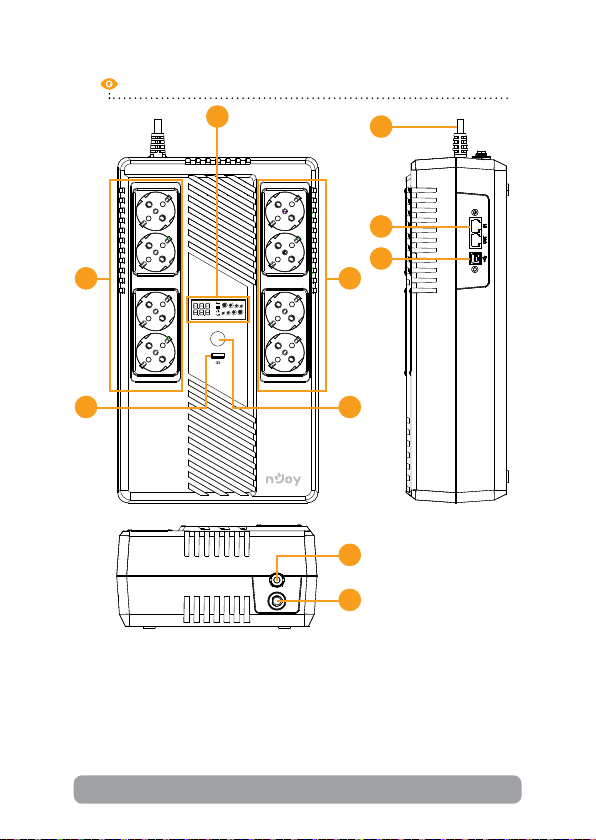
1. Indicatori LED (pentru modelul Token 600) / Asaj LCD (pentru
modelul Token 800): Indica informații despre stare, setari si
evenimente.
2. Buton de pornit/oprit: Porniți UPS-ul apasand butonul de pornire.
Ecranul LCD sau indicatorii LED se vor aprinde. Pentru a snge UPSul apasați acelasi buton.
16
Page 17

3. Prize cu backup pe baterii: Aceste prize asigura salvarea bateriei,
ltrarea EMI, condiționarea liniei si protecție la supratensiune.
Alimentarea bateriei este furnizata automat in caz de avarie.
4. Prize de protecție la supratensiune: Aceste prize nu furnizeaza
energie electrica in cazul intreruperii curentului.
5. Port HID USB: Permite UPS-ului sa apara in Windows ca o baterie.
In momentul intreruperii curentului ai opțiunea de a vedea nivelul
bateriei, care este incarcarea plus alți parametrii. Se pot folosi
opțiunile din Windows legate de controlul bateriei. Pentru opțiuni
exnse se recomanda instalarea soware-ului ViewPower.
6. Protecție pentru linia de modem/telefon si rețea: (doar pentru
modelul Token 800) Acest UPS protejeaza un telefon, un modem sau
un aparat de iesire / o singura linie (1 iesire / iesire) de la supratensiuni
atunci cand sunt conectate prin UPS.
7. USB charger port: 5VDC, 2.1A (doar pentru modelul Token 800)
8. Cablu de alimentare: Conectați-l la rețea.
9. Siguranța pentru curentul de intrare: Siguranța protejeaza in caz de
supraincarcare.
Averzari de siguranța
3
English
Va rugam sa respectați toate aversmentele si instrucțiunile de ulizare
din acest manual. Pastrați acest manual in mod corespunzator si ciți cu
atenție urmatoarele instrucțiuni inainte de instalarea aparatului. Nu folosiți
aceasta unitate inainte de a ci toate instrucțiunile de siguranța si de
ulizare cu atenție:
Transport
• Va rugam sa transportați sistemul UPS numai in ambalajul original
pentru a-l proteja impotriva socurilor.
Pregare
• Condensul poate aparea daca sistemul UPS este mutat dintr-un
mediu rece in unul cald. Sistemul UPS trebuie sa e uscat inainte de
a instalat. Va rugam sa alocați cel puțin doua ore pentru ca sistemul
UPS sa se aclimazeze cu mediul unde doriți sa il instalați.
• Nu instalați sistemul UPS langa apa sau in medii umede.
17
Română
Page 18

• Nu instalați sistemul UPS acolo unde ar expus la lumina directa a
soarelui sau in apropierea surselor de incalzire.
• Nu blocați oriciile de venlație ale carcasei UPS-ului.
Instalare
• Nu conectați aparate sau dispozive care ar suprasolicita sistemul
UPS (de exemplu: imprimantele laser) la mufele de iesire UPS.
• Instalați cablurile in asa fel incat nimeni sa nu calce pe ele.
• Nu conectați aparate de uz casnic, cum ar uscatoare de par la
prizele de iesire UPS.
• UPS-ul poate folosit de orice persoana, fara a necesita nici o
experiența anterioara.
• Conectați sistemul UPS numai la o priza cu impamantare, care trebuie
sa e usor accesibila si aproape de sistemul UPS.
• Va rugam sa folosiți numai cabluri de alimentare testate VDE si cu
marcaj CE (de exemplu: cablul de alimentare de la computer) pentru a
conecta sistemul UPS.
• La instalarea echipamentului, trebuie sa va asigurați ca totalul
curentului de scurgere al UPS si al dispozivelor conectate nu
depaseste 3,5 mA.
Operare
• Nu deconectați cablul de alimentare de la sistemul UPS sau de la priza
cladirii in mpul ulizarii, deoarece acest lucru ar anula impamantarea
de protecție a sistemului UPS si a tuturor sarcinilor conectate.
• Sistemul UPS are propria sursa de curent intern (baterii). Prizele de
iesire sau terminale de iesire pe categorii pot incarcate electric,
chiar daca sistemul UPS nu este conectat la sistemul electric al
cladirii.
• Pentru a deconecta complet sistemul UPS, apasați mai intai butonul
OFF/Enter pentru a deconecta sursa de alimentare.
• Nu lasați sa ajunga in interiorul unitații UPS orice obiect strain sau lichide.
• ATENȚIE: Acesta este un produs UPS de clasa C2. In mediul casnic, acest
produs poate cauza interferenţe radio, caz cand poate necesar sa se ia
masuri suplimentare.
18
Page 19

Intreținere, service si defecte
• Sistemul UPS funcționeaza cu tensiuni periculoase. Reparațiile pot
efectuate numai de catre personalul de intreținere calicat.
• Atenție - risc de soc electric. Chiar si dupa ce aparatul este
deconectat de la rețeaua electrica, componentele din interiorul
sistemului UPS sunt inca conectate la baterie si sunt incarcate
electric si periculoase.
• Inainte de a efectua orice fel de service si / sau intreținere,
deconectați bateriile si vericați sa nu existe curent sau tensiune
periculoasa in terminalele condensatorului de mare capacitate, cum
ar condensatorul BUS.
• Numai persoanele care sunt familiarizate in mod adecvat cu baterii si
cu masurile de precauție necesare pot inlocui bateriile si supraveghea
operațiunile. Persoane neautorizate trebuie sa e ținute departe de
baterii sistemului UPS.
• Atenție - risc de soc electric. Circuitul bateriei nu este izolat de
tensiunea de intrare. Tensiuni periculoase pot aparea intre bornele
bateriei si pamant. Inainte de a ange, va rugam sa vericați ca nu
exista tensiune!
• Bateriile pot provoca soc electric. Va rugam sa luați masurile de
precauție specicate mai jos, precum si orice alte masuri necesare
atunci cand se lucreaza cu bateriile sistemului: dați-va jos ceasurile de
mana, inelele si alte obiecte metalice si folosiți doar instrumente cu
manere izolate.
• La schimbarea bateriilor, instalați acelasi numar si acelasi p de
baterii.
• Nu incercați sa distrugeți bateriile prin arderea lor. Acest lucru poate
cauza explozia bateriilor.
• Nu deschideți sau distrugeți bateriile. Scurgerea electroliților poate
provoca leziuni la nivelul pielii si ochilor si poate toxic.
• Va rugam sa inlocuiți siguranța numai cu acelasi p de siguranța si
amperaj pentru a evita pericolele de incendiu.
• Nu dezasamblați sistemul UPS.
English
Română
19
Page 20
Instalarea sistemului de UPS
4
4.1 Ghid de instalare Hardware
1. Condiții de depozitare
Instalați UPS-ul intr-o zona lipsita de praf si aerisita. Va rugam asezați
UPS-ul la cel puțin 20 de cm de alte echipamente pentru a evita orice fel
de interferențe. Nu puneți in funcțiune UPS-ul in condiții de umiditate si
temperatura ridicate (Consultați specicațiile pentru limitari).
2. Conectarea la rețea si incarcarea
Conectați cablul de alimentare la priza din perete. Pentru o funcționare
fara cusur, incarcați bateriile pentru cel puțin 6 ore inainte de prima
ulizare. UPS-ul se incarca automat cat este conectat la rețea.
3. Conectați echipamentele
Conectați echipamentele la prizele UPS-ului de pe panoul din fața.
Porniți UPS-ul de la butonul de ON, iar echipamentele conectate vor
protejate.
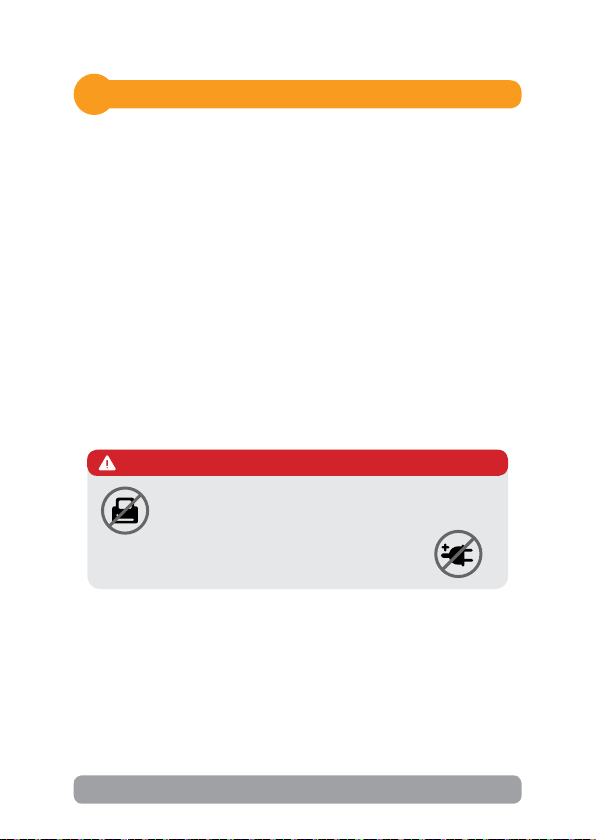
ATENȚIE
Din cauza consumului ridicat de energie, NU recomandam
alimentarea imprimantelor LASER sau a echipamentelor
audio cu SUBWOOFER la acest tip de UPS.
NU conectațialteACCESORII CU PROTECȚIE la
niciuna din prize.
4. Conectare pentru cablul de comunicare USB
Pentru a permite inchiderea si pornirea fara asistența a UPS-ului plus
monitorizarea lui, conectați cablul de comunicare la portul USB si la PC.
Cu programul de monitorizare instalat se poate verica oricand statusul
UPS-ului si programarea lui.
20
Page 21
5. Conectare modem/linie de telefon pentru protecție
Conectați o singura linie de telefon/conexiune internet pe care o doriți
protejata in priza IN de pe spatele UPS-ului, apoi de la priza OUT
conectați cablul la computer.
6. Opriți/porniți UPS-ul
Porniți UPS-ul apasand butonul de pornire, iar pentru a-l snge apasați
acelasi buton.
4.2 Ghid de instalare Soware
Instalați programul de management: pentru o congurare completa a
UPS-ului este recomandata instalarea programului de management de la
urmatorul link hps://www.power-soware-download.com/viewpower.html
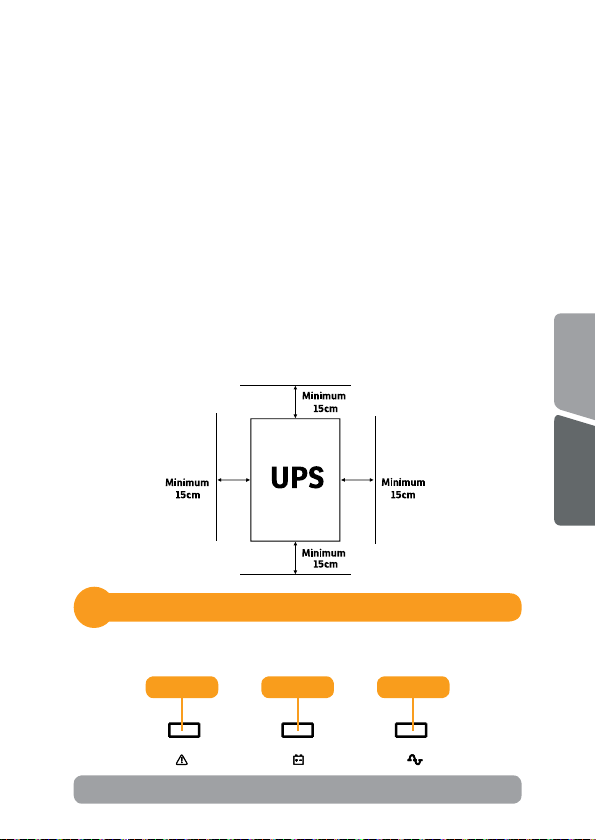
4.3 Poziționare
• Pentru o venlație opma a UPS-ului, va rugam sa il plasați la 15 cm
distanța de orice perete sau obiect
Indicatori
5
5.1 Indicatori LED (pentru modelul Token 600)
English
Română
Rosu Galben Verde
21
Page 22
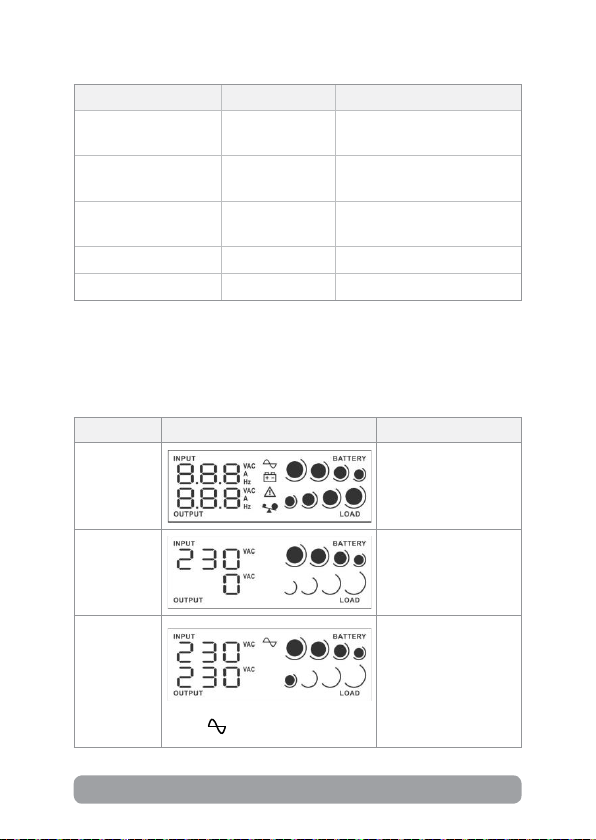
LED Alarma Status UPS
Verde (LED aprins) Oprita
Galben
(LED intermitent)
Galben
(LED intermitent)
Suna la ecare
10 secunde
Suna la ecare
secunda
UPS-ul funcționeaza
normal.
UPS funcționeaza pe modul
baterie.
Baterie descarcata
Verde (LED sns) Oprita UPS-ul este oprit
Rosu (LED aprins) Suna connuu Eroare UPS
5.2 Asaj ecran LCD (pentru modelul Token 800)
Mod UPS Asaj LCD Descriere
Cand UPS-ul porneste
UPS pornit
va intra in aceasta
stare pentru cateva
secunde.
Mod In
Asteptare
Mod AC
22
Cand AVR-ul funcționeaza,
icoana
va lumina intermitent.
In acest mod nu exista
tensiune la prizele
UPS-ului.
Cand tensiunea de
intrare este in limite
acceptabile UPS-ul va
oferi tensiune, in plaja
de lucru, la prizele de
iesire. UPS-ul incarca
bateriile in acest mod.
Page 23
Supra-
incarcare in
mod AC
intermitent.
Icoanele vor lumina
Cand apare
supraincarcarea alarma
va suna la ecare 0.5
secunde.
Mod Baterie
Mod Auto-
Test
Aversment
schimbare
baterii
Supra-
incarcare in
mod baterie
Mod Eroare
Cand bateria e slaba, icoana va
lumina intermitent.
intermitent.
Icoanele vor lumina
Alarma va suna la
ecare 10 secunde.
Aceasta funcție
este acvata doar
prin intermediul
programului pentru
modelul cu port de
comunicare.
Alarma va suna la
ecare 2 secunde.
Aceasta funcție este
disponibila doar pentru
modelul cu funcție de
comunicare.
Cand apare
supraincarcarea alarma
va suna la ecare 0.5
secunde.
Cand apare o eroare
UPS-ul va suna
intermitent.
23
English
Română
Page 24

6
Probleme si soluții
Problema Posibila cauza Soluții
Incarca UPS-ul cel puțin
6 ore.
Inlocuieste bateriile cu
unele de acelasi fel.
Apasa butonul de pornire.
Deconectați o parte din
echipamente de la prizele
UPS-ului. Asigurați-va ca
incarcarea nu depaseste
valoarea acceptata de UPS.
Deconecteaza din
echipamente.
Incarca UPS-ul cel puțin
6 ore.
Inlocuieste bateriile cu
unele de acelasi fel.
Conecteaza cablul de
alimentare corect.
Nicio
informație pe
eranul LCD.
Alarma suna
connuu cand
tensiunea
la priza e
normala.
UPS-ul nu mai
e alimentat
de la priza,
perioada de
back-up este
mai scurta.
Tensiunea de
incarcare e
normala dar
UPS-ul e in
modul Baterie.
Baterie slaba.
Eroare la baterie.
UPS-ul nu este
pornit.
UPS-ul este
supraincarcat.
UPS-ul este
supraincarcat.
Voltajul bateriilor
este prea mic.
Defect la
baterie datorata
temperaturilor
ambientale ridicate
sau bateriile nu
funcționeaza corect.
Cablul de alimentare
nu e conectat corect.
NOTA!
Daca apar situații iesite din comun care nu sunt in tabelul de mai sus, sunați
imediat la service-ul specializat.
24
Page 25

Dezafectarea echipamentelor electrice si electronice vechi
(Se aplica pentru ţarile membre ale Uniunii Europene si pentru alte țari
europene cu sisteme de colectare separata).
Acest simbol aplicat pe produs sau pe ambalajul acestuia indica faptul ca acest produs
nu trebuie tratat ca pe un deseu menajer.
El trebuie predat punctelor de reciclare a echipamentelor electrice si electronice.
Asigurandu-va ca acest produs este dezafectat in mod corect, veţi ajuta la prevenirea
posibilelor consecințe negave asupra mediului si a sanatații umane, care ar putut
surveni daca produsul ar fost dezafectat in mod necorespunzator.
Reciclarea materialelor va ajuta la conservarea resurselor naturale.
25
English
Română
Page 26

EU Declaration of Conformity
We, manufacturer / importer
DAI-TECH SRL
28 Popa Sapca
300057, Timisoara
Romania
declare that the products
UPS Token Series:
UPCSBLS660TTOAZ01B
UPCSBLS680TTOAZ01B
are in conformity with
(EC conformity marking)
Tested with the listed standards, the above mentioned products were found
in compliance with 2014/30/EU EMC Directive and with 2014/35/EU LVD
Directive.
EN 62040-2:2006+AC:2006
EN 61000-3-2:2014
EN 61000-4-3:2006+A2:2010
EN 61000-3-3:2013
EN 62040-1:2008+A1:2013
(RoHS conformity marking) in accordance with European Directive 2011/65/EU.
Stamp
and in conformity with
May 25, 2020
Timişoara
Date and location Signature and name
Tommy Lee
Page 27

Declarație UE de conformitate
Noi, in calitate de producator / importator
DAI-TECH SRL
28 Popa Sapca
300057, Timisoara
Romania
declaram ca urmatoarele produse
UPS Token Series:
UPCSBLS660TTOAZ01B
UPCSBLS680TTOAZ01B
sunt conforme cu
(simbolul de conformitate europeana)
Testate in standardele acceptate, produsele menționate sunt conforme cu
directivele 2014/30/EU EMC si cu directiva 2014/35/EU LVD.
EN 62040-2:2006+AC:2006
EN 61000-3-2:2014
EN 61000-4-3:2006+A2:2010
EN 61000-3-3:2013
EN 62040-1:2008+A1:2013
(simbolul de conformitate RoHS ) in acord cu directiva europeana 2011/65/EU.
Stampila
si in conformitate cu
Mai 25, 2020
Timişoara
Datasilocația
Tommy Lee
Semnatura si nume
Page 28

 Loading...