

nJoy AVRL-10001AL-CS01B, AVRL-20002AL-CS01B, AVRL-3005TAL-CS01B, AVRL-5005TAL-CS01B User guide
Page 1
Alvis
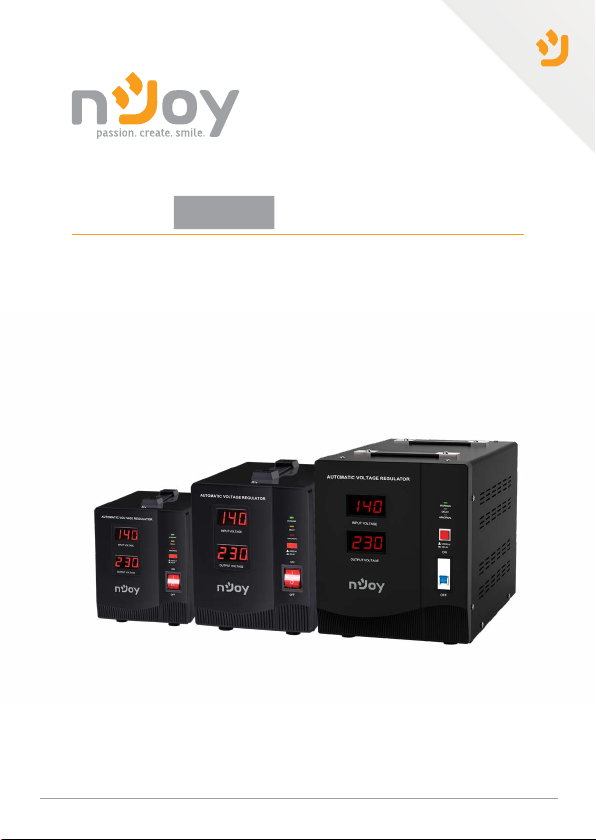
AVRL-10001AL-CS01B
AVRL-20002AL-CS01B
AVRL-3005TAL-CS01B
AVRL-5005TAL-CS01B
series
User Manual
Manual de utilizare
1
Before using this product, carefully read all product documentation and retain it for future reference.
278.23.23.0
Page 2

Thank you for purchasing our products!
Please read this manual before using the product.
nJoy is a brand of power and backup protection products
that create solutions for multiple levels of environment
The nJoy Alvis Series is the ideal protection for computers
or other electronic equipment. With its AVR-protected sockets
regulates the input voltage and eliminates the problems
created by under-voltage or over-voltage fluctuations.
Besides, it is provided with selection for delay time that
eliminates transients that can affect connected equipment.
This high performance AVR Series comes with the versatility
to fit all kinds of equipment with its input voltage range
The following models belong to the Series:
complexity, residential to industrial.
selection.
02
1000VA
2000VA
3000VA
5000VA
Alvis 1000
Alvis 2000
Alvis 3000
Alvis 5000
Page 3
Package Contents
1
AVR Unit.
User Manual.
Power Cord (attached).
Warranty Card.
Product Overview
2
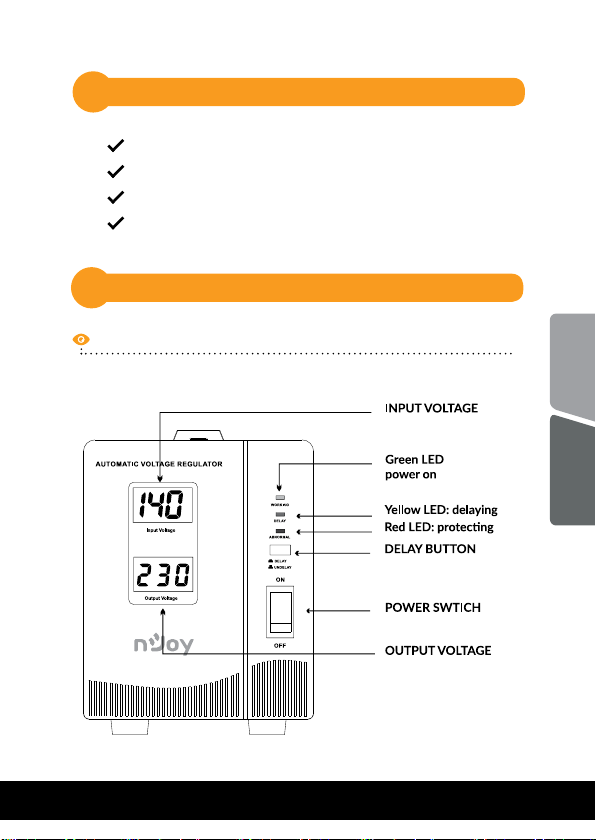
Front View
03
Alvis 1000
English
Romana
Page 4
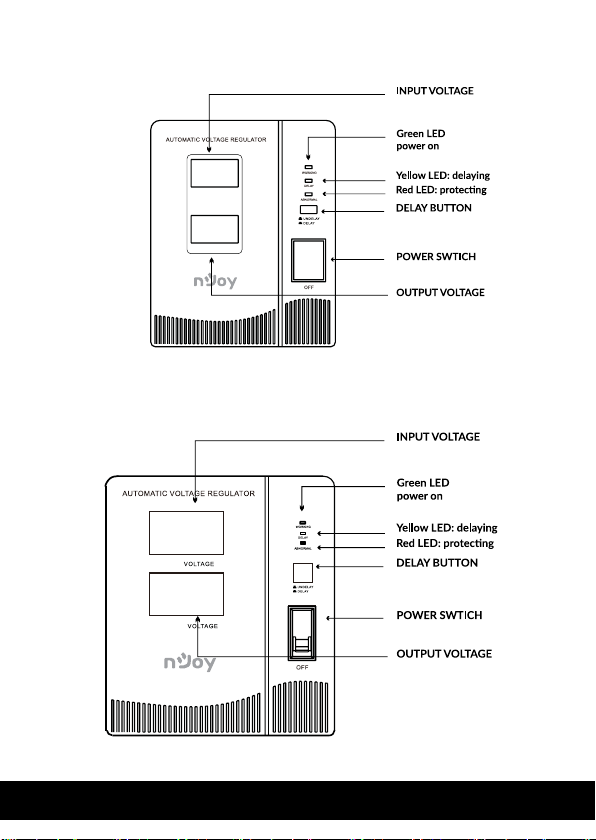
Alvis 2000
Alvis 3000/Alvis 5000
INPU T
OUTPU T
ON
ON
04
Page 5
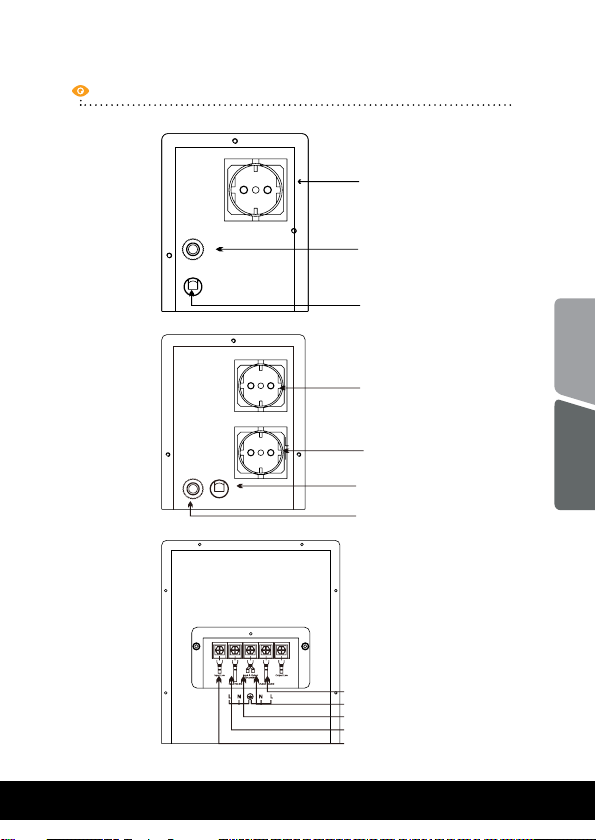
Back View
Alvis 1000
Alvis 2000
OUTPUT SOCKET
CIRCUIT BREAKER
AC INPUT CABLE
OUTPUT SOCKET
OUTPUT SOCKET
English
05
Alvis 3000/
Alvis 5000
INPUTO UTPUT
AC INPUT CABLE
CIRCUIT BREAKER
OUTPUT PHASE CABLE
OUTPUT NEUTRAL CABLE
EARTH CABLE
INPUT NEUTRAL CABLE
INPUT PHASE CABLE
Romana
Page 6
General Specifications3
Microprocessor control guarantees high reliability
Time delay function eliminates transients that can
affect connected equipment
Under-voltage, over-voltage, over-heat and over
current protection
Provides stable output voltage
Provide surge and spike suppression
NOTE: For the full list of technical specifications please
see the AlvisSeries datasheet found at www.nJoy.global
06
Page 7
Important Safety Warnings4
The unit is designed only for use within 45Hz to
65Hz (depending on the model) input frequency
and pure sine wave environment. Any other
input frequency or wave form will affect the
voltage range and load capability.
Please DO NOT connect the unit to the
environment with direct current or simulated
sine wave.
To prevent the risk of fire or electric shock,
install the device in a temperature and humidity
controlled indoor area free of conductive
contaminants. (See the specifications in
the product’s datasheet for the acceptable
temperature and humidity range.)
Don’t connect any appliances to AVR, which
exceeds its rated power capacity.
English
Romana
07
Page 8
20 cm
ON
OUTPUT
INPUT
20 cm
20 cm
Instalation and Initial Startup5
Step 1. Inspection
Remove the unit from the shipping package and inspect it for
damage that might have occurred during transportation.
Notify the carrier and place of purchase if any damage is
found.
Step 2. Placement & Storage Conditions
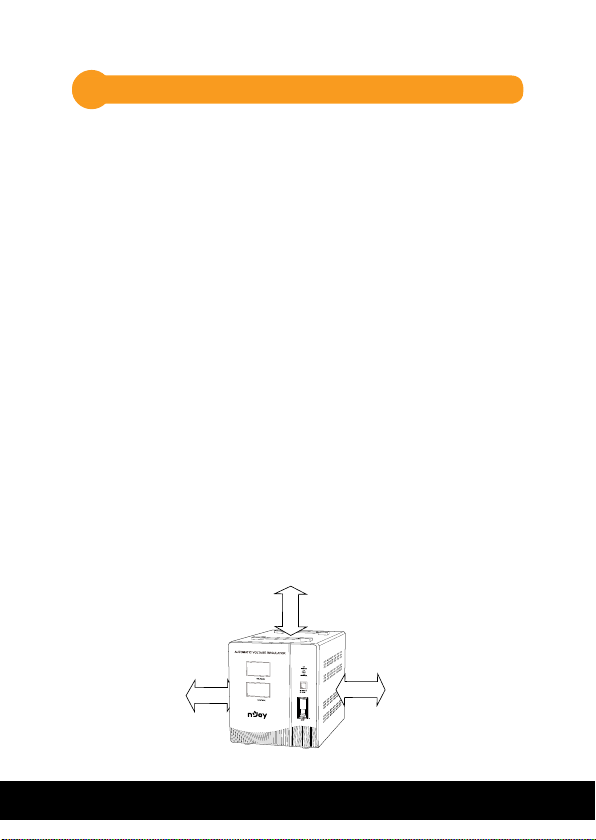
Install the unit in a protected area that is free of excessive
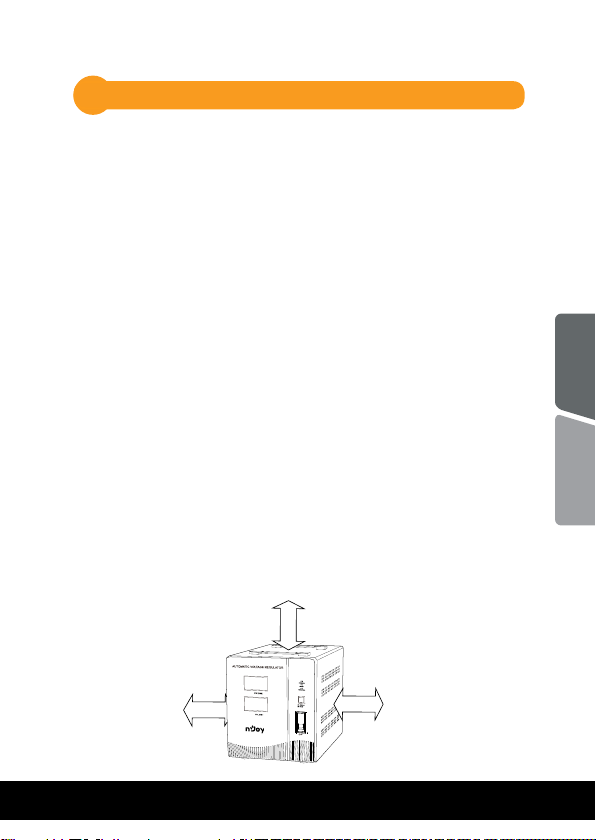
dust and has adequate air flow. Please place the unit away
from other units at least 20cm to avoid interference. Do
NOT block the top or side air vents on the unit. Do not use
the unit in an environment where the ambient temperature
or humidity is outside the limits listed in the specifications.
Operate the unit in an environment free of excessive dust,
mechanical vibration, inflammable gases and explosive or
corrosive atmospheres.
08
Page 9
Step 3. Connect the Loads
The AVR-protected receptacles will provide stable power to
connected devices by boosting and bucking the input
power. Therefore simply connect sensitive loads to
AVR-protected receptacles in order to secure them.
3.1 Make sure all appliances are turned “OFF”, and put the
POWER SWITCH of AVR to “OFF” position.
3.2 For Alvis 1000 and 2000, plug the appliances into the
OUTPUT SOCKET of the AVR
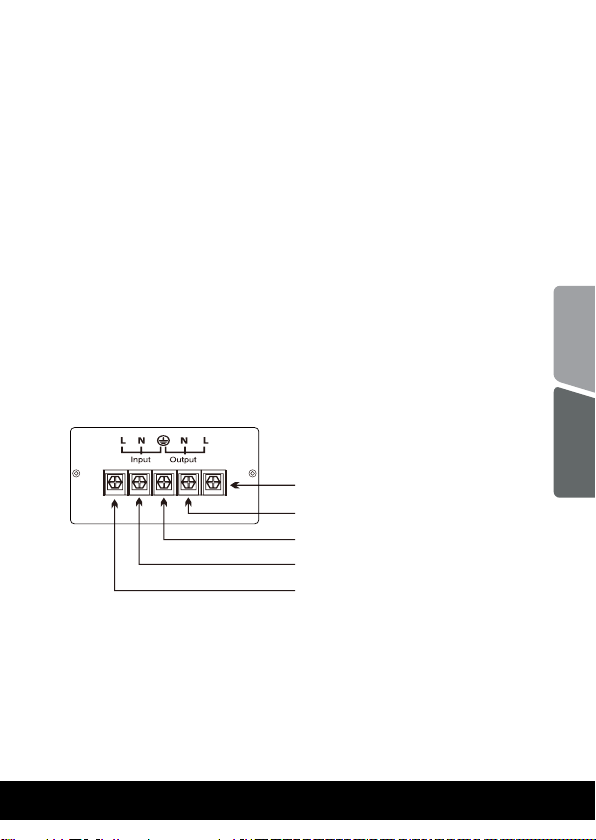
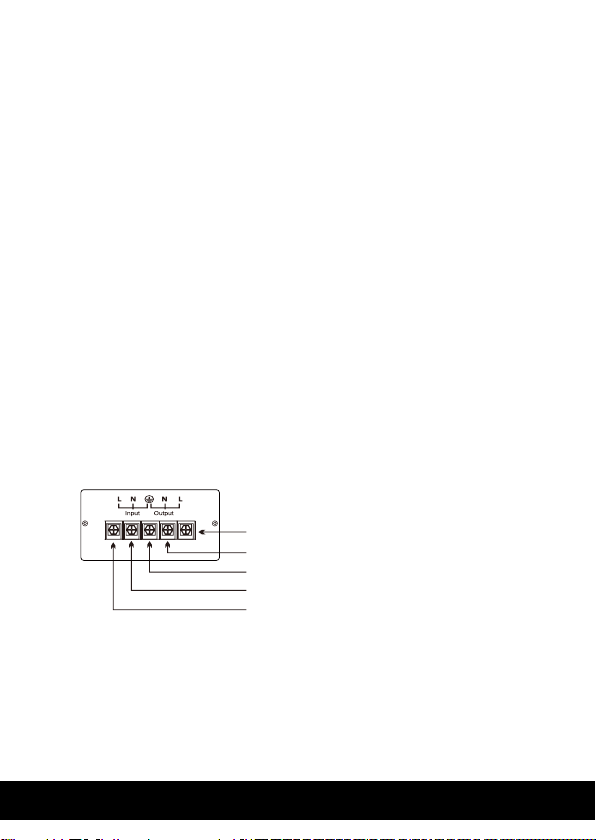
3.3 For Alvis 3000 and 5000 make wiring connection as
shown in Figure 1.
English
OUTPUT PHASE CABLE
OUTPUT NEUTRAL CABLE
EARTH CABLE
INPUT NEUTRAL CABLE
INPUT PHASE CABLE
FIGURE 1
Step 4. Turn On/Off the Unit
Turn on the unit by pressing the power switch to “ON”
position. Then, all connected devices will be powered on.
09
Romana
Page 10
Operation
6
Delay Operation
6.1
The “DELAY” means the output of the AVR will be delayed
for a specific time, after switching on the AVR or the output
is restored from a protecting status.
It will prevent the appliances from being damaged due to
frequent switching on and off.
Undelay
The default delay time is 6 seconds (UNDELAY) or 3
minutes (DELAY). Press down the DELAY BUTTON to select
the “DELAY”, or press it up to select the “UNDELAY”.
For the appliances with motors and compressors, like fans, refrigerators, cooler, freezers,
air-conditioners, pumps, small motors, please
select Delay.
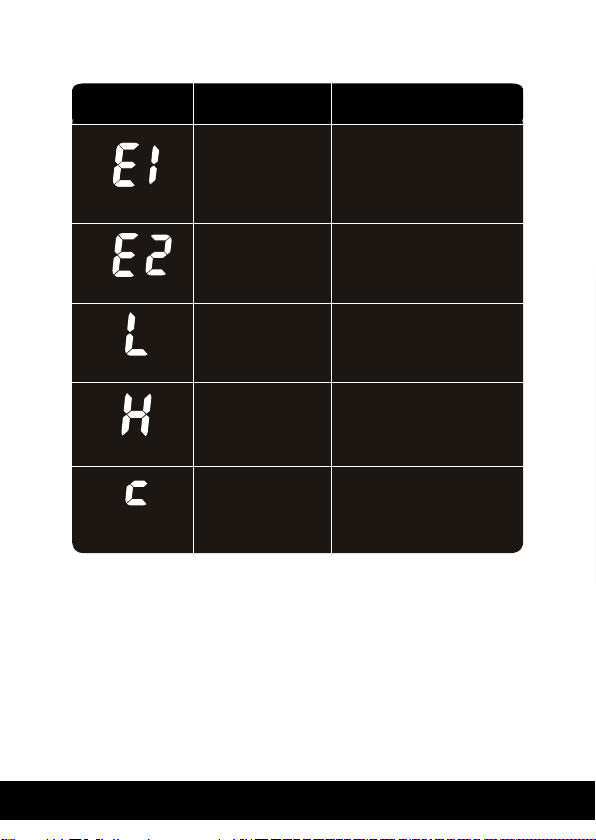
Over Voltage (High Voltage) Protection
6.2
In case that input voltage is over the normal range, the
output will be cut off automatically and a letter “H” will be
shown in the display.
Delay
10
Page 11
When input mains power returns to normal range, the AVR
will restore the output automatically.
6.3
Under Voltage (Low Voltage) Protection
In case that input voltage is below the normal range, the
output will be cut off automatically and a letter “L” will be
shown in the display.
When input mains power returns to normal range, the AVR
will restore the output automatically.
6.4
Over Temperature Protection
In case that the temperature of transformer windings
is beyond the normal range, the output will be cut off
automatically and letter “c” will be flashing in the display.
English
When temperature of transformer windings returns
to normal range, the AVR will restore the output
automatically.
6.5
Short Circuit Protection
In case a short circuit happens to the AVR or appliances,
the AIR BREAKER or CIRCUIT BREAKER will trip off to cut
off the input power supply.
Check if the appliances have been short circuited, if so,
please remove them.
11
Romana
Page 12
If the AVR is short circuited, do not use it! Please turn
to the authorized dealer or service center.
6.6
Smart Overload Protection
Once it is overloaded, the AVR will give display warning to
inform the user to reduce the connected appliances.
When load is >110%±8%: output will be cut off within 30s if
overload is not removed
When load is >120%±8%:
overload is not removed
Once it’s protected, the AVR will retry to restore output for
3 times, if overload is still not removed during this period,
the AVR will stop retrying to restore output, at this time a
letter “E1” or “E2” will be flashing in the display.
When letter “E1” or “E2” is flashing, even if the overload is
removed, the output won’t be restored. In this case, please
conduct below steps:
(a) Put the “POWER SWITCH” to “OFF” position to
disconnect mains power.
(b) Switch off all the connected appliances, and
remove the exceeding load.
(c) Switch on AVR and then switch on the appliance.
output will be cut off within 6s if
12
Page 13
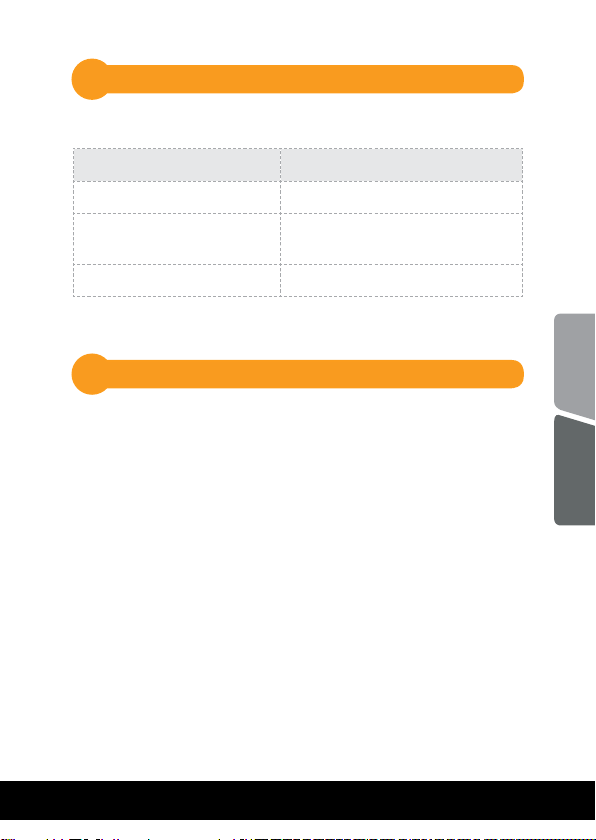
LED Indicators
7
Mode LED Indication
Normal Green led lighting
Time Delay
Abnormal(output cutoff) Red & Green led lighting
Applications
8
The Alvis Series is design for use with voltage sensitive
equipment such as: computers, hydrophore, medical and
laboratory equipment.
When using the voltage regulator with an Uninterruptible
Power Supply (UPS) connect the UPS to the output
receptacle of the Series unit then connect it (the AVR) to the
wall outlet.
Yellow flashing & Green led
lighting
English
Romana
13
Page 14
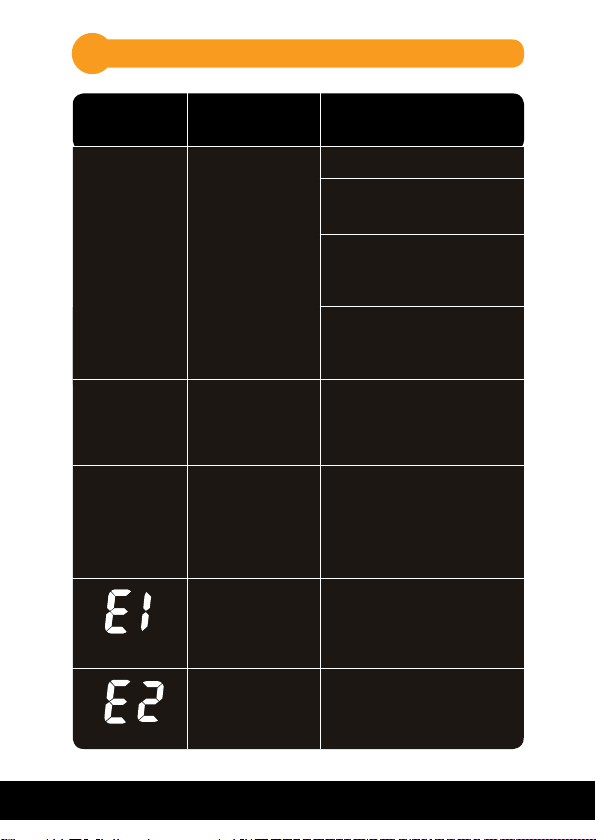
Troubles and solutions9
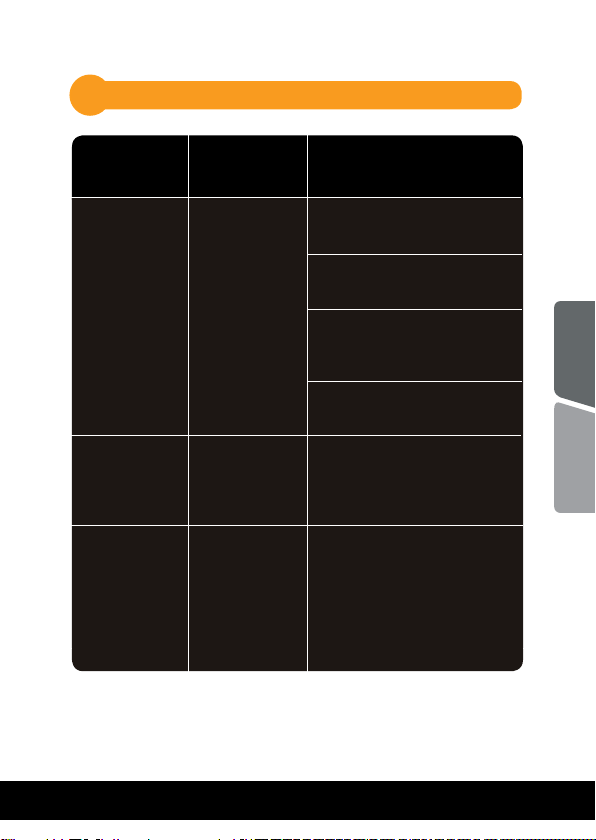
Problem/
error code
Power LED is
not ON.
Circuit
breaker
is”tripped”.
The unit is
turned off
automatically
and the Power
LED is not lit.
Output Voltage
Output Voltage
Possible Cause Solutions
Check if the mains is normal.
Check if the power cord is
Power switch
isn’t ON. AC
plug connection
failed. AC socket
without power or
power failure.
The unit is
overload.
The unit is
overheated. It’s
internal protected
function.
Overload protecting when load is
>110%, but less
than120%
Overload protecting when load is
>120%
connected firmly.
Check if the connected
devices are connected to the
unit firmly.
Check if the unit is turned on.
Use the below table to solve
the minor problems
Remove some loads first.
Reset the circuit breaker by
pressing the button again.
Remove some loads and wait
until the unit cool down.
Then turn on the unit again.
Remove unnecessary
appliances connected;
if still not solved, contact
the dealer
Remove unnecessary
appliances connected;
if still not solved, contact
the dealer
14
Page 15
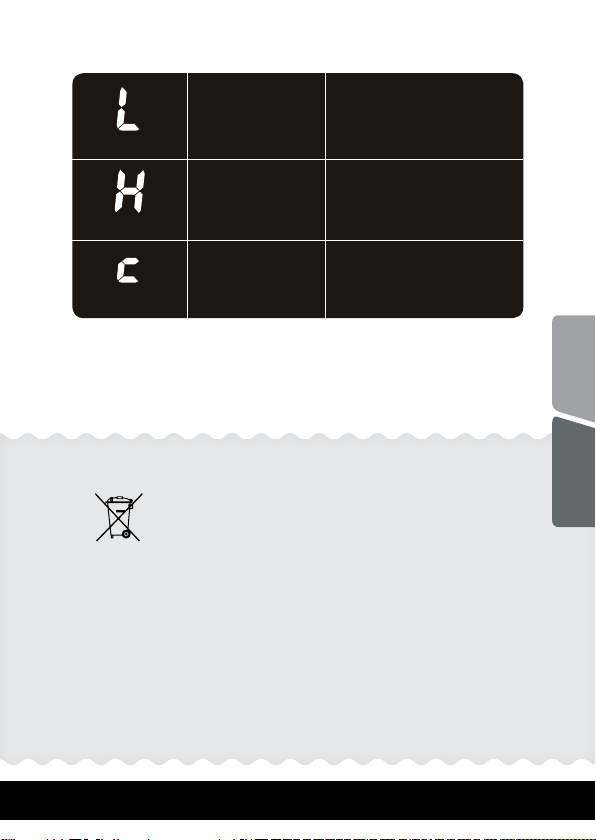
Output Voltage
Under voltage
protection
Wait till input voltage
increases to normal range
Over voltage
Output Voltage
Output Voltage
This symbol on the product or on its packaging indicates that this product shall
not be treated as household waste.
Instead it shall be handed over to the applicable collection point for the
recycling of electrical and electronic equipment.
By ensuring this product is disposed of correctly, you will help prevent potential
negative consequences for the environment and human health, which could
otherwise be caused by inappropriate waste handling of this product.
The recycling of materials will help to conserve natural resources.
protection
Over temperature
protection for
Transformer
windings
Disposal of Old Electrical & Electronic Equipment
(Applicable in the European Union and other European countries
with separate collection systems)
Wait till input voltage
decreases to normal range
Wait till the temperature
of Transformer windings
decreases to normal range
English
Romana
15
Page 16
Memo
16
Page 17

Va multumim ca ati ales produsele noastre!
Va rugam cititi manualul de utilizare inainte de a pune in
nJoy este un brand de solutii UPS dedicate protectiei si
rezervei de energie din diferite medii de utilizare, de la
Seria nJoy Alvis reprezinta solutia perfecta pentru utilizatorii
care sunt in cautarea unui regulator automat de tensiune
cu scopul de a proteja electronicele sensibile de acasa sau
de la birou impotriva sub-tensiunilor si supra-tensiunilor.
Seria dispune de functia de intarziere la repornire. Aceasta
functie ajuta la eliminarea perioadelor tranzitorii care pot
afecta echipamentele conectate. Acest AVR performant
este caracterizat prin versatilitatea de a se potrivi tuturor
tipurilor de echipamente datorita posibilitatii de selectie a
functiune acest produs.
rezidential la industrial.
tensiunii.
Din serie fac parte urmatoarele modele:
1000VA
2000VA
3000VA
5000VA
Alvis 1000
Alvis 2000
Alvis 3000
Alvis 5000
English
Romana
17
Page 18
Continutul pachetului
1
Unitatea AVR.
Manual de utilizare.
Cablu de alimentare (atasat).
Certificat de garantie.
Prezentarea produsului2
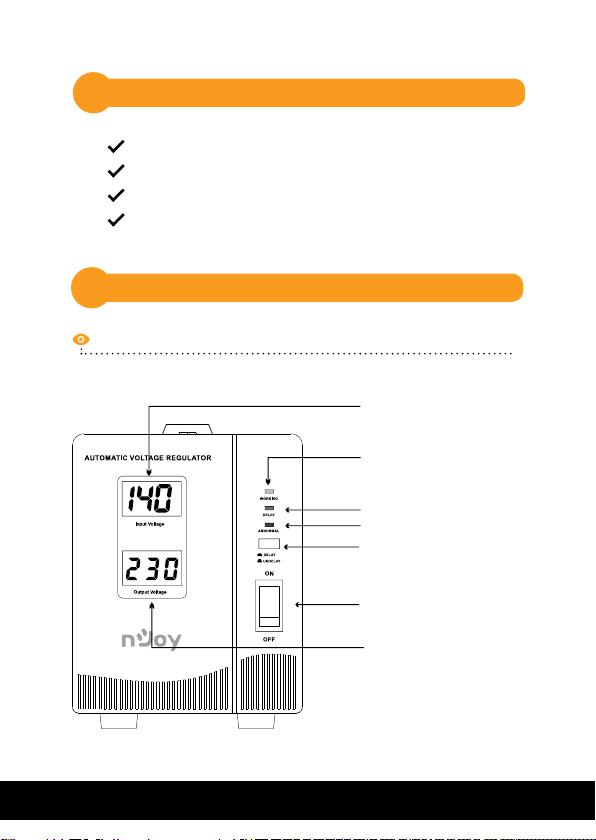
Vedere frontala
18
Alvis 1000
Tensiune intrare
LED verde: pornit
LED galben: intarziere
LED rosu: funtionare anormala
Setare timp functie intarziere.
Intrerupator pornit/
oprit
Tensiune iesire
Page 19
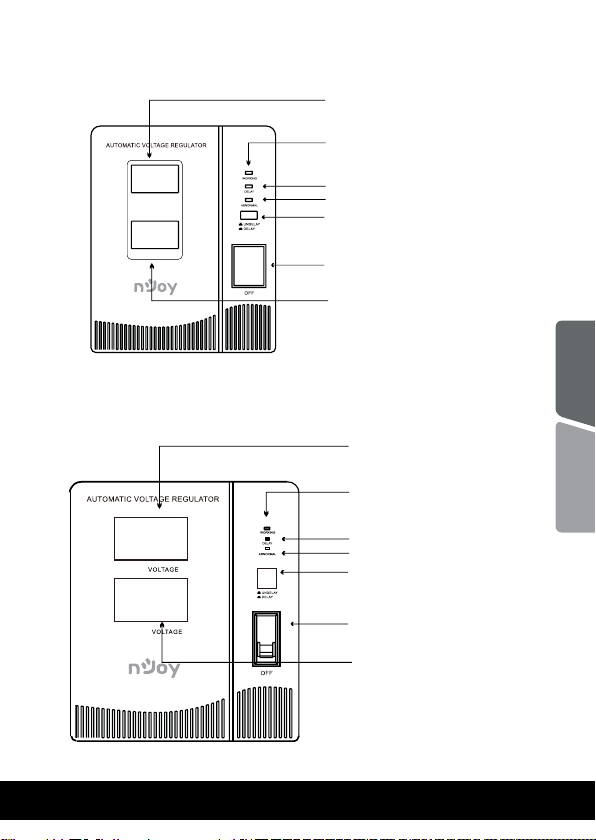
Alvis 2000
Tensiune de intrare
LED verde: pornit
LED galben: intarziere
LED rosu: funtionare anormala
Setare timp functie intarziere.
ON
Intrerupator pornit/
oprit
Tensiune iesire
English
19
Alvis 3000/Alvis 5000
INPU T
OUTPU T
Tensiune de intrare
LED verde: pornit
Romana
LED galben: intarziere
LED rosu: funtionare anormala
Setare timp functie intarziere.
ON
Intrerupator pornit/
oprit
Tensiune iesire
Page 20
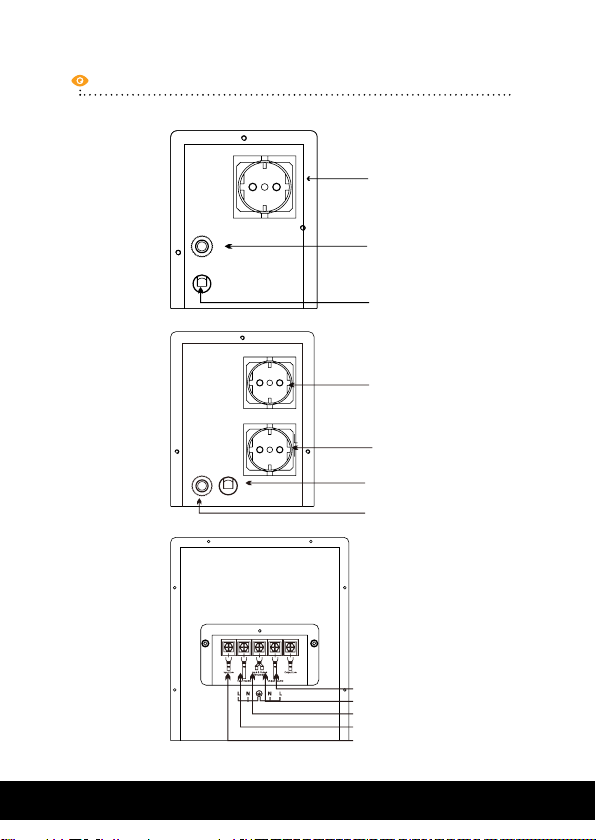
Vedere din spate
Alvis 1000
Alvis 2000
Alvis 3000/
Alvis 5000
PRIZA IESIRE
SIGURANTA
CABLU DE ALIMENTARE
PRIZA IESIRE
PRIZA IESIRE
AC INPUT CABLE
CIRCUIT BREAKER
20
INPUTO UTPUT
CABLU FAZA IESIRE
CABLU NUL IESIRE
CABLU IMPAMANTARE
CABLU NUL ALIMENTARE
CABLU FAZA ALIMENTARE
Page 21
Specificatii generale3
Reglarea prin microprocesor garanteaza o
alimentare cu fiabilitate ridicata
Functia de intarziere la pornire ajuta la
eliminarea perioadelor tranzitorii care pot
afecta echipamentele conectate
Protectie la subtensiune şi supratensiune,
supra-incalzire si supra-incarcare
Ofera tensiune de iesire stabila
Ofera protectie impotriva varfurilor de inalta si
joasa tensiune
NOTA: Pentru a vizualiza intreaga lista de specificatii
ale Seriei Alvis descarcati datasheet-ul produsului
de pe www.nJoy.global
English
Romana
21
Page 22
Instructiuni de siguranta4
Unitatea este destinata pentru utilizare la o
frecventa de intrare de 45Hz sau 65Hz (in functie
de model) si unda sinusoidala pura. Orice alta
frecventa de intrare sau orice alt tip de unda
va afecta plaja tensiunii de iesire si nivelul de
incarcare.
Va rugam sa NU conectati aparatul la curent
continuu sau unda sinusoidala simulata.
Pentru a preveni riscul de soc electric sau de
incendiu instalati unitatea intr-o incapere
controlata din punct de vedere al temperaturii
si al umiditatii. (Consultati specificatiile din
datasheet-ul produsului pentru a observa
nivelul de umiditate si intervalul de temperaturi
acceptate).
Nu conectati niciun aparat la AVR, care
depaseste capacitatea sa de putere nominala.
22
Page 23
5
Conectarea echipamentelor si prima utilizare
Pasul 1. Inspectare
Inainte de instalare va rugam sa verificati unitatea. Asigurativa ca nimic din interiorul pachetului nu este deteriorat! In
situatia in care sunt observate defectiuni va rugam anuntati
transportatorul si compania de unde a fost achizitionat AVR-ul.
Pasul 2. Conditii de depozitare si de amplasare
Instalati unitatea intr-o zona protejata, fara exces de praf
si in care exista un flux de aer adecvat. Va rugam sa asezati
unitatea la o distanta de minim 20 cm fata de alte
dispozitive electronice pentru a evita interferentele. Nu
blocati orificiile de aerisire de sus sau din partea laterala a
unitatii. Nu folositi aparatul intr-un mediu in care
temperatura ambientala sau umiditatea este in afara
limitelor prevazute in datasheet-ul produsului. Utilizati
aparatul intr-un mediu lipsit de praf excesiv, vibratii
mecanice, gaze inflamabile si atmosfere explozive sau
corozive.
20 cm
20 cm
INPUT
OUTPUT
20 cm
ON
English
Romana
23
Page 24
Pasul 3. Conectarea sarcinilor
Prizele protejate ale AVR-ului vor furniza energie stabila
dispozitivelor conectate prin amplificarea si reducerea
intrarii putere. Prin urmare, doar conectati aparatele
electrice la prizele protejate ale AVR-ului pentru a fi
protejate.
3.1 Asigurati-va ca toate aparatele sunt oprite si puneti
INTRERUPATORUL DE ALIMENTARE al AVR-ului in pozitia
„OPRIT”.
3.2 Pentru modelele Alvis 1000 si 2000, conectati aparatele
la priza shuko AVR-ului, pe care o gasiti in partea din spate.
3.3 Pentru modelele Alvis 3000 si 5000, faceti conexiunea
cablajului conform figurii 1.
CABLU FAZA IESIRE
CABLU NUL IESIRE
CABLU IMPAMANTARE
CABLU NUL ALIMENTARE
CABLU FAZA ALIMENTARE
figura 1
Pasul 4. Pornirea/Oprirea AVR-ului
Porniti unitatea, comutand intrerupatorul de alimentare in
pozitia „ON”. Apoi, toate dispozitivele conectate vor fi
alimentate.
24
Page 25

Operatii
6
Setarea functiei de intarziere la pornire
6.1
Setarea functiei de intarziere la pornire cand butonul
„intarziere” este apasat inseamna ca tensiunea de iesire
a AVR-ului va fi intarziata timp de 180s, dupa repornirea
AVR-ului.
Acesta functie va evita aparitia defectelor la dispozitivele
cu motor de curent alternativ din cauza pornirilor
consecutive.
Fara Intarziere
Timpul de intarziere prestabilit este de 6 secunde (FARA
INTARZIERE) sau 180 secunde (INTARZIERE).
Apasati BUTONUL DE INTARZIERE pentru a selecta
„INTARZIERE” sau apasati-l pentru a selecta „FARA
INTARZIERE”.
Pentru aparatele cu motoare si compresoare, precum
ventilatoare, frigidere, frigidere, congelatoare, aparate de
aer conditionat, pompe, motoare mici, va recomandam sa
folositi AVR-ul cu functia “INTARZIERE” selectata.
Protectie la supratensiune (inalta tensiune)
6.2
In cazul in care tensiunea de intrare este peste valoarea
acceptata, iesirea va fi intrerupta automat iar pe ecran va fi
afisat litera „H”.
Intarzire
25
English
Romana
Page 26
In momentul in care alimentarea de la retea va reveni la
valoarea acceptata, AVR-ul va restabili automat iesirea.
Protectie la subtensiune (tensiune joasa)
6.3
In cazul in care tensiunea de intrare va fi sub valoarea acceptata, iesirea va fi intrerupta automat iar pe ecran va fi
afisat litera „L”.
In momentul in care alimentarea de la retea va reveni la
valoarea acceptata, AVR-ul va restabili automat iesirea.
Protectie la temperatura ridicata
6.4
In cazul in care transformatorul intern se supraincalzeste,
iesirea va fi intrerupta automat iar pe ecran va fi afisat
litera „C”.
In momentul in care temperatura transformatorului intern
va reveni la valoarea acceptata, AVR-ul va restabili automat iesirea.
6.5 Protectie la scurt circuit
In cazul in care apare un scurtcircuit la AVR sau la
aparatele conecatate, siguranta se va declansa si va taia
alimentarea AVR-ului.
In acest caz verificati daca aparatele sunt in scurt, daca da,
acestea trebuie deconectate de la AVR.
26
Daca AVR-ul este in scurt, nu-l mai utilizati si
adresati-va centrului de service autorizat nJoy.
Page 27

Protectie inteligenta la suprasarcina
6.6
Odata ce AVR-ul este supraincarcat, va afisa un
avertisment pe ecran pentru a informa utilizatorul sa
reduca aparatele conectate.
Cand sarcina este >110%±8%: iesirea va fi intrerupta in 30s,
in cazul in care suprasarcina nu este eliminata in acest interval
de timp.
Cand sarcina este >120%±8%: iesirea va fi intrerupta in 6s, in
cazul in care suprasarcina nu este eliminata in acest interval de
timp.
Odata ce va intrat in acesta protectie, AVR-ul va incerca
de 3 ori sa restabileasca iesirea, iar in cazul in care
suprasarcina inca nu a fost redusa, AVR-ul va ramane in
modul protejat, iar ecranul va afisa litera „E1” sau „E2”.
Odata ce litera „E1” sau „E2” este efisata, chiar daca
suprasarcina este eliminata, iesirea nu va fi restabilita. In
acest caz, va rog efectuati pasii de mai jos:
(a) Puneti „INTRERUPATORUL DE ALIMENTARE”
in pozitia „OPRIT” si deconectati alimentarea de la retea.
a(b) Opriti toate aparatele conectate si
indepartati sarcina excesiva.
(c) Conectati AVR-ul la retea, puneti
„INTRERUPATORUL DE ALIMENTARE” in pozitia „PORNIT”,
apoi conectati aparatele rand pe rand.
27
English
Romana
Page 28
Protectie inteligenta la suprasarcina
7
Indicatoarele luminoase LED
Mod Indicatii LED
Normal lumina verde aprins
Functia intarziere activa
Anormal lumina rosie + verde aprins
Yellow flashing & Green led
lighting
Aplicatii8
Seria Alvis a fost special conceputa pentru utilizarea cu
echipamentele sensibile la fluctuatiile de tensiune precum:
computere, centrale pe lemne, hidrofoare, aparatura
medicala si de laborator. Aceasta serie este proiectata si
pentru utilizarea cu ehipamentele casnice precum:
televizoare, combine frigorifice, echipamentele de
telefonie, DVD playere, modemuri si echipamente de
prelucrare a datelor.
Cand utilizati AVR-ul impreuna cu o sursa de alimentare
neintreruptibila (UPS), conectati UPS-ul la priza de iesire a
seriei Alvis si nu invers.
28
Page 29
Probleme si solutii
9
Problema Cauza posi-
bila
Butonul de
pornire nu este
LED-ul de
pornire nu
este aprins
Intrerupatorul este sarit/
declansat
Unitatea
se inchide
automat si
LED-ul de
alimentare nu
este aprins.
aprins. Cablul
de alimentare
este defect.
Priza de
alimentare nu
are curent.
Unitatea este
supraincarcata
Unitatea este
supra-incalzita. Oprirea
este datorata
unei protectii
interne.
Solutii
Verifica daca exista sursa de
curent.
Verifica daca cablul de
alimentare este conectat ferm.
Verifica daca aparatele
conectate la unitate sunt
conectate ferm.
Verifica daca unitatea este
pornita.
Reduceti numarul de
consumatori. Resetati
intrerupatorul prin apasarea
butonului de pornire.
Reduceti o parte din
consumatori si asteptati pana
cand unitatea se raceste. Apoi
reporniti unitatea.
English
Romana
29
Page 30
Problema
Cauza posibila
Solutii
Output Voltage
Output Voltage
Tensiune iesire
Tensiune iesire
Tensiune iesire
Overload protecting when load is
>110%,
but less
than120%
Overload protecting when load is
>120%
Protecție sub
tensiune
Protectie supra
tensiune
Protectie
temperatura
ridicata la nivelul
invelisului
Remove unnecessary
appliances connected;
if still not solved, contact
the dealer.
Remove unnecessary
appliances connected;
if still not solved, contact
the dealer.
Așteptați până când
tensiunea de intrare
crește la intervalul normal
Tensiune iesire
Protectie temperatura
ridicata la nivelul
invelisului
30
30
Page 31
Dezafectarea echipamentelor electrice si electronice vechi
(Se aplica pentru ţarile membre ale Uniunii Europene si pentru alte
tari europene cu sisteme de colectare separata)
Acest simbol aplicat pe produs sau pe ambalajul acestuia indica faptul ca acest
produs nu trebuie tratat ca un deseu menajer.
El trebuie predat punctelor de reciclare a echipamentelor electrice si electronice.
Asigurandu-va ca acest produs este dezafectat in mod corect veţi ajuta la
prevenirea posibilelor consecinte negative asupra mediului si a sanatatii umane.
Reciclarea materialelor va ajuta la conservarea resurselor naturale.
31
English
Romana
Page 32

32
 Loading...