

Page 1
All rights reserved Niveo International BV 2023
USER MANUAL
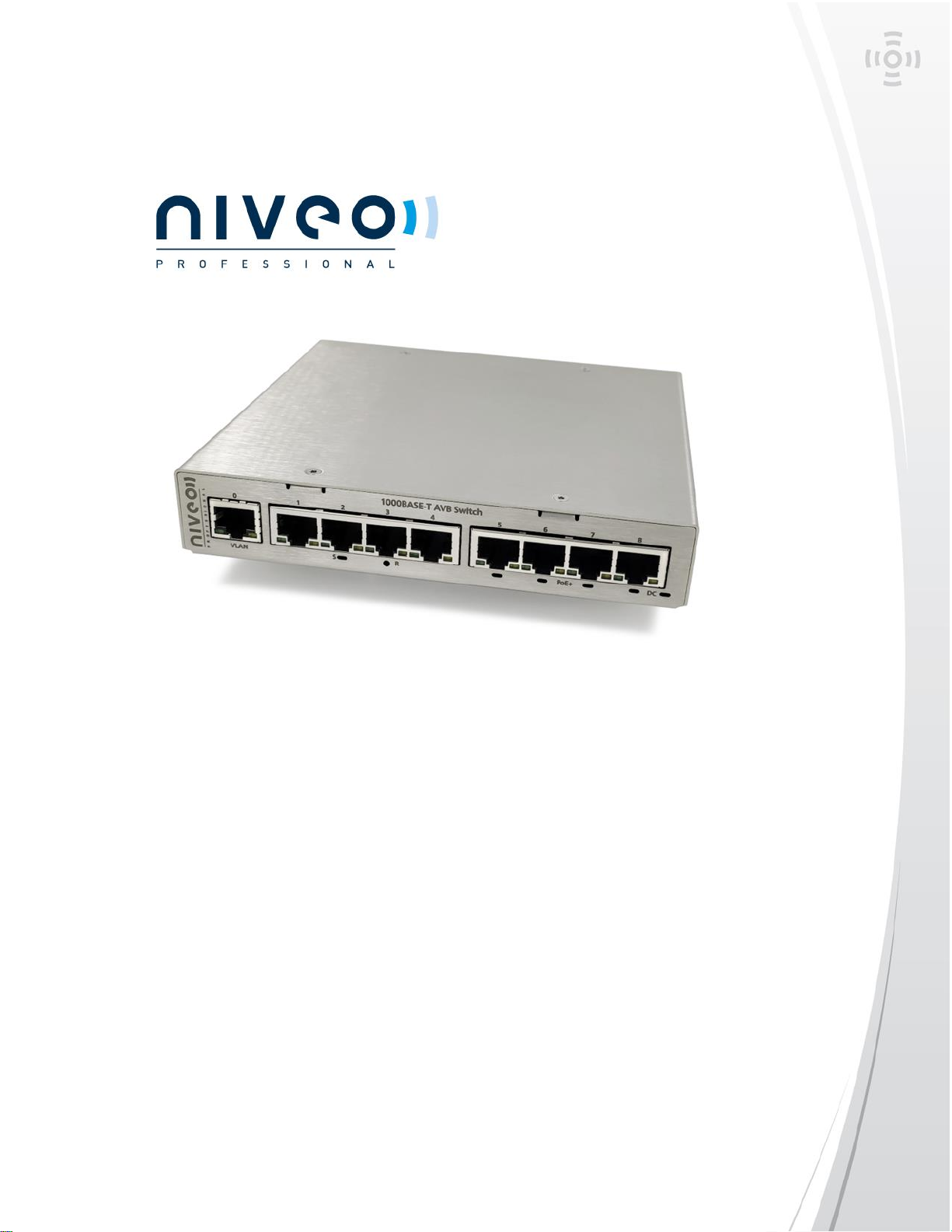
Niveo Professional NGSME9AVB
9-port stackable AVB/MILAN Switch
More information:
WWW.NIVEOPROFESSIONAL.COM
[email protected]
Page 2
All rights reserved Niveo International BV 2023
Introduction
Niveo Professional introduces the brand new NGSME9AVB switch, offering a ready -out
of the box- AVB switch that also supports Dante and PoE+. The switch requires no
configuration or difficult firmware uploads, nor any payment or activation of AVB license
fees. Just unbox, plug-in and relax.
The switch can be expanded to an 18-port design with a simple expansion cable.
With a simple command, you can add or remove ports to the Dante-VLAN or the AVBVLAN.
The industrial design and specifications, make this the most durable AVB-switch on the
market.
Quick Installation Guide
The NGSME9AVB switch is designed to minimize the need for configuration. Just unbox
and plug-in and the configuration is done.
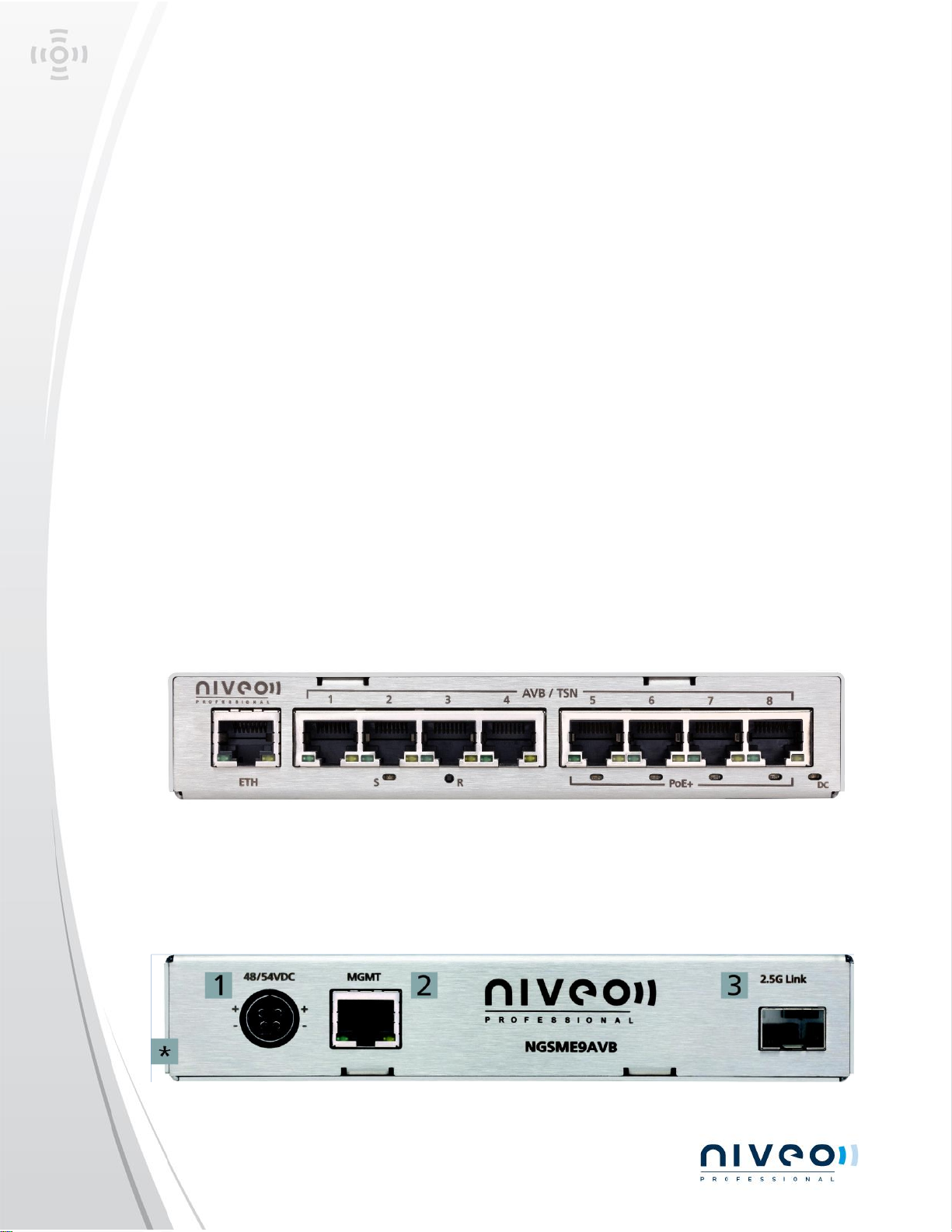
Front Panel
The ‘ETH’ port is a network port that can be used for Dante or networking and is
configured to be a separate VLAN from the AVB ports.
Ports 1-8 offer AVB/Milan connectivity, with ports 5-8 also offering PoE+
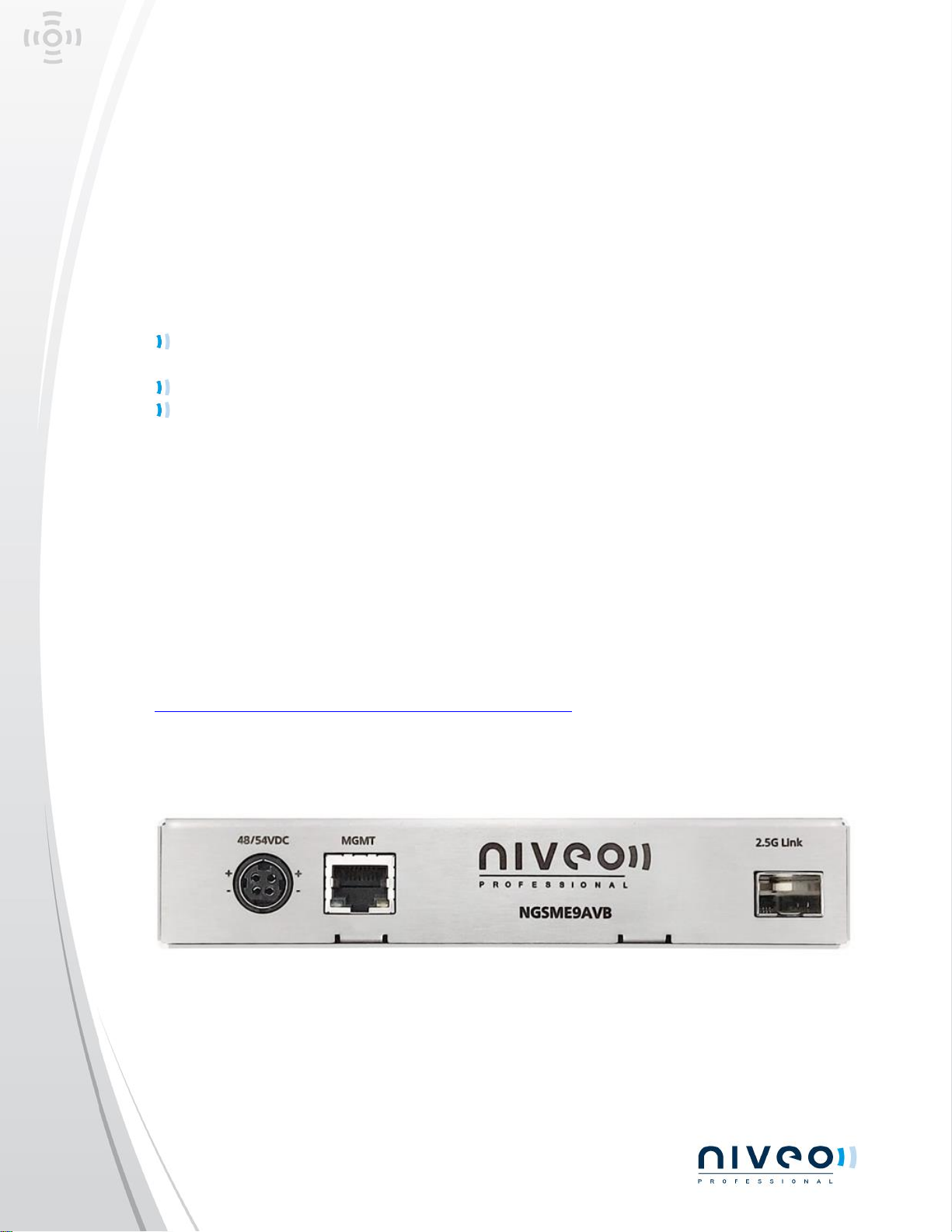
Rear Panel
Page 3
NGSME9AVB-MANUAL-202305.01
All rights reserved Niveo International BV 2023
1: Power input connector - DC input range 48VDC/54VDC 3A max.
2: Management Ethernet port 1000BASE-T w/o AVB capability. For service only, not for
user.
3: SFP 2500BASE-X port (SGMII) for cascading two NGSME9AVB switches.
* Shield/frame - connect to PE
Using the switch
Start up the switch by connecting the power adaptor to the 48/54VDC port of the
switch and to the power outlet.
Wait 30 seconds for the switch to fully start up
Connect the AVB-devices directly to ports 1-8, with PoE-powered devices to ports 5-
8.
Stacking the switch
For stacking the switch, please use the recommended Niveo Professional NRS-D10G1
(10G SFP+ Passive DAC Cable 0,5M) to connect two switches on the ‘2.5G Link’ ports.
Advanced settings
Configuration tool for Niveo Professional NGSME9AVB
Download the tool from the website:
https://niveoprofessional.com/product/ngsme9avb-2/
The tool must run under Windows.
The notebook must be connected to the mgt port at the rear side of the switch and the
notebook IP address must be set to 10.0.0.x (excluding 10.0.0.2).
Mgt port uses 10.0.0.2 as fixed IP address. Avoid using the same IP address elsewhere in
the network, the mgt port is connected to.
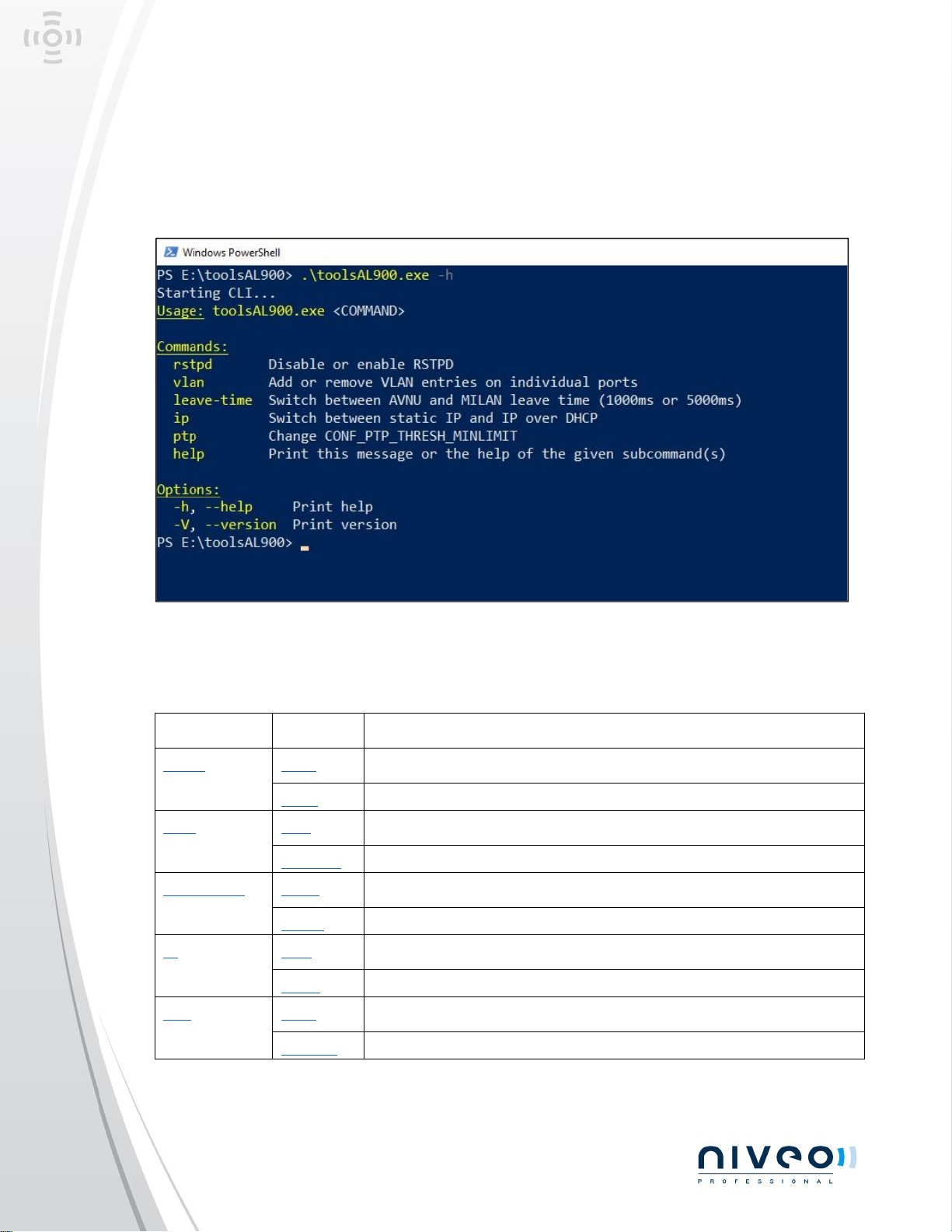
The Tool can be used in a Windows PowerShell or similar.
With Windows PowerShell:
Page 4
NGSME9AVB-MANUAL-202305.01
All rights reserved Niveo International BV 2023
Change directory to the folder including the toolsAL900.exe
executable.
To display all possible commands:
Overview of commands:
command
option
description
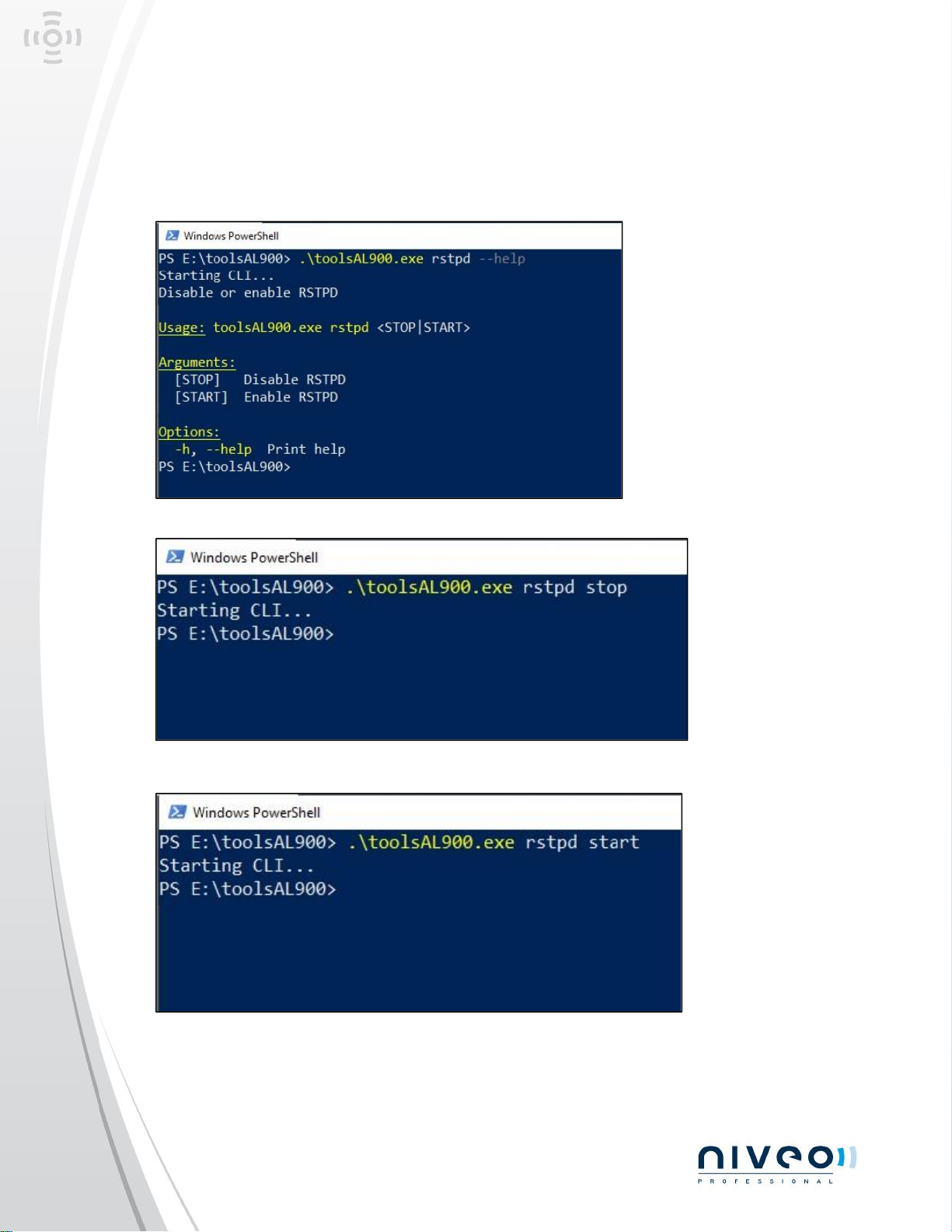
rstpd
stop
stops rstpd service until the next reboot
start
starts rstpd service
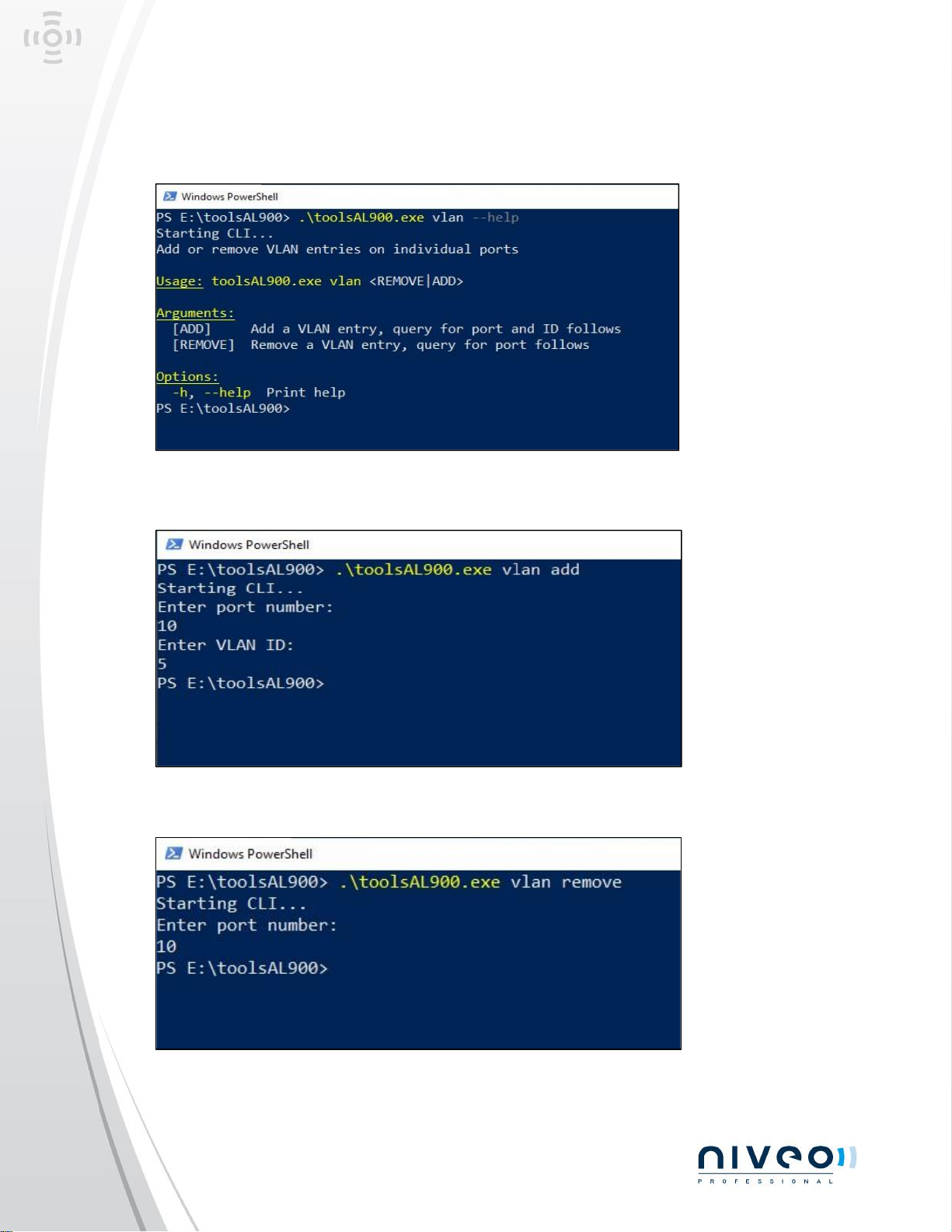
vlan
add
adds VLAN with vlan_id to port
remove
removes VLAN with vlan_id from port
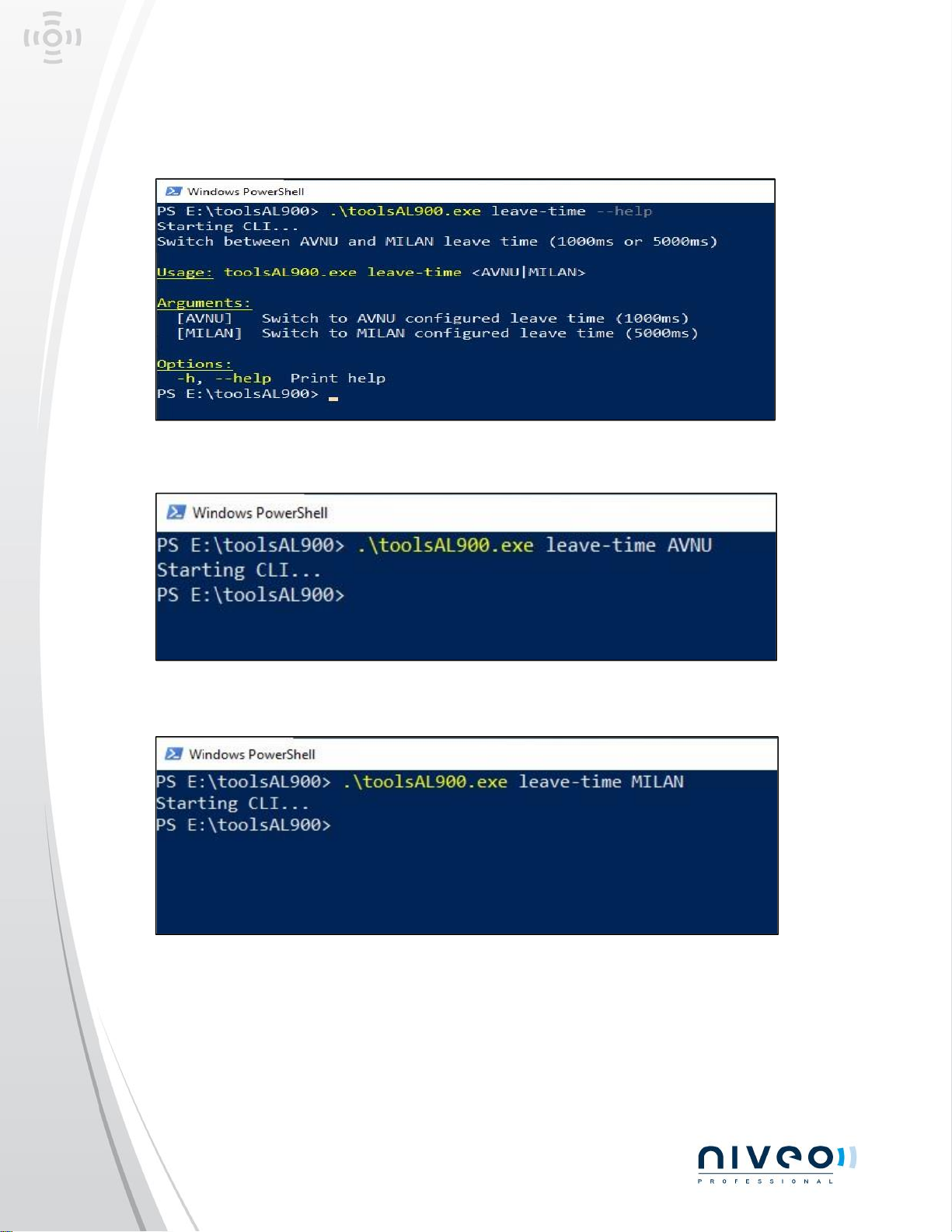
leave-time
avnu
changes leave-time to be AVNU compliant (1000ms)
milan
changes leave-time to be MILAN compliant (5000ms)
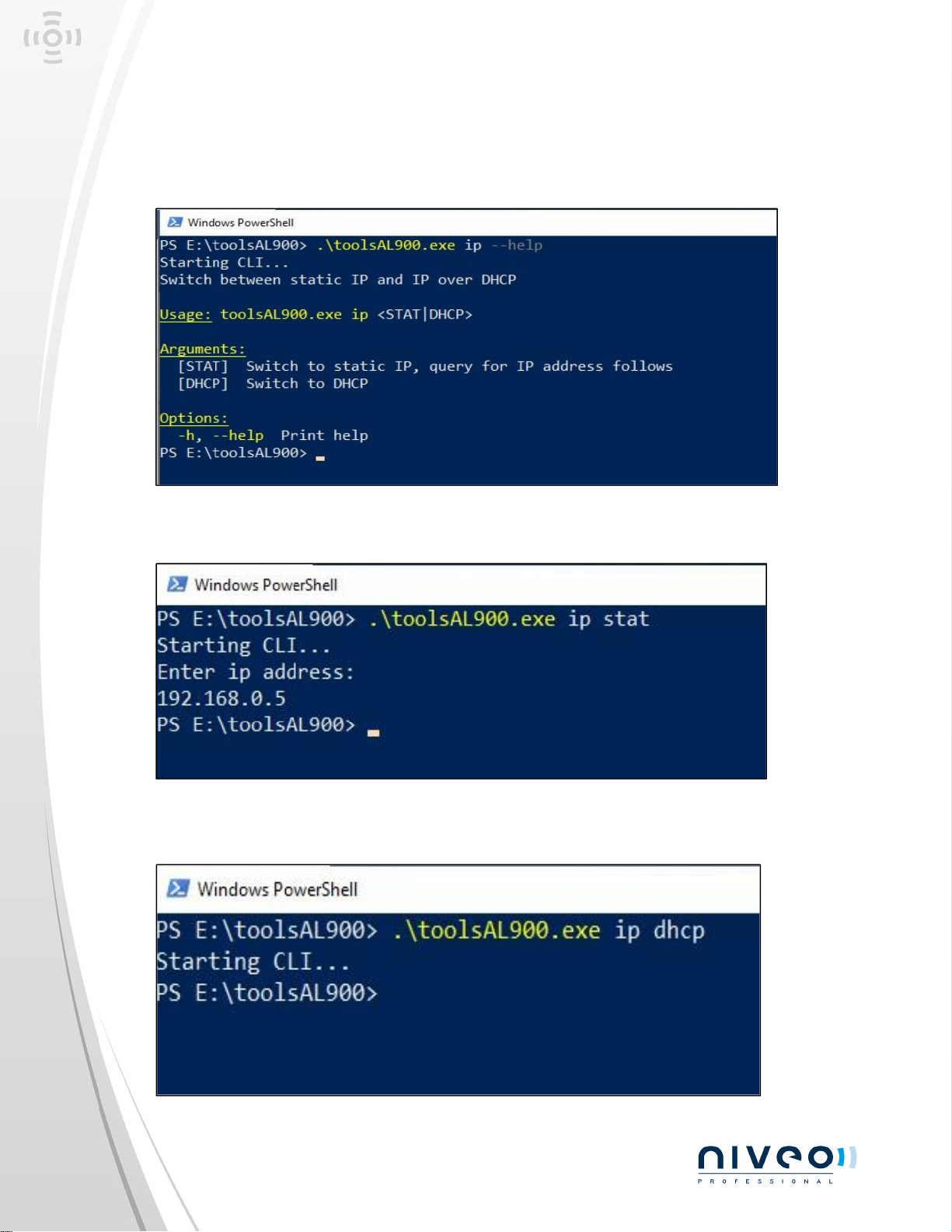
ip
stat
switches to static ip address on eth1
dhcp
switches to dhcp on eth1 (default)
ptp
zero
sets ptp minlimit to 0ns
default
sets ptp minlimit to default value
Page 5
NGSME9AVB-MANUAL-202305.01
All rights reserved Niveo International BV 2023
RSTP
Page 6
NGSME9AVB-MANUAL-202305.01
All rights reserved Niveo International BV 2023
VLAN
Page 7
NGSME9AVB-MANUAL-202305.01
All rights reserved Niveo International BV 2023
Leave-time
Page 8
NGSME9AVB-MANUAL-202305.01
All rights reserved Niveo International BV 2023
IP address
Page 9
NGSME9AVB-MANUAL-202305.01
All rights reserved Niveo International BV 2023
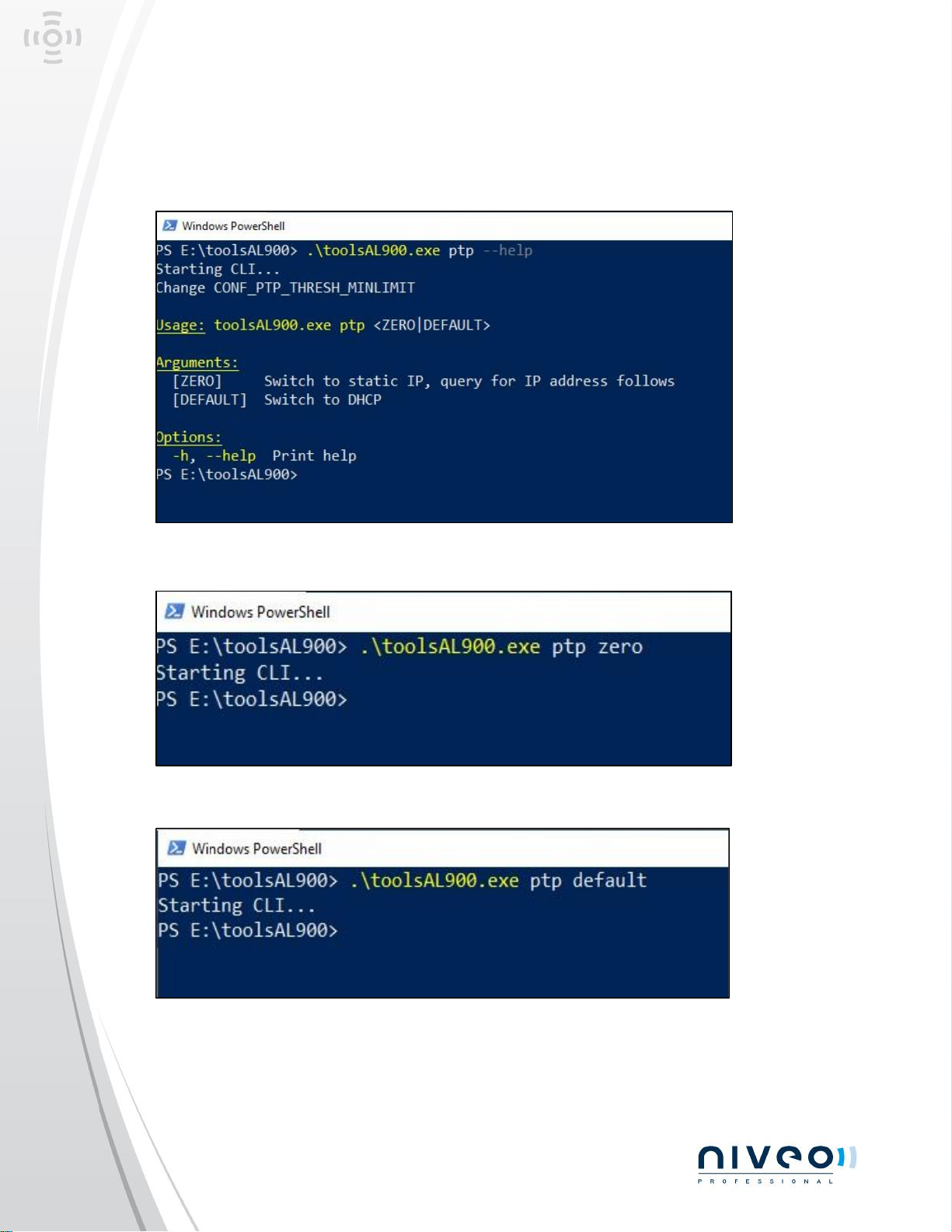
PTP minimum threshold
. \
toolsAL900.exe ptp
. \ toolsAL900.exe ptp zero
Page 10

NGSME9AVB-MANUAL-202305.01
All rights reserved Niveo International BV 2023
Specifications
General
1000BASE-T Ethernet desktop switch box
9 x RJ45 Gigabit Ethernet front connectors
4 x 802.3at PoE+ (up to 30W/port)
PoE+ support up to 120W in total
1 x SFP 2500BASE-X rear connector
Self-managed operation, or ARM® V8 CPU management support
Protocol options e.g. AVB & VLAN
Dimensions: 160mm (W) x 35mm (H) x 146mm (D)
Metal case VA steel
Desktop 4-pos. circular power adapter connector
Nominal 48VDC/54VDC power input operation
Front Panel I/O
9 x RJ45 Ethernet front connectors in total (AVB ports 1-8, ETH)
4 x RJ45 PoE+ Ethernet connectors (ports 5-8)
5 x RJ45 Ethernet connectors (AVB ports 1-4, ETH)
1000BASE-T, 100BASE-TX, 10BASE-T compliant data transfer rate
Rear I/O
1 x SFP 2500BASE-X (AVB switch interconnect)
1 x RJ45 Ethernet connector (CPU management) 1000BASE-T, 100BASE-TX, 10BASE-T
1 x Power jack 4-pos. circular receptacle
Power Requirements
DC Input, 44V-57V (48VDC, 54VDC), 3A max.
Power consumption 135W max. (@120W external load)
Fast acting chip fuse (PCB soldered type - no replacement on-site)
Protected against reverse polarity
ESD protection (TVS)
Common mode input filter
Rear power connector (desktop supply 4-pos. circular connector)
Gigabit Ethernet Switch
Page 11

NGSME9AVB-MANUAL-202305.01
All rights reserved Niveo International BV 2023
Front ports GbE MAC/PHY 1000BASE-T
4 x RJ45 connectors PoE+
5 x RJ45 connectors w/o. PoE+
1 x SFP 2.5Gbps
High performance, non-blocking, Gigabit Ethernet
Support for up to 16K MAC addresses, 10KByte Jumbo Frames
Supports 802.1 Audio Video Bridging (AVB) Gen 2
Time Sensitive Networking (TSN) Standards*, IEEE 1588v2 one-step PTP
Synchronous Ethernet*
Quality of Service (QoS) support with 8 traffic classes
Supports 4096 802.1Q VLANs, three levels of 802.1Q security
Unmanaged solution or management *
Software
Webserver (Firmware Updates & Settings)
AVB/TSN Stack:
IEEE 802.1Q-2011 - Qav (FQTSS) & Qat (SRP)
IEEE 802.1AS-2011 - Time Synchronization (PTPv2)
DANTE (including clock synchronization and stream reservation), static VLAN configurable
via web interface
VLAN *
ProAV Certified AVNU® Switch/Bridge device
ProAV Certified MILAN® Bridge (configuration via Web interface)
* The switch's software stack supports MMRP, MSRP, MVRP, but for compliance with the required behavior of AVNU, only
MVRO and MSRP are enabled in configuration. AVNU specification requires MMRP to be disabled.
Power over Ethernet
4 x RJ45 PoE+ enabled front ports
PSE PoE+ according to IEEE 802.at
Maximum power delivered per port 30W
Maximum power delivered in total 120W
PSE Type 2 mode A (power over RJ45 pins 1/2 & 3/6, 600mA)
Applications
General industrial networking, Real-Time/TSN, machine vision & monitoring
Infotainment/professional audio/video - AVB/Dante™/Milan®
Environmental, Regulatory
Designed & manufactured in Germany
ISO 9001 certified quality management
Page 12

NGSME9AVB-MANUAL-202305.01
All rights reserved Niveo International BV 2023
Long term availability
Rugged solution
RoHS compliant
Operating temperature 0°C to +70°C (commercial temperature range)
Storage temperature -40°C to +85°C, max. gradient 5°C/min
Humidity 5% ... 95% RH non condensing
Altitude -300m ... +3000m
Shock 15g 0.33ms, 6g 6ms
Vibration 1g 5-2000Hz
EC Regulatory EN55035, EN55032, EN62368-1 (CE)
FCC approved (FCC ID 2A36S-AL900)
MTBF 68.6 years
Accessories
NRS-D10G1
10G SFP+ Passive DAC Cable 0,5M
Page 13
All rights reserved Niveo International BV 2023
builds Network and Power products for AV and Security integrators,
designed by and supported with AV and Security integrators.
Our aim is to make Network and Power as good as it can be with the
application in mind. Selected proven technologies, combined with a range of proprietary
feature, built with the best available chipsets and components make these products stand
out against all its peers. The unparalleled support make it a class on its own!
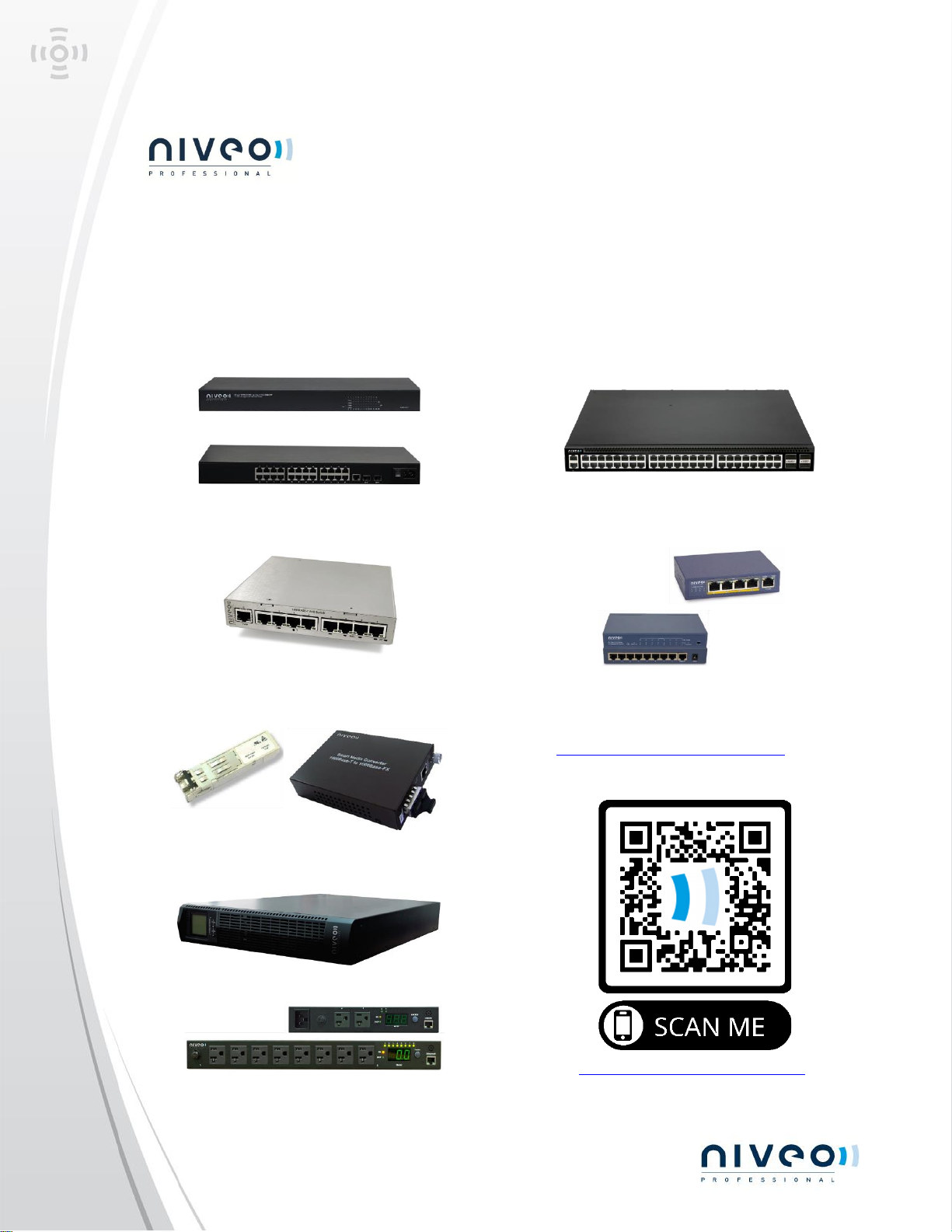
Niveo Professional offers products in the following categories:
Enterprise ProAV Switches
AVB/Milan Switches
Fiber Optic Accessories
UPS Systems
PDU’s
SDVoE ready switches
Business Switches
For more information, please contact
your local representative or contact us
at: [email protected] or visit
our website:
www.niveoprofessional.com
 Loading...