

Page 1

Instruction Manual
FEEL THE DIFFERENCE!
Copyright © 2015 by Medvibe
Page 2
Contents
Thank you for purchasing the NITROFIT Deluxe Plus whole body vibration
machine. Your Nitro Fit model is designed to help you increase muscle strength,
power and physical performance. When properly used, the Nitro Fit delivers a
mechanical stimulus that can gently exercise the entire body. Slight adjustments
in frequency, position and time will affect the intensity of your workout or
rehabilitation session. Please read the instructions carefuly before use. If you
experience any problems during assembly please contact customer service at
1-888-861-0480.
Table of Contents
Precautions................................................................................... 3
Features and Applications.......................................................... 5
Assembly Instructions................................................................. 7
Operations.................................................................................. 10
Suggested Use .......................................................................... 12
Before Use ................................................................................. 12
Troubleshooting ........................................................................ 13
Warranty .................................................................................... 14
Support ...................................................................................... 18
Exercise Chart............................................................................ 19
Copyright © 2015 by Medvibe
Page 3

3
Precautions
IMPORTANT SAFETY INSTRUCTIONS:
Read all instructions before using this product.
1. Do not plug this product into a power outlet until it is fully assembled.
2. Parts of this product may be too heavy for some poeple to assemble by themselves. Have a second person
available to help with assembly if you suspect that the parts are too heavy to handle alone .
3. Never leave children unattended when using this machine. There are moving parts such as
the platform that can injure a childs hands or feet if caught.
4. Use this appliance only for its intended use as described in this manual. Do not use any
attachments that are not certified by the manufacturer.
5. Never operate this appliance if it has a damaged cord or plug . If you notice any signs of water
damage, do not use the machine and contact customer service.
6.
Do not allow moisture or perspiration to build up on the vibration platform. Use a towel to wipe
up moisture or place the provided moisture absorbing exercise mat on the platform during
exercises where moisture may occur. Failure to do so may result in water damage to the electronic
components under the vibration platform. Medvibe will not warranty units with noticeable
moisture damage.
Do not use this product outdoors.
7.
8.
To disconnect turn all controls to the off position then remove plug from outlet.
This model is only intended for semi-commerical and personal household use.
9.
Use of this product in a commercial setting may lead to product failure and will void your warranty.
This product must be grounded. If it should malfunction or breakdown, grounding provides a
10.
path of least resistance for an electric current to reduce the risk of electric shock. This
product is equipped with a grounded cord. Make sure that the plug is properly installed and
grounded in accordance with all local codes and ordinaces.
- 3 -
Copyright © 2015 by Medvibe
Page 4

4
Precautions
WARNING!
Tampering with the product can lead to injury and will void all
warranties on this product.
WARNING!
Electric Shock
To avoid electric shock when using this system:
• Do not use the Nitro Fit during a lightning storm.
• Use only the AC Adapter that comes with your system.
• Do not use the AC Adapter if it has damaged, split or broken cords or wires.
• Make sure that the AC Adapter cord is fully inserted into the wall outlet or
• Always carefully disconnect all plugs by pulling on the plug and not on the cord.
• Make sure the Nitro Fit power button is turned OFF before removing the AC
extension cord.
Adapter cord from an outlet.
- 4 -
Copyright © 2015 by Medvibe
Page 5

5
Precautions
CAUTION!
Please consult with a physician before beginning any exercise
program with this machine.
It may be unsafe to use this machine if you have any of the following conditions:
Pregnancy•
Acute thrombosis•
Serious cardiovascular disease•
Pacemaker•
Recent wounds from an operation or surgery•
Artificial joints•
Acute hernia, discopathy, spondylolysis•
Severe diabetes•
Epilepsy•
Recent infections•
Severe Migraines•
Tumors•
Recently placed IUD’s, metal pins, or plates•
Use of this product while impaired by any of the above conditions
should be performed only after a doctor has deemed it necessary
and may result in further injury.
- 5 -
Copyright © 2015 by Medvibe
Page 6
6
Ergonomic construction with sleek design•
Large LCD display showing TIME,SPEED,BODY FAT, and PULSE RATE•
Durable steel frame with TPR covering.•
Quality 110 V DC Motor•
Overload Current Protection, anti-jamming and anti-static•
CE/RoHS certified•
Features & Applications
Physical Effects of Nitro Fit Deluxe Plus
NitroFit Vibration Training burns calories, engages muscles, and helps to increase your metabolism. Regardless
of what age or gender you are, proper vibration training workouts will help you to develop muscle and in turn
lose weight. Many Nitro Fit users don’t have time to go to the gym and hate regular exercise. The “Basic 10” is a
simple ten minute whole body training session that involves performing exercises on the platform such as
squats, push-ups, dips, and standing positions. (See exercise chart) Combine our workouts with a sensible diet
and your weight loss will be accelerated.
For the active gym goer who focuses on lifting weights to develop muscle, NitroFit is the perfect compliment.
Use your NitroFit WBV machine for warm up exercises and watch as your weight lifting abilities increase
dramatically. NitroFit primes your muscles with blood and endorphins to provide explosive strength, power,
flexibility and speed. No time for the gym, No problem! Use Nitrofit as a 10-15 minute workout to supplement
your missed gym days. Attach the adjustable arm bands that can provide up to 50lbs of resistance in each arm.
Combine bicep curls, upright rows and more to standing positions on the platform for a sweat breaking workout.
Many people suffering from osteoporosis, MS, Parkinson's, Fibromyalgia and other developmental disabilities can't
perform traditional exercises in the gym. Users can stand on or rest specific part of their body on the NitroFit
platform to loosen up sore muscles, build bone density, retrain atrophied muscles, strengthen tendons, and increase
blood flow. Additionally, chiropractors and physical Therapists use NitroFit to force movement into their patients
tight or sore muscles. Many of our NitroFit customers report immediate relief from back and neck pain. Regular
use of NitroFit WBV can strengthen your body and prevent various pain from recurring.
NITRO FIT Deluxe Plus Product Features
Net Weight: 102 lbs
•
Max Power: 2 HP
•
Speed Range:• 30 Levels
Adjustable upper body resistance bands•
Amplitude:• 13mm Max
Frequency: Controlled for comfort
•
•
Oversized platform: 14" x 22.5"
• Full length exercise mat
• Platform exercise mat
Bearings: Commercial grade
•
•
Exercise Towel
NITRO FIT Deluxe Plus Product Specifications
- 6 -
Copyright © 2015 by Medvibe
Page 7
7
Assembly Instructions
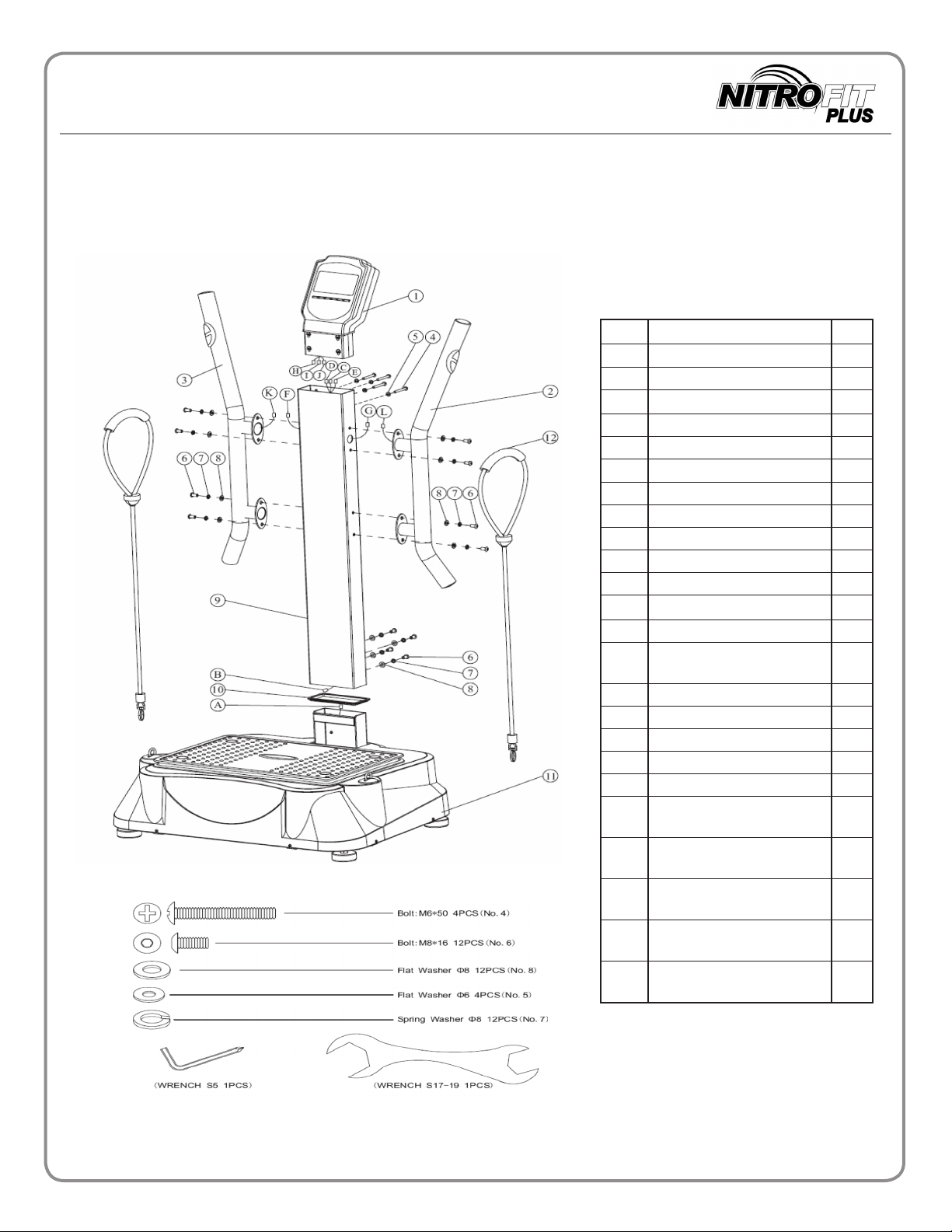
NITRO FIT Deluxe Plus Parts List
•
Refer to the diagram below to identify the components of the Nitro Fit Deluxe Plus .
Item Parts Qty
1 Control Panel 1
2 Right Handle Bar 1
3 Left Handle Bar 1
4 Bolt: M6*50 4
5 Flat Washer: 6mm. 4
6 Bolr: M8*16 12
7 Spring Washer: 8mm. 12
8 Flat Washer: 8mm. 12
9 Post 1
10 Vibration Absorber 1
11 Base Unit 1
12 Exercise Straps (optional) 2
A Base Unit Wire Connector 1
B Post Bottom Wire
C Post Top Wire Connector 1
D Post Top Wire Connector 1
E Post Top Wire Connector 1
F Post Side Wire Connector 1
G Post Side Wire Connector 1
H Control Panel Wire
I Control Panel Wire
J Control Panel Wire
K Left Handle Wire
L Right Handle Wire
1
Connector
1
Connector
1
Connector
1
Connector
1
Connector
1
Connector
- 7 -
Copyright © 2015 by Medvibe
Page 8

8
NOTE:
Assembly Instructions
Please make sure you have all washers, screws
and bolts before assembling your system.
Place the Post (9) onto the Base Unit (11). Note: The
1.
vibration absorber (10) has been pre-attached in the
base for you by the factory. Connect the Base Unit Wire
Connector (A) to the Post Bottom Wire Connector (B).
Affix the Post to the Base
Washers (8), Spring washers
(7) and Bolts (6) provided.
See Figure 1.
2. Place the Right Handle Bar (2) near the Post (9).
Connect the Right Handle Wire Connector (L) to the
Post Side Wire Connector (G). Align the Right Handle
Bar (2) to the Post and fasten with Flat Washers (8),
Spring Washers (7), and Bolts (6). Place the Left Handle
Bar (3) near the Post (9). Connect the Left Handle Wire
Connector (K) to the Post Side Wire Connector (F).
Align the Left Handle Bar (3) to the Post and fasten
with Flat Washers (8), Spring Washers (7), and Bolts (6).
Note: K,F and G,L may be pre-assembled and coiled
in the left(3) and right(2) Handle Bars. If so, run
connector wires from each handlebar into the holes on
either side of the post (9). Then pull wires up through
the top of the post(9)
See Figure 2.
Unit, secure it with Flat
Fig.1
Fig.2
Fig.3
- 8 -
Copyright © 2015 by Medvibe
Page 9

9
Assembly Instructions
4. Place the Control Panel (1) near the Post (9).
Connect the Control Panel Wire Connector
(I) to the Post Top Wire Connector (C). Connect
the Control Panel Wire Connectors (H, J)
to the Post Top Wire Connectors (D, E). Align the
Control Panel to the Post and fasten with Flat
Washers (5) and Bolts (4). Connect resistance bands
(12) to the loop holes on the platform base.
See Figure 3.
Fig.3
NOTE: INSPECT AND BALANCE MACHINE BEFORE USE!
Make sure all parts are well attached before using on the Nitro Fit Deluxe Plus . If you
have any questions regarding assembly please call us at 1-888-861-0480.
- 9 -
Copyright © 2015 by Medvibe
Page 10
10
The NITRO FIT Deluxe Plus is very simple to operate. Turn the power switch located at the bottom
of the machine to the on position. Then use the LCD control panel as follows:
Operations
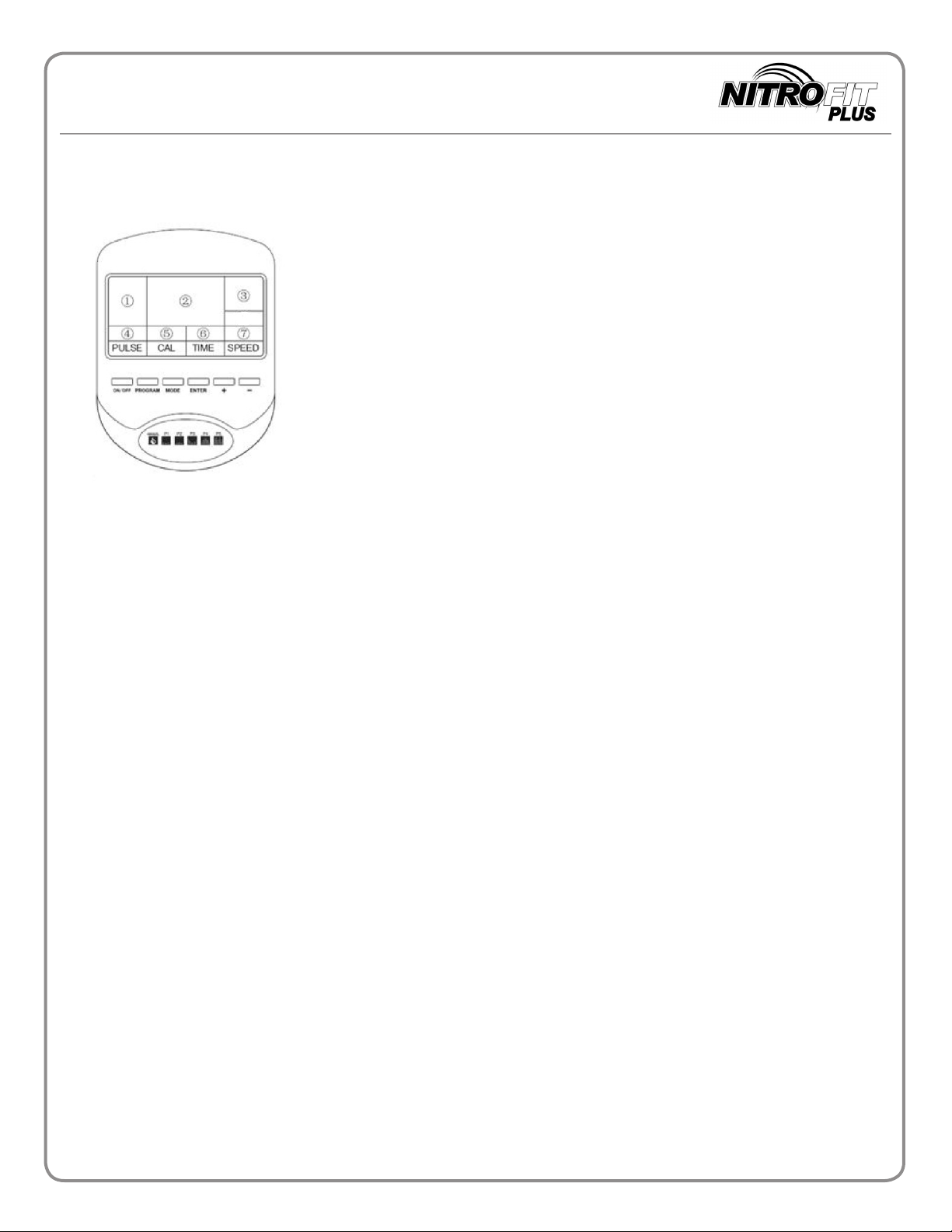
Display Button functions:
"ON/OFF"-Activates manual operation and programs "P1-P5"
1.
"PROGRAM" -Cycles through program options (Manual,FA,P1-P5)
2.
3. "MODE"-Cycles through display options (SPEED, PROGRAM)
4."ENTER"- Confirms selections in the body fat reading program"FA".
5."+"or "-" - Increases or decreases vibration speed during operation,
adjusts pre-set timers, or height/weight/gender selection while in
body fat reading program "FA".
Display Layout:
The head unit is partitioned into 7 informational windows:
Window 1: Displays Program Selection, Gender Selection and Unit Selection
Window 2: Displays Meter Bars and Program Settings
Window 3: Displays Active Gender
Window 4: Displays Pulse
Window 5: Displays Calories Burned
Window 6: Displays Remaining Time
Window 7: Displays Vibration Speed Setting
To Operate the machine:
1. Press ON/ OFF button to start or stop the machine
2. To Set up your work out time:
Press “MODE” to select ‘TIME” or "CALORIES" display.
Select "TIME"to set up your workout time. When you see “000” flash on the screen in window 6, you can press
“+’”(up) to increase or "-" (down) to decrease the timer from 1 to 10 minutes. Default workout time is 10
minutes.
3. Set up speed (frequency) range:
Once the “ON/OFF” button is pressed, the platform will begin to move. You can adjust the speed range by
pressing "+" (up) to increase or "-" (down) to decrease the speed (frequency) of your machine. There are total
30 speed levels displayed in window 7.
4. Built-in programs: Before you start workout, you can choose one of the built-in programs by pressing the
button “PROGRAM”. You can see programs display in screen window 1 in sequences “P1-P2-P3-P4-P5-FA”.
The five built in programs have pre-set speeds that automatically change every minute. You can't adjust speed
settings in a program mode . To control speed settings use manual mode.
- 10 -
Copyright © 2015 by Medvibe
Page 11

11
How to use the body fat calculator program "FA"
1.
Ensure that the platform is deactivated and the screen is illuminated blue. Push the "PROGRAM" button until
the screen reads "FA". Push the "ENTER" button and select your gender icon. Hit “ENTER”
The sreen will now ask you to input your height, age, and weight. Press “ENTER” after each parameter
2.
( age, height , weight,) that you input to move to the next screen.
NOTE: Height and weight are calculated in metric units.
To calculate your height in metric units, multiply your height in inches by .0254. Enter this number using the
"+" and "-" buttons and hit "ENTER". To calculate your weight Kilos,multiply your weight in pounds by
2.2 and enter the results using the "+" and "-"buttons and hit "ENTER".
3.
The screen will now display "---". Place each of your hands over the pulse contacts on each handlebar and
squeeze lightly for up to 5 seconds. A two digit number will appear on the screen. This number is your BMI
(Body Mass Index) Remember this number and see chart below for reference.
Operations
Gender Results displayed on FAT/SPEED
Female 17 and less 17-27 More than 27
Male 14 and less 14-23 More than 23
Results Healthy Athletic Overweight
NOTE: Results may vary. This machine uses a Bioelectrical impedance analysis system that calculates total body
water and estimates body mass. Accuracy is not guaranteed. For the most effective body fat testing,
please consult with a physician or certified personal trainer.
- 11 -
Copyright © 2015 by Medvibe
Page 12

12
NITRO FIT Deluxe Plus SUGGESTED USE
•
•
• Get off the machine immediately if you feel light headed, dizzy, or any other abnormal dis
•
•
TIPS TO READ BEFORE USE:
Suggested Use
The NITRO FIT Deluxe Plus will provide optimal results when used for 10 minutes a
day for 3
Additional use is not recommended. Should you choose to extend your work out on the Nitro
Fit Deluxe Plus , please limit your work out to a maximum of two 15 minute sessions in one
day.
comfort.
While the NITRO FIT Deluxe Plus can be used as a stand alone work out, adding
resistance training to your regimen will yield faster fitness results.
As with any exercise program your diet is just as important as your work-out. Using the
NITRO FIT Deluxe Plus in conjunction with a healthy diet will also yield faster fitness
results.
days a week.
1. Check your foot positioning on the platform to make sure it is even.
2. Check your posture frequently to make sure you are holding yourself in a proper pose.
3. Get off the machine immediately if you feel light headedness, dizziness, or any abnormal
discomfort.
4. Minimize vibration exposure to your head by keeping a slight bend in your elbows and knees.
5. Hydrate before vibration training sessions to avoid dizziness and possible headaches.
6. Eat something at least 30 minutes before your vibration training sessions.
7. Place the plate mat on the vibration plate to make upper body exercises more comfortable on your
hands and forearms.
- 12 -
Copyright © 2015 by Medvibe
Page 13
13
Troubleshooting
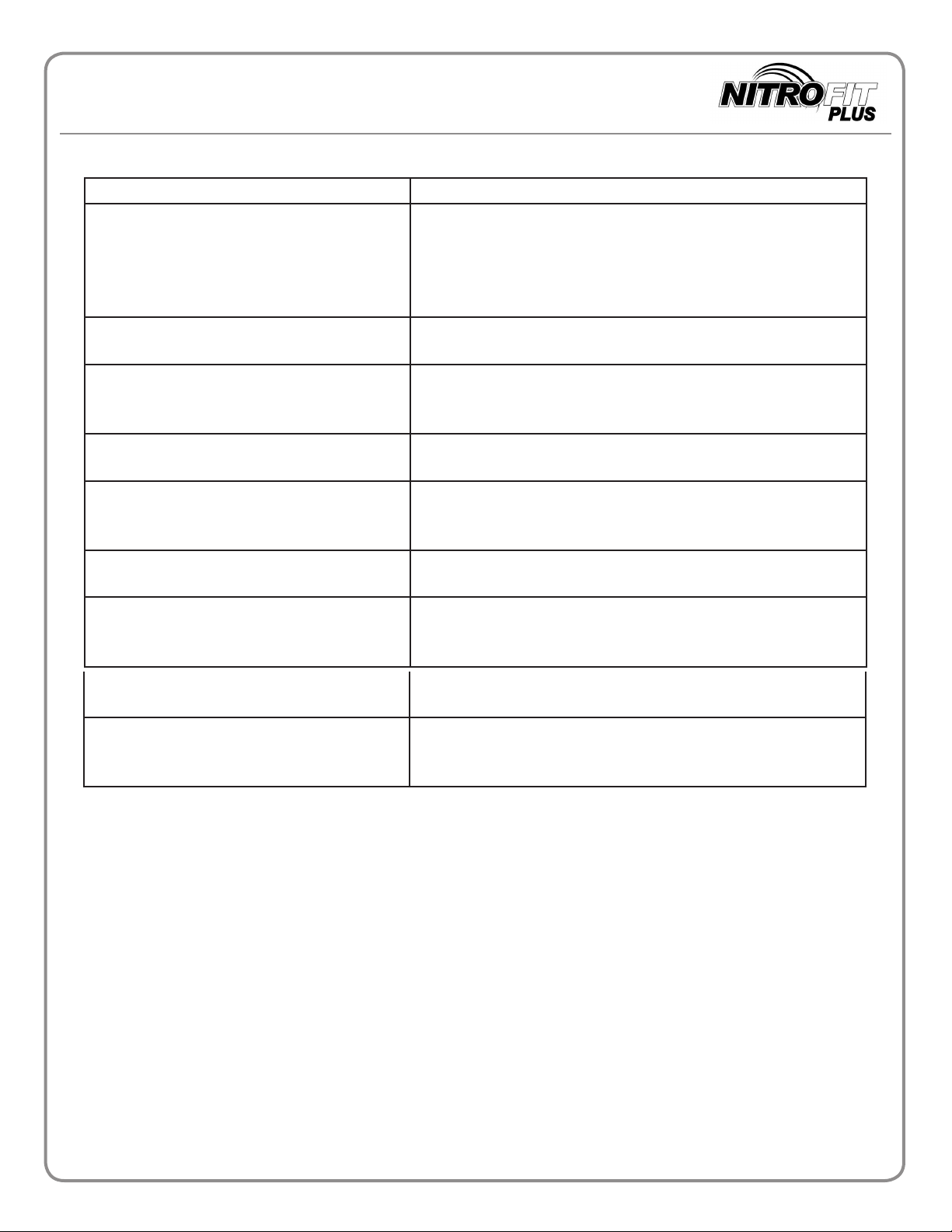
TROUBLE SOLUTION/ACTION
The LED screen will not illuminate Flip the main power switch on the back of the base plate. If
the problem is not solved, check to ensure that vibration has
not disconnected the male and female connector’s in-between the stem and base plate. ( Note: This step may require
some product disassembly)
I can’t turn the NITRO FIT Deluxe Plus
off
The NITRO FIT Deluxe Plus is not
stable on the floor or surface I have.
The stem seems to shake too much when I
use some of the higher speeds.
The beaded base plate leaves marks on my
arms when I perform upper body exercises.
My body feels itchy when I get off of
my Nitro Fit Deluxe Plus .
I often feel like I have to go to the
bathroom when using my Nitro Fit
Deluxe Plus
Flip the main power switch on the back of the base plate of
an on to reset the machine.
Make sure that the machine is not place on uneven flooring
such as tile. For best results place machine on top of a level
rubber mat.
This is normal but could be a result of loose screws. Tighten
screws on the handlebars and base of stem.
The beaded plate acts as traction and massage. To avoid any
markings on your arms place a workout towel or small foam
pad on the platform when performing upper body exercises.
This is normal and is your body’s response to increased
blood flow.
This is also normal and is your body’s reaction to the vibration. Use the restroom and resume your work out.
I sometimes get headaches when using my
Nitro Fit Deluxe Plus.
I feel weak and tired from using my Nitro
Fit Deluxe Plus.
This is usually due to dehydration. Drink plenty of water before using your machine.
Vibration training can be strenuous. Make sure to eat a meal
at least 30 minute before you use your machine.
- 13 -
Copyright © 2015 by Medvibe
Page 14
14
Warranty
MEDVIBE LLC. LIMITED WARRANTY
Consumers have legal rights in accordance with the Magnuson-Moss Act concerning
consumer goods and this limited warranty does not restrict these rights. The new
equipment that you have bought carries a manufacturer’s limited warranty granted by
Medvibe LLC USA. (“ MEDVIBE”). This limited warranty covers manufacturing flaws that
occur and labor that is required during the warranty period. MEDVIBE will, at its
discretion, either repair, rebuild or rep
with the terms set forth below.
WARRANTY TERMS
This owner’s limited warranty is only valid, if the item is used in an environment
approved by MEDVIBE for that particular equipment. MEDVIBE distinguishes two
operating environments:
lace the faulty part or equipment in accordance
1. Home. Only members of the family for whom the equipment is purchased use the
equipment.
2. Light Commercial. The equipment is used by a limited user group, the manner and
environment of usage is similar to home or controlled testing use, for example in schools,
hotels, housing organizations,companies, etc.
A. Medvibe
This owner’s warranty for the Medvibe
Medvibe
parts needed to repair, rebuild or replace the equipment, at MEDVIBE’s option, for a
period of two (2) years and the cost of labor needed to repair, rebuild or repair the
equipment for a period of two (2) years. The Labor clause is contingent upon the
complexity of the repair. NitroFit was engineered for simple assembly and repair
procedures. In most cases Medvibe will ship repairable parts with instructions to the
product owner for self-repair.
B. Medvibe® NitroFit Deluxe Plus products.
This owner’s warranty for the Medvibe® NitroFit Deluxe Plus products only applies to
use of the Medvibe® NitroFit Deluxe Plus products in a home, light commercial center.
This warranty covers the materials and parts needed to repair, rebuild or replace the
equipment, at MEDVIBE’s option, for a period of two (2) years and the cost of labor
needed to repair, rebuild or repair the equipment for a period of two (2) years. The
Labor clause is contingent upon the complexity of the repair. NitroFit was engineered
for simple assembly and repair procedures. In most cases Medvibe will ship
repairable parts with instructions to the product owner for self-repair.
® NitroFit Personal products.
® Personal products only applies to use of the
® Nitrofit Personal products in the home. This warranty covers the materials and
The warranty period commences from the date on which the original buyer
purchases the equipment; warranty repairs will not extend the warranty period.
Copyright © 2015 by Medvibe
Page 15
15
Warranty
WARRANTY RESTRICTIONS
This owner’s warranty only covers the following:
a. Flaws caused by materials or labor in the equipment that existed when the equipment
was originally assembled.
b. Faults that occur in normal use as defined in the owner’s manual, and providing that
MEDVIBE’s instructions on installation, maintenance and use have been followed.
c. The original purchaser of the equipment who holds an original proof of purchase.
This warranty does not extend to or cov
a. Equipment or components that have been modified without the consent of MEDVIBE.
b. Faults resulting from natural wear and tear, use in conditions for which the equipment
is not intended, corrosion, or damage incurred during loading or shipping not provided by
MEDVIBE, or by accident, fire, flood, war or acts of God.
c. Maintenance activities, such as cleaning, lubricating or normal checking of parts; or
installation procedures that customers can do themse
dismantling/reassembling the equipment.
d. Damage or equipment failure caused by (i) electrical wiring not in compliance with
applicable electrical codes, (ii) electrical wiring not in compliance with the owner’s
manual or (iii) electrical wiring that has not been maintained as outlined in the owner’s
manual.
e. Repairs performed without the consent or instruction of MEDVIBE..
f. Repairs due to limitations or corrections in the equipment’s software.
g. Repairs to consumable or cosmetic items, e.g., grips, seals, labels or wheels.
h. Repairs performed on equipment missing a serial number or with a serial tag that has
been altered or removed.
er any of the following:
lves and that do not require
i. Service calls to correct installation of the equipment or instruct owners on how to use
the equipment.
j. Pick-up, delivery, or freight charges involved with repairs.
MEDVIBE MAKES NO EXPRESS WARRANTIES OR CONDITIONS BEYOND THOSE
STATED IN THIS OWNER’S WARRANTY. MEDVIBE DISCLAIM
WARRANTIES AND CONDITIONS, EXPRESS OR IMPLIED, INCLUDING WITHOUT
LIMITATION IMPLIED WARRANTIES AND CONDITIONS OF MERCHANTABILITY
AND FITNESS FOR A PARTICULAR PURPOSE. SOME STATES (OR
JURISDICTIONS) DO NOT ALLOW LIMITATIONS ON IMPLIED WARRANTIES OR
CONDITIONS, SO THIS LIMITATION MAY NOT APPLY TO THE USER OR OWNER.
MEDVIBE’S RESPONSIBILITY FOR MALFUNCTIONS AND DEFECTS IN THE
EQUIPMENT IS LIMITED TO REPAIR AND REPLACEMENT AS SET FORTH IN THIS
S ALL OTHER
- 15 -
Copyright © 2015 by Medvibe
Page 16

16
Warranty
OWNER’S WARRANTY. THESE WARRANTIES GIVE THE USER OR OWNER
SPECIFIC LEGAL RIGHTS, AND THE USER OR OWNER MAY ALSO HAVE OTHER
RIGHTS, WHICH VARY FROM STATE TO STATE (OR JURISDICTION). MEDVIBE
DOES NOT ACCEPT LIABILITY BEYOND THE REMEDIES SET FORTH IN THIS
WARRANTY STATEMENT OR LIABILITY FOR INCIDENTAL OR CONSEQUENTIAL
DAMAGES. SOME STATES (OR JURISDICTIONS) DO NOT ALLOW THE
EXCLUSION OR LIMITATION OF INCIDENTAL OR CONSEQUENTIAL DAMAGES, SO
THE PRECEDING EXCLUSION OR
OWNER.
Despite continuous quality control, faults or operating errors in equipment may result
from individual components. Delivering the complete piece of equipment for repair is
often unnecessary, because the flaw can usually be fixed by replacing just the faulty part.
It is preferable that you make any inquiries about the warranty directly to your MEDVIBE
retailer or to MEDVIBE.
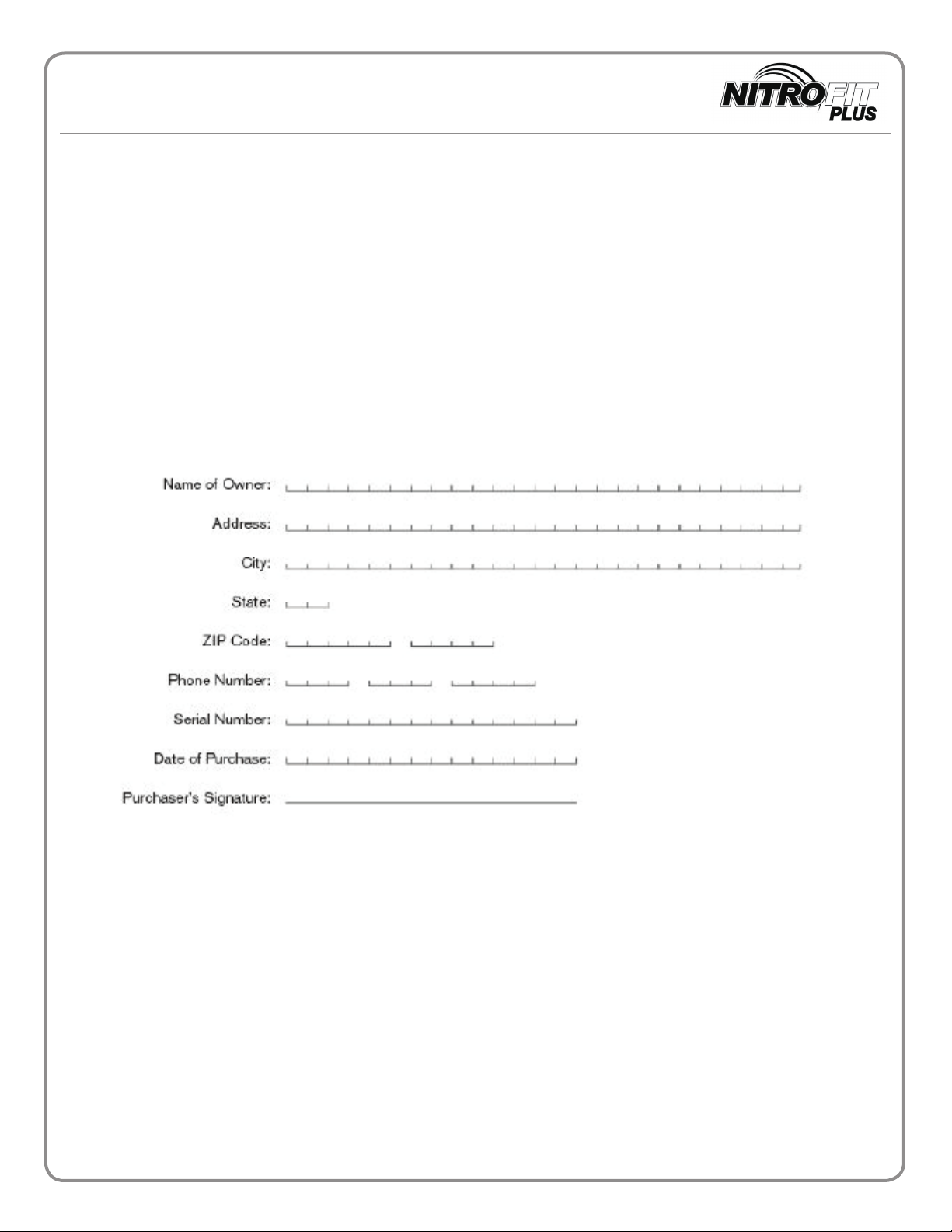
REGISTRATION CARD
We at MEDVIBE want to develop our products and services continuously according to
the needs and wishes of our customers. For this reason, we kindly ask you to complete
the registration card and send it to us as soon as possible, preferably within ten days of
purchasing the equipment. If registration is intended, it must be made within two
(2) months of the date of purchase. Please fill in all fields to ensure that we can serve
you as efficiently as possible.
LIMITATION MAY NOT APPLY TO THE USER OR
To arrange service for your Medvibe
1-888-861-0480 or visit us on the web at www.wholebodyvibration.net and fill out a
contact us form.
® product, please contact service at
- 16 -
Copyright © 2015 by Medvibe
Page 17
17
Online Registration available at Wholebodyvibration.net or
Complete the form and mail back to:
Medvibe LLC
8313 E Edward Ave
Scottsdale, AZ 85250
Warranty
- 17 -
Copyright © 2015 by Medvibe
Page 18

18
Support
For technical support or ordering information please call us.
1-888-861-0480
Thank you for choosing
Corporate Office:
Medvibe LLC
8313 E Edward Ave
Scottsdale, AZ 85250
- 18 -
Copyright © 2015 by Medvibe
Page 19

FEEL THE DIFFERENCE!
 Loading...