

Page 1
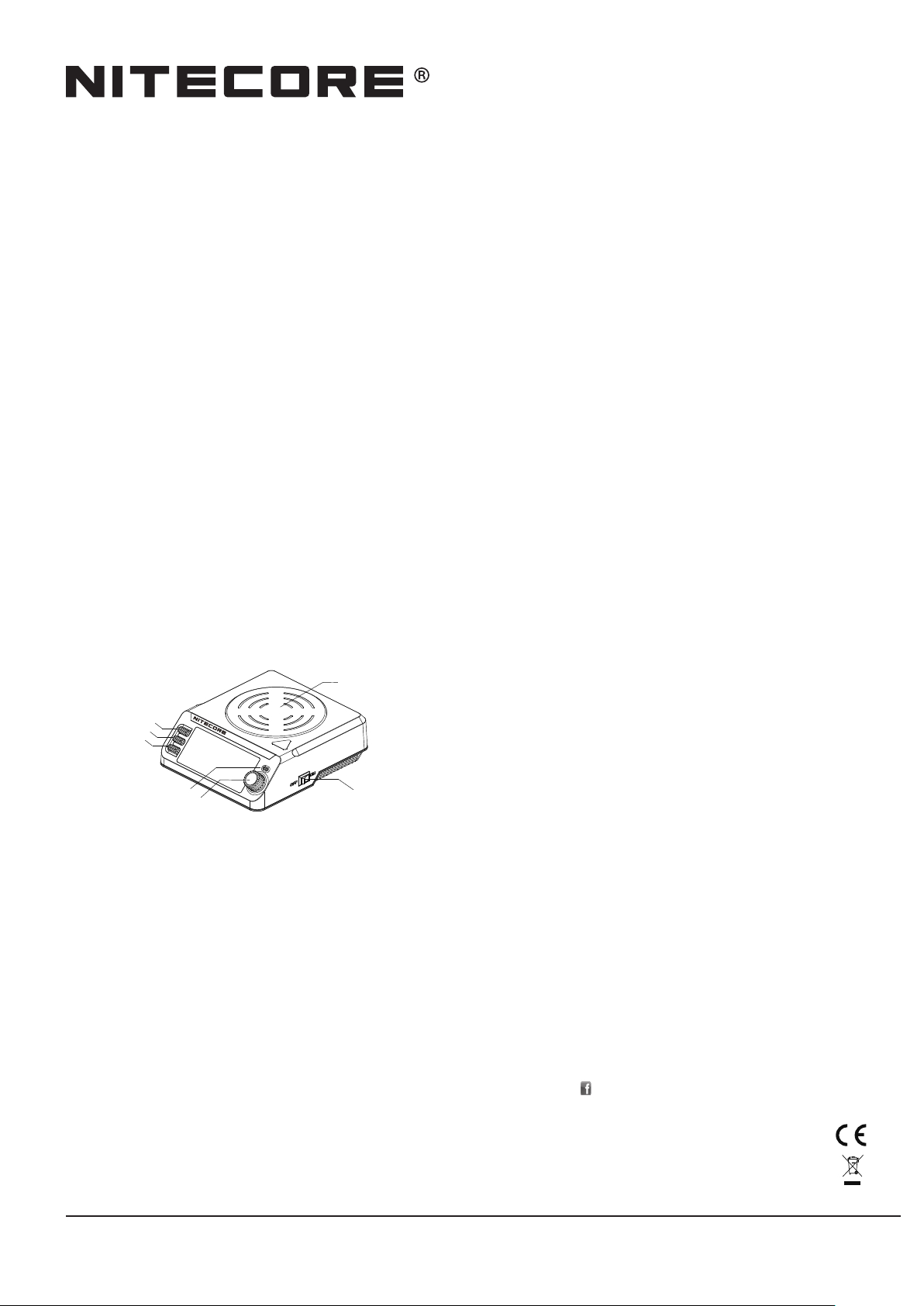
NFF01
Magnetic Liquid Mixer
Features
• Intelligent magnetic liquid mixer
• Maximum speed of up to 1200 R.P.M.(Revolutions Per Minute)
• Temperature controlled within 70℃ ±5
• Utilizes high-graded ceramic heating unit
• The heating panel is made from SS304 stainless steel
• 2 modes selectable and 3 working periods programmable
• Intelligent memory function
• Anti-leakage design prevents accidental liquid spill
• Integrated digital temperature control function
•HousingmadefromreretardantPCmaterials
•CertiedbyRoHS,CE,FCCandCEC
Specication
Input: DC12V3AMAX(apoweradapterincluded)
Motor: 70-1200 R.P.M. (displayed on the screen)
Motor output: 3W
Heat output: 30W
Heatingtemperature: SurfaceCenter70°CMAX
Temperature control: Digital temperature control
Controlprecision: 5℃ /10 ℉
Heatsource: Ceramic
Panel material: SS304 stainless steel
Mixing capacity: 30-1000ML (30-200ML recommended)
Operating duration: SMM default mode: continuous
PMM programmed mode: 14 days (maximum duration)
Size: 161mm×144.7mm×53mm (6.34” ×5.7” ×2.09”)
Weight: 486.1g (17.15oz)
Accessories:
Poweradapter,2×stirbars,amagneticrod(usedfortakingoutthestirbar)
Operating Instructions:
1.Connectthepowerlinetotheexternaladapter;
2.PressthepowerswitchontherightsidetoturntheNFF01on,thescreenwilldisplay
R.P.M.(RevolutionsPerMinute),TEMP(Temperature),RUNTIME,TIMER(starttime
andendtime),REMAIN(remainingtime),SET1,SET2,SET3(AsNFF01hasmemory
function,whenitisrestarted,ifthepreviousmodeisPMM,SET1,SET2,SET3will
bedisplayedonthescreen.IfthepreciousmodeisSMMmode,thescreenwillnot
displaySET1,SET2,SET3);
3.Placeaatbasedvesselontheheatingpanel(Note:doNOTuseplasticvesselwhen
heating).Pourliquidintothevesselandputastirbarintothevessel;
4. Select the appropriate mixing mode and start working.
Heating panel
SET 1 button
SET 2 button
SET 3 button
Heating indicator light
Rotary switch
®
Power switch
Mode Selection
SMM mode and PMM mode are available. Users can select the appropriate stirring mode
according to demands.
SMM mode:
Users can adjust speed (R.P.M.) and stirring temperature in SMM mode.
PMM mode:
InPMMmode,thereare3workingperiodsdividedfrom24hours:SET1/SET2/SET3.
NFF01willworkaccordingtotheprogrammedruntime.
• SET1workingperiod:00:00-07:59
• SET2workingperiod:08:00-15:59
• SET3workingperiod:16:00-23:59
InPMMmode,userscanadjustthestirringspeed(R.P.M.),temperature,programmed
runtime(1dayorlonger),starttime,endtimeandsystemtime.
WhenNFF01ison,iftheiconsofSET1,SET2,SET3arenotdisplayedonthescreen,
longpresstherotaryswitchtoentertheSMMmode;iftheiconsofSET1,SET2,SET3
aredisplayedonthescreen,longpresstherotaryswitchtoenterthePMMmode.Long
presstheSET1buttontoalternatemixingmodeandtaptherotaryswitchonceto
conrmandenterthemode.
Mode Setting
NFF01hasmemoryfunction.Aftermodeselection,NFF01automaticallyoperates
according to the previous settings.
SMM mode:
AfterenteringtheSMMmode,NFF01startsworking(iftheR.P.M.islow,ittakesalittle
longer to start) while the red heating indicator light above the rotary switch will lit and
emit a sound of “beep”.
Toadjustparameters,taptheset1buttononcetoheara“beep”,thenrotatetherotary
switch to select R.P.M. (adjustable range:70-1200 R.P.M.). Tap the rotary switch once
toconrmandselectthestirringtemperature(adjustablerange:35-70℃ /90-150 ℉ ).
Finally,taptherotaryswitchoncetoconrmandstartworking.
PMM mode:
TherearethreeseparateworkingperiodsclassiedasSET1/SET2/SET3.Afterentering
thePMMmode,NFF01willoperateaccordingtotheprevioussettingswhiletheprevious
parameters and system time will be displayed on the screen.
ParameterSettingofSET1/SET2/SET3:
1. SET1:taptheSET1buttononce,theSET1iconwillblinktoindicatethatparameters
areselectable.Rotatingtherotaryswitchtoadjustparameters,aftersettingone
parameter,taponcetomovetothenextparametertocyclethrough“R.P.M.-TEMPTIMER-RUNTIME”.UponthesettingcompletionofRUNTIME,taptherotaryswitch
oncetoexit,SET1iconwillnotblink.Tostopsetting,simplybytappingtheSET1
buttontoexitandthescreenwilldisplaySET1’sparameter.
2. SET2:taptheSET2buttononce,theSET2iconwillblinktoindicatethatparameters
are selectable. Setting method please refer to the above.
3. SET3:taptheSET3buttononce,theSET3iconwillblinktoindicatethatparameters
are selectable. Setting method please refer to the above.
Afterthecompletionofruntime,NFF01willnotifyuserthattheprogrammedperiodis
over by beeping repeatedly.
Pause: AfterthestartofNFF01,taptherotaryswitchoncetopauseandentertheheat
preservationstatus,whiletheredheatingindicatorwillnotturno.Tocontinue,simply
tap the rotary switch once again.
System Time Setting
To adjust the system time in PMM mode by long pressing the rotary switch until a “beep”
is heard. Rotating the rotary switch to modify time and tapping the rotary switch once
toconrmthesetting.
Temperature Protection Function
NFF01hastemperatureprotectionfunction,whenthewholetemperatureofthe
operating panel is over 70℃ ,NFF01willceaseheatinguntilthetemperaturehasbeen
decreased.
NFF01cannotprovideheatingonlywithoutstirring.IfusersadjusttheR.P.M.to0in
anymixingmode,NFF01willceasebothofstirringandheating.Inthistime,stirring
temperature is not allow to be set.
Precautions
1. Duringoperating,donotplaceanyotheritemsontheNFF01exceptfortheheating
vessel.
2. ThesafeenvironmentaltemperaturefortheNFF01isbetween-10~40°C,andthe
safestoragetemperatureis-20~60°C.
3. Donotoperateorstoreitindamparea.Keepalltheinammablevolatilesubstances
away from operating area.
4. TheNFF01isforuseofadultsabove18yearsold.Whileitisworking,keepitoutof
reach of children to avoid accidents.
5. Duringoperating,theworkingpanelistheheatingarea,donottouchtheworking
panel to avoid being scalded.
6. Whenheating,donotuseplasticvesseltoavoidaccidentsanddamageofthe
vessel.
7. Pleaseuseatbasedvesseltostirandheat,whichmakesitmoreecientto
transfer heat energy and avoid the impact between the stir bar and vessel.
8. Whenthemagneticstirbarisbouncing,setthespeed(R.P.M)lowerandproceedto
stirring.
9. Duringoperating,donotuseorplaceanydevicesthataresensitivetomagnetism
nearbytoavoidinuence.
10.Ifthereisanymalfunction,pleasestopusingimmediatelyandreadtheusermanual
carefully.
11.Disassembling,assemblingormodicationmaynullifythewarranty.Checkthe
warranty details.
Warranty Details
Our authorized dealers and distributors are responsible for warranty service. Should
anyproblemcoveredunderwarrantyoccurs,customerscancontacttheirdealersor
distributorsinregardstotheirwarrantyclaims,aslongastheproductwaspurchased
fromanauthorizeddealerordistributor.NITECORE’sWarrantyisprovidedonlyfor
productspurchasedfromanauthorizedsource.ThisappliestoallNITECOREproducts.
Any DOA / defective product can be exchanged for a replacement through a local
distributor/dealerwithinthe15daysofpurchase.After15days,alldefective/
malfunctioningNITECORE® products can be repaired free of charge for a period of
12months(1year)fromthedateofpurchase.Beyond12months(1year),alimited
warrantyapplies,coveringthecostoflaborandmaintenance,butnotthecostof
accessories or replacement parts.
1. Thewarrantyisnulliediftheproduct(s)is/arebrokendown,reconstructedand/or
modiedbyunauthorizedparties
2. Damaged from wrong operations
ForthelatestinformationonNITECORE
NITECORE® distributor or send an email to [email protected]
※Allimages,textandstatementsspeciedhereinthisusermanualareforreference
purpose only. Should any discrepancy occurs between this manual and information
speciedonwww.nitecore.com,informationonourocialwebsiteshallprevail.
SYSMAXInnovationsCo.,Ltd.reservestherightstointerpretandamendthecontent
of this document at any time without prior notice.
Pleasendusonfacebook:nitecorecharger
SYSMAX Innovations Co., Ltd.
Web: www.nitecore.com
Address: Rm2601-06,CentralTower,No.5XiancunRoad,TianheDistrict,
Guangzhou,510623,Guangdong,China
®
productsandservices,pleasecontactalocal
NFF10070120
Thanks for purchasing NITECORE!
 Loading...