

Page 1
EMR10
Portable Electronic Multipurpose Repeller
• Mosquito Repelling Function
• Ultrasonic Function
• 10,000mAh Power Supply
Warranty Service
All NITECORE® products are warranted for quality. Any DOA /
defective product can be exchanged for a replacement through
a local distributor/dealer within 15 days of purchase. After
that, all defective / malfunctioning NITECORE® products can
be repaired free of charge within 12 months from the date
of purchase. Beyond 12 months, the charge for accessories,
replacement parts and delivery shall be at your own expenses.
The warranty will be nullied if
1. the product(s) is/are broken down, reconstructed and/or
modied by unauthorized parties.
2. the product(s) is/are damaged due to improper use.
For the latest information on NITECORE® products and services,
please contact a local NITECORE® distributor or send an email
to [email protected]
※ The trademarks and product images specied herein this
user manual are for reference purposes only. The copyright
belongs to their lawful holders.
※ All images, texts and statements specied herein this
user manual are for reference purposes only. Should any
discrepancy occur between this manual and information
specied on www.nitecore.com, Sysmax Innovations Co.,
Ltd. reserves the rights to interpret and amend the content
of this document at any time without prior notice.
Worldwide Warranty Service
Model number Date of purchase
————————————— —————————————
Serial number Store Stamp
————————————— —————————————
This is the certicate of authenticity if this item and we
conrm that it has been subjected to the most exacting
quality controls by SYSMAX Innovations Co., Ltd.
NOTE:
Please ensure this warranty card is fully completed by the
distributor or retailer after purchasing the product. Should
the product fail to operate correctly during the warranty
period, it may be returned with the completed warranty card
and original sales receipt to the retailer or local distributor
for replacement or repair.
Customer Service Email: [email protected]
SYSMAX Innovations Co., Ltd.
TEL: +86-20-83862000
FAX: +86-20-83882723
E-mail: [email protected]
Web: www.nitecore.com
Address: Unit 6355, 5/F, No.1021
Gaopu Road, Tianhe District,
Guangzhou, 510653, Guangdong, China
Please nd us on facebook : NITECORE Outdoor Electronics
Thanks for purchasing NITECORE!
Made in China
EMR28061023
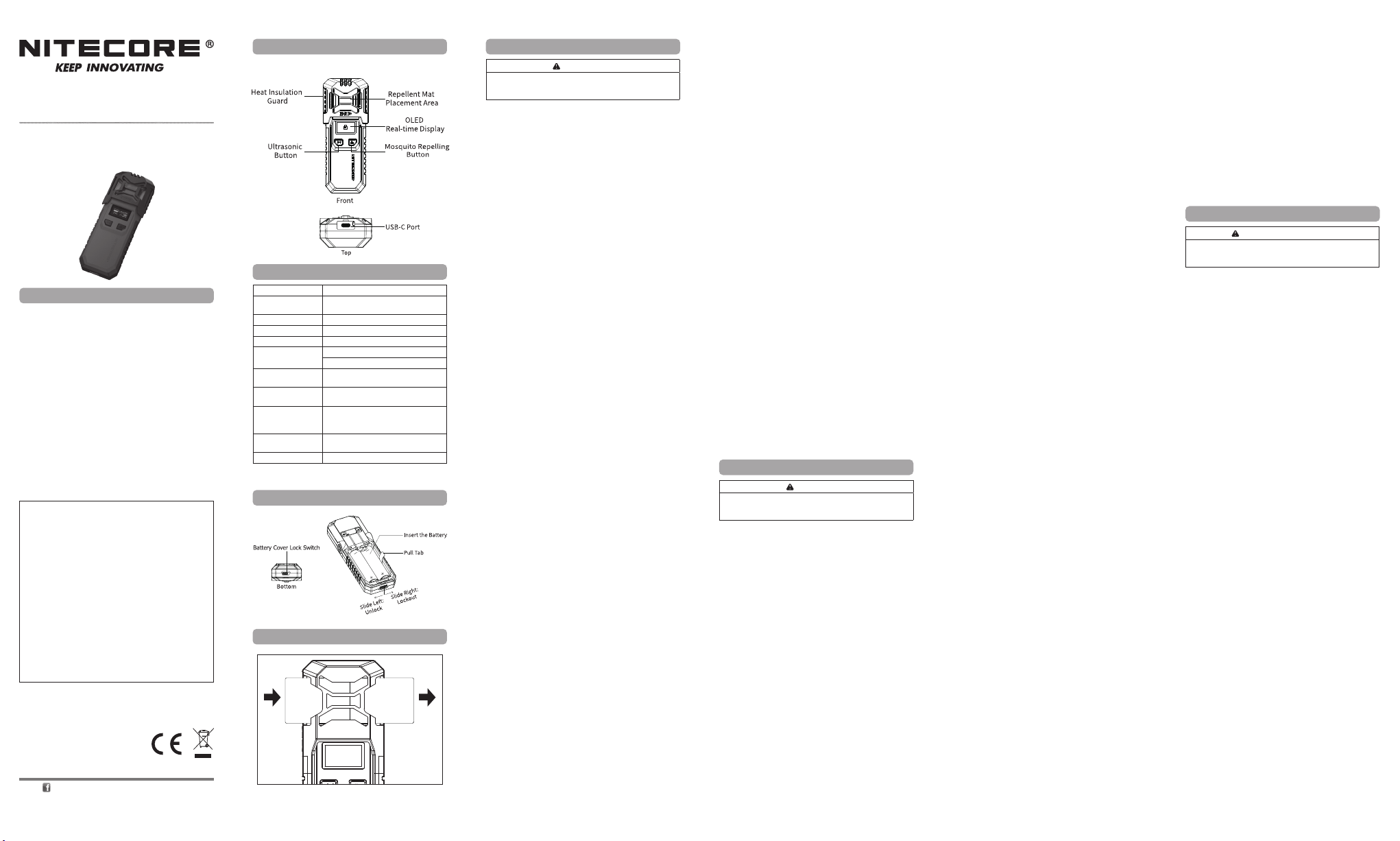
Product Introduction
The EMR10 is specially designed for outdoor activities, such as
outdoor work, camping, shing, trekking and more.
Specications
Input 5V⎓2.4A / 9V⎓2A (18W MAX)
Output
Rated Capacity 10,000mAh 36Wh MAX
Ultrasound Frequency 25kHz, 40kHz
Heating Temperature 165°C / 329°F (MAX)
Modes
Dimensions
Weight
Accessories
Powered by
Waterproof Rating IPX5
Note: Mosquito repellent mats are optional.
Battery Installation
Mosquito Repellent Mat Replacement
New Used
5V⎓2.4A / 9V⎓2A / 12V⎓1.5A
(18W MAX)
Indoor Mode: 11ft Protection Zone
Outdoor Mode: 16ft Protection Zone
167mm x 59.5mm x 33.5mm
(6.6" x 2.3" x 1.3")
135g±5g (4.76 oz±0.1 oz)
(Accessories Not Included)
Heat Insulation Guard, USB-C
Charging Cable, 2 x 21700 NL2150
5,000mAh Li-ion Batteries (optional)
1 or 2 21700 Li-ion Battery(s) to
provide a max runtime of 12h
(English)
IMPORTANT
This product is intended for adult use only. This product is not
Battery Installation
1. Slide the Battery Cover Lock Switch on the bottom to open
2. Ensure the battery(s) is/are inserted with the negative
3. Cover the battery cover and slide the Battery Cover Lock
Charging
Connecting to the External Power
Use the USB cable to connect an external power supply (e.g.
a USB adapter, a power bank or other USB charging device) to
the USB charging port to begin the charging process. (Input:
5V⎓2.4A / 9V⎓2A)
Note: The mosquito repelling function and ultrasonic function
can be activated during the charging process.
Operating Instructions
Mosquito Repelling Function
• On: When the mosquito repelling function is o, long
• O: When the mosquito repelling function is on, long
• Mode Switching: When the mosquito repelling function
Ultrasonic Function
• On: When the ultrasonic function is o, long press the
• O:When the ultrasonic function is on, long press the
Note: Humans can barely hear ultrasound (above 20,000Hz).
Lockout / Unlock
• Lockout: When both functions are o, double press the
• Unlock: When the product is in the Lockout Mode, double
Hibernation Status
The EMR10 will enter hibernation after 30 seconds if the USB-C
port is not in use while the mosquito repelling function and
ultrasonic function are o. In this case, the OLED display will be
o; press either button to show the remaining battery power.
OLED Real-time Display
• When the mosquito repelling function or ultrasonic function
• During the charging process, the OLED display will show the
• During the discharging process, the OLED display will show
Using the EMR10
1. When the product is o, insert 1 repellent mat into the
2. Long press the Mosquito Repelling Button to activate the
3. The protection zone will be created after 10 minutes.
4. After use, long press the Mosquito Repelling Button to turn
Note: NITECORE Mosquito Repellent Mat Size: 34mm x 48mm
/ 1.34" x 1.89" (up to 6 hours each)
Mosquito Repellent Mat Replacement
Make sure the EMR10 is o and cooled. Insert a new repellent
mat while pushing out the used one.
Read all instructions before use.
a toy.
the battery cover.
end towards the spring. The product will not work if the
battery(s) is/are incorrectly inserted.
Switch to lock it.
press the Mosquito Repelling Button to turn it on, and the
corresponding indicator will turn green.
press the Mosquito Repelling Button to turn it o, and the
corresponding indicator will be o.
is on, short press the Mosquito Repelling Button to switch
between Indoor Mode and Outdoor Mode.
Ultrasonic Button to turn it on, and the corresponding
indicator will turn green.
Ultrasonic Button to turn it o, and the corresponding
indicator will be o.
Mosquito Repelling Button to access Lockout Mode. In this
case, the mosquito repelling function and the ultrasonic
function are both unavailable.
press the Mosquito Repelling Button to unlock the mosquito
repelling function and the ultrasonic function.
is turned on, the OLED display will show the selected
function, selected mode, runtime and more.
charging power, battery percentage and more.
the output power, runtime and more.
Repellent Mat Placement Area.
mosquito repelling function.
o the mosquito repelling function. Please store the product
after cooling completely.
EMR10 Placement
• Place the EMR10 upwind of the mosquito repellent area if it
is windy.
• DO NOT cover the EMR10 during the using process.
• It is recommended to use multiple EMR10 together to create
a larger protection zone.
Charging the External Device
USB Output: Available with the USB output, the EMR10 can be
used as a power supply to charge external devices.
Connecting to the External Device: Use the USB cable to
connect an external USB device to the USB charging port to
begin the charging process.
Note: During the discharging process, the USB output will be
automatically o to protect the battery if the battery voltage is low.
Storage and Transportation
• Store the product in ventilated and dry places at room
temperature.
• The battery should be removed to store separately when left
unused for a long time.
Warnings
1. The product is designed to be used by adults. Keep the
product out of reach of children.
2. Children under 16 years old must be under adult supervision
when using this product to prevent scalds and accidents.
3. DO NOT place the product in water.
4. DO NOT put your ngers, metals or foreign matters into the
product to avoid accidents or damage.
5. DO NOT use the product in a conned space.
6. Stop using the product and dispose of it immediately if
there is any leakage, odor, or deformation in the battery.
7. It is recommended to use with NITECORE Li-ion batteries
or others with safety certication.
8. DO NOT expose the product to temperatures above 60°C
(140℉) for a long time.
9. DO NOT disassemble or modify the product without
authorization, as this will cause the warranty to be nullied.
Please check the Warranty Service for details.
10. Please install the Heat Insulation Guard when using the
product to prevent scalds.
11. When using two 21700 Li-ion batteries, please use two with
the same capacity while the voltage dierence between
them is less than 0.1V to avoid damage to the battery or
circuit.
12. Dispose of the device/batteries in accordance with
applicable local laws and regulations.
(Francais)
Lisez toutes les instructions avant utilisation.
Ce produit est destiné à être utilisé par des adultes. Ce produit
Installation de la batterie
1. Faites glisser l’interrupteur de verrouillage du couvercle de la
batterie situé à la base pour ouvrir le couvercle de la batterie.
2. Assurez-vous que la ou les piles sont insérées avec
l’extrémité négative vers le ressort. Le produit ne
fonctionnera pas si la ou les piles sont mal insérées.
3. Couvrez le couvercle de la batterie et faites glisser l’interrupteur
de verrouillage du couvercle de la batterie pour le bloquer.
Charge
Connexion à l’alimentation externe
Utilisez le câble USB pour connecter une alimentation externe
(par exemple, un adaptateur USB, une batterie externe ou un
autre périphérique de charge USB) au port de charge USB pour
commencer le processus de rechargement. (Entrée: 5V⎓2.4A /
9V⎓2A)
Remarque : Les fonctions anti-moustiques et ultrasons
peuvent être activées pendant le processus de charge.
Mode d’emploi
Fonction anti-moustiques
• ON : Lorsque la fonction d’éloignement des moustiques
est désactivée, appuyez longuement sur le bouton antimoustiques pour l’activer et l’indicateur correspondant
deviendra vert.
• OFF : Lorsque la fonction d’éloignement des moustiques est
activée, appuyez longuement sur le bouton anti-moustiques
pour l’éteindre et l’indicateur correspondant sera désactivé.
• Changement de mode : Lorsque la fonction déloignement
des moustiques est activée, appuyez brièvement sur le
bouton anti-moustiques pour basculer entre le mode
intérieur et le mode extérieur.
IMPORTANT
n’est pas un jouet.
Fonction ultrasons
• ON : Lorsque la fonction ultrasons est désactivée, appuyez
longuement sur le bouton à ultrasons pour l’activer et
l’indicateur correspondant deviendra vert.
• OFF : Lorsque la fonction ultrasons est activée, appuyez
longuement sur le bouton à ultrasons pour l’éteindre et
l’indicateur correspondant sera désactivé.
Remarque : Les humains peuvent à peine entendre les
ultrasons (aux alentours de 20 000 Hz).
Verrouillage / Déverrouillage
• Verrouillage : Lorsque les deux fonctions sont désactivées,
appuyez deux fois sur le bouton anti-moustiques pour
accéder au mode de verrouillage. Dans ce cas, la fonction
anti-moustiques et la fonction ultrasons ne sont pas
disponibles.
• Déverrouillage : Lorsque le produit est en mode
verrouillage, appuyez deux fois sur le bouton antimoustiques pour déverrouiller la fonction d’éloignement des
moustiques et la fonction ultrasons.
Etat de veille
L’EMR10 entrera en hibernation après 30 secondes si le port
USB-C n’est pas utilisé alors que la fonction anti-moustiques
et la fonction ultrasons sont désactivées. Dans ce cas, l’écran
OLED sera éteint; appuyez sur l’un ou l’autre bouton pour
acher la puissance restante de la batterie.
Affichage OLED en temps réel
• Lorsque la fonction anti-moustiques ou la fonction ultrasons
est activée, l’écran OLED ache la fonction sélectionnée, le
mode sélectionné, l’autonomie et plus encore.
• Pendant le processus de charge, l’écran OLED achera la
puissance de charge, le pourcentage de batterie restante et
plus encore.
• Pendant le processus de décharge, l’écran OLED achera la
puissance de sortie, l’autonomie et plus encore.
Utilisation de l’ EMR10
1. Lorsque le produit est éteint, insérez 1 tapis répulsif dans la
zone de placement du tapis répulsif.
2. Appuyez longuement sur le bouton anti-moustique pour
activer la fonction anti-moustique.
3. La zone de protection sera créée après 10 minutes.
4. Après utilisation, appuyez longuement sur le bouton antimoustiques pour désactiver la fonction anti-moustiques.
Veuillez ranger le produit après son refroidissement complet.
Remarque : Taille du tapis anti-moustique NITECORE :
34mm x 48mm (jusqu'à 6 heures chacun)
Remplacement du tapis anti-moustiques
Assurez-vous que l’EMR10 est éteint et refroidi. Insérez un
nouveau tapis répulsif tout en poussant celui utilisé.
Placement de l’EMR10
• En cas de vent, placez l'EMR10 dans le sens du vent par
rapport à la zone où se trouve l'anti-moustique.
• NE PAS couvrir l’EMR10 pendant le processus d’utilisation.
• Il est recommandé d’utiliser plusieurs EMR10 en même
temps pour créer une zone de protection plus grande.
Chargement d’un appareil externe
Sortie USB : Disponible avec la sortie USB, l’EMR10 peut être utilisé
comme alimentation pour charger des périphériques externes.
Connexion au périphérique externe : Utilisez le câble USB
pour connecter un périphérique USB externe au port de charge
USB an de commencer le processus de charge.
Remarque : Pendant le processus de décharge, la sortie USB
sera automatiquement désactivée pour protéger la batterie si la
tension de la batterie est faible.
Stockage et transport
• Conserver le produit dans des endroits ventilés et secs à
température ambiante.
• La batterie doit être retirée pour être stockée séparément
lorsque le produit est laissé inutilisé pendant une longue
période.
Avertissements
1. Le produit est conçu pour être utilisé par des adultes.
Gardez le produit hors de portée des enfants.
2. Les enfants de moins de 16 ans doivent être sous la
surveillance d’un adulte lorsqu’ils utilisent ce produit pour
prévenir les brûlures et les accidents.
3. NE PAS placer le produit dans l’eau.
4. NE METTEZ PAS vos doigts, des métaux ou des corps
étrangers dans le produit pour éviter les accidents ou les
dommages.
5. NE PAS utiliser le produit dans un espace conné.
6. Arrêtez d’utiliser le produit et jetez-le immédiatement s’il y
a une fuite, une odeur suspecte ou une déformation dans la
batterie.
7. Il est recommandé d’utiliser le produit avec des batteries Li-
ion NITECORE ou d’autres modèles avec une certication
de sécurité.
8. NE PAS exposer le produit à des températures supérieures
à 60 °C pendant une longue période.
9. NE PAS démonter ou modier le produit sans autorisation,
car cela entraînerait l’annulation de la garantie. Veuillez
consulter le service de garantie pour plus de détails.
10. Veuillez installer le protecteur d’isolation thermique lors de
l’utilisation du produit pour éviter les brûlures.
11. Lorsque vous utilisez deux batteries Li-ion 21700, veuillez
en utiliser deux avec la même capacité et une diérence
de tension inférieure à 0,1 V pour éviter d’endommager la
batterie ou le circuit.
12. Jetez l’appareil / les piles conformément aux lois et
réglementations locales applicables.
(Deutsch)
WICHTIGER HINWEIS
Lesen Sie vor dem Gebrauch alle Anweisungen.
Dieses Produkt ist nur für den Gebrauch durch Erwachsene
bestimmt. Dieses Produkt ist kein Spielzeug!
Einsetzen der Batterie(n)
1. Schieben Sie den Verriegelungsschalter der Batterieabdeckung
an der Unterseite, auf „önen“.
2. Vergewissern Sie sich, dass die Batterie(n) mit dem
negativen Pol in Richtung der Feder eingelegt ist/sind. Das
Gerät funktioniert nicht, wenn die Batterie(n) nicht richtig
eingelegt ist/sind.
3. Schließen Sie die Batteriefachabdeckung und schieben Sie
den Verriegelungsschalter auf „sperren“.
Aufladen
Anschließen an die externe Stromversorgung
Verwenden Sie das USB-Ladekabel, um ein externes Netzteil
(z. B. einen USB-Adapter, eine Powerbank oder ein anderes
USB-Ladegerät) an den USB-Ladeanschluss anzuschließen und
den Ladevorgang zu starten. (Eingang: 5V⎓2.4A / 9V⎓2A).
Hinweis: Die Mückenschutzfunktion und die Ultraschallfunktion
können während des Ladevorgangs aktiviert werden.
Bedienungsanleitung
Mückenabwehr-Funktion
• Ein: Wenn die Mückenabwehr-Funktion ausgeschaltet ist,
drücken Sie lange auf die Mückenabwehr-Taste, um sie
einzuschalten, und die entsprechende Anzeige leuchtet grün.
• Aus: Wenn die Mückenabwehr-Funktion eingeschaltet ist,
drücken Sie lange auf die Mückenabwehr-Taste, um sie
auszuschalten, und die entsprechende Anzeige erlischt.
• Mode-Wechsel: Wenn die Mückenabwehr-Funktion
eingeschaltet ist, drücken Sie kurz auf die MückenabwehrTaste, um zwischen Indoor- und dem Outdoor-Mode zu
wechseln.
Ultraschall-Funktion
• Ein: Wenn die Ultraschallfunktion ausgeschaltet ist, drücken
Sie lange auf die Ultraschall-Taste, um sie einzuschalten, und
die entsprechende Anzeige leuchtet grün.
• Aus: Wenn die Ultraschallfunktion eingeschaltet ist, drücken
Sie lange auf die Ultraschall-Taste, um sie auszuschalten, und
die entsprechende Anzeige erlischt.
Hinweis: Menschen können Ultraschall (über 20000 Hz) kaum
hören.
Sperren / Entsperren
• Sperren: Wenn beide Funktionen ausgeschaltet sind,
drücken Sie zweimal die Mückenabwehr-Taste, um den
Sperr-Mode aufzurufen. In diesem Fall sind sowohl die
Mückenabwehr-Funktion als auch die Ultraschallfunktion
nicht verfügbar.
• Entsperren: Wenn sich das Gerät im Sperr-Mode bendet,
drücken Sie zweimal die Mückenabwehr-Taste, um die
Mückenabwehr-Funktion und die Ultraschallfunktion zu
entsperren.
Ruhe-Status
Die EMR10 geht nach 30 Sekunden in den Ruhezustand
über, wenn der USB-C-Anschluss nicht verwendet wird und
die Mückenabwehr-Funktion oder die Ultraschallfunktion
ausgeschaltet sind. In diesem Fall ist das OLED-Display
ausgeschaltet. Drücken Sie eine der beiden Tasten, um die
verbleibende Energie anzuzeigen.
Page 2
OLED-Echtzeit-Display
• Wenn die Mückenabwehr-Funktion oder die
Ultraschallfunktion eingeschaltet ist, zeigt das OLED-Display
die ausgewählte Funktion, den ausgewählten Mode, die
Laufzeit und vieles mehr an.
• Während des Ladevorgangs zeigt das OLED-Display die
Ladeleistung, den Energiepegel des Akkus und mehr an.
• Während des Entladevorgangs zeigt das OLED-Display die
Ausgangsleistung, die Laufzeit und weiteres an.
Benutzung des EMR10
1. Legen Sie bei ausgeschaltetem Gerät 1 Mückenabwehr-Pad
in den Platzierungsbereich für Mückenabwehr-Pads ein.
2. Drücken Sie lange auf die Mückenabwehr-Taste, um die
Mückenabwehr-Funktion zu aktivieren.
3. Die Schutzzone wird nach 10 Minuten eingerichtet.
4. Drücken Sie nach dem Gebrauch lange auf die
Mückenabwehr-Taste, um die Mückenabwehr-Funktion zu
deaktivieren. Bitte lagern Sie das Gerät erst, nachdem es
vollständig abgekühlt ist.
Hinweis: NITECORE Mückenabwehr-Pad Größe: 34mm x 48mm
(bis zu 6 Stunden pro Stück)
Austausch des Mückenabwehr-Pads
Stellen Sie sicher, dass der EMR10 ausgeschaltet und abgekühlt
ist. Schieben Sie ein neues Mückenabwehr-Pad ein, während Sie
das gebrauchte Pad mit dem alten Pad herausschieben.
EMR10-Platzierung
• Platzieren Sie den EMR10 bei Wind gegen den Wind im
Bereich des Mückenschutzes.
• Decken Sie den EMR10 während des Gebrauchs NICHT ab.
• Es wird empfohlen, mehrere EMR10 zusammen zu
verwenden, um eine größere Schutzzone zu bilden.
Aufladen eines externen Geräts
USB-Ausgang : Mit dem USB-Ausgang kann der EMR10 als
Stromquelle zum Auaden externer Geräte verwendet werden.
Anschließen an das externe Gerät: Verwenden Sie
das USB-Kabel, um ein externes USB-Gerät an den USBLadeanschluss anzuschließen und den Ladevorgang zu starten.
Hinweis: Während des Entladevorgangs wird der USB-Ausgang
automatisch ausgeschaltet, wenn der Energiepegel niedrig ist.
Dies geschieht, um den Akku zu schützen,
Lagerung und Transport
Lagern Sie das Gerät an einem belüfteten und trockenen Ort bei
Raumtemperatur.
Bei längerer Nichtbenutzung sollte der Akku herausgenommen
und separat gelagert werden.
Warnungen
1. Das Gerät ist für den Gebrauch durch Erwachsene
bestimmt. Bewahren Sie es außerhalb der Reichweite von
Kindern auf.
2. Kinder unter 16 Jahren müssen bei der Verwendung
dieses Geräts von Erwachsenen beaufsichtigt werden, um
Verbrennungen und Unfälle zu vermeiden.
3. Legen Sie das Gerät NICHT ins Wasser.
4. Stecken Sie KEINE Metalle oder Fremdkörper oder
Ihre Finger in das Gerät, um Unfälle oder Schäden zu
vermeiden.
5. Benutzen Sie das Gerät NICHT in einem geschlossenen
Räumen.
6. Stellen Sie die Verwendung des Geräts ein und entsorgen
Sie es sofort, wenn der Akku ausläuft, riecht oder sich
verformt.
7. Es wird empfohlen, nur NITECORE Li-Ionen-Akkus oder
andere Akkus mit Sicherheitszertikat zu verwenden.
8. Setzen Sie das Gerät NICHT über einen längeren Zeitraum
Temperaturen über +60°C aus.
9. Demontieren oder modizieren Sie das Gerät NICHT ohne
Genehmigung, da dies zum Erlöschen der Garantie führt.
Bitte informieren Sie sich beim Garantieservice über die
Einzelheiten.
10. Bringen Sie bitte die Wärmeschutz-Abdeckung an, wenn Sie
das Gerät verwenden, um Verbrennungen zu vermeiden.
11. Wenn Sie zwei 21700 Li-Ionen-Batterien verwenden,
verwenden Sie bitte zwei mit der gleichen Kapazität,
während der Spannungsunterschied zwischen ihnen
weniger als 0,1 V beträgt, um so Schäden am Akku oder
dem Stromkreis zu vermeiden.
12. Entsorgen Sie das Gerät/den Akku in Übereinstimmung mit
den geltenden örtlichen Gesetzen und Vorschriften.
Entsorgung von Elektro- und
Elektronikgeräten
Die durchgestrichene Mülltonne bedeutet, dass Sie
gesetzlich verpichtet sind, diese Geräte einer vom
unsortierten Siedlungsabfall getrennten Erfassung
zuzuführen. Die Entsorgung über die Restmülltonne oder die
gelbe Tonne ist untersagt. Enthalten die Produkte Batterien
oder Akkus, die nicht fest verbaut sind, müssen diese vor der
Entsorgung entnommen und getrennt als Batterie entsorgt
werden.
(Italiano)
IMPORTANTE
Leggere tutte le istruzioni prima dell'uso.
Questo prodotto è destinato esclusivamente all'uso da
parte di adulti. Questo prodotto non è un giocattolo.
Installazione della batteria
1. Fare scorrere l'interruttore di blocco del coperchio della
batteria sul fondo per aprire il coperchio della batteria.
2. Assicurarsi che la/le batteria/e sia/no inserita/e con l'estremità
negativa verso la molla. Il prodotto non funzionerà se la/le
batteria/e è/sono inserita/e in modo errato.
3. Chiudere il coperchio della batteria e far scorrere l'interruttore
di blocco del coperchio della batteria per bloccarlo.
Carica
Collegamento all'alimentazione esterna
Utilizzare il cavo USB per collegare un'alimentazione esterna
(ad esempio un adattatore USB, un power bank o un altro
dispositivo di ricarica USB) alla porta di ricarica USB per avviare
il processo di ricarica. (Ingresso: 5V⎓2.4A / 9V⎓2A)
Nota: La funzione repellente per zanzare e la funzione ad ultrasuoni
possono essere attivate anche durante il processo di ricarica.
Istruzioni per l'uso
Funzione repellente per zanzare
• Accensione: Quando la funzione repellente per zanzare è
spenta, premere a lungo il pulsante repellente per zanzare
per accenderlo e l'indicatore corrispondente diventerà verde.
• Spegnimento: Quando la funzione repellente per zanzare
è accesa, premere a lungo il pulsante repellente per zanzare
per spegnerla e l'indicatore corrispondente si spegnerà.
• Cambio modalità: Quando la funzione repellente per zanzare
è accesa, premere brevemente il pulsante repellente per zanzare
per passare tra la Modalità interna e la Modalità esterna.
Funzione ad ultrasuoni
• Accensione: Quando la funzione ad ultrasuoni è spenta,
premere a lungo il pulsante ad ultrasuoni per accenderla e
l'indicatore corrispondente diventerà verde.
• Spegnimento: Quando la funzione ad ultrasuoni è accesa,
premere a lungo il pulsante ad ultrasuoni per spegnerla e
l'indicatore corrispondente si spegnerà.
Nota: Gli esseri umani riescono a malapena a sentire gli
ultrasuoni (sopra i 20.000 Hz).
Blocco / Sblocco
• Blocco: Quando entrambe le funzioni sono spente, premere
due volte il pulsante repellente per zanzare per accedere alla
modalità di blocco. In questo caso, la funzione repellente per
zanzare e la funzione ad ultrasuoni sono entrambe disattivate.
• Sblocco: Quando il prodotto è in modalità di blocco,
premere due volte il pulsante repellente per zanzare per
sbloccare la funzione repellente per zanzare e la funzione ad
ultrasuoni.
Stato di ibernazione
L'EMR10 entrerà in ibernazione dopo 30 secondi se la porta
USB-C non è in uso mentre la funzione repellente per zanzare
e la funzione ad ultrasuoni sono spente. In questo caso, il
display OLED sarà spento; premere uno dei due pulsanti per
visualizzare la carica residua della batteria.
Display OLED in tempo reale
• Quando la funzione repellente per zanzare o la funzione ad
ultrasuoni è accesa, il display OLED mostrerà la funzione
selezionata, la modalità selezionata, la durata e altro ancora.
• Durante il processo di ricarica, il display OLED mostrerà la
potenza di ricarica, la percentuale della batteria e altro ancora.
• Durante il processo di scarica, il display OLED mostrerà la
potenza in uscita, la durata e altro ancora.
Utilizzo dell'EMR10
1. Quando il prodotto è spento, inserire 1 piastrina repellente
nell’apposita area.
2. Premere a lungo il pulsante repellente per zanzare per
attivare la funzione repellente per zanzare.
3. La zona di protezione sarà creata dopo 10 minuti.
4. Dopo l'uso, premere a lungo il pulsante repellente per zanzare
per spegnere la funzione repellente per zanzare. Conservare il
prodotto dopo averlo fatto rareddare completamente.
Nota: Dimensioni della piastrina repellente per zanzare
NITECORE: 34mm x 48mm / 1.34" x 1.89" (no a 6 ore ciascuno)
Sostituzione della piastrina repellente per
zanzare
Assicurarsi che l'EMR10 sia spento e rareddato. Inserire una
nuova piastrina repellente spingendo fuori quella usata.
Posizionamento dell'EMR10
• Posizionare l'EMR10 a monte dell'area repellente per zanzare
se c'è vento.
• NON coprire l'EMR10 durante l'utilizzo.
• Si consiglia di utilizzare più EMR10 insieme per creare una
zona di protezione più ampia.
Ricarica del dispositivo esterno
Uscita USB: L'EMR10 può essere utilizzato come alimentatore
per caricare dispositivi esterni tramite l'uscita USB.
Collegamento al dispositivo esterno: Utilizzare il cavo USB
per collegare un dispositivo USB esterno alla porta di ricarica
USB per avviare il processo di ricarica.
Nota: Durante il processo di scarica, l'uscita USB si spegnerà
automaticamente per proteggere la batteria se la tensione della
batteria è bassa.
Conservazione e trasporto
• Conservare il prodotto in luoghi ventilati e asciutti a
temperatura ambiente.
• La batteria deve essere rimossa e conservata separatamente
quando non viene utilizzata per lungo tempo.
Avvertenze
1. Il prodotto è progettato per essere utilizzato da adulti.
Tenere il prodotto fuori dalla portata dei bambini.
2. I bambini di età inferiore a 16 anni devono essere sotto la
supervisione di un adulto quando utilizzano questo prodotto
per prevenire ustioni e incidenti.
3. NON immergere il prodotto in acqua.
4. NON inserire dita, metalli o corpi estranei nel prodotto per
evitare incidenti o danni.
5. NON utilizzare il prodotto in uno spazio connato.
6. Smettere di utilizzare il prodotto e smaltirlo
immediatamente se si verica una perdita, un odore o una
deformazione nella batteria.
7. Si consiglia di utilizzare batterie al litio NITECORE o altre
con certicazione di sicurezza.
8. NON esporre il prodotto a temperature superiori a 60°C
(140℉) per lunghi periodi.
9. NON smontare o modicare il prodotto senza
autorizzazione, poiché ciò causerà l'annullamento della
garanzia. Per i dettagli, consultare il Servizio di garanzia.
10. Installare la protezione termoisolante durante l'utilizzo del
prodotto per prevenire ustioni.
11. Quando si utilizzano due batterie al litio 21700, si prega
di utilizzare due batterie con la stessa capacità mentre la
dierenza di tensione tra loro è inferiore a 0,1 V per evitare
danni alla batteria o al circuito.
12. Smaltire il dispositivo e le batterie in conformità con le leggi
e i regolamenti locali applicabili.
(Русский)
Полностью ознакомьтесь с инструкцией перед
Этот продукт предназначен для пользования только
взрослыми людьми. Устройство не является игрушкой.
Установкааккумулятора
1. Сдвиньте находящуюся внизу защиту батарейного
отсека, чтобы открыть его крышку.
2. Убедитесь, что аккумулятор (аккумуляторы) вставлен
(вставлены) отрицательным концом к пружине. Продукт
не будет работать, если аккумулятор (аккумуляторы)
вставлен (вставлены) неправильно.
3. Закройте крышку батарейного отсека и сдвиньте его
защиту, чтобы скрыть его.
Зарядка
Подключениеквнешнемуисточникупитания
Используйте USB-кабель для подключения устройства к
внешнему источнику питания (например, USB-адаптеру,
ВНИМАНИЕ
использованием.
блоку питания или другому зарядному устройству с USBпортом), чтобы начался заряд. (Вход: 5 В ⎓ 2,4 А / 9 В ⎓ 2 А)
Примечание:Защита от комаров, в том числе и
ультразвуковая, работает во время зарядки.
Инструкцияпоэксплуатации
Функциязащитыоткомаров
• Включение: если функция защиты от комаров
выключена, нажмите кнопку защиты от комаров
(«Mosquito Repelling»), чтобы включить ее, после этого
соответствующий индикатор загорится зеленым.
• Выключение: если функция защиты от комаров
включена, нажмите кнопку защиты от комаров
(«Mosquito Repelling»), чтобы выключить ее, после этого
соответствующий индикатор перестанет гореть.
• Переключениемеждурежимами: если функция
защиты от комаров включена, кратковременно
нажимайте на кнопку защиты от комаров («Mosquito
Repelling»), чтобы переключаться между режимом «В
помещении» и режимом «На улице».
Функцияультразвука
• Включение:если функция ультразвука выключена,
нажмите кнопку ультразвука («Ultrasonic»), чтобы включить
ее, после этого соответствующий индикатор станет зеленым.
• Выключение: если функция ультразвука включена,
нажмите кнопку ультразвука («Ultrasonic»), чтобы
выключить ее, после этого соответствующий индикатор
перестанет гореть.
Примечание: люди практически не слышат ультразвук
(свыше 20,000 Гц).
Блокировка/Разблокировка
• Блокировка: если обе функции выключены, дважды
нажмите на кнопку защиты от комаров («Mosquito
Repelling»), чтобы получить доступ к режиму блокировки.
В этом режиме функция обычной защиты от комаров и
функция ультразвука недоступны.
• Разблокировка: если устройство находится в режиме
блокировки, дважды нажмите на кнопку защиты от
комаров, чтобы разблокировать функцию обычной
защиты от комаров и функцию ультразвука.
Состояниегибернации
EMR10 перейдет в спящий режим через 30 секунд, если
порт USB-C не используется, а функция обычной защиты от
комаров и функция ультразвука выключены. В этом случае
OLED-дисплей выключится; нажмите любую кнопку, чтобы
показать оставшийся заряд аккумулятора.
OLED-дисплейврежимереального
времени
• При включении функции обычной защиты от комаров
или функции ультразвука, OLED-дисплей отобразит
выбранную функцию, выбранный режим, время работы и
прочее.
• Во время зарядки OLED-дисплей показывает мощность
зарядки, процент заряда аккумулятора и прочее.
• Когда устройство разряжается, OLED-дисплей показывает
выходную мощность, оставшееся время работы и прочее.
ЭксплуатацияEMR10
1. При нахождении устройства в выключенном состоянии
вставьте 1 пластинку от комаров в область ее
размещения.
2. Длительное нажатие кнопки защиты от комаров
(«Mosquito Repelling Button») активирует функцию
защиты от комаров.
3. Защита будет обеспечена через 10 минут после
активации функции.
4. По окончании использования зажмите и долго
удерживайте кнопку защиты от комаров, чтобы
отключить данную функцию. Пожалуйста, убирайте
устройство, лишь когда убедитесь в том, что оно
полностью охладилось.
Примечание:размер пластинки от комаров от NITECORE:
34 мм х 48 мм / 1,34" х 1,89" (до 6 часов каждая)
Заменапластинкиоткомаров
Убедитесь, что устройство выключено и охлаждено.
Вставьте новую пластинку от комаров, выталкивая уже
использованную.
РазмещениеEMR10
• При наличии ветра поместите EMR10 с наветренной
стороны от зоны действия средства.
• НЕЛЬЗЯ ничем накрывать EMR10 во время работы
устройства.
• Рекомендуется использовать несколько EMR10 вместе
для создания большей зоны защиты.
Зарядкавнешнегоустройства
USB-выход:благодаря наличию USB-выхода EMR10 можно
использовать в качестве источника питания для зарядки
внешних устройств.
Подключениеквнешнемуустройству: Используйте
USB-кабель для подключения внешнего USB-устройства к
USB-порту, чтобы начать зарядку.
Примечание: USB-выход автоматически выключится
для обеспечения защиты аккумулятора в случае, если его
напряжение окажется низким.
Хранениеитранспортировка
• Хранить продукт в проветриваемых и сухих помещениях
при комнатной температуре.
• Аккумулятор следует извлечь и хранить отдельно, если
вы планируете длительное время не пользоваться
устройством.
Мерыпредосторожности
1. Продукт предназначен для использования взрослыми.
Храните продукт в недоступном для детей месте.
2. Дети в возрасте до 16 лет должны находиться под
присмотром взрослых при использовании этого устройства
во избежание ожогов и других несчастных случаев.
3. НЕЛЬЗЯ помещать устройство в воду.
4. НЕ помещайте пальцы, металлы или посторонние
предметы в устройство во избежание несчастных
случаев или повреждений.
5. НЕ используйте устройство в замкнутом пространстве.
6. Прекратите использование устройства и немедленно
утилизируйте его в случае, если в аккумуляторе есть
какие-либо утечки, запах или деформация.
7. Рекомендуется использовать устройство с литийионными аккумуляторами NITECORE или другими
сертифицированными аккумуляторами.
8. НЕ подвергайте устройство воздействию температуры
выше 60°C (140℉) в течение длительного времени.
9. НЕ разбирайте и не модифицируйте устройство
сами, так как это приведет к аннулированию
гарантии. Пожалуйста, обратите внимание на раздел
гарантийного обслуживания для получения более
подробной информации.
10. Пожалуйста, установите теплоизоляционную защиту
при использовании устройства, чтобы избежать ожогов.
11. При использовании двух литий-ионных аккумуляторов
21700 используйте два аккумулятора с одинаковой
емкостью, а разница в напряжении между ними не
должна превышать 0,1 В. В противном случае это может
привести к повреждению аккумулятора или цепи.
12 . Утилизируйте устройство / аккумуляторы в соответствии с
действующим местным законодательством и правилами.
( 简体中文 )
警告
使用前请仔细阅读使用说明。
本品并非玩具,仅供成人使用。
装入电池
1. 滑动EMR10 底部电池盖开关,打开电池背盖。
2. 将电池按照指示放入,反装电池将不能工作。
3. 盖上背盖,滑动电池盖开关锁定。
充电:
连接电源:
把 USB-C充电线一端连至本品 USB-C接口,另一端接上 USB
适配器、移动电源或其他USB供电设备。(输入:5V⎓2A
9V⎓2A)
注:在充电过程中,可开启驱蚊及超声波功能。
操作说明
驱蚊
• 开启:关闭状态下,长按驱蚊开关即开启驱蚊功能,指示灯
变为绿色。
• 关闭:开启状态下,长按驱蚊开关即关闭驱蚊功能,指示灯
熄灭。
• 室内模式 / 户外模式切换:开启驱蚊功能状态下,短按驱蚊开
关可切换。
超声波
• 开启:关闭状态下,长按超声波开关开启超声波功能,开关
指示灯变为绿色。
• 关闭:开启状态下,长按超声波开关关闭超声波功能,开关
指示灯熄灭。
注:超声波(大于 20,000Hz)对人类几乎无声。
锁定 / 解锁
• 锁定:在没有开启驱蚊与超声功能时,双击驱蚊开关,进入
锁定模式。驱蚊与超声波功能禁用。
• 解锁:锁定状态下,双击驱蚊开关,解除锁定,驱蚊与超声
波功能恢复。
休眠功能
若 USB-C口没有使用且驱蚊功能和超声波功能没有开启,
EMR10 会在 30S后进入休眠状态。此时 OLED显示屏关闭;单
击任一按键,OLED 显示屏显示电量。
多功能 OLED 显示屏
• 开启驱蚊功能或超声波功能后,OLED 显示屏会显示当前选择
功能、模式、可用时间等信息。
• 当 EMR10 处于正常充电状态,OLED显示屏会显示当前充电
功率、当前电池百分比等信息。
• 当 EMR10 处于正常输出状态,OLED显示屏会显示当前输出
功率、剩余可用时间等信息。
使用 EMR10
(1) 关闭状态下,取 1 片驱蚊片插至驱蚊片放置区上。
(2) 长按驱蚊开关,开启驱蚊功能。
(3) 10 分钟后即可建立保护区域。
(4) 使用完毕后,长按驱蚊开关即关闭,让其进行完全冷却才可
存储。
注:奈特科尔驱 蚊片尺寸 34mm x 48mm 功效最长可达 6 小时 / 片
替换驱蚊片
请确保 EMR10已经关闭并且冷却,插入新的驱蚊片将使用过的
驱蚊片推出。
放置 EMR10
• 有风状态,请将 EMR10 放在驱蚊区域的上风处。
• 使用过程中请不要覆盖 EMR10。
• 如果驱蚊区域面积过大,建议多个 EMR10 一起使用。
给其他设备充电
USB 输出功能:EMR10 具有 USB 输出功能,可作为移动电源为
外部 USB 充电设备供电。
连接外部设备:把 USB-C充电线一端连至本品输出接口,另一
端接上充电设备,即可对设备进行充电。
注:放电过程中,若电池电压过低会自动关闭输出以保护电池。
保存和运输
• 本产品在不使用时,请储存在干燥的室温环境中。
• 本产品在储存期间应取出电池单独存储。
注意事项
1. 本品适用人群为 18 岁以上成年人,请远离儿童。
2. 为了减少烫伤风险,当在儿童附近使用本品时,需要进行密
切地监护。
3. 请勿将本品放置在水中。
4. 请勿将手指、金属或者其他外来物体放入本品中。
5. 请勿在密闭的空间中使用本品。
6. 如果发现电池有任何泄漏、异味或变形,应立即停止使用并
将其安全处理。
7. 建议使用 NITECORE 奈特科尔电池或其他有安全认证的电池
产品。
8. 不要让本产品长时间处于高于 60 摄氏度的环境中。
9. 切勿擅自拆卸、组装或改装本品,可能会导致保修服务失效,
详情请查看保固条款。
10. 在使用驱蚊功能时,请安装上隔热罩,以防高温烫伤。
11. 使用双节 21700 锂电池时,请尽量使用两节相同容量且两节
电池电压相差不超过 0.1V 的 21700 锂电池,以防电池或电
路损坏。
12. 请根据适用的当地法律和法规处置设备 / 电池。
保固服务
NITECORE® 产品拥有售后保固服务。在购买本产品的 15 天内,
如果有任何质量问题均可向经销商要求免费更换。在购买本产品
的 12 个月内享受免费保固服务。在超过 12 个月免费保固期后,
厂家将收取相应的材料费以及快递费。
本保固规则不适用于以下情况:
1. 人为破坏,拆解,改装本产品。
2. 错误操作导致产品损坏。
如对奈特科尔产品有任何疑问,欢迎联系当地的代理商或发邮件
到 [email protected]
※ 本说明书中出现的商标及其产品图片版权属于其合法持有人,
此处仅作展示所用。
※ 本说明书的所有图片、陈述及文字信息仅供参考,请以官网
www.nitecore.cn 实际信息为准。广州希脉创新科技有限公
司拥有对说明书内容的最终解释权和修改权。
 Loading...