

Page 1
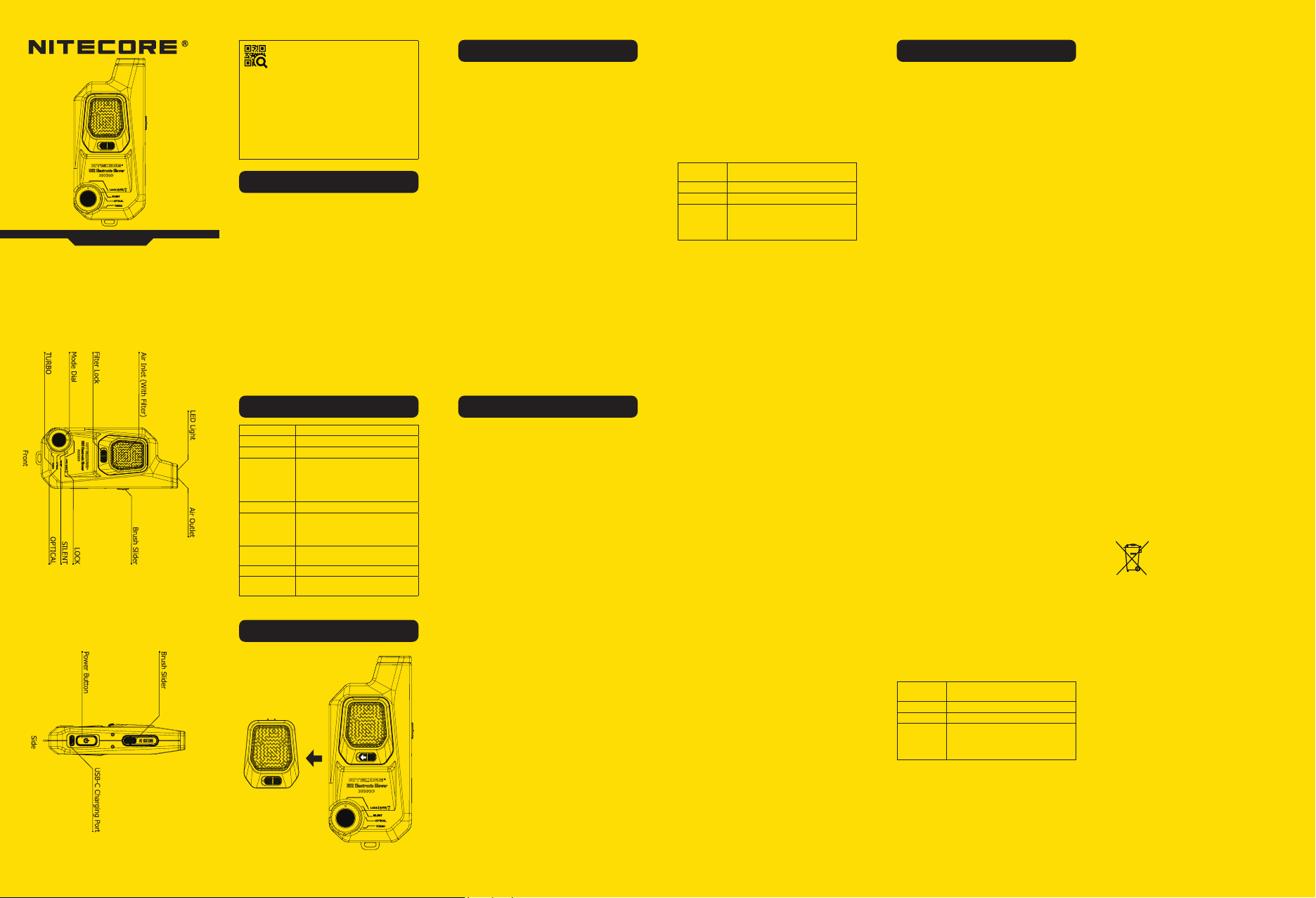
BB2
Electronic Photography Blower
User Manual
IMPORTANT NOTICE
CONCERNING WARRANTY
SERVICE
Thank you for purchasing! Before using this product,
please nd your verication code on the package box,
and go to https://photo.nitecore.com/Validation (or
scan the QR code beside the verication code to visit on
your mobile phone). Type in your verication code and
personal information as required, and submit the page.
After verication, NITECORE will send you a warranty
service email for a free warranty extension of 6 months.
This email and your registration email address are
essential to your possible warranty application.
Features
• Portable Cordless Electronic Blower
• Applicable to the cleaning of photographic equipment
and more devices
• Max wind speed of 80 km/h (49.7 mph)
• Built-in 7.2Wh Li-ion battery provides a consistent
usage
• Built-in Li-ion battery management system with a
USB-C charging port
• Unidirectional air intake to prevent secondary damage
to the object surface
• Replaceable high density lter included for eective
dust ltration
• Power indicator to indicate the remaining battery
power
• Silicone nozzle to prevent accidental damage to the
object surface
• Constructed from aerospace grade aluminum alloy
with HA-III military grade hard-anodized nish
• Magnetic quick release brush included
• 3-level wind speed adjustable
• Available with lighting function
Technical Specications
Input 5V⎓2A
Rated Power 33.6W
Battery Capacity 7.2Wh
Cleaning Times
Rotational Speed
TURBO: Approx. 90 Times
OPTICAL: Approx. 210 Times
SILENT: Approx. 800 Times
(10s per time under full charge)
30,000 RPM
TURBO: 80 km/h (49.7 mph)
Wind Speed
OPTICAL: 55 km/h (34.2 mph)
SILENT: 30 km/h (18.6 mph)
141mm x 62mm x 32mm
Dimensions
(5.55" x 2.44" x 1.26")
Weight 210g (7.4oz)
USB-C Charging Cable, Dust Cap,
Accessories
Magnetic Quick Release Brush
Filter Changing
Warranty Details
Our authorized dealers and distributors are responsible
for warranty service. Should any problem covered under
warranty occur, customers can contact their dealers or
distributors in regards to their warranty claims, as long
as the product was purchased from an authorized dealer
or distributor. NITECORE’s Warranty is provided only
for products purchased from an authorized source. This
applies to all NITECORE products.
Any DOA / defective product can be exchanged for a
replacement through a local distributor/dealer within
the 15 days of purchase. After 15 days, all defective /
malfunctioning NITECORE® products can be repaired
free of charge for a period of 12 months (1 year) from
the date of purchase. Beyond 12 months (1 year), a
limited warranty applies, covering the cost of labor
and maintenance, but not the cost of accessories
or replacement parts. For an optional free warranty
extension of 6 months, please refer to the “IMPORTANT
WARRANTY NOTICE” section on top to validate your
product.
The warranty is nullied if the product(s) is/are:
1. Broken down, reconstructed and/or modied by
unauthorized parties
2. Damaged from wrong operations
For the latest information on NITECORE® products and
services, please contact a local NITECORE® distributor or
send an email to [email protected].
※ All images, text and statements specied herein
this user manual are for reference purpose only.
Should any discrepancy occur between this manual
and information specied on www.nitecore.com,
information on our ocial website shall prevail.
SYSMAX Innovations Co., Ltd. reserves the rights to
interpret and amend the content of this document at
any time without prior notice.
(English)
Charging Function
The BB2 is equipped with an intelligent charging system.
Please charge the product before the rst use. Use the
USB-C cable to connect an external power supply to the
charging port to begin the charging process.
• During the charging process, the red indicator next to
the charging port will ash to inform the user.
• Once the battery is fully charged, the product will
automatically stop charging and the power indicator
will turn green.
• Charging time is approx. 1 hour.
• During the charging process, the cleaning function and
lighting function can be activated.
Operating Instructions
User Mode Selection
Rotate the Mode Dial to select the desired user mode.
Fast Cleaning
Rotate the Mode Dial to the desired user mode (LOCK
Mode excluded), and then press and hold the Power
Button to turn on the Fast Cleaning Mode. Release to
turn it o.
Constant Cleaning
Rotate the Mode Dial to the desired user mode (LOCK
Mode excluded).
On: When the cleaning function is o, double press the
Power Button to turn it on and the power indicator will
glow blue.
O: When the cleaning function is on, short press the
Power Button to turn it o. Rotating the Mode Dial to the
LOCK Mode can also turn it o.
Note: When the power is low in Constant Cleaning
Mode, the product will automatically turn o.
Magnetic Quick Release Brush
Push the Brush Slider to the top to push out the brush;
push the Brush Slider to the bottom to store the brush.
Note: The product comes with a Camera Body Cleaning
Brush. Lens Cleaning Brush is optional and applicable to
be used with the BB2.
Lighting Function
On: Rotate the Mode Dial to the LOCK Mode rst. And
then rotate the Mode Dial to the SILENT Mode while
pressing and holding the Power Button to turn on the
light.
O: When the light is on, rotate the Mode Dial to the
LOCK Mode to turn it o.
Power Indication
When the power is o, short press the Power Button and
the power indicator will glow to indicate the remaining
battery power:
Color of
Indicator
Green Above 50%
Blue Below 50%
Red
Warnings
1. Use the product for the specied purposes only.
Misuse of the product may be risky.
2. Please read the user manual carefully before using
the product. Connect the applicable power source
only according to the specications in this user
manual to charge the product.
3. Please recharge the product every 3 months without
a long-time usage.
4. Ambient Temperature of Usage: -10~40°C
(14~104°F); Temperature of Storage: -20~60°C
(-4~140°F)
5. DO NOT put any foreign objects into the air inlet,
outlet or the charging port.
6. DO NOT cover the air inlet when using the product.
7. DO NOT use the product without a lter, or it will
gather dust in the air inlet.
8. Stop using the product at any sign of malfunction.
9. Store the product in ventilated areas. DO NOT use
any liquid to clean the product. Keep it away from
any combustible material.
10. DO NOT store or use the product in an environment
where the temperature is extremely high / low or
changes rapidly, or in a conned area with a high
temperature.
11. Avoid any vibration or impact to the product.
12. DO NOT disassemble or modify the product as this
could result in battery explosion, cracking or leaking,
causing personal injury, property damage and/or
other unpredictable risks.
13. Dispose of the device/batteries in accordance with
applicable local laws and regulations.
Maintenance
1. Please replace the lter as soon as possible when it
is broken, the air inlet is blocked by dust, or the wind
speed is found signicantly decreased.
2. DO NOT use any liquid to clean the product when the
air inlet is blocked by dust. It is recommended to use
a magnetic quick release brush to sweep the dust,
replace the lter and then turn it on until no more dust
comes out from the inside.
Filter Changing
It is recommended to replace the lter regularly to
maintain the best cleaning performance. Please follow
the steps below:
1. Push the Filter Lock to the other side and take out the
lter.
2. Install a new lter.
Note: DO NOT use the product without a lter installed.
Remaining Power
Below 10%
(Please recharge the product as soon
as possible when it cannot be turned on
due to low power.)
(Deutsch)
Ladefunktion
Das BB2 ist mit einem intelligenten Ladesystem
ausgestattet. Bitte laden Sie das Produkt vor dem ersten
Gebrauch auf. Nutzen Sie das USB-C-Kabel, um ein
externes Netzteil am Ladeanschluss anzuschließen den
Ladevorgang zu starten.
● Während des Ladevorgangs leuchtet die
Betriebsanzeige stetig rot.
● Sobald der Akku vollständig aufgeladen ist, wird der
Ladevorgang beendet und die Betriebsanzeige leuchtet
grün.
● Die Ladezeit beträgt ca. 1h.
● Das Gebläse sowie die Beleuchtung können während
des Ladevorgangs genutzt werden.
Bedienungsanleitung
Auswahl des Benutzer-Mode
Drehen Sie den Mode-Auswahlschalter, um den
gewünschten Benutzer-Mode auszuwählen.
Schnellreinigungs-Mode
Drehen Sie den Mode-Auswahlschalter auf den
gewünschte n Benutzer-Mode (ausgenommen Sperr-Mode),
und halten Sie dann die EIN-/AUS-Taste gedrückt, um
den Schnellreinigungs-Mode einzuschalten. Lassen Sie sie
los, um ihn auszuschalten.
Dauerreinigungs-Mode
Drehen Sie den Mode-Auswahlschalter auf den
gewünschten Benutzer-Mode (ausgenommen Sperr-Mode).
EIN: Wenn die Reinigungsfunktion ausgeschaltet
ist, drücken Sie die EIN-/AUS-Taste zweimal, um sie
einzuschalten, und die Betriebsanzeige leuchtet blau.
AUS: Wenn die Reinigungsfunktion eingeschaltet
ist, drücken Sie die EIN-/AUS-Taste kurz, um sie
auszuschalten.
Hinweis: Wenn die Stromversorgung im
Dauerreinigungs-Mode niedrig ist, schaltet sich das Gerät
automatisch aus.
Magnetische Reinigungsbürste mit
Schnellverschluss
Schieben Sie den Bürstenschieber nach oben, um
die Bürste herauszuschieben; schieben Sie den
Bürstenschieber nach unten, um die Bürste zu verstauen.
Hinweis: Das Produkt wird mit einer Reinigungsbürste
für das Kameragehäuse geliefert. Die
Objektivreinigungsbürste ist gesondert erhältlich und kann
ebenso mit dem BB2 verwendet werden.
Beleuchtungsfunktion
Ein: Drehen Sie den Mode-Auswahlschalter zuerst auf
den Sperr-Mode. Drehen Sie dann den
Mode-Auswahlschalter auf den LAUTLOS-Mode, während
Sie die EIN-/AUS-Taste gedrückt halten.
Aus: Wenn das Licht eingeschaltet ist, drehen Sie den
Mode-Auswahlschalter auf den Sperr-Mode.
Leistungsanzeige
Wenn das Gerät ausgeschaltet ist, drücken Sie kurz die
EIN-/AUS-Taste und die Betriebsanzeige leuchtet, um die
verbleibende Akkuleistung anzuzeigen:
Farbe der
Anzeige
grün über 50%
blau unter 50%
rot
Warnungen
1. Verwenden Sie das Gerät nur für die angegebenen
Zwecke. Ein Missbrauch des Produkts kann Risiken
bergen.
2. Bitte lesen Sie die Bedienungsanleitung sorgfältig
durch, bevor Sie das Produkt verwenden. Schließen
Sie die entsprechende Stromquelle nur gemäß den
Spezikationen in dieser Bedienungsanleitung an,
um das Gerät aufzuladen.
Verbleibende Leistung
unter 10% (Bitte laden Sie das Gerät
so schnell wie möglich auf, wenn der
Blower aufgrund geringer Leistung nicht
eingeschaltet werden kann.)
3. Bitte laden Sie das Gerät alle 3 Monate auf, wenn es
längere Zeit nicht benutzt wird.
4. Umgebungstemperatur zur Verwendung: -10 ~ 40
°C; Lagertemperatur: -20 ~ 60 °C.
5. LEGEN SIE KEINE Fremdkörper in den Lufteinlass,
-auslass oder den Ladeanschluss.
6. Decken Sie den Lufteinlass bei Verwendung des
Geräts NICHT ab.
7. Verwenden Sie das Gerät NICHT ohne Filter, da sich
sonst Staub im Lufteinlass sammelt.
8. Beenden Sie die Verwendung des Geräts bei
Anzeichen einer Fehlfunktion.
9. Lagern Sie das Gerät in belüfteten Bereichen.
Verwenden Sie KEINE Flüssigkeit, um das Produkt
zu reinigen. Halten Sie es von brennbarem Material
fern.
10. Lagern oder verwenden Sie das Produkt NICHT in
einer Umgebung, in der die Temperatur extrem hoch
/ niedrig ist oder sich schnell ändert, oder in einem
begrenzten Bereich mit einer hohen Temperatur.
11. Vermeiden Sie jegliche Vibrationen oder Stöße auf
das Produkt.
12. Zerlegen oder modizieren Sie das Gerät NICHT, da
dies zur Explosion des Akkus, Rissen oder Leckagen
führen kann, die wiederum Personenschäden,
Sachschäden und / oder andere Unvorhersehbare
Risiken verursachen können.
13. Entsorgen Sie das Gerät/den Akku in
Übereinstimmung mit den geltenden örtlichen
Gesetzen und Vorschriften.
Pflege und Wartung
1. Bitte ersetzen Sie den Filter so schnell wie möglich,
wenn er gebrochen ist, der Lufteinlass durch Staub
blockiert oder der Luftstrom deutlich verringert ist.
2. Verwenden Sie KEINE Flüssigkeit, um das Produkt zu
reinigen, wenn der Lufteinlass durch Staub blockiert
ist. Es wird empfohlen, den Staub mit einer weichen
Bürste / weichem Pinsel zu entfernen, den Filter
auszutauschen und dann den Blower einzuschalten,
bis kein Staub mehr von innen herauskommt.
Filter ersetzen
Es wird empfohlen, den Filter regelmäßig auszutauschen,
um die beste Reinigungsleistung zu erhalten. Bitte
befolgen Sie dazu die folgenden Schritte:
1. Schieben Sie den Filterverschluss auf die andere Seite
und nehmen Sie den Filter heraus.
2. Setzen Sie einen neuen Filter ein.
Hinweis: Verwenden Sie das Gerät NICHT ohne
installierten Filter!
Entsorgung von Elektro- und
Elektronikgeräten
Die durchgestrichene Mülltonne bedeutet,
dass Sie gesetzlich verpichtet sind, diese
Geräte einer vom unsortierten Siedlungsabfall
getrennten Erfassung zuzuführen. Die
Entsorgung über die Restmülltonne oder
die gelbe Tonne ist untersagt. Enthalten die Produkte
Batterien oder Akkus, die nicht fest verbaut sind, müssen
diese vor der Entsorgung entnommen und getrennt als
Batterie entsorgt werden.
Page 2
(Francais)
Fonction de charge
Le BB2 est équipé d’un système de charge intelligent.
Veuillez charger le produit avant la première utilisation.
Utilisez le câble USB-C pour connecter une alimentation
externe au port de charge an de commencer le
processus de charge.
● Pendant le processus de charge, l’indicateur rouge
à côté du port de charge clignote pour informer
l’utilisateur.
● Une fois la batterie complètement chargée, le produit
s’arrête automatiquement de charger et l’indicateur
d’alimentation devient vert.
● Le temps de charge est d’environ 1 heure.
● Pendant le processus de charge, la fonction de
nettoyage et la fonction d’éclairage peuvent être
activées.
Mode d’emploi
Sélection du mode utilisateur
Faites pivoter la molette de mode pour sélectionner le
mode utilisateur souhaité
Nettoyage rapide
Faites pivoter la molette de mode vers le mode utilisateur
souhaité (mode LOCK exclu), puis maintenez enfoncé le
bouton d’alimentation pour activer le mode de nettoyage
rapide. Relâchez pour l’éteindre.
Nettoyage continu
Faites pivoter la molette de mode vers le mode utilisateur
souhaité (mode LOCK exclu).
ON : Lorsque la fonction de nettoyage est désactivée,
appuyez deux fois sur le bouton d’alimentation pour
l’allumer et l’indicateur d’alimentation s’allume en bleu.
OFF : Lorsque la fonction de nettoyage est activée,
appuyez brièvement sur le bouton d’alimentation pour
l’éteindre. La rotation de la molette vers le mode LOCK
peut également l’éteindre.
Remarque : Lorsque l’alimentation est faible en mode de
nettoyage constant, le produit s’éteint automatiquement.
Brosse magnétique rapidement
détachable
Poussez le curseur de la brosse vers le haut pour faire
sortir la brosse; poussez le curseur de la brosse vers le
bas pour la ranger.
Remarque : Le produit est livré avec une brosse de
nettoyage du corps de la caméra. La brosse de nettoyage
de lentille est facultative et peut être utilisée avec le BB2.
Fonction d’éclairage
ON : Faites d’abord pivoter la molette de mode vers le
mode LOCK. Puis, faites pivoter la molette de mode vers
le mode SILENT tout en appuyant et en maintenant le
bouton d’alimentation enfoncé pour allumer la lumière.
OFF : Lorsque le voyant est allumé, faites pivoter la
molette de mode sur le mode LOCK pour l’éteindre.
Indication de batterie
Lorsque l’alimentation est coupée, appuyez brièvement
sur le bouton d’alimentation et l’indicateur s’allumera
pour indiquer la puissance restante de la batterie :
Couleur de
l’indicateur
Vert Plus de 50%
Bleu Moins de 50%
Rouge
Avertissements
1. Utilisez le produit uniquement aux ns spéciées.
Une mauvaise utilisation du produit peut être risquée.
2. Veuillez lire attentivement le manuel avant d’utiliser
le produit. Connectez la source d’alimentation
applicable uniquement selon les spécications de ce
manuel d’utilisation pour charger le produit.
Batterie restante
Moins de 10% (Veuillez recharger le
produit dès que possible lorsqu’il ne
peut pas être allumé en raison d’une
faible puissance.)
3. Veuillez recharger le produit tous les 3 mois s’il est
inutilisé.
4. Température ambiante d’utilisation: -10 ~ 40°C ;
Température de stockage: -20 ~ 60°C
5. NE mettez PAS de corps étrangers dans l’entrée d’air,
la sortie ou le port de charge.
6. NE PAS couvrir l’entrée d’air lors de l’utilisation du
produit.
7. N’utilisez PAS le produit sans ltre, sinon il recueillera
de la poussière dans l’entrée d’air.
8. Cesser d’utiliser le produit à tout signe de
dysfonctionnement.
9. Conservez le produit dans des endroits ventilés.
N’utilisez PAS de liquide pour nettoyer le produit.
Gardez-le à l’écart de tout matériau combustible.
10. NE PAS stocker ou utiliser le produit dans un
environnement où la température est extrêmement
élevée / basse ou change rapidement, ou dans un
endroit conné avec une température élevée.
11. Évitez toute vibration ou choc sur le produit.
12. NE PAS démonter ou modier le produit car cela
pourrait entraîner une explosion de la batterie,
une ssuration ou une fuite, causer des blessures
corporelles, des dommages matériels et / ou d’autres
risques imprévisibles.
13. Jetez l’appareil ou les piles conformément aux lois et
réglementations locales applicables.
Entretien
1. Veuillez remplacer le ltre dès que possible lorsqu’il
est cassé, que l’entrée d’air est bloquée par la
poussière ou que la vitesse du soue diminue
considérablement.
2. N’utilisez PAS de liquide pour nettoyer le produit
lorsque l’entrée d’air est bloquée par la poussière.
Il est recommandé d’utiliser une brosse magnétique
rapidement détachable pour balayer la poussière,
remplacer le ltre, puis l’allumer jusqu’à ce qu’il n’y ait
plus de poussière de l’intérieur.
Changement de filtre
Il est recommandé de remplacer le ltre régulièrement
pour maintenir les meilleures performances de nettoyage.
Veuillez suivre les étapes ci-dessous :
1. Poussez le verrou du ltre de l’autre côté et retirez le
ltre.
2. Installez un nouveau ltre.
Remarque : N’utilisez PAS le produit sans ltre installé.
( 한국어 )
충전 기능
BB2 는 지능형 충전 시스템을 갖추고 있습니다 . 제품을
처음 사용하기 전에 충전하십시오 . USB-C 케이블로 외부
전원 공급장치를 충전 포트에 연결하여 충전 프로세스를
시작합니다 .
● 충전 중에는 충전 포트 옆에 있는 빨간색 표시등이 깜
박하여 사용자에게 알립니다 .
● 배터리가 완전히 충전되면 충전이 자동으로 멈추고
전원 표시등이 녹색으로 바뀝니다 .
● 충전 시간은 약 1 시간입니다 .
● 충전 중에 청소 기능과 조명 기능이 활성화될 수 있습
니다 .
사용법
사용자 모드 선택
모드 다이얼을 회전하여 원하는 사용자 모드를 선택합니
다 .
빠른 청소 모드
모드 다이얼을 원하는 사용자 모드 (LOCK 모드 제외 ) 로
회전한 다음 전원 버튼을 길게 눌러 빠른 청소 모드를 켭
니다 . 떼면 꺼집니다 .
연속 청소 모드
모 、드 다이얼을 원하는 사용자 모드로 회전합니다 (LOCK
모드 제외 )
On: 청소 기능이 꺼져 있을 때 전원 버튼을 두 번 눌러서
전원을 켜면 표시등이 파란색으로 들어옵니다 .
Off: 청소 기능이 켜져 있을 땐 전원 버튼을 짧게 누르면
전원이 꺼집니다 . 모드 다이얼을 LOCK 모드로 돌려도 끌
수 있습니다 .
참고 : 연속 청소 모드 중에 전원이 부족하면 제품이 자동
으로 꺼집니다 .
마그네틱 퀵 릴리즈 브러시
브러시 슬라이더를 위로 밀어 브러시를 꺼내고 다시 보관
하려면 슬라이더를 아래로 밀어서 브러시를 넣습니다 .
참고 : 이 제품은 카메라 바디 클리닝 브러시와 함께 제공
됩니다 . 렌즈 클리닝 브러시는 BB2 와 함께 사용할 수 있
는 옵션입니다 .
조명 기능
On: 먼저 모드 다이얼을 LOCK 모드로 회전시킵니다 . 그
런 다음 모드 다이얼을 SILENT 모드로 돌리면서 전원 버
튼을 길게 눌러 조명을 켭니다 .
Off: 불이 켜진 상태에서 다시 모드 다이얼을 LOCK 모드
로 회전시켜 끕니다 .
전원 표시
전원이 꺼져 있을 때 전원 버튼을 짧게 누르면 배터리 잔
량을 나타내는 표시등이 켜집니다 .
표시기의 색상 남은 전력
녹색 50% 이상
파란색 50% 미만
10% 미만 ( 저전력으로 인해 전원이 켜
빨간색
지지 않을 때는 가능한 한 빨리 재충전
해 주십시오 .)
주의사항
1. 제품은 지정된 용도로만 사용하십시오 . 제품을 잘못
사용하면 위험할 수 있습니다 .
2. 제품을 사용하기 전에 사용 설명서를 주의 깊게 읽어
보십시오 . 제품을 충전하려면 이 사용 설명서의 사양
에 따라 해당전원만 연결하십시오 .
3. 장기간 사용이 없을 경우에 3 개월마다 재충전해주십
시오 .
4. 사용온도 : -10~40°C (14~104° F), 보관온도 : -20~60°
C (-4~140° F)
5. 공기 흡입구 , 배출구 또는 충전구에 이물질을 넣지 마
십시오 .
6. 제품 사용 시 공기 흡입구를 덮지 마십시오 .
7. 필터 없이 제품을 사용하지 마십시오 . 공기 흡입구에
먼지가 쌓일 수 있습니다 .
8. 오작동의 징후가 있으면 제품 사용을 중지하십시오 .
9. 제품을 환기 구역에 보관하십시오 . 제품을 세척할 때
어떠한 액체도 사용하지 마십시오 . 가연성 물질에 가
까이 두지 마십시오 .
10. 온도가 매우 높거나 낮은 환경 또는 고온의 밀폐된 장
소에서는 제품을 보관하거나 사용하지 마십시오 .
11. 제품에 어떠한 진동이나 충격을 주지 마십시오 .
12. 제품을 분해하거나 개조하지 마십시오 . 배터리 폭발 ,
균열 또는 누출로 인해 부상 , 재산 손상 및 기타 예측
할 수 없는 위험이 발생할 수 있습니다 .
13. 기기 / 배터리는 해당 지역 법률 및 규정에 따라 폐기
하십시오 .
유지 관리
1. 필터가 파손되거나 , 공기 유입구가 먼지로 막히거나 ,
풍속이 현저히 저하된 경우 가능한 한 빨리 필터를 교
체해 주십시오 .
2. 공기 흡입구가 먼지로 막힌 경우 제품을 세척할 때 액
체를 사용하지 마십시오 . 마그네틱 퀵 릴리즈 브러시
를 사용하여 먼지를 쓸고 필터를 교체한 후 내부에서
먼지가 더 이상 나오지 않을 때까지 제품을 켜는 것이
좋습니다 .
필터 교체
최상의 청소 성능을 유지하려면 필터를 정기적으로 교체
하는 것이 좋습니다 . 다음 단계를 따르십시오 :
1. 필터 락을 반대쪽으로 밀어 필터를 꺼냅니다 .
2. 새 필터를 장착합니다 .
참고 : 필터를 장착하지 않은 상태에서는 제품을 사용하
지 마십시오 .
(简体中文)
充电
本品自带智能锂电池充电系统,初次使用前,请先进行充电。
将 USB-C 充电线一端连接机身充电接口,另一端连接电源
即可进行充电。
•
当处于正常充电状态时,位于充电口旁的红色电量指示
灯会闪烁提示。
•
当充满电时,将自动停止充电,且电量指示灯会变成绿
色。
•
充电时间约为 1 小时。
•
充电时可正常使用气吹和辅助照明功能。
操作说明
档位选择
拨动模式转盘,切换至对应档位即可。
快速清洁
模式转盘切换至目标档位(LOCK档除外),长按开关按
键不松手,即开启。松手即可关闭。
连续清洁
模式转盘切换至目标档位(LOCK 档除外)。
开启:BB2 清洁功能关闭状态下,连续按两下开关按键,
即可开启,且开关按键蓝色指示灯亮起提示。
关闭:BB2 清洁功能开启状态下,按一下开关按键,即可
关闭。模式转盘切换至 LOCK 档位也可关闭。
注:开启连续清洁模式后,当电池电量过低时,本品会自
动停止运行。
使用磁吸快拆毛刷
将毛刷推杆推动至顶部,即可弹出毛刷使用;将推杆推回
底部,即可完成毛刷收纳。
注:标配机身清洁毛刷,另可选购 NITECORE 镜头清洁毛
刷结合 BB2 一起使用。
辅助照明
开启辅助照明:模式转盘切换至 LOCK 档位,长按开关按
键不松手,旋动模式转盘到 SLIENT 档即可开启辅助照明。
关闭辅助照明:照明开启状态下,旋动模式转盘到LOCK 档,
即可关闭辅助照明。
电量提示
在关闭状态下,按一下开关按键,指示灯会以不同颜色指
示电池剩余电量:
指示灯颜色 剩余电量
绿色 大于 50%
蓝色 少于 50%
少于 10%,代表电池电量不足,可能出
红色
现无法开启的情况,应尽快进行充电
注意事项
1.本品适用于特定用途,若将其挪作他用,可能会导致危
险。
2.使用本品之前,请仔细阅读所有说明,并按照本说明书
所述之参数,选用适合的电源为本品充电。
3.当需要长时间储存本品时,请每3个月充电一次。
4 .使用环境温度:-10℃~40℃,储藏温度:-20℃~60℃。
5.请勿将异物投进出气口、进气口或充电口,否则可能损
坏本品。
6.使用过程中,请勿遮挡覆盖进气口。
7.避免在不安装过滤器情况下进行使用,否则可能会导致
进气口内叶轮积聚灰尘。
8.若发现有任何故障,请立即停止操作。
9.请将本品放置在通风、干燥的地方,请勿用任何液体进
行冲洗,远离易燃易爆品。
10.请勿在高/低温、温度骤变或密闭高温环境中存放或使
用。
11.避免机械振动以及冲击,防止损坏本品。
12.请勿拆解本品,否则可能会导致爆炸、电池破裂或漏
液、人身伤害、财产损坏和其他不可预测的风险。
13.请根据适用的当地法律和法规处置设备 / 电池。
清洁与保养
1. 当发现过滤器破损、灰尘明显堵塞或风速明显降低时,
建议及时更换过滤器。
2. 如进气口积聚灰尘,请勿用任何液体进行冲洗,建议使
用磁吸快拆毛刷扫除灰尘,安装新过滤器后开启本品,
直至不再有灰尘吹出。
更换过滤器
为保持理想的清洁力,建议定期更换过滤器。更换方式如下:
1. 推动过滤器释放按钮至另一边,并取出。
2. 装上新过滤器。
注:未安装过滤器时,请勿使用本品。
保固
NITECORE®产品拥有售后保固服务。在购买本产品的 15
天内,如果有任何质量问题均可向经销商要求免费更换。
在购买本产品的 12 个月内享受免费保固服务。在超过 12
个月免费保固期后,本产品享有终身有限度保固服务,如
需要更换重要部件则需收取成本费用。依照“售后服务的
重要提示”完成正品验证后,产品可获得额外 6 个月的免
费保固期。
本保固规则不适用于以下情况:
1. 人为破坏,拆解,改装本产品。
2. 错误操作导致产品损坏。
如对奈特科尔产品有任何疑问,欢迎联系当地的代理商或
发邮件到 [email protected]
※ 本说明书的所有图片、陈述及文字信息仅供参考,请以
官网 www.nitecore.cn 实际信息为准。广州希脉创新
科技有限公司拥有对说明书内容的最终解释权和修改
权。
(简体中文)售后服务的重要提示
感谢您购买本产品!在使用本产品之前,请持包装盒上防
伪码登录 https://photo.nitecore.cn/Validation或刮开防
伪贴纸的二维码,用手机扫描前往验证页面,按页面提示
填写防伪码及个人信息等资料。成功通过正品验证后,您
将收到奈特科尔发来的保固凭证邮件,产品可获得额外 6
个月的免费保固期。请紧记您的注册邮箱及保存售后服务
邮件,此资料为该产品享受保固服务的重要凭证。
Worldwide Warranty Service
Model number Date of purchase
—————————— ———————————
Serial number Store Stamp
—————————— ———————————
This is the certicate of authenticity if this item
and we conrm that it has been subjected to
the most exacting quality controls by SYSMAX
Innovations Co., Ltd.
NOTE:
Please ensure this warranty card is fully completed
by the distributor or retailer after purchasing the
product. Should the product fail to operate correctly
during the warranty period, it may be returned
with the completed warranty card and original
sales receipt to the retailer or local distributor for
replacement or repair.
Customer Service Email: [email protected]
SYSMAX Innovations Co., Ltd.
TEL: +86-20-83862000
FAX: +86-20-83882723
E-mail: [email protected]
Web: www.nitecore.com
Address: Unit 6355, 5/F, No.1021 Gaopu Road,
Tianhe District, Guangzhou,
510653, Guangdong, China
Thanks for purchasing NITECORE!
Please find us on facebook: nitecoreimage
Made in China
BB2609222
 Loading...