

Page 1
ENGLISH
NIOX MINO
®
External Quality Control
User Manual
Page 2
Note!
This manual is an appendix to the NIOX MINO® User Manual.
It describes the optional external Quality Control procedure for
NIOX MINO. Please refer to the NIOX MINO User Manual for more
information.
Page 3

1
Warning! ........................................................... 2
External Quality Control procedure (QC) ...... 2
Switching QC on/off .......................................... 2
Selection and qualication of QC testers .......... 3
QC measurement ............................................. 3
View stored QC results ..................................... 4
View QC information ......................................... 4
Reset QC tester ................................................ 5
Alerts codes ...................................................... 5
Display buttons and symbols ............................ 5
Table of contents
External Quality Control User manual 000186
(EPM-000158), version 04, December 2016, for
instruments with software version from 2005
to 20XX, 22XX and 23XX. X can be any number
between 0 and 9. The version number for your
instrument can be seen in the Information menu,
see NIOX MINO® User Manual.
Information in this document is subject to change.
Amendments will be made available by Aerocrine
AB as they occur.
• NIOX MINO is CE-marked according to In Vitro
Diagnostic Device Directive 98/79/EC and
approved for clinical use in EEC countries.
• NIOX MINO is 510(k) cleared, K101034, by FDA.
• NIOX MINO is RoHS compliant.
• Copyright © 2016 Circassia AB, Solna, Sweden.
• NIOX MINO® and NIOX® are registered
trademarks of Circassia AB.
• Circassia is a registered trademark of Circassia
Limited
Page 4
2
Warnings!
• Handle the NIOX MINO® instrument as stated
in the NIOX MINO User Manual and in this
manual. Aerocrine accepts no responsibility
for damaged equipment or faulty results, if
the equipment is not used according to the
manuals mentioned above.
• Do not use a damaged NIOX MINO instrument
or damaged components
• Use only the power supply unit provided.
• Keep the instrument out of water. Ensure
that no liquid is spilled or dripped on the
instrument.
• Do not heat or dispose of the instrument or
Sensor in re. Please refer to the "Handling of
used/expired products" section.
• Take care not to drop the instrument or subject
it to strong impact.
• It is recommended not to use NIOX MINO
in the proximity of areas where volatile
substances such as organic uids or
disinfectants are being used. Special attention
should be paid to aerosols and disinfection
baths (either open vessels or ultrasonic baths).
• NIOX MINO should not be used adjacent to or
stacked with other equipment.
• The NIOX MINO Sensor contains chemicals
that could be harmful if swallowed.
• Touch only the grey cap when exchanging the
Sensor.
• Do not clean the sensor. Cleaning of the
Sensor with ethanol or similar disinfectant
might destabilize it for a non-predictable time
period.
• Keep the Sensor out of water! Ensure that no
liquid is spilled or dripped on the Sensor.
• The NO scrubber contains potassium
permanganate and should be disposed of as
hazardous waste in accordance with the local
waste disposal regulations.
• When selecting an accessory for your NIOX
MINO please keep in mind that an accessory
not recommended by Aerocrine may result in
loss of performance, damage to your NIOX
MINO, re, electric shock, injury or damage to
other property. The product warranty does not
cover product failure or damage resulting from
use with non-approved accessories. Aerocrine
takes no responsibility for health and safety
problems or other problems caused by the use
of accessories not approved by Aerocrine.
• No modication of the NIOX MINO instrument
or the Sensor is allowed.
Please refer to the NIOX MINO User Manual
for Cautions.
External Quality Control
procedure (QC)
In addition to internal checks and self tests
of NIOX MINO, the external Quality Control
procedure provides the user with further
condence that the system is operating within its
specications.
The external Quality Control consists of two
parts. One positive control from a qualied staff
member with a stable FeNO value providing a
normal biological
FeNO
sample, and a negative
control consisting of a NO free gas sample,
generated from ambient air. NIOX MINO will
allow for one daily QC measurement that will
not affect the number of remaining tests on the
NIOX MINO Sensor. (During the rst 20 days of
instrument start-up, a maximum of four QC testers
can be qualied without impact to the number of
remaining tests on the Sensor.)
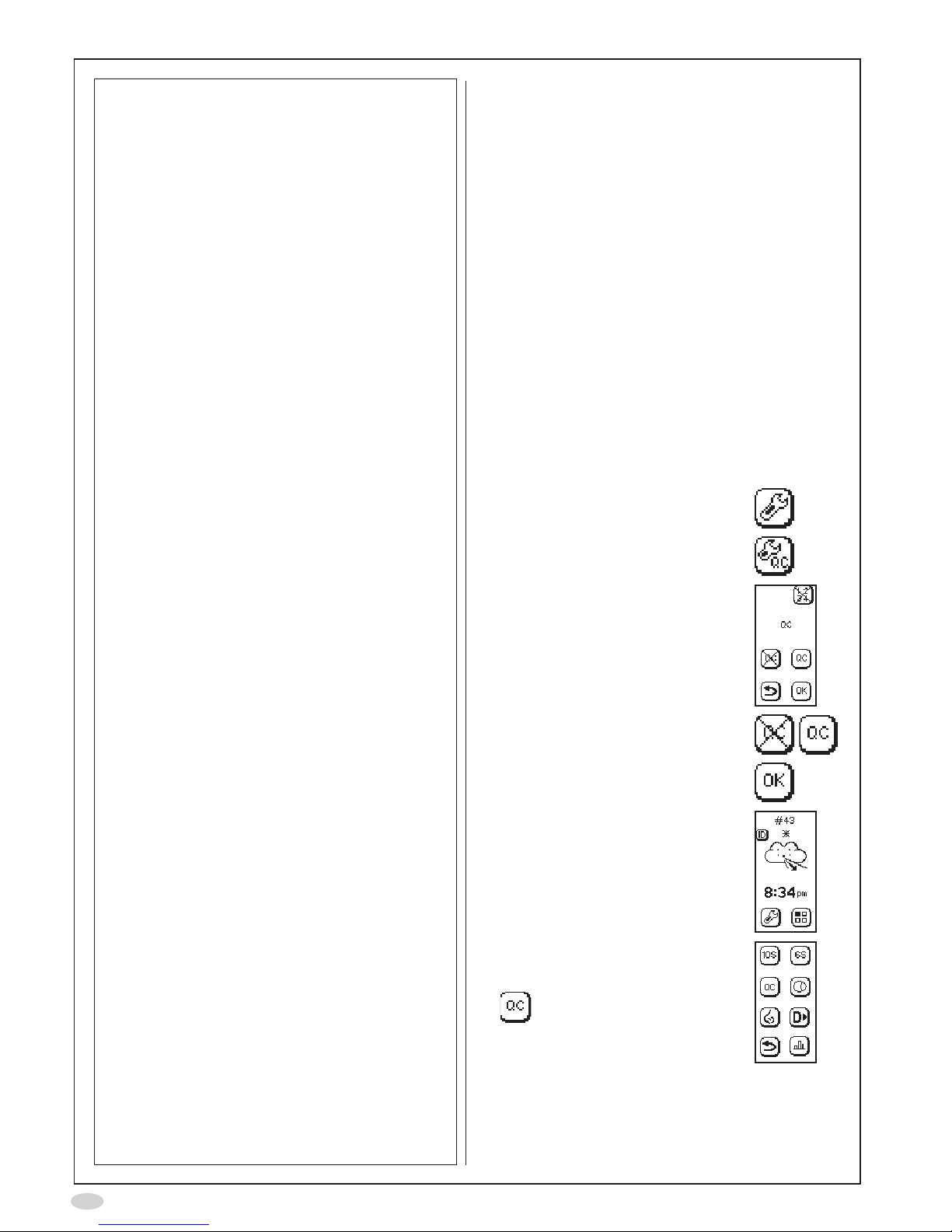
Switching QC on/off
1. Select Settings
2. Select QC settings
3. The QC settings are shown
4. Use the buttons to deactivate or
activate QC measurement
5. Select OK to accept the changes
The main screen shows a twinkling
asterisk to indicate that QC is on
and a daily QC measurement has
not been performed.
The mode screen shows a QC
measurement mode button for
starting a QC measurement
Page 5
3
Selection and qualication of QC testers
A minimum of one individual (two individuals are
recommended) needs to qualify for this procedure.
Identify a third individual as a back-up, if possible.
Identify the staff members who will perform the
Quality Control and meet the following criteria
• Over 18 years of age.
• No ongoing cold or known airway disease.
• Non-smoker.
• Expected stable
FeNO
values between 5 and
40 ppb.
• Preferably no allergies (except seasonal, see
below) or asthma.
A QC tester will be qualied over the course of
three days.
Note!
If the most recent QC measurement is
older than 30 days, then the qualication
is suspended and the QC tester needs
to re-qualify according to the qualication
procedure.
Perform three QC measurements, one per
day within seven days, according to the QC
measurement section, in order to qualify a QC
tester.
A mean value is calculated from the three
measurements that must be between 5-40 ppb
for the QC tester to be qualied. The following
QC measurement on the fourth day must be
within ±10ppb from the mean value and the NO
Scrubber result < 5 ppb. Once the Quality Control
has been completed the instrument is ready
for clinical use. The next moving mean value is
calculated when the QC tester performs a QC
measurement following at least 7 days.
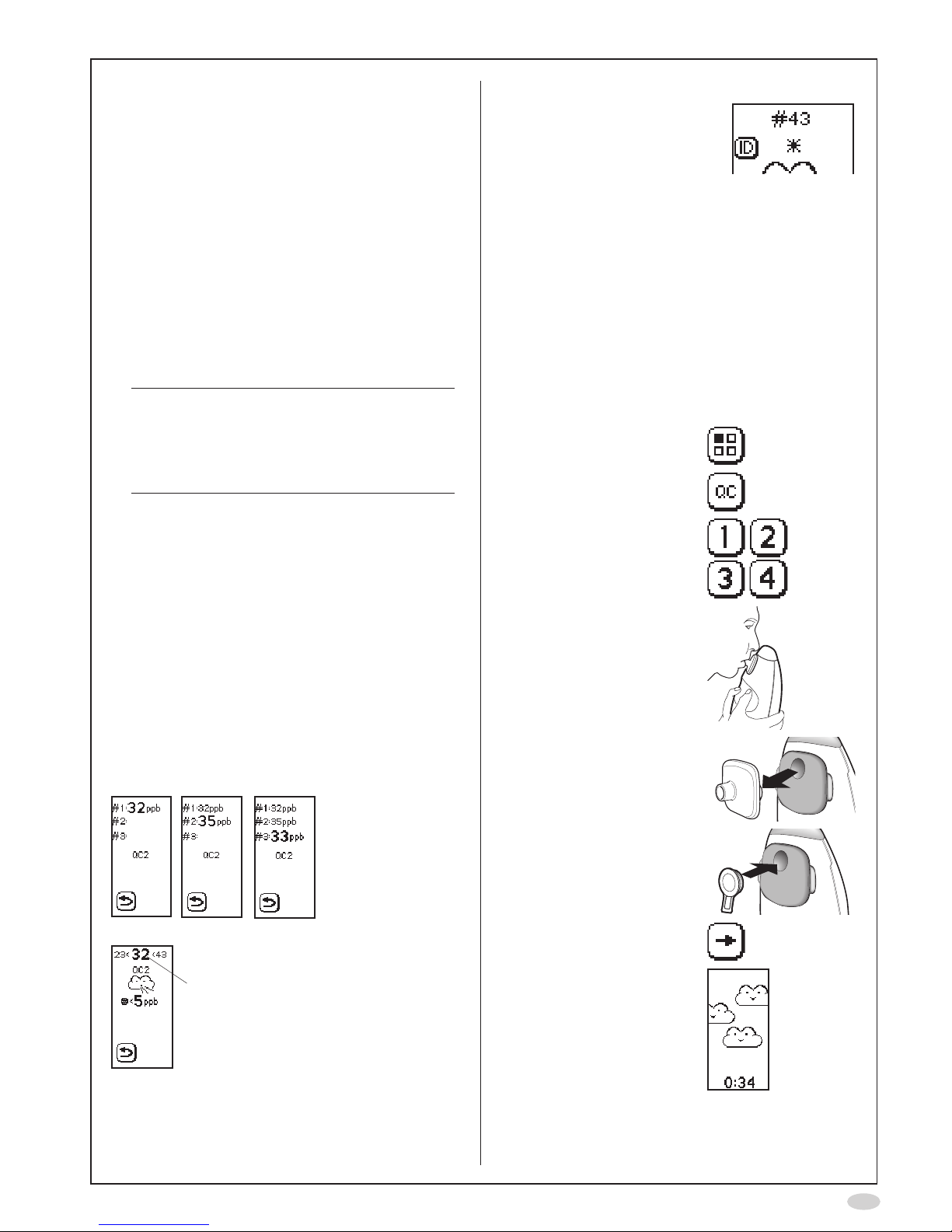
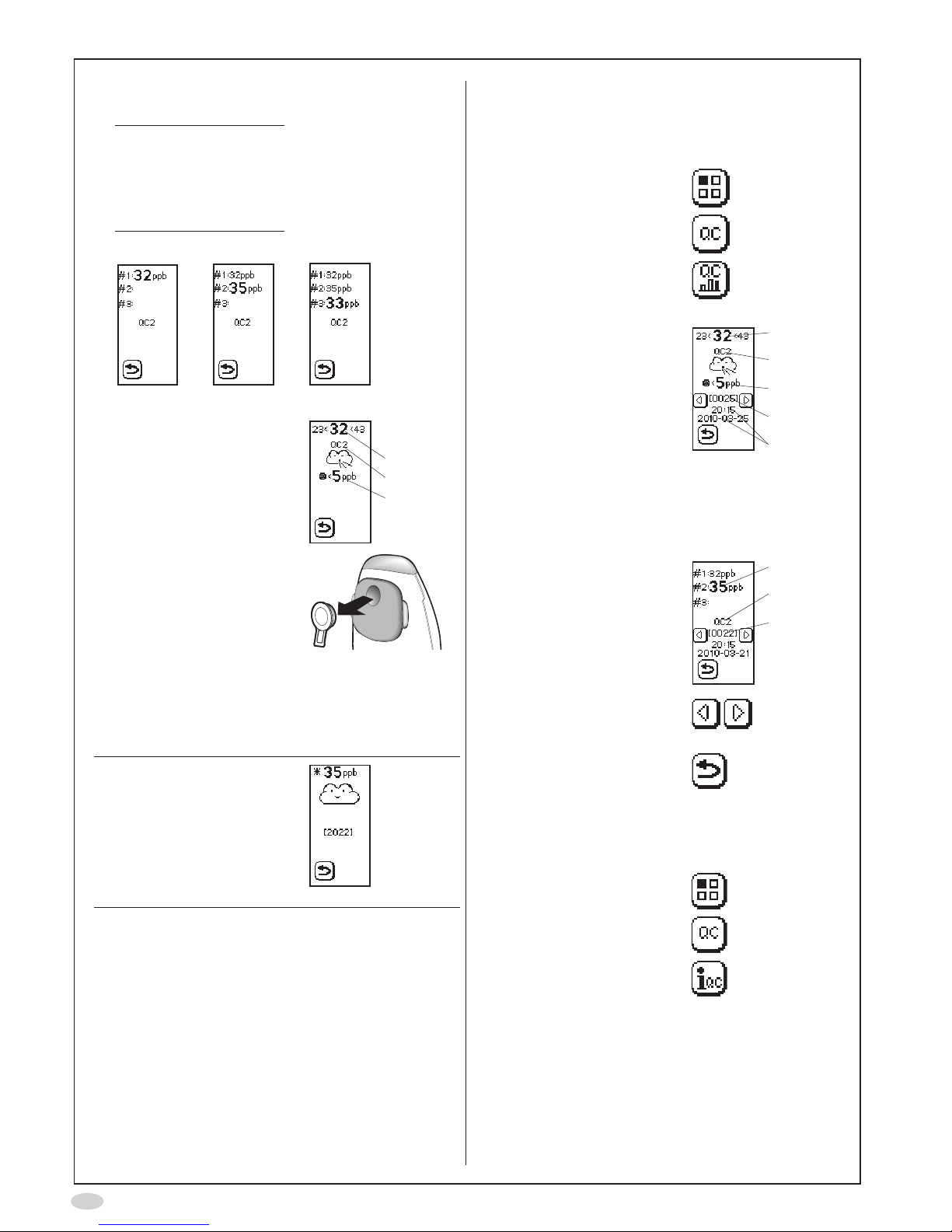
Result screens for the QC tester qualication
Day 1 Day 2 Day 3
After day 3
Positive control result:
FeNO
value and limits
(mean value +/- 10 ppb)
QC measurement
The instrument will prompt for a
daily QC procedure by showing
a twinkling asterisk on the
display.
Always consider the following in order to obtain
reliable results.
Before any measurement:
• Avoid nitrate rich food within 3 hrs before the
measurement.
• Avoid any strenuous exercise at least 1 hour
before the measurement.
Preferably do not perform a measurement in case
of:
• Ongoing cold.
• Acute seasonal allergy.
1. Select Mode
2. Select QC mode
3. Select QC tester number
(each QC tester must
select an individual
number)
4. Perform a normal
FeNO
measurement according
to the NIOX MINO user
manual
5. Remove the patient lter
6. Immediately attach the
QC plug
7. Select the Forward icon
on the display
8. Wait for the analysis to be
completed and the test
result to be displayed
(approximately 5 minutes)
Page 6
4
9. The QC measurement
result is displayed
Note!
During the qualication
days of a new QC
tester the result is
displayed as presented
Day 1-3.
Day 1 Day 2 Day 3
A. Positive control result:
FeNO
value and
limits (mean value
+/-10ppb)
B. QC tester number
C. Negative control result
(should be < 5 ppb)
After day 3
A
B
C
10. Remove the QC plug
Repeat the QC measurement if the positive and/
or the negative controls fail. If QC fail persists,
discontinue use of NIOX MINO® and contact
your local Aerocrine representative or Aerocrine
Customer Support.
Note!
If the daily Quality Control
is not successfully
performed, or if the results
from the QC are outside
limits, an asterisk will be
displayed beside every
measurement value
View stored QC results
All previous QC results are stored in the instrument
and can be viewed at any time by using the
following procedure:
1. Select Mode
2. Select QC
3. Select QC measurement
results
4. The latest stored
measurement is displayed
A. Positive control result:
FeNO
value and
limits (mean value
+/-10ppb)
B QC tester number
C. Negative control result
(should be < 5 ppb)
D. QC sequence number
E. Time and date of
measurement
A
B
C
D
E
The qualication results
can also be displayed
A. QC tester qualifying
result
B QC tester number
C. QC sequence number
A
B
C
5. Use the previous and next
buttons to step through
the results
6. Select Return to go back
to the Mode screen
View QC information
QC tester information is stored in the instrument.
1. Select Mode
2. Select QC
3. Select QC info
Page 7
5
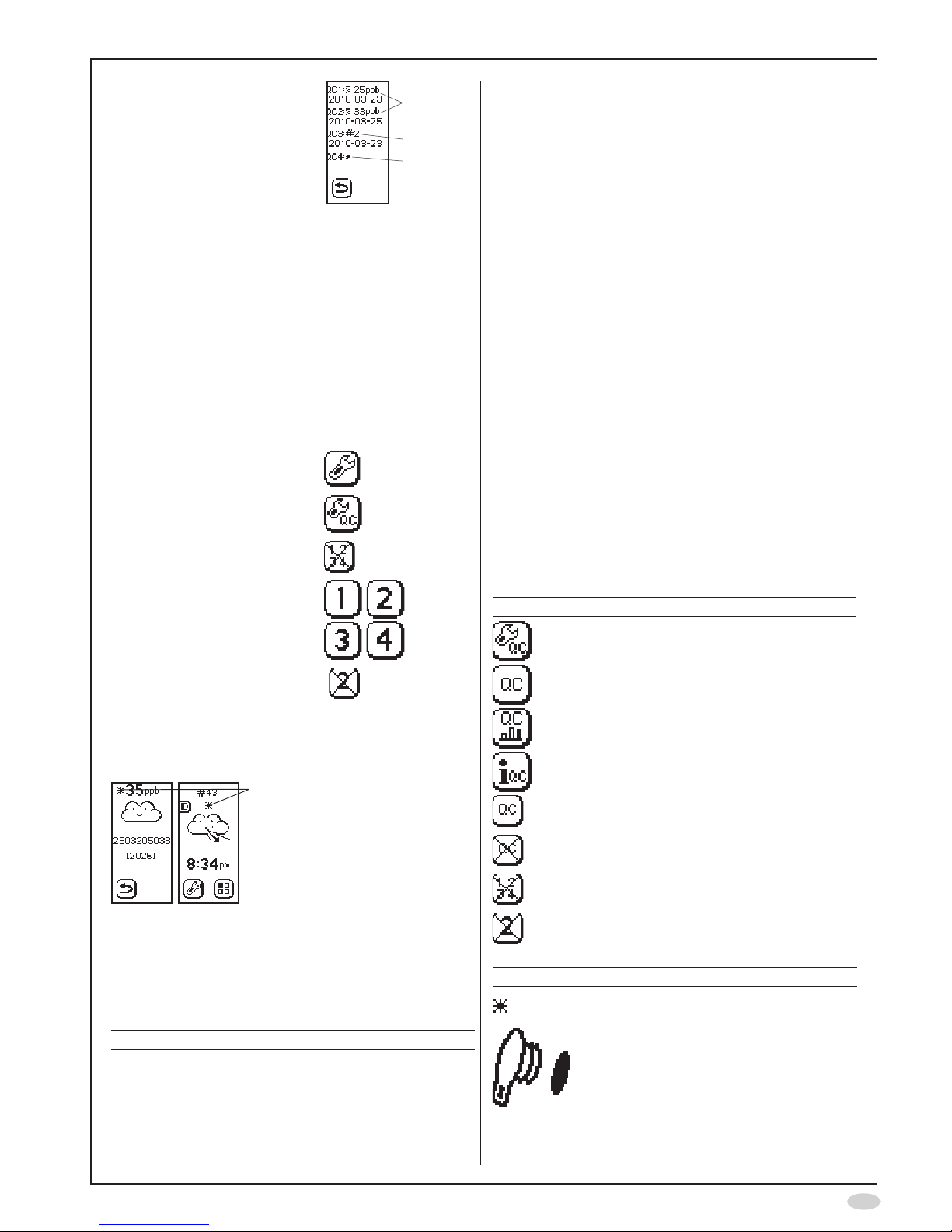
4. The QC information is
displayed:
A. Mean QC
FeNO
value
and latest moving
mean date for QC
testers 1 and 2
B. Ongoing qualication,
position in QC
measurement
sequence for
QC tester 3, and
latest qualication
measurement date
C. The QC tester 4 is not
qualied
A
B
C
Reset QC tester
This procedure will delete the data for the selected
individual
1. Select Settings
2. Select QC setup
3. Select Reset QC tester
4. Select the QC tester to be
reset
5. Select the crossed-over
number to conrm reset
of desired user ID
Alerts codes
Asterisk shown.
The instrument has not been
veried by a daily QC –
Perform a QC measurement.
Alert messages and other information are shown
as codes at the top of the instrument display. The
table below provides the recommended actions to
be taken for an alert code. If alert persists, contact
your local Aerocrine representative or Aerocrine
Customer Support.
Code Action
QC alerts
A50 The mean value of the three qualication
results does not fall between 5-40 ppb.
Restart the QC tester qualication from
qualication day 1.
Code Action
A51 There has been an attempt to perform
several QC measurements on the
same day with the same test person.
Wait one day and perform the next QC
measurement.
A52 Moving mean value out of range.
Restart the QC tester qualication from
qualication day 1.
A53 NO Scrubber result over 5 ppb. Check
that the QC Plug was attached when
instructed. Restart the QC measurement.
If continuously shown replace the NO
Scrubber.
A54 Daily QC result lower than 5 ppb. Restart
measurement with test person who has
FeNO
higher than 5 ppb.
A55 Daily QC result higher than 40 ppb.
Restart measurement with test person
who has
FeNO
lower than 40 ppb.
A56 Failure to press the QC plug forward
button in time (within 1.30 min.). Repeat
the QC measurement and make sure to
press the forward button after the QC
plug is inserted.
Display buttons and symbols
Button Description
QC settings
QC measurement
Stored QC measurement results
QC info
External QC on
External QC off
Reset QC tester
Conrm QC tester reset
Symbol Description
The instrument has not been veried
by a daily QC
Insert the QC plug
Page 8

000186 (EPM-000157), version 04, December 2016, for instruments with SW from 2005 to 20XX, 22XX and 23XX
Circassia AB, an ISO 13485 certified company
Circassia AB, Råsundavägen 18, SE-169 67 Solna, Sweden
Phone: +46 8 629 07 80, Fax: +46 8 629 07 81, E-mail: [email protected]
www.niox.com.
NIOX MINO® is CE marked according to European In Vitro Diagnostic Device Directive 98/79/EEC
Copyright © 2016 Circassia AB, Solna, Sweden.
Circassia is a registered trademark of Circassia Limited
NIOX MINO® and NIOX® are registered trademarks of Circassia AB.
Patents:
Circassia’s NIOX products are protected by a number of patents in the US, Europe and a range of other
countries.
A NEW DIMENSION IN ASTHMA CARE
Information in this document is subject to change.
Amendments will be made available by Circassia AB as they occur.
© Copyright 2016: Circassia AB, SOLNA, Sweden.
Based on the company’s intellectual property, Circassia develops and
commercializes product for the monitoring of nitric oxide (NO) as a marker
of inflammation, to improve the management and care of patients with
inflammatory disease in the airways.
 Loading...