

Page 1
INSTRUCTION BOOKLET
PRINTED IN USA
Nintendo of America Inc.
P.O. Box 957, Redmond, WA 98073-0957 U.S.A.
www.nintendo.com
PRINTED IN USA
Nintendo of America Inc.
P.O. Box 957, Redmond, WA 98073-0957 U.S.A.
www.nintendo.com
58289A
Page 2
PLEASE CAREFULLY READ THE SEPARATE HEALTH AND SAFETY
PRECAUTIONS BOOKLET INCLUDED WITH THIS PRODUCT BEFORE
USING YOUR NINTENDO
®
HARDWARE SYSTEM, GAME CARD OR
ACCESSORY. THIS BOOKLET CONTAINS IMPORTANT HEALTH AND
SAFETY INFORMATION.
IMPORTANT SAFETY INFORMATION: READ THE FOLLOWING
WARNINGS BEFORE YOU OR YOUR CHILD PLAY VIDEO GAMES.
The Nintendo DS can emit radio waves that can affect the operation of nearby electronics, including
cardiac pacemakers.
• Do not operate the Nintendo DS within 9 inches of a pacemaker while using the wireless feature.
• If you have a pacemaker or other implanted medical device, do not use the wireless feature of the
Nintendo DS without first consulting your doctor or the manufacturer of your medical device.
• Observe and follow all regulations and rules regarding use of wireless devices in locations such as
hospitals, airports, and on board aircraft. Operation in those locations may interfere with or cause
malfunctions of equipment, with resulting injuries to persons or damage to property.
WARNING - Radio Frequency Interference
WARNING - Battery Leakage
The Nintendo DS contains a rechargeable lithium ion battery pack. Leakage of ingredients contained within the
battery pack, or the combustion products of the ingredients, can cause personal injury as well as damage to your
Nintendo DS.
If battery leakage occurs, avoid contact with skin. If contact occurs, immediately wash thoroughly with soap and
water. If liquid leaking from a battery pack comes into contact with your eyes, immediately flush thoroughly with
water and see a doctor.
To avoid battery leakage:
• Do not expose battery to excessive physical shock, vibration, or liquids.
• Do not disassemble, attempt to repair or deform the battery.
• Do not dispose of battery pack in a fire.
• Do not touch the terminals of the battery, or cause a short between the terminals with a metal object.
• Do not peel or damage the battery label.
WARNING - Repetitive Motion Injuries and Eyestrain
Playing video games can make your muscles, joints, skin or eyes hurt after a few hours. Follow these
instructions to avoid problems such as tendinitis, carpal tunnel syndrome, skin irritation or eyestrain:
• Avoid excessive play. It is recommended that parents monitor their children for appropriate play.
• Take a 10 to 15 minute break every hour, even if you don't think you need it.
• When using the stylus, you do not need to grip it tightly or press it hard against the screen. Doing so
may cause fatigue or discomfort.
• If your hands, wrists, arms or eyes become tired or sore while playing, stop and rest them for several
hours before playing again.
•
If you continue to have sore hands, wrists, arms or eyes during or after play, stop playing and see a doctor.
WARNING - Seizures
• Some people (about 1 in 4000) may have seizures or blackouts triggered by light flashes or patterns,
such as while watching TV or playing video games, even if they have never had a seizure before.
• Anyone who has had a seizure, loss of awareness, or other symptom linked to an epileptic condition
should consult a doctor before playing a video game.
• Parents should watch when their children play video games. Stop playing and consult a doctor if you or
your child have any of the following symptoms:
Convulsions Eye or muscle twitching Loss of awareness
Altered vision Involuntary movements Disorientation
• To reduce the likelihood of a seizure when playing video games:
1. Sit or stand as far from the screen as possible.
2. Play video games on the smallest available television screen.
3. Do not play if you are tired or need sleep.
4. Play in a well-lit room.
5. Take a 10 to 15 minute break every hour.
Page 3
05
© 2005 NINTENDO. TM, ® AND THE NINTENDO DS LOGO ARE TRADEMARKS OF NINTENDO. ALL RIGHTS,
INCLUDING THE COPYRIGHTS OF GAME, SCENARIO, MUISIC AND PROGRAM, RESERVED BY NINTENDO.
© 2005 NINTENDO. ALL RIGHTS RESERVED.
This product uses the LC Font by Sharp Corporation. LCFONT, LC Font and the LC logo mark are trademarks of
Sharp Corporation.
THIS GAME CARD WILL WORK
ONLY WITH THE NINTENDO DS
TM
VIDEO GAME SYSTEM.
The official seal is your assurance
that this product is licensed or
manufactured by Nintendo. Always
look for this seal when buying
video game systems,
accessories, games
and related
products.
Nintendo does not license the sale or use of products
without the Official Nintendo Seal.
Contents
Notice
Starting a New Life With Your Puppy
Interacting With Your Dog
Living With a Dog
Training Your Puppy
Supplies and Toys
Going Shopping
Walking the Dog
Contests
Meeting Your Friends’ Puppies
Nintendogs Information
Troubleshooting
08
09
12
16
18
20
Credits
Establishing the DS
Warranty & Service Info
40
42
47
24
26
29
32
34
38
In this manual, screenshots
with gray borders appear on
the Top Screen while those
with black borders appear on
the Touch Screen.
Nintendo's game pages, at www.nintendo.com/games, feature
walkthroughs, frequently-asked questions, and codes for many of our
games. If your answer isn't there, check out our forums where you can
exchange tips with other gamers online.
For more information about our forums, visit
www.nintendo.com/community.
If you don't have access to the web-site, recorded tips for many titles are
available on Nintendo's Power Line at
(425) 885-7529
. This may be a long-
distance call, so please ask permission from whoever pays the phone bill.
THIS GAME ALLOWS WIRELESS MULTIPLAYER
GAMES WITH EACH DS SYSTEM CONTAINING
A SEPARATE GAME CARD.
1-2
Wireless DS
Multi-Card
Play
Page 4
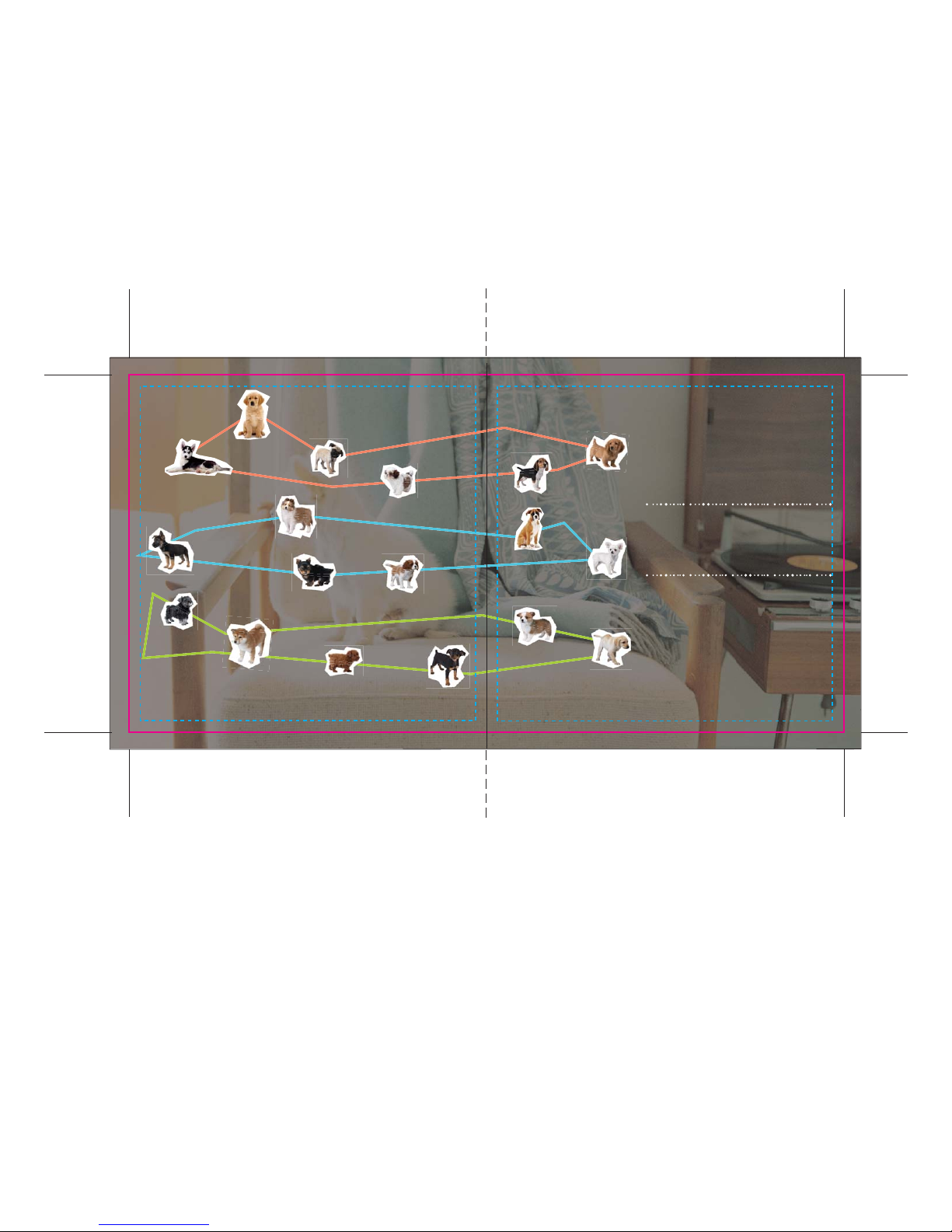
Shiba Inu
Shetland
Sheepdog
Miniature
Pinscher
Pembroke
Welsh Corgi
Labrador
Retriever
Miniature
Dachshund
Beagle
Shih Tzu
German
Shepherd Dog
Pug
Siberian
Husky
Golden
Retriever
Toy Poodle
Chihuahua
Miniature
Schnauzer
Yorkshire
Terrier
Cavalier
K C Spaniel
Boxer
Labrador & Friends
Chihuahua & Friends
Dachshund & Friends
Spend some quality puppy time with Nintendogs!
Train your pup, walk it, and enter it into tournaments...
Isn't everything in life better with a puppy?
0706
Page 5
0908
Notice
Starting a New Life With Your Puppy
Saving Your Nintendogs
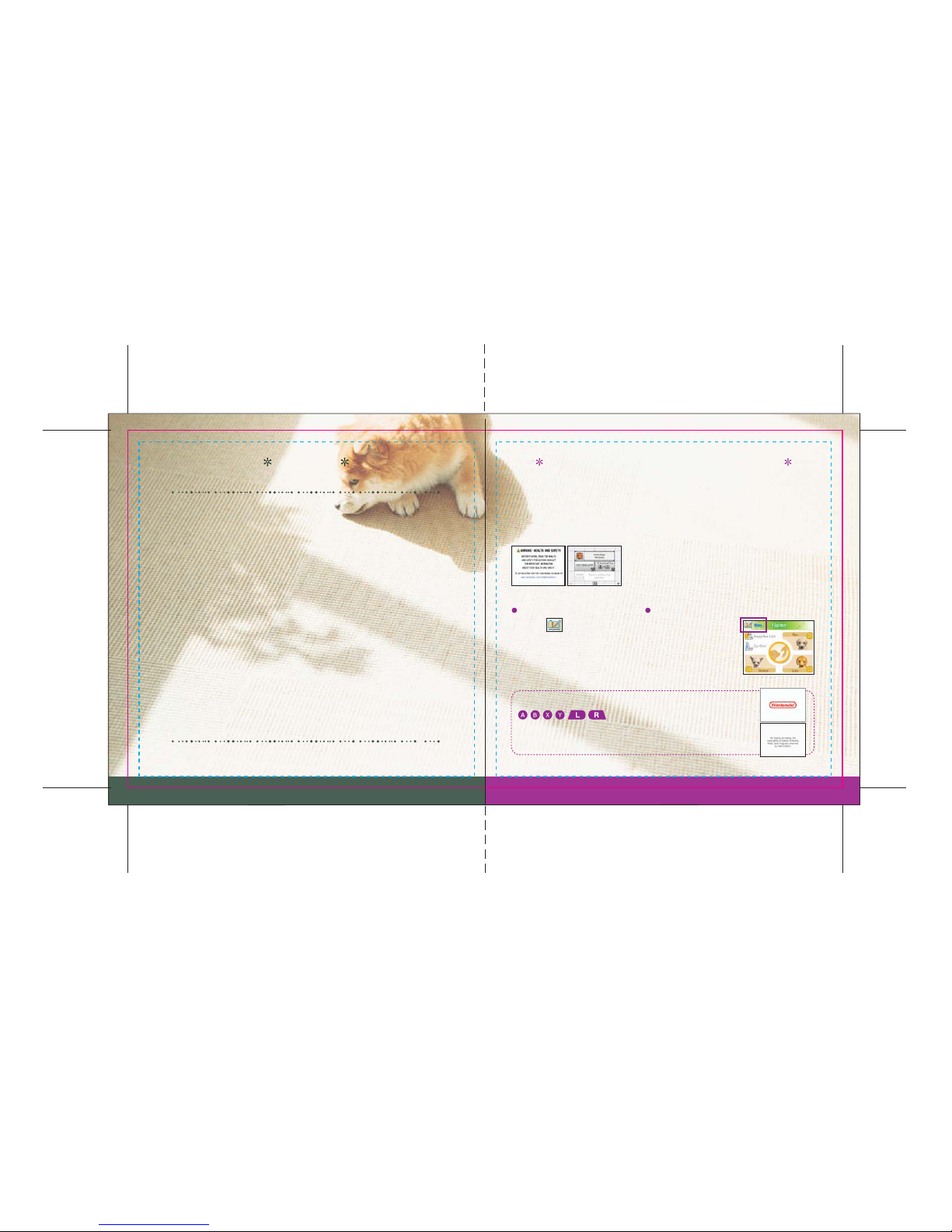
Nintendogs is an interactive entertainment
experience centered on puppies. In the uniquely
imaginative world of Nintendogs, the young dogs do
not age, always remaining puppies. They boast docile
habits and personalities, and are easy to handle.
However, since real puppies are living things, they have
habits and personalities that may be different from
those of the Nintendogs, so when training and caring
for a real puppy, please be sure to be understanding of
the real puppy’s habits and personality.
When caring for living dogs, the trainer holds
ultimate responsibility for the survival and well-being
of the dog, so be sure to consult with your family
before raising a real dog.
Insert the Nintendogs Game Card into your Nintendo DS and press the POWER button.
When the Nintendo DS start-up screen appears, touch the screen. On the system menu,
touch the Nintendogs panel to begin your new life with a puppy.
Touch the icon on the home screen (pg. 16) to create a save
file—touch this icon wherever you want to save everything you
experience and teach your puppy. If you’ve already created a save
file, you will begin with that file already loaded.
If you ever want to erase all of your puppies and saved data, press and hold
all at the same time.
If your Nintendo DS power-on settings have been set to
Auto Mode, you will not need to take all of the steps above.
See your Nintendo DS instruction booklet for more details.
But beware: if you erase all saved data, it and your puppies can
never be recovered.
Page 6
1110
The Kennel
Buy
Look
Using the Keyboard
Naming Your Puppy
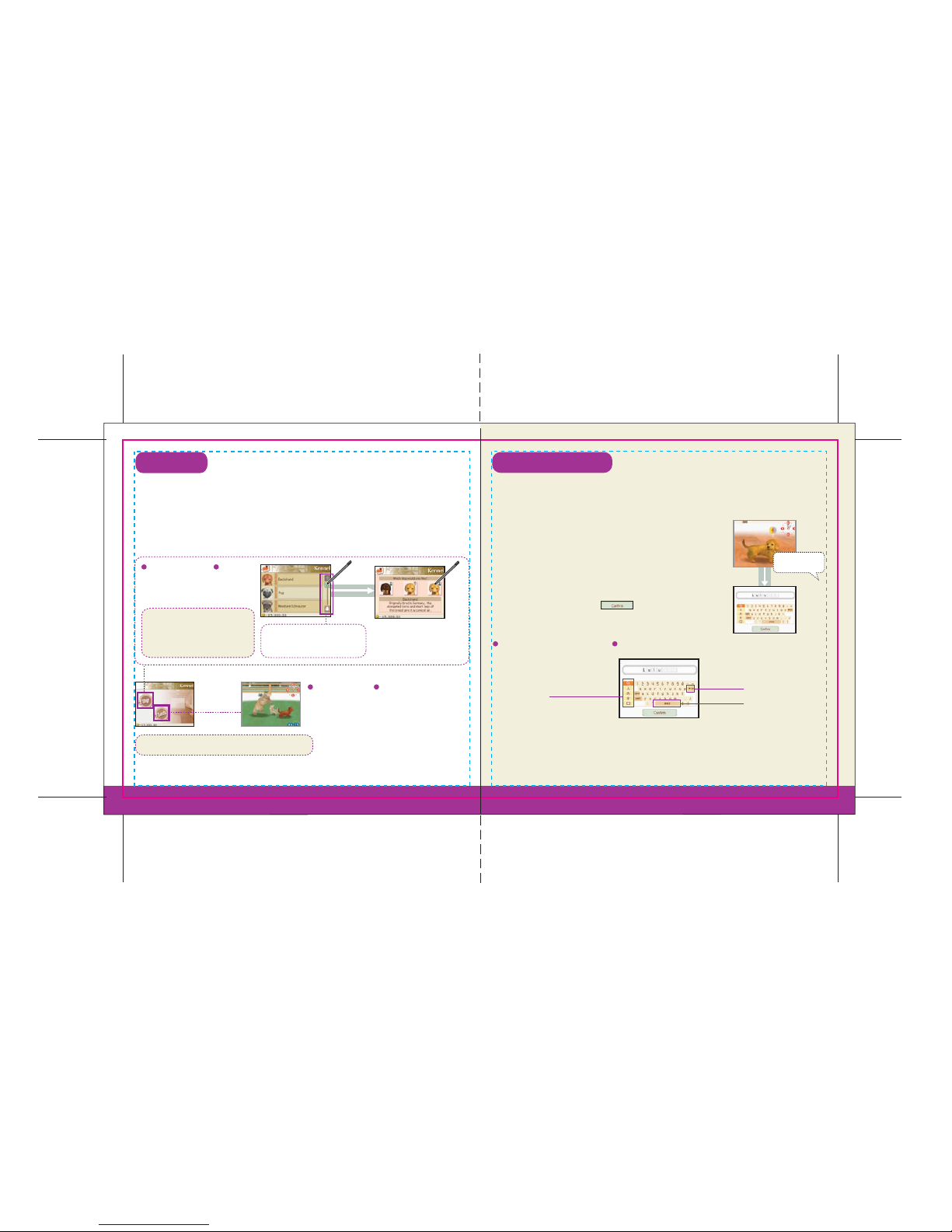
Your new life with a puppy first begins at the kennel, where you will choose and purchase your first
puppy. You can also spend time at the kennel playing with puppies that have already been trained.
After you’ve purchased your first puppy, you can visit the kennel anytime by choosing the kennel
from the Shopping menu (pg. 24). The kennel may add new breeds to its selection, so be sure to check
back regularly to see what puppies are available.
After you bring your new puppy home from the kennel, follow the on-screen instructions to name
your puppy using your own voice and text.
Touch the breed of puppy that
you would like to purchase.
Touch the puppy you’d
like to buy.
It is important to hold the Nintendo DS about six inches from your
face and say the name clearly into the microphone. If you
pronounce the name the same way each time, your puppy will
understand it better.
Once your puppy learns its new name, you’ll use the Touch Screen to
register the name in text. Touch to register the name.
Change Keyboard
Lulu!
Back Space
Space Bar
Here you can play with puppies that have
already been trained.
Use the stylus to scroll through
the list of available breeds.
The initial available breeds are
different in each of the three
versions of Nintendogs.
You can keep up to three dogs in your home.
Page 7
1312
Interacting With Your Dog
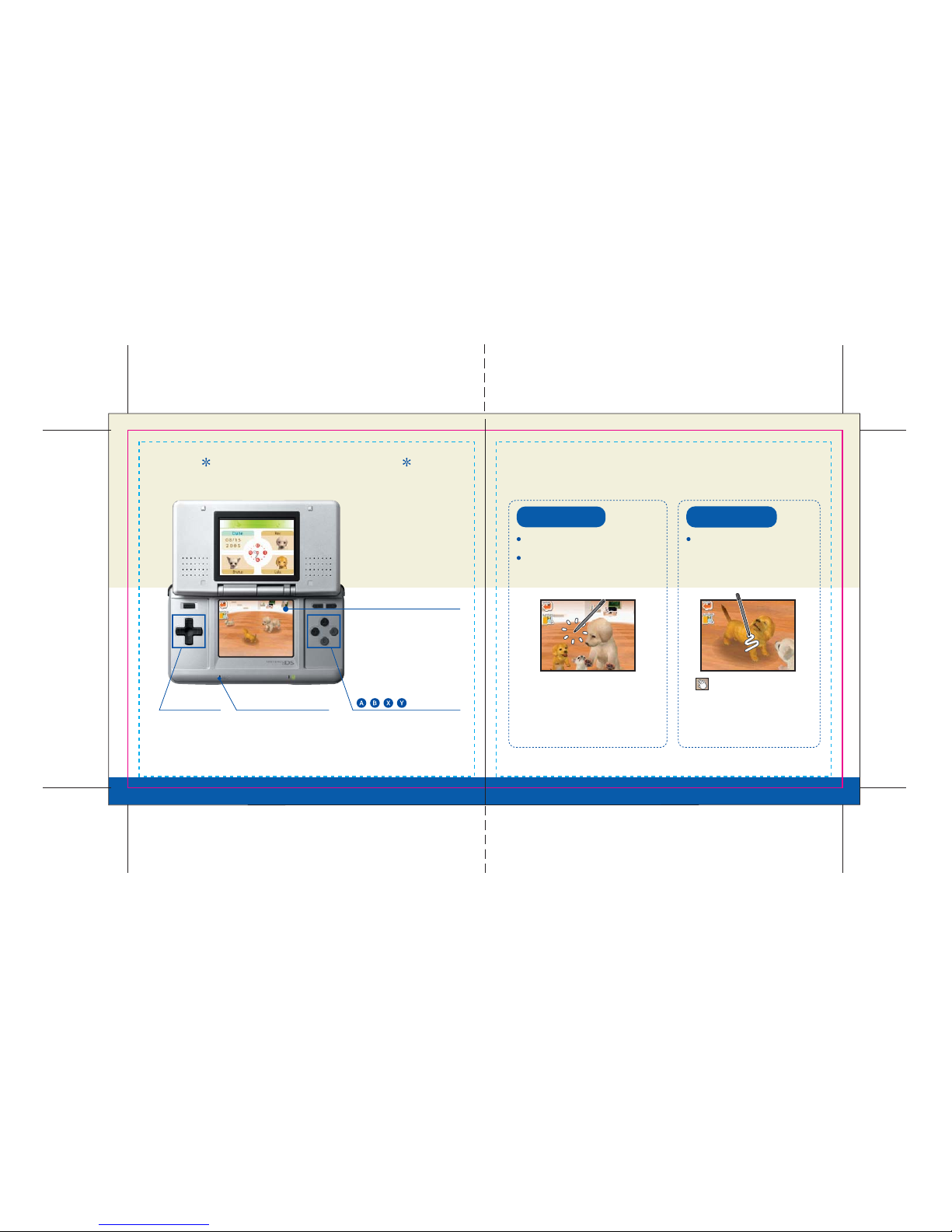
Call Your Dog
Touch Screen
BUTTONS
+ Control
Pad
Microphone
Touch the Dog
Adjust the camera
angle on the Home
screen (pg. 16).
Use the microphone to call
your puppy's name or say
commands like "sit" or
"lie down."
Change the camera's target on the
Home screen. Each time you press a
button, the camera will switch to
another dog or zoom in or out.
Touch the icons that appear on
the Touch Screen to access the
different menus.
Tou c h the Touch Screen. Pet your dog often!
Say your dog's name, or whistle
into the microphone.
Tapping the Touch Screen is a very
effective way of calling all your dogs.
The icon appears whenever you pet
your dog. Your dog will normally love to
be petted, but pet it for too long and it
may get annoyed.
Page 8
15
14
Your New Life With a Puppy
Page 9
1716
をタッチ。
Living With a Dog
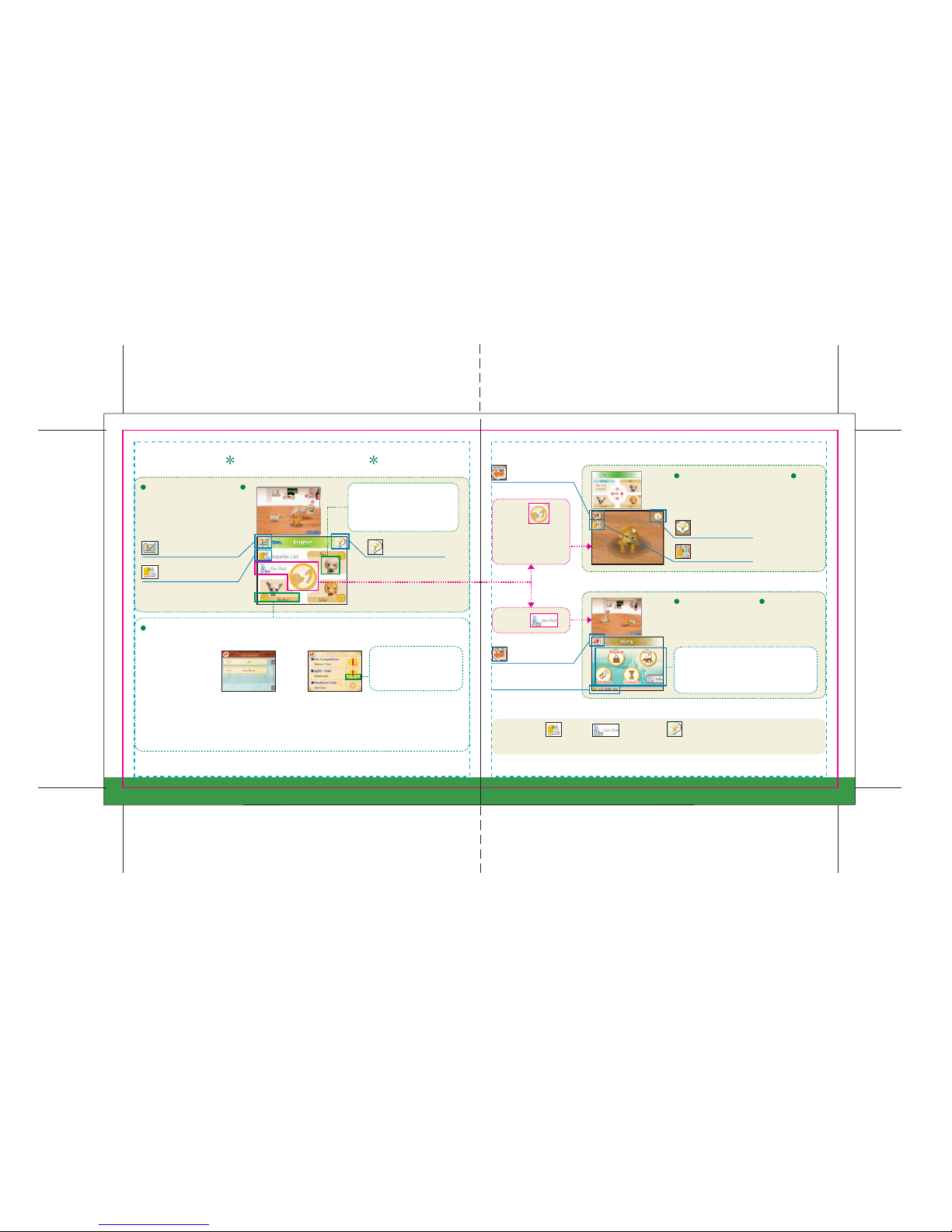
The Home Screen
Interaction Screen
Go Out Menu
Dog Status
View info about your puppies
and save your progress here.
When your puppy appears on the Touch
Screen, you can interact with it by petting
it and training it.
The Go Out menu allows you to go out to a
number of different places. You can also
change game settings here.
The Supplies , Go Out , and Training , icons will appear only after you've
named your new puppy and taught it to sit down.
Touch
Touch
Call Dog's Name
Whistle
Save (pg. 9)
Training (pg. 18)
Return to
the Home screen.
Return to
the Home screen.
Money
Training (pg. 18)
Supplies (pg. 20)
Supplies List (pg.20)
Touch this icon to access your
many dog supplies.
Touch a dog icon to zoom in on
that dog on the Top Screen.
Touch it once more to zoom out.
Touch a dog’s name to
check its status. Here
you can see the dog’s
breed, check its current
condition, view the
commands it has
learned, and see how it
has performed in
contests.
Choose this option to
view a list of the tricks
(pg. 19) you’ve taught
your dog.
Trick List Contest Results
Check to see which
contests (pg. 29) your
dog has entered and
how it has placed.
This will show how many
times your dog has won
the championship.
Shopping (pg. 24)
Walk (pg. 26)
Contests (pg. 29)
Bark Mode (pg. 32)
Info (pg. 34)
Page 10
1918
Training Your Puppy
Through careful training, you can teach your dog to perform a variety of
tricks. You can train your dog from the Home screen (pg. 16) and on the
interaction screen (pg. 17). At first your puppy will only be able to do simple
tricks, but if you spend time with it, it can learn a wide array of tricks.
Each puppy can learn up to fourteen commands. If you want to teach it a new command
after that, it will have to forget an old command first. To make your dog forget an old
command, touch the dog’s name on the Home screen, then access the Trick List. Touch
any command in the list to make the dog forget that command.
Once your dog learns a
command, you can just
say that command into
the microphone, and your
dog will perform that
trick. However, make sure
your dog is focused on
you before saying the
command—otherwise, it
may not perform the trick.
It will take several tries for
your dog to learn a
command.
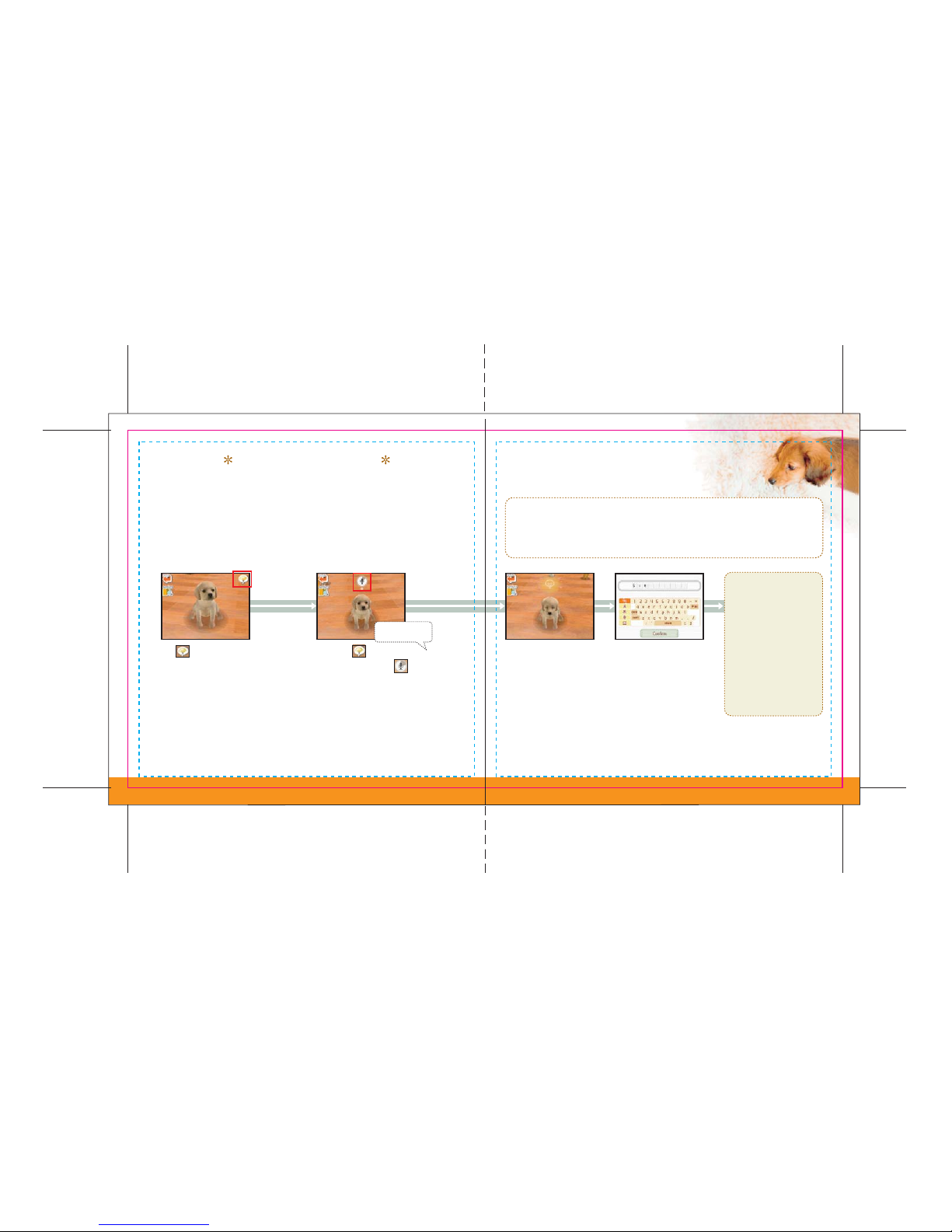
The icon is the training
icon. When it appears onscreen, that is your chance
to train your puppy.
Touch the icon to start
the microphone timer .
Say into the microphone
the command you want
your dog to learn for the
trick it just performed. The
command can be anything
you want it to be.
Sit!
Once your dog learns a
command, enter the name
for that command into
your Trick List.
Page 11
2120
Supplies & Toys
Playing With Your Puppy
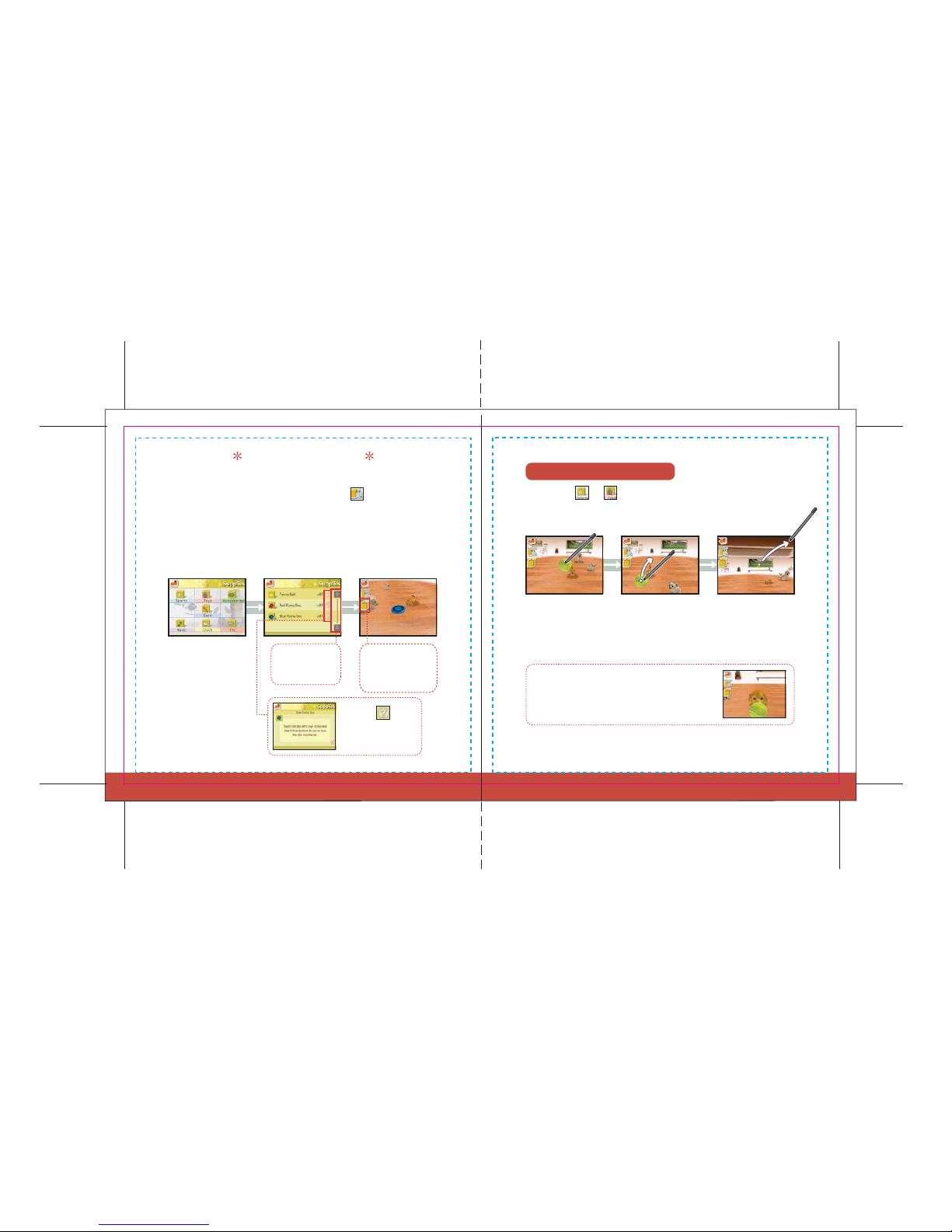
It is important to get familiar with your pet supplies early on to take proper
care of your dog. To access your supplies, touch the icon on either the
Home screen or the interaction screen. Then just choose the type of supply
you want, and then the particular supply you want to use. There are
hundreds of different supplies you can use with your dog, so see if you can
find them all.
Touch either or to select supplies that you can use together
with your puppy. Learn what you can do with each one, and take time
out of your day to play with your puppy.
Choose a Type
Touch any type to see
what supplies you
have in that category.
Touch the arrows
to scroll up and
down the screen.
Touch this icon to
take the supply out
or put it away.
Touch a supply to grab it.
If you gently tap the Touch Screen several times when
your dog is playing with one of your toys, it will bring
the toy to you.
When you are grabbing a
supply, you can slide the
stylus to move it around.
Grab a supply, slide the
stylus, then lift the
stylus off the Touch
Screen to throw the
supply you grabbed.
Touch the icon to
read a description of
the supply.
Choose a Supply Use the Supply
Page 12
2322
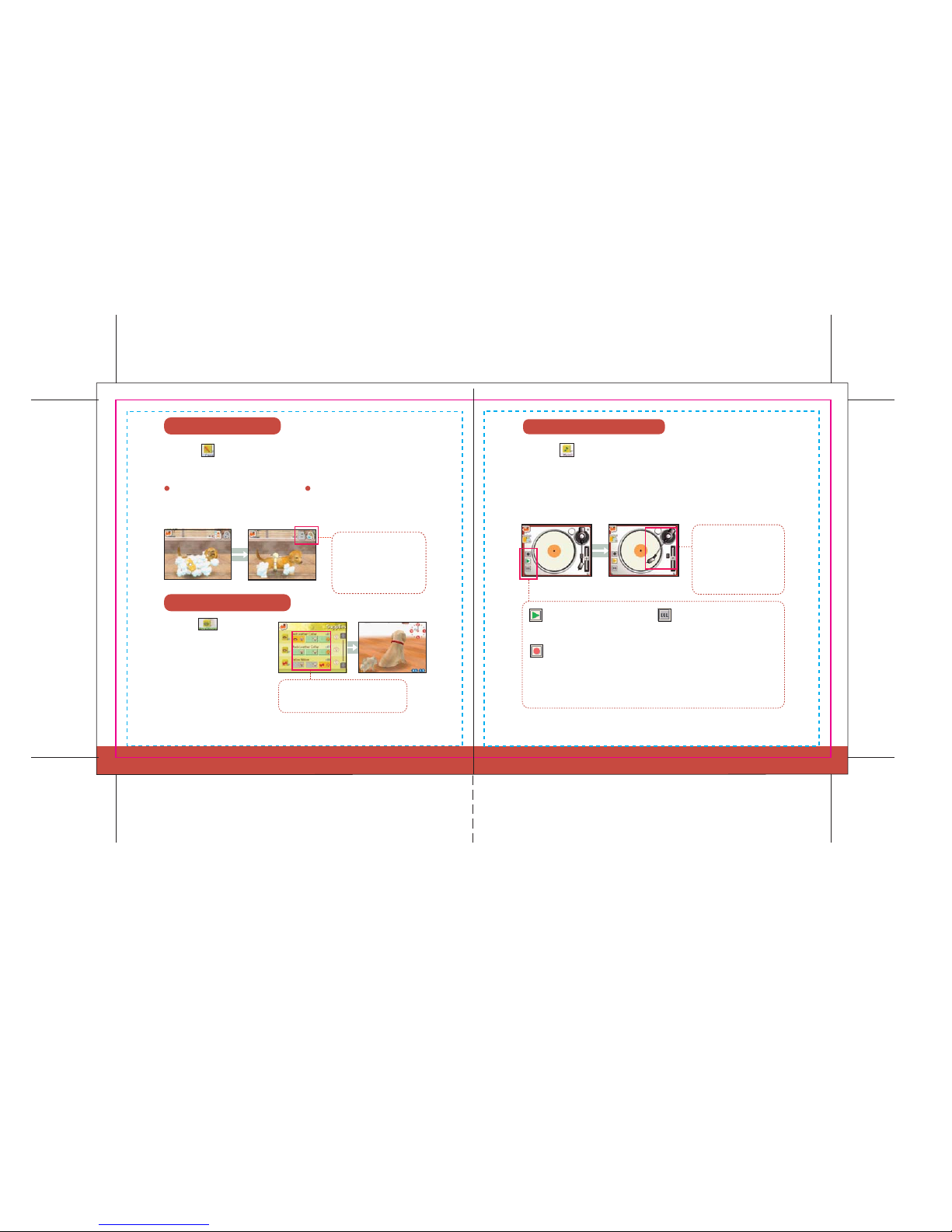
Grooming Your Dog
Shampoo Adds Sparkle
Play Button Delete Button
Record Button
DressUp Your Doggy
Using the White Record
Touch the icon to choose supplies you must use in caring for your pet.
These are the supplies you need to feed and groom your dog.
Touch the icon to choose from a variety of supplies that play
sounds
or music. One of these is the white record, which you can use to record your
own voice message. Your recorded voice message will be sent to other
Nintendogs owners when you communicate wirelessly with them via
Bark Mode, so be sure not to record personal information (pg. 32).
Slide the sponge across your dog’s body to lather it up with shampoo. Wash the
suds away with the showerhead.
Touch the icon to choose a
collar, ribbon, or other accessory
that you’d like your dog to wear.
Play the recorded message.
You can record up to five seconds of
voice data on the white record, but
you can record only one record.
Touch this to erase your current
message. Once erased, messages
can't be recovered.
Use these icons to switch
from shampoo to
showerhead and back,
as needed.
To play or record your
message, touch the
appropriate button and
then slide the needle
onto the record.
Touch the dog’s head to put that
accessory on the dog.
Page 13
2524
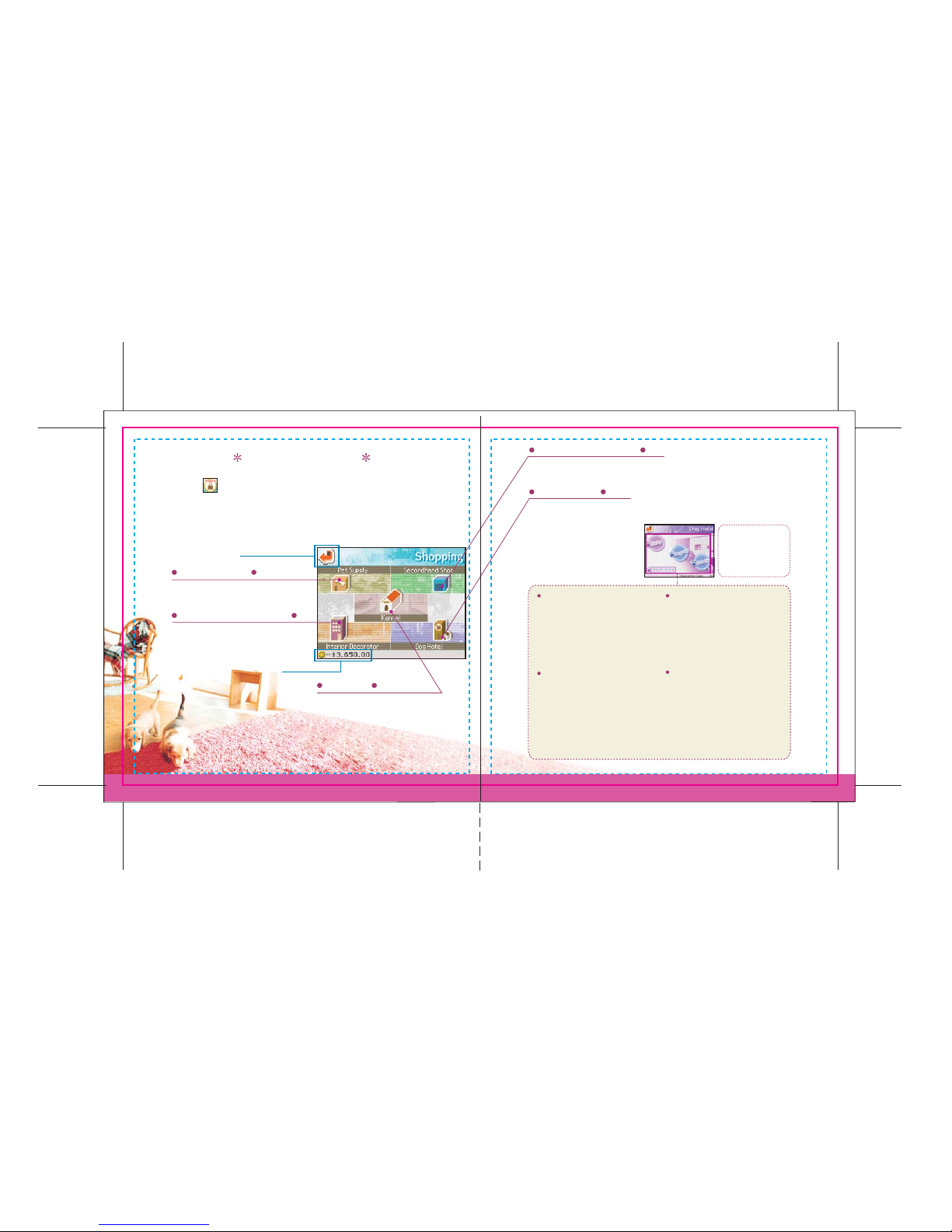
Going Shopping
Pet Supply
Kennel
Secondhand Shop
Dog Hotel
Interior Decorator
Touch the on the Go Out menu to go shopping. Next, just touch the
icon for the store you want to visit.
You can purchase all the supplies you need
at the Pet Supply store.
Select a new decor for your home here.
Go here to buy more puppies.
Go here to sell supplies you no longer need.
You can leave dogs here or
come pick them up. At most, you
can keep three dogs in your
house, so if you want to own
more than three dogs, you’ll
need to keep the others here.
Choose this when you want the Dog
Hotel to care for one of your dogs
for you. Up to five dogs can stay at
the Dog Hotel at one time.
Choose this option to pick up one of
the dogs you’ve left at the hotel. If
you already have three dogs at
home, you’ll have to swap one of
those for a dog in the hotel.
Choose this option when you want
to part ways with your puppy. But
remember, once you donate a puppy
to the hotel, they will find a new
trainer for it, and you’ll never be
able to see that puppy again.
Take a puppy out of the Dog Hotel
and replace it with one of the
puppies currently in your home.
Drop Off
Donate
Pick Up
Swap
You can keep up to
five dogs in the
Dog Hotel.
Go Back
Money
Page 14
2726
Walking the Dog
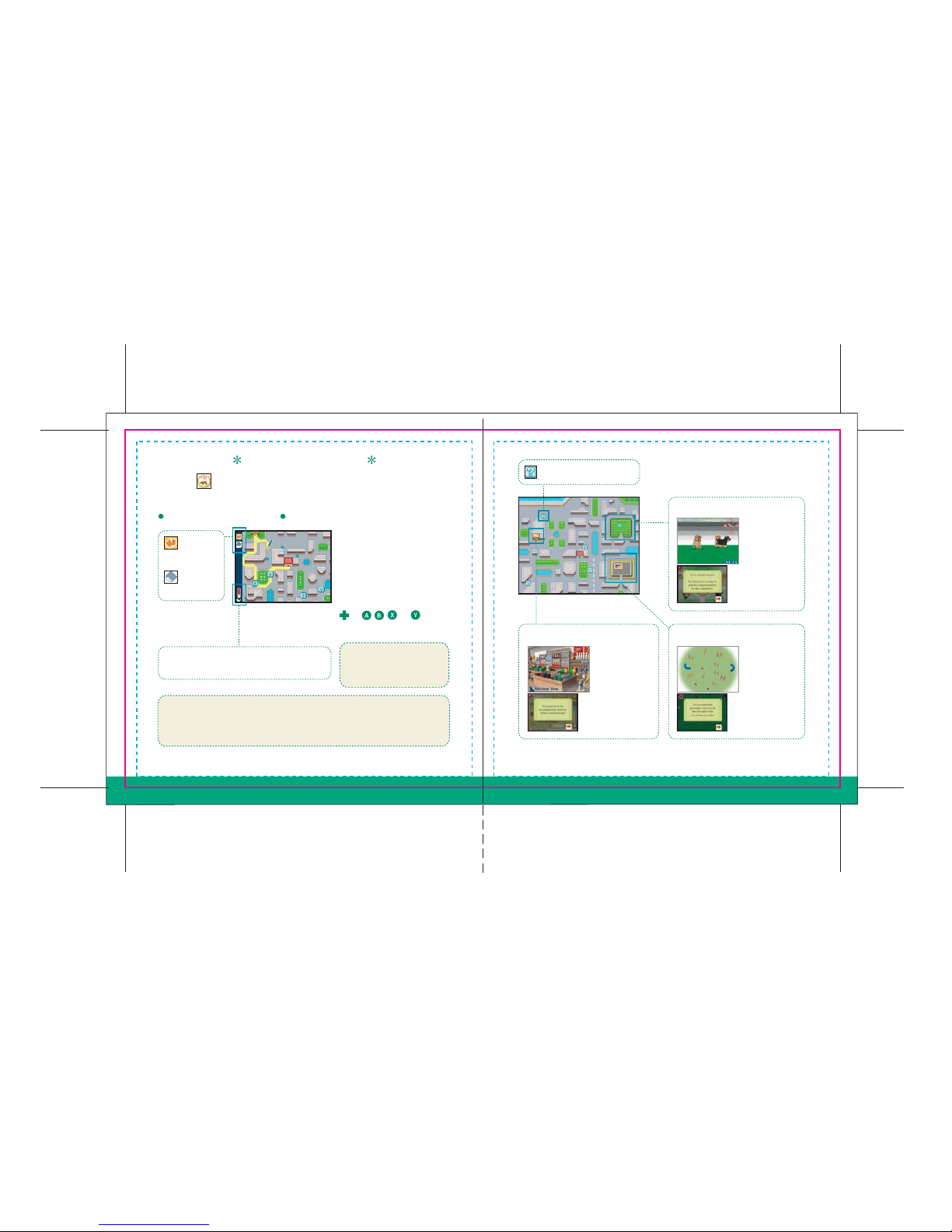
Choose Your Route
Park
Discount Shop Gymnasium
Touch the icon on the Go Out menu to choose a route and take your
puppy for a walk. You can have a lot of fun exploring the town together.
Use the stylus to draw the route
for your walk on the map. To
enter a building or park, just
draw your route to the entrance.
However, your route must always
lead you back to your house. Use
or , , , or to scroll
around the map.
This is your puppy’s stamina. Your puppy can
walk only as far as its stamina will allow.
Laws in most places require dogs to be on a leash at all
times. When walking a real dog, never let your dog off
its leash.
If your puppy poops while on
a walk, be sure to touch the
poop to scoop it up!
Pass through these areas
You can practice
for disc
competitions (pg.
30) on this nice
open lawn.
Come here to buy
supplies at lower
prices than you can
get them at the
pet supply store.
Come here to
practice for agility
trials (pg. 30).
Return to
the menu
Erase your
entire route
Page 15
2928
Life With a Dog
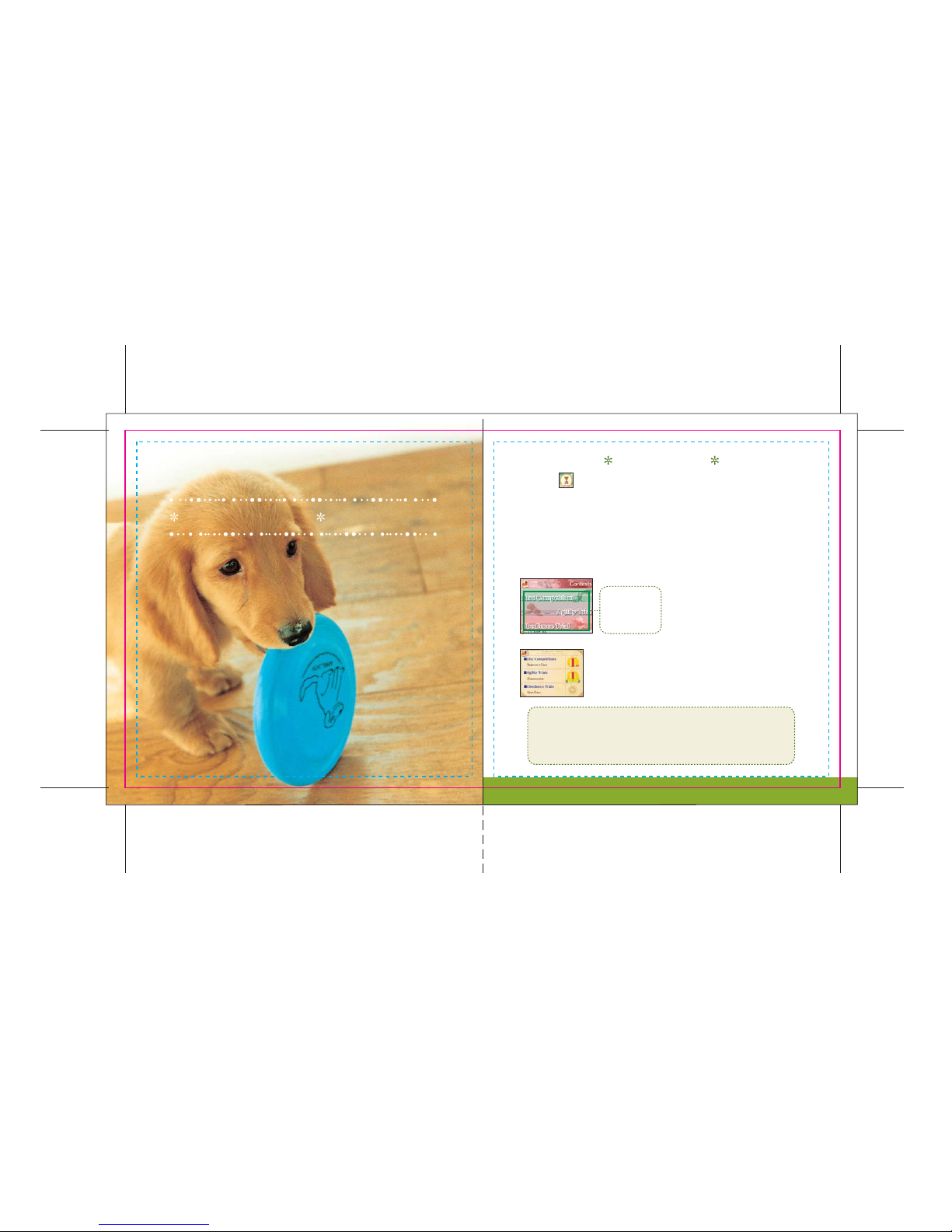
Contests
Touch the icon on the Go Out menu to enter your dog in one of three
different types of contests: obedience trials, agility trials, and disc
competitions. Each contest has five different levels of competition. When
you place in a contest, you’ll move up to the next level. If you fail to finish in
the top three, you’ll drop down one level. Participating in a contest with
your dog is always a memorable experience.
Be sure to practice hard before entering
a contest. You can also read up on the
different contests in the competition
books found under the Care category of
your supplies.
Touch the name
of the contest you
want to enter.
When you win a contest, the results will be displayed under your
Trainer Info (pg. 35). Additionally, if you win the championship
level of competition, a ribbon will be shown, along with the
number of consecutive championships you’ve won.
When raising real puppies, remember that training
a dog for strenuous activities like disc competitions
and agility trials before the dog is fully grown can
be dangerous for the puppy.
Page 16
3130
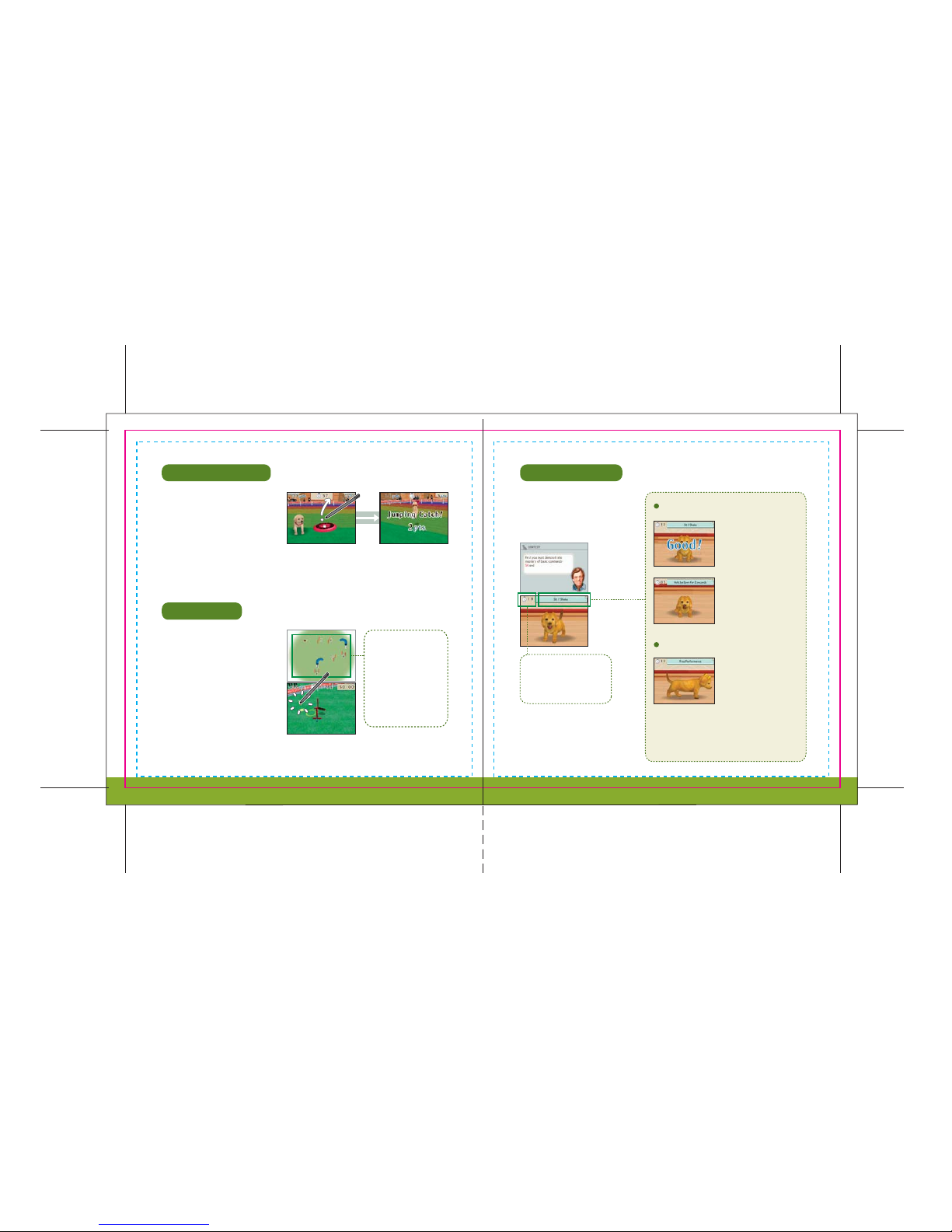
Disc Competition
Agility Trial
Obedience Trial
Required Skills
Free Performance
This is a competition to see how
many points your puppy can earn
by catching discs you’ve thrown
within a given time limit. The points
earned for catching the disc depend
on how far the disc was thrown.
This contest measures your dog’s
ability to follow commands. Speak
clearly as you issue commands to
your puppy.
Perform Skills
Dogs must first perform
several skills consecutively
in a particular order.
Maintaining a Skill
Dogs must perform
particular skills and hold
that pose for a specific
minimum time frame.
This is the dog’s
opportunity to shine.
There are no prescribed
skills. Instead, the trainer
issues commands freely
within a given time frame
to demonstrate the dog’s
different abilities.
Slide the stylus to
throw the disc. Your
puppy will chase
after it.
Catching the disc in
midair results in
higher points.
The map shows the
order in which the
obstacles must be
cleared. If your dog
strays from this order,
points will be deducted
from your score.
Try to complete all the
required commands within
the given time limit.
This competition requires you to
use the stylus to guide your puppy
through the course, clearing
obstacles along the way. Tap the
map with the stylus or slide it along
the map to help guide your puppy.
Page 17
3332
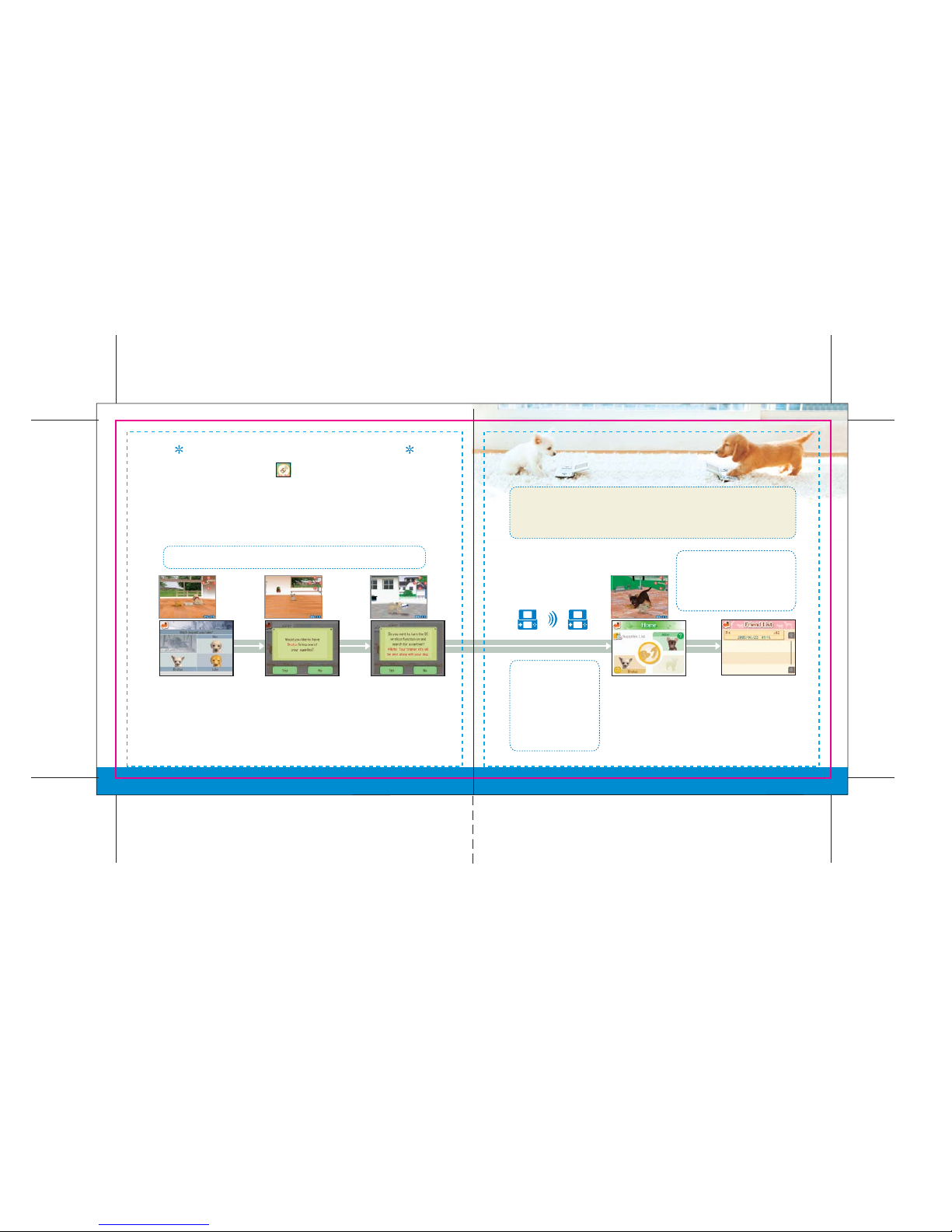
Meeting Your Friends’ Puppies
On the Go Out menu, touch the icon to communicate wirelessly with
another Nintendogs owner via Bark Mode. To do this, you simply put your
Nintendogs Game Card into wireless mode, and then when you pass by
another Nintendogs owner in wireless mode, you will automatically
communicate. Your trainer info (pg. 35) will also be traded.
See pgs. 42–43 regarding using the Nintendo DS wireless function.
Note that Bark Mode uses more battery power than searching for a PictoChat session
(pg. 37). If the battery runs out while playing or while in Sleep Mode, you will have to
restart your game from the last time you played.
First, choose a puppy to
communicate with.
Next, decide whether
or not you want to
give a present to the
other trainer. If so,
choose the present
you want to send.
Once your
preparations are
complete, tap Yes.
Even if you close your
Nintendo DS, it will
continue its wireless
search. See pages 2-3 for
important information
about the wireless feature.
When another trainer
with Bark Mode activated
is nearby...
If the trainer you're communicating
with has recorded a voice message
on his or her white record, you will
hear the voice message.
Success! You will now
have an opportunity to
play with the other
trainer’s dog. After
playing together for a
while, you and your
puppy will return home.
Your Friend List (pg. 34)
will record the date of your
encounter with the other
trainer, and the number of
times you and that trainer
have communicated.
Page 18
3534
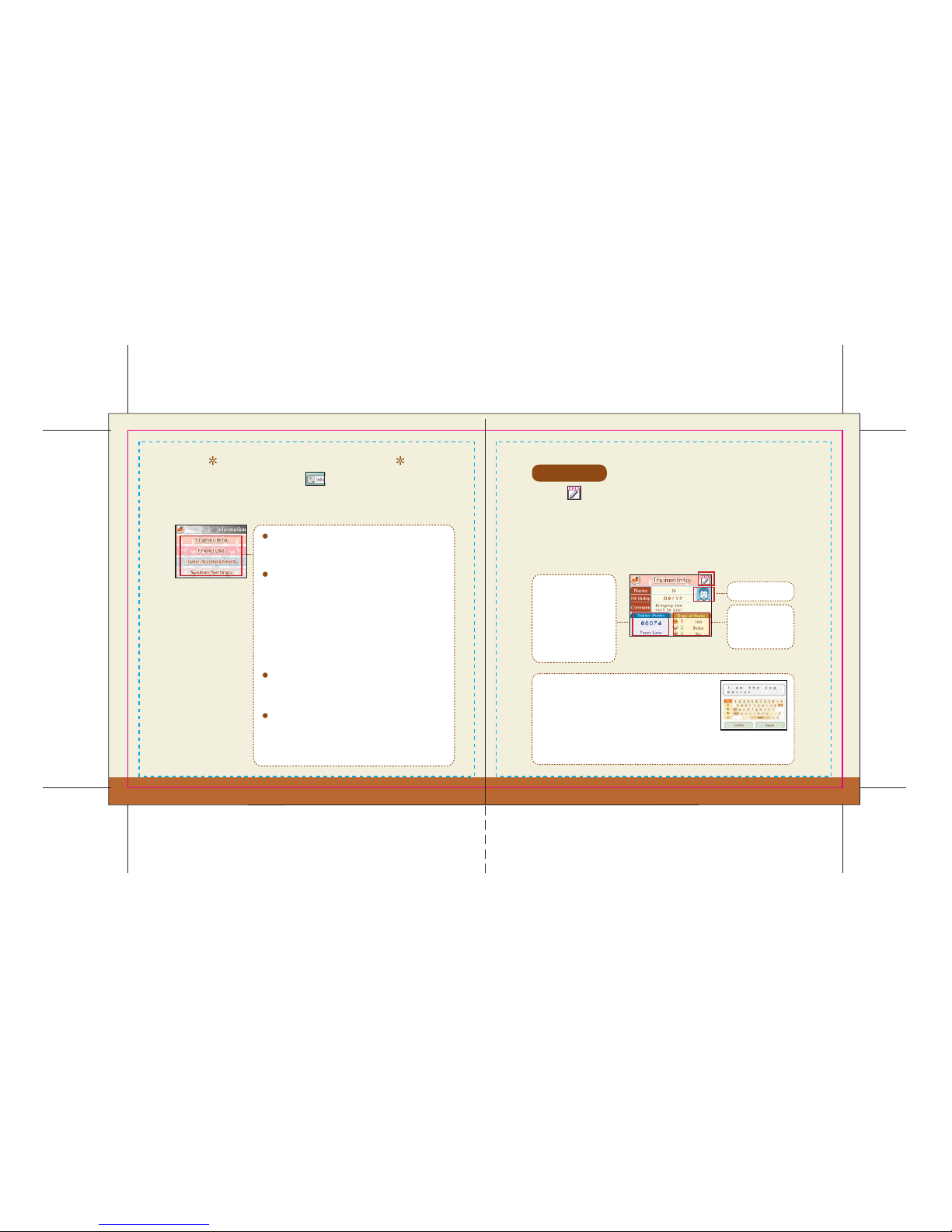
Nintendogs Information
Trainer Info
Friend List
Trainer Accomplishments
Trainer Info
System Settings
The Go Out menu also features the icon. This is where you can go
to find all of your personal information, such as your Trainer Info and
Friend List.
Touch the icon to change the name, birth date, comment, or trainer icon
used in the game. Initially, the information in your Nintendo DS system
settings will be used automatically, but even if you change your trainer info, it
will not affect your Nintendo DS system settings. The information you’ve input
will automatically get sent to another trainer when you communicate with
them wirelessly in Bark Mode.
Read this to see what you've done as the trainer of
your dogs.
As you become closer to
your puppy, your trainer
points will increase.
Your trainer title will
change based on your
trainer points.
Trainer Icon
The dogs you are
raising at home
appear here.
Go here to check your best performances in the various
contests (pg. 29).
Choose this option to change system settings for
Nintendogs. See pg. 37 regarding searching for active
PictoChat rooms.
When changing your name or comment, be sure to use
a nickname and do not include personal information.
See the Nintendo DS instruction booklet for additional
privacy information. You will use the keyboard on the
Touch Screen to input text. When you’re done, touch
Confirm to finish. See pg. 11 for info on how to use the keyboard.
Go here to view a record of the Nintendogs trainers
you’ve linked up with via Bark Mode. Other trainers’
information will automatically get saved here when
you link up with them. You can save information for up
to 50 people. If you link up with more than 50 people,
your list will be updated by erasing the information
from your list, starting with the oldest information.
Page 19
3736
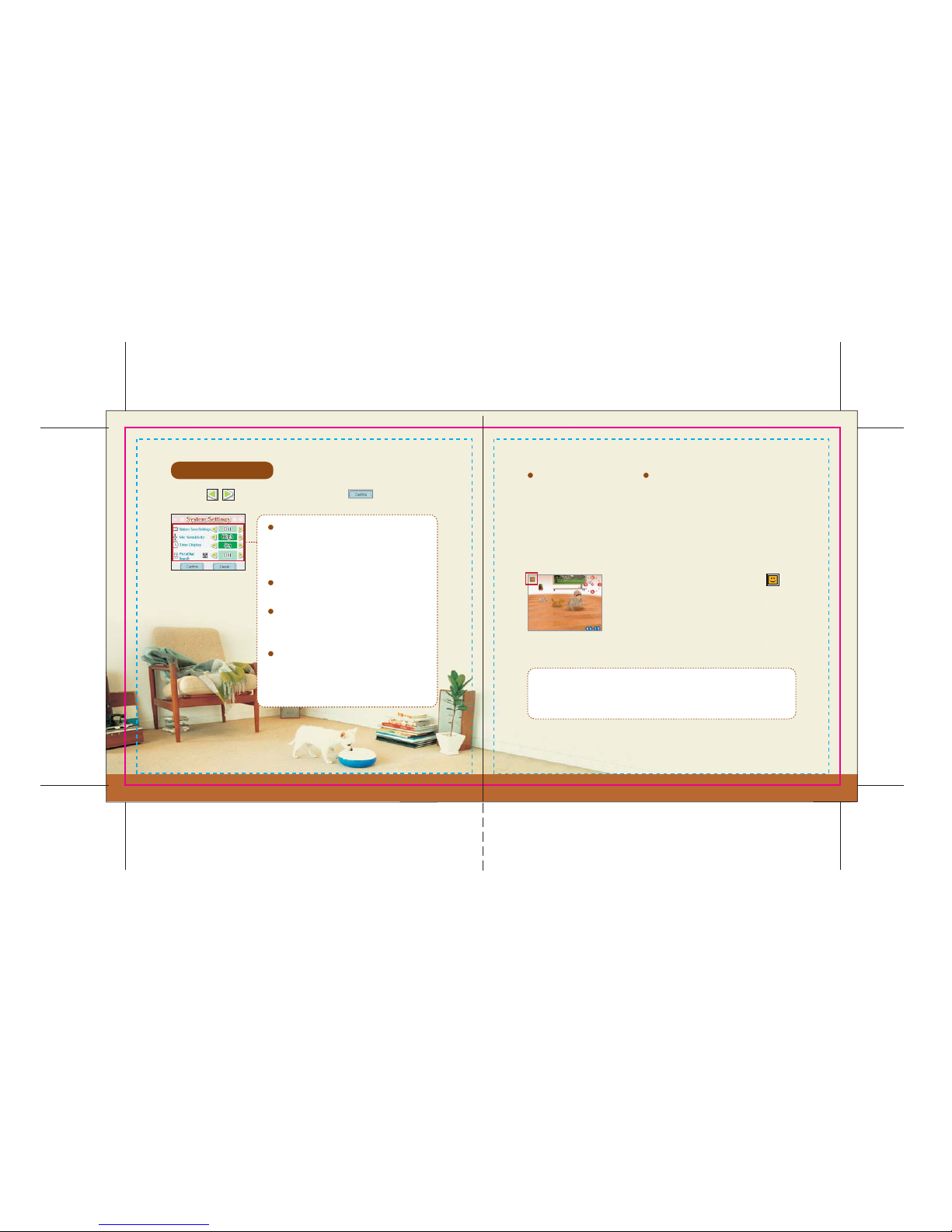
System Settings
Battery Save Settings
PictoChat Search
Mic Sensitivity
Time Display
PictoChat Search
Touch the icons to adjust all settings. Touch when you’re done.
Turn this option on to search for active PictoChat chat rooms while
playing Nintendogs. First you will need to access the system settings and
turn the PictoChat search function on. When you do so, your Nintendo
DS will continue searching wirelessly—even if you close it—but it will
consume more battery power than standard Sleep Mode.
If there are people using PictoChat nearby, the
icon will appear on-screen. You cannot automatically
switch to PictoChat from Nintendogs, so you will first
need to save your progress (pg. 9) on the Home screen
and then power-off your Nintendo DS. Next, turn your
Nintendo DS on again and access PictoChat.
In some cases, the PictoChat chat room you’ve found may become inactive
before you are able to switch from Nintendogs to PictoChat. Please refer to
your Nintendo DS hardware instruction booklet for help using PictoChat.
When set to On, the system's backlight will
automatically turn off after 10 minutes without
any input.
Adjust the sensitivity of the built-in microphone.
When set to Off, the clock will not appear on the
Top Screen.
Turn this option on to search for active nearby
PictoChat chat rooms. You can also choose how
you will be notified.
Page 20
3938
Q
A
Q
Q
A
Q
A
Q
A
Q
A
Troubleshooting
To ensure that your puppy can hear you clearly, hold your Nintendo DS
so that the microphone is about six inches from your face. Also, if there
is a lot of background noise where you are playing, choose the System
Settings option in the Go Out menu to adjust microphone sensitivity.
Even if I call my puppy it won’t respond to me.
You can earn money by entering and placing in contests (pg. 29). You can also earn
money by selling unneeded supplies at the secondhand shop.
Is there a way to earn money?
If a message appears indicating you cannot go for walks or enter competitions, you
will need to wait for a period of time before you can do so. This will not occur if you
always play Nintendogs on the same Nintendo DS system.
When I use a different Nintendo DS system to play Nintendogs, I can't go
for a walk or enter any contests...
Even dogs of the same breed can have different personalities. Additionally, how the
dog is raised can also affect its personality. What personality your dog ends up with
will be affected by you, its trainer.
Even though my friend and I both have the same breed, our dogs have very
different personalities...
Sometimes, dogs are able to sneak out of the house and have fun without you
realizing. If your dog is gone, don’t panic. Just wait a little bit. Sometimes your dog
will return with a present.
My dog is gone...
You can only receive one voice message each time you communicate
via Bark Mode. Once you communicate with another Nintendogs
trainer, the wireless mode automatically shuts off. To communicate
again, you will need reactivate Bark Mode. Additionally, until you turn
your Nintendo DS off, you will be able to replay the last voice message
you received at any time by going to your Friend List.
How many voice messages can I receive at one time?
Page 21
4140
Staff List
PACKAGE/MANUAL
Hisayo Osanai
Daiki Nishioka
Ryuichi Suzuki
Ross Hirai
Hitomi Ross
ARTWORK ADVISOR
Yusuke Nakano
PHOTOGRAPH
Orie Ichihashi
NOA LOCALIZATION
Nate Bihldorff
Bill Trinen
LOCALIZATION
MANAGEMENT
Leslie Swan
Jeff Miller
NOA PRODUCT TESTING
Yoshinobu Mantani
Kyle Hudson
Sean Egan
Arnie Myers
Mika Kurosawa
Teresa Lilygren
SPECIAL THANKS
Wannyanmura, Inc.
Koji Kondo
Kazumi Totaka
Tomoaki Kuroume
Asako Haruhana
Yasuki Tawaraishi
Shinobu Tanaka
Yi-Hong Lin
All EAD
Takahashi
EXECUTIVE PRODUCER
Satoru Iwata
GENERAL PRODUCER
Shigeru Miyamoto
PRODUCER
Hideki Konno
DIRECTOR
Kiyoshi Mizuki
SYSTEM DIRECTOR
Takayuki Shimamura
DOG/SCRIPT DIRECTOR
Kunio Watanabe
OBJECT/WALKING-MODE
DIRECTOR
Katsuhito Nishimura
PROGRAMMING DIRECTOR
Tsutomu Kaneshige
DOG PROGRAMMING
Yoshitaka Ajioka
UI DESIGN
Tomoko Ichikawa
Takahiro Hamaguchi
Satoshi Furukawa
EFFECT DESIGN
Keijiro Inoue
Motoaki Fukuda
DESIGN ADVISOR
Yoshiki Haruhana
SOUND DIRECTOR
Ryoji Yoshitomi
MUSIC
Hajime Wakai
SOUND EFFECT
PROGRAMMING
Masato Mizuta
VOICE INPUT PROGRAMMING
Yoji Inagaki
UI PROGRAMMING
Yuzuru Ogawa
Hiroyuki Kono
OBJECT/UI PROGRAMMING
Soichi Nakajima
OBJECT/WIRELESS SYSTEM
PROGRAMMING
Yasushi Ebisawa
DESIGN DIRECTOR
Junji Morii
3-D DESIGN
Michiho Hayashi
Akito Osanai
Kenji Shinmoto
Masaaki Ishikawa
Masanobu Sato
Mieko Ajima
Hideaki Takamura
PROGRESS MANAGEMENT
Keizo Kato
TECHNICAL SUPPORT
Hironobu Kakui
Shingo Okamoto
DEBUG
Naoki Takami
Yuki Tanikawa
Super Mario Club
3-D LIBRARY PROGRAMMING
Kenji Nishida
PROGRAMMING SUPPORT
Tetsuya Sasaki
Satoru Osako
Tetsuya Nakata
Yohei Tsukada
Atsushi Masaki
Programming Support Group
Page 22
4342
This section explains how to establish your DS wireless link.
What You Will Need:
Nintendo DS One for each player
Nintendogs Game Card One for each player
Steps
1. Make sure that all DS systems are turned off, then insert a Nintendogs Game Card into
each system.
2. Turn on the power of all the systems. The DS menu screen will appear.
3. Touch the “Nintendogs” panel.
4. Now follow the instructions on page 32.
Establishing the DS Wireless Link (DS Wireless Play)
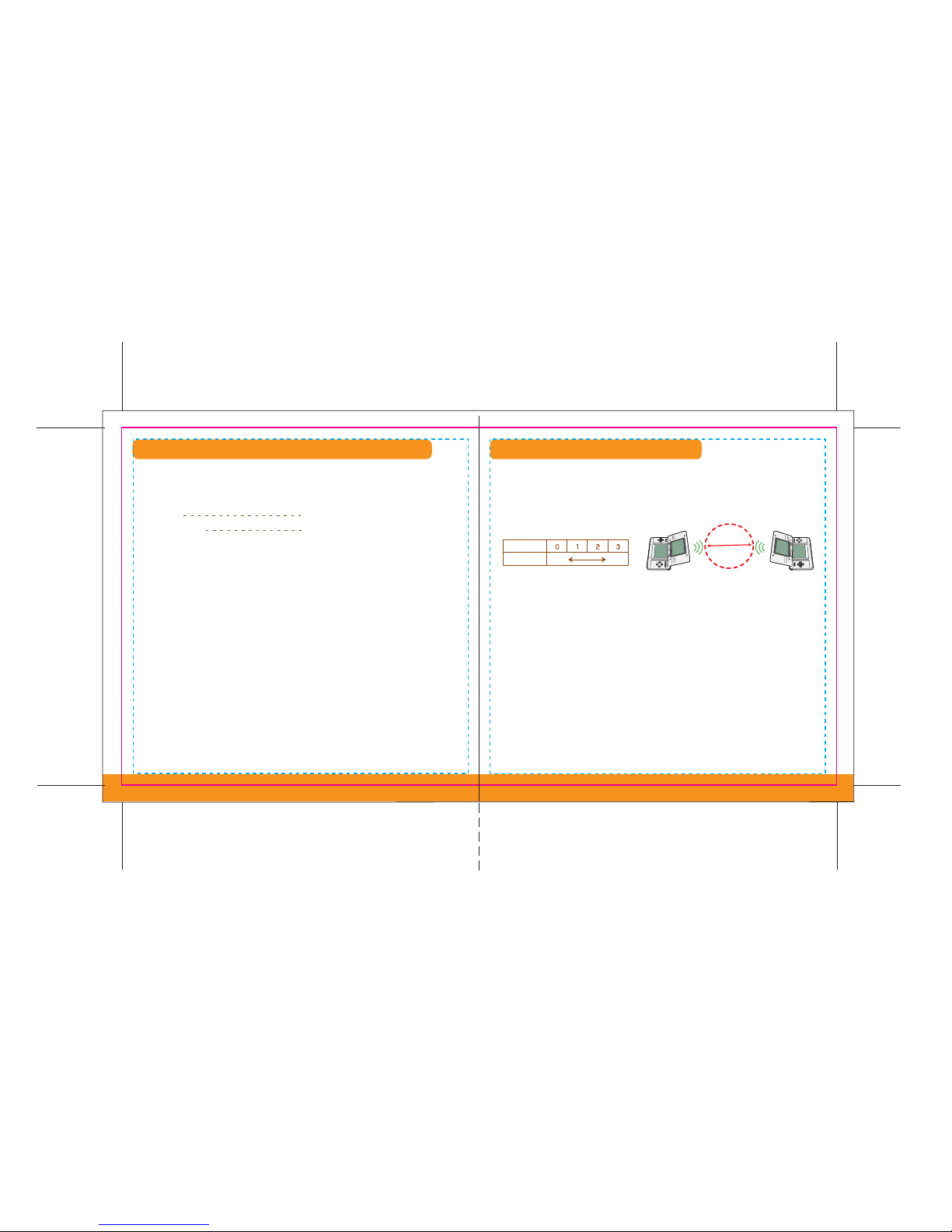
Wireless Communication Guidelines:
Begin with the distance between systems at about 30 feet or less and move closer or farther
apart as desired, keeping the signal strength at two or more bars for best results.
Keep the maximum distance between systems at 65 feet or less.
The systems should face each other as directly as possible.
Avoid having people or other obstructions between the DS systems.
Avoid interference from other devices. If communication seems to be affected by other devices
(wireless LAN, microwave ovens, cordless devices, computers), move to another location or turn
off the interfering device.
Weaker
No. of Bars
Strength
Stronger
30 ft.
During wireless game play, an icon will appear on either the upper or lower displays showing the
signal strength of the wireless signal. The icon has four modes depending on the signal strength,
as shown below.
•
•
•
•
•
Page 23
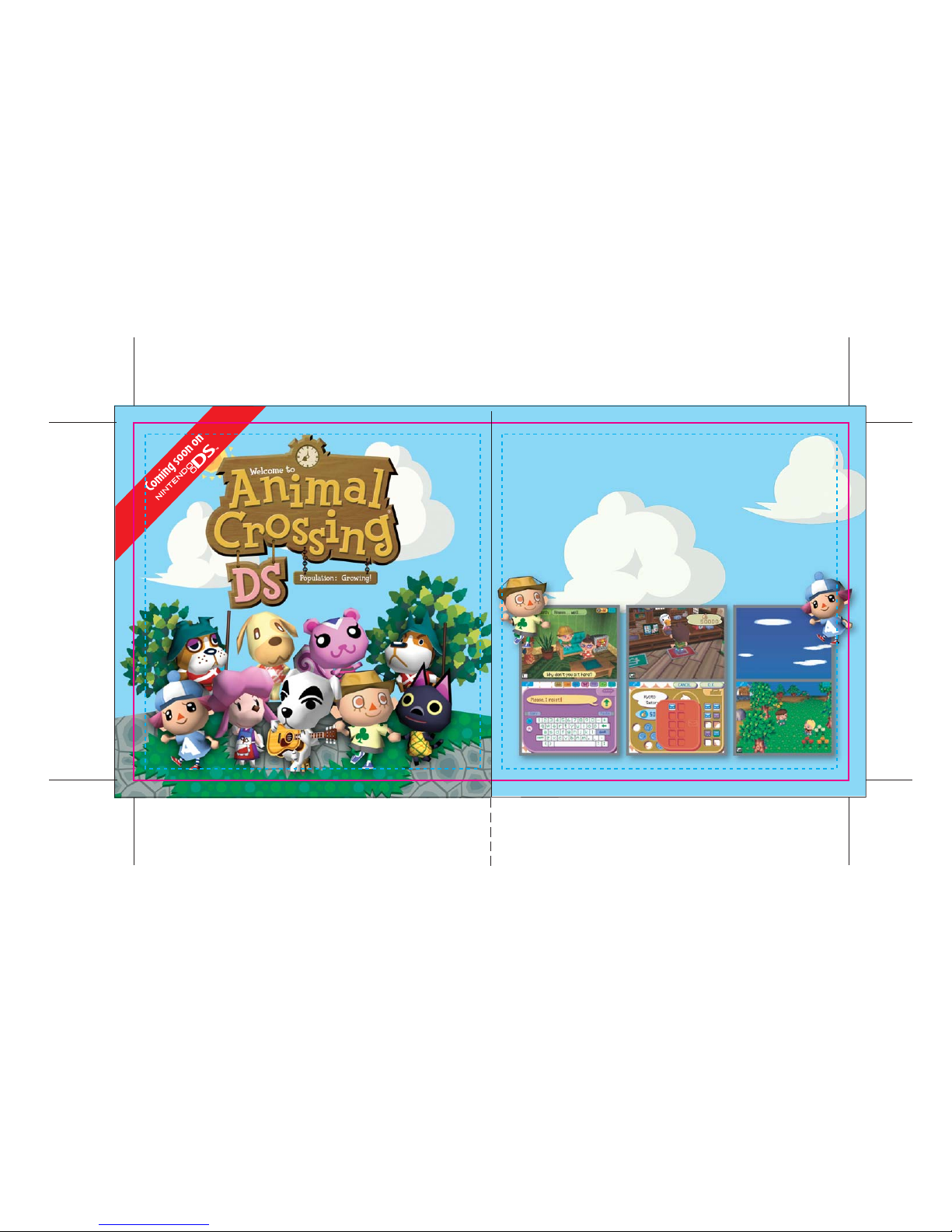
Cross Over to a Brand New World
Live an alternate life in this all-new sequel to the wildly popular Nintendo
GameCube game. Join up to three of your friends in the same virtual town
and interact in real time — either through wireless LAN or over the
Internet. Now you can visit a friend from thousands of miles away!
Whether you want to collect brand new items like hats and sunglasses,
catch bugs and fish, decorate your home, or just chat with the characters
in your town, there’s always something to do.
4544
Page 24

Important Legal Information
Copying of any video game for any Nintendo system is illegal and is strictly prohibited by domestic
and international intellectual property laws. “Back-up” or “archival” copies are not authorized and
are not necessary to protect your software. Violators will be prosecuted.
This video game is not designed for use with any unauthorized copying device or any unlicensed
accessory. Use of any such device will invalidate your Nintendo product warranty. Nintendo (and/or
any Nintendo licensee or distributor) is not responsible for any damage or loss caused by the use of
any such device. If use of such device causes your game to stop operating, disconnect the device
carefully to avoid damage and resume normal game play.
If your game ceases to operate and you have no device attached to it, please contact Nintendo
Customer Service (see below).
The contents of this notice do not interfere with your statutory rights.
This booklet and other printed materials accompanying this game are protected by domestic and
international intellectual property laws.
For further information or assistance, please contact:
Nintendo Consumer Service
www.nintendo.com
or call 1-800-255-3700
(U.S. and Canada)
REV–D
Warranty & Service Information
You may need only simple instructions to correct a problem with your product. Try our web site at www.nintendo.com or call
our Consumer Assistance Hotline at 1-800-255-3700, rather than going to your retailer. Hours of operation are 6 a.m. to 7 p.m.,
Pacific Time, Monday - Sunday (times subject to change). If the problem cannot be solved with the troubleshooting information available on-line or
over the telephone, you will be offered express factory service through Nintendo or referred to the nearest NINTENDO AUTHORIZED REPAIR CENTER.
Please do not send any products to Nintendo without contacting us first.
HARDWARE WARRANTY
Nintendo of America Inc. ("Nintendo") warrants to the original purchaser that the hardware product shall be free from defects in material and
workmanship for twelve (12) months from the date of purchase. If a defect covered by this warranty occurs during this warranty period, Nintendo or
a NINTENDO AUTHORIZED REPAIR CENTER will repair the defective hardware product or component, free of charge. The original purchaser is entitled
to this warranty only if the date of purchase is registered at point of sale or the consumer can demonstrate, to Nintendo's satisfaction, that the product
was purchased within the last 12 months.
GAME & ACCESSORY WARRANTY
Nintendo warrants to the original purchaser that the product (games and accessories) shall be free from defects in material and workmanship for a
period of three (3) months from the date of purchase. If a defect covered by this warranty occurs during this three (3) month warranty period,
Nintendo or a NINTENDO AUTHORIZED REPAIR CENTER will repair the defective product, free of charge.
SERVICE AFTER EXPIRATION OF WARRANTY
Please try our web site at www.nintendo.com or call the Consumer Assistance Hotline at 1-800-255-3700 for troubleshooting information and/or
referral to the nearest NINTENDO AUTHORIZED REPAIR CENTER. In some instances, it may be necessary for you to ship the complete product, FREIGHT
PREPAID AND INSURED FOR LOSS OR DAMAGE, to the nearest service location. Please do not send any products to Nintendo without contacting us first.
WARRANTY LIMITATIONS
THIS WARRANTY SHALL NOT APPLY IF THIS PRODUCT: (a) IS USED WITH PRODUCTS NOT SOLD OR LICENSED BY NINTENDO (INCLUDING, BUT NOT
LIMITED TO, NON-LICENSED GAME ENHANCEMENT AND COPIER DEVICES, ADAPTERS, AND POWER SUPPLIES); (b) IS USED FOR COMMERCIAL PURPOSES
(INCLUDING RENTAL); (c) IS MODIFIED OR TAMPERED WITH; (d) IS DAMAGED BY NEGLIGENCE, ACCIDENT, UNREASONABLE USE, OR BY OTHER CAUSES
UNRELATED TO DEFECTIVE MATERIALS OR WORKMANSHIP; OR (e) HAS HAD THE SERIAL NUMBER ALTERED, DEFACED OR REMOVED.
ANY APPLICABLE IMPLIED WARRANTIES, INCLUDING WARRANTIES OF MERCHANTABILITY AND FITNESS FOR A PARTICULAR PURPOSE, ARE
HEREBY LIMITED IN DURATION TO THE WARRANTY PERIODS DESCRIBED ABOVE (12 MONTHS OR 3 MONTHS, AS APPLICABLE). IN NO EVENT SHALL
NINTENDO BE LIABLE FOR CONSEQUENTIAL OR INCIDENTAL DAMAGES RESULTING FROM THE BREACH OF ANY IMPLIED OR EXPRESS WARRANTIES.
SOME STATES DO NOT ALLOW LIMITATIONS ON HOW LONG AN IMPLIED WARRANTY LASTS OR EXCLUSION OF CONSEQUENTIAL OR INCIDENTAL
DAMAGES, SO THE ABOVE LIMITATIONS MAY NOT APPLY TO YOU.
This warranty gives you specific legal rights. You may also have other rights which vary from state to state or province
to province.
Nintendo's address is: Nintendo of America Inc., P.O. Box 957, Redmond, WA 98073-0957 U.S.A.
This warranty is only valid in the United States and Canada.
REV–O
 Loading...