

Page 1
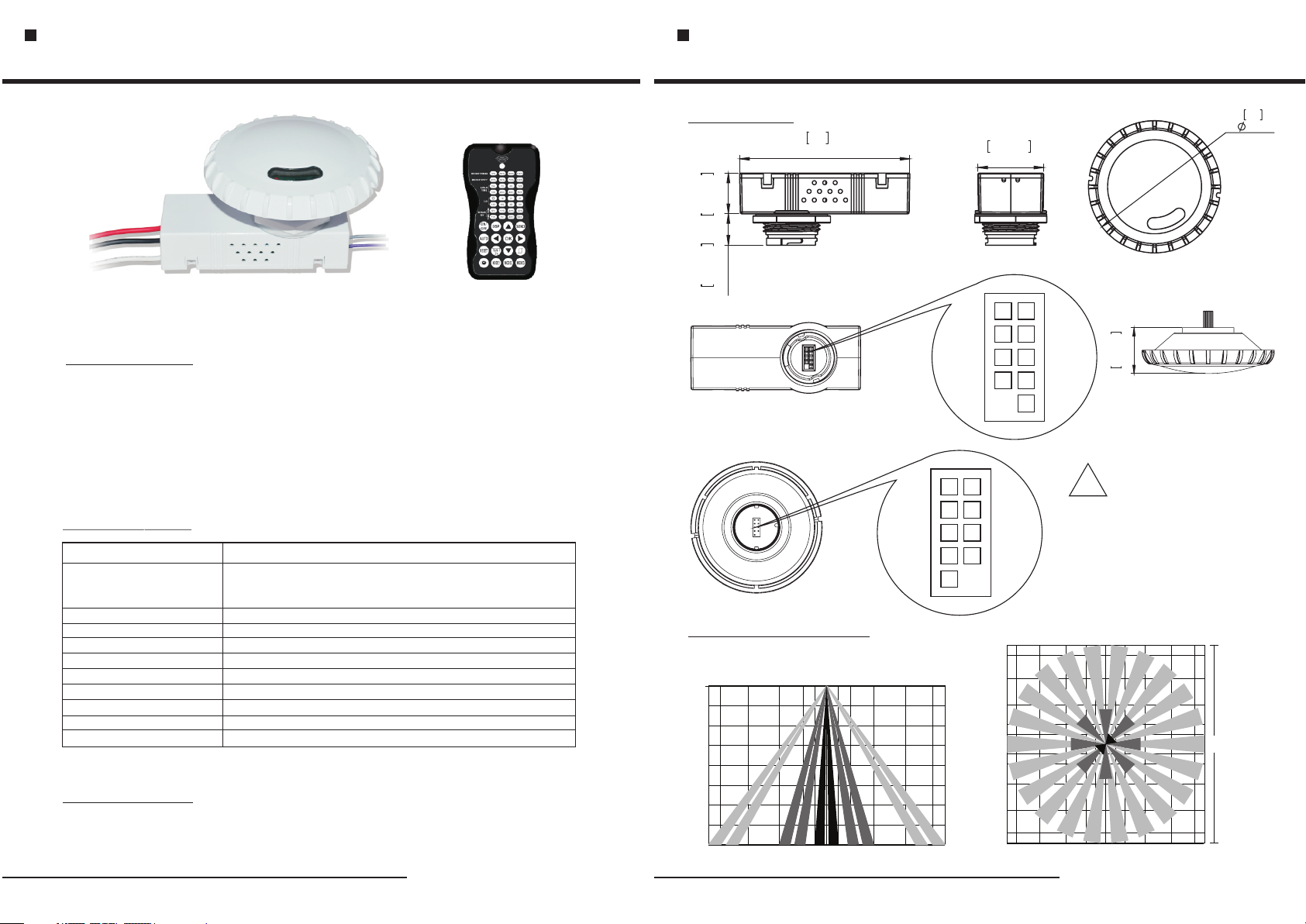
Pho toele ctric And M icrow ave Moti on Sens or Swit ches
BRI816 Instruction
Pho toele ctric And M icrow ave Moti on Sens or Swit ches
BRI816 Instruction
RC-100BRI816
IN TRO DU CTI ON
The product is a moving o bj ec t se ns or f or high bay installation. It’s de te ct io n ra ng e is
50ft,radius is ma x3 0f t, a nd working frequency i s 5.8GHz.The advantage o f this
product is stable working state (s ta bl e wo rk in g te mp er at ur e: -15°~+70°C).It offers 4
levels of t he light Co nt ro l : d im mi ng light (0 ,1 0%,20%, 30%,optional)--100%--dimming
li gh t (0 ,1 0%,20 %, 30%, option al )--off per iods of se le ctabl e wait in g ti me :moti on
h o l d t i me , se l e c t a bl e da y l i g h t thre a s h o l d, a n d free d o m of d e t e ct i o n ar a.
SPECIFICATIONS
Power supply
Maximum load
@ -40°F ~ 131°F
(-40°C ~ 55°C)
HF System
Dim control output
Detection radius/angle
Mounting height
Remote range
Time setting
Light-control
Humidity
Temperature
120/277VAC 50/60Hz
Resistive/Halogen - 800W/1200W@120/277V
Fluorescent Ballast/CFL - 600 W/ 12 00 W@ 12 0/ 27 7V
Electronic Ballast (LED) - 600/1200VA@120/277V
5.8GHz CW
0-10V, max . 25 mA si nk in g cu rr en t
Max 26.2ft.(8m)/360°
Max 50ft. (15m)
33ft. (10m) indoor, no backlight
10sec.-30min. (adjustable)
10-2000Lux (adjustable)
Max. 95% RH
-104°F ~ +158°F (-40°C ~ +70°C)
SE NSO R´S LED :
1. It always light after switch on power, and be off after the unit enter working state.
2. It flash o nc e when the un it r eceiv es s en sing si gn al .
DI MEN SI ONS
98
3.86
0.92
23.35
0.71
18.15
SENSOR INFORMATION
Coverag e Si de View
0' 6' 12' 30'12' 6'30' 20' 20'
10'
20'
30'
40'
'
0
90
3.54
37.93
1.49
1.22
4PIN
5PIN
30'
27'
20'
12'
12'
20'
27'
30'
4PIN
6'
3'
0'
3'
6'
30'
20'
5PIN
12' 6'3'27'
31.07
There a re n ine nee dl es, Pa y
atten ti on to the d ir ect io n of
!
inser ti on!
0' 3' 6' 12' 27'
20'
60 ft
30'
-1-
-2-
Page 2
Pho toele ctric And M icrow ave Moti on Sens or Swit ches
BRI816 Instruction
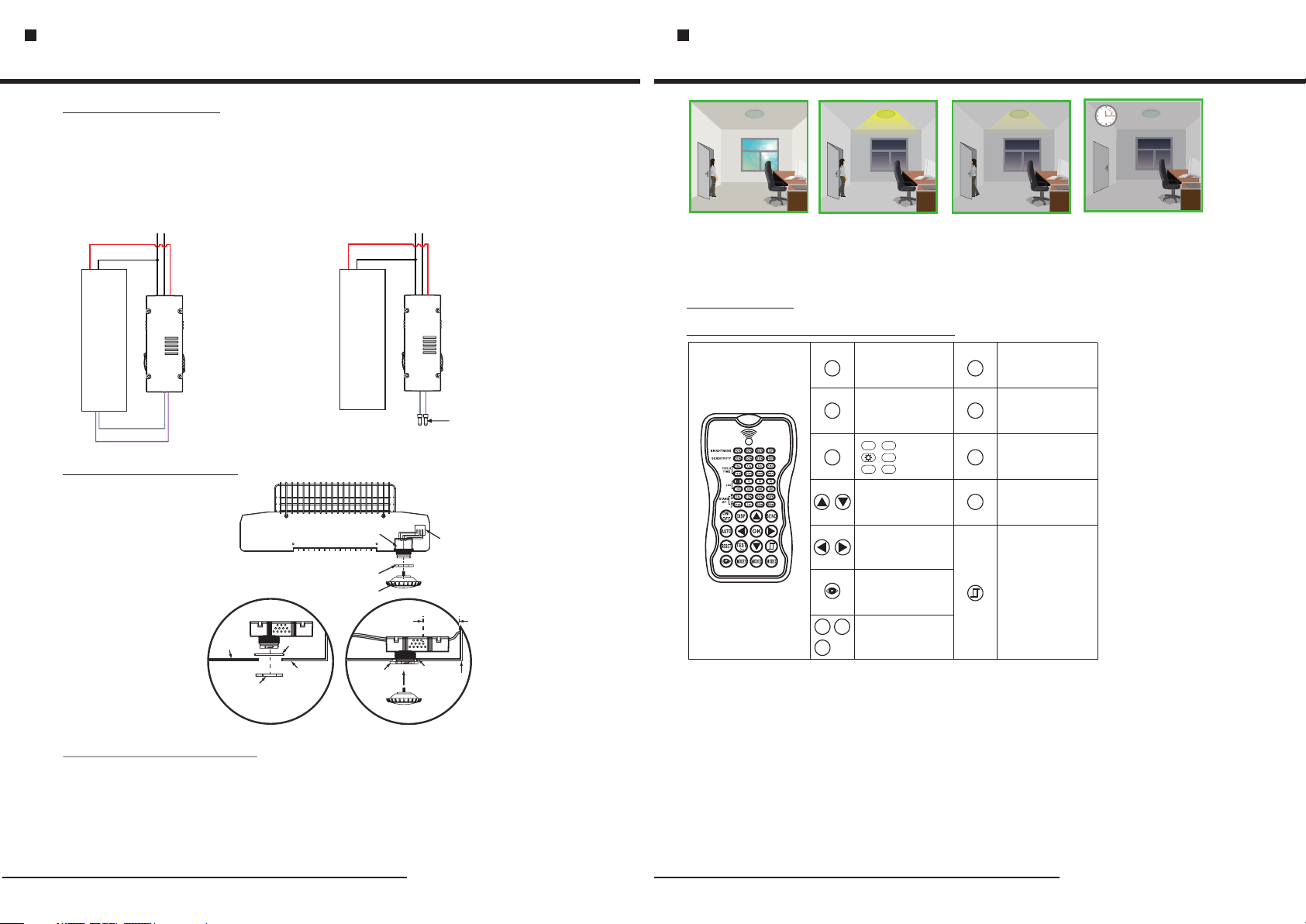
WI RIN G DI AGR AMS
BRI816 wiring with dimming
ballast or LED driver.
Dimming Driver
BRI816 wiring with non-dimming
ballast or LED driver.
Non-Dimming Driver
Pho toele ctric And M icrow ave Moti on Sens or Swit ches
BRI816 Instruction
LINE(Black)
LOAD(Red)
NEUTRAL(White)
Dimming
Driver
GRAY (-)
VIOLET (+)
LINE(Black)
NEUTRAL(White)
LOAD(Red)
NEUTRAL(White)
Dimming
Driver
NEUTRAL(White)
Close E nd Wi re C onn ector
SE NSO R MO UNT ING
Inside Fixture
Wall
Tightening
Nut
BRI816
Sensor module Assembly
Rubber
Gasket
Outside
Fixture Wall
BRI816
Tightening Nut
Tightening
Nut
0.2”(minimum)
sensor module Assembly
Rubber
Gasket
LED
Controller
Fixture
Wall
FUNCTION AND OPTIONS
If offers 4 levels of the light C ontrol : di mm in g light(0,10%,20%, 30 %) -- 10 0% -- di mm in g light
(0,10%,20%,30%)--off p er io ds of s el ec ta bl e waiting t im e: mo ti on holdtime a nd 24hours,
selectable daylight threashold,and freedom of detection ara.
If natral l ig ht lower L ig ht -c on tr ol setting (10Lux,30Lux,50Lux),the l ig ht wi ll not automatically
on (0,10%,20%,30%). When person enter in the room,the light will on 100%,after person le ft
the room,the room enter in semi bright brightness after hold on time.
Wit h s uf fci ent nat ur al lig ht ,
th e ligh t do es no t sw itc h on
wh en pr es enc e dete cte d.
Wit h ins uff ici ent na tural
the s ensor s witch es on th e lig ht
aut omati cally w hen pe rso n
opt ions) s tand by
ent ers the (
lev el afte r the T he lamp
nev er swit ch off wi th pr ese nce ,
eve n the nat ure lig ht is suf fic ien t.
lig ht,
roo m.
Peo ple le ft, ligh t st ill d ims t o
0/1 0%/2 0%/ 30% ( op tio ns)
sta ndby le vel aft er the ho ld
tim e.
Lig ht swit ches of f aut oma tical ly
aft er the di mming t ime ela psed.
OP ERAT ION
SETTING BY REMOTE CONTROL
Permanent on or permanent
ON/
OFF
off mode
The selected parameters
SEN D
go to SEND
100%
5m
RES ET
MOD E1 MOD E2
MOD E3
FC C STATE MEN T
1. This d evice c om pli es w ith P ar t 15 of the F CC Rule s. Oper at ion i s su bje ct t o the f ol lowin g two con ditio ns :
(1) Thi s devic e ma y not c au se ha rm ful int erfer ence.
(2) Thi s devic e mu st ac ce pt an y in terfe rence r eceiv ed , inc lu din g in terfe rence t hat may c ause un de sir ed o per at ion.
2. Chan ges or mo di fic at ion s no t expre ssly ap prove d by t he pa rt y res po nsibl e for com plian ce coul d vo id
the use r's aut ho rit y to o per at e the equ ipmen t.
NOTE: T his equ ip men t ha s bee n te sted an d found t o compl y wi th th e li mit s fo r a Cla ss B d igita l devic e,
pursu ant to Pa rt 1 5 of th e FC C Rul es . These l imits a re desi gn ed to p ro vid e re aso na ble pro tecti on agai ns t har mf ul
inter feren ce i n a res id ent ia l insta llati on. Thi s eq uip me nt ge ne rates u ses and c an radi at e rad io f req ue ncy e ne rgy
and, if n ot inst al led a nd u sed i n ac corda nce wit h the ins tr uct io ns, m ay c aus e ha rmful i nterf erenc e to r adi o
commu nicat io ns. H ow eve r, t here is n o guara ntee th at i nte rf ere nc e wil l no t occur i n a parti cular i ns tal la tio n. I f this
equip ment do es c aus e ha rmf ul i nterf erenc e to radi o or t ele vi sio n re cepti on, whi ch can be d eterm in ed by t ur nin g th e
equip ment of f an d on, t he u ser i s en coura ged to tr y to corr ec t the i nt erf er enc e by o ne or mor e of the fo llowi ng
measu res: Re or ien t or r elo ca te the re ceivi ng ante nn a. In cr eas e th e sep ar ation b etwee n the equ ip men t an d rec ei ver.
Conne ct the eq ui pme nt i nto a n ou tlet on a c ircui t diffe re nt fr om t hat t o wh ich t he r eceiv er is con necte d. Con su lt th e
deale r or an exp er ien ce d rad io /TV tec hnici an for he lp .
100%
20%
+
∞
Enter in Adjustable Control
Parameters condition and
navigate for UP and DOWN
Navigate for Right and Left
The lastest surrounding lux
value overites pervious lux
value learned.
To Save these New
Settings parameters
as Model 1 Model 2 Model 3
DISPLAY Current Settings
DIS P
Back to previous settings
AUT O
before on/off model
In test mode,hold time is only
TES T
2s,and stand-by time and
2s
daylight sensor are disable.
Confirm settings
OK
Photocell On/Off,when the light
level exceeds this setting, the
lights will turn off even when
the space is occupied.
When light level goes below
the settings, the light will turn
on even without motion
detection. This feature is
disabled by default.
-3- -4-
 Loading...