

Page 1
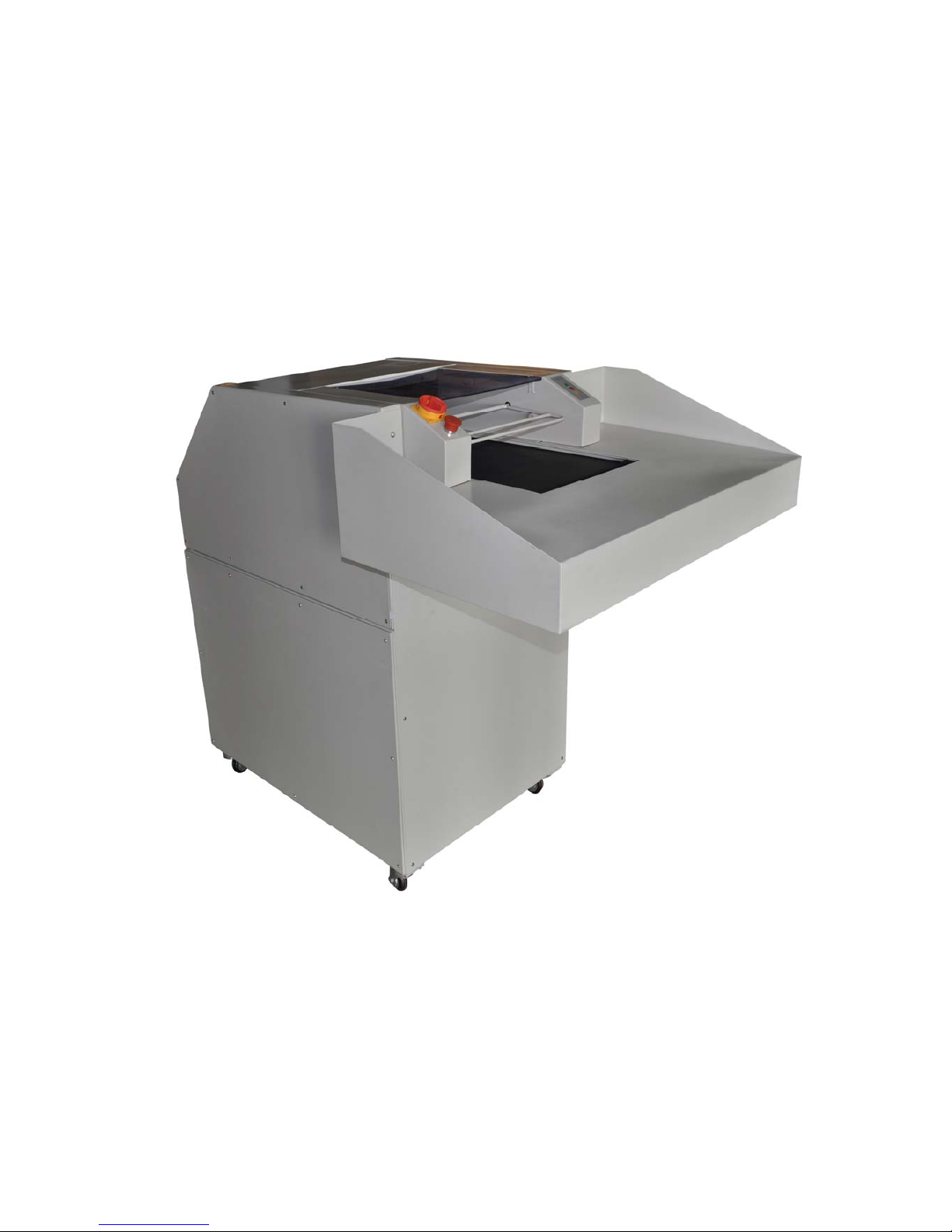
RD610/RD620
Paper Shredder Operation Manual
Ningbo R.D.C Office Equipment Co.,Ltd
Page 2

Preface
The operation manual will guide you how to operate and maintain paper shredder, and also
include security guides. The paper shredder could keep in a good performance and work condition
which is closely related to right operation and maintenance. So please read the manual and
security guides carefully and take it with you .If you operate as the manual, it can be in working
order to avoid accident.
R .D. C company focus on improving the quality of products. Our company have the right of
modification and improvement for performance and specification ,but it doesn’t mean we are
under obligation to modify the machine which have been sold out .to improve the quality of paper
shredder ,it is necessary to improve the technology, but our company keep the right!
Copyright of this manual belongs to R.D.C company. The manual show the information about
installation, operation, maintenance for the machine. The information about technology
specification and drawing are not allowed to copy, spread, use in unfair competition and retransfer
to the third parties.
Notice: If you have any question after reading the manual, please contact with the local distributor.
1
Page 3

Catalog
Preface——————————————————————————————1
Paper shredder nameplate
———————————————————------4
1. Security
—————————————————————————-----5
1.1 Points for attention on safety———————————————————--5
1.1.1 Security symbols——————————————————————------5
1.1.2 Attention symbols——————————————————————-----5
1.2 Safe operation guides—————————————————————-----5
1.3 Operation as manual——————————————————————---7
1.4 Inspecting security device——————————————————--------7
1.4.1 Inspecting process —————————————————————-------8
2. Technology parameter———————————————————----10
2.1 Assembly summary—————————————————————-----10
2.2 Specification and feature—————————————————-----------11
2.3 Shred data—————————————————————————----11
2.4 Motor————————————————————————————-12
2.5 Power supply specification and fuse protection———————---------------12
2.6 Size————————————————————————————---12
2.6.1 Machine Size————————————————————————---12
2.6.2 Paper feed table——————————————————————------12
2.7 Space demand————————————————————————---13
2.8 Noise index————————————————————————------13
2.9 Machine size(drawing)———————————————————----13
3. Installation————————————————————————------14
3.1 Space demand—————————————————————————-14
3.2 Power supply connection————————————————————---14
3.3 Transfer paper shredder to installation location———————----------------14
3.3.1Installation of paper feed table——————————————---------------14
3.4 Installation of paper shredder ————————————————---------15
4. Start ————————————————————————————--15
4.1 Control and display——————————————————————----15
4.1.1 Main supply switch—————————————————————-------15
4.1.2 Emergency stop switch————————————————————------15
2
Page 4

4.1.3 Control panel———————————————————————------16
4.2 Paper delivery ————————————————————-------17
4.3 Deliver paper too much—motor overload————————————------17
4.4 Shut down——————————————————————————-18
4.5 Replace shred bag——————————————————————----18
5. Inspection and maintenance——————————————————--19
5.1 Maintenance of delivery belt—————————————————--------19
5.1.1 Inspecting the tightness of delivery belt——————————----------------19
5.1.2 Inspecting the abrasion of delivery belt———————————--------------20
5.1.3 Cleaning the delivery belt—————————————————------------20
5.2 Inspecting the tightness of chain belt—————-----------------------------------20
5.3 Lubricating paper shredder——————————————————-------21
5.3.1 Paper shredder system————————————————————-------21
5.3.2 Drive———————————————————————————------21
6. Replacing parts—————————————————————--------22
6.1 After-service department address———————————————---------22
6.2 Maintenance—————————————————————————---22
7. Circuit diagram———————————————————————--23
3
Page 5

RONGDA
Paper shredder
Model: RD610/RD620
serial No:
Motor:
voltage:
current:
结 构:
If you couldn’t offer the serial No, you will not get the right of claim and guarantee for all repairs
The serial No is showed on nameplate as indicated above
Once you receive the goods, please mark the serial and related data on right place immediately
4
Page 6

1. Security
1.1 Points for attention on safety
1.1.1 Security symbol
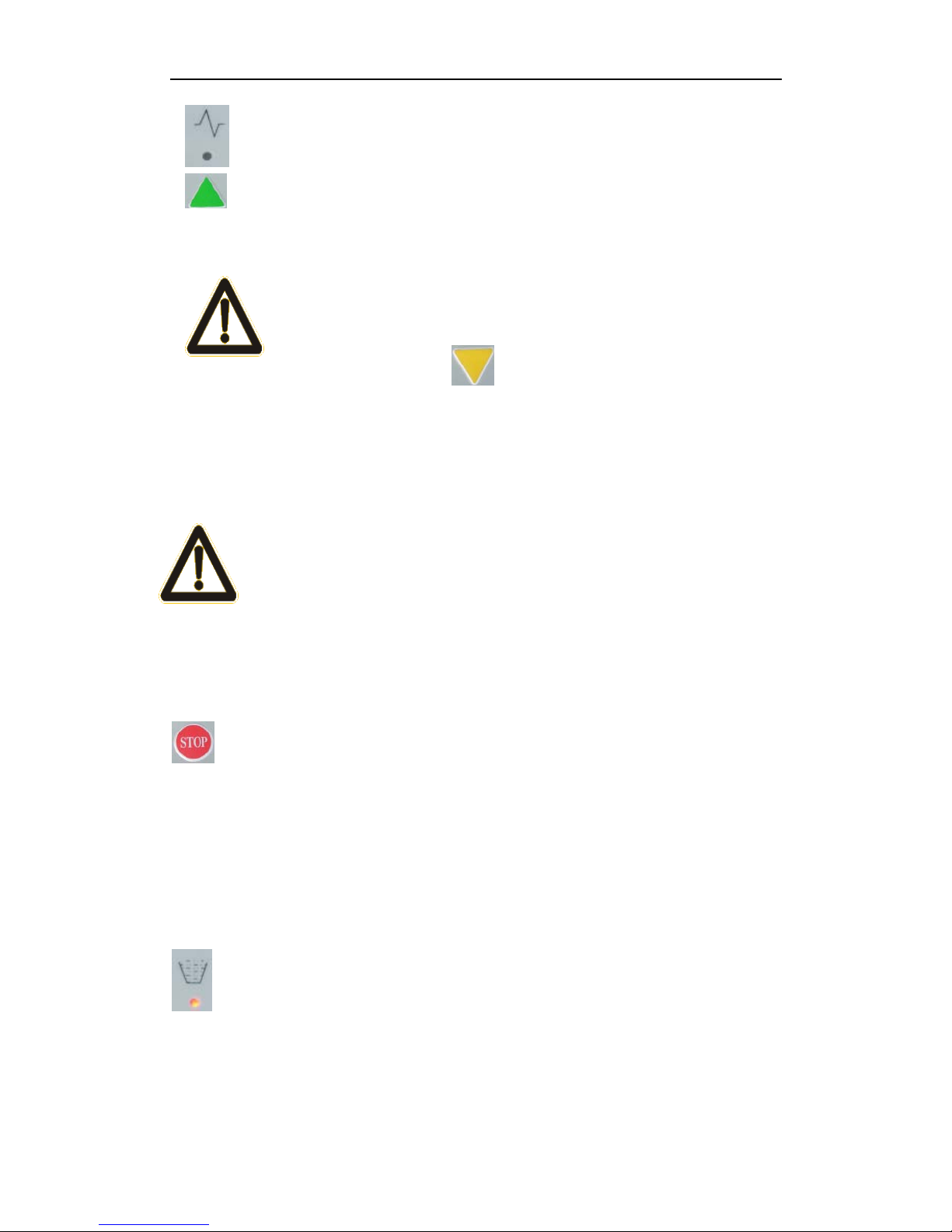
The symbol means dangerous, it may cause serious harm to health and
even life if ignoring it .Please pay attention to it and inform of other
users.
1.1.2 Attention symbol
You should pay much attention to the symbols .make sure to operate the machine
as manual guide to avoid damaging the machine and other devices.
1.2 Safe operation guides
Please notice below security operation ways:
The machine have passed the security certificate, but it will cause following harm by
incorrect operation
z User’s health and life
z Machine and other precious devices
z Using effort of paper shredder
The machine utilize the national advanced technology to guarantee the security,
but it will cause the dangerous by incorrect operation and the operation which is
not apply to our machine design
z The curled materials are not apply to be shredded by the machine
z Long hair, clothes, belt,
Scarves must be far from the paper feeding Portal
--- It is not allowed to operate it for the people under 16 years old
--- The operation worker who is engaged in the assembly, disassembly, reinstallation
5
Page 7

and maintenance (including inspection, maintenance and repair) must read and
understand the manual totally, especially the contents involve “security”
--- The person who is engaged in operation, maintenance, repairing for the machine
should be trained and guided and know potential danger of the machine.
--- The procedure of installation, disassembly, reassembly, operation and maintenance
should clearly know the responsibility of each other to avoid potential danger.
--- Make sure to cut the power before installation, disassembly, reassembly, operation,
maintenance. These operations should be done when power off
--- Before using the machine, avoid driving the machine by touching switch
unconsciously. Please turn the main switch to “off” to lock the power.
--- After repairing and before using, please inspecting all protection devices
----When operating machine, all operations which will threaten to your security will
be forbidden
---If the situation which will threaten to your security happened, please report
principal. It is not allowed to start the machine before solving the danger
---Make sure the machine could work normally before starting to use
--- Make sure to keep machine in a clear and safe place
---All the modifications that will decrease security index are forbidden. Forbid
removing or rejecting security devices
--- When the machine leave unused, please continuously do the maintenance work.
--- Forbid opening the door or cover of the machine when the machine is working,
please notice the symbol
--- Please inspect the security system after installing and repairing the machine.
---When using the paper shredder, please pay attention to the local safety regulation
--- Don’t put the machine on the stand or salience surface object which will affect
security index
--- Keep all connection wire well
--- Inspecting the wear parts of the mechanism every half year
--- Inspecting the electron parts by qualified electrician every half year.
6
Page 8

1.3 Operate as manual
The paper shredder is apply to shred paper, cardboard, CD, and card. But it is not
apply to shred loose-leaf book, paper clip and staple.
The operator will take on after effect by incorrectly using the machine.
Manufacturer will be derelict of duty
Operating as manual and working conform to factory’s instruction of installation,
disassembly, reassembly, operation. The person who is engaged in operation,
maintenance, repairing for the machine should be trained and guided and know
potential danger from the machine
Take attention to related security rules and other occupational disease preventing rule
1.4 Inspecting security devices
Please inspect the security devices as below:
z When Change the function of machine ,it should be inspected
z When the machine continuous work, it should be inspected at least once a
week .
z Inspect after maintenance and repair
Please make security inspecting as following aspects:
z Specific environment
z Specific position
z Attached security devices
z Specific function
Once the error happened when the machine is working, Please stop the machine
and eliminate the error
Don’t modify and remove the protection devices. When the danger happened,
please don’t cut down the protection devices.
To be on the safe side, it is not allowed to modify the machine
Caution symbol
Error security devices may cause serious accident, so when the security devices
have problem, should stop using the machine immediately. Forbid putting you hands
7
Page 9
into paper feed system, otherwise it will be grievously hurt.
Please start shredding after all the security devices is checked normally
Please inspect as all the following points. Eliminate the error first before using the machine
1.4.1 Inspection List
Please inspecting all the following points before using the machine
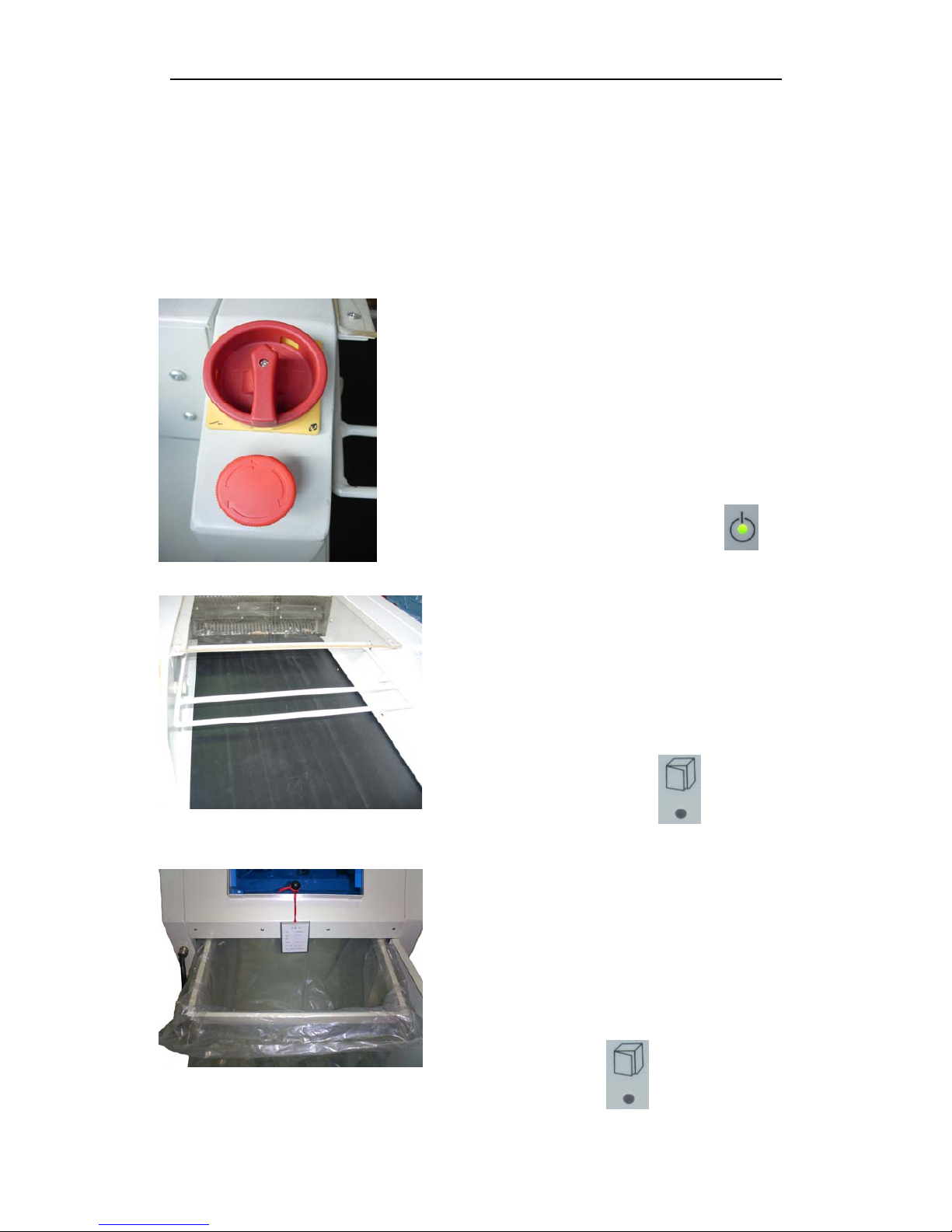
1. Inspecting “emergency stop” switch on paper
feeding table
When you press down “emergency stop” switch,
please shut down the machine immediately, then the
“on” light will be off.
When the “emergency stop” switch is locked.
Please don’t start the machine. The “on” light will be
on after release the “emergency stop” switch.
2. Inspecting the top cover of delivery belt.
When the top cover open, machine stop
immediately. ”security top cover open” light is
on. When the top cover open, please don’t start
the machine. ”security top cover open “light is
off after closing the top cover.
3. Inspecting the security switch of shred box
The machine will stop immediately, when you
take out the shred box. ”security top cover open”
light is on. Please do not start the machine, when
you are taking out the shred box. The “security
top cover open” light will be off after you
reinsert the shred box.
8
Page 10
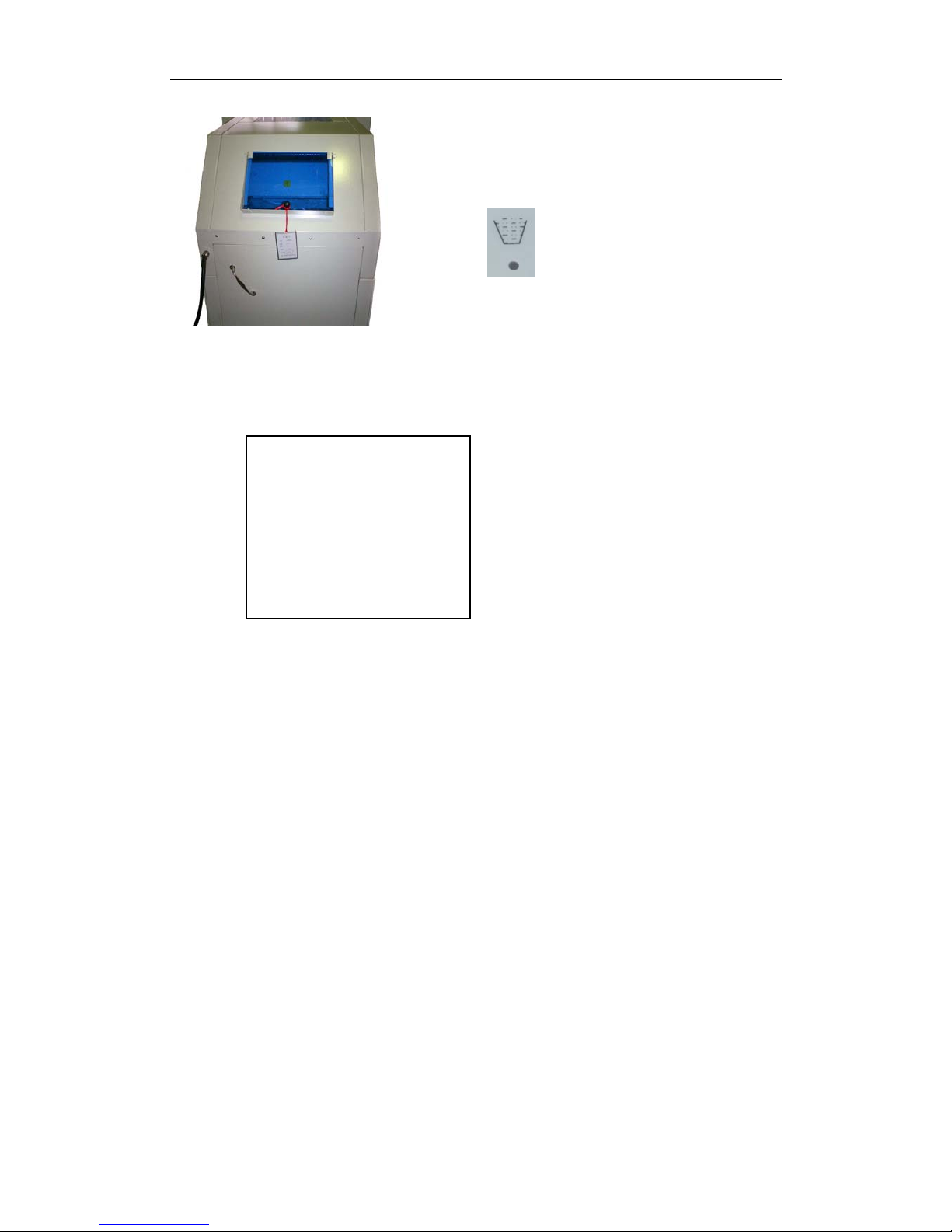
4. Inspecting security switch of checking door
When open the checking door, the machine stop
immediately. ”shred box full” light is on, close it, the
light is off.
5. Install all security cover and tighten them.
record:
Date:________________
note:_________________
9
Page 11
2. Technology parameter
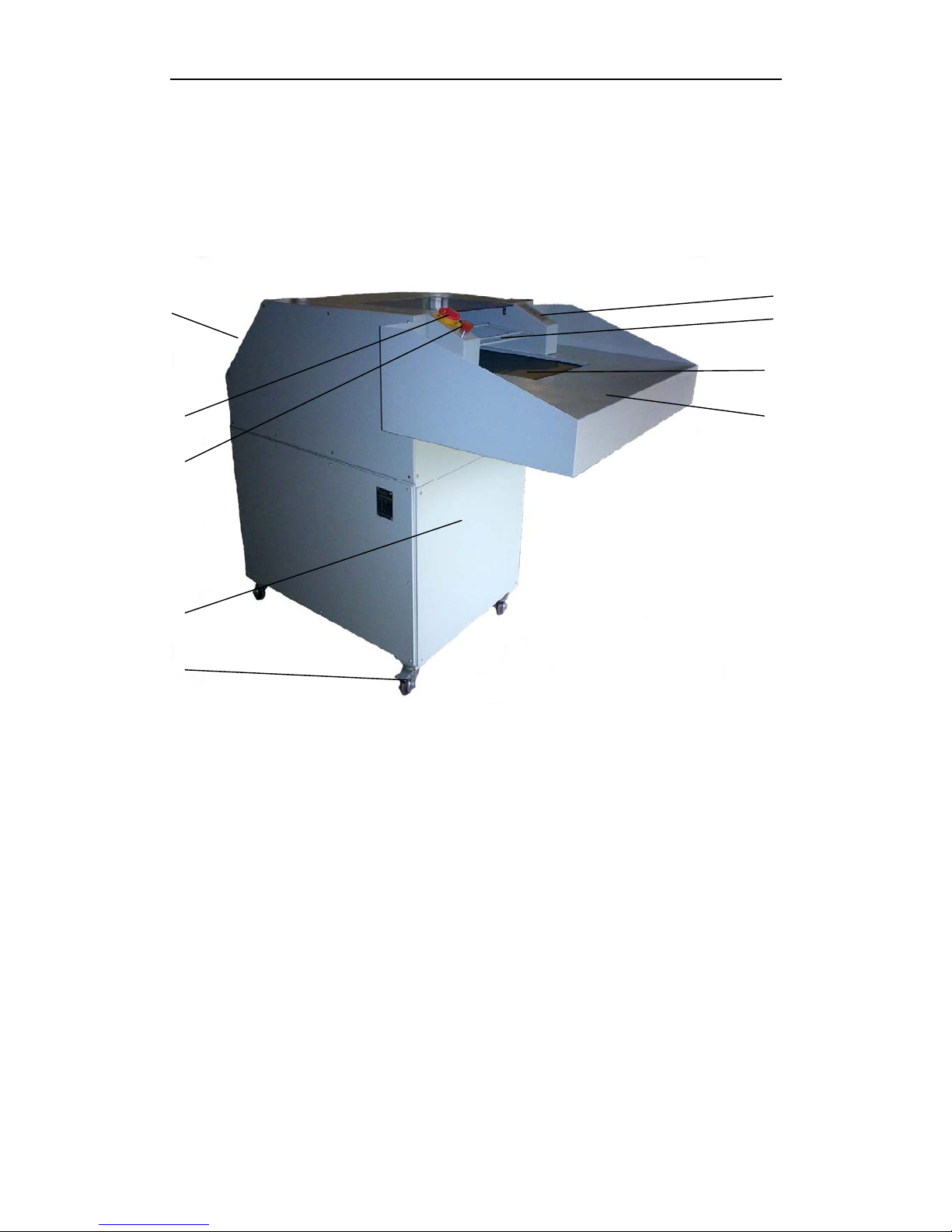
2.1 Assembly summary
5 4
3
2
6 1
7
8
9
(Picture)
The model with shred box
1.Paper feed table
2.Paper delivery belt
3.Security top cover
4.Control panel
5.Checking door
6.Switch
7.Emergency switch
8.Machine frame
9.Moving wheel
10
Page 12

2.2 Machine specification and feature
Body design: Delivery belt
Model:
Net weight: 360KG
Color:
z Machine frame: gray and white RAL 9002
z Paper feeding table and box: gray and white RAL 9002
Technology devices
z Large paper feed table
z Paper feed delivery belt
z Feed roller
z Automatic reversing control
z Moving wheel
z Shred box
2.3 Shred data
Shred type: strip slight
Shred size: 5.8mm 5.8*50mm
Security index (din std): 2 3
German industry standard: 32757 32757
Max.sheet cap
Every time : appvox:100sheets appvox:100sheets
German industry standard: A4,70g/㎡ A4,70g/㎡
Shred speed: 373mm/s 354mm/s
Paper width: 390mm 390mm
Power: 4kw 4kw
Power supply: 380v/50Hz 380v/50Hz
11
Page 13

2.4 Motor
Model: Motor with transmission box
Rated power: 4.0kw
Frequency: 50Hz
Rated current: 8.7A (voltage=380v)
Output speed: 177circle/min
Frame type:
Pole quantity: Induction motor 3 pole
2.5 Power supply specification and fuse protection(400V/50Hz)
Total rated power: 4.0KW
Total rated current: 8.7A
Fuse total current: 2.5A(coil in)
Power bolt: 32A(IEECRC)
2.6 Size
2.6.1 Machine size
Width: 1010 mm
Length: 1600mm(the model with shred box)
Height: 1200mm
2.6.2 Paper feed table
Width: 1010mm
Length: 600 mm
Paper feeding height: 1040mm
12
Page 14
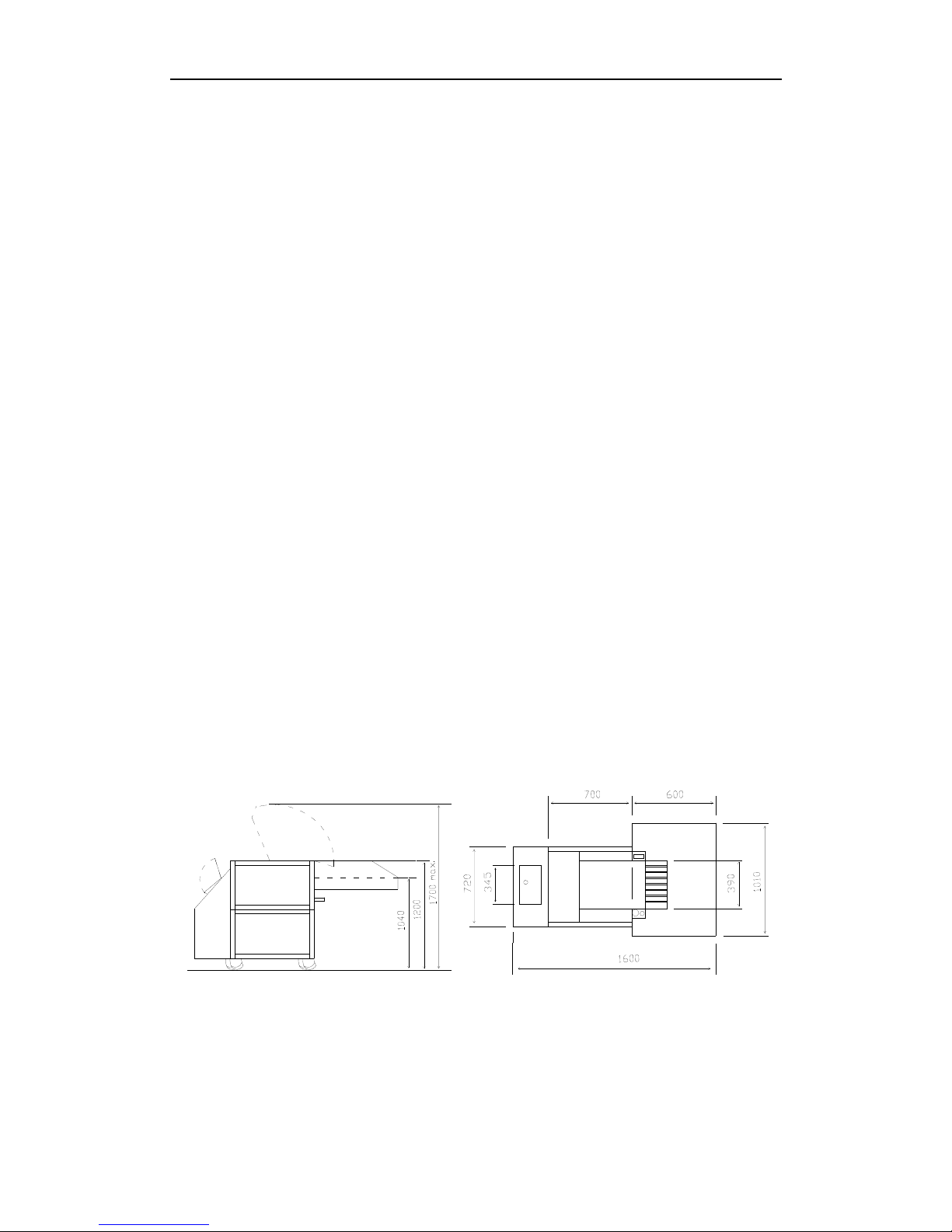
2.7 Space demand
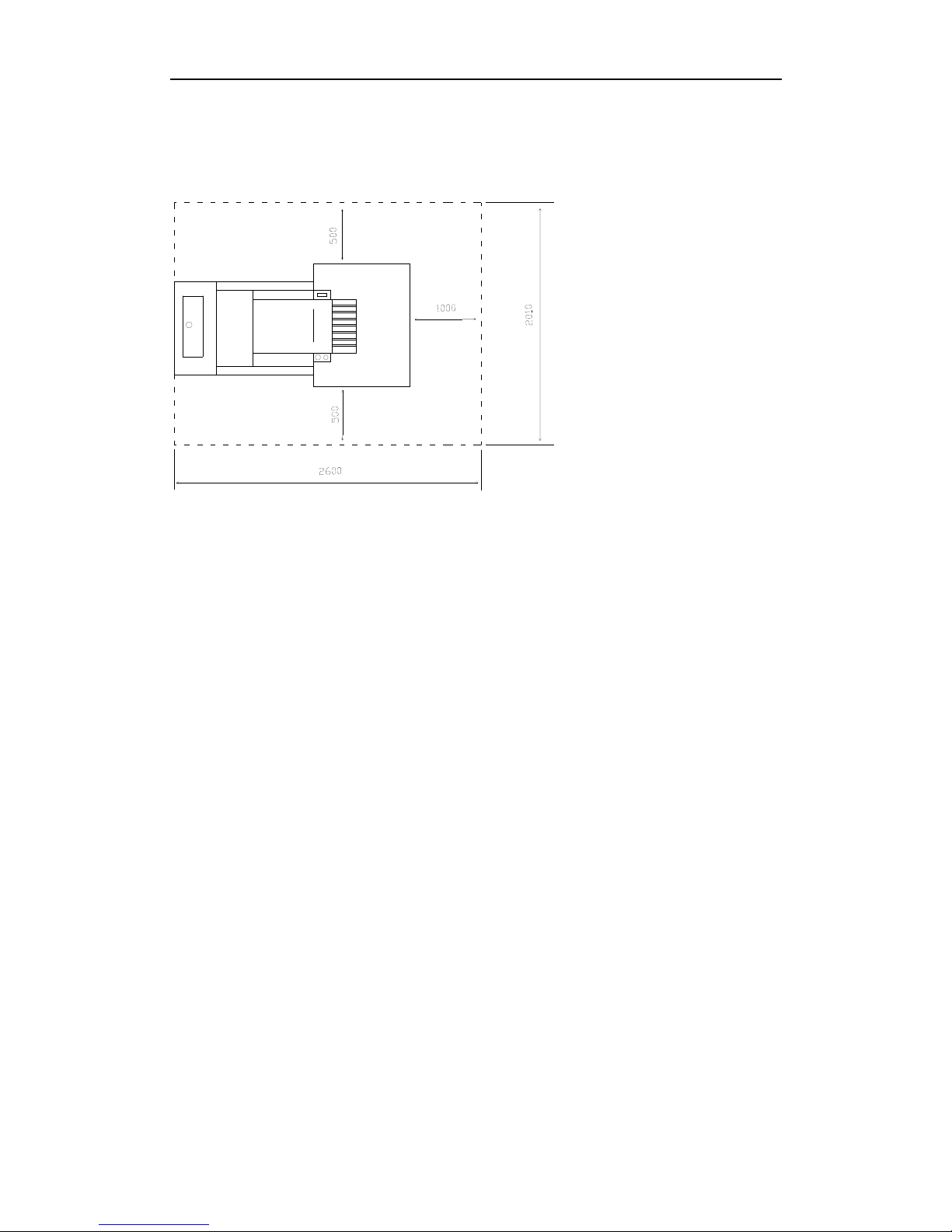
Width: Min. 2010mm
Length: Min. 2600mm
Height: Min. 1700mm
2.8 Noise index
Operating the machine as manual, the noise index as follows:
z Machine working but not shredding:63DB (A)
z Shredding:87DB (A)
The above data is applied to the machine in correct installation without another
noise condition
The data will change if the machine work over 8 hours or have extra noise
When the machine continuous loading 50% document quantity, the noise can
reduce: 3DB
When the machine continuous loading 25% document quantity, the noise can reduce: 6 DB
2.9 Machine size(drawing)
13
Page 15
3. Installation
3.1 Space demand
3.2 Power supply connection
The installation location must offer the socket of A32 CEE
3.3 Transfer paper shredder to installation location
The paper shredder that sent out from factory is not installed totally. The paper
feeding table has removed from the machine and must be installed to the machine on
installation location
--- When transfer the machine, please pay attention to the center of gravity of the
machine
--- Put the machine on a level and steady place
---Open the packing
--- The machine is convenient to be pulled with moving wheels, if it needs to deliver to the
installation location by lift cart, please using appointed cart.
3.3.1 Installation of paper feed table
z Open the packing
z Remove the belt which is fixed with screw on paper feeding table.
14
Page 16

z Fix the paper feeding table on machine frame with six M8 screws
z Refix the belt to paper feeding table(The rubber of belt must touch delivery
belt)
z Fix the protection cover under paper feeding table with four M5 screws
3.4 Installation of paper shredder
--- Put the machine on a level and steady place (without carpet)
The model with shred box:
z Lock the brake roller;
z Plug of shredder connect with 380V socket
4. Start
4.1 Control and display
4.1.1 Main switch
---Turn the main power switch 90°clockwise to start the machine
---The main power switch is locked on “off” location
4.1.2 Emergency stop switch
--- Lift emergency stop switch to release
--- Press down emergency stop switch to cut off the power
--- The switch can be used to stop the machine
15
Page 17
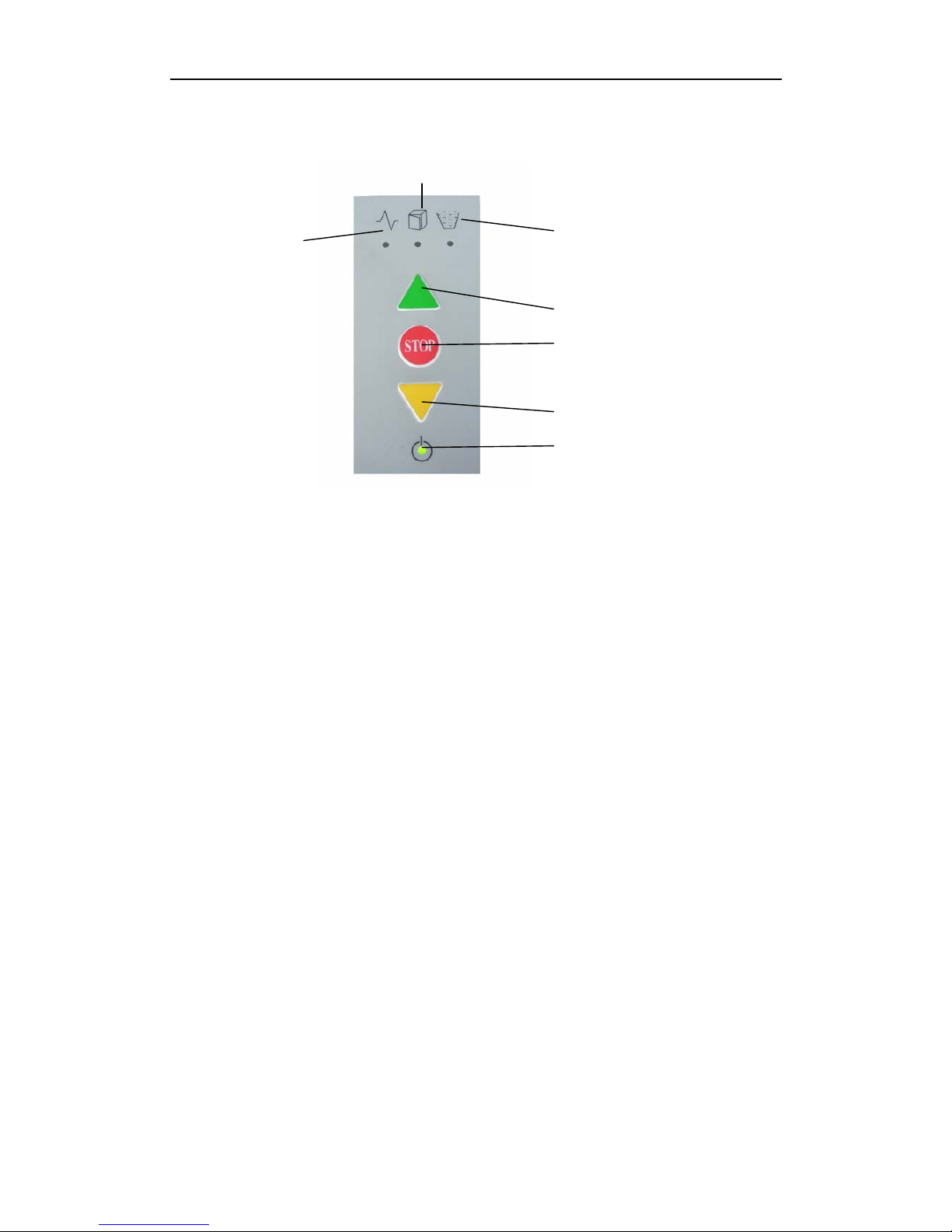
4.1.3 Control panel
2
1 3
4
5
6
7
1. Paper jam ---Motor overload
Red light
2. Security top cover open
No shred box or put wrong shred box
Red light
3. Shred box full –checking door open
Red light (it is apply to the model with shred box)
4. Start key
---- Shredder start—shred system run towards paper feeding direction
5. Stop key
—Shred system stop---paper shredder in spare using condition
6. Reversing key(micro)
Shred system reverse moving
7. Start
Green light
16
Page 18
4.2 Paper delivery
---Turn on main switch “on”
---Release “emergency stop “switch
---Make sure security top cover is closed
---Make sure shred box put in the right position, checking door is closed (it is
apply to the model with shred box)
---Checking the “on” light
--- Press “start” key
If the paper shredder reverse
Attention:
Turn off the power. It needs to change two of the three phase wires by
Technician!
Please check the circuit diagram
--- According to above process to run the machine
--- When the shredder runs forward you can start to deliver the paper
--- Put the paper on paper receiving table, and the paper will deliver orderly.
--- If you put the useful document on the delivery belt. Don’t take out direct use
your hand. You could do as follows:
z First press the “stop” key .when the machine stop ,and press reversing
button.
z Shredder reverse
z Release the reversing button, and the shredder stop.
Now you could get back the useful document, then press start key to use the shredder
again.
4.3 Deliver paper too much—motor overload
When the shred system overload, the delivery belt will turn back automatically.
--- Paper shredder stop
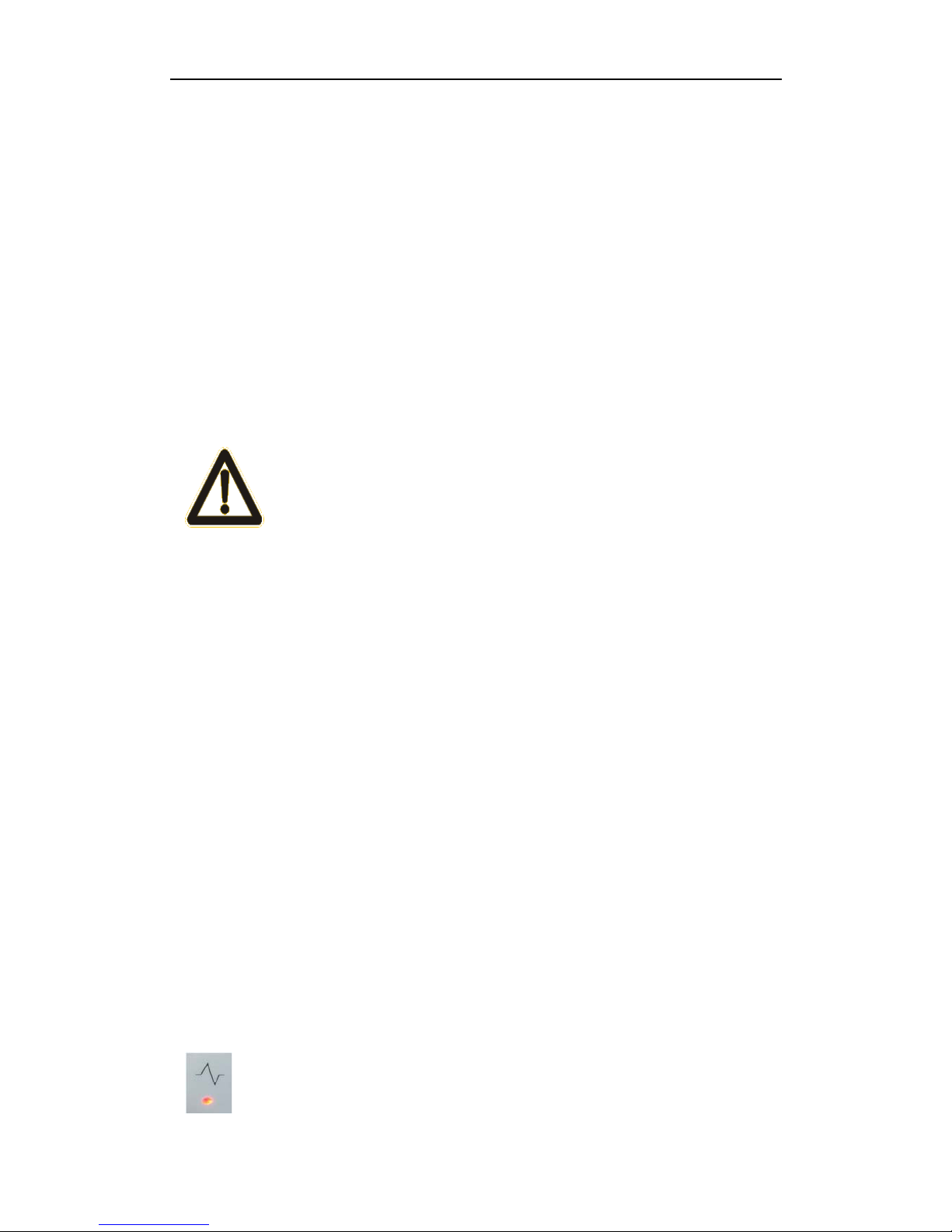
---“Paper jam” red light is on
17
Page 19
---The paper shredder reverses and stops automatically
---“Paper jam” red light is off
--- Detach the paper and press start key again
--- Paper shedder run
--- Put a little paper again
Notice:
If the automatic reserving can’t take out the paper, please press the
manual reserving button . If the paper can take out by press the
manual reserving button, please press the button until paper were delivered to
paper receiving table, and the paper jam red light is “off”. If it fails to do it,
please contact with repair person
Attention:
In order to make the machine working continuously and keep in a good situation.
Please do not put too much paper in one time to shred which can avoid reversing and
improve work efficiency.
4.4 Shut down
--- Press “stop” key
--- Turn the main switch 90° anti-clockwise to stop the machine
---
Lock the main switch if it is necessary
4.5 Replace the shred bag
It is applied to the model with shred box
If the shred box is full, the shred paper will knock the checking door, and the
machine stop
---Paper shredder stop
---“Shred box full” light is on
--- Turn the main switch 90°anti-clockwise to stop the machine
--- Press down “emergency stop” button if it is necessary
18
Page 20

--- 0pen checking door
--- Press the jam paper into the shred box
--- Close the checking door
--- Pull out the shred box totally
--- Take out the shred bag
--- Insert new shred bag, and make sure the shred bag is high 5cm than the
frame.
--- Insert the shred box
--- Open the main switch “on”
--- Loosen “emergency stop” switch
--- Make sure close the checking door and security top cover.
--- Make sure the shred box in right location
--- Press the green start button
5. Inspecting and maintenance
5.1 Maintenance of delivery belt
5.1.1 Inspecting the tightness of delivery belt
The delivery belt could not skid when the paper on it. The paper on the belt
should be delivered steadily,
The delivery belt skid, please adjust as follows:
--- Shut down, take out the paper feed table, then will see the tightness of the
delivery belt
--- Loosen the screw of tightness pulley
--- Tighten the screw to adjust the tightness of delivery belt
19
Page 21

Notice:
It only exert pressure to skidding point when tighten the delivery belt. tighten the
delivery belt over will damage the bearing of delivery belt
--- Tighten the screw of tightness pulley again
--- Reinstall the paper feeding table
5.1.2 Inspecting the abrasion of delivery belt
It will cause abrasion after a long time work .when the weave of the belt can be
saw, you should replace the belt.
--- Inform of the sale-after service department
--- Replace the delivery belt
5.1.3 Cleaning the delivery belt
Inspect the delivery belt once a month
--- Shut down
--- Remove paper feeding table and control panel front of tightness belt.
--- Cleaning dust and waste
--- Reinstall paper feeding table and control panel
5.2 Inspecting the tightness of chain belt
Inspecting the new machine once a week in the first month, then once a month
--- Shut down
--- Remove left cover
--- The chain must droop 4mm to 10 mm
When the tightness of chain need tighten
--- Loosen the tightness screw until the chain droop up to 4mm to 10 mm
--- Tighten the screw
--- Put left cover in original place
20
Page 22
Notice:
Tighten the chain over will lead to abrasion of chain and gear. The chain should
droop min 2.5mm in the first month, then up 4 to 10mm
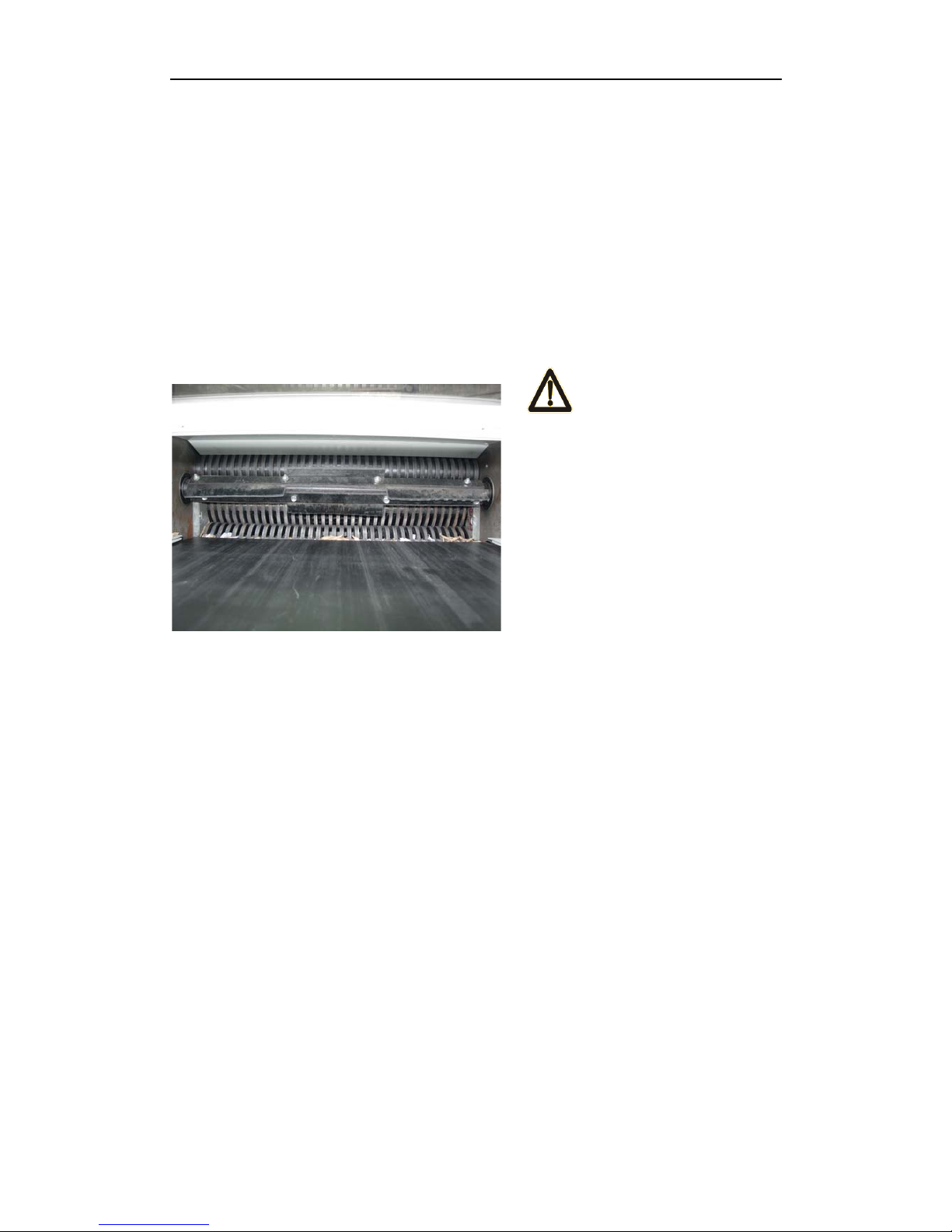
5.3 Lubricating shredder
5.3.1 Paper shredder system
Attention !
Shred roller: the shredder maybe hurt
person without using condition.
Please wear the glove.
Do below things everyday:
--- Spurt the lubricant on the shred roller through paper feeding portal
--- Drive the shred system without paper feeding condition ,and reverse the
machine for several times ,
--- It can remove the dust and sundries by this way.
5.3.2 Drive
Spread the lubricant on the drive chain
--- Shut down
--- Remove the two side covers
--- Spread the lubricant on the back chain. Include the drive chain of shred motor,
drive chain of shred belt, drive chain of shred system feed roller.
Spread the lubricant on synchronizing pulley every week
21
Page 23

--- Shut down
--- Take off left cover
--- Spread the lubricant on synchronizing pulley
--- Reinstall left cover
6. Replacing parts
6.1 After-service department address
Please send your order of consumable and parts to the below address:
Add928 chengxin road, yinzhou investment & innovation Center, Ningbo, China
Post No:315105
--- Please use the original parts from RONGDA company
--- We guarantee the quality and performance
--- During the guarantee, only original parts buy from rongda company could
replace and repair
6.2 Guarantee
It include in the term of delivery and payment about the guarantee‘s instruction .in order to avoid
damaging by incorrect operation .we could sign the
guarantee agreement.
22
Page 24
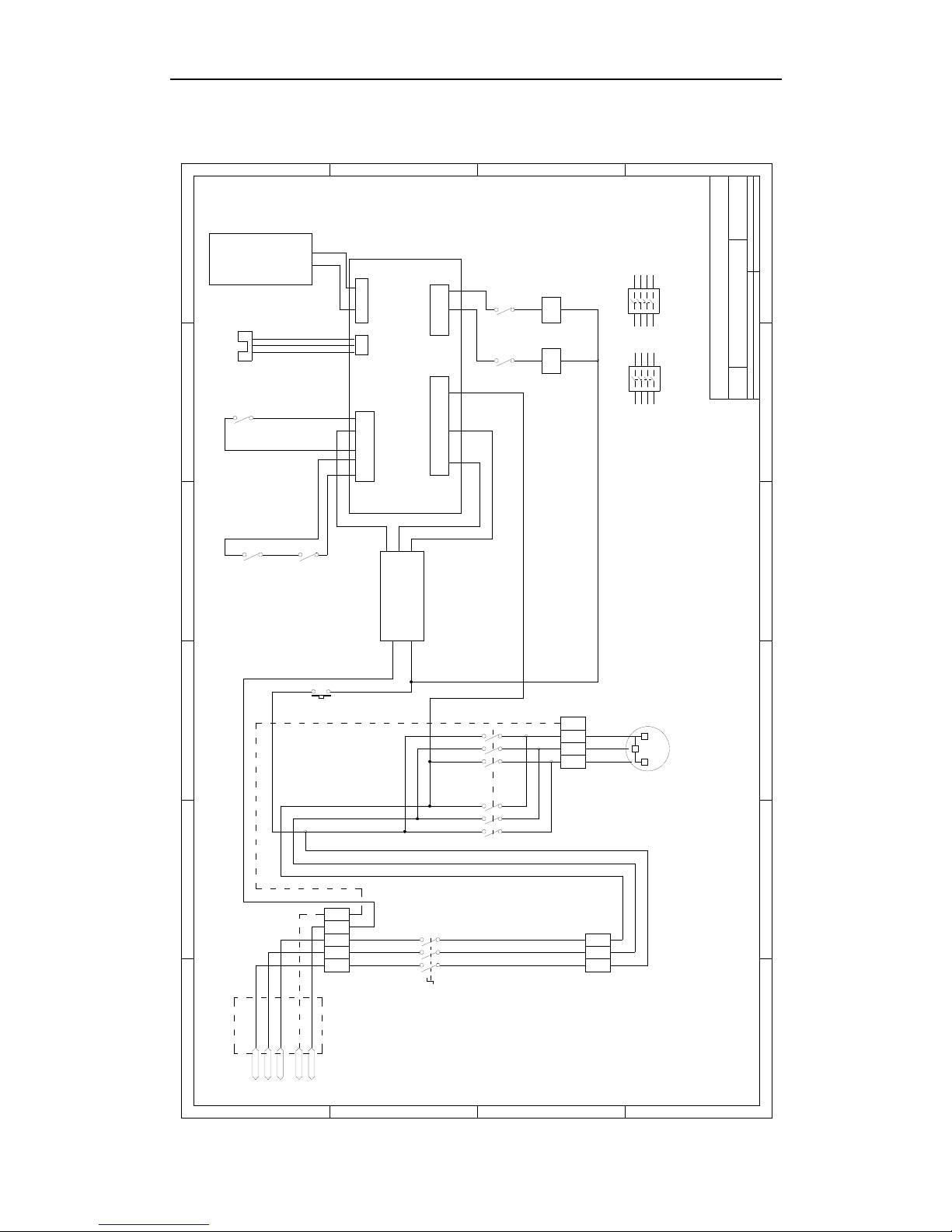
7.Circuit diagram
+5V(V-K)
+24V(AC1)
GND
V-K
零线
紧急开关
k
151617
K2
K1
碎纸机接线图
开关电源
控制板
进纸超出
碎纸箱打开
碎纸满
接触器
接触器
K2
876
54
3
2
1
K1
876
54
3
2
1
操作面板
卡纸光传感器
CN3
CN2
CN1
CN5
K2K1
A2
A1
A2
A1
654
EPWVU
10181920
K1 K2
01
A
0
642
PEPEL3L2L1
地
L3
L2
L1
642642
CN6
三相异步电动机
M
54987
1 3 51 3 5
1 3 5
Drawn By:D:\新建文件夹 (9)\碎纸机接线图.ddbFile:
Sheet of 4-Oct-2007 Date:
B
Size RevisionNumber
Title
A
B
C
D
1
2 3 4 5 6
D
C
B
A
654321
23
 Loading...